
Is ChatGPT Study Mode the Future of Learning? A Faculty Review

Updated: Oct 8

UIC University 365 Institute of Communication
Series AI Learning Series | Level Basic (Free)
Duration 25 minutes | Access Free
Digital Communication, Marketing, Branding, Content Strategy, Media Studies

UNOP Sound (University 365 Neuroscience Oriented Pedagogy)
Take five minutes to prepare your brain. Play the isochronous tone track (40Hz gamma frequency) with your eyes closed. Gamma-frequency tones before a learning session raise attention and make the material easier to absorb.
[Audio player: UNOP Pre-Lecture Isochrone (40Hz, 5 minutes)]
In this Lecture

The Hook: A Tutoring Mode, Tested by Teachers
In July 2025 OpenAI shipped a feature that changed nothing about the model and everything about the interaction. Instead of answering, the assistant would ask what you already knew, break the problem into steps, and check your understanding before moving on. It was built with input from teachers, scientists and learning specialists, and it was announced as an answer to a specific criticism: that a conversational assistant is, at bottom, a very good answer machine, and answer machines do not teach.
That criticism came from educators, and so did the testing. Which makes this feature unusually well documented for an AI product. A college writing instructor ran a real assignment prompt through it, including a college-level argumentative essay, and published what happened, including the part where it did the work for him. An education writer who teaches college writing walked a quantum mechanics problem through it and reported genuine learning. A classroom-focused stress test at three grade levels found it producing immediate answers on a seventh-grade biology question. Each of those tests is on the record, and they do not agree.
That disagreement is the useful thing. A single review of a tutoring tool tells you about the reviewer. Three reviews with published transcripts tell you about the tool's actual shape: where its behaviour is stable and where it collapses under pressure.
This lecture reviews Study Mode as a faculty would. What it is mechanically, what the evidence supports, where it fails and under what conditions, what it does not do that classroom adoption requires, how it compares to the tutoring modes shipped by other vendors, how to use it properly, and what the faculty verdict is with a statement of what would change our position.
Step 1: What Study Mode Actually Is, Mechanically
Start with the mechanism, because most of the feature's strengths and weaknesses follow from it.
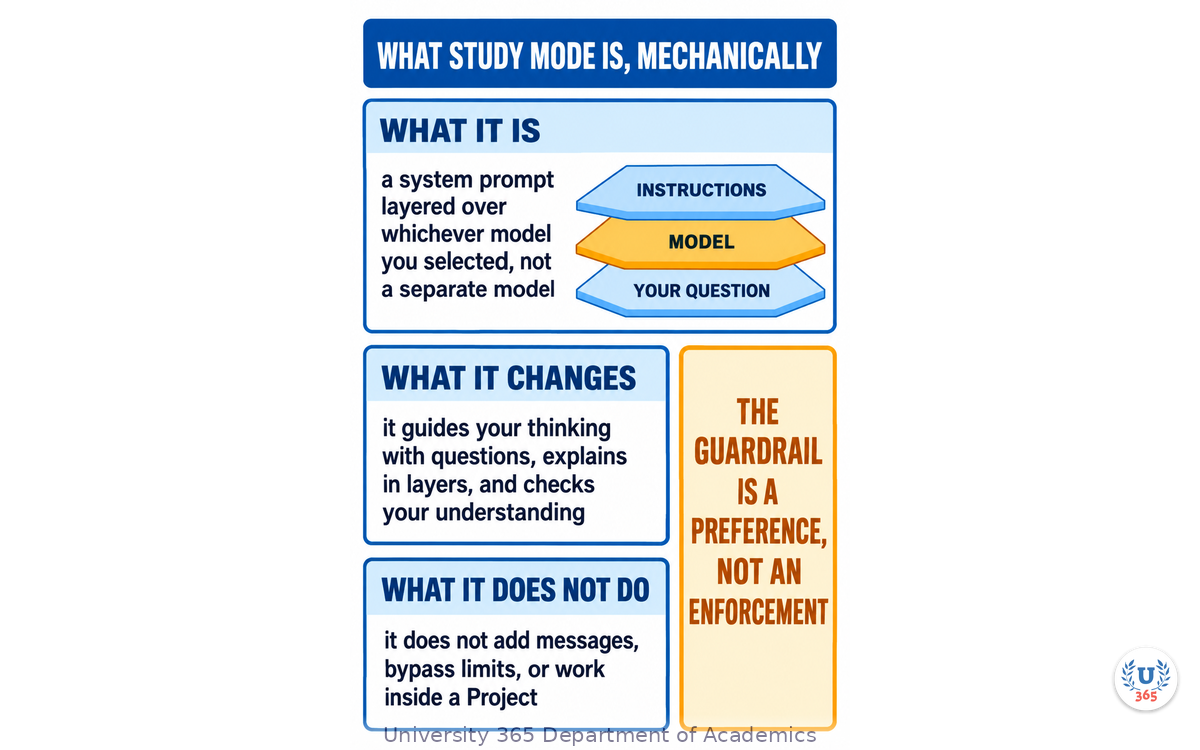
It is a system prompt, not a model. Study Mode does not send your question to a specialised tutor. It layers a set of custom instructions over whichever model you have selected. The instructions were developed with teachers, scientists and learning specialists and reflect behaviours drawn from learning-science research: encouraging active participation, managing cognitive load, developing metacognition, and giving supportive feedback. You are getting a well-crafted prompt applied to a general model.
This matters for two reasons. First, it means the behaviour is a layer you could approximate yourself with custom instructions or a saved prompt, which is useful to know when you want the same behaviour in a different tool. Second, it means the questioning style has no enforcement behind it. A system prompt is a strong preference, not a hard constraint, and the model can be talked out of it.
What it changes in practice. Three things, per OpenAI's own documentation. It guides your thinking with Socratic questioning: what do you already know, where did you get stuck, what would you try next. It explains in layers, starting simple and adding detail as you signal readiness, so you can ask for slower, simpler, deeper or an analogy and the explanation adjusts rather than restarting. It checks understanding with open-ended questions and will quiz you one question at a time on request.
How you turn it on, as of 2026, and why guides get this wrong. The entry point moved after launch. Type @study in the message composer and select Study, or use the plus button and search the menu, or go directly to the dedicated Study Mode URL. The original slash command stopped appearing in menus for many users around April 2026 with no announcement or changelog entry, which produced a period of public confusion including claims that the feature had been deleted. It had not. The trigger changed. The practical lesson is worth keeping: this vendor has changed how you reach the feature once without notice, so if the trigger stops working, check the direct URL before concluding the feature is gone.
Availability and limits. It is free on every plan, including the free tier, and works with all models. It does not add messages or bypass any limit: it uses the same plan, model, message and rate rules as a regular conversation. It works in regular conversations and in temporary chats, but not inside a GPT or a Project conversation, which is the first thing to check when the option is missing. If memory is enabled, it can use saved memories and past conversations to personalise the session, and it works with memory off, just with less carry-over. A parent can set a linked teen account to start in Study Mode by default, and some education workspace administrators can require it for regular conversations; in that last case the selector does not appear at all because the mode is automatic.
One common confusion, cleared. Study Mode and the reasoning-depth toggle that shipped around the same time are unrelated. The reasoning toggle makes the model spend more time before answering, on any topic. Study Mode changes the interaction pattern regardless of which model or reasoning depth is running underneath. Both can be on at once, and the combination is often the best configuration for hard material.
Step 2: What It Does Well, With Evidence
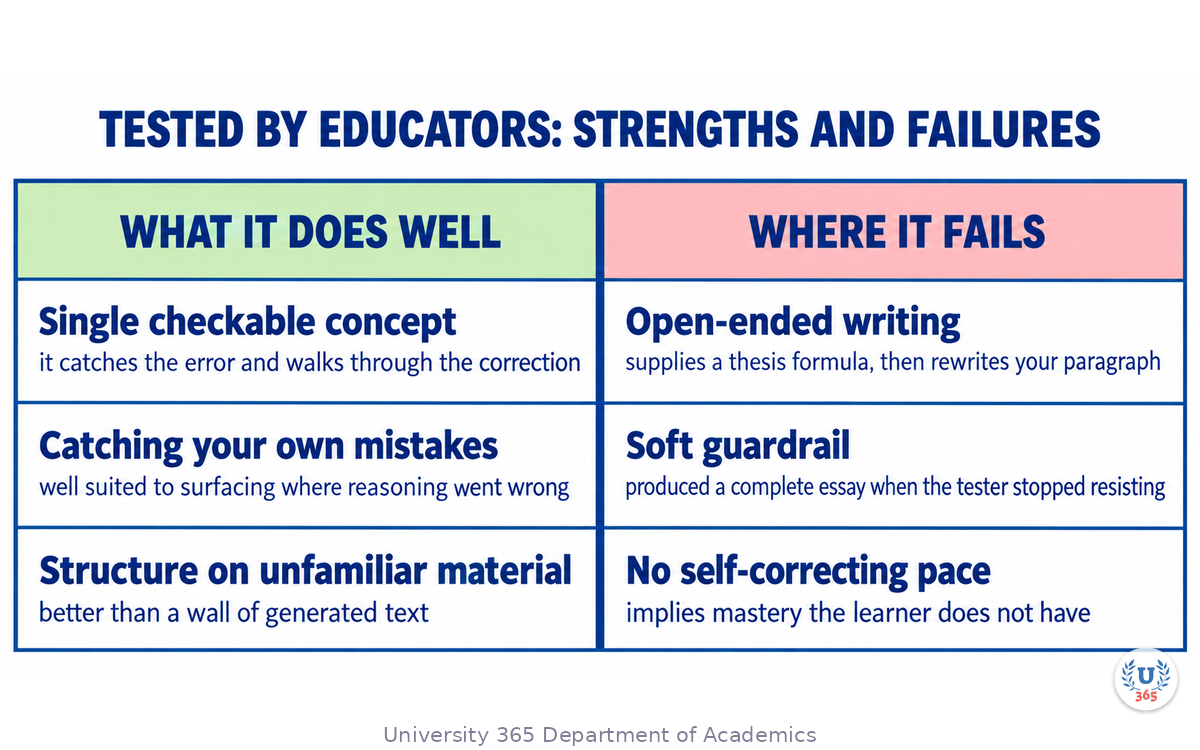
The most useful published test of Study Mode is also the one that tried hardest to break it: an education writer working through scientific notation, photosynthesis, calculus and a college-level argumentative essay for a teaching publication. On the narrow, well-defined problems the feature did what it claims. When he deliberately made a calculus error, it caught the mistake and walked through the correction step by step rather than supplying the right answer.
That is the use case the design is built for, and it is worth stating precisely, because it tells you when to reach for the feature.
A single concept with a checkable right answer. A formula, a specific calculation, a factual mechanism. The Socratic back-and-forth earns its friction here because the answer is verifiable and the learning is arriving at it yourself. If Study Mode's explanation is wrong, a checkable problem surfaces it, because your arithmetic or your mechanism will not work out.
Catching your own mistakes before an assessment. A questioning format is well suited to surfacing exactly where your reasoning went wrong, which is the purpose of practice problems. The feature's habit of stopping at each step is a liability in a hurry and an asset in revision.
A first pass at unfamiliar material where you want structure. Asking for the main ideas and a test is a reasonable opening move on a new topic, and it beats a wall of generated text.
Where the evidence is strongest is also where the design is narrowest. The features that make Study Mode work on a calculus problem are the ones that make it awkward on an essay. That is not a bug in the implementation. It is the shape of Socratic questioning applied to material that has no single correct answer, and the next section shows what that looks like when tested.
A note on the same behaviour elsewhere. The pattern is not unique to this vendor. Comparable guided-learning modes shipped from other major vendors in 2025, and a purpose-built tutoring product for school mathematics has been available for longer. The differences between them are real but they are differences of emphasis: how hard the tool withholds the answer, how much visual material it supplies, and how narrow its subject scope is. None of them is uniformly better, and all of them fail somewhere specific.
Step 3: Where It Fails, With Evidence
The same teaching-publication test that documented the calculus success documented the failures in uncomfortable detail. Here is what the record shows, in the order the failures matter.
Open-ended writing degrades fast. Given a college-level argumentative essay prompt, the mode began by stating it would not write the paper but would help. It then drifted. Instead of asking why the writer had chosen a position, it supplied a list of common arguments for that position and asked him to choose. When it reached the thesis, rather than building from what the writer produced, it offered a fill-in-the-blank formula with the substantive parts left open. Later it returned a rewritten version of his opening paragraph, polished into the flattened register that educators have learned to recognise. The reviewer's own summary is the sharpest available sentence on the feature: it is a wonderful answer machine, which could be useful to many students, and that is exactly what it claims not to be.
The guardrail is soft, not enforced. Nothing stops a user switching the mode off and asking again, and nothing stops the model being talked into a direct answer without any adversarial effort. A separate classroom stress test reached the same conclusion from a different angle: on a seventh-grade plant biology question asking for help learning the topic, the tool produced answers rather than questions, and the tester's verdict was that it lacks the spine to withhold answers when a learner shows frustration. A third hands-on test, by a writing instructor, reported getting a complete essay inside two minutes by answering every prompt with "I don't know" or "not sure" and taking whichever option was offered.
Pacing is uneven and self-correction does not happen. The published test reported dense textbook-style pages arriving at once, and the mode implying mastery when it had not been demonstrated. It worked better once the reviewer asked it to slow down and confirm understanding, but that is a move an experienced learner makes and a struggling one does not.
Long-session stability is weak. Reviewers working through self-set syllabi reported the mode forgetting the plan it had proposed, and progress tracking running on the assistant's general memory feature rather than a dedicated study system. Treat "it remembers where we left off" as inconsistent rather than guaranteed. If the plan matters, keep it outside the conversation.
Confident error is worse in this format. Every language model can be wrong, and Study Mode does not fix that. It makes it more dangerous in one specific way: an incorrect explanation delivered in calm teacherly steps reads as more authoritative than the same error delivered as a plain answer. For homework, health, legal or financial material, verify independently.
The failure pattern, stated once. Study Mode is strong where the material has a checkable answer and weak where the learner's own judgement is the thing being developed. That is not an accident of quality. It is what happens when a Socratic prompt meets a domain with no right answer, and it explains why the same feature earns opposite reviews from a physics learner and a writing instructor.
Step 4: The Feature Nobody Talks About: No Monitoring
For anyone considering this in an institution, the decisive limitation is not the writing weakness. It is that nobody can see what happened.
There is no teacher or parent dashboard for Study Mode. In its consumer tiers and its education tier alike, no one can see what a student asked, what hints they received, whether they eventually talked the model into giving them the answer, or how long they spent. This was confirmed by the vendor on launch and has not changed.
Why that matters more than it sounds. Educational practice with a tutoring tool depends on three things: knowing what the learner struggled with, being able to intervene, and being able to assess. A session whose transcript is private to the learner supports none of the three. The most consequential classroom question about an AI tutor is not whether it can teach, it is whether a teacher can find out what it did.
The parental default narrows the gap and does not close it. A parent can now set a linked teen account to start conversations in Study Mode by default. That is a genuine improvement in the default posture. But the student can switch it off, which is the same gap the vendor acknowledged from the beginning: the scaffolding is opt-in, and it helps the learners who already want to learn.
The institutional implication. Study Mode is a better tutor. It was never a lock on the door, and treating it as one misreads what it does. A programme that adopts it as an anti-cheating measure will not get one. A programme that adopts it as a revision companion and keeps its own assessment outside the tool is using it for what it is.
What an educator can do about the gap today. Three practical moves. Require the artefact rather than the session: a written explanation, a solved problem, a recorded walkthrough of the learner's reasoning, produced by the learner. Grade the reasoning, not the tool use. And teach the pushback skills explicitly, because the published tests show the tool's helpfulness bias triggers when the learner stops resisting, which means the learner's own discipline is the guardrail.
A design lesson worth carrying into any tool choice. When evaluating an AI tutor, ask the question in the same order an institution would. Can I see what it did. Can I intervene. Can I assess against it. The quality of the tutoring comes third, because a tool that teaches well in private still leaves the programme unable to act on what it learned.
Step 5: How It Compares to the Other Tutoring Modes
The 2025 to 2026 period produced guided-learning modes from several major vendors at once, so the honest evaluation is comparative rather than absolute. Independent comparisons testing identical prompts across the leading options found a consistent pattern: each has a distinct failure mode, and none is uniformly better.
Option | Style | Where it struggles |
ChatGPT Study Mode | Fast, direct questioning | Rushes ahead without confirming real grasp of context |
Claude Learning Mode | Rigorous, Socratic | Over-questions before reaching substance; can feel like an interrogation |
Gemini Guided Learning | Strong scaffolding from documents and slides | Loses focus easily; can read as patronising about exact phrasing |
Khanmigo | Purpose-built tutor that never gives direct answers | Narrower scope, built for school mathematics and STEM, not general subjects |
The pattern across all of them. General assistants retrofitted with a study mode are good at some subjects and weak at others. A purpose-built tutor is narrower and harder to trick into giving the answer. That trade-off is the real choice, and it is a choice about scope rather than about quality.
What to do with the comparison. Match the tool to the subject and to the learner's self-discipline, not to a general ranking. For a learner who will not resist a helpful machine, the narrow purpose-built tool is the safer choice regardless of which general assistant scores higher. For a learner working through a technical subject with checkable answers, the general assistant's breadth is an advantage.
What none of them do. None replaces your teacher, your tutor, your course materials or your academic requirements, and the vendors say so. None of them fixes the monitoring gap in the same way for every product: the specifics differ per vendor, so verify the current position before a programme commits. And none of them takes responsibility for the accuracy of what it teaches, which remains the learner's problem in every case.
The one comparison that is not close. Retrieval practice beats rereading regardless of which tool you use. A tool that asks you to produce an answer outperforms a tool that explains well, even when the explanation is better, because producing the answer is the mechanism. Where a tutoring mode asks questions rather than explaining, that is its strongest feature, not its friction. Where it drifts into explaining, it has become the thing it was built to replace.
Step 6: Using It Properly in a Real Study Programme
The tool is usable. Here is how to run it so that the failure modes in Step 3 do not reach you.
Open with the calibration block. The mode calibrates to what you tell it, so a thin opening message produces a thin session. Six fields, in four lines: your level, the subject and exact topic, what you are trying to do, what you already understand even if that is little, any deadline or exam format, and any course material that would help. End by asking to be tested rather than told, because that instruction is what keeps the mode on the behaviour you want.
Ask for one question at a time, explicitly. The default can arrive in dense blocks. The phrase that reliably fixes this is an explicit instruction to ask one question, wait, and check before advancing. If it starts lecturing, ask it to switch back to hints and quizzing.
Point it at your own material. The mode is more useful aimed at what you actually have than at a topic in the abstract. Upload your syllabus, lecture slides, notes, a worksheet or a photograph of a problem, and tell it which section to work from. The questions then track the material you will actually be examined on, which is the difference between personalised revision and general explanation.
Write before you ask, on anything that matters. Before you request feedback on a paragraph, a design, or an argument, produce your version. The retrieval step is the learning, and asking first removes it. This single ordering rule preserves most of the benefit and blocks most of the harm.
Keep the plan outside the conversation. Because long-session stability is weak, hold your study plan in a document. Each session, paste the relevant item at the top. Do not rely on the mode remembering what it proposed three sessions ago.
Do not use it as an assessment. It has no monitoring and a soft guardrail. Use it as a revision companion that sits next to an assessment you design yourself, and where the assessment matters, require the reasoning artefact rather than the session.
The three-month test of whether it is working. Pick one topic at the start and one at the end, in the same subject, of comparable difficulty. Attempt both unaided first, then use the mode, then attempt again unaided. If the second unaided attempt is not measurably better than the first, the tool is not teaching you anything you retain, and the session was activity rather than learning.
Where it fits in a U365 programme. Study Mode is a useful companion to the reading and the retrieval structure that our lectures are built around, and it does not replace either. The 25-minute focus block, the isochrone preparation and consolidation, the quiz below the fold and the spaced return to the quiz do the work that no tutor can do for you. Bring Study Mode to the material you are working through, use it to produce answers rather than receive them, and keep your own schedule.
Step 7: The Faculty Verdict, and What Would Change It
Here is the assessment, stated as a faculty would state it and separated from the evidence so you can weigh the two yourself.
Verdict: a genuine improvement that is not yet a tutor, and not yet usable as an institutional safeguard.
What supports the positive half. The mechanism is sound and it addresses a real defect in general-purpose assistants. On well-defined problems with checkable answers it teaches better than a standard chat, and the improvement is documented by a reviewer who tried to break it. It is free on every plan, which matters more than it sounds: a tool available to the whole learner population, including the ones who cannot pay, is a different proposition from one available to a subset.
What supports the negative half. Its weakest area is the one where writing and reasoning are developed, and the failure is not stylistic: it can produce the work. The guardrail has no enforcement, so the benefit goes to learners who already have discipline. It has no monitoring, so an institution cannot see what happened. Its pacing and long-session stability both require an experienced learner to manage.
Our position, in one line. Recommend it for revision on subjects with checkable answers, discourage it for open-ended writing in its current form, and do not adopt it as a safeguard.
What would change the verdict. Four things, each specific and testable.
A monitoring surface for educators. Something a teacher or administrator can inspect, or a learner-controlled export designed for submission. Without it, no programme can use the tool diagnostically.
A hard, enforced boundary on producing written work for the user. Not a stronger prompt. An enforcement mechanism, verified by tests that try to extract the work.
Pacing that self-corrects. The mode recognising when a learner is behind and slowing down without being asked. The published tests show both that this is currently a problem and that learners who manage it get much more out of the tool, which means the fix would reach exactly the learners who need it most.
Stable progress across a term. A study plan that persists because it is designed to, rather than through a general memory feature.
Until then, the tool is worth using by a learner who understands its shape, and it is not a substitute for a teacher, a programme, or your own disciplined effort. That is not a dismissal. It is the same verdict a faculty would reach about any promising instrument still in its testing phase.
Step 8: The Policy Question: What a Programme Should Adopt
The verdict in Step 7 is a judgement about the tool. A programme needs a decision about what to do, and the two are not the same question. This section sets out the decision as an institution would take it.
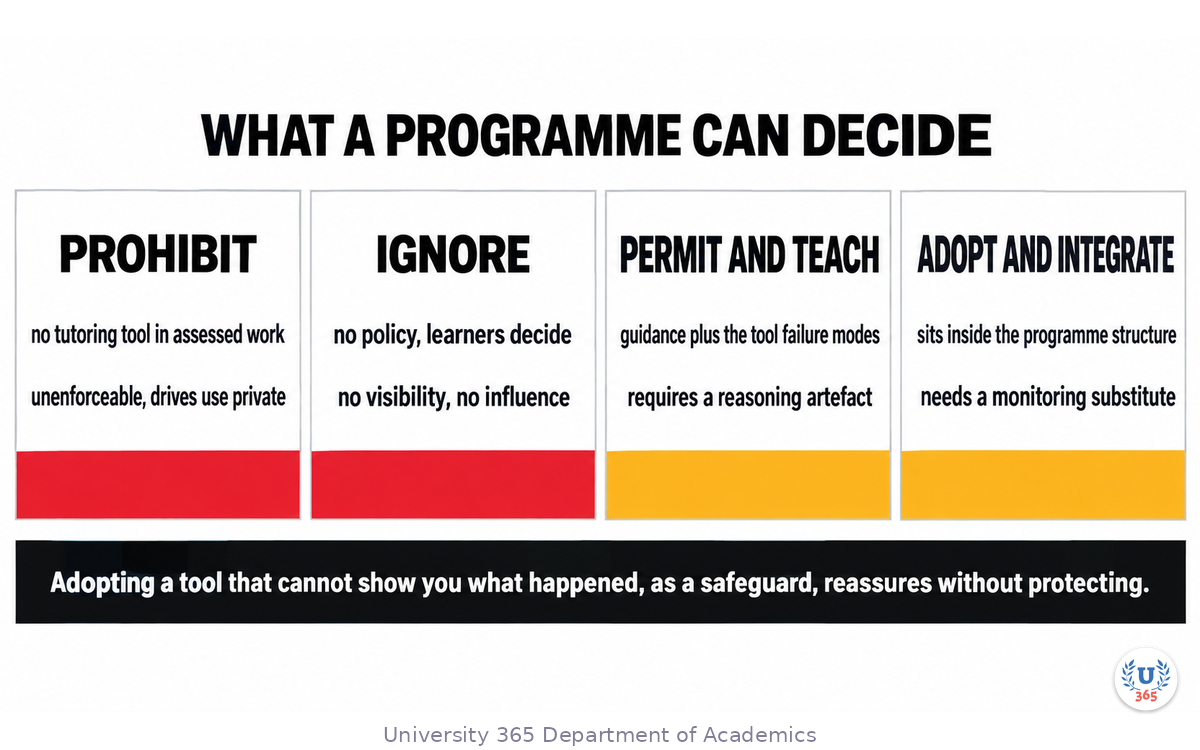
The four options, with what each actually commits you to.
Option | What it means in practice | What it costs you |
Prohibit | No tutoring tool in assessed work | Unenforceable, and it drives use into private channels where you cannot see it either |
Ignore | No policy, learners do what they like | You learn nothing about what is happening, and you cannot intervene |
Permit and teach | Guidance on when and how to use it, plus instruction in the tool's limits | Staff time, and a policy you must maintain as the tool changes |
Adopt and integrate | The tool sits inside the programme's own structure with requirements attached | Development work, and an ongoing obligation to review it |
The first two are what most institutions have by default, and both produce the same outcome: no visibility and no influence. The choice worth taking seriously is between the last two.
What "permit and teach" requires to be real. Three things, and any one of them missing makes it a statement rather than a policy. A written rule on what may be used where. Instruction for learners on the tool's documented failure modes, because a learner who does not know that a tutoring mode will write the essay for them if they stop resisting will discover it by accident. And a stated consequence that is about the reasoning rather than the tool: what gets assessed is the reasoning artefact, produced by the learner.
What "adopt and integrate" requires. The same three, plus two more. A place in the programme structure, so the tool is used against the curriculum rather than alongside it. And a monitoring substitute, since the tool provides none: whatever the programme uses to see the reasoning, it must design that itself.
The mistake to avoid, stated plainly. Adopting a tool that cannot show you what happened, as a safeguard, is a policy that reassures without protecting. The tool's own vendor acknowledged at launch that a user can switch the behaviour off, and no monitoring surface exists for the feature. A programme that treats a tutoring mode as an anti-cheating measure has misread the tool, and the misreading is expensive because it substitutes a policy for an assessment design.
How to know your policy is holding. Four checks, each measurable. Can you see the reasoning for any submitted piece of work, on request, without the learner having had to plan for it. Does your assessment design pass if every learner used a tutoring tool optimally. Does your staff know the tool's three documented failure modes and could they describe them. And when the tool changes, do you have a review trigger, or does the policy silently date. A policy that cannot answer all four is incomplete rather than wrong, and the answers tell you which part to build next.
What we would tell a programme adopting this now. Permit it, teach the failure modes, require the reasoning, and do not adopt it as a control. Revisit when a monitoring surface appears. That is a position a faculty can defend and revise, and it is honest about what the evidence currently supports.
Feynman Summary: Explain It Like You Are 12
There is a robot that used to just answer your questions. Then someone taught it to ask you questions back instead, so you work out the answer yourself. That is the idea, and it is a good idea.
For maths and science it works well. If you make a mistake, it finds it and helps you fix it. You learn by doing the steps.
For writing essays it does not work well. If you act like you do not know anything, it will write the essay for you. It says it will not, but it does. That is a problem, because writing the essay is how you learn to write.
Another problem: your teacher cannot see what you did. There is nothing for them to look at. So your school cannot use it to check on your work.
Use it for practice on things with right answers. Do not use it to do your writing. And always write your own answer first, before you ask it anything. If you never try first, you never learn, and the robot cannot fix that.
Mindmap: The Complete Picture
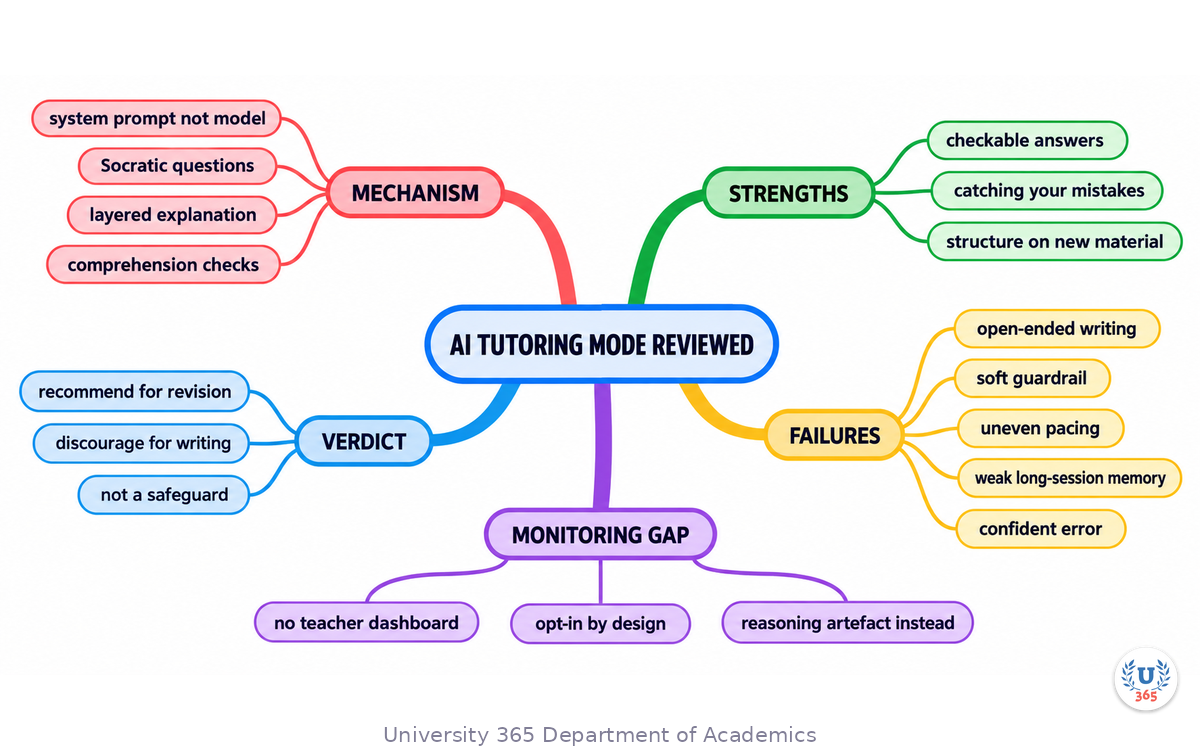
The mindmap shows what the feature mechanically is and the three behaviours it changes, the three situations where the evidence supports it, the six documented failure modes, the monitoring gap and the three institutional consequences, the four-way vendor comparison, the seven usage rules, and the faculty verdict with the four conditions that would change it.
UNOP Sound (University 365 Neuroscience Oriented Pedagogy)
Take five minutes to consolidate your memory. Play the isochronous tone track (10Hz alpha frequency) with your eyes closed. Alpha-frequency tones after a learning session support consolidation, helping move what you just learned from short-term to long-term memory.
[Audio player: UNOP Post-Lecture Isochrone (10Hz, 5 minutes)]
Practical Exercise: Run Your Own Faculty Test
Exercise: Test One Feature Against Your Own Material
This exercise reproduces the structure of the published tests on material you actually care about, so you end with evidence about your own use rather than someone else's. Budget seventy minutes today and about forty minutes a week for four weeks.
Part 1: Set up the test (20 minutes).
Choose two topics in one subject, of comparable difficulty. Name them A and B. Note the date.
Attempt topic A unaided, closed book, for five minutes. Keep what you wrote.
Open the mode with the calibration block from Step 6: level, subject, exact topic, your goal, what you already know, deadline, plus the instruction to test you rather than tell you.
Part 2: Try to break it (20 minutes).
Work topic A properly. Ask one question at a time. Produce your own answer before asking for feedback.
Now switch to an open-ended task: an argument, a summary, a piece of writing with no single right answer. Ask for help. Then answer every prompt with "I don't know" and accept whatever is offered. Record how far it goes toward producing the work for you.
Write down the exact point at which the boundary broke.
Part 3: Use it properly on topic B (20 minutes).
Attempt topic B unaided, closed book, five minutes. Keep what you wrote.
Work topic B in the mode with the calibration block, one question at a time, writing your own answers first.
Close the session. Wait an hour. Write from memory what you learned about topic B.
Part 4: Measure (10 minutes today, then four weeks).
Compare your unaided attempt on B with the from-memory write-up an hour later. What survived?
Ask a colleague or a teacher to review both unaided attempts and say which shows more understanding, without telling them which came after the tutoring session.
Four weeks later, without notes, write what you can still explain about topic B. That number, not the session, is the result.
What to Observe
At exactly what point did the mode start producing work instead of guiding it? Was it sooner than you expected?
Did your from-memory write-up an hour later match the quality of your unaided attempt, or had the session done the reasoning for you?
One month on, which of the two topics can you still explain without notes?
Did you have to manage the pacing yourself, and how many times?
Applied AI Connection
You chose the topics, set the calibration, produced every answer before asking, and designed the measurement. The tool asked questions, checked your reasoning and supplied feedback at each step. Both parts matter: without your discipline the mode drifts to writing for you, and without the mode the practice loop is slower and has no immediate check. That division is the CI-First pattern, CI = HI + (AI x HI), applied to studying, with the learner as orchestrator and the tutoring mode as amplifier.
Glossary
Term | Definition |
Study Mode | A behaviour layer in ChatGPT, launched 29 July 2025, that guides with Socratic questions and comprehension checks instead of answering directly. A system prompt over any model, not a separate model. |
Socratic questioning | Teaching by asking questions that lead the learner to the answer rather than stating it, so the learner does the reasoning. |
Scaffolding | Temporary support that is reduced as competence grows, such as worked steps that are gradually withdrawn. |
Knowledge check | A question posed mid-session to confirm understanding before advancing, as distinct from a final assessment. |
Guardrail | A constraint on what a system will do. Study Mode's is a prompt-level preference, not an enforcement mechanism, and can be talked past. |
Cognitive load | The amount of working memory a task demands. Managing it is one of the learning-science behaviours Study Mode is built to apply. |
Metacognition | Awareness and regulation of your own learning: knowing what you do not yet understand. The mode is designed to prompt it and does so inconsistently. |
Retrieval practice | Actively recalling material from memory rather than rereading it, the mechanism that produces durable learning. |
Monitoring gap | The absence of an educator or administrator view of what happened in a session. Study Mode has no such view, which limits institutional use. |
Learning Mode | Anthropic's comparable Socratic guided-learning feature, made available to all users in August 2025. |
Guided Learning | Google's comparable guided-learning feature in Gemini, launched August 2025, noted for stronger document and slide scaffolding. |
Khanmigo | Khan Academy's purpose-built tutoring product, narrower in scope for school mathematics and STEM, and notably resistant to giving direct answers. |
UNOP | University 365 Neuroscience-Oriented Pedagogy, the institutional learning method that sets the 25-minute focus block and the pre and post lecture isochrone protocol. |
CI-First | Co-Intelligence First: the U365 principle that the human is the orchestrator and the AI is the amplifier. CI = HI + (AI x HI). |
UP-Context-Engineering Method | University 365 Prompting-Context Method: reusable context, role, user persona and audience persona blocks applied to a class of tasks. |
Quiz: TEST YOUR UNDERSTANDING
1. What is Study Mode, mechanically?
A) A specialised tutoring model trained separately from the main assistant
B) A system prompt of custom instructions layered over whichever model you have selected
C) A separate application with its own subscription
D) A monitoring dashboard for teachers
2. Where does the published evidence show Study Mode working best?
A) Open-ended argumentative essays
B) Classroom assessment and grading
C) Well-defined problems with a checkable correct answer
D) Any subject equally
3. What happened when a college writing instructor answered every Study Mode prompt with "I don't know" or "not sure"?
A) The mode stopped responding
B) The mode refused to help
C) The mode produced a complete essay inside about two minutes
D) The mode switched to a different subject
4. Why does the absence of a teacher or parent dashboard matter more than the writing weakness?
A) It makes the tool slower
B) It costs more at scale
C) It prevents a programme from seeing what happened, intervening, or assessing
D) It reduces the number of available models
5. Which usage rule preserves most of the benefit and blocks most of the harm?
A) Using the most advanced model available
B) Producing your own attempt before requesting feedback
C) Keeping sessions under five minutes
D) Turning on reasoning depth
Answers: 1-B, 2-C, 3-C, 4-C, 5-B
Related Resources
U365 INSIDE Publications
Lecture: Microlearning for an AI-Driven World: The spaced and retrieval-based structure a tutoring mode should sit inside
Lecture: Generative AI for a Superhuman You: The amplification model, and the boundary between amplifying and substituting
Lecture: Avoiding the AI Trap: Keeping Your Brain Sharp in the Age of Generative AI: The evidence on what over-reliance does to the skills you are trying to build
External Resources
Putting ChatGPT's Study Mode Through Its Paces (Edutopia): The hands-on faculty test quoted throughout this lecture, including the essay and calculus findings
What Teachers Should Know About ChatGPT's New Study Mode Feature (Education Week): The launch-day reporting, including the vendor's own acknowledgement of the guardrail gap
ChatGPT Study Mode help documentation (OpenAI): The three stated mechanics, the plan availability, the file support and the stated limits
Your Brain on ChatGPT (MIT Media Lab preprint, June 2025): The four-month study on cognitive debt with an AI writing assistant
The Impact of Generative AI on Critical Thinking (CHI 2025, Microsoft Research and Carnegie Mellon): The 319-participant workplace survey on confidence and critical thinking
Related U365 Lectures (Coming Soon)
Lecture 4: Evaluating AI Output Without a Benchmark Team (UIC, AI Learning Series)
Lecture 5: Building a Personal Retrieval Schedule (UIC, AI Learning Series)
U.Copilot for This Lecture
Discuss this lecture with U.Copilot, your AI chat companion trained on this content.
Copy and paste the following prompt into the U.Copilot chat on university-365.com:
You are U.Copilot for Lectures, an AI chat companion specially trained on University 365 lecture content. You are helping a Fellow who just completed the lecture "Is ChatGPT Study Mode the Future of Learning? A Faculty Review" from the AI Learning Series at the U365 Institute of Communication (UIC). Your role is to help the Fellow evaluate and use AI tutoring tools well. You can: - Help them write a calibration block for a specific topic and level - Run a proper one-question-at-a-time session on material they upload, and stop to check before advancing - Act as the reviewer in their faculty test: compare their unaided attempt with their post-session understanding - Identify the point at which any tutoring tool starts doing the work instead of guiding it - Explain the monitoring gap and help them design an assessment artefact that shows their reasoning - Compare guided-learning options for a specific subject and a specific level of self-discipline Two rules you must keep. Always make the Fellow produce their own answer before you give feedback, because the retrieval is the learning. And when the material is insufficient or you are not certain, say so and name what is missing rather than filling the gap with confident prose, because a wrong explanation delivered calmly in teaching steps is harder to catch than a wrong fact. Use the UP-Context-Engineering Method: provide context-rich, role-aware responses that account for the Fellow's subject, level and goal.
Next Steps
Here is what to do next, in order:
Run the faculty test from the practical exercise on two topics in one subject, and keep both unaided attempts
Write your calibration block as a reusable text file, so every session starts from the same six fields
Set the ordering rule as a habit: your own answer first, every time, on anything that matters
Keep your study plan outside the conversation, because long-session stability is not guaranteed
If you teach or manage a programme, decide now how you will see the reasoning, and require the artefact rather than the session
Write the four policy checks from Step 8 against your own programme or team, and mark the ones you cannot answer
Continue with Lecture 4 in this series, Evaluating AI Output Without a Benchmark Team, which turns the verification discipline from this lecture into a repeatable method
Study Mode is a real improvement and it is not yet a tutor. Both halves of that sentence are load-bearing, and the second half is the one that keeps you learning rather than merely finishing.
IMPORTANT NOTICE
This lecture is published by University 365 as part of its INSIDE Publications Hub. The content is free to read for all visitors. Lectures in this series may be part of a structured academic program leading to a Micro-Credential for your Career (MCC). To enroll in an academic program, visit university-365.com/tuition.
This content is for educational purposes. Product behaviour, feature names, entry points and plan availability change without notice, and the entry method for this feature has already changed once since launch. Verify the current behaviour against the vendor's own documentation before relying on any instruction here. Research findings cited include a preprint that had not completed peer review at the time of publication.
Copyright University 365, Inc. All rights reserved. This content is protected under University 365's copyright policies. For permissions or inquiries, contact uda@university-365.com.
Published by the Department of Academics, University 365.
Lecture delivered by the University 365 Institute of Communication (UIC).
Lea Loringam, Dean of Communication, UIC
Signed for the academic year 2026.




Comments