
Make: a visual scenario canvas, an agent inside the run, and a credit that expires

Updated: 4 days ago
Status: Active | Last tested: 2026-09-28 (Make, as its product, pricing and legal documents described it on that date) | Re-check: trigger-based (max 6 months)
Active: the tool is current and recommended.
Reviewed as documented at make.com and its help centre in September 2026. The platform is a scenario canvas, an AI agent that reasons inside a run, a conversational builder called Maia, an MCP server that exposes the account to an external AI client, and one credit balance that all of them spend. The credit economy is what makes the pricing behave differently from the headline monthly figure, and this review separates the capability from the meter.
Make scores 5.0 out of 10 on the U365 CI-First Review, which is CI-First Positive, with a Humics-Neutral protection badge and a Medium AI Imposture Risk carrying Skill Illusion High. The platform makes a process readable and cheap to start, and its own meter punishes complexity, so the review below states both.
For detailed explanations of the CI-First evaluation terms used in this review, including the Humics Protection Badge and the AI Imposture Risk levels, see the Glossary at the end of this post.


In this Tool Review
The Make name, the Integromat lineage and the Celonis contracting party, stated before the review begins
Three names sit on this product and they resolve to different things, which matters because the documents a buyer relies on are issued by names other than the one on the logo.
Name | What it is | Where it appears |
Make | The brand, the platform and the domain make.com | The product surfaces, and the master agreement, which defines the Platform as "Celonis' Make-branded software platform and related interfaces" |
Integromat | The product's own former name, launched in 2012 and rebranded to Make in February 2022 | The community forum is still on integromat.com, the skills repository is under the integromat organisation on GitHub, and review platforms still file Make under the Integromat entry |
Celonis | The parent company, which acquired Integromat in October 2020 and runs Make as a business unit. The contracting party is Celonis, Inc., with Celonis SE as the group headquarters | Every legal document: the master services agreement, the data processing agreement and a privacy notice issued "on behalf of Celonis Inc., the headquarter Celonis SE and all subsidiaries ("Celonis"), which includes Make" |
Two consequences for a reader. The terms a purchase is governed by are Celonis terms under New York law, not Make terms under Czech law, even though the company is registered in Prague and its support and community operations sit there. And a reader comparing the product against a Czech software purchase order, or looking for the vendor in a register, is looking for Celonis.
Make is not four products sold separately, and it is not one product on one meter. The platform sells automations built by hand on a canvas, AI agents that reason inside a scenario, a conversational builder that writes scenarios from a prompt, and an MCP server that exposes scenarios and account management to external AI clients. The first is metered by credit per module action, the second and third draw on the same credits but with AI steps priced by model and token consumption, and the fourth is available on every plan for running scenarios and only on paid plans for management. One account therefore carries three different ways to spend the same balance, which is the single most important thing to understand before reading the pricing page.
What this review is not. It is not a comparison of Make against Integromat, which no longer exists as a product. It is not a review of Celonis process mining, which is a different platform sold to different buyers. And it is not a review of a self-hosted product, because Make is cloud-first at every subscription level and publishes no self-hosted option at all.
Tool Snapshot
Make (make.com), operated by Celonis, Inc.
Tagline: "The visual AI automation platform. Connect any app, data source, or AI model. Build and manage automations and AI agents, visually, in code, or with a prompt." (make.com, 2026-09-28.)
Category: A cloud workflow-automation and AI-orchestration platform. A scenario is a visual canvas of modules: a trigger, then actions, routers, filters, iterators and aggregators, wired together and reading each other's data. The vendor sells four surfaces on that foundation: hand-built scenarios, Make AI Agents that reason inside a scenario, Maia, a conversational co-worker that writes and edits scenarios, and an MCP server that lets an external AI client run scenarios and manage the account. Around them sit Make Grid, an automatically generated map of the whole automation landscape, the Make API, a code module for JavaScript and Python, and the Make Academy.
Primary use cases:
Connecting two systems that do not talk to each other. The original and still the most common case: a new row in a spreadsheet creates a record somewhere else, a form submission opens a ticket, an invoice arrives and a bookkeeping entry appears.
A recurring business process with a defined shape. Lead intake and routing, order and fulfilment updates, support triage, reporting assembly, and the internal handoffs that a person currently performs by copying between tabs.
An AI step or an AI agent inside a process. Classification, extraction, summarisation, drafting, and an agent that chooses its own tools and decides what to do next at run time, with the reasoning visible on the canvas.
Building the automation conversationally. Maia takes a described process and proposes the modules, wiring and field mappings, and the result is editable on the canvas in the ordinary way.
Exposing a workflow as a tool for an external AI client. The MCP server turns scenarios into callable tools for Claude, ChatGPT or another MCP client, and on paid plans lets that client view and modify scenarios, connections, webhooks, data stores, teams and organizations.
What it is not. It is not a self-hosted product: there is no local deployment, no container image for the platform and no option to run scenarios on your own hardware, on any plan. It is not an application-development platform: the code module runs a script inside a scenario, and it does not build an application with a database and a user interface. It is not a data warehouse or a BI tool, though it moves and reshapes data competently. And it is not an agent framework in the sense of a system a developer assembles: the agents live inside the vendor's own execution model.
Platforms and access:
Surface | Address | Access model |
Web platform and Scenario Builder | make.com, on regional zones eu1, eu2, us1 and us2 | Browser only. Free plan with no time limit, or a paid subscription |
Make AI Agents | Inside the Scenario Builder, as the Make AI Agent (New) app | Available on all plans with the vendor's own AI provider. A custom AI provider connection requires Pro or above |
Maia by Make | Inside the Scenario Builder, as a chat surface | A 30-day trial with 45 messages on the free plan, and a promotion of the first 70 messages over 30 days; afterwards each response consumes credits, and the consumption is dynamic |
Make MCP server | mcp.make.com, connected by OAuth or by MCP token | Scenario run tools on all plans; management tools on paid plans |
Make Grid | Inside the account, as an automatically generated map | Available to account users |
Make API and code module | api.make.com and the built-in Code app | API access from the Core plan upwards; the code module is metered at two credits for each second of execution |
Make Academy | academy.make.com | Free courses, learning paths and badges; the vendor states 200,000 or more learners |
Inputs: A trigger, which is a schedule, a webhook, a mailhook, a polling watch on an application, a form submission, a chat message or a manual run. Data arrives as bundles: JSON, form fields, file contents, spreadsheet rows, email bodies and attachments, or the output of the previous module.
Outputs: Actions in connected applications, records written to a database or a spreadsheet, messages sent to people, files generated, and the execution log with each bundle, each module's input and output, each step's status and the credits consumed. AI steps add generated text, structured data, images or files. Outputs are also callable: a scenario can be published as a tool for an external AI client through the MCP server.
Pricing, as printed on 2026-09-28:
Plan | Printed rate for 10,000 credits a month | Printed features |
Free | 0 | 1,000 credits a month, the no-code builder, 3,000 or more apps, routers and filters, customer support, and a 15-minute minimum interval between runs |
Core | 12 | Everything in Free, plus unlimited active scenarios, scheduled scenarios down to the minute, larger data-transfer limits, and access to the Make API |
Pro | 21 | Everything in Core, plus priority scenario execution, custom variables and full-text search in execution logs |
Teams | 38 | Everything in Pro, plus teams and team roles, and shared scenario templates |
Enterprise | Custom pricing | Everything in Teams, plus custom functions, enterprise app integrations, round-the-clock support, overage protection and advanced security features |
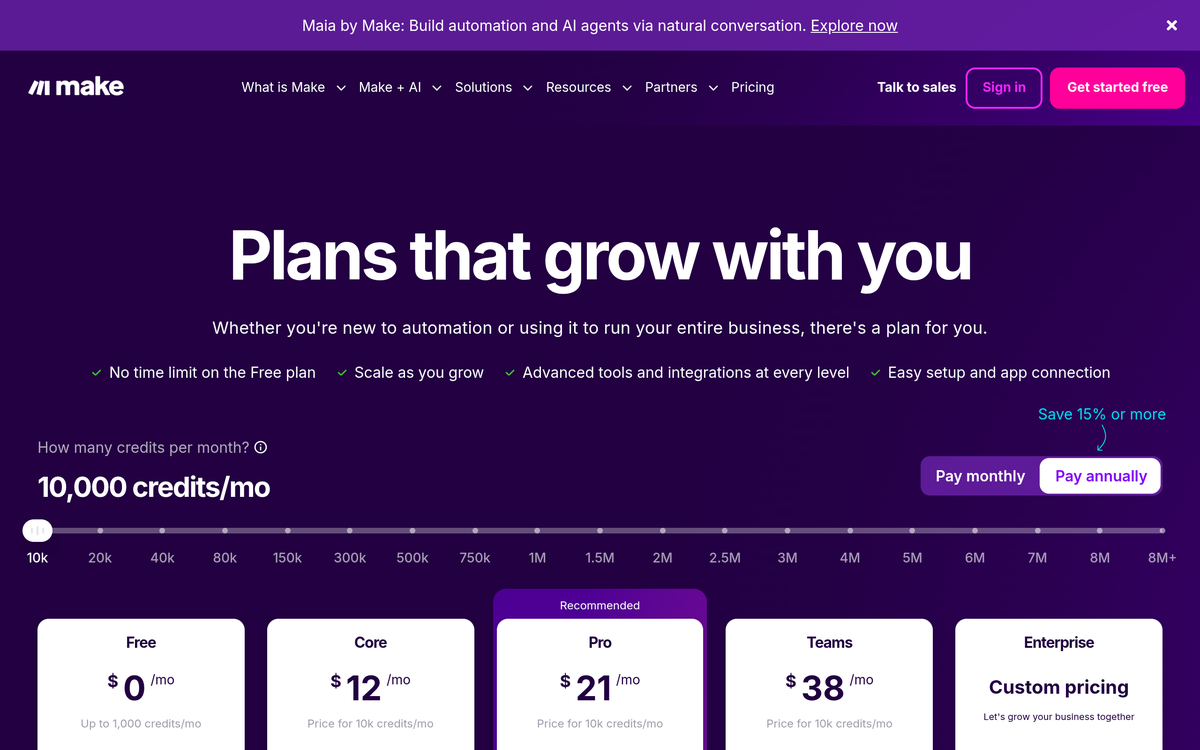
Three notes on that table, because the pricing page does not present them together.
The page carries a monthly and an annual option and does not print both rates at once. The rates above are the ones shown on the page as read on 2026-09-28, with the annual option selected and a printed saving of "15% or more" beside it. Independent trackers publish different monthly figures for the same plans at the same credit volume, and one publishes a lower annual figure for the entry tier, so the honest statement for a buyer is that the entry paid tier sits between about 9 and about 16 dollars a month for 10,000 credits depending on the billing period and the source, and that the page's own default display is the lower number.
The credit is not a task. "Each module action in your scenario, like adding a Google Sheet row or fetching Gmail account data, counts as one credit", most actions consume one credit, and advanced features that use the vendor's own AI provider consume more, priced by model and by token consumption. Error-handler modules and the router module consume none. The platform notifies an account at 75 per cent and at 90 per cent of its balance, stops scenarios when the balance runs out, queues incoming webhooks up to the account's queue allowance, and resumes polling from the last successful run. Extra credits are sold in bundles of 1,000 or 10,000, the Core, Pro and Teams plans can be set to purchase 10,000 automatically before the balance runs out, and unused credits expire at the end of the term.
Data volume is priced with the credit. Every 10,000 credits a month carries 5 GB of data transfer, 10 MB of data storage, 10 MB of incomplete-execution storage up to a 2 GB maximum, and a webhook queue of 667 up to a maximum of 10,000.
What it costs to leave. A subscription is non-cancelable and non-refundable once the services are ordered, and the master agreement states that it renews automatically for the same period as the initial purchase unless the account gives notice before the charge. Deleting a scenario, a connection or a data store is instantaneous and there is no export of a scenario beyond the blueprint in the account. A reader who builds a business process on this platform should read the credit, liability and amendment findings below rather than after the first invoice.
The Problem
The work a small organisation does every day is mostly moving information between two systems that were never introduced to each other.
A form submission becomes a record in a spreadsheet, then an entry in a CRM, then a message in a chat channel, then a row in an invoice run. A support email becomes a ticket, then a status update, then a follow-up reminder. An order becomes a fulfilment instruction, then a tracking number, then a notification. None of those steps requires judgement. Every one of them requires a person to be sitting in front of a screen at the right moment, reading from one window and typing into another.
The cost of that work is not the minutes. It is the failure mode. A copy-and-paste process fails silently: the row is not written, the invoice is not generated, and nobody knows until a customer asks. A person doing the same steps fifty times a week makes an error at a rate that is invisible in any single instance and cumulative over a quarter. And a process that lives in a person's habits cannot be handed over, audited or improved, because it exists nowhere except in their working memory.
Automation platforms exist to move that work out of human attention. The category has been through three phases: point-to-point connectors, then visual workflow builders with hundreds of applications, and now a third phase in which a language model sits inside the workflow and an agent chooses its own next step. Each phase makes the platform more capable and the oversight problem harder, because a deterministic workflow that breaks is visible in a log, and an agentic one can complete a run successfully while doing the wrong thing.
The barrier is not whether the platform works. It is whether the person building the automation can tell what the automation did. A workflow that runs without error and a workflow that produces the right result are different claims, and the tools that make the first easy do not automatically make the second one checkable. That is the question this review keeps returning to.
The Outcome
Make gets a person from a described process to a running automation faster than any comparable platform in this series, and it makes the platform's own execution visible at every step.
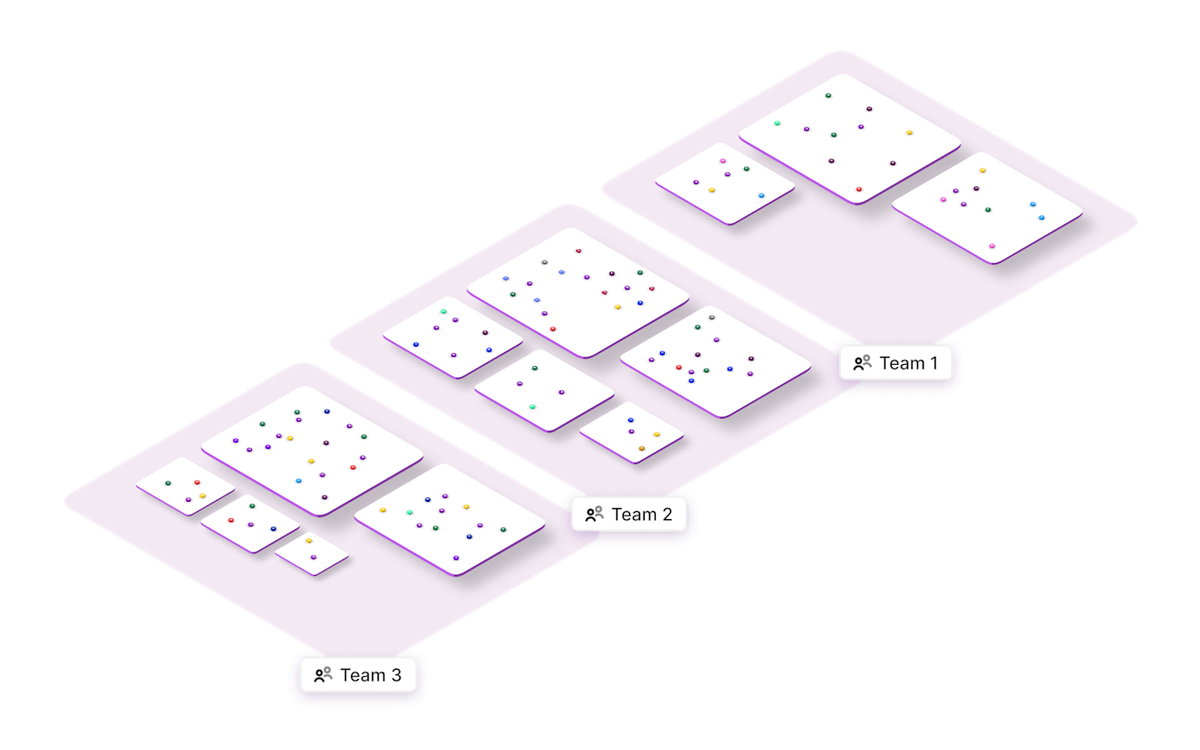
A first scenario is a fifteen-minute job: choose a trigger, search for the application, drop in an action, map two fields, run it once and look at the output of each module. The canvas is not a form and not a code editor; it is a diagram of the process, and the diagram is the program. When a scenario runs, each module shows what it received and what it emitted, and an account can open any execution and read the payload at each step. Make Grid extends that from one scenario to the whole landscape, generating a map of every scenario, app, data store and AI component and how they connect.
The AI layer is where the platform has moved fastest. An agent is built on the same canvas as the rest of the scenario, given instructions, tools, knowledge files and a model, and its reasoning is shown step by step while it runs. Maia writes and edits scenarios from a description and shows each change as it makes it. The MCP server runs the reverse direction, exposing scenarios as tools to an AI client the user already works in.
The honest outcome has two halves. Make turns a described process into a running one quickly, and it does so on a canvas that keeps the logic readable. The cost of that is a metered unit that punishes complexity: every module action spends a credit, AI steps spend credits at a rate set by the model and the tokens involved, and an account that does not model its own volumes before building will meet the meter after the build rather than before it. For a small team with a handful of processes and modest volumes, that trade is good. For a high-volume process, the platform is the wrong meter, and this review names the alternatives in the comparison section rather than pretending otherwise.
Who Should Use Make
The U365 Fellow who gains the most
The operator who owns a process and can describe it. A Fellow running a business unit, a project or a solo practice, who can list the steps of a process, name the applications it touches and say what a correct outcome looks like. Everything this platform asks for is that list. The scenario is the process written down, the modules are the steps, and a run history is the proof of what happened. A Fellow who cannot describe the process will build a scenario that reflects their guess instead of their process, and the meter will charge them for it.
A Fellow who has to answer a customer within a working day. Classify, route, draft against a knowledge base, escalate. The agent surface and the vendor's own published templates for exactly that job make one person look like a desk, and the free plan is enough to prove the value of the first one.
A Fellow building AI capability inside an existing business tool. The interesting position of this platform is that it connects 3,000 or more applications, and it can also be reached from an AI client through the MCP server. A Fellow who already works inside a chat client can turn a Make scenario into a tool it calls, which is a shorter path to a working agent than building one from scratch.
A Fellow in a regulated or audited role, on a paid plan. The Teams and Enterprise tiers carry team roles, shared templates, audit surfaces and administrative controls, and the AI modules document where their output comes from. On the free and entry tiers those controls are absent, which is a configuration limit rather than a defect, and the review states it rather than calling the platform ungovernable.
The U365 Fellow who should not adopt this
A Fellow whose process runs at high volume with trivial logic. Above a certain volume, a per-module meter is the wrong meter, and the honest alternatives are a self-hosted platform, a platform that charges per completed workflow, or writing the integration once. The threshold is not fixed and it is measurable on your own data, which is why the Getting Started checklist puts the arithmetic before the purchase.
A Fellow who will not open the run history. This platform's central claim is that its logic is visible. That claim is only true for a reader who looks. A scenario that silently stopped last Tuesday, a connection that expired, a scenario that is spending the whole monthly balance on a polling trigger: each of them is visible in the account and invisible to a Fellow who never opens it. If nobody in the unit owns the run history, the platform is running the business on trust, and it will not say so.
A Fellow who wants the automation to decide. A scenario that carries a payment, a customer entitlement, a hiring decision, a medical question or a legal position must pause for a person before it acts. Make will happily perform all of those unattended, and the platform's own documentation frames the approval step as something the builder adds. The platform is not the constraint. The process design is, and a Fellow who does not want to design it should not adopt the tool.
Institute alignment, in one paragraph
The primary home for this tool at U365 is UIB, because the decisions it forces are commercial and organisational before they are technical: which process is worth automating, what it costs per completed run, who approves an action, and who reviews the automation after it has been running for a month. UIC has a real and narrower reading, in the rule for what may leave a channel without a person reading it. UIT has the strongest technical reading this platform supports, because a scenario is a data contract between two systems and the run history is an inspection surface. UID is a reading contact rather than a design home. The full table, with the reasoning and the limits of each row, follows.
U365 Institutes Alignment
The alignment below rates what a U365 institute could take from this platform as a working instrument and as an object of study. The primary home is UIB, because the judgements the platform forces are commercial before they are technical: which process, at what cost, with whose approval, and against which return. The other three readings are real and each is bounded.
UIB (Business Management, Entrepreneurship)
Rating. High (primary)
Why. Three competencies a practitioner supplies, and each survives the removal of the tool. Process selection: deciding which process is worth automating from its volume, its error rate and what it costs to run. Metered-service appraisal: converting a credit allowance into a cost per completed process, allowing for the dynamic pricing of AI steps, the 1,000 and 10,000-credit bundles, the automatic purchase of extra credits, and the fact that credits expire at the end of the term. And approval-boundary design: stating which actions may run unattended and which must pause for a person, which on this platform is a configuration the builder adds rather than a default the platform supplies. Those are the questions of a business case, and the Getting Started checklist and the workflows below put them in the reader's hands
The limit that holds the row. The platform teaches no management content of its own and the appraisal is a costing exercise rather than a discipline. A word-start search over all 79 published programme descriptions in the Online Programs catalogue on 2026-09-28 returned zero matches for cost, pricing, metered, usage-based, unit economics, invoice, procurement, supplier, rate card, total cost and contract. The nearest published anchors are Business Analysis Professional (60 days, 252 steps), which publishes Business Analysis Foundations, Agile Requirements, Business Bebefits Realization, Project Manager Collaboration, Business Process Modeling, Leadership Foundations and Communication skills, with the module spelling reproduced as the catalogue publishes it, and Financial Analysis Specialist (30 days, 124 steps), which publishes Corporate Financial Statement, Financial Modeling, Forcasting Financial Statements, and Data, and Economic Modeling with Stata. The first is requirements and process modelling, the second is the analysis of a company's own statements, and neither publishes a method for appraising a supplier's rate card or the cost of a completed automated process. Adjacent anchors, not assessment homes. No credential is claimed
UIC (Digital Communication, Marketing)
Rating. Medium
Why. One competency that matters and it is the one the platform makes invisible. The publication rule for an automated channel: what may leave an account without a person reading it, which voice it carries, and what the engagement numbers returned by the pipeline actually support. On this tool that rule is not theoretical. The vendor's own tutorials configure an agent that watches an inbox and replies to the sender, with instructions that tell it to answer in HTML and not to add a signature, so the reply arrives as an ordinary message from the account. A communication cohort can also study the category's central case, which is the industrialisation of audience contact, and measure what an automated reply does to a relationship
The limit that holds the row. The tool composes no communication craft. It teaches no register, no audience analysis and no standard for what a message should say, and its published guidance points a user at templates rather than at writing. A word-start search over the same 79 published programme descriptions returned zero matches for consent, disclosure and privacy. The nearest published anchor is Content Marketing Specialist (30 days, 124 steps), which publishes Content Marketing ROI, Content Stratégy, Producing and Promoting Live Video, SEO Content Writing and Link Building, with the module spelling reproduced as published. That is content planning and platform craft rather than a rule for an automated channel. Adjacent anchor, not an assessment home
UIT (Technology, AI, Data Science)
Rating. Medium
Why. Two real engineering readings. The integration reading: a scenario is a data contract between two systems, and building one forces a Fellow to decide what each step receives and emits, what happens when a field is empty, what a retry does to a record, and why a webhook behaves differently from a polling trigger. The platform exposes that reasoning through its execution log, which shows the payload at every module, and it is the most transferable thing a technical Fellow can learn from a visual builder. The second reading is the evaluation one this review performs: telling a process that is working from one that has silently stopped, and, on a scenario that carries AI steps, telling a run that completed from a run that produced a correct result
The limit that holds the row. Nothing here is assessable as engineering practice in the professional sense. There is no version control on scenarios, no test suite, no local execution and no self-hosted deployment, so the deployment and observability disciplines a UIT cohort is meant to build are outside the product's scope, and the code module runs a script rather than a testable service. A word-start search of the same 79 published programme descriptions returned zero matches for API design, data mapping, scripting, error handling, monitoring, logging and observability. The nearest published anchor is Bachelor of Science in IT (B.Sc.) (224 days, 957 steps), whose published description names system and network administration, cloud and virtualisation, databases and NoSQL, software development, and AI and machine learning, with every match for governance sitting inside its own text, in the module line "Risk Management & Information Governance" and the sentence beneath it. That is organisational governance of data rather than the governance of an automated action. Adjacent anchor, not an assessment home
UID (Digital Design, UX/UI)
Rating. Low
Why. A reading contact rather than a design act. One genuine item: a designer can read how data moves through a system and what that system will and will not do before being asked to design an interface that depends on it. Make Grid adds a second, thinner contact, because mapping a connected process visually is the kind of thinking a designer already does
The limit that holds the row. The platform performs no design work and evaluates no design against a brief. It specifies no layout, interaction, prototyping or motion, and its own surfaces are built from templates rather than from a design system a Fellow could study. The row is rated as evaluation contact and it is stated that way rather than as a design claim. No credential is mapped
U365 methods, not an institute (UNOP, ULM, LIPS, CARE and the UP-Context Method)
Rating. Applicable
Why. The methods layer is relevant in one specific way and it is the operational one. An automation is a standing decision that keeps executing after the person who made it has stopped thinking about it, which is precisely the kind of decision LIPS and the UP-Context Method exist to record: the rule, the owner, the approval boundary and the review cadence. The platform holds the scenario; the method holds the reasoning
The limit that holds the row. The platform keeps no record of why a scenario exists or who is accountable for it. It records what ran and when, not what was decided or on whose authority, so a unit that does not keep the reasoning elsewhere has no record of it when the person who built the scenario leaves
The sentence that holds across all four rows. Relevance is not a credential, and the two diverge on this tool. A rating says a cohort has something to learn by reading or using the product. A credential says U365 assesses that competency and issues something for it. On this tool the first is true at all four institutes and the second is true at none, and the table below states the position row by row rather than leaving a reader to infer it.
Tool to Skill to Credential
No published U365 credential assesses any of the competencies this tool exercises. That is the finding and it is not a catalogue defect. A workflow-automation platform supplies capability that sits underneath a business process rather than teaching the process, and U365 credentials assess what a Fellow can do rather than what a service can do for them. The Skill sub-score of 3 records the same thing from the scoring side, and Skill Illusion High records it from the risk side.
Every row below does two things. It names the nearest published programme a Fellow could enrol in, and it states what that programme does not publish. An adjacent anchor is useful to a Fellow who wants the neighbouring skill. An adjacent anchor is not a credential claim, and none is presented as an assessment home for the competency in the row.
The programmes below were read from the published Online Programs catalogue on 2026-09-28 (86 records, 79 published), each as a published programme with its own description and step count.
Deciding which process is worth automating, from its volume, its error rate and its running cost, and stating the case before building anything
U365 competency. Process selection and business case construction
Credential. No published U365 programme assesses process selection for automation. The nearest published anchor is Business Analysis Professional (60 days, 252 steps, published), which publishes Business Analysis Foundations, Agile Requirements, Business Bebefits Realization, Project Manager Collaboration, Business Process Modeling, Leadership Foundations and Communication skills, with the module spellings reproduced as the catalogue publishes them. That is requirements and process modelling rather than the decision to automate a specific process, and it publishes no cost or return method for the decision. Adjacent anchor, not an assessment home
Institute. UIB (Business Management, Entrepreneurship), no credential mapped
Converting a credit allowance into a cost per completed process, allowing for dynamic AI-step pricing, credit expiry and the automatic purchase of extra credits
U365 competency. Metered-service cost appraisal
Credential. No published U365 programme assesses a usage-metered cost outcome. The term search over all 79 published programme descriptions returned zero matches for cost, pricing, metered, usage-based, unit economics, invoice, procurement, supplier, rate card and total cost. The nearest published anchor is Financial Analysis Specialist (30 days, 124 steps, published), which publishes Corporate Financial Statement, Financial Modeling, Forcasting Financial Statements, and Data, and Economic Modeling with Stata, with the module spellings reproduced as published. That is the analysis of a company's own statements rather than the appraisal of a supplier's rate card and consumption unit. Adjacent anchor, not an assessment home
Institute. UIB (Business Management, Entrepreneurship), no credential mapped
Reading two systems as a data contract: what each module receives and emits, what an empty field does, what a retry does to a record, and why a webhook differs from a polling trigger
U365 competency. Integration and data-contract design
Credential. No published U365 programme assesses integration design. The term search over the same 79 published descriptions returned zero matches for API design, data mapping, scripting, error handling, monitoring, logging and observability. The nearest published anchor is Bachelor of Science in IT (B.Sc.) (224 days, 957 steps, published), whose description names system and network administration, cloud and virtualisation, databases and NoSQL, software development, and AI and machine learning as its themes. That is application and infrastructure construction rather than the appraisal of a cloud, metered connective service. Adjacent anchor, not an assessment home
Institute. UIT (Technology, AI, Data Science), no credential mapped
The publication rule for an automated channel: what may leave an account without a person reading it, and which voice it carries
U365 competency. Automated-channel publication policy
Credential. No published U365 programme assesses an automated-channel publication rule. The term search over the same 79 published descriptions returned zero matches for consent, disclosure, privacy, compliance and audit. The nearest published anchor is Content Marketing Specialist (30 days, 124 steps, published), which publishes Content Marketing ROI, Content Stratégy, Producing and Promoting Live Video, SEO Content Writing and Link Building, with the module spelling reproduced as published. That is content planning and platform craft rather than a rule for an automated channel. Adjacent anchor, not an assessment home
Institute. UIC (Digital Communication, Marketing), no credential mapped
Writing the approval boundary: which actions may run unattended, which must pause for a person, and what the pause should ask
U365 competency. Approval-gate design for automated systems
Credential. No published U365 programme assesses approval design or automated-decision oversight. The term search returned zero matches for governance outside a single organizational-governance module named inside the Bachelor of Science in IT description, and zero for compliance, audit, risk assessment as an automation question, and contract. The nearest published anchor is Project Manager Mastery (25 days, 103 steps, published), which publishes Foundations, Ethics, Schedules, Budgets, and Teams and Communication. That is project governance rather than the design of an approval gate inside a running system. Adjacent anchor, not an assessment home
Why all five rows land on an adjacent anchor rather than a credential. U365 credentials are built around what a person does: analyse a business, design a curriculum, run a project, write for an audience. A platform that executes a process on a person's behalf exercises judgement in the person who configures it and none in the person who watches it run. That is the same finding the Skill sub-score records, and it is stated here in the catalogue's own terms rather than as an opinion about the catalogue. University 365 has three academic access levels: DISCOVERY, INSIDER and SUPERHUMAN. Specialised diplomas and certificates carry Basic, Foundation and Expert levels: DISCOVERY Fellows can enrol in Basic-level programmes only, INSIDER Fellows in Basic and Foundation programmes, and SUPERHUMAN Fellows in all of them. Degree programmes carry a single Expert level and are open to SUPERHUMAN Fellows only, and one of the anchors above, the Bachelor of Science in IT (B.Sc.), is a degree programme. No per-programme access level is asserted for the diploma-level anchors, because the catalogue does not expose one, no credit transfer between programmes is asserted, and no micro-credential component title is asserted in this table.
How Make Works
A scenario is a diagram that executes. A trigger module starts a run, either on a schedule, from a webhook, or by watching an application for new data. Every module after it receives data from the module before it, transforms it, and passes a bundle onward. A router splits the flow into branches with filters, an iterator runs the same steps once for each item in a list, and an aggregator collects many items into one. The execution log records each module's input and output, its status, and the credits it consumed, and a scenario can be run manually, step by step, or watched live while it executes.
What a module is. A module is one operation inside one application: add a row, update a record, search for a contact, download a file, send a message. Most applications expose a trigger, one or more searches and one or more actions, and the platform configures each with a form whose fields can be typed, mapped from previous modules, or computed with a function. The vendor states 3,000 or more applications, of which some are verified and community-maintained, and any application with an API can be reached through the HTTP module or a custom app.
Where the AI sits. Four distinct AI surfaces exist and they behave differently.
AI modules inside a scenario. A model call as an ordinary step: classify this text, extract these fields, summarise this document, generate this image. The vendor lists more than 350 AI applications in its catalogue, and its own AI toolkit adds a provider connection, a content extractor and a web search. An AI step priced on the vendor's own provider consumes credits by model and by tokens; the same step against the user's own provider account consumes one credit for the operation.
Make AI Agents. An agent is built on the canvas as a module, given instructions, a model, tools and optional knowledge files, and set to reason at run time, choosing which tool to call next. Its execution produces a Response, an execution-step list and a token-usage summary, and the Reasoning tab shows the steps, the processing time, the context-window use, and whether a fallback connection had to be used.
Maia. A conversational co-worker that writes and edits scenarios from a description, showing each change as it makes it. It reads the current scenario and the account's apps, not the execution logs, so an error has to be described to it rather than pointed at, and it cannot see or call other scenarios.
The MCP server. The account is exposed as a set of tools to an external AI client: run active and on-demand scenarios, and, on paid plans, view and modify scenarios, connections, webhooks, data stores, teams and organizations. The vendor also publishes Make Skills, a set of Markdown instruction files for the client, and states on its own install page that the skills can take live actions on a Make account, including modifying scenarios and connections.
Where the reasoning is recorded. Each scenario run is kept with its bundles, its module statuses, its timing and its credit use. On the Pro plan and above, the execution log is full-text searchable. Make Grid maps the account's scenarios, applications, data stores and AI components and their dependencies, and updates as the landscape changes. On an agent run, the execution steps and the token summary are attached to the module's output. What is not recorded is intent: nothing in the account stores why a scenario exists, who approved it, or what it is allowed to do.
How the platform scales. Execution zones are regional, chosen per organization, and the vendor operates four named zones plus regional Celonis hosts. Data transfer, data storage, incomplete-execution storage and webhook queue size are all entitlements that scale with the number of credits licensed, which is worth understanding before a high-volume webhook design: a queue that fills stops accepting new requests, and the vendor states the ceiling in both absolute terms and per-credit terms.
Two things the platform does not do, stated because they are often assumed. It does not version scenarios, so a change to a live scenario is a change to the running process with no history and no rollback beyond an export of the blueprint. And it does not test them: a scenario can be run manually against example data, and there is no test suite, no staging concept and no assertion mechanism beyond the run itself.
Getting Started with Make
A fifteen-minute checklist that puts the arithmetic and the boundary before the build.
Minutes 1 to 3: pick the process and write it down as steps. Name one process, not a category. List the steps in order, the application each step touches, and what a correct outcome looks like at the end. If the list runs past about ten steps, take the first half.
Minutes 3 to 5: count the credits. Every module action spends one credit and error-handler modules spend none. Mark each step in your list that will become a module action, then multiply by how often the process runs in a month. A five-step process running twice a day is about 300 credits a month. The same process running every five minutes is about 43,000. That single multiplication decides the plan, and it is the calculation the pricing page does not do for you.
Minutes 5 to 7: add the AI cost where an AI step is planned. An AI module on the vendor's own provider consumes credits dynamically, priced by the model and the tokens the step actually uses, and its credit cost is shown per message or per run in the account. A step with a model call and two tool calls is not one credit. If the volume is high, price the same step against your own provider account instead, where the module operation costs one credit and the tokens are billed by the provider.
Minutes 7 to 9: create the free account and build the smallest version of the process. The free plan has no time limit, carries 1,000 credits a month, allows up to two active scenarios and enforces a 15-minute minimum interval between runs. Build two steps, run them, and look at the output of each module before adding a third.
Minutes 9 to 12: break it once on purpose. Send an empty field through the step that expects a value, or point a connection at an expired credential, and read the error in the execution log. Then add an error handler: a rollback after a partial write, a break with a condition, or a resume that retries. The vendor documents an exponential-backoff pattern for rate-limited applications. A scenario with no error path will fail the first time the outside world misbehaves, which is a certainty rather than a risk.
Minutes 12 to 14: decide the approval boundary before anyone else uses it. For each action the scenario takes, write one of two answers: it may run unattended, or it must pause for a person. Payments, entitlements, deletions, contract changes and anything that reaches a customer without review belong in the second category, and the pause has to be something the scenario actually performs, such as a draft that waits for approval, or an action held until a person marks the item reviewed.
Minute 14: record the decision outside the platform. Put the process rule, the approval boundary, the owner and the review cadence in your LIPS project rather than in a scenario note. The platform keeps what ran; it does not keep what was decided or by whom.
Minute 15: set the review. Open the execution log and the Grid map once a month, and check three things: which scenarios failed, which connections are near expiry, and which scenario consumed the most credits. A scenario that failed repeatedly and silently is the failure mode this platform does not surface on its own.
What the checklist is protecting you from. Not the build, which is quick, but the two things that go wrong after it: a bill that reflects a process built before its volume was counted, and an automation that has been running unwatched since the day it was made.
Real Workflows
Three workflows, each with a time budget, a verification checklist and the point at which the honest user stops.
Workflow 1: The intake pipeline that replaces copy-and-paste
What it is. One process where information currently moves between two systems by hand: a form submission or an inbound email that has to become a record, plus a notification and an acknowledgement.
Steps. Build a trigger on the form or the mailbox. Add a search module that checks whether the record already exists, and a router with two branches: one for a new record, one for a duplicate. On the new branch, create the record, then send the internal notification, then send the acknowledgement. On the duplicate branch, update the existing record and skip the acknowledgement. Run it once against real example data, read the output bundle of each module, then activate it and watch the first live run.
Time budget. Forty minutes for the first build, most of it spent mapping fields and correcting two mistakes. Twenty minutes for the second scenario of the same shape, because the pattern repeats.
The point at which the honest user stops. When the acknowledgement goes to a person outside the organisation. An automated acknowledgement is a message from the company, and it should either say what it is or be written by a person. The second stop is the duplicate branch: if you cannot say what makes two records the same, the scenario will create duplicates and the search step will look like it is working.
VERIFICATION CHECKLIST for Workflow 1:
☐ Multi-Model Check: run the same scenario against the same example twice and compare the outputs. A scenario that produces a different record on identical input has a non-deterministic step in it.
☐ External Source: confirm against the destination system itself, against the destination system rather than against the scenario's own report, that the record exists with the fields you mapped. The execution log shows what the module sent, and the receiving application is the authority on what it stored.
☐ Human Review: a second person reads the acknowledgement text and the notification before the scenario is activated.
☐ CI-First Test: can you explain, without the scenario open, what happens when a duplicate arrives and what happens when the search module fails? If not, the pipeline is not ready.
Workflow 2: The AI agent with tools, and the oversight decision it forces
What it is. A support or sales process where the incoming message needs reading rather than routing: classify it, decide what it is about, look something up, and produce an answer or a draft.
Steps. Start with a trigger on the mailbox or the helpdesk. Add the Make AI Agent (New) module, connect a provider, and write instructions that include the agent's role, the steps it takes, the tools it may call and the guardrails. Give it tools: a search in your knowledge base, a lookup in the CRM, and a write action if it needs one. Set a conversation ID so a thread keeps its context, and set the maximum number of replies in the conversation history deliberately, because context is charged. Set the response format to text or to a data structure and use the data structure when the output feeds a later module. Run it, open the Reasoning tab, and read the execution steps before you let it reply to anyone. Then configure the output: a draft saved for a person, or a reply sent to the sender.
The oversight decision inside this workflow, stated plainly. The vendor's own published email and mailhook agent tutorials configure the second option: the agent watches an inbox, reads the message, and replies to the sender, with instructions that tell it to answer in HTML and not to add a signature. That is a legitimate automation for a great many organisations, and it means the message arrives as an ordinary reply from the account, written by a model, with no marking that separates it from a message a person wrote. The first option costs one more module and one more person's attention per message, and it is the configuration this review recommends for any conversation that carries a commitment, a price, an admission or bad news.
Time budget. Two hours for a first agent that uses two tools and reads well, because the instructions take as long to write as the canvas takes to build. Ten minutes to change the output from a sent reply to a drafted one.
The point at which the honest user stops. When the agent is answering questions about something it does not have in its knowledge, or when nobody is reading the drafts. An agent that answers confidently from a knowledge base it does not have is the Skill Illusion in its purest form, and it is invisible from the outside: the reply reads like every other reply.
VERIFICATION CHECKLIST for Workflow 2:
☐ Multi-Model Check: run ten real messages through the agent and run the same ten past a person. Compare where the two disagree, not where they agree. The disagreements are the agent's actual boundary.
☐ External Source: check every factual claim in a sample of the agent's answers against the source your knowledge base is built from. Include one answer you expect to be wrong and confirm that it is wrong in a way you can detect.
☐ Human Review: a named person reads the first twenty outputs before any of them reach a customer, and the name goes into the unit's LIPS record rather than into a scenario note.
☐ CI-First Test: for one of the agent's answers, could you reconstruct how it decided, from the Reasoning tab, and defend the answer to the person who received it? If not, the output is not ready to be sent.
Workflow 3: The institution-facing automation that has to survive scrutiny
What it is. A U365 unit automates a process that touches people outside it: a newsletter send, a cohort communication, a payment reminder, a document that goes to a partner.
Steps. Write the process and its approval boundary first, in the unit's LIPS project. Identify every action in the scenario that produces something a person outside the unit will read or receive. For each one, decide the gate: send, draft, or hold. Build the scenario so that the gate is a step rather than a convention, which usually means the last module writes to a draft folder, a review board or a queue instead of sending. Configure notifications so that the person who owns the gate is told a review is waiting. Run it once in the drafting mode and check the output. Then decide the disclosure position for anything automated that reaches a reader, and write it where the reader will see it rather than in a scenario note.
Time budget. Ninety minutes, most of it administrative. The canvas is the small part; the boundary and the disclosure position are the work.
The point at which the honest user stops. At the disclosure decision. If the unit cannot agree on what an automated message says about itself, the automation is not ready. The second stop is the payment or commitment surface: if the scenario moves money or creates an entitlement, the answer is a person, always, and the platform will not enforce that for you.
VERIFICATION CHECKLIST for Workflow 3:
☐ Multi-Model Check: put the planned automation beside the unit's own policy on automated communication, if one exists. If none exists, writing the first version of that policy is the deliverable, and the scenario waits.
☐ External Source: verify the data the scenario acts on against the system of record before it runs, particularly where a list, a cohort or a set of entitlements is involved. A scenario that reads a stale list will act on it correctly.
☐ Human Review: a second person signs off the gate configuration and the disclosure wording, and their name and the date go into the decision record.
☐ CI-First Test: if a recipient asked how this message was produced and who approved it, could the unit answer with the boundary document and the approving name in hand? If not, it is not ready.
The verification rule that covers all three
None of the three workflows depends on the platform producing better output than a person would. All three depend on the layer around the run: what the scenario is allowed to do, who reads what it did, what the recipient is told, and whether the result was checked against the system of record rather than against the log. The platform's own strongest feature, its execution log, is the instrument for the third of those and not a substitute for the other three, and the checklists above are arranged to put the decision before the build rather than after the incident.
Strengths, Limits, and AI Imposture Risk
Strengths
The visual canvas makes a process readable, and that is the platform's real product. A scenario is not a form to fill in and not code to write; it is a diagram of the process with the data flowing along the arrows. A reader who understands the process can read the scenario, and a reader who cannot read the scenario can look at the run and see what happened at each step. That property survives every other criticism in this review, and it is the reason the platform is worth a small team's time.
The execution log is a genuine inspection instrument, and most competitors do not have one like it. Every run keeps its bundles, each module's input and output, its status, its timing and its credit use, and the Pro plan adds full-text search over that history. That is the difference between debugging an automation and guessing at one.
Make Grid extends the same visibility to the whole landscape. The platform generates a map of every scenario, application, data store and AI component and how they depend on each other, without being asked to. For an account with thirty scenarios, the map answers a question no log answers: what will this application change or this connection expiry actually break.
The integration library is wide, and the escape hatch is documented. The vendor states 3,000 or more applications, with verified and community apps distinguished, and any system with an API can be reached through the HTTP module or a custom app. The vendor also publishes the pattern for replacing a dependency, which is the honest answer to the question every automation platform raises: what happens when an integration disappears.
The AI layer is transparent in the place it matters, which is unusual in this category. An agent's reasoning is shown step by step, its tool calls are listed, its token use is summarised, and whether a fallback connection was invoked is recorded on the same screen. The vendor's own documentation is direct about what an agent should and should not be given, including a best-practice page that tells a builder to send the output to a person for review when a tool's result needs approval.
The free plan is real and it is not a trial. The vendor states there is no time limit on it, and it exposes the whole builder, the integration library, routers and filters and support, on 1,000 credits a month. A Fellow can prove a process on it before paying anything.
The vendor publishes its own data position, including the part that is uncomfortable. The Maia system card states that customer data is not used to train or fine-tune the underlying model. The terms page lists sub-processors and publishes prior versions of the sub-processor list, the master agreement and the processing agreement, so a buyer can see what changed and when. Few platforms in this series publish superseded legal documents at all.
Limits
The credit meter turns complexity into cost, and the pricing page does not present that arithmetic. Every module action spends a credit, an AI step on the vendor's provider spends credits by model and tokens, and data transfer, storage and webhook queue size all scale with the credits licensed. The platform's own FAQ is careful and honest about how credits work, and a buyer still has to do the multiplication themselves, once per process, before they know what an automation costs.
Unused credits expire. The vendor states plainly that credits expire at the end of the term, that extra credits expire after one month on a monthly subscription or at the end of the year on an annual plan in the Pro and Teams tiers, and that incoming webhooks queue and then stop when the balance runs out. A business whose volume is seasonal pays for the peak in every month of the year.
Scenario changes have no history. There is no version control and no rollback inside the platform. The blueprint can be exported and re-imported, which is a manual practice rather than a feature, and a scenario edited by two people over a year carries no record of who changed what.
There is no test suite, no staging environment and no self-hosted option. A scenario can be run manually against example data, and there is no way to assert that a change produces the same result on a set of known inputs. For an organisation subject to a change-control regime, that is a structural limit rather than a missing feature, and it is the reason the technical reading of this tool stops at a medium rating.
No independent measurement of the agent surface exists. No accuracy figure, no completion rate, no failure rate and no controlled third-party test of Make AI Agents, of Maia's authored scenarios, or of the model calls inside a scenario, and the vendor publishes none of its own. The evidence for the AI layer is the vendor's own documentation and the platform's own transparency surfaces, which are unusually good and are still the vendor's account of its own product. The Quality sub-score of 5 rests on that absence as much as on the platform's strengths.
The incident record is uneven. The vendor's status page keeps a published history, and over the ten months it covers it records 19 incidents of major impact alongside a much larger number of minor ones, with six major incidents in July 2026 alone and login or execution failures recurring across the period. The platform publishes this, which is to its credit, and a buyer planning a process that cannot tolerate a morning of failed executions should read the history rather than the marketing page.
The legal position is thin in three specific places. The master agreement caps total aggregate liability at 1,000 dollars where an exclusion of liability is not permitted, provides the services without warranty, and permits changes to the terms, the privacy notice and the processing agreement without notice, with renewal counting as acceptance. Section 7c sets out what those clauses say and what they do not mean.
The skills and MCP write surfaces are broad, and the vendor says so. Management tools can view and modify scenarios, connections, webhooks, data stores, teams and organizations, and the vendor's own installation page warns that the skills can take live actions on an account, including modifying scenarios and connections, and advises starting in a test environment. That warning is honest and it is also an acknowledgement that the default grant is wide.
AI Imposture Risk
Time Illusion: Medium. The recurring saving is real and it is the platform's clearest benefit: a process that took ten minutes of a person's attention five times a day disappears from their day entirely. Against that, the first build of a non-trivial scenario takes an afternoon, debugging a data-mapping problem takes as long as the original build, Maia shortens the first draft and not the correction of it, polling triggers introduce a delay that is sometimes mistaken for a failure, and the AI steps add a class of correction that did not exist before. The honest net position is a strong recurring saving after a real setup cost, which is why this is Medium rather than Low or High.
Quantity Illusion: Medium. Automation multiplies output without multiplying verification, and the specific mechanism on this platform is that a successful run and a correct run look identical from outside. A scenario whose filter is wrong produces clean logs, a scenario that writes to a stale list completes successfully against the wrong audience, and an AI step that classifies badly returns a well-formed answer. The execution log is the cure and reading it is optional, which is exactly the shape of this trap.
Skill Illusion: High. The no-code premise removes the need to understand the thing being automated. A builder who has never read a JSON payload can wire two modules together, a builder who has never designed a data contract can map fields until the run succeeds, and Maia will now author the scenario from a sentence, including the module choices and the field mappings, at a rate of over 100 credits for a single response. The result is a person who holds a working automation and cannot say what it does when a field is empty. The MCP Skills surface compounds it: an agent-installed skill set that can modify scenarios and connections is a saved procedure that governs later sessions, authored by the model and installed on the user's own instruction, and the vendor's install page states the risk plainly. This is the highest rating in this review and it is the platform's central risk rather than an edge case.
Overall: Medium. One trap is High and two are Medium, and framework 5.3 places that combination at Medium overall when the High trap has a real mitigation available. The mitigations here are concrete rather than theoretical: the execution log and the Reasoning tab make the mechanism inspectable, the agent's tool list and knowledge files are explicit objects a builder writes, and the vendor publishes a best-practice page that names the approval step as the builder's responsibility. Those mitigations are available and none of them is a default, which is why the overall rating is Medium and not Lower.
Framework v1.2 clause note
Three clauses were added to the framework in v1.2, and each is assessed below. A null is a finding and is recorded as one.
Clause 5.2.3-a, agent-authored procedural memory, with a Skill Illusion floor of no lower than Medium, returns a null. Make does not write procedural memory on anyone's behalf. Maia authors scenarios, which are artifacts a person reviews and edits on the canvas, and an agent's instructions and knowledge files are written by the human who configures them. The agent runtime keeps a conversation history keyed to a conversation ID and a defined maximum number of replies, and that history is a short-term context store rather than a durable memory the agent revises. Nothing in the product creates or rewrites a user's skills, standing instructions or memory stores. The clause does not engage, and the Skill Illusion rating of High is set on the no-code mechanism described above rather than on this clause.
Clause 4.2-a, agent-mediated conversation, applies on condition (a). The clause's first condition is met where agent-authored text is presented as the person's own voice in a human-facing channel. The vendor's own published tutorial for an email-triggered agent configures a Gmail watch, a Make AI Agent (New) module and a Gmail reply module, with instructions that read "You are a customer service agent that answers questions from customers. Read the content of the email and answer in HTML format. Directly reply to the email. Don't provide any email signature." The mailhook tutorial is the same shape with different plumbing. The reply leaves the account as an ordinary message, from the user's own address, with no signature and no marking that distinguishes it from something the user typed. That is agent-authored text in the user's voice, in a channel a human being reads. The second condition is not met, because the platform does not substitute agent interaction for human contact: a drafted reply still goes to a person, and a configuration that keeps the agent's output as a draft does not touch this dimension at all. The clause applies on condition (a) alone, which is why the Social Authenticity rating is 0 rather than -1: the platform supports both configurations, the sending one is built from the vendor's own instructions, and the honest reading is that the dimension is at risk from a default template rather than being eroded by the product's design.
Clause 7.5, team-level rooms, returns a null. No room exists in which several named agents share a channel with a human. An account's agents run inside single scenario executions, each with its own instructions and its own run, and the team features on the paid tiers are people sharing an account, a scenario library and roles. The MCP server lets an external AI client run and manage an account, which is one client acting on one account rather than several agents coordinating in a shared operational room, and the Make Skills installation puts a set of instruction files into a client that is still a single agent from the platform's perspective. The clause does not apply, and the Collaboration Mode below is derived from framework 7.2 rather than from this clause, because the overall Imposture Risk is Medium and 7.2 assigns Centaur wherever the risk is Medium or High.
Section 7c: The credit expiry, the liability cap and the amendment clause, stated plainly
Five of the vendor's own documents decide the commercial position before any scenario is built, and each is quotable. This section quotes the operative text, keeps allegation and finding distinct, changes no score, and states at the end what the section does not do.
Fees are non-refundable, the subscription renews itself, and the platform will charge whatever payment method it holds. The master services agreement for Make states: "Subscription Fees are non-cancelable and non-refundable once Services are ordered. Subscription Fees and Taxes are due upfront at the time of purchase." It then states: "UNLESS YOU NOTIFY US BEFORE A CHARGE THAT YOU WANT TO CANCEL YOUR SUBSCRIPTION OR DO NOT WANT TO AUTO-RENEW, YOU UNDERSTAND YOUR SUBSCRIPTION FOR THE SERVICES WILL AUTOMATICALLY RENEW FOR THE SAME PERIOD OF TIME AS YOUR INITIAL PURCHASE AND YOU AUTHORIZE US (WITHOUT NOTICE TO YOU, UNLESS REQUIRED BY APPLICABLE LAW) TO COLLECT THE APPLICABLE SUBSCRIPTION FEE AND ANY TAXES USING ANY ELIGIBLE PAYMENT METHOD WE HAVE ON RECORD FOR YOU." The same clause adds that if every payment method on file is declined, the account must supply a new one "promptly or you will be denied access to the Services", and that a successful charge afterwards sets the next term from "the original renewal date and not the date of the successful charge".
Read together, this is an ordinary subscription mechanic and it has one consequence a business should price in before buying: an annual plan is a commitment for the year, stopping the card does not end it, and the access cut-off lands on the customer rather than on the subscription. On the product side the vendor is more generous than most platforms in this series about running out of meter: scenarios stop rather than bill through, the account is warned at 75 per cent and at 90 per cent of its balance, incoming webhooks queue until the account's queue allowance fills, polling triggers resume from the last successful run, and the Core, Pro and Teams tiers can be set to buy 10,000 extra credits automatically before the balance empties. The extra credits are themselves perishable: the vendor's own FAQ states that credits expire at the end of the term and that extra credits expire after one month on a monthly subscription or at the end of the year on an annual plan in the Pro and Teams tiers.
The liability ceiling is 1,000 dollars, the services carry no warranty, and no availability commitment attaches to the standard plans. The agreement states that the services are provided "AS-IS" without warranty of any kind and that the implied warranties "OF MERCHANTABILITY AND FITNESS FOR A PARTICULAR PURPOSE AND ANY TERMS IMPLIED BY STATUTE OR COMMON LAW REGARDING QUALITY, FITNESS, MAINTENANCE, OR USE" are disclaimed and excluded to the extent permitted by law. It then states: "WHERE SUCH EXCLUSION OF LIABILITY IS PROHIBITED UNDER APPLICABLE LAW, OUR TOTAL AGGREGATE LIABILITY SHALL NOT EXCEED $1,000.00, WHICH THE PARTIES AGREE IS A FAIR AND REASONABLE AMOUNT." A related clause states that user-developed apps and the vendor's materials are not subject to any service level agreement or availability commitments to which the services may be subject.
The finding is arithmetic rather than rhetorical. A scenario that moves orders, invoices or entitlements can lose more in a morning of failed executions than the total amount the vendor can be liable for, and the vendor's own published incident history shows that mornings of failed executions happen. That does not make the platform unsafe; it makes the business-continuity planning the customer's responsibility, and it is why the workflows in this review put a review step and a system-of-record check on anything that carries a commitment. The agreement also disclaims responsibility for issues arising from the customer's own actions or from third-party connectors, which covers the majority of real incidents on a platform whose whole value is connecting third-party applications.
The terms, the privacy notice and the processing agreement can change without notice, and renewal counts as acceptance. The agreement states: "WE MAY IN OUR DISCRETION CHANGE THESE TERMS, THE PRIVACY NOTICE AND DATA PROCESSING AGREEMENT, OR ANY ASPECT OF THE SERVICES, WITHOUT NOTICE TO YOU. ANY RENEWAL OF YOUR SUBSCRIPTION AFTER WE MAKE SUCH CHANGES CONSTITUTES YOUR ACCEPTANCE OF THE CHANGES. IF YOU DO NOT AGREE TO ANY CHANGES, YOU MUST CANCEL YOUR SUBSCRIPTION." The processing agreement carries its own version of the same mechanic: "We may update this DPA from time-to-time. Any revised version shall become effective upon renewal of Your Subscription under the Agreement."
Combined with the non-refundable fee clause, the practical position is that a change to the data terms in month three takes effect at the next renewal, and the only remedy offered is not to renew. The counterweight is real and it belongs in the same paragraph: the platform publishes its legal documents in full, it keeps prior versions of the master agreement, the processing agreement and the sub-processor list on its own terms page, and a customer can therefore see what changed between one version and the next rather than discovering it from an email. Very few vendors in this review series publish superseded contract versions at all, and a reader evaluating the amendment clause should weigh that against the clause itself.
The customer keeps ownership of its data, and the licence it grants is bounded; the feedback licence is not. The agreement states: "As between You and Us, You are and remain the exclusive owner of all right, title and interest (including without limitation the Proprietary Rights) in and to Customer Data and Customer Materials." The licence granted back is limited to the operation of the service: the customer grants the vendor, its affiliates and its subcontractors a "worldwide, limited-term, revocable, non-exclusive license to: (i) use, host, transmit, monitor, manage, replicate, access, collect, store, cache ... aggregate and/or anonymize Customer Data, and (ii) transfer Customer Data to Our subcontractors, in each case solely as necessary to provide the Services in accordance with the Documentation." Two clauses elsewhere in the same document are less bounded. On feedback: "You hereby grant Us a worldwide, perpetual, irrevocable, royalty-free license to use and incorporate such Feedback for any legitimate business purpose without restriction." And on publicity: "You agree that We may disclose You as a customer of Ours and use Your name and logo on Our website and in our promotional materials."
Two findings follow from that language, and neither is a scandal. First, the customer-content licence contains no training right. The agreement's Customer Data clause permits aggregation and anonymisation only "solely as necessary to provide the Services", and the vendor's Maia system card states the position directly: "Make doesn't use customer data, such as user prompts, scenario structures, or outputs, to train or fine-tune the underlying LLM. Adjustments in model behavior come exclusively from system prompt engineering and tooling configuration. No customer data modifies the model weights." On the evidence of the vendor's own documents, this platform grants itself no right to train on customer content, which is a stronger position than several tools reviewed in this series and is worth stating plainly rather than burying. The residual point is that a feedback submission is not the same object as customer content, and the feedback licence is unrestricted and perpetual. Second, the reference-customer clause authorises the vendor to use a customer's name and logo in promotional material without asking. It is a common clause in enterprise contracts, it is worth knowing before signing, and it is the kind of term a reader can negotiate rather than accept.
The data position: processor terms, a sub-processor list that the customer consents to in advance, and retention that runs to the end of the contract. The processing agreement states: "You hereby consent to the use of (i) Celonis Affiliates and (ii) the sub-processors listed at https://www.make.com/en/terms-and-conditions in connection with Our performance under the Agreement", with the vendor liable for its sub-processors' compliance. On deletion, it states that the vendor will return or delete personal data on request and "certify such deletion upon Your request", with an exception where law requires retention, in which case the data is isolated. The agreement also places two obligations on the customer rather than the vendor: the customer is responsible for "the accuracy, quality, and legality of all Customer Data" it uploads, and it must "obtain any legally-necessary consents and/or provide required privacy notices to any party whose personal data you input into the Service". That second obligation is the one that matters most for a university: a scenario that reads an inbox, a CRM or a student list is processing other people's personal data under the customer's own legal basis, not the vendor's.
The privacy notice is issued on behalf of Celonis Inc., one of two Celonis entities that adhere to the Data Privacy Framework, and it names the categories collected, including communication and interaction data and, for United States residents, a statutory categories and retention section. A reader building a scenario that touches personal data should read the notice rather than this summary of it.
The AI surfaces carry their own published limits, and the vendor states them. The Maia system card states that "The LLM decides how to respond to each user request, including the tools to call, their order, and parameters. The output determines the scenario configuration, whose quality depends on the LLM's reasoning ability and the accuracy of its knowledge." It states that user prompts and scenario data stay in Make except for calls to the AI provider, that Maia operates within the account's own access permissions, and that the AI provider applies safeguards that reject prompts requesting personal data. On the skills surface, the vendor's own installation page carries the warning in these terms: "Use with caution. Make Skills can take live actions on your Make account, including modifying scenarios and connections. Start in a test environment before bringing it into production workflows." That is a vendor telling a reader where its own write surface is wide, and it is a better disclosure than the same surface documented without the warning.
No score changed, and here is why. The commercial and legal findings above are the ordinary terms of a metered cloud service and they were known before this review scored the tool: a non-refundable subscription, a liability cap, an amendment-on-renewal clause and a reference-customer clause move no framework dimension on their own. The one clause with a framework consequence is the agent-reply configuration, and it is assessed in the clause note under 4.2-a rather than here, because it is a mechanism of agent-mediated conversation and not a contract term. The credit-expiry mechanic does not move the Time or Quantity sub-scores either: it changes the cost of an unused allowance rather than the benefit of the tool, and the re-check triggers at the top of this review record it so that a change to it forces a re-run rather than a quiet adjustment.
What this section does not do. It does not summarise either document, and a reader making a purchase decision should read the master services agreement, the processing agreement and the privacy notice directly, all of which are published on the terms page. It does not allege that the vendor enforces any clause unfairly; every clause above is a published term, and two of the findings are favourable to the vendor. And it does not restate the framework's scores a second time, because none of them moved.
U365 Co-Intelligence Rating
CI-First Profile
Primary: Co-Worker and Assistant (level 2). The platform's value is execution: it moves data, writes records, sends notifications and runs a process without a person in the loop. The human directs and reviews, and the scenario does the work, which is the definition of this profile.
Secondary: Analyst and Tester (level 4), and the rating is earned rather than courteous on this tool. The execution log shows the payload at every module, the credit consumption of every step, and each run's status; the Reasoning tab on an agent run shows its steps, its tool calls, its token use and whether a fallback connection was invoked; and Make Grid maps the whole automation landscape and its dependencies. A user who reads those surfaces is interrogating their own process and learning where it breaks, and the free plan makes it cheap to build a variant and test it.
Secondary: Co-Creator and Thought Partner (level 1), narrowly. Maia builds a scenario in conversation with the user and shows each change as it makes it, which is genuine back-and-forth over a design, and the Library of Agents publishes worked examples a user adapts. The level 1 entry is limited because the platform executes a described process rather than developing an idea with the user, and because a scenario built without thinking is a scenario built without thinking.
CI-First Benefit Score
Time
Score. 6
Reasoning. A real recurring saving, reduced by the first build, the debugging that data mapping always costs, polling delays, the credit arithmetic a buyer does before extending a process, and the reading step that the platform supports but does not require
Quantity
Score. 6
Reasoning. A genuine step change in the volume one person can carry, held down because the marginal unit is metered, because an AI step's consumption varies with the model and the tokens it uses, and because no measurement exists of whether the automated volume was the right volume
Quality
Score. 5
Reasoning. The deterministic surface is reliable and observable, and the run log plus Grid map are real quality instruments, capped by an incident history with 19 major incidents across ten published months, by the absence of any test suite or staging concept, and by the vendor publishing no measurement of its agent or AI-step output and no third party having done so either
Skill
Score. 3
Reasoning. A real learning surface in data contracts and operational verification, scored low because the product removes the requirement rather than teaching it, supplies no critique or standard for the process it automates, and hides its own failure modes from anyone who does not open the log
(6 + 6 + 5 + 3) / 4 = 5.0. CI-First Benefit Score: 5.0 / 10, band CI-First Positive.
Why this score is not higher, and why it is not lower
Why it is not lower. The capability is real and it is broad: 3,000 or more applications, a canvas that makes a process readable, an execution log that shows the payload at every step, an automatically generated map of the whole landscape, an agent surface whose reasoning is visible while it runs, a free plan with no time limit, and a starting price below every comparable platform in this series at the same volume. The platform also publishes the things that make it auditable: how credits are spent, which modules consume none, which features use the vendor's own AI provider and which do not, what its contract clauses say, and what its own incident history looks like. A reader with a manual process, a modest volume and a named owner gains a great deal, and that is what the CI-First Positive band means.
Why it is not higher. Three findings hold it at 5.0. The Skill sub-score is 3 and Skill Illusion is High, for the same reason the whole no-code category carries that shape: the platform is designed so that a person does not need to understand the thing they are automating, Maia now writes the scenario for them at a cost of over 100 credits for a single response, and the MCP skills surface installs instruction files that can modify scenarios and connections. The Quality sub-score is 5 because the platform's reliability record is uneven and because no measurement of its AI output exists anywhere. And the price advantage is a price advantage in one dimension: at high volume a per-module meter is the wrong meter, and the platform's own comparison page concedes nothing about that.
Humics Protection Badge
Humics-Neutral (-1 / +3). Creativity 0, Critical Thinking -1, Social Authenticity 0.
Dimension | Rating | Reasoning |
Creativity | 0 Neutral | Removing clerical work returns a person's attention to the work that needs judgement, and the platform's templates and Maia reduce process design to selecting or accepting a pattern that already exists. The two balance |
Critical Thinking | -1 Erodes | A successful run and a correct run look identical from outside, a silently failed scenario looks like a quiet week, the platform's own documentation states that an agent's output quality depends on the model's reasoning and the accuracy of its knowledge, and the instrument that would break the pattern, the execution log, is available but never required. The erosion is in the default posture rather than in the feature set, which is why this is -1 rather than worse |
Social Authenticity | 0 Neutral | The platform's own tutorials configure an agent that answers emails in the user's voice without a signature, while the platform equally supports a draft step that keeps a person in the loop. Social Authenticity is therefore at risk from a default template and not eroded by the product's design, and clause 4.2-a is applied on that basis rather than scored through to -1 |
0 + (-1) + 0 = -1, which is Humics-Neutral. This is a real number rather than a formality: the badge would move to Humics-Risky if the agent-reply pattern became the platform's recommended default AND the execution log remained an optional surface, and it would move to Humics-Friendly if the platform shipped a review gate as a first-class module and taught the boundary as a build step.
Superhuman Usage Guidance
When to invite Make in.
Invite it for a recurring process with a nameable volume whose worst-case failure is a fixable record: a row that can be corrected, a notification that can be resent, a draft that can be rewritten. Invite it for the awkward integration nobody supports, where one system has an API and no one on the team will write the connector. Invite it for classification, extraction and summarisation against a defined output shape, where the result either matches the shape or does not. Invite it when the alternative is a person copying between two windows fifty times a week, because a metered platform with a visible log beats a manual process with an invisible error rate. And invite it to learn how a business process is actually shaped, because drawing a scenario is the cheapest way there is to find out.
When to keep it out.
Keep it out of any process whose failure mode is a payment, an entitlement, a customer's legal position or a student record, unless a person approves the action before it happens. Keep it out of a high-volume process where a per-module meter is the wrong meter, and route that work to a self-hosted platform, to a platform that charges per completed workflow, or to code. Keep it out of any data the customer's own contract forbids uploading or that the unit has no legal basis to process, because the processing agreement places the accuracy, legality and consent obligations on the customer rather than on the vendor. Keep it away from unattended write access with no owner: a scenario that can modify records and that nobody reads is a liability that runs on a schedule. And keep it out of any unit that cannot name the person who opens the execution log.
U365 method integration.
LIPS and CARE. The decision record belongs in LIPS, not in the platform. Put the process rule, the approval boundary, the owner and the review cadence in your own system, because the platform keeps what ran rather than what was decided or by whose authority. In the CARE cycle this platform supports Collect and Execute strongly, and it must never be allowed to make the Review decision: the whole finding of this review is that an automation's Review step is a person reading a run history, and the platform's defaults work against it.
UP-Context. Write the scenario's instructions and its boundary in the same place you keep the reason for it. An agent's instructions are a UP-Context artifact in everything but name: role, goal, available tools, guardrails and a statement of what it must not do. The vendor's own best-practice page asks a builder to write those things down, which is the same instruction the UP-Context Method gives, reached from the engineering side.
ULM. The reading that holds is Quality of Life and Career. A process that consumes a person's attention five times a day is time returned to one of the six domains, and the discipline of stating what a system may do without asking is a habit that transfers. Character and Emotions are touched only through that discipline, and this review does not claim more.
SL-OS. The platform sits beside the Microsoft stack rather than inside it, and its distinct contribution to a SL-OS deployment is the governed action layer: a place where a described process runs and leaves a record, with an MCP surface through which an AI client can call it. The boundary the platform does not supply is the one SL-OS already carries, which is who decides and who reviews.
UNOP. Weak. The platform automates a process rather than teaching one, and the Make Academy teaches the product rather than the process design. The one pedagogical surface worth naming is the run history, which teaches a careful reader what their own process actually does.
Over-delegation warning. The failure mode of this platform is an organisation whose processes all run and none of them are read. The records appear, the notifications arrive, the invoices go out, and nobody can say which scenario is allowed to do what, when it last succeeded, or what it does when an application changes under it. The specific danger with the AI surfaces is worse than silence: an agent that answers from a knowledge base it does not have produces a confident, well-formed reply that reads like every other reply, and the person who receives it has no way to tell. If nobody in the unit has opened the execution log in the last month, the platform is running the business on trust, and it will not say so.
Verification checklists, consolidated
Every workflow above carries its own checklist. Across all three, the same four checks apply: run the scenario twice on identical input and compare; verify the result against the receiving system rather than against the log; have a named person read the first outputs before they reach anyone outside the unit; and answer the CI-First question for one output, which is whether you could reconstruct and defend the result without the platform open.
What Users Say
Two cohorts matter here and they disagree, which is itself the finding. The independent software-review platforms rate the platform highly and the consumer review platform rates it poorly, and the disagreement tracks what each cohort is rating.
Aggregate Rating Table
Platform | Rating | Volume | What the cohort is rating |
Capterra | 4.8 out of 5 | 409 reviews | The product, from a buyer-oriented cohort. The vendor's own site prints the same figure |
GetApp | 4.8 out of 5 | 407 verified reviews | The same product under a different aggregation. Both directories are operated by the same group |
G2 | 4.7 out of 5 | Not disclosed on the surfaces read | The product. The vendor's own site prints this figure |
Gartner's peer review platform | 4.6 out of 5 | A small review count, mostly enterprise buyers | The product, from a validated enterprise cohort, whose detailed reviews praise the visual interface and ask for better support |
Trustpilot | 2.6 to 2.7 out of 5 | 170 reviews, rated "Poor" | The company and its subscriptions. The profile is claimed by the vendor and the vendor replies to most negative reviews |
The spread is the finding. On the two directories that solicit reviews from buyers evaluating software, the platform sits near the top of its category at 4.7 to 4.8. On the platform where consumers write after a purchase, it is rated "Poor". The detailed reviews resolve the contradiction rather than deepening it: the same product is being rated, by cohorts with different expectations, on two different questions. A buyer rating the tool is rating what it does. A paying customer on a consumer review site is frequently rating the billing relationship that surrounds it.
What Users Praise
The visual interface and the fact that a non-developer can build a working automation with it. This is the most frequently named strength across both cohorts, and the detailed reviews are specific: reviewers describe building a first scenario without technical help, and describe staying because the canvas remained comprehensible as the account grew.
The price, relative to the alternative it replaced. Multiple reviewers across Trustpilot and the directories describe moving from another automation platform and paying a fraction of the previous bill, and the specific comparison against Zapier's entry price appears repeatedly.
The integration library. Reviewers name the number of applications, and the recurring description is that the platform supports things a user did not previously have a way to connect.
The free plan, as a genuine learning surface. Reviewers describe using it to learn the product and then moving to a paid plan, which is a different sentiment from the trial-expiry complaints typical of this category.
Support, in a way worth separating from the rest of the Trustpilot corpus. The vendor replies to the large majority of negative reviews in public and typically within about a week, and a number of reviews that begin critical record a resolution. Support is not the most common complaint.
What Users Complain About
Billing and refunds, and they dominate the Trustpilot corpus. The recurring shape is a refund request refused against the non-refundable clause quoted in Section 7c, and a subscription that renewed when the reviewer believed it had been cancelled. This is where the 2.6 rating comes from, and the reviews are consistent with the contract rather than in conflict with it: the term is published, and the reviews are people meeting it after the fact.
Support response times, in the software-directory corpus and in the community forum. A different cohort from the refund reviewers describes the same support organisation as slow: tickets that go several days without a substantive answer, and one long-standing review describing a ticket closed for non-response after the customer had written repeatedly. The vendor's public replies acknowledge the pattern rather than denying it.
The learning curve, named as complexity rather than as difficulty. Reviewers who rate the platform well still describe a period of confusion before the canvas clicks, and the reviews that rate it poorly often describe the same experience without the recovery.
Error handling and stability, on the directories that collect structured feedback. This is the one complaint that bears directly on this review's Quality sub-score, and it matches the vendor's own incident history: executions that fail, connections that need re-authorising, and a pattern of degradation incidents concentrated in particular zones.
Reliability of pricing in an account's own arithmetic. Reviewers describe the operations-to-credits migration as confusing at the time it happened in 2025, and describe credit consumption on AI-heavy scenarios as harder to predict than the published rate card implies. The vendor's own community thread on the change carries both the reassurance and the concern, and a solo builder's worry in that thread, that a fixed-cost model was giving way to a metered one, is the same finding this review reaches from the pricing page.
Sentiment Summary
Separate the cohorts and the picture is consistent. Where people rate the tool, they rate it well and they name the same things this review names: the canvas, the integration library, the price, and the free plan. Where people rate the company, they rate it poorly and they name one thing: the billing relationship. The product reviews and the company reviews are not in conflict, and a reader deciding whether to adopt the platform should read the first group for what the tool does and the second group for what happens when a subscription goes wrong.
U365 Editorial Note
The spread between 4.8 on a software directory and 2.6 on a consumer review platform is not evidence that one cohort is wrong. It is evidence that the two are answering different questions, and the framework's User Sentiment dimension exists to record the second question rather than to average it away. Read these as two findings: a tool that its buyers rate highly, sold on terms that a share of its paying customers experience as a trap at renewal. The terms are published, and publishing them is the difference between a hard bargain and a hidden one.
Comparison and Alternatives
Four honest alternatives, each with the case for and against it. One of them is a tool U365 has already scored, and its published score is quoted from its own review.
Alternative | Choose it if | The case against it | The case for it |
Zapier (scored 5.0 / 10, CI-First Positive, in its own U365 review) | Your workflows are simple, the applications are mainstream, and you value the shortest distance from a description to a running automation | It costs several times more per completed unit at the same volume, its AI steps are metered at multipliers of three and five times the base rate, and its per-task model punishes the same complexity Make's per-module model punishes | The widest application coverage in the category, an onboarding that works for a non-technical reader, and a free tier that proves the value before payment |
n8n (scored 6.5 / 10, CI-First Strong, in its own U365 review) | Your team has technical capacity, your volumes are high, or you need to hold the data yourself | It needs a server, a database and maintenance, and its own review scored it as a platform for technical teams rather than for operators | Self-hosted, so the marginal cost of volume approaches the cost of the hardware, plus a code-first surface and a workflow-as-code model that Make does not offer |
Activepieces | You want an open-source platform with a visual builder and a self-hosted deployment, and you do not need the largest integration library | A smaller application catalogue than Make's, a smaller community, and an enterprise tier whose commercial terms sit in a directory the vendor marks out from the open-source core | An MIT-licensed core with a clearly marked commercial directory, self-hosting, and a cloud tier priced per task for teams that want the managed option |
Writing the integration once | The process is stable, high-volume and touches two systems, and there is a developer available for a week | It is not a platform: there is no canvas, no catalogue and no run history, and every change afterwards is an engineering task rather than an afternoon | No meter beyond the infrastructure it runs on, full control of the data path, and no expiry of a monthly allowance |
Why Make sits between Zapier and n8n rather than replacing either. Make is the cheaper, more visual option for an operator, and it is the less controllable, less testable option for a technical team. The comparison that matters to most readers is the first one: at a modest volume, Make costs materially less than Zapier for the same work, its canvas exposes more of the logic, and its per-module meter is easier to predict than a task meter that multiplies for AI steps. At a high volume, that advantage inverts, and both the self-hosted option and writing the integration once become the honest answers.
Verdict and Next Steps
Adopt Make for a small organisation's recurring, modest-volume processes, on the free plan first, with the credit arithmetic done before the build and the approval boundary written before the second user arrives.
The platform earns that verdict on three things. Its canvas makes a process readable to the person who owns it, which no spreadsheet and no script does. Its execution log and Grid map make an automation inspectable after the fact, which is the property that separates a supervised automation from a hopeful one. And its price at a modest volume is below every comparable platform reviewed in this series, with a free plan that is permanent rather than a trial.
The verdict comes with two conditions, and both belong to the reader rather than to the platform. First, do the multiplication before you build: mark every module action in your process, multiply by the monthly run count, price the AI steps separately because their consumption varies by model and tokens, and choose the tier from that figure rather than from the entry price. Second, name the person who will open the execution log once a month and write the approval boundary down before a second person touches the scenario. An automation nobody reads is the failure mode this platform does not protect you from.
Next steps.
Create the free account and build the smallest version of one real process, with two module actions and no AI step.
Break it once on purpose and add an error handler, so the first failure you see is a rehearsed one.
Write the process rule, the approval boundary, the owner and the review cadence into your LIPS project, not into a scenario note.
Run the credit arithmetic for the whole process, then decide the tier from the number rather than from the pricing page's default display.
If an agent is planned, keep its output as a draft for the first month, read the Reasoning tab on every run, and only then decide whether any conversation may be answered without a person.
UP-Context prompt packs
Three prompts to run before a build and one to run after.
Before the first module, to decide whether the process is worth automating. Context: I have a recurring business process and I am deciding whether it is worth automating. Here are the steps in order, the application each one touches and how often the process runs. Role: AI as a process appraiser working to a written standard. I own the decision; you interrogate it. Profile: Act as an Analyst and Tester, applying my stated standard rather than inventing one. Task: for each step, state whether it requires judgement, what its failure would cost me, and whether it can be automated at my stated volume. Then name the one step that decides whether the process is worth automating at all. Constraints: never call a step automatable because it is repetitive; the test is what a failure in it would cost. Where I cannot describe the current step, say so and hold it back rather than filling the gap. Output format: a numbered list of steps with judgement or rule, cost of failure, and automate or keep manual, followed by the deciding step. Memory: the decision and the reasoning belong in my own record and in my LIPS Digital Second Brain, not in the product. UP-Context verification: I decide what is automated and I keep the reasoning myself, I check every cost figure against my own figures, and I can defend each automate or keep manual choice without the conversation open. Data safety: this pack carries no personal data. I do not paste a client name, a customer record or an unpublished process diagram into it, and I keep the approved list in my own store.
Before the first agent, to write the boundary. Context: I am writing the operating boundary for an automated agent before it runs. Here is the process it will run, the data it will read and what it will produce. Role: AI as a boundary reviewer working to a written standard. I own the rule; you test it against the risks. Profile: Act as an Analyst and Tester, applying my standard rather than inventing one. Task: list every action the agent could take that a person outside my organisation would see or receive, and for each one say whether it should send, draft or wait for approval. Then write the one sentence I would use to explain the automation to a recipient if they asked how the message was produced. Constraints: never approve an action on the ground that it is accurate; the question is who is acting and who is accountable. Where an action cannot be bounded by a rule, say so and keep it under my own hand. Output format: a list of actions with send, draft or wait, the explanation sentence for each, and the list of prohibitions. Memory: the boundary and the reason for each rule belong in my own record, because the platform keeps what the agent ran and not what I decided. UP-Context verification: I read the rule back against every connected account before the agent is switched on, I check that each prohibition is written rather than assumed, and I name the person who reads the run history. Data safety: this pack carries no personal data. I do not paste a live credential, a customer record or an unpublished process diagram into it, and I keep the rule and the account inventory in my own store.
Before the first paid month, to price it. Context: I have my process as a list of module actions with my monthly run volume, which steps would use an AI model, and the model I would choose. Role: AI as a cost analyst working from published rates. I own the purchase decision; you show the arithmetic. Profile: Act as an Analyst and Tester, testing the arithmetic rather than reassuring me. Task: convert this into a monthly credit figure, flag every step whose consumption I cannot predict from a published rate, and tell me which tier to buy at my stated volume. Then state the point at which self-hosting would be cheaper than the meter. Constraints: never present a per-action charge as fixed where the vendor prices it per operation; say which figures came from a published rate and which you estimated. Where the volume arithmetic is missing, ask for it rather than assuming. Output format: the monthly credit figure per step, the unpredictable steps, the tier recommendation, and the self-hosting crossover. Memory: the decision, the rates and the volume belong in my own record, because the platform keeps what ran and not what I decided or why. UP-Context verification: I recompute the total myself from the published rates before I buy anything, I check the crossover arithmetic against my own figures, and I can defend the tier choice without the conversation open. Data safety: this pack carries no personal data. I do not paste an invoice, an account figure or a customer record into it, and I keep the cost record in my own store.
After the first month, to review it. Context: I have my execution log for the last month: which scenarios ran, which failed, and what each one consumed. Role: AI as a reviewer of a month of automation, working from the log I hold. I own the conclusions; you challenge the evidence. Profile: Act as an Analyst and Tester, reading the log itself rather than the product summary of it. Task: tell me which failures were silent, which scenario costs the most per completed outcome, and what in this log I should have looked at sooner. Then name the one change to the build the month's record argues for. Constraints: do not accept the log as the whole record; say what a log of what ran cannot show about what was decided. Where a figure is missing, name it rather than estimating. Output format: the silent failures, the cost per completed outcome, the review misses, and the one build change. Memory: the review outcome and the change belong in my own record, because the platform keeps the run history and not the reasoning. UP-Context verification: I check the cost arithmetic myself against the actual consumption figures, I name at least one failure I did not catch at the time, and I make the change rather than only noting it. Data safety: this pack carries no personal data. I do not paste a customer record, a credential or an unpublished price into it, and I keep the review in my own store.
Status and Last Tested
Status: Active | Last tested: 2026-09-28 | Re-check: trigger-based (max 6 months)
The status is Active because the platform is current, maintained, priced below its nearest competitor at a modest volume, and recommended for the use cases this review names. It is not Risky: nothing in this review identifies an unresolved defect in the product, and the two conditions attached to the verdict are design decisions the reader owns rather than defects the vendor has to fix.
Version tested: Make, as documented at make.com and its help centre in September 2026. The platform ships continuously rather than in versions, so this review records the state of the product, its pricing, its legal documents and its published incident history as read on 2026-09-28, and the re-check triggers at the top of this document define what would force a new scoring pass.
Migration Path
Not applicable. Make is Active, and there is no migration path to record. Readers migrating to Make from another automation platform should read the comparison section, and readers with an existing Integromat-era account have been on the Make platform since the 2022 rebrand.
U365's Recommendations to Learn More
Official learning resources
The pricing page, which carries the credit selector, the five plan structures and the FAQ that explains what a credit is: https://www.make.com/en/pricing
The help centre's page on credits, which is the authoritative statement of what consumes a credit, which modules consume none, how the balance behaves, and when credits expire: https://help.make.com/credits
The help centre's section on subscription and credits, for upgrades, downgrades, cancellation and extra credits: https://help.make.com/subscription
The Make AI Agent (New) introduction, for the concepts of an agent's instructions, tools, knowledge, input, conversation ID and response format: https://help.make.com/introduction-to-make-ai-agent-new
The agent module reference, for the fields that decide cost and behaviour, including maximum conversation history, step timeout and the fallback connection: https://help.make.com/make-ai-agent-new-app
The agent best-practice page, which is the vendor's own guidance on instructions, tools, knowledge, outputs and testing, including the recommendation to route a tool's output to a person for approval where the result needs it: https://help.make.com/make-ai-agent-new-best-practices
The email-triggered and mailhook-triggered agent tutorials, which are the two documents this review quotes on agent-mediated conversation: https://help.make.com/email-triggered-ai-agent and https://help.make.com/mailhook-triggered-ai-agent
The credit-usage page for agents, which sets out which modules consume credits by token and which do not: https://help.make.com/credit-usage-for-ai-agents
The Make Grid documentation, for the automatically generated map of an account's automations and their dependencies: https://help.make.com/introduction-to-make-grid
The Maia system card, which is the vendor's own statement on model training, data flow, oversight and the limits of the assistant: https://help.make.com/maia-by-make-system-card
The Make MCP server documentation, for the tool surface, the scopes, the connection methods and the timeout behaviour: https://developers.make.com/mcp-server/make-mcp-server
The Make Skills installation page, which carries the warning about live actions on an account: https://skills.make.com/
The error-handling documentation, including the exponential-backoff pattern: https://help.make.com/Overview-of-error-handling
The terms and conditions page, which is the index of every legal document, including the master services agreement, the processing agreement, the sub-processor list and the prior versions of each: https://www.make.com/en/terms-and-conditions
The vendor's own status page, which is the source of the incident history in this review: https://status.make.com/history
Make Academy, which is free and publishes learning paths and badges: https://academy.make.com/
Video tutorials and channels
Three videos are listed below and one of them is the vendor's own, which is stated because a reader should know whose account of the product they are watching.
The vendor's own launch video for the current generation of AI agents, which is the clearest short statement of what the agent surface is now selling: https://www.youtube.com/watch?v=4JsSl6JjmAs
A beginner walkthrough from a third-party channel, which is more representative of how a new user actually meets the interface than the vendor's own material: https://www.youtube.com/watch?v=JSA2oezQWOU
A short tutorial on the agent surface aimed at a non-technical reader: https://www.youtube.com/watch?v=EJFCLhK-8Rc
Two further tutorials are embedded below. Both are third-party channels rather than vendor material, and both are listed for how the interface is organised rather than for how the output performs on your own process.
Watch the first for how the vendor describes its own agent surface, and the second for the mechanics of a first scenario. Neither substitutes for building one on the free tier against your own process, which is what the Getting Started checklist asks for.
Written tutorials and deep-dive articles
A vendor comparison page that states its own position against a self-hosted competitor, useful because it publishes the argument for the platform in the vendor's own words and concedes the self-hosting point: https://www.make.com/en/compare/make-vs-n8n
An independent pricing analysis that separates the credits from the operations and works through what a scenario actually costs: https://latenode.com/blog/make-com-pricing
An independent guide to the free plan's three limits, which is the clearest statement available of what 1,000 credits will and will not support: https://crosstechos.com/make-com-free-plan-limits
An independent review that judges the platform on reliability, monitoring, governance and scale rather than on build speed: https://aiflowreview.com/make-com-ai-automation-review
Community and social
The vendor's community forum is the most substantive public resource for this platform. It is still hosted on the product's own former domain name, and the thread announcing the credits migration is worth reading in full because it carries both the vendor's reassurance and the objections raised against it: https://community.make.com/t/introducing-credits-a-new-system-of-billing/89480
Resources on Make
The vendor's own surfaces are the first channels to add, because a change to the credit rules, the agent surface or the contract terms would be announced there before it reached a document you had already read.
Resources on X
Dedicated X channels. The vendor's community forum is listed above and is the busiest public surface for this platform. The X account used for the thumbnail below is the vendor's own, verified on 2026-09-28 as @make_hq, which describes itself as "AI automation you can visually build and orchestrate".
Dedicated Make channels. The vendor's community forum is listed above and is the busiest public surface for this platform. The X account used for the thumbnail below is the vendor's own, verified on 2026-09-28 as @make_hq, which describes itself as "AI automation you can visually build and orchestrate".

A vendor channel for the agent surface. The launch presentation of the current AI agent generation is embedded below, because it is the vendor's own explanation of what the surface is for and where it sits in a scenario.
CI-First Evaluation Summary Card
Field | Value |
Tool | Make (make.com), operated by Celonis, Inc. |
Category | Workflow automation and AI orchestration platform |
Version reviewed | Make, as documented at make.com and its help centre in September 2026 |
Status | Active |
Last tested | 2026-09-28 |
CI-First Profile | Primary: Co-Worker and Assistant (level 2). Secondary: Analyst and Tester (level 4) on the execution log, the agent Reasoning tab and Make Grid, and Co-Creator and Thought Partner (level 1) narrowly, in Maia's scenario authorship and the Library of Agents |
Collaboration Mode | Centaur. Imposture Risk is Medium with Skill Illusion High, and framework 7.2 assigns Centaur wherever risk is Medium or High. A run is over before a person sees it, so the judgement is retrospective and there is no loop for a Cyborg stopping criterion to end |
CI-First Benefit Score | 5.0 / 10 (CI-First Positive) |
Time | 6, a strong recurring saving after a real first-build cost, reduced by data-mapping debugging, polling delays, Maia's per-response credit consumption and the reading step the platform supports but does not require |
Quantity | 6, a real step change in the volume one person carries, held down because the marginal unit is metered, because an AI step's consumption varies with the model and the tokens it uses, and because no measurement exists of whether the automated volume was the right volume |
Quality | 5, reliable and observable on the deterministic surface with a genuine inspection instrument in the execution log, capped by 19 major incidents across ten published months, by the absence of any test suite or staging concept, and by no vendor or independent measurement of the agent or AI-step output |
Skill | 3, a real learning surface in data contracts and operational verification, scored low because the product removes the requirement rather than teaching it, authors scenarios from a sentence through Maia, and hides its failure modes from anyone who does not open the log |
Humics Protection Badge | Humics-Neutral (-1 / +3) |
Creativity | 0 Neutral: removing clerical work returns attention to the work that needs judgement, while templates and Maia reduce process design to accepting a published pattern, and the two balance |
Critical Thinking | -1 Erodes: a successful run and a correct run look identical from outside, a silently failed scenario looks like a quiet week, the vendor's own documentation says an agent's output depends on the model, and the execution log that would break the pattern is optional |
Social Authenticity | 0 Neutral: the vendor's own tutorials configure an agent that answers email in the user's voice without a signature, and the platform equally supports a draft step that keeps a person in the loop, so the dimension is at risk from a default template rather than eroded by design |
AI Imposture Risk | Medium overall |
Time Illusion | Medium: a genuine recurring saving against a real setup and debugging cost, polling delays, Maia's metered responses and an optional reading step |
Quantity Illusion | Medium: automation multiplies output without multiplying verification, and the mechanism is that a successful run and a correct run look identical from outside |
Skill Illusion | High: the no-code premise removes the need to understand the thing being automated, Maia authors scenarios from a prompt at over 100 credits a response, and the MCP skills surface installs instruction files that can modify scenarios and connections |
Clause 5.2.3-a | Null. The platform writes no procedural memory on a user's behalf. Maia authors scenarios, which are artifacts a person reviews on the canvas, an agent's instructions and knowledge files are written by the human who configures them, and the conversation history behind a conversation ID is a bounded short-term context store rather than a durable memory the agent revises. Skill Illusion is High on the no-code mechanism, not on this clause |
Clause 4.2-a | APPLIES on condition (a), and not on condition (b). The vendor's own email-triggered and mailhook-triggered agent tutorials configure an agent that reads incoming mail and replies to the sender from the account, with instructions that tell it to answer in HTML and add no signature, so agent-authored text reaches a human reader in the account's own voice. Condition (b) is not met because the platform does not substitute agent interaction for human contact and supports a draft step, which is why Social Authenticity stays at 0 rather than moving to -1 |
Clause 7.5 | Null. Agents run inside single scenario executions with their own instructions and their own runs, the team features are people sharing an account, a scenario library and roles, and the MCP server is one external client acting on one account rather than several agents in a shared operational room. Centaur is derived from framework 7.2 rather than from this clause |
Section 7c finding | Fees are non-cancelable and non-refundable and the subscription renews itself against any payment method on file; total aggregate liability is capped at 1,000 dollars where an exclusion of liability is not permitted and the services carry no warranty or availability commitment on the standard plans; the terms, the privacy notice and the processing agreement may change without notice with renewal counting as acceptance; unused credits expire at the end of the term and extra credits after one month or at the end of the year. Against those, the customer keeps ownership of its data, the content licence is bounded and contains no training right, the Maia system card states plainly that customer data does not train or fine-tune the model, and the vendor publishes prior versions of its own contracts and sub-processor list. No score changed |
Superhuman usage | Invite for a recurring process with a nameable volume whose worst-case failure is a fixable record; for the awkward integration nobody supports; for classification, extraction and summarisation against a defined output shape; and to learn how a process is actually shaped. Keep out of payments, entitlements and student records unless a person approves the action; out of high-volume processes where a per-module meter is the wrong meter; out of data the unit has no legal basis to process; and out of any unit that cannot name the person who opens the execution log |
Over-delegation warning | The failure mode is an organisation whose processes all run and none of them are read. The specific danger with the AI surfaces is worse than silence: an agent answering from a knowledge base it does not have produces a confident reply that reads like every other reply. If nobody has opened the execution log in the last month, the platform is running the business on trust, and it will not say so |
Verification checklists | Per workflow, in Real Workflows: multi-model check, external source, human review, CI-First test |
U365 methods | LIPS holds the process rule, the approval boundary, the owner and the review cadence, because the platform keeps what ran rather than what was decided. ULM: primarily Quality of Life and Career, with Character and Emotions touched only through the discipline of writing a boundary you did not have to write. UP-Context writes the agent's instructions and its boundary in the same place as the reason for it. SL-OS supplies the action layer and must supply the decision rule the platform omits. UNOP: weak, because the platform automates a process rather than teaching one, and its only pedagogical surface is a run history a careful reader learns from |
Re-check triggers | A change to the credit meter or rates; publication of an independent measurement of agent or Maia reliability; a change to how the agent-reply templates present themselves; a change to the liability cap, the availability commitment or the amendment clause; a change to the training position or the sub-processor list; completion of the Make Skills and MCP management surfaces; a material change to the incident pattern; a change to the free plan |
Glossary
CI-First
Co-Intelligence First: the U365 principle that the human is the ruler and the orchestrator and AI is the amplifier. The question this review answers with a score is whether the tool makes co-intelligence more profitable than human intelligence alone. Make is a CI-First Positive platform: a clear net benefit for recurring processes at modest volume with disciplined oversight, and the wrong meter as volume rises.
CI-First Benefit Score
The arithmetic mean of the four benefit dimensions, each scored 0 to 10, rounded to one decimal place. 0 to 2.0 is CI-First Negative, 2.1 to 4.0 is CI-First Neutral, 4.1 to 6.0 is CI-First Positive, 6.1 to 8.0 is CI-First Strong, and 8.1 to 10 is CI-First Transformative. Make scores 5.0, which is Positive.
Time Benefit
Whether the tool returns more time than it costs, after the overhead of using it is subtracted. Make is 6: a recurring manual process leaves a person's day entirely, against a first build that takes an afternoon, debugging that takes as long again, and the reading step that the platform supports but never requires.
Quantity Benefit
How much more usable work a person produces in the same time, verified rather than assumed. Make is 6: the volume a person can carry rises substantially, the marginal unit is metered, and nothing measures whether the automated volume was the right volume.
Quality Benefit
Whether the output is better than the person's own baseline and whether it survives verification. Make is 5: the deterministic surface is reliable and the run log is a genuine inspection instrument, and the platform's incident history plus the absence of any measurement of its AI output hold the score where it is.
Knowledge and Skill Benefit
Whether the tool builds lasting capability or substitutes for it. Make is 3: a real learning surface in data contracts and in reading a run history, scored low because the product is designed so that the user does not need to understand the thing being automated, and because Maia now writes the automation from a sentence.
CI-First Profile
The role the AI plays in the Co-Intelligence relationship. Make is primary Co-Worker and Assistant (level 2), secondary Analyst and Tester (level 4), and narrowly Co-Creator and Thought Partner (level 1) for Maia's scenario authorship.
Humics
The three core human capabilities the framework tracks: Creativity, Critical Thinking and Social Authenticity. A tool can protect them, leave them neutral, or erode them.
Humics Protection Badge
The sum of the three Humics ratings, from -3 to +3. +2 to +3 is Humics-Friendly, -1 to +1 is Humics-Neutral, and -2 to -3 is Humics-Risky. Make is Humics-Neutral at -1: Creativity 0, Critical Thinking -1, Social Authenticity 0.
AI Imposture Risk
The likelihood that a tool traps a user in one of three usage illusions: the illusion of saving time, the illusion of producing quality at volume, and the illusion of holding a skill. Make is Medium overall, with Skill Illusion High.
Centaur
The mode where the human and the AI have clearly separated work. The human sets the task boundary, the AI executes, and the human reviews the output. It is the default for any tool whose overall Imposture Risk is Medium or High.
Scenario
Make's unit of automation: a visual workflow of modules, starting from a trigger and running through actions, routers, filters, iterators and aggregators, with each step reading the data the previous step emitted.
Module
One operation inside one application, such as adding a row, updating a record, searching for a contact or sending a message. Each module action consumes credits, most of them one credit, and error-handler modules and the router consume none.
Credit
Make's billing unit since August 2025, replacing operations. One credit is one ordinary module action; features that use the vendor's own AI provider consume a variable number of credits priced by model and tokens; unused credits expire at the end of the term.
Make AI Agent
An agent built inside a scenario as a module, given instructions, a model, tools and optional knowledge files, and able to choose which tool to call next at run time. Its output includes a response, an execution-step list, a token summary and a reasoning view.
Maia
Make's conversational co-worker inside the Scenario Builder, which writes and edits scenarios from a description and shows each change as it makes it. It reads the current scenario and the account's applications, not the execution logs, and it cannot see or call other scenarios.
Make MCP server
The interface that exposes a Make account to an external AI client, running scenarios as tools on every plan and, on paid plans, viewing and modifying scenarios, connections, webhooks, data stores, teams and organizations.
Make Grid
An automatically generated map of an account's whole automation landscape: every scenario, application, data store and AI component, and how they depend on each other.
User Sentiment
The aggregate of what users report about a tool, kept separate from the framework's own findings. On Make the software directories rate the product at 4.6 to 4.8 and the consumer review platform rates the company at 2.6 to 2.7, and the two are answering different questions.
Review Status
The badge at the top of this review. The vocabulary is: Active, the tool is current and recommended; Active (updated), recently re-checked and refreshed; Changed, a re-check trigger has fired and an update is pending; Risky, the tool has significant unresolved issues or has been clearly surpassed, so use it with caution; Stale, not re-checked in over six months, so pricing and features are unverified; Retired, the tool still works but is no longer recommended; Deprecated, the tool has been shut down or fundamentally changed.
Last tested and Re-check
The date this review's evidence was gathered and the condition that forces a new pass. Make was tested on 2026-09-28 and re-checks on any of the eight triggers listed at the top of this document, and in any case within six months.
Sources
Vendor primary sources
The product homepage, for the platform's own framing, the customer figures and the review ratings it prints: https://www.make.com/en
The pricing page, for the five plans, the credit explanation in the FAQ, the usage-allowance formula, the credit-expiry statements and the payment methods: https://www.make.com/en/pricing
The help centre's credits page, for what a credit is, which modules consume none, and how fixed and dynamic consumption differ: https://help.make.com/credits
The subscription section of the help centre, for upgrades, downgrades, cancellation and extra credits: https://help.make.com/subscription
The integrations index, for the application count and the verified and community distinctions: https://www.make.com/en/integrations
The AI agents page, for the agent surface's own claims and the Library of Agents: https://www.make.com/en/ai-agents
The Make Grid page, for the map's own description and its governance claims: https://www.make.com/en/grid
The comparison page against a self-hosted competitor, for the vendor's own account of where it wins and where it does not: https://www.make.com/en/compare/make-vs-n8n
The agent introduction and module reference, for the concepts, the fields that decide cost, and the fallback behaviour: https://help.make.com/introduction-to-make-ai-agent-new and https://help.make.com/make-ai-agent-new-app
The agent best-practice page, for the vendor's own guidance on instructions, tools, knowledge, testing and approval: https://help.make.com/make-ai-agent-new-best-practices
The email-triggered and mailhook-triggered agent tutorials, quoted in the clause note for their instructions to the agent: https://help.make.com/email-triggered-ai-agent and https://help.make.com/mailhook-triggered-ai-agent
The credit-usage page for agents: https://help.make.com/credit-usage-for-ai-agents
The Maia introduction and system card, for the assistant's limits, its data position and the model-training statement: https://help.make.com/introduction-to-maia-by-make and https://help.make.com/maia-by-make-system-card
The Make MCP server documentation, for the tool surface, scopes, connection methods and timeouts: https://developers.make.com/mcp-server/make-mcp-server
The Make Skills installation page, for the skills, the MCP tool list and the live-action warning: https://skills.make.com/
The error-handling documentation: https://help.make.com/Overview-of-error-handling
Make Academy, for the free learning paths and the learner figure: https://academy.make.com/
The terms and conditions index, which links the master services agreement, the processing agreement, the privacy notice, the sub-processor list, the product description, the privacy whitepaper, the ISO 27001 certificate and the prior versions of each document: https://www.make.com/en/terms-and-conditions
The master services agreement for Make, last updated March 2026, quoted in Section 7c for the fee, renewal, liability, warranty, amendment, data, feedback and reference-customer clauses: https://www.make.com/master-service-agreement.pdf
The data processing agreement, quoted for the sub-processor consent, the deletion and certification obligation, the audit clause and the amendment mechanic: https://www.make.com/data-processing-agreement.pdf
The Celonis privacy notice for Make, for the issuing entities, the categories collected, the legal bases, the international transfers and the Data Privacy Framework position: https://www.make.com/en/privacy-notice
The vendor's status page and its incident history, which are the source of the incident count in this review: https://status.make.com and https://status.make.com/history
Independent sources
A pricing analysis that separates credits from operations and works through a scenario's real cost: https://latenode.com/blog/make-com-pricing
An independent pricing overview that states the plan figures and the annual savings: https://www.lindy.ai/blog/make-com-pricing
A guide to the free plan's three limits and where they draw the line for production use: https://crosstechos.com/make-com-free-plan-limits
An independent review that judges the platform on reliability, monitoring, governance and scale rather than on build speed: https://aiflowreview.com/make-com-ai-automation-review
An independent review of the platform against its predecessors and its handling of workflow freedom: https://peaklly.com/make-com-review-2026
A directory profile that records the platform's ownership, founding and headcount independently of the vendor: https://platform.tracxn.com/a/d/company/531a3408e4b0f7e1660a3818/make
A record of the 2022 rebrand from Integromat and the Celonis acquisition, which is the source of the lineage in this review's naming section: https://www.businesswire.com/news/home/20220222005231/en
The vendor's own 2020 year in review, which records the Celonis acquisition date and the original product name: https://www.make.com/en/blog/integromat-2020-in-review
Review platform sources
Capterra, Make: 409 reviews, 4.8 average as printed on the vendor's own site and consistent with the directory's aggregate: https://www.capterra.com/p/154278/Integromat/
GetApp, Make: 407 verified user reviews, with the pricing and stability comments quoted in this review: https://www.getapp.com/it-management-software/a/integromat/
G2, Make (listed under its former name): the platform's largest review corpus in the software-directory category: https://www.g2.com/products/integromat-by-celonis-make/reviews
Trustpilot, Make: 170 reviews, rated "Poor", with the profile claimed by the vendor and most negative reviews answered in public: https://www.trustpilot.com/review/make.com
Gartner's peer review platform, Make: a smaller validated enterprise-buyer corpus, 4.6 as printed on the vendor's own product page: https://www.gartner.com/reviews/product/make
Community and community-reported evidence
The vendor's community forum, including the thread announcing the credits migration and the objections raised in it: https://community.make.com/t/introducing-credits-a-new-system-of-billing/89480
A community thread on the certification position, which is where the vendor's own support organisation stated that ISO 27001 was held and SOC 2 was being worked on: https://community.make.com/t/certification-soc2/83574
Framework and method
The U365 CI-First Evaluation Framework, version 1.2, which is the scoring method used here. It sets the benefit dimensions, the Humics protection rating, the AI Imposture risk assessment and the collaboration modes applied in this review, including the three v1.2 clauses assessed in the clause note: https://www.university-365.com/ci-first
The U365 INSIDE Tools review template, which sets the structure of this post and the tool-type variants applied in it: https://www.university-365.com/tools
Published U365 INSIDE Tools reviews, read as comparisons and linked where they are named in this post, including the Zapier review cited in the comparison section: https://www.university-365.com/tools
Faculty Note on Evidence Quality
Four things should be said plainly about the evidence behind this review, because they change how much weight a reader should put on each part of it.
First, the four review-platform figures in this review are not measuring the same thing, and one of them is printed by the vendor rather than found independently. Capterra's 4.8 and GetApp's 4.8 both come from directory cohorts that are asked to rate a product they evaluated, they are operated by the same group, and their samples overlap. G2's 4.7 and Gartner's peer-review 4.6 are printed on the vendor's own homepage, which is a legitimate place to find them and is a fact about the vendor's confidence in them rather than about the underlying review corpora, neither of which is readable in full from outside. Trustpilot's 2.6 to 2.7 is the outlier, and reading the reviews explains it: the corpus is dominated by billing disputes rather than by product experience. The correct reading is two cohorts answering two different questions, and this review states it that way rather than averaging four numbers into one, which would produce a figure that measures nothing.
Second, the most important statements about the AI surfaces rest on the vendor's own documentation, and there is no independent measurement anywhere. The agent's transparency features, the reasoning view, the credit behaviour of an AI step, and the model-training position all come from the vendor's help centre, its system card and its pricing FAQ. That documentation is unusually specific and it is also the vendor describing its own product. No third party has published a controlled test of Make AI Agents, of Maia's authored scenarios, or of the model calls inside a scenario, and the vendor publishes no accuracy or completion figure of its own. The Quality sub-score of 5 rests on that absence as much as on the platform's strengths, and the first re-check trigger at the top of this document exists to force a re-run when such a measurement appears.
Third, the incident record in this review is read from the vendor's own status page, which is a published and partial record. The page reports 50 incidents over ten months, of which 19 carry major impact, with six in July 2026 alone and login or execution failures recurring across the period. That is a real pattern and it is drawn from the vendor's own disclosure, which is a stronger source than a user's recollection and a weaker one than an independent uptime monitor. It should be read as a floor rather than a ceiling: a vendor that publishes its incident history is publishing the incidents it classified, and the classification is its own.
Fourth, the contractual findings are quoted from the vendor's published documents and the two that favour the vendor are stated as prominently as the two that do not. The master services agreement, the processing agreement and the privacy notice are all published at stable addresses, and every quotation in Section 7c is verbatim from the document named beside it. That reading produced a finding this review states plainly because it is unusual in the category: the customer-content licence contains no training right, and the vendor's own system card affirms that customer data does not train or fine-tune the model. It also produced the liability cap, the amendment clause and the credit-expiry mechanic. A review that reported only the second group would be a worse review, and a reader who wants to check any of it can open the same PDF.
Status and Re-check
Status: Active | Last tested: 2026-09-28 (make.com, as its product, pricing and legal documents described it on that date) | Re-check: trigger-based (max 6 months)
Active: the tool is current and recommended.
For detailed explanations of the CI-First evaluation terms used in this review, including the Humics Protection Badge and the AI Imposture Risk levels, see the Glossary at the end of this post.
Re-check triggers:
A change to the credit meter or to the published credit rates. Credits replaced operations in August 2025 at one credit per module action, most AI features are priced dynamically by model and token consumption, error-handler and router modules consume none, and unused credits expire at the end of the term. Any change to those rates, or to the automatic purchase of extra credits, changes what this platform costs for the same work.
Publication of an independent measurement of AI-agent or Maia reliability. No accuracy figure, no completion rate and no failure rate exists for the agent surface, for Maia's scenario authorship or for the model calls inside a scenario, and the vendor publishes none. A measured figure with a stated method would require the Quality sub-score to be re-run rather than adjusted.
A change to how the two agent-reply templates present themselves. The vendor's email and mailhook agent tutorials configure an agent that reads incoming mail and replies to the sender directly, with instructions that tell it to answer without a signature. That framing is what the framework's clause 4.2-a turns on, and a draft step, a disclosure line or a bot identity in the reply would move the Social Authenticity rating.
A change to the liability cap, to the availability commitment or to the amendment clause. The master agreement caps total aggregate liability at 1,000 dollars where an exclusion of liability is not permitted, states that the Services are provided without warranty, and permits changes to the terms, to the privacy notice and to the processing agreement without notice, with renewal counting as acceptance. Any movement in those three clauses is a re-check.
A change to the training position or to the sub-processor list. The Maia system card states that customer data is not used to train or fine-tune the underlying model, and the processing agreement lists sub-processors on the terms page. A new sub-processor, a new AI provider or a rewritten system card is a re-check.
Completion of the Make Skills and MCP management surfaces. Scenario run tools are available on every plan and management tools only on paid plans, token-based connections time out on a short clock while a scenario keeps running for up to 40 minutes, and the vendor's own install page tells users the skills can take live actions on an account. Any widening of the write surface belongs in this review's governance section.
A material change to the incident pattern. The status page recorded 19 incidents of major impact in the ten months of its published history, including six in July 2026, and login and execution failures recur across the period. A shift in that pattern, or the publication of a service-level commitment on the standard plans, changes the Quality sub-score.
A change to the free plan. The free plan is time-limited only in that it carries 1,000 credits a month and a minimum interval between runs; the vendor states there is no time limit on it. A reduction of the free allowance, or the appearance of a permanent free tier with more credits, changes the Getting Started advice.




Comments