
Motionleap: the mobile app that animates a still photograph along motion paths you draw yourself

Status: Active | Last tested: 2026-09-25 (Motionleap 1.9.38, by Lightricks Ltd., on the App Store and Google Play) | Re-check: any pricing change on either store listing, any change to the free export allowance, and the next major version after 1.9.38
Active: the tool is current and recommended.
What Active means here. Active means current and recommended for the reader Section 3 describes: someone who needs motion inside a photograph they already have, on a phone, without a desktop pipeline, and who will draw the motion themselves rather than accept the app's suggestion. It does not mean the commercial arrangement is settled. The free tier's export position is disputed by the vendor's own paying users, the published prices are ranges rather than prices, no independent measurement of the animation quality exists on any platform, and the terms of use carry a perpetual, irrevocable and sublicensable licence over the photographs you import, including the likeness of anyone in them. A reader who needs a price certainty, a published resolution table, a quality figure, or a licence they can live with for images of people should treat those as not currently available and act accordingly.
For detailed explanations of the CI-First evaluation terms used in this review, including the Humics Protection Badge and the AI Imposture Risk levels, see the Glossary at the end of this post.
Summary: Motionleap animates a single still photograph by letting you draw the motion yourself, and it is the most widely installed consumer product in that niche. The U365 CI-First Evaluation scores it 5.0 out of 10, CI-First Positive, with Humics-Neutral at +1 and AI Imposture Risk Medium-High on the strength of the Skill Illusion rating. The manual work is real and unusually cheap to learn; the adoption condition is that you draw the motion rather than accept the one-tap suggestion, and that you decide in advance whether the licence over the photograph is acceptable.
Primary institute alignment: UID (Digital Design, UX/UI) high and primary, because the manual path is the part of the product a reader can be taught to judge; UIC (Digital Communication, Marketing) medium, on the disclosure rule a fabricated representation requires; UIB (Business Management, Entrepreneurship) medium, on the price evidence and the quoted contract; UIT (Technology, AI, Data Science) low to medium, on appraising a classifier that publishes no reasoning. The descriptors are the house forms and no institute here is rated as having no relevance.


In this Tool Review
Status and Re-check
Two of the triggers below would move the score rather than only the wording: any change to the free export allowance, and any independent measurement of the animation quality. Both are stated in Section 11 and Section 8, and both are the reason this review says "recommended with conditions" rather than simply "recommended".
Next re-check: Trigger-based, maximum six months. The triggers are listed at the top of this review, and two of them would change the score rather than only the wording: any change to the free export allowance, and any independent measurement of the animation quality.
What Active means here. Active means the tool is current and recommended for the reader Section 3 describes: a person who needs motion inside a photograph that already exists, on a phone, without a desktop pipeline, and who will draw the motion rather than accept the app's suggestion. It does not mean the commercial arrangement is verified. The free tier's export position is disputed by the vendor's own paying users, the published prices are ranges rather than prices, and no independent measurement of the animation quality exists on any platform. A reader who needs a price certainty, a published resolution table or a quality figure should treat all three as not yet available and act accordingly.
The reviewed build is version 1.9.38, whose current-release date on the App Store catalogue record is 2026-08-02, with the Google Play listing last updated 2025-10-30. The score of 5.0 stands for that build.
The Motionleap naming, stated before the review begins
Three names circulate for one product, and one of them is a trap.
Name you will meet | What it actually is |
Motionleap | The product as it is sold today, by Lightricks Ltd. |
Pixaloop | The former name of the same app, not a separate product. Lightricks released it as Enlight Pixaloop in 2018 and rebranded it to Motionleap in 2020. The Android support address and several in-app developer responses still use the Pixaloop name, and so does the Google Play package identifier |
Motionleap: AI Animate Photo / Motionleap: 3D Photo Animator | Two titles for the same listing. The App Store serves the title differently by storefront and by device: the United States listing reads Motionleap: 3D Photo Animator, other storefronts read Motionleap: AI Animate Photo, and both resolve to Apple identifier 1381206010 |
The request that produced this review named the tool as MotionLeap (Apple). The parentheses are misleading in both directions. The app is cross platform and the Google Play listing is live under the package com.lightricks.pixaloop with more than fifty million installs, so this review covers both stores and treats them as one product with two distribution channels and two rating records. There is no separate Android product and no separate Mac or web product. A second, unrelated product also uses the name Motionleap: Google Play carries a separate publisher using the Motionleap name for a photo editing app, which is a different developer and not the Lightricks product. If a download page does not name Lightricks Ltd. as the developer, it is not this app.
Motionleap also belongs to a family. Lightricks sells it inside what the company now calls the Creative Kit, formerly the Enlight suite: Boosted for marketing video, Videoleap for video editing, Facetune2 for selfies, Lightleap for image editing, and Photoleap for AI photo generation. Those are separate products with separate listings, separate prices and separate reviews. Nothing in this review scores them, and Motionleap's score should not be read across to them.
Tool Snapshot
Field | Detail |
Name | Motionleap, by Lightricks Ltd. |
Former name | Pixaloop, rebranded in 2020. Same product, same developer, same listings |
Category | Consumer mobile photo animation and editing app. Likely variant: Video and Creative Tool |
Platforms | iOS 17.0 or later, iPadOS, visionOS, and Android 7.1 or later. No desktop build, no web app, no browser version |
Apple listing | Motionleap: 3D Photo Animator, identifier 1381206010, Photo and Video plus Graphics and Design. Free to download, in-app purchases |
Google Play listing | Motionleap by Lightricks, package com.lightricks.pixaloop. Free to download, in-app purchases. Fifty million or more installs |
Current version reviewed | 1.9.38, current-release date 2026-08-02 on the App Store record |
First release | 2018-09-09 on the App Store record, 2019-06-18 on the Play record |
What it does | Turns a still photograph into a short looping video, a GIF, a live photo or a live wallpaper, by drawing motion arrows and pinning parts of the image still, with an AI-assisted layer on top that supplies water motion, sky replacement and overlay effects |
Core interaction | You draw. Arrows set direction, anchor points hold a region still, a freeze brush locks an area, and a speed control sets the loop rate. The app does not decide what moves in the manual workflow |
AI layer | A one-tap automatic water animation, automated animated sky replacement, and a text-to-image generator that produces an image you can then animate. Lightricks markets the AI as the headline capability |
Output formats | MP4 video, GIF, live photo, and device live wallpaper. The app also exports still frames |
Free tier | Free to download and free to edit. The dispute between the vendor and its own reviewers is what leaving the free tier actually allows you to save, and it is covered in Section 9 |
Subscription | Listed on the App Store as in-app purchases labelled "Unlimited access" at $3.99, $5.99, $9.99, $19.99, $59.99, and "Motionleap unlimited access" at $9.99 and $35.99. Google Play reports the app's in-app purchase range as $0.99 to $199.99 per item |
Independent review corpus | None on any business software platform. The community evidence consists of the two app store review corpora and the support-complaint compilations that mirror them |
Export watermark | Not documented as a watermark by the vendor. What is documented and reported is an export gate: several reviewers state that export itself is locked behind the subscription. This is a different mechanism from a watermark and the difference matters, because a watermark can be removed by paying once and a gate cannot |
At a Glance Dashboard
Dimension | Result |
CI-First Benefit Score | 5.0 out of 10 |
Band | CI-First Positive |
Primary profile | Co-Creator and Thought Partner (level 1), because the user authors the motion and the tool renders it |
Secondary profile | Co-Worker and Assistant (level 2) on the AI-assisted paths, where the app proposes the motion and the user accepts or rejects it |
Collaboration Mode | Centaur |
Humics Protection Badge | Humics-Neutral, +1 / +3 |
AI Imposture Risk | Medium-High overall, with Skill Illusion High, Time Illusion Medium, Quantity Illusion Medium |
Time | 6 |
Quantity | 5 |
Quality | 5 |
Knowledge and Skill | 4 |
Deployment | Personal device only. No server component, no team account, no administrative console |
Best single use | A still photograph that needs motion to hold attention on a phone screen, produced in minutes without a desktop pipeline |
The Problem
A photograph is a frozen instant, and the audience for a photograph is scrolling. Motion holds attention, and motion has always cost something: a camera that captures it, or a person who knows how to build it.
The traditional route to motion inside a still image is manual work in a desktop application. You separate the foreground from the background, you build a displacement map or a set of pins, you animate them along a path, you mask the edges where the motion would otherwise bleed, and you export. In After Effects this is a Puppet Pin and displacement-map workflow; in Photoshop it is a frame animation or a timeline with layer masks. It is real work, it is measured in hours for a first attempt, and it requires someone who understands masking, keyframes and loops. The output, a cinemagraph or a 2.5D parallax move, is genuinely valuable, and the number of people who can produce one is small.
The second route arrived with generative video. A model takes your still image and a text prompt and produces a clip. It costs credits, it is a different skill, and it has its own failure mode: the model invents. It moves things that should not move, it warps faces and text, and it gives you no authority over which part of the frame stays still.
The problem Motionleap addresses is the gap between those two. A person with a phone, a photograph and one idea about what should move has no cheap way to get it, and a person with a phone and no idea at all has no cheap way to discover one.
The Outcome
Motionleap puts the manual route on a phone and removes most of its prerequisites. You import the image you already have, draw one or more arrows in the direction you want things to travel, drop anchor points on the parts that must not move, brush over anything else that should stay still, and set the speed. The app renders a looping clip. The skill floor drops from an After Effects operator to anyone who can draw a line, and the time drops from hours to minutes. That is the whole product, and it is a real capability.
The AI layer then does something different. It offers to make the motion decision for you: one tap animates water, an automated sky replacement drops an animated sunset or storm behind your existing foreground, and a text-to-image generator produces an image from a description that you can then animate in the same session. The second outcome is that a person who cannot draw a motion path and would not know what should move can still get a moving image, because the app chose for them.
What the product does not give you is a guarantee about the artefact. There is no independent measurement of how well the water animation or the sky replacement actually works, no published fidelity figure, and no third party has benchmarked the animation quality of this class of app at all. Section 11 states exactly what that absence does to the Quality score and why.
Who Should Use Motionleap
The social content creator with a camera roll and a deadline. The audience is on a phone and the asset needs to move. A photograph of a fountain, a street at dusk, steam off a cup or a sky that deserves more than a static frame becomes a post in the time it takes to draw three arrows. This is the primary use case and the one the product is built for.
The educator or presenter who needs one image to hold a room. An animated still of a diagram, a historical photograph or a landscape does more work than the same image static, and it can be produced between two other tasks. The risk to manage is the one this review's Section 7c covers: an image of a real place, given motion or weather it never had, presented without any label.
The beginner discovering motion design. Someone who has never heard the word cinemagraph can make one, and the manual path drawing teaches the underlying idea: something moves, something else holds still, and the loop point decides whether it reads as motion or as a stutter. That is genuine transferable understanding, and it is the strongest argument for the tool in an educational setting.
Who should not use it. Three groups. First, anyone who needs frame-accurate control, layered compositing, or an export at a specified codec and resolution for broadcast: this is a phone app and it behaves like one. Second, anyone whose still image is sensitive: a photograph of a person, of a private interior, or of an identifiable location that will be animated and published. Section 7c explains what the terms of use let Lightricks do with that image. Third, a paid team that needs to run this at volume. There is no seat, no team account, no asset management and no billing that an organisation can administer. It is one subscription held by one person on one phone.
U365 Institutes Alignment
Ratings below are relevance ratings for a reader deciding where this class of tool belongs in their own study. They are written from a single ratings set so that the prose and the table agree. No credential or programme claim is asserted anywhere in this review without a published programme behind it.
Institute | Relevance rating | Why, stated as the competency that remains | The limit that holds the row |
UID (Digital Design, UX/UI) | High (primary, confirmed) | The motion decision, made by the human, and judged against the frame rather than against the render. The Fellow decides what moves, what must hold still, and how far the motion may travel before the loop seam reads as a jump. Three of the review's own verification checks are that competency and nothing else: watching the loop for a visible seam, reading the boundary between the moving region and the frozen region at full resolution for a smear or a torn edge, and checking that nothing meaningful in the frame, text, a logo, a face or a sign, has been turned into noise by motion. The manual path also teaches the two-variable model of a still with movement in it, which is the idea a designer carries to a desktop timeline afterwards. | The tool teaches no design principles: no typography, no colour management, no layout system and no critique of an output against a written brief. There is no timeline, no layer stack beyond the overlay system, no vector export, no broadcast specification, and the depth reading the app uses to place parallax is not shown to the user. The Skill sub-score of 4 records the same finding from the scoring side. The High describes the direction and judgement competency and the surface it is exercised on, not design education. |
UIC (Digital Communication, Marketing) | Medium (confirmed, reason rewritten) | The publication rule for a fabricated representation. Deciding whether a still of a real place or a real person may be given weather, light or motion it never had, what the audience is owed by way of disclosure, where the label sits, and who checks it before it reaches a cohort. The review supplies that rule in three places of its own: workflow 3 requires a fabricated motion to be labelled in teaching material and says a class that learns to fabricate motion without learning to label it has learned half the subject; workflow 2 requires the disclosure question to be answered before publication; and workflow 1's checklist requires the licence position on the source photograph to be checked before the file is published. Every part of that rule survives the removal of the tool. | The tool builds no communication craft. Content Marketing Specialist publishes content marketing return, content strategy, live-video production, search content writing and link building; Social Media Marketing Manager publishes social strategy, copywriting for social, content-creation strategy and two short-form platform modules; Marketing Manager publishes marketing-communications strategy and marketing-plan writing. None of those is exercised here, and the animated still is a production output rather than a communication decision. No credential chain is mapped on this tool for the communication institute, and the section below states the verified reason. The rating is Medium rather than High because one teaching case, produced by reading a vendor's clauses and a review's own checklists, does not carry the institute's production week. |
UIT (Technology, AI, Data Science) | Low to Medium (corrected up from Low) | Auditing a classifier decision that publishes no reasoning, and telling the two paths of one product apart. The AI path classifies the image, decides where the water ends and the sky begins, places the motion and replaces the region, and it explains none of it. The Fellow's work is the review's workflow 2: find the classification boundary and ask whether it is a hard line or a plausible edge, ask whether the illumination applied to the foreground is consistent with the sky that was inserted, and recognise a photographic-looking generated image as a generation rather than a photograph. The second half is the same transferable habit: the manual path is a deterministic execution of an instruction and the AI path is an inference, and a user who can state which of the two produced an artefact is doing machine-output appraisal rather than consumption. | The vendor publishes no technical description of the animation pipeline, no model card, no parameter count, no benchmark, no matching or segmentation metric, no interface, and no accuracy figure of any kind, so the pipeline cannot be studied, instrumented or measured from outside and nothing here is assessable as engineering. No credential chain is mapped on this tool for the technology institute, and the section below states the verified reason. The row is Low to Medium rather than Medium because the appraisal has no published specification to appraise against, which is exactly the condition that holds the sibling video-model row at Low to Medium. |
UIB (Business Management, Entrepreneurship) | Medium (corrected up from Low) | Two competencies, and both are read from a published record and both survive the tool. Technology-purchase appraisal: four published surfaces state four different positions on what this product costs, from eight in-app purchase points between $3.99 and $59.99 on one store listing, through a declared purchase range of $0.99 to $199.99 per item on the other, to three independent figures that disagree with each other and with both listings, and the Fellow's work is to compute cost per finished asset from their own usage record and to state which figure they will plan against and why. Supplier-contract literacy: one output sits under a licence that is perpetual, irrevocable and sublicensable and that reaches the likeness of anyone in the imported photograph, a fee position that is non-refundable and non-cancellable, a reserved right to deactivate features, and a termination-for-convenience clause, all quoted from the vendor's own pages. Deciding what has to be answered in writing before a recurring charge is accepted on personal photographs is a management decision. | The tool teaches no management, finance, entrepreneurship or leadership content of its own, and it produces nothing a business cohort could be assessed on. There is no team, seat, account or purchasing surface to teach, so the institutional-procurement half of the institute's territory is absent. A substring search over the published descriptions of all 79 published programmes returned zero for `licence`, zero for `intellectual property`, zero for `copyright`, zero for `terms of service`, zero for `cost of ownership` and zero for `personal data`. The nearest verified anchor is the Business Law module inside Entrepreneur, and the section below states what it does not publish. No credential chain is asserted on this tool for the business institute beyond that adjacent anchor. |
**A tool that performs a task cannot be chained to a competency in performing that task. It can be chained to the competency in judging, evaluating or directing it. The test is what remains when the tool is removed.
The sentence that holds across all four rows. No institute in the U365 system should adopt Motionleap as a taught or institutional tool, and the reason is the commercial arrangement rather than the animation: the artefact depends on a subscription continuing, and the licence over the imported photograph is perpetual. The teaching value is real and it sits in three places: the motion decision, the publication rule for a fabricated representation, and the two documents that describe the purchase. The primary institute is UID, because the manual path is the part of the product a Fellow can be taught to judge.
Tool to Skill to Credential
The honest position, stated first. No published University 365 credential assesses the principal competency of any of the four institute rows above. That is a finding and it is not a catalogue defect: it is a statement about what this class of tool does. It removes a production requirement rather than teaching production, and University 365 credentials assess what a Fellow can do rather than what a tool can do for them. The Knowledge and Skill sub-score of 4 records the same thing from the scoring side.
Every row therefore does two things. It names the nearest published programme a Fellow could enrol in and states what that programme publishes, and it states what the programme does not publish. An adjacent anchor is not a credential claim, and this review does not present one as an assessment home for the competency in the row.
Six rows. Each Credential cell names the nearest published programme and states what it does not publish.
Tool skill | U365 competency | Credential | Institute | Published next step |
Deciding what should move inside a still image and what must hold still, and defending the choice | Motion design judgement: composition for movement, the direction of a motion field, and what a frame must not move | Motion Graphics and VFX Expert (60 days, 252 steps), verified PUBLISHED on 2026-09-25. Its published programme covers Motion Graphics and Animation Foundations; Motion Graphics in After Effects; Type in Motion; Art of Rotoscoping; Introduction to 3D in After Effects; Cinema 4D: Motion Graphics and VFX, which are the decisions this competency consists of at a desktop standard. The adjacent anchor for the composition decision itself is Graphic Design Professional (30 days, 124 steps), published, whose programme covers Ideas, Concepts, and Form; Layout and Composition; Typography; Think Design; Color for Design; Creating Inclusive Content. Limit: neither publishes a cinemagraph, a negative-motion or a composition-for-movement outcome, and the tool's own two-variable model, what moves and what holds still, has no named assessment home | Bachelor in Design (B.D.), then Master in Design (M.D.) 1/2 and 2/2, as the published programme hierarchy. Expert level, SUPERHUMAN only | |
Placing anchors and brushing a freeze region so the boundary between motion and stillness reads as motion rather than as a smear | Masking, edge control and image compositing craft | Motion Graphics and VFX Expert (60 days, 252 steps), verified PUBLISHED on 2026-09-25, publishes Art of Rotoscoping and Introduction to 3D in After Effects, which are the isolating and separating craft this competency consists of. The adjacent anchor is After Effect Expert (30 days, 124 steps), published, whose programme covers Principles of Motion Graphics; Mastering Content-Aware Fill; Tracking Cameras and Stabilizing Footage; Color Grading Footage; Creating a Mograph Title. Limit: no published U365 programme carries a masking, cinemagraph or keyframe outcome. A word-boundary and substring search over the descriptions of all 79 published programmes returned zero for masking, zero for cinemagraph and zero for keyframe, so the edge-control craft is taught inside a larger programme and is not assessed on its own | Bachelor in Design (B.D.), then Master in Design (M.D.) 1/2 and 2/2, as the published programme hierarchy. Expert level, SUPERHUMAN only | |
Judging a loop seam and setting a speed so a clip cycles without a visible jump | Timing, rhythm and cycle construction | 2D Animation Expert (30 days, 124 steps), verified PUBLISHED on 2026-09-25. Its published programme covers Walk Cycles Basics; Character & Attitude Walk Cycles; Animal Walk Cycles; Animate Flying Creatures; Animate Monsters & Aliens; Story and Character Development; Manage Gesture; Storyboarding, and a cycle is the unit it teaches, which is the timing craft this competency consists of. Limit: no published programme carries a loop-seam, cycle-continuity or frame-timing outcome. The single catalogue occurrence of the word loop is a module on agentic loop engineering inside an internal programme, which is a different sense of the term. The tool also sets the loop point itself and does not expose it, so the Fellow judges the seam rather than constructs it | Bachelor in Design (B.D.), then Master in Design (M.D.) 1/2 and 2/2, as the published programme hierarchy. Expert level, SUPERHUMAN only | |
Selecting a format and resolution for a destination, confirming what the export actually gave you, and exporting once rather than several times | Media production and delivery specification | Video Production Specialist (60 days, 252 steps), verified PUBLISHED on 2026-09-25. Its published programme covers The Art of Video Editing; Creative Techniques; History of Film and Video Editing; Premiere Pro Essential Training; Final Cut Pro Essential Training; Video Dialogue Editing, which is the delivery craft this competency consists of. The adjacent anchor is Adobe Specialist (60 days, 252 steps), published, whose programme covers Photoshop Training; InDesign Training; Illustrator Training. Limit: no published U365 programme carries a delivery-specification, codec, resolution or export outcome. A substring search over all 79 published programme descriptions returned zero for delivery specification, zero for codec and zero for export, and the single occurrence of resolution is a phrase about resolving user requirements inside UX Designer Expert, which is a different sense of the word. This review rules that the row belongs to UID and not to UIC, because no published UIC programme publishes a production or delivery outcome | Bachelor in Design (B.D.), then Master in Design (M.D.) 1/2 and 2/2, as the published programme hierarchy. Expert level, SUPERHUMAN only | |
Deciding whether an animated representation of a real place or person needs a disclosure, and writing it | Publication ethics for a fabricated representation: the disclosure decision and the named reviewer | None asserted. No published U365 programme assesses disclosure, labelling or representation in published media. A substring search over all 79 published programme descriptions returned zero for disclosure, zero for representation, zero for media ethics, zero for synthetic media, zero for consent and zero for privacy. The nearest published teaching is AI Creator Professional (30 days, 124 steps), published, whose programme carries Opportunities, Issues, and Ethics alongside DALL-E: the Art of Prompting; Adobe Firefly; Midjourney: Creating Images; Stable Diffusion; Leveraging AI in Adobe, and that module assesses the ethics of generating an image rather than the disclosure owed when a fabricated motion is published. The adjacent anchors for the channel half are Content Marketing Specialist (30 days, 124 steps), whose programme covers Content Marketing ROI; Content Stratégy; Producing and Promoting Live Video; SEO Content Writing; Link Building, and Social Media Marketing Manager (30 days, 124 steps), whose programme covers Social Media: Strategy and Optimization; Copywriting for Social Media; Content Creation Startegy; TikTok and Instagram Reels; Stories: Creative Strategies. Neither publishes a disclosure or governance outcome. No credential chain is mapped on this tool for the communication institute | None asserted. No published programme assesses this competency, so no degree chain attaches to the row | |
Reading a consumer subscription's terms before subscribing, including what happens to your own artefacts when it ends | Technology-purchase appraisal and cost-of-ownership literacy, including the rights position on your own output | Entrepreneur (25 days, 104 steps), verified PUBLISHED on 2026-09-25. Its published programme covers Foundations; Finding and Testing Your Idea; Creating a Business Plan; Business Law; Raising Capital; Income Taxe, with the module name reproduced as the catalogue publishes it, and Business Law is the nearest published legal-literacy module. Limit: it publishes a business-law module inside a venture-planning programme and publishes no technology-purchase contract literacy, no licence reading and no rights outcome. A substring search over all 79 published programme descriptions returned zero for licence, zero for license, zero for intellectual property, zero for copyright, zero for terms of service, zero for cost of ownership, zero for personal data and zero for privacy. The word subscription matches 63 programmes and every one of those matches is the same administrative line about library access during course duration, which is a billing arrangement rather than an assessed competency | Bachelor of Business Administration (B.B.A.), then Master of Business Administration (M.B.A.) 1/2 and 2/2, as the published programme hierarchy. Expert level, SUPERHUMAN only |
University 365 has three academic access levels: DISCOVERY, INSIDER and SUPERHUMAN.
Specialised diplomas and certificates carry Basic, Foundation and Expert levels. DISCOVERY Fellows can enrol in Basic-level programmes only. INSIDER Fellows can enrol in Basic and Foundation programmes. SUPERHUMAN Fellows can enrol in all of them.
University degree programmes carry a single Expert level and are open to SUPERHUMAN Fellows only.
No credit transfer is asserted. Four of the six rows name the published degree family that follows their diploma anchor, because the catalogue publishes those degrees as separate programmes, and two rows assert no chain because no published programme assesses the competency. No micro-credential component title is asserted anywhere in this document. The UIT reconciliation of 2026-09-22 established that four component titles carried by earlier academic mapping documents were internal working names that never reached the catalogue, and none is used here.
No access level is asserted for any individual programme. The catalogue read does not expose a per-programme access level, so only the published rule is stated.
Five curriculum gaps, recorded as gaps rather than filled.
Five statements, each with the search that proved it and with the nearest anchor and what disqualifies it.
Publication ethics for a fabricated representation. Zero matches for disclosure, representation, media ethics, synthetic media, consent and privacy across all 79 published programme descriptions. The nearest anchor is the ethics module inside AI Creator Professional, which assesses the ethics of generating an image rather than the disclosure owed when one is published. The review's own workflow 3 requires the disclosure decision of every teaching visual, so the gap is real rather than an artefact of this catalogue read.
Technology-purchase contract and rights literacy. Zero matches for licence, license, intellectual property, copyright and terms of service. The nearest anchor is the Business Law module inside Entrepreneur, which publishes no technology-purchase, licence-reading or rights outcome. The review's own Section 7c turns on the difference between a licence to use something and ownership of it, so this is the gap the review itself makes load-bearing.
Delivery-specification literacy. Zero matches for delivery specification, codec and export, and one near-match on resolution which is about resolving user requirements. The nearest anchors are Video Production Specialist and Adobe Specialist, which teach production craft rather than a specification decision.
Loop, cycle-continuity and frame-timing construction. Zero matches for cinemagraph and keyframe, and one near-match on loop which is an agentic loop-engineering module. The nearest anchor is the cycle work inside 2D Animation Expert.
Masking and edge control as its own outcome. Zero matches for masking. The nearest anchor is Art of Rotoscoping inside Motion Graphics and VFX Expert, where the craft is taught inside a larger programme and is not assessed on its own.
What This review does not claim. None of the five gaps is a current programme and none is presented as one. This review also does not treat a term match as an assessment home: composition matched two programme descriptions and both are design programmes, typography matched two, rotoscop matched one, and every one of those matches is a genuine teaching surface rather than an assessment home for the competency in the row. The five gaps are named so that a curriculum conversation starts from the evidence rather than from a placeholder, and so that a reader is not told a credential exists where none does.
What the catalogue does cover, so the gaps are not overstated. composition, typography, animation, motion graphic and brand all match published design programmes, and the design craft this app substitutes for is genuinely assessed by U365 at a desktop standard. What is not assessed is the disclosure rule its output requires, the rights position the purchase creates, the delivery specification, the loop-seam judgement and the masking craft on its own. That distinction is the honest reading of the search.
How Motionleap Works
Motionleap is a compositing engine with two animation primitives and a rendering step, wrapped in an editor.
Inputs. A photograph from the device gallery or camera, or an image generated inside the app from a text description. Additional inputs are the drawn motion arrows, the anchor points, the freeze-brush strokes, the speed value, and any sky, overlay or effect the user selects.
The manual motion pipeline, step by step.
The image is loaded into a canvas and the app estimates a depth reading of the scene to support parallax. This is the step that makes a flat photograph behave as if it had a front and a back.
The user draws one or more arrows. Each arrow is a direction field: the pixels under it displace along the arrow, so water flows, clouds drift, hair lifts.
The user places anchor points or brushes a freeze region. Anchors hold a specific point in place; the freeze brush locks an area so that a nearby arrow cannot drag it. This is the equivalent of a mask, and it is the control that decides whether the result reads as motion or as a smear.
The user selects a speed and, in the camera-effects path, a tilt, zoom or dolly value, which adds a second movement to the whole frame on top of the local one.
The app renders a loop. The loop point is set by the app rather than by the user, which is why a finished Motionleap clip boomerangs or cycles rather than running once.
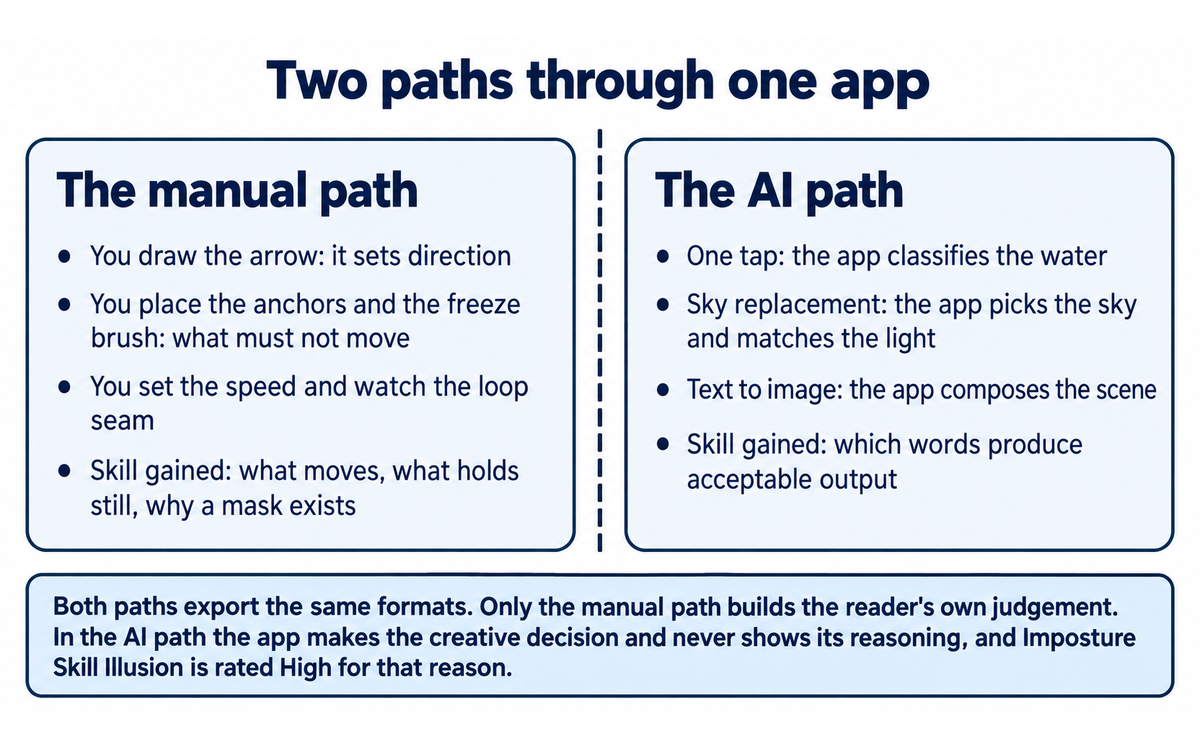
The AI-assisted pipeline. Three surfaces sit on top of that. A one-tap water animation analyses the image and places motion along what it reads as water. Sky replacement detects the sky region, replaces it with an animated sky from a library, and attempts to match the foreground lighting. A text-to-image generator produces a new image from a description, which enters the same animation pipeline as a photograph. The distinction that matters for a reader is directional: in the manual path the user makes the creative decision and the app executes it, and in the AI path the app makes the creative decision and the user accepts or rejects it.
Model and architecture, stated as far as the vendor describes it. Lightricks does not publish the technical architecture of the animation pipeline for this product. What the vendor's own privacy policy discloses is that the AI features involve third-party integrated artificial intelligence, that the avatar-generation path uses the Stable Diffusion neural network model, and that some processing runs on the device while other processing runs on what the vendor calls the Lightricks Cloud. Which of the two applies is stated in the policy as depending on the specific app, feature or service. No published model card, parameter count or benchmark accompanies the animation capability.
Outputs and formats. MP4 video, GIF, live photo formats, and a live wallpaper for the device. Resolution and duration depend on the tier: third-party reviews report free exports between six and sixty seconds at 1080p and higher-resolution exports behind the subscription, and the vendor's own listing copy advertises multiple formats and live wallpaper without publishing a resolution table. The spread between those published figures is treated as a finding in Section 9.
What it does not do. There is no timeline, no multi-clip editing, no audio track, no keyframe curve, no layer stack beyond the overlay system, no colour-management control, no export for a broadcast specification, and no desktop or web client. It produces one moving image per project and it does that well or it does nothing.
Pipeline type, in the template's terms: image-to-video with a user-drawn motion field, plus text-to-image as a feeder into the same pipeline. It is a hybrid, and the manual half is the half that defines the product.
Getting Started with Motionleap
This is a fifteen-minute first session. Do it on a photograph you own and do not care about, so that the first artefact is practice rather than a deliverable.
Install from the store for your device. On iOS, search Motionleap and confirm the developer is Lightricks Ltd. On Android, the package is com.lightricks.pixaloop. If the developer name is anything other than Lightricks, you have the wrong app.
Decline the subscription prompt for now. The app opens on an offer. The free tier is enough to complete this session, and Section 7c explains what the paid terms say before you commit to one.
Choose a photograph with one obvious candidate for motion and one obvious thing that must hold still. Water, foliage in wind, smoke, a curtain, drifting cloud. An image where nothing is clearly movable produces a confusing first result.
Open the Animation tool and draw one arrow. Direction only. Draw it over the part you want to move, along the axis the motion should take.
Pin the rest. Place anchor points on the static elements, then brush the freeze brush over anything a nearby arrow would otherwise drag. If the whole frame starts moving, you have not pinned enough.
Set the speed and preview the loop. Watch the seam where the clip restarts. If the motion jumps at the loop point, the motion is too fast or the path too long for the loop.
Export deliberately, and read what the app tells you. This is the step that will show you which tier you are on, and it is the reason this review's What Users Say section exists. If the export is blocked, you have met the gate rather than a watermark.
Then try the AI path once, on the same image. Use the one-tap water animation or a sky replacement and compare it to the version you drew by hand. The comparison is the most useful five minutes in the product, because it shows you where the app's judgement and yours disagree.
What to have ready before you start: a photograph you own, twenty minutes, and a decision about whether the output will be published. If it will be published and it shows people, a private interior or an identifiable place, read Section 7c before you export, not after.
Real Workflows
Each workflow below carries its own verification checklist. Run the checklist, do not assume it.
Workflow 1: Turn a still photograph into a short looping clip for a phone screen
Time: 10 to 20 minutes for a first attempt, 5 to 10 minutes once you know the controls. Goal: one moving image that holds attention for a second and a half and reads as motion rather than as a distortion.
Steps. Import the photograph. Identify the one element that should move and the one that must not. Draw a single arrow over the moving element along its natural axis. Pin the static element with anchors and brush the freeze edge where the two meet. Preview at half speed, then at full speed. Shorten the arrow if the motion travels farther than the loop can accommodate. Export as MP4 for social platforms, as a GIF where the destination does not autoplay video, or as a live photo or wallpaper where the destination is the device itself.
Verification checklist.
Watch the whole loop three times without looking away. Is there a visible jump at the seam?
Look at the boundary between the moving region and the frozen region at full resolution. Is there a visible smear, a stretched edge, or a region that has torn?
Check anything in the frame that carries meaning: text, a logo, a face, a sign. Motion over a letterform turns it into noise.
Confirm the resolution and duration the app actually gave you, rather than the resolution you assumed.
Confirm whether the file carries an overlay or a restriction before you publish it, and check the licence position on the source photograph if you did not take it.
Workflow 2: Use the AI path when you do not know what should move
Time: 3 to 8 minutes. Goal: a moving image from an image you cannot animate by hand, or from an idea with no image yet.
Steps. Open the one-tap water animation on an image that contains water, or the sky replacement on an image with a visible sky. Accept the app's choice and export. Separately, use the text-to-image generator with a description of the scene you want, then animate the result in the same session. The point of the workflow is to see what the app decides: which pixels it classified as water, which region it classified as sky, and whether the lighting it applied to your foreground is consistent with the sky it inserted.
Verification checklist.
Look for the classification boundary. Where the app thought water ended and land began, is there a hard line or a plausible edge?
In a sky replacement, ask whether the foreground illumination matches the new sky. A sunset behind a noon-lit foreground is the failure this feature produces.
For a text-to-image result, check it before you publish it: hands, text, architectural geometry and reflected light are where generated images fail, and a photographic-looking image is not a photograph.
Ask the disclosure question before publication. Section 7c covers why.
Workflow 3: Produce a teaching example of motion design for a class or a workshop
Time: 20 to 30 minutes to build, reusable afterwards. Goal: a demonstration that teaches the two-variable model of motion in a still: what moves, and what holds still.
Steps. Take one photograph and produce three versions of it. In the first, animate the obvious subject and freeze everything else. In the second, animate the background and freeze the subject, so the reader sees the frame move behind a static foreground. In the third, deliberately under-pin the image so that a region drags that should not, and show the class the smear. Put the three side by side. The third version is the one students remember, because seeing the failure mode teaches the anchor point faster than describing it does.
Verification checklist.
Confirm the three versions differ only in the motion decision and not in the crop, the speed or the export settings.
Confirm each version loops cleanly, including the deliberately wrong one, so that the class sees a correct failure rather than a broken file.
Note for each version which parts of the frame the app treated as foreground and which as background, because that reading is the depth estimate doing its work.
If the image is a real place or a real person, label the fabricated motion in the teaching material. A class that learns to fabricate motion without learning to label it has learned half the subject.
Strengths, Limits, and AI Imposture Risk
Strengths
The manual motion model is genuinely good, and it is the reason to use the product. Two primitives, direction and anchor, cover a surprising share of what a still image needs. Because the user draws the motion, the output is deterministic in intent even where it is imperfect in execution: the water goes where you drew the arrow. No generative model in this category gives you that authority.
The skill floor is near zero and the ceiling is not. A person who has never opened an animation tool can produce a looping cinemagraph in one session, and the same person can then spend an hour refining a path. Very few tools span that range.
It is genuinely cross platform and genuinely cheap to start. The same product on iOS, iPadOS, visionOS and Android, free to download, with no desktop requirement and no rendering queue.
The effect and overlay library is deep. Skies, weather, particles, camera moves and geometric motion, with a large library the vendor keeps expanding. A reader who needs one specific atmospheric effect is likely to find it.
The output formats meet the destinations. MP4 for platforms, GIF where autoplay fails, live photo and wallpaper for the device itself. The wallpaper export in particular has no good alternative on a phone.
Limits
The free tier is the product's central problem, and the vendor and its own reviewers disagree about what it contains. The vendor states in developer responses that the free tools can save any project for free. Multiple reviewers state that export is locked entirely. Section 7c and Section 9 quote both. Until the difference is resolved, treat the free tier as an evaluation mode rather than a production tier, and confirm the position on your own device and storefront before you plan around it.
Export is gated in a way that is unusual for the category. A watermark can be removed by paying once. An export gate cannot: it recurs. Reviewers report that a project built on premium features becomes unusable after a subscription lapses, which turns the subscription into a recurring dependency on work you have already made rather than a one-off tool purchase. A reader should understand that before subscribing, and should export their own copies in a durable format on the day they make them.
The price published on the store listings is a range rather than a price. The App Store lists eight separate "Unlimited access" purchase points from $3.99 to $59.99, Google Play reports a range from $0.99 to $199.99 per item, and third-party guides report monthly figures from $4.99 to $9.99 and one-time figures from $149.99 to $206.39. No single surface states what a new subscriber will be asked to pay today.
No independent measurement of the animation quality exists. No benchmark, no fidelity figure, no third-party comparison of the water animation or the sky replacement against a manual result, and no analyst assessment. Section 11 states exactly what that absence does to the Quality score and why it is the absence and not the quality that the score reflects.
Mobile only, with mobile precision. The brush lacks pressure sensitivity and feathering on several reviewer accounts, Apple Pencil behaviour is reported as laggy, the mask tool is reported as unusable outside animate mode, and the layer model is shallow. For layered compositing, frame-accurate control or a broadcast export, this is the wrong tool and no update has changed that.
Longevity of your own work is not guaranteed by the vendor's terms. The terms explicitly reserve the right to deactivate features, including free ones, and to move them behind a subscription. Your project depends on the vendor's current tier configuration continuing to exist, and your subscription depends on a company that reserves the right to terminate the agreement for convenience.
AI Imposture Risk
Time Illusion: Medium. The manual path saves real time against a desktop workflow, and the overhead is genuinely low: the interaction is drawing, not prompting, and the result appears immediately. The illusion lives in two places. First, an honest user iterates: a clean loop takes several attempts at the arrow length, the pin placement and the speed, and each attempt is another render. Second, and more seriously, the AI path is faster to run and slower to finish, because the user must inspect a classification the app made silently. The water animation that classified the wrong region costs a re-export; the sky replacement that mismatched the lighting costs a full redo. Evidence: reviewer reports of exports failing at zero per cent, of brush precision requiring manual zooming to prevent motion bleeding into unintended regions, and of projects that stop opening after a subscription ends.
Quantity Illusion: Medium. The product multiplies volume: one photograph, one arrow, one export, repeat. The illusion is that each of those exports is a finished asset. An animated still that reads as a distortion rather than as motion is worse than the still it came from, because it draws attention to the failure. The text-to-image path is where the trap is sharpest: a generated image that looks photographic at thumbnail size, animated and published, is a claim about the world that the reader will accept unless they are told otherwise. Evidence: the vendor's own product page presents the generator as a headline capability without a fidelity claim, and review commentary on the generator reports inconsistent visual output requiring prompt regeneration.
Skill Illusion: High. This is the trap that decides the review. The manual path teaches something real: what moves, what holds still, how a loop seam works, and why a mask exists. That is genuine transferable craft. The AI path teaches the opposite, and the app presents the two as equally creative: you press a button, the app decides that this is water and that is sky, and a moving image appears under your name. A user can spend an hour in the product and never learn to make the motion decision, while producing a portfolio of moving images. The mechanism is the app making the creative judgement invisibly and then attributing the result to the user, and there is no point in the workflow at which the app explains what it decided or why. The text-to-image path deepens it, because the user never learns composition, lighting or perspective; they learn which words produce acceptable output. Framework clause 5.2.3-a does not apply to this product, and it does not need to: the Skill Illusion here comes from the animation surface itself, not from a memory store, and the rating is High on the evidence of what the app decides without showing its reasoning.
Overall: Medium-High. One trap at High and two at Medium. The mitigation is stated in Section 8 and it is short: draw the motion yourself, and treat every AI-produced motion as a claim to be checked rather than a result to be accepted.
Framework v1.2 clause note
All three v1.2 clauses were assessed. All three return a null, and each null is a finding.
Clause 5.2.3-a, agent-authored procedural memory: null. Motionleap writes no skills, no memory store and no standing instructions on the user's behalf. It stores projects and account data, and it stores the AI models it builds from consented inputs under its own privacy policy, but neither is procedural memory about how the user works. There is no agent-authored artefact the user would later mistake for their own capability. The Skill Illusion rating of High is therefore reached from the animation surface itself and not through the clause, which is the correct route and not a substitute for one.
Clause 4.2-a, agent-mediated conversation: null. The product has no conversational surface. There is no text exchange presented in a person's own voice and no agent standing in for human contact. The text-to-image prompt box is a request field, not a conversation, and nothing the app produces is presented as something the user said. The Social Authenticity dimension below is scored on the fabrication question, which is a publishing decision about an image rather than an agent speaking for a person.
Clause 7.5, team-level rooms: null. Motionleap runs one pipeline in one execution on one device with one user. There is no shared channel, no second agent and no coordination surface. It is not a team-level room under any reading.
No clause requires a separate pedagogical follow-up on this tool.
Section 7c: Subscriptions, cancellation and your photographs, stated plainly
This section is a finding about contract terms and about a data flow, drawn from Lightricks' own documents. It changes no score, and it says so again at the end.
What the terms let Lightricks do with your photograph
The Terms of Use, last updated 7 December 2025, carry the licence over what you import in Schedule C. The operative text, quoted from the vendor's own page:
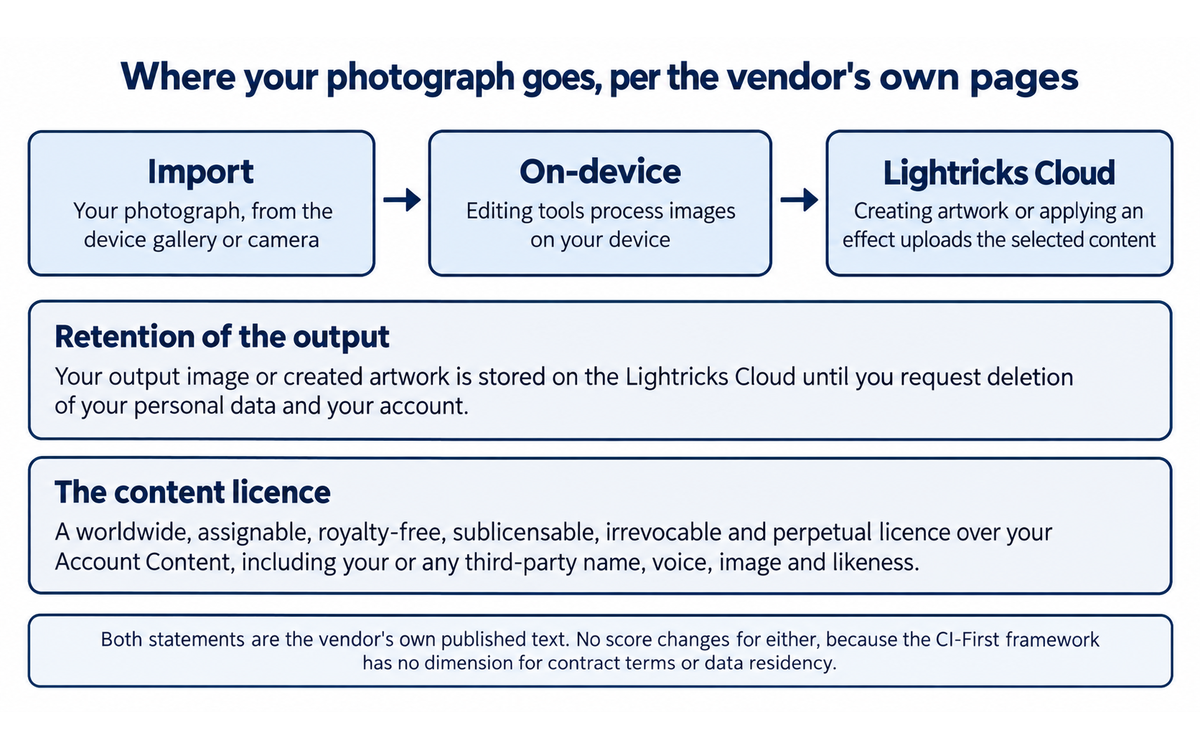
"Account Content License to Lightricks. You hereby grant Lightricks and all Lightricks Affiliates a worldwide, assignable, non-exclusive, royalty-free, fully-paid, sublicensable (through multiple tiers of sublicensees), irrevocable and perpetual license (the 'Account Content License'), in any media format and through any media channels, to store, access, process, distribute, host, translate, reproduce, edit, adapt, modify, republish, promote, publicly perform, publicly display, create derivative works of, and otherwise use your Account Content, including your or any third-party name, voice, image, likeness, and/or other identifying information as contained in your Account Content"
The purposes that licence is granted for are then listed, and one of them is this:
"to promote the Services and/or Lightricks"
The AI Terms, Schedule B, carry a second grant over user content shared on the Services, again in the vendor's words:
"You grant the Company and its subsidiaries, affiliates, and partners a worldwide, non-exclusive, fully-paid, royalty-free, irrevocable, sublicensable and transferable license to use, reproduce, distribute, prepare derivative works of and based upon, display, transmit, adapt, edit, modify, publicly display, publish, perform, sell, republish, promote, exhibit, and otherwise use, the User Content, in all media now known or hereafter developed, for any and all purposes"
The word to notice is the one that describes what you are licensing, and what it includes: "your or any third-party name, voice, image, likeness, and/or other identifying information". A photograph of a person carries that person's image and likeness, and a photograph of a private interior or an identifiable place carries identifying information. A reader who imports such a photograph into this app is granting a perpetual, irrevocable, sublicensable licence over the likeness of someone who is not party to the agreement and has not consented to it.
This is a standard consumer-app licence, it is not unique to Lightricks, and the section states no allegation against the company. It is a finding about what the user is agreeing to, and the decision it puts in front of the reader is a simple one: use images of consenting people or of no people, or decide consciously that this licence is acceptable for the images you import.
Where your photograph is processed
The privacy policy, last modified 22 October 2025, describes the editing tools in Table A. Two statements matter and they describe different steps:
"If you use our editing tools, images, photos and videos are processed on your device"
and then, for the same feature, at the point where artwork is created:
"When photos, videos or images are used for creating artwork or adding effects to your creations, the selected content is uploaded to the Lightricks Cloud."
The output is then retained there until you act:
"your output image or other created artwork will be stored on our Lightricks Cloud until you request us to delete your Personal Data and your account"
So the position is that the local on-device processing described first is not where the photo ends. Any creation of artwork or application of an effect uploads the selected content to the vendor's cloud, and the resulting image and output artwork stay there until the user requests deletion of their personal data and their account. That is a defensible engineering design and it is disclosed. It is also the fact a reader needs before importing a photograph of a person, and it is not visible anywhere in the app's user interface.
Two adjacent statements are worth quoting because they show the vendor distinguishing carefully between data sets. On face data, from the same table:
"We do not collect or store Face Data on our servers or share it with third parties."
And on AI training, from Table B:
"Subject to your consent, we will use the data sets listed under this Table B for AI training and machine learning purposes"
with the withdrawal route stated as:
"You have the right to withdraw your consent at any time, as set forth under Section 8 Your Rights, below, or through the App's Privacy Settings."
and a retention limit:
"AI Training Data will be permanently deleted within 2 years after we process them for training purposes, unless we are legally required to maintain the data for a longer period."
Read together, the AI-training position is consent-based, withdrawable in the app, and time-limited to two years, while the content licence in the terms is irrevocable and perpetual and covers likeness. The two are not in conflict, because they govern different things: one governs training data, the other governs the content you make. A reader who reads only one of the two documents will get the wrong picture of the other, which is why both are quoted here.
The Google Play data safety declaration for the app adds the platform-level view: the listing states that the app may share crash logs with third parties for analytics, may collect location, personal information and four further data types, that data is encrypted in transit, and that a user can request deletion. The policy names the analytics and tracking software development kits the app integrates, including AppsFlyer, AppLovin, Facebook, Firebase, TikTok, Snapchat and Braze.
What you are agreeing to when you subscribe
The subscription clauses are where a consumer is most exposed and where the terms are least forgiving. On fees, the operative sentence:
"Except as stated in those policies, all Fees are non-refundable and non-cancellable."
On cancellation:
"You can cancel your Paid Subscription at any time, and you will continue to have access to the Service through the end of the billing period ... payments are non-refundable and we do not provide refunds or credits for any partial Paid Subscription periods or unused Services."
On what the vendor may change after you have paid:
"Lightricks reserves the right, from time to time, for a valid reason, and as further detailed hereafter, at its sole discretion, to: (a) change any Features and/or other aspects (such as the design, layout, or availability) of the Services; (b) deactivate any Features, including without limitation deactivating any free Features and offering them only as part of a Paid Subscription or subject to additional payment (and vice versa)"
On termination by the company:
"Lightricks reserves the right, without notice and without liability, to suspend and/or terminate this Agreement at any time, whether for cause (for example if you breach this Agreement) or for convenience (for example if Lightricks is discontinuing Services)."
And on what happens to your project when the subscription ends, the terms are silent and the vendor's own reviewers are not. The reviewer evidence in Section 9 reports that projects built with premium features stop opening after a subscription lapses, which is consistent with a feature-gated renderer and is not addressed by any clause the vendor publishes.
Two further terms belong in front of a reader, stated without comment. Disputes are governed by the laws of the State of New York and are subject to mandatory arbitration under Schedule A, with an opt-out available to a user who has not previously agreed to arbitration and with the arbitration clause expressly not binding on residents of the European Union; the arbitration schedule includes a jury-trial waiver and a class-action waiver. Cancellation for subscriptions bought through the stores is handled by the store's own refund policy rather than by the vendor's, which is why the practical cancellation route is the device's subscription settings rather than any page on the Lightricks site.
What this section does not do
It states no allegation about Lightricks. Every quotation above is the vendor's own published text, on pages that are linked in Section 16 and still live. It is not legal advice, it does not advise against using the app, and it does not assert that any of these terms has been applied in a way a user did not expect. It states what the documents say, quotes the operative sentences rather than paraphrasing them, and names the decision each one puts in front of a reader: which images to import, whether to consent to training, and whether a recurring charge with a perpetual content licence suits the work you have in mind. It also makes one connection that is practical rather than legal: the licence and the upload path both reach the user's personal photographs, and the workflow where that matters most, an image of an identifiable person, is the workflow a social creator is most likely to run.
No score changed in this section, and none could. The CI-First Benefit Score measures benefit delivered to the human, net of overhead, across Time, Quantity, Quality and Skill. It has no dimension for contract terms, licensing or data residency, which is correct as methodology and a blind spot as a review. A reader who sees a score unchanged next to a terms finding should read it as the framework being honest about what it measures, not as the finding being discounted. The Humics Protection badge and the Imposture ratings are likewise unaffected, because they measure what the tool does to a human's creativity, judgement and authenticity rather than what the supplier's contract permits.
U365 Co-Intelligence Rating
CI-First Profile
Primary: Co-Creator and Thought Partner (level 1). The defining interaction of this product is a human deciding what moves and drawing it, with the machine rendering the decision. The creative judgement is entirely the user's in the manual path, and the tool is a skilled hand rather than a partner with an opinion. Level 1 is the profile that describes a tool which executes a human's creative intent at higher fidelity than the human could alone.
Secondary: Co-Worker and Assistant (level 2). The AI-assisted surfaces invert the relationship. The app classifies the scene, proposes the motion, replaces the sky and generates an image from a description, and the user accepts or rejects. That is delegation with review, which is level 2.
The distinction is the most useful sentence in this review for a reader deciding how to use the app: the same product supports both, the profile depends on which path you take, and only one of the two builds your capability.
Collaboration Mode
Centaur. The mode follows the framework's own rule rather than how the interaction feels: Section 7.2 assigns Centaur when the tool's Imposture Risk is Medium or High, because Centaur is the safer mode, and this tool is Medium-High with Skill Illusion at High. The division of labour the mode prescribes is also the one the product actually needs: the human owns the creative decision, which is what moves and what holds still, and the tool owns the render. Every AI-produced motion goes to the human for review before publication. Cyborg mode, in which the user prompts and refines in a fast loop, would put the creative decision inside the tool's iteration, and this is exactly the tool where that produces an unowned artefact.
CI-First Benefit Score
Dimension | Score | What drives it |
Time | 6 | Moderate savings against a desktop cinemagraph workflow, and genuinely low overhead because the interaction is drawing rather than prompting. Held below 7 by iteration cycles on the loop and the pins, by export failures reported at zero per cent, and by the re-inspection the AI paths require |
Quantity | 5 | Moderate increase: one photograph becomes one clip in minutes, and the library of effects means several variants of the same image are cheap. Held at 5 because the usable volume is bounded by the images worth animating, which is a small share of any camera roll |
Quality | 5 | Moderate and consistent improvement in the common case, capped by an absence rather than by a weakness. There is no independent measurement of the animation quality, no published fidelity figure, and no benchmark of this product or this category by any third party. Section 11 states which of the two it is |
Knowledge and Skill | 4 | Marginal and uneven. The manual path teaches a real transferable idea, what moves and what holds still, which is worth more than 4. The AI path teaches nothing and produces the appearance of competence, which is worth less than 4. The average lands at 4 with the conservatism the framework requires on Skill |
CI-First Benefit Score | 5.0 | (6 + 5 + 5 + 4) / 4 |
Band | CI-First Positive | Clear net benefit for most users, worth adopting with disciplined usage |
Why this score is not higher, and why it is not lower
It is not higher because two of the four dimensions are held down by things the product could fix and has not. Quality is capped by the total absence of independent measurement, and the honest position on a tool whose entire value is the visual plausibility of its output is that nobody outside the vendor has measured whether the output is plausible. Skill sits at 4 because the two halves of the product pull in opposite directions and the framework requires the conservative reading. And Time is held below Strong by the reviewer reports of export failure and subscription-related lockouts, which are pure overhead imposed on the user.
It is not lower because the core capability is real and the framework's own test is met. A user with a photograph and an intention gets a moving image in minutes, the manual controls give them genuine authority over the result, and the product spans a skill range from a total beginner to someone refining a path for an hour. A CI-First Benefit Score of 5.0 is a recommendation with conditions, and the conditions are the free-tier position and the terms in Section 7c rather than anything about the animation itself.
Humics Protection Badge
Humics dimension | Score | Why |
Creativity | +1 | The manual path hands the creative decision to the user and gives them a fast feedback loop for exploring it, which is what a creativity tool should do. Drawing a motion path is a creative act, and the app makes it cheap to try, discard and try again |
Critical Thinking | 0 | Neutral and genuinely two-sided. The manual path rewards thinking about what should move and why, and the loop seam forces a judgement about what reads as motion. The AI path removes that thinking entirely by making the classification invisible, which is the opposite. A tool that both teaches and replaces the same judgement scores as neutral |
Social Authenticity | 0 | Neutral, and this is the closest call in the review. An animated photograph of a place, given weather and motion it never had, is a fabricated representation that a viewer will read as real, and the app applies it in one tap with no disclosure step. Against that, the app is widely and openly used as an effects tool, the social convention on the platforms where it is used is that animated stills are edited, and nothing in the product presents the result as documentary. The score is neutral rather than negative because the deception is a publishing choice the user makes, not a property the tool imposes |
Humics Protection Score | +1 | Humics-Neutral |
Superhuman Usage Guidance
When to invite the tool. When you have a photograph that matters to an audience and motion is what makes it land. When you want to teach or learn the two-variable model of motion in a still. When you need an effect, weather or light, that would take a desktop session to build and you have ten minutes. When the destination is a phone screen and the format is MP4, GIF, live photo or wallpaper.
When to keep the tool out. When the photograph shows a person, a private interior or an identifiable place and you have not decided whether you accept the licence in Section 7c. When the image is evidence of anything: a site condition, a product defect, a location at a time. When the output needs a specified resolution, codec or duration for a professional delivery. When the work is part of a team pipeline, because there is no team surface to manage it with. And when you want to be able to reopen and re-edit the project years later without depending on a subscription that is still running.
U365 method integration. This is a production tool rather than a method tool. Where it connects is at the boundary: decide in your own record what the animation is for and what it must not imply before you open the app, keep the original photograph and the exported clip in a place you own rather than in the app's project store, and if the output will be published, write the one-line disclosure at the same time you write the caption rather than deciding later whether one is needed. The UP-Context method is the natural home for that boundary note, and Section 11 carries a prompt pack for it.
Over-delegation warning. The failure mode of this product is not that it takes over your work. It is that it takes over one decision, quietly, every time you press the AI button, and the decision it takes over is the creative one. A user who only ever uses the one-tap paths will build a library of moving images and no understanding of why any of them work, and will be unable to fix one when it fails. The corrective is mechanical and it takes seconds: draw the motion yourself first, then run the AI version and compare. You will learn more from the difference than from either result.
What Users Say
Motionleap has no business-software review corpus at all. It has something different and, for this product, more honest: two very large app store review bodies written by the people who actually use it, one on each platform, with developer responses attached to the negative reviews. That is the primary community evidence, and everything below comes from those two records plus the support-complaint compilations that mirror them.
Aggregate Rating Table
Source | Rating | Volume | Notes |
Apple App Store, United States listing, iOS | 4.8 out of 5 | 117,332 ratings on the Apple catalogue record, 117K on the listing | The large figure. Read alongside the next row, not instead of it |
Apple App Store, regional storefronts | 4.8 out of 5 | 2.1k ratings on one regional storefront read | Apple computes the rating per storefront, so a reader outside the United States meets a much smaller sample carrying the same average |
Google Play, United States storefront | 4.0 out of 5 | 343,000 reviews on one read of the listing, 338,000 reported earlier in the same session on the same listing | The same page reported two different counts within one research pass. Both are stated because the spread is the finding: the Play count moves |
Google Play, other storefronts | 4.2 out of 5 | 338,000 reviews reported for one non-United States storefront | A regional read of the same app carries a different average from the United States read. There is one product and more than one published rating |
Google Play, installs | Not applicable | 50,000,000 or more | The install figure, for scale rather than sentiment |
Google Play, in-app purchase range as declared by the listing | Not applicable | $0.99 to $199.99 per item | The platform's own statement of the app's purchase range |
G2 | No reviews found on G2 | None | No listing for this product was found |
Capterra | No reviews found on Capterra | None | No listing found |
GetApp | No reviews found on GetApp | None | No listing found |
Trustpilot | No listing found for this product | None | Trustpilot searches under the name return a different product, Motion, which is unrelated |
Product Hunt | No listing found | None | No launch entry was found |
TopBusinessSoftware | 5.0 out of 5 | 1 user review | A single review, reported for completeness and not treated as a measurement |
Tenereteam, an aggregator page carrying app reviews | 4.6 out of 5 | 11 reviews | An aggregator with eleven reviews behind it. Not treated as an independent measurement |
JustUseApp, which compiles the app store reviews into a complaint list | Not applicable | 27 most-reported problems | The compilation is useful for what people complain about. It is a mirror of the store reviews, not a separate sample |
The decisive fact about this table is that the two store averages disagree by eight tenths of a point on the same product, and that the volume behind them differs by a factor of three. The Apple audience rates the app 4.8. The Android audience rates it 4.0. That gap is the single most useful number in this section, and the complaints below explain it.
What Users Praise
The animation tools, from people who use them seriously. The most detailed positive reviews are the long ones, and they consistently describe the same thing: arrows, pins, a freeze brush, a large effect library, and a workflow that a beginner can finish. One reviewer who had used the vendor's photo editors for three years wrote that the animation editor delivered, calling the interface intuitive and noting the breadth of the light effects, camera movements and overlays. Another described the app as a fun way to take social posts up a level, and named the loop and export behaviour as the reason for their rating.
The effect and overlay library. Weather, particles, skies, camera moves and geometric motion recur in positive reviews. Users report that the library has grown over the years they have used the app, which matters for a tool whose replay value depends on it.
The low skill floor. The praise from self-described beginners is specific: people who had never tried an animation app because the category looked technical found this one usable. That is the product's core claim working as advertised.
Restoring a purchase across devices. One detailed review describes failing to unlock pro features on a second device with the same Apple account, and then finding the "already paid?" link under the purchase button, which resolved it. The developer response confirms the mechanism. Worth knowing: it exists, and it is not obvious.
What Users Complain About
The free tier versus what you can save. This is the dominant complaint by a wide margin. The developer states its position plainly in a response to a one-star review: "Happy to explain, you don't have to pay to use the app! It is free to download and has many features you can use however you like. There are also Pro features that require making a purchase, but that's completely optional. If you feel Pro isn't for you, stick to the free tools and you will be able to save any Project - for free!" Reviewers on the other side state the opposite in equally plain terms: "Now, most of that is gone AND you have to pay to save/export ANYTHING", and "the fact that you have to pay a monthly/yearly fee to export anything is beyond ridiculous". A third reviewer, who liked the free version of the app under its former name enough to subscribe, describes the paid features working on a phone but not on an iPad under the same account, and then being unable to export at a higher quality or in an unsupported format. The company and its paying users are describing different products, and a prospective user cannot tell from either statement which one they will get.
The price, described as out of proportion to the product. One reviewer put the objection precisely: they would pay a one-time fee of a dollar or two and recommend the app to friends, but not a monthly subscription, and they predicted users would play with the limited version for a week and stop. Another reports being shown a six-dollar-a-month pro pack, then discovering that the app as demonstrated in a store had every filter unlocked and was therefore a demonstration rather than the product. The subscription model, not the animation, is what these reviews reject.
Subscription and billing problems, repeatedly. A support complaint compilation built from the app's own reviews records, among others: a user who subscribed by mistake to the annual plan and asked for a refund after cancelling; a user charged twice despite a failed transaction; a user who stopped using the app a year earlier and was still being charged while unable to cancel; a user who found charges of fifteen to forty dollars a month over years against an expectation of twenty dollars a year, including two charges on consecutive days; and a user who intended one month and was charged a year. These are individual accounts, reported by the users themselves, and they are consistent enough across years to state as a pattern rather than as isolated error.
Export failing. The most-repeated technical complaint in the support compilation is an export that sits at zero per cent and then cancels, reported by more than one user, including users who had paid. This is the complaint that most directly affects a working user: the artefact is finished and cannot be retrieved.
Precision, masking and the tools as they were reduced. Several reviewers describe the animation controls as having been pared down from an earlier version. An artist using an iPad Pro with an Apple Pencil reported serious lag, a path that does not follow the drawn direction, inadequate masking, no pressure sensitivity, no feathering and no way to add many instances of the same overlay element. A subscriber reported that the mask brush and eraser are inoperable outside animate mode. One reviewer told other readers to use CapCut instead, and noted that a specific overlay they had paid for appears there too.
Subscription-gated access to work already made. One reviewer, who had paid for a year as a child and then cancelled, found that animations made with premium options would not load after the subscription ended, and specifically that live-photo animations required an active subscription to view. The developer response says this does not sound right and redirects to support. It is the single complaint with the largest implication for a professional reader: if the artefact you made depends on the subscription continuing, it is not your artefact in the sense that matters.
The generated images. One review of the text-to-image feature is withering and worth quoting for its specificity, describing every output as uncanny in a particular way and every prompt returning something the reviewer found unsettling regardless of wording. Independent commentary points the same way more mildly: one 2026 review reports that the AI text-to-image feature frequently requires prompt regeneration because outputs are inconsistent. The generator is a secondary surface for this product and its quality is reported as the weakest part of it.
Sentiment Summary
The aggregate is split by platform and the split is explained by the same cause. Apple users rate the app 4.8 and Android users rate it 4.0, and the complaints that dominate the Android body, and the negative end of the Apple body, are about money rather than about animation: what the subscription costs, what it unlocks, how to leave it, and what happens to your work when you do. The animation capability itself is praised across both stores, including by reviewers who then refuse to pay for it. Read together, the store reviews say something the vendor's own marketing does not: this is a well-made tool with a commercial model its users actively resent, and the resentment is strongest among the users who were most attached to the app.
U365 Editorial Note
Two things for a reader to take from this section. First, treat the free tier as unresolved. The vendor says the free tools can be saved for free and a large number of paying users say export is gated, and a review that picks one side would be asserting something it cannot verify. Until you have confirmed it on your own device and storefront, plan your use of the free tier as an evaluation rather than as production, and confirm the export position in the first five minutes rather than after you have built something. Second, when you do pay, export your own copies immediately in a durable format and keep them outside the app's project store. The complaint about work that will not open after a subscription ends is the one that costs a professional reader the most, and the fix takes ten seconds on the day you make the asset.
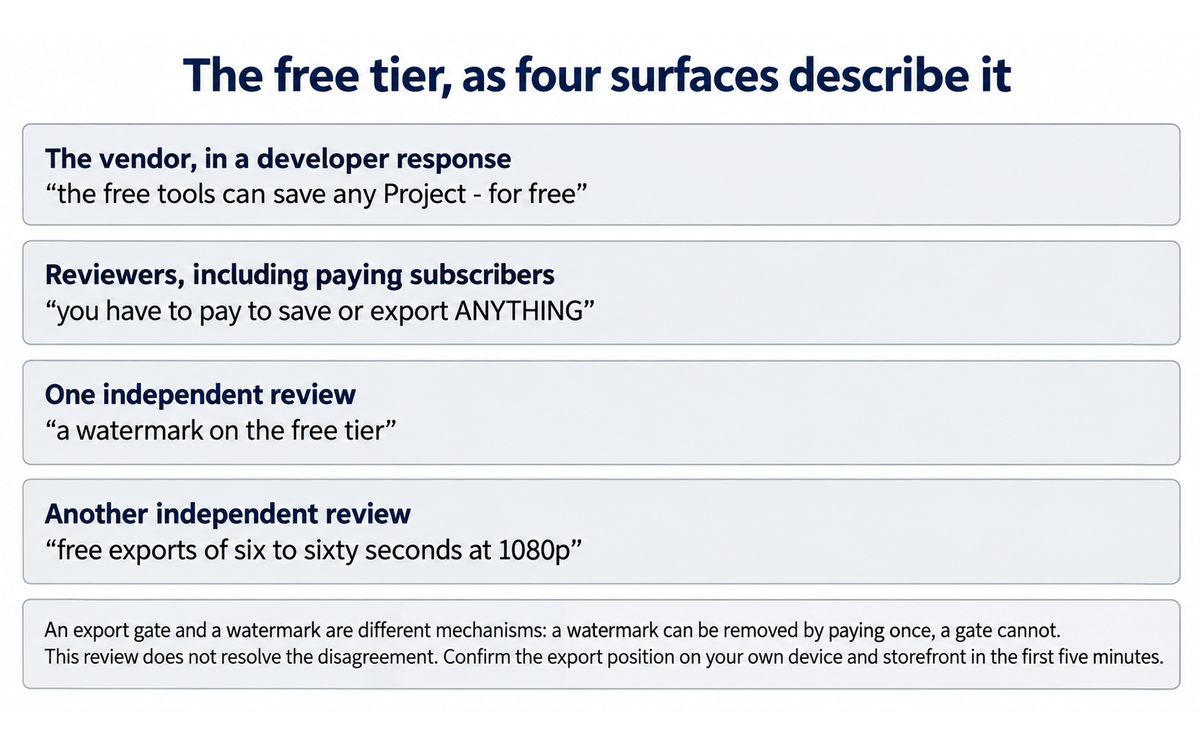
Comparison and Alternatives
Alternative | "Choose the alternative if..." | "Choose Motionleap if..." |
CapCut (https://www.capcut.com/) | You want one free app that edits video, animates a photo and carries a large effect and overlay library, and you are not attached to drawing the motion yourself. CapCut is the alternative named by a paying Motionleap reviewer in the app's own review corpus, who pointed out that a specific overlay they had subscribed for appears there as well. Its strength is breadth: a timeline, templates, effects and overlays in one free product, with a paid tier for the deeper features | You want the motion to be yours. CapCut gives you a template or an effect and a timeline to place it in; Motionleap gives you an arrow and an anchor point, which is a different relationship to the result. If the thing you cannot get elsewhere is a cinemagraph where you decided what moves, the template route will not produce it |
Runway (https://runwayml.com/) | You want a generative model to produce the motion, you work on a desktop or in a browser, and the clip is part of a production pipeline rather than a phone post. Runway's image-to-video path takes your still and a prompt and returns a synthetic clip, with the control, resolution and output options a professional workflow needs. One 2026 comparison of photo-to-video tools reports the free tier carries a watermark, the maximum clip is around ten seconds on the tier compared, and native audio is absent | You want determinism and you want it on a phone. Runway's model decides what moves and can invent elements that were never in the photograph; Motionleap moves only what you drew, and the failure mode is a smear you can see rather than a detail you did not ask for. Runway costs credits and a prompt iteration loop; Motionleap costs minutes and a drawn line |
Photoleap, by the same developer (https://www.lightricks.com/) | You want AI image generation and editing as the primary activity and animation as one feature among many. The same company sells it, it is the sibling product in the Creative Kit, and it carries the generative surfaces that Motionleap treats as secondary. A reader already inside Lightricks' pricing should compare the two before subscribing to either, because they are separate subscriptions | Animation itself is the job. Motionleap is the product in this family built around motion, and its two-primitive motion model is the reason to pick it over a general editor with an animation feature bolted on |
Google Photos, with photo-to-video generation in the Gemini app (https://photos.google.com/) | You want a moving image with no work at all, from an app you already have, and you accept a short generated clip with no motion control. One 2026 comparison reports daily rate-limited generations and a clip of around six seconds, with no watermark and audio now optional | You need control, you need a specific format such as a GIF or a live wallpaper, or you need the clip to loop cleanly. The generated route gives you an interpretation of your photograph; Motionleap gives you an execution of your instruction |
After Effects or Photoshop on a desktop (https://www.adobe.com/products/aftereffects.html) | You need frame-level control, layered compositing, a specified codec and resolution, or you are producing several assets under a brand standard. Puppet Pin, displacement mapping, keyframe curves and layer masks remain the reference implementation of this effect and nothing on a phone replaces them | You do not have the desktop tool, the licence, or the hours. A clean cinemagraph from an After Effects operator takes a professional an hour or more for a first attempt and requires knowledge of masking and loops that most people do not have. Motionleap produces a version of the same idea in ten minutes on a device you already own |
Where Motionleap is clearly better. Two things, and both are the manual motion model. First, the authority it gives a beginner over what moves: an arrow and an anchor point are the smallest possible expression of a motion design decision, and no generative competitor offers it, because a generative model decides for you. Second, the format reach on a phone: MP4, GIF, live photo and device wallpaper, from one app, with no desktop step. The live wallpaper export in particular has no real alternative.
Where Motionleap is clearly worse. The commercial arrangement, and it is not close. A reader can get a broader free editing and effects tool in CapCut, a stronger generative engine in Runway, and a no-work animated clip from an app already on their phone. Against all of them, Motionleap charges more for less surface area and gates the artefact itself rather than a feature. What the reader is paying for is the motion model and the platform reach, and a reader who does not specifically need those has no reason to pay for this app. On top of that sits the absence this review keeps returning to: nobody outside the vendor has measured the quality of what it produces.
Verdict and Next Steps
Who should adopt it: A creator, educator or student who needs motion inside a photograph that already exists, on a phone, without a desktop pipeline or an animation skill. The tool fits a person whose constraint is time and device rather than budget or precision, and who will draw the motion rather than accept the app's suggestion.
When: The evaluation can start now, on the free tier, and it takes fifteen minutes. Before adopting it for anything you intend to publish, settle three things. First, confirm what your storefront's free tier actually lets you export, because the vendor and its paying users disagree and the answer decides whether the free tier is a tool or a demonstration. Second, decide whether you accept the licence in Section 7c for the photographs you intend to import, which matters most if they show people. Third, if you subscribe, export your own copies of everything you make in a durable format on the day you make it. Subscription is a reasonable decision at the low end of the published range; subscription with your work held inside the app is not.
For what: The primary task is a short looping clip from a still photograph for a phone screen, in seconds rather than minutes, with the motion decided by you. The secondary tasks are teaching the motion-design idea, applying an atmospheric effect or a sky quickly, and producing a live wallpaper. The task to avoid is using the AI path as the default, because that is where the product stops teaching you anything and starts producing artefacts you cannot defend.
UP-Context prompt pack
These three prompts are written for use outside the app, in your own working record, because the app itself has no promptable surface beyond the text-to-image field. They are the boundary notes that keep a fast tool honest. Replace the bracketed fields with your own context. Each is written to be copied as it stands.
1. The boundary note, written before the app is opened
Context: The photograph is [what it shows]. It will be published on [channel] on [date]. It shows [people, a private interior, an identifiable place / none of these]. What the image must not imply is [the one thing]. The licence position on the source photograph is [I took it / licensed / unclear].
Role: AI as a publication-boundary adviser working to a rule I already hold.
Profile: Act as a Co-Creator and Thought Partner. I own the motion decision and the disclosure decision; you state the boundary back to me.
Task: State what I am allowed to animate, what must stay still for the image to remain honest, and what the caption must say so that a viewer is not misled about the weather, the light or the movement. Name the one thing in this frame that a reader could take as fact and that the animation would make false.
Constraints: No motion over text, faces, logos or anything carrying meaning. No weather or light that contradicts the season in the frame. If a disclosure line is needed, write it now rather than deciding later. Where the source photograph is one I did not take, say what has to be established before it is imported.
Output format: Three lines for what moves, what stays still and the caption line, then the one detail needing a check before this is published.
Memory: this app saves projects on the device and writes no standing instruction of its own, so this boundary note belongs in my own working record rather than in the application.
UP-Context verification: state what you checked, what you could not check, and what a human must decide before this is used.
2. The comparison of the drawn version against the app's version
Context: I drew the motion myself and exported version A. I then ran the app's one-tap path on the same image and exported version B. Both files are in front of me and the destination is [channel] at [size].
Role: AI as an output auditor working from the two files rather than from the feature's description.
Profile: Act as an Analyst and Tester, auditing a decision the app made without showing its reasoning.
Task: Describe where the two differ. Name specifically what the app classified as movable that I did not, and what I classified as movable that it did not. Then state which of the two I can explain without the app open, because that is the one I can defend if it is questioned.
Constraints: Describe what is visible in the two files rather than what the feature claims to do. Where the app inserted a sky or applied an effect, say whether the foreground illumination is consistent with it. If you cannot tell from the export, say so and name what you would need.
Output format: Two short lists of differences, one sentence naming the decision the app made that I would have made differently, and the defence line for the version I keep.
Memory: this app records the decision it made only as the rendered file, so the comparison belongs in my own record and not in the project store, which I lose when a subscription ends.
UP-Context verification: state what you checked, what you could not check, and what a human must decide before this is used.
3. The asset note, written at export rather than later
Context: I made [n] assets in this session on [date]. They live in the app's project store and depend on [free tier / active subscription]. The tier and the export position I actually met were [what the app allowed]. What the terms let the vendor do with the source image is [what I read].
Role: AI as a rights and record keeper for my own artefacts.
Profile: Act as the owner of these artefacts rather than as a renter of them.
Task: List every asset, its export format and its confirmed resolution, and where my own copy outside the app is kept. Then state, for each asset, whether it depends on the subscription continuing in order to open, and which of them contain a fabricated motion that needs a caption.
Constraints: No asset counts as finished until my copy exists in a durable format and in a location the vendor does not control. Do not record a resolution I did not confirm on the file. Do not state a rights position the terms do not support, and distinguish a licence to use something from ownership of it.
Output format: A table of asset, format, confirmed resolution, my copy's location, subscription dependency, and caption needed, then the one asset I should export again before I close the app.
Memory: this app holds the project and I keep the decision, so the approved version of this note belongs in my own record rather than in the app.
UP-Context verification: state what you checked, what you could not check, and what a human must decide before this is used.
Related U365 content:
The INSIDE Tools Review of ElevenLabs, for the other consumer-facing creative case in this series where the licence over what you upload is the finding that matters most, and where the Humics badge rests on the cloning surface rather than the conversational one.
The INSIDE Tools Review of Rabbit OS3, for the case where a vendor's own contract is the most useful document in the release and where quoting the contract against the launch copy is the method.
The INSIDE Tools Review of Genmo Mochi 1, for the open-weights alternative to every hosted generative surface named in Section 10, and for what a reader gives up and gains by owning the model instead of renting the app.
The INSIDE Tools Review of Klarent, for the enterprise contrast: a tool sold on a signed contract with a documented exit, against a consumer app whose artefact depends on a subscription continuing.
Browse the published U365 Tools Reviews index at https://www.university-365.com/tools
Working the thinking in U.Copilot before and after the app
U.Copilot is the front door to the U365 tool library, available at https://www.university-365.com/ucopilot. Motionleap has no integration surface of its own, so the honest use is to do the thinking in U.Copilot before and after the app.
Where the score sits beside the risk. This tool scores 5.0 out of 10, CI-First Positive, and its AI Imposture Risk is Medium-High with Skill Illusion High, Time Illusion Medium and Quantity Illusion Medium. The trap at High is the one a workflow has to answer, because a reader who meets only the overall level does not know which of the three is High. Skill Illusion is the trap the AI paths create, and the corrective is the comparison exercise in the second prompt pack.
What to ask U.Copilot to do: describe the photograph you intend to animate and ask it to name what should move, what should hold still, and what the image could imply that you do not intend. Ask it to write the disclosure line for the caption if the animation fabricates weather, light or movement in a real place. Ask it to list the formats you need for each destination so you export once rather than four times. And ask it to write the three asset notes from the prompt pack above, so the boundary you set is a record rather than a memory.
U.Copilot prompt example:
Design a CI-First workflow for animating [photograph, described] with Motionleap. Include: what should move and what must stay still, and why; the one thing the image must not imply; a caption disclosure line if the animation fabricates weather or movement in a real place; the export format and resolution needed for each destination, named; and an asset note that records where my own copy of each export is kept outside the app. Tell me which parts of this I must decide myself and which parts a drawing tool cannot decide for me, and start with the disclosure decision, because that is the one a drawing tool cannot make.
Where the decisions live in your own working record
LIPS Digital Second Brain: the boundary note, the comparison of your drawn version against the app's proposed version, and the asset record all belong in your LIPS under your Projects category. The app holds the project; LIPS holds the decision. When the subscription ends, the decision record is the part you keep.
The fields worth keeping for a Motionleap engagement: the boundary note in your own words together with the one thing the image must not imply; whether the motion was drawn or proposed by the app; the export format and the confirmed resolution; the licence position on the source photograph; the caption line where a fabricated motion is published; and where your own copy lives. The field most likely to be omitted is the licence position on the source photograph, and it is the one that decides what an institution may do with the result.
ULM routines: primarily Career and Finance, where the case is a content capability you can execute on a phone in minutes, and Quality of Life, where the case is the pleasure of making something rather than the productivity. Character and Emotions is touched in one specific way: publishing a fabricated weather or light condition in a real photograph and labelling it, or not, is a disclosure habit rather than a feature setting. Weak fit for Body and Health, no fit for Social and Love Relationships, and nothing in the product bears on Spirit and Mind.
My Successful Life: put the boundary note in the same place as your other pre-publication checks, so the animation decision is made before the tool is open rather than after the export. The trigger to watch is the AI button: every press of it is a creative decision made by the app, and if your routine has no place to review that decision, it will not be reviewed.
Microsoft 365: there is no integration, and this is worth stating plainly rather than filling the space. Motionleap is a phone app with no desktop client, no account a team can administer, no Microsoft Entra ID sign-in and no data path into OneDrive, SharePoint, Teams or the Microsoft 365 tenant. The practical pattern for a Microsoft-centred team is to treat the app as a personal production step: produce the clip, move the exported file into OneDrive or SharePoint yourself, and keep the boundary note in OneNote or in your LIPS record alongside it. Nothing in the product supports a governed workflow, and a team that needs one should read Section 10 instead.
Migration Path
Not applicable. Motionleap is an Active tool and this review does not recommend a migration away from it. The heading is carried so the review structure is complete, and it states plainly that no migration plan is built here.
A reader who decides the commercial arrangement in Section 7c is not for them should read Section 10 rather than this section. The alternatives there are live products, not migration targets from a retired tool.
U365's Recommendations to Learn More
Resources on Motionleap
Dedicated Motionleap channels
The Google Play listing, which carries the vendor's own feature summary, the data safety declaration and the largest review corpus: https://play.google.com/store/apps/details?id=com.lightricks.pixaloop
The App Store listing under the Motionleap: 3D Photo Animator title: https://apps.apple.com/us/app/motionleap-3d-photo-animator/id1381206010
The App Store listing under the Motionleap: AI Animate Photo title, which is the same product on a different storefront: https://apps.apple.com/us/app/motionleap-ai-animate-photo/id1381206010
Lightricks on X, the company account: https://x.com/Lightricks
The Lightricks product index, which lists the whole Creative Kit family and is where the sibling products in Section 10 live: https://www.lightricks.com/
The official Motionleap app icon, as the App Store publishes it for identifier 1381206010

The icon above is the vendor's own asset, served from the App Store listing record for this product, so that the illustration in this review is a genuine Motionleap asset rather than a generic graphic. It carries no implied claim about output quality.
Video tutorials
Two walkthroughs are listed, and both were confirmed as live and playable on 2026-09-25. Both are third-party tutorials rather than vendor material, which is what a reader needs for this product: the vendor does not run a Motionleap tutorial channel, and the app's own behaviour is best seen being used rather than described.
HOW TO ANIMATE YOUR PICTURES WITH MOTIONLEAP, a complete app walkthrough by Justine Lamer. The fullest third-party tour of the app's controls, including the arrow and anchor workflow. Watch page: https://www.youtube.com/watch?v=Gx6AtFvk5V8
How to use Pixaloop, by Phillip Twyford. Recorded under the app's former name, which is why it is worth listing: it shows the controls as they were before several reviewers reported them pared down, and it is the closest thing available to a before-and-after of the tool's development. Watch page: https://www.youtube.com/watch?v=gZcZJLJkrs8
Watch these for what the interface looks like and where the controls sit, not as evidence about output quality. They are third-party demonstrations on chosen images, and no quality claim in this review rests on them.
Written tutorials and reference material
The vendor's Terms of Use, read for Schedule C on the Account Content License and Schedule B on the AI terms, both quoted in Section 7c: https://static.lightricks.com/legal/terms-of-use.html
The vendor's Privacy Policy, read for Table A on editing tools and cloud upload, Table B on AI training data, and the retention and withdrawal provisions: https://static.lightricks.com/legal/privacy-policy.html
The Google Play data safety declaration, for the platform-level view of what the app collects and shares and for the install volume: https://play.google.com/store/apps/details?id=com.lightricks.pixaloop
The support-complaint compilation that mirrors the app store reviews, useful for the recurring billing and export complaints reported in Section 9: https://justuseapp.com/en/app/1381206010/motionleap-by-lightricks/reviews
The vendor's Series D funding announcement, for the company's scale and its stated positioning on the creator economy, which is the commercial context behind the subscription model: https://www.lightricks.com/post/lightricks-award-winning-app-developer-raises-130m-series-d-to-power-expansion-and-champion-creator-economy
FutureTools, Motionleap entry, for a directory view of the same product: https://futuretools.io/tools/motionleap
Community and social
The Motionleap hashtag on Instagram and TikTok, where the vendor's own listing directs users to post and be featured, is the de facto community for this product.
CapCut at https://www.capcut.com/ and Runway at https://runwayml.com/ are where a reader who leaves Motionleap will most likely land, and both are worth reading before subscribing rather than after.
On X, CapCut at https://x.com/capcutapp and Runway at https://x.com/runwayml carry the product announcements from the two strongest alternatives in Section 10.
One honest note: there is no forum, subreddit or business-software review corpus for this product. The community evidence is the two app store review bodies and the support compilations built from them, which is what Section 9 uses and the reason its findings are stated as reviewer accounts rather than as measured results.
Resources on X
Dedicated X channels
The account to add first is the vendor's own at https://x.com/Lightricks, because a change to the pricing model, the licence over your content or the model line would be announced there before it reached a documentation page. For this category the accounts worth following alongside it are the practitioner and analyst accounts that publish comparative work, and the competitor accounts named in the comparison section, so that any capability claim in this review can be checked against a measurement rather than against a marketing page.
CI-First Evaluation Summary Card
Field | Result |
Tool | Motionleap, by Lightricks Ltd. Formerly Pixaloop. Cross platform mobile app, iOS 17+ and iPadOS and visionOS, and Android 7.1+ |
CI-First Benefit Score | 5.0 out of 10 |
Band | CI-First Positive |
Time | 6 |
Quantity | 5 |
Quality | 5, capped by the absence of any independent measurement of animation quality, not by measured weakness |
Knowledge and Skill | 4, conservative per the framework rule, because the manual path teaches and the AI path does not |
Humics Protection | Humics-Neutral, +1 / +3. Creativity +1, Critical Thinking 0, Social Authenticity 0 |
AI Imposture Risk | Medium-High. Skill Illusion High, Time Illusion Medium, Quantity Illusion Medium |
CI-First Profile | Co-Creator and Thought Partner (level 1) primary; Co-Worker and Assistant (level 2) on the AI paths |
Collaboration Mode | Centaur |
Framework v1.2 clauses | 5.2.3-a null, 4.2-a null, 7.5 null. All three assessed, none applies, and no pedagogical follow-up is required |
Status | Active |
Reviewed version | 1.9.38, current-release date 2026-08-02 |
Section 7c | Applies. Subscription, cancellation and the licence over your photographs, quoted from the vendor's own terms and privacy policy. No score changed |
Review Status | Active, with the conditions stated at the status badge |
Glossary
CI-First Benefit Score
The average of four dimensions, each scored 0 to 10: Time, Quantity, Quality, and Knowledge and Skill. It answers whether using the tool makes Co-Intelligence more profitable than Human Intelligence alone. Bands: 0 to 2.0 CI-First Negative, 2.1 to 4.0 CI-First Neutral, 4.1 to 6.0 CI-First Positive, 6.1 to 8.0 CI-First Strong, 8.1 to 10.0 CI-First Transformative. The score accounts for the overhead of using the tool and not merely the benefit it produces. Motionleap scores 5.0.
CI-First Profile
The role the AI plays in your working relationship. (level 1) Co-Creator and Thought Partner, (level 2) Co-Worker and Assistant, (level 3) Coach and Tutor, (level 4) Analyst and Tester, (level 5) Challenger and Devil's Advocate. Lower level numbers indicate higher AI autonomy. Assigning a profile before giving the AI a task is a core CI-First discipline. Motionleap is primarily a Co-Creator and Thought Partner (level 1), because the user draws the motion and the tool renders it, with Co-Worker and Assistant (level 2) as the secondary on the AI-assisted paths where the app proposes the motion and the user accepts it.
Humics Protection Badge
A rating of whether a tool protects, leaves neutral, or erodes three human capabilities: Creativity, Critical Thinking, and Social Authenticity. Each is scored +1, 0, or -1, and the sum gives the badge. +2 to +3 is Humics-Friendly, -1 to +1 is Humics-Neutral, -2 to -3 is Humics-Risky. It measures whether the tool strengthens the human or contributes to AI Obesity. Motionleap is Humics-Neutral at +1 / +3: Creativity protected, Critical Thinking neutral, Social Authenticity neutral.
AI Imposture Risk
The likelihood that a tool traps you in one of three illusions. The Time Illusion is the appearance of saving time when net time is lost. The Quantity Illusion is high volume that looks good but does not survive inspection. The Skill Illusion is the appearance of competence in you while the underlying skill is absent or eroding. Each trap is rated Low, Medium, or High with cited evidence, and the overall level is Low when all three are Low and High when two or more are High. Motionleap is Medium-High overall, with Skill Illusion High.
User Sentiment
The aggregated public opinion from review platforms, community forums and repository activity. It is reported separately from the CI-First score because crowd sentiment can contradict a rigorous evaluation. Where the two agree, the finding is stronger. Where they diverge, the divergence is worth explaining. For a consumer app with no business-software listing, the honest source is the two app store review bodies, and they disagree with each other by eight tenths of a point on the same product.
Review Status
Review Status records the current standing of the tool at the time of the last test. Active: the tool is current and recommended. Active (updated): recently re-checked and the content was refreshed. Changed: a re-check trigger fired and an update is pending, so read the review with that in mind. Risky: the tool has significant unresolved issues, or it has been clearly surpassed by newer alternatives. Use it with caution and read the Limits section. Stale: this review has not been re-checked in over 6 months, so treat details such as pricing and features as unverified. Retired: the tool still works but is no longer recommended. Deprecated: the tool has been shut down or fundamentally changed. Retired and Deprecated posts include a Migration Path section. Motionleap is Active, with the conditions stated at the status badge.
Sources
Vendor primary sources
Lightricks Ltd., Motionleap: 3D Photo Animator, Apple App Store United States listing, for the feature list, the arrow and anchor description, the AI water animation and sky replacement claims, the export format list, the in-app purchase labels and prices, the version history reaching 1.9.38, the seller name and the developer responses quoted in Section 9: https://apps.apple.com/us/app/motionleap-3d-photo-animator/id1381206010
Lightricks Ltd., Motionleap: AI Animate Photo, App Store listing under the alternate title, confirming that the different title resolves to the same product identifier and developer: https://apps.apple.com/us/app/motionleap-ai-animate-photo/id1381206010
Lightricks Ltd., Motionleap by Lightricks, Google Play listing, for the install figure of fifty million or more, the review counts and averages, the in-app purchase range of $0.99 to $199.99 per item, the last-updated date, the Creative Kit family description and the links to the terms and privacy policy: https://play.google.com/store/apps/details?id=com.lightricks.pixaloop
Lightricks Ltd., Google Play data safety declaration for com.lightricks.pixaloop, for the stated data collection and sharing, the crash-log sharing for analytics, the encryption-in-transit statement and the deletion request route: https://play.google.com/store/apps/datasafety?id=com.lightricks.pixaloop
Lightricks Ltd., Terms of Use, last updated 7 December 2025, for Schedule C on the Account Content License including the perpetual and irrevocable grant and the promotion purpose, Schedule B on the AI terms and the second content grant, the fees clause and the non-refundable and non-cancellable statement, the cancellation clause, the changes-to-the-services clause on deactivating free features, the termination-by-Lightricks clause, the New York governing law, and Schedule A on mandatory arbitration, the jury-trial waiver and the class-action waiver: https://static.lightricks.com/legal/terms-of-use.html
Lightricks Ltd., Privacy Policy, last modified 22 October 2025, for the identification of Lightricks Ltd. as controller, Table A on editing tools including the on-device processing statement, the cloud upload statement and the Face Data statement, Table B on AI training including the consent basis, the in-app withdrawal route and the two-year deletion limit, the analytics and tracking SDK list, the data retention section and the EU and UK data protection representative details: https://static.lightricks.com/legal/privacy-policy.html
Lightricks Ltd., AI Terms of Use, for the grant of rights over user content shared on the Services and the statement that the AI feature is governed by additional terms: https://static.lightricks.com/legal/ai-terms-of-use.html
Lightricks Ltd., refund and cancellation policy, referenced by the terms as the governing document for refunds outside the app stores, for the cancellation route a subscriber is directed to follow: https://static.lightricks.com/legal/refund-policy.pdf
Lightricks Ltd., company site, for the product family and the Creative Kit description: https://www.lightricks.com/
Lightricks Ltd., Series D funding announcement, for the company's scale and its stated positioning on the creator economy: https://www.lightricks.com/post/lightricks-award-winning-app-developer-raises-130m-series-d-to-power-expansion-and-champion-creator-economy
Community and review evidence
Apple App Store review body for Motionleap, read through the United States listing, for the reviewer accounts quoted in Section 9 on the pared-down animation controls, the export and subscription complaints, the Apple Pencil and masking limitations, the device-restore behaviour and the text-to-image assessment: https://apps.apple.com/us/app/motionleap-3d-photo-animator/id1381206010?see-all=reviews
Google Play review body for Motionleap, for the aggregate rating and review count and for the reviewer accounts on the free version's limits, the billing behaviour and the price: https://play.google.com/store/apps/details?id=com.lightricks.pixaloop
JustUseApp, support and complaint compilation for Motionleap, which mirrors the app store reviews, for the twenty-seven most-reported problems, the repeated failed-export accounts, the duplicate-charge accounts, the years-of-charges account and the unintended-annual-subscription account quoted in Section 9: https://justuseapp.com/en/app/1381206010/motionleap-by-lightricks/reviews
TopBusinessSoftware, Motionleap review page, for the single user review carrying a 5.0 rating, reported for completeness and not treated as a measurement: https://topbusinesssoftware.com/products/Motionleap/reviews/
FutureTools, Motionleap entry, for the directory-level product description: https://futuretools.io/tools/motionleap
G2, Capterra, GetApp, Trustpilot and Product Hunt carry no listing for this product at all, and are reported as absent rather than as containing anything. Apple's public catalogue lookup for identifier 1381206010, for the aggregate rating of 4.76821 across 117,332 ratings, the version 1.9.38 with a current-release date of 2026-08-02, the first release date of 2018-09-09, the seller Lightricks Ltd., the Photo and Video and Graphics and Design categories, and the official screenshot asset URLs used for the image in this review: https://itunes.apple.com/lookup?id=1381206010&country=us
Independent and third-party sources
Wondershare Filmora, "Motionleap: Easy Way to Animate Your Photos (2026 Review)", dated 2026-07-17, for the first-hand account of the brush and masking behaviour including the requirement to zoom in to prevent motion bleeding into unintended regions, the inconsistent text-to-image output, the platform and OS requirements, the free-tier export description of six to sixty seconds at 1080p, and the Pro price range from $4.99 per month to a $206.39 one-time payment. Filmora is a competing product and the article ends by recommending itself, which is the reason its figures are named with their source rather than treated as neutral: https://filmora.wondershare.com/video-editor-review/motionleap-review.html
AI Bosala, Motionleap: 3D Photo Animator analysis, dated January 2026, for the second price set of roughly $9.99 monthly, roughly $49.99 annually and roughly $149.99 for a lifetime licence, and for the freemium characterisation. This is the surface on which the lifetime licence figure appears, and it disagrees with the one-time figures on the other two surfaces: https://bosala.ai/tools/201
Unstore, "7 best AI photo-to-video apps for Android in 2026", for the Android comparison placing Motionleap at about six dollars per month with a watermarked free tier and a clip length of up to thirty seconds, which is a third figure against the two above: https://unstore.io/discover/best-ai-photo-to-video-apps-android
Animate Photo AI, alternatives comparison, for the framing of CapCut's photo-to-video route against manual motion editing: https://animatephotoai.com/alternatives
Cliploft, "Photo to Video AI: 12 Best Tools in 2026", for the comparison of Runway Gen-4.5 against Google Photos' Veo-based generation, including the free credit allowance, the around-ten-second maximum clip and the watermark on the free tier: https://cliploft.com/blog/photo-to-video-ai
Lockimate, live wallpaper app comparison, for the third-party reading of Motionleap as MP4 and GIF output requiring conversion for wallpaper use, the free tier watermark description and the around-$9.99 monthly price. This surface describes a watermark where the other surfaces and the vendor describe an export gate, and the disagreement is reported rather than resolved: https://lockimate.com/compare/live-wallpaper-app-comparison
AllBestApps, Motionleap review, for the limitations named in Section 7 including insufficient advanced layering and masking for complex composites, reduced depth in animation controls compared with earlier versions, and imprecision in small selections with an Apple Pencil, plus the statement that many pro effects, high-resolution exports and full project saving remain subscription-gated: https://allbestapps.net/ai-app/motionleap
ScreenRant, "Motionleap App: How To Animate Your Photos & Bring Them To Life", for the consumer-facing description of the animate workflow: https://screenrant.com/motionleap-app-how-animate-photos-bring-life
Infinium, "12 Best Apps to Animate Photos for Stunning Results (2026)", for the category placement of Motionleap among photo-animation apps for social creators: https://infinium.coop/12-best-apps-animate-photos-stunning-results-2026
Tenereteam, Motionleap review aggregation page, for the aggregate figure of 4.6 across eleven reviews, reported for completeness and not treated as an independent measurement: https://motionleap.tenereteam.com
YouTube, the two third-party tutorial videos listed in Section 14, both confirmed as live and playable on 2026-09-25: https://www.youtube.com/watch?v=Gx6AtFvk5V8 and https://www.youtube.com/watch?v=gZcZJLJkrs8
How the sources above were read, stated rather than hidden. Every link in this review was read on 2026-09-25. Two hosts, TopBusinessSoftware and adobe.com, did not serve their content at the time of reading. TopBusinessSoftware is carried for the single review it publishes and its figure is reported as that review's own; adobe.com is cited only as the reference implementation of the desktop workflow in Section 10, and no figure in this review is taken from it. No rating, review count or price stated here rests on a page that did not resolve. G2, Capterra, GetApp, Trustpilot and Product Hunt were checked and carry no listing for this product at all; they are reported as absent rather than as containing anything. Two independent surfaces published price sets that disagree with each other and with both store listings, and both are named with their source in Section 9 rather than merged. Finally, the vendor publishes no per-product page for Motionleap at a stable address: the company site serves the family index, and the YouTube handle under the company name carries no channel, which is why the product descriptions here come from the two store listings, which are the vendor's own primary surfaces, and why the videos listed in Section 14 are third-party tutorials rather than vendor material. Two surfaces published price sets that disagree with each other and with both store listings, and both are named with their source in Section 9 rather than merged. The vendor does not publish a product page for Motionleap at a stable address: the company site serves the family index rather than a per-product page, which is why the product descriptions in this review come from the two store listings, which are the vendor's own primary surfaces.
Faculty Note on Evidence Quality
What the evidence for this review is, and what it is not. The scoring rests on the vendor's own store listings and legal pages, on the two app store review bodies that between them carry more than four hundred and fifty thousand ratings, on independent written reviews from competing and adjacent vendors, and on the vendor's public company announcements. It rests on no measurement of animation quality, because none has been published: no benchmark, no fidelity figure and no third-party comparison of this product's water animation or sky replacement against a manual result has been published on any platform. Section 8 records what that absence does to the Quality dimension, which is to cap it at 5 as a measurement of absence rather than a measurement of weakness, and a reader should read that 5 as the honest score for a capability nobody outside the vendor has assessed rather than as a criticism of the output.
The price evidence is a set of surfaces that disagree, and the disagreement is the finding. Four current surfaces state four different positions on what this product costs. The App Store lists eight in-app purchase points labelled Unlimited access from $3.99 to $59.99. Google Play reports the app's purchase range as $0.99 to $199.99 per item. One independent review reports monthly tiers from $4.99 and a one-time payment of $206.39. Another reports roughly $9.99 monthly, roughly $49.99 annually and roughly $149.99 for a lifetime licence. A third reports about six dollars a month. No methodology, no billing period and no storefront are stated with any of them, and the lifetime licence figure appears on one surface only. The review names each figure with the surface it appears on rather than picking one, because a reader who is about to subscribe deserves to know that the number they are shown depends on where they look.
Free tier and watermark: the vendor and its own users do not describe the same product. The vendor states in a developer response that the free tools can be saved for free. Multiple reviewers, including paying subscribers, state that export itself is locked. One independent surface describes a watermark on the free tier, which is a third position and a different mechanism from the one the reviewers describe. This review does not resolve the disagreement, because resolving it would require a purchase and device test that the scoring does not depend on; it states both positions with their sources and tells the reader to confirm the position on their own device and storefront before planning around it.
A head-to-head base to check. Where alternatives are compared in Section 10, the figures are attributed to the comparison that published them, and one deserves the reader's attention. The Runway comparison used in this review reports the free credit allowance and a maximum clip of around ten seconds on the tier compared, which is a tier-specific figure rather than a product ceiling, and the watermark finding applies to the free tier. A reader comparing Motionleap's duration against Runway should compare the paid tiers rather than the free ones, because the free-tier figure describes the entry point and not the tool.
One vendor claim and its base. The vendor's App Store copy advertises export to social media in multiple formats and export as live wallpaper, with unlimited projects and adjustments, and does not state a resolution, a duration or a tier for any of them. Third-party reviews fill that gap with figures that disagree with each other, from six to sixty seconds at 1080p on one account to up to thirty seconds on another. No resolution table is published by the vendor on either store listing. A reader who needs a specific output specification should test it before subscribing rather than after.
What would change this review. Three things, and any of them would move the score. An independent measurement of the animation quality and the AI-assisted water and sky features would raise or lower Quality on evidence rather than holding it at 5 for the absence of evidence. A published rate card with a stated billing period and a stated free-tier export allowance would remove the central ambiguity of Section 9 and let a reader decide the cost question without a test purchase. And a documented artefact-portability position, stating what a user's projects and exports do after a subscription ends, would address the complaint that carries the largest practical risk for a working reader.




Comments