
Recraft: native vector and SVG generation for design systems that have to stay editable

Updated: 5 hours ago
Status: Active | Last tested: 2026-09-25 (Recraft Studio as published on the vendor's pricing, documentation, terms and developer-terms surfaces, plus the V4.1 model line) | Re-check: trigger-based (max 6 months)
Active: the tool is current and recommended.
What Active means here. Active means current and recommended for the reader this review describes: a design or brand team producing a set of assets that has to stay editable, brand-exact and often vector. It does not mean the cost surface is settled or that vector quality is measured. The same nominal generation is priced differently on two of the vendor's own pages, the free tier vests ownership in the vendor and does not convert on upgrade, and no third party publishes a repeatable measurement of vector path quality. A reader who needs a fixed price per asset or an independently measured output should treat both as not currently available and act accordingly.
Summary. Recraft is a design-native generation platform where Vector is a generation type rather than a tracing filter: the model emits path geometry, the product ships a point-level Vector Editor, and the export is SVG or PDF. It scores 5.8 out of 10, CI-First Positive, with a Humics-Neutral badge and a Medium AI Imposture Risk assessment in Centaur mode. Adopt it for asset sets that have to be edited downstream; it is not the tool for the most beautiful single raster image, and its raster models sit mid-field on the public leaderboard by the vendor's own published entries.
Primary institute alignment. UID (Digital Design, UX/UI), rated high and primary, because the deliverable is the asset and the handover is a vector file. UIT (Technology, AI, Data Science) and UIC (Digital Communication, Marketing) also rate high and UIB (Business Management, Entrepreneurship) rates medium. The ratings, the competency each records and the limit that holds each row are set out in full in the U365 Institutes Alignment section.
For detailed explanations of the CI-First evaluation terms used in this review, including the Humics Protection Badge and the AI Imposture Risk levels, see the Glossary at the end of this post.


In this Tool Review
The Recraft naming and family, stated before the review begins
A reader searching for Recraft meets a product name, a company name, four model generations, six model variants inside the current generation, fifteen external models licensed into the same interface, and a separate site that also carries the word Recraft. The distinction belongs at the top, because three of these are different things and the review scores one of them.
Name | What it actually is | Relationship to this review |
Recraft, recraft.ai, Recraft Studio | The product. A browser workspace with a canvas, a create panel, an editor, a style library and an export panel | This is the review subject |
Recraft Inc. | The company. The terms of service, the developer terms and the privacy policy are all issued by Recraft Inc. | The contracting party |
Recraft V2, V3, V4, V4.1 | Four model generations, all still selectable and all still available through the API | Versions of one product line, not four products. A review of one is a review of the platform |
V4.1 Flash, V4.1, V4.1 Pro, V4.1 Utility, V4.1 Utility Pro and the V4.1 vector equivalents | Six raster settings and several vector settings inside the current generation, priced differently in credits | A settings menu inside one model, not separate reviews |
Flux, GPT Image, Nano Banana, Imagen, Ideogram, Seedream, Qwen, Z-Image, HiDream | External, third-party models resold inside Recraft Studio, listed on a documentation page with their own credit prices | Not Recraft models. Their licences are the other vendors' licences, and Recraft states which ones are used for editing rather than generation |
recraft.ai and app.recraft.ai | One product behind two hostnames. The pricing route resolves on both and returns the same page | The same product. Not two vendors |
"Vector" and "SVG" as the vendor uses them | A generation type, distinct from Image in the create panel, that produces path geometry rather than pixels | The distinction that decides this review, stated in Section 4 and tested in Section 10 |
The word vector is doing a lot of work on the vendor's own pages and in nearly every independent review, and it is worth separating what it means here from what it means in a tracing tool. In an auto-trace workflow, software converts a finished raster image into paths afterwards, and the result is a large number of anchor points describing the edges it found. In Recraft, vector is a generation type selected before anything is produced, and the model emits path geometry as its output. The vendor's own documentation supports both halves of the distinction: the Vector Editor documentation says the editor edits "every point, curve, and color of a vector image directly in Recraft Studio", which is only meaningful if there are real points and curves to edit, and the vectorizing documentation, which is the tracing path, says plainly that "photorealistic images, 3D renders, or highly textured illustrations may produce artifacts when converted to SVG, since the format supports only simplified shapes, lines, and fills". The vendor is honest that its own tracing feature has limits. That honesty is the reason this review treats the native-vector claim as substantiated rather than as marketing.
Tool Snapshot
Field | Detail |
Product | Recraft, also referred to as Recraft Studio |
Vendor | Recraft Inc. |
Site | |
Category | AI image generation platform built for designers, with native vector and SVG output as the differentiator |
Primary use case | Producing brand-ready raster and vector assets, icon and logo systems, illustration sets, mockups and product imagery inside one canvas |
Output formats | SVG and PDF from the vector path, plus raster exports. The vendor's documentation and independent hands-on reviews both name SVG, PDF and Lottie-class vector exports from the same export panel. Mockups, image sets and short video on the higher tiers |
Own model line | Recraft V2, V3, V4 and V4.1, each with raster and vector settings, plus V4 Styles variants |
External models in the same interface | Flux, GPT Image, Nano Banana, Imagen, Ideogram, Seedream, Qwen, Z-Image, HiDream and others, from Black Forest Labs, OpenAI, Google, ByteDance, Alibaba and HiDream AI, listed with per-model credit prices |
Video | Text to video and image to video, on Pro and Teams plans, across a roster including Veo, Sora, Kling, Luma, Hailuo, Wan, Seedance, PixVerse and Grok Imagine |
Developer surfaces | A documented REST API with prepaid API Units, a batch and asynchronous path, and a Model Context Protocol server |
Designer integrations | The vendor's own documentation index includes a plugins section, and independent reviews name a Figma plugin and web-platform integrations |
Style and brand control | Custom styles built from up to ten reference images in the current mode with per-reference weight sliders, a type setting, a palette setting, and a shared style library on the Teams plan |
Free tier | Public images, no commercial rights, limited daily allowance, no credit top-ups |
Paid model | Credit-based subscriptions. Monthly or annual billing, credits reset each cycle and do not roll over, top-up credits never expire, and a separate prepaid API Unit ledger for programmatic use |
Commercial rights | Full ownership and commercial rights on any paid plan at the moment of generation, with one published restriction on what you may do with the assets afterwards |
Platforms | Web application, desktop and Android per the video documentation, with iOS described as rolling out, plus iOS and Android app listings linked from the vendor's own pages |
At a Glance Dashboard
Dimension | Assessment |
CI-First Benefit Score | 5.8 / 10 (CI-First Positive) |
CI-First Profile | Primary: Profile 2, AI as Co-Worker and Assistant. Secondary: Profile 1, AI as Co-Creator and Thought Partner |
Collaboration Mode | Centaur |
Humics Protection | Humics-Neutral (0 / +3): Creativity +1, Critical Thinking -1, Social Authenticity 0 |
AI Imposture Risk | Medium (Time Medium, Quantity Medium, Skill Illusion Medium) |
Status | Active |
Best for | Design and brand teams whose deliverable has to open in a vector editor and stay editable; anyone building icon systems, logo sets, spot illustration libraries or brand-locked asset runs |
Not for | Buyers whose need is the single most beautiful raster image in the category, buyers who need print-grade colour management, and buyers who want a predictable per-asset cost without reading two credit tables |
The Problem
Most AI image generators solve the wrong half of a designer's problem, and the half they leave unsolved is the expensive one.
A prompt produces a raster file. The file looks right on screen and it is the wrong object for the job. It cannot be resized to a favicon and to a trade-show banner without visible loss. Its colours cannot be corrected to a brand palette, because the palette was baked into pixels. Its lettering cannot be edited when the client changes one word. Every icon in an icon set has to be regenerated separately and comes back as a slightly different family. The designer's actual work, which is to build a system of assets that share a line weight, a corner radius and a palette, and to hand that system to someone else in a form they can edit, starts after the generator stops.
The workaround the category offers is auto-tracing: convert the raster to paths after the fact. Every designer who has tried it knows the result. The trace produces hundreds of anchor points describing pixel edges, it struggles with flat colour and clean geometry, and it takes longer to clean up than drawing the mark from scratch would have. The workaround costs the time it was supposed to save.
The second half of the problem is commercial. An image generator used in professional work has to answer a question about the file itself. Who owns it, can it be sold, can it be used for a client, and does the answer survive cancelling the subscription. Vendors answer this in a terms-of-service document that few buyers read until something goes wrong, and the answers are not uniform across the category. Some vendors attach a revenue threshold. Some give the vendor the output on the free tier and hand it over on the paid tier without saying that the handover is not retroactive. Some reserve a training right over your work by default.
Recraft is built as an answer to both halves. The next two sections state what it changes and what it does not.
The Outcome
A designer selects Vector as the generation type before generating, rather than tracing after. What comes back is path geometry: shapes with fills, points, tangents and curves, editable inside the product in the Vector Editor and exportable as SVG or PDF. The vendor documents the editor as splitting a vector into its individual shapes, letting you move, scale and rotate each one, reorder them with send to back and bring to front, change a single shape's fill colour, add points to a path, and add or remove tangents on a point. That is the vocabulary of a vector tool, and it is the reason the tool exists.
Around that core sit three things that matter to the same buyer. A custom style is built from up to ten reference images with a weight slider on each, plus type and palette settings, and it is saved to a personal style library for reuse, which is how a run of forty icons comes back as one family rather than forty unrelated marks. Brand colour can be supplied as an exact palette rather than suggested in the prompt. And text inside a generated image is rendered legibly enough that a poster or a packaging comp does not have to go back for spelling, which is the failure mode that made an earlier generation of image tools unusable for anything carrying a word.
What the tool does not change is worth stating in the same breath. It is not the best raster image generator in the category, and independent measurement says so. On the public text-to-image leaderboard maintained by Artificial Analysis, read on 2026-09-25, the Recraft entries sit at an Elo of 1021.16 for Recraft V4.1 Utility, 1017.23 for Recraft V4.1 Utility Pro, 990.28 for Recraft V4.1, 986.25 for Recraft V4 Pro, 982.22 for Recraft V4 and 868.68 for Recraft V3, against a field whose leading entries are above 1180. A designer choosing Recraft for the single most beautiful image is choosing the wrong tool. A designer choosing it because the asset has to be editable, brand-exact and often vector is choosing the only tool in the category that hands over an object rather than a picture.
The commercial answer is unusually clean for the paid tiers and unusually strict for the free tier, and the vendor documents it in plain language in both places. Section 7c quotes the clauses verbatim.
Who Should Use Recraft
Institute alignment
UID (Digital Design, UX/UI) rates High (primary). Designing an asset system rather than an asset, and judging each output against a written specification at the size it will be used.
UIT (Technology, AI, Data Science) rates High. Integration engineering against a published specification, and appraisal of a metered API before spending on it.
UIC (Digital Communication, Marketing) rates Medium. The publication rule for a generated asset.
UIB (Business Management, Entrepreneurship) rates Medium. Two competencies, and both are costable and evidenced.
The competency each row records, the limit that holds it and the programmes nearest to it are set out in the U365 Institutes Alignment section below.
Who should use it
Designers and brand teams whose output must stay editable. If the file will be opened in a vector editor and adjusted two weeks later, this is the tool that produces a file worth opening.
Anyone building an asset set rather than an image. Icon families, logo systems, spot illustration libraries and interface graphics are the jobs where the style lock and the vector generation type compound.
Marketing and communications teams producing on-brand illustration at volume. A palette supplied exactly and a saved style applied across a campaign is the difference between a design tool and a prompt box.
Product and engineering teams that need graphics on demand. The API returns an editable vector, which is a capability raster-only APIs cannot serve at all, and it is the reason a product team would choose this over a stronger raster model.
Educators producing diagrammatic teaching material. A vector diagram scales into a slide, a handout and a print sheet without three separate exports.
Who should not
Buyers whose need is the most beautiful single raster image. Independent measurement places the vendor's own raster models mid-field. Choose the leader on the public leaderboard for that job and accept a raster file.
Buyers who need print-grade colour management. Vector output is not the same thing as a print-ready file with spot colours and a CMYK workflow, and no part of the vendor's documentation claims otherwise.
Buyers who want a predictable cost per asset without reading documentation. The credit cost of the same nominal operation differs across the vendor's own surfaces, and some generation types are priced as a multiple of the selected model rather than as a fixed number.
Anyone planning to run client work on the free tier. Free-tier assets are owned by Recraft, carry no commercial rights, and upgrading does not convert them. The vendor states this directly and the terms confirm it.
Buyers who need an indemnity. No indemnity from the vendor appears in the published terms, and the indemnity clause runs the other way, from you to Recraft.
U365 Institutes Alignment
Four institutes are rated here, each with the competency a Fellow is assessed on and the limit that keeps the rating where it is. No credential or programme claim is asserted anywhere in this review without verification against the published catalogue, and every programme named in the Tool to Skill to Credential section was read from that catalogue on 2026-09-25.
UID (Digital Design, UX/UI)
UDA rating. High (primary)
Why, stated as the competency that remains. Designing an asset system rather than an asset, and judging each output against a written specification at the size it will be used. The Fellow fixes the stroke weight, the corner treatment, the perspective convention, the detail level and the palette values as exact values before generating, and holds a set to them. The judgement that survives the removal of the tool is the coherence check: whether forty icons read as one family, whether one tile is individually acceptable while the family is not, whether a corner radius drifted, and whether the exported path is clean enough for the next person to edit. The source supplies that check in three places of its own: Workflow 1 sets the family test, Workflow 2 puts the palette check with a colour picker rather than by eye, and both verification checklists name the designer who did not write the prompt as the reviewer.
The limit that holds the row. Recraft teaches no design principles: no typography, no colour theory, no layout, no critique of an output against a written brief. Complex output is reported by independent hands-on reviewers to carry stray anchor points and duplicate paths and to need cleanup in a vector editor, so the handover is not automatically hygienic. The High describes the direction and judgement competency and the surface it is exercised on, not design education, and the Skill sub-score of 5 records the same finding from the scoring side.
UIT (Technology, AI, Data Science)
UDA rating. High
Why, stated as the competency that remains. Integration engineering against a published specification, and appraisal of a metered API before spending on it. The Fellow maps each operation to its published API Unit cost, chooses between a batch or asynchronous path and a request loop, reads a developer terms document that switches off the general training licence and states that it prevails where the two conflict, reads a published MCP server description and states that at the public endpoint the server is read-only and scoped to published site content, and takes a cost object before the job runs. The tool is the third-party system being integrated and the document set being appraised, and both halves are what the Fellow can explain without it.
The limit that holds the row. Recraft teaches no programming and no machine-learning competency of its own. The model line is closed and the weights are not published, so there is no training path a curriculum can assess and nothing here is assessable as modelling. The API Units are prepaid and non-refundable, and the review records that the vendor's own two credit tables disagree, so the appraisal is a reading exercise rather than an assessed outcome.
UIB (Business Management, Entrepreneurship)
UDA rating. Medium
Why, stated as the competency that remains. Two competencies, and both are costable and evidenced. Usage-based cost appraisal: the same nominal operation is priced at two different values on two of the vendor's own live surfaces, the blog post giving one credit for a raster and two for a vector while the documentation gives four to twelve credits depending on the vector model, and a reader budgeting a vector project from the blog post is out by a factor of six, so the Fellow reconstructs the governing figure and defends a tier choice against a measured spend. Supplier-contract literacy: one output sits under a general terms document and a developer terms document that answer different questions, ownership attaches at the moment of generation on a paid plan, the free tier assigns the asset to the vendor with no retroactive conversion, a perpetual and irrevocable licence runs from the user over the inputs and the assets produced at the user's direction, model training is on by default with a prospective opt-out, and the indemnity runs from the user to the vendor. The Fellow reads those before an institution or a venture is built on the output.
The limit that holds the row. Recraft teaches no management, finance, entrepreneurship or leadership content, and neither competency has a published assessment home: a term search over the full published descriptions of all 79 published programmes returned zero matches for procurement, vendor management, supplier, counterparty, contract, terms of service, licence, intellectual property, indemnity, liability, total cost of ownership, sunk cost, build versus buy, cost per, metered, usage-based, invoice, burn rate, compliance and audit. A High rating would rest on two competencies with no credential outcome behind either, so the row is Medium.
UIC (Digital Communication, Marketing)
UDA rating. Medium
Why, stated as the competency that remains. The publication rule for a generated asset. Deciding which channels a generated still may carry, whether generated illustration may stand in for commissioned or photographic artwork for this client and this audience, what the audience is owed by way of disclosure, which palette values the brand owner signed off, and who reviews each asset before it reaches a cohort. The source supplies that rule in its own workflows: Workflow 2 makes the brand owner rather than the person who prompted the approver, its checklist requires the palette to be checked in the exported file against the brand specification, and Section 7c requires the licence position to be read before paid-tier output is used anywhere client-facing. Every part of that rule survives the removal of the tool.
The limit that holds the row. The tool builds no communication craft: it writes nothing in a person's voice, conducts no correspondence, runs no campaign and evaluates no audience. Content Marketing Specialist publishes content marketing return, content strategy, live-video production, search content writing and link building; Social Media Marketing Manager publishes social strategy, copywriting for social, content-creation strategy and short-form platform formats, and neither is exercised here. The production the tool performs is not a competency that survives the removal of the tool, so the row is Medium and no UIC credential chain is mapped.
The primary institute marker is UID, and every rating above is stated the same way in the Who Should Use section and in this table.
Tool to Skill to Credential
Six competencies this tool exercises, each with the nearest published programme a Fellow can read and enrol in, and what that programme does not publish.
Fixing a visual system before generating: stroke weight, corner treatment, perspective convention, detail level, and the palette supplied as exact values rather than described
U365 competency. Design specification and visual direction: stating the system a set of assets must obey before any of them is produced
Credential, and what it does not publish. Graphic Design Professional (30 days, 124 steps), published, carries Ideas, Concepts, and Form; Layout and Composition; Typography; Think Design; Color for Design; and Creating Inclusive Content, which are the decisions this competency consists of. Logo and Brand Design Specialist (30 days, 124 steps), published, carries Brand Design Foundations; Identity Design; Identity Development; Shapes and Symbols; Handmade Aesthetic; Symbolism in Nature; and Visual Effect. Limit: both publish the design decision and neither publishes a generative-production, style-specification or set-consistency outcome, so the production half of the tool skill has no assessment home
Institute. UID
Judging a generated vector as a design object before it ships: the anchor-point count on the simplest shape, the stroke and corner convention across a set, and the palette values read in the exported file rather than by eye
U365 competency. Evaluation of a generated artefact against a written specification, which is the verification habit the framework depends on
Credential, and what it does not publish. Digital Illustrator Professional (60 days, 252 steps), published, carries Adobe Illustrator Essential Training; Drawing Vector; Creating Illustrative Design; Hand Lettering; Color and Detail; and Adobe Fresco. Adobe Illustrator Expert (60 days, 252 steps), published, carries Adobe Illustrator Workflow; Vector Brush; Patterns; Isometric Illustration; Brand Character Design; Creating Infographics; Creating Icons; and Drawing Maps. Limit: both publish vector craft in a named application and neither publishes an outcome in evaluating generated output, counting anchor points, judging path hygiene or reading a palette against a brand specification. The catalogue returns zero matches for svg, export, geometry, artboard, cmyk and prepress across all 79, so the handover half of the skill has no assessment home
Institute. UID
Integrating a generation call into a build: mapping operations to published API Units, choosing a batch or asynchronous path over a loop, and reading the developer terms that override the general terms
U365 competency. Integration engineering and appraisal against a published vendor specification
Credential, and what it does not publish. Full-Stack Web Developer (60 days, 252 steps), published, carries HTML, CSS, Javascript; Git Essential; ECMAScript 6+; React.js; Node.js; SQL and No SQL; REST APIs; and DevOps Foundations, and it is the only published diploma whose module list names REST APIs. Software Developer (60 days, 252 steps), published, carries Fundamentals; Databases; HTML, CSS, Javascript; Python, Java, C#; SQL Programming; and Web Security. Limit: neither publishes asynchronous job design, rate-limit budgeting against a vendor table, or reading one vendor document against another, and the catalogue returns zero matches for asynchronous, batch, rate limit, repository, pipeline and code review across all 79. The nearest anchor for the server half is MCP Server from Zero to Deployed (2 days, certificate), published, which carries building MCP servers from scratch, elicitation and sampling, managing security and authorisation, and deploying remote MCP servers, and which publishes a Micro-Credential for your Career line of 1 US academic credit and 1.5 ECTS. It publishes no outcome in integrating a third-party vendor API
Institute. UIT
Reconstructing what one generation costs from two of the vendor's own live tables that disagree, and defending a tier or a top-up choice against a measured spend
U365 competency. Usage-based cost appraisal on a metered service
Credential, and what it does not publish. Financial Analysis Specialist (30 days, 124 steps), published, carries Corporate Financial Statement; Financial Modeling; Forecasting Financial Statements; and Data, and Economic Modeling with Stata. Business Analysis Professional (60 days, 252 steps), published, carries Business Analysis Foundations; Agile Requirements; Business Benefits Realization; Project Manager Collaboration; and Business Process Modeling. Limit: neither publishes a usage-based, per-generation or metered-pricing outcome, and the catalogue returns zero matches for metered, usage-based, cost per, total cost of ownership, invoice and cost across all 79, with one Budgets module inside Project Manager Mastery (25 days, 103 steps) whose other modules are Foundations, Ethics, Schedules and Teams and Communication. The appraisal is therefore coursework rather than a credential outcome
Institute. UIB
Reading the two documents one output sits under: where ownership attaches, what the free tier assigns to the vendor, what the perpetual licence over the inputs covers, whether training is on by default and whether opting out is prospective, and which way the indemnity runs
U365 competency. Commercial and legal literacy applied to a technology purchase decision
Credential, and what it does not publish. Entrepreneur (25 days, 104 steps), published, carries Foundations; Finding and Testing Your Idea; Creating a Business Plan; Business Law; Raising Capital; and Income Taxe, with the module name reproduced here as the catalogue publishes it. Business Analysis Professional (60 days, 252 steps) publishes Business Benefits Realization and Business Process Modeling, and Project Manager Mastery (25 days, 103 steps) publishes an Ethics module. Limit: the Business Law module establishes a venture and it publishes no software-licence, intellectual-property-ownership, training-right or indemnity outcome, and the catalogue returns zero matches for licence, intellectual property, indemnity, liability, terms of service and commercial use across all 79. Reading the terms before an institution builds on the output is not asserted as credential-recognised
Institute. UIB
Writing and enforcing the publication rule for a generated asset: which channels it may carry, whether generated illustration may stand in for commissioned artwork for this client and audience, the disclosure the audience is owed, and the named reviewer per asset
U365 competency. Editorial and publication rule applied to generated media: the disclosure the audience is owed and the named reviewer per asset
Credential, and what it does not publish. Content Marketing Specialist (30 days, 124 steps), published, carries Content Marketing ROI; Content Stratégy; Producing and Promoting Live Video; SEO Content Writing; and Link Building. Social Media Marketing Manager (30 days, 124 steps), published, carries Social Media: Strategy and Optimization; Copywriting for Social Media; Content Creation Startegy; TikTok and Instagram Reels; and Stories: Creative Strategies, with the two module names reproduced here as the catalogue publishes them. Marketing Coordinator (30 days, 124 steps) publishes Market Research, Social Media marketing 101 and Project Management Basics. Limit: none of the three publishes a disclosure, synthetic-media governance or named-reviewer outcome, and the catalogue returns zero matches for disclosure, transparency, provenance, consent, compliance, audit and sign off across all 79, so the rule is assessed in coursework rather than against a credential
Institute. UIC
One competency deliberately left off the table, and one chain deliberately not asserted. The competency of designing a research or critique session so that a recording does not change it is a method decision rather than a design act, and the source does not build it, so no row is written for it. No UIC credential chain is asserted, because Recraft builds no communication craft: it writes nothing in a person's voice and evaluates no audience, which is the same finding four published siblings carry on the same institute. The UIC row therefore names adjacent anchors and asserts no chain, and it says so in its own limit.
University 365 has three academic access levels: DISCOVERY, INSIDER and SUPERHUMAN.
Specialised diplomas and certificates carry Basic, Foundation and Expert levels. DISCOVERY Fellows can enrol in Basic-level programmes only. INSIDER Fellows can enrol in Basic and Foundation programmes. SUPERHUMAN Fellows can enrol in all of them.
University degree programmes carry a single Expert level and are open to SUPERHUMAN Fellows only.
Three degree chains attach to the six rows. The UID rows stack into Bachelor in Design (B.D.), then Master in Design (M.D.) 1/2 and 2/2, whose published modules include UX/UI Mastery, Motion Graphics Elevation, Digital Illustration Excellence, a Mastery in Video Editing segment, Design Thinking Innovation and a Capstone Project. The UIT row stacks into Bachelor of Science in IT (B.Sc.), then Master of Science in IT (M.Sc.) 1/2 and 2/2. The UIB rows stack into Bachelor of Business Administration (B.B.A.), then Master of Business Administration (M.B.A.) 1/2 and 2/2. No UIC chain is asserted, so no degree attaches to that row. All three chains are Expert level and SUPERHUMAN only, and that sentence publishes with the table.
No credit transfer is asserted. No claim is made here that completing one of the anchors awards credit toward a degree or toward any named micro-credential, and the published catalogue does not expose one. No micro-credential component title is asserted anywhere in this review. No micro-credential component page exists for any name, so the institute page is the link. Every anchor above is a programme title a Fellow can find and enrol in.
One micro-credential credit figure is named and it is named because the programme publishes it. MCP Server from Zero to Deployed publishes a Micro-Credential for your Career line of 1 US academic credit and 1.5 ECTS, and AI Agents and Workflows Automation with n8n publishes the same line. The credit figure is named because the programme page itself publishes it, and no component title inside it is named.
No access level is asserted for any individual programme. The catalogue read does not expose a per-programme academic access level, so only the published rule is stated here. One qualification is recorded because it was read and not assumed: the Superhuman Expert with AI diploma states in its own published description that it is offered to INSIDER and SUPERHUMAN Fellows only. That is the programme's own statement about itself and it is not generalised to any other programme in this document.
Four competencies this tool exercises have no assessment home in the published catalogue. They are recorded here as gaps rather than filled with a plausible programme name.
Evaluating a generated asset against a written specification before it ships. The catalogue teaches design decisions and vector craft in named applications. It carries nothing that assesses judging a model's output against a brief, which is the competency the review's own three verification checklists are built around, and it returns zero for critique, peer review, sign off, verification, fact check and quality assurance.
Vector path and handover literacy. Anchor points, path hygiene, reading a palette value out of an exported file, and a print-ready or colour-managed handover all return zero across the catalogue. The nearest programme teaches the application, not the appraisal of generated output.
Software-licence and training-right reading applied to a purchase. The catalogue carries a Business Law module and a venture-planning outcome. It carries nothing on reading a vendor's ownership clause, its training default, its perpetual input licence or its indemnity against a contract, and it returns zero for licence, intellectual property, indemnity, liability and commercial use.
Metered-cost appraisal for a generative service. No programme publishes a usage-based, per-generation or per-token outcome, and no programme teaches reconciling two of a supplier's own published tables against each other, which is the exact exercise the review's Faculty Note performs.
What is not claimed here. None of the four is a current programme and none is presented as one. They are named so that a curriculum conversation starts from the evidence rather than from a placeholder, and so that a reader is not told a credential exists where none does.
How Recraft Works
Inputs. A text prompt, with or without reference images selected from the canvas, from an upload, or from generation history. A style, either curated from the product's preset library or custom and built from reference material. A generation type chosen before generating, which is the important mechanical difference from a prompt box: Image, Vector, Mockup and Image set are separate types, not toggles inside one. A colour palette, supplied as exact values. A model, either one of the vendor's own or an external one licensed into the same interface.
The generation step. The vendor's documentation states costs per model and per generation type, and that some operations carry a base credit cost which is then multiplied by the selected model's price. A prompt enhancer costs nothing, which is a small and unusual decision that rewards careful prompting rather than penalising it. Image set generation produces a family of related assets in one pass, and exploration produces variants for comparison.
The vector path specifically. Vector is its own generation type, and the documentation notes that reference images are not available when generating with it, which is a real constraint a reader should know before planning a reference-driven vector workflow. What the model emits is shapes rather than pixels. Opening the Vector Editor splits a vector into its individual shapes on demand and makes each one an object; converting it permanently is a separate action. From there the editing surface includes moving, scaling and rotating a shape, layer order, per-shape fill colour, multi-select inside a frame, and point-level editing where you drag points and edges, add points to a path, and add or remove tangents on a point. Export produces SVG or PDF.
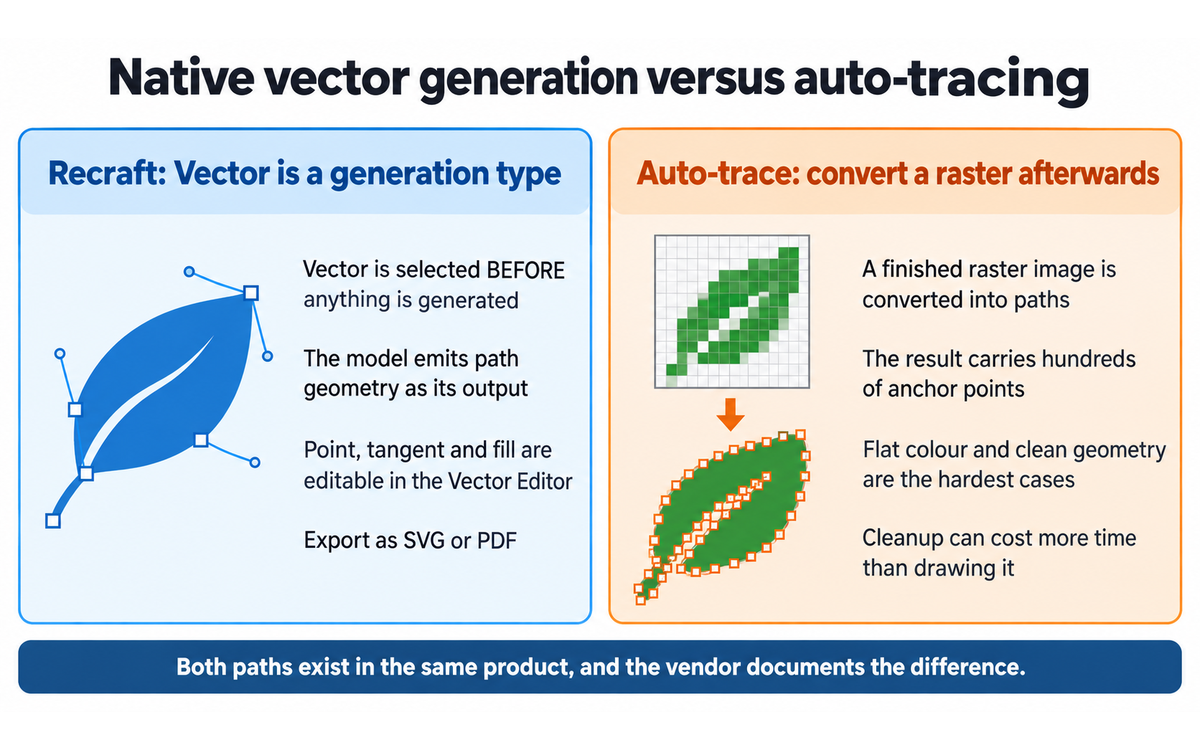
The tracing path, kept separate. Vectorizing an existing raster image is a different feature with its own documentation and its own honest warning: colour reduction is a slider, colours can be replaced by swatch or shifted by spectrum, and the vendor states that photorealistic and highly textured images may come back with artifacts because the format supports simplified shapes, lines and fills. A reader should not confuse the two paths, and the vendor does not blur them.
The editing surface. Modify region, erase region, remove and replace background, outpaint, adjust colours, remix, crisp upscale and creative upscale. Some of these are priced as a base cost multiplied by the model, some at a flat cost, and one at a much higher flat cost. Turning a vector into a mockup and turning it into a raster image are both single actions from the same panel.
The credit mechanics. A paid plan carries a monthly credit allowance that resets at the start of each billing cycle and does not roll over. Top-up credits are bought separately, never expire, are used automatically once the subscription credits are exhausted, and are available only on paid plans. A separate prepaid API Unit ledger governs programmatic access and does not expire, and the vendor states in the pricing page's own questions that the two ledgers are distinct and that API Units are non-cancellable and non-refundable except where law requires otherwise.
Style and brand control. A custom style is created from reference images with a weight slider between them, a type setting, a palette setting, and, in the legacy mode, an additional mimic setting and a style prompt. The current mode accepts up to ten references. A test panel previews the style against a prompt before saving. Saved styles go into a personal library, can be shared, and on the Teams plan are shared across the workspace.
External models. The documentation lists each external model with its creator, its response time and its credit price, and marks with an asterisk which ones are used for editing images with natural language. The range is wide: one credit for the cheapest entry to sixty-three for the highest-resolution Nano Banana variant. The vendor's own FAQ explains the spread as reflecting each model's complexity and its external API cost, which is a fair explanation and also the reason the credit ledger is not a simple unit of output.
Developer surfaces. The API exposes image and vector generation, editing, background removal, inpainting, outpainting, batch jobs and asynchronous processing, and the vendor states that all models across the V2, V3, V4 and V4.1 generations are reachable through it. The developer terms incorporate the general terms by reference and state that where the two conflict the developer terms prevail for API use, which matters because the training position differs between them.
Outputs and export. SVG, PDF and raster exports for generated work; video on Pro and Teams plans; mockups; image sets; and an export panel that independent reviewers describe as offering several production formats from one place.
Getting Started with Recraft
A fifteen-minute orientation that produces a usable asset rather than a pretty one.
Create an account and start on the free tier deliberately. The free tier is how you evaluate the tool, and it is important to know what it is before you generate anything you might want to keep. Free-tier images are public, appear in the community gallery, are owned by Recraft, and carry no commercial rights, and the vendor states that upgrading later does not change the status of images made before you paid. Generate test material only, and expect to regenerate anything you want to keep after you subscribe.
Decide whether your job is a picture or an asset. If the deliverable has to be resized, recoloured or edited by someone else, choose the Vector generation type. If it is a photographic or painterly image, choose Image. This is the decision that determines whether the rest of the workflow works.
Pick the model and read its cost. The vendor's documentation lists credit costs and response times per model. The cheapest vector setting and the most expensive one differ by a factor of six in credits, and the raster settings differ by a factor of ten. On a metered plan this choice is the cost decision, not an afterthought.
Set the style before the prompt, not after. Create a custom style from three to ten reference images, set the weight of each, set the type and the palette, and use the test panel to preview it. A saved style is what turns separate generations into a set.
Supply the palette as exact values rather than describing it. Palette control is a first-class setting in this product, and describing a colour in the prompt is strictly worse than setting it.
Generate an image set rather than a single image when you need a family. Icon runs, illustration sequences and campaign variants are the case the image-set generation type exists for, and generating them one at a time is what produces an incoherent set.
Edit in the product before exporting. Double-click a vector to open the Vector Editor, split it into shapes if the pieces need independent treatment, and fix the two or three points that are wrong rather than regenerating and hoping.
Export the format the next person needs. SVG or PDF for a vector handover, and a raster export when the asset is going straight into a page or a post.
Set your training preference before you upload client material. The terms reserve a training right over inputs and generated assets by default with an opt-out in account settings, and the privacy policy states that third-party providers are barred from training unless you affirmatively authorise it. Read the setting rather than assuming it.
Budget the credits before a large run. Add the per-model cost of the generation type to the number of assets, then add the editing operations, then check whether the monthly allowance covers it or whether you need a top-up. Top-ups are cheaper per credit than a tier step in some cases and the vendor publishes the package prices.
Verification checklist for getting started
VERIFICATION CHECKLIST for onboarding:
[ ] Multi-Model Check: generate the same brief with a Recraft model and one external
    model in the same interface, and compare which one is closer to the brief before
    committing to a style.
[ ] External Source: open the exported SVG in a vector editor you already trust and
    count the anchor points on a simple shape. If a basic icon carries hundreds of
    points, the output is not what you planned for, and the problem is the setting
    rather than the model.
[ ] Human Review: have a designer who did not write the prompt look at the set and
    say whether the assets read as one family, because that judgement is the one the
    tool cannot make for you.
[ ] CI-First Test: can you explain and defend the asset you are about to ship without
    the tool, including why the line weight and the palette are right? [Y/N]
Real Workflows
Workflow 1: Produce an icon set that reads as one family
This is the workflow the tool exists for and the one where the difference from a prompt box is largest.
Write the brief as a system, not as a list of pictures: the stroke weight, the corner treatment, the perspective convention, the level of detail, and the palette as exact values.
Build one custom style from three to six reference icons that already share those traits, set the weight of each reference, set the type and the palette, and use the test panel to check the style against one prompt before saving it.
Select the Vector generation type. Note that reference images are not available in this type, which means the style carries the consistency rather than a reference image doing it.
Generate the set. Use the image-set generation type for the family rather than generating icons one at a time, because coherence degrades with every separate run.
Compare the tiles against each other before opening any of them. The failure mode is a set where each icon is individually acceptable and the family is not.
Open each vector in the Vector Editor, split it into shapes if the pieces need independent treatment, and correct the specific points that are wrong: a tangent that is too sharp, a corner that does not match the convention, a fill that drifted off palette.
Export SVG per icon and keep the source vectors, so a later request to change one colour is an edit rather than a regeneration.
VERIFICATION CHECKLIST for an icon set:
[ ] Multi-Model Check: regenerate two of the icons with a second Recraft model setting
    and confirm the family holds across both. If it does not, the style is doing less
    work than it appears to, and the set will drift on the next run.
[ ] External Source: open the exported SVGs in your vector editor and inspect the anchor
    count on the simplest shape. A handful of points is a native vector; hundreds mean
    you are looking at a trace, and the setting, not the model, is the cause.
[ ] Human Review: a designer who did not write the prompts reviews the whole set for
    stroke consistency, corner radius and optical weight at 16 pixels, which is the size
    where an inconsistent family shows itself.
[ ] CI-First Test: can you state the stroke weight, the corner radius and every palette
    value in the set from memory or from your own notes, without opening the tool? [Y/N]
Workflow 2: Turn a brand palette and an existing style into campaign illustration
This is the marketing case, and it is the workflow where the palette control earns its place.
Enter the brand palette as exact values rather than describing the colours in the prompt.
Reuse the saved style from earlier work, or build one from the brand's existing illustration references.
Generate a spread of concepts at the cheapest settings that will carry the idea, because the goal at this stage is direction rather than finish.
Select the two or three directions worth developing and regenerate them at the higher-quality setting that will actually ship.
Edit in place: remove a background, replace a background, adjust colours, or extend a composition with outpaint, rather than regenerating and losing the direction you approved.
Check every string of text rendered inside an image at full size, in the language and script you need. In-image text is a strength of this tool and it is still not a guarantee.
Export in the format the destination needs, and keep the vector where the asset may be resized later.
VERIFICATION CHECKLIST for campaign illustration:
[ ] Multi-Model Check: run the approved direction through one external model in the same
    interface as a second opinion on the composition. The roster is already there and the
    comparison costs one generation.
[ ] External Source: check the palette in the exported file against the brand
    specification with a colour picker rather than by eye. Supplying hex values is not
    the same as the output carrying them exactly.
[ ] Human Review: the brand owner, not the person who prompted, approves the set against
    the brand guidelines.
[ ] CI-First Test: can you say why each visual decision in the approved asset is right
    for the brand, without referring to the prompt? [Y/N]
Workflow 3: Put vector generation into a build pipeline through the API
This is the engineering case, and it is the one where the tool does something no raster-only API can do.
Read the API pricing page and the developer terms before writing code, because the API ledger is separate from subscription credits, its units are prepaid, and the training position in the developer terms differs from the general terms.
Map each operation you need to its API Unit cost, per operation and per output type. Vector generation costs more units than raster on every model compared on the pricing page, and the multipliers are published per model.
Use batch jobs and asynchronous processing for anything at volume rather than issuing requests in a loop, since both are documented and the developer terms restrict load patterns that a loop violates by default.
Have your application write the returned assets to storage you control, because a subscription that lapses should not be the reason an asset becomes unreachable.
Wire the MCP server into an internal assistant only for the read-and-generate path, and understand what it is: at the public endpoint, the vendor's own server description states that the server is read-only, scoped to published site content, and does not mutate state.
Test on a small representative batch and price it out at your projected monthly volume before committing to a package, because API Units are non-refundable.
VERIFICATION CHECKLIST for an API pipeline:
[ ] Multi-Model Check: for any asset class going into production, compare a Recraft
    vector output against a raster output from another provider resized to the same
    display size, and confirm the vector is genuinely better and not merely different.
[ ] External Source: validate every generated SVG against your own parser or a
    third-party validator before it enters the repository, because a broken export that
    renders in a browser can still fail in a build.
[ ] Human Review: a designer signs off on the first batch of a new asset class before it
    is wired into an automated path, since after that point nobody is looking at output.
[ ] CI-First Test: can the engineer who built the pipeline explain what the generated
    assets are and why the geometry is correct for their use? [Y/N]
Strengths, Limits, and AI Imposture Risk
Strengths
The vector generation type is a real capability and not a marketing claim. Vector is a separate generation type selected before generating, the vendor ships a point-level Vector Editor inside the product, the export produces SVG and PDF, and the vendor documents its own tracing feature as having the limits a tracing feature has. The claim survives contact with the documentation, which is more than can be said for most differentiation claims in this category.
The style system does the work that a prompt cannot. Up to ten weighted references, a type setting, a palette setting and a preview panel before saving, then a reusable library and workspace-wide sharing. This is the mechanism that turns a generator into an asset production system.
Exact palette control. Brand colour as a setting rather than as a suggestion in a sentence. Independent reviewers single this out for the same reason a designer does: it is the difference between a tool and a toy for brand work.
In-image text that survives review. Text rendered inside a generated image is a long-standing failure mode across the category. Independent reviewers are consistent that this vendor handles it well.
A model roster that consolidates tools. The own line runs from V2 to V4.1, and the interface hosts Flux, GPT Image, Nano Banana, Imagen, Ideogram, Seedream, Qwen and others with published per-model credit prices. A reader can evaluate a competing model without leaving the platform, which is a genuinely useful property.
A real developer surface. A documented REST API with batch and asynchronous processing, a prepaid unit ledger, and a Model Context Protocol server with a written description of exactly what it does and does not do.
An unusually clear commercial position on the paid tier. Ownership and commercial rights attach at the moment of generation on any paid plan, with no revenue threshold, and they survive cancellation. Section 7c quotes it.
Limits
The raster quality is mid-field and the vendor's own measurements say so. On the public text-to-image leaderboard read on 2026-09-25, every Recraft entry sits below an Elo of 1022 against a leading field above 1180. The tool is not the choice for the most beautiful single image, and buying it for that is buying the wrong thing.
Complex vector output needs cleanup. Independent hands-on reviewers converge on the same finding: flat and line icons come out clean, and complex illustrations with overlapping elements, shadows and gradients come back with stray anchor points, duplicate paths and groupings that do not serve the drawing. The tool's own documentation supports the general shape of this, since it describes the vector as needing to be split into shapes before they can be edited independently.
The credit cost of the same nominal operation differs across the vendor's own surfaces. Detailed in the Faculty Note, with each figure named against its surface.
The canvas has a practical ceiling. One independent reviewer reports noticeable lag above roughly 200 layers, and puts the sensible finishing path in a desktop vector editor rather than in the browser.
No independent measurement of vector path quality exists. Not one third party publishes a repeatable measurement of anchor count, path hygiene or edit time saved by class of artwork. The capability is documented and independently reported by people who used it; it is not measured.
No indemnity. The published terms contain an indemnity running from the user to Recraft over intellectual property claims arising from the assets and the inputs. Nothing in those terms offers the reverse.
A split reputation across review platforms. The pattern is stated in Section 9 with the numbers and the platforms named.
Print-grade colour management is absent. Vector output is not a print-ready file, and nothing in the documentation claims it is.
The free tier is an evaluation surface, not a working one. Public images, no commercial rights, no ownership, no top-ups, and no retroactive conversion on upgrade.
AI Imposture Risk
Time Illusion: Medium. The tool is genuinely fast at the thing it is built for. Simple icons, flat illustration and brand graphics come back in seconds to roughly fifteen seconds depending on model and type, and one independent reviewer estimates that around eighty per cent of flat and line icons need no manual cleanup, which is a usable estimate rather than a measurement and is treated as such. Two things stop this being Low. The first is that the output that saves the most time is the output that needs the least review, so the honest user's fastest path is also the path where verification quietly stops. The second is the cost surface: the same nominal generation is priced differently across two of the vendor's own pages, some operations are priced as a multiple of the selected model, and the interface does not always show the cost before you commit to a generation. A metered plan whose unit price has to be reconstructed from documentation turns a fast generation into a budgeting task.
Quantity Illusion: Medium. Volume is the tool's strong suit and the image-set generation type is designed to produce families of assets in one pass, which is exactly the shape of output where quality is judged by the set rather than by the item. The failure mode is documented by independent reviewers rather than invented here: within a single run, one generation can be clean and balanced while its sibling is lumpy and thin, and a user who takes the first tile and leaves is taking the weaker of the two that were produced and paid for. Polished vector output is also harder to fault by eye than text, because the artefact that matters, path hygiene, is invisible at the size most people review at. Two things keep this at Medium rather than High. The output is at least legible as wrong in the way most users check, since a bad icon looks like a bad icon. And the vendor's documentation is unusually willing to state its own limits, including on the tracing path.
Skill Illusion: Medium. The judgement of whether an icon system is coherent, whether a line weight is right and whether a palette reads as on-brand is a professional competency that this tool neither teaches nor requires, and a user can hold an entire brand asset library they could not have drawn and cannot evaluate. Two mechanisms make this sharper than the general case. First, point-level path editing looks like design skill and is not: moving a tangent is a mechanical action that produces a professional-looking file, and the user who performs it learns the interface rather than the craft. Second, the tool's output is more legible to a non-designer than most generators' output, because an editable file that opens without error looks finished in a way a strange photograph does not. Medium rather than High on three grounds. The gap is visible without expertise, since a misaligned set and a heavy corner are things anyone can see once the comparison is set up. The tool does have genuine learning surfaces that build transferable judgement, including palette discipline, stroke conventions and the difference between a native vector and a trace. And the framework's clause 5.2.3-a does not apply here, so this is a judgement on the evidence rather than a floor, which is stated in the clause note below.
Overall AI Imposture Risk: Medium. All three traps are Medium. Per the framework's own criteria, one, two or three Medium traps with clear mitigations stated describes a tool that requires disciplined use rather than one whose core proposition is an illusion. That is the correct description here: the capability is real and the discipline is not built in.
Framework v1.2 clause note
All three of the pedagogical clauses added in framework v1.2 were assessed explicitly, and each outcome is stated whether it applies or returns a null. A null is a finding.
Clause 5.2.3-a, agent-authored procedural memory: it does not apply, and that is a finding rather than an omission. The clause sets a Skill Illusion floor of no lower than Medium for any tool that writes procedural memory on the user's behalf, and rates it High where the tool can revise that memory during use without a per-write human decision. Recraft writes no skills, no memory store and no standing instructions on the user's behalf. What it does write is a custom style: a named, reusable artefact built from reference images and weight sliders, saved to the user's own library and applied to later generations. That is user-authored configuration produced by explicit, deliberate action inside a visible panel, with a preview step before saving and a documented path to edit or delete it afterwards, and it is a generation setting rather than a competence claim. The boundary is drawn deliberately rather than assumed: a durable artefact that changes future output in a way the user cannot explain would trigger the clause, and this one is neither agent-authored nor unexplained. The clause returns a null, and the Skill Illusion rating of Medium above rests on the mechanisms set out in its rationale, not on the floor.
Clause 4.2-a, agent-mediated conversation: it returns a null, and it does so twice over. The clause applies when agent-authored text is presented as the person's own voice, or when agent interaction substitutes for human contact. Recraft has no conversational surface in the ordinary sense. The AI Chat mode documented for the product is a prompt interface for generation and editing inside the user's own account, not an agent conducting correspondence or speaking in the user's name to another person, so there is no agent-authored text presented as the user's own voice. The product also has no messaging, email or social integration documented in its published material, so there is no channel through which agent interaction could substitute for human contact. The clause returns a null by subject matter, which is why Social Authenticity is rated neutral below rather than positively or negatively on this ground.
Clause 7.5, team-level rooms: it returns a null. The clause applies to a shared channel where more than one agent acts, which requires Centaur. Recraft has no agent at all in the sense the clause means: there is no agent that acts in a shared room, no multi-agent surface, and no agent that another agent or another user interacts with. The Teams plan is a workspace construct, which shares styles, styles a credit pool across seats and centralises administration, and it is an arrangement of human seats rather than a room in which agents act. The clause returns a null by subject matter, and the Collaboration Mode below is derived from the Imposture Risk rule rather than from this clause.
Section 7c: Licence over your output, and what training accepts, stated plainly
This section exists because two documents issued by the same company describe the same material differently, and because a reader adopting this tool is adopting both. Nothing in it changes any score, and the reason is set out at the end.
The two ownership positions, quoted
The terms of service were last updated on 11 August 2026, with an effective date of 11 August 2026 for new accounts and 25 August 2026 for existing accounts. Section 7.1 sets the free tier:
"Assets generated by Free Tier users are Free Tier Assets ('Free Tier Assets') and you are granted a non-exclusive, limited, non-transferable, non-sublicensable, non-assignable, license to use all Free Tier Assets you create with the Services for your personal use subject to the following restriction: (i) no commercial use of Free Tier Assets is permitted; (ii) Free Tier Assets are owned by Recraft and may not be sold, licensed or transferred; and (iii) Free Tier Assets may not be used to train artificial intelligence models, systems or networks or similar technology."
The same clause continues:
"You agree that any Free Tier Assets you create as a Free Tier user, including any modifications or alterations thereto, are owned by Recraft and you hereby irrevocably transfer and assign to Recraft all worldwide right, title and interest in and to the Free Tier Assets."
Section 7.2 sets the paid position:
"You own all Assets you create with the Services and Recraft hereby assigns to you all copyright rights it may have in the Assets subject to the following restriction: Assets may not be used to train artificial intelligence models, systems or networks or similar technology."
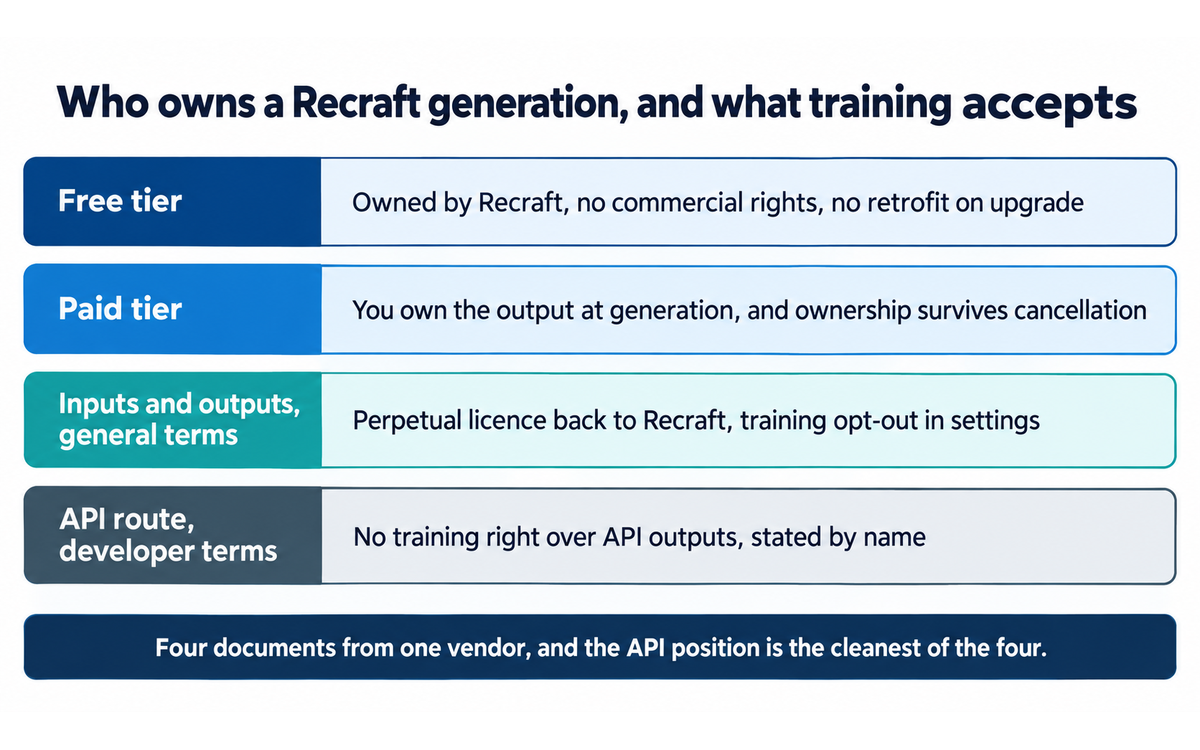
Three things follow, and the vendor states all three in its own words on the pricing page rather than leaving them to be inferred. Rights attach at the moment of generation, so material produced on the free tier stays Recraft's after you subscribe and there is no way to buy it back. Paid-tier material stays yours after cancellation, which is a better position than some vendors in this category offer. And the restriction that survives ownership is that you may not use the assets to train AI models, which is a condition on the asset you own rather than a claim on it.
The licence the user grants back
Section 7.7 is the clause a reader is most likely to have missed, because it is not about ownership at all, it is about permission:
"By using the Services, you grant to Recraft and its successors and assigns a perpetual, worldwide, non-exclusive, sublicensable, fully paid, royalty-free, irrevocable license to use, copy, reproduce, process, adapt, modify, publish, transmit, prepare derivative works of, publicly display, publicly perform, sublicense, or distribute, or any combination of the foregoing, text prompts, images, attachments and any other content you input into the Services (the 'Inputs') or Assets produced by the Services at your direction, or both, for Recraft (i) to provide, maintain, promote, and improve the Services, (ii) to comply with applicable law and enforce Recraft policies, or (iii) if you share with other users through the Services any Assets produced by the Services at your direction or Inputs you provide into the Services, or both, allow Recraft share those Inputs and Assets with other users."
The same clause continues:
"You acknowledge and agree that Recraft may use your Inputs you provide and the Assets produced by the Services to train, fine-tune, and otherwise improve Recraft's artificial intelligence models and systems. This training use is enabled by default, but you may opt out at any time by adjusting your preferences in your account profile settings."
Read against each other, sections 7.2 and 7.7 answer different questions and a reader should not collapse them. You own the output on a paid plan, and Recraft holds a licence over the inputs you supply and the assets produced at your direction. The licence covers a perpetual, irrevocable, sublicensable right, and the training use is enabled by default with an opt-out in account settings. The clause also states that the licence is granted "in return for your license to use the Services and not for any compensation paid to you", which is the clause that makes it a condition of use rather than a bargain.
The free tier's community gallery is a third position again
Section 7.5 grants every user a licence to use community assets, for personal or commercial use, and then states this about the same pool:
"Recraft may use Community Assets, including any modifications made to Community Assets to train Recraft models or systems."
Because free-tier assets are community assets, this clause restates the free-tier training position through a different route. A reader who generates on the free tier is placing material into a pool that the vendor reserves the right to train on, and the vendor states in its documentation that deleted free-tier images are not permanently removed and may still be visible in the gallery. That is stated in the vendor's own ownership FAQ rather than inferred here, and it is the single most consequential fact for anyone considering an evaluation on the free tier.
The API position is different, and the vendor says so
The developer terms, which govern the API, the MCP server and related services, incorporate the general terms by reference and state that "in the event of a conflict between these Developer Terms and the General Terms, these Developer Terms control with respect to use of the API." Section 6.3 states:
"Recraft will not use any Assets created using the API Services to train Recraft AI models or for any other use in any Recraft Services, except as may be necessary for customer support for the customer that created the Asset, and to comply with applicable law and enforce Recraft policies. For the avoidance of doubt, the 'Licenses to Recraft' provision in the General Terms of Service does not apply to the API Services."
This is the clearest document of the set. Programmatic generation carries no training right over the outputs, and the clause names the general-terms provision it is switching off. Section 6.2 of the same document gives the API user the same ownership position as a paid subscriber, with the same single restriction on training.
The privacy policy's own statement
The privacy policy, last modified 12 March 2026, states the third-party position and then narrows it in the same paragraph:
"We shall not use and shall not permit our third-party AI service providers or any other data processor or contractor of ours to train, fine-tune, or otherwise improve any machine learning or artificial intelligence models using your AI Input or AI Output or any other data, unless you have affirmatively authorized and configured the Services to permit such use. We may use such information to train Recraft's own proprietary AI models, but you may disallow such use of your information by opting out in your account profile settings."
The two halves of that paragraph are not in conflict, and the difference matters. Third parties are barred unless you authorise them. Recraft itself may train, and the remedy is an opt-out. A reader who reads only the first sentence will conclude the opposite of what the second one says.
What the contract also does
Three further clauses are worth a reader's attention because they are ordinary and consequential. The terms require arbitration and contain a class action waiver, with an opt-out path. Section 2.2 states that a Business User accepts that consumer-specific statutory protections that can be varied or excluded by contract do not apply, and section 2.4 presumes a paid individual subscription, API access, MCP access or a group workspace to be a Business User access unless rebutted, which means the commercial classification follows the tier unless you show otherwise. Section 17 is an indemnity running from the user to Recraft, covering claims that the assets or the inputs infringe third-party rights, and claims arising from failure to comply with transparency, labelling or marking laws for AI-generated content.
What this section does not do, and why no score moved
No score changed, and here is why. The CI-First Benefit Score measures the benefit to the human net of the overhead of using the tool. The Humics Protection Rating measures three human capabilities. The AI Imposture Risk assessment measures three usage illusions. None of the three has a dimension for ownership, licensing, training rights or indemnity, so a contract finding has no dimension to move. It is recorded here because an institution adopting this platform is also adopting its contract, and a reader who saw a score sitting next to a rights finding with no explanation would reasonably conclude the finding had been discounted.
What this section is. It is a plain reading of four documents the vendor publishes, quoted verbatim, with each quotation attributed to the section it comes from. Where the documents answer different questions, it says so rather than treating the difference as a contradiction.
What this section is not. It is not legal advice, and the framework note is not a substitute for a lawyer reading the DPA and the terms on your behalf. It does not allege that any clause is improper, and every clause quoted here is ordinary commercial drafting of a kind found across the category. It does not assert that any party has acted in bad faith. It does not tell you to avoid the platform, which would substitute a judgement for your own. It states, attributes, and names the decision in front of the reader, which is whether to subscribe before generating anything worth keeping, whether to move client work onto the API route where the training position is cleanest, and whether to change the training preference in account settings before uploading any material you would not want used.
U365 Co-Intelligence Rating
CI-First Profile
Primary: Profile 2, AI as Co-Worker and Assistant. The tool's everyday value is execution: it produces the icon, the illustration, the mockup and the variant at a speed and consistency a person cannot match unaided, and the human directs, selects and finishes. That is Profile 2 by the framework's own definition, which describes AI handling execution tasks while the human directs and reviews.
Secondary: Profile 1, AI as Co-Creator and Thought Partner. The canvas, the style library, the image-set type and the point-level editor support genuine iteration, where a direction is proposed, tested, adjusted and built on rather than executed once. For a designer working through a visual problem rather than filling a brief, this is the mode the tool is strongest in.
CI-First Benefit Score
Time
Score. 6 / 10
Rationale. Real, measurable savings on the class of work the tool is built for, and the fastest path is the least reviewed one. Simple icons, flat illustration and brand graphics return in seconds to about fifteen seconds depending on model and generation type, and one independent reviewer estimates that around eighty per cent of flat and line icons need no manual cleanup, which is an estimate rather than a measurement. Against that sits the overhead: complex illustrations need anchor-point cleanup in a separate editor, the credit cost of an operation has to be reconstructed from two documentation pages, and one reviewer reports noticeable canvas lag above roughly 200 layers. The score is net of that overhead, which is why it is above the middle rather than at the top
Quantity
Score. 6 / 10
Rationale. Volume is genuinely high, and the image-set generation type is built for producing families of assets in a single pass. Two conditions cap it. The cost of the same nominal operation varies across the vendor's own surfaces, so volume is not predictable from a rate card. And independent reviewers report quality swinging inside a single run, with one clean result next to a weaker one from the same prompt, which turns volume into a selection task rather than a production run. Quantity is useful and reliable enough to plan around; it is not a fixed price per item
Quality
Score. 6 / 10
Rationale. This is the dimension where the tool's own subject matter is strongest and the evidence is thinnest. The vector capability is real and independently confirmed. The raster quality is mid-field by the vendor's own published measurements on a public leaderboard. Complex vector output is reported by independent hands-on reviewers to carry stray anchor points and duplicate paths. And the decisive point for a conservative score: no third party publishes any repeatable measurement of vector path quality, anchor count or edit time saved. Quality is capped by that absence rather than by measured weakness, and the distinction is deliberate
Skill
Score. 5 / 10
Rationale. Marginal. There are real learning surfaces, and they are more substantial than the category norm: exact palette control teaches palette discipline, the stroke and corner conventions required to keep a set coherent teach system thinking, point-level editing teaches what a path is, and the distinction between a native vector and a trace is a durable piece of design knowledge. Against that, the tool's purpose is to let someone who is not a designer produce a designed asset, and the judgement of whether a system is coherent is a design competency the tool neither teaches nor requires. A user can hold a whole brand library they could not have drawn and cannot evaluate, and moving a tangent looks like skill while teaching the interface rather than the craft. Conservative by the framework's instruction to score the user rather than the tool
CI-First Benefit Score: (6 + 6 + 6 + 5) / 4 = 5.8 / 10. Band: CI-First Positive.
Why this score is not higher, and why it is not lower
It is not higher because the score measures the honest user and the common case, and both of them meet the same three things. The first is that vector path hygiene is unmeasured by anyone outside the vendor, so the capability that justifies the tool carries no number. The second is that the raster quality is mid-field and the vendor publishes the evidence for that itself. The third is that the strongest output is the output that most invites skipping verification, and the framework rewards tools that make the human's judgement better rather than tools that make the human's judgement unnecessary.
It is not lower because the alternative reading does not survive the documentation. The vector generation type, the Vector Editor, the export formats and the honest statement of limits on the tracing path are all confirmed in the vendor's own material, and independent reviewers who used the product confirm the core claim. The paid-tier ownership position is unusually clean and survives cancellation. The style system does a job a prompt cannot, and no other major tool in the category does the vector job natively. A 5.8 with a Positive band is a real recommendation with a discipline attached, and the discipline is to verify what the tool cannot verify for you: the coherence of the set, the cleanliness of the path and the correctness of the text.
Humics Protection Badge
Humics dimension | Rating | Rationale |
Creativity | +1 (Protects) | The tool expands what a person can produce and leaves the creative decisions in the user's hands. The subject, the composition, the stroke convention, the palette values and the level of detail are all set by the user before generation, and the style system exists precisely to carry the user's own visual language across a body of work rather than to substitute a house style for it. Point-level editing lets the user impose a judgement the model did not make. The protection is not maximal, because the aesthetic pull of a well-tuned default setting moves different users toward similar output, and a user who generates until something looks acceptable has handed over the ideation rather than the execution. The workflows above are written to prevent exactly that by requiring the system to be specified before the set is generated |
Critical Thinking | -1 (Erodes) | Erosion by a documented mechanism, and it is the same mechanism in the vendor's own material. The tool presents finished, professional-looking, editable output with no provenance signal, no confidence indication, no statement of what the model could not do, and no critique of what is wrong with a given result. The specific evidence for erosion is narrower than for a text tool but it is real: independent reviewers report quality swinging within one run, which teaches a user to accept the first plausible tile as the result, and one reviewer documents two explicit settings, an image count and an aspect ratio, both being overridden silently, with the wrong dimensions delivered and no warning. A user who is not told that a setting was dropped learns to check output by eye rather than to verify it. Two counterweights are genuine and are why this is -1 rather than more severe: the vendor's documentation states its own limits plainly, including on the tracing path, and the export surface lets anyone count anchor points in a trusted editor and see the truth of the output directly. The mitigation is that check, and it is cheap |
Social Authenticity | 0 (Neutral) | The tool touches no human-facing communication by any route documented in the material read here. It drafts no message, conducts no correspondence and speaks in no one's voice, and framework clause 4.2-a is explicit that agent-mediated conversation is not erosion by itself. The adjacent concern is real but it is the user's conduct rather than a capability this tool erodes in them: generated imagery and generated depictions of people can be used to misrepresent, and the vendor's own terms prohibit impersonating others, generating identifiable personal information and creating non-consensual intimate imagery, which places the obligation on the user. Neutral records that the dimension is essentially untouched by the product |
Humics Protection Score: (+1) + (-1) + 0 = 0 / +3. Badge: Humics-Neutral.
How to use the badge. Humics-Neutral means the tool neither consistently builds nor consistently erodes the human. It protects creativity on the same surface where it erodes critical thinking, and it asks the user to manage that split deliberately. The management move is concrete: treat every generation as a proposal, keep the source vectors rather than only the exports, and put one verification between the canvas and anything that ships, specifically counting anchor points on a simple shape and checking any rendered text at full size.
Superhuman Usage Guidance
When to invite the tool in. When the deliverable has to be editable, scalable and brand-exact, and when the job is a set of assets rather than a single image. Icon systems, logo concepts, spot illustration libraries, interface graphics, packaging comps and on-brand campaign illustration are the cases where the vector capability and the style lock compound into something a person cannot do as fast unaided.
When to keep it out. When the deliverable is a single beautiful raster image and the tool will be judged on that image alone. When the output has to be print-ready with colour management. When nobody on the team can evaluate a design system and the result will be shipped unchecked. And when the budget cannot absorb a metered cost that has to be reconstructed from documentation rather than read off a rate card.
U365 method integration. Recraft is a production instrument rather than a method surface, and it integrates cleanly into three places in the U365 method set. In CI-First terms it is a Co-Worker instrument used in Centaur mode, which means the human keeps the judgement and the tool takes the generation, and the verification checklists above are the operational form of that split. In UNOP terms, a generated asset is an artefact rather than a finished contribution, and the workflow that keeps it at that level is the one where the asset is specified as a system, generated, and then checked against the specification rather than accepted because it looks good. Under 5M2S, a Recraft pipeline is a production surface whose output has to pass through the same verification a designer would apply to any supplier's file, which is the anchor-point check and the palette check rather than a glance at a thumbnail.
Over-delegation warning. The over-delegation pattern for this class of tool is specific and it looks productive. It is the loop where the user regenerates instead of editing: the icon is nearly right, regeneration is cheap and one click away, and the user never opens the Vector Editor to learn that three points were the entire problem. That loop produces a designer who can prompt and cannot draw, and it produces asset sets with no internal logic. The second pattern is subtler: accepting a set because each tile looks acceptable, when the family is incoherent, which is the one judgement the tool will never make for you. The third is exporting and discarding the source, which converts an editable asset into a picture and gives away the only property that justified the purchase.
What Users Say
The review landscape for this product is unusual, and the honest way to report it is to name every figure against the surface it appears on, because the surfaces disagree with each other and the disagreement is itself the finding.
Aggregate Rating Table
Platform | Rating reported | Volume reported | Read on | What it means |
Product Hunt | 4.81 out of 5 | 37 reviews | 2026-09-25 | Read directly from the product page's own structured rating data rather than from a screenshot or a summary. This is the smallest sample in the table and the most favourable, and it reflects an early-adopter audience |
G2 | Reported between 4.6 and 4.7 out of 5 | Reported between roughly 400 and roughly 450 reviews | 2026-09-25 | No single figure. Four independent directories published four different pairings of score and count for the same platform in the same week, and the platform's own page publishes no single aggregate figure. Treat the rating as "high with several hundred reviews behind it" and the precise number as unverified |
Trustpilot | Reported between 1.6 and 1.8 out of 5 | 27 in the one directory that states a count | 2026-09-25 | The most negative surface in the table, and the one where the two directories that report it disagree with each other by 0.2. The complaints cluster on billing and credit behaviour, on support responsiveness, and on a service interruption in February 2025 that subscribers report left them unable to reach generated content |
Tekpon | 4.2 out of 5 | Not stated on the page read | 2026-09-25 | An aggregator that republishes sentiment from other platforms. It carries a second, higher figure for a comparison product on the same page, so read it as one directory's aggregation rather than as a measurement |
Tooliverse | 9.33 out of 10 | 2,110 "verified reviews across 5 platforms" | 2026-09-25 | The largest number in the table and the least useful, because the count is the directory's own aggregation across unnamed platforms and the scale is its own composite rather than a five-point scale. A 9.33 out of 10 across 2,110 reviews and a 1.6 out of 5 across 27 reviews describe the same product |
G2 and Capterra: one directory reports their absence | Not applicable | Not applicable | 2026-09-25 | A synthesis page states directly that "the absence of G2 and Capterra reviews is notable for a tool targeting professional designers", while four other directories report several hundred G2 reviews for the same product. One of the two readings is wrong and no page settles which |
No single rating | Low volume | 2026-09-25 | Discussion is concentrated in general AI and AI-art communities rather than in professional design communities, with critical comparisons appearing in the image-generation communities. Reported at platform level because no specific thread was read directly |
How to read that table. Nothing in it is invented and nothing in it is averaged. Every figure is attributed to the surface that publishes it and to the date it was read, and where two surfaces claim the same platform and disagree, both are shown. The honest conclusion is not that the product is loved or disliked but that its reputation is split along the line of expectation: the audiences that evaluate it for the job it is built for, which is vector and brand asset production, report it highly, and the audiences that arrive expecting a general image generator or a trouble-free subscription report it badly. The professional platforms that would normally settle the question at enterprise scale either publish no aggregate figure or disagree with each other about how many reviews exist.
What Users Praise
Native editable vector output, named repeatedly and specifically. The distinction that reviewers keep drawing is between generating paths and tracing a raster afterwards, and the praise attaches to the first. A recurring formulation is that this is the only tool in the category that hands over an asset rather than a picture.
Brand style consistency. The style lock and the palette control are described as delivering consistency without a training step, and the specific praise is about whole sets rather than single images.
Text rendered inside images. Reviewers who need a word in a graphic report it as solved here and not elsewhere.
Production formats from one export panel. The ability to leave with a genuine vector file in more than one production format is called out as the feature that justifies the tool.
What Users Complain About
Messy path structure on complex output. The most consistent technical complaint, stated by more than one hands-on reviewer in nearly the same words: flat and line icons come out clean, and complex illustrations with overlapping elements, shadows and gradients come back with stray anchor points, duplicate paths and groupings that do not serve the drawing. One reviewer sums it up as editable but not professionally hygienic, and another reports needing cleanup in a vector editor for the complex cases.
Credit behaviour and cost transparency. Complaints cluster here: that the cost of a generation is not always shown before you commit to it, that failed generations have been reported to consume credits, and that credits reset without rollover so an unused balance is simply lost. This is the most common theme across the negative reviews on the trust-focused platform.
Settings silently overridden. One hands-on reviewer documents an explicit image count and an explicit aspect ratio both being ignored, with the wrong dimensions delivered and no warning. That is a single report rather than a pattern, and it is worth naming because it is the exact failure that trains a user out of trusting a control.
Quality swinging inside one run. The same reviewer describes two results from one prompt in one run, one crisp and one lumpy, and the practical consequence that a user who takes the first tile may take the weaker one.
Canvas performance. Lag reported above roughly 200 layers, with the recommendation to finish work in a desktop editor.
Support responsiveness. A recurring theme on the trust-focused platform, and one of the reasons the platform's score sits where it does while the product-focused platforms score the same product highly.
The free tier as a trap. Public images, no commercial rights and no retroactive conversion on upgrade is a position the vendor states clearly and which users still report being surprised by.
Sentiment Summary
The product-focused platforms report a strong tool. The service-focused platform reports a poor supplier. Both are describing the same product, and neither reading is wrong, which is why this review scores the product capability highly and puts the cost and support questions into the Limits and re-check triggers rather than into the benefit score.
U365 Editorial Note
For a design team, the practical reading of this table is a sequencing decision rather than a verdict. Test the vector workflow deliberately, on the asset class you actually need, and confirm the path quality in your own editor before committing to an annual plan, because the reviewers who report path problems are reporting them on exactly the complex output a brand team produces. Then weigh the subscription against the split reputation on billing and support, and prefer a monthly plan until you have a billing history with this vendor. The one figure in the table that should carry no weight at all is the composite score, whatever the sample behind it, because it averages across audiences that are not evaluating the same job.
Comparison and Alternatives
This comparison is built around one question, because the category has one question that actually separates the tools: does your output need to be an editable vector, or is a raster image the deliverable. Two of the alternatives below are covered by reviews of their own in this series, and their entries here are written to be read alongside those rather than to pre-empt them.
Tool | What it is | Published cost to start | Choose it if |
Recraft | Design-native generator with vector as a generation type, an in-product Vector Editor, exact palette control and a reusable style system | The vendor's documentation gives the Basic tier at twelve dollars per month billed monthly or ten billed annually for 1,000 credits | Choose Recraft if the output has to be edited downstream. If the file will be opened in a vector editor, recoloured to a brand specification, resized from a favicon to a banner, or extended into a family of icons, this is the only tool in the comparison that hands you the object rather than a picture of it. The vector-versus-raster line is the decision, and everything else in this table is secondary to it |
Krea | Real-time creative suite for image, video and 3D generation with a live canvas and an agent surface | Not compared here; see the Krea review in this batch | Choose Krea if your work is exploratory and multi-modal. The canvas rewards steering with strokes and shapes, the model roster is broader than this one's including Recraft's own V4 models, and the pipeline covers video and upscaling. Choose it over Recraft when the job is finding a direction across media rather than producing an asset a designer will edit, because Krea's own output is raster and the finishing path stops there |
Leonardo AI | Vendor-operated image, video and design generation platform with one model line, deep control tools and hosted third-party engines | Not compared here; see the Leonardo AI review in this batch | Choose Leonardo AI if you want one stable vendor relationship with depth in a single model line. Its control surfaces, including trained elements, run deeper on its own models than the equivalents here. Choose it over Recraft when editability is not a requirement and a raster deliverable is, because vector output is not what that platform is for |
Ideogram | Generator specialised in rendering accurate, readable words inside a generated raster image | Vendor publishes its own tiers; not compared here | Choose Ideogram if the words inside a raster image are the whole job. If you need a poster, a mockup with real copy or a social graphic where the headline has to be correct and you can live with a pixel file, it is the more specialised tool. Choose Recraft instead when the lettering needs to be a path you can kern yourself, which is a different and for brand work a more useful capability |
Midjourney | Aesthetic-first image generator, raster only | Vendor publishes its own tiers | Choose Midjourney if the image is the finished piece. On the public text-to-image leaderboard read on 2026-09-25 its lineage occupies the top of the field while every Recraft entry sits below an Elo of 1022, and no other tool here approaches it for a single beautiful frame. Choose Recraft when the image is an input to further work, because Midjourney has no vector output and no public API |
Adobe Illustrator | The incumbent professional vector application | Vendor publishes its own subscription pricing | Choose Illustrator if the deliverable is print-grade and the geometry has to be exact. It remains the reference for anchor-level control, colour management and packaging work, and nothing here replaces it. Recraft's honest position is that it accelerates the first hour of a job Illustrator finishes, and most teams will run both |
The vector-versus-raster distinction, stated plainly, because it is the decisive comparison and not the model count. Every alternative in this table except Illustrator produces pixels. Recraft produces paths when you ask it to, and it gives you an editor for those paths inside the same product. That single difference reorganises the whole comparison. Against Krea, whose canvas and video roster are broader and whose exploratory surface is stronger, the question is whether the work ends in a picture or in an asset, and a studio doing both jobs will get more from paying for two tools than from pretending one covers both. Against Leonardo AI, whose single-model control depth is greater, the question is whether editability is a requirement at all. Against Ideogram and Midjourney, the question is what happens after the image exists. A comparison built on how many models each platform hosts would rate Recraft higher than it deserves on some surfaces and lower than it deserves on the one surface that matters, which is why this table does not make that argument.
Verdict and Next Steps
Verdict. Recraft scores 5.8 out of 10, which is CI-First Positive, with a Humics-Neutral badge and a Medium Imposture Risk assessment in Centaur mode. It is a real recommendation with a discipline attached, and the discipline is verification.
The capability is genuine. Vector is a generation type rather than a tracing filter, the vector editor edits real points and real curves, the export is a file worth opening, the style system produces coherent sets rather than separate pictures, the palette is an exact setting, and the developer surface returns an editable vector through an API, which is something a raster-only API cannot do at all. Independent reviewers who used the product confirm the core claim, and the raster leaderboard confirms the honest limit of it at the same time.
The score is 5.8 rather than higher for three reasons that a reader should hold next to the strengths. Vector path quality is unmeasured by anyone outside the vendor, so the capability that justifies the purchase carries no number. The raster quality is mid-field and the vendor's own leaderboard entries say so. And the highest-value output is the output that most invites skipping a check, which the framework penalises because it rewards tools that improve the human's judgement rather than tools that make it unnecessary.
Next steps, in order.
Decide which of the two jobs you are buying for. Write down whether the deliverable is a picture or an asset before you generate anything. If it is an asset, proceed. If it is a picture, choose the leader on the public leaderboard instead.
Evaluate on the free tier with material you do not need. Free output is public, owned by Recraft, carries no commercial rights and does not convert on upgrade. Generate test assets only, and keep nothing you intend to use.
Test path quality in your own editor before paying for a year. Generate a simple icon, a flat illustration and a complex illustration with overlapping shapes and shallow gradients, export all three as SVG, and count anchor points on the simplest shape in a vector editor you already trust. If the complex one is unusable, you have learned the limit cheaply.
Subscribe monthly first. Given the split reputation on billing and support, a monthly plan until you have a billing history is the lower-risk sequence, and the vendor's own annual discount is up to twenty per cent, which is not large enough to justify the risk before you have verified the workflow.
Change the training preference in account settings before uploading anything you care about. The default is on, the opt-out is documented, and the setting is your own to make.
Move high-volume client work to the API route if the volume justifies it. The developer terms switch off the general training licence over the outputs, which is the cleanest data position of the four published documents, and the API Units are prepaid and non-expiring, though also non-refundable.
Build one style before you build anything else. A saved style is what turns separate generations into a system, and the first hour spent on it is the difference between a folder of images and a brand library.
UP-Context-Engineering prompt pack
Three prompts written in the UP-Context-Engineering order of Context, Role, Task, Constraints and Output format, each closing with a verification step. The text inside each block is copied verbatim into your own context, and every bracketed placeholder is replaced before it is run. Each of the three carries the two disclosures this tool requires: it writes nothing in a person's voice, so the disclosure duty is the reader's, and its training default is on for an individual account until somebody turns it off.
Prompt pack 1: Specify an asset system before generating a single tile
Context: the asset class is [icon set / illustration set / interface graphics], the family
size is [number of assets], and the destination sizes are [for example 16px in the UI and
1200px in the deck]. The brand palette values are [hex or exact values, listed]. The
stroke weight, the corner treatment and the level of detail we use are [stated]. The
generation type I am using is Vector, and the model setting is [setting].

Role: AI as Co-Worker and Assistant (Profile 2). You generate the family. I own the
system, I own the palette values, and I approve the set as a set rather than tile by tile.

Profile: Act as a Co-Worker and Assistant, generating the family to the system I specify rather than restyling it.

Task: state the system back to me as a specification before generating: stroke weight,
corner treatment, perspective convention, detail level, and every palette value with the
role it plays. Then name what this specification cannot control.

Constraints: do not add a colour outside the palette I gave you. Do not change the stroke
weight between assets. Do not introduce a gradient, a shadow or a texture I did not ask
for. Do not describe the assets in prose instead of producing the specification.

Output format: the specification as a list, then one heading: "What this system does not
control, and who checks it". The second heading is the one I will act on.

Memory: the specification and the model setting behind the accepted set belong in my own project record, because the tool keeps the files and not the system they follow.

UP-Context-Engineering verification: I generate one tile first and open the exported SVG in a vector
editor I already trust, then count the anchor points on the simplest shape before I
generate the rest. A handful of points means the path is native and the set is worth
finishing. Hundreds of points means I am looking at a trace and the setting is wrong, not
the model. I read the exported palette values back with a colour picker rather than by
eye. This tool writes no design principle into the file, so the coherence of the family is
my judgement and I make it against the specification above, not against how the tiles
look next to each other on screen.

Data safety: this pack carries no personal data. I do not paste a client's brand palette, an unreleased icon set or a licensed reference into it, and I keep the specification and the exported sources in my own store.
Prompt pack 2: Decide the licence and the cost position before a paid run
Context: the work is [client / internal / teaching material], the plan in use is
[Basic / Pro / Teams / API], and the tier at the moment of generation is [tier]. The
generation type is [Image / Vector], the model setting is [setting], and the volume is
[assets per month]. Some operations are priced as a base cost multiplied by the selected
model's price.

Role: AI as Co-Researcher, Analyst and Tester (Profile 4). You reconcile the published figures. I decide
the tier, I decide whether the account stays on the API route, and I am the party who
answers to the client.

Profile: Act as a Co-Researcher, Analyst and Tester, reconciling the published figures rather than averaging them.

Task: from the vendor's own published surfaces, state the credit cost of one operation of
each type we intend to use, name which document each figure came from, and say which figure
governs a budget when two of them disagree. Then state who owns the output, whether that
survives cancelling the plan, what the training position is, and what has to be changed to
move it.

Constraints: do not average two published figures into one. Where two of the vendor's own
pages disagree, show both and name the one to plan against, with the reason. Do not write
a contract summary as advice. Do not tell me whether to subscribe.

Output format: a table of operation, credit cost and source document; then a short section
headed "Who owns the output, and what changes it"; then one heading: "What I have to
decide in writing before the first paid generation".

Memory: the cost table, the ownership position and the tier decision belong in my own project record, because the tool keeps the account and not the reasoning.

UP-Context-Engineering verification: I read the ownership position and the training position myself in
the vendor's terms before any client asset is generated, and I record the tier the asset
was generated on, because the free-tier position is not converted by upgrading later. I
change the training preference in account settings before uploading anything I would not
want used, and I treat opting out as prospective rather than retroactive. I keep the
source vectors and the style specification outside the tool, so a lapse in the
subscription does not make the assets unreachable. This tool is a production surface, so
its output passes the same supplier check I would apply to an external studio.

Data safety: this pack carries no personal data. I do not paste a licence agreement, an invoice or a client's asset into it, and I keep the cost record and the licence reading in my own store.
Prompt pack 3: Verify a generated set before it is handed over
Context: the set is [asset class] for [destination], the approver is [role], and the
handover format is [SVG / PDF / raster]. The brand specification says [palette values,
clear space, stroke convention]. The assets going into production are [which subset].

Role: AI as Co-Researcher, Analyst and Tester (Profile 4). You assemble the check. I run it, and I sign
the set off, because the tool cannot evaluate coherence and does not claim to.

Profile: Act as a Co-Researcher, Analyst and Tester, assembling the check rather than signing the set off for me.

Task: produce the verification checklist for this set, ordered so that the cheapest check
comes first, covering: the anchor-point count on the simplest shape, the stroke and corner
convention across the whole set, the palette values read in the exported file rather than
on screen, any text rendered inside an asset read at full size, and the licence position of
the model settings actually used.

Constraints: do not report a check as passed on the strength of how an asset looks. Do not
treat a legible export as a hygienic one, because path structure is invisible at the size
most people review at. Do not let one acceptable tile stand for the family.

Output format: the numbered checklist with the person who performs each step, then one
heading: "Which of these is a design judgement and not a measurement", so the reader can
see which steps need a designer rather than a script.

Memory: the checklist, the signed-off set and its verifications belong in my own project record, because the tool keeps the exports and not the checks behind them.

UP-Context-Engineering verification: I do not accept a set because each tile is individually
acceptable; I look at the family at the smallest size it will be used, because that is
where an incoherent set shows itself. I open every exported vector in an editor, count the
anchor points, and send back anything that reads as a trace rather than as a path. I do
not regenerate a tile that needs three points moved, because that exchange is where the
judgement is either exercised or given away. Where an asset could be mistaken for
photography or for commissioned artwork, I say what it is and who approved it, and I keep
the source vectors rather than only the exports.

Data safety: this pack carries no personal data. I do not paste a client's production files, an unlicensed asset or an internal approval chain into it, and I keep the signed-off record in my own store.
Integration notes for U365 method surfaces
Three integration points, stated briefly, followed by what the tool does and does not fit.
Under the CI-First method this is a Co-Worker instrument used in Centaur mode: the human holds the judgement about coherence, palette and fitness, the tool takes the generation, and every workflow above carries a verification checklist that makes that split operational rather than aspirational. Under UNOP the generated asset is an artefact, not a finished contribution, and it earns its place by passing the verification attached to it rather than by looking right. Under 5M2S a generation pipeline is a production surface and its output passes through the same supplier check a designer would apply to an external studio, which here is the anchor-point count and the palette reading rather than a glance at a thumbnail.
In U.Copilot, Recraft is a production surface and never an approval step. Route to it when the deliverable has to stay editable, when the job is a set of assets rather than a single image, and when a designer who can evaluate a system is available to sign the set off. Route away from it when the deliverable is print-ready work needing colour management, when the deliverable is a single beautiful raster image and the tool will be judged on that alone, when nobody on the team can state what a coherent set looks like, and when the budget cannot absorb a metered cost that has to be reconstructed from two documentation pages. The tool-choice framing is one question: can the person commissioning the work state the stroke weight, the corner treatment and the palette values without opening the tool. If the answer is no, the work is not ready to be generated.
In SL-OS, this tool belongs in Execute and is verified in Review. The Successful Life Operating System runs ULM and EVA for vision and LIPS with CARE for execution. Recraft fits the Execute step, where an asset is produced, and it fits the Review step, where the anchor-point and palette checks happen. It does not fit Collect and it does not fit Action Plan. The per-Fellow cadence is one specification and one check per asset class: write the system down once, generate against it, then run the verification before the set leaves the account.
The LIPS record this tool writes. One record per asset class, under the project or the ULM domain it serves, with these fields: the asset class and the generation type; the plan tier in use at the moment of generation; the model setting and its credit cost, with the document that governs the figure; the style version and the palette values as specified; the anchor-point count read on the simplest shape; the licence position for the settings used; every correction made by hand with the reason; and the export format and where the handover landed. The correction log and the anchor-point count are the fields that matter most, because the review records that path hygiene is unmeasured by anyone outside the vendor and that no third party publishes a repeatable measurement, so the Fellow's own count is the only figure that exists.
The Microsoft 365 workflow. A style library is per-account, so the specification behind it has to live in the institution's own document store rather than only inside the tool. Keep the palette values and the stroke and corner conventions in the brand specification, keep the exported vectors and their sources in the project folder, and record which model setting each asset was generated with, exactly as the version of any other production tool would be recorded.
The fit statement. Recraft fits a Fellow who has a system to hold and a designer to sign the set off. It does not fit print-ready colour-managed work, it does not fit a team that cannot state what coherent means, and it does not fit a budget that needs a fixed price per asset, because the same nominal operation is priced differently on two of the vendor's own live pages.
Migration Path
Not applicable. Recraft has an Active status, so no migration plan is required. The heading is retained because the published section set requires it, and the statement that follows is the complete content: there is nothing to migrate from and nothing to migrate to, and a reader adopting this tool needs no transition plan. The one forward-looking note worth recording in its place is that the vendor's own model generations move quickly, with four already published and six settings inside the current one, so a team that builds on a specific model setting should record which setting each asset was generated with, exactly as it would record the version of any other production tool.
U365's Recommendations to Learn More
Official learning resources
The product itself: https://www.recraft.ai/
The documentation index, which lists every page in the vendor's own set and is the fastest route to any specific surface: https://www.recraft.ai/docs/llms.txt
The pricing page, which carries the questions and answers about credits, ownership, refunds and the API ledger: https://www.recraft.ai/pricing
The credits documentation, which carries the per-operation and per-model cost tables: https://www.recraft.ai/docs/plans-and-billing/credits
The paid-plans documentation, which is the page that actually states the tier sizes: https://www.recraft.ai/docs/plans-and-billing/paid-plans
The commercial rights and ownership documentation: https://www.recraft.ai/docs/plans-and-billing/commercial-rights-and-ownership
The Vector Editor documentation, which is the page that substantiates the product's core claim: https://www.recraft.ai/docs/recraft-studio/image-editing/vector-editor
The custom style creation guide, for reference counts, weights and the test panel: https://www.recraft.ai/docs/recraft-studio/styles/custom-styles/how-to-create-a-custom-style
The vectorizing documentation, which is the tracing path and which states its own limits plainly: https://www.recraft.ai/docs/recraft-studio/format-conversions-and-scaling/vectorizing
The external models list, for the third-party roster and its per-model credit prices: https://www.recraft.ai/docs/recraft-studio/image-generation/external-models
The video generation documentation, for which plans carry video and which models are available: https://www.recraft.ai/docs/recraft-studio/video-generation
The API pricing page, for the prepaid API Unit table: https://www.recraft.ai/docs/api-reference/pricing
The ownership and commercial use FAQ, which is the vendor's own plain-language account of the free-tier and paid-tier split: https://www.recraft.ai/blog/ownership-and-commercial-use-faq
The pricing update post, which explains the move to credit-based subscriptions and carries the earlier per-operation table: https://www.recraft.ai/blog/pricing-update
The terms of service, the developer terms, the privacy policy, the DPA and the subprocessor list, which are the five documents Section 7c reads together: https://www.recraft.ai/legal/terms , https://www.recraft.ai/legal/developer-terms , https://www.recraft.ai/legal/privacy , https://www.recraft.ai/legal/dpa , https://www.recraft.ai/subprocessors
Resources on Recraft
Dedicated Recraft channels
Dedicated X channels. The vendor's own account is where a reconciled credit table, a licence change or a model release would appear before it reached a documentation page.
The vendor's YouTube channel, which publishes product walkthroughs and feature tutorials: https://www.youtube.com/@Recraftai
The vendor's X account, for feature announcements: https://x.com/recraftai
The vendor's blog, which carries the pricing update and the ownership FAQ quoted in this review: https://www.recraft.ai/blog
The vendor's documentation, which is the surface to watch for a reconciled credit table: https://www.recraft.ai/docs
Video tutorials and channels
Every video below was live when this review was prepared on 2026-09-25, and each is a walkthrough of the current product rather than of an earlier generation.
"Create Vectors, Logos and Posters with AI", on the vendor's own channel, for the vector generation workflow and the style system in the interface: https://www.youtube.com/watch?v=974zNrvZZYo
"Generate and Edit Vectors in Recraft Studio", on the vendor's own channel, which is the video to watch next to the Vector Editor documentation: https://www.youtube.com/watch?v=U8N6A0aiNN0
"How to Use Recraft Studio in 2026", on the vendor's own channel, for a full interface walkthrough of the current product: https://www.youtube.com/watch?v=Pb71_1pIrec
"How to Vectorize Any Image in Recraft", on the vendor's own channel, for the tracing path and its limits: https://www.youtube.com/watch?v=iRIgRmPbazk
"Recraft 4.1 Explained", by a third-party channel, for an independent walkthrough of the current generation and its SVG editing: https://www.youtube.com/watch?v=HH8G9Sxixek
"Finally a way to make SVG Vector Icons and Logos with AI", by a third-party channel, for the developer's-eye view of the vector output: https://www.youtube.com/watch?v=RvNPsvMMaEA
Create Vectors, Logos and Posters with AI
Generate and Edit Vectors in Recraft Studio
Watch these for how the product looks and how a workflow is described in the interface, not for how it will behave on your own brief. The vendor's own videos are demonstrations on prepared setups, and no quality claim in this review rests on them.
Written tutorials and deep-dive articles
The vendor's own pricing update post, for the credit model and the earlier cost table: https://www.recraft.ai/blog/pricing-update
The vendor's own ownership and commercial use FAQ, for the free-tier and paid-tier split in the vendor's words: https://www.recraft.ai/blog/ownership-and-commercial-use-faq
The vendor's own commercial-position post explaining the rights position against another platform's threshold: https://www.recraft.ai/blog/when-the-brief-says-commercial-not-just-beautiful
One independent hands-on review that documents the settings-override and quality-variance findings quoted in this review: https://firmcritics.com/review/recraft-ai
One independent hands-on review that documents the anchor-point and canvas-performance findings: https://creativemediastack.pages.dev/reviews/recraft-ai
One synthesis page that reports the split reputation across platforms and the absence it claims on professional review platforms: https://checkthat.ai/brands/recraft/reviews
One review directory entry that reports the tier figures which differ from the vendor's own paid-plans page: https://hokai.io/hub/tools/recraft
One independent review that states a per-model Elo for the vendor's models on the public leaderboard: https://aitoolspolice.com/reviews/recraft
One licence comparison that reads this vendor's terms against six others and quotes the free-tier and paid-tier clauses: https://pikes.ai/blog/ai-image-commercial-use-licence
Community and social
The public text-to-image leaderboard maintained by Artificial Analysis, which is the independent measurement this review cites for raster quality: https://artificialanalysis.ai/text-to-image
The vendor's subprocessor list, which is where an institutional buyer checks the third parties in the data path: https://www.recraft.ai/subprocessors
The product page on Product Hunt, whose structured rating data this review cites: https://www.producthunt.com/products/recraft-ai
The image-generation community on Reddit, reported at platform level because no specific thread was read directly and this review does not cite a thread it could not read: https://www.reddit.com/r/StableDiffusion/
One honest note: no vendor-operated discussion forum, no subreddit dedicated to this product and no practitioner community organised around it was found. The discussion that exists sits inside general AI-art communities and in the review surfaces listed in Section 9, and that absence is reported as a finding rather than as a gap in the search.
Resources on X
Dedicated X channels
Also worth following in the same category:
The vendor's own account, which is where a reconciled credit table or a model release would appear first: https://x.com/recraftai
Artificial Analysis, for independent measurement where measurement exists: https://x.com/ArtificialAnlys
Adobe, for the incumbent vector application's own direction: https://x.com/Adobe
The image-generation community accounts that discuss vector workflows and model comparisons, which is where an independent measurement of path quality would most likely appear first, reported at platform level: https://x.com/i/flow/login
For readers working through the INSIDE Tools Review series rather than this tool alone, three prior reviews in the same series are the useful companions to this one and are named in Section 19: the Krea and Leonardo AI reviews, which were scored by the same method and which resolve the same vector-versus-raster question from the other side, and the Ideogram review, which covers the specialist case for text inside a raster image.
CI-First Evaluation Summary Card
Field | Result |
Tool | Recraft (recraft.ai), also referred to as Recraft Studio, by Recraft Inc. |
Vendor | Recraft Inc. |
Date | 2026-09-25 |
CI-First Benefit Score | 5.8 |
Band | CI-First Positive |
Time | 6 |
Quantity | 6 |
Quality | 6 |
Skill | 5 |
Humics Protection Score | 0 (of +3) |
Humics Badge | Humics-Neutral |
Humics: Creativity | plus 1 (Protects) |
Humics: Critical Thinking | minus 1 (Erodes) |
Humics: Social Authenticity | 0 (Neutral) |
AI Imposture Risk overall | Medium |
Trap: Time Illusion | Medium |
Trap: Quantity Illusion | Medium |
Trap: Skill Illusion | Medium |
CI-First Profile | Primary: Profile 2, AI as Co-Worker and Assistant. Secondary: Profile 1, AI as Co-Creator and Thought Partner |
Collaboration Mode | Centaur. Imposture Risk is Medium, and the framework assigns Centaur wherever risk is Medium or High. Cyborg, the alternative, is where the Skill Illusion above gets its foothold |
Review Status | Active |
Clause 5.2.3-a, agent-authored procedural memory | Null. Recraft writes no skills, no memory store and no standing instructions on the user's behalf, so no floor applies and the Skill Illusion rating rests on the mechanism rather than on the clause |
Clause 4.2-a, agent-mediated conversation | Null, and on both grounds: no conversational correspondence surface and no messaging integration |
Clause 7.5, team-level rooms | Null. The Teams plan is an arrangement of human seats, not a room in which agents act |
Section 7c | Present. Licence over your output, and what training accepts, quoted from four documents the vendor publishes, and it moves no sub-score |
Re-check trigger | A reconciled credit table, a published rate card, a first independent measurement of vector path quality, any change to clause 7.7 or 7.1 of the terms, or a change to the free-tier allowance |
Glossary
CI-First Benefit Score
The average of four dimensions, each scored from 0 to 10 on the honest user and the common case, net of the overhead of using the tool: Time Benefit, Quantity Benefit, Quality Benefit, and Knowledge and Skill Benefit. Bands: 0 to 2.0 CI-First Negative, 2.1 to 4.0 CI-First Neutral, 4.1 to 6.0 CI-First Positive, 6.1 to 8.0 CI-First Strong, 8.1 to 10.0 CI-First Transformative.
CI-First Profile
One of five modes of working with AI, as classified by the framework: 1 Co-Creator and Thought Partner, 2 Co-Worker and Assistant, 3 Professor, Coach and Tutor, 4 Co-Researcher, Analyst and Tester, 5 Challenger, Critic and Devil's Advocate. A tool has a primary profile and may have secondary profiles.
Humics Protection Badge
The sum of three ratings, each +1 where the tool protects the capability, 0 where it is neutral, and -1 where it erodes it: Creativity, Critical Thinking and Social Authenticity. The Humics are the capabilities that belong to human intelligence alone. A sum of +2 to +3 is Humics-Friendly, -1 to +1 is Humics-Neutral, and -2 to -3 is Humics-Risky.
AI Imposture Risk
The likelihood that a tool traps a user in one of three illusions, each rated Low, Medium or High: the Time Illusion, where the appearance of speed exceeds the real saving; the Quantity Illusion, where volume looks like quality; and the Skill Illusion, where the user appears to hold a competence the tool is supplying. The overall level is Low where all three are Low, Medium where one, two or three are Medium or one is High with clear mitigations stated, and High where two or more are High.
User Sentiment
The reported aggregate of user reviews across independent platforms, read directly where the platform serves its content and cited at directory level where it does not, with each figure attributed to the surface publishing it.
Review Status
The status line records the review's own state and the trigger that would force a re-check. The six values are: Active, the tool is current and recommended; Changed, the tool has shipped a material update and a re-score is pending; Risky, the tool has significant unresolved issues, or it has been clearly surpassed by newer alternatives, and should be used with caution after reading the Limits section; Deprecated, a successor has replaced the tool and migration is advised; Retired, the tool is no longer available; and Unverified, the review rests on evidence that has not been confirmed against a primary source. This review is Active.
Framework v1.2 clauses
Three pedagogical clauses added to the CI-First framework in version 1.2 and assessed explicitly in every review. Clause 5.2.3-a sets a Skill Illusion floor of no lower than Medium for any tool that writes procedural memory on the user's behalf. Clause 4.2-a concerns agent-mediated conversation. Clause 7.5 concerns team-level rooms where more than one agent acts. All three return a null in this review, with the reasoning stated in the clause note in Section 7.
Sources
Vendor primary sources
The product site: https://www.recraft.ai/
The pricing page, including its own questions on credits, refunds, ownership and the API ledger: https://www.recraft.ai/pricing
The documentation index, which enumerates every vendor documentation page: https://www.recraft.ai/docs/llms.txt
The credits documentation, carrying the per-operation table and the per-model credit costs for raster and vector models: https://www.recraft.ai/docs/plans-and-billing/credits
The paid-plans documentation, carrying the Basic and Pro tier sizes and the Teams tier list: https://www.recraft.ai/docs/plans-and-billing/paid-plans
The free plan documentation: https://www.recraft.ai/docs/plans-and-billing/free-plan
The commercial rights and ownership documentation: https://www.recraft.ai/docs/plans-and-billing/commercial-rights-and-ownership
The external models documentation, carrying the third-party roster with per-model credit prices: https://www.recraft.ai/docs/recraft-studio/image-generation/external-models
The video generation documentation, carrying plan eligibility and the video model roster: https://www.recraft.ai/docs/recraft-studio/video-generation
The Vector Editor documentation: https://www.recraft.ai/docs/recraft-studio/image-editing/vector-editor
The vectorizing documentation, carrying the tracing path and its stated limits: https://www.recraft.ai/docs/recraft-studio/format-conversions-and-scaling/vectorizing
The custom style creation guide: https://www.recraft.ai/docs/recraft-studio/styles/custom-styles/how-to-create-a-custom-style
The API pricing page, carrying the prepaid API Unit table and the per-operation unit charges: https://www.recraft.ai/docs/api-reference/pricing
The Model Context Protocol server description, which states the public endpoint's read-only scope: https://www.recraft.ai/docs/mcp
The pricing update blog post, which states the raster and vector operation costs and the no-rollover rule: https://www.recraft.ai/blog/pricing-update
The ownership and commercial use FAQ: https://www.recraft.ai/blog/ownership-and-commercial-use-faq
The commercial-position blog post comparing the rights position with another platform's: https://www.recraft.ai/blog/when-the-brief-says-commercial-not-just-beautiful
The terms of service, last updated 11 August 2026, sections 1, 2, 3, 5, 7.1, 7.2, 7.4, 7.5, 7.6, 7.7, 8, 16 and 17: https://www.recraft.ai/legal/terms
The developer terms, including sections 3, 6.2, 6.3, 6.5, 6.8, 8 and 13: https://www.recraft.ai/legal/developer-terms
The privacy policy, last modified 12 March 2026: https://www.recraft.ai/legal/privacy
The Data Processing Addendum referenced by section 3 of the terms: https://www.recraft.ai/legal/dpa
The subprocessor list, last updated 2 April 2026: https://www.recraft.ai/subprocessors
Independent measurement and review platforms
The public text-to-image leaderboard maintained by Artificial Analysis, read 2026-09-25 for the Elo values cited for every Recraft model entry and for the leading field: https://artificialanalysis.ai/text-to-image
The Product Hunt product page, whose own structured rating data reports 4.81 out of 5 across 37 reviews: https://www.producthunt.com/products/recraft-ai
Tekpon, for a directory aggregate of the product's review sentiment: https://tekpon.com/software/recraft/reviews/
One synthesis page reporting the split reputation and the claimed absence of professional-platform reviews: https://checkthat.ai/brands/recraft/reviews
One directory reporting tier figures and credit allowances that differ from the vendor's own documentation: https://hokai.io/hub/tools/recraft
One directory reporting G2 at 4.6 across 445 reviews and the Trustpilot divergence: https://justprompt.io/review/recraft-review
One directory reporting G2 at 4.6 to 4.7 across roughly 450 reviews and Trustpilot at 1.8 across 27: https://aibestnav.com/ai-tools/recraft
One independent review reporting a per-model Elo and a directory scorecard: https://aitoolspolice.com/reviews/recraft
One independent review directory reporting a composite score across unnamed platforms: https://tooliverse.ai/tools/recraft
The licence comparison that reads this vendor's terms against six other vendors' licences: https://pikes.ai/blog/ai-image-commercial-use-licence
One further licence and rights reading quoting the free-tier and paid-tier ownership clauses: https://smmgid.com/en/cards/recraft
Independent hands-on reviews
One hands-on review documenting the settings-override and quality-variance findings: https://firmcritics.com/review/recraft-ai
One hands-on review documenting the anchor-point, canvas-performance and cost-transparency findings: https://creativemediastack.pages.dev/reviews/recraft-ai
One hands-on review documenting the vector pipeline and the path-structure finding: https://aiagentsquare.com/agents/recraft
One hands-on review documenting the vector output, the style controls and the export formats: https://aisotools.com/blog/recraft-review-2026
One hands-on review with a per-feature scorecard and the SVG cleanup finding: https://aitoolspolice.com/reviews/recraft
One review comparing the vector workflow with a professional vector application: https://creativemediastack.pages.dev/compare/recraft-ai-vs-illustrator
Community and platform-level sources
The image-generation community on Reddit, reported at platform level because no specific thread was read directly and this review does not cite a thread it could not read: https://www.reddit.com/r/StableDiffusion/
The product's channel on YouTube, for the vendor's own walkthroughs: https://www.youtube.com/@Recraftai
The vendor's X account: https://x.com/recraftai
Faculty Note on Evidence Quality
Five claims did not survive checking, and the pattern across them is worth stating before the list. This is a vendor whose documentation and legal pages are noticeably more careful than its pricing surfaces.
First, the credit cost of the same operation is stated at two different values on two of the vendor's own pages. The pricing update post states it plainly: "Producing a single raster image uses 1 credit, and producing a single vector image uses 2." The credits documentation states a per-model table in which a raster generation costs 1 credit on Recraft V4.1 Flash and 10 on Recraft V4.1 Pro, and a vector generation costs 2 on Recraft V3 Vector and V2 Vector, 4 on Recraft V4.1 Vector and 12 on Recraft V4.1 Pro Vector. The blog post is not wrong as a description of the cheapest settings and it is wrong as a description of the product, and a reader budgeting a vector project from the blog post would be out by a factor of six. The documentation page is the document to believe, and the blog post should be treated as a historical statement from the launch of the credit model.
Second, the tier list has moved and third-party directories still carry the old one. The vendor's paid-plans page now lists Basic at twelve dollars monthly or ten annually for 1,000 credits and four Pro sizes at 2,000, 4,000, 8,000 and 16,000 credits. Directories read on the same day quote a ten-dollar Basic entry, a twenty-seven-dollar Advanced tier and a forty-eight-dollar Pro tier with 8,400 credits. None of those three figures appears on the vendor's own current paid-plans page, and the pricing page itself does not render its tier table to a reader without a session, so a reader comparing prices across the open web is comparing an old rate card with a new one and cannot tell which is which.
Third, the free-tier allowance is published at four different sizes across four sources, and the unit is not defined the same way. The pricing FAQ says the Free plan has no commercial rights and its images are public, without a number. The pricing blog says credits "are reset daily for free users". The free plan documentation says a free account can upload up to three images per day and that "each prompt produces up to two images at a time". A vendor comparison post says "Free accounts include up to 30 generations and edits per day". One third-party hands-on review says "limited daily credits" and separately quotes a directory figure of 50 credits per day. Credits per day, generations and edits per day, uploads per day and images per prompt are four different units, and the four sources do not agree on any of them. The figure to plan around is the one in the documentation, which is the most precise of the four, and even that one does not state a total daily allowance.
Fourth, the raster quality is published by the vendor's own category's independent measurement, and it is mid-field. The vendor does not claim to lead on aesthetic quality, so this is not a contradiction, but a reader should see the numbers rather than the marketing: on the public text-to-image leaderboard read on 2026-09-25, Recraft V4.1 Utility sits at an Elo of 1021.16, Recraft V4.1 at 990.28, Recraft V4 Pro at 986.25, Recraft V4 at 982.22 and Recraft V3 at 868.68, against leading entries above 1180. A review that reported the vector capability without these figures would be giving the reader half of the evidence.
Fifth, the review landscape itself is internally inconsistent and one synthesis page contradicts four other directories. Four directories report several hundred G2 reviews for this product, with ratings between 4.6 and 4.7. A synthesis page states that "the absence of G2 and Capterra reviews is notable for a tool targeting professional designers". Both cannot be true, the platform's own pages publish no single aggregate figure, and this review therefore reports the figures at directory level with the directory named rather than adopting any of them as the count. The one figure read directly from a platform's own structured data is Product Hunt's, at 4.81 across 37 reviews.
What the vendor got right, stated with the same emphasis, and the list is longer than this section usually carries. The documentation states the tracing path's own limits rather than presenting it as equivalent to generation, in these words: "Not all images can be cleanly vectorized", followed by the specific classes of image that fail and the reason. The free-tier position is stated in plain language on the pricing page, in the terms and in a dedicated FAQ, including the fact that upgrading does not convert existing free-tier assets, which is the single detail most vendors in this category leave for the customer to discover. The paid-tier ownership position is unusually clean, with no revenue threshold, rights attaching at the moment of generation, and rights surviving cancellation. The developer terms resolve their own conflict with the general terms explicitly and switch off the general training licence for API outputs by name. The privacy policy separates its third-party position from its own position in the same paragraph rather than blurring them. The subprocessor list is published, dated, and carries the purpose and jurisdiction of each entry. And the vendor publishes its own model costs per operation and per model, including the ones where its competitors' models cost more than its own, which is more disclosure than the category norm.
Status and Re-check
Re-check triggers. The status of this review is Active, and the five triggers below are the events that would move it.
A reconciliation of the credit table the vendor publishes on two of its own surfaces. The pricing-update post states that producing a single raster image uses one credit and a single vector image uses two. The documentation's credits page states that the same vector generation costs four credits on Recraft V4.1 Vector, twelve on Recraft V4.1 Pro Vector, and two on the V3 and V2 vector models, and that a raster generation costs one credit only on the cheapest of its own raster models and up to ten on the Pro ones. Both pages are live, both describe the same product, and a reader budgeting a project needs one number. If the vendor publishes a single reconciled table, the Quantity reasoning below should be re-run against it.
A first reconciled public price for the paid tiers. The documentation's paid-plans page lists the Basic plan at twelve dollars per month billed monthly and ten dollars per month billed annually for 1,000 credits, and lists four Pro sizes at 2,000, 4,000, 8,000 and 16,000 credits. Third-party directories quote a Basic entry price of ten dollars, an Advanced tier at twenty-seven dollars and a Pro tier at forty-eight dollars with 8,400 credits, and none of those three figures appears on the vendor's current paid-plans page. The pricing page itself does not render its tier table to a reader without a session. A published rate card that resolves the two readings is the single change that would most improve this review.
A first independent measurement of vector path quality. No third party publishes a repeatable measurement of how many anchor points a Recraft SVG carries for a given class of artwork. The claim that the output is native rather than traced is supported by the vendor's documentation, by its Vector Editor, and by independent hands-on reviewers, and the claim that complex illustrations still need anchor-point cleanup is supported by the same reviewers. Both can be true at once, and neither is measured.
Any change to the training licence in clause 7.7 or to the free-tier assignment in clause 7.1 of the terms of service. Section 7c below sets out the two clauses that a reader adopting this tool is also accepting. Either one moving changes the adoption calculus for an institution.
A change to the free-tier allowance. Three of the vendor's own surfaces and one third-party guide give four different answers about how much a free account can produce in a day, and none of them defines the unit the same way.




Comments