
TypeDesk: a text expander with a shared team library and an AI layer on the same template model

Status: Active | Last tested: 2026-09-25 (TypeDesk as published on typedesk.com, including the AI Prompt Generator and Document Template Builder product pages, with the security policy, the privacy notice and the terms and conditions dated 2025-08-17) | Re-check: trigger-based (max 6 months)
Active: the tool is current and recommended.
What Active means here. Active means current and recommended for the reader this review describes: a team or an individual on Windows or macOS who sends the same message repeatedly and wants one maintained version of it. It does not mean the tool is measured. No independent benchmark of expansion reliability or time saved exists for this product, the vendor's own 30-hours-a-month figure is published without a method, and the per-user price of the paid tiers is not printed on the vendor's pricing page. Two consequences belong in the reader's decision and both are stated in full below: the object that syncs across a team is the template itself, so a team that stores client-identifying content in a template body has put it into the synced store, and the contract's contribution licence is drafted wide enough to cover submitted template content. Section 7c is where those findings sit, and the two decisions it asks for are the ones to make before a team adopts.
For detailed explanations of the CI-First evaluation terms used in this review, including the Humics Protection Badge and the AI Imposture Risk levels, see the Glossary at the end of this post.


In this Tool Review
Status and Re-check
Re-check triggers:
Publication of a list price for the Premium and Premium +AI tiers. The pricing page presents Free, Premium, Premium +AI and Enterprise, and it publishes the feature boundary between them, but the per-user figure for the paid tiers is delivered behind a signup or a demo request rather than as a printed rate on the page as captured. If a printed rate card appears, the Time and Quantity reasoning in Section 12 should be re-run against the actual number.
Availability of the mobile application. The pricing page lists the mobile application as coming soon on the Premium tier. If iOS and Android ship, the sync and encryption question in Section 7c changes shape, because the sync surface gains a platform the vendor has not yet described in its legal pages.
A material change to the privacy notice's AI-processing or retention language. Section 7c quotes the operative text as captured on 2026-09-25. Any narrowing or widening of that language changes the adoption calculus for teams that put client-identifying content into shared snippets.
A change to the encryption description. The vendor describes transport protection and account-level access control. If the vendor publishes an end-to-end or client-side encryption statement for the synced template store, the data-flow finding in Section 7c should be re-read as narrower.
A published independent security certification. The footer of the marketing site links a Security page alongside the Terms and Conditions and the Privacy Policy. If a named certification, an auditor or a penetration-test report appears with a date, this review should record it and adjust the Critical Thinking discussion.
A material change to the team permission model. The vendor advertises per-user and per-folder permissions and an activity feed that notifies the team when a response changes. If the permission model changes, the governance reading of the shared snippet store changes with it.
A named customer willing to publish measured time savings with a method. The homepage claim of up to 30 hours saved per month and the vendor's own testimonial set are the only quantity figures available. A named, method-bearing result would move the Quantity sub-score.
TypeDesk and four products that share the name, stated before the review begins
A reader who searches for TypeDesk meets at least five different products and several spellings. The distinction belongs at the top, because two of the collisions are in the same productivity category and one of them is a presentation add-in that also uses the word "deck".
Name | What it actually is | Relationship to this review |
TypeDesk (typedesk.com) | The product reviewed here: a text expander and keyboard automation app for Windows and Mac, with browser extensions and an AI layer | The subject of this review |
typedesk (lowercase) | The same product. The vendor writes its own brand in lowercase throughout its site, its legal pages and its copyright line | The vendor's own spelling for the same tool |
Typedeck (typedeck.app) | A native macOS presentation application operated by a company called Testify LLC | Not related. Different product, different category, similar spelling |
TypeDeck (typedeck.pro) | A small PowerPoint add-in sold for a one-off low price | Not related. Same spelling, different product |
Typeset (typeset.im) and Typecast (help.typecast.ai) | An unrelated document-formatting product and an unrelated Korean AI voice and content vendor | Not related. They appear in the same searches for the term |
Two consequences follow. First, TypeDesk the text expander is the only product in this table that stores a team's canned responses and syncs them across machines, which is why this review treats it as a governance question and rather than only a productivity question. Second, the vendor is a small European company: a Capterra vendor card places it in Lille, France, founded in 2018. That matters for the legal reading in Section 7c, because a European operator sits under the General Data Protection Regulation, and for the support reading in Section 14, because the testimonials repeatedly praise a small responsive team.
Tool Snapshot
TypeDesk
Tagline: "Do more. Type less." (verbatim from typedesk.com)
Category: Text expander and keyboard automation, with a team sharing layer and an AI layer
Primary use cases:
Insert a saved reply into any application with a typed shortcut, for example /addr expands to a company address
Build one library of canned responses that a support or sales team shares and syncs across machines
Fill in a template with custom variables, conditionals and calculations before it lands in the destination
Run a saved ChatGPT prompt in place, inside any text box the user already works in
Assemble a document or estimate from a template with computed figures and pick a variation by tone or language
Pricing summary: Freemium. A free plan is free forever with unlimited templates and 50 uses per week for a single user. Premium adds unlimited usage, teams support, template sharing, email assistance, AI integration, image uploads and webhooks. Premium +AI adds advanced AI integrations, AI Quick Reply, custom AI templates, AI variable autofill, all available AI models and custom AI workflows. Enterprise adds SSO and auto-join, chat and Zoom assistance, a dedicated account manager, custom integrations, SLA guarantees, advanced security, team metrics and volume discounts. Annual billing is presented as saving 30 percent. Volume discounts start at 15 users. A 30-day money-back guarantee is published. The per-user figure for the paid tiers is not printed on the pricing page as captured; it is delivered through signup or a demo request.
Platforms: Native apps for Windows and Mac, browser extensions for Chrome, Firefox and Brave. The mobile application is listed as coming soon on the Premium tier.
Official links:
Website: https://www.typedesk.com/
Text expander product page: https://www.typedesk.com/text-expander
AI Prompt Generator: https://www.typedesk.com/ai-prompt-generator
Document Template Builder: https://www.typedesk.com/document-template-generator
Features: https://www.typedesk.com/canned-responses-features
Pricing: https://www.typedesk.com/pricing/
Help center: https://www.typedesk.com/help/
Customers: https://www.typedesk.com/customers
Security: https://www.typedesk.com/security/
Terms and Conditions: https://www.typedesk.com/terms/
Privacy Policy: https://www.typedesk.com/privacy/
Service status: https://stats.uptimerobot.com/lpZllioJNN
AI-layer fields (TypeDesk is not itself a language model):
AI layer: an integration that runs prompts and generates text inside the app. The vendor names OpenAI and ChatGPT and states that all available AI models are reachable on the Premium +AI tier.
AI surfaces: prompt generation, quick reply, template autofill of variables, custom AI workflows
Model choice: the vendor states that all available AI models are available on the top tier, without naming the full list on the pricing page
Deployment: cloud, with a native desktop client and browser extensions
Training on customer content: the privacy notice is the operative document; read Section 7c before putting client-identifying content into a shared snippet
Open-source fields: TypeDesk is closed source. GitHub, licence, stars, forks and last-commit fields are not applicable. The product is commercially licensed software with no published source repository.
At a Glance Dashboard
Field | Detail |
Tool | TypeDesk (typedesk.com) |
Vendor | A small European company, placed in Lille, France by a Capterra vendor card, founded 2018 |
Category | Text expander and keyboard automation, with a team sharing layer and an AI layer |
Primary use case | Insert saved, variable-bearing text into any application from a keyboard shortcut, and share one library across a team |
Trigger model | A customisable shortcut per template, plus search across the library. No API and no per-application plugin |
Variables | Free text input, a gender conditional, a time-of-day conditional, calculations, variations by tone or language, and form-filler actions |
Team layer | Shared folders with per-user and per-folder permissions, an activity feed on every template change, and standardisation as the vendor's stated purpose |
AI layer | AI Prompt Generator, AI Quick Reply, custom AI templates, AI variable autofill and custom AI workflows, built on the same template model |
Models named by the vendor | OpenAI and ChatGPT are named as the working integration; the top tier is described as reaching all available AI models |
Platforms | Native apps for Windows and macOS, browser extensions for Chrome, Firefox and Brave. The mobile application is listed as coming soon |
Free tier | Free forever, unlimited templates, 50 uses per week, a single user |
Paid tiers | Premium, Premium +AI and Enterprise. The per-user figure is not printed on the pricing page as captured |
Encryption stated by the vendor | TLS/SSL in transit for database connections and encrypted at-rest backups. No client-side or end-to-end statement for the synced template store |
Data flow stated by the vendor | Fill-in values are never sent to the vendor's servers. The template library itself syncs, which is how a team shares it |
Retention and deletion | Retention is tied to the account. Deletion is a request by email to a support address, not a self-service control |
Review base | Capterra 4.5 from 49 reviews, G2 4.7 from 18, Product Hunt 4.8 from 31, all read 2026-09-25 |
The Problem
Most people who answer other people for a living type the same words over and over. A support agent sends the same password-reset explanation forty times a week. A recruiter sends the same interview logistics message to every candidate. A financial adviser sends the same disclosure paragraph with every estimate. A lecturer answers the same three questions about an assignment in the same way, every term. The work is not hard. It is repetitive, and repetition is where time goes and where consistency breaks.
The usual fixes fail in predictable ways. Keeping a document of saved answers open in a second window works until the window is behind five others and the agent copies the wrong paragraph into the wrong conversation. Browser-only snippet tools work inside the browser and stop at the edge of it, so they do nothing in Word, nothing in a desktop CRM, nothing in a native helpdesk client. Team wikis hold the canonical wording but nobody reaches for the wiki mid-conversation, so the wording drifts. Each person then builds a personal note file, and the team ends up with twelve slightly different versions of the same message, one of which still contains last year's pricing.
There is a second problem, and it is the one this review cares about most. The moment a team moves from personal snippets to shared snippets, the library stops being a convenience and becomes a small internal knowledge store. It holds the answers the organisation gives to customers. In practice it also holds things that were never meant to be circulated: an internal escalation phrase, a discount ceiling, a reference to a client by name, a note about how a particular account is handled. That content then syncs. It leaves the machine it was written on and lands on every teammate's laptop, and on the vendor's servers in between. A tool that solves the repetitive-typing problem quietly creates a data question, and most buyers never ask it.
A third problem is specific to the AI era. By 2026 the same agent who wants a canned reply also wants a way to run a good prompt without leaving the window they are already in. The saved prompt and the saved reply are the same kind of object, a reusable block of text with placeholders, but they usually live in different tools. The agent keeps a snippet manager and a prompt manager and loses time deciding which one to open.
The Outcome
A user who adopts TypeDesk stops retyping standard text. A shortcut typed anywhere, in the inbox, in the CRM, in a Word document or in a browser form, expands into the saved block. The agent's hands stay on the keyboard. The saved block can carry variables, so the same template produces "Dear Maria" for one recipient and "Dear Thomas" for another without the agent editing anything. It can carry conditionals, so a paragraph about maternity leave appears only when the recipient's context calls for it, and a calculation, so an estimate arrives with the arithmetic already done and consistent. The vendor's own example set on the homepage covers exactly this ground: reply to customers, send a booking link, write a cost estimate, send contact details, send payroll information, write medical notes.
For a team, the outcome is a single shared library instead of twelve personal ones. The vendor describes sharing and syncing canned responses with everyone on the team, with per-user and per-folder permissions, and an activity feed that notifies the rest of the team whenever someone changes a response. In operational terms that turns an informal habit into a maintained artefact: the wording has one owner-visible version, and a change is visible to the people who depend on it. That is the difference between a team that is consistent because everyone happens to remember the same phrasing and a team that is consistent because the phrasing has a home.
For the individual Fellow or professional, the concrete outcome is time returned to the parts of the work that need judgement. The vendor claims that its most productive users save 30 hours each month, and the homepage frames the offer as "Are 30 hours of your time worth $5?". That claim is a vendor claim and it is not independently measured; Section 12 treats it as such. What a reader can verify without the vendor is smaller and still real: a saved reply that used to take ninety seconds to find, adapt and paste becomes a two-second shortcut, and the consistency of the answer stops depending on how tired the agent is at four in the afternoon.
For the AI layer, the outcome is that the saved prompt and the saved reply become one library. A user builds a prompt once, tags it with a shortcut, and runs it in whatever text box is open, on the customer's own conversation. The vendor frames this as having a ChatGPT writing assistant on every application, which is marketing language, but the operational reality is narrower and useful: the prompt lives next to the reply it supports, so the agent does not switch tools between retrieving the facts and drafting the response.
Who Should Use TypeDesk
TypeDesk is a horizontal tool, and that is both its strength and the reason a reader needs a filter rather than a yes or a no.
Learner or worker type | Difficulty | Typical return | Where it fits in a U365 path |
Students (Bachelor and Master) | Beginner | Faster, more consistent written answers to recurring academic and administrative queries; a personal library of citation formats and standard email openings | Supports the writing discipline in ULM and the planning habits in LIPS; useful in D2L and T2L coursework |
Professionals upskilling in a service role | Beginner to Intermediate | A shared response library replaces personal note files; measurable reduction in reply time for recurring messages | Direct fit with the operational discipline that U365 teaches in CARE; useful wherever a role answers the same question repeatedly |
Support and customer success teams | Intermediate | One library, per-folder permissions, an activity feed, and an audit trail of who changed what | A governance case as much as a productivity case; read Section 7c before sharing client-identifying content |
Sales and account management | Intermediate | Faster outreach with consistent wording, booking links and quotes generated from a template with computed figures | Supports the consistency expectations in LIPS and the client-facing standards of CARE |
HR, legal and compliance functions | Intermediate | Controlled wording for recurring communications, with the permission model doing the control | Read Section 7c first. A compliance team is the audience most exposed to the retention question |
Agencies and consultants working across clients | Intermediate | Reusable briefs, follow-ups and onboarding packs, with per-client folders | Fits the multi-client structure of the U365 professional tracks |
Developers and power users keeping reusable text | Advanced | Snippets for code, hashes, API strings and boilerplate alongside the business content | Useful, but the same person is the most likely to notice where a snippet manager ends and a code-snippet tool begins |
The reader who should not adopt TypeDesk on this basis alone is the individual who types a repetitive message twice a month. The free tier covers that case, and there is no reason to buy a seat for it. The reader who should adopt with care is the team that intends to put internal or client-identifying content into shared snippets, because that decision is a data-retention decision and it is treated in Section 7c.
U365 Institutes Alignment
Ratings below are relevance ratings for a reader deciding where this class of tool belongs in their own study. They are written from a single ratings set so that the prose and the table agree. No credential or programme claim is asserted anywhere in this review.
Institute | Rating | Why, stated as the competency that remains | The limit that holds the row |
UIC (Digital Communication, Marketing) | Medium, primary | The team's standard wording, and the decision about what a machine-drafted reply may say in the team's own voice. The competency is setting one canonical answer for a recurring message, in words that hold up under reuse, assigning an owner to it, and putting a review date on it. The review's own Workflow 1 is that competency written out: twenty canonical replies taken from the ticket history rather than from memory, one owner per folder, a two-week shadow period in which every case where the canonical wording did not fit becomes the next revision, and a standing review. Its Workflow 2 adds the second half: the covering note is drafted by the model and the consultant reads every document end to end for voice, because a covering note that sounds like a machine undercuts the relationship it is trying to build. Both halves survive the removal of the tool, and both are writing decisions the Fellow owns. | The tool builds no communication craft. It teaches no register, no audience analysis, no argument structure and no measurement of whether a reply worked, and the review's own Quality rationale records that it standardises quality rather than raising it. No published UIC programme assesses the maintenance of a canonical reply library, the assignment of a wording owner, or the attribution of a machine-drafted message: the catalogue returns zero matches across all 79 published descriptions for canned, reply, replies, style guide, tone, brand voice, register, boilerplate, checklist and audit trail, so the competency is exercised in coursework and against no credential. |
UIB (Business Management, Entrepreneurship) | Medium | Reading a supplier's own contract, security page and privacy notice as one record for a purchase decision, and deciding what has to be answered in writing before a team commits. The review's Section 7c is the case, and it is the strongest evidence in the batch for this competency: a contribution licence drafted wide enough to cover the content of a shared template library, retention tied to the account with a backup-archive carve-out so deletion is not instantaneous, account deletion routed through a support email rather than a self-service control, three AI providers named in the privacy notice where the marketing pages name one, and a clause stating that the services are not tailored to comply with industry-specific regulations sitting beside customer pages aimed at doctors, lawyers and insurers. A Fellow who reads those five statements together and states which governs the adoption decision is doing commercial appraisal the Fellow supplies. | The tool teaches no management, finance, entrepreneurship or leadership content. Neither competency has a published U365 assessment home: the same search returns zero matches for procurement, vendor management, supplier, counterparty, contract, terms of service, licence, total cost of ownership, sunk cost, build versus buy, cost per, compliance, audit and risk management over the full descriptions of all 79 published programmes. The row is Medium rather than High because the appraisal is exercised once, at adoption, and on a published record rather than on an operating decision. |
UIT (Technology, AI, Data Science) | Low | Reading a vendor's own statements about where your content goes, and telling a value typed at the point of use from an object that is stored, synced and retained. That distinction is the review's decisive technical finding and it is stated by the vendor in its own words: the security page says the data stored in the dynamic fill-ins is never sent to the servers, while the product's core promise is that templates are shared and synced. A Fellow who can read those two sentences against each other, name which object leaves the machine, and say what the retention position means at the end of a contract is exercising judgement that survives the removal of the product. | The tool publishes nothing a Fellow could appraise as engineering. There is no model card, no architecture, no parameter count, no benchmark, no accuracy figure, no API reference for the AI layer and no encryption design: the vendor names OpenAI and ChatGPT as the integration without publishing an interface, and the security page states transport protection and account-level access control while stopping short of a client-side or end-to-end statement for the synced store. A text expander also teaches no programming, no data work and no systems engineering. The row is Low rather than Low to Medium because the two siblings that carry the data-position competency at High or Medium are tools whose own subject matter is the data surface (an encryption library with a published design, or a local-capture agent whose storage defaults the vendor states per tier), whereas here the data question is incidental to a text expander and the vendor publishes no design to read. The condition that would move the row: a published API reference with per-model routing, or a stated encryption design for the synced template store, which a Fellow could then appraise as a specification. |
UID (Digital Design, UX/UI) | Low | The competency is narrow and the review states it narrowly: nothing here is a design competency. The one thing a designer takes from the tool is a working habit, keeping the standard critique phrases and reference wording in one library, and a habit is not a taught discipline. The review supplies no design decision, no design artefact and no design critique. | The tool produces no design artefact, supports no layout, interaction, prototyping or motion work, evaluates no design against a brief and specifies no design method. No credential chain is mapped at UID, because there is nothing to chain. The catalogue returns zero matches for usability, usability testing, user testing, user research, design critique, critique, ux research, editorial and media literacy. The condition that would move the row: a surface that holds and checks a design artefact, which this product does not have and is not building. |
The honest reading is that TypeDesk is aligned with U365 through discipline rather than through curriculum. It makes a team consistent, and it makes an individual faster at the repetitive edge of knowledge work. It does not teach a subject and it does not evaluate anything, which is why its Knowledge and Skill sub-score in Section 12 is conservative: the tool compounds a person's own writing, but the person still has to write the snippet and own the wording. No published U365 credential assesses any of the four competencies above, and that is a statement about what the tool does rather than a gap in the catalogue.
No institute is rated as having no relevance, and the reason is worth stating. TypeDesk is used in every one of the four disciplines and it does not conflict with any of them. What it does not do is build disciplinary competency: it stores and replays what the Fellow wrote. The ratings are therefore a spread across Medium, Medium, Low and Low, and the two Low rows are held there by the same finding stated twice: there is no published subject matter to appraise in UIT and no design artefact to make in UID.
Three U365 methods connect to this tool and they connect in one direction only. LIPS (Life-Interests-Projects-System): the shared library is a Collect artefact, and the review's own guidance puts the standard wording under the project or domain it serves, so it stays inside the second brain rather than beside it. CARE (Collect, Action Plan, Review, Execute): the canonical reply is an expression of the consistency standard, and the review's folder owner and review date are the CARE review step applied to a wording library. UP-Context (University 365 Prompting-Context Method): this one is a strong fit on the AI tiers and a null fit on the expansion tiers. A saved prompt that runs in place inside any text box is the surface a UP-Context file set is built for, because the CONTEXT, ROLE and USER-PERSONA files are what the saved prompt carries. On the expansion tiers there is no prompt to attach a file set to, and a Fellow should not be told otherwise.
Tool to Skill to Credential
Tool skill | U365 competency | Credential, and what it does not publish | Institute |
Setting one canonical answer for a recurring message, in words that hold up under reuse, and assigning an owner and a review date to it | Maintaining a standard-wording library and owning the wording in it | Administrative Professional (30 days) publishes Foundations and Tips, Time Management, Business Etiquette, Effective Note-Taking, Communication within Teams, Asserting Yourself and Microsoft Teams, Outlook and Excel for Administratives, and its Effective Note-Taking module is a named module rather than a title. Marketing Coordinator (30 days) publishes Market Research, Email and Newsletter Tips, Social Media marketing 101, Project Management Basics and Customer Service Foundations. Microsoft 365 Expert (46 days) publishes the Word, Outlook, Teams and SharePoint modules a team would store such a library in. None publishes an outcome in selecting what becomes the canonical reply, in assigning a wording owner, in running a shadow period, or in reviewing a library on a schedule, and the catalogue search returns zero matches for canned, reply, replies, style guide, tone, register and audit trail, so the competency is not asserted as credential-recognised. | |
Reading a supplier's contract, security page and privacy notice as one record, and deciding what has to be answered in writing before a team commits | Supplier-claim appraisal and contract reading for a software purchase | Entrepreneur (25 days) publishes Foundations, Finding and Testing Your Idea, Creating a Business Plan, Business Law, Raising Capital and Income Taxe, and its Business Law module is the nearest published teaching of the legal surface. Business Analysis Professional (60 days) publishes Business Analysis Foundations, Agile Requirements, Business Benefits Realization, Project Manager Collaboration and Business Process Modeling. Project Manager Mastery (25 days) publishes Foundations, Ethics, Schedules, Budgets and Teams and Communication. None publishes an outcome in comparing a supplier's marketing page against its own legal pages, in reading a contribution licence, in reading a liability cap or a retention carve-out, or in deciding which of two published statements governs, and the catalogue search returns zero matches for procurement, vendor management, supplier, counterparty, contract, terms of service, licence, total cost of ownership and audit. | |
Telling a value typed at the point of use from an object that is stored, synced and retained, and reading a vendor's own statements about where content goes | Reasoning about where data lives and what a published data-flow statement does and does not cover | IT Security Specialist (60 days) publishes Core Concepts, Operating System Security, Network Security, SSL/TLS, Cybersecurity with Cloud Computing, Vulnerability Management, Threat Modeling and AI for Cybersecurity, and its SSL/TLS and Threat Modeling modules are the nearest published teaching of transport protection, and the only programme in the catalogue whose description mentions threat modelling or TLS. Full-Stack Web Developer (60 days) publishes REST APIs, SQL and NoSQL, DevOps Foundations and Git Essential, and it is the only programme whose description mentions an API at all. Neither publishes an outcome in reading a vendor's security page for what it stops short of, in distinguishing a fill-in value from a stored template, in reading a retention default, or in stating what an administrative control is not, and the catalogue search returns zero matches for encryption, end to end, data flow, data residency, retention and privacy. | |
Keeping the machine-drafted message at the edge of the library, reading it for voice before it leaves, and deciding what a model may say in the team's own voice | Editorial judgement over a machine-drafted message, and the publication rule for one | Content Marketing Specialist (30 days) publishes Content Marketing ROI, Content Strategy, Producing and Promoting Live Video, SEO Content Writing and Link Building. Social Media Marketing Manager (30 days) publishes Social Media: Strategy and Optimization, Copywriting for Social Media, Content Creation Startegy and the TikTok and Instagram Reels module. AI Business Specialist (18 days) publishes How to Research and Write Using Generative AI Tools, Introduction to Prompt Engineering for Generative AI, How to Boost Your Productivity with AI Tools and Nano Tips for Using ChatGPT for Business. None publishes an outcome in reading a generated draft for voice drift, in deciding which parts of a reply may be machine-drafted at all, or in the read-before-send discipline the review's verification checklists require, and the catalogue search returns zero matches for tone, brand voice, register and disclosure. | |
Costing a free tier with a weekly usage cap and a paid tier whose per-user figure is not printed, and deciding when a seat is justified | Usage and capacity cost appraisal on a published tier model | Microsoft Excel Specialist (30 days) publishes Formulas and Functions, Formatting, Productivity Tips, PivotTable, Dashboards, Macro and VBA and Power Query, and its PivotTable and Dashboards modules are the nearest published teaching of building a cost model. Financial Analysis Specialist (30 days) publishes Corporate Financial Statement, Financial Modeling, Forecasting Financial Statements and Data and Economic Modeling with Stata. Data Analyst Expert (84 days) publishes Use Excel for Data Analysis, Data Fluency, Statistics Essentials, Data Mining, Power BI, Data Visualization, Tableau Essentials, SQL Data Reporting and Data Cleaning in Python. None publishes an outcome in reading a tier boundary, in converting a usage cap into a monthly volume, in deciding when a seat pays for itself, or in appraising a price the vendor does not print, and the catalogue search returns zero matches for per seat, usage limit, free plan and pricing. | |
Writing a reusable prompt once, carrying context and role with it, and running it in place inside the application the work already happens in | Delegating a repeatable instruction to an AI surface, and designing the instruction so it holds | AI Business Specialist (18 days) publishes Introduction to Prompt Engineering for Generative AI, GPT-4: What You Need to Know, Nano Tips for Using ChatGPT for Business and How to Research and Write Using Generative AI Tools. Superhuman@Work (certificate) publishes the UP Method context-engineering curriculum and the Shadow Crew practice, and it states in its own description that it trains a Fellow to build reusable agentic workflows. MCP Server from Zero to Deployed (2 days) publishes building MCP servers from scratch, elicitation and sampling, managing security and authorisation, and deploying remote servers. None publishes an outcome in writing one instruction that holds across a whole team's recurring messages, in deciding what an instruction may not be given, or in the verification step over a machine-drafted message, and the catalogue search returns zero matches for verification, fact check and style guide. |
University 365 has three academic access levels: DISCOVERY, INSIDER and SUPERHUMAN.
Specialised diplomas and certificates carry Basic, Foundation and Expert levels. DISCOVERY Fellows can enrol in Basic-level programmes only. INSIDER Fellows can enrol in Basic and Foundation programmes. SUPERHUMAN Fellows can enrol in all of them.
University degree programmes carry a single Expert level and are open to SUPERHUMAN Fellows only.
No degree chain is asserted for any of the six rows, and no credit transfer is asserted either. Every anchor above is a specialised diploma or a certificate, and no claim is made of claim that completing one awards credit toward a degree or toward any named micro-credential. No credit transfer is asserted, and the catalogue read does not expose one.
No micro-credential component title is asserted anywhere in this document. The UIT reconciliation of 2026-09-22 established that four component titles carried by earlier alignment records were internal working names that never reached the catalogue. Every anchor above is a programme title a Fellow can find and enrol in.
No access level is asserted for any individual programme. The catalogue read does not expose a per-programme academic access level, so only the published rule is stated here. One qualification is recorded because it was read and not assumed: Superhuman@Work is a certificate published with 0 days and no step count, and Superhuman Expert with AI states in its own published description that it is open to INSIDER and SUPERHUMAN Fellows only. Those are the programmes' own statements about themselves and they are not generalised to any other programme in this document.
Four competencies this tool exercises have no assessment home in the published catalogue. They are recorded as gaps rather than filled with a plausible programme name.
Maintaining a standard-wording library and owning the wording in it. The catalogue teaches note-taking, business etiquette and communication within teams. It publishes nothing on selecting what becomes the canonical reply for a recurring message, on assigning a wording owner, on running a shadow period, or on reviewing a library against changing prices and policy.
Supplier-claim appraisal for a software purchase. The catalogue carries business law for establishing a venture, benefits realisation and budgets. It publishes nothing on reading a supplier's marketing page against its own legal pages, on a contribution licence, on a retention carve-out, or on deciding which of two published statements governs.
Reading a published data-flow statement for what it does not cover. The IT Security Specialist and Full-Stack Web Developer programmes teach the protocols and the interfaces. No programme publishes an outcome in reading a vendor's own security and privacy pages for the gap between them, or in stating what a storage claim does and does not include.
The verification step over a machine-drafted business message. The catalogue teaches prompt engineering and it teaches AI product use. It publishes nothing on telling a machine-drafted message from a human-authored one at the point of sending, on reading a draft for voice drift, or on deciding which parts of a recurring message may be machine-drafted at all.
What this review does not claim. None of the four is a current programme and none is presented as one. They are named so that a curriculum conversation starts from the evidence rather than from a placeholder, and so that a reader is not told a credential exists where none does.
How TypeDesk Works
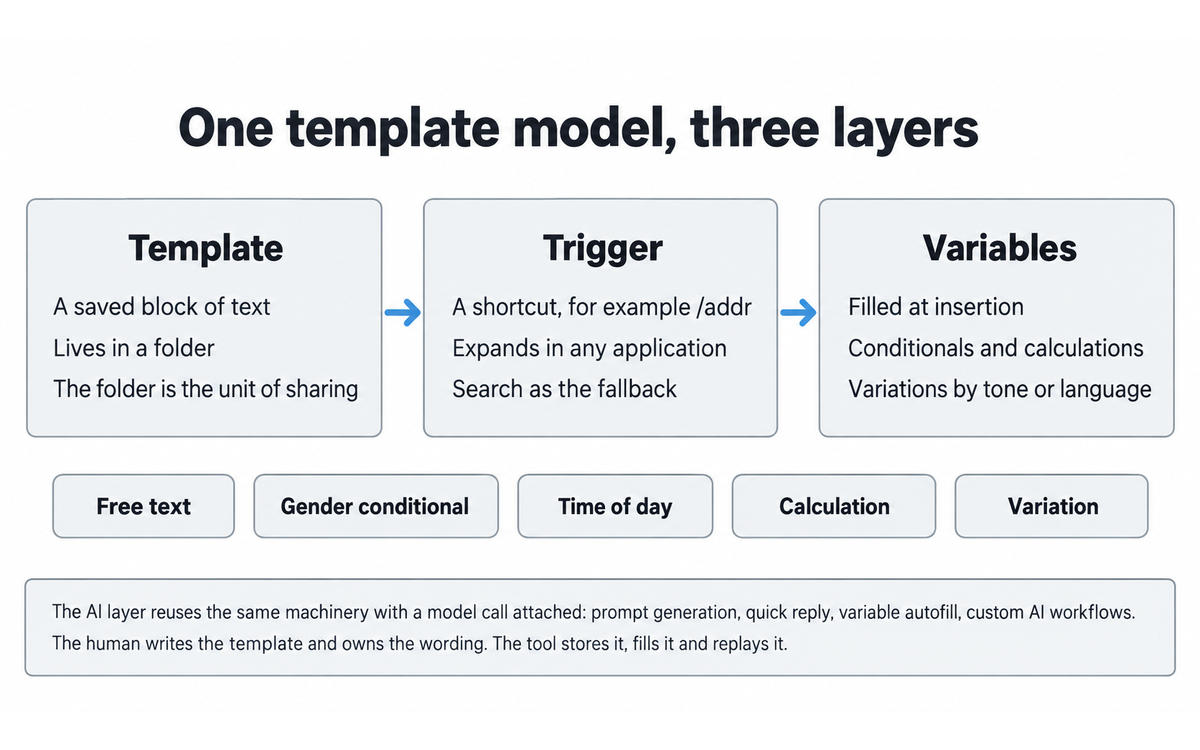
The expansion and automation model rests on three parts that work together: a template, a trigger, and a set of variables that fill the template at the moment of insertion.
The template. A template is a saved block of text, and the vendor organises templates into folders. Each folder carries its own sharing settings, which is the unit of control a team actually manages. A folder can be personal, or shared with specific people, or shared with the team.
The trigger. The default expansion model is a shortcut. The user assigns a shortcut such as /addr to a template, and typing it in any supported application expands the template in place. The vendor states that the shortcut for each template is customisable, which matters because a shared library whose shortcuts collide is unusable. The vendor also supports search: a user can search through hundreds of canned responses by keyword rather than remembering the shortcut, which is the path most new users take before the shortcuts stick.
The variables. Variables are the part that separates a text expander from a clipboard manager. The vendor's feature set includes:
Free text input, for a name, a product reference or an issue description typed at insertion time
A gender conditional, so one template shows different content depending on the recipient
A time-of-day conditional, so a greeting or an offer changes with the clock
Calculations, so a template performs arithmetic and lands with the figure already computed, which is the mechanism behind the cost-estimate example
Variations, so one template has several versions, for example a different tone or a different language, and the user picks the variant at insertion
The combination is a light form builder. A user builds, inside a text box, a small interactive object that collects input and produces consistent output. The vendor extends the same idea to form filling: the form-filler actions automate entering data into web forms, which is the furthest TypeDesk goes from pure text replacement toward task automation.
The AI layer. The AI features are not a separate application. They reuse the same template machinery with a model call attached. The vendor's own framing of the surfaces is:
AI Prompt Generator: a prompt assistant that is available everywhere the user works, meaning a saved prompt runs from a shortcut in any text box
AI Quick Reply: a quick-reply surface for generating a reply
Custom AI templates: templates whose output is produced by the model rather than stored as fixed text
AI variable autofill: the model fills a template's variables rather than the user
Custom AI workflows: multi-step AI behaviour built on the template model
All available AI models: the top tier can reach more than one model
The vendor names OpenAI and ChatGPT as the working integration and states that "ChatGPT API is built in typedesk". The homepage also frames the offer as having a ChatGPT writing assistant on every application. The AI layer therefore inherits whatever data-flow properties the integration has, and that is the subject of Section 7c.
Team mechanics. The vendor's collaboration surface has three parts. First, sharing and syncing of templates across the team, with fine-grained permissions per user and per folder. Second, an activity feed that notifies the team whenever someone changes a template. Third, standardisation: the vendor's stated purpose for sharing is to keep everyone on the same page, which in a support or sales context means the same answer to the same question.
Platforms. The native clients are Windows and Mac, and the vendor describes them as running natively and integrating with the operating system for speed. Browser extensions cover Chrome, Firefox and Brave. The mobile application is listed as coming soon. The vendor's marketing claim is that no integration is required, because the tool runs on the computer and works in the inbox, the CRM, the back office and Word alike.
Getting Started with TypeDesk
The shortest honest path from nothing to a working library is four steps, and the vendor's signup flow supports all of them.
Decide the first ten templates. Write them down before opening the app. The ten messages you send most often, in the words you actually use. This is the step people skip, and skipping it is why tool trials stall.
Sign up and choose a plan to try. The vendor states that a new account is automatically upgraded to a five-seat plan so a team can trial the sharing features, and that the vendor will extend the trial on request. The free plan is permanent, with unlimited templates, 50 uses per week, and a single user.
Create the templates and assign triggers. Enter the ten blocks, put them in folders, and assign a shortcut to each. Use a prefix convention, for example a slash, so shortcuts do not collide with ordinary typing.
Add variables where a template repeats context. The first template to convert is the one where you always edit the same two fields. Replace the name with a free-text variable and test it by inserting the template twice with two different values.
Then the team step, which is the step that changes the tool's category:
Share one folder, not everything. Move the team-standard messages into a shared folder and keep the personal ones personal. The permission model is per folder, so the boundary between the two is a decision the team makes once.
Assign an owner to the shared folder. The activity feed tells the team when something changes, but a feed is not a policy. One person should be accountable for the wording in the shared folder, so that a change is a decision and not an accident.
Review the shared folder on a schedule. Pricing, policy and legal wording drift. A library nobody reviews is a library that will one day answer a customer with last year's terms.
For the AI layer, the entry point is one saved prompt, not a workflow. Save the prompt you already retype into a chat window, give it a shortcut, and run it in place once. If that saves you a context switch, expand from there. If it does not, the AI layer will not earn its premium for you, and the non-AI Premium tier already carries the expansion and sharing work.
Real Workflows
Three workflows follow, each written for the honest user who does not verify perfectly and has to get the answer right anyway. The first two are the team cases and the individual case; the third is the AI layer, which is where the framework's Skill Illusion risk is closest to the surface. Each carries a UP-Context prompt pack and a verification checklist in the framework format.
Workflow 1: The shared support reply library for a service team
Who this is for: a support or customer success team of three to fifteen people answering recurring questions in a ticketing system, an inbox and a live chat.
What you build: one shared folder of canonical replies, each with a shortcut, a set of variables for the customer's name and reference numbers, and a named owner.
The steps:
Collect the twenty questions the team answers most often, from the ticket history rather than from memory. The ticket history tells you what customers actually ask, which is usually narrower than what the team remembers.
Write one canonical reply per question, in the team's own voice, with the variable slots marked. Keep each reply under a screen, because a canned response that scrolls is a canned response nobody reads before sending.
Create the folder, the templates, the shortcuts and the variables in TypeDesk, and share the folder with the team under the per-user permission settings.
Assign one owner per folder. The owner is the person whose change to the wording is a decision. Everyone else uses the replies; the owner maintains them.
Run a two-week shadow period in which agents use the replies but still read each one before sending, and record every case where the canonical wording did not fit. Those cases are the next revision.
Revise, then let the shortcuts do the work. Use the activity feed as the change log for the next revision cycle.
What the tool changes: the time to assemble a reply drops to a shortcut, the wording stops varying by agent, and the library has one visible version. The vendor's customer case studies describe exactly this pattern, including a customer support organisation that scaled its support volume on shared templates.
What the tool does not change: whether the reply is right. A wrong canonical answer is now wrong consistently and faster, which is a different failure mode from a slow correct answer, and it is more serious. This is why the human check below is not optional.
U365 connection: this workflow is the practical form of the consistency standard in CARE, and it exercises the Collect and Execute phases of LIPS. It connects to the professional service tracks rather than to a single course.
UP-Context prompt pack for this workflow. Copy the block below into the TypeDesk AI layer.
Context: the team is [team or role], and the recurring messages are [name three]. The
messages are sent in [channel or system]. Our review owner is [who], and the review
interval we will hold to is [interval]. What currently governs the wording is [a shared
doc / nothing / habit].

Role: AI as Co-Worker and Assistant (Profile 2). You assemble the specification. I own
the wording, the owner assignment and the review date.

Profile: Co-Worker and Assistant (2). You produce the structure and the drafts; I decide
what becomes canonical and I am accountable for it.

Task: take the three messages I named and turn them into a specification for a first
library of ten canonical replies. For each one, state the trigger shortcut, the variable
slots, and the sentence in the reply that carries a price, a policy term, a deadline or a
legal statement, if it carries one.

Constraints: do not invent a price, a policy term or a legal statement. Where a reply
would carry one, mark the gap and name the source system I must check instead of filling
it. Do not write more than one screen per reply. Do not turn the replies into prose
paragraphs; they are reusable blocks.

Output format: a table of the ten replies, one row each, with columns for trigger,
variable slots, the fact-bearing sentence, and the source system to verify against; then
one heading: "Replies I could not specify without a fact you must look up".

Memory: I place the accepted specification and the folder structure in my LIPS Digital
Second Brain under the project or domain it serves, so the standard wording stays a
record I own rather than one the tool holds.

UP-Context verification: I open the ticket history and confirm the ten replies are the
ones we actually send before anything is created. I read each reply as a customer would
and I delete any that only makes sense to the person who wrote it. I confirm the folder
owner is named and the review date is in the calendar, because a library nobody reviews
will one day answer a customer with last year's terms.

Data safety: this pack carries no personal data. I do not paste a customer name, an order
reference, a ticket body or any identifying detail into it, and I treat anything I do type
into a variable at insertion time as the only content the vendor states stays on my
machine.
Verification checklist.
VERIFICATION CHECKLIST for Workflow 1 (shared support reply library):
[x] Multi-Model Check: before publishing a new canonical reply that contains a factual or policy claim, draft it once with the AI layer and once by hand, and compare. If the two disagree on substance, the reply is not ready to be canonical.
[x] External Source: for any reply containing a price, a policy term, a deadline or a legal statement, verify against the current source system, not against the previous snippet. The previous snippet is the most likely carrier of stale facts.
[x] Human Review: the folder owner approves every change to a canonical reply before it reaches the team. Agents read the assembled reply before sending it on any case that is escalated, legal, medical or financially material.
[x] CI-First Test: can the agent explain and defend the reply without the tool? If the agent cannot say why the wording says what it says, the reply is being sent on trust and the agent should ask the owner.
Workflow 2: The AI-assisted estimate and proposal generator for a small consultancy
Who this is for: a consultant, agency or adviser who sends cost estimates, statements of work and proposals, where the same structure repeats and the figures change.
What you build: a document template with computed variables, a variation for tone or language, and an AI prompt that drafts the covering note.
The steps:
Take one estimate you have sent recently and that the client accepted. That document is the template, because its structure was already good enough to win work.
Convert the fixed parts into template text and the changing parts into variables. The line items, quantities and rates become calculation variables so the arithmetic is done by the template and not by the consultant at the end of a long day.
Build the covering note as an AI prompt template, with the client name, the scope line and the tone as inputs. The prompt produces a draft, not a final.
Create a variation of the document for each language or tone the business uses, so the same estimate can go out in the form the recipient expects without being rebuilt.
Run the workflow on a real, low-risk opportunity first. Compare the generated document against what you would have written by hand, line by line, and fix the template, not the individual document.
What the tool changes: the estimate is assembled in minutes, the arithmetic is consistent, and the covering note starts from a draft that reflects the library's tone rather than a blank page. The vendor's own homepage presents the cost-estimate case as a headline use, and the Document Template Builder exists for precisely this shape of task.
What the tool does not change: the commercial judgement. Which line items to include, which to discount, and what the client will accept are the consultant's calls. The AI layer drafts the words around a decision the human has already made.
U365 connection: this workflow maps to the client-facing standards in CARE and to the consistency expectations of the professional tracks. It also exercises ULM's principle that repeatable structure should be standardised so attention can go to the non-repeatable part.
UP-Context prompt pack for this workflow. Copy the block below into the TypeDesk AI layer.
Context: the tool is [tool], the plan under consideration is [plan], and the team size is
[number]. What we are deciding is [adopt / expand / cancel]. The vendor pages I have read
are [list them], and the statement I am relying on is [quote or paraphrase].

Role: AI as Analyst and Tester (Profile 4). You read the vendor's own documents against
each other and you show your work. I make the purchase decision and I own it.

Profile: Analyst and Tester (4). You test my reading of the record; you do not tell me
whether to buy.

Task: take the vendor's own published statements about where our content goes and how long
it is kept, and produce the disagreement list. For each disagreement, name the two pages,
quote the operative sentence from each, and state what a reader has to decide because of
it.

Constraints: quote only what is published. Do not infer an encryption design the vendor
does not state, and do not treat a marketing page as a policy. Do not average two figures
into one. Where the vendor routes a purpose to another section rather than stating it in
place, say so rather than reconstructing it. Do not write a legal conclusion and do not
claim the position is compliant or non-compliant.

Output format: the disagreement list, one entry per pair of statements, each with the two
page names, the two quoted sentences and the decision it forces; then one heading:
"Questions I must put to the vendor in writing before we commit".

Memory: I keep the vendor pages, the quoted sentences and the decision I reached as a
record under the project it belongs to, so that the position we relied on is mine and not
the vendor's page as it stands today.

UP-Context verification: I read the two quoted sentences on the vendor's own pages before
I use them, and I re-read them on the day I decide. I confirm which of the two governs our
case rather than assuming the more favourable one. I record what we decided and who
decided it, because a position nobody wrote down is a position nobody can defend at the
end of a contract.

Data safety: this pack carries no personal data. I do not paste our contract, our account
details, a customer name or any identifying detail into it, and I keep any such material
in the system of record rather than in a prompt. The pages I ask you to read are the
vendor's public ones, which name nobody.
Verification checklist.
VERIFICATION CHECKLIST for Workflow 2 (estimate and proposal generator):
[x] Multi-Model Check: draft the covering note with the AI layer, then re-run the same inputs through a second model of your choice and compare the two for factual claims and tone drift. Use the differences as a signal about which parts of the prompt are under-specified.
[x] External Source: recompute the totals independently, by spreadsheet or calculator, before sending. A calculation variable is code, and code is wrong silently. Never send a computed figure that you have not checked.
[x] Human Review: the consultant reads every document end to end before it leaves. The AI-drafted covering note is reviewed for voice, because a covering note that sounds like a machine undercuts the relationship the proposal is trying to build.
[x] CI-First Test: can the consultant explain and defend every figure and every scope line without the tool? If not, the document is not ready to send, whatever it looks like.
Workflow 3: Put one saved prompt into the AI layer and keep the library honest
Who this is for: the individual who already retypes the same prompt into a chat window, and the team owner who has decided to let a model draft text the library will carry.
What you build: one saved prompt template with a shortcut you can run in place, plus the reading habit that keeps a shared library from answering with last year's terms.
The steps:
Take one prompt you already retype into a browser chat window and save it as a template with a shortcut of its own. One prompt, not a workflow: the entry point the review recommends is the smallest useful step.
Run it in place once, inside a text box you already work in, and judge it on one thing only: whether it saved you a context switch. If it did not, the AI layer will not earn its premium for you, and the non-AI tier already carries the expansion and sharing work.
When the prompt produces customer-facing text, compare its output against a second model before the wording becomes canonical. A single model's phrasing must not become the team's standard.
Before a draft becomes a canonical reply, check every price, policy term, deadline and legal statement in it against the current source system rather than against the previous snippet. The previous snippet is the most likely carrier of a stale fact.
Name one owner for the shared folder. The activity feed records a change; the owner authorises it. A feed is not a policy.
Put a review date on the shared folder and treat it as a standing commitment rather than an intention. Pricing, policy and legal wording drift, and a library nobody reviews will one day answer a customer with last year's terms.
What the tool changes: the prompt lives next to the reply it supports, so the agent stops switching tools between retrieving the facts and drafting the response, and the library has one visible version instead of a personal note file per person.
What the tool does not change: whether the words are right, and who owns them. This is the workflow where the Skill Illusion is closest to the surface, because the AI-authoring path is the one place a model can write reusable procedure that is then saved durably into the team's shared library. The person who inserts a snippet must be able to explain and defend it without the tool.
U365 connection: this workflow is where LIPS carries the library as the Collect artefact while the human judgement stays the Execute step, and where ULM's authoring discipline applies: the person who writes the canonical reply is the person who understands it.
UP-Context prompt pack for this workflow. Copy the block below into the TypeDesk AI layer.
Context: the shared folder is [folder], its owner is [who], and the last review was
[date]. The folder carries [number] replies. The areas that have changed since then are
[pricing / policy / legal / product]. The system of record for each is [system].

Role: AI as Coach and Tutor (Profile 3) for this pass. You hold the checklist and you ask
the questions; I check each reply and I approve the change.

Profile: Coach and Tutor (3). You teach me what to look for in my own library; you do not
approve anything on my behalf.

Task: take the folder's reply list and produce the review pass. For each reply, state
whether it carries a price, a policy term, a deadline or a legal statement, name the source
system to check it against, and state what in the reply would be wrong if that fact
changed.

Constraints: do not rewrite the replies and do not approve any of them. Do not treat the
current snippet as the source of truth for a fact; the source system is. Where a reply
carries no fact that can go stale, say so and move on rather than inventing a check. Do not
add a reply to the list and do not remove one.

Output format: the review pass as a table of reply, the fact it carries, the system to
check, and the change that would make it wrong; then one heading: "Replies I would retire
rather than update".

Memory: I keep the review pass and the changes I approved in my LIPS Digital Second Brain
under the project the folder serves, with the date and the owner, so the library has a
change history rather than only a current state.

UP-Context verification: I open every source system you named and read the current figure
before I approve anything. I record which replies I changed and who changed them, because
the activity feed records that a change happened and it does not record that anyone
authorised it. I keep the read-before-send habit for escalated, legal, medical and
financial cases, because a library that answers in two seconds trains the agent to skip the
read.

Data safety: this pack carries no personal data. I do not paste a customer name, an order
or ticket reference, a transcript, a contract or any identifying detail into it, and I keep
the folder's reply list itself inside the tool rather than in a prompt.
Verification checklist.
VERIFICATION CHECKLIST for Workflow 3 (one saved prompt, and an honest library):
[ ] Multi-Model Check: when the AI layer drafts customer-facing text, compare its output against a second model before the wording becomes canonical.
[ ] External Source: every price, policy, deadline and legal statement in a shared snippet is verified against the current source system, not against the previous snippet.
[ ] Human Review: a named folder owner approves every change to a shared template, and every escalated, legal, medical or financially material reply is read before it is sent.
[ ] CI-First Test: can the person who inserted the snippet explain and defend its content without the tool? If not, they are sending text they do not own.
Strengths, Limits, and AI Imposture Risk
Strengths
The core strength is that TypeDesk does the repetitive part of knowledge work and stays out of the judgement part. The expansion model is fast, it is keyboard-first, and it works across the applications a person actually uses rather than inside one of them. The vendor's no-integration claim is accurate for a text expander: no API, no plugin per destination application, no per-tool configuration. That breadth is the reason a team can standardise on one tool instead of one tool per system.
The variable and conditional model is more capable than a plain clipboard manager and more approachable than a scripting layer. Free-text inputs, gender and time-of-day conditionals, calculations and variations cover the great majority of business templates without requiring the user to write code. The form-filler actions extend the same idea to web forms, which is the point where the tool stops being a text tool and starts being a light automation tool.
The team layer is the second real strength. Per-user and per-folder permissions plus an activity feed turn a snippet collection into a maintained artefact with a visible change history. That is the feature that makes TypeDesk a team product rather than a personal utility, and it is the feature a governance-minded buyer should evaluate first.
The AI layer is integrated rather than bolted on. Because the AI surfaces reuse the template model, a saved prompt is an object of the same kind as a saved reply, in the same library, with the same shortcuts. That is a cleaner design than running a separate prompt manager beside a separate snippet manager.
Limits
The pricing page as captured does not print the per-user figure for the paid tiers. A buyer comparing on cost has to request it. For a governance review this is not fatal, but for a team procurement it is friction, and the re-check trigger is set on it.
The mobile application is not available. The vendor lists it as coming soon. An agent who answers from a phone does not get the library on the phone, and the vendor's own testimonial set mentions waiting for the mobile version.
The platform list is Windows and Mac, plus three browsers. The vendor does not advertise a Linux desktop client. A Linux user, or an institution standardised on Linux desktops, is outside the supported set.
The tool is closed source and the sync store is the vendor's. A team that puts client-identifying content into shared snippets is trusting the vendor's transport, storage and retention practices. The vendor's privacy notice is the operative document and Section 7c reads it in detail. There is no published client-side encryption statement for the synced template store as captured, which is a real limit for the most sensitive content.
The AI layer introduces the standard AI limits on top of the text-expander limits: the output is a draft, it needs verification, and its quality varies by task. A team that lets the AI draft customer-facing text without review has traded a consistency problem for a correctness problem.
The vendor's strongest quantitative claim, up to 30 hours saved per month, is published without a method and is measured by nobody independent. Treat it as a marketing figure, not a benchmark.
Verification discipline for the whole tool
A snippet library fails in a specific way that is worth naming before the risk table: the failure is not that a snippet is wrong, it is that a snippet is wrong and everybody uses it. Because the shared library is by design the single source of a team's standard wording, an error in a canonical reply propagates at the speed of the fastest agent. The discipline that prevents this is the folder owner plus the checklist above, not a tool feature. The honest user will not run the checklist every time. The honest user should therefore automate the part that can be automated: put a review date on the shared folder, and make the review a standing commitment rather than an intention.
AI Imposture Risk
The framework measures three traps. The evidence for each follows.
Trap | Rating | Evidence |
Time Illusion | Low | This is where TypeDesk is strongest and clearest. The tool removes typing, not thinking, at the point of use. The overhead is a one-time setup cost (writing the templates, assigning shortcuts) and a small ongoing maintenance cost (reviewing the folder). The saving appears on every subsequent insertion, so the net time benefit is large and it compounds rather than decaying. A shortcut that replaces ninety seconds of find-and-adapt work is a real saving measured in seconds per use and hours per month for a busy role. The vendor's 30-hour figure is not independently verified, but the direction is not in doubt, which is why this trap is Low rather than Low-by-assertion. The one caveat is the AI layer, where a generated draft can take longer to verify than to write, and that is recorded in the Skill row rather than here. |
Quantity Illusion | Medium | The tool increases the volume of communication a person or team can send, and that is the point, so volume is a genuine benefit rather than only an illusion. The illusion risk is real but narrower: a larger volume of standardised replies creates a temptation to send more without reading more, and in a support context the measure of the work is not the number of replies but the number of correctly resolved cases. The vendor's own framing leans on volume ("send responses out quickly", "spend more time selling"), and the honest reading is that quantity rises with a modest quality cost unless the team keeps the read-before-send habit during and after rollout. Rated Medium because the tool makes the volume easy and the verification is left to the user. |
Skill Illusion | Medium | This is the trap the framework's clause 5.2.3-a speaks to most directly, and the reasoning is set out in full below. In short: TypeDesk does not write the user's snippets in the common case, so it is not agent-authored procedural memory in the sense clause 5.2.3-a describes, and the floor that clause imposes does not bind here. But the library is durable, reusable procedural content, and a team that inherits a library written by someone else can be competent at inserting answers it did not compose and could not defend. The Skill Illusion is therefore Medium: not from the tool authoring procedure, but from the tool making a shared, reusable procedure easy to use without understanding. |
Overall AI Imposture Risk: Medium. One trap is Low, two are Medium. Under the framework's Section 5.3 rule, one or two Medium traps with the third Low is a Medium overall level, and the tool requires disciplined use rather than strong safeguards.
Assessment of clause 5.2.3-a, the Skill Illusion floor for agent-authored procedural memory
Clause 5.2.3-a states that agent-authored procedural memory is a Skill Illusion vector in its own right, that when an agent creates or revises the user's skills, memory stores or standing instructions the user holds a documented capability they did not write, and that such a tool cannot be recorded as Low on Skill Illusion. The clause carries a floor of no lower than Medium.
TypeDesk is close to the surface of this clause, and the honest assessment has to say why it does not trigger the floor and why the reasoning is not a technicality.
The clause is triggered by procedure that an agent authors on the user's behalf. TypeDesk's core object is a template, and in the common case the human writes the template. The vendor's own product story assumes the human does the authoring: the pricing page promises assistance in importing previous canned responses, which presupposes that prior human-authored content exists; the help centre teaches users to become template masters; and the testimonials from working users describe writing their own brand messaging, code snippets and hashtags into the tool. A team member who writes the reply that answers a customer's question is composing standing instructions for the team, and a human is composing them. On that reading, clause 5.2.3-a does not apply to the base product, and the Skill Illusion rating is not bound by its floor.
The assessment changes at the AI layer, and this is where the clause is genuinely close. Three of the vendor's AI surfaces move authoring away from the human. Custom AI templates produce the reply's content with a model instead of storing fixed human text. AI variable autofill has the model fill the template's slots rather than the user. Custom AI workflows chain model behaviour into a reusable procedure. A user who builds a custom AI template and saves it to a shared folder has, in effect, let a model author a reusable piece of the team's standing procedure, and saved it durably. That is the pattern clause 5.2.3-a describes, and for that specific usage path the floor applies.
The conclusion this review reaches is therefore split and stated plainly:
For the base product, where the human authors the snippets, clause 5.2.3-a returns a null. The clause does not apply, and this is a finding, not an omission. The reason is that the human holds the authoring role in the common case, which is exactly the condition the clause names.
For the AI-authoring path (custom AI templates, AI variable autofill, custom AI workflows saved as shared procedure), clause 5.2.3-a applies and the Skill Illusion rating for that path cannot be recorded below Medium.
Because TypeDesk's Skill Illusion is recorded at Medium overall, the floor is satisfied on both readings. A reader who uses only the expansion and sharing features is not bound by the floor at all. A reader who lets the AI author shared templates is bound by it, and the recorded Medium is the correct level for them. No score changed as a result of this assessment; the Skill sub-score in Section 12 is set from the ordinary scoring reasoning, and this section explains that the clause does not force a different number either way.
Assessment of clause 4.2-a, agent-mediated conversation
Clause 4.2-a states that agent-mediated conversation is not erosion by itself, that the dimension measures the human's own communicative capability rather than the composition of the channel, and that a shared room in which named agents and their owner coordinate internally is neutral.
TypeDesk is a tool the human uses to compose and send their own messages. There is no agent holding the conversation on the human's behalf, and the tool does not present agent-authored text as the person's own voice by default. A human writes the snippet; a human inserts it into a conversation the human is having. The AI layer can draft a reply, and if a user sends an AI draft as their own authentic voice without reviewing it, Social Authenticity erodes, but that is a usage choice the user makes rather than a property of the tool's channel design. Clause 4.2-a returns a null for TypeDesk. The clause does not apply, and the Social Authenticity rating in Section 12 is set from the ordinary reasoning about the use of canned responses, not from this clause.
Assessment of clause 7.5, team-level rooms
Clause 7.5 states that a room shared by several agents and the human is several AIs in one channel rather than one AI in one role, that a profile is attributed to each agent, and that a room with more than one agent requires Centaur and cannot be Cyborg.
TypeDesk's team feature is a shared template library, not a shared channel in which multiple agents act. The team members are humans sharing content; there is one AI layer, and it acts only when a human invokes it on their own behalf. There is no room in which more than one AI is acting, so clause 7.5 returns a null. The clause does not apply. The Collaboration Mode in Section 12 is therefore set from the ordinary rule stated in the framework (Imposture Risk of Medium or High means Centaur because Centaur is safer), not from clause 7.5.
Verification checklist for the tool as a whole
VERIFICATION CHECKLIST for TypeDesk adoption:
[x] Multi-Model Check: when the AI layer drafts customer-facing text, compare its output against a second model before the wording becomes canonical. Do not let a single model's phrasing become the team's standard.
[x] External Source: every price, policy, deadline and legal statement in a shared snippet is verified against the current source system. A snippet that was right last quarter is the primary carrier of stale facts.
[x] Human Review: a named folder owner approves every change to a shared template. The activity feed records the change; the owner authorises it.
[x] CI-First Test: can the person who inserted the snippet explain and defend its content without the tool? If not, they are sending text they do not own.
Section 7c: Sync, encryption and retention of expanded content, stated plainly
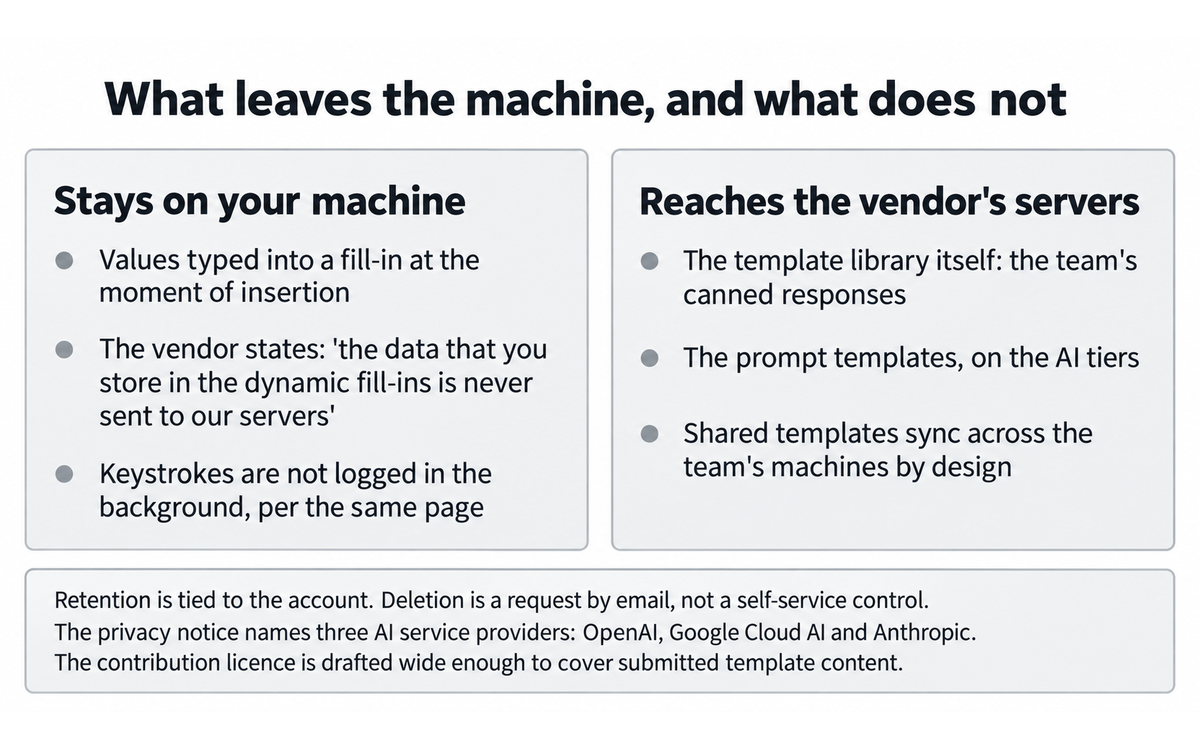
This section is a contract-terms and data-flow finding. It reads the vendor's own published documents against each other. It is not an allegation that the vendor has done anything wrong, and the distinction between what the vendor states and what a reader should decide is kept explicit throughout.
What the vendor says about the sync and encryption question
The vendor's Security Policy page, headed "Infosec & Security Policy - typedesk", opens by stating its purpose: "The purpose of this document is to describe our security standards and practices to ensure your data is safe at rest and in transit."
The same page makes four operational statements that a team should read together.
On server hosting: "typedesk servers are managed by DigitalOcean, and replicated accross several regions for a lower latency and high redundancy." The page also states that infrastructure access is passwordless and that "each computer holding an SSH-key is disk-encrypted with biometric authentication."
On the database and its replicas: "our database is managed by DigitalOcean to ensure high availability and data security. Your data is replicated accross several regions. Backups of customer managed database instances are taken and stored off-site daily. They are encrypted while stored to prevent unauthorized access to customer database data without the required decryption keys. Managed Database customer instances connection occur over TLS/SSL, which provides encryption of traffic in transit between the customer applications and the customer managed databases."
On keystrokes and dynamic fill-ins: "typedesk does not log your keystrokes in the background, and the data that you store in the dynamic fill-ins is never sent to our servers. All personal data is transmitted through secure layer protocols (HTTPS), and hosted on providers offering the highest level of security and certification."
On the network edge: "Our web-application and database servers are behind a Firewall with advanced security mechanisms managed by Cloudflare, preventing DDoS attacks, code injection and malicious exploits."
The word "accross" is the vendor's own spelling and is reproduced here as published.
The two documents read against each other
Two statements sit next to each other and describe different parts of the same product.
The first is the security page's line that "the data that you store in the dynamic fill-ins is never sent to our servers." A reader who takes that sentence as covering all content would conclude that nothing a user types into a template leaves the machine.
The second is the product's own core promise, repeated on the homepage and the pricing page: templates are shared and synced with a team, the rest of the team is notified when a response changes, and the pricing page sells "Share templates with your team" as a paid feature on the Premium tier.
Both statements can be true at once, and the honest reading is that they are describing different objects. The sentence about never sending data to the servers is scoped by its own wording to "the data that you store in the dynamic fill-ins", which is the content a user types into a variable at insertion time, for example the customer's name or an order reference. That is a defensible reading and it is the reading the sentence's own grammar supports. What it does not say is that the templates themselves stay local. The templates are precisely the object the product syncs, because a shared template library that did not leave the machine could not be shared.
The finding, stated plainly, is this: the content that leaves the user's machine and reaches the vendor's infrastructure is the template library itself, meaning the team's canned responses and, on the AI tiers, the prompt templates. The content that stays local, by the vendor's own statement, is the value typed into a dynamic fill-in at the moment of insertion. A team that stores an internal escalation phrase, a discount ceiling or a client's name inside a template body has put it into the synced object. A team that types the client's name into a variable at insertion has, by the vendor's own description, not.
That distinction is not spelled out on one page. It has to be assembled from a marketing page, a pricing page and a security page read together, which is exactly why it belongs in a review rather than in a footnote.
Retention of expanded content
The Privacy Policy, last updated August 17, 2025, is the operative document for retention. Its section 8 is headed "HOW LONG DO WE KEEP YOUR INFORMATION?" and states:
"We will only keep your personal information for as long as it is necessary for the purposes set out in this Privacy Notice, unless a longer retention period is required or permitted by law (such as tax, accounting, or other legal requirements). No purpose in this notice will require us keeping your personal information for longer than the period of time in which users have an account with us."
The same section adds: "When we have no ongoing legitimate business need to process your personal information, we will either delete or anonymize such information, or, if this is not possible (for example, because your personal information has been stored in backup archives), then we will securely store your personal information and isolate it from any further processing until deletion is possible."
Section 7c states the deletion route: "If you want to delete your account contact us by email support@typedesk.com", and adds that "Upon your request to terminate your account, we will deactivate or delete your account and information from our active databases. However, we may retain some information in our files to prevent fraud, troubleshoot problems, assist with any investigations, enforce our legal terms and/or comply with applicable legal requirements."
Two consequences follow for a team. First, account deletion is a request by email to a support address, not a self-service control, so the exit path is a human process on the vendor's side. Second, the retention window is tied to the account, and the backup-archive carve-out means deletion is not instantaneous on the backup copies. Neither of these is unusual. Both are worth knowing before a team stores client-identifying content in a shared library, because the practical question at the end of a contract is what happens to the library.
The AI-processing paragraph, quoted
The Privacy Policy's section 6 is headed "DO WE OFFER ARTIFICIAL INTELLIGENCE-BASED PRODUCTS?" and is the paragraph that matters most for the AI tiers. It states:
"We provide the AI Products through third-party service providers ("AI Service Providers"), including OpenAI, Google Cloud AI and Anthropic. As outlined in this Privacy Notice, your input, output, and personal information will be shared with and processed by these AI Service Providers to enable your use of our AI Products for purposes outlined in 'WHAT LEGAL BASES DO WE RELY ON TO PROCESS YOUR PERSONAL INFORMATION?' You must not use the AI Products in any way that violates the terms or policies of any AI Service Provider."
Three things in that paragraph change a decision. First, the vendor names three AI service providers, not one: OpenAI, Google Cloud AI and Anthropic. The marketing pages name ChatGPT and OpenAI prominently, so a reader who assumed the AI layer was OpenAI-only would be working from an incomplete picture of the vendor's own disclosure. Second, the disclosure states that input, output and personal information are shared with those providers. Third, the processing purpose is cross-referenced to another section rather than stated in place, so a reader who wants the purpose has to follow the reference into section 2 of the same notice.
The same document's section 4 sets out sharing more broadly and includes the business-transfer clause: "We may share or transfer your information in connection with, or during negotiations of, any merger, sale of company assets, financing, or acquisition of all or a portion of our business to another company."
The template content and the terms that govern it
The Terms and Conditions, also last updated August 17, 2025, contains two clauses that a team should read before it treats the library as its own private store.
Section 9, "USER GENERATED CONTRIBUTIONS", states: "Contributions may be viewable by other users of the Services and through third-party websites. As such, any Contributions you transmit may be treated as non-confidential and non-proprietary." The section's definition of "Contributions" is swept wide: it covers "text, writings, video, audio, photographs, graphics, comments, suggestions, or personal information or other material".
Section 10, "CONTRIBUTION LICENSE", then states: "By posting your Contributions to any part of the Services, you automatically grant, and you represent and warrant that you have the right to grant, to us an unrestricted, unlimited, irrevocable, perpetual, non-exclusive, transferable, royalty-free, fully-paid, worldwide right, and license to host, use, copy, reproduce, disclose, sell, resell, publish, broadcast, retitle, archive, store, cache, publicly perform, publicly display, reformat, translate, transmit, excerpt (in whole or in part), and distribute such Contributions ... for any purpose, commercial, advertising, or otherwise".
This is a standard broad platform clause and it is common across software-as-a-service contracts; the framework's instruction is to quote the operative text where it changes what a reader should decide, not to characterise a common clause as unusual. What it changes here is narrow and real. A "Contribution" as defined is text a user submits to the Services. A template is text a user submits to the Services. The vendor's own business practice is clearly not to resell customers' canned responses, and nothing in this review alleges that it does. The finding is only that the contract, as drafted, grants a licence wide enough to cover the content of a shared template library, and that a team with a compliance obligation should read the clause rather than assume the library is outside it. The clause is drafted broadly enough that a reader cannot rely on the contract text alone to conclude that uploaded snippet content is carved out.
There is a further, smaller finding inside the same document. Section 1, "OUR SERVICES", states that "The Services are not tailored to comply with industry-specific regulations ... so if your interactions would be subjected to such laws, you may not use the Services." The vendor's own customer pages target doctors and health professionals, lawyers and attorneys, and insurance companies. Those are regulated fields. The clause does not prohibit an individual practitioner from using the product, and the vendor's marketing to those fields is not a misrepresentation, but a professional in a regulated field should read the two together and decide for themselves rather than assume that a product marketed to their sector carries their sector's compliance.
What this section does not do
This section does not change any score, and the reason is deliberate. The Time, Quantity, Quality and Skill sub-scores measure benefit to the user, and none of them turns on the licence clause. The Humics ratings measure the effect on the human's capabilities, and the licence clause does not touch them. The Imposture Risk ratings measure the likelihood of a usage illusion, and a broad contribution licence is not a usage illusion. Recording this as a finding without moving a number is the correct treatment of a contract observation that changes the calculus of adoption rather than the arithmetic of benefit.
This section does not accuse the vendor of anything. The vendor publishes a security policy, a privacy notice and terms that are more transparent than many products in this category, and the security page makes specific, checkable statements about encryption in transit, encrypted backups and keystroke logging. It does not assert or imply that the vendor sells customer content, that its synced store is insecure, or that its security statements are untrue. It quotes the vendor's own documents and states what a reader should decide in light of them.
This section does not conclude that TypeDesk is unsuitable for a team. It concludes that a team should make two explicit decisions before adopting it: what content is allowed into a template body as opposed to a fill-in, and who owns the library at the end of the contract. Both are decisions a team can make and document in an afternoon.
U365 Co-Intelligence Rating
The rating below follows the framework. Every sub-score carries the reasoning that produced it, including the reasoning that pushed a number down.
CI-First Profile
Primary profile: Co-Worker and Assistant (2). TypeDesk takes a defined, repetitive task and does it on instruction. The human decides what the reply says and when to send it; the tool performs the insertion. This is the profile's definition: the AI does the work, the human directs it.
Secondary profile: Coach and Tutor (3). A user who maintains the library learns something durable from it. The discipline of writing a canonical reply once, in words that will hold up under reuse, teaches the writer to think about their own standard wording. The framework's own mitigation guidance for Skill Illusion says to use a tool as a Coach and Tutor rather than only as a Co-Worker and Assistant, and the mechanism here is the authoring step, which is where the learning happens.
Not a fit: Challenger and Devil's Advocate (5) and Analyst and Tester (4) are not roles this product plays. It does not critique the user's judgement and it does not test hypotheses.
Collaboration Mode: Centaur
Centaur. The framework's Section 7.2 rule is that Imposture Risk of Medium or High means Centaur, because Centaur mode is safer. TypeDesk's overall Imposture Risk is Medium, so the mode is Centaur and clause 7.5 does not alter that, as the clause note below records.
The division of labour is clean and easy to state. The human writes the template, decides what the canonical answer is, owns the wording in the shared folder and reads the assembled reply before it reaches a customer. TypeDesk stores the template, runs the shortcut, fills the variables, performs the arithmetic and, on the AI tiers, drafts text on request. The line between the two is the content of the reply, and it does not blur the way it does with a general-purpose assistant. That clarity is why the Centaur assignment is not a compromise here; it is the natural way to use the tool.
Cyborg mode is available for the AI drafting loop, where a user iterates on a prompt template in real time, but it is not the mode this review recommends as the default, and the framework's rule sets the default at Centaur.
CI-First Benefit Score
Dimension | Score | Rationale |
Time | 7 | Strong net saving. The overhead is a one-time authoring cost and a periodic review, and the saving repeats on every insertion. For a role that sends the same message dozens of times a week, the net is large and it compounds. The score is not higher because the saving is concentrated in roles with genuine repetition, and the verification cost on AI-drafted text offsets part of the gain. |
Quantity | 7 | Strong increase in usable output. The honest reading is that a support agent who could answer forty messages a day answers more, and the increase is in verified, sent replies rather than drafts. The score is not higher because the volume gain is bounded by the workload available and because the framework scores the common case, not the vendor's most productive user. |
Quality | 6 | Moderate, verified improvement. The team consistency gain is real and it survives inspection: one canonical wording, a permission model, an activity feed. The score is capped by two limits. First, the tool standardises quality rather than raising it, so a mediocre canonical reply becomes a consistently mediocre reply. Second, the AI layer's output is variable and needs the same verification as any other AI draft. |
Skill | 2 | No skill benefit, and deliberately conservative per the framework's instruction to score this dimension low when in doubt. The tool performs the task; the user does not learn to perform it. The template-authoring step is a real discipline and it is why this is not a zero, but the user does not become a better writer or a better support agent by inserting a saved reply, and the framework's Skill Illusion reasoning sets the ceiling here. |
CI-First Benefit Score: (7 + 7 + 6 + 2) / 4 = 22 / 4 = 5.5 (CI-First Positive)
The 5.5 says TypeDesk delivers a clear net benefit that a reasonable user should adopt with disciplined usage, and that it does not transform what a person can achieve. That is the correct description of a well-built utility.
Humics Protection Rating
Dimension | Rating | Rationale |
Creativity | Neutral (0) | The tool composes nothing on its own. It stores and replays what the human wrote. It can protect creativity by freeing time for the work that needs it, and it can erode creativity if a team stops writing new replies because the library already has one. The two effects balance, and the tool itself pushes in neither direction. |
Critical Thinking | Protects (+1) | This is the one dimension where the tool has a genuine positive effect, and the mechanism is concrete. Every template is an explicit, written statement of the team's standard answer, which forces the question "is this the right answer, and is it still current?" at the moment of authoring. A library with a named owner and a review date institutionalises that question. The tool surfaces its own uncertainty in a useful way: a stale snippet is a visible artefact that someone can be asked to defend, whereas a half-remembered answer in an agent's head is not. Clause 4.2-a returns a null and does not affect this rating. |
Social Authenticity | Neutral (0) | A canned response is a standard wording, and sending standard wording is not inauthentic in itself; most professional communication is templated by convention. The tool preserves the human's voice because the human chooses the words. The erosion risk is the AI-drafted reply sent without review, and the quantity pressure to send more without reading more. That risk is real but it is a usage pattern rather than a property of the tool, so the rating is neutral rather than negative. |
Humics Protection Score: 0 + 1 + 0 = +1 Badge: Humics-Neutral. The tool neither strengthens nor weakens the human overall. It protects Critical Thinking through the library discipline, and it is neutral on Creativity and Social Authenticity. It is safe to use, and it does not build core capabilities on its own.
AI Imposture Risk
Trap | Rating |
Time Illusion | Low |
Quantity Illusion | Medium |
Skill Illusion | Medium |
Overall | Medium |
The evidence for each trap is set out above. The overall level follows the framework's Section 5.3 rule: one trap Low and two Medium is Medium, and the tool requires disciplined use rather than strong safeguards.
Framework v1.2 clause note
All three clauses are assessed, and each outcome is stated as a finding.
Clause | Outcome | Reason |
5.2.3-a, agent-authored procedural memory, Skill Illusion floor no lower than Medium | Applies to the AI-authoring path. Null for the base product. | In the common case the human writes the snippet, so the clause's condition is not met and this is a null rather than an omission. On the AI-authoring path, where custom AI templates, AI variable autofill and custom AI workflows let a model author reusable procedure that is then saved durably, the clause applies and the floor binds. The recorded Skill Illusion of Medium satisfies the floor on both readings. |
4.2-a, agent-mediated conversation | Null. | TypeDesk does not hold the conversation on the human's behalf, and its channel composition changes nothing. The human composes and sends their own messages. The clause's erosion condition, agent-authored text presented as the person's own voice, is a usage choice here rather than a design property. |
7.5, team-level rooms | Null. | The team feature is a shared template library, not a channel in which more than one agent acts. One AI layer acts only when a human invokes it. No room with multiple agents exists, so the Centaur requirement is not triggered by this clause. Collaboration Mode is set from the ordinary rule instead. |
No score moved as a result of the clause assessments, and the reason is stated with each.
Superhuman usage guidance
Invite TypeDesk when: a task repeats, the wording should be consistent across people, the content is a standard answer rather than a judgement, and the destination is an application the tool already covers.
Keep TypeDesk out when: the message requires original judgement about a specific situation, the content is confidential in a way the team has not decided how to handle, or the reply will be sent to a customer without a human reading it.
U365 methods in practice: use TypeDesk with LIPS by keeping the template library as the Collect artefact and the human judgement as the Execute step. Use it with CARE by making the canonical reply an expression of the standard the method sets rather than a substitute for attention to the person receiving it. Use it with ULM by treating the authoring step as the learning step: the person who writes the canonical reply is the person who understands it.
Over-delegation warning: the specific risk here is that a team stops reading what it sends. A library that answers a customer in two seconds trains the agent to trust the library and to skip the read. At that point the team is sending text nobody in the room wrote recently, and the first anyone notices is a customer replying to last quarter's terms. The single cheapest defence is to keep the read-before-send habit for escalated and financial cases, and the second is a quarterly review of the shared folder by its owner.
What Users Say
Independent ratings differ across platforms, and the differences are themselves informative. Every figure below was read from the platform's own page on 2026-09-25.
Platform | Rating | Review count | What the platform itself reports |
Capterra | 4.5 out of 5 | 49 user reviews | Reviews sentiment: 94 percent positive, 0 percent neutral, 6 percent negative. A Capterra vendor card for the same product lists a starting price of 8.00 US dollars per user per month and places the vendor in Lille, France, founded in 2018. |
G2 | 4.7 out of 5 | 18 reviews | 83 percent of ratings are five star and 16 percent are four star, with no rating below four stars. The platform's generated pros and cons list Ease of Use (9 mentions), Time-saving (5), Helpful (4), Automation (4) and Customer Support (3) against Slow Loading (2), Manual Input (1), Limited Customization (1), Lack of Integrations (1) and Data Duplication (1). |
Product Hunt | 4.8 out of 5 | 31 reviews | 385 followers. The platform's own summary states that reviewers describe the product as a fast, lightweight text expander that saves substantial time on repetitive replies, and that the main complaints are a report of broken sync with no support response and a request for richer editor formatting. |
Fluidsurveys tool directory | 3.8 out of 5 | Not stated on the page | The directory describes the product as a niche text expansion and template tool with form features, states that the free plan covers a single user, and records a 5 US dollar monthly per user figure for the paid tier. |
An independent catalogue summary | 4.8 out of 5 | Claims 300 or more verified reviews across Capterra, Product Hunt and G2 | This figure does not reconcile with the counts on the platforms themselves, which total 98 reviews across the three named platforms on the same date. Treat the 300 figure as unverified. |
The spread is the finding. Capterra shows 49 reviews at 4.5. G2 shows 18 reviews at 4.7. Product Hunt shows 31 reviews at 4.8. The most-cited aggregate figure of 300 or more verified reviews is not supported by any of the three platforms named as its source. A reader who sees "300 or more reviews" quoted in a directory should check it against the platforms, because the number on the largest platform here is 49.
The published price figures also disagree, and each was read from the surface that carries it:
The vendor's own blog, in a 2023 alternatives article written by the vendor, states that the product "Starts at $8/seat/month" and describes team sharing as included rather than an add-on.
The vendor's customer testimonials on the pricing page include a user who says they moved from a competitor because the pricing was better for their company.
The Capterra vendor card lists a starting price of 8.00 US dollars per user per month.
The Fluidsurveys directory and an independent lab report both record 5 US dollars per month for the Pro tier.
A G2 comparison block on the same product page shows a starting price of 6 US dollars per user per month against a competitor.
The vendor's official pricing page itself, as captured, does not print a per-user number at all. It presents the four tiers and their feature boundaries and routes the buyer to signup or a demo request.
Five different figures for one product, none of them printed on the vendor's own pricing page. The framework calls this out as a finding rather than a nuisance: the spread means a buyer cannot compare on price from published material, and the only figure the vendor itself controls, its own pricing page, is the one that does not state a number. The re-check trigger is set on this.
The vendor also publishes ratings badges in its site footer for Capterra, Product Hunt and G2, and the badge images are served from the vendor's own domain rather than from the review platforms. The badges are a marketing surface; the underlying numbers above are the platform pages.
What users praise, across platforms and in the vendor's own testimonial set, is consistent and narrow: speed, cross-application reach, the variables, and team sharing. A Capterra reviewer with the product for more than two years writes that it is "the most satisfying and efficient tool I own" and that it "would be very difficult to live without", while naming the missing mobile application as the one gap. A Product Hunt summary credits cross-app use, simple setup, search, variables, team sharing and cloud sync. A G2 reviewer describes using slash commands for pre-canned support and partner emails and calls it a time saver.
What users complain about is equally consistent and worth reading. The most serious item is a Product Hunt reviewer who reports broken sync and no support response; a sync failure is the failure mode that matters most for a shared library, because it silently splits the team's standard wording. A Capterra reviewer gives the product the headline "Worst customer service" in October, which sits against the several reviewers who praise a responsive small team; the vendor's own testimonial set contains a user who notes problems with new updates that the team then fixes promptly, so both readings are attested. G2 reviewers mention slow loading and a copy-and-paste behaviour that occasionally types twice or fails to paste. A G2 reviewer also notes limited customisation, and a Product Hunt reviewer asks for richer editor formatting, specifically bullets and numbered lists.
The honest synthesis: the core engine is well reviewed and the ratings are high, the review base is small, the vendor's own 4.8 badges rest on 18 to 49 reviews rather than hundreds, and the two failure modes users report (sync reliability and thin support at the low end of the market) are exactly the two that matter for a team library.
Comparison and Alternatives
Three alternatives cover the decision space: one direct commercial competitor, one open-source option, and one operating-system-level tool that solves part of the problem for free.
TypeDesk | TextExpander | Espanso | Raycast Snippets | |
Category | Text expander with team sharing and an AI layer | The category incumbent for teams | Open-source text expander | Launcher with a snippets feature |
Platform coverage | Windows, macOS, Chrome, Firefox, Brave. No Linux desktop client. Mobile listed as coming soon | Windows, macOS, iOS, Chrome and more, with a long-standing mobile presence | Windows, macOS, Linux | macOS only |
Team sharing | Yes. Per-user and per-folder permissions, activity feed, sharing sold from the Premium tier | Yes, with team libraries as the core paid proposition | Not natively. Teams distribute configuration files | Not a team product. Snippets are local to the user |
Variable and logic model | Free text, gender conditional, time-of-day conditional, calculations, variations, form-filler actions | Dynamic fill-ins, dates, math, optional sections | Shell extensions and scripting, which is more powerful and less approachable | Placeholders and dynamic dates, limited logic |
AI layer | Built in. Prompt templates, quick reply, variable autofill, custom AI workflows, multiple models on the top tier | AI features have been added to the paid tiers | None natively. Can be extended with scripts | AI commands alongside snippets in the launcher |
Pricing as published | Free tier forever with 50 uses per week and one user. Paid tiers presented without a printed per-user figure. Annual billing shown as a 30 percent saving. A blog article written by the vendor states 8 US dollars per seat per month | A subscription. Third-party write-ups put Pro at about 6 US dollars and Business at about 12 US dollars per user per month billed annually | Free and open source | Free tier, with a paid tier for advanced features |
Source model | Closed source | Closed source | Open source | Closed source |
Best fit | A support, sales or admin team on Windows or Mac that wants sharing plus a light AI layer in one tool | A larger team that needs a mature mobile presence and a longer track record | A technical user or a Linux team that wants control and no subscription | A macOS user who wants snippets inside the launcher they already use |
On the comparison the vendor itself publishes. The vendor's homepage carries a testimonial from a user who moved from a competitor and cites better pricing for a company with broadly the same features, and the vendor's blog compares itself to other expanders. One independent lab report summarises the product as "not trying to reinvent the category", with "the AI angle is light". A competing vendor's own comparison piece includes the product as the most directly support-focused option for shared canned responses across different support tools, which is a competitor's assessment and is noted here as such. On the framework's Pitfall 20 rule, no head-to-head with a deliberately weaker competitor setting was found in the vendor's material; the vendor's comparisons are feature-level rather than benchmark-level, which is the less misleading form.
On the free tiers, which is where most teams will start. TypeDesk's free tier gives unlimited templates but caps usage at 50 insertions per week and limits the account to a single user. An independent buyer's guide on text-expander pricing for e-commerce teams describes the free tier of a competing product in similar terms, noting that a low active-snippet limit and a slow snippet-swap cadence "gets restrictive fast". The pattern is the same across the category: the free tier proves the workflow, the paid tier is where the library and the team live. TypeDesk's free tier is genuinely usable for one person, and the 50-use cap is the boundary that decides whether a single heavy user can stay on it.
What the comparison does not settle. None of these alternatives ships the same combination of team permissions, an activity feed and an integrated AI prompt layer as one product. Espanso is more powerful for a technical user and has no sharing layer. Raycast is free and excellent on macOS and is not a team tool on Windows. TextExpander is the mature incumbent with a mobile presence TypeDesk does not have. A team that needs all three of sharing, AI prompts in place, and Windows and Mac coverage is choosing between TypeDesk and TextExpander, and the deciding factors are the mobile requirement and the price the vendor quotes for the seats.
Verdict and Next Steps
TypeDesk is a well-built, honestly-described text expander with a team layer that does real work and an AI layer that is integrated rather than bolted on. It scores 5.5 out of 10, which places it in the CI-First Positive band: a clear net benefit, worth adopting with disciplined usage, not a transformative tool. The Time and Quantity sub-scores are the reason to adopt it. The Skill sub-score of 2 is the reason to keep the authoring step in human hands. The Humics badge is Neutral, with Critical Thinking the one dimension the tool strengthens, through the explicit library discipline.
The recommendation for a U365 team is a bounded trial, not an open rollout. Start on the free tier with one person and ten templates, because that is enough to prove whether the repetitive typing is real. Move to a paid team tier only when the shared folder is justified, and at that point make the two decisions Section 7c sets out: what content is allowed into a template body, and who owns the library at the end of the contract. Assign a folder owner. Put a review date in the calendar. Keep the read-before-send habit for escalated, legal, medical and financial cases.
For an individual Fellow or professional, the case is simpler. If you type the same message more than a few times a week, the free tier will pay for itself in the first fortnight, and the discipline of writing your standard answers down once is a small skill gain in its own right.
The one thing this review asks you not to do is buy a team tier because the feature list is long. The features that earn the premium are the sharing, the permissions and the AI layer, and each of those is a governance decision as much as a productivity one.
Status and Last Tested
Status: Active. Active means the tool is current and recommended for the use this review describes: a team or individual on Windows or macOS who needs reusable, shareable standard text, with the two Section 7c decisions made and recorded.
Last tested: 2026-09-25. The evidence base for this review is the vendor's own product, pricing, features, security, terms and privacy pages, the vendor's published customer pages and testimonials, the vendor's blog, and independent evidence from Capterra, G2, Product Hunt, a tool directory and an independent lab report. The limits of that base are stated in the Faculty Note on Evidence Quality at the end of this post.
Re-check: trigger-based, at most six months. The seven triggers are listed in Section 1.
U.Copilot Integration
U.Copilot is the front door to the U365 tool library, available at https://www.university-365.com/ucopilot. Use it before you build the library, not after.
What to ask U.Copilot to do: describe the role and the messages that repeat, and ask it to produce a first draft of the ten canonical replies in the team's own voice, marked with the variables a person would otherwise edit by hand. Ask it to name which of those replies contain a price, a policy term or a legal statement, so those replies get the highest review priority. Ask it to produce the folder structure and the permission assignment for the team. Then ask it to write the review schedule for the shared folder, with a named owner and a review interval, and to place the resulting library and its review log in your LIPS Digital Second Brain, so the standard wording remains a record you own.
U.Copilot prompt example:
Design a CI-First text-expander workflow for [team or role] using TypeDesk. Our repeated messages are [name three]. Produce a draft of ten canonical replies in our voice with the variable slots marked; flag any reply that contains a price, a policy term, a deadline or a legal statement; propose the folder structure and per-folder permissions; name the person who should own the shared folder and the interval at which it is reviewed; and state what content we must never put in a template body versus a fill-in, given that templates sync and fill-in values do not.
SL-OS Integration
TypeDesk is not a learning system and it is not a component of SL-OS. The honest placement is that it is a tool a person uses inside the operational layer SL-OS describes, not a part of SL-OS itself. Where it connects is at the edges: the canonical wording a team settles on is an expression of the standards SL-OS encodes, and the library a team maintains is a small body of standing knowledge that belongs in the same review rhythm as any other standing artefact. A reader should not expect an integration surface, and should not add TypeDesk to a stack because it claims to be part of a learning system. It is a text expander. It is a good one.
Migration Path
Not applicable. TypeDesk is an Active tool: it carries no announced retirement, no deprecation notice and no successor, and nothing in this review recommends migrating away from it. The heading is carried so the section inventory is complete, and the correct statement for an Active tool is that there is no migration plan to describe.
Two exit facts belong on the record anyway, because they are contract facts rather than migration risks. Cancellation runs through the account and the terms state that it takes effect at the end of the current paid term. Account deletion is not self-service: the privacy notice routes it to a support address, and the same notice records that some information may be kept to prevent fraud, troubleshoot problems, assist with investigations, enforce the legal terms or meet a legal requirement. A team that has built a large shared library should export it before cancelling, because the exit path runs through a human process at the vendor and the library is the team's own work product. The two re-check triggers that would turn this section into a real one are a vendor retirement announcement and a published successor.
U365's Recommendations to Learn More
Read the vendor's documentation before you commit a team to it, because the two decisions in Section 7c are made in the account settings and the permission model, and both are easier to get right at the start than to unwind later.
What to read first, in this order
The pricing page, to establish the tier boundaries between Free, Premium, Premium +AI and Enterprise: https://www.typedesk.com/pricing/
The privacy notice, specifically the artificial intelligence section and the retention section, before any content goes into a shared template: https://www.typedesk.com/privacy/
The terms and conditions, specifically the user generated contributions and contribution license sections: https://www.typedesk.com/terms/
The security policy, which is the page that carries the encryption and keystroke-logging statements quoted in Section 7c: https://www.typedesk.com/security/
The features page, for the variables and conditionals list: https://www.typedesk.com/canned-responses-features
The help centre, which the vendor frames as the route to becoming a template master: https://www.typedesk.com/help/
Written material and case studies
The customer support page, which is the closest thing to a description of this review's first workflow: https://www.typedesk.com/customers/technical-customer-support
The HighLevel case study, on scaling support volume with shared templates: https://www.typedesk.com/customers/highlevel
The IncQuery case study, on survey setup and client communication: https://www.typedesk.com/customers/incquery
The vendor's own comparison article on text expanders for customer support teams, which is vendor-written and should be read as such: https://www.typedesk.com/blog/best-text-expander-customer-support
The vendor's email template library, which is a ready-made starting point for a first folder of templates: https://www.typedesk.com/email-templates
The service status page, which is the page to check first if a team reports that sync has stopped: https://stats.uptimerobot.com/lpZllioJNN
Independent evidence
Read the platform pages directly rather than the aggregate figures that circulate about this product.
Capterra, 4.5 out of 5 from 49 reviews, with the vendor card that lists the 8 dollar starting price: https://www.capterra.com/p/187611/typedesk/
G2, 4.7 out of 5 from 18 reviews, with the generated pros and cons list: https://www.g2.com/products/typedesk/reviews
Product Hunt, 4.8 out of 5 from 31 reviews, which includes the report of broken sync with no support response: https://www.producthunt.com/products/typedesk/reviews
One independent lab report that describes the AI angle as light and the expansion engine as reliable: https://koda.community/reviews/2026-07-15-typedesk-ai-text-expander.html
One tool directory with a 3.8 rating and a plain reading of what the product is and is not: https://fluidsurveys.com/tools/typedesk
A competing vendor's pricing comparison across the text expander category, useful for the price spread and written by a competitor: https://ecommerceparadise.com/textexpander-alternatives
One honest note: no community discussion of any depth was found. There is no substantive Reddit thread and no long forum discussion, which is why the review base for this product is the review platforms rather than practitioner conversation. That absence is itself worth knowing: this is a small product with a small, satisfied user base, not a debated tool.
Video tutorials and channels
Two independently published videos were found on the mechanism this product automates, and both are third-party rather than vendor-produced. Neither was published by the vendor, and no claim in this review rests on either.
"From Repetitive Typing to Efficiency: Unleashing the Automation of typedesk", a walkthrough from the Get Organized! channel by Dr Frank Buck, which is the better of the two for seeing the everyday workflow: https://www.youtube.com/watch?v=v5JWMaZHID8
"Text Expander and canned responses with advanced variables TypeDesk", a demonstration from the SaaS Master channel which is the one of the two that shows the variables in use: https://www.youtube.com/watch?v=ON2aINIDaZM
Watch them for the interface and for how a template is built, not for a measurement. Neither is an independent benchmark, and no quantity claim in this review rests on either.
Resources on TypeDesk
The vendor's own surfaces are the ones to read first, because the security policy, the privacy notice and the terms are where every caveat in this review comes from, and the application is the product.
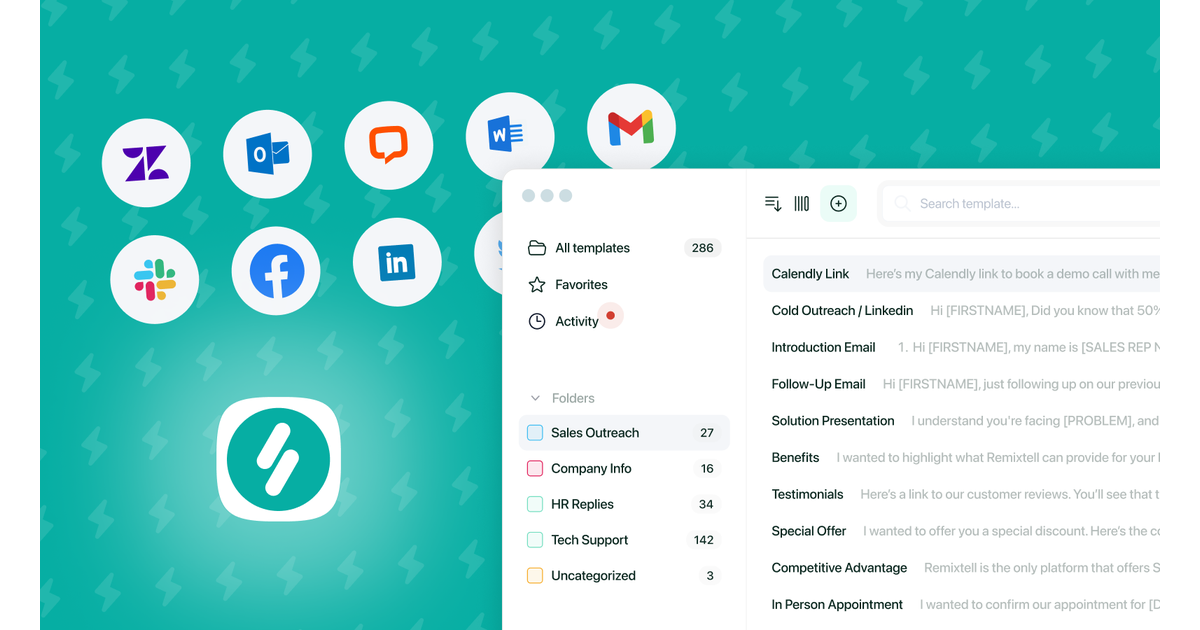
Dedicated TypeDesk channels
The vendor's own blog, which carries the category comparison articles: https://www.typedesk.com/blog/
The help centre and its what-is-new page, which is where feature changes land: https://www.typedesk.com/help/whats-new
The service status page, which is the page to check first if a team reports that sync has stopped: https://stats.uptimerobot.com/lpZllioJNN
The email template library, which is a ready-made starting point for a first folder of templates: https://www.typedesk.com/email-templates
Resources on X
Dedicated X channels
The vendor publishes no X account of its own: none of its pages links one, and the handle that carries the product name serves an unrelated private profile. The accounts worth following in this category are therefore the incumbent and the alternatives the comparison section names, so that a capability claim can be checked against a product rather than against a marketing page.
TextExpander on X, the category incumbent and the most direct comparison this review draws: https://x.com/TextExpander
Raycast on X, the macOS launcher whose snippets feature is one of the three alternatives in the comparison table: https://x.com/raycastapp
Zapier on X, automation coverage of the text-expander category: https://x.com/zapier
CI-First Evaluation Summary Card
Field | Value |
Tool | TypeDesk (typedesk.com) |
Category | Text expander and keyboard automation, with a team sharing layer and an AI layer |
CI-First Profile | Primary: Co-Worker and Assistant (2). Secondary: Coach and Tutor (3) |
Collaboration Mode | Centaur |
CI-First Benefit Score | 5.5 / 10 (CI-First Positive) |
Time | 7 |
Quantity | 7 |
Quality | 6 |
Skill | 2 |
Humics Protection Badge | Humics-Neutral |
Humics Protection Score | +1 out of +3 |
Creativity | Neutral (0) |
Critical Thinking | Protects (+1) |
Social Authenticity | Neutral (0) |
AI Imposture Risk | Medium |
Time Illusion | Low |
Quantity Illusion | Medium |
Skill Illusion | Medium |
Clause 5.2.3-a | Null for the base product, where the human authors the snippets. Applies to the AI-authoring path, where a model authors reusable procedure that is saved durably. The recorded Skill Illusion of Medium satisfies the floor on both readings |
Clause 4.2-a | Null |
Clause 7.5 | Null |
Section 7c finding | The synced object is the template; the vendor states fill-in values are never sent to its servers. Retention is tied to the account, deletion is by email request. The AI paragraph names OpenAI, Google Cloud AI and Anthropic. The contribution license is drafted wide enough to cover submitted template content |
Recommended use | Team or individual on Windows or macOS with genuinely repetitive standard text |
Not for | One-off messages, judgement-heavy replies, or any content the team has not decided how to treat |
Primary risk | A shared library nobody reads before sending, and a licence and retention position a team has not read |
Verified | Capterra 4.5 from 49 reviews, G2 4.7 from 18, Product Hunt 4.8 from 31, all read 2026-09-25 |
Glossary
Each term below is defined as it is used in this review, not as the vendor uses it.
CI-First
The U365 method for using AI so that Co-Intelligence is worth more than Human Intelligence alone. Written as CI = HI + (AI x HI). The decisive term is HI: if using a tool erodes the human's own capability, the multiplier falls and the total falls with it.
CI-First Benefit Score
The average of four dimensions, each scored 0 to 10: Time, Quantity, Quality, and Knowledge and Skill. It answers whether using the tool makes Co-Intelligence more profitable than Human Intelligence alone. Bands: 0 to 2.0 CI-First Negative, 2.1 to 4.0 CI-First Neutral, 4.1 to 6.0 CI-First Positive, 6.1 to 8.0 CI-First Strong, 8.1 to 10.0 CI-First Transformative. The score accounts for the overhead of setting up, supervising and verifying, not just the benefit the tool produces. TypeDesk scores 5.5.
CI-First Profile
The role the AI plays in your working relationship. (level 1) Co-Creator and Thought Partner, (level 2) Co-Worker and Assistant, (level 3) Coach and Tutor, (level 4) Analyst and Tester, (level 5) Challenger and Devil's Advocate. TypeDesk is primarily level 2, with level 3 as a secondary role through the template-authoring step.
Humics
The three uniquely human capabilities, from Pascal Bornet's framework: Creativity, Critical Thinking and Social Authenticity. A tool either protects, leaves neutral, or erodes each one.
Humics Protection Badge
The badge produced by summing the three Humics ratings, on a range of minus three to plus three. Plus two to plus three is Humics-Friendly, minus one to plus one is Humics-Neutral, and minus two to minus three is Humics-Risky. TypeDesk is Humics-Neutral at plus one.
AI Imposture Risk
The likelihood that a tool traps the user in one of three usage illusions: the Time Illusion, the Quantity Illusion, or the Skill Illusion. Each is rated Low, Medium or High with cited evidence. Overall level: all three Low is Low, one or two Medium is Medium, two or more High is High. TypeDesk is Medium.
Skill Illusion
The illusion of demonstrating a skill while in fact moving toward error without knowing it. The framework's clause 5.2.3-a adds that agent-authored procedural memory is a Skill Illusion vector in its own right, and sets a floor of no lower than Medium for a tool that writes procedural memory on the user's behalf. TypeDesk's Skill Illusion is Medium.
Collaboration Mode
The safest and most effective way to structure the working relationship. Centaur mode is a clear division of labour: the human takes strategy, empathy and final judgement, the AI takes heavy processing and drafting. Cyborg mode is deeply intertwined continuous co-creation. The framework assigns Centaur whenever Imposture Risk is Medium or High, because Centaur is safer. TypeDesk is Centaur.
Text expander
A tool that stores reusable blocks of text and inserts them into any application when the user types a trigger, for example a saved reply inserted by typing a slash command. The category also includes snippet managers and prompt managers.
Snippet (template)
The stored block of text itself. In TypeDesk a snippet is called a template, it lives in a folder, and it can carry variables and conditionals. This is the object that syncs across a team and the object Section 7c concerns.
Variable (dynamic fill-in)
A placeholder inside a snippet that is filled at the moment of insertion, either by the user or, on the AI tiers, by a model. TypeDesk supports free text, gender conditionals, time-of-day conditionals and calculations. The vendor states that the values stored in dynamic fill-ins are never sent to its servers, which is the distinction Section 7c turns on.
User Sentiment
What the public says about a product across review platforms, community forums and independent assessments, reported separately from the CI-First score because crowd sentiment can contradict a scored evaluation. Where the two agree the finding is stronger, and where they diverge the divergence is worth explaining. TypeDesk's is unusually thin for a product of its age: three platform ratings between 4.5 and 4.8 resting on 49, 18 and 31 reviews, five different published price figures and none of them printed on the vendor's own pricing page, and no substantive community discussion found anywhere.
Canned response
A pre-written reply, usually for support, sales or a service role, stored so that it can be reused. It is the primary content type of a shared TypeDesk library.
Review Status
The badge at the top of every INSIDE Tools Review, and the vocabulary is fixed. Active means the tool is current and recommended. Risky means the tool has significant unresolved issues, or it has been clearly surpassed by newer alternatives, so it should be used with caution and the Limits section read first. Retired and Deprecated are reserved for tools no longer recommended, and a Migration Path section is then required. TypeDesk is Active.
Status and Last Tested
The line that records when the review's evidence was gathered and what will trigger a re-check. TypeDesk was last tested on 2026-09-25, with a trigger-based re-check at no more than six months.
Sources
Every URL below was relied on for this review and was resolving on 2026-09-25
Vendor product and pricing pages
The homepage, for the tagline, the use-case set, the 30-hour claim and the testimonial set: https://www.typedesk.com/
The pricing page, for the four tiers, the annual saving statement, the 30-day guarantee and the volume discount threshold: https://www.typedesk.com/pricing/
The text expander product page: https://www.typedesk.com/text-expander
The AI Prompt Generator page: https://www.typedesk.com/ai-prompt-generator
The Document Template Builder page: https://www.typedesk.com/document-template-generator
The features page, for the variables, conditionals and privacy statement on keystrokes: https://www.typedesk.com/canned-responses-features
The customer support page: https://www.typedesk.com/customers/technical-customer-support
The HighLevel case study: https://www.typedesk.com/customers/highlevel
The IncQuery case study: https://www.typedesk.com/customers/incquery
The help centre: https://www.typedesk.com/help/
The email template library: https://www.typedesk.com/email-templates
The service status page: https://stats.uptimerobot.com/lpZllioJNN
The vendor's customer support comparison article: https://www.typedesk.com/blog/best-text-expander-customer-support
Vendor legal and security documents
The privacy notice, last updated 2025-08-17, for the AI provider disclosure, the retention section, the sharing section and the deletion route: https://www.typedesk.com/privacy/
The terms and conditions, last updated 2025-08-17, for the user generated contributions and contribution license sections, the regulated-industry clause, the subscription terms and the contact address: https://www.typedesk.com/terms/
The security policy, for the DigitalOcean hosting and replication statement, the encrypted backup statement, the dynamic fill-in statement and the keystroke statement: https://www.typedesk.com/security/
Review platforms and independent sources
Capterra, 4.5 out of 5 from 49 reviews, and the vendor card with the 8 dollar starting price: https://www.capterra.com/p/187611/typedesk/
G2, 4.7 out of 5 from 18 reviews: https://www.g2.com/products/typedesk/reviews
Product Hunt, 4.8 out of 5 from 31 reviews: https://www.producthunt.com/products/typedesk/reviews
An independent lab report on the product: https://koda.community/reviews/2026-07-15-typedesk-ai-text-expander.html
A tool directory with a 3.8 rating and a plain account of the form features: https://fluidsurveys.com/tools/typedesk
A competing vendor's category pricing comparison: https://ecommerceparadise.com/textexpander-alternatives
Platforms and stores
The Chrome and Edge browser extension listing: https://chrome.google.com/webstore/detail/canned-responses-by-typed/haddgijkelkjimhdhgaopfcjhnoipimj
The Firefox extension listing: https://addons.mozilla.org/fr/firefox/addon/typedesk/
Social and video
TypeDesk on X: https://x.com/typedesk
"From Repetitive Typing to Efficiency: Unleashing the Automation of typedesk", Get Organized! by Dr Frank Buck: https://www.youtube.com/watch?v=v5JWMaZHID8
"Text Expander and canned responses with advanced variables TypeDesk", SaaS Master: https://www.youtube.com/watch?v=ON2aINIDaZM
Faculty Note on Evidence Quality
What follows is the evidence base for this review, and what it does not establish.
What the evidence base is. Every statement about the product's behaviour, features, tiers, data flow and contract terms is taken from the vendor's own published pages: the product and pricing pages, the features page, the security policy, the privacy notice and the terms and conditions. Every rating and review count is taken from the platform page that carries it, read on 2026-09-25. No independent benchmark of expansion reliability, time saved or sync performance exists for this product, and this review therefore makes no measured claim about any of them.
What was not possible to establish. Three things a reader may reasonably want are not in this review because they are not published.
The per-user price of the paid tiers. The vendor's pricing page presents the tiers and their features and does not print a per-user figure as captured. Five different figures appear across five other surfaces, which is recorded as the finding in Section 13 rather than resolved.
Whether the synced template store uses client-side or end-to-end encryption. The security policy states encryption in transit for database connections and encryption at rest for backups. It does not state that the synced template store is encrypted such that the vendor cannot read it, and this review does not infer that it is.
Whether the AI layer sends template content, fill-in values, or only the prompt text to the named AI providers. The privacy notice states that "your input, output, and personal information will be shared with and processed by these AI Service Providers" without narrowing which of those the input consists of in each AI surface. The distinction between what a user types into a fill-in and what the template contains is stated on the security page for fill-ins only.
On the vendor's quantitative claims. The claim that the most productive users save 30 hours each month is a vendor figure with no published method and no independent measurement. It is reported in this review as a vendor claim and it does not carry the Quantity sub-score, which is set from the ordinary reasoning about repetition. Likewise, the "10,000+ users" figure on the homepage is a vendor figure, and the "300 or more verified reviews" figure that appears in a third-party catalogue does not reconcile with the review counts on the three platforms it names, which is why Section 13 records the platform counts individually.
On the ratings themselves. The review base for this product is small. Across the three platform pages read for this review the counts are 49, 18 and 31. A 4.8 rating from 31 reviews and a 4.8 rating from 310 are different pieces of evidence, and the badges the vendor serves do not carry the count. A reader deciding on a team rollout should weight the review base accordingly, and should read the specific complaints in Section 13 as the more informative part of the user evidence.
On the clause assessments. Clauses 5.2.3-a, 4.2-a and 7.5 of Framework v1.2 were each assessed explicitly. Two return nulls and one splits between a null and an application. The reasoning is in the imposture-risk section and the reasoning for the split is stated in full there, because a reader should be able to disagree with the conclusion on the evidence rather than having to take it on trust.
What would change this review. A printed rate card, the mobile application shipping, a published encryption statement for the synced store, or a material change to the privacy notice's AI or retention language. Each is listed as a re-check trigger in Section 1, and each would move at least one number in this review.




Comments