
Upscayl: free, offline AI image upscaling on your own machine


Status: Active | Last tested: 2026-09-27 (Upscayl, as the project's own site, download page, pricing page and repository described it on that date) | Re-check: trigger-based (max 6 months)
Active: the tool is current and recommended.
Reviewed as documented at upscayl.org and in the project's own repository in September 2026. Upscayl is a free, open-source desktop application that runs neural network models on the reader's own graphics hardware, with no account, no upload and no credit meter. The same name is used by paid services that are not the project, which this review treats as a finding rather than as a footnote, because a reader who searches for the tool meets both in the same result list.
Upscayl scores 5.3 out of 10 on the U365 CI-First Review, which is CI-First Positive, with a Humics-Neutral protection badge at -1 / +3 and a Medium AI Imposture Risk. A reader who needs a larger file gets one on their own machine, at no cost, from a tool that never sends the image anywhere. The two things that decide whether it helps are the graphics hardware and the willingness to inspect a result and reject it.
For detailed explanations of the CI-First evaluation terms used in this review, including the Humics Protection Badge and the AI Imposture Risk levels, see the Glossary at the end of this post.


In this Tool Review
Status and Re-check
Status: Active | Last tested: 2026-09-27 | Re-check: trigger-based (max 6 months) Active: the tool is current and recommended.
Upscayl is current and recommended as a free, local, offline image upscaler for people who work with images on their own machine and do not want to pay a subscription or upload unpublished material to a service. The re-check triggers for this review are: a further six months with no published desktop release, a change in the naming situation described below, or a change to the licence of the desktop application.
Naming and Scope: One Name, Three Different Services
Before any rating, a reader has to know which Upscayl this review is about, because the name is shared.
There is the official project. Upscayl is an open-source desktop application for Linux, macOS and Windows, published by the Upscayl project at https://upscayl.org, with its code at https://github.com/upscayl/upscayl under the GNU Affero General Public License v3.0. The desktop application is free, runs on your own machine, and processes images offline. Its models come from the Real-ESRGAN family running in the NCNN framework, and the application asks for a GPU with Vulkan support. That is the tool this review scores.
There are the project's own paid surfaces, which are separate from the free desktop download even though the project operates them:
Upscayl Cloud, sold on the official site. The pricing page states a Pro plan at $24.99 for 300 credits per month, a ten-credit free trial, up to 256MP on Pro and 512MP on Business, and two footnotes about cancellation: "If you cancel your plan, your subscription credits will not roll over and will be lost after" and "If you cancel your plan, your Upscayl history will be lost after 1 month." Both footnotes end without a time period on the page as published.
An App Store build for macOS is linked from the official download page. That linked listing did not resolve when it was opened for this review, and no current App Store listing for the application was found, so no App Store price is reported here. Whether the paid App Store build still exists could not be confirmed.
There are at least two other live services that sell upscaling under the Upscayl name and are not the official project. Both are treated in detail in the finding below and neither appears on the official site or in the official repository.
The practical rule for a reader: the free tool is the desktop download from the official site or the GitHub releases page. It asks for no account, no card and no upload. If a page asks you to log in, buy credits or paste a URL to upload an image, you are on a paid surface, and you should check who operates that surface before you send anything to it. The naming confusion is the single most useful thing to take from this review, because a search for the tool returns the free application and the paid services side by side.
Tool Snapshot
At a Glance Dashboard
Item | Detail |
Product | Upscayl, desktop AI image upscaler |
Vendor | The Upscayl project (GitHub organisation upscayl) |
Official site | |
Repository | |
Category | AI image upscaling and image enhancement, local desktop application |
Platforms | Linux, macOS and Windows (vendor download page) |
Licence | GNU Affero General Public License v3.0 (repository metadata, read 2026-09-27) |
Price of the desktop application | Free, open source, no account (vendor site and download page) |
Underlying models | Real-ESRGAN family in the NCNN framework, plus user-supplied custom models |
Hardware requirement | A GPU with Vulkan support; the vendor notes local processing as a desktop feature |
Processing location | Your own machine, offline. The download page states: "Upscayl Desktop does all the processing on your local machine. No need for internet connection." |
Repository scale | 49,903 stars, 2,529 forks, 44 open issues (GitHub repository API, read 2026-09-27) |
Repository created | 2022-07-30 |
Last repository push | 2026-09-15 |
Latest published release | v2.15.0, December 2024. A v2.15.1 tag exists with no published release object |
Companion repository | upscayl/upscayl-ncnn, 472 stars, a release dated 2025-12-07 |
Paid surfaces operated by the project | Upscayl Cloud on the official site (Pro plan $24.99 for 300 credits per month), and the App Store build linked from the download page |
Unrelated services using the name | www.upscayl.app and upscaylai.com, both selling upscaling under the Upscayl name |
Account needed for the desktop tool | None |
Output formats | PNG, JPG and WebP, with PNG recommended when quality matters more than file size |
Scale options | 1x to 4x in the ordinary slider, with a double upscale option that runs the process twice for a much larger result |
The Problem
Low-resolution images are a normal working condition in an institution, not an exception. Scanned archive photographs come in at whatever the scanner produced. Logos and brand marks get exported small and then need to go on a poster. Course slides hold screenshots of software interfaces. Conference photographs arrive as compressed phone images. Product and event shots get published at thumbnail size and later requested at print size. AI-generated images arrive at a generator's default resolution and need to be larger before they can be used in a layout.
The old answers to this problem are all unsatisfactory in a university setting. Rescanning or reshooting is often impossible when the original is a photograph of a person, a place or an object that no longer exists, and it is always expensive in time. Resizing an image in an ordinary editor adds pixels without adding information, so the result stays soft. Paying a cloud service works, but it puts unpublished or personal material on someone else's server, adds a subscription line to a departmental budget, and makes the work depend on a network connection and an account that someone has to administer.
There is a privacy dimension that matters more in an institution than in a hobby workflow. Student images, unpublished research material, archival documents and internal design work should not be uploaded to an unknown service simply because the person doing the work needs a larger file. The cloud route also creates an accountability gap: nobody can say later where the file went or who held it.
The cost dimension is just as practical. A departmental subscription for image enhancement is a recurring cost for a task that is occasional, and the per-seat model means the cost is paid whether or not the month contains any work.
A third problem appears only once the free route is chosen. The name of the free tool is used by unrelated paid services, so the person who reads a comparison article or follows the first search result can end up paying for something the institution already has for free, or worse, uploading a confidential image to a service whose operator is not clearly identified on the page. That is a problem of discovery, not of software, and it is treated as a finding below.
The Outcome
Upscayl gives the reader a version of this workflow that is free, local and offline. You install a desktop application on Linux, macOS or Windows, point it at an image or a folder of images, choose a model that matches the kind of image you have, and press the button. The image is enlarged on your own hardware. Nothing leaves the machine, no account exists to be administered, and no credit meter runs while you work.
The desktop application offers a batch mode for folders, several built-in models with different strengths, a comparison slider that puts the original and the result side by side at the same position, an image scale control from 1x to 4x, a double upscale option that runs the process twice for a much larger output, output format selection, an output folder you can remember between sessions, and support for user-supplied custom models. The vendor site states that the desktop app can enlarge images "by up to 16x better resolution", which corresponds to the double upscale path rather than the ordinary single pass.
The outcome has limits that the tool does not advertise. Upscaling estimates missing detail; it does not recover it. A model that produces clean lines and sharp edges on an illustration can invent texture on a noisy photograph, and text inside an image can be altered in ways that matter if the image is a document, a form or a sign. Large images can crash the application, file paths with certain characters can fail to load, and a machine with only an integrated graphics chip may be too slow to make the workflow worthwhile. Those limits are the subject of the Limits section, and they shape the rating rather than being exceptions to it.
Who Should Use Upscayl
Use Upscayl when all of the following are true:
You work on a machine with a discrete or reasonably capable GPU that supports Vulkan, or you are willing to accept slow processing on an integrated chip.
The image you want to enlarge is a photograph, an illustration, a logo, a screenshot, a 3D render or similar visual material, and you will look at the result at the size you actually intend to publish it.
You want the work to stay on your machine, either because the material is confidential or unpublished, or because you do not want to create an account for a task you perform a few times a month.
You can accept that the tool estimates missing detail rather than recovering it, and you are prepared to reject a result that looks artificial or that changes text and faces.
Do not reach for Upscayl when any of the following is true:
The image contains text whose exact characters matter, such as a scanned form, a legal document, a certificate or a signboard, and you need the characters to remain exactly as they were.
The image is evidence. An enlarged image with estimated detail is a reconstruction, not a record, and it should not be offered as a record of what a camera captured.
The task is to recover detail that was never captured, such as a face in a group photograph taken from far away or a licence plate in a compressed video frame.
You need a compliance record of every image operation, since the desktop tool writes an output file and keeps no audit trail of what was applied.
The job is large, batch, and time-critical on a machine whose GPU is integrated, where a cloud service or a dedicated workstation will finish faster than a local pass.
You cannot evaluate the result. If you cannot tell an invented texture from real texture in the image you are working on, the tool will produce a confident-looking file that nobody can judge.
For design and communication staff, the tool answers a recurring need to lift small source images to publication size. For faculty and researchers, it answers the archival need to make an old scan legible without sending the scan anywhere. For IT and data staff, batch mode answers the need to prepare a folder of images at a consistent setting. For a student working in design or communication, it is a zero-cost way to work with real image tasks rather than downloaded samples.
U365 Institutes Alignment
Institute | Rating | Reason |
UIT (Technology, AI, Data Science) | High | The tool is a local runner for Real-ESRGAN models in the NCNN framework, so model choice, hardware compatibility, batch execution and file handling are directly relevant to AI platform work, and the whole workflow runs without sending data out. |
UIB (Business Management, Entrepreneurship) | Low | There is no management or venture function in an image upscaler. The only business relevance is cost comparison, where a free offline tool removes a subscription line from an operating budget. |
UIC (Digital Communication, Marketing) | Medium | Publication images, thumbnails, campaign visuals and archival photographs pass through image preparation, so communication teams need a written rule about which images may be enhanced and whether enhancement is disclosed. |
UID (Digital Design, UX/UI) | High | Illustrations, logos, line art and clean graphic shapes are where the models perform best, and the comparison slider matches a designer's normal habit of judging a result at its intended output size. |
U365 methods | Medium | A local tool fits the LIPS handling of image assets and the CARE cycle's Review step, provided a team writes down when enhancement is allowed and who checks the output before publication. |
Tool to Skill to Credential
Tool skill | U365 competency | Credential | Institute |
Choosing the right upscale model for an image type and rejecting an artificial result | Judging visual quality of a design asset at its intended output size | AI Creator Professional. The catalogue entry publishes no duration and no step count, and a term search over the description text of all published programmes returns no module on upscaling, resolution, denoising or restoration. Adjacent anchor, not an assessment home. | UID |
Preparing a print-ready or web-ready asset from a low-resolution source | Digital content production from imperfect source material | Full-Stack Web Developer, 60 days and 252 steps, with published modules HTML, CSS, Javascript; Git Essential; ECMAScript 6+; React.js; Node.js; SQL and No SQL; REST APIs; DevOps Foundations. It publishes no module on image resolution or asset preparation. Adjacent anchor, not an assessment home. | UIT |
Running a batch image job at one consistent setting with a verification step | Repeatable digital operations and process design | Digital Transformation Strategist, 84 days and 252 steps, with published modules including Industry 4.0; AI, And Cognitive Tech for Leaders; Digital Transformation; Strategic Agility; Leading with Innovation; The Future of Performance Management; Customer Service Leadership; Machine Learning for Marketing; Introductions to Digital Twins; Cloud Computing and Quantum Computing; Big Data and AI; Agile Development; Design Thinking; Cybersecurity Program. It publishes no module on image processing. Adjacent anchor, not an assessment home. | UIB |
Judging whether an enhanced image is honest, including invented detail and altered text | Analytic handling of evidence and visual claims | Data Visualization Consultant. The catalogue entry publishes no duration and no step count, and the programme description contains no coverage of image enhancement or its risks. Adjacent anchor, not an assessment home. | UIT |
Writing the team convention for when AI image enhancement is allowed in U365 publications | Institutional AI governance and data handling | IT Security Specialist, 60 days and 252 steps. The catalogue entry publishes no module list and no coverage of AI image manipulation or its disclosure. Adjacent anchor, not an assessment home. | UIT |
A term search over the description text of all published U365 programmes returned zero matches for upscale, upscaling, resolution, pixel, noise reduction, denoise and restoration. The skills above therefore sit beside the catalogue rather than inside it, and a team that wants them assessed will have to add the assessment itself.
The access levels are stated as the catalogue publishes them. University 365 has three academic access levels: DISCOVERY, INSIDER and SUPERHUMAN. Specialised diplomas and certificates carry Basic, Foundation and Expert levels: DISCOVERY Fellows can enrol in Basic-level programmes only, INSIDER Fellows in Basic and Foundation programmes, and SUPERHUMAN Fellows in all of them. University degree programmes carry a single Expert level and are open to SUPERHUMAN Fellows only. No per-programme access level is asserted, because the catalogue does not expose one, and no credit transfer is asserted between any two programmes. None of the five anchors above stacks into a degree, so no degree consequence arises from this chain and none is asserted.
How Upscayl Works
Upscayl is a desktop application that carries a small set of neural network models and runs them on your own graphics hardware. The repository metadata lists the application language as TypeScript, which tells you what the project is: a desktop front end, in the Electron style, wrapped around a separate command line backend. That backend lives in the companion repository upscayl/upscayl-ncnn, which runs the Real-ESRGAN family of models through NCNN, a framework designed to run neural networks efficiently on ordinary consumer hardware rather than on data centre accelerators. The repository shows 49,903 stars and 2,529 forks for the main application, and 472 stars for the backend, both read on 2026-09-27.
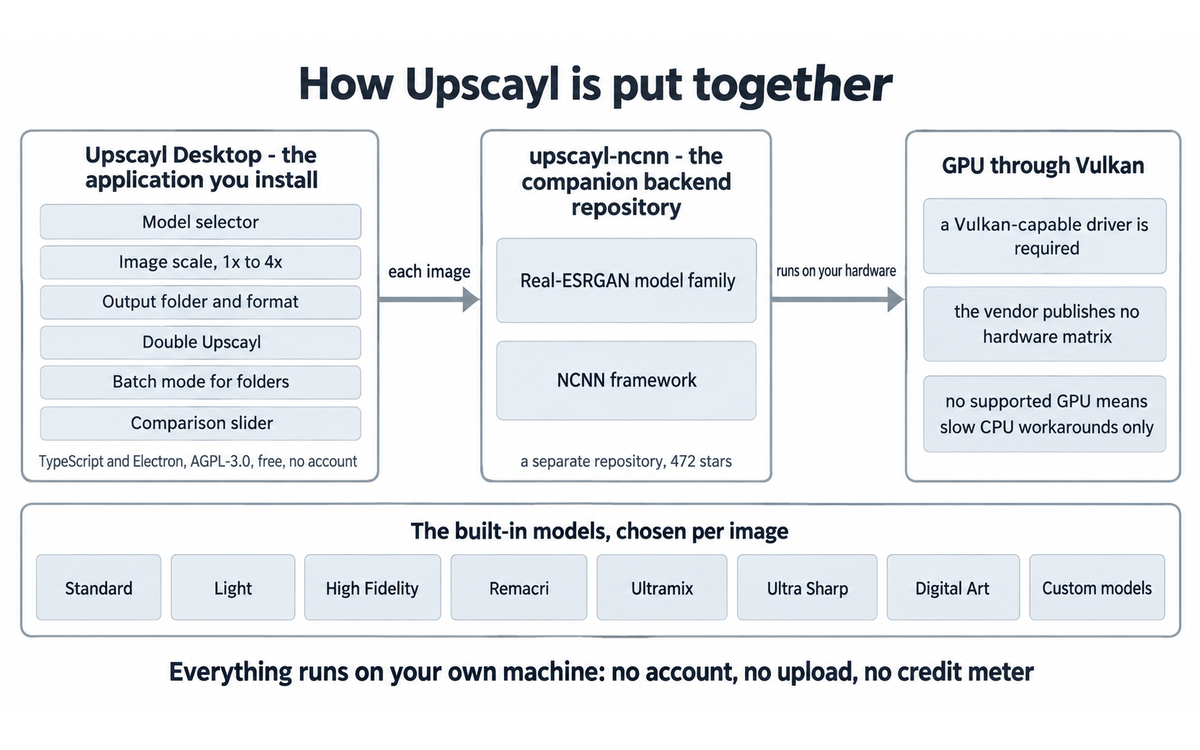
The practical consequence of that architecture is the hardware requirement. NCNN reaches the GPU through Vulkan, so the application needs a Vulkan-compatible graphics driver to run at a useful speed. The vendor's download page does not publish a hardware matrix. Community tutorials describe the check as looking up your GPU on an unofficial compatibility list and, on machines without a supported GPU, editing the application's own DLL files to substitute a software Vulkan shim so the work lands on the CPU. That workaround is a user discovery, not a supported feature, and the same tutorial warns that the result is much slower.
Once the application is running, the operation is deliberately plain. You select an image, or a folder of images in batch mode, choose a model, choose an output format, choose a scale between 1x and 4x, and press the button. The application shows a comparison slider when the job finishes, with the original and the result sharing one frame so you can move the divider and inspect the same region on both sides. The output lands in the folder you selected, or in the source folder by default.
The models are the part that requires judgement. Independent tutorial coverage published on YouTube lists the built-in set and what each one is for: Standard and Light as the general-purpose pair, with Light traded for speed; High Fidelity for realistic texture and smooth areas; Remacri for natural images and texture such as metal and landscape; Ultramix as a balanced option for complex scenes; Ultra Sharp for pushing sharpness; and Digital Art for illustrations, smoothing outlines while keeping colour clean. The same coverage notes that custom models can be added through the wiki instructions, and that the model choice is per image rather than a global setting.
Two features change the arithmetic of a job. The double upscale option runs the scale pass twice, which the vendor site describes as "Enhance your images by up to 16x better resolution" in its feature list. Independent coverage is more cautious: one video explains that double upscale makes the output size very large, that a regular scale of five times becomes roughly twenty-five times the pixel count in total, and that applying it to an ordinary photograph can slow the machine or crash the software. Treat double upscale as a tool for small crops and small icons, not a default.
Upscaling itself does one thing and not another. A model predicts a plausible higher-resolution version of what it sees. It estimates missing detail; it does not recover detail that the camera never captured. Where the prediction has enough context, on clean lines, flat colour and regular shapes, the result can look correct at normal viewing size. Where it does not, on heavy sensor noise, compression artefacts and fine photographic texture, the model fills the space with invented texture that looks convincing in isolation. The vendor's own cloud surface says the same thing in its terms: upscaling "increases pixel dimensions but does not guarantee recovery of the original scene's missing information", and outputs may contain "Invented texture", "Changed facial features", "Altered text", "Distorted logos" and "Repeated patterns". The vendor states that on its cloud terms page at upscaylai.com, a page that is not the official project's site and is treated in the finding below.
Finally, the processing location. The desktop application runs on your machine and the download page states that it "does all the processing on your local machine. No need for internet connection." Nothing about your image leaves the device, no account exists, and no credit balance is consumed. The cloud surface is the opposite: images travel to a server, a credit is spent per image, and the pricing page states that cancelling loses rollover credits and that "your Upscayl history will be lost after 1 month." Those are different products with different data paths, and a reader who chooses the desktop download gets the first path and none of the second.
Getting Started with Upscayl
1. Check the graphics hardware first. Confirm that the machine has a GPU whose driver supports Vulkan. On integrated-only laptops, expect either a refusal to run or processing slow enough to change the decision. If the machine has no supported GPU, the community CPU workaround is documented in an independent tutorial, but it is slow enough that a cloud service or a workstation may be the better answer.
2. Download only from the official surfaces: the download page at https://upscayl.org/download or the releases page at https://github.com/upscayl/upscayl/releases. On Linux the download is an AppImage, on Windows an installer executable, and on macOS the official download page points to the App Store. Independent coverage reports a download size around 300 MB for the Windows build. Do not install an upscaler from a paid look-alike site when the free application is one click away.
3. Install and note the first-run interface. The left side of the window holds the model selector, the image scale control, the output folder, the format selector and the double upscale toggle. Settings hold the theme, the language, the output format, the compression slider, the remembered output folder and the log viewer. The log viewer with a copy button is the tool you will need if something fails, because it is what a bug report requires.
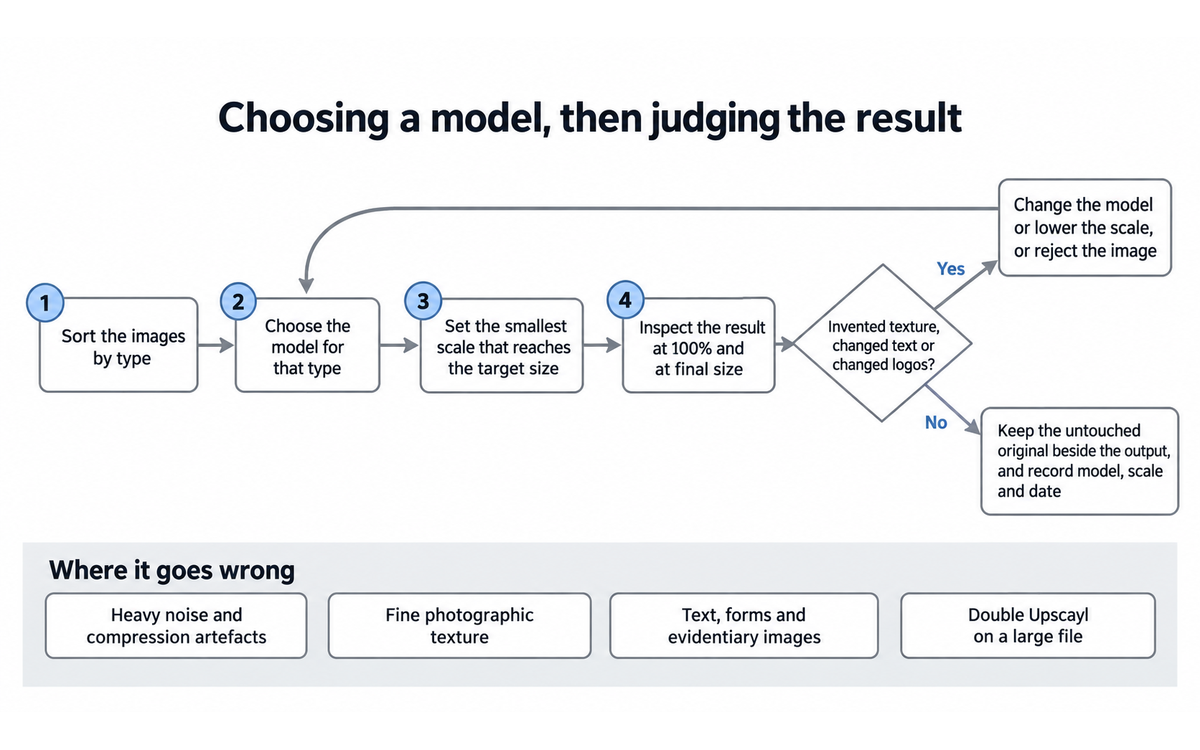
4. Run one image before any batch. Choose a representative image, start with the image scale set to the smallest factor that reaches your target size, and prefer 2x over 4x when the source is already reasonable. An independent reviewer warns that pushing the scale too high makes an image look worse rather than better, and that a 2x pass was enough for a 720p source in their workflow.
5. Inspect the result at the size you intend to publish it. Use the slider at 100 percent on the region that matters, not at thumbnail size. Look for invented texture in skin, foliage and fabric, changed letterforms in any text, altered logos, and repeating patterns in flat areas.
6. Choose a format. PNG retains the most quality at the largest file size, JPG and WebP reduce size. The compression slider trades quality for size and is worth leaving alone unless file size is a constraint.
7. Then move to batch mode with the model and settings you validated, with the caveat that different image types need different models, so a mixed folder should be split by type before it is processed.
8. Keep a rejection habit. If the result looks artificial at the intended size, change the model or lower the scale rather than shipping a file that invents detail.
Real Workflows
Four workflows, each one a job an institution actually has. Each carries the situation, the method, what can go wrong, and a verification checklist to run before the result is trusted.
Workflow 1: Making an archival photograph legible
The situation: a faculty member or archivist holds a low-resolution scan or an old photograph, the original cannot be reshot, and the image needs to be legible in a report or on a slide. The material is unpublished.
The method: copy the file to a working folder. Run a single image pass at 2x with the High Fidelity model first, and a second pass at the same scale with Remacri. Compare both at 100 percent on faces, clothing and text in the frame. Pick the pass with the least invented detail, not the sharpest one. Record what you did in the asset note so the file can be described honestly later.
What can go wrong: faces can change in ways that matter to the people in the photograph, and any sign, plaque or printed text in the frame can be altered. If the photograph shows identifiable people, the enhanced file is a reconstruction of them, and the note that ships with it should say so.
VERIFICATION CHECKLIST for "Making an archival photograph legible":
☐ Second model check: run the same image through two Upscayl models and compare at 100 percent; keep the one with less invented detail
☐ External source: keep the untouched original beside the enhanced file and never overwrite it
☐ Human review: the person responsible for the archive or the collection approves the enhanced file before it is used
☐ CI-First test: can the user describe what the tool changed and what it could not recover, without the tool open? [Y/N]
Workflow 2: Lifting a small logo or illustration to publication size
The situation: a communication or design task needs a logo, icon, line drawing or illustration at a larger size than the source file provides, and the graphic must keep clean edges.
The method: run the Digital Art model for line work and illustrations, or Standard and Light for photographic content, at the smallest scale that reaches the target. Inspect edges for squiggle and for halos along high-contrast boundaries, which independent reviewers on YouTube reported as visible artefacts in their own tests. Check that colours stay in family. Confirm the result at final placement size, because a file that looks acceptable in a preview window can show a wobbly edge on a printed page.
What can go wrong: an upscaled logo is a new file with estimated edges, and if the brand mark has a protected form or a registered design, the enlarged version should still sit inside the brand guidelines. Line weight, not sharpness, is what a designer should compare.
VERIFICATION CHECKLIST for "Lifting a small logo or illustration to publication size":
☐ Second model check: compare Digital Art against Standard on the same graphic and check edge weight, not just sharpness
☐ External source: place the result in the actual layout at real size and check it there, not in the application window
☐ Human review: the brand owner or the design lead approves the enlarged file before publication
☐ CI-First test: can the user state which model was used and why, and what the original resolution was? [Y/N]
Workflow 3: Preparing a folder of event images for a website or a deck
The situation: a folder of compressed photographs or AI-generated images arrives at a size too small for the page or the deck, and the task is routine preparation rather than art direction.
The method: sort the folder by image type first. Run batch mode with one model and one scale for photographs, then a separate batch with the Digital Art model for illustrations. Keep the output folder remembered so results do not land among the sources. Expect occasional failures: an independent reviewer on YouTube reported a batch that stopped partway and needed a reset before it would continue, and the project's own issue list contains an open report titled "Crash after turning Up Double Upscayl before switching to batch mode", labelled high priority, opened in January 2025 and still receiving comments into September 2026. Keep the failed file out of the delivery and process it alone.
What can go wrong: volume. A batch turns one decision into several hundred outputs, and the only honest way to finish is to inspect a sample of the batch at final size rather than to trust the folder listing.
VERIFICATION CHECKLIST for "Preparing a folder of event images for a website or a deck":
☐ Second model check: sample five outputs from the batch against a second model or a plain resize in an ordinary editor
☐ External source: confirm the delivered images in the page or the deck where they will be seen
☐ Human review: whoever owns the publication reviews the sample before the batch is used
☐ CI-First test: can the user explain the model and scale chosen for this folder and defend them to a colleague? [Y/N]
Workflow 4: A short video sequence, handled with care
The situation: a few seconds of footage needs to be enlarged, and there is no budget for a video-specific product.
The method: an independent tutorial on YouTube documents the only practical route with the desktop tool. Export the clip as a PNG image sequence from an ordinary video editor, run the sequence through batch upscale, then reassemble the frames over the original clip so the audio and frame rate come from the source. Keep the sequence under about thirty seconds, because the frame count multiplies the work and the failure rate.
What can go wrong: batch failures in the middle of a long sequence, temporary files left in the folder, and a very large working set. This is the weakest workflow in the tool, and it is included because readers ask for it, not because the tool is built for it.
VERIFICATION CHECKLIST for "A short video sequence, handled with care":
☐ Second model check: upscale a ten frame sample with two models before committing the full sequence
☐ External source: watch the reassembled clip end to end with the original audio, at normal speed
☐ Human review: the editor of the piece approves the clip before it is published
☐ CI-First test: can the user reproduce the frame sequence steps without the tutorial? [Y/N]
Strengths, Limits, and AI Imposture Risk
Strengths
The desktop application is free, open source under AGPL-3.0, and runs with no account. For institutional use the local processing path is the strongest single feature, because confidential and unpublished material never leaves the machine.
Batch mode turns a folder into a finished set with one setting, and the output folder can be remembered between sessions.
The model set covers the common image types rather than one average case, and custom models can be added through the project's own instructions.
The comparison slider puts the original and the result in the same frame, which is the cheapest available guard against accepting invented detail.
Repository scale is real: 49,903 stars and 2,529 forks read on 2026-09-27, with the repository created in 2022 and pushed as recently as 2026-09-15.
Limits
The release history is thin. The latest published release is v2.15.0, from December 2024. A v2.15.1 tag exists without a published release object. The repository shows a push in September 2026 and the issue tracker carries reports as recent as September 2026, including an open crash report first filed in January 2025 and labelled high priority, but a reader who judges a tool by its release notes will see a desktop application that has not shipped a numbered release in about twenty months. That is the main reason a reader might argue for a different badge, and the reason the re-check triggers above are written the way they are.
The name is shared with unrelated paid services, which is a reader risk rather than a software defect, and it is treated as the finding below.
Hardware is a real filter. The application needs a Vulkan-capable GPU to run at a useful speed, and the vendor publishes no hardware matrix. On integrated-graphics laptops the honest outcome is either a refusal or processing slow enough that the savings disappear. One independent tutorial reports a user workaround that redirects the work to the CPU, and it is slow.
Large images and some paths fail. An open issue titled "Crash after turning Up Double Upscayl before switching to batch mode" has been in the tracker since January 2025 and is still receiving comments in September 2026. A closed issue titled "Failure to load files with certain characters in filenames" describes exactly the problem that non-ASCII file paths cause for users who name files in their own language. A YouTube reviewer reported a batch that stopped partway through a folder and only continued after a reset.
Quality is uneven by image type. Clean lines, illustrations, logos and graphics upscale well. Heavy noise, compression artefacts and fine photographic texture do not: the model fills the space with invented detail, and independent reviewers report visible artefacts such as squiggly edges and lost grain alongside the improvements they praise.
Double upscale is a trap for the unwary. It multiplies the file size and the failure risk, and one independent reviewer explains that a five-times setting becomes roughly twenty-five times the pixel count, with slow machines and crashes as the consequence.
There is no audit trail. The application produces a file and no record of which model and scale produced it, so an institution that needs to say later how an image was made has to keep that record by hand.
Why the Status Badge Is Active
Active is chosen because the desktop tool still does the job it claims: it is free, open source, offline, and it upscales images on ordinary hardware. None of the limits above changes what the tool produces for a reader who follows the checklist, and the repository shows activity into 2026. The badge would change to Risky on any of the re-check triggers at the top of this review: a further six months with no published release and no maintenance traffic, a licence change that removes the free desktop path, or a naming situation that stops being a discovery problem and starts being a mis-installation problem for readers who follow the official download page.
AI Imposture Risk
Trap | Rating | Evidence |
Time Illusion | Medium | Net time savings are clear on suitable hardware: one image pass takes seconds and batch mode handles a folder in one run. The overhead is real too. Model choice is trial and error, and independent reviewers describe running several models over the same image before choosing, changing settings, and repeating failed batches. Failures cost time: an open high-priority crash report has been in the tracker since January 2025, and one reviewer's batch stopped partway and needed a reset. On an integrated GPU the time saving can reverse entirely. |
Quantity Illusion | Medium | Batch mode produces a large set of plausible-looking outputs quickly, which is the exact condition for shipping unverified volume. The vendor's own terms for its cloud surface list what an output may contain: "Invented texture", "Changed facial features", "Altered text", "Distorted logos", "Repeated patterns". Independent reviewers report squiggly edges, lost grain and details that disappear, and one warns that over-scaling makes an image look worse. The tool's own comparison slider is the countermeasure, and it is only useful if the reviewer inspects at the size of final use. |
Skill Illusion | Medium | The application produces a result that a user can describe as restored or remastered without having developed any skill in image restoration, retouching or print resolution. Nothing in the workflow teaches the user to tell estimated detail from captured detail, so a user can believe they have fixed an image when they have replaced its missing pixels with invented ones. The rating stays Medium rather than High because the workflow keeps the original untouched, the comparison slider shows both versions in one frame, and no part of the tool presents its output as a recovery of fact. |
Overall AI Imposture Risk: Medium. One trap is Medium on a strong mitigation and two are Medium with a clear countermeasure available to the reader, so the framework's Medium level applies rather than High. Collaboration Mode: Centaur. The tool does the pixel work and the human keeps the judgement about which model, which scale and which output is honest enough to publish. Framework 7.2 assigns Centaur whenever Imposture Risk is Medium or High, and the boundary here is easy to write down: the tool decides nothing about whether an image should be enhanced at all, or whether the result may be disclosed as enhanced.
Over-delegation with this tool looks like this: a user presses the button on every image in a folder, accepts the folder listing as evidence that the work is done, and publishes images whose text, faces and logos have been quietly changed. Nobody in that workflow gained a skill, and the institution published files it cannot describe.
Section 7c: The Upscayl name is shared with paid services that are not the official project
The finding, stated plainly: at least two live services sell image upscaling under the Upscayl name and are not the official open-source project. A reader who searches for the tool meets the free application and the paid services in the same result list, and nothing on the paid pages stops a reader from assuming they are the vendor.
At https://www.upscayl.app/ the site presents itself as "Upscayl AI Image Upscaler" and sells a subscription ladder of $4.50, $9.50, $19.50 and $65.50 per month. Its terms of service, last updated August 19, 2026, open as follows: "These Terms of Service are a binding agreement between you and PixelForge LLC, a Wyoming limited liability company (\"PixelForge,\" \"we,\" \"us,\" or \"our\"), which owns and operates the Upscayl AI Upscaler website at https://www.upscayl.app and provides its AI-powered image enhancement and 4K upscaling services". The same document states: "Upscayl AI is independently operated and is not the official website of, affiliated with, endorsed by, or managed by the developers or owners of those models unless expressly stated otherwise", and its model list includes Real-ESRGAN, Real-ESRGAN Anime6B, CodeFormer and FLUX Kontext Restore Image, the same classes of model the free desktop tool uses.
At https://upscaylai.com/ the site presents itself under the heading "Free, Open-Source AI Image Upscaler for Desktop and Cloud" and routes users to desktop downloads and to a cloud plan. Its terms of service carry an effective date of July 27, 2026. Its pricing page republishes the official cloud ladder, Pro at $24.99 for 300 credits, with sign-up links pointing at https://upscayl.org/login, and states: "Prices verified against the official Upscayl pricing page on July 27, 2026." The same site's footer describes it as an "Independent educational website. Product names and trademarks belong to their respective owners."
The defect this review can state as observed fact is on that second site. Its published terms of service end with an internal preparation list addressed to the site operator, still visible on the public page under the heading "Publisher review checklist" and the sub-heading "Required checks before publication", which reads: "Confirm and update:" followed by "Legal owner or company name", "Business mailing address", "State of formation or principal operation", "Whether the website is official, affiliated, or independent", and further items on retention periods, pricing rules, cancellation, refunds and payment processor. An earlier clause of the same document states: "Any governing-law, venue, arbitration, or class-action provision should be added only after the website owner's legal entity, business address, and operating state have been confirmed and reviewed by qualified counsel." A public legal document that carries the operator's own unfinished checklist is a live defect: it tells the reader that the identity of the party on the other side of the contract had not been settled when the page was published. This review makes no allegation of unlawful conduct by either operator, and no finding is stated about intent.
The licence position is separate from the naming position, and the two are easy to confuse. The code of the desktop application is published under the GNU Affero General Public License v3.0, which governs the source code. A software licence does not transfer a name. This review found no trademark registration record for the name, and the pages read do not state one, so no claim is made about who holds rights in the name. The models used by these services, including Real-ESRGAN and CodeFormer, are separately licensed by their own authors, and the terms published by the service at upscayl.app acknowledge that third-party relationship in the clause quoted above.
No score changes because of this finding, and here is why: the finding is about discovery and about a third party's published legal page, not about the code, licence or behaviour of the desktop application this review scores. The free tool is not made worse or better by another operator using the same word. The rating, the Humics value and the Imposture Risk in this review rest on what the desktop application does.
What this section does not do: it does not assert that either site is fraudulent or unlawful, it does not assert a legal conclusion about trademark rights, and it does not tell a reader to avoid a paid service. It states which domain publishes which claim, it quotes the operative text, and it records that the official project does not reference either domain.
The reader-facing consequence is a rule that fits on one line: if a page asks for a card, a login or an upload, it is not the free desktop tool, and the official download lives at https://upscayl.org/download and at https://github.com/upscayl/upscayl/releases.
U365 Co-Intelligence Rating
CI-First Profile: primary Co-Worker and Assistant, secondary Coach and Tutor. The tool executes a defined change on a file you already own, and it teaches nothing by itself, so the skill side depends on the user choosing to compare models and to inspect output at final size.
Collaboration Mode
Recommended mode: Centaur. The tool does the pixel work and the human keeps the judgement about which model, which scale and which output is honest enough to publish.
Mode rationale. Framework clause 7.2 assigns Centaur whenever the Imposture Risk is Medium or High, and all three traps on this tool are rated Medium. The boundary is easy to write down and it is what a reader has to hold: the tool decides nothing about whether an image should be enhanced at all, or whether the result may be disclosed as enhanced. Alternative mode: none recommended, because a single pass is over before a person sees it and there is no stopping criterion to apply inside it.
Dimension | Score | Rationale |
Time | 6 | A single image completes in seconds on suitable hardware and batch mode removes the per-file work, which is genuine net saving. The overhead is model trialling, the occasional stalled batch, the crash report that has been open since January 2025, and the GPU requirement, which on an integrated-only machine can make a local pass slower than an alternative route. |
Quantity | 7 | Batch mode plus no per-image cost means a folder of images can be processed in one run with no account and no credit meter, which is a quantity gain no paid service offers at this price. The gain is capped by the need to sort mixed folders by image type and to keep rejected outputs out of the delivery. |
Quality | 5 | Quality is strongly dependent on image type. Illustrations, logos and clean lines come out well; heavy noise, compression artefacts and fine photographic texture do not, and independent reviewers report artefacts alongside improvements. Vendor terms for the related cloud surface list invented texture, changed faces and altered text among possible outputs, and the honest user must inspect at final size and reject some results. |
Skill | 3 | The tool builds no lasting image skill. It neither teaches resolution, colour management or print preparation, nor asks the user to learn them, and a user can finish a large job without understanding anything about how the result was produced. A deliberate user can build genuine judgement about model choice and about what an honest enhanced image looks like, which is why the score is not lower, but the default usage pattern does not move the user forward. |
CI-First Benefit Score: (6 + 7 + 5 + 3) / 4 = 5.3, band Positive.
Why this score is not higher, and why it is not lower
Why it is not higher. The step from Positive to Strong requires evidence that what the tool produces is good, and there is a real ceiling here: the release history is thin, one open crash report has sat in the tracker since January 2025, and the tool builds no lasting image skill, which is why the Skill sub-score is 3.
Why it is not lower. The capability is genuine and the arithmetic is honest. A reader with a Vulkan-capable machine gets a larger, better-resolved file in seconds, at no cost, with nothing uploaded, and the comparison slider gives them the means to check the result rather than trust it.
Humics Protection: Creativity 0, Critical Thinking -1, Social Authenticity 0. Humics Protection Score: -1. Badge: Humics-Neutral.
Creativity is neutral because the tool works on an asset the user already made; it can support a design or archive task but it supplies no idea. Critical Thinking erodes slightly because the most comfortable use of the tool is to accept a confident-looking enlargement as a recovered image, and the countermeasure, keeping the original and inspecting at final size, is a habit the user has to choose. Social Authenticity is neutral, and the boundary is disclosure: an enhanced photograph of identifiable people is a reconstruction, and publishing it without saying so is the point at which a neutral tool becomes a problem. The team convention in the recommendation below exists for that boundary.
Framework v1.2 clause note
Three clauses of the CI-First framework, version 1.2, were assessed against this tool. All three return a null, and each outcome is recorded with its reasoning, because a null is a finding and a null reached without checking is worthless. No sub-score changes on the strength of a clause note.
5.2.3-a agent-authored procedural memory: null. Upscayl is a desktop image tool with no agent surface, no conversational layer and no memory store of any kind. It does not author skills, standing instructions or procedural memory on the user's behalf, so the Skill Illusion floor in that clause is not triggered, and the Skill Illusion rating of Medium above rests on the ordinary criteria in Section 5.2.3 rather than on that floor.
4.2-a agent-mediated conversation: null. The application produces no text, no message and no conversational turn, so there is no surface on which agent-authored wording could be presented in a person's own voice, and no agent interaction substitutes for human contact. The only adjacent case is disclosure of an enhanced image, which is a publication decision the user makes rather than an agent-mediated conversation.
7.5 team-level rooms: null. The tool is single-user desktop software. It has no shared channel and no multi-agent surface, so nothing about it requires the Centaur default that the clause sets for rooms where more than one agent acts.
What Users Say
Trustpilot carries an unclaimed profile for www.upscayl.org. At the time of reading, the profile showed 6 reviews and a TrustScore of 3.1, with 3 reviews in the last 12 months, and Trustpilot states on the profile that the company has not invited its customers, so the reviews may not be representative. The visible reviews are mixed and specific:
A review dated November 24, 2024, rated one star, complains about memory use: "It consumes so much RAM in the background that you can't do anything else. I restarted my computer twice, and after a second reboot, I removed this malware from it." The word malware is the reviewer's characterisation, not a finding of this review, and the repository and licence evidence in this document describes a different picture.
A review dated November 23, 2025, rated one star, makes a related resource complaint: "The software run by itself when turning on my pc and use lot lot lot of resources, I unistalled it".
A review dated August 15, 2026, rated one star, warns about damaged collections: "it will mess up your whole photo collection, youll end up spending lots of money and time to fix". This is a reviewer opinion with no detail attached, and it is the kind of claim a careful reader should treat as a prompt to keep originals, which is what the worklist above already states.
A review dated July 22, 2026, rated five stars, reports a straightforward good experience: "First time using the software, I am very happy with the results, very easy to use. Would definitely recommend it."
A review dated February 23, 2024, rated five stars, compares the free tool to a paid one and calls it "free and open source", which matches the repository licence.
No reviews were found for this tool on G2, Capterra, GetApp or Product Hunt in the pages read for this review. The vendor's own site publishes a wall of quotes from named X accounts praising the tool, including one calling it "a free and Open Source alternative to @Magnific_AI". Those are vendor-selected testimonials and are treated here as the vendor's own material, not as independent evidence.
Independent video coverage is more useful than the review profile because it shows the work. One tutorial walks through a 2K to 16K enlargement, model selection, double upscale and the comparison slider. A second, longer tutorial documents batch upscaling, custom models, a full video upscaling path through an image sequence, the Vulkan requirement, and the CPU workaround. A third reports the practical finding that a 2x pass was enough for a 720p source and that over-scaling makes an image look worse, alongside visible squiggly edges and lost grain in their test. A fourth walks through the model list and warns that double upscale can produce an extremely large file and crash the software. These are enthusiast and how-to channels with their own preferences, and they are cited for the details they demonstrate rather than for a rating.
The project's own issue tracker is the most concrete source of failure reports. The search performed for this review found an open issue titled "Crash after turning Up Double Upscayl before switching to batch mode", labelled high priority, opened 2025-01-02 and carrying comments into 2026-09-11. A closed issue titled "Failure to load files with certain characters in filenames", opened 2025-08-07 and closed 2025-09-13, matches the non-ASCII path complaint. The same search returned several reports with the project's stale label, which is evidence that the maintainers triage rather than ignore.
Comparison and Alternatives
Option | What it is | Where it fits |
Upscayl Desktop | Free, open source, local, AGPL-3.0, Vulkan GPU needed | First choice for offline work with no account and no per-image cost |
Upscayl Cloud | Paid surface operated by the project on the official site, Pro at $24.99 for 300 credits per month, ten-credit free trial, larger images on higher tiers | Choose when local hardware is the constraint or when a browser is needed on a device you do not administer. Note the published cancellation footnotes: rollover credits are lost after cancelling and history is lost after one month |
Topaz Gigapixel AI and similar paid desktop upscalers | Commercial image enhancement software | A reader comparing quality on difficult photographic material will find these in the market. This review did not fetch a current price or specification for them, so no figure is stated here, and the Trustpilot page shows a separate profile for one such vendor with a large review base, which is a different evidence set from this one |
Magnific AI and similar creative enhancement services | Subscription service that reinterprets an image rather than enlarging it faithfully | The vendor's own site quotes users who contrast it with Upscayl on cost, including a quote describing paying "$40/month" elsewhere. Those are testimonials, not measured comparisons, and the honest distinction is that one class enlarges an existing image and the other generates new content |
Real-ESRGAN command line and the upscayl-ncnn backend | Free open-source model runner without the desktop interface | The right route for a reader who wants batch scripting, reproducibility and a record of exactly which model and parameters ran. It answers this review's audit-trail limit directly |
waifu2x and other narrow model runners | Free open-source tools specialised for anime and line art | Useful when the material is line art and the desktop model set is more than needed |
The comparison that matters for a U365 reader is not Upscayl against another upscaler, it is local against remote. A local tool keeps unpublished images on the machine and costs nothing per image; a remote service is faster on weak hardware and adds a subscription, an account, an upload, and for the paid third-party services above, an operator whose identity the reader has to establish before sending anything.
Verdict and Next Steps
Upscayl Desktop earns a positive rating as a free, local, offline image upscaler with a working batch mode, a usable model set and a comparison view that helps a careful user avoid the tool's main failure. It is not a restoration service, it is not appropriate for text-critical or evidentiary images, and it does not teach the user anything. Read the naming section before you download anything, because the same word is used by paid services that are not the project.
Next steps for a U365 team:
1. Confirm the machine has a Vulkan-capable GPU before asking anyone to depend on the tool.
2. Download only from https://upscayl.org/download or the project's releases page, and keep that link in the team's asset notes so nobody installs a look-alike.
3. Run one representative image at 2x, inspect at final size, and reject the result if text, faces or logos change.
4. Write a one-page team convention: which images may be enhanced, which models the team treats as default per image type, that the original is always kept, and that an enhanced image of identifiable people is described as enhanced when it is published.
5. Keep the audit habit the tool does not provide: record source file, model, scale and date beside each enhanced output.
6. Re-check this review when a new desktop release appears, when the naming situation changes, or at the six-month mark, whichever comes first.
U.Copilot is the U365 assistant surface a team uses to plan and track work, and the honest integration here is administrative rather than technical: a U.Copilot routine can log the enhancement jobs a team performs, hold the model and scale used for each output, and remind the owner that an enhanced image of identifiable people needs a description when it is published. There is no direct connector to the desktop application, and no automated hand-off should be assumed. The tool runs on a workstation, and the record travels back to the team by hand or by the convention the team writes.
The desktop application does not sit inside the Microsoft 365 surface, and it should not be described as if it did. Its output is a file, and once the file exists it moves through the ordinary channels: OneDrive or SharePoint for storage, Teams for review, PowerPoint or Word for placement. A practical rule for a SL-OS team is to keep enhanced images in a named folder with the source file at their side, so that a reviewer can always open both versions.
U.Copilot Integration
U.Copilot is the U365 assistant surface a team uses to plan and track work, and the honest integration here is administrative rather than technical: a U.Copilot routine can log the enhancement jobs a team performs, hold the model and scale used for each output, and remind the owner that an enhanced image of identifiable people needs a description when it is published. There is no direct connector to the desktop application, and no automated hand-off should be assumed. The tool runs on a workstation, and the record travels back to the team by hand or by the convention the team writes.
SL-OS Integration
The desktop application does not sit inside the Microsoft 365 surface, and it should not be described as if it did. Its output is a file, and once the file exists it moves through the ordinary channels: OneDrive or SharePoint for storage, Teams for review, PowerPoint or Word for placement. A practical rule for a SL-OS team is to keep enhanced images in a named folder with the source file at their side, so that a reviewer can always open both versions.
Status and Last Tested
Status: Active. Last re-checked against vendor pages, repository metadata, the project's issue tracker, a review platform and independent video coverage on 2026-09-27. Re-check triggers: a new published desktop release, a change in the naming situation described above, a licence change to the desktop application, or the six-month limit.
Migration Path
Not applicable. Upscayl Desktop carries the Active badge, so no migration is required and none is recommended. A reader who judges the thin release history as disqualifying should read the comparison table above: the same model family can be run without the desktop interface through the project's own NCNN backend, and a paid desktop product remains the route for readers who need vendor support and a formal release cadence. If the badge changes at a re-check, this section becomes the place where the replacement route is written out in full.
U365's Recommendations to Learn More
Start with the project itself rather than with a comparison article, because the comparison articles are where the naming confusion is most likely to catch a reader. The official site, the download page and the repository are the three places where the free desktop tool actually lives, and everything else about the tool's capabilities can be checked from those three pages.
Read the model list before choosing a model for a real job. The wiki in the repository carries the custom model instructions, and the practical knowledge a U365 reader needs is which model suits which image type. The two tutorials below show that decision being made on real images, including the parts that go wrong.
Practice the inspection step on one image before trusting a batch. Move the comparison slider to the region that matters in the image, at the size the image will be published at, and ask whether the detail you are looking at was captured or estimated. If you cannot answer that question, the image is not ready.
Write the team convention before the next publication cycle, not after. A one-page document that names which images may be enhanced, which models are default per image type, that originals are always kept, and that enhanced images of identifiable people are described as enhanced is more valuable to a U365 team than any purchase decision in this review.
Resources on Upscayl
Dedicated Upscayl channels:
Official site and product pages: https://upscayl.org and https://upscayl.org/download
Official pricing page for the paid cloud surface: https://upscayl.org/pricing
Project repository, issues, discussions and wiki: https://github.com/upscayl/upscayl
Model backend repository: https://github.com/upscayl/upscayl-ncnn
Independent project coverage on Reddit: the community around the tool discusses hardware compatibility and model choice, and Reddit threads are where the unofficial GPU compatibility list is shared
Vendor image, the desktop application interface as published by the project:
Video walkthrough of a first upscale with model selection, double upscale and the comparison slider:
Video walkthrough covering batch upscaling, custom models, the video path through an image sequence and the CPU workaround for machines without a Vulkan GPU:
Resources on X
The project's own account is the first channel to add, because a change to the licence, the release position or the naming situation described in this review would appear there before it reached a documentation page. Verified 2026-09-27: the account is @upscayl at https://x.com/upscayl, linked from the project's own site.
Dedicated X channels

Video walkthroughs
Video walkthrough of a first upscale with model selection, double upscale and the comparison slider among the built-in models:
How to Upscale Images with Upscayl, Upscayl Tutorial 2026, by HowToHarbor. Watch it for how the model choice and the scale setting are made before the button is pressed.
Video walkthrough covering batch upscaling, custom models, the video path through an image sequence and the CPU workaround for machines without a Vulkan GPU:
Upscayl, Best Free and Easy Image Upscaler, video too, by Jump Into AI. Watch it for the batch run, the custom model path and the batch that stopped partway through and needed a reset.
Vendor image, the desktop application interface as published by the project:

CI-First Evaluation Summary Card
Field | Value |
Tool | Upscayl (desktop application) |
Vendor | The Upscayl project, https://upscayl.org, https://github.com/upscayl/upscayl |
Category | AI image upscaling, local desktop application |
Licence | GNU Affero General Public License v3.0 |
Price of the scored product | Free, no account, offline processing |
Separate paid surfaces | Upscayl Cloud on the official site, Pro at $24.99 for 300 credits per month, and the macOS App Store build. Two unrelated sites, www.upscayl.app and upscaylai.com, sell upscaling under the same name and are not the project |
Status | Active |
Last tested | 2026-09-27 |
Re-check | Trigger-based: a new published desktop release, a naming change, a licence change, or six months |
CI-First Profile | Primary Co-Worker and Assistant, secondary Coach and Tutor |
Collaboration Mode | Centaur |
Time Benefit | 6 |
Quantity Benefit | 7 |
Quality Benefit | 5 |
Skill Benefit | 3 |
CI-First Benefit Score | 5.3 of 10, band Positive |
Humics Protection | Creativity 0, Critical Thinking -1, Social Authenticity 0, total -1, badge Humics-Neutral |
Imposture Risk | Overall Medium. Time Illusion Medium, Quantity Illusion Medium, Skill Illusion Medium |
Clause note outcomes | 5.2.3-a null, 4.2-a null, 7.5 null |
Best fit | Offline image preparation for design, communication and archival work on a machine with a Vulkan-capable GPU |
Do not use for | Text-critical images, evidentiary images, detail that was never captured, integrated-GPU laptops under time pressure |
Section 7c | Real finding: the name is shared with paid services that are not the official project, and one of those services publishes an unfinished internal checklist inside its own terms of service |
Glossary
Audit trail
Audit trail: a record of what was done to a file, by which settings, at what time. The desktop application does not produce one, so a team that needs it must keep that record by hand.
CI-First
CI-First: Co-Intelligence First, the U365 principle that the question is not whether to use AI but whether using it leaves you more capable than working without it. Read the whole method name on first mention, and treat the score in this review as a statement about benefit net of the overhead of using the tool.
Centaur
Centaur: the Collaboration Mode in which the human and the AI hold clearly separated roles, with the human holding judgement and disclosure. Upscayl's Centaur boundary is procedural rather than technical: choose the model, set the scale, keep the original, inspect the result at the size it will be published at, and describe an enhanced photograph of identifiable people as enhanced.
Comparison slider
Comparison slider: the view in the application that places the original and the enhanced image in one frame so a region can be inspected on both sides. It is the cheapest available guard against accepting invented detail.
Double Upscayl
Double Upscayl: the option that runs the scale pass twice, producing a far larger file and a higher chance of failure. It is a tool for small crops and small icons, not a default.
Imposture Risk
Imposture Risk: the three U365 traps, Time Illusion, Quantity Illusion and Skill Illusion, each rated Low, Medium or High from cited evidence. Medium or High overall requires Centaur Collaboration Mode under framework clause 7.2.
NCNN
NCNN: the neural network framework the project's companion backend uses to run Real-ESRGAN models efficiently on ordinary graphics hardware rather than on data centre accelerators.
Real-ESRGAN
Real-ESRGAN: the open-source image restoration and upscaling model family the tool's built-in models come from. It estimates missing detail; it does not recover detail the camera never captured.
Review Status
Review Status: the badge carried at the top of a U365 tools review. The vocabulary is Active, meaning the tool is current and recommended; Active (updated), meaning the tool is current and recommended after a material change that has been reviewed; Changed, meaning the tool or its terms have changed and the review is being revised; Risky, meaning the tool has significant unresolved issues or has been clearly surpassed, and must be used with caution; Stale, meaning the review itself is out of date; Retired, meaning the tool is no longer recommended for use; and Deprecated, meaning the tool is being withdrawn and a replacement route is published in the Migration Path.
Section 7c
Section 7c: the place in a U365 tools review where a real regulatory, legal, contract or threat finding is stated plainly, with the operative text quoted, without changing any score.
Vulkan
Vulkan: the graphics interface the application uses to reach the GPU. Without a driver that supports it, the application cannot do its work at a useful speed, and the project publishes no hardware compatibility matrix.
CI-First Benefit Score
CI-First Benefit Score: the average of four dimensions, each scored 0 to 10: Time, Quantity, Quality, and Knowledge and Skill. Bands: 0 to 2.0 CI-First Negative, 2.1 to 4.0 CI-First Neutral, 4.1 to 6.0 CI-First Positive, 6.1 to 8.0 CI-First Strong, 8.1 to 10.0 CI-First Transformative. Upscayl scores 5.3.
CI-First Profile
CI-First Profile: the role the AI plays in the working relationship. (level 1) Co-Creator and Thought Partner, (level 2) Co-Worker and Assistant, (level 3) Coach and Tutor, (level 4) Analyst and Tester, (level 5) Challenger and Devil's Advocate. Assigning a profile before giving the AI a task is a core CI-First discipline. Upscayl is primarily a Co-Worker and Assistant (level 2), with Coach and Tutor (level 3) narrowly, where a reader uses it to learn what a model does to an image.
Humics Protection Badge
Humics Protection Badge: a rating of whether a tool protects, leaves neutral, or erodes those three capabilities. Each is scored +1, 0 or -1 and the sum gives the badge. +2 to +3 is Humics-Friendly, -1 to +1 is Humics-Neutral, -2 to -3 is Humics-Risky. Upscayl is Humics-Neutral at -1 / +3: Creativity neutral, Critical Thinking eroded, Social Authenticity neutral.
AI Imposture Risk
AI Imposture Risk: the likelihood that a tool traps the reader in one of three illusions. The Time Illusion is the appearance of saving time when net time is lost. The Quantity Illusion is high volume that looks good but does not survive inspection. The Skill Illusion is the appearance of competence while the underlying skill is absent or eroding. Each trap is rated Low, Medium or High from cited evidence. Upscayl is Medium overall, with all three traps Medium.
User Sentiment
User Sentiment: the aggregated public opinion from review platforms, community forums and directories, reported separately from the CI-First score because crowd sentiment can contradict a rigorous evaluation. Where the two agree the finding is stronger; where they diverge the divergence is worth explaining. For Upscayl the only profile carrying volume is unclaimed and small, and no reviews were found on the four business directories read for this review, so sentiment is reported as thin rather than as a rating.
Sources
Pages fetched and used for this review, in the order they were read:
1. https://upscayl.org, official site. Product description, feature list, testimonials, the statement that the desktop application is free and open source, and the claim of up to 16x better resolution through double upscale. Read 2026-09-27.
2. https://upscayl.org/download, official download page. Platform links for Linux, macOS and Windows, the App Store link, the feature list, and the statement "Upscayl Desktop does all the processing on your local machine. No need for internet connection." Read 2026-09-27.
3. https://upscayl.org/pricing, official pricing page. Credit bundles, the free trial of 10 credits, the Pro plan at $24.99 for 300 credits per month, up to 256MP on Pro and 512MP on Business, and the two cancellation footnotes about rollover credits and Upscayl history. Read 2026-09-27.
4. https://api.github.com/repos/upscayl/upscayl, repository metadata. 49,903 stars, 2,529 forks, 44 open issues, created 2022-07-30, last push 2026-09-15, AGPL-3.0 licence, TypeScript as the listed language, and the repository description as the project publishes it. Read 2026-09-27.
5. https://github.com/upscayl/upscayl/releases, releases. The latest published release object is v2.15.0, December 2024, and a v2.15.1 tag exists without a published release object. Read 2026-09-27.
6. https://github.com/upscayl/upscayl/issues/1106, the open crash report referenced in this review, opened 2025-01-02 with twelve comments, the most recent dated 2026-09-11. Read 2026-09-27. 6b. https://github.com/upscayl/upscayl/issues/1301, the closed file-name character report referenced in this review, opened 2025-08-07 and closed 2025-09-13. Read 2026-09-27.
7. https://www.upscayl.app/, a service using the Upscayl name that is not the official project. Its self-description, its tool list and its published subscription ladder of $4.50, $9.50, $19.50 and $65.50 per month. Read 2026-09-27.
8. https://www.upscayl.app/terms-of-service, the same service's terms of service, last updated August 19, 2026. The PixelForge LLC clause, the independent-operation clause, the model list including Real-ESRGAN, Real-ESRGAN Anime6B, CodeFormer and FLUX Kontext Restore Image, and the payment processor clause. Read 2026-09-27.
9. https://upscaylai.com/, a second service using the Upscayl name that is not the official project. Its desktop, cloud and API framing, its desktop-versus-cloud comparison and its own statement that upscaling cannot recover every detail. Read 2026-09-27.
10. https://upscaylai.com/terms/, the same service's terms of service, effective July 27, 2026. The quoted clauses on user content permissions, on AI-generated and enhanced results including the list of possible output defects, and the visible publisher review checklist and the governing-law sentence quoted in the finding. Read 2026-09-27.
11. https://upscaylai.com/pricing/, the same service's pricing page. The republished official credit ladder at Pro $24.99 for 300 credits, the stated verification date against the official pricing page, the credit rules and the cancellation answers, and the footer self-description as an independent educational website. Read 2026-09-27.
12. https://www.trustpilot.com/review/upscayl.org, review platform profile. Unclaimed status, 6 reviews, TrustScore 3.1, 3 reviews in the last 12 months, and the individual reviews quoted in What Users Say. Read 2026-09-27.
13. https://www.youtube.com/watch?v=flPwjxwyoQI, independent tutorial. Model selection, double upscale, the comparison slider, and the observation that high scale settings cause performance issues on modest machines. Read 2026-09-27.
14. https://www.youtube.com/watch?v=vQSWRdb6aIU, independent tutorial. Batch upscaling, custom models, the model list, the video path through a PNG image sequence, the Vulkan requirement, the user CPU workaround, the batch that stopped partway, and the reset that resolved it. Read 2026-09-27.
15. https://www.youtube.com/watch?v=SquoTkG25qM, independent review. The finding that a 2x pass was sufficient for a 720p source and that over-scaling makes an image worse, with visible squiggly edges and lost detail in the reviewer's own test. Read 2026-09-27.
16. https://www.youtube.com/watch?v=YeNxsoa_kiE, independent review. The model-by-model description of what each built-in model is for, the warning about double upscale and file size, and the reviewer's statement that an over-scaled image can slow the machine or crash the software. Read 2026-09-27.
Pages fetched and used for this review, in the order they were read:
17. The macOS App Store listing that the official download page links to. That address did not resolve when it was opened for this review, and no current App Store listing for the application was found, so no App Store price is reported in this document. Read 2026-09-27.
No other sources were used. Where a figure appears in this review without a source above, it is not reported as a figure.
Faculty Note on Evidence Quality
Three things about the evidence behind this review are worth stating plainly.
First, the claims about the paid services under the same name rest on the services' own published pages, quoted verbatim in the finding. Each quoted clause is attributed to its domain. Where a claim is a reviewer's opinion, such as the Trustpilot review that uses the word malware, the review text is quoted and labelled as an opinion of the reviewer, and the repository metadata and licence in this document describe a different picture. No claim is made about any party's intent, and none of the material read for this review establishes one.
Second, the capability claims about the desktop tool come from the vendor's own pages for what the product does and from independent tutorials and reviews for how the work goes in practice. The independent sources are enthusiast and how-to channels, and their tests are not controlled experiments. They are cited for the details they demonstrate, such as the model list, the batch failure and the visible artefacts, rather than for any rating, and no rating from a review platform is reported here because the platform profile examined is unclaimed and small.
Third, the numbers in this review are dated and sourced. Repository figures were read from the repository metadata interface on 2026-09-27, prices and plan limits were read from the official pricing page on the same date, and review counts were read from the review platform profile on the same date. Prices on commercial sites change without notice, and repository figures move daily. A reader who acts on this review more than a few weeks after its date should re-open the pricing page and the repository before relying on any number quoted here.
Where this review could not confirm something, it says so rather than filling the gap. The macOS App Store price is not stated because the listing did not return a readable page when opened. No hardware compatibility matrix is reported because the vendor does not publish one. No trademark register record is reported because none was searched for this review.




Comments