
Gemini 3.8 Live with Live Avatar: real-time conversation with a rendered video presence

Status: Active | Last tested: 2026-09-27 (Gemini 3.8 Live with Live Avatar, as the developer guide and the two launch announcements described it on that date) | Re-check: trigger-based (max 6 months)
Active: the tool is current and recommended.
Reviewed as documented at cloud.google.com, docs.cloud.google.com and blog.google in September 2026, from the developer guide, the two launch announcements and the two published pricing pages. This is a developer and enterprise surface rather than a consumer application, and no free surface carries the rendered avatar.
Gemini 3.8 Live with Live Avatar scores 4.5 out of 10 on the U365 CI-First Review, which is CI-First Positive, with a Humics-Neutral protection badge at -1 / +3 and a Medium AI Imposture Risk carrying a Medium Time Illusion, a Low Quantity Illusion and a Medium Skill Illusion. One model carries the dialogue, the rendered presence and the background tool calls, and the review below separates what it demonstrably produces from the procurement and pricing questions the vendor's own pages leave open.
For detailed explanations of the CI-First evaluation terms used in this review, including the Humics Protection Badge and the AI Imposture Risk levels, see the Glossary at the end of this post.


In this Tool Review
Status and Re-check
Status: Active | Last tested: 2026-09-27 (Gemini 3.8 Live with Live Avatar, as the developer guide and the two launch announcements described it on that date) | Re-check: trigger-based (max 6 months)
Active: the tool is current and recommended.
For detailed explanations of the CI-First evaluation terms used in this review, including the Humics Protection Badge and the AI Imposture Risk levels, see the Glossary at the end of this post.
Gemini 3.8 Live with Live Avatar reached general availability on 24 September 2026. Google announced it on the Google Cloud blog and introduced it the same day on the Google blog. The Google Cloud blog states that the feature is "now generally available in Gemini Enterprise" and that it is "now available with US and EU endpoints, with provisioned throughput, enterprise compliance, and strict data governance." The developer guide on Google Cloud documentation carries the same model at launch stage General Availability (GA) with the model ID gemini-3.8-live.
The badge is Active because the model is current, on a published GA track, sold through two live Google Cloud surfaces, and carries no unresolved defect that a reader must weigh before adopting it. The risks this tool carries are real but they are not adoption blockers for the enterprise buyer it is built for: a rendered synthetic face speaking in a voice that belongs to no person, a custom avatar path that Google gates behind an allowlist, and a pricing table that does not publish a rate for the avatar video output surface. All three are treated in Strengths, Limits, and AI Imposture Risk and in the section on the custom avatar allowlist and the data governance claim, and none of them changed a score. That is the honest reading of the badge rule: risk belongs in the Limits section, not automatically in the badge.
Re-check triggers, in priority order:
Gemini 3.8 Live Extended Thinking leaves private preview and the family naming changes. The Google Cloud blog records that Extended Thinking "remains in private preview" on the same day the Live Avatar configuration went GA, so the family is mid-flight and will move again.
Google publishes a per-token rate for the live avatar video output surface, or changes any of the rates already published on the Gemini Enterprise Agent Platform pricing page or the Gemini Developer API pricing page.
The custom avatar allowlisting terms change, in particular the verification step described in the Google Cloud blog and the approval step described in the developer guide.
Google changes the SynthID watermarking commitment for generated audio and video, or adds an opt-out for enterprise customers.
A published retention or data-processing statement for live session media appears on the Google Cloud documentation.
Scheduled re-check at the latest by 27 March 2027. Any one of the triggers above moves the check forward.
Naming and Scope: three models, one name, three availability states
A reader searching for "Gemini 3.8 Live" on 27 September 2026 lands on three different products with three different availability states. Getting this wrong is the most likely way to waste a procurement week, so this review states the boundary before anything else.
Name in the market | What it is | Availability on 24 September 2026 |
Gemini 3.8 Live | The base real-time conversational model. Developer guide model ID gemini-3.8-live. Bidirectional voice, live camera and screen input, 24 kHz audio output. | Announced the previous week; the base model is the foundation of the GA configuration below. |
Gemini 3.8 Live Extended Thinking | The reasoning-heavy sibling. | Private preview only. The Google Cloud blog states plainly that it "remains in private preview." |
Gemini 3.8 Live with Live Avatar | The same Live model with the Live Avatar feature enabled, producing a synchronized 24 FPS video presence alongside the audio. | Generally available, US and EU endpoints, in Gemini Enterprise and through the API. |
This review covers the third row only: Gemini 3.8 Live with Live Avatar as generally available on 24 September 2026. Where a figure comes from the base model rather than the avatar configuration, the review says so. Extended Thinking is out of scope and no claim in this document should be read as describing it.
One further scope note that decides the whole review: this is a developer and enterprise model, not a consumer app. There is no free consumer surface for the avatar feature. A reader who wants the rendered face needs a Google Cloud project, an API key and a build step, or a Gemini Enterprise seat inside an organisation that has already provisioned it. There is no browser tab, no phone app and no free tier that turns on a talking avatar for a lecturer on a Tuesday afternoon. That single fact drives the Time dimension and the Getting Started section more than any model specification does.
Tool Snapshot
Attribute | Detail |
Tool | Gemini 3.8 Live with Live Avatar |
Vendor | Google, specifically Google DeepMind for the research and Google Cloud for the enterprise surface |
Category | Real-time multimodal conversational model with rendered video presence |
Model ID | gemini-3.8-live |
Availability | General availability from 24 September 2026; US and EU endpoints |
Reached through | Gemini Enterprise, and the Gemini Live API via the Google Gen AI SDK |
Input modalities | Audio (16 kHz PCM), video (1 FPS JPEG), text |
Output modalities | Audio (24 kHz PCM), video (24 FPS MP4 Live Avatar), text |
Live Avatar synthesis | 24 FPS synchronized video output, compared with unsupported on the Gemini 2.5 Flash Live API Native Audio baseline in the developer guide table |
Language coverage | 97 languages, automatic detection, mid-stream switching |
Tool calling | Asynchronous non-blocking execution, plus an auto-cancelling blocking mode (behavior="BLOCKING") |
Interruption handling | Polite interruption downgrade, which waits when the user is speaking, against immediate interruption on the baseline |
Provenance | SynthID watermarks on all generated audio and video streams |
Custom avatars | Gated behind a strict enterprise allowlisting and verification process; a curated prebuilt avatar library is open |
Model input rates, Gemini Enterprise Agent Platform pricing page | Text input USD 0.75 per 1 million tokens; video and image input USD 1.00; audio input USD 3.00; all listed as Non-global |
Model rate, Gemini Developer API pricing page | Text input USD 0.75 per 1 million tokens on the paid tier, free of charge on the free tier, for "Gemini 3.8 Live, Gemini 3.8 Live Extended Thinking, and Gemini 3.1 Flash Live Preview" |
Avatar video output rate | No published per-token rate found on either pricing page fetched for this review |
Enterprise claims | Provisioned throughput, enterprise compliance, strict data governance |
Consumer free surface | None for the avatar feature |
Two things in that table need a sentence of their own, because they are where a buyer gets surprised.
First, the vendor publishes rates on more than one surface and the surfaces differ. The Gemini Developer API pricing page lists a single text input rate of USD 0.75 per 1 million tokens for the Live family. The Gemini Enterprise Agent Platform pricing page breaks the same model into three input rows and adds figures the developer page does not carry: USD 0.75 for text, USD 1.00 for video and image, USD 3.00 for audio, each per 1 million tokens, each marked Non-global. A reader who budgets from the developer page alone will undercount a video-heavy or audio-heavy session by a wide margin. The developer page itself says so, in its own notes: "Prices may differ from the prices listed here and the prices offered on Gemini Enterprise Agent Platform."
Second, neither page states a rate for the live avatar video output. The Agent Platform page also carries a Live API billing note that changes how a session is metered: "tokens consumption is calculated per turn (defined as one user input and the model's corresponding response). Users are charged for all tokens present in the Session Context Window during that turn." That note rewards short sessions with tight context and penalises long-running kiosk conversations that keep a large context alive. Read it before you design a session that runs all day.
The Problem
Real-time conversational AI has been voice-only for most of its commercial life. A user talks, a voice answers, and the screen shows a waveform or a transcript. That is enough for a support line and not enough for a service counter, a claims desk, a hotel check-in station, a walkthrough kiosk or a language practice room. In all of those settings the missing element is not intelligence. It is a face.
The obvious workaround exists and it is expensive in exactly the currency a small institution does not have. Teams that want a talking presence with a voice have historically stitched three products together: a speech-to-speech or speech-to-text model for dialogue, a separate text-to-speech service for the voice, and a third rendering layer to animate a face and match lip movement to the audio. Every seam in that stack adds latency, every seam adds a failure mode, and the lip-sync problem alone is a small engineering project. Interruptions make it worse. When a user speaks over a stitched pipeline, the audio and the face desynchronise, and the conversation either restarts or degrades into a delay the user can hear.
The second half of the problem is operational rather than visual. A live agent that must call a backend system, look up a claim, check a room, or price a product has to do that work while it keeps talking. A synchronous tool call stops the conversation dead. The user stares at a frozen face while a database answers, which is worse than a voice-only agent that at least keeps speaking.
The third half is scale. An institution that operates in more than one language either builds a separate agent per language or accepts that the experience breaks at the first code switch. Both outcomes are costly, and the second one is invisible until a real user does it.
Finally there is the compliance problem, which lands after the build rather than before it. The moment an institution puts a synthetic face in front of a customer, three questions arrive from a different department than the one that built it: whose face is it, can anyone tell it is generated, and who approved the voice. A team that answers those three questions after launch is a team doing remediation work.
Gemini 3.8 Live with Live Avatar addresses all four of those problems in one product, and the rest of this review measures how much of each problem it actually removes.
The Outcome
For an enterprise team that has already decided to put a conversational agent in front of users, the outcome is a working interactive video agent that speaks, listens, holds a face and calls tools, built on one model instead of three services.
The Google Cloud blog describes the shape of the change in its own words across five numbered points: video avatars with synchronized lip-syncing; fluid dialogue where native speech-to-speech means "more natural interruption recovery without dropping conversation context or backend transactions"; tool calling that "executes tools and API calls in the background while continuing the conversation"; 97 languages with automatic language detection; and live visual understanding that can "process live camera feeds and screen shares alongside audio, all at the same time."
The developer guide adds the engineering specifics that turn those claims into something a team can size: bidirectional WebSockets, 16 kHz PCM audio in, 24 kHz PCM audio out, 24 FPS MP4 avatar video out, barge-in handled as a polite interruption downgrade that waits when the user is speaking, and function calling split into an asynchronous non-blocking path and an auto-cancelling blocking path.
What changes for a U365 team in practice, stated plainly:
A multilingual service or teaching interaction can run on one agent rather than one agent per language, because the model detects the language and can switch mid-stream.
A rendered presence is available without an external rendering pipeline, which removes an entire class of synchronisation bug from the project plan.
Tool calls no longer freeze the conversation, which means a claims or enrolment flow can acknowledge the request out loud and continue while the backend works.
The provenance question has a vendor answer before launch rather than after: generated audio and video carry SynthID watermarks, and custom avatar creation sits behind an allowlist.
The procurement question does not have a complete vendor answer yet: the published pricing pages carry model input rates and no rate for the avatar video output surface.
What the outcome is not, and this matters as much as what it is:
It is not a tool a lecturer opens. The build step is real and the surfaces are a Cloud project, an API key and an SDK integration.
It is not free anywhere. The free tier on the Gemini Developer API pricing page is attached to the Live family for text input, and no free consumer surface carries the avatar feature.
It is not a finished experience out of the box. The allowlist, the endpoint choice, the barge-in behaviour and the session context billing note are all decisions the implementing team makes.
It does not replace a human on the other side of a sensitive conversation. It replaces a stitched audio-only stack.
Who Should Use Gemini 3.8 Live with Live Avatar
This tool rewards a specific kind of buyer and punishes a general one. The distinction is not seniority, it is whether there is an engineering step between purchase and use.
Strong fit:
Enterprise engineering teams that already run agents on Google Cloud and want to add a visual presence to an existing conversational flow. The migration path from the Gemini 2.5 Flash Live API Native Audio baseline is written down in the developer guide, which is the single most useful document for this buyer.
Contact centre, claims and service operations that handle high-volume intake. The insurance claims intake demonstration published in the GA announcement is the vendor's own chosen example, and the Live visual understanding capability is aimed directly at that case.
Institutions that need a service surface in many languages at once, where one agent with mid-stream switching costs less to run than several language-specific agents.
Education and training teams that want supervised conversational practice with a visible presence, for example a practice desk for admissions interviews, a simulated counter for a service module, or a language room where learners talk to an agent that answers in the same language the learner switched to.
Kiosk and front-desk deployments where a person stands in front of a screen and needs an interface that behaves like a counter.
Poor fit:
A single lecturer or researcher who wants a talking avatar for a demonstration this week. The build step, the Cloud project and the API key stand between intent and output, and there is no free consumer surface for the avatar feature.
Any team that cannot accept a synthetic face speaking to a real person. If the service promise depends on the other side being human, this tool is the wrong answer regardless of quality.
A procurement process that requires a published per-token rate for the video output surface before approval. The rate is not on the pages fetched for this review, and a team that needs it should ask Google rather than assume a figure.
A team that wants the custom avatar path with an ordinary Google Cloud account. Custom avatar creation is gated behind an enterprise allowlist and a verification process, and the prebuilt library is what a standard account gets.
U365 Institutes Alignment
Ratings below are for fit with each institute's published programme catalogue and teaching model. High means the tool maps onto existing competency work and there is a plausible path from the tool to a taught skill; Medium means the tool is useful in the institute's domain but the taught path is not obvious; Low means the institute would need new curriculum before the tool is teachable.
Institute | Rating | Why | The limit that holds the row |
UIT (Technology, AI, Data Science) | High | Two competencies that survive the removal of the tool. Writing and defending an integration against a documented streaming interface: opening a bidirectional WebSocket session, setting the audio path, choosing a media_resolution setting and a custom_vocabulary set, and stating what each choice costs and protects. And reading a vendor's own attribute-by-attribute comparison across two model generations well enough to say what changed in a running system, which is the systems-design exercise the review's migration section is built on. | The tool builds no engineering knowledge by itself. What a cohort assesses is the Fellow's integration and the Fellow's reading of the vendor's table, and neither is assessable as modelling: no architecture, parameter count or benchmark is published for the model. Nothing in the catalogue teaches the surface either, which the review measures rather than asserts. |
UIB (Business Management, Entrepreneurship) | Medium | Two commercial competencies, both defensible from what the review itself establishes. Converting a vendor's two non-reconciling price surfaces into a costed service case: the developer page lists one text rate for the family, the enterprise page splits text, video and image, and audio and marks them non-global, and the session-context billing rule charges every token held in the window on every turn, so the arithmetic has to be built from stated assumptions rather than copied. And supplier appraisal on a sales-mediated path: the allowlist, the provisioned-throughput activation and the unpublished output rate are the terms a venture has to write down before it commits. | The tool teaches no management, finance or entrepreneurship content of its own. No published rate exists for the avatar video output, so the cost case rests on a written estimate rather than on a published figure, and the two pricing surfaces do not reconcile on any single page. The row stands at Medium rather than higher because both competencies rest on reading a published record rather than on operating anything. |
UIC (Digital Communication, Marketing) | Medium | Two communication judgements the Fellow supplies. The publication rule for a live agent on a brand surface: what may be said without a person reading it first, and what happens to a viewer who asks something the agent should not answer. And the disclosure decision on a synthetic presenter: what the viewer is told, when a human is named, and which language version was checked by a speaker of that language before it was released. | The tool supplies no standard, critique or measurement for the copy, the register or the imagery, and its production step is technical. No published programme in any institute assesses synthetic-media disclosure practice: the review's term search returns zero matches for disclosure, attribution, watermark and likeness across all 79 published programme descriptions, verified on a second pass over the same descriptions. The disclosure competence is taught by U365 method material rather than assessed by a programme. |
UID (Digital Design, UX/UI) | Medium | Specifying and then judging a presence rather than drawing one: deciding what a rendered interface must communicate at the moment it answers, reading how turn-taking and interruption are experienced by the person in front of it, and naming the point at which a chosen library presence stops carrying the intent. The review's own Workflow 3 puts that judgement in a Fellow's hands, because a practice session that stalls is a design failure before it is a technical one. | The face is chosen from a published library or approved through an allowlist rather than composed, so a design cohort authors no character, defends no typographic decision and builds no component, and the rendered artefact belongs to the vendor. Nothing in the catalogue assesses synthetic-presence design: presence returns one match across the corpus and it is a leadership phrase inside a business programme, and interaction design returns two, neither of which covers a real-time rendered presence. |
U365 methods, not an institute (UNOP, ULM, LIPS, CARE and the UP-Context Method) | Applicable | The methods layer is relevant here in the one way the review itself identifies, and it is worth naming rather than rating: this tool creates a disclosure obligation that has to sit somewhere, and a session record that somebody has to hold. Deciding who reviews a recording, what a learner is told before a session opens, and what happens to a transcript afterwards is a standing decision, and it belongs in a written rule rather than in a product setting. That rule and its review record belong in LIPS rather than in the platform. UNOP is not claimed. | The platform holds the session and not the rule. It keeps no record of who approved a disclosure line, who reviewed a recording, or what was decided about a transcript, so the record this row depends on has to be kept outside the tool rather than configured inside it. |
A term search over the description text of all 79 published programmes returned zero matches for real-time, latency, speech-to-speech, avatar, watermark, lip sync and barge-in. That is the measured gap this tool sits in: the technology is taught nowhere in the catalogue, and the vocabulary a team needs to teach it is absent from every published programme description. The search matched word-start, accent-folded, over each published programme's title and its full description text, with a negative control returning zero.
Tool to Skill to Credential
Tool skill | U365 competency | Credential | Institute |
Real-time speech-to-speech dialogue design, including barge-in behaviour | Designing live conversational agents | AI Developer Specialist (18 days, 72 steps: Deep Learning Foundations : NLP with TensorFlow; GPT-4: What you need to know; Transfomers: Text Classification for NLP Using BERT; Building NLP Apps with Hugging Face Transformers; Introduction to Responsible AI Algorothm Design; Generative AI: Working with Large Language Models). It publishes no module on real-time streaming models, latency budgets or interruption handling. Adjacent anchor, not an assessment home. | |
Live avatar operations and synthetic media disclosure | Trust, provenance and compliance in generated media | AI Business Specialist (18 days, 72 steps: Generative AI for Business Leaders; How to Research and Write Using Generative AI Tools; Introduction to Prompt Engineering for Generative AI; How to Boost Your Productivity with AI Tools; Midjourney: Tips and Techniques for Creating Images; GPT-4: What You Need to Know; Nano Tips for Using ChatGPT for Business). It publishes no module on watermarking, synthetic media disclosure or avatar governance. Adjacent anchor, not an assessment home. | |
Non-blocking tool calling inside a live conversation | Agent workflow and systems design | Full-Stack Web Developer (60 days, 252 steps: HTML, CSS, Javascript; Git Essential; ECMAScript 6+; React.js; Node.js; SQL and No SQL; REST APIs; DevOps Foundations). It publishes no module on WebSocket streaming, event ordering or latency measurement. Adjacent anchor, not an assessment home. | |
Multilingual mid-stream switching in a service flow | Global service delivery | Digital Transformation Strategist (84 days, 252 steps, 14 published modules including Customer Service Leadership, The Future of Performance Management and Design Thinking). It publishes no module on real-time language switching, mid-stream continuity or service-flow design, so the nearest module covers the service context rather than the switching competence. Adjacent anchor, not an assessment home. | |
Avatar interaction design for supervised practice | Interaction design and learner presence | UX Designer Expert (25 days, 104 steps, published: Analyzing User Data; Creating Personas; Ideation; Scenarios and Storyboards; Paper Prototyping; Sketching; Interaction Design). Its published programme covers the interaction-design half of the competency and publishes no module on presence, turn-taking, real-time media or disclosure, so the learner-presence half has no assessment home. Adjacent anchor, not an assessment home. |
The access levels are stated as the catalogue publishes them. University 365 has three academic access levels, DISCOVERY, INSIDER and SUPERHUMAN. Specialised diplomas and certificates carry Basic, Foundation and Expert levels: DISCOVERY Fellows can enrol in Basic-level programmes only, INSIDER Fellows in Basic and Foundation programmes, and SUPERHUMAN Fellows in all of them. University degree programmes carry a single Expert level and are open to SUPERHUMAN Fellows only. No per-programme access level is asserted, because the catalogue does not expose one, no credit transfer between programmes is asserted, and no micro-credential component title is asserted anywhere in this table. None of the anchors above stacks into a degree, so no degree consequence arises from it.
The pattern across the five rows is consistent. The nearest published programme in each institute is adjacent to the skill, not home to it. A U365 team that builds with this tool creates a new competency rather than extending a certified one, and that is worth saying out loud before a learner is promised a credential for it.
How Gemini 3.8 Live with Live Avatar Works
The mechanics matter here more than the marketing, because the engineering decisions are where a team either gets a usable agent or an expensive demonstration. This section sets out what the developer guide and the two announcements actually describe.
The transport
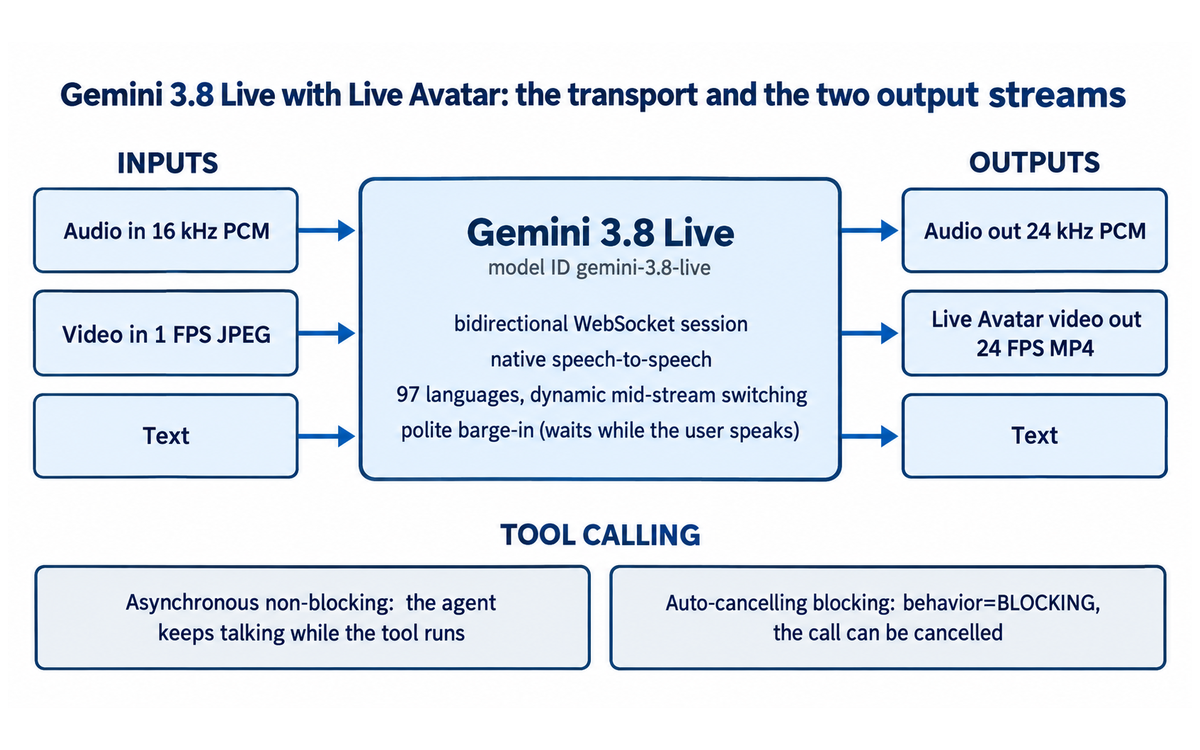
The developer guide states that the model "operates across bidirectional WebSockets, processing speech, live camera feeds, and screen broadcasts with sub-second latency while synthesizing natural 24 kHz audio and synchronized 24 FPS video avatars." A bidirectional WebSocket session is a persistent connection, not a request and response pair. That single design decision explains most of the rest of the product: the audio can stream in both directions at once, the video frames can arrive while audio is still playing, and a tool call can be in flight while the model is mid-sentence.
The input side carries audio at 16 kHz PCM, video at 1 FPS JPEG, and text. The output side carries audio at 24 kHz PCM, video at 24 FPS MP4 for the avatar, and text. Note the asymmetry between input video at 1 frame per second and output video at 24 frames per second. The model sees the world slowly and renders a face quickly. That is a sensible split for a conversation, and it is also a limit: a fast-moving camera feed gives the model roughly one sample per second to work with, so a reader planning a task that depends on fine visual motion should size that expectation against the published input rate rather than against the output smoothness.
The avatar layer
The developer guide lists Live Avatar synthesis as "24 FPS synchronized video output" for Gemini 3.8 Live, against "Unsupported" on the Gemini 2.5 Flash Live API Native Audio baseline. The Google blog describes what sits behind that: the feature "dynamically adapts its lip-sync and expressions and can [switch] across 97 languages without degrading video fidelity or introducing visual drift." The Verge, covering the launch independently, records what that looks like in practice: "One video shared by Google shows its Live Avatar talking in English and Japanese, with its mouth animation lining up with what it's saying in both languages."
The Verge also records a capability the vendor announcements do not lead with: "It can also pull up information on-screen while it talks."
Two avatar paths exist and they are not equal. The Google Cloud blog states that "customers can deploy from a library of curated, pre-built avatars, while custom avatar creation is gated behind a strict enterprise allowlisting and verification process." The Google blog adds that the custom path takes "system instructions, uploading a single reference photo and audio file sample." The Verge confirms the split from the outside: "Though Google will offer a library of preset avatars for customers to choose from, it will also allow organizations to create their own." A reader should plan for the prebuilt library and treat the custom path as a separate approval process with its own timeline.
Dialogue behaviour: barge-in, affect and the audio filter
The developer guide table sets out three behavioural changes against the GA baseline that a team will notice within the first hour of testing.
Barge-in handling is listed as "Polite interruption downgrade (waits if user is speaking)" for Gemini 3.8 Live, against "Immediate interruption (can talk over user)" for the baseline. This is a genuine improvement for a service counter and a real constraint for a debate or interview trainer. An agent that politely waits is pleasant to interrupt and harder to talk over. If a training scenario depends on the agent holding its ground, this behaviour works against the scenario and the implementing team needs to know that before the learners do.
Affective dialogue and proactive audio are both listed as "Enabled by default" for Gemini 3.8 Live, against "Requires explicit configuration" on the baseline. Defaults are decisions. A team that wants a flat, neutral delivery now has to configure away from a default rather than opt into one, which matters in any setting where an expressive synthetic face is a compliance question rather than a feature.
Domain biasing is listed as supported through custom_vocabulary in AudioTranscriptionConfig, against "Standard baseline transcription." For an institution with programme names, acronyms and building names that a general model mangles, this is the control that fixes transcription quality without retraining anything.
Visual token control is listed as a configurable media_resolution with LOW, MEDIUM and HIGH settings, against a "Fixed per-frame token budget" on the baseline. Cost and fidelity are now a knob rather than a constant, which connects directly to the pricing note below.
Tool calling, in two modes
The developer guide lists function calling execution as "Asynchronous non-blocking and auto-canceling blocking (behavior="BLOCKING")" against "Asynchronous and synchronous" on the baseline. The Google Cloud blog describes the non-blocking path in plain terms: the model "executes tools and API calls in the background while continuing the conversation, so the model can acknowledge requests and keep chatting while tasks finish in the background." The Google blog names the same behaviour "asynchronous tool calling" and shows it in a hotel check-in demonstration.
The blocking mode has a name worth reading twice: auto-cancelling blocking. A blocking call that can be cancelled by a user action is a different promise from a blocking call that runs to completion. The developer guide does not state the cancellation conditions in the table, so a team that adopts the blocking path should confirm the cancellation semantics against the API reference before depending on them for a transactional step.
Language handling
The Google Cloud blog states that "Gemini 3.8 Live understands and speaks 97 languages, with automatic language detection." The developer guide lists language support as "Dynamic mid-stream switching across supported languages," against "Supported languages" on the baseline. The Verge reports the demonstration: the avatar "talking in English and Japanese, with its mouth animation lining up with what it's saying in both languages." Mid-stream switching is the capability that removes the need for one agent per language, and it is the single most defensible reason for a multilingual institution to pick this model over an audio-only stack.
Live visual understanding
The Google Cloud blog describes the capability as the model processing "live camera feeds and screen shares alongside audio, all at the same time." The Google blog frames the same capability as processing "visual and audio inputs simultaneously." The insurance claims intake demonstration in the GA announcement is the vendor's own example of what this is for, and it is the closest thing to a production pattern in the published material.
Provenance and governance
The Google Cloud blog states that "all generated audio and video streams carry imperceptible SynthID watermarks, ensuring AI-generated content remains transparent and verifiable." The same post records the deployment conditions: US and EU endpoints, provisioned throughput, enterprise compliance and strict data governance. Those four items are claims the vendor makes about the product. What the review can add is what the claims do not cover, and that is treated in the section on the custom avatar allowlist and the data governance claim.
What the model does not do
Three honest limits belong here rather than in the marketing.
There is no published per-token rate for the avatar video output. The pricing page fetched for this review carries model input rates and no avatar output row.
There is no consumer surface. The Google Cloud blog routes readers to Gemini Enterprise and the API. A reader without one of those two has nothing to open.
And there is no statement in the fetched pages about how long live session media is retained, who can review it, or where it is processed beyond the US and EU endpoint locations. A team that needs that answer should ask it in writing during procurement, because the review could not find it published.
Getting Started with Gemini 3.8 Live with Live Avatar
This section is written for the team that has decided to try the tool and wants the shortest honest path to a first working session. It assumes nothing beyond a Google Cloud account and a developer who can follow a quickstart.
What you need before you write any code
A Google Cloud project with billing enabled. The Gemini Developer API pricing page carries a free tier for the Live family, and the avatar feature is an enterprise surface reached through Gemini Enterprise or the Gemini Live API. Plan the spend conversation before the build, not after.
An API key for the Gemini API, or a Gemini Enterprise seat in an organisation that has provisioned the model.
The Google Gen AI SDK. The developer guide states that it covers "How to integrate the model using the Google Gen AI SDK," so the SDK is the intended client rather than a hand-rolled WebSocket client.
A decision about your endpoint. The Google Cloud blog states that the model is available "with US and EU endpoints," and the Gemini Enterprise Agent Platform pricing page marks its Gemini 3.8 Live rows as Non-global. Endpoint choice is a data residency decision and a pricing decision at the same time.
A decision about your avatar. Start with the curated prebuilt library. Do not plan a launch around a custom avatar, because the Google Cloud blog puts custom avatar creation behind "a strict enterprise allowlisting and verification process."
The first session, in order
Install the Google Gen AI SDK for your language and confirm the model ID. The developer guide gives it as gemini-3.8-live, and the developer guide's migration material exists specifically to move a team off the older Live API models, which tells you the model ID is not a drop-in substitution.
Open a bidirectional session with audio input and audio output only. Do not add the avatar, do not add tools, do not add video. Get a clean spoken exchange first, because that isolates audio problems from rendering problems.
Enable the avatar output and confirm you get 24 FPS video alongside the 24 kHz audio. The developer guide gives 24 FPS as the avatar video rate and 24 kHz as the audio output rate, so those are the two numbers to check.
Add one tool call in the asynchronous non-blocking mode and watch what the agent says while the tool runs. The point of the non-blocking mode is that the conversation continues, so the test is whether the agent acknowledges the request out loud rather than going quiet.
Test barge-in by interrupting mid-sentence. Gemini 3.8 Live is specified as a polite interruption downgrade that waits when the user is speaking. Say the word at the point where a real user would and listen for whether the agent yields or finishes.
Test the language switch. Speak in one language, then switch mid-conversation, and confirm both the audio and the lip movement follow. The Google blog claims 97 languages with adaptation of lip-sync and expressions, and the only way to trust that for your language pair is to test your language pair.
Decide your media_resolution setting for the visual input path. The developer guide lists LOW, MEDIUM and HIGH, and the Agent Platform pricing page charges video and image input at USD 1.00 per 1 million tokens. Fidelity and cost trade directly against each other on this knob.
Write the session-length policy before you write the kiosk. The Agent Platform pricing page states that token consumption "is calculated per turn (defined as one user input and the model's corresponding response)" and that users "are charged for all tokens present in the Session Context Window during that turn." A long-lived session keeps a large context alive and bills it every turn.
The mistakes a team makes in the first week
Building the custom avatar path first. It is allowlisted, it needs verification, and the prebuilt library is what a standard account gets. Teams that start with the custom path lose the week waiting rather than building.
Testing on a network that is not the deployment network. The developer guide describes sub-second latency over bidirectional WebSockets, and a kiosk on conference centre wifi is not the environment that promise was measured in.
Budgeting from one pricing page. The developer page lists a single text rate; the Agent Platform page lists text, video and image, and audio separately. A video-heavy or audio-heavy flow is materially more expensive than a text-first mental model suggests.
Assuming a published rate exists for the avatar video output. It does not appear on the pages fetched for this review. Ask for it in writing.
Turning on affective dialogue and only then asking the compliance question. It is enabled by default. If an expressive synthetic face is a governance issue for your institution, raise it before the demo, not after.
A minimum viable acceptance test
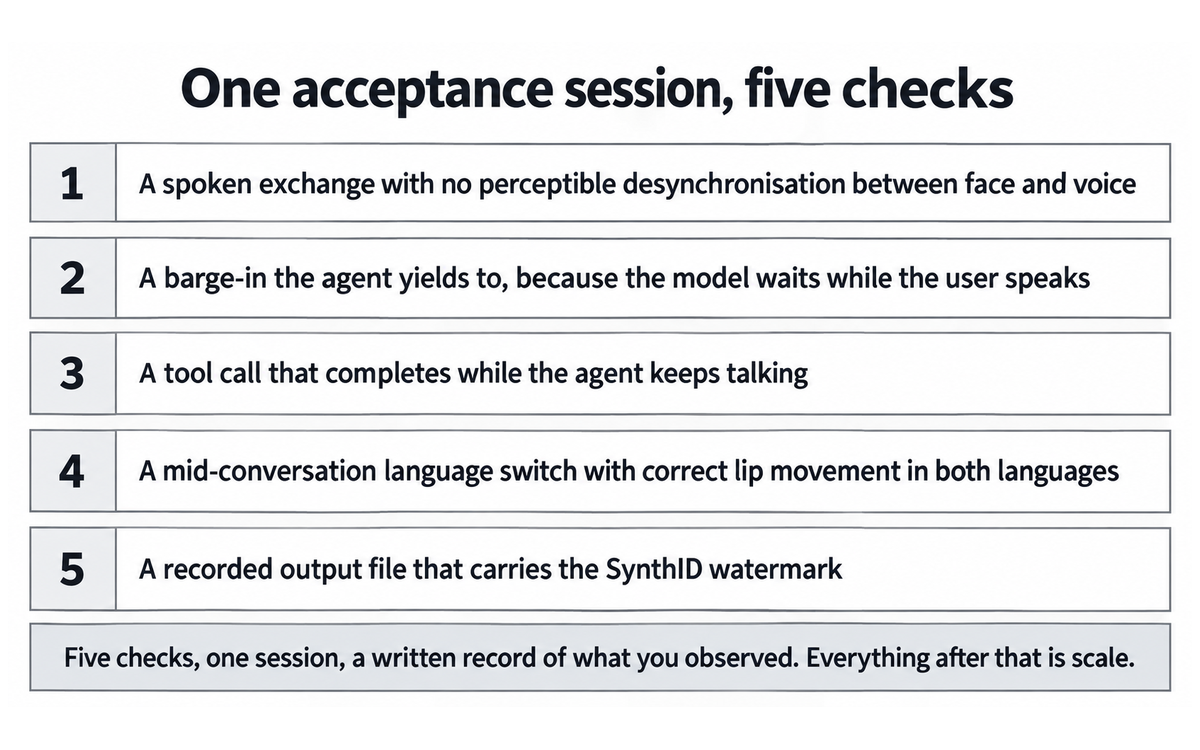
Before you scale anything, run one session that proves all five of these in the same conversation: a spoken exchange with no perceptible desynchronisation between face and voice; a barge-in that the agent yields to; a tool call that completes while the agent keeps talking; a mid-conversation language switch with correct lip movement in both languages; and a recorded output file that carries the SynthID watermark. Five checks, one session, and a written record of what you observed. Everything after that is scale.
Real Workflows
Each workflow below states the setup, the run, the honest user, and where the failure would show up. The scores in the rating section are derived from these, not the reverse.
Workflow 1: Multilingual front-desk kiosk for admissions enquiries
The setup. A physical or on-screen kiosk where a prospective applicant asks about programmes, fees, intake dates and campus location, in whichever of two or three languages they are comfortable in. The agent has a prebuilt avatar, a tool that reads the programme catalogue, and a system instruction that tells it which questions to refuse.
The run. The applicant speaks. The agent answers with a face, calls the catalogue tool in the background when a specific programme is named, and switches language the moment the applicant does. A quiet fallback sends anything outside the tool's scope to a human queue.
The honest user. A prospective applicant with one question and no patience. They do not read instructions, they interrupt, and they will test the agent with a second language within the first minute.
Where it fails. If the agent's refusal boundary is not written precisely, it answers a question it should have handed to a human. If the tool call is not non-blocking, the face freezes at the exact moment the applicant expects an answer. If the prebuilt avatar library does not contain a presence that suits the institution, the escalation to a custom avatar becomes a project.
Time saved, honestly. The first build is a project, measured in days or weeks rather than hours. The saving arrives afterwards, in a queue that absorbs questions that previously needed a person, and in not running two language-specific agents.
VERIFICATION CHECKLIST for Workflow 1:
☐ Multi-Model Check: write the same refusal boundary into a second assistant and ask it to answer the same three questions an applicant asks first. Where the two answers differ is where your boundary is not yet written precisely enough for the kiosk.
☐ External Source: check every programme name, fee and intake date the tool is allowed to answer against the published catalogue page rather than against a copy of it, because the catalogue moves and a cached list does not.
☐ Human Review: the named person who owns the escalation queue reads the first twenty transcripts and confirms that the questions the agent refused were the ones it should have refused, and no others.
☐ CI-First Test: can you state, without opening the console, which questions the agent will hand to a human and who that human is? If not, the refusal rule is not yet yours.
Workflow 2: Service or claims intake with live visual understanding
The setup. A person points a camera at a document, a damaged item or a screen, and the agent holds both the conversation and the visual context at the same time. The insurance claims intake demonstration in the GA announcement is the vendor's own version of this pattern.
The run. The agent asks the intake questions in order while reading the visual feed at 1 frame per second, records the answers through tool calls that run while it talks, and produces a structured record at the end.
The honest user. A person who is anxious, in a hurry, and holding a phone at an angle that is not ideal.
Where it fails. The input video rate is 1 FPS, so fine visual detail and fast movement are outside what the model samples. A workflow that depends on reading small print from a shaky camera will disappoint. The auto-cancelling blocking tool path is the right mode for a transactional step, and its cancellation conditions are not stated in the developer guide table, so the team must confirm them before depending on that step for a legally meaningful record.
Time saved, honestly. Substantial for the intake step, because the transcription, the structured capture and the conversation happen in one pass. The saving is in the human review step that no longer has to reconstruct a record from notes, and that saving is real only if the structured output is verified.
VERIFICATION CHECKLIST for Workflow 2:
☐ Multi-Model Check: run the same document and the same intake questions through a second model tier, or through a transcript read by a person, and compare the structured record each produces. Divergence on a field is where the visual input was not enough.
☐ External Source: verify every value that will be acted on, such as a policy number, an amount or a date, against the document itself rather than against the captured value. Extraction errors are confident and specific.
☐ Human Review: the adjuster reads the first ten structured records against the source material and states which fields they had to correct by hand.
☐ CI-First Test: could you defend the last record this workflow committed to the person it affects? If not, the tool-call boundary is wrong, and the fix is in the cancellation semantics rather than in the prompt.
Workflow 3: Supervised conversation practice in a second language
The setup. A learner books a slot, the agent holds a conversation in the target language at a chosen topic, and the learner can switch languages when they get stuck. A supervisor reviews recordings afterwards.
The run. Twenty minutes of dialogue with a visible presence, at the learner's pace, with the supervisor reading the transcript and watching for the points where the learner stalled.
The honest user. A learner who is embarrassed to practise with a person. That is the whole reason the workflow exists, and it is also why the agent's manners matter more than its eloquence.
Where it fails. The polite interruption downgrade is the wrong behaviour for a scenario that requires the learner to be pushed. An agent that waits will never train the learner out of a pause. The session context billing note also bites here: a twenty-minute session with growing context bills all of that context on every turn, so a practice format that stays long should be designed with context trimming in mind, and no published rate exists for the avatar video output side.
Time saved, honestly. This is the workflow where the tool saves the most per hour and where the U365 method work is least done. It replaces practice slots with a person, which is genuine capacity, and it introduces a synthetic face into a learning relationship, which is what the clause note below has to address.
VERIFICATION CHECKLIST for Workflow 3:
☐ Multi-Model Check: hold the same twenty-minute conversation with a second model and compare where each one pushed and where each one waited. The polite barge-in behaviour is the variable to isolate.
☐ External Source: check the target-language phrasing against a native sample rather than against the tool's own transcript, because a fluent answer can still be wrong in register.
☐ Human Review: the supervisor reads the transcript for the points where the learner stalled, and states whether the agent's choice to wait helped or hid the problem.
☐ CI-First Test: did the learner produce something they could not have produced with a person, or did they simply practise with something less intimidating? Both are answers, and the session log should say which one it was.
Workflow 4: Multilingual campaign or explainer production
The setup. A short interactive explainer in several languages, produced once and delivered by an agent that adapts to whoever opens it.
The run. The script and the visual assets are prepared once, the language handling is left to the model, and the same agent answers a viewer's follow-up question in the same breath.
The honest user. A marketing or communications team with a tight production budget and several language markets.
Where it fails. This is not a recorded video. It is a live agent, so it answers what it is asked, which means the brand cannot fully control what is said. A team that wants a fixed script wants a video, not this. The watermark is also always present, which is the correct default and is worth stating in any external campaign brief.
Time saved, honestly. The production saving is real against recording separate presenters in several languages. The review cost is real too, because a live agent on a brand surface needs someone watching it.
VERIFICATION CHECKLIST for Workflow 4:
☐ Multi-Model Check: put the same question to the explainer twice, in two languages, and compare what it claims. A live agent answers what it is asked rather than what the script anticipated.
☐ External Source: every figure, date and product claim the agent may repeat should be checked against the published source before the campaign runs.
☐ Human Review: a named person on the communications team watches the running explainer for the first week, because the brand cannot fully control what a live agent says.
☐ CI-First Test: could you stand behind the last sentence the agent produced on a brand surface? If not, the disclosure line and the refusal list are not yet finished.
Workflow 5: Interactive walkthrough inside a product or campus tour
The setup. A guided walkthrough where the agent points at on-screen information while it talks, the capability The Verge reports it showing in the launch demonstration.
The run. The visitor asks a question about a step and the agent answers while placing the relevant information on the screen in view.
The honest user. A first-time visitor who does not know what to ask.
Where it fails. The on-screen behaviour is a capability the vendor demonstrates, and the developer guide fetched for this review does not specify a client-side contract for it. A team that depends on that behaviour should confirm the API surface that drives it before designing around it.
VERIFICATION CHECKLIST for Workflow 5:
☐ Multi-Model Check: ask the same three-step question of a second walkthrough build and compare which on-screen information each one chose to place.
☐ External Source: verify whatever the walkthrough points at, such as a price, a room number or a step count, against the source system rather than against the agent's answer.
☐ Human Review: a first-time visitor completes the walkthrough unassisted while someone watches, and reports the point where they stopped trusting it.
☐ CI-First Test: does the walkthrough answer the question a visitor actually arrives with, or the question the script was written for? The two are rarely the same.
Strengths, Limits, and AI Imposture Risk
What the tool does well, with the evidence behind it
The rendered presence is real and it is synchronised. The developer guide lists Live Avatar synthesis as 24 FPS synchronized video output against Unsupported on the Gemini 2.5 Flash Live API Native Audio baseline, and The Verge independently reports the English and Japanese demonstration with "its mouth animation lining up with what it's saying in both languages." A team that has costed a stitched rendering pipeline can now compare that work against a single model output.
Tool calls do not stop the conversation. The Google Cloud blog states that the model "executes tools and API calls in the background while continuing the conversation." The developer guide names both modes: asynchronous non-blocking, and auto-cancelling blocking through behavior="BLOCKING". Two modes for two jobs is a better design than one mode forced onto both.
The language handling is the strongest single feature for a multilingual institution. 97 languages with automatic detection on the Google Cloud blog, dynamic mid-stream switching in the developer guide table, and a demonstration of a mid-conversation switch on The Verge. A language room or a multilingual service desk is a genuine fit rather than a stretch.
The provenance answer exists before launch. "All generated audio and video streams carry imperceptible SynthID watermarks," from the Google Cloud blog. A team that has to answer a disclosure question from a communications or compliance office has a vendor statement to show.
The migration path is published. The developer guide carries migration material from legacy Gemini Live API models and compares the GA baseline attribute by attribute. Teams replacing a 2.5 Flash Live API audio agent have a document rather than a guess.
Where the tool stops, stated plainly
The custom avatar path is not available on request. It is allowlisted, and the GA announcement tells readers to "Reach out to your Google Cloud sales representative to activate provisioned throughput, discuss customized deployment architectures and allowlisting for custom avatar." A team cannot self-serve a custom face.
No published per-token rate exists for the avatar video output. This review fetched the Gemini Enterprise Agent Platform pricing page and the Gemini Developer API pricing page and found model input rates on both and no avatar video output row on either. A procurement case that needs that number must ask for it.
The vendor publishes more than one rate for the same model input and the surfaces differ. The developer page lists one text rate for the Live family; the Agent Platform page lists text, video and image, and audio separately. The developer page itself carries the warning: "Prices may differ from the prices listed here and the prices offered on Gemini Enterprise Agent Platform."
Session billing is per turn against the whole session context window. The Agent Platform page states that consumption "is calculated per turn (defined as one user input and the model's corresponding response)" and that users "are charged for all tokens present in the Session Context Window during that turn." A long-running kiosk session is billed on everything it is holding, every turn.
Affective dialogue and proactive audio are on by default. The developer guide lists both as "Enabled by default" against "Requires explicit configuration" on the baseline. A neutral delivery is now something a team configures rather than something it receives.
Barge-in is polite. The developer guide lists "Polite interruption downgrade (waits if user is speaking)" against "Immediate interruption (can talk over user)" on the baseline. That is the right behaviour for a service desk and the wrong behaviour for any scenario that requires the agent to hold a position.
Input video is sampled at 1 frame per second. The developer guide gives the input modalities as "Audio (16 kHz PCM), video (1 FPS JPEG), text." Fine visual detail and fast movement are outside what the model receives.
There is no consumer surface and no free path to the avatar. The avatar feature lives in Gemini Enterprise and the API. A reader who wants a talking face needs a Cloud project, an API key and a build step.
AI Imposture Risk
Each trap is rated Low, Medium or High with the evidence behind the rating. The ratings are for the honest user working the common case, not for a demonstration.
Time Illusion: Medium. Evidence for the rating comes from both directions. The Agent Platform pricing page states that users are "charged for all tokens present in the Session Context Window during that turn," which means the cost of a conversation grows with its own history, and the developer guide's session material describes long-lived sessions rather than short ones. The Google Cloud blog routes the reader to "Reach out to your Google Cloud sales representative," which is a procurement step before a measurable saving exists. Against that, the build saving is real: one model replaces a speech pipeline, a voice service and a rendering layer, and the developer guide publishes a migration path so the work is bounded. The trap is specific and avoidable. A team that treats a kiosk session like a web request will watch the meter run and conclude the tool was oversold.
Quantity Illusion: Low. The evidence is that the output is either checkable or visibly wrong. A rendered face either lip-syncs or it does not, a language switch either follows the speaker or it does not, and a tool call either completes while the agent talks or it does not. The developer guide gives the exact rates to check against: 16 kHz audio in, 24 kHz audio out, 24 FPS avatar video, 1 FPS video input. The one soft spot is the on-screen information behaviour The Verge reports, which the developer guide fetched for this review does not specify a client contract for, so a team should confirm that surface rather than assume it. That is a scoping risk, not a volume-of-polished-nonsense risk.
Skill Illusion: Medium, on the tool's own evidence rather than on any clause floor. This tool does not write procedural memory on the user's behalf, so clause 5.2.3-a returns a null and sets no floor here. The substantive reason for Medium is specific. The skills this tool displaces are the ones a U365 learner would otherwise build: designing a conversation turn by turn, diagnosing a desynchronisation problem, deciding when an agent should yield and when it should hold, and measuring a latency budget. A team that ships an avatar agent learns the integration, and the conversation craft that the tool performs on its behalf is not learned by watching it work. The mitigations are real: the developer guide publishes rates and modes a reader must understand to configure anything, and the migration material forces a model-by-model comparison. That is why the rating stops at Medium and does not reach High.
Overall: Medium. One trap is Low, two are Medium, which places the overall level at Medium under the framework rule and not at High, because neither Medium rating rests on an unresolved defect. A score of High would require two High traps or a core value proposition built on an illusion, and the core value proposition here is a rendered face that the evidence shows rendered.
Framework v1.2 clause note
5.2.3-a agent-authored procedural memory. Null. Gemini 3.8 Live with Live Avatar is a real-time conversational model. The fetched developer guide and the two announcements describe system instructions supplied by the implementing team, asynchronous tool calls, and session handling. None of them describes the model creating or revising the user's skills, memory stores or standing instructions, and none describes a durable artefact that outlives the session. The Skill Illusion rating above sits at Medium for the conversational-craft reason set out there, which stands on its own evidence rather than on any clause floor. Because the clause returns a null, no floor arises from it, and the Medium rating in the trap table rests on that conversational-craft reason alone.
4.2-a agent-mediated conversation. Applies. This is the live question for this tool and it deserves a direct statement. A rendered avatar speaks in a voice that is not a person's, holds a face that may be a prebuilt one or a face built from an uploaded reference photo, and appears in front of a real person as the other side of a conversation. The Google blog describes the custom path as taking "system instructions, uploading a single reference photo and audio file sample," which means the face can belong to someone specific. Where that face is presented without disclosure as a human counterpart, agent interaction substitutes for human contact and the clause applies directly. The mitigations the vendor does publish are genuine: SynthID watermarks on all generated audio and video, and custom avatar creation behind a verification process. What the fetched pages do not publish is a retention or disclosure statement for live session media, which is the part an institution has to settle itself. The clause outcome is that any deployment built on this tool needs a disclosure line the user can see, a named human escalation path, and a rule that no avatar appears as a person who exists.
7.5 team-level rooms. Applies, in the specific form of the multi-agent pattern the vendor demonstrates. The GA announcement shows an ADK agent team behind the claims intake demonstration: "In the background, an ADK agent team checks the policy, applies the intake rules, and builds the adjuster packet." More than one agent acting behind a shared conversational surface is a team-level room under the clause, whatever the user sees. Collaboration Mode Centaur is therefore required, and it is required twice over: the framework rule puts it there because Imposture Risk is Medium, and the clause puts it there because several agents act in one room. A single execution orchestrator would be a null. This is not that.
Section 7c: the custom avatar allowlist and the data governance claim, stated plainly
This section records what the vendor's own pages say side by side on two surfaces, because the pair changes what an implementing team should put in a project plan. No score in this review changed as a result of it, and the reason is stated at the end.
The finding. Two Google documents published on the same day describe the custom avatar path at different levels of commitment.
The Google Cloud blog announcement states: "To safeguard identity and prevent misuse, customers can deploy from a library of curated, pre-built avatars, while custom avatar creation is gated behind a strict enterprise allowlisting and verification process."
The same post closes with the operational instruction: "Reach out to your Google Cloud sales representative to activate provisioned throughput, discuss customized deployment architectures and allowlisting for custom avatar."
The Google blog frames the capability on the developer side as a three input process: "system instructions, uploading a single reference photo and audio file sample."
Read together, the vendor describes a custom avatar build that looks like a configuration task and a governance path that is a sales-mediated approval. Both statements are the vendor's own and they do not contradict each other. The finding is the gap a reader has to close themselves: the announcement does not publish the criteria for approval, the turnaround, whether an approval is per organisation or per avatar, or what happens to a reference photo and audio sample after submission. A project plan that schedules a custom avatar in the same sprint as the integration is a plan built on the first document and not the second.
The second finding, on data. The Google Cloud blog states that the model is "now available with US and EU endpoints, with provisioned throughput, enterprise compliance, and strict data governance." Those four items are assertions about the product's compliance posture, and the phrase "strict data governance" is not accompanied in that post by a retention period, a deletion route, or a statement of what happens to live camera and screen media after a session ends. The Google blog describes the model processing "visual and audio inputs simultaneously" and the Google Cloud blog describes it processing "live camera feeds and screen shares alongside audio." A camera feed and a screen share can contain anything. A team placing this tool in front of a member of the public should get the media handling answer in writing during procurement, because this review could not find it published on the pages it fetched, and "strict data governance" is a claim rather than a specification.
Allegation and finding are kept distinct here. There is no allegation that Google mishandles session media, and there is no evidence of a policy breach in anything this review read. The finding is narrower and entirely factual: the pages fetched state an allowlisting gate and a governance claim, and neither page specifies the criteria or the retention detail a deploying institution would have to answer for.
No score changed, and the reason is that both findings are about the procurement path rather than about the product's measured behaviour. The model's published rates, modes and outputs are what the dimensions are scored against, and none of the operative text quoted above contradicts them. The allowlist narrows which avatars a team can deploy, which is a plan constraint, and the governance claim is unverified rather than contradicted. Moving a score on either would punish the tool for a documentation gap rather than for a measured failure. The Limits section carries both, the Getting Started checklist already tells a reader not to plan a launch around a custom avatar, and the rating stands as scored.
What this section does not do. It does not assess Google's compliance programme, it does not compare Google's privacy terms to another vendor's, and it does not reach any conclusion about whether the allowlist is well designed. It records the operative text from two pages published on 24 September 2026 and states what those pages leave open. A reader who needs the closed answer should ask Google for it in the procurement conversation the vendor itself recommends.
U365 Co-Intelligence Rating
The four dimensions
Time Benefit: 3. The honest user is an enterprise team building a live agent, and the first build is a project rather than a session. The developer guide provides a quickstart, an SDK path, a migration guide and a model comparison, which is better documentation than most tools in this catalogue carry, and the removal of a stitching layer saves real engineering days against the alternative of building a speech pipeline, a voice service and a renderer. Against that, the pricing pages carry no rate for the avatar video output, the allowlist path adds a sales cycle, the session context billing note punishes long sessions, and the endpoint decision has to be made before the first line of code. The savings arrive after the build and they are real; they are not savings a team feels in week one. Net of everything a deploying team carries, the dimension lands in the Neutral band.
Quantity Benefit: 5. Volume here is conversational capacity rather than document output, and it is genuine. One agent absorbs enquiries that previously needed a person at a desk, one agent covers 97 languages instead of one agent per language, and tool calls run in the background so the agent produces an acknowledgement and a completed transaction in the same turn. The limit on the dimension is that the volume is bounded by the session context window billing note and by the 1 FPS input sampling, so a workload that needs dense visual detail or very long sessions gets less volume than the headline suggests. The common case is a service or teaching conversation, and in that common case the capacity gain is solid and measurable.
Quality Benefit: 6. This is where the tool is strongest relative to what a U365 team could assemble otherwise. Synchronised 24 FPS avatar output, 24 kHz audio, mid-stream language switching without the drift problem that plagues stitched stacks, a polite interruption model that behaves the way a real counter conversation behaves, and a published model comparison against the previous GA generation with attribute-level differences. The quality ceiling is capped by two things: no published quality benchmark from an independent source was found, and the polite barge-in behaviour is a deliberate trade rather than a strict improvement, so a scenario that needs the agent to hold its ground gets lower quality from this design than from the baseline's immediate interruption. On the honest common case, a service conversation in more than one language, the quality is good and the evidence for it comes from a developer guide that is unusually specific about rates.
Skill Benefit: 4. The rating is deliberately conservative. The developer guide requires a reader to understand WebSocket streaming, session context accounting, media_resolution trade-offs, asynchronous versus auto-cancelling blocking behaviour, and custom_vocabulary configuration, and a team that works through that material gains real capability in real-time agent design. That is why the dimension is not lower. What keeps it modest is that the conversation craft itself is performed by the model: turn-taking, interruption handling, language adaptation and expressive delivery are defaults rather than skills the implementer builds, and the 79 published U365 programmes contain no module on any of the terms this tool is defined by. A team learns to integrate the system and does not learn to design the conversation it hosts, and both halves of that sentence are true.
The score
Average of Time 3, Quantity 5, Quality 6 and Skill 4 is 4.5. CI-First Benefit Score: 4.5. Band: Positive (4.1 to 6.0). The tool clears the threshold for a Positive band on the strength of what it demonstrably produces and does not reach Strong because the Time dimension carries the procurement, allowlist and unpublished-rate overhead that a first deployment genuinely absorbs.
Humics Protection
Creativity: 0. The tool supplies a presence and a set of behaviours rather than a creative surface. A team can design a service conversation, a practice format or a walkthrough around it, and the prebuilt avatar library constrains rather than invites invention. A rendered face is an output, not a medium to compose in, so the effect on creative capacity is neutral.
Critical Thinking: 0. The tool does not push a user toward or away from judgment. It does change what there is to be critical about: a team adopting it has to reason about session context billing, endpoint residency, watermarking, avatar provenance and the difference between a polite agent and a correct one. Those are new questions rather than replacements for old thinking, and a team that ignores them gets a demonstration instead of a service. Neutral, with the caveat in the Limits section.
Social Authenticity: -1. This is the dimension the tool moves, and it moves it downward. A rendered avatar speaks in a voice that is not a person's, may wear a face built from an uploaded reference photo of a real individual, and appears as the other side of a conversation. The vendor's own mitigations are the reason the deduction is one point and not more: SynthID watermarks on all generated audio and video, an allowlisting and verification process for custom avatars, and a prebuilt library that carries no real person's face by construction. A deployment that discloses the agent, names a human escalation path and keeps the avatar visibly synthetic can hold this at neutral in practice. The default configuration, deployed without those three choices, does not.
Humics Protection total: -1. Badge: Humics-Neutral (-1 to +1). The tool is close to the boundary. Removing the disclosure, the prebuilt library and the escalation path would take it to -2 and move the badge to Humics-Risky, which is why those three are written into the Getting Started checklist rather than left to chance.
Collaboration Mode
Centaur. The framework rule sets the mode from Imposture Risk, and Imposture Risk is Medium with two Medium traps and one Low, so the mode is Centaur by rule. The clause analysis reaches the same place independently: the vendor demonstrates an ADK agent team acting behind the claims intake surface, which is more than one agent in a shared room and therefore clause 7.5 territory. Centaur means a clear division of labour between the people and the agents, and for this tool the division is unusually legible: the agent holds the conversation, the live presence and the tool calls, and the people on the U365 side own the disclosure line, the escalation path, the avatar choice, the session-length policy and the review of anything the agent commits to. Those five items are not delegable to the agent, and a team that delegates any of them is in Cyborg territory without the discipline Cyborg requires.
U365 Co-Intelligence Rating summary
Element | Value |
Time Benefit | 3 |
Quantity Benefit | 5 |
Quality Benefit | 6 |
Skill Benefit | 4 |
CI-First Benefit Score | 4.5 |
Band | Positive (4.1 to 6.0) |
Humics Protection | -1 (Humics-Neutral) |
Imposture Risk | Medium (Time Medium, Quantity Low, Skill Medium) |
Collaboration Mode | Centaur |
What Users Say
There is very little independent user reporting on this tool, and the honest answer says so rather than manufacturing consensus from vendor material.
Independent review coverage. The Verge covered the launch and reported the mid-conversation language switching demonstration, the on-screen information behaviour, and the availability restriction: the Live Avatar "is currently only available to Gemini Enterprise customers." That is launch reporting from an independent outlet, and it is the only independent item this review found that describes the tool's behaviour directly.
Named customer statements in the vendor's announcement. Two are published with attribution and both are worth reading because they name the capabilities that mattered to the customer rather than the ones the vendor led with.
Cox Automotive, on the Autotrader shopping assistant: "Shoppers increasingly expect to describe what they need in their own words rather than work through filters and menus. Autotrader's new conversational AI Avatar brings that experience to vehicle discovery by matching natural conversation to the right inventory. It is another step toward our vision of connected intelligence, where every consumer interaction draws on the full depth of Cox Automotive data." The announcement describes the build as guiding car shoppers through vehicle search, comparison and financing, and the shopper is shown the relevant area of the screen while the assistant talks. Marking what is on the screen and calling tools are the two capabilities the demonstrated experience rests on. Note that a customer statement published in a vendor announcement is a testimonial and not a review, and the review treats it that way.
Specs, on the voice activity detection work: "The updates made to Voice Activity Detection and the improvements to overall latency are huge steps forward and further our ability to deliver the highest quality AI Assistant on the SPECS platform." This one is useful because it names the two things a live deployment actually notices, voice activity detection and latency, rather than the avatar.
Review platforms. No reviews found on G2, Capterra, GetApp, Trustpilot or Product Hunt for Gemini 3.8 Live with Live Avatar. That is expected for a feature that reached general availability three days before this review and is sold through enterprise procurement rather than a self-serve page. A reader should not read the absence as a signal about quality in either direction, and should not read the presence of customer quotes in the announcement as one either.
What to look for instead of reviews. Three things a prospective adopter can check without a review corpus: the developer guide's model comparison table, which states attribute-level differences against the previous GA generation; the published rates on both pricing pages, which give a unit-economics basis rather than an opinion; and the demonstration videos, which show the claims intake and the custom avatar build end to end.
Comparison and Alternatives
Three alternatives matter for a U365 reader, and each one wins on a different dimension.
Option | What it is | Where it wins against Gemini 3.8 Live with Live Avatar | Where it loses |
Gemini 2.5 Flash Live API Native Audio | The previous GA generation of the Live API, listed as the GA baseline in the developer guide comparison table | It is the baseline the developer guide measures against, and its interruption behaviour is immediate rather than polite, so a scenario that needs the agent to hold its ground gets more from it | No Live Avatar synthesis (listed as Unsupported), no affective dialogue without explicit configuration, no proactive audio without explicit configuration, fixed per-frame token budget rather than configurable media_resolution |
Google's separate audio models: Gemini 3.5 Transcribe, Gemini 3.5 Live Translate, Gemini 3.8 Flash TTS and Flash-Lite TTS | Specialised audio components the GA announcement offers "If your application requires specialized, modular audio capabilities" | Each does one job with a narrower surface, and a team that only needs transcription or only needs translation does not pay for a rendered face | None of them produces a conversational presence with a face, and a team that needs the whole experience reassembles the stitched pipeline |
A stitched stack of a speech model plus a text-to-speech service plus an external avatar renderer | The path teams took before this class of product existed | Component choice per layer, and a team can tune each stage independently | Three integration seams, three latency contributors, and the lip-sync problem becomes the team's own engineering project, which is exactly the problem the developer guide addresses with a single 24 FPS output |
The comparison a reader should actually make is narrower than the table. If the requirement is a face on a conversational agent and a build team is available, this tool is the shortest path that exists in the Google line, because the developer guide publishes the migration path and the model comparison against the previous generation. If the requirement is transcription, translation or a recorded voice, the specialised audio models in the GA announcement are cheaper and simpler and the avatar is unnecessary weight. If the requirement is a fixed script, a recorded video is the right answer and this tool is the wrong one.
Verdict and Next Steps
The verdict. Gemini 3.8 Live with Live Avatar is a genuine step, not a packaging exercise. It takes a rendered conversational presence from a three-service integration project down to a model output, publishes the rates, modes and behaviours a team needs to configure it, and carries an honest provenance answer in the form of SynthID watermarks and an allowlisted custom avatar path. For a U365 institute that already runs agent infrastructure and wants a service desk, a supervised practice format or a multilingual walkthrough to hold a face, it is the most direct route available and the documentation is good enough to plan from.
It is not a tool an individual picks up. The consumer surface does not exist for the avatar feature, the custom avatar path runs through a sales conversation, no rate is published for the avatar video output, and the session context billing rule makes a long kiosk conversation an expensive design. The badge is Active because none of those is an unresolved defect that a reader must weigh before adopting the tool for its intended enterprise use; each one is a constraint that belongs in a project plan, and each one is written into the plan above.
What to do next, in order.
Read the developer guide migration section before touching the SDK. It is the only document in the fetched set that compares this model to the generation it replaces attribute by attribute, and it tells a team what changes rather than what to type.
Get the media handling answer in writing. Ask Google what happens to live camera and screen media after a session, because the pages fetched for this review state "strict data governance" without stating a retention period, a deletion route, or a review process.
Ask for the avatar video output rate in the same conversation. Neither pricing page publishes it, and a procurement case built on an assumed figure will be rebuilt later.
Write the disclosure line before you build the avatar. Decide what the user sees and when a human is named, then build the interface around it. This is the Clause 4.2-a work and it cannot be retrofitted politely.
Run the five-check acceptance session in the Getting Started checklist. One session, five verifications, a written record.
Confirm the blocking tool cancellation semantics against the API reference before a transactional step depends on them. The developer guide names the mode auto-cancelling and does not state the cancellation conditions in the comparison table.
Decide the session-length policy and the context trimming approach before the first kiosk pilot, because the Agent Platform pricing page bills every token in the session context window on every turn.
What to ask U.Copilot and what to keep, in three prompts.
Prompt 1 (The refusal boundary and the disclosure line, written before the kiosk is built). Context: I am building a front-desk agent that answers [the enquiries] in [the languages]. The material it may answer from is [name the catalogue, the fee schedule, the policy pages]. The person it replaces answers about [n] questions a week. Role: AI as a service designer who writes the boundary I will own. Profile: Act as a Co-Worker and Assistant. Task: produce (1) the ten questions the desk will actually receive, (2) the three the material cannot answer, (3) the refusal sentence the agent says when it must hand a person the conversation, (4) the disclosure sentence a visitor reads before the first exchange, and (5) the escalation route, named by role rather than by person. Constraints: answer only from the material I gave you; do not fill a gap with a general answer; write the refusal sentence in the register the desk would use out loud; do not name a person in the escalation path. Output format: the five numbered outputs, then a heading "Where a person would have answered differently". Memory: the platform keeps the session and not the rule, so the boundary, the disclosure sentence and the escalation route belong in my own project record and in my LIPS record. UP-Context verification: I read the three unanswerable questions myself and check that the agent declines rather than invents, I read the disclosure sentence on the surface a visitor meets rather than in my notes, and I confirm a named human owns the handover before the desk opens. If I cannot say what the desk must refuse without reading the logs, it does not open. Data safety: this pack carries no personal data. I do not paste a real applicant's record, a fee letter or a named person's details into it, and I keep the boundary and the escalation route in my own record.
Prompt 2 (The visual-input boundary and the structured record, run before a claims or intake desk goes live). Context: the agent holds a conversation while reading a live camera feed at one frame per second. The document types it will see are [list them]. The record it must produce has the fields [list them]. The person at the camera is [the situation]. Role: AI as an intake designer and a tester of my own instrument. Profile: Act as an Analyst and Tester, applying my standard rather than inventing one. Task: write (1) the smallest set of intake questions that produces the record I named, (2) the conditions under which the visual path should be abandoned and the conversation should be handed to a person, (3) five cases where one frame per second is not enough to decide, and (4) the sentence that tells the person what the camera is being used for. Constraints: do not assume the camera shows what I described; state what you could not tell from the material I gave you; do not present a sampling rate as a resolution; name the field you would drop rather than inventing a value for it. Output format: the four numbered outputs, then a heading "What this intake cannot establish". Memory: the platform keeps the session, so the question set, the handover conditions and the camera-use sentence belong in my own project record and in my LIPS record, with the date each was checked against the source system of record. UP-Context verification: I run one document of each type through the intake myself and read what the record says against what the document actually shows, I confirm the handover condition fires when it should, and I keep the camera-use sentence as published rather than as drafted. If I cannot name a case where the intake should stop, it does not go live. Data safety: this pack carries no personal data. I do not paste a live claimant's document, an image of a real person or a record identifying anyone into it, and I redact the document set before it enters the prompt.
Prompt 3 (The supervised practice session, its disclosure and its review rule). Context: I am designing a supervised conversation-practice session in [the language] for [the learner group]. The learner will talk to an agent that answers with a rendered presence. What the practice must build is [the two or three hard moments]. A supervisor reviews the recording afterwards. Role: AI as a session designer whose work will be reviewed by a colleague. Profile: Act as a Coach and Tutor for the session design, and state plainly that the coaching judgement stays with the human supervisor. Task: produce (1) the session shape in stages with the time each takes, (2) the three lines the learner is told before the session opens, including that the other side is an agent, (3) the review rule for the supervisor, saying what they look for and how often they must read a full recording, (4) the context-trimming or session-length decision, and (5) what the session cannot build, stated as a teaching limit rather than as a product limit. Constraints: never let the design present the agent as a person; do not propose a scoring rubric for the learner; do not treat a recording as evidence of the learner's skill; state what a transcript cannot show. Output format: the five numbered outputs, then a heading "What this session does not teach". Memory: the platform holds the session and no cross-session record, so the session shape, the disclosure lines the learner heard, the supervisor's review log and the transcript decision belong in my own record and in my LIPS record. UP-Context verification: I read the three opening lines aloud as the learner would hear them, a supervisor other than me reads one full recording before the format is repeated, I confirm the recording and transcript handling is written down and consented to before the first session, and I keep the review cadence I committed to rather than reviewing the first two sessions and stopping. If the only evidence I can offer that the session worked is that the agent said it went well, nothing was learned. Data safety: this pack carries no personal data. I do not paste a learner's recording, transcript or progress note into it, I do not describe an identifiable learner, and I keep consent records and review logs in my own store.
U.Copilot Integration
U.Copilot is the front door to the U365 tool library, available at https://www.university-365.com/ucopilot. Use it before the first build session, because the boundary and the disclosure line are the two parts of this workflow the platform cannot write for you and the two parts that decide whether a deployment is admissible. What to ask U.Copilot to do. Describe the service, the audiences and the languages, and ask it to write the rule before any code exists: what the agent may answer, what it must hand to a person, what the disclosure sentence is on the surface a visitor meets, who reviews a session recording, and what happens to a transcript. Ask it to place the disclosure decision, the escalation route and the session-length policy in your LIPS Digital Second Brain, so the rule sits with the deployment it governs. U.Copilot prompt example. I am a U365 Fellow planning a disclosed conversational agent for [the service] in [the languages]. Write (1) the CI-First Profile and the Collaboration Mode with the reason, (2) the boundary: what the agent answers, what it refuses and the sentence it uses, (3) the disclosure line for the page or the kiosk and the route to a human beside it, (4) the review rule for anything the agent commits to, and (5) the record I keep in LIPS under CARE, including the session-length policy and the media-handling position.
SL-OS Integration
LIPS Digital Second Brain: the disclosure sentence as published, the escalation route, the session-length policy, the review rule for anything the agent commits to, and the consent and transcript decisions belong in your LIPS under the service they cover. The platform holds the session; LIPS holds the reasoning, which is what you need when a disclosure is questioned or a recording is asked for. ULM routines: primarily Career and Finance, and Quality of Life. The tool removes a build queue and a recurring dependence on somebody else's availability and returns the time the queue was holding, which is a Career and Finance question and a Quality of Life one. Character and Emotions is touched in one specific way: declining to put a rendered presence in front of a person without a disclosure is a discipline rather than a setting. Weak fit for Body and Health, Spirit and Mind, and Social and Love Relationships, because a rendered counterpart is the one thing none of those three domains should be practising against. My Successful Life: book the transcript review as a recurring appointment rather than as a task, so the supervision the deployment depends on has a place in the week, and re-read the published disclosure on the page once a quarter as a reader sees it. Microsoft 365: no native integration is documented. The record is a manual discipline: keep the disclosure text, the escalation route and the review log in the SharePoint folder for the service rather than in the platform, deliver the review to the Teams channel that owns the service, and never place a recording carrying personal data or a credential in a shared record.
Status and Last Tested
Status: Active. Last tested: 2026-09-27. Re-check: trigger-based, at the latest 27 March 2027.
Re-check triggers in priority order: Gemini 3.8 Live Extended Thinking leaves private preview and the family naming changes; a per-token rate for the avatar video output is published or an existing published rate changes; the custom avatar allowlisting terms change; the SynthID watermarking commitment changes or gains an enterprise opt-out; a published retention or data-processing statement for live session media appears. Any one of those moves the check forward to the week it happens.
Migration Path
Not applicable. Gemini 3.8 Live with Live Avatar is Active. No Migration Path section is required for an Active tool. One migration is worth stating here rather than leaving it in the body, and it belongs to the reader rather than to the vendor: a team already running an audio-only Live API agent is moving onto this model rather than off it, and the four attribute changes below are the checklist.
Migrating from the Gemini 2.5 Flash Live API Native Audio baseline. This is the migration the developer guide is written for and the one most readers will be making. The developer guide's comparison table is the checklist, and the four rows that change a running system are these. Output modalities gain video alongside 24 kHz audio, so a client that only renders audio needs a video path. Live Avatar synthesis goes from Unsupported to 24 FPS synchronized output, which is the reason the migration exists. Function calling execution changes from asynchronous and synchronous to asynchronous non-blocking plus an auto-cancelling blocking mode, so every existing tool call needs a decision about which of the two it should be. Barge-in changes from immediate interruption to polite downgrade, which changes the feel of every existing conversation and should be tested against the scenarios the old agent already handled.
The developer guide also documents a model ID change: gemini-live-2.5-flash-native-audio to gemini-3.8-live. That is not a string swap in a configuration file, because the behaviour rows change with it, and a team that treats it as one will ship a different agent than the one they tested.
Migrating off this tool, should that become necessary. The relevant surface is the session, not the stored data: a client that speaks bidirectional WebSocket audio is the closest thing to portability, and the migration material in the developer guide is documented in both directions because the attribute table is symmetric. For a U365 team the practical hedge is to keep the conversation logic in the system instructions and the tool definitions rather than spread through client code, so that a future model change is a configuration change rather than a rebuild. The rendered avatar is the least portable part of any deployment, and a team should assume that a face is a commitment to this vendor's rendering path while the dialogue logic is not.
U365's Recommendations to Learn More
Start with the developer guide, because it is the only document in the fetched set that a team can plan from. Read the model comparison table first, then the migration section, then the mandatory API rules. A reader who knows the four attribute changes before opening the SDK saves a week.
Then read both pricing pages, because they carry different figures for the same model. Read the Gemini Enterprise Agent Platform pricing page for the video, image and audio input rows and the Live API billing note, and read the Gemini Developer API pricing page for the comparison the vendor itself draws between the two surfaces.
Then watch the demonstrations in the order the announcement presents them: the custom avatar build, the claims intake, and the ADK voice agent. The last one is the one to watch first if the build approach is still open, because it shows the ADK path to the Live API without a speech pipeline in the middle.
Official learning resources
The vendor's own channel for this model is Google Cloud Tech, which is where every demonstration video in the GA announcement is hosted.
The GA announcement's first demonstration, the interactive custom avatar build:
The Autotrader shopping assistant demonstration, which shows the marking of what is on the shopper's screen, alongside tool calling, in a customer deployment:
Recommended reading, in the order a team should open them:
The developer guide: https://docs.cloud.google.com/gemini-enterprise-agent-platform/models/guides/gemini-3-8-live
The Gemini Enterprise Agent Platform pricing page: https://cloud.google.com/gemini-enterprise-agent-platform/generative-ai/pricing
The Gemini Developer API pricing page: https://ai.google.dev/gemini-api/docs/pricing
The Live API documentation, which the GA announcement links as the integration entry point: https://docs.cloud.google.com/gemini-enterprise-agent-platform/models/live-api
The Gemini Live API development skill published by the vendor on GitHub, which the GA announcement offers to readers building bidirectional streaming apps: https://github.com/google-gemini/gemini-skills/blob/main/skills/gemini-live-api-dev/SKILL.md
The open-source claims intake agent team code the announcement points to: https://github.com/Shubhamsaboo/awesome-llm-apps/tree/main/voice_ai_agents/insurance_claim_live_agent_team
The Google blog introduction: https://blog.google/innovation-and-ai/models-and-research/gemini-models/gemini-3-8-live-with-live-avatar/
The GA announcement's first demonstration, the interactive custom avatar build, is published by Google Cloud Tech on YouTube:
The Autotrader shopping assistant demonstration, which shows the marking of what is on the shopper's screen alongside background tool calling in a customer deployment:
Resources on Gemini 3.8 Live with Live Avatar
Dedicated Gemini 3.8 Live with Live Avatar channels
The demonstration records are the vendor's own, published on the Google Cloud Tech channel, and each is listed with its title and its channel.
Resources on X
Dedicated X channels
The vendor's own account is the first channel to add, because a change to the endpoint list, the allowlisting terms or the SynthID commitment would appear there before it reaches the developer guide.
CI-First Evaluation Summary Card
Element | Value |
Tool | Gemini 3.8 Live with Live Avatar |
Vendor | Google (Google DeepMind research, Google Cloud enterprise surface) |
Availability | General availability from 24 September 2026, US and EU endpoints |
Reached through | Gemini Enterprise, or the Gemini Live API via the Google Gen AI SDK |
CI-First Benefit Score | 4.5 |
Band | Positive (4.1 to 6.0) |
Time Benefit | 3 |
Quantity Benefit | 5 |
Quality Benefit | 6 |
Skill Benefit | 4 |
Humics Protection | -1, Humics-Neutral |
Imposture Risk | Medium (Time Medium, Quantity Low, Skill Medium) |
Collaboration Mode | Centaur |
Status | Active |
Primary profile | Primary profile: Co-Worker and Assistant (level 2). Secondary: Co-Creator and Thought Partner (level 1) on the scripted and design side, and Analyst and Tester (level 4) narrowly, on the reading of the vendor's own model comparison. |
Strongest evidence | Developer guide attribute comparison against the GA baseline: 24 FPS avatar video, 24 kHz audio out, 16 kHz audio in, polite barge-in downgrade, asynchronous non-blocking and auto-cancelling blocking tool modes |
Main limit | No published per-token rate for the avatar video output on either pricing page fetched, and custom avatar creation behind an enterprise allowlist |
Best U365 fit | Multilingual supervised conversation practice and multilingual service desks with a disclosed synthetic presence |
Glossary
CI-First
Co-Intelligence First: the U365 principle that the human is the ruler and the orchestrator and AI is the amplifier. The question this review answers is what this tool returns to the person using it, not what it can be made to do in a demonstration.
CI-First Benefit Score
The arithmetic mean of the four benefit dimensions, each scored 0 to 10, rounded to one decimal place. 0 to 2.0 is CI-First Negative, 2.1 to 4.0 is CI-First Neutral, 4.1 to 6.0 is CI-First Positive, 6.1 to 8.0 is CI-First Strong and 8.1 to 10.0 is CI-First Transformative. Gemini 3.8 Live with Live Avatar is 4.5, which is Positive.
Time Benefit
Whether the tool returns more time than it costs, after the overhead of using it is subtracted. This tool is 3: the build removes a stitching layer a team would otherwise write, and the first build is a project, an endpoint decision and a procurement step before any saving arrives.
Quantity Benefit
Whether the tool raises the volume of usable work a person can produce, scored on verified usable output rather than on gross output. This tool is 5: one agent absorbs enquiries that previously needed a person at a desk and covers the languages one agent at a time, bounded by the session context billing rule and by the 1 frame per second input sampling.
Quality Benefit
Whether the output is better than you would produce alone, verified and durable. This tool is 6: synchronized 24 FPS avatar output, 24 kHz audio, mid-stream language switching without the drift a stitched stack introduces and a published attribute comparison against the previous generation, capped because no independent measurement of quality was found.
Knowledge and Skill Benefit
Whether the tool builds lasting capability in you, or substitutes for it. This tool is 4: a team that configures it learns real-time agent integration, and the conversation craft the model performs on the team's behalf is not learned by watching it work.
CI-First Profile
The role the AI plays in your working relationship. (level 1) Co-Creator and Thought Partner, (level 2) Co-Worker and Assistant, (level 3) Coach and Tutor, (level 4) Analyst and Tester, (level 5) Challenger and Devil's Advocate. This tool's primary profile is the enterprise builder working in real-time multimodal service, training or communication.
Collaboration Mode
How the work is divided between you and the AI. Centaur is a clear division of labour: you hold the judgement and the AI holds the execution, and you can state where your side of the line sits. Cyborg is an interleaved loop with a stopping criterion, and Automaton is delegation without review.
Humics
The three human capabilities Pascal Bornet's Humics framework identifies as the ones AI can either strengthen or erode: Creativity, Critical Thinking and Social Authenticity.
Humics Protection Badge
A rating of whether a tool protects, leaves neutral, or erodes those three capabilities. Each is scored +1, 0, or -1, and the sum gives the badge. +2 to +3 is Humics-Friendly, -1 to +1 is Humics-Neutral, and -2 to -3 is Humics-Risky. This tool is -1, which is Humics-Neutral, carried by the Social Authenticity deduction.
AI Imposture Risk
The likelihood that a tool traps you in one of three illusions. The Time Illusion is the appearance of saving time when net time is lost. The Quantity Illusion is the appearance of volume without verified usable output. The Skill Illusion is the appearance of capability built when a dependency was created instead. This tool is Medium overall, with a Medium Time Illusion, a Low Quantity Illusion and a Medium Skill Illusion.
Centaur
The collaboration mode in which you and the AI hold clearly separated roles: you set the task, define the boundary and review the output, and the AI performs the work inside that boundary. Required here by the Imposture Risk level and by the multi-agent pattern the vendor demonstrates behind the claims intake surface.
User Sentiment
The aggregated public opinion from review platforms, community forums and directories. It is reported separately from the CI-First score because crowd opinion and measured benefit are different measurements. This tool has almost no independent user reporting, and the review says so rather than manufacturing a consensus.
Review Status
Review Status records the current standing of the tool at the time of the last test. Active: the tool is current and recommended. Active (updated): recently re-checked and the content was refreshed. Changed: a re-check trigger fired and an update is pending, so read the review with that in mind. Risky: the tool has significant unresolved issues, or it has been clearly surpassed by newer alternatives. Use it with caution and read the Limits section. Stale: this review has not been re-checked in over 6 months, so treat details such as pricing and features as unverified. Retired: the tool still works but is no longer recommended. Deprecated: the tool has been shut down or fundamentally changed. This tool is Active.
Last tested and Re-check
Last tested is the date on which the vendor's own published surfaces were read for this review, and it is the anchor for everything that follows: the model identifiers, the modality rates, the two tool-calling modes, the allowlisting position and both pricing pages. This tool is re-checked on triggers rather than on a calendar, at the latest on 27 March 2027.
Live Avatar
The feature that produces a synchronized video presence alongside the model's audio, at 24 FPS per the developer guide.
Speech-to-speech
A model path that converts speech to speech without an intermediate text stage as the conversational basis. The Google Cloud blog describes Gemini 3.8 Live as delivering "a native speech-to-speech foundation."
Barge-in
A user speaking while the agent is speaking. This model handles it as a polite interruption downgrade that waits when the user is speaking, against immediate interruption on the GA baseline.
Auto-cancelling blocking
A tool-calling mode named in the developer guide as behavior="BLOCKING", where the call blocks the conversation and can be cancelled. The developer guide does not state the cancellation conditions in its comparison table.
SynthID
Google's imperceptible watermarking technology. The Google Cloud blog states that "all generated audio and video streams carry imperceptible SynthID watermarks."
Allowlist
The gated path for custom avatar creation. The Google Cloud blog describes it as "a strict enterprise allowlisting and verification process," and the announcement directs readers to a Google Cloud sales representative to activate it.
Session context window
The live accumulation of tokens in a running session. The Agent Platform pricing page states that consumption "is calculated per turn" and that users "are charged for all tokens present in the Session Context Window during that turn."
`media_resolution`
The configurable visual token control on this model, with LOW, MEDIUM and HIGH settings, against a fixed per-frame token budget on the GA baseline.
`custom_vocabulary`
The domain biasing control supported in AudioTranscriptionConfig on this model, listed against standard baseline transcription on the GA baseline.
GA baseline
The generation the developer guide measures against, which is Gemini 2.5 Flash Live API Native Audio with the model ID gemini-live-2.5-flash-native-audio.
Sources
Every source below was consulted for this review. Dates are the publication or effective dates shown by the source itself.
Google Cloud blog, "Power your agents: Gemini 3.8 Live with Live Avatar is now generally available," 24 September 2026. https://cloud.google.com/blog/products/ai-machine-learning/gemini-3-8-live-with-live-avatar-is-now-generally-available
Google blog, "Introducing Gemini 3.8 Live with Live Avatar," 24 September 2026. https://blog.google/innovation-and-ai/models-and-research/gemini-models/gemini-3-8-live-with-live-avatar/
Google Cloud documentation, "Developer's guide to Gemini 3.8 Live." https://docs.cloud.google.com/gemini-enterprise-agent-platform/models/guides/gemini-3-8-live
Google Cloud, Gemini Enterprise Agent Platform pricing. https://cloud.google.com/gemini-enterprise-agent-platform/generative-ai/pricing
Google AI for Developers, Gemini Developer API pricing. https://ai.google.dev/gemini-api/docs/pricing
The Verge, "Gemini 3.8 Live with Live Avatar gives Google's AI a face." https://www.theverge.com/tech/1000328/google-gemini-ai-live-avatar-face
YouTube, the two embedded video records themselves, with their titles and credits as published by the Google Cloud Tech channel: https://www.youtube.com/watch?v=oVG-5BF-dWo and
The second embedded record: https://www.youtube.com/watch?v=0pS0I7mhv10
Faculty Note on Evidence Quality
This note states what the review rests on so a reader can weigh it.
Vendor material carries the specification. The developer guide supplies every rate, mode and modality figure in this review: the model ID, the input and output modalities, the 24 FPS avatar output, the 16 kHz and 24 kHz audio rates, the 1 FPS video input rate, the barge-in behaviour, the two tool-calling modes, the language handling row, media_resolution and custom_vocabulary. Every one of those is quoted from a page fetched during this review and none is inferred. The two announcements supply the availability, endpoint, throughput, compliance and watermarking statements quoted here, plus the five numbered capability claims and the two customer statements.
Pricing rests on two vendor pages and they do not agree on the shape of the offer. The Developer API page lists a single text rate for the Live family. The Agent Platform page lists text, video and image, and audio separately and marks them Non-global. That spread is reported as a finding rather than resolved, because resolving it would require a purchasing conversation this review did not have. No rate for the avatar video output appears on either page, and the review says so rather than carrying a third-party figure.
Independent evidence is thin and the review says so rather than filling the gap. The Verge covered the launch from outside and supplied three items: the Enterprise-only availability restriction, the English and Japanese mid-conversation switch with matching mouth animation, and the on-screen information behaviour. No independent measurement of latency, lip-sync accuracy, avatar fidelity or cost per session was found. No reviews were found on G2, Capterra, GetApp, Trustpilot or Product Hunt. The two customer statements are testimonials published in the vendor's own announcement and are labelled as such wherever they appear.
What the review could not establish. The criteria, turnaround and scope of the custom avatar allowlisting are not published on the pages fetched. Retention, deletion and review handling for live camera and screen media are not published on those pages, and the "strict data governance" phrase is a claim rather than a specification. The cancellation conditions for the auto-cancelling blocking tool mode are not stated in the developer guide comparison table. The client-side contract behind the on-screen information behaviour is not specified in the fetched pages. Each of those is written as an open question in the sections where it matters rather than smoothed over here.
How the scores were set. The four dimension scores are for an honest enterprise team building a live agent under the constraints the vendor publishes, not for a demonstration and not for a team with an unlimited budget. The conservative choices are visible in the Time dimension, where the procurement and allowlist overhead is charged against the tool, and in the Skill dimension, where the integration knowledge is credited and the conversation craft that the model performs on the team's behalf is not. Imposture Risk ratings cite the specific evidence behind each one, including the clause floor on Skill Illusion and the reason the Overall sits at Medium rather than High. Humics rest on the Social Authenticity deduction and the three deployment choices that keep it at one point rather than two.




Comments