
Tailscale: the private network that gives an AI agent its own identity

Status: Active | Last tested: 2026-11-16 (Tailscale client v1.104.7; Aperture by Tailscale generally available) | Re-check: trigger-based (max 6 months)
Active: the tool is current and recommended.
For detailed explanations of the CI-First evaluation terms used in this review, including the Humics Protection Badge and the AI Imposture Risk levels, see the Glossary at the end of this post.


In this Tool Review

Tailscale: the private network that gives an AI agent its own identity
What this review covers, and the six names you will meet
Tailscale is a platform, and the words around it are used loosely. Six names appear in this review, and each one means something different.
Name | What it is | Where it appears |
Tailscale | The commercial platform: clients, a hosted coordination server, DERP relays, the admin console, the policy file, and the paid plans. This is the subject of the review | tailscale.com, the pricing page, the docs, the admin console |
tailnet | Your private network on Tailscale. Devices, users, tags and services belong to one tailnet. A tailnet is a logical network, not a product tier | The admin console, the policy file, every ACL rule |
Aperture by Tailscale | An AI gateway, sold separately from the Tailscale plans. It holds model-provider keys, authenticates callers by their tailnet identity, logs sessions, applies cost controls and guardrails, and proxies MCP servers | aperture.tailscale.com, the Aperture docs, the GA post |
Tailscale PAM | Privileged access management for SSH, Kubernetes, databases, RDP and browsers, built on the Border0 acquisition of March 2026. It is in beta and is a platform extension, not part of the base plan | The TailscaleUp 2026 page, the PAM docs |
Tailcat | An open-source Go library and CLI that uses Tailscale's data plane without Tailscale's control plane. It is not a Tailscale plan and it needs no account | The Tailcat blog post, the GitHub repository |
Headscale | A community, self-hosted implementation of a Tailscale-compatible control server. It is not made or supported by Tailscale | The Headscale repository and community documentation |
This is a new review. No earlier University 365 publication covers Tailscale: the platform appears in no existing review's title, subject or slug, and no existing post is edited or reused here.
What this review is not. It is not a review of every one of the 100+ integrations Tailscale lists. It is not a throughput benchmark: the performance statements are the vendor's documented limits and named user reports, and they are attributed. It is not a security audit of the Tailscale control plane, and it does not test Tailnet Lock against a simulated compromise. It is not a review of Headscale, of Tailcat as a standalone product, or of the Mullvad exit-node add-on. Aperture and PAM appear where they change what the platform can do for AI work, and each is named as a separate product with its own commercial terms.
Tailscale: the private network that gives an AI agent its own identity
Tool Snapshot
Tailscale, an identity-based private network that connects laptops, servers, containers, cloud networks, edge devices and AI agents without opening a public port, sold on the claim that it is the secure connectivity platform for the AI era.
Category: Infrastructure and networking, with a zero-trust access model. It replaces a legacy VPN, a set of SSH tunnels and a collection of public endpoints, and it adds an identity and policy layer that AI agents can be held to.
Primary use cases:
Reach private AI infrastructure. Connect a laptop to a GPU host, a model server running Ollama or vLLM, a vector database or an MCP server by a stable private name, with no public port and no SSH tunnel.
Replace a legacy VPN for a distributed team. Give every person and device a node, write one policy file, and remove the appliance, the port forward and the flat network that grants everything once a session is open.
Connect multi-cloud, Kubernetes and on-prem estates. Join clusters, VPCs and a data centre through subnet routers and app connectors, with the same identity model across all of them.
Give agents and CI jobs an identity. Tag an agent device, issue an OAuth client or an auth key, scope it to one service, and let it reach that service without holding a personal key or a broad network position.
Connect a homelab, a NAS or a personal device. Reach a home server, a Synology NAS or a remote desktop from anywhere, transfer files with Taildrop, or route internet traffic through an exit node.
What it is not. It is not a language model and it generates no content. It is not an AI gateway in the base product: Aperture is a separate purchase. It is not a self-hosted control plane, and it publishes no official on-premises server. It is not a web application firewall, an endpoint detection product or a full secure access service edge suite, although it competes with parts of each. It is not a public content delivery network, and Funnel is a sharing feature with a beta label rather than a hosting product.
Pricing, as published on 2026-11-16:
Plan | Price | Users | Tagged resources | ACL groups | Ephemeral resources |
Personal | $0, free forever | Up to 6 | 50 included, extra at $1 per month each | 3 | 1,000 minutes per month |
Standard | $8 per user per month | Unlimited | 50 included, extra at $1 per month each | 10 | 1,000 minutes per month |
Premium | $18 per user per month | Unlimited | 50 included, extra at $1 per month each | 300 | 10,000 minutes per month |
Enterprise | Custom | Custom | Custom | Custom | Custom |
Three pricing facts need to sit beside the table. First, the unit is a seat, not a device: user devices are unlimited on every plan, and Tailscale says it moved to seat-based pricing on 2026-04-08 so that a bill is predictable. Second, tagged resources are the meter that catches infrastructure teams: a server, an exit node, a subnet router or an agent node consumes a tagged resource, and the first 50 are included. Third, Aperture is bought separately from the Tailscale plans, and each new Aperture instance includes an initial token allowance; model tokens can be bought inside Aperture or supplied through your own provider keys.
Official links:
Website: https://tailscale.com
Pricing: https://tailscale.com/pricing
Documentation: https://tailscale.com/docs
Changelog: https://tailscale.com/changelog
Security and compliance: https://tailscale.com/security
Data Processing Addendum: https://tailscale.com/dpa
Status page: https://status.tailscale.com
Client source code: https://github.com/tailscale/tailscale
Aperture documentation: https://tailscale.com/docs/aperture
PAM documentation: https://tailscale.com/docs/border0
Tailcat repository: https://github.com/tailscale/tailcat
Infrastructure and DevOps fields:
Architecture: A WireGuard data plane with a hosted coordination server. The coordination server distributes node keys and policy; devices then connect directly through NAT traversal, and fall back to Tailscale's DERP relays when a direct path is impossible.
Transport: WireGuard over UDP for direct connections. DERP is a TLS-based relay, usually on port 443, used to bootstrap NAT traversal and to carry traffic when a direct path fails.
Identity: SSO through your identity provider, with users, groups, tags, OAuth clients and auth keys. Standard and Premium add SCIM provisioning, device posture integrations and advanced roles.
Policy: One tailnet policy file, written in JSON, carrying ACL grants, tagOwners, autogroups, SSH rules and node attributes. It is the access-control surface for people, services and agents.
Deployment targets: Windows, macOS, Linux, iOS and Android clients; NAS packages; Docker; the Kubernetes operator; CI runners; cloud VMs; edge and IoT devices. Tailscale lists more than 100 integrations.
Licence: The client is open source under a BSD 3-Clause licence. The coordination server is proprietary and hosted by Tailscale. Headscale is a separate community project, not a Tailscale product.
Version tested: v1.104.7, the current client release on 2026-11-16.
Control plane: Hosted by Tailscale in the base product. There is no official self-hosted control plane, and the vendor's own documentation treats Tailnet Lock as the answer to a compromised control plane rather than self-hosting.
Encryption: End-to-end through WireGuard. Tailscale states that it cannot read the traffic between devices, and that it collects connection metadata needed to operate the service.
At a Glance Dashboard
Field | Value |
Category | Infrastructure and networking / zero-trust connectivity for people, devices, services and AI agents |
CI-First Benefit Score | 6.0 / 10 (CI-First Positive) |
Sub-scores | Time 7 / Quantity 6 / Quality 6 / Skill 5 |
CI-First Profile | Primary: Co-Worker and Assistant (level 2). Secondary: Co-Researcher, Analyst and Tester (level 4) |
Humics Protection | Humics-Neutral (0 / +3) |
AI Imposture Risk | Medium overall, with Time Illusion Medium, Quantity Illusion Low and Skill Illusion Medium |
Status | Active |
Last tested | 2026-11-16 |
Pricing | Personal free up to 6 users; Standard $8 per user per month; Premium $18 per user per month; Enterprise custom; Aperture sold separately |
Platforms | Windows, macOS, Linux, iOS, Android, NAS packages, Docker, Kubernetes, CI runners, cloud VMs, edge devices; 100+ integrations |
User sentiment | Strong on ease of use, setup speed and reliability; critical of re-authentication friction, Windows client behaviour, support responsiveness and cost at team scale |

Tailscale: the private network that gives an AI agent its own identity
The Problem
AI work is no longer a conversation in a browser tab. It is a model server on a GPU machine, a vector store, an MCP server that exposes tools, a sandbox that runs generated code, a CI runner that builds the agent, and an agent that has to reach all of them. Those pieces rarely sit in one place. The GPU host is in a rented cloud, the MCP server is on a home server, the dataset is on a NAS, and the person directing the work is on a laptop in another country. Before any of the AI work starts, someone has to make those machines reach each other.
The default answer is to expose each service on the public internet and put a token in front of it. That answer fails in four ways that a security review will find. The token spreads: it ends up in a shell history, a container image, a CI secret and a laptop. The endpoint is scanned continuously, and a service that was meant for one agent becomes a public target. The token is usually a personal key, so the service cannot tell one agent from another. And when something goes wrong, there is no record of which agent called which service, because the network layer never knew who was calling.
The legacy VPN answer is heavy in a different way. It needs an appliance or a concentrator, a port forward, a split-tunnel configuration and client software that someone has to support. Once a session is open, the network is usually flat: the person who needed one database can reach the whole subnet. It was designed for a workforce inside an office, and it treats every connection as a person on a laptop. It has no natural way to represent a container that exists for ten minutes, a CI runner that runs once, or an agent that should reach one MCP server and nothing else.
There is a third problem, and it is the one the AI era made urgent. An agent is not a person. Giving an agent a user account with a broad role is the wrong identity, and giving it a personal API key is worse. What an agent needs is its own identity, a policy that names the one service it may reach, and a record of what it did. Very few networks can express that. A network that only knows IP addresses can say that a machine is allowed to reach a port. It cannot say that a tagged agent called mcp-reader may reach the retrieval service and may not reach the model gateway.
The fourth problem is a boundary that most teams discover late. A local agent, such as a coding agent running on your laptop, can reach a private network if it is on that network. A cloud assistant, such as the web version of a chat product, cannot: it connects from the vendor's cloud, so a private address is unreachable by design. A team that wants both a private MCP server and a cloud assistant has to decide which one gets a public route, and that decision is usually made after the first failure rather than before it.

Tailscale: the private network that gives an AI agent its own identity
The Outcome
Tailscale turns a set of scattered machines into one private network with a name for every node and a policy for every connection, and it gives an AI agent the same kind of identity that a server has. It does not make a model better, cheaper or safer to trust.
The first outcome is a network that is small enough to describe. Every device gets an address in the 100.64.0.0/10 range and a MagicDNS name, and the name resolves from any other device on the tailnet. A model server on a GPU host is reachable as gpu-box:11434 from a laptop, a CI runner or a colleague's machine, without a public port, a DNS record or a reverse proxy. Tailscale tries a direct connection first and falls back to a relay when the network will not allow one, so the same name works from an office, a hotel and a restrictive campus network.
The second outcome is an access model that can be written down. The tailnet policy file names who may reach what: a user, a group, a tag or an autogroup, a destination, and a port. A server can be tagged tag:model-server, an agent can be tagged tag:agent-reader, and the policy can allow the second to reach the first on one port. Tailscale SSH can require a fresh check before a connection, and the check period is configurable. The result is a network where the default can be made narrow, and where the narrow rule is a file in version control rather than a set of firewall changes someone remembers.
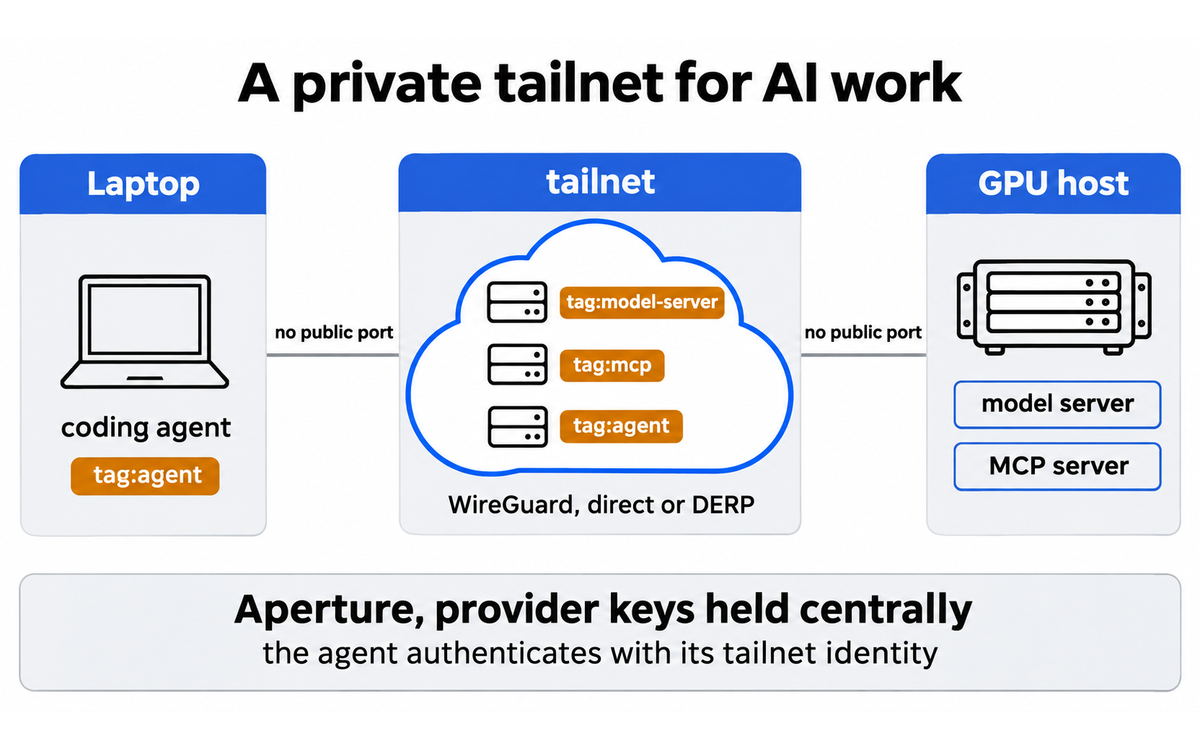
The third outcome is specific to AI work, and it is the reason this review exists. A private GPU host becomes usable from anywhere, so a researcher can run a model on hardware they own instead of renting a larger instance with a public endpoint. A private MCP server becomes reachable by a local agent without exposing it, and Aperture can sit in front of the model providers so that the agent authenticates with its tailnet identity and never holds a provider key. An ephemeral node or a throwaway tailnet gives a CI job or an untrusted agent a network that exists for the length of the task. None of this improves the model. All of it removes the reason teams either expose a service they should not, or give up on running it themselves.
The fourth outcome is the one a budget can see. The Personal plan is free for up to six users and 50 tagged resources, which covers a lab, a small team or a solo researcher with a GPU host and a NAS. Standard is $8 per user per month and removes the user limit. Premium is $18 and adds the audit surfaces a regulated team needs: network flow logs, log streaming, just-in-time access, advanced SSH and 300 ACL groups. A team that compares those numbers with a VPN appliance, a public-endpoint proxy and the staff time to run either one is comparing a seat price with a capital project.
What does not change is as important as what does. Tailscale does not make a model accurate, and it does not make an agent's output true. It does not remove the need to read what an agent did, and it does not decide which service an agent should be allowed to reach. It does not remove the vendor dependency for the control plane, and Tailnet Lock is a mitigation for that dependency rather than a replacement for it. And it does not turn a public service into a private one: Funnel is a deliberate public route, and the review treats it as such.

Tailscale: the private network that gives an AI agent its own identity
Who Should Use Tailscale
Learner type | Difficulty | Typical ROI | Career path |
Students (Bachelor, Master) | Intermediate | A free tailnet is enough for a laptop, a campus GPU host, a home server and a small project. The gain is that a model server, a database or an MCP server becomes reachable from anywhere without a public endpoint, which is the setup most AI coursework assumes but rarely provides. The risk is that the tool hides the network, so a student can pass a project without learning why an ACL matters. The check is to write the policy by hand, then explain every rule. | UIT (Technology, AI, Data Science) for cloud, networking and AI-agent practice. UID (Digital Design, UX/UI) for the console and developer-experience study, as an object of study rather than a design instrument. No published U365 credential assesses tailnet administration as a named component, and none is asserted. |
Professionals (career upskilling) | Intermediate | The strongest case in the product: a developer, researcher or platform engineer who runs models, MCP servers, CI runners or multi-cloud infrastructure and needs private access without a VPN project. The time saved on access setup is immediate, and the policy file becomes a durable asset. The limit is that the tool is infrastructure, not a model: it improves the access path, not the quality of the AI output. | |
Everyone (lifelong learners) | Beginner | A simple and free way to reach a home NAS, a personal computer or a media server, and to help family members remotely without a commercial remote-desktop subscription. The AI value is narrower: a personal model server becomes usable from a phone or a laptop, but most everyday AI work does not need a private network. The gain is convenience and privacy, not capability. | LIPS Collect and Review phases for the record of what was connected and why, and the UP-Context-Engineering Method order for any prompt that configures a device. No assessment home is asserted. |
For teams and organisations. Tailscale is sold to companies as well as to individuals, and a team deciding on it starts with four questions.
Team deployment. A team reaches Tailscale through the admin console, the API, the clients and more than 100 listed integrations. SSO with any identity provider is available on every plan, SCIM provisioning and device posture integrations start on Standard, and advanced roles for billing, IT and auditors start on Standard as well. MDM deployment and configuration are supported, and the API and OAuth clients let a platform team provision devices without a human login. Aperture and Tailscale PAM are separate products: Aperture is an AI gateway bought separately from the plan, and PAM is in beta as a platform extension.
Cost at team scale. The meter is the seat, not the device: user devices are unlimited, Standard is $8 per user per month and Premium is $18, and the difference buys audit and control rather than more devices. Tagged resources are the second meter. Fifty are included and each additional tagged resource is $1 per month, which matters to an infrastructure team that tags servers, subnet routers, exit nodes and agent nodes. Ephemeral resources are the third meter: 1,000 minutes per month on Personal and Standard, and 10,000 on Premium. Aperture is a separate purchase with its own token allowance and model costs.
Data and compliance. Tailscale states that traffic is end-to-end encrypted with WireGuard and that it cannot read it. It collects device and connection metadata, including public IP addresses, routing information and client version, to operate the service. It publishes a SOC 2 Type II report covering security, availability and confidentiality, and a Data Processing Addendum. It does not offer a HIPAA business associate agreement, because it says it stores metadata rather than customer data. The DPA's continuous security assessment paragraph applies to the Tailscale Solution services except Aperture, which is the exclusion a regulated buyer must read before putting prompts through the gateway. Network flow logs, log streaming and regional routing start on Premium.
U365 for companies. Professional learners reach University 365's academic services individually or through their organisation, and the company route runs through a customized training agreement for employee groups. Corporate education programmes are built on demand, and their tuition follows content and duration.
Skill level required: Intermediate. Installing a client and joining two devices takes minutes. Running a tailnet that other people depend on requires more: reading a policy file, understanding tags and key expiry, choosing between a subnet router and an app connector, and knowing when a connection is relayed rather than direct. None of that is required to get a connection, and all of it is required to keep the network narrow.
Prerequisites. An identity provider that supports OIDC or SAML, because Tailscale delegates authentication to it. A decision about who owns the tailnet and who can edit the policy file. A naming convention for devices and tags, written before the first server joins. For AI work, a model server or an MCP server that listens on a private interface, and a decision about whether Aperture is in scope. For a regulated team, a reading of the DPA and the Aperture exclusion before the first prompt is logged.
Typical time to first result: Under ten minutes for two devices on the same tailnet, including SSO, the client install and a first tailscale ping. Under thirty minutes for a tagged server with a first ACL rule that lets one user reach one port. An afternoon for a subnet router that reaches an existing network, because the routing and the return path are where most first attempts fail.
Typical time to competence: Ten to twenty hours of active use. Three habits carry most of the value: write the ACL before the second device joins, tag every non-human node, and check tailscale status for whether a connection is direct or relayed before blaming the application.
Who should wait. A single user with one laptop and one cloud service that already has a safe access path does not need a tailnet, although the free plan costs nothing to try. A team that needs a fully self-hosted control plane should look at Headscale or NetBird rather than Tailscale. A team that needs a public API or a webhook receiver should use a reverse tunnel or an API gateway, not Funnel. And a team that expects the network to enforce application-level authorization should not confuse an ACL with an authorization layer: the ACL decides who can reach a service, and the service still has to decide what that caller may do.

Tailscale: the private network that gives an AI agent its own identity
U365 Institutes Alignment
The alignment below rates what a U365 institute could take from this platform as a working instrument and as an object of study. The primary home is UIT (Technology, AI, Data Science), because identity-based access, network segmentation for agents, AI infrastructure operations and security verification are the competencies the product exercises. The other three readings are real and each is bounded.
UIT (Technology, AI, Data Science)
Rating. High (primary)
Why. Four engineering competencies, each of which survives the removal of the tool. Identity-based access design: deciding which node, user, tag or OAuth client may reach which service, and writing that decision as policy rather than as a firewall change. Network segmentation for AI: separating a model server, a retrieval service, an MCP server and an agent sandbox so that a compromised agent cannot reach the model weights or the dataset. AI infrastructure operations: running a GPU host, a model server and a CI runner across clouds, and diagnosing whether a slow connection is direct or relayed. Security verification: reading a policy file for an allow-all grant, checking that a tagged agent cannot SSH into a user device, and understanding what Tailnet Lock does and does not cover. The published programme set already teaches Python, software development, cloud engineering and AI agents, and this platform is a working object on which those skills are exercised.
The limit that holds the row. Tailscale hides the network it builds. A student can connect a GPU host and an MCP server without learning routing, DNS or WireGuard, and the product does not teach those subjects. The competencies above are real only when the course adds the explanation, the policy review and the failure diagnosis. No published programme assesses tailnet administration or agent network segmentation as a named component. Adjacent anchors, not assessment homes.
UIB (Business Management, Entrepreneurship)
Rating. Medium
Why. Two decisions the product forces that are commercial before they are technical. Infrastructure cost: a seat price, a tagged-resource price and an ephemeral-minute allowance are three different meters, and a business case that compares only the seat price with a VPN appliance has missed two of them. Vendor risk: the control plane is hosted, the client is open source and the server is not, so an exit plan has to name what would be rebuilt and what would be lost. Those are finance and operations skills a cohort can practise on a live quote.
The limit that holds the row. The product supplies no management method and does not measure its own return. It publishes no total cost of ownership, no staff-time saving and no productivity figure, so a business case has to be built by the unit. The catalogue's business programmes publish process modeling and financial analysis, and no published programme assesses infrastructure vendor risk as a named component. Adjacent anchors, not assessment homes.
UIC (Digital Communication, Marketing)
Rating. Low to Medium
Why. One competency that matters and is easy to miss: explaining a technical access model to a non-technical audience. A marketing or communication practitioner who can describe why a private MCP server is not a public endpoint, and who can write the one paragraph a client needs before a demo, is doing work the profession claims. There is also a practical surface: Serve and Funnel let a practitioner publish a demo or a webhook receiver from a machine on the tailnet, which is a real campaign and event workflow.
The limit that holds the row. The product teaches no register, no audience analysis and no publication standard. Funnel is a beta sharing feature, not a content platform, and it has no scheduling, analytics or brand controls. Rated as evaluation contact with a publishing surface. No credential is mapped.
UID (Digital Design, UX/UI)
Rating. Low
Why. The design contact is the admin console and the developer experience, not a visual authoring surface. A designer can study how a dense infrastructure console presents machines, users, tags, ACLs and logs, and how it makes a policy file legible to a non-specialist. That is a useful case study in information architecture for a technical product.
The limit that holds the row. Tailscale performs no design work and produces no visual artefact. There is no layout, interaction or motion competency in it, and the console is the object of study rather than the instrument. No credential is mapped.
U365 methods, not an institute (UNOP, ULM, LIPS, CARE and the UP-Context-Engineering Method)
Rating. Applicable
Why. The methods layer is relevant in the way an access policy is: the decision about who may reach what is a planning decision before it is a configuration, and the UP-Context-Engineering Method's context-role-task-constraints-output order is exactly what a reproducible setup prompt needs. For LIPS and CARE, the record of which device was joined, which tag was applied, which ACL rule was written and which service was exposed belongs in the Fellow's own system, because the tailnet holds the configuration but not the reason for it. UNOP has no direct fit: the product is not built to teach, and its gains come from identity and access design rather than from any pedagogical mechanism. ULM has no direct fit either, although the time saved on access setup can be returned to a life domain the Fellow chooses.
The limit that holds the row. The product carries no method of its own and no coaching surface. A Fellow who does not keep the reasoning about identity, tags and exposure in their own system has no account of it, and nothing in Tailscale writes that account for them. Aperture's session logs record what an agent did, not why the policy allowed it.

Tailscale: the private network that gives an AI agent its own identity
How Tailscale Works
A private overlay network with a hosted coordination server, a WireGuard data plane and one JSON policy file, sold as a replacement for the VPN, the public endpoint and the personal access key.
Inputs: An identity provider, the devices and services you want to connect, a tailnet name, a policy file, and, for automation, an auth key or an OAuth client. For Aperture, the model-provider credentials and the MCP servers you want to aggregate.
Outputs: A private IPv4 address and a MagicDNS name for every node, a direct or relayed WireGuard connection between them, an access decision for every connection, and, on the paid tiers, logs, flow records and session recordings. Aperture adds a single OpenAI-compatible endpoint for model calls, a /v1/mcp endpoint for aggregated MCP tools, and per-identity usage records.
The control plane and the data plane are separate, and the separation is the product. The coordination server holds the map: which nodes exist, which keys belong to them, which tags they carry and which policy applies. It distributes that map and the node keys, and it does not carry the traffic. The data plane is WireGuard between the devices, direct when NAT traversal succeeds and relayed through a DERP server when it does not. That split is why Tailscale says it cannot read your traffic, and it is also why the control plane remains a trust dependency: a control plane that could distribute an attacker's key could insert a node. Tailnet Lock addresses that by requiring a user-controlled signature for every node key, with signing keys that Tailscale never sees or stores.
NAT traversal is the part that most users never see and most failures come from. Two devices behind different NATs try to find a direct UDP path, using STUN-style discovery and hole punching. When they succeed, throughput is limited by the path and the hardware. When they fail, traffic goes through a DERP relay: a TLS connection, usually on port 443, which is reliable from restrictive networks but adds latency and enforces fair-use throughput limits. A connection starts relayed and upgrades to direct when a path is found, and it can fall back to relayed later. The practical consequence is that tailscale ping and tailscale status are the first diagnostic tools, not the last.
Identity is the feature that makes the product usable for agents. A node can belong to a user, or it can be tagged. A tag is a service identity: applying a tag removes user-based authentication, the tag is defined in tagOwners, and the policy can grant access to a tag rather than to a person. Tags have a limit that matters in practice: a device with a tag-based identity can only SSH into other tagged devices, not into devices with a user-based identity. For an agent that needs to reach a model server, that is a useful constraint. For an agent that needs to reach a developer's laptop, it is a wall.
Key expiry is the second operational fact. Node keys expire after 180 days by default, and the window is configurable from 1 to 180 days. A device whose key expires stops connecting until its owner re-authenticates or an admin temporarily extends the key. Tagged nodes do not require key renewal, which is why tagging is the usual way to keep a server from dropping off, and a team that does not plan for expiry will meet it on a Monday morning. The admin console session has its own 30-day expiry, which is unrelated to the node keys.
Tailscale SSH replaces SSH key distribution with the same policy engine. The node key authenticates the connection, the ACL decides who may connect as which user, and check mode can require a fresh authentication before a session. The default check period is 12 hours, and it can be set to always for high-risk users such as root. The limit is that check mode with always can break automation that opens many short SSH connections, which is exactly the pattern an agent uses.
The feature set, in the order an AI team meets it:
Capability | What it does | Why an AI team cares |
Private node access | A stable 100.x address and a MagicDNS name for every device | A GPU host, a model server or an MCP server is reachable by name without a public port |
ACLs and tags | A JSON policy that grants users, groups, tags or autogroups access to destinations and ports | An agent gets one service, not the network |
Tailscale SSH | SSH authentication and authorization through the tailnet, with check mode | No SSH keys on an agent, and a re-authentication gate for high-risk sessions |
Subnet routers | Advertise an existing CIDR to the tailnet | Reach a lab, an office network or a cloud VPC without installing a client on every host |
App connectors | Reach a SaaS or third-party service through a connector | Connect a service that cannot run a Tailscale client |
Exit nodes | Route a device's internet traffic through another node | Use a trusted egress point, or a Mullvad exit node as an add-on |
Serve | Publish a local service to the tailnet over HTTPS | Give a browser-based tool a private HTTPS address without a public route |
Funnel | Publish a local service to the public internet through a Funnel URL | Share a demo or a webhook receiver, with the public exposure that implies |
Taildrop | Send files between your own devices | Move a model, a dataset or a checkpoint without a file-sharing service |
Device posture | Check OS, version, MDM, EDR or geolocation before granting access | Keep a non-compliant laptop away from a model endpoint |
Tailnet Lock | Require a user-controlled signature for every node key | Limit what a compromised control plane can insert |
Logs and flow records | Configuration audit logs, network flow logs, log streaming | Reconstruct which identity reached which service; flow logs and streaming start on Premium |
Kubernetes operator | Join pods and services to the tailnet | Give a training job or an inference service a private address across clusters |
tsnet | Embed a Tailscale node in a Go program, with its own identity and MagicDNS name | Give an application its own network identity without a host daemon |
Tailnets API | Create a whole tailnet on demand | Isolate one customer, one environment or one untrusted agent in a throwaway network |
Aperture | An AI gateway with identity-based access, key centralization, session logs, cost controls, guardrails and MCP proxying | Remove provider keys from laptops and containers, and tie every model call to an identity |
PAM (beta) | Just-in-time access to SSH, Kubernetes, databases, RDP and browsers, with session recording | Put human and agent access to production under one approval and audit path |
DNS filtering (Control D) | Block destinations by group, tag or device through an ACL integration | Stop an agent or a device from reaching a destination the policy forbids |
The AI-era case: agents as network principals
The product's own positioning is explicit. Tailscale calls itself "the best secure connectivity platform for the AI era" and lists business VPN, privileged access, AI security, infrastructure access and zero-trust networking as its five product areas. The claim is marketing, and the architecture behind it is real. Six AI workloads show where the platform changes what a team can do.
AI workload | What Tailscale provides | What it replaces | The limit to plan for |
A model server on your own GPU host | A private MagicDNS name and an ACL for the port, reachable from a laptop, a CI runner or a colleague | A public endpoint, an SSH tunnel or a reverse proxy | The GPU host still has to be patched, and the model server still has to authenticate its callers |
A private MCP server | A tailnet-only endpoint, with the Tailscale identity attached to every call | A public endpoint with a bearer token | A cloud assistant cannot reach a tailnet; it needs Funnel or its own tunnel |
A coding agent on a laptop or a container | A tagged node or an OAuth client, scoped to one service | A personal API key and a broad SSH key | An untagged agent inherits its owner's access on the default policy |
A model gateway for a team | Aperture: provider keys held centrally, identity-based access, session logs, cost controls, guardrails, MCP proxying | Keys on every laptop, a shared key in CI, no per-agent usage record | Aperture records full sessions, and it is a separate purchase with its own compliance scope |
An untrusted agent or a CI job | An ephemeral node, or a throwaway tailnet through the Tailnets API | A shared staging network and a long-lived key | Ephemeral minutes are metered: 1,000 on Personal and Standard, 10,000 on Premium |
A multi-cloud training or inference estate | Subnet routers, app connectors and the Kubernetes operator, with one policy across all of them | A site-to-site VPN and a separate ACL per cloud | A subnet router advertises a route; it does not inspect the traffic on it |
The strongest AI-era argument is not the VPN replacement. It is the identity. A model call or a tool call that arrives over a tailnet carries a user, a device and a set of tags. Aperture uses that identity to decide which provider a caller may use and to attach the caller to the usage record. An MCP server can use the same identity to decide which tools a caller may see. That is a different security model from a bearer token, which is a secret that anyone who holds it can use. It is also the reason the product fits an agent workflow: an agent can be given an identity that is narrower than its owner's, and the identity survives the task.
What else it is used for
The AI story is the current marketing, and it is not the whole product. The documented use cases include a long list that predates the AI wave.
Use case | What the reader does | The practical detail |
Business VPN replacement | Connects a distributed team to internal apps, file shares and databases | SSO, ACLs and a client on every platform; no appliance and no port forward |
Homelab and NAS | Reaches a home server, a Synology NAS, a Raspberry Pi or a media server from anywhere | The free Personal plan covers six users and 50 tagged resources; NAS packages are listed |
Remote desktop and SSH | Uses RDP, VNC or SSH over the tailnet instead of exposing the port | Tailscale SSH can replace key distribution; PAM adds approval and session recording |
Multi-cloud and Kubernetes | Joins clusters, VPCs and on-prem networks under one policy | Subnet routers, app connectors and the Kubernetes operator |
Site-to-site networking | Connects two offices or a data centre to a cloud network | A subnet router or an app connector, with the return route configured |
CI/CD runners | Gives a short-lived runner access to a private registry, a database or a test environment | Ephemeral nodes and auth keys; the node disappears when the job ends |
Edge and IoT | Reaches devices behind a carrier NAT or a restrictive firewall | No inbound port; a device can be tagged and scoped to one service |
File transfer | Sends a file to your own devices | Taildrop, with no third-party storage |
Public demos and webhooks | Publishes a local service through a Funnel URL | Funnel is beta, public and deliberately outside the private network |
Privacy and egress | Routes internet traffic through a trusted exit node | Exit nodes, including the Mullvad add-on; the exit node sees the traffic |
Gaming and LAN sessions | Plays a LAN game across the internet | Tailcat, the control-plane-free data plane, can carry a direct session without an account |
Education and lab access | Gives a class access to a shared GPU host or a lab machine | Tags and ACL groups per student cohort; the free plan covers a small class |
What the architecture costs. The same design that makes Tailscale simple has four limits. The control plane is hosted, so the vendor is a dependency. DERP relays are shared and rate-limited, so a relayed connection is slower than a direct one. The overlay is IPv4, with a 100.64.0.0/10 range, and a reviewer on Capterra names the absence of custom private IP segments as an annoyance. And the policy file is powerful enough to be dangerous: a single allow-all rule undoes the segmentation the rest of the file was written to create.

Tailscale: the private network that gives an AI agent its own identity
Getting Started with Tailscale
The first hour is about two devices and one rule. The first week is about tagging every server, deciding the expiry policy and writing the ACL before the second person joins.
A first-session checklist for a tailnet:
Create the tailnet with SSO. Sign in with the identity provider the team already uses. Tailscale delegates authentication, so the account you use here is the account that will own the network. Do not create a shared local account.
Install the client on two devices you control. A laptop and a server is the right pair, because it tests both a user device and a machine that will later be tagged. The client is available for Windows, macOS, Linux, iOS and Android, and as packages for several NAS systems.
Confirm the names before you change anything. Open the admin console, find the two machines, and check their MagicDNS names. From the laptop, run tailscale status and then tailscale ping <server-name>. The ping output tells you whether the path is direct or relayed, and it names the DERP region when it is relayed.
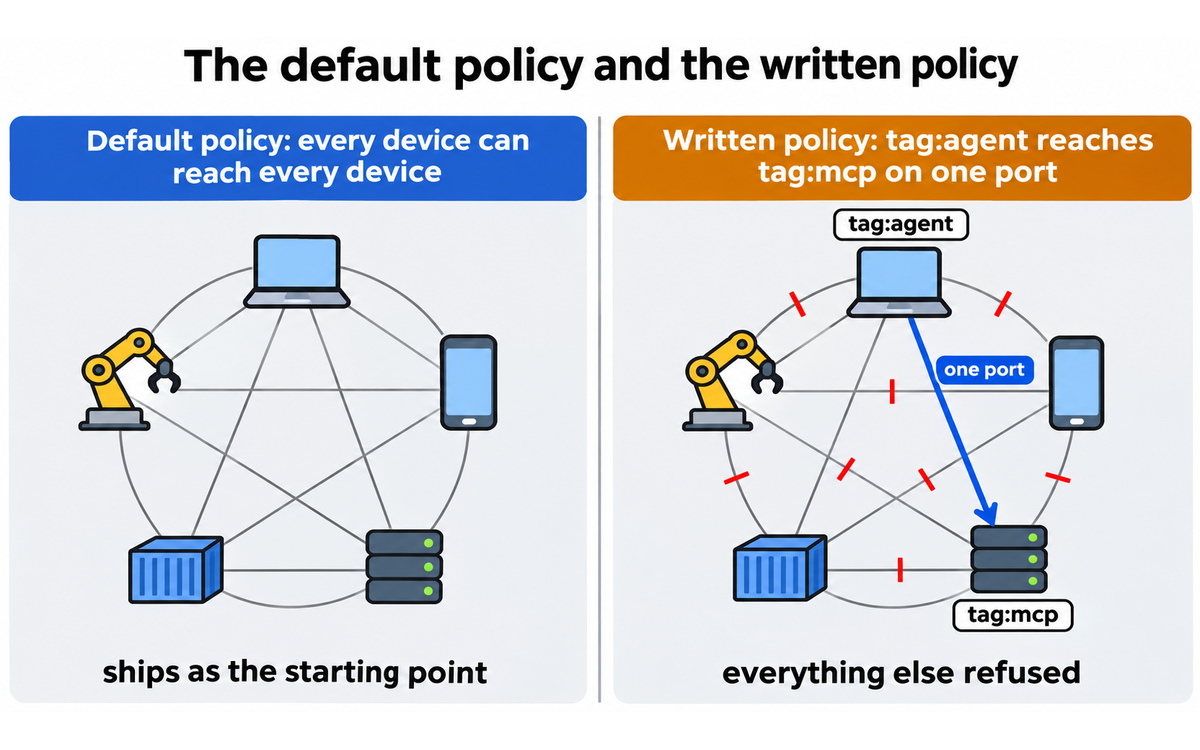
Write the policy before the second person joins. The default policy on a new tailnet lets every device reach every other device. Open the policy file and replace the default with a rule that grants your user access to the server on the ports you actually need. A model server on Ollama listens on 11434; an SSH service listens on 22; an MCP server usually listens on one HTTP port. Grant those, and nothing else.
Tag the server, not the person. Define tag:server in tagOwners, then join the server with tailscale up --advertise-tags=tag:server. A tag gives the machine a service identity, removes user-based authentication, and lets the policy name the machine by purpose. Remember the constraint: a tagged device can only SSH into other tagged devices, so do not tag the laptop you will use to administer it.
Decide the expiry policy. Node keys expire after 180 days by default, and the window is configurable from 1 to 180 days. Decide which machines are allowed to expire and which are not, and write the answer down. A GPU host that drops off while a training job is running is an avoidable outage.
Check what the outside world can see. From a network that is not on the tailnet, try to reach the server's public address and the ports you care about. If anything answers, you have a public listener that the tailnet did not create and does not remove. Close it.
Decide whether Aperture is in scope. If the team uses coding agents or model APIs, create an Aperture instance, add the provider credentials there, and point one test client at the gateway. If the team does not, stop here. Aperture is a separate product with its own data handling, and it should be a decision rather than a default.
Record the design in your own system. A short note that names the tailnet, the tags, the ACL rules, the expiry policy and the services exposed through Funnel is worth more than the console history. Put it in the project record or the LIPS project entry, because the console holds the configuration and not the reason for it.
Three checks before you invite a second person. Read the policy file once more and look for an allow-all rule. List every tagged resource and ask what each one can reach. Confirm that no Funnel route exists unless you created it deliberately. Those three checks catch most of the failures that a new tailnet exposes in its first month.

Tailscale: the private network that gives an AI agent its own identity
Real Workflows
Workflow 1: Put a model server on a private name and use it from anywhere
When to use it: you run a model on hardware you control, or on a rented GPU instance, and you want to use it from a laptop, a phone or a colleague's machine without exposing the model server to the public internet. This is the most common AI-era setup, and the one where a public endpoint is most tempting.
Learner type: Professional, advanced student. CI-First benefit tags: Time, Quality. Connects to: UIT (Technology, AI, Data Science), as an infrastructure practice. Time estimate: 30 to 45 minutes including the external check.
What you do vs what the tool does:
Step | You do | The tool does |
1 | Install the client on the GPU host and on the laptop, and sign both into the same tailnet | Creates a node for each device with a 100.x address and a MagicDNS name |
2 | Name the service and the port, and decide who may reach it | Publishes the name through MagicDNS and carries the connection over WireGuard |
3 | Write the ACL rule for the laptop or the user group, and for nothing else | Enforces the rule at the network layer, and refuses the rest |
4 | Start the model server on a private interface, not on 0.0.0.0 | Provides the private path; it does not change what the model server listens on |
5 | Point the model client at http://<host>:<port> and run one completion | Routes the request directly, or through a DERP relay if a direct path fails |
6 | Try the same request from a network that is not on the tailnet | Refuses it, because the service has no public route |
Sample prompt:
Context: I have a GPU host named [host] running [Ollama/vLLM/llama.cpp] on port [port], a laptop named [laptop], and a tailnet whose policy file currently uses the default allow-all rule. The model is for my own work, the host is on [cloud/homelab], and the laptop travels between home, an office and hotel networks. Done means the laptop reaches the model by its MagicDNS name, no other device on the tailnet can reach the port, and nothing on the public internet can reach it.
Role: AI as a Co-Worker and Assistant (Profile 2). You draft the policy and the client configuration. I decide which devices are allowed and I run the external check.
Profile: Act as a Co-Worker and Assistant for the configuration, and as a Challenger, Critic and Devil's Advocate on the policy: name every rule that is broader than the one I asked for.
Task: Write the `tagOwners` entry for `tag:model-server`, the ACL grant that lets [laptop] reach `tag:model-server` on [port], and the client configuration line that points my model client at the MagicDNS name. Then list the services that remain reachable after the change.
Constraints: Use Tailscale's own policy syntax and its documented flags. Do not grant `*` to `*`. Do not grant SSH unless I asked for it. Do not assume the model server is safe because it is private: state what the model server itself still has to authenticate. If the host is behind a carrier NAT or a restrictive firewall, say that the connection may be relayed and what that costs in latency. Do not invent a flag or a policy field.
Output format: (1) the policy snippet, (2) the client configuration line, (3) a table of every remaining reachable path with its justification, (4) the three checks I must run from outside the tailnet, (5) what you did not verify.
Memory: you hold no state between calls and you write nothing on my behalf. I keep the policy in the infrastructure repository, the reason for each rule in the project note, and the access decision in my CARE action plan.
UP-Context-Engineering verification: I read the policy before I apply it, run `tailscale status` and `tailscale ping` from the laptop, try the port from a network that is not on the tailnet, and ask a second model to review the policy for an allow-all rule. If I cannot explain why each rule exists, I do not apply it.
Data safety: the prompt contains hostnames, ports and policy text, not model weights, credentials or personal data. I paste no provider API key and no private key. The model server's own logs and prompts stay on the host.
What the tool does well here: the access path. A private name, a direct connection when the network allows one, and an ACL that can be narrower than a VPN's flat network. The model server is reachable from a hotel network without a public port, and the route survives a change of network because the name does not change.
What it does not do: it does not make the model server safe to expose to the tailnet. A model server with no authentication is reachable by every device the ACL allows, and an ACL that grants a whole user group is broader than one laptop. The model server still needs its own authentication if the tailnet has more than one person on it.
Verification checklist for Put a model server on a private name:
☐ Multi-Model Check: ask a second model to review the policy snippet for an allow-all rule, an unintended SSH grant and a tag that can reach more than the model port. Compare its list with yours.
☐ External Source: from a network that is not on the tailnet, try the host's public address and the model port. Confirm that nothing answers. Then run tailscale ping from the laptop and confirm the path is direct, or record the DERP region if it is relayed.
☐ Human Review: have a colleague on the tailnet try to reach the model port from a device that should be blocked. A rule that has never been tested from the blocked side is a hope.
☐ CI-First Test: can you explain every rule in the policy and name the devices it admits, without opening the console? If not, the policy is not yours yet.
Workflow 2: Give a coding agent one MCP server and nothing else
When to use it: a coding agent needs to call an MCP server that runs on your infrastructure, and you do not want to expose the server or give the agent your personal access. This is the workflow that separates a private network from a public endpoint with a token.
Learner type: Professional. CI-First benefit tags: Time, Quality, Skill. Connects to: UIT (Technology, AI, Data Science), as an agent-security practice. Time estimate: 45 to 60 minutes including the negative test.
What you do vs what the tool does:
Step | You do | The tool does |
1 | Define tag:agent and tag:mcp, and decide which tools the MCP server exposes | Gives each node a tag-based identity and a MagicDNS name |
2 | Join the agent's node with the agent tag, using an auth key or an OAuth client | Issues the node identity and records it against the tag |
3 | Write the ACL that lets tag:agent reach tag:mcp on one port, and nothing else | Enforces the rule and refuses every other path |
4 | Point the agent at the MCP server by its MagicDNS name | Carries the MCP call over the tailnet, with the identity attached |
5 | Run one read-only tool call from the agent | Returns the MCP response; it does not decide whether the tool is safe |
6 | Try a tool call that the MCP server should refuse, and a host the agent should not reach | Refuses the host at the network layer; the MCP server refuses the tool |
Sample prompt:
Context: I run an MCP server at [host] on port [port]. It exposes [tools]. I want a coding agent, [agent], to reach it from a container on [runtime], and I want the agent to reach nothing else on the tailnet. The tailnet currently has [n] devices, including my laptop and [other services]. Done means the agent completes one read-only tool call, cannot reach the model server or my laptop, and every call is attributable to the agent's tag.
Role: AI as a Co-Researcher, Analyst and Tester (Profile 4) for the policy design, and as a Challenger, Critic and Devil's Advocate (Profile 5) on the agent's reach.
Profile: Act as a Co-Researcher and Analyst for the ACL and the identity, and as a Challenger for the negative test: name every path the agent could take that I did not intend.
Task: Design the tag scheme, the ACL grant and the agent's join command. Then write the negative test: one tool call that should succeed, one tool call that the MCP server should refuse, and one host that the network should refuse.
Constraints: One port, one destination, one tag. Do not grant the agent a user identity and do not reuse my personal auth key. Do not grant SSH unless the agent needs it for the task, and if it does, state why. The MCP server still has to authorize the tool call: the ACL is not an authorization layer. If the agent runs in a cloud that cannot reach a tailnet directly, say so and name the alternative.
Output format: (1) the tag definitions, (2) the ACL snippet, (3) the agent join command, (4) the three negative tests with the expected result for each, (5) the log line or record that proves which identity made the call, (6) what you did not verify.
Memory: you hold no state between calls and you write nothing on my behalf. I keep the tag scheme, the ACL and the test results in the agent's project record, and the access decision in my CARE action plan.
UP-Context-Engineering verification: I read the ACL before I apply it, run the successful call, run both negative tests, and check the MCP server's own log for the caller identity. If I cannot name every service the agent can reach, I do not give it the key.
Data safety: the prompt contains hostnames, tool names and policy text. I paste no provider key, no OAuth secret and no MCP server credential. The agent's tool calls may contain project data, so I keep the MCP server's logs on infrastructure I control and I do not paste a real customer record into the test.
What the tool does well here: the identity. The agent gets a tag that is narrower than its owner, the ACL names one destination, and the network can refuse a path that the agent was never meant to take. That is a better starting point than a bearer token, which cannot tell one caller from another.
What it does not do: it does not authorize the tool call. An MCP server that exposes a destructive tool will run that tool for any caller the ACL admits. The MCP server needs its own per-tool authorization, and the agent needs a human approval step for anything that writes. The tailnet narrows the network; it does not narrow the tool.
Verification checklist for Give a coding agent one MCP server:
☐ Multi-Model Check: ask a second model to review the ACL for a path from tag:agent to any destination other than the MCP server. Compare its list with yours.
☐ External Source: run the successful tool call, then run a call to a host that should be refused, and read the agent's own error. Confirm that the refusal came from the network and not from the MCP server's application logic.
☐ Human Review: read the MCP server's log and confirm that the caller is the agent's tag, not your user. A log that names your account means the agent inherited your identity.
☐ CI-First Test: can you list every service the agent can reach, and every tool it can call, without opening the agent's session? If not, the agent has more access than you can defend.
Workflow 3: Connect a homelab, a cloud VPC and an office without a VPN appliance
When to use it: the estate is already spread across a home lab, a cloud VPC and an office network, and the current answer is a VPN appliance, a set of port forwards or a mesh of SSH tunnels. This is the traditional use case, and it is where the product's operational value is easiest to measure.
Learner type: Professional, everyone. CI-First benefit tags: Time, Quantity. Connects to: LIPS Collect and Review, as a method surface. Time estimate: 2 to 3 hours including route debugging.
What you do vs what the tool does:
Step | You do | The tool does |
1 | Draw the address plan: which CIDR lives where, and which one needs to reach which | Creates the tailnet and the node identities |
2 | Install a subnet router in the office and advertise the office CIDR | Carries the route to the tailnet, with the return path |
3 | Install an app connector or a subnet router in the VPC | Joins the cloud network to the same policy |
4 | Decide the exit-node policy, if any device needs a trusted egress | Routes the selected traffic through the exit node |
5 | Write ACL groups for the people and tags for the services | Enforces the policy across all three networks |
6 | Remove the old port forwards and the VPN appliance's public listener | Provides the private path; it does not remove the old configuration for you |
7 | Test from each network, in both directions | Reports the path and the relay region when a direct path fails |
Sample prompt:
Context: I have three networks: a home lab on [cidr], a cloud VPC on [cidr] and an office on [cidr]. The office has a firewall I control, the VPC has a security group, and the home lab is behind a carrier NAT. Today the office reaches the VPC through a VPN appliance, and I reach the home lab through a port forward. I want one policy across all three, no public port forwards, and a written route plan. Done means a laptop on the tailnet reaches one service in each network, the office reaches the VPC without the appliance, and nothing is exposed to the public internet.
Role: AI as a Co-Worker and Assistant (Profile 2) for the route plan and the policy, and as a Challenger, Critic and Devil's Advocate (Profile 5) on the address plan.
Profile: Act as a Co-Worker for the configuration, and as a Challenger for the failure modes: overlapping CIDRs, a missing return route, a relayed path and a firewall that blocks UDP.
Task: Produce the address and route plan, the subnet-router commands for the office and the VPC, the ACL groups for the people and the tags for the services, and the order in which to remove the old VPN and port forwards.
Constraints: Do not advertise a CIDR that overlaps another network. Do not route all internet traffic through an exit node unless I name the devices that need it. Do not assume a direct connection: state where a DERP relay is likely and what it costs. Do not remove the old path until the new one has passed a test from each network. Do not invent a route or a firewall rule.
Output format: (1) a table of networks, CIDRs and the route each one advertises, (2) the commands for each subnet router, (3) the ACL snippet, (4) the removal order for the old VPN and port forwards, (5) the four tests that prove the new path works, (6) what you did not verify.
Memory: you hold no state between calls and you write nothing on my behalf. I keep the address plan, the policy and the test results in the infrastructure project record, and the migration decision in my CARE action plan.
UP-Context-Engineering verification: I read the route plan before I apply it, run `tailscale status` and `tailscale netcheck` on each network, test in both directions, and keep the old path until every test passes. If I cannot draw the path from the laptop to each service, I do not remove the appliance.
Data safety: the prompt contains CIDRs, hostnames and policy text, not credentials or customer data. I paste no firewall secret, no VPN pre-shared key and no private key. The office and VPC configurations stay in the infrastructure repository, not in the chat.
What the tool does well here: one policy across three networks, and a route that does not require a public listener. The subnet router is the feature that makes an existing network reachable without installing a client on every host, and the exit node is the feature that gives a travelling device a trusted egress.
What it does not do: it does not fix an address plan. Overlapping CIDRs, a missing return route and a firewall that blocks UDP are the three failures that consume the afternoon, and none of them is a Tailscale defect. It also does not inspect the traffic on a subnet route: a subnet router advertises a path, and the services behind it still need their own access control.
Verification checklist for Connect a homelab, a cloud VPC and an office:
☐ Multi-Model Check: ask a second model to review the address plan for an overlapping CIDR and a missing return route. Overlap is the failure a text review catches cheaply.
☐ External Source: run tailscale status, tailscale ping and tailscale netcheck from each network, and a traceroute to the service. Confirm that the path is direct where you expected direct, and that the relay region is the one you expected where it is not.
☐ Human Review: have a colleague on the office network reach the VPC service and a colleague on the VPC reach the office service. One direction is not a test.
☐ CI-First Test: can you draw the path from the laptop to each service, name the router and the ACL rule, and explain the return path? If not, the old VPN stays until you can.

Tailscale: the private network that gives an AI agent its own identity
Strengths, Limits, and AI Imposture Risk
Strengths
The setup is genuinely short. Two devices on one tailnet take minutes, and a tagged server with one ACL rule takes under half an hour. The client is available on every platform a team is likely to use, the SSO path uses the identity provider the team already has, and the admin console shows the machines, the users and the policy in one place. A reader who has configured a traditional VPN will notice the absence of an appliance, a port forward and a certificate authority.
The identity model is the durable advantage. A node can be a person or a tag, the policy can name a tag, and an agent can hold an identity that is narrower than its owner's. That is the capability a public endpoint with a bearer token cannot provide, and it is the reason the product fits an AI workflow rather than only a remote-access one.
The data plane is fast when it is direct. WireGuard is a modern protocol, the connection is peer-to-peer when NAT traversal succeeds, and the review's user sources describe throughput close to a local network in ordinary conditions. The relay fallback is slower, and the product tells you when it is in use.
The free tier is usable. Six users, unlimited user devices, 50 tagged resources and 1,000 ephemeral minutes per month cover a lab, a small class or a solo researcher with a GPU host and a NAS. That is a generous floor for a product that many teams will later buy.
The audit surfaces exist on the paid tiers. Network flow logs and log streaming start on Premium, configuration audit logs record policy changes, and Tailscale PAM adds SSH session recording. They give a security team the records it needs to answer who reached what, and they are the reason a regulated team should price Premium first.
The open-source boundary is real. The client is open source under a BSD 3-Clause licence, so a team can inspect what runs on its devices. The coordination server is not, and the review treats that as a limit rather than a footnote.
Limits
The control plane is hosted, and there is no official self-hosted server. A team that cannot accept a vendor-hosted control plane has three paths: accept it with Tailnet Lock, self-host with Headscale, or choose a different product. Tailnet Lock closes the node-injection path, and it does not make the control plane self-hosted. Headscale is a community project with a narrower scope and no vendor support.
The default policy is allow-all. A new tailnet lets every device reach every other device until someone writes a rule. That is a sensible default for a first connection and a poor default for a network that will hold agents, and the section on the default policy below treats it as the main security finding of the review.
A relayed connection is slower and rate-limited. DERP relays are a shared fallback, they add latency, and they enforce fair-use throughput limits. A team that expects data-plane performance from every path will be disappointed on a restrictive network, and the diagnostic is tailscale ping, not a support ticket.
The overlay is IPv4. The 100.64.0.0/10 range is the address space, and a reviewer on Capterra names the absence of custom private IP segments as an annoyance. A team with an existing address plan has to translate it into the overlay rather than reuse it.
An ACL is not an authorization layer. The policy decides who can reach a service. It does not decide which rows a caller may read, which tools an MCP server may run, or whether a model call is appropriate. A team that treats the ACL as the whole security model has secured the path and left the destination open.
Tags have a sharp edge. A tagged device can only SSH into other tagged devices, not into user devices. That is a useful constraint for a server and a wall for an agent that needs to reach a developer's laptop. A team that tags first and reads the constraint later will spend an afternoon on it.
Key expiry is an operational tax. The default is 180 days, the window is configurable, and an expired key stops the connection. A GPU host that drops off during a training run is the predictable failure, and the fix is a decision about which machines are allowed to expire.
Aperture and PAM are separate products with separate terms. Aperture records full sessions, holds provider keys and is excluded from the DPA's continuous-assessment paragraph. PAM is in beta. Neither is included in the seat price, and neither should be adopted as an unexamined default.
Funnel is public and beta. It exposes a service to the internet through a Funnel URL, it hides the device's IP address, and the relay cannot decrypt the traffic. It is still a public route, and the review treats it as a publishing decision.
AI Imposture Risk
Time Illusion
Rating. Medium
Evidence. The first connection is fast, and the time is lost later: writing and reviewing the ACL, diagnosing a relayed path, handling key expiry, and discovering that a cloud assistant cannot reach the tailnet. The vendor's own DERP documentation describes the relay fallback and its throughput limits, and the user reviews describe login and re-authentication friction in team deployments. The saving is real on the access layer and smaller than the marketing suggests on the first managed deployment.
Quantity Illusion
Rating. Low
Evidence. The product generates no content and returns no answer that can be mistaken for work. The volume it enables is a volume of connections, not a volume of output. An agent with broad access can act at volume, and that risk belongs to the agent and to the policy, not to the network layer. There is no polished artefact that masks a quality problem.
Skill Illusion
Rating. Medium
Evidence. Tailscale hides the network it builds, which is the product's purpose and also its trap. A user can connect a GPU host, a NAS and an MCP server without learning routing, DNS or WireGuard, and can conclude that the network is secure because it is private. The default allow-all policy and an untagged agent that inherits its owner's access are the two places where that conclusion is wrong. The user can detect the gap with tailscale status, the policy file and, on Premium, the flow logs, and the product does not prompt them to look.
Overall AI Imposture Risk: Medium. Two traps are Medium and one is Low. The tool requires disciplined use, and the discipline is policy design rather than output verification. The rating is not a judgement on the product's reliability. It is a judgement on the confidence the product creates in a user who has not read the policy file.
Framework v1.2 clause note
Clause 5.2.3-a, agent-authored procedural memory: null, with a boundary. Tailscale does not write skills, memory or standing instructions on the user's behalf. Aperture records sessions and usage, and a session record is not procedural memory. The clause applies to an agent that runs on the tailnet and writes its own memory, not to the network that carries the agent's traffic. The boundary is worth stating because a team that deploys an agent platform on Tailscale inherits the clause through that platform.
Clause 4.2-a, agent-mediated conversation: null. The product carries no human-facing conversation surface. It does not compose messages, and it does not substitute agent interaction for human contact. A team that uses an agent over the tailnet to talk to other people is in the clause through the agent, not through Tailscale.
Clause 7.5, team-level rooms: null, removed. The clause was removed from the framework by v1.4 on 2026-10-13. No mode or team-room dimension is assessed here, and no CMS mode value is written.

Tailscale: the private network that gives an AI agent its own identity
Section 7c: The default policy, the control plane, and what Aperture records
Three findings sit outside the benefit score and matter more than any of them to a team that will put agents on this network. None of them changes a sub-score, because the score measures whether the tool makes the user more effective, and these findings are about the conditions under which that effectiveness is safe.
The first finding is the shipped default. A new tailnet's policy lets every device reach every other device. That is not a hidden setting: it is the documented starting point, and it is the reason a first connection works without a policy file. It is also the reason an agent that joins the tailnet untagged inherits its owner's access. On a personal tailnet, that means the agent can reach anything the owner can reach, which is broader than the MCP server it was bought for. The control is a tag applied to the agent's device, and applying it is a manual step on every plan. The practical instruction is simple: write the ACL before the agent joins, and give the agent a tag rather than a user.
The second finding is the control plane. Tailscale hosts the coordination server, and that server distributes the node keys and the policy. The data plane is end-to-end encrypted, so Tailscale cannot read the traffic, and the control plane can still see metadata: which devices exist, their public addresses, their tags and their connection attempts. A compromised control plane could try to insert a node by distributing an attacker-controlled key. Tailnet Lock closes that path by requiring a user-controlled signature for every node key, with signing keys that Tailscale never sees or stores. It is an available mitigation and not the default posture, and it has an operational cost: a new node has to be signed before it can join. A team that cannot accept the hosted control plane should read the Tailnet Lock white paper before it reads the pricing page.
The third finding is Aperture. Aperture is the most useful AI feature in the product set and the largest new data surface. It holds the model-provider keys, authenticates callers by their tailnet identity, and records full LLM sessions, including local and MCP tool calls. That is the point: the record is what makes an agent's behaviour auditable, and it is also a store of prompts that may contain client data, personal data or confidential code. Two published facts matter to a buyer. Aperture is sold separately from the Tailscale plans, and the DPA's continuous security assessment paragraph applies to the Tailscale Solution services except Aperture. A team that puts regulated material through Aperture is relying on Aperture's own terms and controls, not on the SOC 2 report that covers the rest of the platform.
Two smaller findings complete the picture. Funnel is a public route: it exposes a local service to the internet through a Funnel URL, it hides the device's IP address, and the relay cannot decrypt the traffic, but it is still public and it is labelled beta. Serve is the private alternative, and a team that wants a browser-based tool on the tailnet should use Serve. And the compliance position is narrower than the marketing: Tailscale publishes a SOC 2 Type II report covering security, availability and confidentiality, it does not offer a HIPAA business associate agreement, and it says it stores metadata rather than customer data. A healthcare team can use Tailscale as a supporting safeguard, and it cannot treat the product as a HIPAA-covered service.
What this section does not do. It does not audit Tailscale's security, and it does not test Tailnet Lock against a simulated compromise. It states the shipped defaults and the published terms, and it names the three decisions a team must make before an agent joins: the policy, the tag and the Aperture boundary. No sub-score changes, because a default that can be fixed with a policy file is a deployment instruction rather than a defect in the benefit the product delivers.

Tailscale: the private network that gives an AI agent its own identity
U365 Co-Intelligence Rating
CI-First Profile
Primary: Co-Worker and Assistant (level 2). Tailscale executes a task the user has already defined: connect these machines, apply this policy, carry this traffic. The user directs and reviews, and the product does the work.
Secondary: Co-Researcher, Analyst and Tester (level 4). The logs, flow records, tailscale status output and Aperture's usage records are analytical surfaces. A user who reads them can find a path they did not intend, a device that is relayed when it should be direct, or an agent that is using more of the gateway than its task requires.
The product is not a Co-Creator, a Professor or a Challenger in its own right. It does not generate ideas, teach a subject or argue with a decision. Those roles belong to the tools and agents that run on the network.
CI-First Benefit Score
Time Benefit
Score. 7 / 10
Rationale. A two-device tailnet takes minutes, a tagged server with one rule takes under half an hour, and a private model endpoint replaces an SSH tunnel or a reverse proxy. The saving is strong on the access layer, and it is not a saving on the AI task itself. The overhead is the policy, the tags, the expiry decision and the relay diagnosis, and it is real on a first managed deployment.
Quantity Benefit
Score. 6 / 10
Rationale. More machines and services become usable in the same day: a GPU host, a NAS, a CI runner, a colleague's model server. Parallel experiments and multiple agents on separate nodes become practical, and the Tailnets API makes a throwaway network cheap. The product removes a ceiling rather than multiplying output, so the honest multiplier is in the 1.8 to 3 times range for infrastructure-heavy work, not the 3 to 5 times range.
Quality Benefit
Score. 6 / 10
Rationale. Access is more reliable and more private: stable names, direct paths where possible, fewer public ports, per-agent identity and, on Premium, flow records. The quality of the model output is unchanged, and a bad model served privately is still a bad model. The gain is in operational quality and in the audit trail, and it is consistent rather than transformative.
Skill Benefit
Score. 5 / 10
Rationale. A motivated user learns identity-based access, ACL design, tags, subnet routing, NAT traversal and the difference between a direct and a relayed path. A user who only clicks connect learns none of it, and the product does not teach. The score is conservative because the tool's purpose is to hide the network, and a hidden network is a skill gap that is easy to miss.
CI-First Benefit Score: (7 + 6 + 6 + 5) / 4 = 6.0 / 10, CI-First Positive.
Why the score sits where it sits
The score is at the top of the Positive band, and the ceiling is deliberate. The product is excellent at the job it defines, and the job is infrastructure rather than intelligence. A framework that scored it on the quality of a model's answer would be measuring the wrong thing. A framework that scored it on connectivity alone would give it a higher number and tell a reader less.
The Time score is the highest because the saving is the most concrete. The Quantity score is one point lower because a network removes a bottleneck; it does not multiply the work that flows through it. The Quality score is level with Quantity because the gain is operational: fewer exposed ports, a written policy, a record of who reached what. The Skill score is the lowest because the product hides its own subject, and the framework asks whether the user becomes more capable with or without the tool. A user who writes the policy by hand and tests it from the blocked side does become more capable. A user who clicks connect does not.
A score of 6.0 is a real recommendation. It is not a claim that every reader should adopt Tailscale, and it is not a claim that the product is the best choice for every network. It is a claim that a reader who runs AI infrastructure, or who needs a private path to a model or an MCP server, will get a clear net benefit from it with disciplined use.
Humics Protection Badge
Creativity
Rating. 0
Reason. The product has no ideation surface. It does not generate, suggest or shape an idea, and it neither strengthens nor weakens the user's creative capability. A private path to a model can enable creative experimentation, and the enabling is done by the model, not by the network.
Critical Thinking
Rating. 0
Reason. The product offers the evidence a critical user needs: a policy file, a status output, flow logs on Premium and session records in Aperture. It does not require the user to read any of them, and its default policy encourages a user to trust the network because it is private. The tool is neutral: it neither trains verification nor prevents it.
Social Authenticity
Rating. 0
Reason. The product carries no human-facing communication surface. It does not draft, rewrite or mediate a message, and it does not substitute agent interaction for human contact.
Humics Protection Score: 0 / +3, Humics-Neutral. The product does not strengthen or erode the three capabilities in ordinary use. It can protect them indirectly, by keeping a private model and a private dataset off the public internet, and that protection is a property of the deployment rather than a mechanism in the product.
Superhuman Usage Guidance
When to invite the tool. Invite Tailscale when the work needs a private path between machines that do not share a network: a GPU host and a laptop, an MCP server and a coding agent, a multi-cloud estate and one policy, a CI runner and a private test environment. Invite it when the alternative is a public endpoint with a bearer token, or a VPN appliance that grants the whole subnet. Invite it when an agent needs an identity that is narrower than its owner's.
When to keep the tool out. Keep it out when a single cloud service already provides a safe access path and the added network would be another thing to administer. Keep it out when the requirement is a fully self-hosted control plane, because Tailscale does not offer one. Keep it out when the service needs a public API or a webhook receiver, because Funnel is a beta sharing feature and not an API gateway. And keep it out when the team cannot commit to writing and reviewing the policy: an allow-all tailnet with agents on it is a larger exposure than the public endpoint it replaced.
U365 method integration. Use LIPS to record the design: the tailnet name, the tags, the ACL rules, the expiry policy and the services exposed through Funnel, in the project entry where the work lives. Use CARE for the change: collect the current paths, make the access plan, review it against the blocked-side test, and execute the removal of the old port forward only after the new path passes. Use the UP-Context-Engineering Method for the setup prompts in the workflows, because a reproducible configuration prompt needs the context, role, task, constraints and output format in that order. UNOP has no direct fit, and ULM has no direct fit beyond the time the setup returns to the user.
Over-delegation warning. The dangerous delegation is not the network configuration. It is the assumption that a private network is a safe network. A user who connects an agent, gives it a tag in name only, and never reads the policy has delegated the security decision to a default. The framework's Executive Safeguard applies directly: assume the worst connection, read the policy, test from the blocked side, and keep the human decision about which service an agent may reach. The network can enforce that decision. It cannot make it.

Tailscale: the private network that gives an AI agent its own identity
What Users Say
The ratings below are the platforms' published figures, read on 2026-11-16. They are not averaged, because the cohorts differ: G2 and Capterra draw business software buyers, and Trustpilot draws individual users, often with a support complaint.
Aggregate Rating Table
Platform | Rating | Reviews | What the cohort is |
G2 | 4.6 / 5 | 32 | Business software buyers, with ease of use as the most cited strength and cost at user growth as a common caveat |
Capterra | 4.9 / 5 | 7 | Small and mid-sized business buyers; ease of use 4.7, value for money 5.0, customer service 5.0 |
Trustpilot | 3.9 / 5 | 25 | Individual users, with a mix of five-star setup stories and one-star support and login complaints |
What Users Praise
Setup speed is the most consistent theme. Reviewers on Capterra describe installing the client and connecting devices in minutes, and one long-term reviewer says the service has not gone down in two years. A Trustpilot reviewer describes replacing a commercial remote-desktop subscription with Tailscale to help family members, and names the installation guide as simple and accurate. The praise is specific about the first hour rather than about a feature list.
The cross-network behaviour is the second theme. Reviewers describe connecting from a hotel, a campus network or a restricted firewall without changing the configuration, and a Capterra reviewer names the performance between remote workstations as close to a local network. That is the NAT traversal and direct-path behaviour doing its job.
The free tier and the personal use case come up repeatedly. A Trustpilot reviewer describes a simple free connection between devices that do not belong to the same network, with no port forwarding and no setup beyond a login. The personal plan is doing real work for families, homelabs and small teams, and the reviews say so.
The business reviews praise the console and the ACL model. A Capterra reviewer names SSO access control and ACLs as the strongest part of the product, and another describes the control panel as complete. The praise is for the model, not for a wizard: the users who like it are the ones who wrote a policy.
What Users Complain About
Re-authentication and login friction in team deployments. A one-star Trustpilot review from September 2026 describes remote workers experiencing persistent login issues after a company migration, with daily IT intervention. That is the key-expiry and SSO interaction showing up as a support load. The default 180-day expiry, a device approval step and an identity provider that requires re-authentication can combine into a Monday morning problem.
The Windows client and re-authentication flow. A three-star Trustpilot review describes a Windows 11 client that is hard to find in the taskbar, a live button that authenticates instead of refreshing, and a re-authenticate action buried in a right-click menu. The complaint is about the user experience of a security control, and it is the kind of friction that makes a user ask for a longer session rather than learn the control.
Cost at team scale. A G2 comparison page records cost at user growth as a common caveat, and the pricing model explains it: a seat price for every user, a tagged-resource price beyond 50, and a Premium tier for the audit features a regulated team needs. The complaint is not that the product is expensive for what it does. It is that the bill grows in three places at once.
The IPv4 overlay and the ACL requirement. A Capterra reviewer names the absence of custom private IP segments as an annoyance, because it forces the team to use ACLs rather than an address plan it already understands. The complaint is real and it is also the product's design: the overlay is a flat address space, and the segmentation is the policy.
Support responsiveness. The Trustpilot profile records that the company has not replied to negative reviews, and a one-star review raises a GDPR concern. The review does not treat an unanswered review as proof of a support failure, and it does note that the public support signal is thinner than the product's business reputation.
Sentiment Summary
The users who fit the product are enthusiastic, and their praise is about the first hour and the reliability that follows. The users who struggle are usually in a team deployment where identity, expiry and a managed device meet a security control they did not choose. The gap between 4.6 on G2 and 3.9 on Trustpilot is not a contradiction. It is the difference between a buyer who configured the policy and an end user who met the login screen.
U365 Editorial Note
The product's confidence problem is not reliability. It is the inference a new user makes from a private connection: that the network is secure because it is not public. The default policy and the untagged agent are the two places where that inference is wrong, and both are fixed by a decision the user has to make rather than by a feature the product can enable. The review's advice is to treat the first tailnet as a policy exercise, not as an installation. A reader who writes the ACL, tags the agent and tests from the blocked side gets the product the reviews describe. A reader who clicks connect gets a private network with the default policy, and the default policy is the finding.

Tailscale: the private network that gives an AI agent its own identity
Comparison and Alternatives
Tailscale is the reference point in this category, and the alternatives differ on one question: do you want a peer-to-peer mesh where every device can reach every other device subject to policy, or do you want resource-based access where a user reaches only named applications? Tailscale is the first. Twingate and Cloudflare Zero Trust are the second. ZeroTier is a virtual Layer 2 and Layer 3 network. NetBird and Headscale are the self-hostable answers.
Product | Model | Published price, checked 2026-11-16 | Best fit |
Tailscale | WireGuard peer mesh with a hosted control plane, ACLs, tags, SSH, Serve, Funnel, Aperture and PAM as extensions | Personal free up to 6 users; Standard $8 per user per month; Premium $18; Enterprise custom; tagged resources $1 per month beyond 50 | A team that wants a managed mesh, broad client support and an identity model it can extend to agents |
Twingate | Connector-based zero-trust access to named resources, with a cloud controller | Starter free up to 5 users and 50 resources; Teams $5 per user per month up to 100; Business $10 per user per month up to 500; Enterprise custom | Least-privilege workforce access to a defined set of applications, without joining a peer mesh |
Cloudflare Zero Trust | Access policies and Tunnel connectors at Cloudflare's edge, with the Cloudflare One client | Free up to 50 users; pay-as-you-go $7 per user per month; contract custom | A team already on Cloudflare that wants private access beside its web security and gateway controls |
ZeroTier | A virtual Layer 2 and Layer 3 network over its own protocol, with a hosted controller | Personal free for 10 devices; Essential $18 per month for 10 devices, $2 per extra; Scale $179 per month for 100 devices; Enterprise custom | A network that needs virtual Ethernet, broadcast domains or a Layer 2 topology |
NetBird | WireGuard peer mesh with a hosted or self-hosted control plane | Cloud free for 5 users and 100 machines; Team €6 per active user per month; community edition free | A team that wants a Tailscale-like mesh and a self-hosted control plane it can operate |
Headscale | A community control server for the official Tailscale clients | No software fee; the operator pays for infrastructure and administration | A single modest tailnet, run by an operator who accepts the missing features and the lack of support |
Choose Tailscale if you want a managed mesh that works across Windows, macOS, Linux, mobile, NAS and Kubernetes, you value the identity and tag model, and you are willing to write the policy. It is the broadest product in the table and the one with the most AI-adjacent surfaces.
Choose Twingate if your requirement is that a user reaches a named application and nothing else, and you do not want every endpoint to be a member of a network. Its resource model is narrower by design, and its Teams price is lower than Tailscale Standard.
Choose Cloudflare Zero Trust if the team already runs Cloudflare for DNS, web security or its edge, and private access should live on the same control plane. It is the stronger choice when private access is one part of a wider secure access programme, and the weaker choice when the requirement is a simple peer mesh.
Choose ZeroTier if the network needs Layer 2 behaviour, broadcast, or a topology that looks like a virtual switch. It is a different model, not a cheaper Tailscale, and moving between them is a network redesign.
Choose NetBird if a self-hosted control plane is a firm requirement and you want an independent project with a managed option. It is the closest like-for-like alternative, and it is the one to test first if Tailscale's hosted control plane is the blocker.
Choose Headscale if you specifically want to keep the official Tailscale clients and run a single tailnet on your own infrastructure. It is not a drop-in replacement: it targets one tailnet, it has no high availability, and it does not support Funnel, Serve, network flow logs or dynamic ACLs. A team that needs those features is choosing an operating burden, not a free product.
Build it yourself with WireGuard if you have a small, static set of peers and an engineer who enjoys key distribution. You will save the subscription and spend the time on NAT traversal, key rotation and a control plane that someone has to maintain. For a lab with two machines, that can be the right trade. For a team with agents, it rarely is.

Tailscale: the private network that gives an AI agent its own identity
Verdict and Next Steps
Verdict: adopt Tailscale when the work needs a private path between machines that do not share a network, and adopt it with the policy written before the second device joins. Do not adopt it as a security boundary, and do not put an agent on a default tailnet.
Tailscale scores 6.0 / 10, CI-First Positive. The score is a real recommendation, and it is not a claim that the product is the best choice for every network. The strongest case is a reader who runs AI infrastructure: a GPU host, a model server, an MCP server, a CI runner or a multi-cloud estate, and who needs those services reachable without a public port. The second case is a team replacing a legacy VPN, where the saving is measurable in the first week. The weaker case is a single user with one laptop and one cloud service that already has a safe access path.
The product's advantage in the AI era is identity. A model call or a tool call that arrives over a tailnet carries a user, a device and a set of tags, and Aperture can use that identity to hold the provider keys, attach usage to the caller and record the session. That is a different security model from a bearer token, and it is the reason an agent can be given a narrow identity that outlives the task. The product's advantage outside the AI era is simpler: it makes a private network out of machines that have no business being on the same network, and it does so in minutes.
Adopt now if you run a model server, an MCP server or a multi-cloud estate, and the current answer is a public endpoint or a VPN appliance. Wait if you need a fully self-hosted control plane, a public API gateway, or a single-service setup that already works. Do not adopt if the team will not write the policy, because an allow-all tailnet with agents on it is worse than the public endpoint it replaced.
Prompt pack for designing a tailnet policy:
Context: My tailnet is [name]. It has [n] users, [n] user devices, [n] tagged resources and [n] services that need to be reachable. The services are [list], the tags I plan are [tags], and the sensitive destinations are [list]. The team uses [identity provider], and the regulated data is [type or none]. Done means every user and every agent has the narrowest access that still lets them work, and I can explain every rule.
Role: AI as a Co-Worker and Assistant (Profile 2) for the policy draft, and as a Challenger, Critic and Devil's Advocate (Profile 5) on every rule that is broader than the task requires.
Profile: Act as a Co-Worker for the policy syntax and the tag scheme, and as a Challenger for the failure modes: an allow-all rule, a tagged device that can reach a user device, an agent that inherits its owner's access and a Funnel route nobody owns.
Task: Draft the `tagOwners` section, the ACL grants for the users and tags, and the SSH rules for the hosts that need them. Then list every path that remains open after the policy, and every path I should close before an agent joins.
Constraints: One destination per grant where possible. No `*` to `*`. No user identity for an agent. No SSH from a tagged device to a user device, because the product does not allow it. Treat the ACL as network access, not as application authorization. If a service needs a public route, say so and name Funnel as a separate decision. Do not invent a policy field.
Output format: (1) the policy file, (2) a table of every grant with the task it serves, (3) a table of every remaining path and whether it is intended, (4) the three tests I must run from the blocked side, (5) the decisions I still have to make, (6) what you did not verify.
Memory: you hold no state between calls and you write nothing on my behalf. I keep the policy in the infrastructure repository, the reason for each rule in the project record, and the access decisions in my CARE action plan.
UP-Context-Engineering verification: I read every rule before I apply it, ask a second model to find an allow-all path, test one intended path and one blocked path from each side, and check the flow record on Premium. If I cannot explain a rule and name the task it serves, I remove it.
Data safety: the prompt contains hostnames, tags, ports and policy text, not credentials, private keys or customer records. I paste no provider key and no Aperture token. The regulated data, if any, is named by type and never pasted.
Next steps:
Write the first policy before the second device. Join two devices, then replace the default allow-all rule with one grant for the task you actually have. Test it from the blocked side.
Tag every non-human node. A server, a subnet router, an exit node and an agent are tagged resources. A user device is not. The distinction is the access model.
Decide the Aperture boundary before the first agent uses a model. If Aperture is in scope, read its terms and its retention settings, and keep regulated prompts out until the buyer has approved them. If it is not in scope, keep provider keys on the agent's host and accept that you have no central usage record.

Tailscale: the private network that gives an AI agent its own identity
Status and Last Tested
Field | Value |
Status | Active |
Last tested | 2026-11-16 |
Version tested | v1.104.7, the current Tailscale client release; Aperture by Tailscale generally available |
Next re-test | Trigger-based, with a six-month ceiling of 2027-05-16 |
Re-check triggers | A pricing or packaging change; a change to the default policy, tags or device approval; a change to Aperture's data handling or compliance scope; a security incident or control-plane compromise; a change to Funnel, Serve or the sharing model; a change to agent identity or the MCP surface; a material competitor move; a change to the open-source boundary |
What Active means here. The tool is current and recommended for the use cases named in this review. It does not mean that every deployment is safe, that every plan is a fit, or that the vendor's security posture has been audited by URC. The policy, the tags and the Aperture boundary are the reader's decisions, and the review names them because the product's defaults do not make them.

Tailscale: the private network that gives an AI agent its own identity
Migration Path
A migration path is not applicable. Tailscale is Active, so there is no retirement, deprecation or risk-driven migration to plan. A team arriving from a legacy VPN should use the three workflows in this review, keep the old path in place until each new path passes a test from both sides, and remove the old port forwards only after the new policy is verified. That is a deployment sequence, not a migration away from Tailscale.

Tailscale: the private network that gives an AI agent its own identity
U365's Recommendations to Learn More
Start with the vendor's own documentation
The documentation is unusually good for an infrastructure product, and it is the source this review used for the architecture, the policy syntax and the limits. Read the docs for private access, the policy file and tags before the pricing page, because the pricing page sells a plan and the docs explain what the plan can enforce.
Documentation home: https://tailscale.com/docs
Policy file and ACLs: https://tailscale.com/kb/1018/acls
Key expiry: https://tailscale.com/kb/1028/key-expiry
Tailscale SSH: https://tailscale.com/kb/1193/tailscale-ssh
Tailnet Lock white paper: https://tailscale.com/kb/1230/tailnet-lock
Aperture: https://tailscale.com/docs/aperture
Tailcat: https://github.com/tailscale/tailcat
Read the security pages before the pricing page
The security page and the DPA carry the facts that decide a regulated deployment: SOC 2 Type II, end-to-end encryption, the metadata the service collects, the absence of a HIPAA business associate agreement, and the Aperture exclusion in the continuous-assessment paragraph. A buyer who reads only the pricing page will miss all of them.
Security and compliance: https://tailscale.com/security
Data Processing Addendum: https://tailscale.com/dpa
Two videos worth the time
"This will change how you homelab | Aperture GA announcement", Tailscale, 2026: https://www.youtube.com/watch?v=wu4FweYa5J4
"Tailscale Without Tailscale, By Tailscale - TailscaleUp 2026", Tailscale, 2026: https://www.youtube.com/watch?v=QkmjKr2QXM8
The first is the clearest demonstration of Aperture acting on a tailnet, including the SSH and node-management MCP endpoints. The second is the Tailcat talk, and it is the best explanation of what the data plane does when the control plane is removed.
Resources on X
Dedicated X channels: the Tailscale account at https://x.com/tailscale is the vendor's own channel for release notes, Aperture changes and incident notices. The November 2026 post on private MCP servers is the one to read beside the Aperture documentation: https://x.com/Tailscale/status/2119892081581682974

U365 courses and programmes that build the surrounding skill
No published U365 course is dedicated to Tailscale, and this review does not assert one. The surrounding skills are taught in the UIT (Technology, AI, Data Science) track for cloud, AI agents and security, and in the UIB (Business Management, Entrepreneurship) track for the cost and vendor-risk side of an infrastructure decision. A reader who wants a structured path should start with the UIT programme pages and use this review as the infrastructure exercise beside them.
The one habit to carry
Write the policy before the second device joins, and test it from the blocked side. A private network that has never refused a connection is a network with an untested policy, and the default policy refuses nothing.

Tailscale: the private network that gives an AI agent its own identity
CI-First Evaluation Summary Card
Field | Value |
Tool | Tailscale, Tailscale Inc., tailscale.com |
Category | Infrastructure and networking / zero-trust connectivity for people, devices, services and AI agents |
CI-First Benefit Score | 6.0 / 10, CI-First Positive |
Sub-scores | Time 7 / Quantity 6 / Quality 6 / Skill 5 |
CI-First Profile | Primary: Co-Worker and Assistant (level 2). Secondary: Co-Researcher, Analyst and Tester (level 4) |
Humics Protection | Humics-Neutral (0 / +3). Creativity 0, Critical Thinking 0, Social Authenticity 0 |
AI Imposture Risk | Medium overall. Time Illusion Medium, Quantity Illusion Low, Skill Illusion Medium |
Framework v1.2 clauses | 5.2.3-a null with boundary, 4.2-a null, 7.5 null (removed) |
Status | Active |
Last tested | 2026-11-16 |
Version tested | v1.104.7 client release; Aperture by Tailscale generally available |
Pricing | Personal free up to 6 users; Standard $8 per user per month; Premium $18 per user per month; Enterprise custom; Aperture sold separately |
Primary institute | UIT (Technology, AI, Data Science) |
Review status | Active: the tool is current and recommended |

Tailscale: the private network that gives an AI agent its own identity
Glossary
CI-First Benefit Score
The arithmetic mean of the four benefit dimensions, each scored 0 to 10, rounded to one decimal place. 0 to 2.0 is CI-First Negative, 2.1 to 4.0 is CI-First Neutral, 4.1 to 6.0 is CI-First Positive, 6.1 to 8.0 is CI-First Strong, and 8.1 to 10 is CI-First Transformative. Tailscale scores 6.0, which is Positive.
Time Benefit
Whether the tool returns more time than it costs, after the overhead of using it is subtracted. Tailscale is 7: a two-device tailnet takes minutes, a tagged server with one ACL rule takes under half an hour, and a private model endpoint replaces an SSH tunnel or a reverse proxy. The overhead is the policy, the tags, the expiry decision and the relay diagnosis.
Quantity Benefit
Whether the tool increases the volume of usable work a person can produce in a given time. Tailscale is 6: more machines and services become usable in the same day, parallel experiments and multiple agents on separate nodes become practical, and the Tailnets API makes a throwaway network cheap. It removes a ceiling rather than multiplying output.
Quality Benefit
Whether the tool helps the user produce better work than they could alone, judged after verification rather than on surface polish. Tailscale is 6: access is more reliable and more private, with stable names, direct paths where possible, fewer public ports and, on Premium, flow records. The quality of the model output is unchanged.
Knowledge and Skill Benefit
Whether the tool helps the user learn what they did not know and do what they did not know how to do. Tailscale is 5, scored conservatively: a motivated user learns identity-based access, ACL design, tags, subnet routing and NAT traversal, and a user who only clicks connect learns none of it. The product hides the network by design.
Humics Protection Badge
The sum of three ratings, each +1, 0 or -1, across Creativity, Critical Thinking and Social Authenticity. +2 to +3 is Humics-Friendly, -1 to +1 is Humics-Neutral and -2 to -3 is Humics-Risky. Tailscale scores 0, which is Humics-Neutral: it neither strengthens nor erodes the three capabilities, and it offers the evidence a critical user needs without requiring them to read it.
AI Imposture Risk
The likelihood that the tool traps its user in one of three illusions: the Time Illusion, where the overhead exceeds the saving; the Quantity Illusion, where volume passes for quality; and the Skill Illusion, where the user believes they can do what the tool did. Each trap is rated Low, Medium or High. Tailscale is Medium overall, with Time Illusion Medium, Quantity Illusion Low and Skill Illusion Medium.
CI-First Profile
The role the AI plays in the working relationship: Co-Creator and Thought Partner (1), Co-Worker and Assistant (2), Professor, Coach and Tutor (3), Co-Researcher, Analyst and Tester (4), or Challenger, Critic and Devil's Advocate (5). Tailscale is primarily Co-Worker and Assistant, with Co-Researcher, Analyst and Tester as the secondary role.
User Sentiment
The aggregate reading of the review platforms, reported as each platform's own score and its own review count rather than as an average across them. The platforms draw different cohorts, so the business-software buyers and the individual users are reported side by side. Tailscale reads 4.6 / 5 from 32 reviews on G2, 4.9 / 5 from 7 reviews on Capterra and 3.9 / 5 from 25 reviews on Trustpilot, every figure read on 2026-11-16, and the divergence between them is the finding rather than a defect in the data.
Review Status
The badge on this review states how much confidence to place in it. The vocabulary: Active means the tool is current and recommended. Active (updated) means it is current and recommended and was recently re-checked and refreshed. Changed means a re-check trigger fired and an update is pending, so read it with that in mind. Risky means the tool has significant unresolved issues or has been clearly surpassed by newer alternatives, so use it with caution and read the Limits section. Stale means the review has not been re-checked in over six months, so treat pricing and features as unverified. Retired means the tool still works but is no longer recommended, and Deprecated means it has been shut down or fundamentally changed. This review is Active.
Last tested and Re-check
The date on which the review's evidence was last read against the vendor's own surfaces, and the condition under which it will be read again. This review was last tested on 2026-11-16 and is re-checked on a trigger list with a six-month outer limit, because a networking product's plans, defaults and AI surfaces move faster than a calendar interval can track.

Tailscale: the private network that gives an AI agent its own identity
Sources
Vendor primary sources:
Tailscale, pricing page, checked 2026-11-16: https://tailscale.com/pricing
Tailscale, home page and product positioning, checked 2026-11-16: https://tailscale.com
Tailscale, documentation home: https://tailscale.com/docs
Tailscale, "Tailscale Funnel", last validated 2026-01-20: https://tailscale.com/kb/1223/funnel
Tailscale, "Tailnet Lock white paper", last validated 2026-01-05: https://tailscale.com/kb/1230/tailnet-lock
Tailscale, "Group devices with tags", last validated 2025-12-04: https://tailscale.com/kb/1068/acl-tags
Tailscale, "Key expiry", checked 2026-11-16: https://tailscale.com/kb/1028/key-expiry
Tailscale, "Tailscale SSH", last validated 2026-01-05: https://tailscale.com/kb/1193/tailscale-ssh
Tailscale, "Security at Tailscale" and compliance FAQ: https://tailscale.com/security
Tailscale, Data Processing Addendum: https://tailscale.com/dpa
Tailscale, "A first look at Aperture by Tailscale (private alpha)", 2026-01-27: https://tailscale.com/blog/aperture-private-alpha
Tailscale, "Aperture by Tailscale is now self-serve": https://tailscale.com/blog/aperture-self-serve
Tailscale, "Aperture by Tailscale is now generally available", 2026: https://tailscale.com/blog/aperture-ga
Tailscale, "The 2026 TailscaleUp-date": https://tailscale.com/tailscaleup-date-week-26
Tailscale, "Border0 is joining Tailscale", 2026-03-17: https://tailscale.com/blog/border0-joins-tailscale
Tailscale, "An open-source CLI for Tailscale's WireGuard, NAT traversal, and DERP" (Tailcat), 2026: https://tailscale.com/blog/tailcat
Tailscale, "tsnet" documentation: https://tailscale.com/docs/features/tsnet
Tailscale, "Tailnets API" documentation: https://tailscale.com/docs/features/tailnet-creation-api
Tailscale, changelog, checked 2026-11-16: https://tailscale.com/changelog
Independent reporting and measurement:
BetaKit, "Tailscale catches AI tailwinds as it nears 40,000 paid business customers", 2026-07-21: https://betakit.com/tailscale-catches-ai-tailwinds-as-it-nears-40000-paid-business-customers
Council of Canadian Innovators, "CCI Welcomes Tailscale to Canada's Network of Innovators", 2026-10-14: http://www.canadianinnovators.org/content/cci-welcomes-tailscale-to-canadas-network-of-innovators
Still Remote, company profile of Tailscale: finances, risks and outlook, 2026-11-03: https://stillremote.com/companies/tailscale/deep-dive
Proxidize, "7 Best Tailscale Alternatives in 2026: Compared": https://proxidize.com/blog/tailscale-alternatives/
Secure Coding, "Cloudflare Zero Trust vs Twingate", 2026-10-02: https://www.securecoding.com/compare/cloudflare-zero-trust-vs-twingate/
Pangolin, "Comparison - Twingate vs. Tailscale", 2026-02-23: https://pangolin.net/news/twingate-v-tailscale
XDA Developers, "I switched to Headscale instead of Tailscale, but most people probably shouldn't": https://www.xda-developers.com/headscale-instead-of-tailscale-brings-headaches/
User review platforms, read 2026-11-16:
G2, Tailscale reviews and comparison page: https://www.g2.com/products/tailscale/reviews
Capterra, Tailscale review page: https://www.capterra.com/p/234284/Tailscale/
Trustpilot, tailscale.com reviews: https://www.trustpilot.com/review/tailscale.com
U365 internal reference:
U365 CI-First Evaluation Framework v1.4.1 (URC methodology)

Tailscale: the private network that gives an AI agent its own identity
Faculty Note on Evidence Quality
What this review rests on, in order of weight. First, the vendor's own primary surfaces: the pricing page, the home page, the documentation for Funnel, Tailnet Lock, tags, key expiry and SSH, the security page, the DPA, the Aperture launch and GA posts, the Border0 acquisition post, the Tailcat post and the TailscaleUp 2026 page. Second, independent reporting that names its own sources: BetaKit on the paid customer count and the AI-driven signups, the Council of Canadian Innovators on the company's scale, and Still Remote on the funding history. Third, the review platforms, each read on 2026-11-16 with its own count. Fourth, comparison pages from competitors and from independent analysts, used for the alternatives table and never for a Tailscale capability claim.
Where the vendor's numbers and the independent numbers meet, and where they part. They meet on scale: Tailscale says 50,000 businesses choose it, and BetaKit reported near 40,000 paid business customers in July 2026, with two million monthly active users. Both can be true, because the homepage figure is broader than the paid count, and a review that prints one without its base is dating a claim without saying so. They meet on the AI tailwind: the vendor positions the product for the AI era, and BetaKit's reporting records that most of the firms added over the previous eight months were using it in an AI infrastructure stack. They part on the shape of the benefit: the vendor's page names five product areas and a platform for AI, and the product's documented use cases still include the remote-access and homelab work it was built on. The AI case is real and it is newer than the remote-access case.
What is measured and what is inferred. The prices, the plan limits, the default key expiry, the SSH check period, the tag constraints, the DPA text and the compliance position are vendor-published and were read on the pages cited. The G2, Capterra and Trustpilot scores and counts are platform-published. The claim that identity is the product's durable advantage in the AI era is an interpretation of the architecture against the way agents authenticate, and it is the interpretation this review defends. The claim that a new user will over-trust a private network is an inference from the default policy and from the user reviews, not a controlled study, and it is labelled as an inference.
Two findings cut in the vendor's favour and should be said as plainly as the rest. The free tier is genuinely usable: six users, unlimited user devices, 50 tagged resources and 1,000 ephemeral minutes a month. And the security architecture is better than the category average: end-to-end WireGuard, a SOC 2 Type II report, an open-source client and Tailnet Lock as a documented answer to the control-plane trust problem. A vendor that publishes a white paper on its own control-plane risk is unusual.
Two findings cut against it. The default policy is allow-all, and an untagged agent inherits its owner's access until someone writes a rule. And Aperture, the most useful AI feature, records full sessions and sits outside the DPA's continuous-assessment paragraph. Neither is a defect in the product's engineering. Both are decisions a buyer must make before the first agent joins.
What this review does not do. It does not benchmark throughput, and the performance statements are the vendor's documented relay limits and named user reports rather than a controlled test. It does not audit Tailscale's security or test Tailnet Lock against a simulated compromise. It does not review Headscale, Tailcat or the Mullvad add-on as products. And it does not score the AI models or agent platforms that run on the network: those are separate reviews, and the network's score is about the access path they depend on.
Review conducted by URC under the CI-First Evaluation Framework, version 1.4.1. Scoring date 2026-11-16. Tool version reviewed: Tailscale client v1.104.7, with Aperture by Tailscale generally available. Framework version applied: 1.4.1.

Tailscale: the private network that gives an AI agent its own identity
Status and Re-check
Status: Active | Last tested: 2026-11-16 (Tailscale client v1.104.7; Aperture by Tailscale generally available) | Re-check: trigger-based (max 6 months)
Active: the tool is current and recommended.
For detailed explanations of the CI-First evaluation terms used in this review, including the Humics Protection Badge and the AI Imposture Risk levels, see the Glossary at the end of this post.
Re-check triggers:
A pricing or packaging change. The plans moved to seat-based pricing on 2026-04-08: the free Personal plan grew to six users, Starter became Standard at $8 per user per month, and Premium stayed at $18 with more features. Legacy plans are honoured for a period, so an existing invoice may not match the page. The cost arithmetic in this review is built on the 2026-11-16 list prices.
A change to the default tailnet policy, to tags, or to device approval. The security finding in this review rests on the shipped default, which lets every device reach every other device until an ACL says otherwise. A different default changes the finding.
A change to Aperture's data handling, retention or compliance scope. Aperture records full LLM sessions, including MCP tool calls. The DPA's continuous-assessment paragraph excludes Aperture, and that exclusion is the part a buyer must re-read.
A security incident or a control-plane compromise. The control plane distributes node keys. Tailnet Lock closes the node-injection path, and any report that tests it changes the trust position.
A change to Funnel, Serve or the public sharing model. Funnel is labelled beta, it exposes a service to the public internet, and the review treats it as a publishing decision rather than a private-access feature.
A change to agent identity or to the MCP surface. OAuth apps became generally available in November 2026, and Aperture ships MCP endpoints for Tailscale and Tailscale SSH. The agent workflow in this review depends on both.
A material move by Twingate, Cloudflare, NetBird, ZeroTier or Headscale on price or on self-hosting. The comparison section is the least stable part of the review, because several competitors changed their packaging in 2026.
A change to the open-source boundary. The client is open source and the coordination server is proprietary. A change to either side changes the lock-in judgement.




Comments