
GPT-5.6 Sol: OpenAI's Flagship Multi-Modal Reasoning Model

Updated: Oct 8

Status: Active | Last tested: 2026-08-24 (GPT-5.6 Sol) | Re-check: trigger-based (max 6 months)
Active: the tool is current and recommended.


In this Tool Review
Tool Snapshot
Tagline: OpenAI's most capable model for complex reasoning, coding, and multi-modal tasks
Category: Large Language Model
Primary use cases:
Complex multi-step reasoning and problem decomposition
Software development and code generation across languages
Analysis of large documents within a 1 million token context window
Scientific and mathematical problem solving with extended thinking
Multi-modal tasks combining text and image understanding
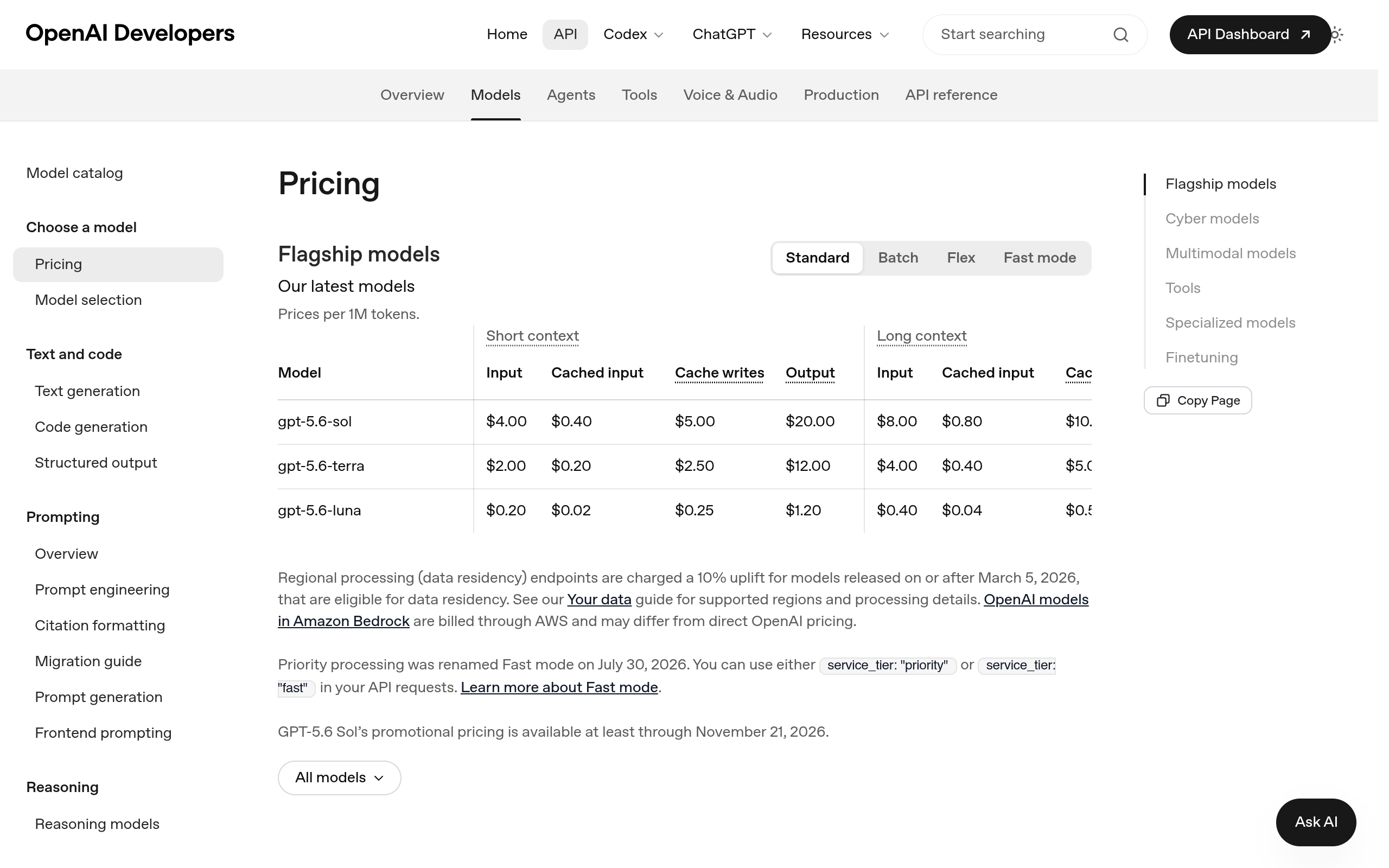
Pricing summary: Paid - Standard: $4.00/M input, $20.00/M output. Promotional (through Nov 21, 2026): $2.00/M input, $10.00/M output. Flex processing: $8.00/M input, $40.00/M output. Cached input: $0.40/M (Standard), $0.20/M (Promotional).
Official links:
Website: https://openai.com
Help: https://help.openai.com
Status: https://status.openai.com
Community: https://community.openai.com
LLM specifications:
Context Window: 1,050,000 tokens (approximately 1,500 A4 pages)
Effort Levels: Configurable reasoning effort via reasoning_effort parameter (minimal, low, medium, high)
Parameters: Not publicly disclosed (proprietary model)
Architecture: Transformer-based reasoning model with extended chain-of-thought. Not publicly disclosed in detail.
Platforms: OpenAI API, ChatGPT (Plus, Team, Enterprise), Azure OpenAI Service, AWS Bedrock, Google Cloud Vertex AI. Not available as open weights.
Variants: GPT-5.6 Sol (flagship), GPT-5.6 Terra (balanced), GPT-5.6 Luna (cost-efficient, ranked #1 on Artificial Analysis Intelligence Index), GPT-5.6 Cyber (security-focused)
CI-First Benefit Score | 6.0 / 10 (CI-First Strong) |
Time / Quantity / Quality / Skill | 7 / 7 / 7 / 3 |
CI-First Profile | Co-Creator and Thought Partner (1) |
Humics Protection | Humics-Neutral (-1/+3) |
AI Imposture Risk | Medium (Skill Illusion High) |
User Sentiment | Mixed (Reddit/G2/Trustpilot) |
Pricing | Paid ($4/M in, $20/M out standard) |
Platforms | OpenAI API, ChatGPT, Azure, AWS Bedrock, Vertex AI |
Context Window | 1,050,000 tokens |
For detailed explanations of the CI-First evaluation terms used in this review, including CI-First Benefit Score, CI-First Profile, Humics Protection Badge, AI Imposture Risk, and User Sentiment, see the Glossary at the end of this publication.
The Problem
Complex reasoning tasks require holding many variables in working memory, connecting ideas across disciplines, and working through multiple steps before reaching a conclusion. A student writing a thesis, a developer architecting a system, or a professional analyzing a 200-page contract all face the same bottleneck: the human brain can hold only 4 to 7 items in working memory at once.
Standard LLMs help with drafting and summarizing, but they do not reason through multi-step problems. They produce plausible-sounding text that may or may not hold up under inspection. For tasks where correctness matters (code that compiles, analysis that survives peer review, legal arguments that hold in court), a model that only sounds right is a liability.
GPT-5.6 Sol was built to address this gap. It uses extended chain-of-thought reasoning: it thinks through the problem in hidden reasoning tokens before producing an answer. This means it can decompose complex problems, check its own intermediate steps, and correct course before committing to an output. For users who need more than fluent text, the reasoning capability is the difference between a tool that drafts and a tool that thinks.
The Outcome
A Fellow using GPT-5.6 Sol can process a 200-page document in a single prompt and ask questions about specific sections, because the 1 million token context window holds the entire document. For a UIT student building a software project, the model can write code across multiple files, explain architectural decisions, and debug errors in the same conversation.
For a UDS professional doing competitive analysis, the model can hold a full competitor's annual report, financial filings, and product documentation in context simultaneously, then synthesize a structured analysis. The reasoning effort levels let you control the depth: use minimal effort for quick questions, high effort for problems that require careful decomposition.
The concrete outcomes are faster analysis of large documents, higher quality code generation with fewer bugs, and the ability to tackle problems that exceed what a single human can hold in working memory. A task that took 3 hours of careful manual analysis becomes a 20-minute structured conversation with verification.
Who Should Use GPT-5.6 Sol
Learner categories:
Students (Bachelor, Master) | Intermediate to Advanced | Faster research, code generation, and multi-step problem solving for projects and theses | UIT Bachelor IT, UIB Bachelor Business, all U365 thesis work |
Professionals (career upskilling) | Intermediate | Complex document analysis, competitive intelligence, code architecture | UDG Growth, UDE Engagement, UDO Operations |
Everyone (lifelong learners) | Intermediate | Understanding complex topics through guided reasoning, learning new domains | LIPS Collect phase, SL-OS learning routines |
U365 Institutes Alignment
UIT (Technology, AI, Data Science): High. Code generation, system architecture, algorithm design, data analysis.
UIB (Business Management, Entrepreneurship): Medium. Document analysis, market research, strategic planning.
UIC (Digital Communication, Marketing): Medium. Content strategy, audience analysis, trend research.
UID (Digital Design, UX/UI): Medium. Design reasoning, user research synthesis, specification drafting.
Skill level required: Intermediate. You need basic prompt engineering skills and the ability to evaluate AI output critically.
Prerequisites: Basic understanding of LLM capabilities and limitations. Experience with ChatGPT or similar tools helps. For API use: programming knowledge and familiarity with REST APIs.
Typical time to first result: 5 minutes (ChatGPT), 15 minutes (API with key setup).
Typical time to competence: 10 to 20 hours of active use to learn effective prompting, reasoning effort calibration, and verification habits.
How GPT-5.6 Sol Works
Inputs
Text prompts, images, document files (via API file inputs), and conversation history up to 1 million tokens. The model accepts both text and image inputs, making it multi-modal.
Outputs
Text responses including code, analysis, explanations, and structured data. The model generates visible answer tokens and hidden reasoning tokens (billed as output tokens but not shown via the API).
Underlying technology
Model: GPT-5.6 Sol, a proprietary reasoning model from OpenAI released July 9, 2026.
Architecture: Transformer-based with extended chain-of-thought reasoning. OpenAI has not publicly disclosed the parameter count or detailed architecture.
Reasoning effort: Configurable via the reasoning_effort parameter (minimal, low, medium, high). Higher effort produces more reasoning tokens and typically better answers on complex problems, at the cost of latency and token usage.
Fast mode: GPT-5.6 Sol runs up to 2.5x faster than Standard processing when Fast mode is enabled (available since July 30, 2026).
Multi-modal: Supports text and image input. Generates text output.
Key technical features
Context window: 1,050,000 tokens (approximately 1,500 A4 pages of size 12 Arial font). This is one of the largest context windows available in a production model.
Parameter count: Not publicly disclosed. OpenAI has not released the model size.
Architecture details: Transformer-based reasoning model. Exact architecture not publicly disclosed.
Available effort levels: minimal, low, medium, high (controlled via reasoning_effort parameter).
Benchmark scores: Artificial Analysis Intelligence Index score of 61 (ranked #5 of 187 models, well above median of 35). Supports 9 evaluations including GDPval-AA v2, Terminal-Bench v2.1, SciCode, Humanity's Last Exam, GPQA Diamond, and others.
Available platforms and APIs: OpenAI API (first-party), ChatGPT (Plus, Team, Enterprise), Azure OpenAI Service, and 4 additional API providers. Available through 6 API providers total.
Model variants: GPT-5.6 Sol (flagship, $4/M input, $20/M output), GPT-5.6 Terra (balanced, $2/M input, $12/M output), GPT-5.6 Luna (cost-efficient, $0.20/M input, $1.20/M output, ranked #1 on Artificial Analysis Intelligence Index), GPT-5.6 Cyber (security-focused, $12.50/M input, $75/M output).
Pricing details (as of August 2026)
Standard processing: $4.00/M input, $20.00/M output, $0.40/M cached input.
Promotional processing (through November 21, 2026): $2.00/M input, $10.00/M output, $0.20/M cached input.
Flex processing: $8.00/M input, $40.00/M output, $0.80/M cached input.
Long context (above 272K input tokens): $8.00/M input, $30.00/M output (Standard), $2.50/M input, $10.00/M output (Promotional).
Speed
74.3 output tokens per second (below average for reasoning models at this price tier, median 75 t/s). Time to first token: 162.41 seconds (high, due to reasoning time before first answer token).
Local deployment
Not available as open weights. A community upload exists on Ollama (treyleo16/gpt-5-6-sol) but is not an official OpenAI release. For local LLM needs, see ollama.com/search for open-weight alternatives.
Comparison references
See artificialanalysis.ai for independent benchmark rankings across 187+ models. See ollama.com/search for local deployment options with open-weight models.
Getting Started with GPT-5.6 Sol
Required accounts
ChatGPT: Free account at chat.openai.com gives access to GPT-5.6 Sol with usage limits. ChatGPT Plus ($20/month) provides higher usage limits. Team and Enterprise plans available.
API: OpenAI Platform account at platform.openai.com. Requires payment method. Pay-as-you-go pricing. No free tier for GPT-5.6 Sol (free tier available for GPT-5.6 Luna).
Installation
ChatGPT: Web app at chatgpt.com. Mobile apps for iOS and Android. Desktop app for macOS and Windows.
API: No installation required. Use the OpenAI Python SDK (pip install openai) or any HTTP client with the REST API.
First-time configuration
1. For ChatGPT: Go to chatgpt.com and sign in. Select GPT-5.6 Sol from the model picker if available (Plus and above). No additional configuration needed.
2. For API: Go to platform.openai.com, create an API key in the API Keys section, and set it as an environment variable (export OPENAI_API_KEY=your_key).
3. (Optional) Install the OpenAI Python SDK: pip install openai.
4. (Optional) Choose your reasoning effort level. Default is medium. For complex problems, set reasoning_effort to high. For simple questions, use minimal to save tokens and reduce latency.
5. (Optional) Enable Fast mode for 2.5x faster processing by setting service_tier to priority or fast in your API request.
First 15 minutes checklist
☐ Ask GPT-5.6 Sol a complex question from your current work or study. Example: Explain the tradeoffs between different sorting algorithms and recommend one for a dataset of 10 million records.
☐ Try a multi-step reasoning task. Example: Analyze the arguments in this text and identify the strongest counterargument.
☐ If using the API, run a request with reasoning_effort set to high on a difficult problem and compare the output quality to a request with reasoning_effort set to minimal.
☐ Upload or paste a long document (10+ pages) and ask a specific question about it to test the context window.
☐ Verify the output: check at least one factual claim against an independent source.
Result: You have experienced the reasoning capability of GPT-5.6 Sol, tested the context window, and practiced verification. You have a feel for how effort levels affect output quality and latency.
Real Workflows
Workflow 1: Analyze a Complex Document and Generate a Structured Summary
Learner type: Students (Bachelor, Master) and Professionals
CI-First benefit tags: Time, Quality
Connects to: Research methods practice, UDA thesis work, LIPS Collect phase. No published U365 credential assesses research methods as a named component, and none is asserted.
Time estimate: 30 minutes (upload, query, verify, store)
Step 1 | You define the document and your analysis goal | (Nothing yet) |
Step 2 | You upload the document to ChatGPT or paste it via the API | The model ingests the full document into its 1M token context window |
Step 3 | You ask a structured analysis question with constraints | The model reasons through the document, generates reasoning tokens, and produces a structured answer |
Step 4 | You verify key claims by checking the original document sections | (Nothing, you verify) |
Step 5 | You store the summary and source citations in your LIPS Digital Second Brain | (Nothing, you execute) |
Sample prompt: I have uploaded a 50-page research report. Analyze the methodology section and identify: (1) the research design, (2) the sample size and selection criteria, (3) potential biases in the methodology, and (4) whether the conclusions follow from the evidence. Be specific with page references. Set reasoning_effort to high.
Verification checklist:
☐ Multi-Model Check: Run the same document through Claude 3.5 or Gemini and compare the methodology analysis. If they identify different biases, investigate which is correct.
☐ External Source: Open the original document to the pages cited and confirm the model's claims match the source text.
☐ Human Review: Share the analysis with your thesis advisor or a peer. Ask: Did the model miss anything important in the methodology?
☐ CI-First Test: Can you explain the methodology analysis in your own words without the model? [Y/N]
Workflow 2: Build and Debug a Multi-File Software Component
Learner type: Students (UIT) and Professionals
CI-First benefit tags: Time, Quantity, Quality
Connects to: UIT Bachelor in IT, software development courses, coding projects
Time estimate: 45 minutes (design, generate, test, debug)
Step 1 | You describe the component requirements and constraints | (Nothing yet) |
Step 2 | You ask the model to design the component architecture | The model reasons through the requirements and proposes a file structure and architecture |
Step 3 | You ask the model to generate each file with tests | The model generates code files and test files, reasoning through edge cases |
Step 4 | You run the code and tests in your development environment | (Nothing, you test) |
Step 5 | If tests fail, you paste the error and ask the model to debug | The model reasons through the error trace, identifies the bug, and proposes a fix |
Step 6 | You review and understand every line of code before integrating | (Nothing, you review) |
Sample prompt: I need a Python module for a task queue with the following requirements: (1) priority-based scheduling, (2) retry with exponential backoff, (3) dead letter queue for failed tasks, (4) thread-safe operations. Design the file structure, then generate the code for each file with unit tests using pytest. Set reasoning_effort to high. Explain your architectural decisions.
Verification checklist:
☐ Multi-Model Check: Ask Claude 3.5 or Gemini to review the generated code architecture. Compare their feedback with the model's design decisions.
☐ External Source: Run all tests in a clean environment. Do not trust the model's claim that the code works. Verify with actual execution.
☐ Human Review: If you are not confident in your ability to evaluate the code, ask a senior developer or your instructor to review the architecture and key files.
☐ CI-First Test: Can you explain and defend every architectural decision the model made? Can you reproduce the core logic without the model? [Y/N]
Strengths, Limits, and AI Imposture Risk
Strengths
CI-First Benefit | Strength | Evidence |
Time | Strong savings on complex multi-step tasks. The reasoning capability reduces iteration cycles for hard problems. | A 3-hour manual analysis of a 200-page document becomes a 20-minute structured conversation. The 1M context window eliminates the need to chunk and summarize. |
Quantity | Strong increase in usable output volume. The model can generate complete code modules, multi-section analyses, and structured documents in a single session. | A developer can generate a complete multi-file component with tests in one session instead of writing files individually over days. |
Quality | Strong improvement in output quality for reasoning-heavy tasks. The chain-of-thought reasoning catches errors before producing the answer. | Artificial Analysis Intelligence Index score of 61 (ranked #5 of 187 models), well above the median of 35. The model reasons through problems rather than pattern-matching. |
Skill | Marginal. The model produces expert-looking output but does not teach the user the underlying skill. Dependency risk is high. | A non-programmer can generate working code but cannot reproduce it without the model. The reasoning is hidden (reasoning tokens are not visible via the API). |
Limits
The model is slow for its price tier. At 74.3 tokens per second, it is below average for reasoning models (median 75 t/s). Time to first token is 162.41 seconds, which means complex queries with high reasoning effort can take over 2 minutes before the first answer appears.
The model is expensive. At $4/M input and $20/M output (Standard), it costs more than twice the median for comparable reasoning models ($1.75/M input, $10/M output). The promotional pricing ($2/M input, $10/M output) is temporary through November 21, 2026.
The model is proprietary and not available as open weights. You cannot run it locally or audit its architecture. A community upload on Ollama exists but is not official.
The reasoning tokens are hidden. The model thinks before answering, but you cannot see the reasoning process. This makes verification harder: you see the answer but not how the model arrived at it.
The Jagged Frontier applies. The model excels at complex reasoning tasks but can fail on simple tasks that a less capable model handles correctly. You cannot assume consistency across task types.
Image output is not supported. The model accepts image input but generates only text.
AI Imposture Risk
Time Illusion
Rating. Low
Evidence. The model is genuinely faster for complex reasoning tasks. The time savings are real and measurable. The 162-second time to first token is a cost, but the net time saved on complex problems is substantial.
Quantity Illusion
Rating. Medium
Evidence. The model can generate large volumes of high-quality output, but the hidden reasoning tokens mean you are billed for tokens you cannot see. A user may not realize how many tokens a high-effort query consumes until the bill arrives.
Skill Illusion
Rating. High
Evidence. This is the most dangerous trap. The model produces expert-looking code, analysis, and reasoning for users who lack the skill to evaluate it. A non-programmer who generates working code believes they can program. A student who receives a well-reasoned analysis believes they can analyze. The hidden reasoning tokens mean the user never sees the thinking process, so they cannot learn from it. The model masks the user's lack of understanding.
Overall Imposture Risk: Medium. The Skill Illusion is High, but it can be mitigated with disciplined verification and the CI-First Test (can you reproduce the output without the tool?).
U365 Co-Intelligence Rating
CI-First Profile
Primary profile: Co-Creator and Thought Partner (1). GPT-5.6 Sol is best used as a thinking partner that reasons through problems alongside you. You bring the context, constraints, and judgment. The model brings reasoning capacity, breadth of knowledge, and the ability to hold large amounts of information in context.
Secondary profiles: Professor, Coach and Tutor (3) for learning new domains through guided reasoning. Analyst and Tester (4) for analyzing data and testing hypotheses. Challenger and Devil's Advocate (5) for stress-testing your assumptions.
CI-First Benefit Score
Time
Score (0-10). 7
Rationale. Strong savings on complex reasoning tasks. The 1M context window and reasoning capability reduce iteration cycles significantly. The 162-second time to first token is a cost on simple tasks.
Quantity
Score (0-10). 7
Rationale. Strong increase in usable output. Complete code modules, multi-section analyses, and structured documents in a single session.
Quality
Score (0-10). 7
Rationale. Strong quality improvement. Artificial Analysis Intelligence Index of 61, well above median. Reasoning catches errors before producing answers.
Skill
Score (0-10). 3
Rationale. Marginal. The model produces expert output but does not teach the underlying skill. Hidden reasoning tokens prevent learning from the thinking process. Dependency risk is high.
CI-First Benefit Score: 6.0 / 10 (CI-First Strong)
Humics Protection Badge
Dimension | Rating | Rationale |
Creativity | Neutral (0) | The model can spark ideas through reasoning, but it can also replace the user's own ideation. The effect depends on how the user engages with the output. |
Critical Thinking | Erodes (-1) | The hidden reasoning tokens mean the user does not see the model's thinking process. This encourages accepting answers without understanding the reasoning. Over time, the user may lose the habit of working through problems independently. |
Social Authenticity | Neutral (0) | The model generates text, not interpersonal communication. Its effect on social authenticity depends on how the user uses the output. |
Humics Protection Score: -1 / +3
Badge: Humics-Neutral
Superhuman Usage Guidance
When to invite this tool:
Complex multi-step reasoning tasks where the reasoning capability produces measurably better answers
Large document analysis within the 1M token context window
Code generation for well-defined requirements where you can verify the output by running tests
Learning new domains through guided Socratic dialogue (Professor, Coach and Tutor profile)
When to keep this tool out:
Tasks where you lack the expertise to evaluate the output (the Skill Illusion trap)
Creative ideation where your own original thinking is the primary value
Ethical judgment, empathy, and human connection (Humics tasks)
Simple tasks where the 162-second time to first token makes the tool slower than doing it yourself
U365 method integration:
LIPS + CARE: Model outputs feed into the Collect phase. Use the model to process information, then store verified results in your LIPS Digital Second Brain.
ULM + EVA: The model supports the Career domain (analysis, coding, research) and the Quality of Life domain (faster completion of complex tasks).
UP-Context-Engineering: The model responds well to structured UP-Context-Engineering prompting. Provide role, context, task, constraints, and output format.
SL-OS: The model integrates with Microsoft 365 workflows through the API. Export model outputs to OneNote for LIPS storage.
UNOP: The model supports spaced repetition when used as a Professor, Coach and Tutor. Ask it to generate quiz questions and explanations. But the hidden reasoning tokens limit the learning value compared to a tool that shows its work.
Over-delegation warning: GPT-5.6 Sol creates the strongest Skill Illusion in the U365 tool library because it produces high-quality reasoning output with hidden reasoning tokens. A user who delegates analysis, coding, or problem-solving to this model without verifying and reproducing the results is heading toward AI Obesity. If you cannot explain and defend the model's output without the tool, you are in the illusion. The CI-First formula is clear: if HI drops, CI drops, even with strong AI. Use the CI-First Test after every session: can you reproduce the core reasoning without the model? If not, go back and work through the problem yourself.
What Users Say
Aggregate Rating Table
Platform | Rating | Reviews |
N/A | N/A | |
N/A | N/A | |
Community | Active discussion | |
Intelligence Index: 61 | Ranked #5 of 187 models |
What Users Praise
Reddit discussions (r/OpenAI and related subreddits) show positive sentiment around the reasoning quality, the 1M token context window, and the multi-modal capabilities. Users appreciate that the model can handle entire codebases and long documents in a single conversation. The Fast mode (2.5x faster processing, available since July 30, 2026) has been well received by developers who found the standard processing speed too slow.
What Users Complain About
Reddit users report three main concerns: (1) the high cost, especially for high reasoning effort queries that consume many hidden reasoning tokens, (2) the slow time to first token (162 seconds on average for reasoning models), which makes the tool feel unresponsive for quick questions, and (3) the promotional pricing uncertainty (users worry about what happens after November 21, 2026 when promotional rates may end). Some users also report that the model sometimes overthinks simple questions when reasoning effort is set to high.
Sentiment Summary
Overall sentiment: Mixed
Reasoning quality is best-in-class for complex tasks
1M context window enables new use cases (full document analysis, entire codebase review)
Cost is a significant concern, especially for high-effort queries
Latency (time to first token) is a barrier for interactive use
Promotional pricing creates uncertainty about long-term cost
Fast mode helps but does not fully solve the latency issue
U365 Editorial Note
The user sentiment aligns with the CI-First evaluation in two key areas. First, users praise the reasoning quality, which matches the Quality dimension score of 7. Second, users complain about cost and latency, which the CI-First evaluation captured in the Time dimension rationale (the 162-second time to first token is a cost). The tension is in the Skill dimension: users report satisfaction with the output quality, but the CI-First evaluation scores Skill at 3 because the hidden reasoning tokens prevent learning. Users who feel productive may be experiencing the Skill Illusion without realizing it. The U365 recommendation is to use GPT-5.6 Sol in Centaur mode with disciplined verification to capture the quality gains while mitigating the Skill Illusion risk.
Comparison and Alternatives
Alternative | When to Choose |
Claude Opus 4.6 (Anthropic) | You need strong reasoning at a fraction of the cost. DeepSeek offers competitive reasoning at much lower prices. |
Gemini 3.1 Pro (Google) | You need multi-modal (image) input, the 1M context window, or tighter integration with OpenAI tooling (Codex, Agent Builder). |
GPT-5.6 Luna (OpenAI) | Cost-sensitive tasks. Luna ranks #1 on Artificial Analysis Intelligence Index at $0.20/M input. |
Llama 4.1 (Meta) | Local deployment, data residency, open-weight requirements. |
DeepSeek V4 Pro (DeepSeek) | Competitive reasoning at much lower prices, open-weight options. |
Where GPT-5.6 Sol is clearly better
GPT-5.6 Sol is the best choice when you need maximum reasoning quality on complex problems and can justify the cost. The 1M token context window is a genuine differentiator for full-document analysis and large-codebase work. The multi-modal capability (text and image input) in a reasoning model is not universally available. The Artificial Analysis Intelligence Index score of 61 places it in the top tier of all models tested.
Where GPT-5.6 Sol is clearly worse
GPT-5.6 Sol is worse than its own sibling GPT-5.6 Luna for cost-sensitive tasks. Luna ranks #1 on the Artificial Analysis Intelligence Index at $0.20/M input (20x cheaper than Sol at promotional rates, 40x cheaper at standard rates). For most everyday tasks, Luna is the better choice. GPT-5.6 Sol is also worse than open-weight models (Llama 4.1, DeepSeek V4 Pro) for users who need local deployment, data residency, or cost control. The hidden reasoning tokens and proprietary architecture mean you cannot audit or modify the model.
Verdict and Next Steps
Who should adopt it: UIT students and professionals who need maximum reasoning quality on complex problems and can justify the cost. Researchers working with large documents. Developers building multi-file systems.
When: When you have a specific complex task that exceeds what GPT-5.6 Luna or a non-reasoning model can handle. Start with Luna for everyday tasks. Switch to Sol when the task requires the full context window or maximum reasoning effort.
For what: Complex multi-step reasoning, large document analysis, code architecture and debugging, scientific problem solving.
UP-Context-Engineering prompt pack:
1. Context: I am writing a thesis on [topic]. I have uploaded [document]. Role: AI as a research analyst working only from the uploaded document. I own the conclusions; you analyse and cite. Profile: Act as an Analyst and Tester, testing the method rather than paraphrasing it. Task: Analyze the methodology and identify strengths, weaknesses, and gaps. Constraints: Focus on the methodology section only. Cite specific pages. Set reasoning_effort to high. Output format: Structured analysis with numbered findings and a summary recommendation. Memory: the analysis and the page citations belong in my thesis record, because the conversation keeps no source list. UP-Context-Engineering verification: I open the cited pages and read the sentences myself before I rely on the analysis, I check each weakness against the methodology as written, and I can defend the findings without the tool. Data safety: this pack carries no personal data. I do not paste an unpublished thesis, a supervisor's comments or a participant dataset into it, and I keep the analysis in my own store.
2. Context: I am building [system description]. Role: AI as a senior software architect working from the stated system. I own the design decisions; you propose and generate. Profile: Act as a Co-Worker and Assistant, building one bounded system to my brief rather than expanding it. Task: Design the component architecture and generate code with tests. Constraints: Use [language/framework]. Include error handling and edge cases. Set reasoning_effort to high. Output format: File-by-file code with architecture rationale at the top. Memory: the architecture rationale and the accepted code belong in my repository record, because the conversation keeps no history. UP-Context-Engineering verification: I read the rationale before the code, I run the generated tests myself before accepting the implementation, and I can explain each component's responsibility without the tool. Data safety: this pack carries no personal data. I do not paste proprietary code, credentials or production data into it, and I keep the architecture record in my own repository.
3. Context: I believe [conclusion] based on [evidence] and I want the strongest case against it. Role: AI as a critical thinking partner working only from the evidence I state. I own the conclusion; you challenge it. Profile: Act as a Challenger, arguing against my conclusion rather than balancing it. Task: Find the strongest counterarguments and identify flaws in my reasoning. Constraints: Do not agree with me. Challenge every assumption. Set reasoning_effort to high. Output format: Numbered counterarguments with evidence and a final assessment of whether my conclusion holds. Memory: the counterarguments and my revised position belong in my own analysis record, because the conversation keeps no reasoning state. UP-Context-Engineering verification: I trace each counterargument back to the evidence myself before I revise anything, I check that my original assumptions were actually challenged rather than restated, and I can defend my final position without the tool. Data safety: this pack carries no personal data. I do not paste confidential evidence, a colleague's draft or an unpublished finding into it, and I keep the analysis in my own store.
Related U365 content:
U365's Recommendations to Learn More
We curate learning resources that go beyond this review: tutorials, deep-dive articles, official documentation, and community discussions that help you build real skill with GPT-5.6 Sol. All links verified as of 2026-09-03.
Official learning resources
OpenAI API docs - GPT-5.6 Sol model: developers.openai.com/api/docs/models/gpt-5.6-sol
OpenAI model guidance guide: developers.openai.com/api/docs/guides/latest-model
OpenAI pricing page: platform.openai.com/docs/pricing
Artificial Analysis - GPT-5.6 Sol benchmarks: artificialanalysis.ai/models/gpt-5-6-sol
GPT-5.6 Preview System Card: deploymentsafety.openai.com/gpt-5-6/gpt-5-6.pdf
Video tutorials and channels
GPT-5.6 Explained: Sol vs Terra vs Luna (AiGuidePath): youtube.com/watch?v=LbBjC3d4Czo
GPT-5.6 Sol Tutorial: Next-Generation Model Preview (Muhammad Moin): youtube.com/watch?v=7isdnDq3jHc
How to Use ChatGPT 5.6 for Beginners - Luna, Terra, Sol (AI Master): youtube.com/watch?v=MBoZgXIhmkc
I Tested GPT-5.6 Sol for a Month (Every): youtube.com/watch?v=13tHN3iP5kQ
ChatGPT 5.6 and Codex Tutorial with Real Use Cases (The Cutting Edge School): youtube.com/watch?v=6cRiP9g90PY
How To Use Codex To Build Websites Using GPT 5.6 Sol (AI LABS): youtube.com/watch?v=pHstb0JGGhE
GPT 5.6 SOL IS HERE! How to use it (Greg Isenberg): youtube.com/watch?v=7pVTQSA4s5I
Written tutorials and deep-dive articles
Complete Guide to GPT 5.6 - Blockchain Council: blockchain-council.org/ai/gpt-5-6-guide
OpenAI builder's guide to GPT-5.6: openai.com/index/builders-guide-to-gpt-5-6
Community and social
OpenAI Community forum: community.openai.com
OpenAI Help Center - GPT-5.6 preview FAQ: help.openai.com/en/articles/20001325-a-preview-of-gpt-56-sol-terra-and-luna
We label community sources so you know the provenance. We exclude promotional or affiliate content. Every link was verified active on 2026-09-03.
Glossary
CI-First Benefit Score
A composite score from 0 to 10 that measures how much a tool genuinely benefits you across four dimensions: Time saved, Quantity of usable output, Quality improvement, and Skill built. The average of the four sub-scores determines the overall rating. A score of 6.0 means CI-First Strong: the tool produces real, durable benefits, but vigilance is needed to avoid over-reliance. For GPT-5.6 Sol, the Time, Quantity, and Quality scores are strong (7 each), but the Skill score is low (3) because the hidden reasoning tokens prevent learning from the model's thinking process.
CI-First Profile
A classification of how a tool collaborates with you, from (level 1) Co-Creator and Thought Partner to (level 5) Challenger and Devil's Advocate. Lower level numbers indicate higher AI autonomy. GPT-5.6 Sol is primarily Profile 1 because it reasons through problems alongside you, bringing breadth of knowledge and the ability to hold large amounts of information in context. It can also serve as Profile 3 (Professor, Coach and Tutor) for learning new domains and Profile 5 (Challenger) for stress-testing your assumptions.
Humics Protection Badge
A rating of how a tool affects your human capabilities across three dimensions: Creativity, Critical Thinking, and Social Authenticity. Each dimension is scored as Protects (+1), Neutral (0), or Erodes (-1). The sum gives a score from -3 to +3. GPT-5.6 Sol scores -1 (Humics-Neutral) because the hidden reasoning tokens erode Critical Thinking (you cannot see how the model arrived at its answer), while Creativity and Social Authenticity are neutral depending on how you use the output.
AI Imposture Risk
An assessment of how likely a tool is to create the illusion of capability without real learning. Three traps are evaluated: Time Illusion (does it feel faster without actually saving time), Quantity Illusion (does volume mask hidden costs), and Skill Illusion (does expert-looking output mask the user's lack of skill). GPT-5.6 Sol has Medium overall risk because the Skill Illusion is High: it produces expert-level code and analysis that users without expertise cannot evaluate, and the hidden reasoning tokens prevent learning from the thinking process.
User Sentiment
How users feel about a tool based on aggregated reviews, community discussions, and direct feedback across platforms like G2, Trustpilot, Reddit, and specialized benchmark sites. User sentiment is a data point, not a verdict: it reflects perceptions that may or may not align with the CI-First evaluation. For GPT-5.6 Sol, user sentiment is Mixed. Users praise the reasoning quality and 1M context window but complain about cost and latency. The U365 editorial note connects this to the CI-First evaluation: user satisfaction with output quality may mask the Skill Illusion, where users feel productive without building lasting capability.
Sources
GPT-5.6 Explained: Sol vs Terra vs Luna (YouTube - AiGuidePath)
GPT-5.6 Sol Tutorial: Next-Generation Model Preview (YouTube - Muhammad Moin)
ChatGPT 5.6 and Codex Tutorial with Real Use Cases (YouTube - The Cutting Edge School)
How To Use Codex To Build Websites Using GPT 5.6 Sol (YouTube - AI LABS)
GPT 5.6 SOL IS HERE! How to use it (YouTube - Greg Isenberg)
GPT-5.6 Sol Builds Insanely Beautiful Websites (YouTube - Zubair Trabzada)
An aggregate of real user feedback from review platforms (G2, Trustpilot, Reddit, Artificial Analysis). For GPT-5.6 Sol, overall sentiment is Mixed. Users praise the reasoning quality and 1M context window but complain about high cost and latency. The U365 editorial note connects this to the CI-First evaluation: user satisfaction with output quality may mask the Skill Illusion, where users feel productive without actually building lasting capability.




Comments