
INSIDE Tools Review: Genmo Mochi 1 - Open-Source Text-to-Video Generation

Updated: Oct 16
Status: Risky | Last tested: 2026-09-16 (Mochi 1 preview) | Re-check: trigger-based (max 6 months)
Risky: the tool has significant unresolved issues, or it has been clearly surpassed by newer alternatives. Use it with caution and read the Limits section.


In this Tool Review
Tool Snapshot
Category: AI Video Generation, Open-Source Model
Tagline: "A new state-of-the-art in open text-to-video" (Genmo blog, October 2024)
Primary use cases:
Generating short video clips from text prompts with strong motion quality
Fine-tuning on custom visual datasets using LoRA adapters
Self-hosting a text-to-video pipeline under a permissive license
Producing physics-coherent motion (fluids, hair, fur) for research or creative projects
Official links:
Pricing summary: Free (250 one-time credits, watermark), Lite ~$10/mo (1,200 credits, no watermark), Standard ~$20/mo (5,000 credits). Self-hosting free under Apache 2.0. Third-party inference ~$0.50/generation.
At a Glance:
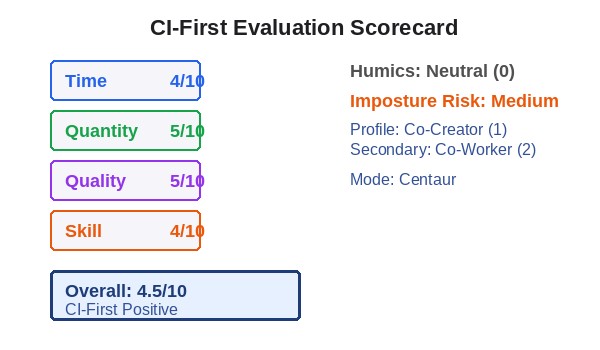
CI-First Benefit Score | 4.5/10 (CI-First Positive) |
Sub-scores | Time / Quantity / Quality / Skill |
Sub-score Values | 4 / 5 / 5 / 4 |
CI-First Profile | Co-Creator and Thought Partner (1), Secondary: Co-Worker and Assistant (2) |
Humics Protection | Neutral (0/3) |
AI Imposture Risk | Medium |
User Sentiment | Mixed (G2 4.6/5, Capterra 4.4/5, GitHub ~3,700 stars) |
Pricing | Freemium + Free self-hosting (Apache 2.0) |
The Problem
Generating video from text has been one of the hardest problems in generative AI. Before late 2024, open-source video models were small (under 5B parameters), produced inconsistent motion, and could not follow complex prompts. If you wanted high-quality AI video, you paid for closed platforms like Runway or Pika. If you wanted open-source, you accepted short, jerky clips that fell apart on close inspection.
The specific gap was motion quality. Most models could produce visually plausible individual frames, but temporal coherence remained elusive. Water looked like a texture, not a fluid. Hair moved in ways that were statistically reasonable frame-to-frame but physically nonsensical over a full clip. Human figures drifted between poses rather than walking.
For developers and researchers, there was an additional problem: no large-scale video model was available under a permissive license. You could not fine-tune, modify, or commercially deploy the best models without paying for closed APIs.
The Outcome
Mochi 1 addressed both gaps at once. It shipped 10 billion parameters under Apache 2.0, making it the largest openly released video model at the time. For a developer or researcher, this means you can download the weights, run inference locally, fine-tune with LoRA adapters, and deploy commercially without vendor lock-in or licensing fees.
For a creative user, Mochi 1 produces 5-second clips at 480p with notably strong motion physics. Fluids, smoke, hair, and fur move in ways that hold up under viewing. Prompt adherence is strong thanks to the T5-XXL text encoder, which handles multi-clause prompts better than most contemporaries.
The honest outcome in September 2026: Mochi 1 was a milestone that has been surpassed. Wan 2.1 and 2.2, HunyuanVideo, and LTX-2 now offer higher resolution, longer clips, image-to-video, and in LTX-2's case, synchronized audio. Mochi 1 remains useful for its permissive license, LoRA ecosystem, and motion quality at 480p, but it is no longer the state-of-the-art open model.
Who Should Use Genmo Mochi 1
Mochi 1 serves a broad audience, from non-technical users exploring the hosted playground to developers and researchers self-hosting and fine-tuning the model. The tool's value differs sharply depending on which path you take.
U365 Fellow Categories
Learner type | Difficulty | Typical ROI | Career path |
Students (Bachelor, Master) | Advanced | Learn diffusion model architecture hands-on. Experiment with open-weights video generation for research projects. | UIT AI Developer Specialist and Data Scientist, research methodology |
Professionals (career upskilling) | Intermediate to Advanced | Self-host video generation without API costs. Fine-tune on brand assets for marketing content. | UIT Technology, UIC Digital Communication, UID Digital Design |
Everyone (lifelong learners) | Intermediate | Generate short video clips from text prompts via the hosted playground. Explore AI video creation without coding. | ULM Career and Finance, and Quality of Life domains, creative projects |
Skill level needed: Intermediate for hosted playground use (prompting skills). Advanced for self-hosting (Python, PyTorch, GPU management, ComfyUI or CLI).
Prerequisites: For self-hosting: Python proficiency, GPU with 24GB+ VRAM (or cloud GPU access), familiarity with Hugging Face Hub and diffusion pipelines. For hosted playground: none beyond basic prompt writing.
Time to first result: 5 minutes via hosted playground. 30 to 60 minutes for self-hosted setup (download weights, install dependencies, run first inference).
Time to competence: 2 to 4 hours for effective prompting. 1 to 2 weeks for self-hosted pipeline proficiency including LoRA fine-tuning.
U365 Institutes Alignment
Mochi 1 aligns most strongly with technology and AI disciplines. The tool is an open-weights AI model, not a consumer application, so its primary value path runs through UIT.
UIT (Technology, AI, Data Science)
Relevance. High
Why. Core tool for UIT. 10B-parameter diffusion transformer with open weights under Apache 2.0. UIT Fellows can study AsymmDiT architecture, run inference locally, fine-tune with LoRA, and deploy commercially. Maps to deep learning, generative AI, and model adaptation curriculum.
The limit that holds the row. The 480p resolution and the 5.4-second clip limit make Mochi 1 unsuitable for production video: it is a research, prototyping and learning tool. The value sits in the engineering study, the AsymmDiT architecture, local inference, LoRA fine-tuning and commercial deployment, which is an advanced AI engineering competency rather than an output-production one.
UIB (Business Management, Entrepreneurship)
Relevance. Low
Why. Business users would use hosted commercial alternatives. No UIB MCC or diploma requires open-source video model deployment.
The limit that holds the row. The hosted playground has minimal business workflow integration, and business users would typically use a hosted commercial alternative rather than self-hosting a 10B-parameter model. No UIB MCC or diploma requires or teaches open-source video model deployment.
UIC (Digital Communication, Marketing)
Relevance. Medium
Why. Marketing teams can use Mochi 1 for short product demo clips via hosted playground. 480p cap and 5.4-second limit restrict practical marketing output. Secondary alignment for AI-assisted content creation.
The limit that holds the row. The 480p resolution cap and the 5.4-second clip limit restrict practical marketing output, and the tool is not a content strategy or distribution tool. The alignment is a coursework understanding of text-to-video generation as a content production capability rather than an assessed communication competency.
UID (Digital Design, UX/UI)
Relevance. Medium
Why. Designers can use Mochi 1 for motion studies, concept visualization, and creative exploration. LoRA fine-tuning supports brand-consistent visual style work. Secondary alignment.
The limit that holds the row. It is a research, prototyping and learning tool rather than a production surface: the 480p resolution and the 5.4-second clip limit make it unsuitable for production video. It is a reference tool for motion design study, and the visual style work the LoRA fine-tuning supports still rests on the design judgement this institute assesses.
How Genmo Mochi 1 Works
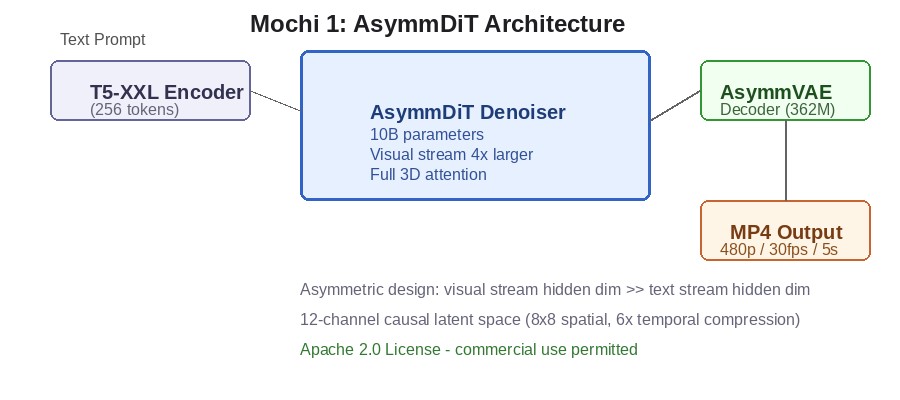
Mochi 1 is a text-to-video diffusion model. Text prompts enter a T5-XXL text encoder, an Asymmetric Diffusion Transformer (AsymmDiT) iteratively denoises a latent representation, and an AsymmVAE decoder maps the final latent back to pixel space. The output is a short MP4 clip.
Underlying Technology
Mochi 1 is built on the AsymmDiT (Asymmetric Diffusion Transformer) architecture. Its key innovation is asymmetric processing: the visual stream's hidden dimension is approximately 4x larger than the text stream, giving more compute to the harder visual generation task. This design choice influenced subsequent open video models.
A 362-million-parameter AsymmVAE compresses input clips by 8x8 in space and 6x in time, producing a 12-channel causal latent representation. The encoding is causal: each frame can only attend to itself and prior frames, preventing reconstruction artifacts.
A single T5-XXL encoder processes the text prompt with a 256-token limit, giving Mochi 1 strong prompt adherence for multi-clause, detailed prompts. The transformer attends across all 44,520 video latent positions simultaneously using full 3D attention.
Key Technical Features
Inputs: Text prompts (up to 256 tokens via T5-XXL). No image input, no video input. Pure text-to-video.
Outputs: Short video clips in MP4 format. 480p resolution (848x480), 30 fps, maximum 5.4 seconds (163 frames). No audio track.
Integrations: ComfyUI (community wrappers), Hugging Face diffusers (MochiPipeline), Replicate, fal.ai, 302.ai, Beam.cloud, Modal (fine-tuning tutorial).
Parameters: 10 billion (denoiser), 362 million (VAE).
Hardware: Approximately 60GB VRAM in bf16 on 1x H100. Under 24GB with fp8-quantized ComfyUI builds (runs on RTX 4090).
Getting Started
Installation
Three deployment options: n8n Cloud (sign up at genmo.ai/play, no installation), self-hosted via pip from source, or ComfyUI with MochiWrapper community node.
Self-hosted setup:
git clone https://github.com/genmoai/mochi
cd mochi && pip install -e .
python3 ./scripts/download_weights.py weights/
python3 ./demos/cli.py --model_dir weights/ --cpu_offload
Hardware requirements: Full precision (bf16) approximately 60GB VRAM (H100 or A100 80GB). FP8 quantized (ComfyUI) under 24GB VRAM (RTX 4090 works). Minimum 32GB system RAM. Approximately 20GB disk for weights.
First-time Configuration
1. Go to https://www.genmo.ai and sign up for the hosted playground, or clone the repo for self-hosting.
2. For hosted: navigate to genmo.ai/play. You receive 250 one-time credits (100 credits per generation, approximately 2-3 free generations).
3. For self-hosted: download weights (approximately 20GB), install dependencies, run the CLI demo.
4. Type a text prompt describing the video you want. For hosted, click generate. For self-hosted, run the CLI with your prompt.
First 15 Minutes Checklist
Write a detailed text prompt for a 5-second clip. Include subject, motion, camera behavior, and setting.
Generate the clip and watch the output.
Write a second prompt that changes one element (camera angle, subject motion) to test prompt adherence.
Compare the two outputs. Does the model follow your specific instructions?
Note what worked and what did not. Save good prompts for future use.
Real Workflows
These workflows show how U365 Fellows across different institutes can use Mochi 1 in real projects, following the CI-First methodology.
Workflow 1: Generate a Product Demo Clip for Social Media
Learner type: Professionals (career upskilling)
CI-First benefit: Time (4), Quality (5) - rapid prototyping of short video concepts
U365 program: UIC Digital Communication, UID Digital Design - LIPS+CARE
Step | You do | The tool does |
1 | Write a detailed prompt describing your product in a 5-second scene. Specify camera movement, lighting, and mood. | (Nothing yet) |
2 | Submit the prompt to Mochi 1 (hosted or self-hosted) | Generates a 5-second 480p clip from your prompt |
3 | Review the output. Does the product look right? Is the motion natural? | (Nothing, you evaluate) |
4 | If the output is wrong, rewrite the prompt with more specific constraints and regenerate | Generates a new clip from the revised prompt |
5 | Select the best clip. If needed, upscale or post-process in a video editor. Export for your platform. | (Nothing, you execute) |
Sample prompt: Context: I am generating a short product demo clip for social media and the product and channel are stated. The clip brief is mine. Role: AI as a generative-video assistant executing a shot brief. I own the selection; you generate and vary. Profile: Act as a Co-Creator and Thought Partner, producing candidates from my brief rather than a final asset. Task: generate a 5-second clip from this brief: a sleek white coffee mug on a marble countertop, warm morning sunlight from the left, camera slowly pushing in from a 45-degree angle, steam rising gently, shallow depth of field, cinematic. Vary the camera move and the light across candidates and name what differs. Constraints: 5 seconds; no invented lettering or branding on the mug or the surface, because invented detail is a defect in a product clip. Where the motion breaks physically, say so rather than shipping it. Output format: the prompt used, the parameter set, the candidate variations with what differs, and the recommended take. Memory: the approved prompt and takes belong in my own content file, because the tool keeps the generations and not the selection reasons. UP-Context-Engineering verification: I review motion physics and brand fit frame by frame before anything is published, I check that no invented detail appears on the product, and I can defend the final selection without the tool. Data safety: this pack carries no personal data. I do not paste a client's unreleased product, a person's likeness or a licensed brand asset into it, and I keep the takes and the record in my own store.
Verification checklist:
Multi-Model Check: Generate the same prompt through Wan 2.1 or Runway and compare output quality.
External Source: Check the generated clip against your actual product. Are colors and proportions accurate?
Human Review: Show the clip to a colleague. Ask: "Does this represent our brand?"
CI-First Test: Can you explain why this clip works without the tool? Can you describe what a human videographer would need? [Y/N]
Workflow 2: Fine-Tune Mochi 1 on Brand Visual Assets with LoRA
Learner type: Students (Bachelor, Master), Professionals
CI-First benefit: Skill (4), Quality (5) - teaches model adaptation and transfer learning
U365 program: UIT AI and Data Science, UID Digital Design - ULM+EVA
Step | You do | The tool does |
1 | Collect 20 to 50 images or short clips representing your brand visual style. Clean and organize the dataset. | (Nothing yet) |
2 | Set up the LoRA fine-tuning script from the Mochi repo (demos/fine_tuner/). Configure hyperparameters. | (Nothing yet) |
3 | Launch training on an H100 or A100 80GB (cloud or local) | Fine-tunes a LoRA adapter on your dataset without modifying base weights |
4 | Load the trained LoRA adapter alongside Mochi 1 base weights. Generate test clips. | Applies your fine-tuned style to generation |
5 | Evaluate whether the output matches your brand aesthetic. Iterate if needed. | (Nothing, you evaluate) |
Sample prompt: Context: I am producing brand-styled clips from an approved visual language, and the brand, the style reference and the scene are stated. Role: AI as a generative-video assistant working to an approved style. I own the brand fit; you generate and vary. Profile: Act as a Co-Worker and Assistant for the production pass, holding the style rather than reinterpreting it. Task: generate a 5-second clip in the brand's visual style: a person walking through a modern office space, natural lighting, minimalist composition, camera tracking laterally left to right. Give three takes with different camera speeds and name what each changes about the brand feel. Constraints: keep the composition and lighting within the stated style; no invented logos, signage or text. Where the output drifts from the style reference, say so rather than smoothing it. Output format: the prompt used, the three takes with their differences, and the take closest to the style reference. Memory: the approved style prompt and the takes belong in my own content file, because the tool keeps the generations and not the style decisions. UP-Context-Engineering verification: I compare every take against the approved style reference before selecting, I check for invented brand elements, and I can explain why the selected take holds the style. Data safety: this pack carries no personal data. I do not paste a real colleague's footage, an unreleased campaign or a licensed track into it, and I keep the selections in my own store.
Verification checklist:
Multi-Model Check: Generate the same prompt with and without the LoRA adapter loaded. Compare outputs.
External Source: Compare the generated clips against your brand guidelines and reference images.
Human Review: Show the fine-tuned outputs to your design lead or brand manager.
CI-First Test: Can you explain what the LoRA adapter changed in the model's behavior? [Y/N]
Workflow 3: Explore Motion Physics for a Research Project
Learner type: Students (Bachelor, Master)
CI-First benefit: Skill (4), Quality (5) - develops critical evaluation and research methodology
U365 program: UIT AI and Data Science, research methodology - UNOP
Step | You do | The tool does |
1 | Frame a research question about AI video motion quality. Example: "How well does Mochi 1 simulate fluid dynamics?" | (Nothing yet) |
2 | Write prompts that test specific physics scenarios (water pouring, smoke rising, cloth waving) | (Nothing yet) |
3 | Generate clips for each prompt using Mochi 1 | Produces 5-second clips for each physics scenario |
4 | Analyze each clip frame-by-frame. Document where motion is coherent and where it breaks down. | (Nothing, you analyze) |
5 | Write a short report on your findings. Store it in your LIPS Digital Second Brain. | (Nothing, you execute) |
Sample prompt: Context: I am studying how motion behaves in generated video for a research project, and the phenomenon under study is stated. Role: AI as a generative-video assistant producing a test clip for study. I own the analysis; you generate to my parameters. Profile: Act as an Analyst and Tester, producing a controlled clip rather than an attractive one. Task: generate a 5-second clip of water pouring from a glass pitcher into a clear glass on a wooden table, camera static at eye level, where the water hits the glass and creates ripples and splashes, in natural indoor lighting. Then name the physical behaviours to check frame by frame. Constraints: keep the camera static and the lighting unchanged so the physics are readable; no cuts, no style effects. Where the fluid behaviour breaks continuity, make it easy to point at. Output format: the prompt used, the clip parameters, and the frame-check list for the study. Memory: the clip parameters and my analysis notes belong in my own research record, because the tool keeps the generations and not the study. UP-Context-Engineering verification: I analyse the clip frame by frame myself against the check list, I record the parameters with the clip so the test is repeatable, and I can state what the clip shows about motion quality without the tool. Data safety: this pack carries no personal data. I do not paste an unpublished test protocol, a partner's footage or a confidential research dataset into it, and I keep the study record in my own store.
Verification checklist:
Multi-Model Check: Generate the same physics prompts through Wan 2.1 or HunyuanVideo and compare motion coherence.
External Source: Compare AI-generated motion against real video reference footage of the same scenario.
Human Review: Share your analysis with your research advisor or a peer.
CI-First Test: Can you explain the physics principles at work and where the model succeeds or fails? [Y/N]
Strengths, Limits, AI Imposture Risk
Strengths
CI-First Benefit | Strength | Evidence |
Time | Moderate for rapid prototyping of short video concepts. Minutes to generate versus hours for manual animation. | Self-hosted fp8 on RTX 4090: approximately 8 minutes per clip. Hosted: minutes depending on queue. |
Quantity | Multiple clip variations from different prompts in a session, exploring creative directions quickly. | 100 credits per generation on hosted platform. LoRA enables batch generation in consistent style. |
Quality | At launch, best-in-class motion quality for open-source video, particularly for fluids, hair, and fur. Strong prompt adherence via T5-XXL. | Genmo's human preference evaluations showed highest Elo scores for motion quality at release. |
Skill | LoRA fine-tuning and open codebase let developers build genuine understanding of diffusion model architecture and training. | Official LoRA fine-tuner in demos/fine_tuner/. Community derivatives on Hugging Face. 14 contributors on GitHub. |
Limits
480p resolution cap (848x480) - competitors now offer 720p or higher
5.4-second maximum clip length - too short for most practical video content
Text-to-video only - no image-to-video, no video editing, no audio generation
Approximately 60GB VRAM in full precision - enterprise hardware required for self-hosting
No updates in 18 months - model labeled "preview" since October 2024
Surpassed by Wan 2.2, HunyuanVideo, and LTX-2 on most dimensions
AI Imposture Risk
Dimension | Risk | Evidence |
Time Illusion | Medium | Multiple iterations needed per usable clip. Hardware setup and queue delays add hidden time costs. |
Quantity Illusion | Medium | Volume of short clips looks productive but 480p/5.4s/no-audio limits practical utility. Temporal artifacts may go unnoticed at a glance. |
Skill Illusion | Low | Generation tool does not mask competence gap. Users unlikely to confuse generation with production skill. |
Overall AI Imposture Risk: Medium - The platform mitigates risk through the need for active evaluation, but the Quantity Illusion is the primary concern for hosted playground users.
U365 Co-Intelligence Rating
CI-First Profile
Primary Profile: Co-Creator and Thought Partner (level 1) - Mochi 1 collaborates on creative ideation through prompt-driven generation. The human directs and evaluates.
Secondary Profile: Co-Worker and Assistant (level 2) - the tool executes rendering tasks based on human instructions.
Collaboration Mode: Centaur - the human directs and evaluates, the tool renders.
CI-First Benefit Score
Time
Score. 4/10
Rationale. Net time saved is moderate. Generation takes minutes but multiple iterations are needed per usable clip. Self-hosting setup adds significant overhead.
Quantity
Score. 5/10
Rationale. Users can generate multiple variations, but 480p/5.4s/no-audio limits practical utility of the volume.
Quality
Score. 5/10
Rationale. Strong motion physics at 480p, but surpassed by newer models. Quality is durable for research but insufficient for production.
Skill
Score. 4/10
Rationale. Genuine skill built through self-hosting and LoRA fine-tuning (UIT path). Minimal skill from hosted playground use.
Overall
Score. 4.5/10 (CI-First Positive)
Rationale. Real value in a narrow context (research, fine-tuning, motion physics) but not a general-purpose video production tool.
Humics Protection Badge
Creativity: 0 (Neutral) - Mochi 1 does not directly impact creativity. It generates clips but the creative direction comes from the human.
Critical Thinking: 0 (Neutral) - The tool does not inherently protect or erode critical thinking. The human must evaluate output quality.
Social Authenticity: 0 (Neutral) - Video generation does not directly affect social authenticity.
Score: 0. Humics-Neutral. The tool's impact on humanics depends entirely on how the user engages with it.
Superhuman Usage Guidance
When to invite Mochi 1: Motion prototyping, physics research, LoRA fine-tuning, architecture study, short-form concept visualization.
When to keep Mochi 1 out: Production video, image-to-video tasks, audio-required content, tasks you cannot evaluate critically, any project requiring 720p+ resolution.
U365 method integration: In LIPS+CARE, Mochi 1 serves as the Explore tool for visual concepts. In ULM+EVA, it supports the Career domain (AI skill development) and Quality of Life (creative expression). UP-Context-Engineering prompts should include subject, motion, camera behavior, and setting. SL-OS: self-hosting aligns with data sovereignty principles.
Over-delegation warning: Accepting generated clips without critical review erodes creative judgment. The Quantity Illusion (many clips that look acceptable at a glance but contain temporal artifacts) is the primary risk. CI drops if HI drops.
What Users Say
Aggregate Rating Table
Platform | Rating | Reviews |
G2 | 4.6/5 | Limited reviews |
Capterra | 4.4/5 | Limited reviews |
GitHub | ~3,700 stars | 490 forks, 58 open issues |
Product Hunt | Not listed | N/A |
Mixed | Community discussions on r/StableDiffusion, r/LocalLLaMA |
What Users Praise
Strong motion quality, especially for fluids, hair, and fur physics
Apache 2.0 license allows commercial use with no restrictions
LoRA fine-tuning capability for adapting to custom visual styles
Well-documented codebase and architecture (AsymmDiT)
Active community with ComfyUI wrappers and quantized variants
What Users Complain About
480p resolution cap is too low for practical content production
5.4-second clip limit is too restrictive
No image-to-video support
Hardware requirements (24GB+ VRAM) make self-hosting impractical for most users
Model labeled "preview" 18 months after release with no updates
Generation can be slow, especially on the hosted playground free tier
Sentiment Summary
Overall sentiment is mixed. Users praise the motion quality and Apache 2.0 licensing but consistently flag the resolution, clip length, and hardware requirements as major limitations. The model has been surpassed by newer open-source alternatives (Wan 2.1, HunyuanVideo, LTX-2) on most dimensions.
U365 Editorial Note
User sentiment aligns with the CI-First evaluation. The praise for motion quality corresponds to the Quality dimension (5/10). The complaints about resolution, clip length, and hardware requirements correspond to the Limits section and the Time dimension (4/10). The mixed sentiment on Reddit about "open-source" being a marketing label for a tool that requires enterprise hardware is consistent with the Medium Time Illusion rating. The CI-First score of 4.5 (CI-First Positive) reflects this tension: Mochi 1 delivers real value in a narrow context but is not a general-purpose video production tool.
Comparison and Alternatives
Mochi 1 occupies a specific niche: permissively licensed, open-weights video generation with strong motion physics. Newer alternatives have surpassed it on most practical dimensions.
Alternative | Choose it if... | Choose Mochi 1 if... |
You need 720p resolution, image-to-video, or a lower VRAM entry point (1.3B variant). Apache 2.0. | You need strong motion physics for fluids/hair/fur and already have a 24GB+ GPU. | |
You want cinematic lighting and highest visual quality at 720p. Note: custom license excludes EU/UK/South Korea. | You need Apache 2.0 with no geographic restrictions and no revenue caps. | |
You need synchronized audio and video, 4K output, or fastest inference. Ships with free desktop editor. | You need a simpler, well-documented text-to-video pipeline without LTX Community License terms. | |
You have limited hardware (2B variant) and need both text-to-video and image-to-video. | You need 10B-scale motion quality that CogVideoX 5B cannot match. | |
You want a polished commercial product with no setup, higher resolution, and longer clips. | You need open weights for self-hosting, fine-tuning, or commercial deployment without vendor lock-in. |
Where Mochi 1 is clearly better
Apache 2.0 licensing with zero restrictions is Mochi 1's strongest differentiator. Wan 2.1 matches this, but HunyuanVideo and LTX-2 carry custom licenses with geographic or revenue restrictions. For teams that need guaranteed permissive licensing and have the GPU infrastructure, Mochi 1 remains a safe choice. The LoRA fine-tuning ecosystem is mature and well-documented.
Where Mochi 1 is clearly worse
Resolution (480p vs 720p for Wan 2.1 and HunyuanVideo), clip length (5.4s vs 5-10s for competitors), lack of image-to-video (most competitors now support it), lack of audio (LTX-2 generates synchronized audio), and development pace (no updates in 18 months while competitors ship regular releases). For most practical video generation tasks in 2026, Wan 2.2 or LTX-2 are stronger choices.
Verdict and Next Steps
Mochi 1 earns a CI-First Benefit Score of 4.5/10 (CI-First Positive). It delivers real value for developers and researchers who need a permissively licensed, open-weights video model for fine-tuning, architecture study, or motion physics research. For everyone else, newer alternatives offer better output quality, longer clips, and more features.
Who should adopt: Developers and researchers who need Apache 2.0 licensed video generation for fine-tuning, architecture study, or motion physics research. Creative teams with GPU infrastructure who specifically need strong fluid or organic motion simulation.
When: Now, if your use case requires Apache 2.0 licensing and you accept 480p. Otherwise, evaluate Wan 2.2 or LTX-2 first.
For what: Short-form motion prototyping, LoRA fine-tuning on custom visual styles, and diffusion model architecture research.
UP-Context-Engineering Prompt Pack
Prompt 1 (Motion Prototype): Context: I am prototyping a five-second video concept for a named project, with the visual style stated. The clip is a concept test, not a deliverable. Role: AI as a generative-video assistant executing a prototype brief. I own the concept selection; you generate and vary. Profile: Act as a Co-Creator and Thought Partner for the prototype pass, exploring the concept rather than committing it. Task: generate a 5-second clip showing the stated subject performing the stated action in the stated setting, in the stated visual style. Give three takes that differ in camera distance and motion, and name which reads best at phone size. Constraints: 480p at 30fps, static camera, natural lighting; no text or logos in frame. Where the concept does not read at five seconds, say so rather than padding it. Output format: the prompt used, the three takes with their differences, and the take that reads best at small size. Memory: the approved direction and takes belong in my own project file, because the tool keeps the generations and not the reasoning. UP-Context-Engineering verification: I review each take at the size it will be seen before selecting, I check the motion is coherent enough for the concept, and I can explain the selection without the tool. Data safety: this pack carries no personal data. I do not paste an unreleased client concept, a person's likeness or a licensed asset into it, and I keep the takes in my own store.
Prompt 2 (Physics Test): Context: I am studying AI video motion quality for a stated research project, and the phenomenon and lighting condition are set. Role: AI as a generative-video assistant producing a controlled test clip. I own the analysis; you generate to my parameters. Profile: Act as an Analyst and Tester, holding the conditions fixed rather than making the clip attractive. Task: generate a 5-second clip of the stated material (fluid, smoke, cloth or hair) in motion under the stated lighting condition, with the motion requiring physically plausible behaviour. Name the three moments to check frame by frame, including where mass, continuity or collision should show. Constraints: keep the camera and lighting fixed so the physics are readable; no cuts and no style effects. Where the motion breaks plausibility, keep it visible rather than smoothing it. Output format: the prompt used, the fixed parameters, the frame-check list, and the observation format for my notes. Memory: the parameters and my analysis belong in my own research record, because the tool keeps the generations and not the study. UP-Context-Engineering verification: I analyse the clip frame by frame against the list, I keep the parameters with the clip so the test is repeatable, and I can state what the clip shows without the tool. Data safety: this pack carries no personal data. I do not paste an unpublished test protocol, a partner's footage or a confidential dataset into it, and I keep the study record in my own store.
Prompt 3 (Brand Style Test with LoRA): Context: I have fine-tuned a style adapter on brand visual assets and I am testing whether the brand style holds in generated motion. The brand and the scene are stated. Role: AI as a generative-video assistant working with a fine-tuned style adapter. I own the brand fit; you generate and vary. Profile: Act as a Co-Worker and Assistant for the test pass, holding the trained style rather than reinterpreting it. Task: generate a 5-second clip in the fine-tuned brand style showing the stated product or scene, with the composition following the rule of thirds and the lighting matching the brand guidelines. Give three takes and name where each one drifts from the trained style. Constraints: no invented logos, text or product features; the style adapter governs, not generic style words. Where the trained style does not carry, say so rather than substituting a look. Output format: the prompt used, the three takes with their drift notes, and the take closest to the trained style. Memory: the approved adapter, prompt and takes belong in my own content file, because the tool keeps the generations and not the style decisions. UP-Context-Engineering verification: I compare each take against the brand guidelines before selecting, I check no invented brand element appears, and I can explain the style decision without the tool. Data safety: this pack carries no personal data. I do not paste unreleased brand assets, a person's likeness or a licensed track into it, and I keep the selections in my own store.
U365's Recommendations to Learn More
We have curated the best resources for learning Genmo Mochi 1 and open-source video generation. All links were verified as of 2026-09-16.
Official learning resources
Video tutorials and channels
Text-to-Video Model LOCALLY Tutorial (Mochi-1) by Matthew Berman (Published 2024-12-04)
Written tutorials and deep-dive articles
Community and social
Resources on X
Dedicated X channels:
X posts with video content:
We curate resources by content quality, not source type. Individual creators and community experts are welcome when they produce the best tutorials. We exclude only promotional or affiliate content.
Glossary
CI-First Benefit Score
The CI-First Benefit Score rates how much a tool genuinely benefits a human user after accounting for the time spent prompting, verifying, and correcting the output. It is calculated from four sub-scores (Time, Quantity, Quality, Skill), each rated 0-10, averaged and rounded to one decimal. Scores from 4.1-6.0 are classified as CI-First Positive, meaning the tool provides real but limited benefit.
CI-First Profile
The CI-First Profile classifies how a tool collaborates with humans across five levels of AI autonomy: (level 1) Co-Creator and Thought Partner, (level 2) Co-Worker and Assistant, (level 3) Professor, Coach and Tutor, (level 4) Analyst and Tester, (level 5) Challenger and Devil's Advocate. Lower level numbers indicate higher AI autonomy in the collaboration.
Humics Protection Badge
The Humics Protection Badge evaluates whether a tool protects or erodes human capabilities across three dimensions: Creativity, Critical Thinking, and Social Authenticity. Each dimension is rated +1 (Protects), 0 (Neutral), or -1 (Erodes). The sum determines the badge: +2 to +3 Humics-Friendly, -1 to +1 Humics-Neutral, -2 to -3 Humics-Risky.
AI Imposture Risk
AI Imposture Risk assesses whether a tool creates false impressions of productivity, competence, or quality. It evaluates three dimensions: Time Illusion (does the tool make work seem faster than it is?), Quantity Illusion (does volume mask low utility?), and Skill Illusion (does the tool mask a competence gap?). Each is rated Low, Medium, or High. The overall risk is Low if all dimensions are Low, Medium if 1-2 are Medium, and High if 2 or more are High.
User Sentiment
User Sentiment aggregates real user reviews from multiple platforms (G2, Capterra, Product Hunt, Reddit, GitHub stars) to capture how the community perceives the tool. It includes ratings, praise themes, complaint themes, and an editorial note connecting sentiment to the CI-First evaluation. This grounds the evaluation in real-world experience, not just theoretical analysis.
Review Status
Review Status records the current standing of the tool at the time of the last test. Active: the tool is current and recommended. Active (updated): recently re-checked and the content was refreshed. Changed: a re-check trigger fired and an update is pending, so read the review with that in mind. Risky: the tool has significant unresolved issues, or it has been clearly surpassed by newer alternatives. Use it with caution and read the Limits section. Retired: the tool still works but is no longer recommended. Deprecated: the tool has been shut down or fundamentally changed. Retired and Deprecated posts include a Migration Path section.




Comments