
n8n: The AI-Native Workflow Automation Platform for Technical Teams

Updated: 4 days ago
Status: Active (updated) | Last tested: 2026-10-31 (n8n 2.45.7, self-hosted npm) | Re-check: trigger-based (max 6 months)
Active (updated): the tool is current and recommended. This review was recently re-checked and the content was refreshed.


In this Tool Review
Tool Snapshot
Category: AI Workflow Automation Platform
Provider: n8n GmbH (Berlin, Germany)
License: Sustainable Use License (fair-code, source-available, self-hostable)
Platforms: Cloud (n8n Cloud), Self-hosted (Docker), Desktop
Integrations: 1500+ integrations, 12,324+ workflow templates
GitHub: 209,184 stars, 61,333 forks (github.com/n8n-io/n8n)
Tagline: "AI agents and workflows you can see and control"
Primary use cases:
Automating repetitive business processes across 1500+ integrated apps
Building AI agent workflows with LangChain-powered nodes
Creating RAG pipelines with vector databases (Qdrant, Pinecone, pgvector)
Multi-agent orchestration with centralized orchestrator model
Human-in-the-loop approval gates for AI-driven decisions
Official links:
Website: https://n8n.io
Documentation: docs.n8n.io
GitHub: github.com/n8n-io/n8n
Community: community.n8n.io
YouTube: n8n official channel
Pricing summary: Starter EUR 20/mo (2.5K executions), Pro EUR 50/mo (10K executions), Business EUR 667/mo (40K executions), Enterprise (custom), Community Edition (free self-hosted)
At a Glance:
CI-First Benefit Score | 6.5 / 10 (CI-First Strong) |
Time / Quantity / Quality / Skill | 8 / 7 / 6 / 5 |
CI-First Profile | Co-Worker and Assistant (level 2) |
Humics Protection | Humics-Neutral (+1) |
AI Imposture Risk | Medium |
User Sentiment | 4.7/5 (G2, 316 reviews, read 2026-10-09) |
Pricing | Free self-host / EUR 20 to EUR 667+ /mo |
Platforms | Cloud, Docker, Desktop |
The Problem
Technical teams waste hours every week on repetitive tasks: moving data between SaaS apps, syncing CRM records, generating reports from multiple sources, and manually triggering actions when events occur. The no-code automation tools built for non-technical users (Zapier, Make) cannot handle complex logic, custom code, or AI integration without becoming brittle. Pure-code solutions (Temporal, custom scripts) require engineering effort that scales poorly when business users need to build or modify workflows.
The AI era compounds this problem. Teams want to embed AI agents into their business processes: route support emails to an AI that drafts responses, build RAG pipelines that answer questions from company knowledge bases, and orchestrate multiple AI models with human approval gates. Existing automation platforms either lack AI support entirely or bolted it on as an afterthought, leaving developers to wire LLM calls manually with no visibility into token costs, prompt drift, or what the AI actually did at each step.
The core tension: business teams need visual, modifiable workflows; developers need code-level control, self-hosting, and inspection; and everyone needs AI agents that are observable, controllable, and cost-aware. No existing tool addressed all three needs simultaneously.
The Outcome
n8n delivers a fair-code workflow automation platform with native AI agent capabilities. You build workflows on a visual canvas where every step is inspectable: you see the prompt, the response, the token cost, and what happened next. The platform ships with 1500+ integrations and 12,324+ community templates, so most workflows start from a template and take minutes, not days.
For technical teams, n8n provides what no-code tools cannot: self-hosting via Docker, custom JavaScript code nodes, MCP (Model Context Protocol) client and server nodes, intelligent model routing, and AI workflow evaluations that act as regression tests for your prompts. You can connect any model (OpenAI, Anthropic, Google, open-source) and switch without rebuilding the workflow. The Sustainable Use License means the source code is always available and you can run it on your own infrastructure.
For AI-specific outcomes: Huel saved 1,000 hours through automated workflows. Vodafone saved GBP 2.2 Million. The community has 200,000+ members and 12,324+ shared templates. The AI Workflow Builder lets you describe what you want in natural language and generates a working workflow on the canvas. Human-in-the-loop approval gates ensure consequential AI decisions never ship without a human check.
Who Should Use n8n
n8n serves a broad audience, from non-technical business users who start from templates to developers who write custom JavaScript code nodes and self-host on Docker. The visual canvas lowers the barrier for understanding workflow logic, but complex workflows with AI agents and branching logic require technical thinking.
U365 Fellow Categories
Fellow Category | Best For | Skill Level |
Students | Learning automation thinking, building first workflows from templates, understanding API integrations | Beginner to Intermediate |
Professionals | Automating business processes, building AI agent pipelines, self-hosting for data control | Intermediate to Advanced |
Everyone | Using the AI Workflow Builder to describe automation needs in plain language and get a working workflow | Beginner |
Skill level needed: Beginner for template-based workflows; intermediate for custom logic; advanced for self-hosting and AI agent orchestration.
Prerequisites: Basic understanding of APIs and data flows. JavaScript knowledge helps for custom code nodes. No code required for template-based workflows.
Time to first result: 15 to 30 minutes (clone a template, configure credentials, run).
Time to competence: 2 to 4 weeks for building custom workflows with branching, loops, and AI agents.
U365 Institutes Alignment
n8n aligns most strongly with technology and AI disciplines, where workflow automation and AI agent building are core skills. Business and communication institutes benefit from process automation and content pipelines, while design applications are indirect.
UIT (Technology, AI, Data Science)
Rating. High, primary
The competency that remains. Integration design and execution inspection: building a workflow that moves data between two systems on a trigger, choosing what each step receives and emits, and reading the run to see what actually happened before it is trusted.
The limit that holds the row there. The tool supplies no engineering standard of its own. It publishes no model card, no architecture, no accuracy figure and no benchmark, so a Fellow appraises it by reading its own behaviour rather than by measuring it. A U365 programme assesses the competency: three published n8n certificates, and the wider UIT diploma family.
UIB (Business Management, Entrepreneurship)
Rating. Medium
The competency that remains. Two competencies. Process selection and rule specification: deciding which process is worth automating, what its rule set is, and where the approval boundary sits when the process touches money or a commitment. And the costed route: reading a metered execution model plus a self-hosted infrastructure cost against the work the automation replaces.
The limit that holds the row there. No published U365 programme assesses software licence tiering or total cost of ownership for a self-hosted platform. The nearest anchors are Financial Analysis Specialist and Business Analysis Professional, and neither publishes a licence or total-cost position.
UIC (Digital Communication, Marketing)
Rating. Medium
The competency that remains. The publication rule for an automated channel: what may leave an account without a person reading it, which voice it carries, and what the engagement numbers returned by the pipeline actually support. The human read before scheduling is the competency, and the review's own workflow 2 states it as a step.
The limit that holds the row there. The tool composes no communication craft. It teaches no register, no audience analysis and no measurement of whether a message worked, and it supplies no editorial standard for the content it distributes.
UID (Digital Design, UX/UI)
Rating. Low
The competency that remains. A reading contact, not a design act. A designer takes one thing from this tool: reading how data moves and what a system will and will not do before it is asked to do it.
The limit that holds the row there. Nothing in the UID competency set is exercised as a design decision. The tool produces no design artefact, specifies no layout, interaction, prototyping or motion work, and evaluates no design against a brief.
How n8n Works
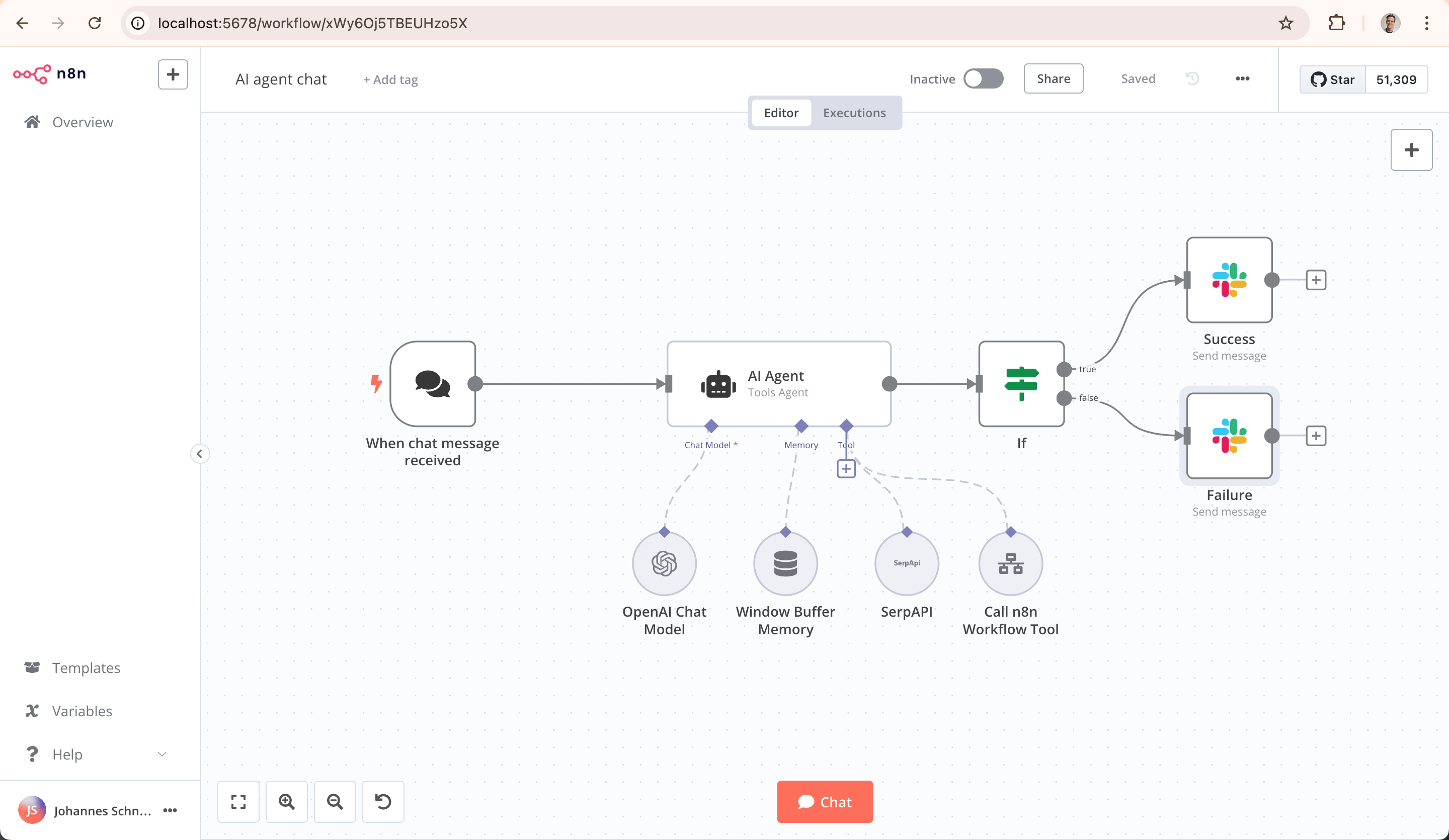
n8n is a node-based workflow automation platform. You build workflows by dragging nodes onto a visual canvas and connecting them. Each node performs one action: call an API, transform data, execute JavaScript, query a database, or invoke an AI model. Data flows from node to node, and you can inspect the exact input and output of every node at every execution.
Underlying Technology
n8n is built in TypeScript and runs on Node.js. Workflows execute as JavaScript. The AI Agent nodes are built on the LangChain JS framework, providing structured tool calling, memory, and multi-step reasoning. The platform supports MCP (Model Context Protocol) for standardized AI tool communication. Self-hosting uses Docker or npm, with PostgreSQL as the default database for execution history. From the 2.40 line the agent runtime ships inside the platform as @n8n/agents, carrying its own memory runtime alongside the LangChain nodes.
Key Technical Features
Inputs: Webhooks, schedules, manual triggers, app triggers (1500+ integrations), RSS feeds, database changes, file uploads.
Outputs: API calls, database writes, emails, Slack messages, file creation, AI-generated text, structured JSON for downstream consumption.
Integrations: 1500+ pre-built integrations including Google Workspace, Slack, GitHub, Notion, OpenAI, Anthropic, Qdrant, Pinecone, pgvector, and custom HTTP nodes for any API.
AI-Native Features
n8n stands apart from general automation tools through its deep AI integration. The platform includes 70+ AI nodes for LLMs, vector databases, memory, and tools. AI Agent nodes built on LangChain JS support tool calling, memory, and multi-step reasoning. The AI Workflow Builder accepts natural language descriptions and generates working workflows on the canvas. Intelligent model routing sends simple tasks to lightweight models and complex reasoning to powerful models, optimizing cost.
MCP (Model Context Protocol) client and server nodes enable standardized communication between AI agents and external tools. RAG support includes native integration with vector databases (Qdrant, Pinecone, pgvector). Multi-agent orchestration uses a centralized orchestrator model where one AI agent coordinates specialized sub-agents. Token usage tracking provides spend visibility at each step of the workflow.
AI workflow evaluations function as regression tests: you define expected outputs and the system detects prompt drift over time. Human-in-the-loop approval gates let you require human confirmation before any consequential AI output ships. Structured inputs and outputs control data flow to and from AI steps. You can inspect every execution: the prompt sent, the response received, and what happened next. Connect any model from OpenAI, Anthropic, Google, or open-source providers and switch without rebuilding the workflow.
Agents are now first-class artefacts in n8n. You build an agent, publish it, attach channels and schedules to it, and it runs on its own rather than only as a step inside a workflow. Agent-directed episodic memory adds a durable store: the flag_memory tool lets an agent save one note about a user, account or case, and a reflection pass drops, merges and supersedes those entries automatically as they accumulate. That revision happens during use, with no per-write decision by the person the memory describes.
The conversational surface is renamed the n8n Assistant in 2.40, and Promotions replaces the earlier Git connection CLI commands for moving work between environments. Integration breadth grows as well: Microsoft Teams gains online-meeting, chat and channel message operations, and Microsoft Dataverse becomes a core node.
Self-hosters moving from 2.39 to 2.40 have three migration items to read before upgrading: the v3 storage-directory rename, the removal of the chat hub, and the deprecation of N8N_DB_PING_TIMEOUT. The workflow publication service is also enabled by default in 2.40, which changes behaviour on an instance that already runs, and 2.40.6 authenticates instance reports with the licence certificate.
Getting Started
Installation
Three deployment options: n8n Cloud (sign up at n8n.io, no installation), self-hosted via Docker (docker run -it --rm -p 5678:5678 n8nio/n8n), or Desktop app for local development. The Community Edition is free and self-hostable under the Sustainable Use License.
First-time Configuration
1. Create an n8n account or start the Docker container. For self-hosted, set environment variables for database, encryption key, and authentication.
2. Open the workflow editor at localhost:5678 (self-hosted) or your cloud URL.
3. Add credentials for the services you want to integrate (API keys, OAuth tokens, database connections). n8n stores them encrypted.
4. Clone a template from the 12,324+ community templates or use the AI Workflow Builder to describe what you want in natural language.
First 15 Minutes Checklist
Sign up or start Docker container (2 minutes)
Open the workflow editor and explore the template library (3 minutes)
Clone a simple template (e.g., RSS to Slack notification) (2 minutes)
Configure credentials for the required services (5 minutes)
Run the workflow and inspect the execution data at each node (3 minutes)
Real Workflows
These workflows show how U365 Fellows across different institutes can use n8n to automate real tasks. Each workflow demonstrates a different CI-First benefit and connects to a U365 program.
Workflow 1: AI-Powered Customer Support Automation
Learner type: UIT fellow (Technology, AI, Data Science)
CI-First benefit: Time (8), Quality (6) - automates repetitive support triage while maintaining response quality through human approval gates
U365 program: UNOP (University 365 Operational Practicum) - real workflow deployment in a business context
Step | You Do | n8n Does |
1 | Configure webhook to receive support emails | Listens for incoming email events |
2 | Define sentiment categories and response guidelines | AI Agent analyzes sentiment and categorizes the ticket |
3 | Upload knowledge base articles to vector database | RAG retrieves relevant articles from Qdrant or pgvector |
4 | Review the drafted response | AI Agent drafts a response using retrieved context |
5 | Approve or edit the response (human-in-the-loop gate) | Waits for human approval before proceeding |
6 | Verify the CRM record was created correctly | Sends the reply email and logs the ticket to CRM |
Sample prompt: Context: I am automating first-line support triage, with a human approval gate before any reply is sent. A support email is provided below and the knowledge base is attached. Role: AI as a support triage assistant inside a supervised pipeline. I own the approval; you categorise and draft. Profile: Act as a Co-Worker and Assistant, executing one supervised step rather than managing the queue. Task: determine the sentiment (positive, neutral or negative), categorise the issue (billing, technical or general), retrieve the relevant knowledge base articles, and draft a reply that references the correct documentation. State which article supports each claim. Constraints: never send anything without my approval, and never invent a policy or a refund term. Where the knowledge base does not cover the issue, say so and leave the draft unfinished rather than guessing. Output format: the sentiment, the category, the article list with what each supports, the draft reply, and the gaps. Memory: the accepted replies and the categorisation record belong in my own operations record, because the platform keeps the run and not the decisions. UP-Context-Engineering verification: I read the drafted reply and the cited article before I approve anything, I check that the referenced article exists and is current, and I can explain the categorisation myself. Data safety: this pack carries no personal data. I do not paste a customer account record, a payment detail or another customer's ticket into it, and I keep the approval record in my own system.
Verification checklist:
Multi-Model: Run the same support email through two different LLM providers and compare sentiment analysis
External Source: Verify the knowledge base article referenced in the draft actually exists and is current
Human Review: Read the drafted response before approval - check for hallucinated policy details
CI-First Test: Time saved per ticket vs. manual response. Does the AI draft reduce your handle time?
Workflow 2: Automated Content Pipeline
Learner type: UIC fellow (Digital Communication, Marketing)
CI-First benefit: Quantity (7), Time (8) - multiplies content output through automated social media scheduling and filtering
U365 program: LIPS+CARE (Learning by Implementing Projects with Support + Context, Authenticity, Real-world Engagement) - content pipeline deployed for a real brand
Step | You Do | n8n Does |
1 | Configure RSS feed sources to monitor | Polls RSS feeds on a schedule for new articles |
2 | Define brand voice guidelines and off-brand filters | AI Agent summarizes articles and generates social media posts |
3 | Review the generated posts for brand alignment | Filters out off-brand content based on your criteria |
4 | Approve posts for scheduling | Schedules approved posts in Buffer or HubSpot |
5 | Review engagement metrics weekly | Tracks engagement metrics and stores in a dashboard |
Sample prompt: Context: I am running a supervised content pipeline: an article arrives from a monitored feed and a draft leaves for scheduling. The brand voice is professional and data-driven with no hype, and the article is provided below. Role: AI as a content pipeline assistant working to my written brand standard. I own what is published; you summarise and draft. Profile: Act as a Co-Worker and Assistant for the drafting step, executing against my brand standard. Task: summarise the article in 2 sentences, then draft a LinkedIn post of at most 200 words and a 5-tweet thread whose first line states the key insight. Match the brand voice, and flag the piece as off-brand if it is about crypto or gambling. Constraints: never invent a figure or a quote from the article; where the article is thin, say so rather than padding it. One insight per post, not a list. Output format: the 2-sentence summary, the LinkedIn post, the thread, and the off-brand flag. Memory: the accepted drafts and the reason for any rejection belong in my own content record, because the platform keeps the schedule and not the editorial decisions. UP-Context-Engineering verification: I read every draft before it is scheduled, I check each figure against the article, and I can defend why the piece was published or dropped. Data safety: this pack carries no personal data. I do not paste a customer story, an embargoed announcement or a named person's details into it, and I keep the editorial record in my own store.
Verification checklist:
Multi-Model: Generate posts with two different LLMs and compare brand voice consistency
External Source: Verify the RSS article URL is still live before scheduling the post
Human Review: Read every post before scheduling - check for factual accuracy and brand fit
CI-First Test: Compare engagement metrics (likes, clicks) for AI-generated vs. human-written posts
Workflow 3: Multi-Agent Research and Report Pipeline
Learner type: UIT fellow (Technology, AI, Data Science)
CI-First benefit: Quality (6), Skill (5) - teaches multi-agent orchestration and structured AI output handling
U365 program: ULM+EVA (University 365 Learning Method + Evaluation) - research project with structured evaluation
Step | You Do | n8n Does |
1 | Define research topic and sub-questions | Orchestrator AI agent breaks the topic into sub-tasks |
2 | Configure search API credentials (Serper, Brave) | Sub-agents search the web and collect sources |
3 | Define report structure and formatting requirements | Synthesis agent combines findings into a structured report |
4 | Review the report for accuracy and citations | Generates the report with structured inputs and outputs |
5 | Run AI evaluation against expected outputs | Evaluation node checks for prompt drift and quality regression |
Sample prompt: Context: I am running a multi-agent research pipeline and the orchestrator step must be inspectable. The research question is stated below. Role: AI as a research orchestrator inside a supervised pipeline. I own the report; you decompose and assemble. Profile: Act as an Analyst and Tester, keeping the sub-questions testable rather than broad. Task: break the question into 3 sub-questions, and for each one state the sources to search and the acceptance test for a usable answer. Then assemble the returned summaries into one structured report with an Executive Summary, Key Findings and Sources, and flag any claim that lacks a source. Constraints: never present an unsourced claim as a finding, and follow the agreed structure exactly. Where a sub-question cannot be answered from the retrieved sources, mark it open rather than filling it. Output format: the sub-questions with acceptance tests, then the structured report with an open-items list. Memory: the question set, the acceptance tests and the final report belong in my own project record, because the pipeline keeps the runs and not the reasoning. UP-Context-Engineering verification: I check every citation myself before I circulate the report, I re-read the executive summary against the findings, and I can defend each finding without the pipeline open. Data safety: this pack carries no personal data. I do not paste a client question, an unpublished dataset or a source under embargo into it, and I keep the report record in my own store.
Verification checklist:
Multi-Model: Run the orchestrator with GPT-4o and Claude Sonnet, compare task decomposition quality
External Source: Verify every citation URL returns HTTP 200 and the content matches the summary
Human Review: Read the executive summary and check for factual claims that need sourcing
CI-First Test: Does the multi-agent approach produce a better report than a single LLM call?
Strengths, Limits, AI Imposture Risk
Strengths
Dimension | Score | Evidence |
Time | 8 | Dramatic time savings once workflows are built. Handles up to 220 executions per second. 12,324+ templates mean most workflows start from a clone. |
Quantity | 7 | Multiplies output through automation pipelines. A single workflow can process thousands of events. Template library accelerates new pipeline creation. |
Quality | 6 | Reliable deterministic execution for non-AI steps. AI outputs within workflows need verification (human-in-the-loop gates and evaluations address this). |
Skill | 5 | Teaches workflow thinking and automation logic. Risk of dependency on visual builder without understanding underlying data flows. |
Limits
Steep learning curve: complex workflows with branching, loops, and AI agents require technical thinking and iteration
Setup can take days: configuring credentials, testing integrations, and debugging data flows is time-intensive upfront
AI Workflow Builder can waste credits: some users report the natural language builder producing suboptimal workflows that need manual correction
Self-hosting requires infrastructure knowledge: Docker, PostgreSQL, and environment variable configuration
Visual builder can mask understanding: users may build workflows without understanding the underlying data transformations
Token costs scale with usage: AI agent workflows consume LLM tokens at each step, requiring cost monitoring
AI Imposture Risk
Time Illusion
Risk. Medium
Evidence. Steep learning curve means initial setup takes days. Complex workflows need iteration. The time savings are real but front-loaded investment is significant.
Quantity Illusion
Risk. Low
Evidence. Deterministic workflows produce verifiable output. Each execution is inspectable. The 12,324+ templates represent real, tested workflows.
Skill Illusion
Risk. High
Evidence. Framework clause 5.2.3-a engages where an agent has episodic memory switched on, which 2.40 exposes as a per-agent setting on the Memory tab and which needs an OpenAI credential. In that configuration the agent calls flag_memory to save a durable note about you or your account, and a reflection pass drops, merges and supersedes those entries as they accumulate, with no per-write decision by the person the note describes and no screen that shows you what was stored. The clause's High threshold is reached on that configuration. The visual builder also masks the understanding of the underlying data transformations.
Overall AI Imposture Risk: Medium - one trap, Skill Illusion, is rated High under framework clause 5.2.3-a, and the overall level stays Medium because the mitigations are real and unchanged: human-in-the-loop approval gates, per-execution inspection, and AI workflow evaluations that act as regression tests. The visual builder can still create a false sense of understanding of the data flows underneath it.
U365 Co-Intelligence Rating
CI-First Profile
Primary Profile: Co-Worker and Assistant (level 2) - n8n executes workflows and automations on behalf of the user, handling repetitive tasks, data movement, and process orchestration with human oversight.
Secondary Profile: Co-Creator and Thought Partner (level 1) - the AI agent builder and multi-agent orchestration capabilities position n8n as a creative partner for designing AI workflows, RAG systems, and complex automation architectures.
CI-First Benefit Score
Time
Score. 8
Rationale. Dramatic time savings for automation once set up. Handles up to 220 executions per second. 12,324+ templates reduce build time.
Quantity
Score. 7
Rationale. Multiplies output through automation pipelines. A single workflow processes thousands of events automatically.
Quality
Score. 6
Rationale. Reliable execution for deterministic steps. AI outputs within workflows need verification (human-in-the-loop gates address this).
Skill
Score. 5
Rationale. Teaches workflow thinking and automation logic. Can create dependency on visual builder without understanding underlying code.
Overall
Score. 6.5
Rationale. (8 + 7 + 6 + 5) / 4 = 6.5. CI-First Strong. The platform delivers strong automation value with meaningful AI integration, but requires technical investment and ongoing verification of AI outputs.
Humics Protection Badge
Creativity: 0 (Neutral) - n8n does not directly impact creative thinking. It automates processes but the creative decisions remain with the human.
Critical Thinking: +1 (Protects) - Human-in-the-loop approval gates, inspection of every execution (prompt, response, what happened next), and AI workflow evaluations that detect prompt drift actively protect critical thinking by forcing human review of AI decisions.
Social Authenticity: 0 (Neutral) - Automation does not directly affect how users present themselves socially.
Score: +1. Humics-Neutral. The platform's human-in-the-loop design and execution inspection provide a slight protective effect on critical thinking, but the overall impact is neutral.
Superhuman Usage Guidance
When to invite n8n: Repetitive multi-step processes across multiple SaaS apps, data pipeline construction, AI agent orchestration for business processes, RAG system prototyping, and any workflow that requires human approval gates for AI decisions.
When to keep n8n out: One-off tasks that do not recur, simple single-API calls (just write a script), workflows requiring real-time sub-millisecond latency, and any process where the AI agent would make consequential decisions without human review.
U365 method integration: In LIPS+CARE, n8n serves as the implementation platform for real-world automation projects. In ULM+EVA, AI workflow evaluations provide the assessment framework. In UNOP, students deploy production workflows for real businesses.
Over-delegation warning: The visual builder makes it easy to create complex workflows without understanding the underlying data transformations. If you cannot explain what each node does and why it is there, you have over-delegated. The AI Workflow Builder can generate workflows that look correct but contain logic errors. Always review generated workflows node by node before activating them in production.
What Users Say
Aggregate Rating Table
Platform | Rating | Reviews | Key Themes |
G2 | 4.7 / 5 | 316 | 275 of 316 reviews at 5 stars, 33 at 4 stars. Praised for flexibility, AI integration, self-hosting |
Product Hunt | Award winner | 74 | Best for Developers Award for AI Workflow Automation, Winter 2026 |
Trustpilot | Mixed | N/A | Some negative reviews about AI builder wasting credits; positive about security |
Generally positive | N/A | "n8n is the GOAT", "n8n is a beast for automation", steep learning curve acknowledged | |
GitHub | 209,184 stars | 61,333 forks | Active community, Sustainable Use License, last push 2026-10-31 |
What Users Praise
Flexibility and control: users value the ability to write custom JavaScript in code nodes and self-host on their own infrastructure
AI integration depth: the LangChain-powered AI agent nodes, model routing, and MCP support go far beyond basic LLM API calls
Template library: 12,324+ community templates mean most use cases have a starting point
Cost transparency: token usage tracking at each step provides spend visibility that other platforms lack
Fair-code license: the Sustainable Use License keeps source code available while allowing commercial use
What Users Complain About
Steep learning curve: the visual builder has many concepts (nodes, connections, expressions, data transformations) that take time to master
AI Workflow Builder credit waste: some users report the natural language builder producing suboptimal workflows that waste API credits
Self-hosting complexity: Docker and PostgreSQL setup requires DevOps knowledge that not all users have
Pricing at scale: the Business tier at EUR 667/mo is expensive for small teams that exceed the Pro plan limits
Sentiment Summary
The review records positive qualitative feedback from developer communities alongside recurring concerns about the learning curve, AI builder credit consumption, and enterprise pricing. G2 rates n8n 4.7 out of 5 from 316 reviews, read on 2026-10-09; the rating has moved within the same band as the review count has grown.
U365 Editorial Note
The positive sentiment aligns with the CI-First Benefit Score of 6.5 (Strong). Users confirm the time savings (Time: 8) and output multiplication (Quantity: 7) that the scoring reflects. The complaints about the learning curve and AI builder credit waste are consistent with the AI Imposture Risk assessment (Medium, particularly the Time Illusion component). The platform's human-in-the-loop design and execution inspection address the critical thinking protection that earns the Humics-Neutral badge. Case studies from Huel (1,000 hours saved) and Vodafone (GBP 2.2 Million saved) provide enterprise validation.
Comparison and Alternatives
n8n occupies a unique position: more technical than Zapier, more AI-native than Make, more visual than Temporal, and more fair-code than any commercial alternative. Here is how it compares to the main alternatives.
Alternative | Best For | Where n8n is Better | Where n8n is Worse |
Zapier | Choose if you want simplicity and no-code, but limited complex logic | Self-hosting, custom code, AI agents, cost at scale, fair-code license | Ease of use for non-technical users, app coverage breadth |
Make (Integromat) | Choose if you want visual building with moderate complexity, but less AI-native | AI agent nodes, LangChain integration, MCP support, self-hosting, fair-code | Simpler visual builder, lower learning curve for basic workflows |
Microsoft Power Automate | Choose if you work mainly inside Microsoft 365, but less flexible | Cross-platform, AI-native, self-hosting, custom code nodes, fair-code | Deep Microsoft 365 integration, enterprise governance, RPA |
Activepieces | Choose if you want a fully open-source alternative, but smaller community | Larger community, 12,324+ templates, AI agent nodes, more integrations, commercial support | Fully open-source (MIT vs Sustainable Use License), simpler for basic needs |
Temporal | Choose if you need code-first durable execution, but no visual builder | Visual canvas, non-technical accessibility, AI agent nodes, template library | Code-first control, durability guarantees, performance at extreme scale |
Verdict and Next Steps
n8n earns a CI-First Benefit Score of 6.5 (Strong) with a Humics-Neutral protection badge and Medium AI Imposture Risk. It is the best workflow automation platform for technical teams who need AI-native capabilities, self-hosting, and visual workflow building in one tool. The 1500+ integrations, 12,324+ templates, and LangChain-powered AI agent nodes make it a powerful co-intelligence tool for UIT and UIB fellows building real automation pipelines.
Who should adopt: Technical teams and developers who need workflow automation with AI integration. UIT fellows building AI agent pipelines. UIB fellows automating business processes. UIC fellows creating content pipelines. Anyone who values execution inspection and human-in-the-loop control over AI decisions.
When: Now. The platform is mature (209,184 GitHub stars), actively maintained (last push 2026-10-31), and the AI capabilities are production-ready with LangChain integration, MCP support, and workflow evaluations.
For what: Automating repetitive business processes, building AI agent pipelines with RAG, multi-agent orchestration, content automation, and any workflow where you need human approval gates for AI decisions.
UP-Context-Engineering Prompt Pack
Prompt 1 (Workflow Design): Context: I am designing an automation before anything is built: the task, the applications and data sources it touches, and the volume. Role: AI as a workflow design assistant working to my stated constraints. I own the design decision; you interrogate the brief. Profile: Act as a Co-Worker and Assistant for the design pass, structuring the work rather than reassuring me. Task: ask me the questions I have not answered, then state the nodes I need, the optimal workflow structure, and where error handling and retry logic belong. Then name the failure modes I have not thought about. Constraints: do not recommend a build order before the failure modes are named; keep every constraint I stated and mark anything I left open. Never invent an application capability. Output format: the unanswered questions first, then the node list, the structure with error paths marked, and the failure modes. Memory: the approved design belongs in my own project record, because the platform keeps the run history and not the reasoning. UP-Context-Engineering verification: I walk the design against the real process before anything is built, I name who reviews failures, and I can explain each step's purpose without the design conversation open. Data safety: this pack carries no personal data. I do not paste credentials, a customer record or an internal system diagram into it, and I keep the approved design in my own store.
Prompt 2 (AI Agent Configuration): Context: I am configuring an AI agent step inside a workflow: what the agent should do, the tools and data it may reach, and the consequential action it must not take alone. Role: AI as an agent configuration assistant working to my stated boundary. I own the boundary; you translate it into settings. Profile: Act as an Analyst and Tester, testing the configuration against the boundary rather than enabling everything. Task: tell me how to configure the agent node, its memory and its tools for this task; where a human approval gate belongs before the consequential action; and the settings in the tool that implement each part. Constraints: approval off is a decision, not a default: state what would run unattended if I leave it off. Never treat a read-only tool as harmless without saying what it reads. Output format: the node, memory and tool settings with reasons, the gate placement, and the risks the configuration does not cover. Memory: the boundary, the gate and the owner belong in my own record, because the platform keeps what the agent ran and not what I decided. UP-Context-Engineering verification: I decide the boundary myself rather than accepting a recommendation, I check each tool's access against the boundary before I connect it, and I name the person who reads the agent's activity. Data safety: this pack carries no personal data. I do not paste credentials, customer records or account identifiers into it, and I keep the configuration record in my own store.
Prompt 3 (Cost and Quality Optimization): Context: my workflow consumes more tokens than I expect, and I have the current workflow and the consumption figures to work from. Role: AI as a cost and quality analyst for the workflow. I own the trade-off; you show the options. Profile: Act as an Analyst and Tester, arguing from the consumption figures rather than from general advice. Task: say which steps could use a lighter model, how to set up deliberate model routing, and how to run an evaluation that detects prompt drift after a change. Then state what each change would cost in quality. Constraints: never present a saving without the risk it carries; where a step's consumption is unpredictable from the figures, say so. Do not suggest removing a verification step to save tokens. Output format: the per-step options with savings and risks, the routing plan, and the drift test with its pass condition. Memory: the accepted routing plan and the evaluation result belong in my own record, because the platform keeps the runs and not the reasoning. UP-Context-Engineering verification: I check the savings estimate against my own consumption figures before I change anything, I run the drift test myself, and I can explain why each step kept its model. Data safety: this pack carries no personal data. I do not paste an invoice, a call log or a customer record into it, and I keep the cost record in my own store.
U365's Recommendations to Learn More
We have curated the best resources for learning n8n, with a focus on AI agent building and workflow automation. Every link has been verified as of 2026-09-25. We prioritize content that teaches something the post itself does not cover.
Official learning resources
Video tutorials and channels
n8n Automation Tutorial 2026: Complete Beginner's Guide (YouTube)
Written tutorials and deep-dive articles
Community and social
Resources on X
Dedicated X channels:
X posts with video content:
We curate resources by content quality, not source type. Individual creators and community experts are welcome when their content is substantial, teaches something the post itself does not, and matches the current tool version.
CI-First Evaluation Summary Card
Field | Result |
Tool | n8n (n8n.io) |
Vendor | n8n GmbH, Berlin, Germany |
Date | 2026-10-31 |
Version reviewed | 2.45.7, self-hosted npm |
CI-First Benefit Score | 6.5 / 10 |
Band | CI-First Strong |
Time | 8 |
Quantity | 7 |
Quality | 6 |
Skill | 5 |
Humics Protection Score | +1 of +3 |
Humics Badge | Humics-Neutral |
Humics: Creativity | 0, neutral |
Humics: Critical Thinking | +1, protects |
Humics: Social Authenticity | 0, neutral |
AI Imposture Risk overall | Medium |
Trap: Time Illusion | Medium |
Trap: Quantity Illusion | Low |
Trap: Skill Illusion | High |
CI-First Profile | Primary Co-Worker and Assistant (level 2); secondary Co-Creator and Thought Partner (level 1) |
Collaboration Mode | Centaur |
Review Status | Active (updated) |
Last tested | 2026-10-31 |
Clause 5.2.3-a, agent-authored procedural memory | Applies. n8n 2.40 ships agent-authored episodic memory (flag_memory) with automatic drop, merge and supersede and no per-write human decision, which reaches the clause's High threshold. Skill Illusion is recorded High |
Clause 4.2-a, agent-mediated conversation | Null. Shared integration threads keep the agent a named participant on every turn, so agent-authored text is not presented as the user's own voice |
Clause 7.5, team-level rooms | Applies, answer unchanged. Shared threads and sub-agents make a multi-agent room possible, and the clause's required default is Centaur, which is already recorded |
Section 7c finding | None. This review records no separate governance finding |
Institutes | UIT High (primary), UIB Medium, UIC Medium, UID Low |
Framework | CI-First Evaluation Framework v1.2 |
Re-check trigger | Any release that changes agent memory, Promotions or the storage-directory migration, or a new minor line becoming stable |
Glossary
CI-First Benefit Score
The CI-First Benefit Score rates how much a tool genuinely amplifies human capability rather than creating the illusion of productivity. It combines four dimensions: Time (net time saved after accounting for setup, prompting, and verification), Quantity (usable output volume increase, verified not just surface volume), Quality (durable quality improvement, not surface polish), and Skill (genuine lasting capability built, not dependency created). Each dimension is scored 0 to 10. The overall score is the average of the four dimensions. The interpretation bands are: 0 to 2.0 CI-First Negative, 2.1 to 4.0 CI-First Neutral, 4.1 to 6.0 CI-First Positive, 6.1 to 8.0 CI-First Strong, 8.1 to 10.0 CI-First Transformative.
CI-First Profile
The CI-First Profile classifies how a tool collaborates with its user on a 5-level scale of AI autonomy. (level 1) Co-Creator and Thought Partner: the tool creates original work alongside the user. (level 2) Co-Worker and Assistant: the tool executes tasks on behalf of the user with oversight. (level 3) Professor, Coach and Tutor: the tool teaches and guides the user. (level 4) Analyst and Tester: the tool evaluates and tests the user's work. (level 5) Challenger and Devil's Advocate: the tool pushes back on the user's assumptions. Lower level numbers indicate higher AI autonomy.
Humics Protection Badge
The Humics Protection Badge evaluates whether a tool protects or erodes the qualities that make us human: Creativity, Critical Thinking, and Social Authenticity. Each dimension is scored +1 (protects), 0 (neutral), or -1 (erodes). The sum ranges from -3 to +3. A score of +2 to +3 earns the Humics-Friendly badge, -1 to +1 earns Humics-Neutral, and -2 to -3 earns Humics-Risky. The badge helps users understand whether a tool supports their human judgment or quietly replaces it.
AI Imposture Risk
AI Imposture Risk assesses whether a tool creates the illusion of productivity without delivering real value. It evaluates three dimensions: Time Illusion (does the tool seem fast but actually slow you down with setup and corrections?), Quantity Illusion (does the tool produce high volume but low quality output?), and Skill Illusion (does the tool create the appearance of competence without building real understanding?). Each dimension is rated Low, Medium, or High. The overall risk is Low if all dimensions are Low, Medium if 1 to 2 are Medium or 1 is High with mitigations, and High if 2 or more dimensions are High.
User Sentiment
User Sentiment aggregates real user reviews from multiple platforms (G2, Product Hunt, Trustpilot, Reddit, App Store, Google Play, GitHub) to provide a balanced view of how the tool performs in practice. We collect ratings, review counts, and qualitative themes (what users praise and what they complain about) to triangulate the tool's real-world performance against the CI-First evaluation scores. User sentiment is one signal among many: strong ratings do not override a low CI-First score, and weak ratings do not override a high one, but significant divergence between sentiment and scores warrants investigation.
Review Status
Review Status records the current standing of the tool at the time of the last test. Active: the tool is current and recommended. Active (updated): recently re-checked and the content was refreshed. Changed: a re-check trigger fired and an update is pending, so read the review with that in mind. Risky: the tool has significant unresolved issues, or it has been clearly surpassed by newer alternatives. Use it with caution and read the Limits section. Retired: the tool still works but is no longer recommended. Deprecated: the tool has been shut down or fundamentally changed. Retired and Deprecated posts include a Migration Path section.




Comments