
AI Content Generation: Beyond ChatGPT

Updated: Oct 8


UIC University 365 Institute of Communication
Series Content Strategy Series | Level Basic (Free)
Duration 25 minutes | Access Free
Digital Communication, Marketing, Branding, Content Strategy, Media Studies

UNOP Sound (University 365 Neuroscience Oriented Pedagogy)
Take five minutes to prepare your brain. Play the isochronous tone track (40Hz gamma frequency) with your eyes closed. Gamma-frequency tones before a learning session raise attention and make the material easier to absorb.
[Audio player: UNOP Pre-Lecture Isochrone (40Hz, 5 minutes)]
In this Lecture

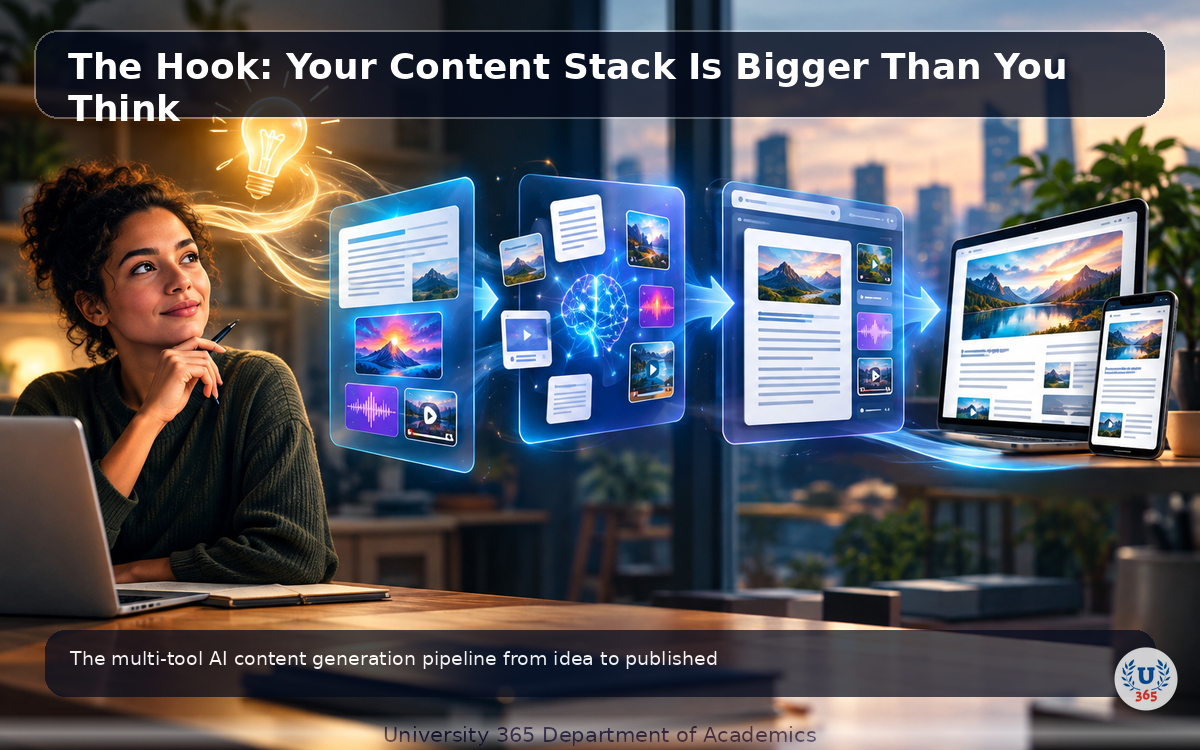
The Hook: Your Content Stack Is Bigger Than You Think
You open ChatGPT. You type a prompt. You get text. That is the extent of AI content generation for most people.
But behind the teams producing 200 articles per month, managing 15 social channels, and personalizing email campaigns for 50,000 subscribers, there is an entire ecosystem of specialized AI tools. Each tool does one job better than a generalist chatbot. Together, they form a pipeline that no single tool can match.
In the next 25 minutes, you will learn what these tools are, how they differ, and how to combine them into a content pipeline that maintains brand voice while scaling output 10x. This is not theory. Every tool described here is in production use at communication teams in 2026.
Step 1: The Content Generation Landscape in 2026
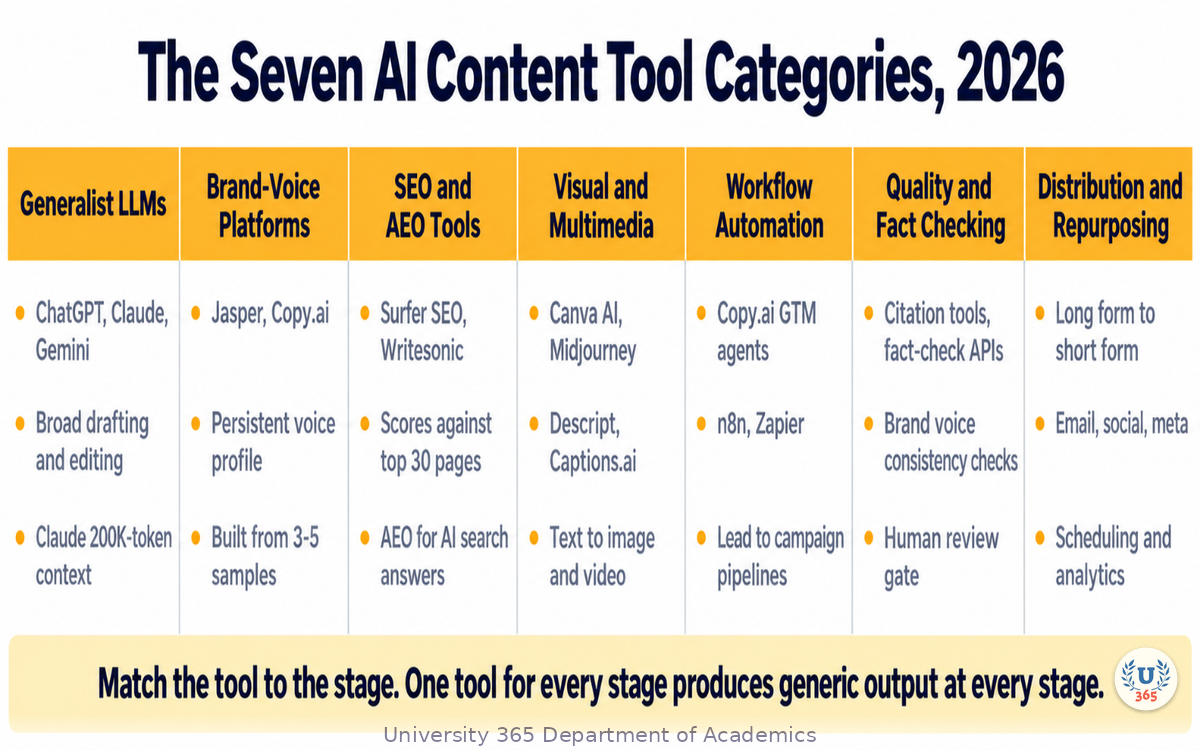
The AI content generation market has moved far beyond the "ask ChatGPT and paste the result" phase. In 2026, the landscape divides into five functional categories.
Generalist LLMs
ChatGPT (OpenAI), Claude (Anthropic), and Gemini (Google) are general-purpose language models. They excel at brainstorming, drafting, answering questions, and adapting to any task. Their weakness is specificity: they produce competent but generic output unless you invest significant effort in prompting and context.
Claude stands out for long-form content. Its 200,000-token context window lets you feed it entire brand guidelines, competitor analysis documents, and style guides in a single prompt. ChatGPT remains the most versatile for short-form and multi-turn refinement. Gemini integrates with Google Workspace, making it useful for teams embedded in that ecosystem.
What each one is actually good at in 2026. The three have converged on capability but not on character. ChatGPT is the strongest at following a long, structured instruction and at reasoning through a research question in steps. Claude remains the best choice for long-form work: the context window takes an entire brand guide, three competitor articles and a transcript in one pass, and it holds formatting instructions more reliably than the others. Gemini is strongest when the work sits inside Google's own surfaces, reading a document in Workspace or a video on YouTube without an export step.
Where they are weak. None of the three knows your brand voice unless you tell it, every time. None of them can verify a claim. None of them will notice that your last four posts all opened the same way. They are generalists by design, and a generalist has no opinion about your standards.
The practical consequence. Use a generalist model for every stage that requires judgment over language, and for nothing that requires a library of your own rules. The moment you find yourself pasting the same 400-word voice guide into a new chat for the fourth time this week, you have found the boundary where a specialist tool earns its subscription.
Brand-Voice Platforms
Jasper and Copy.ai are built specifically for marketing teams. Their core differentiator is brand voice training: you upload examples of your company's content, and the platform learns your tone, terminology, and style. Every output thereafter matches your brand without manual prompting.
Jasper's Brand Voice feature creates a persistent voice profile from 3-5 writing samples. Copy.ai supports multiple AI models (OpenAI, Anthropic, Gemini, Perplexity) so you are not locked into one backend. Both platforms include workflow templates for common content types: blog posts, ad copy, social media captions, email sequences.
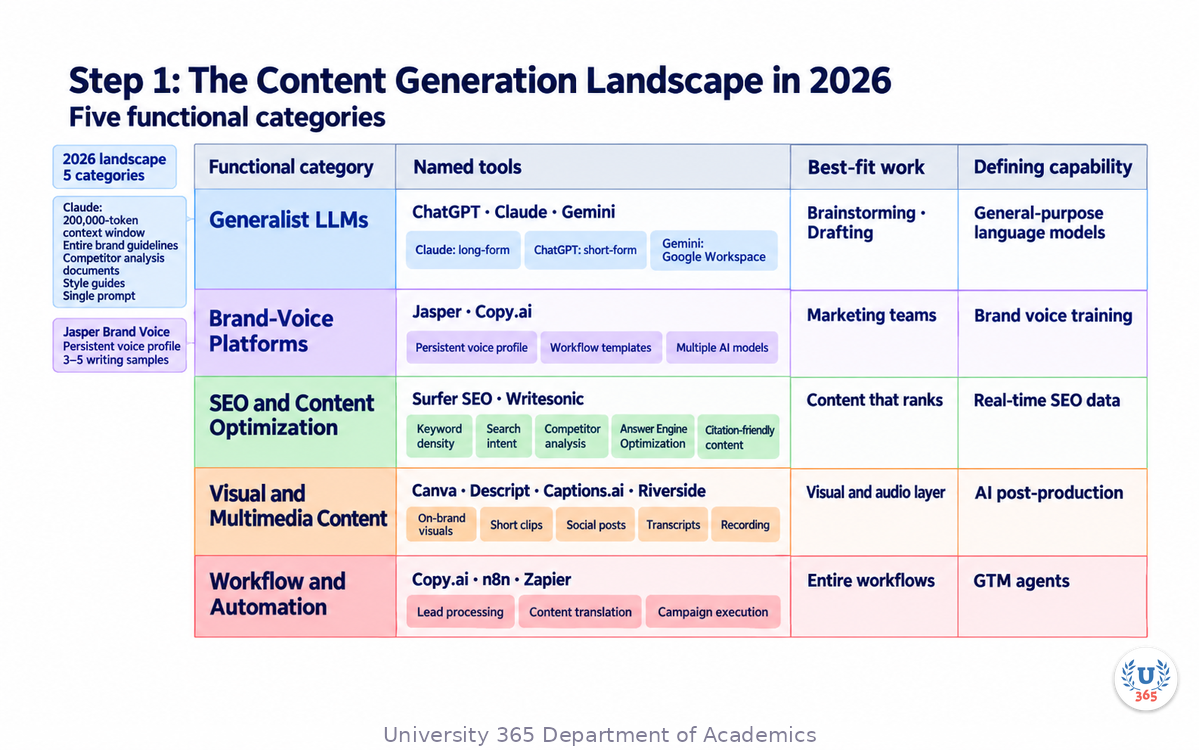
SEO and Content Optimization
Surfer SEO and Writesonic focus on content that ranks. They combine AI generation with real-time SEO data: keyword density, search intent, competitor analysis. The output is structured to satisfy both human readers and search engine algorithms.
A newer category addresses Answer Engine Optimization (AEO): optimizing content for AI search engines like Perplexity and ChatGPT Search, which synthesize answers from multiple sources rather than returning link lists. This requires structured, citation-friendly content that AI search engines can parse and quote.
Visual and Multimedia Content
Canva's AI features generate on-brand visuals from text prompts. Descript and Captions.ai turn long-form video and podcasts into short clips, social posts, and transcripts. Riverside combines recording and AI post-production. These tools handle the visual and audio layer that text-only LLMs cannot produce.
Workflow and Automation
Copy.ai's GTM agents automate entire workflows: lead processing, content translation, campaign execution. n8n and Zapier connect AI tools to CRM systems, social schedulers, and analytics platforms. The workflow layer is where individual tools become a pipeline.
Step 2: Specialized Tools for Specialized Jobs
Using ChatGPT for every content task is like using a Swiss Army knife for every job in a kitchen. It works, but a chef with proper tools will outproduce you 5 to 1.
Long-Form Articles and Reports
Best choice: Claude. The 200K context window lets Claude hold an entire brand style guide, three competitor articles, and a detailed outline simultaneously. It maintains consistency across 3,000-word articles better than ChatGPT, which tends to drift in tone over long outputs.
Claude also follows complex formatting instructions more reliably. If you need numbered sections, specific heading styles, and defined word counts, Claude adheres to structural constraints better than alternatives.
High-Volume Marketing Copy
Best choice: Jasper or Copy.ai. When you need 50 ad variations, 20 email subject lines, and 15 social media captions in one session, a brand-voice platform produces consistent output faster than a generalist LLM. The templates pre-structure the output, and the brand voice profile ensures every piece sounds like your company.
Jasper's Campaigns feature generates a coordinated set of assets (blog post, social posts, ad copy, email) from a single brief. Copy.ai's workflow builder chains multiple steps: research, draft, edit, format, export.
SEO-Optimized Content
Best choice: Surfer SEO paired with an LLM. Surfer analyzes the top 30 ranking pages for your target keyword, extracts the common content patterns (word count, heading structure, keyword usage, topic coverage), and scores your draft against them in real time. You draft with Claude or Jasper, then optimize with Surfer until the content score reaches 75+.
Social Media Content
Best choice: Copy.ai or Canva AI. Copy.ai generates platform-specific copy (LinkedIn tone vs. Twitter tone vs. Instagram caption). Canva AI produces the visual component: on-brand graphics, carousel layouts, story templates. Together, they cover the text-plus-visual requirement of every major social platform.
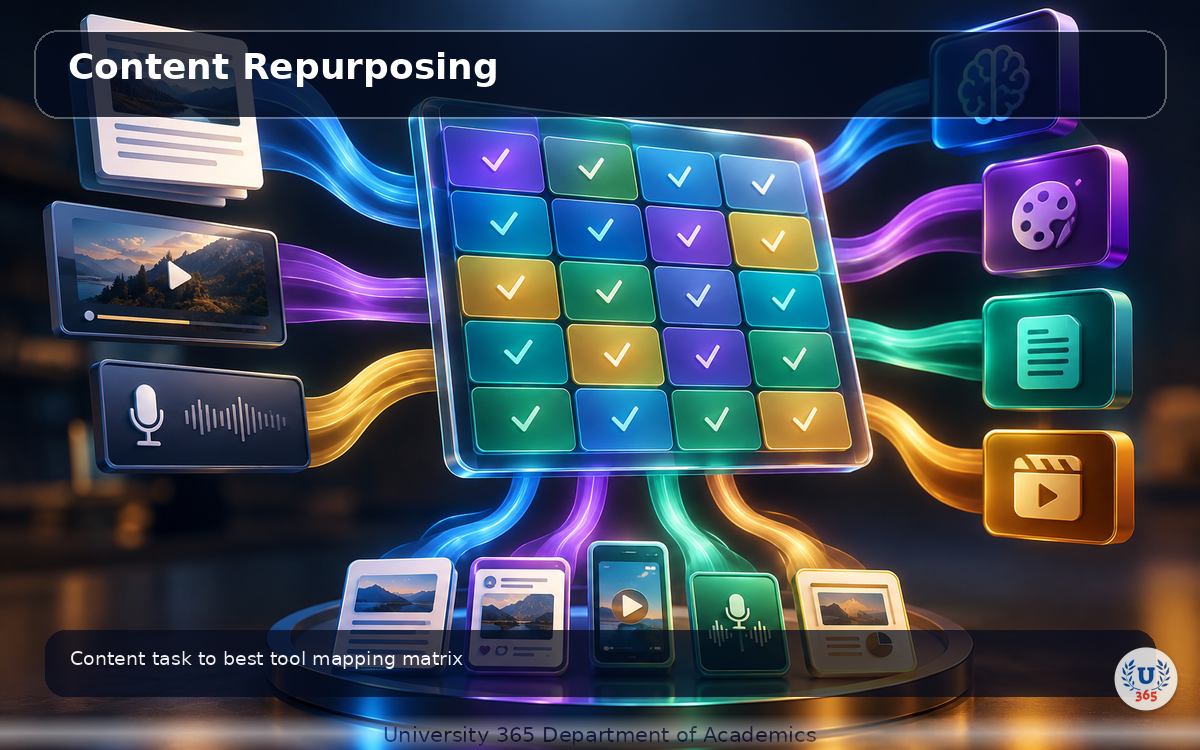
Content Repurposing
Best choice: Descript or Captions.ai. Feed a 45-minute podcast or webinar into Descript, and it produces a transcript, chapter markers, highlight clips, social media posts, and a blog post summary. Captions.ai specializes in short-form video: it takes a long video and generates 15-60 second clips optimized for TikTok, Reels, and Shorts.
Step 3: Building a Multi-Tool Content Pipeline
A content pipeline is a sequence of tools, each handling one stage of content production. The output of one tool becomes the input of the next. Here is a production pipeline used by communication teams in 2026.
Stage 1: Research and Ideation
Start with a generalist LLM (Claude or ChatGPT) to brainstorm topics, analyze search trends, and identify content gaps. Feed it your content calendar, competitor URLs, and audience personas. The output is a list of validated topics with search volume estimates and angle recommendations.
Stage 2: Brief Generation
Use the same LLM to create a detailed content brief: target keyword, search intent, outline with H2/H3 structure, word count target, internal linking suggestions, and brand voice notes. This brief becomes the input for the drafting stage.
Stage 3: Drafting
Route the brief to the tool best suited for the content type:
Long-form article: Claude with the brief and brand guidelines in context
Marketing copy batch: Jasper with the Brand Voice profile active
SEO content: Jasper or Claude for the draft, Surfer SEO for optimization
Stage 4: Visual Asset Creation
Generate images, infographics, and social media graphics with Canva AI or Midjourney. For data visualizations, use AI-assisted chart tools. Every visual must pass the brand kit check: correct colors, fonts, and logo placement.
Stage 5: Editing and Quality Control
Run the draft through an AI editing pass (Claude with a style guide prompt) for grammar, tone consistency, and factual claims. Then a human editor reviews for accuracy, brand alignment, and structural logic. This is the CI-First checkpoint: the human validates the AI output before it advances.
Stage 6: Distribution and Repurposing
Publish the primary content (blog post, article). Then use Descript or Captions.ai to create derivative assets: social media clips, pull quotes, carousel posts, email teasers. Schedule across channels with a social media management tool.
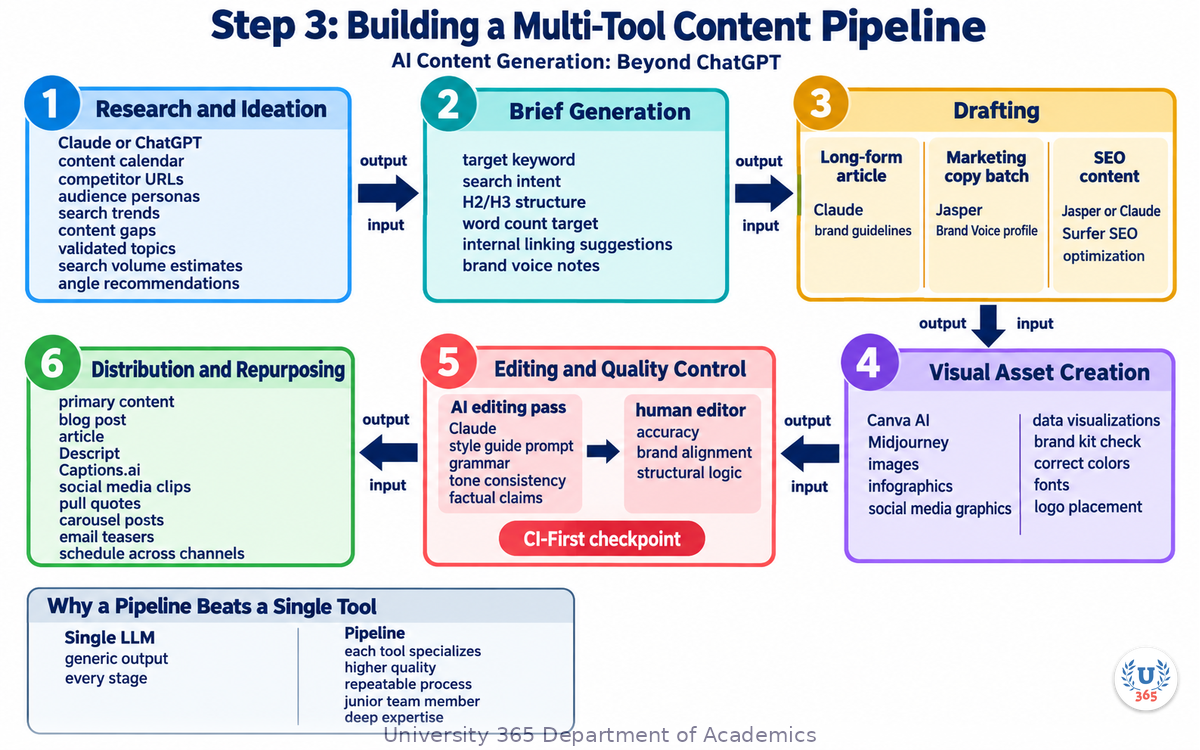
Why a Pipeline Beats a Single Tool
A single LLM asked to "write a blog post and create social media content" produces generic output at every stage. A pipeline where each tool specializes in its stage produces higher quality at each step. The pipeline also creates a repeatable process: once configured, a junior team member can execute it without deep expertise in each tool.
Step 4: Brand Voice Training and Consistency
Brand voice is the most common failure point in AI-generated content. Without training, every AI tool defaults to a generic, helpful, slightly corporate tone that sounds like every other AI-generated content on the internet.
What Brand Voice Training Does
Brand voice training teaches the AI model your company's specific communication style. You provide 3-10 examples of your best content: blog posts, emails, social media captions. The platform analyzes patterns in word choice, sentence length, tone, formatting, and vocabulary. It creates a voice profile that guides all future generation.
Jasper Brand Voice
Jasper's Brand Voice feature creates a voice profile from writing samples. The profile captures:
Tone (formal, conversational, authoritative, playful)
Vocabulary preferences (industry terms, avoided words, preferred phrases)
Sentence structure (short and punchy, long and descriptive, mixed)
Formatting conventions (bullet points, numbered lists, paragraph length)
Once trained, every Jasper output automatically applies the voice profile. You can create multiple profiles for different brands or sub-brands.
Claude Context Window Approach
Claude does not have a formal "brand voice" feature, but its 200K context window achieves the same result through prompting. You paste your brand guidelines, 3-5 writing examples, and a voice description into the conversation. Claude maintains this context across the entire session, producing output that matches your voice.
The advantage: no platform subscription. The disadvantage: you must include the context in every new conversation. For teams, Jasper's persistent voice profile is more efficient.
Multi-Tool Voice Consistency
When using multiple tools in a pipeline, voice drift is the biggest risk. Claude's draft may sound different from Jasper's social posts, which may sound different from Copy.ai's email copy.
The solution is a shared voice document: a 1-page brand voice guide that you paste into every tool. It specifies:
Three adjectives that describe the tone (e.g., "direct, expert, practical")
Two sentences to avoid (anti-examples)
Two sentences that exemplify the voice (positive examples)
Preferred and banned words (5 each)
Paragraph length target (2-4 sentences)
This 1-page guide, applied consistently across tools, reduces voice drift significantly.
Step 5: Quality Control: When AI Gets It Wrong
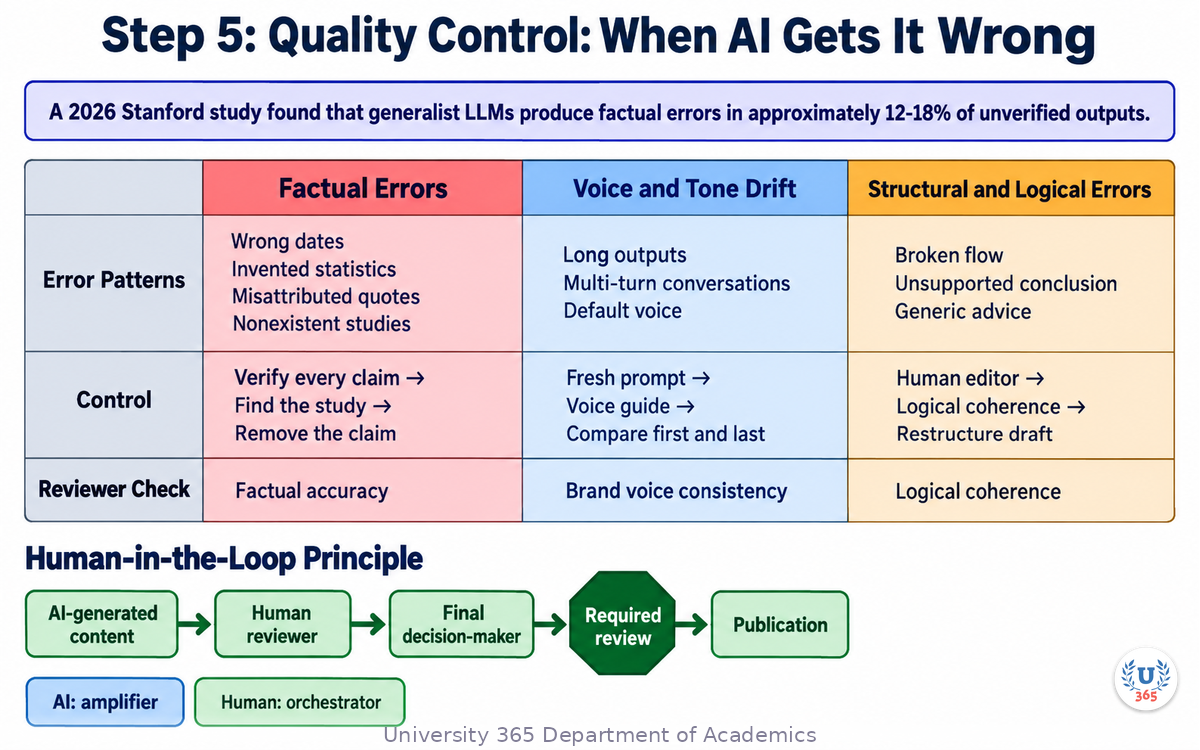
AI content tools produce confident, fluent, grammatically perfect text. That fluency masks three categories of error that quality control must catch.
Factual Errors
LLMs hallucinate facts, statistics, quotes, and sources. A 2026 Stanford study found that generalist LLMs produce factual errors in approximately 12-18% of unverified outputs. The errors are not random: they tend to appear in specific patterns (wrong dates, invented statistics, misattributed quotes, nonexistent studies).
Control: Every factual claim must have a verifiable source. If the AI says "according to a 2025 Nielsen study," find that study or remove the claim. Use a fact-checking pass as a dedicated pipeline stage, not an afterthought.
Voice and Tone Drift
AI tools drift toward their default voice over long outputs or multi-turn conversations. The first paragraph may match your brand voice perfectly. By paragraph 10, the tone has shifted toward the AI's default style.
Control: Break long content into sections, each generated in a fresh prompt with the voice guide. Run a consistency check: compare the first and last paragraphs. If the tone shifted, regenerate the later sections.
Structural and Logical Errors
AI tools sometimes produce content that is structurally sound but logically broken. The sections do not flow into each other. The conclusion does not follow from the evidence. The practical advice is generic and non-actionable.
Control: A human editor reviews the full draft for logical coherence, not just grammar. The key question: "Does each section build on the previous one?" If sections read as independent units rather than a connected argument, the draft needs restructuring.
The Human-in-the-Loop Principle
Every piece of AI-generated content that represents your brand must pass through a human reviewer before publication. The reviewer checks three things: factual accuracy, brand voice consistency, and logical coherence. This is not optional. Publishing unreviewed AI content risks brand damage, legal liability (for factual claims), and audience trust erosion.
This is the CI-First principle applied to content: the human is the orchestrator and final decision-maker. The AI is the amplifier that increases output volume. The human maintains quality control.
Step 6: The CI-First Content Workflow
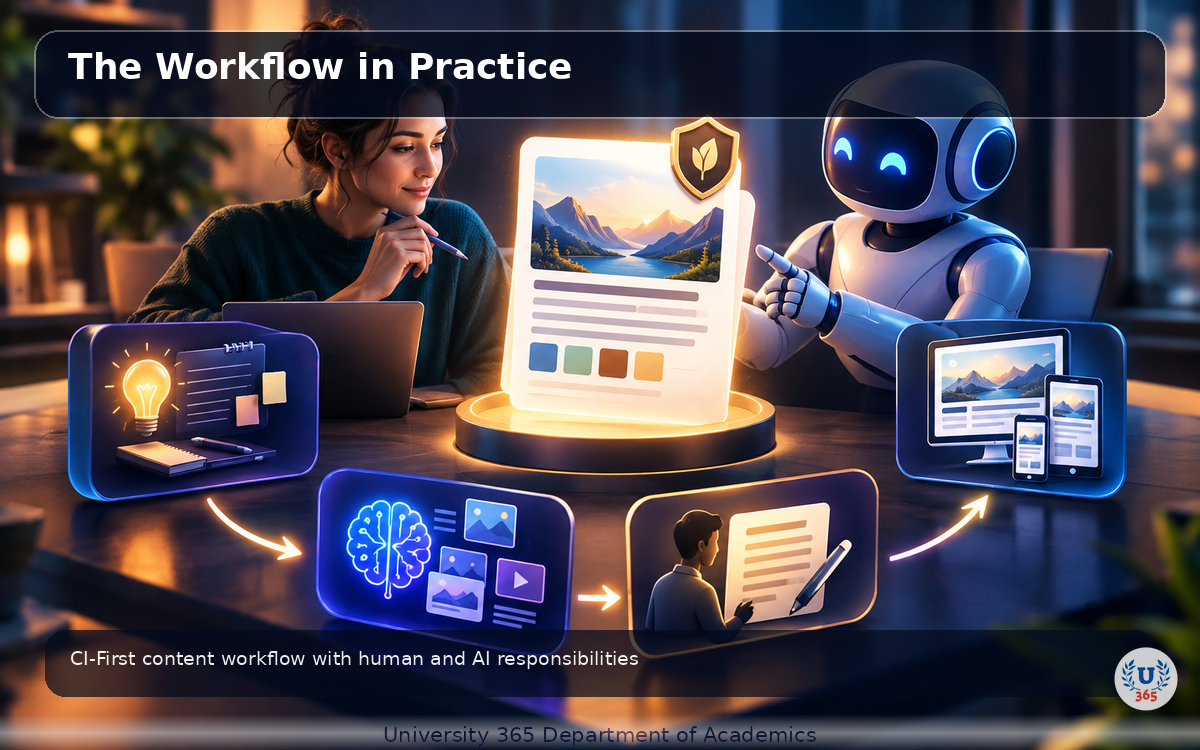
CI-First means Co-Intelligence First: the human is the ruler and orchestrator, the AI is the amplifier. In content production, this translates to a specific workflow.
The Human Decides
The human determines:
What content to create (strategy, topics, priorities)
What angle and message to take (positioning, narrative)
What brand voice to use (tone, style, vocabulary)
What facts and sources are acceptable (verification)
What quality bar to enforce (editing standards)
The AI Amplifies
The AI handles:
Draft generation at scale (volume, speed)
Format adaptation (blog post to social posts to email)
Research assistance (finding sources, summarizing data)
Variation generation (10 headline options, 5 intro paragraphs)
Repurposing (long-form to short-form, text to visual concepts)
The Workflow in Practice
Human writes the brief (10 minutes): topic, angle, outline, voice notes
AI generates the first draft (3 minutes): Claude or Jasper produces 1,500 words from the brief
Human edits for logic and accuracy (15 minutes): check facts, fix structure, add expertise
AI generates derivative content (5 minutes): social posts, email teaser, meta description from the edited draft
Human reviews and approves (5 minutes): final check on all assets before scheduling
Total time per piece: 38 minutes. Without AI, the same output takes 3-4 hours. The AI does not replace the human. It compresses the production timeline by 5x while the human maintains editorial control at every decision point.
Step 7: Cost, Speed, and Scale Comparison
The practical case for a multi-tool pipeline comes down to three metrics: cost per piece, time per piece, and output volume per month.
Cost Comparison
Approach | Tools | Monthly Cost | Output/Month | Cost/Piece |
Manual only | None | $0 | 8-12 pieces | $0 (labor-intensive) |
ChatGPT only | ChatGPT Plus | $20 | 20-30 pieces | $0.67-$1.00 |
Claude only | Claude Pro | $20 | 25-35 pieces | $0.57-$0.80 |
Jasper pipeline | Jasper + Surfer | $100-150 | 60-80 pieces | $1.25-$2.50 |
Full pipeline | Claude + Jasper + Canva + Descript | $200-300 | 150-200 pieces | $1.00-$2.00 |
The full pipeline has higher monthly cost but lower cost per piece at scale. The breaking point is approximately 40 pieces per month: below that, a single LLM is more cost-effective. Above that, the pipeline pays for itself.
Speed Comparison
A trained content team using the full pipeline produces a complete content asset (1,500-word article, 5 social posts, 1 email, 1 infographic) in 38-45 minutes. The same output without AI takes 3-4 hours. The speed gain comes from the AI handling draft generation and repurposing, not from skipping the human stages.
Scale Comparison
A 3-person content team using manual processes produces 30-40 pieces per month. The same team with a full AI pipeline produces 150-200 pieces. The 5x gain is not because the team works 5x faster. It is because the AI eliminates the blank-page problem, handles format conversion, and enables parallel production.
The bottleneck shifts from content creation to content strategy and quality control. This is the correct outcome: the human mind spends time on high-value decisions (what to say, how to position it) rather than low-value execution (typing 1,500 words).
Step 8: Auditing an AI Content Pipeline in One Afternoon
By now you can build a multi-tool pipeline. The harder skill is knowing whether the pipeline you already run is doing what you think it does. Teams rarely set out to produce weak content. They inherit a stack one subscription at a time, and nobody ever writes down which stage is doing which job. The result is a workflow that costs $250 a month and produces drafts that still need a full rewrite.
This section gives you a four-hour audit you can run yourself, on your own content, before you buy anything else.
The Four Questions the Audit Answers
An audit is not a review of your last ten posts. It is a measurement of four specific things:
Stage ownership. Which tool produces which artifact, and is that the tool's actual strength?
Rework rate. What proportion of AI output survives to publication unchanged?
Recovery time. When a piece fails review, how long does the fix take?
Voice distance. How far does the published copy sit from your own stated voice?
You can answer all four in an afternoon with the content you already published last quarter.
Hour 1: Build the Stage Map
Take your last twenty published pieces. For each one, write down the six stages and the tool that ran each stage:
Stage | Output | Your tool | Is this its strength? |
Research | Topic, angle, source list | ||
Brief | Outline, audience, message | ||
Draft | First full text | ||
Visual | Images, charts, layout | ||
Edit | Facts, logic, voice | ||
Adapt | Social, email, meta |
Two patterns show up almost every time. The first is a generalist model running every stage, which means the draft, the edit and the adaptation all carry the same blind spots. The second is a specialist tool running a stage it was not built for, most often a visual tool being asked to write, or a writing tool being asked to pick a chart.
Do not fix anything yet. The map alone is usually the most useful output of the audit, because most teams have never drawn it.
Hour 2: Measure the Rework Rate
Open the drafts and the published versions side by side. For each piece, mark every sentence that changed between draft and publish. Then compute one number:
Rework rate = changed sentences / total draft sentences
Benchmarks from communication teams running a tuned pipeline in 2026 cluster in three bands:
Under 20 percent. The brief and the voice context are doing real work. The pipeline is calibrated.
20 to 40 percent. The brief is thin. The AI is guessing at your intent, and you are paying for the guess twice: once in generation, once in repair.
Over 40 percent. The pipeline is decorative. You are drafting manually with an expensive text predictor in the loop, and you would produce the same quality faster from a blank page.
A high rework rate almost never means you chose the wrong model. It means the input to the model was incomplete. The brief is the highest-value artifact in the whole pipeline, and it is the one teams spend the least time on.
Hour 2.5: Time the Recovery
Pull three pieces that failed review badly. For each one, reconstruct what went wrong and how long the fix took. Sort the failures into four kinds, because they have different fixes:
Factual failure. An invented statistic, a misattributed quote, a dead source. Fix: a fact-check stage with a named owner. Never a model swap.
Structural failure. Sections that do not build on each other, a conclusion that does not follow. Fix: a tighter outline in the brief, not a longer prompt.
Voice failure. Copy that is correct and off-brand. Fix: the shared voice document, applied at every stage.
Audience failure. Copy that answers a question nobody asked. Fix: this one is a strategy problem. No tool change will touch it.
If most of your failures are factual or structural, your pipeline needs gates. If most are voice failures, your pipeline needs a shared context file. If most are audience failures, stop optimizing the pipeline and go back to the brief.
Hour 3.5: Score the Voice Distance
Take three published pieces and one piece you wrote yourself, with no AI, in the last year. Put them side by side. Read them aloud. Ask one question of each AI piece:
Would a regular reader of my work believe the same person wrote this?
Score 1 to 5. Below 3 on two or more pieces, the drift is systemic rather than a one-off, and the cause is almost always that the voice specification lives in somebody's head instead of in a file every tool receives. The shared voice document described in Step 4 is the fix. Applying it consistently moves most teams up one to two points on this scale.
The Audit Output: One Page
The audit produces a single page you can act on:
The stage map, with the two mismatches circled.
The rework rate, with its band.
The failure histogram, with the dominant kind named.
The voice distance score, averaged.
That page tells you what to change. For most teams, the answer is not a new subscription. It is a better brief, a named fact-check owner, and a voice file that every tool receives at the start of every session. In our own review of team pipelines, those three changes cut rework by more than half, and they cost nothing but an afternoon.
The Three Gates Worth Automating
You cannot automate judgment, but you can automate three checks that catch most defects before a human sees them. Each one takes an afternoon to set up and pays for itself within a month.
Gate one: the claim ledger. Every number, date and attribution in a draft goes into a table with its source URL and the date you checked it. The gate rejects any claim whose source field is empty. In practice this catches the entire class of invented statistics, because a model asked to fill a source column for a statistic it made up will either leave it blank or produce a URL that does not resolve.
Gate two: the sentence-level source diff. Compare the draft against the brief. Any sentence in the draft that is not traceable to a brief point or a source is marked as new material and must be justified or cut. This gate catches the second-most-common failure after invented facts: confident prose that answers a question you never asked.
Gate three: the voice fingerprint. Extract three measurable features from your published corpus: average sentence length in words, the ratio of first-person to third-person openings, and the frequency of your ten most distinctive terms. Run the same measurement on the draft. A draft more than thirty percent off on sentence length, or missing more than half your distinctive terms, is drifting. This is a number, not an impression, so it can be logged and trended quarter over quarter.
None of the three gates needs a model to run. All three are cheap arithmetic over text you already have, which is exactly why they get skipped.
What the Audit Is Not
Two cautions before you run it.
The first is that the audit measures your pipeline, not your people. A high rework rate is a process finding, and reporting it as an individual performance problem will get you one honest audit and no second one.
The second is that one audit is a snapshot. Rerun it each quarter. Model capabilities move fast, and a stage that needed a specialist tool in January may be handled acceptably by a generalist model by July. The correct pipeline is the one that matches the tools and the team you have this quarter, and the audit is how you find out which quarter that is.
Step 9: One Asset, Twelve Formats
The strongest economic case for a multi-tool pipeline is not faster drafting. It is that one piece of research can carry a month of publishing. A single 1,500-word article, correctly processed, becomes a dozen distinct assets. Done by hand, that conversion takes a full day. Done through a tuned pipeline, it takes about forty minutes, and the human time goes into the parts that need judgment.
This section gives you the conversion map, the order to run it in, and the three places the process breaks.
The Source Asset and What It Must Already Contain
Repurposing multiplies whatever you feed it. Feed it a thin draft and you get twelve thin assets. Before you start, the source article needs four things:
One clear claim. A sentence a reader could repeat to a colleague.
Three to five proof points. Numbers, examples, or named cases that support the claim.
One worked example. Something concrete enough that a reader can picture it.
A stated audience. Who this is for, in one phrase.
An article missing any of the four will produce derivative assets that read as filler, because there is nothing specific to carry across.
The Conversion Map
# | Asset | Derived from | Human minutes |
1 | Long article | Source | 15 (edit) |
2 | Email newsletter | Claim plus worked example | 8 |
3 | LinkedIn post | Claim plus one proof point | 4 |
4 | X thread | The three to five proof points | 6 |
5 | Instagram carousel | Worked example, one step per slide | 10 |
6 | Short video script | Hook plus worked example | 12 |
7 | Podcast talking points | All four elements | 6 |
8 | Two quote graphics | The claim, and the strongest proof point | 5 |
9 | Infographic | The proof points as a comparison | 20 |
10 | Slide deck | The article's section headings | 12 |
11 | Meta description and title variants | Claim, rewritten for search | 4 |
12 | Internal summary | All four elements, compressed | 5 |
The human minute column is the point. The AI produces the raw shape of each asset in seconds. The value you add is the selection, the sequencing and the check.
The Order Matters
Run the conversion in three passes, not one.
Pass one, text derivatives. Newsletter, LinkedIn, X thread, internal summary. These all draw on the same text, so one context session handles all four, and the voice stays consistent across the set.
Pass two, visual derivatives. Carousel, quote graphics, infographic, slide deck. These need the article's numbers and structure, but not its prose. Feed the AI the proof points as data, not the article as text. A model asked to turn a 1,500-word article into a chart will guess at what matters. A model handed five labelled values and a chart type will get it right.
Pass three, time-based derivatives. Short video script, podcast talking points. These need the worked example in full, because both formats live or die on a single concrete story.
Running all twelve in one session is where quality collapses. The model's context fills with the article itself, and the later assets inherit the article's structure instead of the format's.
Where Repurposing Breaks
Three failure modes account for almost every weak derivative asset.
The copy-paste derivative. The LinkedIn post is the article's introduction with a line break. A reader who follows you on both channels sees the same paragraph twice and learns to skip one. The fix is a rule: no derivative asset may reuse a complete sentence from the source. Paragraphs get rewritten, or they do not ship.
The wrong-audience derivative. The article was written for a marketing manager. The X thread is written for the same reader, but X's audience for your topic is not that person. Each channel has its own entry point, and the AI will not know it unless you tell it. State the channel's reader in the prompt: not "make this a thread" but "make this a thread for a founder who has never run a content team."
The orphan derivative. The quote graphic carries the claim, the claim promises a number, and the number is not in the graphic. Readers notice the missing half and assume the worst. Every derivative asset must be self-sufficient: a reader who sees only that asset gets a complete idea, or the asset is cut.
Measuring Whether It Works
Repurposing has one honest metric and one misleading one.
The honest metric is reach per hour of human time. Track the human minutes spent per asset and the audience each asset reached. A pipeline that produces twelve assets in ninety minutes and reaches nine hundred people is doing its job. One that produces twelve assets in four hours and reaches the same nine hundred is a hobby.
The misleading metric is asset count. Twelve derivatives that nobody reads are worth less than two that get shared. Do not report the count to your team as an outcome. Report reach per hour, and cut the formats that never earn their production cost.
A Note on Attribution
When you repurpose, keep one canonical URL. Every derivative asset should point back to the source article, and the source article should list what it generated. This does two things. It gives search engines one clear original, which is how the article keeps its ranking when ten derivatives of it exist. And it tells you which format actually drives traffic, which is the input to next quarter's conversion map.
That is the whole system: one researched source, a three-pass conversion, three rules against the standard failure modes, and one metric that keeps you honest. It turns a content pipeline from a way to make more into a way to make more that people read.
Feynman Summary: Explain It Like You Are 12
Imagine you run a school newspaper. You could write every article yourself, but that takes forever. So you get helpers.
One helper is great at writing long articles. Another is great at writing short catchy headlines. Another makes cool pictures. Another takes your long article and turns it into three short posts for social media.
No single helper is the best at everything. The article writer is bad at pictures. The picture maker is bad at headlines. But if you give each helper the job they are best at, and pass the work from one to the next, you get a complete newspaper much faster than doing it all yourself.
That is what AI content tools do for companies. Instead of using one AI for everything, smart companies use different AI tools for different jobs and connect them into a pipeline. The human still decides what articles to write, checks the facts, and makes sure everything sounds right before publishing. The AI just does the heavy lifting faster.
The key rule: the human is the boss. The AI is the helper. You never publish what the AI writes without checking it first.
Mindmap: The Complete Picture
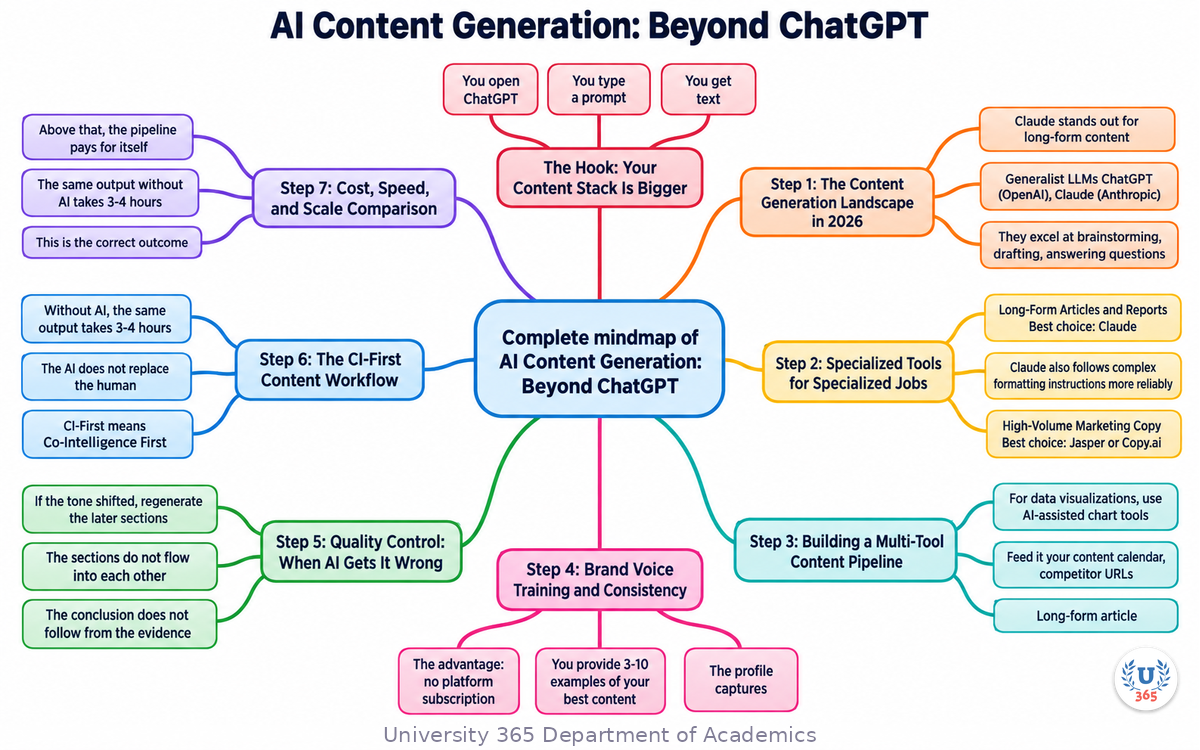
The mindmap shows the five tool categories (generalist LLMs, brand-voice platforms, SEO tools, visual/multimedia, workflow automation), the six-stage pipeline (research, brief, draft, visuals, QC, distribution), the brand voice training process, the quality control checkpoints, and the CI-First workflow with human and AI responsibilities clearly separated.
UNOP Sound (University 365 Neuroscience Oriented Pedagogy)
Take five minutes to consolidate your memory. Play the isochronous tone track (10Hz alpha frequency) with your eyes closed. Alpha-frequency tones after a learning session support consolidation, helping move what you just learned from short-term to long-term memory.
[Audio player: UNOP Post-Lecture Isochrone (10Hz, 5 minutes)]
Practical Exercise: Build Your First Multi-Tool Pipeline
Exercise: Create One Piece of Content Using Two AI Tools
Choose a topic you know well (a professional skill, a hobby, a product you use)
Open Claude or ChatGPT and paste this prompt: "Write a 1,000-word blog post about [topic] for [audience]. Use a direct, practical tone. Include 3 H2 sections with actionable advice."
Take the draft and open Canva (free tier works)
Use Canva's AI text-to-image to generate an infographic: prompt it with "Create an infographic about [main point from the article]" using your brand colors (or pick a 3-color palette)
Review the draft: check every factual claim. Mark any claim you cannot verify. Remove or replace unverified claims.
Write 3 social media posts based on the article: one for LinkedIn (professional tone), one for Twitter (concise, hook-driven), one for Instagram (caption-style with emojis). Use ChatGPT or Claude to generate drafts, then edit them yourself.
What to Observe
How long did each stage take? Compare to writing the same content manually.
Where did the AI output need the most editing? (Most people find the intro and conclusion need the most human work.)
Did the infographic from Canva match the article content? If not, how would you adjust the prompt?
Did the social media posts capture the article's key points? If not, what context was missing from the prompt?
Applied AI Connection
This exercise demonstrates the CI-First approach in practice. You (the human) chose the topic, verified the facts, and made the final editorial decisions. The AI handled draft generation and visual creation. The output is your content, not AI content. The AI amplified your expertise, it did not replace it.
Glossary
Term | Definition |
Brand Voice | The consistent tone, vocabulary, and style that identifies content as coming from a specific brand. |
Brand Voice Training | The process of teaching an AI tool to match a brand's specific communication style by providing writing examples. |
Content Pipeline | A sequence of AI tools, each handling one stage of content production, where the output of one tool feeds into the next. |
Generalist LLM | A large language model designed for broad tasks (ChatGPT, Claude, Gemini) rather than specialized content functions. |
AEO (Answer Engine Optimization) | Optimizing content for AI search engines that synthesize answers from multiple sources, distinct from traditional SEO. |
Voice Drift | The tendency of AI tools to shift away from a specified brand voice over long outputs or multi-turn conversations. |
Hallucination | When an AI model generates confident, fluent text containing factual errors, invented statistics, or nonexistent sources. |
CI-First | Co-Intelligence First: the U365 principle that the human is the orchestrator and the AI is the amplifier. CI = HI + (AI x HI). |
Content Repurposing | Transforming one piece of content into multiple formats (article to social posts, podcast to blog post). |
Multi-Tool Pipeline | A content production workflow that uses different specialized AI tools for different stages rather than one tool for everything. |
Quality Control Pass | A dedicated pipeline stage where a human reviews AI output for factual accuracy, voice consistency, and logical coherence. |
UP-Context-Engineering Method | University 365 Prompting-Context Method: a structured approach to AI prompting with context blocks for consistent outputs. |
Quiz: TEST YOUR UNDERSTANDING
1. What is the primary advantage of a multi-tool content pipeline over a single LLM?
A) It costs less per month
B) Each tool specializes in one stage, producing higher quality output at that stage
C) It requires fewer human reviewers
D) It eliminates the need for quality control
2. What does brand voice training do?
A) It teaches the AI to write in multiple languages
B) It creates a persistent voice profile from writing samples so all output matches the brand tone
C) It automatically generates brand logos
D) It replaces the need for human editors
3. What is the most common type of error in AI-generated content?
A) Grammar mistakes
B) Formatting errors
C) Factual errors (hallucinations) including invented statistics and misattributed quotes
D) Spelling errors
4. In the CI-First content workflow, what does the human decide?
A) Which AI model to use for drafting
B) The topic, angle, brand voice, acceptable sources, and quality bar
C) The word count and paragraph length
D) The publishing platform
5. At approximately what output volume does a full AI pipeline become more cost-effective than a single LLM?
A) 10 pieces per month
B) 20 pieces per month
C) 40 pieces per month
D) 100 pieces per month
Answers: 1-B, 2-B, 3-C, 4-B, 5-C
Related Resources
U365 INSIDE Publications
Book Essential: Co-Intelligence by Ethan Mollick: The Centaur model and human-AI collaboration
Book Essential: Irreplaceable by Pascal Bornet: Humics and staying irreplaceable in the AI age
External Resources
Jasper AI: Enterprise brand voice platform: jasper.ai
Copy.ai: Marketing workflow automation: copy.ai
Claude by Anthropic: Long-form content specialist: claude.ai
Surfer SEO: Content optimization with real-time SEO scoring: surferseo.com
Canva AI: On-brand visual content generation: canva.com
Descript: Audio/video editing and content repurposing: descript.com
Related U365 Lectures (Coming Soon)
U.Copilot for This Lecture
Discuss this lecture with U.Copilot, your AI chat companion trained on this content.
Copy and paste the following prompt into the U.Copilot chat on university-365.com:
You are U.Copilot for Lectures, an AI chat companion specially trained on University 365 lecture content. You are helping a Fellow who just completed the lecture "AI Content Generation: Beyond ChatGPT" from the Content Strategy series at the U365 Institute of Communication (UIC). Your role is to help the Fellow deepen their understanding of multi-tool AI content pipelines. You can: - Clarify any concept from the lecture (tool categories, pipeline stages, brand voice training, quality control, CI-First workflow) - Provide additional examples of how specific tools compare for specific content tasks - Explain how to build a content pipeline for the Fellow's specific industry or use case - Discuss cost and scale considerations for different team sizes - Help the Fellow design their own content production workflow using the CI-First approach - Suggest follow-up learning based on the Fellow's interests Always maintain U365's CI-First approach: encourage the Fellow to think critically, verify AI outputs, and maintain human judgment as the orchestrator of AI tools. Use the UP-Context-Engineering Method: provide context-rich, role-aware responses that account for the Fellow's learning level and goals.
Next Steps
Now that you understand the AI content generation landscape beyond ChatGPT, here is what to do next:
Complete the practical exercise above to build your first multi-tool content piece
Audit your current content process: identify which stages are manual that AI could handle, and which stages require human judgment
Test 2-3 specialized tools from this lecture using free trials to see which fits your workflow
Create a 1-page brand voice guide using the template from Step 4 and test it across different AI tools
Take Lecture 2 in this series: "Brand Voice in the AI Era" to go deeper on training AI tools to match your brand identity
Explore the U365 Content Strategy tag on INSIDE for more practical guides on content production with the CI-First approach
The difference between using ChatGPT and using a multi-tool pipeline is the difference between a person with a hammer and a person with a workshop. Both can build something. One can build consistently at scale.
IMPORTANT NOTICE
This lecture is published by University 365 as part of its INSIDE Publications Hub. The content is free to read for all visitors. Lectures in this series may be part of a structured academic program leading to a Micro-Credential for your Career (MCC). To enroll in an academic program, visit university-365.com/tuition.
This content is for educational purposes. While we strive for accuracy, AI is a fast-moving field. Verify current technical details against primary sources for professional applications.
Copyright University 365, Inc. All rights reserved. This content is protected under University 365's copyright policies. For permissions or inquiries, contact uda@university-365.com.
Published by the Department of Academics, University 365.
Lecture delivered by the University 365 Institute of Communication (UIC).
Lea Loringam, Dean of Communication, UIC
Signed for the academic year 2026.





Comments