
Agentic Coding with Claude Code and Codex: The 2026 Developer Workflow


UIT University 365 Institute of Technology
Series DevTools Series | Level Basic (Free)
Duration 25 minutes | Access Free
IT Engineering, AI and Applied AI, Data Science, Software Development, Digital Transformation

UNOP Sound (University 365 Neuroscience Oriented Pedagogy)
Take five minutes to prepare your brain. Play the isochronous tone track (40Hz gamma frequency) with your eyes closed. Gamma-frequency tones before a learning session raise attention and make the material easier to absorb.
[Audio player: UNOP Pre-Lecture Isochrone (40Hz, 5 minutes)]
In this Lecture

The Ticket You Hand Over
You write one instruction in a terminal: the payment retry logic double-charges when the first attempt times out, find it and fix it with a test. You press enter, leave the desk, and come back twenty minutes later. On screen there are nine changed files, a new test, and a summary that says the bug was a missing idempotency key on the retry path.
That is agentic coding in 2026. A coding agent ran in your repository, read the files it decided were relevant, edited them, ran your test command, read the failure, and edited again. Nobody copied code into a chat window. Nobody pasted file contents by hand.
The capability is real and the failure mode is real. The same agent that finds a missing idempotency key will also rename a public function that three other services call, and it will report the work as complete while doing it. Both outcomes come from the same design: an agent that plans and executes multiple steps without asking permission at each one.
This lecture teaches you the workflow that makes the first outcome common and the second outcome catchable. You will learn what the terminal agents do, how Claude Code and OpenAI Codex differ in the controls they give you, how to plan before you execute, how to run more than one agent without corrupting your own work, and how to review what the agent produced. The last part is the part that decides whether this workflow makes you faster or slower.
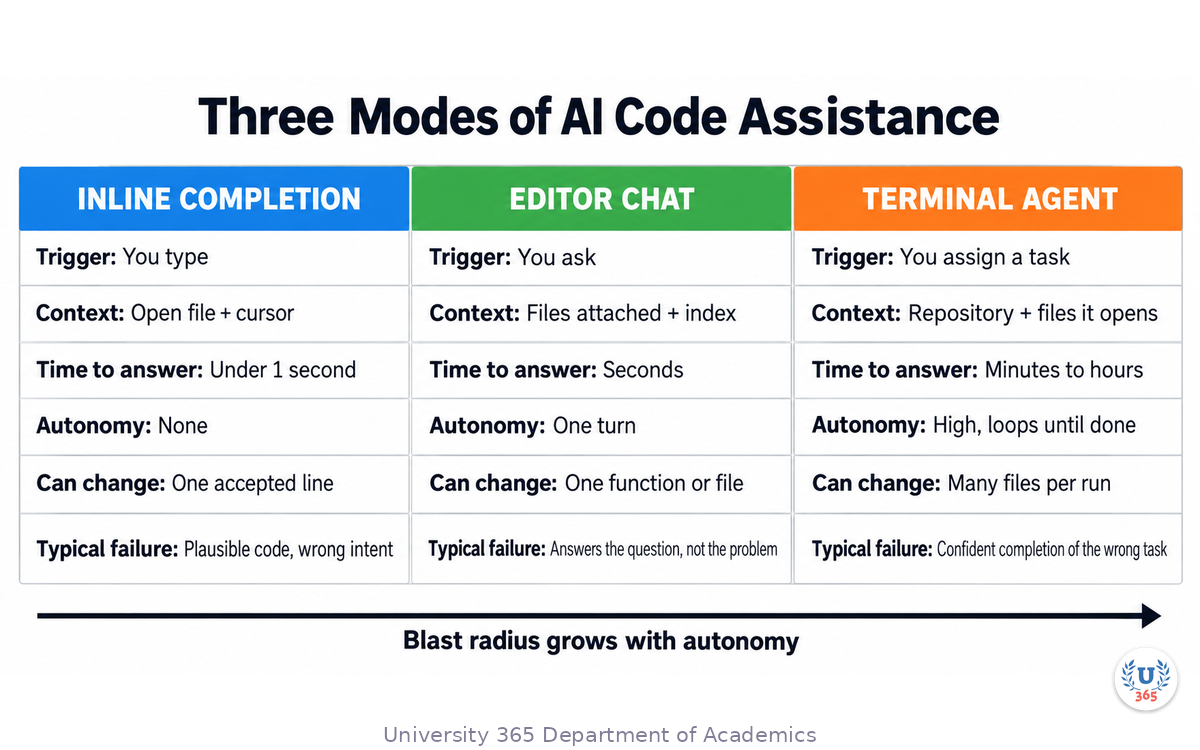
Three Modes of AI Code Assistance
Three distinct tools get called "AI coding" in 2026. They differ in how much autonomy they hold, how much of your repository they can see, and what happens when they are wrong. Pick the wrong one for a task and you get either unnecessary review work or unreviewed damage.
Inline completion | Editor chat | Terminal agent | |
What triggers it | You type | You ask | You assign a task |
Context it sees | Open file and cursor position | Files you attach or the editor index | The repository, plus every file it chooses to open |
Time to answer | Under a second | Seconds | Minutes to hours |
Autonomy | None, it proposes a line | One turn, it proposes a change | High, it loops until it decides the task is done |
What can change | The line you accept | One function or file | Many files in one run |
Typical failure | Plausible code that solves the wrong problem | Answers the question you asked instead of the problem you have | Confident completion of the wrong task |
Inline completion lives inside your editor. GitHub Copilot built its reputation here, and Cursor is the editor-first product most teams name for it. The value is real but narrow: the completion is fast because its context is the file in front of you. It cannot know that a helper with the same name already exists three directories away.
Editor chat is the middle rung. You select code, describe an intent, and the assistant proposes a change. Cursor and the GitHub Copilot chat surfaces both work this way, and both add an agent mode that can edit multiple files within the session. The context is still what the editor indexed or what you attached.
A terminal agent is the top rung. Claude Code and OpenAI Codex are the two products this lecture covers, and both run as a program in your terminal rather than as a pane inside an editor. The agent reads your repository, decides which files matter, edits them, runs commands, reads the output, and continues. Its context is the working directory, not the file you happen to have open.
The practical rule: reach for the terminal agent when the task needs more context than one file and more than one step. Reach for inline completion when you are writing code you already understand. Use editor chat when you want a proposal you will paste yourself.
What Makes an Agent Agentic
The word agent is overused. The mechanism is specific and both products implement the same loop.
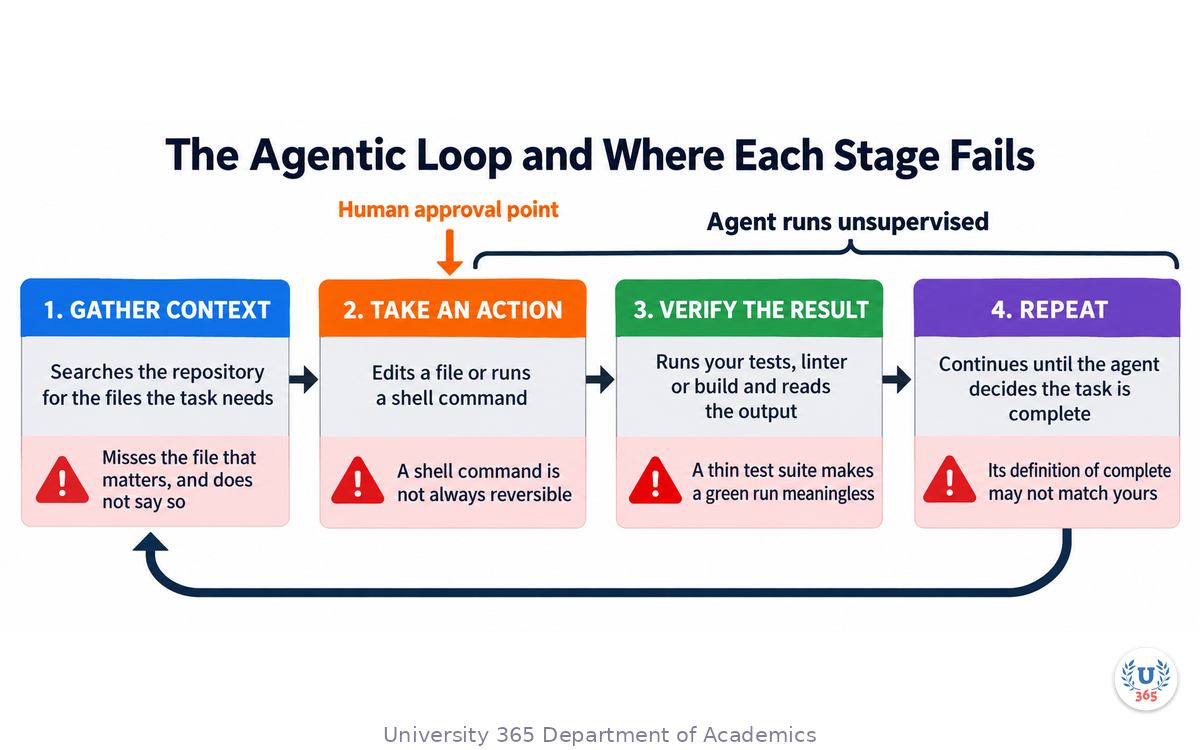
An agentic coding tool runs a cycle: gather context, take an action, verify the result, repeat. That is the loop Anthropic documents for Claude Code, and a Codex session follows the same shape. The loop is what separates an agent from a chat assistant.
Look at the four stages closely, because each one is a place where the run can go wrong.
Gather context. The agent searches your repository for the files the task needs. It uses search tools, not an index you maintained. On a small repository this is accurate. On a large one, the agent may miss the file that actually matters, and it will not tell you what it did not read.
Take an action. The action is a file edit or a shell command. This is where autonomy becomes risk. An edit is reversible in version control. A shell command is not always reversible: a migration, a deployment script, a file deletion.
Verify the result. The agent runs your tests, your linter, or your build command and reads the output. This is the stage that makes the loop useful and the stage that makes it deceptive. If your test suite is thin, the agent's verification is thin, and a green run proves only that your tests did not cover the failure.
Repeat. The agent continues until it decides the task is complete. Nothing in the loop guarantees that its definition of complete matches yours.
That last point is the whole reason to keep the CI-First lens on this workflow. The agent is a collaborator that does the reading, typing, and iterating. You remain the person who decides whether the task is finished. Co-Intelligence First puts the human in the approving seat, and an agent run is exactly the situation that doctrine was written for: invite the AI, do not overestimate it, and never hand over the judgement.
There is one more property worth naming because it is easy to miss. The loop runs at machine speed. The agent will make one hundred decisions in the time you make three. Most of those decisions are correct and unremarkable, which is why the workflow feels so productive. The ones that are wrong are also unremarkable in the moment, because the agent describes its own work as finished either way.
Claude Code: The Anthropic Terminal Agent
Claude Code is Anthropic's coding agent, built to run in your terminal alongside your existing command line tools. You install it, run it from the root of a repository, and give it a task in plain language. It maps and explains a codebase by agentic search rather than by an index you build.
The controls it gives you are the part worth learning, because they are how you set the boundary of a run.
Permission modes. Claude Code has six permission modes and you choose which one governs a session. In the default mode the agent may only read; every edit and command needs your approval. Accept-edits mode lets it edit files and run common filesystem commands without asking. Plan mode restricts it to reading while it researches and proposes, and it cannot edit until you approve the plan. Auto mode lets it act with background safety checks. The dont-ask mode refuses anything you have not pre-approved, which is what you want in a pipeline. Bypass-permissions mode removes the prompts and is documented for isolated containers and virtual machines only.
You cycle the common modes with Shift plus Tab during a session, or set one at launch. The flag is the clearer habit for work you care about:
claude --permission-mode plan
Planning before editing. Plan mode is documented as the way to research and propose without changing source. You enter it with the Shift plus Tab cycle or by prefixing a single prompt with the slash command /plan. When the agent writes a plan, it presents it for approval, and your approval also picks the mode the session will edit in. Read the plan. It is the cheapest place to catch a wrong approach.
Subagents. Claude Code can spawn subagents, which are separate agents with their own context window and their own loop. Their value is isolation: a subagent can read forty files while only a summary returns to your main conversation, so your context stays clean on a long session. Anthropic ships read-only helpers for exploration and planning, and you can define your own agents in a project or user agent directory with frontmatter that controls the model, the tools, the permission mode, the hooks, and the number of turns allowed.
Skills and hooks. A skill is a markdown file of instructions that the agent loads when the task matches, and it can run in your session or in a forked subagent context. A hook is different and stronger: it is a script, an HTTP request, or a subagent that fires on a lifecycle event such as before or after a tool call. The distinction matters for enforcement. An instruction in a context file asking the agent not to touch certain files is a request. A hook that blocks the action is enforcement. If a rule must hold on every run, make it a hook.
Project context. Claude Code reads a CLAUDE.md file for persistent context, so the conventions you want followed on every session do not need restating. The same information can live in the open AGENTS.md standard, which several tools now read.
Headless runs. For automation, Claude Code runs non-interactively with the print flag, which you can combine with an allow-list of tools and a structured output format:
claude -p "Find and fix the bug in auth.py" --allowedTools "Read,Edit,Bash"
The process exits 0 on success and non-zero when the run fails, so a pipeline can branch on the result. There is also an Agent SDK if you want to script the same agent loop yourself.
OpenAI Codex: The CLI and the Approval Model
OpenAI Codex is OpenAI's coding agent, and it ships on four surfaces: a terminal CLI, IDE extensions, a desktop app, and cloud tasks you can launch without keeping your laptop open. The CLI is open source and built in Rust for start-up speed, which matters when you fire many short runs from a script.
Install it and run it in a repository:
npm i -g @openai/codex codex
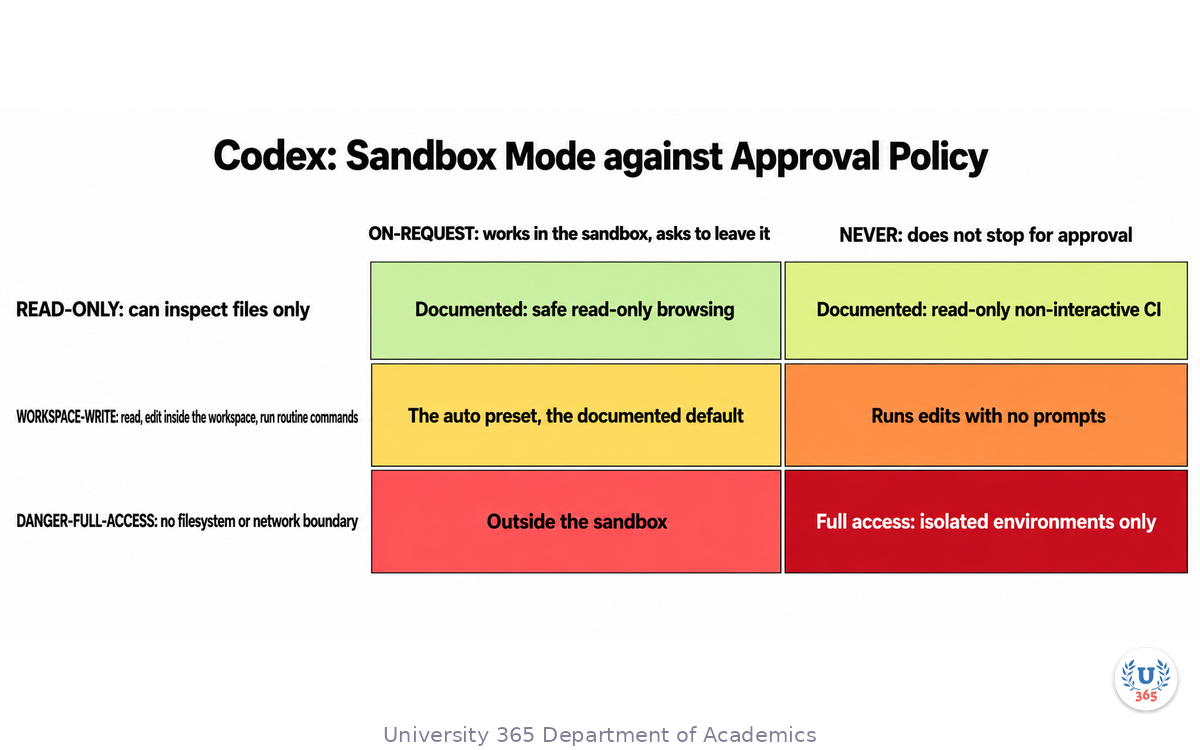
The piece of Codex you should understand before your first real task is the split between the sandbox and the approval policy. Codex treats them as two separate controls, and so should you.
Sandbox mode defines what the agent can do technically. There are three levels. Read-only lets it inspect files and nothing more. Workspace-write lets it read, edit inside the workspace, and run routine local commands, and it is the default working mode. Danger-full-access removes the filesystem and network boundaries entirely and is documented for controlled environments only. The sandbox is enforced with operating-system mechanisms rather than by trusting the model to behave.
Approval policy defines when the agent must stop and ask, and Codex documents exactly two values. On-request means it works inside the sandbox by default and asks when it needs to go beyond it. Never means it does not stop for approval prompts. The stricter rule, asking before every command that is not explicitly allowed, is no longer an approval policy at all. Codex moved it to a project trust setting: you add a [projects."/path/to/project"] entry to your user-level ~/.codex/config.toml, set trust_level to the restricted value, and commands then require approval unless an execution-policy rule allows them, which also disables project-local configuration.
The combination is your risk setting. A read-only sandbox with a never policy is the safe profile for a pipeline: the agent can read files and answer questions and cannot change anything. The documented auto preset pairs workspace-write with on-request, and you name it explicitly with --sandbox workspace-write --ask-for-approval on-request. Full access means danger-full-access plus a never policy, and it belongs in an isolated container or virtual machine and nowhere else.
Two more details make Codex useful beyond an interactive session. It reads AGENTS.md for project instructions, the same open standard that Claude Code and other tools support. And its non-interactive mode, codex exec, runs the agent from a script or a continuous-integration job. Non-interactive runs default to a read-only sandbox, and you raise the permission level explicitly when you need edits:
codex exec --sandbox workspace-write "summarize the repository structure and list the top 5 risky areas"
With the JSON output flag, stdout becomes a stream of events you can pipe into another tool. There is also a GitHub Action that installs the CLI and runs codex exec under the permissions you choose, which is how a team puts an agent into a review or migration pipeline without managing the CLI itself.
Plan First, Then Execute
The single habit that most improves an agent run costs nothing: make the agent plan before it edits.
Every failure mode in this lecture gets cheaper when a plan exists first. A plan is text you can read in thirty seconds. A wrong plan costs you a correction. A wrong implementation costs you a review of nine files and, if it reached the main branch, a rollback.
Both products support this directly. Claude Code has plan mode, and you can make it the default for a repository so every session starts there. Codex supports planning conversationally and lets you keep the permission profile read-only until you are satisfied with the approach. In either tool, the shape of the interaction is the same: you ask for an approach, you disagree with part of it, and the disagreement lands before any file changes.
Write the plan so it is checkable. A useful agent plan names four things: the files it intends to change, the change it intends to make in each, the command it will run to prove the change works, and what it will do if that command fails. If the plan does not name a verification command, the agent has not told you how it will know the task is done. Ask for one.
The plan is also where the task definition gets fixed. An instruction like "clean up the error handling" has no boundary, and the agent will draw its own. An instruction like "every failure path in the upload handler returns a typed error, and the existing tests still pass" has a boundary the agent can fail against. You can see the difference in the plan before you pay for it in a diff.
Keep the project context file current for the same reason. Whether you use AGENTS.md or CLAUDE.md, the conventions you write there apply to every run. The build command, the test command, the directories the agent should not touch, the naming rules your team enforces. The agent reading a current context file plans closer to your standards on the first attempt.
Running Several Agents at Once
An agent run takes minutes. Several independent tasks then become a scheduling question, and both products let you run more than one agent at a time.
Claude Code spawns subagents within a session; those are isolated workers whose reading does not fill your main context. Both products also let you run separate agent sessions, and the ordinary way to keep them from colliding is a version-control worktree: give each agent its own checkout of the repository on its own branch, and the file edits cannot overwrite each other. Codex documents worktree automation as part of its agentic surface, and Claude Code has explicit worktree session controls.
Parallel agents pay off when the tasks are genuinely independent. Three separate bug fixes in three separate modules are a good fit. They work badly when the tasks touch shared surfaces. Two agents editing the same base class, or one agent migrating a schema while another writes queries against the old shape, will produce a merge conflict at best and a subtly wrong program at worst.
The working discipline is small and worth stating plainly. Give each agent its own worktree and branch. Give each agent one task with one verification command. Merge one branch at a time, and run your test suite on the merged result rather than trusting each agent's own green run. The agents will each report success. Only the merged build tells you whether the combination is correct.
There is a cost to parallelism that is easy to miss on a fixed subscription. Every agent session draws on the same usage budget, so running five agents at once does not create five times the capacity; it consumes the month's allowance five times faster. Parallelism is a latency tool, not a capacity tool.
Agent Code Review: Read the Diff
The agent wrote the code. You are still the reviewer, and the review is the skill that decides whether this workflow is an upgrade.
The failure that matters most is not a broken build. It is a change that passes every test and changes behaviour nobody asked to change. An agent removing what it judged to be dead code, tightening a permission check, or rewriting a helper to match its own style all fit that description. None of these will fail a test suite that was written for the old behaviour.
So read the diff with an order, and read the parts that are not in the task.
Start with the file list. Compare it against the plan. A file the plan did not name is the highest-value place to look, because it is where the agent decided on its own. Then read the deletions. Removing a line is a decision with consequences, and agents report removals as cleanups. Then check anything that changes a public interface, a database query, an authentication path, or a configuration default. Finally, confirm the verification step actually ran: the agent's summary should name the command and the result, and you should be able to run the same command yourself.
Then run it yourself. The agent's report is a claim, not evidence. Running the test command on the branch costs you one minute and converts a claim into a fact.
Two practices make this review cheap enough to do every time. Ask the agent to keep each change on its own branch, so the diff is a clean unit you can read or discard. And ask it to write the test before the fix when the task is a bug, because a failing test that then passes is the one agent claim you can verify without reading every line.
This is the CI-First lens applied to a tool that will happily skip it. The agent proposes and executes. You verify and decide. An agent run without a diff review is not a faster developer; it is an unreviewed commit with a confident description.
Terminal Agent or Inline Assistant
You now have three rungs and two terminal agents. Here is how to choose, by the shape of the task rather than by habit.
Use inline completion when you are writing code you already understand, one line and one file at a time. The tool is fast precisely because its context is small, and a small context is correct when the task is small.
Use editor chat when you want a proposal you will apply yourself, or when the change is confined to one function you have open. Cursor and GitHub Copilot both serve this well, and both reach into an agent mode when the session needs more than one file.
Use a terminal agent when the task spans files, needs discovery, or needs execution. Refactoring a module against its tests, tracing a bug across a request path, adding a migration with its own verification, and wiring a new dependency through a build are all terminal-agent tasks.
Within the terminal agents, the honest difference in 2026 is about control shape rather than raw capability. Anthropic's Claude Code leads with a six-mode permission ladder, plan mode, skills and hooks, and subagents that isolate context; it is the stronger surface when you want to shape the agent's behaviour into a repeatable team process. OpenAI's Codex leads with the separation of sandbox and approval policy, an open-source Rust CLI that starts fast for scripted use, non-interactive codex exec with a JSON event stream, and a cloud surface that keeps working after you close the laptop. It is the stronger surface when you want a fast, scriptable agent you can fan out from a pipeline.
Both read AGENTS.md, both speak the Model Context Protocol for external tools and data, both run headless, and both give a third product a run for its money on any single task. That is the reason to learn the controls rather than the brand. The controls transfer.
One caution on versions. The model names under both products change on a monthly cadence, and the feature sets move with them. Read the vendor changelog before you commit a team to a specific flag, and do not build a process around a model name you read in a blog post.
Where an Agent Belongs in Your Pipeline
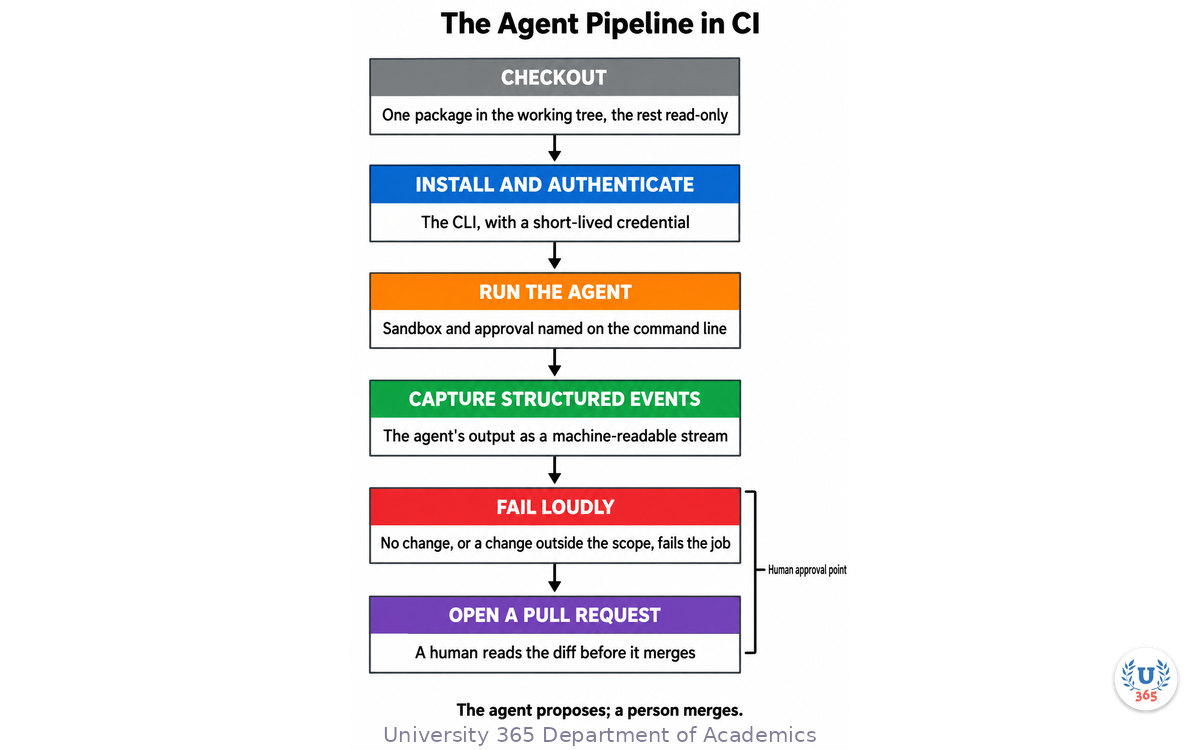
The interesting use of an agent is not the interactive session. It is the run nobody watches: in continuous integration, on a pull request, with a human reading the result.
Four properties make that shape safe rather than reckless.
The permission level is named on the command line. A non-interactive run defaults to a read-only sandbox, which is the correct default. When a job must edit, it names the workspace-write sandbox and its approval setting in the pipeline definition, so the permission change appears in a diff someone reviews.
The scope is enforced by the checkout, not by the prompt. The agent can only change what is present in the working tree and writable under the sandbox. Checking out a single package, with the rest of the repository read-only, is a stronger boundary than any instruction you can write into a context file.
The output is a pull request, never a push to the main branch. The agent proposes; a person merges. A job that pushes directly has removed the only check that matters.
The job fails loudly on an empty result. An agent that produced no diff has either found nothing or failed silently, and both deserve attention. A job that reports success either way trains the team to ignore it.
When you read the agent's pull request, use a fixed order every time, because a consistent reading order is what catches the change you were not expecting. First the file list against the plan: did it touch what it said it would touch, and nothing else? Then the deletions, before the additions. A removed guard clause, a dropped test, or a narrowed error handler is the highest-consequence change in any diff and the easiest to miss among added lines. Then the interfaces: did a signature, a return type, or a public name change in a way that affects a caller outside this diff? Finally the verification: run the command yourself rather than trusting the log the agent reported. That last step is the same discipline you apply to a colleague's pull request, and it is what makes the pipeline reviewable rather than merely automated.
One more number belongs in your process. Every turn of an agent loop re-sends the accumulated conversation, so a run that takes eight turns costs far more than twice a run that takes four. Tell the agent its maximum iterations, enforce the same cap in the runner that launches it, point it at a directory rather than a monorepo root, and make its verification command cheap enough to run on every turn. After twenty runs you will know which of your task types suit an agent and which do not, and that knowledge is what turns the tool from an experiment into a process.
Feynman Summary: Explain It Like You Are 12
Imagine you hire a contractor to fix something in your house. You do not stand behind them pointing at every nail. You describe the job, you agree the plan, you let them work, and then you inspect what they built before you pay.
A terminal coding agent works the same way. You give it a job in words. It walks around your project, opens the files it thinks are relevant, works out a plan, changes the code, and runs the tests to check itself. Then it tells you it is finished.
Two things follow from that. The first is that the agent is very fast, so it does a lot of work while you do something else. The second is that it checks its own work with your tests. If your tests do not cover the thing it changed, its check comes back fine anyway, and it tells you it is done when it is not.
That is why you inspect. You look at the list of files it touched, you read the lines it removed, and you run the test command yourself. It takes a minute. It is the difference between hiring a contractor and hoping.
The controls both tools give you are the way you set the boundary of the job. Claude Code lets you say "only read for now" or "ask me before every command". Codex lets you say "you may change files in this folder but you cannot use the network". A plan first, then work inside the boundary, then inspect: that is the whole workflow.
Mindmap: The Complete Picture
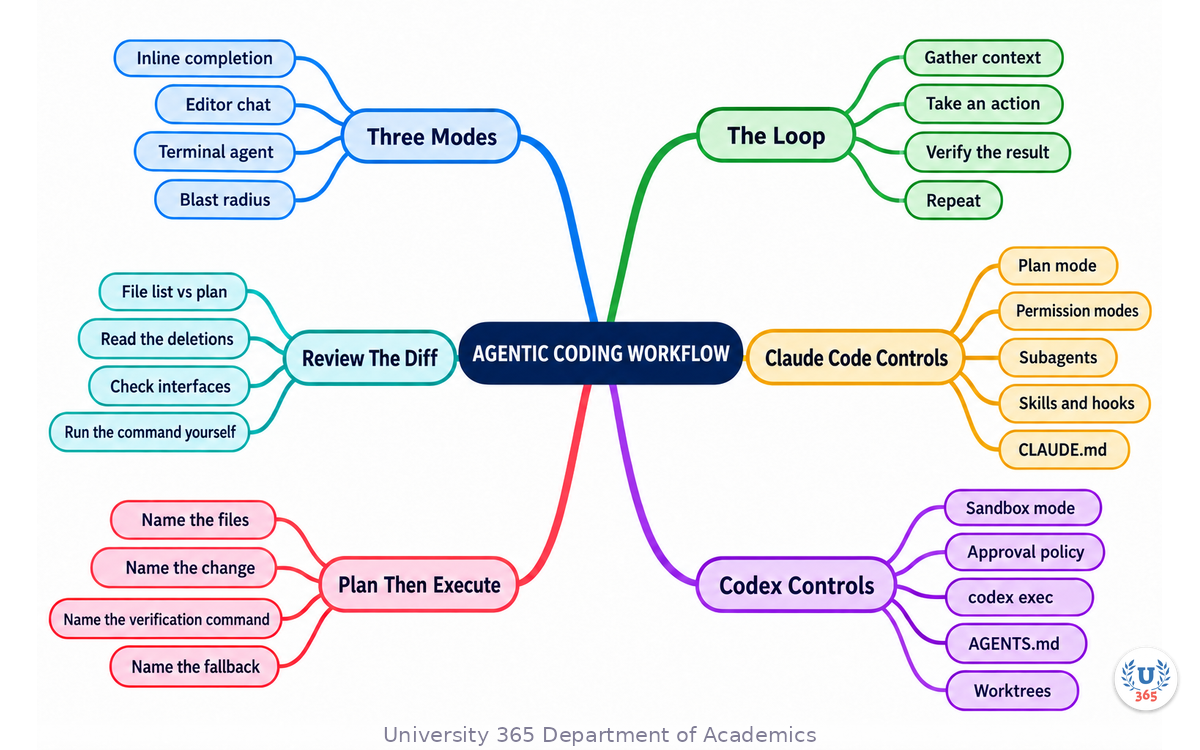
The mindmap places the agentic loop at the centre and branches outward to the three assistance modes that surround it, the Claude Code controls, the Codex sandbox and approval model, the planning step, parallel agent sessions, and the diff review that closes the run.
UNOP Sound (University 365 Neuroscience Oriented Pedagogy)
Take five minutes to consolidate your memory. Play the isochronous tone track (10Hz alpha frequency) with your eyes closed. Alpha-frequency tones after a learning session support consolidation, helping move what you just learned from short-term to long-term memory.
[Audio player: UNOP Post-Lecture Isochrone (10Hz, 5 minutes)]
Practical Exercise: Refactor a Module with a Terminal Agent
This exercise takes about 30 minutes and needs one terminal agent, a small repository you own, and a test command that runs in under a minute. Do not skip the review step. The difference between the two diffs is the lesson.
Step 1: Choose a task with a clear boundary
Pick one function or one small module that has a test covering its current behaviour. A good first task is a refactor with a fixed outcome: extract the validation branch of a handler into its own function, keep the same behaviour, and keep the existing tests passing. Avoid a task with a vague goal such as improving performance, because you cannot verify it in one run.
Step 2: Write the project context file
Add an AGENTS.md file at the repository root with four lines: the install command, the test command, the lint command, and one line naming the directories the agent must not modify. Both Claude Code and Codex read this file. If you use CLAUDE.md as well, keep the two consistent.
Step 3: Ask for a plan, not a change
Start the agent in a read-only or plan mode and ask it for an approach. Claude Code takes a plan-mode session directly:
claude --permission-mode plan
Then give the task: what to change, which file, and what must stay true. Read the plan before you allow anything to be written. Check that it names the files it will touch, the change to each, and the command it will run to verify. If it does not name a verification command, ask for one and wait.
Step 4: Approve and let it execute
Approve the plan. The agent edits, runs the test command, reads the result, and iterates. Watch the file list as it works. A file the plan did not name is your first review target.
Step 5: Read the diff in a fixed order
When the agent reports completion, do not read its summary first. Read the diff, in this order: the file list against the plan, the deletions, any change to a public interface or a configuration default, and the test that was added or changed. Then read the summary, and confirm it matches what you saw.
Step 6: Verify the agent's claim yourself
Run the test command on the branch. Run the lint command. If the agent claims a test passes, run that test by its own name. This step is not a formality: it is the step that converts the agent's report into evidence.
What to look for
You are looking for the gap between the task you assigned and the task the agent completed. Most runs have one, and most of them are small: a comment reworded, an import reordered, a helper inlined. Some are not small: a behaviour change in an adjacent branch, a validation check moved, a default changed. Find the small one on this exercise so that spotting the large one is routine on the next task.
Applied AI connection
This is the review pattern you will reuse in every agentic workflow: fix a boundary, require a plan, keep the run on its own branch, read the diff before the summary, and verify the claim yourself. The agent's own green run is not the measurement. Your run on the merged branch is.
Glossary
Term | Definition |
**Agentic coding** | A workflow in which a coding agent plans, edits files and runs commands over multiple steps with limited human approval at each step. |
**Terminal agent** | A coding agent that runs as a program in your terminal and works against the repository in your working directory. Claude Code and OpenAI Codex are the two covered here. |
**Inline completion** | A suggestion produced while you type, scoped to the file and cursor position. Minimal context, minimal risk, no autonomy. |
**Editor chat** | An assistant inside your editor that proposes a change for a selection or a question. Its context is what the editor indexed or what you attached. |
**Agentic loop** | The cycle an agent runs: gather context, take an action, verify the result, repeat until the agent decides the task is complete. |
**Permission mode** | A Claude Code setting that controls what the agent may do without asking. The six modes range from read-only to bypassing all prompts. |
**Plan mode** | A Claude Code mode in which the agent researches and proposes an approach and cannot edit your source until you approve the plan. |
**Sandbox mode** | In Codex, the technical boundary on what the agent and its commands can touch: read-only, workspace-write, or full access. |
**Approval policy** | In Codex, when the agent must stop and ask before acting. The documented values are on-request and never; the stricter rule now lives in a project trust setting, not in the approval policy. It is a separate control from the sandbox. |
**Subagent** | A worker agent with its own context window and its own loop, spawned by the main agent so that verbose work does not fill the main conversation. |
**CLAUDE.md** | The file Claude Code reads for persistent project context on every session. |
**AGENTS.md** | An open standard file for project instructions, read by multiple coding agents including Claude Code and Codex. |
**Hook** | A script, HTTP request, or subagent that fires on an agent lifecycle event. Hooks enforce a rule; a prompt instruction only requests one. |
**Skill** | A markdown file of instructions an agent loads when the task matches, either in the current session or in a forked subagent context. |
**Headless run** | A non-interactive agent run from a script or pipeline. Claude Code uses the print flag; Codex uses `codex exec`. |
**Worktree** | A separate checkout of the same repository on its own branch, used to keep parallel agent sessions from overwriting each other's edits. |
**Blast radius** | How much of the codebase a single accepted action can change. One line for inline completion, many files for a terminal agent. |
**Diff review** | The human step of reading an agent's changes before accepting them: file list, deletions, interface changes, and the verification command. |
**Turn** | One pass of the agent loop: read the state, take an action, read the result. Every turn re-sends the accumulated conversation, so cost grows faster than the turn count. |
**Non-interactive run** | An agent invocation with no human at the prompt, run from a script or a continuous-integration job. Defaults to a read-only sandbox. |
**Human approval point** | The step where a person reads the agent's diff before it merges. The pull request is the usual form. |
**Empty result** | A run that produced no change. Either the agent found nothing or it failed silently, and both deserve a failing job rather than a green one. |
Quiz: TEST YOUR UNDERSTANDING
1. Which mode of AI code assistance has the widest blast radius in one accepted action?
A) Inline completion
B) Editor chat with one file attached
C) A terminal agent running until it decides the task is done
D) A linter run from the editor
2. In OpenAI Codex, what does the approval policy control?
A) How many tokens the model may use
B) When the agent must stop and ask before acting
C) Which files the agent may read
D) Which model answers the request
3. What is the main purpose of Claude Code's plan mode?
A) To run faster by skipping tests
B) To research and propose without editing your source until you approve
C) To automatically merge the agent's branch
D) To disable all tool use in the session
4. Why should each parallel agent session get its own worktree?
A) Worktrees reduce model cost
B) Worktrees make the tests run in parallel
C) It gives each agent an isolated checkout so concurrent edits cannot overwrite each other
D) It is required for the agent to read AGENTS.md
5. An agent reports that it fixed the bug and all tests pass. What is the correct next step?
A) Accept the change, since the tests passed
B) Merge the branch and move to the next task
C) Ask the agent to describe the fix again
D) Read the diff against the plan and run the verification command yourself
6. An agent run takes eight turns instead of the four you expected. Why does it cost more than twice the expected figure?
A) The provider raises the rate after turn four
B) Every turn re-sends the accumulated conversation, so cost grows faster than the turn count
C) The agent opens more files each turn
D) Output tokens are billed twice
7. Why is naming the sandbox on the command line better than setting it in a configuration file for a CI job?
A) It runs faster
B) The permission appears in the pipeline definition, so a change to it appears in a diff someone reviews
C) Configuration files are ignored in CI
D) The CLI requires it
8. In the pipeline shape, what should the job do when the agent produces no diff?
A) Report success, since nothing broke
B) Retry with a larger model
C) Fail, because an empty result is either a genuine finding or a silent failure
D) Push the empty commit
Answers: 1-C, 2-B, 3-B, 4-C, 5-D, 6-B, 7-B, 8-C.
Related Resources
U365 INSIDE Publications
Lecture: AI Code Generation: Copilot, Cursor, and Beyond: The three modes of AI code assistance and what each one costs you in review time
Lecture: The AI Stack 2026: What Every Developer Needs: Where a coding agent sits in the modern AI application architecture
Lecture: How LLMs Actually Work: Transformers in 20 Minutes: The attention mechanism that decides what an agent can keep in context during a long run
External Resources
How Claude Code works (Anthropic): The agentic loop, the built-in tools, and how sessions and context are managed: code.claude.com/docs/en/how-claude-code-works
Choose a permission mode (Anthropic): The six Claude Code permission modes, plan mode, and how to set one at launch or as a repository default: code.claude.com/docs/en/permission-modes
Create custom subagents (Anthropic): How to define a subagent, what its frontmatter controls, and when isolation helps: code.claude.com/docs/en/sub-agents
Run Claude Code programmatically (Anthropic): The print flag, the tool allow-list, structured output, and the Agent SDK: code.claude.com/docs/en/headless
Sandbox (OpenAI): The separation of sandbox mode and approval policy, and the documented profiles for each intent: developers.openai.com/codex/sandbox
Non-interactive mode (OpenAI): Running codex exec in scripts and continuous integration, with the JSON event stream and the read-only default: developers.openai.com/codex/noninteractive
Command line options (OpenAI): The full Codex CLI flag reference, including the sandbox and approval flags: developers.openai.com/codex/cli/reference
About GitHub Copilot cloud agent (GitHub): How the cloud agent researches a repository, plans, changes a branch and opens a pull request: docs.github.com/en/copilot/concepts/agents/cloud-agent/about-cloud-agent
AGENTS.md (open standard): The project instruction file read by multiple coding agents: agents.md
Related U365 Lectures (Coming Soon)
Agent Skills and Hooks: Turning a Coding Session into a Team Process, in the DevTools series
Code Review for Agent-Written Code: The Checklist, in the DevTools series
U.Copilot for This Lecture
Use this prompt with your own AI assistant to turn the lecture into a decision for one task you actually own. It follows the UP-Context method: context first, then the task, then the constraints, then the output shape.
CONTEXT I am choosing between an inline assistant, an editor chat session, and a terminal coding agent for one real task in my repository. The task is: [describe the task in two sentences] The files it probably touches are: [list them, or say you do not know] The test command that proves the task is done is: [name the exact command, or say there is none] The cost if the change is wrong in production is: [state the consequence] TASK 1. Tell me whether this task is single-file or spans files, and whether it needs discovery before editing. 2. Recommend one of the three modes, and name the specific tool for it. 3. If you recommend a terminal agent, write the plan I should require before the agent edits anything: files, the change in each, the verification command, and the fallback if that command fails. 4. Give me the review order for the diff this task will produce, naming the one thing most likely to change without failing my tests. CONSTRAINTS Use only the information I gave you plus what is in this conversation. Do not invent benchmark numbers or model names. Where you are uncertain, say which command or document would settle it. OUTPUT A one-paragraph recommendation, then a table with one row per candidate mode: mode, fit for this task (yes or no), and the reason. End with the four lines I should put in AGENTS.md before the run.
Next Steps
Write the context file for one repository you own, with the install, test and lint commands and one line naming the directories the agent must not touch
Run the practical exercise on a small refactor and read the diff in the fixed order before you read the agent's summary
Set your default permission profile consciously: plan or read-only for exploration, accept-edits for work on a branch, and a read-only sandbox with a never policy for anything you script
Take the next lecture in this institute: the coming DevTools lecture on agent skills and hooks, for turning a single agent session into a repeatable team process
Read the two control references before your next real run: the Claude Code permission modes page and the Codex sandbox page, in the External Resources above
Agentic coding changes what you spend your time on. The typing gets cheaper and the judgement gets more valuable. Ask one question before you accept any agent run: can I point to the command that proves this change is correct, and did I run it myself? If the answer is no, the work is not finished yet.
IMPORTANT NOTICE
This lecture is published by University 365 as part of its INSIDE Publications Hub. The content is free to read for all visitors. Lectures in this series may be part of a structured academic program leading to a Micro-Credential for your Career (MCC). To enroll in an academic program, visit university-365.com/tuition.
This content is for educational purposes. While we strive for accuracy, AI is a fast-moving field. Tool names, flags and model versions change on a monthly cadence, so verify current technical details against the vendor documentation for professional applications.
Copyright University 365, Inc. All rights reserved. This content is protected under University 365's copyright policies. For permissions or inquiries, contact uda@university-365.com.
Published by the Department of Academics, University 365.
Lecture delivered by the University 365 Institute of Technology (UIT).
Sam Utteker, Dean of Technology, UIT
Signed for the academic year 2026.





Comments