
Generative Video: Sora, Veo and the New Production Pipeline

Updated: 4 days ago

UIC, UID Cross-institute lecture
Series Cross-Institute Series | Level Basic (Free)
Duration 25 minutes | Access Free
Delivering institutes: UIC (Institute of Communication); UID (Institute of Design)

UNOP Sound (University 365 Neuroscience Oriented Pedagogy)
Take five minutes to prepare your brain. Play the isochronous tone track (40Hz gamma frequency) with your eyes closed. Gamma-frequency tones before a learning session raise attention and make the material easier to absorb.
[Audio player: UNOP Pre-Lecture Isochrone (40Hz, 5 minutes)]
In this Lecture


Generative Video: Sora, Veo and the New Production Pipeline
The Hook: The Tool That Went Dark Mid-Career
In March 2026, OpenAI announced it was discontinuing Sora in both the consumer app and the API. The app went offline on April 26, 2026, and OpenAI's discontinuation notice set the API shutdown for September 24, 2026. The reported reason was focus and compute: the video product consumed machine capacity that other teams needed.
Read that as a working professional and the lesson is not about Sora. It is about the shape of the tier you were about to build a workflow on.
Text-to-video has settled into something quieter and more useful. In 2026 the question is no longer whether a model can produce a moving image. It is which model you point at which shot, what you do about continuity between shots, and who owns the result when the footage contains no camera and no crew.
This lecture crosses two institutes because generative video crosses both. Design owns the shot, the look and the motion direction. Communication owns the story, the edit, the sound and where the finished piece is published. You will learn the landscape as it stands in October 2026, the production pipeline that turns a script into a sequence, and the prompting discipline that separates a usable shot from an expensive accident.

Generative Video: Sora, Veo and the New Production Pipeline
Step 1: The 2026 Landscape, Tier by Tier
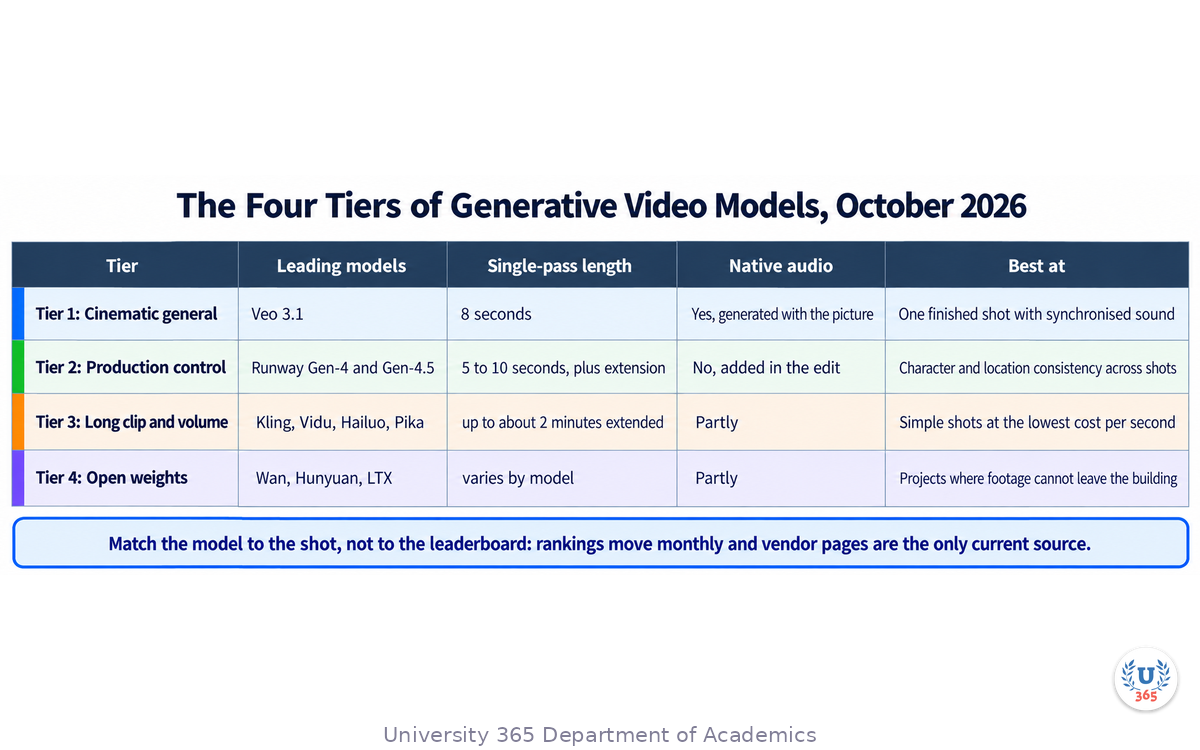
Four tiers are worth knowing, and they behave differently under deadline.
Tier one: the general cinematic models
Google's Veo 3.1 is the model most teams reach for when they need one finished-looking shot. It generates eight-second clips at 720p, 1080p or 4K, and it generates the audio in the same pass: ambient sound, effects and dialogue arrive with the picture. It accepts up to three reference images to steer subject and style, and can extend a clip it has already produced. Access runs through the Gemini API, the Gemini app and Google Flow.
OpenAI's Sora 2 is the model that defined the category in the public imagination and is now leaving it. If you have Sora assets in a live workflow, the migration is not a design decision, it is a deadline.
Tier two: the production-control models
Runway's Gen-4 line is the one that behaves most like an editing suite. Gen-4 was built around a single reference image that holds a character, an object or a location across separate generations, and Gen-4.5 added text-to-video alongside image-to-video. The controls are the point: keyframes for start and end, motion brush to paint where movement happens, reference-driven consistency, and video-to-video editing. Runway claims Gen-4.5 topped the Artificial Analysis text-to-video leaderboard.
Tier three: the long-clip and budget models
Kling, from Kuaishou, is the model most associated with longer single-pass clips and lower per-second prices, and it appears inside other tools as a bundled option. Vidu, Hailuo and Pika occupy the same band: useful for volume, weaker on control. Published specifications and prices differ by plan, region and resolution, so verify on the vendor's own pricing page before you commit a monthly budget.
Tier four: the open-weight models
Wan, Hunyuan and the LTX family can be self-hosted. That matters for one reason: data control. If your client cannot allow footage to leave their infrastructure, a hosted API is a non-starter regardless of quality, and a self-hosted model on your own GPUs is the only compliant option. The trade is operational work and hardware cost, which only pays off above a volume most teams never reach.
The leaderboard moves faster than your workflow
On the Artificial Analysis text-to-video leaderboard in October 2026, the top of the audio-enabled table was held by Wan 3.0, Gemini Omni Flash, MiniMax H3 and Dreamina Seedance 2.0, with Veo 3.1, Veo 3.1 Fast and the Kling 3.0 entries sitting in the teens.
That is the operating fact of this tier: model rankings are volatile and vendor pages are the only reliable source on any given day. Pick your stack for the shape of the work, not for this quarter's ranking.

Generative Video: Sora, Veo and the New Production Pipeline
Step 2: What Each Model Is Actually Good At
A model that wins a benchmark does not automatically win your shot. Match the job to the strength.
One finished shot with sound: Veo 3.1
When a single clip has to feel complete without a sound pass, Veo 3.1 is the shortest path. The audio is generated with the picture, so footsteps land where the feet land and dialogue is already in the frame. For a hero shot, a product beat with ambience, or a narrated explanatory sequence, that saves an entire downstream step.
The weakness is length and identity. Eight seconds is one beat. Identity holds well inside a clip and drifts between separate generations, so a character who must persist across five shots needs reference images or a different model.
Multi-shot sequences with one character: Gen-4.5 and its control modes
When the work is a sequence rather than a shot, consistency becomes the whole problem, and this is where reference-driven generation earns its price. Give the model one reference image of your subject and it will place that subject in a new location, under new lighting, from a new angle, without fine-tuning. Keyframes let you specify the first and last frame of a move. Motion brush lets you decide where the movement goes instead of hoping the prompt lands.
Long single-pass clips and volume: Kling and its peers
Longer single-pass generation is useful for dialogue exchanges, product walkthroughs and anything that needs an unbroken span. The trade is control: at length, character consistency weakens and you spend more attempts per usable clip. For social volume where the shot is simple and the deadline is short, that trade is often correct.
Self-hosting: Wan, Hunyuan, LTX
Choose this tier for compliance, not quality. An open-weight model you run yourself is the only answer to a client whose policy forbids external generation. Budget for the engineering time honestly; the model is free and the integration is not.
The decision, in one paragraph
If the shot must be complete in one pass with audio, use Veo 3.1. If a character or product has to hold across several shots, use Runway's reference-driven modes. If you need an unbroken span at the lowest cost per second, use Kling or a peer. If the data cannot leave the building, self-host. Everything else is preference.

Generative Video: Sora, Veo and the New Production Pipeline
Step 3: Script to Shot List
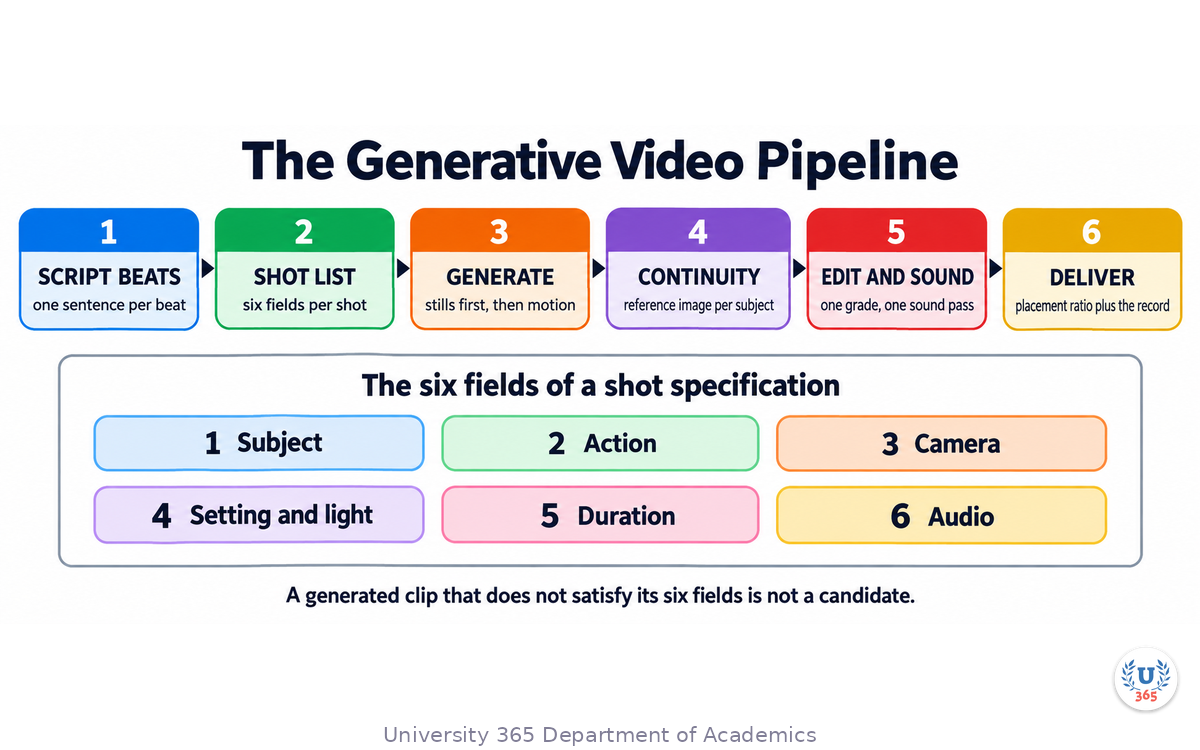
Generative video fails most often before the first generation, in a shot list that was never written. The pipeline below is the same one a film crew uses, with the camera replaced by a prompt.
Write the script as beats, not paragraphs
A generative sequence is assembled from discrete clips. Each clip must stand alone and carry one beat. Write the script as a numbered list of beats, one sentence each, in the order they will appear. If a beat needs two ideas, it is two beats.
Convert each beat to a shot specification
A shot specification has six fields, and every one of them is a decision you make, not a decision the model makes for you:
Subject: who or what is in frame, described in concrete nouns.
Action: the single movement or event of the shot.
Camera: the move and the framing (static wide, slow push in, tracking left, handheld close).
Setting and light: where it happens and what the light is doing.
Duration: how many seconds, within the model's limit.
Audio: what the shot should sound like, if the model generates audio.
The shot list is the acceptance test later. If a generated clip does not satisfy its six fields, it is not a candidate, and you regenerate instead of talking yourself into it.
Build the sequence on paper first
Order the shots, mark which ones must connect directly, and note where a cut or a transition hides a discontinuity. A cut is cheaper than a fix. A sequence that is designed with cut points does not need frame-perfect continuity between every pair of shots.
Budget attempts per shot, not renders per project
Professional practice in this tier is measured in attempts. Decide in advance how many generations a shot may consume, and hold the line. A shot that takes forty attempts to satisfy a six-field specification is a badly specified shot, not an unlucky one.

Generative Video: Sora, Veo and the New Production Pipeline
Step 4: Generating the Shots
Generation is the part everyone wants to start with and the part that rewards patience least. Work in this order.
Lock the look before the motion
Generate still frames first. A still is cheap, fast and easy to judge. Approve the composition, the palette and the subject before you spend generation budget on seconds of video. Many image-to-video models accept a still as the first frame, so the approved still starts the shot rather than becoming a discarded reference.
Start from an image when continuity matters
Text-to-video is the flexible option and image-to-video is the controlled one. When a shot has to match a previous shot's subject, location or grade, start from an image that already carries those properties. The model then has less to invent and less to get wrong.
Generate a small batch, then select
Generate three to five candidates per shot, view them side by side, and choose against the six fields. Delete the rejects immediately. A folder of unused variants is how projects lose track of which clip was approved.
Judge at delivery size, not at full resolution
A clip that looks impressive full screen and illegible in a phone feed has failed. Watch every candidate at the size the audience meets it, in the aspect ratio you will publish. Portrait placements fail on landscape composition, and this is the step where you catch it.
Keep the generation record as you go
For every approved clip, record the model and version, the date, the prompt, the seed or reference image if the tool exposes one, and whether the audio was generated with the picture or added afterwards. You will need this for the disclosure line in Step 9, and reconstructing it after delivery is impossible.

Generative Video: Sora, Veo and the New Production Pipeline
Step 5: Continuity Across Generations
Continuity is the technical heart of multi-shot generative video. Three properties must hold between shots, and each has a specific countermeasure.
Identity: the subject must stay the same subject
The reliable technique is a reference image per subject, reused in every shot that subject appears in. A single well-lit, front-facing reference beats a paragraph of description. Where the model supports multiple reference images, add one for wardrobe and one for the environment, because the model will otherwise re-invent both.
Space: the location must stay the same place
Establish the location with one wide shot and reuse the frame as an image reference for later shots in that location. Keep the light direction consistent across the sequence; two shots in the same room lit from opposite sides read as two different rooms, and no viewer can explain why it feels wrong.
Grade: the sequence must look like one piece
Lock colour and contrast in the edit, not in the model. Generated clips arrive with different white balance, different contrast curves and different grain. A single adjustment layer across the timeline costs minutes and is the difference between a sequence and a compilation.
When continuity cannot be achieved, cut
This is the professional answer. A cut to a new angle resets the viewer's expectations. A dissolve promises continuity and then breaks it. If two shots cannot be made to match, place a cut between them, or insert a shot that carries no shared subject, and the sequence survives.

Generative Video: Sora, Veo and the New Production Pipeline
Step 6: Prompting for Motion
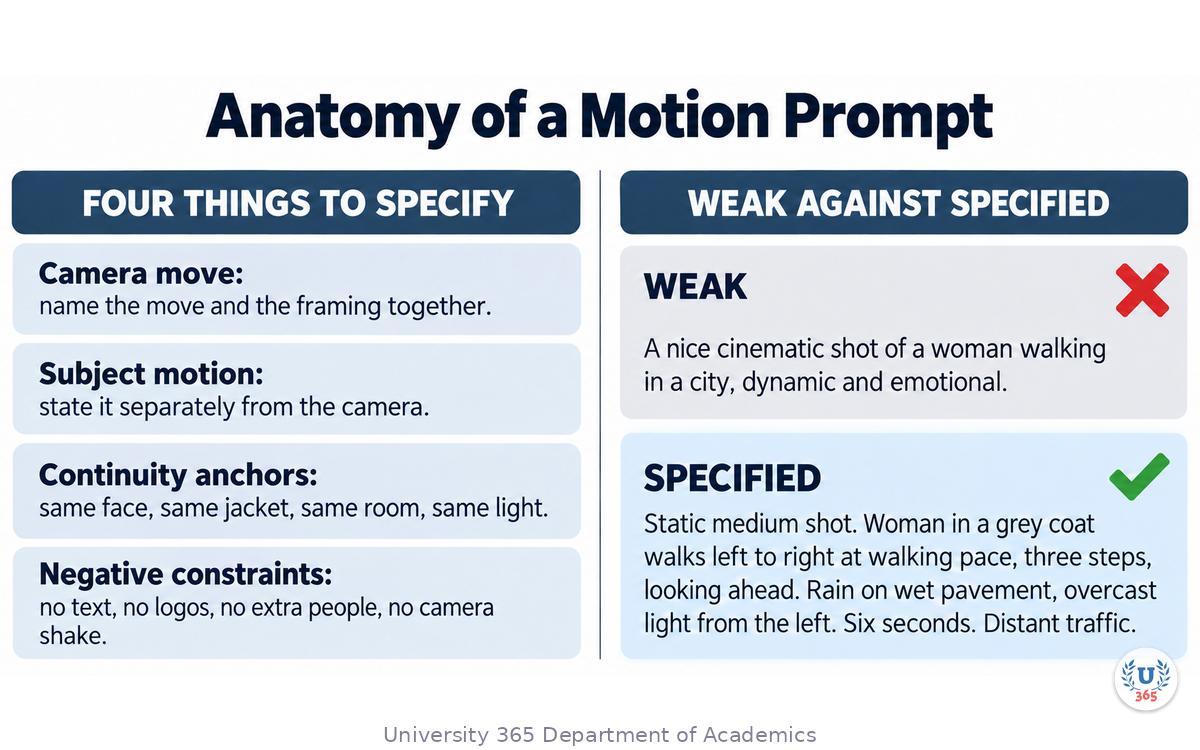
Prompting for video is not prompting for images with movement added. Three dimensions have to be specified, and a fourth has to be excluded.
Specify the camera move in the language of a camera department
Name the move and the framing together: slow push in to a medium close-up, static wide, tracking left at walking pace, handheld over-the-shoulder, crane down to a wide. Vague motion language produces vague motion, and the model will default to a slow drift that reads as a slideshow.
Specify the subject motion separately
The camera and the subject move independently and the prompt must keep them apart. "She turns to look at the window while the camera holds static" is one instruction, not two competing ones. State whether the subject moves, stays still, enters or leaves frame, and at what speed.
Anchor what must not change
Every generation prompt should name the properties that must hold: same face as the reference, same jacket, same room, same time of day, consistent lighting direction. These anchors are what makes the next shot belong to the same sequence.
Exclude what you do not want, by name
State the negative constraints explicitly: no text, no captions, no logos, no on-screen interface elements, no extra limbs, no additional people entering frame, no camera shake unless requested. Text and logos are the most common failure because they render as convincing nonsense that survives review and reaches a client.
Keep the prompt as a structured statement, not a paragraph of adjectives
Write the prompt in the six fields from Step 3, in plain sentences, in the same order every time. A repeatable structure is how you find out which field caused a failure. An adjective cloud cannot be debugged.

Generative Video: Sora, Veo and the New Production Pipeline
Step 7: Edit, Sound and Delivery
Generation produces clips. Editing produces a film. The gap between the two is where most amateur results are lost.
Assemble to the beat, then trim to the frame
Lay the approved clips in order and check the rhythm before refining anything. Then trim each shot on its strongest frame. Generated clips usually start and end with a moment of drift while the model settles, so cut those frames off rather than hoping the viewer ignores them.
Do the sound as a separate pass, even when the model generates audio
Veo 3.1 gives you synchronised audio in the same pass, and it is still worth a sound pass in the edit. Generated ambience is coherent but generic. A music bed, a level balance and two or three placed effects turn a sequence of clips into something an audience reads as one piece.
Grade once, for the whole sequence
Apply one grade across the timeline. Fix exposure differences between clips before you fix colour, because exposure mismatch is what the eye notices first.
Deliver in the ratio the placement requires
Generate or crop to the placement: 16:9 for a website hero or a landscape feed, 9:16 for a vertical placement, 1:1 for a feed that demands it. Re-authoring one landscape cut into three placements by cropping blind is how faces end up half out of frame. Where the tool supports it, generate the placement rather than cropping it.
Export the record with the cut
Ship the generation log with the finished file. Which model, which date, which shots were generated rather than captured, which audio was synthesised. It takes ten minutes at delivery and separates a professional answer from a guess.

Generative Video: Sora, Veo and the New Production Pipeline
Step 8: Where Design and Communication Use It
The same pipeline serves four jobs, and each has its own acceptance test.
Previsualisation and storyboarding before a shoot
The cheapest use in the whole tier. Generate the intended shots before a camera exists, cut them together, and show the client the movement rather than a static board. Approval on motion, not on stills, is the checkpoint that matters.
Brand and social video at volume
Generate the visual beats once, then produce placement-specific variants for each channel instead of re-cutting one master. The constraint is brand consistency, not volume: fix the palette, the typography placement and the grade before generating, and hold every variant to the same system.
Motion exploration inside a design system
Use generated clips to test how a mark behaves in motion, how a transition reads, and how a typeface holds at speed. This is where generative video earns its place in a design practice: exploration that used to need a motion designer for a week takes an afternoon, and the exploration is thrown away on purpose.
Product and explainer sequences
Product shows, feature walkthroughs and short explainers are the highest-value commercial application because they are short, repeatable and easy to specify. Keep the product accurate. A generated product shot that misrepresents a detail is a compliance problem, not a creative one, and the fix is to composite real product imagery into the generated environment.
What remains human in every one of these
The shot list. The selection. The cut. The sound balance. The decision that the sequence is finished. Generation changes how shots are obtained, not who decides what the sequence means.

Generative Video: Sora, Veo and the New Production Pipeline
Step 9: Cost, Rights and the Disclosure Line
Two questions decide whether generative video is usable on a given project, and neither is a technical question.
The cost question
Published prices move quickly and are quoted per second, per credit and per subscription, which makes them hard to compare. Compare the way a producer compares: cost per approved second, not cost per generation. A cheaper model that needs four attempts per usable shot is more expensive than a premium model that lands in two. Then add the time: iteration consumes budget at a rate the invoice does not show.
The rights question
Three things must be established before delivery, in writing:
Model training position. Whether the model was trained on licensed or consented material affects the risk your client carries. Vendors publish different positions, and some tools embed provenance signals in their output while others do not.
Commercial use terms. Which plan grants commercial rights, and whether the output carries a watermark on the tier you are paying for.
Client policy. Many organisations now restrict generated footage in final commercial output while allowing it in previsualisation. Find out which side of the line your project sits on before the brief, not after the delivery.
The disclosure line
Keep one written paragraph that states how your process uses generative video and what you will never do without permission. What belongs in it: which class of tool you use, that no client asset is used as a reference or training input without written approval, that every human face or client name in generated material is approved, and that the generation record is available on request.
The practical rule across all three: keep the record, state the position, and let the client make an informed decision. A delivered video with an unexplained origin is a liability; the same video with a one-paragraph disclosure is a service.

Generative Video: Sora, Veo and the New Production Pipeline
Step 10: Delivery Specifications Across Every Placement
A generated sequence is not finished when it looks right in the editor. It is finished when it plays correctly in every placement it was commissioned for, and placements disagree with each other about almost everything.
Start From the Placement List
Write the placements before the shot list, not after. A single promotional piece routinely needs six shapes: a sixteen-by-nine master for the site and presentations, a one-by-one square for feed placements, a nine-by-sixteen vertical for stories and shorts, a muted autoplay loop with burned-in subtitles, a three-to-five second bumper, and a still frame extracted as the poster image.
Each of those is a different edit of the same material, and the differences are not cosmetic. Vertical placement changes the composition rule for the whole sequence: a subject placed at the left third in a sixteen-by-nine frame is centred in a nine-by-sixteen crop, and a two-person dialogue shot cannot be cropped vertically without cutting one person out. Decide the placements before you generate, so the shot list is composed for the crop that will actually be used.
The Technical Specifications That Actually Cause Failures
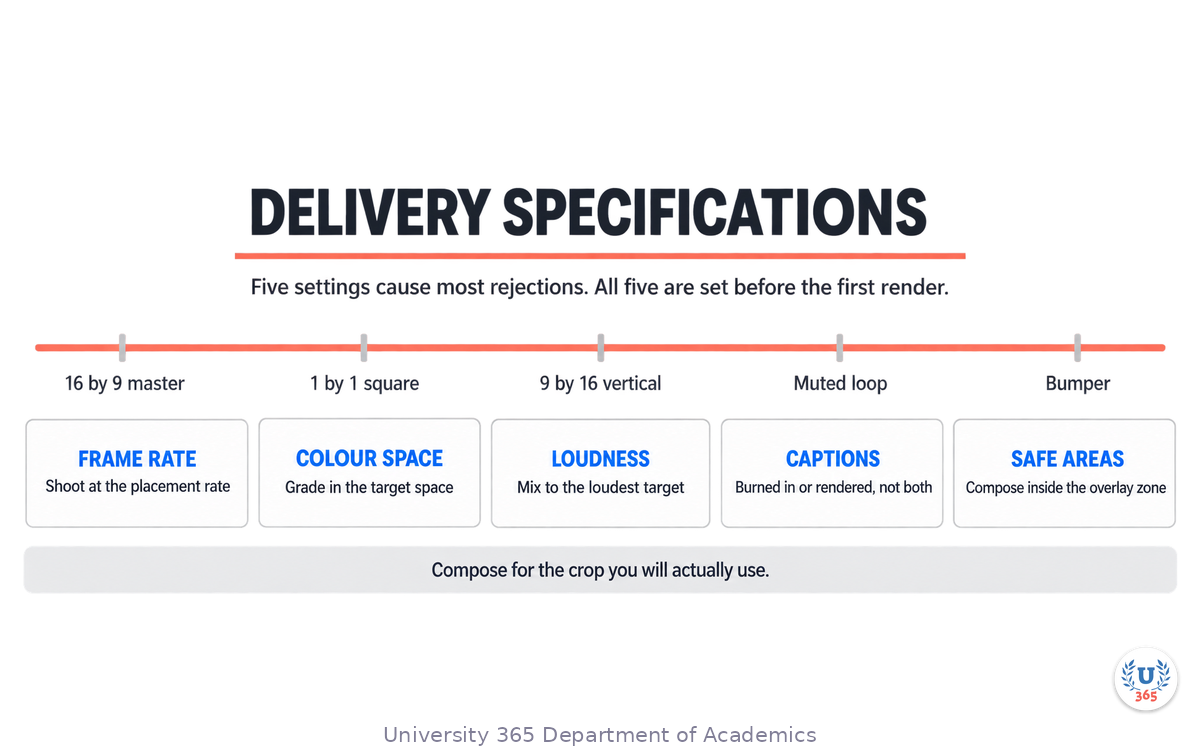
Five settings account for most delivery rejections, and all five are set before the first render.
Frame rate. Shoot the sequence at the placement's rate. A twenty-four frame master delivered into a thirty frame channel gets a pulldown that produces judder on motion, and the artefact is visible on exactly the camera moves generative video is good at.
Colour space and bit depth. Deliver the grade in the standard the platform expects, because a sequence mastered in one space and converted at upload will shift its blacks and its skin tones.
Loudness. Broadcast and platform targets differ, and a sequence mixed to broadcast loudness will sound quiet on a social platform. Mix to the loudest placement's target and reduce for the others rather than the reverse.
Caption strategy. Burned-in captions are correct for muted autoplay and wrong for a player that renders its own captions, where they will double up. Decide per placement.
Safe areas. Vertical placements overlay interface elements at the top and bottom of the frame. Compose within the safe area rather than cropping the subject afterwards.
The Delivery Pack
Ship seven things with the sequence, and the client can place it without a conversation.
The master in the highest quality the project needs. Each placement's edit at its own ratio and length. A poster frame for every placement, because a video without a poster renders as a black box in most feeds. A subtitle file in the standard format alongside any burned-in version. The still images extracted for thumbnails. The sound mix in the loudness target of the primary placement. And the production record, covered in the next section.
A Five-Minute Check Before Upload
Run the same five checks on every deliverable. Play the first three seconds with the sound off, because that is what autoplay shows. Play the last two seconds, because a generated clip often settles late and the final frame is what a loop displays. Check the first frame is not blank. Confirm the poster frame is a frame that reads at thumbnail size. And play the sequence on a phone speaker, where most of the audience will meet it.

Generative Video: Sora, Veo and the New Production Pipeline
Step 11: Two Worked Pipelines, at Two Budgets
The same six-stage pipeline behaves differently at a solo budget and at a studio budget. Two worked examples make the difference concrete.
Pipeline One: A Solo Creator, One Product Explainer at Zero Cash Cost
The brief: a thirty-second explainer for a small product, delivered for the site, one social feed and one vertical story. No budget for stock footage, no camera, one person for a day and a half.
Script to shot list, forty minutes. The script is written as beats, not paragraphs: problem, product, effect, action. Four beats become five shots, because the problem beat needs two images to read.
Look lock, twenty minutes. The look is set from a single generated still, chosen for its lighting and its limited palette rather than for its subject, because the still is what every subsequent shot is conditioned on.
Generation, three hours. Each shot gets six attempts, which means thirty short clips. Two of the shots need a second round because the first six all showed the same continuity break between the subject's hand and the object. The attempts are judged at the delivery size, not at full resolution.
Continuity, thirty minutes. The five selected clips are placed on the timeline in order and watched once at speed with the sound off. Two cuts fail: one because the subject's shadow flips direction, one because the background changes hue by a step. Both are fixed by cutting to a different shot rather than by regenerating.
Edit and sound, ninety minutes. The cut is assembled to a music bed with the beat map rather than to the words. The voice track is recorded separately on a phone, because model-generated speech is the weakest element in a solo pipeline. Subtitles are burned in for the muted placements and exported as a file for the site.
Delivery, thirty minutes. Three ratios are exported from the one master. Poster frames are pulled. The production record is written.
Total: one and a half days, zero cash cost, five shots, three placements.
Pipeline Two: A Studio Team, a Fifteen-Second Brand Spot at a Per-Second Budget
The brief: a fifteen-second brand spot for a campaign, delivered in four ratios, with the look locked to an existing brand film.
Script to shot list, two hours with the client. Six shots in fifteen seconds, which is fast cutting. The client approves the shot list as an animatic built from stills, before any motion is generated. This is the step that protects the per-second budget, because a shot list change after generation costs the whole shot.
Look lock, one hour. The look is conditioned on frames extracted from the existing brand film, so the new sequence sits beside the old one without a visible seam. This is the single highest-value use of image conditioning in the pipeline.
Generation, one day. Each of the six shots gets twelve attempts at the higher tier for the two hero shots and six at the standard tier for the four supporting shots. The attempt budget is decided per shot before generation begins, and it is written on the shot list where the client can see it.
Continuity, two hours. A colourist matches the six clips to the brand film's grade rather than to each other, which is the correct target when the sequence will be intercut with existing material.
Edit and sound, one day. The cut is assembled to a licensed track. Sound design is a separate pass: whooshes on the four transitions and a subtle room tone under the whole spot, because the model's own audio is not good enough to carry a fifteen-second brand piece on its own.
Delivery, half a day. Four ratios, poster frames, a subtitle file, an audio mix at the platform target, and the production record with the rights position for each model used.
Total: four days of work, a per-second budget spread across thirty-six hero attempts and twenty-four standard attempts, four placements.
What the Two Pipelines Share
The proportions are the same in both, and that is the useful finding. Roughly a third of the time is decisions and the shot list, a third is generation and selection, and a third is edit, sound and delivery. Generation is the cheapest third in money and the most expensive in patience, and it is never the majority of the work.
The second shared property is where the failures appear. In both pipelines, every defect that reached the review stage was a continuity failure or a delivery specification failure, never a failure of the model to produce something plausible. That is the shape of the craft now: the model reliably produces material, and the practitioner's value sits in the specification before and the assembly after.
The third shared property is the record. Both pipelines finish with a written production log naming the model, the tier, the date and the rights position per clip, because that document is what makes the next commission a conversation rather than an audit.

Generative Video: Sora, Veo and the New Production Pipeline
Feynman Summary: Explain It Like You Are 12
Imagine you want to make a little film about a dog finding a ball.
Usually you need a camera, a dog, a garden and a friend to hold the camera. Now you can type what you want and a computer makes a short clip of it. Not the whole film. One short clip, about eight seconds.
So you write down five short moments. Dog looks at ball. Dog stands up. Dog runs. Dog picks up the ball. Dog comes back. Then you ask the computer for each moment, one at a time, and hope the same dog appears in all five.
That is the hard part. The computer forgets what the dog looked like. So you give it a picture of your dog and say: use this dog, every time. And when two clips still do not match, you put a cut between them, the way a real film does, and nobody notices.
You still decide the five moments. You still decide which clips are good. You still put them in order and add the music.

Generative Video: Sora, Veo and the New Production Pipeline
Mindmap: The Complete Picture
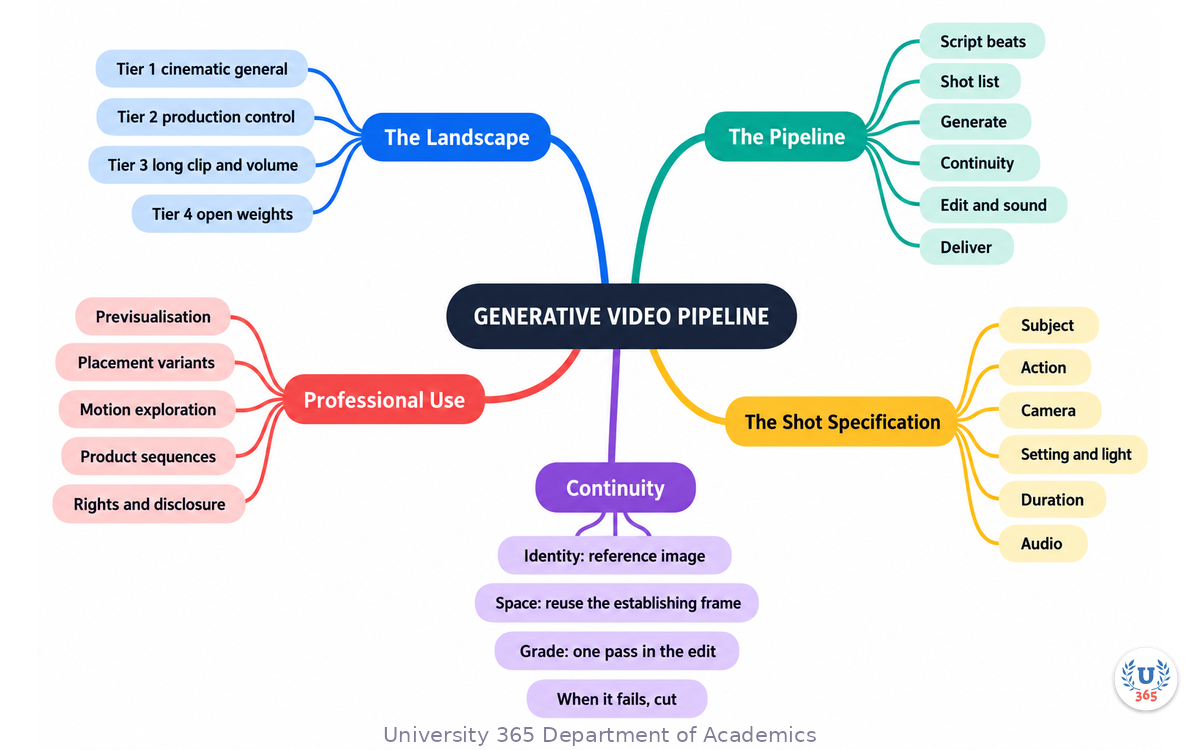
The mindmap sets out the four model tiers and what each is good at, the six-stage pipeline from script beats to published cut, the six fields of a shot specification, the three continuity properties and their countermeasures, the four dimensions of a motion prompt, the four professional use cases, and the three rights questions plus the disclosure line.
UNOP Sound (University 365 Neuroscience Oriented Pedagogy)
Take five minutes to consolidate your memory. Play the isochronous tone track (10Hz alpha frequency) with your eyes closed. Alpha-frequency tones after a learning session support consolidation, helping move what you just learned from short-term to long-term memory.
[Audio player: UNOP Post-Lecture Isochrone (10Hz, 5 minutes)]

Generative Video: Sora, Veo and the New Production Pipeline
Practical Exercise: Plan and Generate a Three-Shot Sequence
Exercise: One sequence, three shots, ninety minutes
Choose a subject you already know. A product you own, a place you can describe, a person who consents to appear as a generated likeness. Do not start with an imaginary client.
Write three beats. One sentence each, in order. For example: she opens the box; she lifts the device; she sets it down and steps back.
Write the shot list. For each beat, fill the six fields: subject, action, camera, setting and light, duration, audio. Keep each shot at or under the model's limit.
Generate three stills first. One per beat, from the shot specification. Approve composition and light before you spend any video generation.
Generate the three clips. Use the approved still as the first frame where the tool allows it, and reuse one reference image of your subject in all three shots.
Assemble and review. Cut the three clips in order. Watch once at full size and once at the size your audience will see. Note every place where the subject or the location changes without being asked to.
Fix with continuity, not with luck. Re-generate the weakest shot with a stronger reference image or tighter anchors. If two shots still will not match, replace the join with a cut.
Add sound. One music bed, one level balance, two placed effects. Compare the version with sound to the version without.
Write the record. Model, version, date, per-shot prompt, which shots were generated, which audio was synthesised. One page.
What to Observe
Which of the six fields did you leave vague in the first draft, and which shot failed because of it?
How many generations did each shot consume, and was the cost in attempts paid by the specification or by luck?
Where did identity drift first, and did the reference image hold it?
Did the sequence survive a cut where continuity failed?
At phone size, which shot became unreadable, and what would you change in the shot list to prevent it?
Applied AI Connection
You specified, generated, selected, assembled and accounted for the work. The model produced pixels; you produced the sequence. CI-First applies to video exactly as it applies to text and still design: HI remains the ruler and orchestrator of the AI, and the generation record is how you prove the first HI was in the loop. CI = HI + (AI x HI).

Generative Video: Sora, Veo and the New Production Pipeline
Glossary
Term | Definition |
Text-to-video | Generating a moving image sequence from a written prompt alone, with no source image. |
Image-to-video | Generating motion from a supplied still image, which becomes the first frame or the reference for the shot. |
Shot specification | The six-field description of one shot: subject, action, camera, setting and light, duration, audio. |
Shot list | The ordered set of shot specifications that a sequence is assembled from. |
Continuity | The property that separate generated shots read as one piece: same subject, same space, same grade. |
Reference image | A supplied image that locks a subject, object or location so it survives into a new generation. |
Motion brush | A control that lets you paint the region of a frame that should move, and how it should move. |
Keyframes | Supplying the first and last frame of a shot so the model fills the motion between them. |
Native audio | Sound generated in the same pass as the picture, so effects and dialogue are synchronised with the visuals. |
Single-pass clip | One continuous generation, without extension or assembly, which defines the maximum usable shot length. |
Grade | The colour and contrast treatment applied across a sequence so the shots match. |
Generation record | The per-shot log of model, version, date, prompt and which elements were generated rather than captured. |
Open-weight model | A model you can run on your own hardware, which keeps the data inside your own infrastructure. |
Provenance signal | An embedded marker in generated output that identifies it as generated. |
UNOP | University 365 Neuroscience-Oriented Pedagogy, the instructional framework that governs how these lectures are structured. |
Micro-Credential for your Career (MCC) | A stackable professional credential for job-ready skills in a targeted burst. |

Generative Video: Sora, Veo and the New Production Pipeline
Quiz: TEST YOUR UNDERSTANDING
1. What happened to Sora in 2026?
A) It became the leading commercial video model
B) OpenAI discontinued it, with the app offline in April and the API scheduled to end in September
C) It was renamed and folded into a design tool
D) It was replaced by an open-weight release
2. Which property is the central technical problem when a sequence needs several shots?
A) Resolution
B) File size
C) Continuity of subject, space and grade across separate generations
D) The length of the prompt
3. What is the professional answer when two shots cannot be made to match?
A) A dissolve between them
B) Regenerate until they match, at any cost in attempts
C) Place a cut between them
D) Grade them separately
4. Which six fields make up a shot specification?
A) Model, version, seed, price, resolution, duration
B) Subject, action, camera, setting and light, duration, audio
C) Hook, beat, transition, grade, sound, export
D) Title, script, storyboard, animatic, cut, delivery
5. Where should exposure and colour differences between generated clips be fixed?
A) In the model, by re-prompting each clip
B) By exporting at a different resolution
C) In the edit, with one grade applied across the sequence
D) They cannot be fixed
Answers: 1-B, 2-C, 3-C, 4-B, 5-C

Related Resources
U365 INSIDE Publications
AI for Personal Branding: Design, Content, and Strategy: Building the visual system and publishing rhythm that a video presence feeds into
AI Motion Graphics: Animation Without After Effects: The motion-design groundwork that a generated shot sequence sits on
The Future of Creative Work: Human + AI Collaboration: Where the value moves in a creative practice when production gets cheap
AI Content Generation Beyond ChatGPT: The content engine that a video sequence has to fit inside
Generative Brand Identity: Building the identity system your generated footage must hold to
External Resources
OpenAI, Sora discontinuation coverage (2026): the announcement that the app and the API would be discontinued, and the end of the reported Disney licensing deal: theverge.com
CNET, "OpenAI's Once Viral Sora AI Video App Is Being Discontinued" (2026): the company statement that Sora would be discontinued in the consumer app and the API: cnet.com
Google DeepMind, Veo 3.1 (2026): the model page for the leading native-audio video model, with access through Gemini and Google Flow: deepmind.google
Runway, "Introducing Runway Gen-4.5" (2025): the reference-driven control model, with its Artificial Analysis placement and control modes: runway.com
Runway, "Introducing Runway Gen-4" (2025): world consistency from a single reference image, the technique multi-shot work depends on: runway.com
Artificial Analysis, Text to Video Leaderboard (2026): blind preference rankings across the current video models. Treat it as a snapshot, because the board changes monthly: artificialanalysis.ai
Related U365 Lectures (Coming Soon)
Lecture 7: Generative Video for Social Campaigns (UIC, Content Strategy Series)
Lecture 8: Sound Design for AI Video (UIC, Media Studies Series)
Lecture 9: Motion Systems in Generated Footage (UID, Motion Graphics Series)

Generative Video: Sora, Veo and the New Production Pipeline
U.Copilot for This Lecture
Discuss this lecture with U.Copilot, your AI chat companion trained on this content.
Copy and paste the following prompt into the U.Copilot chat on university-365.com:
You are U.Copilot for Lectures, an AI chat companion trained on University 365 lecture content. You are helping a Fellow who just completed the lecture "Generative Video: Sora, Veo and the New Production Pipeline" from the Cross-Institute series at the University 365 Institute of Design (UID) and the University 365 Institute of Communication (UIC). Your role is to help the Fellow plan, generate and account for a multi-shot generative video sequence. You can: - Clarify any concept from the lecture: the four model tiers, the six-stage pipeline, the six fields of a shot specification, the three continuity properties, the four dimensions of a motion prompt, and the three rights questions. - Review a shot list the Fellow has written and tell them which shot specifications are too vague to generate from. - Help the Fellow choose a model tier for a stated job, and name the trade-offs honestly. - Pressure-test a continuity plan: identity, space and grade, and where a cut is the better answer. - Help the Fellow draft the generation record and the disclosure line. - Discuss the professional use cases: previsualisation, placement variants, motion exploration and product sequences. Follow the CI-First approach: the Fellow orchestrates, the AI amplifies. Never present a generated clip as approved output, and never present a model's capability claim as verified fact without checking the vendor's own current documentation. Ask the Fellow to state what the sequence must achieve before suggesting any generation step. Use context-rich, role-aware responses that account for the Fellow's discipline and experience level.

Generative Video: Sora, Veo and the New Production Pipeline
Next Steps
Now that you can see how the pipeline works, here is what to do next:
Write one shot list this week from a brief already on your desk, in the six fields, and show it to a colleague.
Run the practical exercise end to end and keep the generation record.
Verify your current tool's terms on commercial use, watermarking and the tier you are paying for.
Draft the disclosure line and put it in your standard proposal template.
Check the leaderboard and the vendor pages before you commit a monthly budget, not after.
Continue the series with "AI Motion Graphics: Animation Without After Effects" to build the motion-design groundwork.
Explore the U365 Cross-Institute Series on INSIDE for more lectures that join design method to communication practice.
Generative video is not a cheaper camera. It is a new production stage, and the discipline that makes it work is the discipline of specifying what you want before you ask for it.

Generative Video: Sora, Veo and the New Production Pipeline
IMPORTANT NOTICE
This lecture is published by University 365 as part of its INSIDE Publications Hub. The content is free to read for all visitors. Lectures in this series may be part of a structured academic program leading to a Micro-Credential for your Career (MCC). To enroll in an academic program, visit university-365.com/tuition.
This content is for educational purposes. Model capabilities, access terms and prices in this tier change quickly. Verify current specifications, licensing and commercial-use terms against each vendor's own documentation before you commit a team workflow or a client deliverable to them.
Copyright University 365, Inc. All rights reserved. This content is protected under University 365's copyright policies. For permissions or inquiries, contact uda@university-365.com.
Published by the Department of Academics, University 365.
Lecture delivered by the UIC, UID in collaboration.
Martin Swartz, Dean of Academics, UDA
Signed for the academic year 2026.




Comments