
The Future of Creative Work: Human + AI Collaboration


UID University 365 Institute of Design
Series Creative Technology | Level Basic (Free)
Duration 15 to 20 minutes | Access Free
Digital Design, UX/UI, Visual Communication, Motion Graphics, Creative Technology

UNOP Sound (University 365 Neuroscience Oriented Pedagogy)
Take five minutes to prepare your brain. Play the isochronous tone track (40Hz gamma frequency) with your eyes closed. Gamma-frequency tones before a learning session raise attention and make the material easier to absorb.
[Audio player: UNOP Pre-Lecture Isochrone (40Hz, 5 minutes)]
In this Lecture

The Hook: Two Forecasts, One Job Market
Two forecasts have been running in parallel since 2023. The first says generative tools absorb the production layer, and creative roles shrink to a review function or disappear. The second says the tools remove the cost of making things, so more people make more things, and creative capacity expands.
Both forecasts are still quoted. Neither one survives contact with the hiring data.
In April 2026 Adobe Research published a study of two waves of United States job postings, a survey of 1,433 working creatives in the United States and the United Kingdom, and eighteen months of qualitative interviews. The study found redistribution, not replacement. United States creative professional job postings rose from roughly 10,500 to 11,300 in six months, an 8 percent gain. The share of those postings that explicitly listed AI skills rose from 10 percent to 15 percent. The roles did not change name. They gained a new line in the requirements section.
That finding matters for you more than the debate does, because it tells you where the work went. It moved out of the first pass and out of the finishing pass, and it piled up in the middle: choosing between options, directing the work, negotiating with the client, and being accountable for how the work was made. This lecture is about that middle, and about the discipline required to hold it.
Step 1: What the Evidence Actually Shows
Start with the numbers, because the arguments you will have this year are arguments about numbers.
Hiring rose, and AI requirements rose with it
The Adobe job-postings comparison covers September 2025 and April 2026. Over that six-month window, United States creative professional postings rose 8 percent, and AI as an explicit requirement rose 5 percentage points. The demand is not spread evenly. Among postings from mid-market and enterprise companies, 18 percent required AI skills. Among postings from solo and small businesses, 8 percent did. At the same time, mid-market and enterprise share of creative hiring rose from 64 to 69 percent of postings.
The distribution of those requirements is worth knowing if you are positioning yourself. Of the postings that require AI skills, Graphic Designer accounts for 11 percent, Video Editor 10 percent, UX/UI Designer 8 percent, and Animator, Photographer and Motion Graphics Designer 6 percent each. These are established roles with a new line in the requirements, not new job titles.
Most creative jobs still do not require AI skills
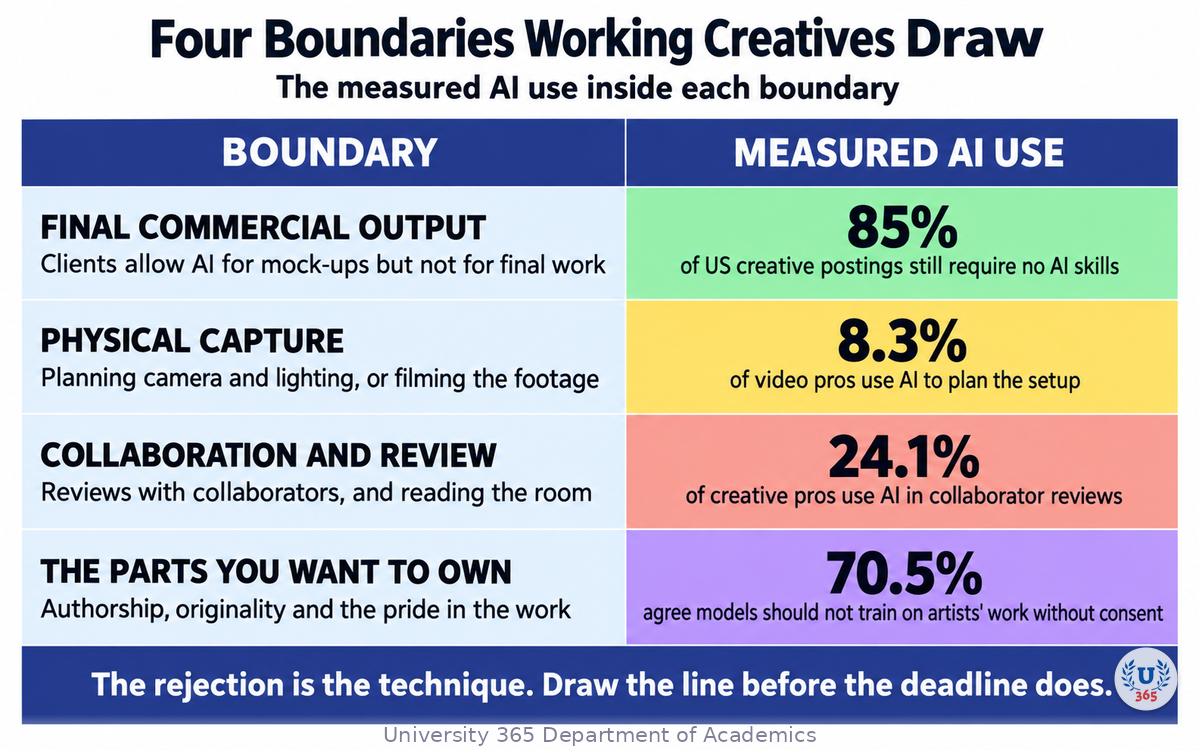
The single most useful number in the study is the one that resists the hype: as of April 2026, 85 percent of United States creative professional postings still did not explicitly require AI skills. Five out of six creative jobs were being filled on paper without an AI requirement.
Read that together with the previous paragraph and you get a market that has not converged. AI fluency is concentrating in specific segments, mostly larger employers, and leaving the rest of the market mostly untouched. If you are job hunting, that tells you to read the employer, not the trend.
Employers expect skills to keep moving
The World Economic Forum Future of Jobs Report 2025 surveyed employers and found they expect 39 percent of workers' core skills to change by 2030. That figure is down from 44 percent in the 2023 edition, which suggests employers have adapted their expectations rather than that the pressure has stopped. The same report ranks creative thinking among the top core skills employers identify today, and puts AI and big data at the top of the fastest-growing skills.
The report also gives a task-level split that is more useful than any headline: employers estimate that 47 percent of work tasks today are performed mainly by humans alone, 22 percent mainly by technology, and 30 percent by a combination of both. The combination is already a third of the work. It is the part this lecture trains.
Who is coming into the field
About twelve million American adults describe themselves as actively training to move into creative work, which is roughly three times the size of the current creative professional and creative-major population combined. In the Adobe study, 93 percent of them are career switchers, more than half have no formal creative education, and 77 percent rate generative AI as extremely or very important to their future creative career.
The incumbents read the same technology differently. Working creatives were 85.6 percent net positive about AI while 46.2 percent of United States respondents said they were likely to call it a threat to their profession. In the United Kingdom that threat figure was 51.2 percent. Both things are true at once: a tool can be useful inside your workflow and still feel like a threat to the structure of the profession.
Step 2: Where Your Value Moves
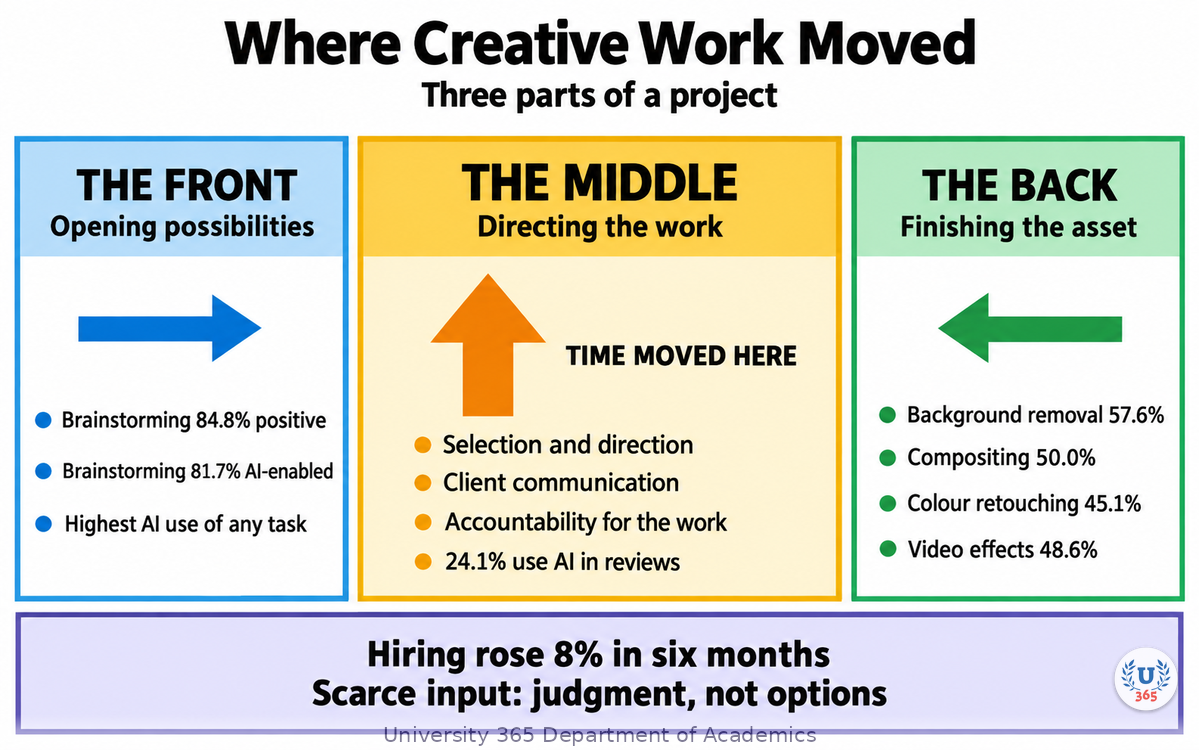
The Adobe study describes a three-part shape to a creative project: a front where possibilities are opened, a back where the finished asset is prepared for delivery, and a middle where the work is directed. AI is strongest at the front and the back. The middle is where the hours went.
The front: possibility
Brainstorming and ideation is the single task in the study that scored high on creativity, high on enjoyment, high on AI use, and high on positive sentiment at the same time. Among United States creative professionals, 84.8 percent reported positive sentiment about AI's effect on brainstorming, and 81.7 percent rated brainstorming as highly enabled by AI.
Use it that way. Ask for thirty directions you would not have considered, then reject twenty-nine. The output is not the deliverable. It is the raw material for a decision you still have to make.
The back: finishing
The back of the workflow is where the tooling is most concretely embedded. Among United States photo professionals, 57.6 percent reported substantial generative AI use to remove distracting background elements, 50.0 percent on compositing multiple images, and 45.1 percent on colour and tone retouching. Among United States video creators, 48.6 percent reported substantial generative AI use on visual effects.
This is real time recovered, and it is also the least differentiating part of your work. Nobody commissions you for background removal.
The middle: judgment, direction, accountability
Selection, direction, client communication and accountability are the tasks the study describes as expanding. They are also the tasks where creative professionals reported the lowest AI use even when the tooling could technically do them. Less than one in four, 24.1 percent, reported using generative AI in reviews with collaborators.
Here is the practical consequence. If the first and last thirds of your process are cheap, the only way to be worth more is to be better at the middle. That means developing a stated point of view, being able to explain why option three beats option seven, and carrying the responsibility for how the work was produced.
What the evidence says the scarce input is
The Adobe report is explicit about its own limits: it is a six-month hiring delta and a cross-sectional survey, not a multi-year trend, and it does not measure how project time is actually reallocated. With that caveat stated, its conclusion is a good working assumption for your career: more creative options are unlikely to be the scarce input. The scarce input is the judgment to decide which options are worth pursuing, and the deliberate practice of keeping enough of your own thinking in the work for it to be recognisably yours.
Step 3: The Four Boundaries Working Creatives Draw
The most useful part of the Adobe study for a practitioner is not a number. It is the pattern of refusal.
Working creatives in the study were not uniform adopters. They integrated AI in specific zones and actively kept it out of others, and the report describes tasks where practitioners were not using AI even when the tooling was capable, specifically tasks that touch authenticity, artistic integrity, ownership, or emotionally loaded design work. Empathising with clients was named as one area where they were not willing to take a shortcut.
Four boundaries show up often enough to plan around.
Boundary 1: The final commercial output
Client policy is tightening even as deadlines compress. One art director described a rule that AI is acceptable to render ideas and mock-ups, but not allowed in final work. Another described a company policy that allowed AI in final work only where the models used were trained ethically and did not infringe copyright.
If you do client work, find out where your client draws this line before the brief starts, not after you deliver. The line is usually a legal and brand-risk decision, not a comment on your craft.
Boundary 2: Physical capture
The study found low AI adoption in tasks that involve physical capture. Among United States video professionals, only 8.3 percent reported substantial AI use in planning the setup of camera and lighting equipment, and 13.3 percent in filming footage. Among United States photo professionals, 8.1 percent use it in setting up camera and lighting equipment.
The camera is not where the tool is. If your value is on set, the tooling changes your prep and your post, not your eye and your presence.
Boundary 3: Collaboration and review
Across all disciplines, less than a quarter of United States creative professionals, 24.1 percent, use generative AI in reviews with collaborators. Reading a room, defending a choice in person, and changing your mind because of a face rather than a prompt is still human work.
Boundary 4: The parts you want to own
Ownership is the boundary practitioners describe most personally. In the Adobe research, creative professionals reported that prompting a model to make work does not produce the same sense of pride of authorship as drawing, painting or photographing. One graphic designer put it plainly: the work looked good, but it did not feel like theirs.
There is a practical technique inside that discomfort, and the study records it. One team brainstorms ideas, puts the brief into the tool, asks for ideas, and starts over if the tool produces any of the ideas they already had. The rejection is the test of originality. A second practitioner described drawing more, not less, as a response to the volume of generated work.
The copyright question is not settled
Two-thirds or more of the working creatives surveyed agree that AI models should not be trained on artists' work without consent: 70.5 percent in the United States and 74.9 percent in the United Kingdom. Among United Kingdom creative professionals, 56.7 percent reported concern about copyright or trademark infringement when using AI outputs.
You do not have to resolve the policy debate to run your own studio. You do have to know where your name goes and what risk you are accepting when it goes there. Check the terms of the tools you use and the provenance requirements of each client before publication, and keep a record of which model produced which asset.
Step 4: The Two Collaboration Modes
The evidence tells you where the value moved. It does not tell you how to organise the work. U365 does, and the model comes from the CI-First approach.
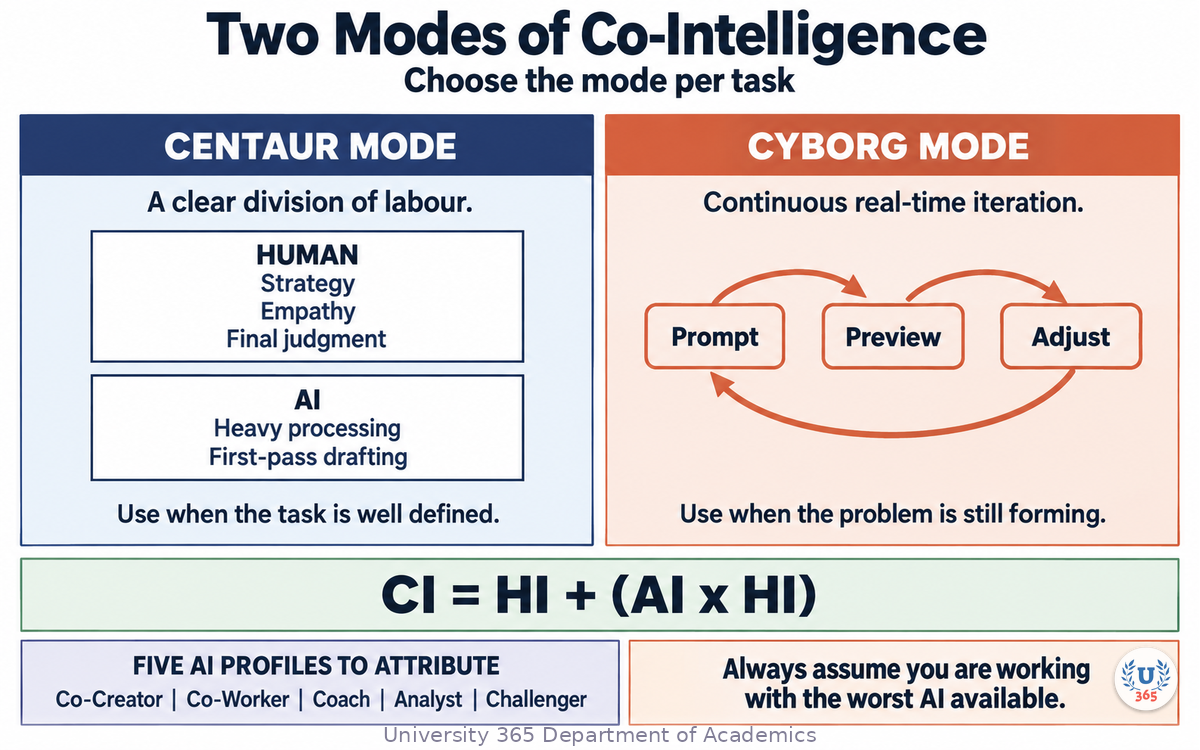
CI-First, Co-Intelligence First, holds that Human Intelligence remains the ruler and orchestrator of the AI. The founding equation is CI = HI + (AI x HI). Read it as structure rather than arithmetic: the AI multiplies your intelligence, and it multiplies nothing when your own intelligence is not in the loop. That is why the formula has HI in it twice.
Within that approach there are two modes of collaboration, and choosing the right one per task is a skill in itself.
Centaur mode: a clear division of labour
In Centaur mode, you split the work. The human handles the tasks that carry strategy, empathy and final judgment. The AI takes the heavy processing and the first-pass drafting.
Use Centaur mode when the task is well defined and the acceptance criteria are clear. Generating forty thumbnail variations from a fixed brief is Centaur work. Writing the brief is not.
Cyborg mode: continuous iteration
In Cyborg mode, human and machine iterate together in real time, prompting and refining in a tight loop. This is where the speed advantage is largest, and it is also where the risk is highest, because the boundary between your judgment and the tool's defaults becomes invisible if you are not watching for it.
Use Cyborg mode when the problem is still forming and you are thinking by making. A motion sequence where you adjust and preview twenty times in ten minutes is Cyborg work.
Name the AI profile before you assign the task
U365 trains five profiles for AI, and the profile you attribute shapes the output you get:
AI as Co-Creator and Thought Partner
AI as Co-Worker and Assistant
AI as Coach and Tutor
AI as Analyst and Tester
AI as Challenger and Devil's Advocate
The last one is the most under-used in creative practice and the most valuable. Ask the tool to attack the concept before the client does. A critique you commissioned is cheaper than a critique you received.
The executive safeguard
Whichever mode you are in, you remain the CEO of the AI. U365 enforces one mental model for this: always assume you are working with the worst AI available. That assumption forces you to verify independently, to keep your own judgment exercised, and to stay in the orchestrator seat rather than drifting into the passenger seat because the output looked confident.
Step 5: Direct, Evaluate, Account
The middle of the workflow consists of three skills, and each one can be practised deliberately.
Direct
Directing is the act of deciding what the work is before the tool touches it. A direction you can state in one sentence is worth more than a folder of references, because it survives the first round of feedback.
Write your direction in the imperative and hold it: what the work must achieve, for whom, and what it must never do. Then hand it over.
Evaluate
Evaluating is the skill that separates practitioners in an abundant-output market, and it has a specific failure mode: the second-best option is usually the most attractive one, because it is close enough to be familiar and different enough to feel like progress.
Give yourself a scoring frame before you look at the options, not after. Three criteria, ranked, written down. Then apply it without negotiating. The point is not to remove taste from the decision. It is to stop the volume of options from making the decision for you.
Account
Accountability is the part that is hardest to delegate and easiest to lose. If a client asks how an asset was produced, you need a truthful answer with a record behind it. If a claim in the work is wrong, it is your claim.
Keep a production record per asset: which tool, which model, which date, what was human, what was generated, what was retouched. It takes a minute per asset. It is the difference between a policy answer and a guess.
The three skills in one sentence
Direct the work before you generate it, evaluate it against criteria you set in advance, and be able to account for every part of it afterwards.
Step 6: What Breaks When You Over-Delegate
The failure modes of AI collaboration in creative work are predictable enough to plan against. Each one has a countermeasure.
Atrophy of the skills you stopped practising
When you hand over the typing and the thinking, reading, analysing, criticising and deciding at the same time, your own capacity in those areas weakens. U365 calls this AI Obesity: cognitive atrophy from over-delegation. The countermeasure is deliberate practice on Humics, the parts of the work AI cannot do for you: genuine creativity, critical thinking and social authenticity.
Practical version: keep one project per quarter where you do the difficult part yourself.
Hallucination blindness
A confident output is not a verified output. When a generated element looks polished, the temptation is to accept the surrounding claims with it. This is a specific risk in creative work, because invented copy, invented statistics and invented product names all render beautifully.
Countermeasure: every factual claim in a deliverable passes a separate verification pass, done by you, against a source.
Defaults that harden into decisions
A generated default becomes a decision the moment someone sees it. If the tool proposes a three-field signup form and nobody objects in the review, you now own a three-field signup form.
Countermeasure: flag every default you did not choose, out loud, in the review.
The Winner Effect
When the output arrives fast and looks strong, your brain gets a reward signal that increases confidence and risk appetite. Unmanaged, that shows up as hubris, reduced empathy and rushed decisions. The U365 response is to balance personal power with social responsibility and to keep ethical review outside the moment of enthusiasm.
Countermeasure: never approve regulated or high-stakes output in the same session that generated it.
Loss of authorship
The last failure is the quietest. If the work reaches the client without a trace of your thinking in it, you have delivered volume and kept nothing.
Countermeasure: the boundary work from Step 3. Choose, on purpose, the parts you will always do yourself, and write them down.
Step 7: Your Collaboration Contract
Everything in this lecture compresses into one artefact you can build in twenty minutes: a personal collaboration contract. It is the practical expression of CI-First in a creative practice.
Write it in four parts.
Part 1: Your zone
The three to five things you will always do yourself, regardless of budget or deadline. Typical entries: framing the problem, the first concept, the final selection, the client conversation, the approval of factual claims.
Part 2: The delegated zone
The tasks you will hand to a tool by default, with the criterion that makes them safe to delegate: the acceptance test is clear, the failure is cheap and visible, and the output is verified before it leaves your desk.
Part 3: The disclosure line
What you tell clients, in one paragraph, about how you work with AI, and what you will never do without written permission: name a client, use a client's asset in a training corpus, or produce regulated claims from a generated draft.
Part 4: The record
Where you keep the per-asset production log, and what it contains. Tool, model, date, human versus generated, retouch notes.
Why writing it down matters
A contract you have written is a decision you make once. Without it, you renegotiate the same boundary under deadline pressure, every project, and you will lose some of those negotiations. This is the difference between using AI and being managed by it.
Feynman Summary: Explain It Like You Are 12
Imagine you are drawing a poster. You are fast at drawing the shapes, but slow at making forty versions to choose from.
A machine can make the forty versions in a minute. Now you have forty posters on the floor and one job: pick the one that works. That job did not exist for you before. It is yours now.
Three things stay yours. You decide what the poster is for. You decide which one is good. And if someone asks where a number in the poster came from, you are the one who has to know.
The machine is a very fast assistant with no taste and no responsibility. You are the one with taste and responsibility. Keep both, or the posters will look fine and mean nothing.
Mindmap: The Complete Picture
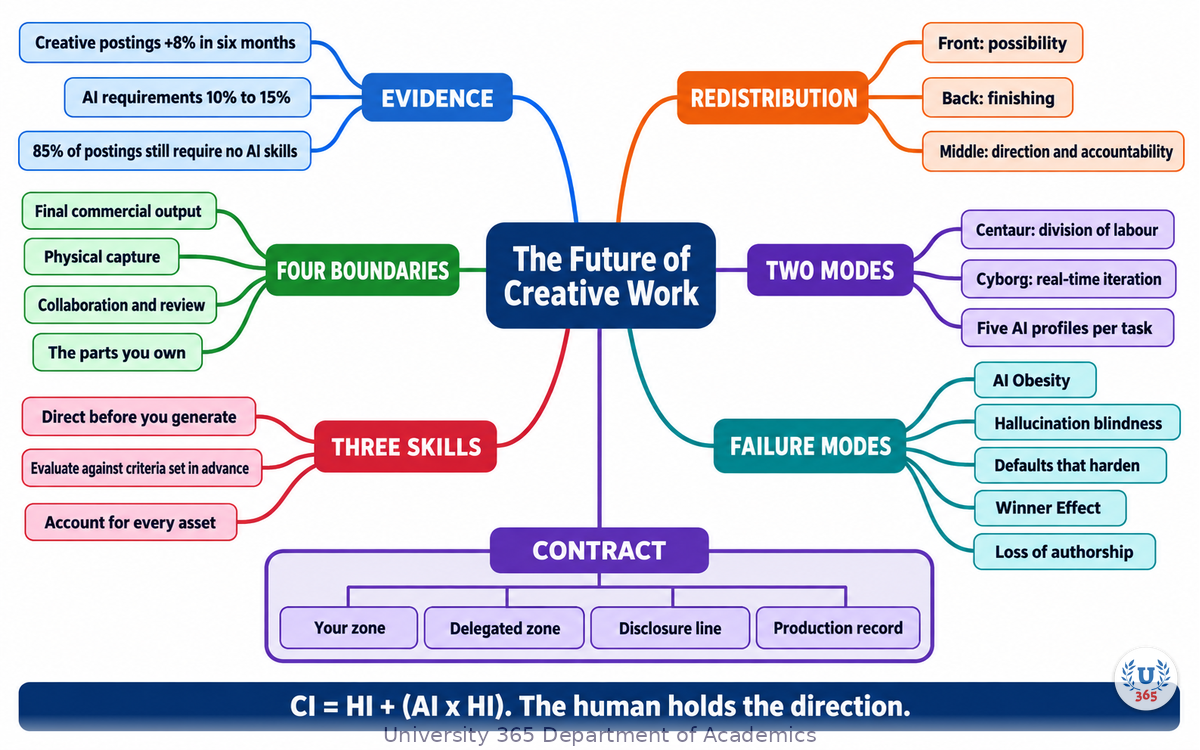
The mindmap sets out the two competing forecasts and the data that resolves them, the three parts of a creative project and where value moved, the four boundaries practitioners draw, the two collaboration modes with the five AI profiles, the three middle-stage skills, the five failure modes and their countermeasures, and the four parts of a personal collaboration contract.
UNOP Sound (University 365 Neuroscience Oriented Pedagogy)
Take five minutes to consolidate your memory. Play the isochronous tone track (10Hz alpha frequency) with your eyes closed. Alpha-frequency tones after a learning session support consolidation, helping move what you just learned from short-term to long-term memory.
[Audio player: UNOP Post-Lecture Isochrone (10Hz, 5 minutes)]
Practical Exercise: Map Your Own Boundaries
Exercise: One project, one contract, twenty minutes
Pick the most recent project you delivered and list every task it contained, in order, from first conversation to final handover.
Mark each task with one of three labels: H for human only, C for Centaur (split), or Y for Cyborg (live iteration).
Find the middle. Circle the tasks that involved choosing, directing, negotiating or accounting for the work. Count them.
Name your zone. Write the three to five tasks you will never hand over. Use the imperative: "I write the brief." "I choose the final cut."
Write your disclosure line. One paragraph you would be comfortable sending to a client, describing how AI is used in your process and what you will not do without written permission.
Start the record. Create the log with five columns: asset, tool, model, date, human or generated. Fill in the three most recent assets.
Test the contract against the next brief you receive, before you open a tool.
What to Observe
How many of your tasks were already Cyborg tasks, and how many did you assume were human-only?
Where in the project did the decision making actually happen, and who did it?
Which of the four boundaries from Step 3 does your current practice already respect, and which does it ignore?
Can you state your direction for the last project in one sentence? If not, what did that cost you?
Applied AI Connection
You classified your own workflow, chose your zone, wrote the disclosure line and started the record. The tool produced nothing in this exercise on your behalf. That is the point. CI-First is not a licence to delegate; it is a discipline of deciding what to delegate and proving you did. CI = HI + (AI x HI), and the exercise exists to keep the first HI in the equation.
Glossary
Term | Definition |
Redistribution | The measured shift of creative work between stages of a project, rather than a reduction in the number of creative roles. |
CI-First | Co-Intelligence First: the U365 principle that Human Intelligence remains the ruler and orchestrator of AI. CI = HI + (AI x HI). |
Humics | The human capabilities AI does not replace: genuine creativity, critical thinking and social authenticity. |
Centaur mode | A collaboration mode with a clear division of labour: the human handles strategy, empathy and final judgment, the AI handles processing and first drafts. |
Cyborg mode | A collaboration mode of continuous real-time iteration between human and machine. |
AI Obesity | Cognitive atrophy caused by over-delegating thinking as well as production to AI. |
Winner Effect | The confidence and risk-taking surge that follows a rapid success, which can reduce judgment if left unmanaged. |
Hallucination blindness | Accepting an output, and the claims around it, because it looks confident and polished. |
Direction | A one-sentence statement of what the work must achieve, for whom, and what it must never do. |
Selection | The act of choosing among generated options against criteria set before the options are seen. |
Production record | A per-asset log of tool, model, date and the split between human and generated work. |
Disclosure line | A written statement of how a practitioner uses AI and what will not be done without permission. |
UNOP | University 365 Neuroscience-Oriented Pedagogy, the instructional framework that governs how these lectures are structured. |
Micro-Credential for your Career (MCC) | A stackable professional credential for job-ready skills in a targeted burst. |
Quiz: TEST YOUR UNDERSTANDING
1. What did the Adobe job-postings comparison find between September 2025 and April 2026?
A) United States creative professional postings fell sharply
B) United States creative professional postings rose 8 percent and AI requirements rose
C) AI became a requirement in most creative postings
D) Creative roles were renamed to AI roles
2. Where did AI use concentrate inside a creative project?
A) In client negotiation and final approval
B) In the front, where ideas are opened, and the back, where assets are finished
C) In every stage equally
D) Only in the middle of the process
3. Which mode applies when the problem is still forming and you adjust and preview many times in a tight loop?
A) Centaur mode
B) Cyborg mode
C) Neither mode
D) Outsourced mode
4. What is the correct countermeasure to defaults that harden into decisions?
A) Accept the default and note it later
B) Regenerate from a longer prompt
C) Flag every default you did not choose, out loud, in the review
D) Remove the default silently
5. What belong in a personal collaboration contract?
A) A list of tools you own
B) Your zone, the delegated zone, the disclosure line and the record
C) A client list and a rate card
D) A prompt archive
Answers: 1-B, 2-B, 3-B, 4-C, 5-B
Related Resources
U365 INSIDE Publications
AI for Prototyping: From Sketch to Interactive in 15 Min: The fifteen-minute prototyping loop, from a photographed sketch to a clickable prototype
AI Image Generation: Stable Diffusion for Designers: Producing a real design asset from a prompt
Design Systems Powered by AI: Tokens, documentation and component variants generated with AI
External Resources
Adobe Research, "How AI is redistributing creative work" (2026): job-postings analysis, a 1,433-person survey of working creatives and qualitative practitioner research: adobe.com/ai/research
World Economic Forum, "Future of Jobs Report 2025": employer expectations on skills change by 2030 and the human-machine task split: weforum.org
AI and Ethics, "Designing meaningful human oversight in AI" (2026): oversight patterns for human review of AI systems: link.springer.com
Related U365 Lectures (Coming Soon)
Lecture 7: AI for Accessibility: Designing for Everyone (UID, UX/UI Series)
Lecture 8: Generative Brand Identity (UID, Creative Technology Series)
Lecture 9: AI in Web Design: From Wireframe to Deployed Site (UID, UX/UI Series)
U.Copilot for This Lecture
Discuss this lecture with U.Copilot, your AI chat companion trained on this content.
Copy and paste the following prompt into the U.Copilot chat on university-365.com:
You are U.Copilot for Lectures, an AI chat companion trained on University 365 lecture content. You are helping a Fellow who just completed the lecture "The Future of Creative Work: Human + AI Collaboration" from the Creative Technology series at the U365 Institute of Design (UID). Your role is to help the Fellow decide what to keep human, what to delegate, and how to account for the result. You can: - Clarify any concept from the lecture: redistribution of creative work, the three parts of a project, the four boundaries, Centaur and Cyborg modes, the five AI profiles, the three middle-stage skills, and the five failure modes with their countermeasures. - Review a direction the Fellow wrote and tell them whether it is specific enough to survive a first round of feedback. - Help the Fellow build the scoring frame for selection before they look at any generated option. - Pressure-test a draft personal collaboration contract: their zone, the delegated zone, the disclosure line and the record. - Act as the Challenger and Devil's Advocate profile on a concept the Fellow is about to present. - Discuss where the Fellow's current practice already respects a boundary and where it ignores one. Follow the CI-First approach: the Fellow orchestrates, the AI amplifies. Never present generated output as a decision, and never present a generated claim as a verified fact. Ask the Fellow to state what the work must achieve before suggesting any production step. Use context-rich, role-aware responses that account for the Fellow's discipline and experience level.
Next Steps
Now that you can see where creative value moved, here is what to do next:
Run the practical exercise on your most recent project and write the contract.
Set your selection criteria before the next time you open a generation tool.
Start the production record today, with the next asset you deliver.
Commission a critique from the Challenger profile before your next client review.
Choose one Humic skill and schedule deliberate practice on it this quarter.
Continue the series with "Generative Brand Identity" to apply the same discipline to a full identity system.
Explore the U365 Creative Technology tag on INSIDE for more practical design method with the CI-First approach.
The future of creative work is not a forecast you wait for. It is a set of boundaries you draw this week, on a project that is already on your desk.
IMPORTANT NOTICE
This lecture is published by University 365 as part of its INSIDE Publications Hub. The content is free to read for all visitors. Lectures in this series may be part of a structured academic program leading to a Micro-Credential for your Career (MCC). To enroll in an academic program, visit university-365.com/tuition.
This content is for educational purposes. Labour-market data and tool capabilities change quickly. Verify current figures and features against each source's own documentation before you commit a team workflow or a policy to them.
Copyright University 365, Inc. All rights reserved. This content is protected under University 365's copyright policies. For permissions or inquiries, contact uda@university-365.com.
Published by the Department of Academics, University 365.
Lecture delivered by the University 365 Institute of Design (UID).
Joe Borazian, Dean of Design, UID
Signed for the academic year 2026.




Comments