
Design Systems Powered by AI

Updated: Oct 1


UID University 365 Institute of Design
Series Creative Tech Series | Level Basic (Free)
Duration 25 minutes | Access Free
Digital Design, UX/UI, Visual Communication, Motion Graphics, Creative Technology

UNOP Sound (University 365 Neuroscience Oriented Pedagogy)
Take five minutes to prepare your brain. Play the isochronous tone track (40Hz gamma frequency) with your eyes closed. Gamma-frequency tones before a learning session raise attention and make the material easier to absorb.
[Audio player: UNOP Pre-Lecture Isochrone (40Hz, 5 minutes)]
In this Lecture
AI-Generated Token Systems: From Brand to Code Automatically
AI for Component Documentation: Never Write Another Props Table
Automated Design Linting: Catching Inconsistencies Before They Ship
AI-Driven Design-to-Code Pipelines: From Figma Frame to Production Component
Figma AI and Visual Editor Intelligence: Design Tools That Think
Supernova and Specify: Token Management Platforms Powered by AI
The Hook: Why Design Systems Need AI Now
You lead design at a mid-size SaaS company. Your design system has 142 components, 380 design tokens, and 60 documentation pages. Last quarter, your team shipped 3 new features. Each one introduced at least 7 token variations that did not exist in the system. Your Figma library now has 23 slightly different button styles. Your developers maintain a separate set of tokens in code that drifted from the design files 4 months ago.
Nobody did this on purpose. The team is busy. Deadlines are tight. A designer needs a slightly larger padding, creates a new token instead of finding the existing one. A developer hardcodes a color because the token name was ambiguous. A new component gets documented in a Figma comment but never makes it to the Storybook page. Over 12 months, the system rots from the inside.
This is the design system maintenance crisis. The 2025 Design Systems Survey by Figma found that 73% of design teams report their design system is either partially or fully out of sync with production code. The average design system has 47 undocumented component variations. Teams spend 30 to 40% of their design operations time on maintenance tasks that could be automated: syncing tokens, updating documentation, checking for consistency, and migrating components when the system changes.
AI changes the economics of design system maintenance. In 2026, AI tools can generate token systems from a brand guideline document, write component documentation from Figma component definitions, lint designs against your token system in real time, and produce production-ready code from visual designs. The designer shifts from maintaining the system to curating it.
The question is not whether AI belongs in your design system workflow. It is already there in Figma AI, Supernova, Specify, and code generation tools. The question is whether you understand these tools well enough to deploy them without creating new layers of inconsistency.

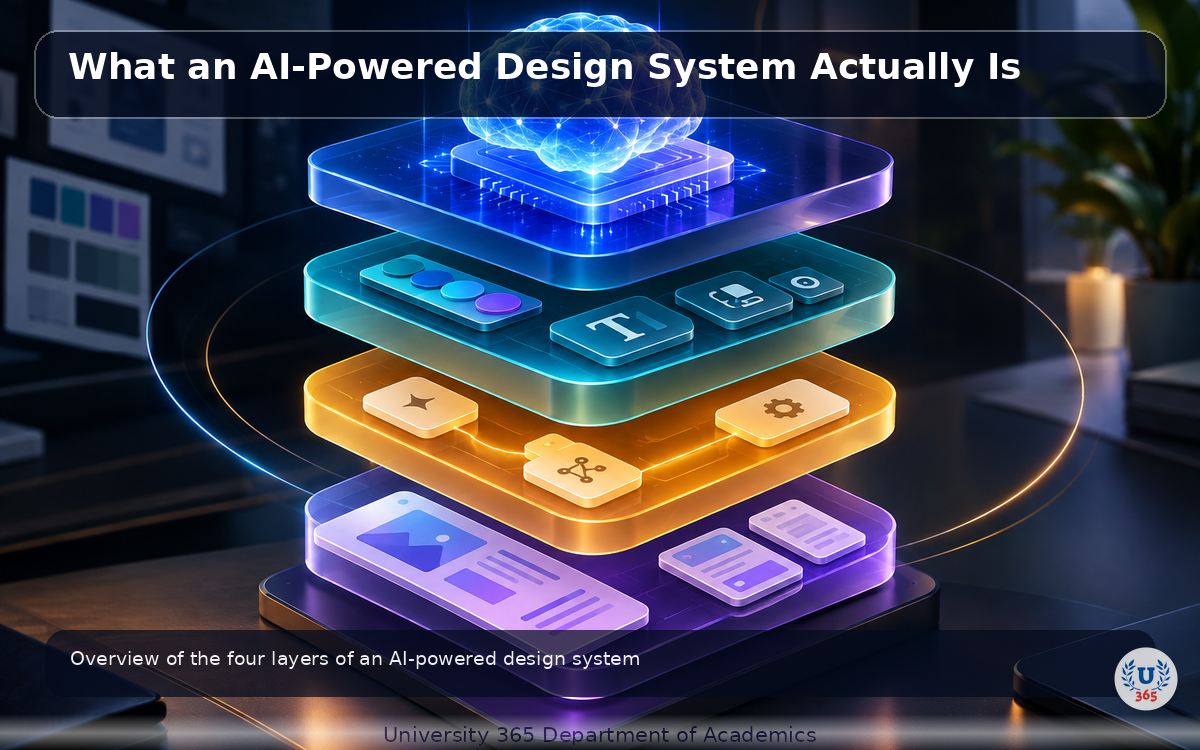
What an AI-Powered Design System Actually Is
An AI-powered design system is a design system where artificial intelligence augments every layer of the system: token generation, component documentation, consistency enforcement, code generation, and documentation maintenance. It does not replace the design system. It makes the system self-maintaining.
A traditional design system has four layers. Layer 1 is tokens: the atomic values for color, typography, spacing, radius, and motion. Layer 2 is components: reusable UI elements built from tokens. Layer 3 is patterns: combinations of components that solve recurring design problems. Layer 4 is documentation: guidelines for when and how to use each component and pattern.
AI operates at every layer. At the token layer, AI generates a complete token system from brand guidelines, sketches, or competitor analysis. At the component layer, AI writes documentation, generates variants, and detects undocumented modifications. At the pattern layer, AI identifies recurring combinations and proposes new patterns. At the documentation layer, AI generates and maintains documentation from the design files themselves, eliminating the gap between what the system says and what the system does.
The key distinction is between AI that generates and AI that maintains. Generation tools create new system artifacts from inputs. Maintenance tools keep existing artifacts in sync. Both are necessary. A design system that generates well but maintains poorly will rot just as fast as one with no AI at all.
AI-Generated Token Systems: From Brand to Code Automatically
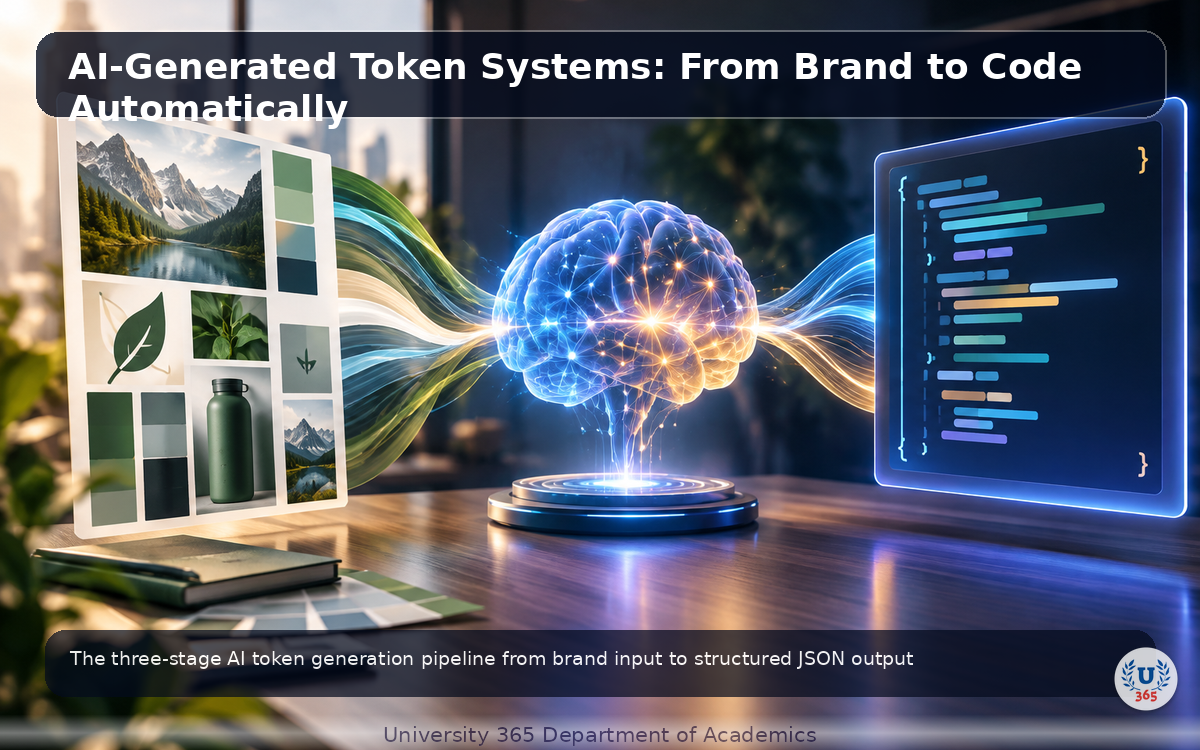
Design tokens are the foundation of any design system. They are the named values that define your visual language: colors, typography scales, spacing units, border radii, shadows, and motion durations. A complete token system for a mid-size product typically contains 200 to 500 individual tokens organized into categories and aliases.
Creating a token system from scratch takes 2 to 4 weeks of skilled work. You audit the brand guidelines, extract every color and type style, define a naming convention, create semantic aliases (primary, secondary, surface, text), organize tokens into categories, and document the relationships between them. Then you export to JSON, sync to code, and pray nothing changes.
AI compresses this to hours. Tools like Tokens Studio, Supernova, and Specify can ingest a brand guideline document, a Figma file, or even a screenshot of a competitor's interface, and generate a complete token system automatically. The AI identifies colors, categorizes them into scales, proposes semantic aliases, generates spacing and typography scales based on visual analysis, and outputs structured JSON compatible with Style Dictionary, W3C Design Token format, or your custom format.
The workflow has three stages. Stage 1 is input. You provide a brand guideline PDF, a Figma file with existing styles, or a set of reference designs. The AI extracts every visual value: hex colors, font sizes, line heights, spacing values, shadow definitions. Stage 2 is structuring. The AI organizes raw values into a token hierarchy with naming conventions. It proposes semantic aliases (background-primary, text-secondary, border-subtle) and groups tokens into logical categories. Stage 3 is output. The system generates JSON token files, CSS variables, Tailwind config, or iOS/Android native format files. Everything is synchronized and documented.
The advantage is not just speed. It is completeness. A human designer creating a token system will typically define 30 to 40 colors. An AI analyzing the same brand might identify 67 distinct color values in use across the product surface, including 12 that the designer was not aware of. The AI catches what humans miss because it processes every pixel systematically.
The pitfall is accepting AI-generated tokens without review. The AI does not know your brand context. It might categorize a one-off marketing color as a core brand token, or propose a semantic alias that conflicts with your naming conventions. Always review AI-generated token systems before adopting them. The AI does the extraction and structuring. You do the judgment.
AI for Component Documentation: Never Write Another Props Table
Component documentation is the most tedious part of maintaining a design system. Every component needs a props table, usage examples, do and do not guidance, accessibility notes, and code snippets. For a system with 142 components, the documentation burden is enormous. And it is never finished. Every component update requires a documentation update. Most teams fall behind within months.
AI eliminates this burden. Given a Figma component definition or a React component file, AI can generate complete documentation automatically. This includes props tables with types and defaults, usage examples showing common configurations, accessibility annotations, do and do not patterns, and code snippets in multiple frameworks (React, Vue, Angular, Svelte).
The workflow is straightforward. You connect your design tool or code repository to an AI documentation tool. The AI reads each component definition, analyzes its properties, variants, and constraints, and generates structured documentation. For Figma components, it extracts variant properties, instances, and constraints. For code components, it reads the TypeScript interfaces or PropTypes and generates documentation from the type definitions.
Tools like Supernova, Specify, and custom LLM pipelines built on GPT-4 or Claude can produce documentation that is 80 to 90% accurate on the first pass. The remaining 10 to 20% requires human review for edge cases, usage guidance that requires domain knowledge, and accessibility annotations that need manual verification.
The result is documentation that stays in sync with the system. When a component changes, the AI regenerates the affected documentation section. You no longer have a Storybook page that describes a component as it existed 6 months ago. The documentation reflects the current state of the system because it is generated from the system itself.
Automated Design Linting: Catching Inconsistencies Before They Ship
Design linting is the automated checking of designs against a set of rules. Just as ESLint catches code inconsistencies before they reach production, design linters catch visual inconsistencies before they reach development. In 2026, AI-powered design linters have become sophisticated enough to enforce not just token usage but also semantic intent.
Traditional design linting checks whether a designer used a valid color token, a valid spacing value, and a valid typography style. If you used #3B82F6 instead of your token color-primary, the linter flags it. This is useful but limited. It catches mistakes but not misunderstandings.
AI-powered linting goes further. It understands context. If you used color-surface for a primary button background, the linter flags it because semantically a primary button should use color-primary, even though color-surface is a valid token. If you applied spacing-lg to a component that should use spacing-md based on the pattern library, the AI detects the mismatch. If your text contrast ratio falls below WCAG AA, the linter flags it with a specific remediation suggestion.
Tools like Design Lint (Figma plugin), Figma AI's consistency checker, and custom pipelines using the Figma API plus LLMs can scan an entire Figma file in seconds and produce a report of every violation, grouped by severity. The AI can also auto-fix many violations by replacing non-token values with the closest valid token.
The practical workflow is to run design linting as a pre-handoff step. Before a design is passed to development, the designer runs the linter. The report shows every issue with severity levels: critical (accessibility violations, broken tokens), warning (semantic misuse, pattern deviations), and info (suggestions for improvement). The designer fixes critical issues, reviews warnings, and ships a clean file.
The pitfall is treating linting as a substitute for design judgment. A linter can tell you that you used the wrong token. It cannot tell you whether the token system itself is well-designed. If your token system has 15 button variants, the linter will enforce all 15, but the real problem is that you have too many variants. Use linting to enforce the system. Use design judgment to improve the system.
AI-Driven Design-to-Code Pipelines: From Figma Frame to Production Component
Design-to-code has been the holy grail of design systems for a decade. The promise is simple: a designer creates a component in Figma, and production-ready code comes out the other end. For most of that decade, the reality was disappointing. Generated code was bloated, used inline styles instead of tokens, and broke on edge cases.
AI changed this in 2025 and 2026. Tools like Figma Dev Mode with AI, Anima, Locofy, and Builder.io use large language models to generate code that is not just syntactically correct but architecturally sound. The AI understands your component structure, applies your token system, uses your existing utility classes or component library, and produces code that a developer would actually accept in a pull request.
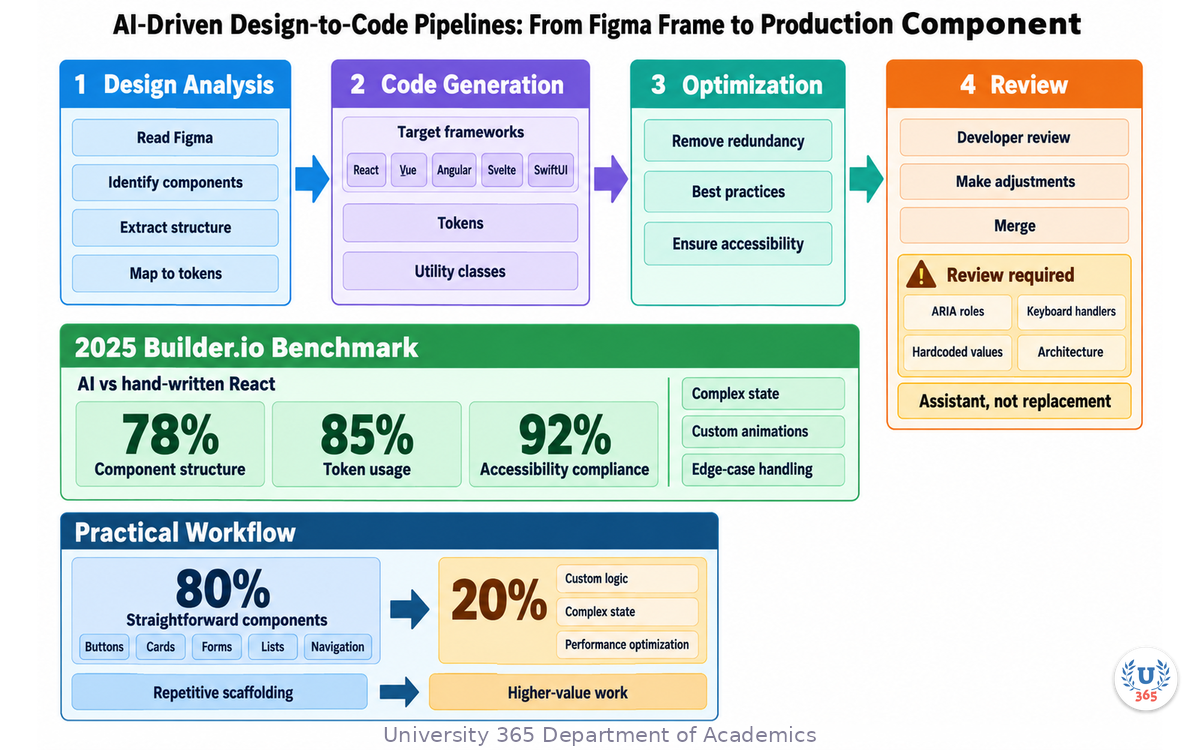
The pipeline works in four stages. Stage 1 is design analysis. The AI reads the Figma file, identifies components, extracts their structure, and maps visual properties to tokens. Stage 2 is code generation. The AI generates component code in your target framework (React, Vue, Angular, Svelte, SwiftUI) using your design system's tokens and utility classes. Stage 3 is optimization. The AI refactors the generated code to remove redundancy, apply best practices, and ensure accessibility. Stage 4 is review. The developer reviews the generated code, makes adjustments, and merges.
The quality improvement over pre-AI tools is significant. A 2025 benchmark by Builder.io compared AI-generated React components to hand-written ones. The AI-generated code matched hand-written code in 78% of cases for component structure, 85% for token usage, and 92% for accessibility compliance. The remaining gaps were in complex state management, custom animations, and edge-case handling.
The practical workflow for a design team is to use AI code generation for the 80% of components that are straightforward: buttons, cards, forms, lists, navigation. These are components with well-defined patterns that the AI handles well. Developers then focus on the 20% that requires custom logic, complex state, or performance optimization. This shifts developer time from repetitive component scaffolding to higher-value work.
The pitfall is skipping the review stage. AI-generated code can look correct but contain subtle issues: incorrect ARIA roles, missing keyboard handlers, hardcoded values that should be tokens, or component structures that do not match your architecture. Always have a developer review AI-generated code before merging. The AI is a code generation assistant, not a code review replacement.
Figma AI and Visual Editor Intelligence: Design Tools That Think
Figma AI, introduced in 2024 and significantly expanded through 2026, represents the deepest integration of AI into a professional design tool. It is not a separate product. It is embedded in the design workflow itself, augmenting every action a designer takes within Figma.
The capabilities relevant to design systems fall into five categories. First, AI-assisted component creation. Figma AI can generate component variants automatically. You design a button in its default state, and the AI generates the hover, active, disabled, and focus states based on your existing component patterns. It applies your token system consistently across all generated variants.
Second, AI consistency checking. As you design, Figma AI runs in the background and flags inconsistencies in real time. If you apply a color that is close to but not exactly a token color, the AI suggests the nearest token. If you create a spacing value that does not match your spacing scale, it offers the closest valid value. This is design linting integrated directly into the design process, not as a separate step.
Third, AI-powered rename and organize. Figma AI can analyze your layer structure and suggest semantic names for layers, auto-organize components into logical groups, and identify duplicate components that should be consolidated. For a design system with 142 components, this organization work saves days of manual effort.
Fourth, AI visual search. You can describe what you are looking for in natural language ("find all card components with image headers") and Figma AI searches your entire file or team library. This is faster than manual navigation and catches components you might have forgotten existed.
Fifth, AI-powered design generation. Figma AI can generate complete UI layouts from text descriptions, using your design system tokens and components. This is useful for rapid prototyping and for generating variations of existing patterns. The generated designs are not production-ready, but they are starting points that are consistent with your system.
The advantage of Figma AI over standalone tools is context. Figma AI has access to your entire design file, your component library, your token system, and your team's design history. It makes suggestions that are grounded in your specific design system rather than generic web design patterns. This context awareness makes its output significantly more useful than general-purpose AI design tools.
Supernova and Specify: Token Management Platforms Powered by AI
While Figma AI enhances the design tool, Supernova and Specify enhance the pipeline between design and code. Both platforms serve as the bridge that connects design tokens and components in Figma to their implementation in code, and both have integrated AI to automate the work of maintaining that bridge.
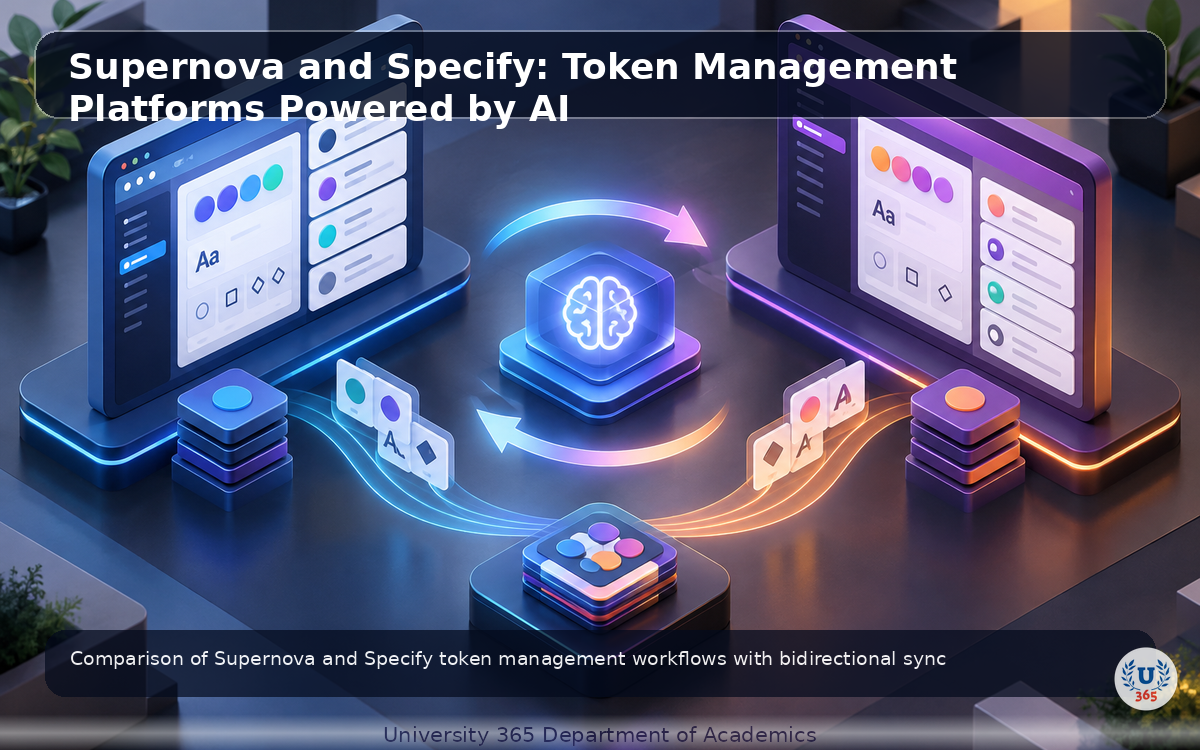
Supernova is an AI-powered design system platform that connects to your Figma file and code repository. It ingests your tokens, components, and documentation, and creates a living representation of your design system that stays in sync with both sides. The AI capabilities include automatic token extraction from Figma files, token drift detection between design and code, automatic documentation generation from component definitions, and AI-powered component code generation in multiple frameworks.
The Supernova workflow is bidirectional. When a designer changes a token in Figma, Supernova detects the change, generates the updated token files for code, and creates a pull request in your repository. When a developer changes a token value in code, Supernova detects the drift and alerts the design team. This bidirectional sync eliminates the token drift problem that plagues most design systems.
Specify is a similar platform with a focus on precision and developer experience. It ingests design tokens from Figma, Sketch, or Adobe XD, and outputs them in any format your codebase needs: CSS variables, SCSS variables, Tailwind config, Style Dictionary, iOS Swift, Android XML, or custom JSON. The AI capabilities in Specify include automatic token naming suggestions, token deduplication (identifying when two tokens have the same value but different names), and token relationship mapping (understanding that button-primary-bg is derived from color-primary).
The practical decision between Supernova and Specify depends on your team structure. Supernova is better for teams that want an all-in-one platform with documentation, code generation, and bidirectional sync. Specify is better for teams that already have documentation and code generation handled, and need a precise, developer-friendly token pipeline. Both platforms offer free tiers that support small design systems.
The pitfall with both platforms is over-automation. When the bidirectional sync is too aggressive, every small Figma change triggers a code pull request, creating noise. Configure sync rules to batch changes, require manual approval for token renames, and block automatic sync for breaking changes. The AI should reduce your maintenance burden, not create a new category of pull request fatigue.
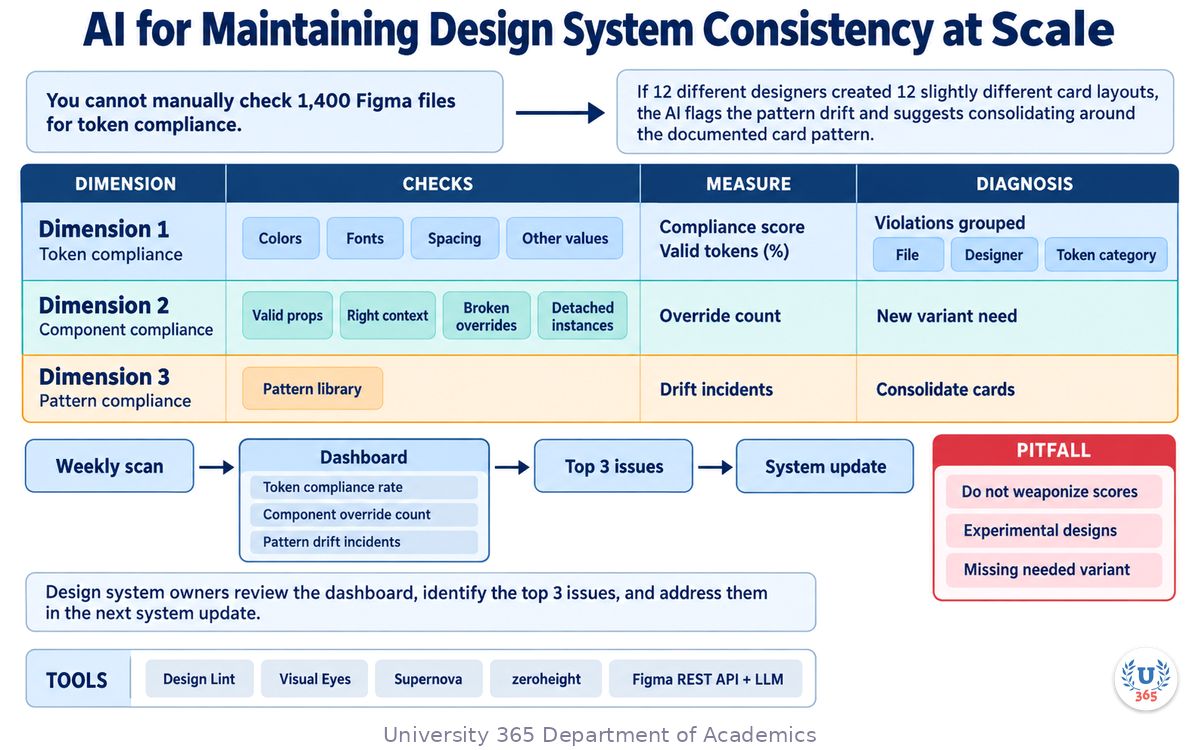
AI for Maintaining Design System Consistency at Scale
Consistency is the entire point of a design system. A consistent system means that every button looks the same, every form behaves the same, and every color comes from the same palette. At scale, maintaining consistency becomes a statistics problem, not a design problem. You cannot manually check 1,400 Figma files for token compliance. You need automated systems that monitor consistency continuously.
AI-powered consistency monitoring works across three dimensions. Dimension 1 is token compliance. The AI scans every file in your Figma team and checks whether all colors, fonts, spacing, and other values come from the token system. It produces a compliance score (percentage of values that use valid tokens) and a list of violations grouped by file, designer, and token category.
Dimension 2 is component compliance. The AI checks whether components are used correctly: props set to valid values, variants used in the right context, no broken overrides or detached instances. It identifies files with high numbers of component overrides, which often indicates that the component needs a new variant rather than a manual override.
Dimension 3 is pattern compliance. The AI identifies recurring design patterns across files and checks whether they match the documented pattern library. If 12 different designers created 12 slightly different card layouts, the AI flags the pattern drift and suggests consolidating around the documented card pattern.
The tools for this monitoring range from Figma plugins like Design Lint and Visual Eyes, to enterprise platforms like Supernova and zeroheight, to custom pipelines using the Figma REST API plus an LLM. The Figma API gives you access to every file in your team, including component instances, style assignments, and layer properties. An LLM can process this data to identify patterns, detect anomalies, and generate compliance reports.
The practical workflow is to run consistency monitoring weekly. The AI generates a dashboard showing compliance trends over time: token compliance rate, component override count, pattern drift incidents. Design system owners review the dashboard, identify the top 3 issues, and address them in the next system update. This transforms design system maintenance from reactive firefighting to proactive quality management.
The pitfall is weaponizing compliance scores against individual designers. A designer with a low token compliance score might be working on experimental designs that intentionally break the system. A high override count might indicate that the component library is missing a needed variant. Use compliance data to improve the system, not to police the team. The goal is a better design system, not a higher compliance score.
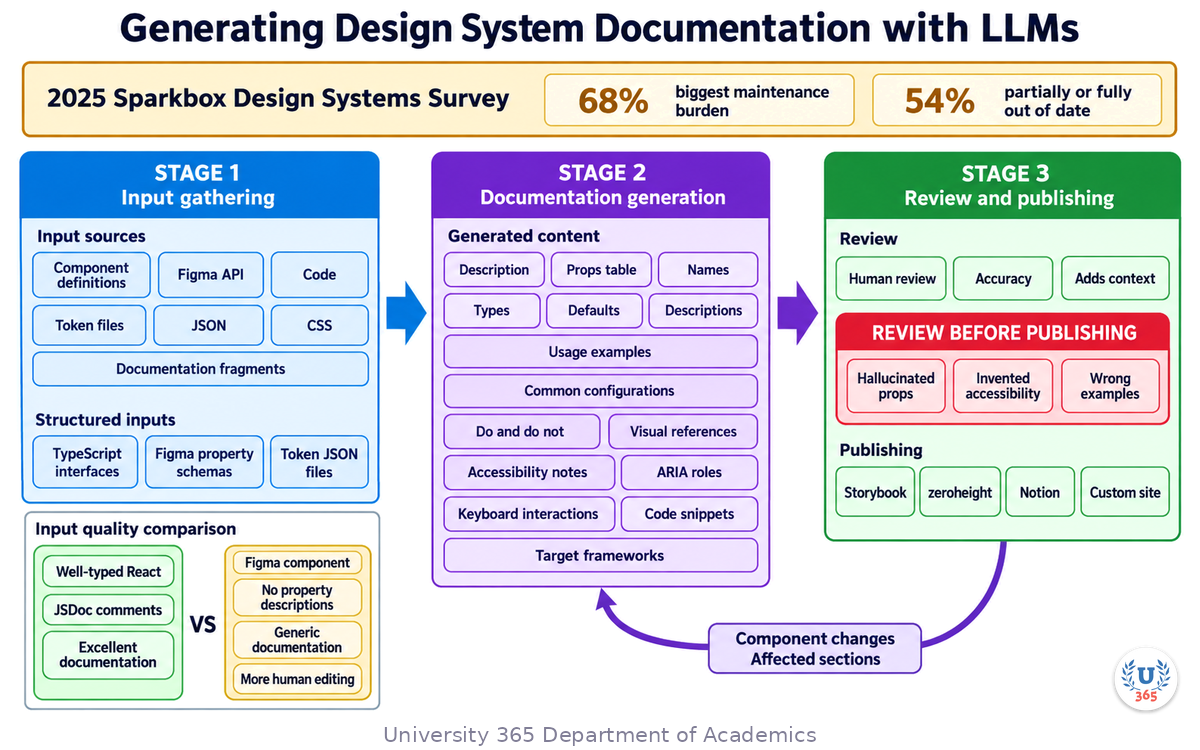
Generating Design System Documentation with LLMs
Documentation is the layer of a design system that everyone agrees is important and nobody wants to maintain. The 2025 Sparkbox Design Systems Survey found that 68% of design system teams cite documentation as their biggest maintenance burden, and 54% report that their documentation is partially or fully out of date.
LLMs are uniquely suited to solve this problem because documentation is fundamentally a text generation task, and text generation is what LLMs do best. Given structured input (component definitions, token files, code), an LLM can generate documentation that is accurate, comprehensive, and written in clear prose.
The workflow has three stages. Stage 1 is input gathering. You feed the LLM your component definitions (from Figma API or code), your token files (JSON or CSS), and any existing documentation fragments. The more structured the input, the better the output. Provide the LLM with TypeScript interfaces, Figma component property schemas, and token JSON files rather than screenshots or prose descriptions.
Stage 2 is documentation generation. The LLM produces documentation for each component including: a description of what the component does, a props table with names, types, defaults, and descriptions, usage examples showing common configurations, do and do not guidance with visual references, accessibility notes including ARIA roles and keyboard interactions, and code snippets in your target frameworks.
Stage 3 is review and publishing. A human reviews the generated documentation for accuracy, adds context that the LLM could not infer, and publishes to your documentation platform (Storybook, zeroheight, Notion, custom site). When a component changes, the LLM regenerates only the affected sections.
The tools for this range from custom pipelines using the OpenAI or Anthropic API, to dedicated platforms like Supernova and zeroheight that have integrated LLM documentation generation, to open-source tools like Storybook's experimental AI docs plugin. The quality of output depends heavily on the quality of input. An LLM given a well-typed React component with JSDoc comments will produce excellent documentation. The same LLM given a Figma component with no property descriptions will produce generic documentation that requires more human editing.
The pitfall is publishing AI-generated documentation without review. LLMs can hallucinate props that do not exist, invent accessibility features that the component does not have, or generate usage examples that are semantically wrong. Always have a human review generated documentation before publishing. The LLM does the first draft. The human does the final review. This division of labor reduces documentation time by 70 to 80% while maintaining quality.
Common Pitfalls and How to Avoid Them
Pitfall 1: Treating AI-generated tokens as final. AI token generators are extraction tools, not design tools. They identify values and propose structure, but they do not understand brand context, semantic intent, or naming conventions. Always review AI-generated token systems with a designer who understands the brand before adopting them.
Pitfall 2: Over-automating documentation generation. LLM-generated documentation is 80 to 90% accurate on the first pass. The remaining 10 to 20% includes edge cases, domain-specific usage guidance, and accessibility annotations that need verification. Publishing without review erodes trust in the documentation. Once developers find errors, they stop trusting the docs and go back to reading the code directly.
Pitfall 3: Trusting AI code generation for complex components. AI design-to-code tools handle straightforward components well but struggle with complex state management, custom animations, and performance-critical components. Use AI for the 80% of simple components. Have developers write the 20% of complex ones. Mixing AI-generated and human-written code without clear boundaries creates maintenance nightmares.
Pitfall 4: Ignoring token drift because the sync tool handles it. Bidirectional sync tools like Supernova and Specify are powerful, but they cannot fix semantic drift. If a designer changes color-primary from blue to purple, the sync tool will dutifully update every usage in code. But if that change was not intentional, you now have a purple button across your entire product. Always review token change proposals before approving sync.
Pitfall 5: Using compliance scores as performance metrics. Token compliance scores measure the health of the design system, not the performance of individual designers. A low compliance score might mean the system is missing needed tokens, not that the designer is doing poor work. Use compliance data to improve the system, not to evaluate people.
Pitfall 6: Not training the AI on your specific system. General-purpose LLMs generate generic documentation and code. If you use an LLM for documentation generation, provide it with your existing component library, token naming conventions, and documentation style guide as context. Fine-tuned or well-prompted models produce significantly better output than zero-shot generation.
Pitfall 7: Underestimating the cultural shift. AI-powered design system maintenance changes the role of design system teams from manual maintainers to system curators. This requires new skills: prompt engineering, AI output review, pipeline configuration. Invest in training your team on these skills. The tools are only as good as the people configuring them.
Governance, Contribution, and Keeping the System Alive
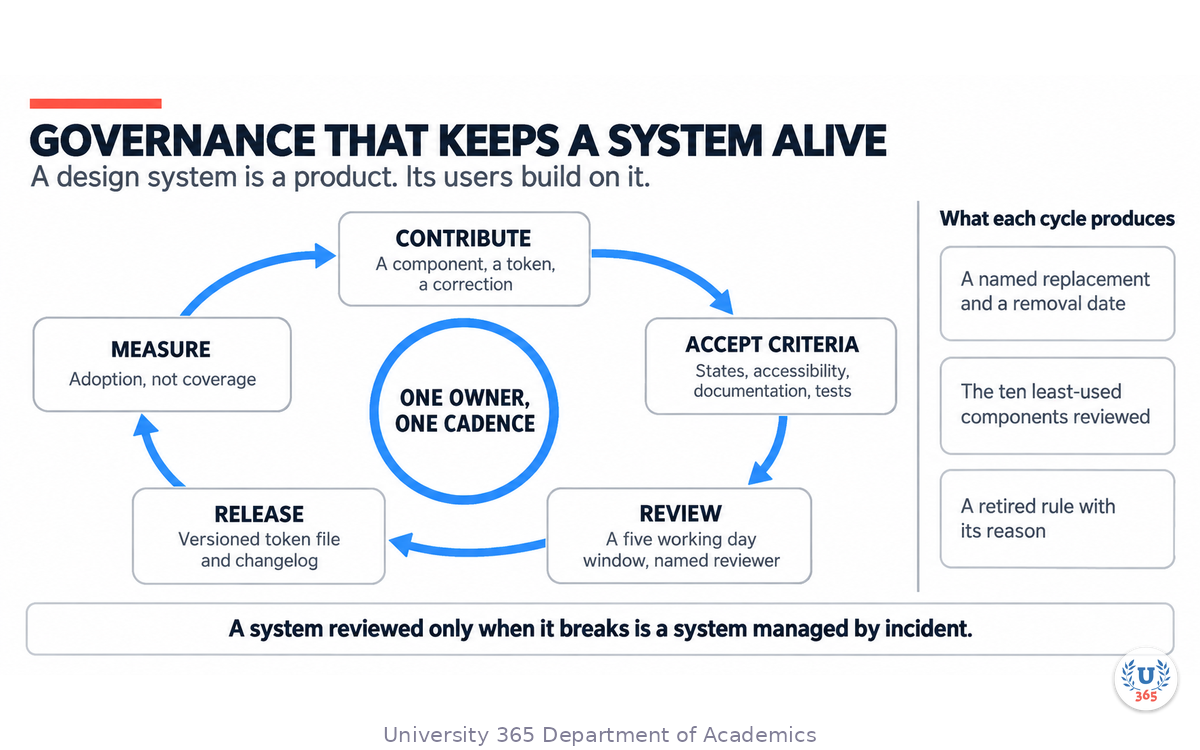
A design system is a product, and its users are the teams building on it. Governance is the process by which they participate, and it is the part that decides whether the system is still used in a year.
Define what a contribution is
A new component, a token change, a documentation correction, and a bug report are four different contributions with four different paths. Say which path each takes, and what evidence each requires. A contributor who does not know what is required will submit something incomplete and be rejected, which costs the contributor and the maintainer twice.
Make the acceptance criteria public
Publish the checklist a contribution must meet: the states, the accessibility requirements, the documentation, the tests, and the token rules. A published checklist turns a rejection into an instruction.
Time-box the review and commit to the window
Name a review window, such as five working days, and hold to it. A contribution with no response is a contribution that will not be made twice, and the system then stops receiving the fixes only its users can see.
Track adoption, not just coverage
Coverage measures what the system offers; adoption measures what teams actually use. Instrument the components in production and review the ten least-used ones. A component nobody uses is either wrong or unknown, and both are fixable, but only if the number is visible.
Sunset deliberately
Deprecate components on a schedule, with a named replacement and a removal date. A system with no deprecation path accumulates components nobody can delete, and the next team pays the maintenance cost.
Review the system on the roadmap's cadence
Put the adoption numbers, the open contributions, and the deprecation list in front of the same group that reviews the roadmap, on the same schedule. A system reviewed only when it breaks is a system managed by incident.
Feynman Summary: Explain It Like You Are 12
Imagine you are building a huge LEGO set with 500 different pieces. The instruction manual tells you exactly which piece goes where and what color it should be. Now imagine that every time you add a new piece, the manual updates itself automatically to include it. And if you try to use a piece that is not in the manual, a little robot taps you on the shoulder and says "that piece is not in the set, try this one instead."
That is what AI does for design systems.
A design system is like a LEGO instruction manual for building websites and apps. It has all the colors you are allowed to use, all the button styles, all the font sizes, and all the rules for putting them together. Without AI, a team of people has to write this manual by hand and update it every time something changes. With 500 pieces, that is a lot of updating.
AI helps in four ways. First, it writes the manual. You show it your brand colors and styles, and it creates the whole color palette and rule book automatically in a few hours instead of weeks. Second, it checks your work. While you design, it watches and says "hey, that color is close to one in the system but not exact, want to use the right one?" Third, it translates for the builders. When a designer finishes a button in the design tool, the AI writes the code for that button so the developers do not have to do it by hand. Fourth, it keeps the manual up to date. When someone changes a color, the AI updates every page of the manual that mentions that color.
The catch is that the robot is smart but not perfect. Sometimes it writes down the wrong rule. Sometimes it generates code that looks right but has a bug. Your job is to use the robot to do the boring work, then check its work before you publish it. The robot writes the first draft. You make sure it is correct.
Mindmap: The Complete Picture
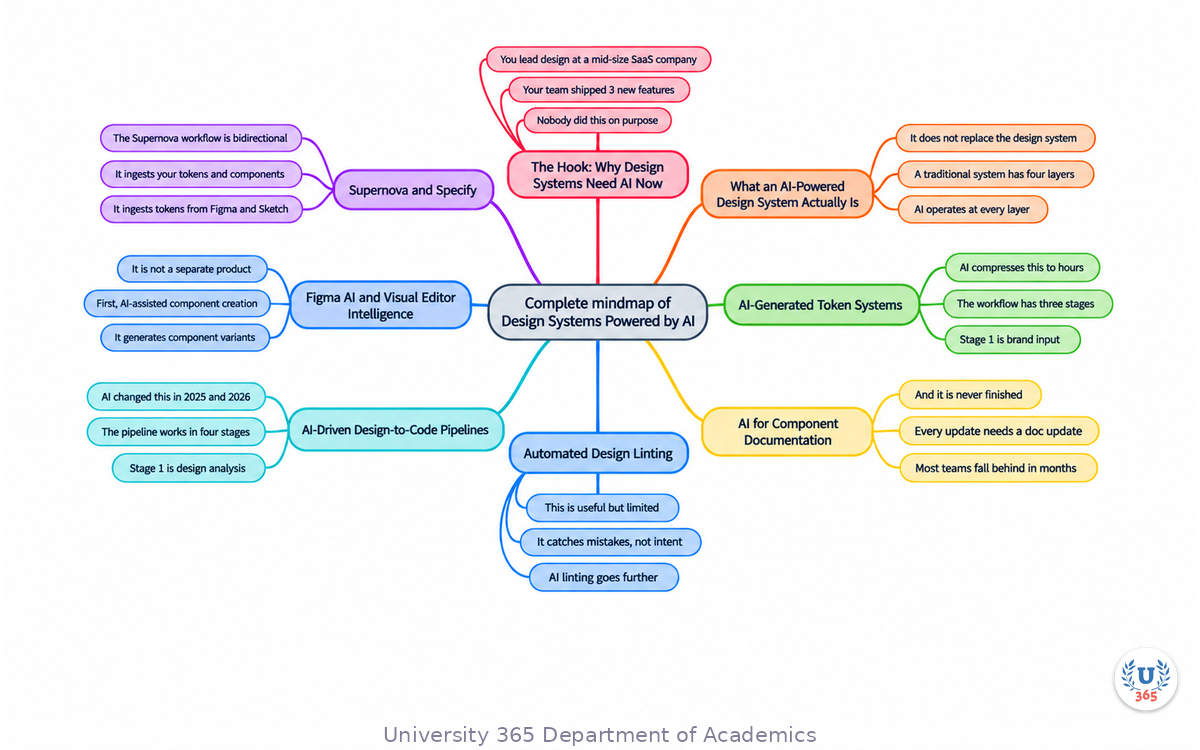
This mindmap shows the full AI-powered design system ecosystem. The center node is AI Design Systems. Six branches extend outward: token generation (brand input, AI extraction, semantic aliases, JSON output), component documentation (Figma analysis, LLM generation, props tables, multi-framework snippets), design linting (token compliance, semantic checking, accessibility enforcement, auto-fix), design-to-code (Figma Dev Mode, Anima, Locofy, Builder.io), platform tools (Figma AI, Supernova, Specify, zeroheight), and consistency monitoring (token compliance, component overrides, pattern drift, weekly dashboards).
UNOP Sound (University 365 Neuroscience Oriented Pedagogy)
Take five minutes to consolidate your memory. Play the isochronous tone track (10Hz alpha frequency) with your eyes closed. Alpha-frequency tones after a learning session support consolidation, helping move what you just learned from short-term to long-term memory.
[Audio player: UNOP Post-Lecture Isochrone (10Hz, 5 minutes)]
Practical Exercise: Audit and Upgrade a Design System with AI
This exercise takes 90 minutes and requires access to Figma (free plan is sufficient) and an AI tool (ChatGPT, Claude, or similar).
Objective: Audit an existing Figma file for design system consistency using AI-powered analysis, and generate a token system and documentation for a small set of components.
Step 1: Choose a Figma file. Use any Figma file with at least 10 components. If you do not have one, duplicate the free Figma Community file "Design System Starter Kit" or use any open-source design system file.
Step 2: Extract token data. In Figma, go to the file's styles panel. List all color styles, text styles, and effect styles. Export this list as a text file. If using the Figma API, call the GET /v1/files/:key endpoint and extract the styles section from the JSON response.
Step 3: Analyze with AI. Paste your token list into an LLM (ChatGPT or Claude) with this prompt: "Analyze this design token list. Identify: (1) any duplicate tokens with different names but the same value, (2) tokens with inconsistent naming conventions, (3) missing semantic aliases that should exist, (4) tokens that appear to be one-off values rather than part of a system. Output a structured report."
Step 4: Generate a clean token system. Ask the LLM to generate a revised token system in W3C Design Token JSON format based on its analysis. Review the output. Accept the changes that make sense for your system and reject the ones that do not.
Step 5: Pick 3 components from your Figma file. For each one, describe its properties (variants, sizes, states) to the LLM. Ask it to generate component documentation including a props table, usage examples, and do and do not guidance.
Step 6: Review the generated documentation. Compare it to the actual component in Figma. Note any errors, missing information, or hallucinated props. This teaches you both the power and the limitations of AI documentation generation.
Step 7: Write a one-page summary. List the top 3 issues found in the token audit, the quality rating of the AI-generated documentation (1 to 10), and 3 things you would do differently if running this audit on a production design system.
Deliverable: A one-page audit report with token issues, AI-generated documentation for 3 components, and a reflection on AI quality and limitations.
Glossary
Term | Definition |
Design Token | A named value that stores a design decision (color, typography, spacing) in a platform-agnostic format that can be transformed for any target platform. |
W3C Design Token Format | A standardized JSON format for design tokens proposed by the W3C Design Tokens Community Group, enabling interoperability between design tools. |
Token Drift | The gradual divergence between design tokens in design files and their corresponding values in production code, caused by unsynchronized updates. |
Design Linting | The automated process of checking designs against a set of rules (token usage, spacing values, accessibility) to catch inconsistencies before handoff. |
Bidirectional Sync | A workflow where changes to design tokens flow automatically between design files and code repositories in both directions, keeping both in sync. |
Style Dictionary | An open-source tool by Amazon that transforms design tokens into platform-specific formats (CSS, iOS, Android, etc.) through a build pipeline. |
Semantic Token | A token named for its purpose rather than its value (e.g. color-primary instead of color-blue-500), making the system resilient to visual changes. |
Component Documentation | Structured documentation for a UI component including props, usage examples, accessibility notes, and code snippets for implementation. |
Design-to-Code | The process of converting visual designs from tools like Figma into production-ready code, increasingly automated by AI tools. |
Pattern Compliance | The degree to which designs across a product conform to documented design patterns, measured by AI-powered monitoring tools. |
Props Table | A structured table listing all properties (props) of a component with their types, default values, and descriptions, auto-generated by AI tools. |
Token Compliance Score | The percentage of design values in a file that use valid design tokens rather than hardcoded values, used as a design system health metric. |
Quiz: TEST YOUR UNDERSTANDING
What is the primary benefit of AI-generated token systems over manually created ones?
A) AI tokens are always more visually appealing
B) AI extracts every visual value systematically, catching tokens humans might miss
C) AI-generated tokens never need human review
D) AI tokens automatically sync to all platforms without configuration
What is the critical limitation of AI-generated component documentation?
A) It can only generate documentation for React components
B) It is always 100% accurate and requires no review
C) It can hallucinate props, invent accessibility features, or generate wrong examples
D) It cannot handle components with more than 5 props
How does AI-powered design linting differ from traditional design linting?
A) AI linting only checks colors, while traditional linting checks everything
B) AI linting understands semantic intent, flagging valid tokens used in the wrong context
C) AI linting requires no configuration, while traditional linting requires extensive setup
D) AI linting is slower but more thorough than traditional linting
What is token drift and how do platforms like Supernova and Specify address it?
A) Token drift is when tokens lose their color values over time; platforms restore colors automatically
B) Token drift is the divergence between design and code token values; platforms use bidirectional sync to keep both aligned
C) Token drift is when designers forget token names; platforms provide autocomplete
D) Token drift is a rendering bug; platforms fix it with CSS resets
What is the recommended approach for using AI design-to-code tools?
A) Use AI for all components including complex ones with custom state management
B) Use AI only for documentation, never for code generation
C) Use AI for the 80% of straightforward components, have developers handle the 20% of complex ones
D) Use AI only for prototyping, never for production code
Answers: 1-B, 2-C, 3-B, 4-B, 5-C
Related Resources
U365 INSIDE Publications
AI Image Generation: Stable Diffusion for Designers - Understand AI tools for design from a production perspective
External Resources
Figma AI Documentation - Official guide to Figma AI features for design systems
Supernova Design System Platform - AI-powered design system management with bidirectional sync
Specify Design Token Pipeline - Developer-focused token management with multi-platform output
W3C Design Tokens Community Group - Standardizing the design token format for interoperability
Tokens Studio for Figma - Token management plugin with AI-assisted generation
Style Dictionary: Open-Source Token Build System - Open-source token transformation pipeline
Related U365 Lectures (Coming Soon)
AI Prototyping Tools: From Wireframe to Interactive Prototype (Creative Technology Series, Lecture 3)
AI in Web Design: From Wireframe to Deployed Site (Creative Technology Series, Lecture 4)
Motion Design with AI: Automating Animation Workflows (Creative Technology Series, Lecture 5)
U.Copilot for This Lecture
Copy and paste the following prompt into the U.Copilot AI agent on university-365.com to continue exploring this topic:
I just completed the UID lecture "Design Systems Powered by AI." I want to apply AI tools to my current design system. Can you help me: 1. Audit my existing Figma token system for duplicates, inconsistencies, and missing semantic aliases 2. Generate a W3C Design Token JSON file from my current color and typography styles 3. Draft component documentation for 3 of my most-used components including props tables and usage examples 4. Recommend which AI tools (Figma AI, Supernova, Specify, Tokens Studio) fit my team size and workflow
Next Steps
Open a Figma file with at least 10 components and run the practical exercise from this lecture. Compare your AI-generated token system to your existing one.
Install the Tokens Studio plugin for Figma and experiment with AI-assisted token generation from your existing styles. Export to JSON and review the output.
Try Figma AI's consistency checker on a real design file. Review the violations report and fix the top 5 critical issues.
Sign up for a free trial of Supernova or Specify. Connect your Figma file and code repository. Test the bidirectional token sync workflow.
Enroll in the UID Creative Technology program at university-365.com/uid to access hands-on labs, instructor feedback, and a community of designers working with AI-powered design system tools.
Read the next lecture in this series: "AI Prototyping Tools: From Wireframe to Interactive Prototype" to learn how AI accelerates the design iteration cycle from concept to clickable prototype.
IMPORTANT NOTICE
Copyright University 365, Inc. All rights reserved.
This lecture is part of the UID (University 365 Institute of Design) Creative Technology series. It is published as a free educational resource under the 5M2S (5 Minutes to Success) and UNOP (University 365 Neuroscience-Oriented Pedagogy) formats.
For enrollment in UID programs, visit university-365.com/tuition. For permissions or inquiries, contact uda@university-365.com.
The educational content in this lecture is current as of September 2026. AI design system tools evolve rapidly. Verify current platform capabilities, pricing, and integration support before using any tool in commercial work. Always review AI-generated tokens, documentation, and code before publishing to production systems.
Published by the Department of Academics, University 365.
Lecture delivered by the University 365 Institute of Design (UID).
Joe Borazian, Dean of Design, UID
Signed for the academic year 2026.





Comments