
Generative Brand Identity


UID University 365 Institute of Design
Series Creative Technology | Level Basic (Free)
Duration 15 to 20 minutes | Access Free
Digital Design, UX/UI, Visual Communication, Motion Graphics, Creative Technology

UNOP Sound (University 365 Neuroscience Oriented Pedagogy)
Take five minutes to prepare your brain. Play the isochronous tone track (40Hz gamma frequency) with your eyes closed. Gamma-frequency tones before a learning session raise attention and make the material easier to absorb.
[Audio player: UNOP Pre-Lecture Isochrone (40Hz, 5 minutes)]
In this Lecture

The Hook: The Logo Was Finished and the Brand Was Not
A founder opens a generator, types three sentences about the company, and gets forty logo options in ninety seconds. She picks one she likes. It lands on the website by Friday.
Six weeks later the problem shows up. The social media team is producing images that do not match the mark. The pitch deck uses a different blue. Nobody can produce a favicon, a monochrome version for an invoice, or an icon set for a product interface. And when the founder tries to file for trademark protection, she discovers the mark was assembled from a template library that thousands of other customers can license, so it may not be distinctive enough to register.
The generator did exactly what it was asked. It produced an image. A brand identity is not an image. It is a system of connected decisions: what the company is, how it should feel, which shapes and colours carry that feeling, and how those choices extend across every surface the company touches.
This lecture teaches the workflow that makes generative tools useful for identity work rather than merely fast. You will learn what a brand identity contains, which parts a model can produce and which it cannot, why vector output and typographic accuracy are the two hard technical limits, how to write a brand specification a machine can follow, how to run exploration as a decision pipeline rather than a slot machine, and what ownership and trademark clearance actually require before a mark goes into production.
Step 1: What a Brand Identity Actually Contains
Before choosing a tool, separate strategy from expression. Confusing the two is the most common reason an AI-assisted identity project produces a pretty mark attached to nothing.
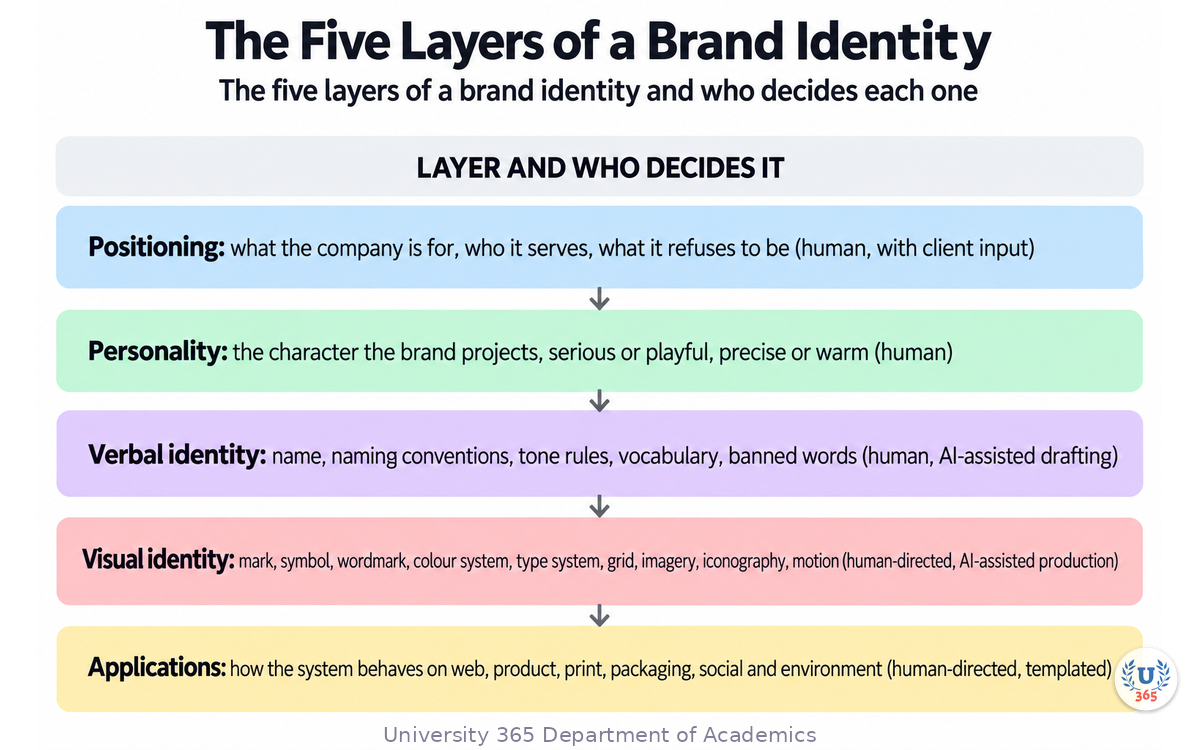
Layer | What it decides | Who decides it |
Positioning | What the company is for, who it serves, what it refuses to be | Human, with client input |
Personality | The character the brand projects: serious, playful, precise, warm | Human |
Verbal identity | Name, naming conventions, tone rules, vocabulary, banned words | Human, AI-assisted drafting |
Visual identity | Mark, symbol, wordmark, colour system, type system, grid, imagery, iconography, motion | Human-directed, AI-assisted production |
Applications | How the system behaves on web, product, print, packaging, social, environment | Human-directed, templated |
Why the Expression Layer Is Where Generation Fits
The strategy layer is a set of judgements about a business and its market. A model cannot make them, because the answer is not in any training corpus; it is in a conversation with the people who own the company. The expression layer is a set of design decisions that can be described precisely: shape grammar, palette with measurable contrast behaviour, type stack with weights and ratios, layout grid, motion behaviour. Once decisions are described precisely, generation becomes useful, because the hard part turns into execution rather than invention.
The Four Things a Brand System Must Survive
Scale. A favicon at 16 pixels and a building sign at four metres must be the same mark.
Colour change. Full colour, one colour, reversed out of dark, and one-colour print.
Composition change. Horizontal lockup, stacked lockup, symbol alone, wordmark alone.
Volume. Hundreds or thousands of generated assets per month, produced by people who are not designers, without drifting off the system.
A mark that only works at one size, in one colour, in one arrangement, in one designer's hands, is not a system. It is a picture.
Step 2: What Generative Models Are Good At
Treat the model as an exploration engine with a fast clock and no taste. That framing tells you where to point it.
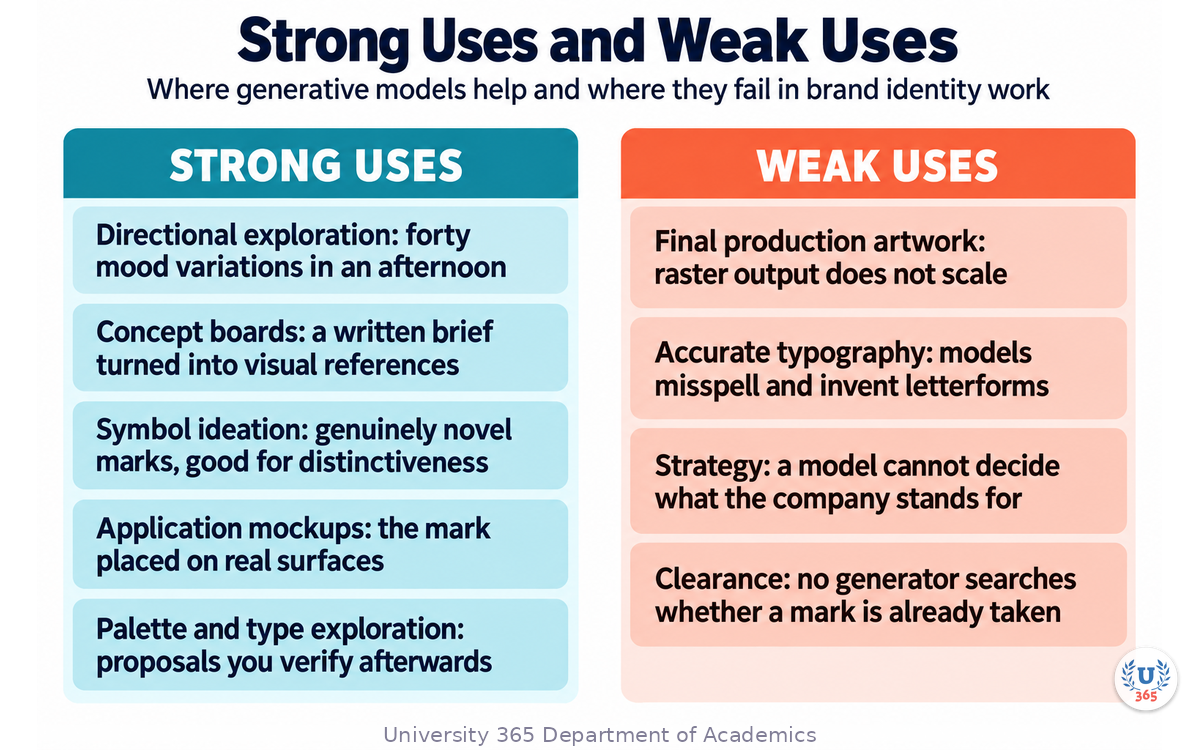
Strong Uses
Directional exploration. Generating forty mood variations in an afternoon to locate a direction, then discarding thirty-nine. The value is the search, not the artefacts.
Concept boards. Turning a written personality brief into visual references you can put in front of a client, which shortens the conversation about what "precise but warm" means.
Symbol ideation. Many models now produce genuinely novel marks rather than stock-icon recolours. This matters for distinctiveness, which is the property trademark law cares about.
Application mockups. Placing an approved mark onto a bag, a van, a screen or a business card to test how it behaves outside a design tool.
Palette and type exploration. Proposing colour relationships and type pairings from a written direction, which you then verify with a contrast checker and a licence check.
Weak Uses
Final production artwork. Most image models produce raster output. A raster logo does not survive scaling and cannot be edited at the path level.
Accurate typography. General image models still misspell, mis-kern and invent letterforms. Wordmarks need either a model known for text accuracy or, better, real type set by you.
Strategy. A model cannot tell you what the company should stand for. It will produce fluent, confident nonsense if asked.
Clearance. No generator searches whether a mark already belongs to somebody else. That is a legal step, not a creative one.
The Vector Problem and the Type Problem
Almost every "AI logo" output on the market is a raster image, whatever the marketing says. A small number of tools produce native editable vector output with real paths you can open and edit node by node. If your workflow ends in a raster file, you have a concept, not a logo, and you or someone else will redraw it before it can be used.
The same caution applies to type. Image models are improving at rendering words, and a few are notably better than the rest, but a generated wordmark is artwork depicting letterforms. It is not a font, it is not licensed to you as type, and it will not letter-set a new sentence. If the brand needs to write its name anywhere new, you need real type.
Step 3: Building a Machine-Readable Brand Spec
A brand guideline written for humans reads like a mood statement. A spec written for a machine is a set of values. You need both, and the second one is what keeps generated output on-brand.
Write Values, Not Adjectives
Instead of | Write |
"Warm coral" | Hex value, with a minimum contrast ratio on light and on dark surfaces, and a usage rule |
"Modern but readable" | Font stack, permitted weights, line-height ratio, tracking values |
"Friendly and professional" | Sentence length ceiling, banned opening phrases, pronoun rules, one example of each |
"Clean geometry" | Corner radius range, stroke weight range, grid unit, permitted shape families |
The Three Parts of a Brand Spec
Tokens. Colour, type, spacing, radius, motion and motif expressed as values, so a model or a build pipeline can read them rather than interpret them.
Prompt pack. The model-facing version of the guidelines: the instructions an AI receives whenever it produces an asset for this brand. Without a prompt pack, the model invents a new brand on every call. Write one per surface, because social copy, interface copy, image generation and video each need different constraints.
Evals. Automated checks that score generated output against the spec: contrast checks, voice rubric scoring, layout grammar tests, motif compliance, an off-brand pattern scan. Without evals, the system has no way to notice drift before it ships.
Why the Spec Comes Before the Mark
When the spec exists first, the mark becomes a test of it. You can ask of any candidate: does this shape hold at 16 pixels, does it survive one-colour reduction, does it sit inside the type system, does it still read as the brand in monochrome. When the mark comes first, every later decision is a negotiation with an accident.
Step 4: Running Exploration as a Decision Pipeline
Generation is cheap. Judgement is not. The pipeline exists to spend your judgement where it changes the outcome.
Branch, Gate, Converge
Branch deliberately. Generate in separated families, not one long run. One family for symbol ideas, one for wordmark ideas, one for combination marks. Mixing them in a single run produces variants of one idea rather than different ideas.
Gate at human review. Nothing gets descendants until a human approves its parent. This is the step that teams skip, and it is why AI identity projects drown in near-duplicates.
Converge onto one master. Once a direction is chosen, everything downstream references the approved master. Later assets restage the same shape instead of inventing a new one.
Keep the Hygiene Clean
Keep rejected explorations out of the asset tree that production reads. A rejected mark sitting in the brand folder is a future mistake.
Record the prompt and the model for every approved master, so the direction is reproducible.
Record checksums and a manifest that maps each asset slot to the file that fills it, so a redesign cannot leave a stale favicon behind.
Never replace a visible mark while compiled icons, social previews and templates still point at the old one.
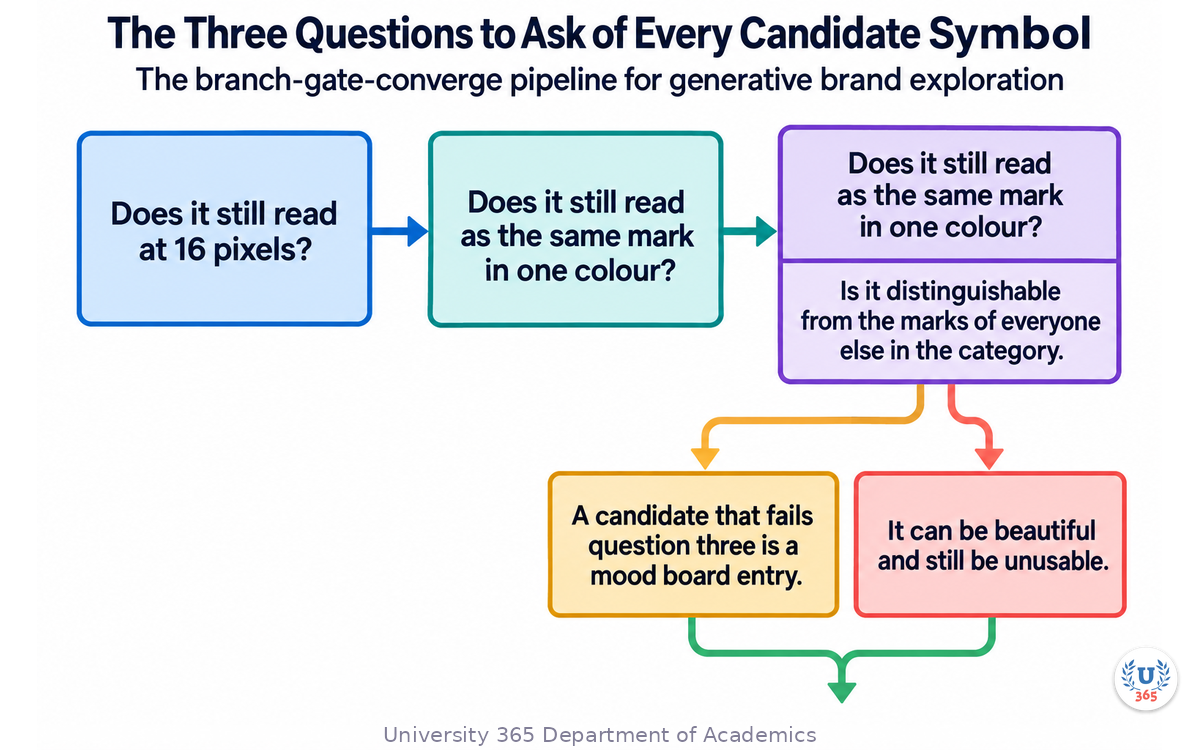
The Three Questions to Ask of Every Candidate Symbol
Does it still read at 16 pixels?
Does it still read as the same mark in one colour?
Is it distinguishable from the marks of everyone else in the category, and would it survive a clearance search?
A candidate that fails question three is a mood board entry. It can be beautiful and still be unusable.
Step 5: Ownership, Copyright and Trademark Clearance
This section is not legal advice. It is the map of the questions your counsel will ask, and the reason a generator's output cannot be treated as a finished legal asset.
Copyright and the Human Authorship Question
In the United States, purely AI-generated artwork generally cannot be registered for copyright, because copyright requires human authorship. The position has been tested and stands. Meaningful human editing, redrawing, combining and substantive creative choices can bring a work into copyrightable territory, but untouched generator output generally will not.
For a logo, this rarely matters, because a logo's protection in practice comes from trademark rather than copyright.
Trademark and Distinctiveness
Trademark law protects source identifiers used in commerce, and it has no human-authorship requirement. A mark's protectability turns on distinctiveness, on use in commerce, and on the absence of a likelihood of confusion with an existing mark in the same or a related class. An AI-generated mark can be registered, and registration applications do not turn on how the mark was made.
The risk is practical rather than philosophical. A mark assembled from a shared template library, a stock icon or an obvious geometric shape is weak on distinctiveness, and thousands of other customers can license the same building blocks. That is a reason to favour genuinely generative output plus human refinement, and it is a reason to avoid the cheapest wizard-style builders for anything you intend to trade under.
The Clearance Step, Plainly
Identify the prominent design elements of the mark.
Search the relevant trademark database for existing marks that are identical or similar, using both word search and the design search coding system, and filter to live marks.
Search the internet for common-law use by businesses that never registered.
Treat the result as a screening signal, not a clearance opinion, and involve a trademark attorney for anything commercial.
Confirm you hold the rights the tool grants, on a tier that includes commercial use and private generation. Free tiers commonly make output public and forbid commercial use.
The Checklist Before Anything Ships
Commercial-use rights confirmed on the tier that produced the master.
The mark exists as an editable vector, and not solely as a raster image.
The wordmark is set in licensed type, or the letterforms are owned outright.
The full lockup set exists: horizontal, stacked, symbol only, wordmark only, one colour, reversed.
Favicon, app icon and social preview regenerated from the new master.
A clearance search run, and an attorney engaged if the mark will be traded under.
Step 6: The CI-First Brand System Workflow
CI-First means Co-Intelligence First: the human is the ruler and orchestrator, and AI is the amplifier. Identity work is where that split is most visible, because taste is the scarce input.
The Human Owns
Strategy: positioning, audience, the things the brand refuses to be.
The final choice of direction, and the reasons behind it.
The brand spec: what the tokens are, what the prompt packs say, which evals run.
Judgement on every candidate mark, and the decision to stop.
The legal steps: rights, clearance, filing.
The AI Owns
Breadth: generating separated families of directions quickly.
Concept boards, colour relationship proposals and type pairing suggestions.
Application mockups on real surfaces.
First drafts of the written layer: naming candidates, taglines, voice rules.
Consistency enforcement: holding the tokens and prompt pack across every generation call.
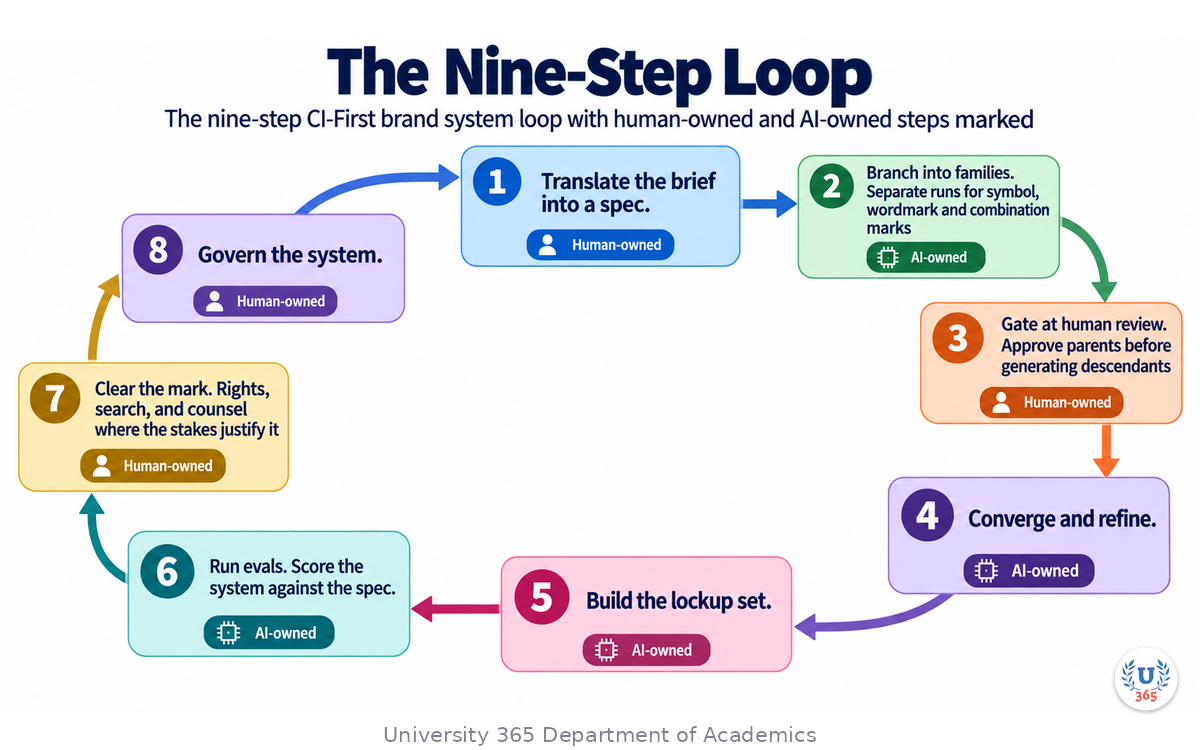
The Nine-Step Loop
Write the brief. Positioning, audience, personality, the negative space of what the brand is not.
Translate the brief into a spec. Tokens for colour, type, spacing, radius, motif and motion, plus the prompt pack.
Branch into families. Separate runs for symbol, wordmark and combination marks.
Gate at human review. Approve parents before generating descendants.
Converge and refine. Take the chosen direction to editable vector and set the wordmark in real licensed type.
Build the lockup set. All the compositions and colour variants the brand will actually need.
Run evals. Score the system against the spec, and check the mark at small sizes and in one colour.
Clear the mark. Rights, search, and counsel where the stakes justify it.
Govern the system. A named editor reviews drift on a cadence and updates the spec, rather than policing individual assets.
Steps 1, 2, 4, 5 and 8 are where a designer is not replaceable. Steps 3, 6 and 7 are where the pipeline does the labour.
Feynman Summary: Explain It Like You Are 12
Imagine your school asks you to design a flag for the whole school. You could draw forty flags in an afternoon and pick your favourite. That is what an AI generator does for you, and it is genuinely useful.
But a flag is not the whole job. You also have to decide what the school stands for, so the flag means something. You have to pick colours that still look right in black and white, because the printer will run out of colour one day. You have to draw the flag big for the gym wall and tiny for a badge, and it has to look like the same flag in both places. You have to write down the rules so that next year, when someone else makes a poster, they use the same flag the same way.
If you skip all that, you have a picture you like and a mess later. The picture was the easy part.
There is one more thing. Before you paint the flag on the school bus, you have to check that another school is not already using it. Nobody in the generator checks that for you. That is a job for a person, and eventually for a lawyer.
Mindmap: The Complete Picture
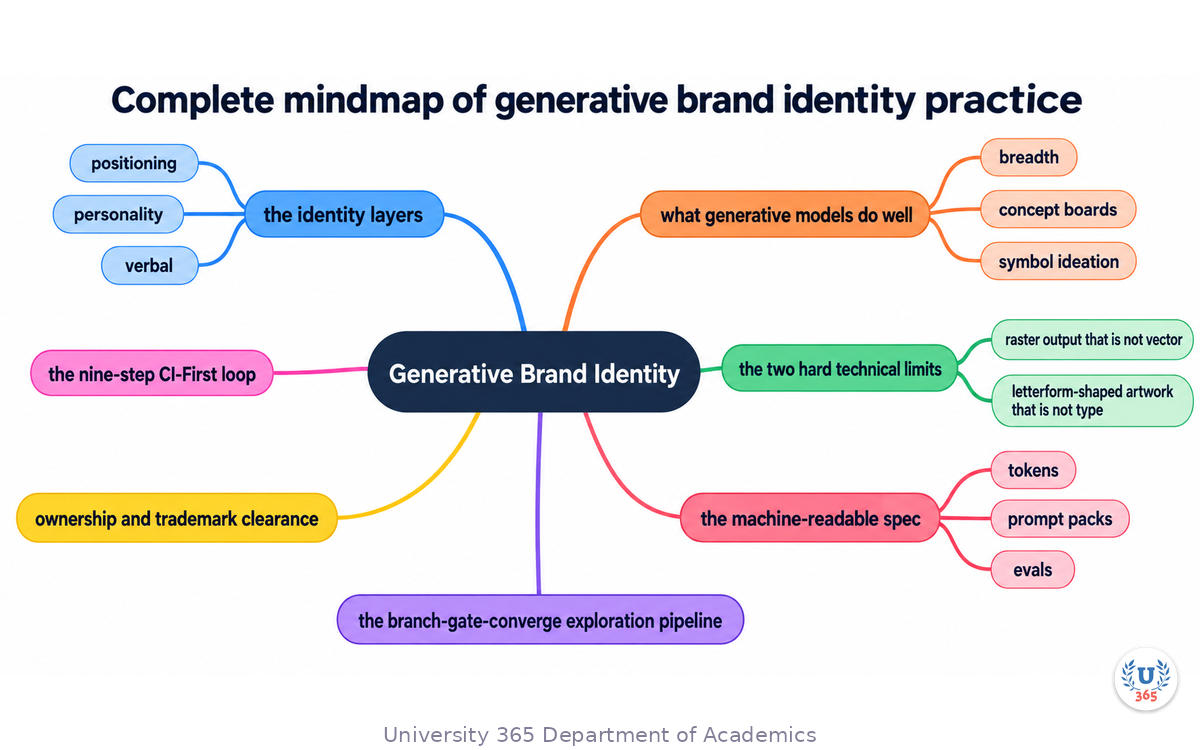
The mindmap shows the whole structure of what you learned: the identity layers (positioning, personality, verbal, visual, applications) and which are human decisions; what generative models do well (breadth, concept boards, symbol ideation, mockups) and where they fail (final artwork, typography, strategy, clearance); the two hard technical limits (raster output that is not vector, and letterform-shaped artwork that is not type); the machine-readable spec (tokens, prompt packs, evals); the branch-gate-converge exploration pipeline; ownership and trademark clearance; and the nine-step CI-First loop that keeps taste and judgement with the designer.
UNOP Sound (University 365 Neuroscience Oriented Pedagogy)
Take five minutes to consolidate your memory. Play the isochronous tone track (10Hz alpha frequency) with your eyes closed. Alpha-frequency tones after a learning session support consolidation, helping move what you just learned from short-term to long-term memory.
[Audio player: UNOP Post-Lecture Isochrone (10Hz, 5 minutes)]
Practical Exercise: Build One Brand Spec and Three Marks
Exercise: Spec First, Then Generate
Choose a real or invented company with a clear audience. A neighbourhood bakery, a developer tool and a cycling repair shop all work.
Write six decisions. Positioning in one sentence. Audience in one line. Personality as three adjectives plus three things the brand is not. Then the colour direction, the type direction and one shape constraint. Keep it under 200 words.
Convert the decisions into tokens. Write actual values: hex codes, a contrast target for text on the brand colours, a font stack with permitted weights, a corner radius range, a stroke weight range. Where you cannot write a value, your decision is not specific enough yet.
Write one prompt pack paragraph. This is what you will paste into every generation call. It should carry the tokens and the negative constraints, so the model is never guessing.
Branch into three families. Run one batch of symbol ideas, one of wordmarks and one of combination marks. Keep them separate so you are comparing ideas rather than variants.
Gate the output. Pick at most two candidates per family to keep. Write one sentence for each rejection explaining which criterion it failed. The reasons matter more than the picks.
Test the finalists. Take the best combination mark and check it at 16 pixels, then in a single colour, then reversed out of a dark background.
Write the lockup list. Name the compositions the brand actually needs. Horizontal, stacked, symbol only, wordmark only, one colour, reversed. Check whether your finalist survives all six.
Note what you could not produce. Be specific. If you ended with a raster file, write down that a vector redraw is outstanding. If the wordmark is generated letterforms, write down that licensed type has not been set. This list is the real state of the brand.
What to Look For
The tokens step is where most people discover their direction was vague. That discovery is the point.
Rejecting for a written reason is what stops a session from becoming aesthetic drift.
The 16-pixel test kills candidates that looked excellent at full size. Run it before you fall in love.
Your final list should contain at least one production gap. That gap is the boundary between generation and design.
CI-First Connection
Steps 1, 2, 5, 6, 7 and 8 are human work. Steps 3 and 4 are where generation saves you time. The spec you write in steps 1 and 2 is not paperwork; it is the thing that makes step 4 useful instead of noisy.
Glossary
Term | Definition |
**Brand Identity** | The system of connected decisions that define how a brand presents itself: positioning, personality, verbal identity, visual identity and applications. |
**Brand Spec** | The machine-readable form of a brand's rules, expressed as tokens, prompt packs and evals rather than as prose guidelines. |
**Token** | A structured value a machine can read, such as a hex colour with a contrast target, or a font stack with permitted weights and ratios. |
**Prompt Pack** | The model-facing version of the brand guidelines, versioned and scoped per surface, given to an AI whenever it produces an asset for the brand. |
**Eval** | An automated check that scores generated output against the brand spec, such as a contrast check, a voice rubric or a layout grammar test. |
**Shape Grammar** | The set of geometric rules a brand's marks and motifs follow, such as permitted shape families, corner radii and stroke weights. |
**Lockup** | A fixed arrangement of the brand's elements, for example symbol plus wordmark horizontal, or the symbol alone. |
**Wordmark** | A mark consisting primarily of the brand name set in letterforms. |
**Lettermark** | A mark built from the initials of the brand name. |
**Pictorial Mark** | A mark built from a recognisable image or symbol. |
**Combination Mark** | A mark combining a symbol and a wordmark in one locked arrangement. |
**Native Vector Output** | A generated file containing real editable paths, such as an SVG, rather than a raster image saved with a vector file extension. |
**Raster** | An image made of pixels. It cannot be scaled up without loss and cannot be edited at the path level. |
**Distinctiveness** | The property that makes a mark capable of identifying one source. It is what trademark protection turns on. |
**Likelihood of Confusion** | The standard used to judge whether a mark is too similar to an existing mark in a related class of goods or services. |
**Clearance Search** | A search for existing marks that may conflict with a proposed mark, covering registered marks and common-law use. |
**Human Authorship** | The requirement, in United States copyright law, that a work be created by a human to be eligible for copyright registration. |
**Drift** | The gradual divergence of generated assets from the brand spec, caught by evals and corrected by the editor who owns the spec. |
**CI-First** | Co-Intelligence First. The human is the ruler and orchestrator; AI is the amplifier. |
Quiz: TEST YOUR UNDERSTANDING
1. Which layer of a brand identity can a generative model NOT produce?
A) Application mockups
B) Positioning and audience decisions
C) Concept boards for a client review
D) Symbol ideation
2. Why is a generated "logo" PNG usually not a finished logo file?
A) PNG files are not allowed in brand guidelines
B) It is raster, so it cannot be scaled without loss or edited at the path level
C) PNG files cannot be printed
D) It cannot be displayed on a website
3. A model generates a wordmark you like. What have you actually received?
A) A licensed typeface you can use for any new sentence
B) Artwork depicting letterforms, not an installable or licensed font
C) A vector font file ready for production
D) A trademark registration
4. What is a prompt pack in a brand spec?
A) A folder of exported logo files
B) The model-facing version of the guidelines that ships with the brand so every generation call stays on-brand
C) A list of banned competitors
D) The client's original brief
5. In the United States, which protection generally applies to a purely AI-generated logo?
A) Copyright registration, automatically
B) Trademark, because it turns on distinctiveness and use in commerce rather than human authorship
C) Patent
D) Neither, so the mark is unprotected forever
Answers: 1-B, 2-B, 3-B, 4-B, 5-B
Related Resources
U365 INSIDE Publications
AI Image Generation: Stable Diffusion for Designers: The generation techniques this workflow draws on
Design Systems Powered by AI: Token systems and component variants that a brand system feeds
AI for Accessibility: Designing for Everyone: Contrast, target size and inclusive colour rules that constrain a palette
External Resources
USPTO: Federal trademark searching: The official starting point for a clearance search, including design search codes for marks with image elements: uspto.gov/trademarks/search/federal-trademark-searching
USPTO: Design search codes: How to search for similar designs when your mark contains a graphic element: uspto.gov/trademarks/search/design-search-codes
USPTO: Comprehensive clearance search: What a thorough search covers, and why the USPTO recommends an attorney for commercial marks: uspto.gov/trademarks/search/comprehensive-clearance-search-similar-trademarks
W3C: Web Content Accessibility Guidelines (WCAG) 2.2: The contrast and non-colour-alone requirements that bound any brand palette: w3.org/TR/WCAG22
WAI-ARIA Authoring Practices Guide: Reference for accessible component behaviour when a brand system reaches product interfaces: w3.org/WAI/ARIA/apg
Related U365 Lectures (Coming Soon)
Lecture 4: Color Theory and AI: Palette Generation That Works (UID, Visual Communication Series)
Lecture 10: The Future of Creative Work: Human + AI Collaboration (UID, Creative Technology Series)
Lecture 9: AI in Web Design: From Wireframe to Deployed Site (UID, UX/UI Design Series)
U.Copilot for This Lecture
Discuss this lecture with U.Copilot, your AI chat companion trained on this content.
Copy and paste the following prompt into the U.Copilot chat on university-365.com:
You are U.Copilot for Lectures, an AI chat companion specially trained on University 365 lecture content. You are helping a Fellow who just completed the lecture "Generative Brand Identity" from the Creative Technology series at the U365 Institute of Design (UID). Your role is to help the Fellow deepen their understanding of building brand identity systems with generative tools. You can: - Clarify any concept from the lecture (identity layers, brand spec, tokens, prompt packs, evals, shape grammar, lockups, native vector output, distinctiveness, clearance) - Review a brand spec the Fellow wrote and point out where a value is missing - Explain how to structure an exploration run so it produces different ideas rather than variants of one idea - Discuss the difference between artwork depicting letterforms and licensed type - Walk through the clearance search steps and explain when to involve an attorney - Connect the lecture content to practical brand project tasks Always maintain U365's CI-First approach: encourage the Fellow to think critically, verify AI outputs, and maintain human judgment as the orchestrator of the design process. Use the UP-Context Method: provide context-rich, role-aware responses that account for the Fellow's learning level and goals.
Next Steps
Now that you understand how to build a brand identity system with generative tools, here is what to do next:
Run the practical exercise above and keep the written rejection reasons, not just the winning mark
Convert one existing brand's guidelines into tokens and a prompt pack, and see how much of the prose turns out to be unspecified
Take one approved mark to editable vector and build the full lockup set, including the one-colour and reversed versions
Run a clearance search on a mark you are considering, using both word search and design search codes
Take Lecture 4 in this series, "Color Theory and AI: Palette Generation That Works", to go deeper on the palette half of the system
Generative tools turn identity exploration from a three-week exercise into a two-day one. That is a real gain, and it moves the bottleneck somewhere more useful: the judgement about what the brand should be, the craft of making the chosen direction production-ready, and the legal work that decides whether the mark is actually yours to use. Those three things were always the job.
IMPORTANT NOTICE
This lecture is published by University 365 as part of its INSIDE Publications Hub. The content is free to read for all visitors. Lectures in this series may be part of a structured academic program leading to a Micro-Credential for your Career (MCC). To enroll in an academic program, visit university-365.com/tuition.
This content is for educational purposes. It is not legal advice. Copyright, trademark and licensing rules vary by jurisdiction and change over time. Consult qualified counsel before relying on any mark commercially.
Copyright University 365, Inc. All rights reserved. This content is protected under University 365's copyright policies. For permissions or inquiries, contact uda@university-365.com.
Published by the Department of Academics, University 365.
Lecture delivered by the University 365 Institute of Design (UID).
Joe Borazian, Dean of Design, UID
Signed for the academic year 2026.




Comments