
AI for Accessibility: Designing for Everyone


UID University 365 Institute of Design
Series UX/UI Design | Level Basic (Free)
Duration 15 to 20 minutes | Access Free
Digital Design, UX/UI, Visual Communication, Motion Graphics, Creative Technology

UNOP Sound (University 365 Neuroscience Oriented Pedagogy)
Take five minutes to prepare your brain. Play the isochronous tone track (40Hz gamma frequency) with your eyes closed. Gamma-frequency tones before a learning session raise attention and make the material easier to absorb.
[Audio player: UNOP Pre-Lecture Isochrone (40Hz, 5 minutes)]
In this Lecture

The Hook: The Audit Passed and the Product Still Failed
Here is a sequence you will meet in your first year as a designer. The accessibility scanner reports zero violations. The build ships. Two weeks later a screen reader user files a support ticket that says the checkout form is unusable, because the reading order jumps from the card number field to the marketing footer and never announces the error message.
Nothing the scanner looked at was wrong. The scanner was looking at the wrong layer.
Automated tools test attributes. People use flows. An image with an alt attribute passes the rule and can still carry an alt value of "image". A form with a label element passes the rule and can still announce the wrong label to a screen reader. The published industry estimate is that automated scanning covers roughly 30 to 40 percent of WCAG success criteria, and that ceiling is structural rather than temporary: it is set by how many criteria can be decided by inspecting a single element.
This lecture teaches you where AI genuinely changes accessibility work and where it does not. You will learn what the standard actually requires, which barriers are machine-checkable, how AI-assisted auditing changes the economics of a review, how to use AI for alt text and semantic labelling without shipping technically correct nonsense, and how to build an accessibility workflow that keeps a human in the loop at the points that matter.
Step 1: Accessibility Is a Design Problem, Not a Compliance Task
The European Accessibility Act (Directive 2019/882/EU) has applied to a defined set of products and services sold into the EU since 28 June 2025. Its technical reference is the harmonised standard EN 301 549, which currently points at WCAG 2.1. WCAG 2.2, published as a W3C Recommendation on 5 October 2023, is backward compatible with 2.1 and adds nine success criteria, so building to WCAG 2.2 Level AA also satisfies the older reference. Conformance levels, the applicable law and the exemptions are legal questions for your client's counsel. Your job as a designer is narrower and clearer: know the standard, test against it, and describe what you found.
The scale of the problem is measured, not rhetorical. In February 2026, WebAIM evaluated the home pages of the top one million websites and found that 95.9 percent had automatically detectable WCAG 2 failures, with an average of 56.1 detected errors per page. Both figures are worse than the 2025 edition, which reversed six consecutive years of gradual improvement. Six error types account for 96 percent of everything detected, and they have been the same six for seven consecutive years: low contrast text, missing alt text, missing form labels, empty links, missing document language and empty buttons.
The audience is not a niche. The World Health Organization estimates that about 1.3 billion people, roughly 16 percent of the world population, experience significant disability, and the number is rising as populations age and chronic conditions become more common.
Why "Compliance Task" Is the Wrong Frame
A compliance frame produces three predictable failures.
The scanner becomes the judge. Teams optimise for a zero-violation report instead of a usable product. Every fix is a rule match, and the 60 to 70 percent of criteria that need judgement never get tested.
Accessibility gets scheduled last. If accessibility is a review step, it competes with everything else at the end of a release, which is exactly when nobody wants to redesign a flow.
The design system carries no accessibility. When the accessible pattern is not the default component, every product team re-solves the same problem badly. The fix belongs in the design system, once.
A design frame produces the opposite: focus states, target sizes, contrast pairs, error announcements and reading order become properties of the components you already ship, and the audit becomes a confirmation rather than a discovery.
Step 2: What AI Can and Cannot Fix
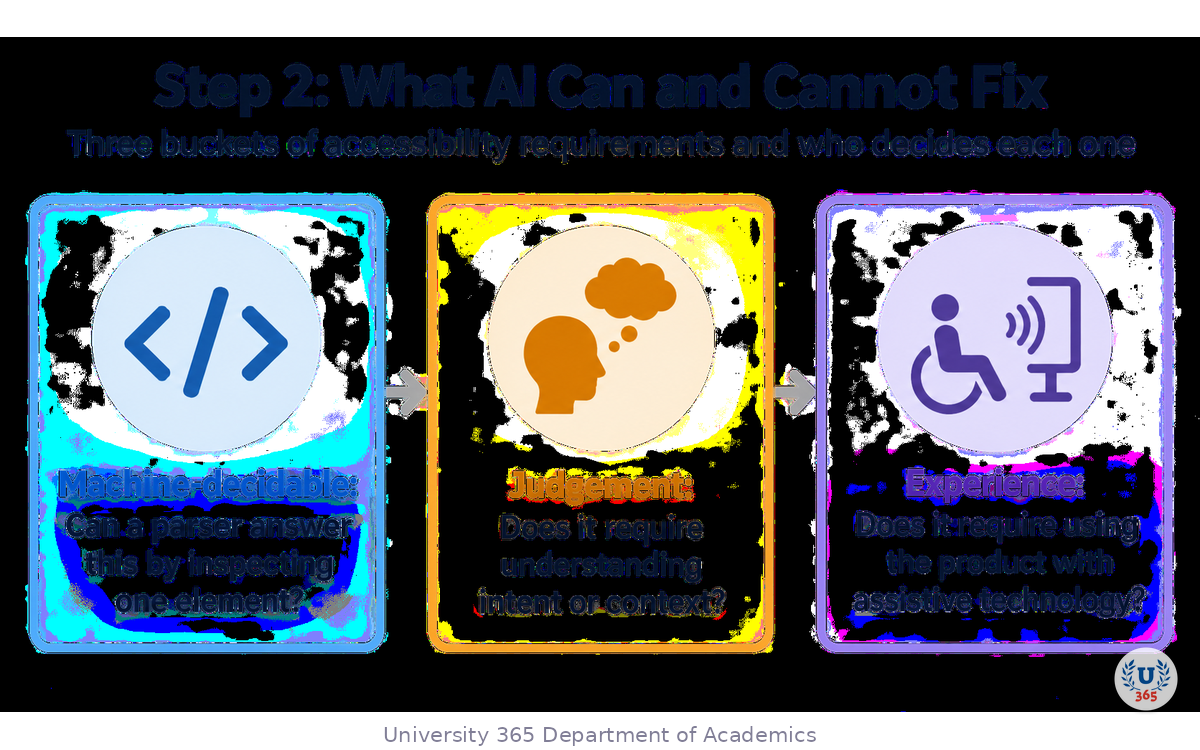
Sort every accessibility requirement into three buckets before you open any tool.
Bucket | Question it answers | Who decides | Examples |
Machine-decidable | Can a parser answer this by inspecting one element? | Rule engine | Alt attribute present, contrast ratio computed from CSS, unique page title, document language, duplicate ids |
Judgement | Does it require understanding intent or context? | Human, AI-assisted | Whether alt text carries the right meaning, heading hierarchy matching content, reading order, error message clarity |
Experience | Does it require using the product with assistive technology? | Human with real AT | Keyboard flow through a multi-step form, screen reader narrative, focus management in a modal |
AI changes the middle bucket the most. A vision model can look at an unlabelled chart and produce a description that names the trend. A language model can read a violation plus the surrounding markup and propose a corrected snippet. Neither can tell you whether a graphic is decorative and should therefore carry empty alt text, because that depends on what the page is trying to say.
The Two Failure Modes of AI-Generated Accessibility Content
Technically correct, functionally useless. The description names objects and misses purpose. "A person smiling in front of a laptop" is accurate and tells a screen reader user nothing about why the image is on the page.
Confident and wrong. A generated ARIA attribute can pass a syntax check while describing behaviour the widget does not have. A control announced as a button that does not activate on Enter is worse than an unlabelled control, because the user is now misled.
The discipline that prevents both: AI drafts, a human classifies and approves, and the approved text is what ships.
Step 3: AI-Powered Auditing and Its Hard Ceiling
Every serious accessibility toolchain on the market today rests on the same open-source rule engine, axe-core, maintained by Deque and embedded in Google Lighthouse, in Microsoft's accessibility assessment tool and in most browser extensions. Build your review on it, then understand exactly what it bought you.
What the Rule Engine Does Well
It is deterministic. On the rules it ships, a flagged issue is a real violation.
It runs in seconds and can run on every commit, which turns accessibility into regression prevention instead of a quarterly event.
It maps its rules to WCAG 2.0, 2.1 and 2.2 success criteria, so a report can be scoped to a conformance target such as WCAG 2.2 Level AA.
Where the Ceiling Sits
Published estimates place automated coverage at roughly 30 to 40 percent of WCAG success criteria, with tool vendors reporting higher figures for their own rule sets. The disagreement is real and the direction is consistent: the majority of criteria cannot be decided by static inspection. WCAG 2.2 moved the standard further in that direction, because its new criteria are about flows and focus behaviour rather than element attributes.
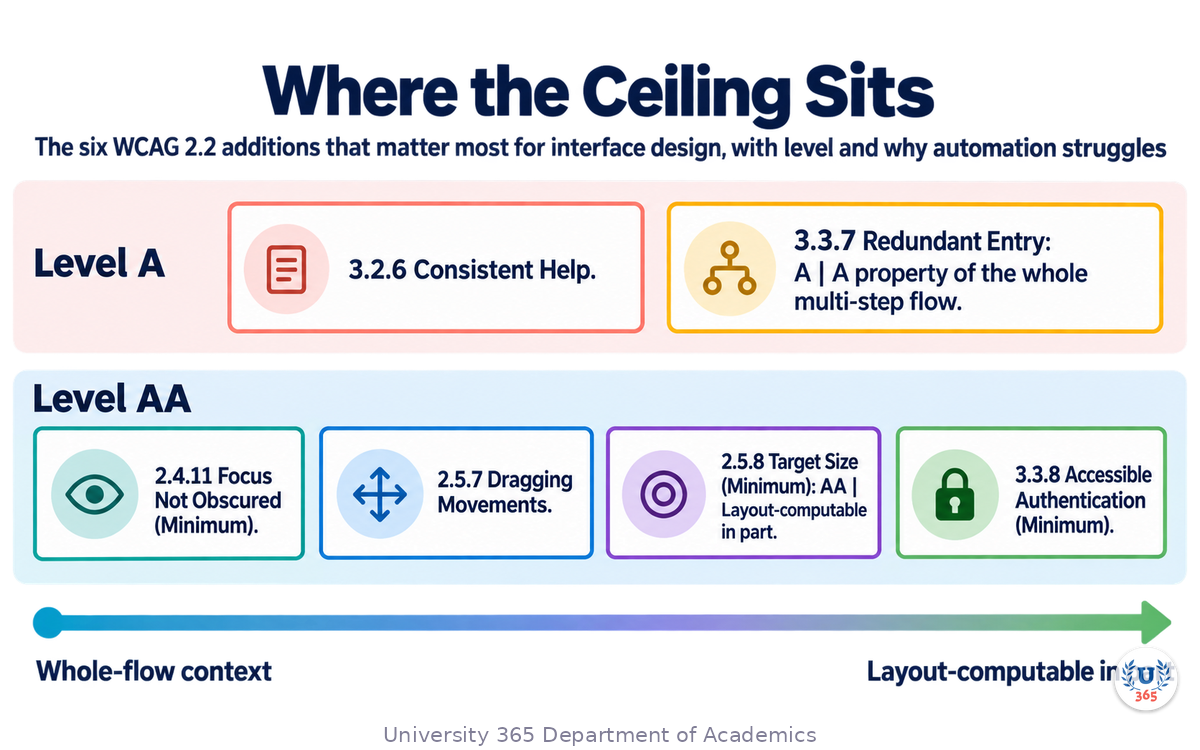
New in WCAG 2.2 | Level | Why automation struggles |
2.4.11 Focus Not Obscured (Minimum) | AA | Requires knowing what is visually on top of the focused element as the user tabs |
2.5.7 Dragging Movements | AA | Requires finding an alternative interaction path across the whole interface |
2.5.8 Target Size (Minimum) | AA | Layout-computable in part, so partly automatable, but exceptions need judgement |
3.2.6 Consistent Help | A | A cross-page property of the help mechanism's position |
3.3.7 Redundant Entry | A | A property of the whole multi-step flow, not of one field |
3.3.8 Accessible Authentication (Minimum) | AA | A property of the login journey, including whether a cognitive test is imposed |
Where AI Genuinely Helps in a Review
Triage. Feed a rule-engine report plus the relevant markup to a model and ask it to group findings by user impact and to name the user journey each failure breaks. This converts a list of rule identifiers into a work queue ordered by damage.
Fix drafting. For common violations, a model can propose a corrected snippet that a developer reviews and applies. The review is cheap and the first draft is usually close.
Semantic checks the rules cannot do. Ask a model whether a link label makes sense read out of context, whether an error message names the field and the required correction, and whether a chart description conveys the trend rather than the furniture.
Regression explanation. When a pipeline gate turns red on a component, ask what changed in behaviour, not just which rule fired.
None of these steps replaces a manual audit. They change how much of the backlog a designer can clear before the specialist arrives.
Step 4: Alt Text and Semantic Labels: Draft, Not Final
Images are the largest single content-level failure on the web. WebAIM measured missing alt text on 53 percent of the million home pages in its 2026 sample. At that volume, hand-writing every description does not scale, which is why AI-generated alt text is now standard as a first draft.
A vision model can describe an image well enough for product photos, screenshots and many diagrams. It is weakest exactly where accuracy matters most: charts, data visualisations and context-dependent images.
The Two-Step Workflow
Human classifies, in one second. Is this image informative or decorative? An informative image gets a description. A decorative image gets an empty alt value, and a description there is a defect, not a courtesy.
AI writes, in one call. Give the model the image plus its page context and require a description of what is shown and its purpose.
Then apply the rules that separate a usable description from a passing attribute:
Describe purpose in context, not just content.
Keep it short enough to be spoken without dominating the page. Aim under about 125 characters for a simple image.
Do not begin with "image of", "picture of" or "photo of". Assistive technology already announces that it is an image.
Do not repeat an adjacent caption. If the caption already carries the information, the description should not duplicate it.
For a chart, describe the trend and the direction, and reference the data table if one exists.
For text baked into an image, put the text in the surrounding copy instead. A logo with a tagline is a common case, and the accessible answer is usually to render the tagline as text.
Semantic Labels Beyond Images
The same draft-then-approve pattern applies to the labels and names that assistive technology announces.
Button and link names. A rule engine confirms a name exists. A model can flag names that carry no information out of context, such as "click here", "read more" or "learn more".
Form field labels and error text. Ask the model to state, for each failing field, whether the error message names the problem and the required correction. That is the check a scanner cannot perform.
Custom widget roles. A model can compare the ARIA role a component declares with the behaviour the code implements. Treat the answer as a hypothesis and confirm it against the WAI-ARIA Authoring Practices.
Step 5: Keyboard, Screen Reader and Voice: Where AI Helps Least
This is the bucket AI cannot take from you, and it is the bucket that generates the support tickets.
Keyboard
Tab through the screen with the mouse untouched and record what happens.
Every interactive element is reachable in an order that matches the visual layout.
Focus is always visible, and it is never fully hidden behind a sticky header, a cookie banner or a floating help widget. That is success criterion 2.4.11 in plain language.
No keyboard trap: you can always leave a component with Tab or Shift+Tab.
Any drag interaction has a single-pointer alternative, which is success criterion 2.5.7. Sliders, map panning, drag-to-reorder lists and upload drop zones are the usual offenders.
AI can help you script and run parts of this through browser automation, and it can summarise what the run produced. It cannot tell you whether the order feels right to the person using it.
Screen Reader
Test the narrative, not the markup. Listen to whether the page announces a coherent sequence, whether the error message is announced when it appears, and whether a modal takes focus and returns it on close.
AI can generate the test script and can transcribe the output. The judgement about whether the announcement makes sense is yours.
Voice and Switch Control
Voice control depends on visible labels matching spoken commands. Switch control depends on a small, predictable set of reachable targets. Both are fast to check and rarely checked. If your design system ships an icon-only button with no accessible name, it fails both.
The Honest Boundary
Experience-level testing requires assistive technology and, in the strongest form, real users of that technology. Anything an AI tells you about this bucket is a description of code, not a measurement of experience. State that boundary in your reports instead of implying broader coverage than you tested.
Step 6: Inclusive Color, Contrast, Target Size and Motion
Color and Contrast
Contrast is the single most common detected failure on the web and it is fully computable. Check it with arithmetic, not with an opinion.
4.5 to 1 minimum for normal text.
3 to 1 minimum for large text, and for the visual boundaries of user interface components and graphical objects.
Never carry meaning in color alone. Pair color with an icon, a label, a pattern or a shape.
AI helps in two places. First, generation: ask a model for palette options that hold their contrast relationships across light and dark surfaces, then verify every pair with a contrast checker rather than trusting the proposal. Second, detection: a vision model can flag chart and diagram combinations that collapse for a viewer with a colour vision deficiency, which no attribute-level rule will find.
Target Size
Success criterion 2.5.8 requires interactive targets of at least 24 by 24 CSS pixels, with defined exceptions for inline links and for spacing. Audit the small controls first: icon-only buttons in toolbars, close buttons on notifications, compact row actions in tables, filter chips and steppers. This is partly automatable from computed layout, and it is the one WCAG 2.2 addition where a tool can genuinely carry most of the check.
Motion
Respect the reduced-motion preference. Provide a way to pause, stop or hide any moving content that runs longer than five seconds. Avoid parallax and large-area motion for its own sake; if movement carries meaning, ask whether a static representation would carry it better.
Authentication
Success criterion 3.3.8 blocks cognitive function tests as a login gate where an alternative exists. Do not block paste into password fields, do not block password managers, and provide a non-visual alternative to a puzzle captcha.
Step 7: The CI-First Accessibility Workflow
CI-First means Co-Intelligence First: the human is the ruler and orchestrator, and AI is the amplifier. In accessibility work that principle assigns tasks in a specific way.
The Human Owns
The decision about which conformance target applies and what that means for the product.
The classification of every image as informative or decorative.
The judgement on whether a description, label or error message carries the right meaning.
Every experience-level test with real assistive technology.
The final statement about what was tested and what was not.
The AI Owns
First-draft alt text and descriptions from image plus page context.
Triage of a rule-engine report into an impact-ordered work queue.
Draft fixes for common violations, for developer review.
Semantic checks the rules cannot perform: label quality, error message clarity, description relevance.
Palette proposals, contrast computations and layout measurements.
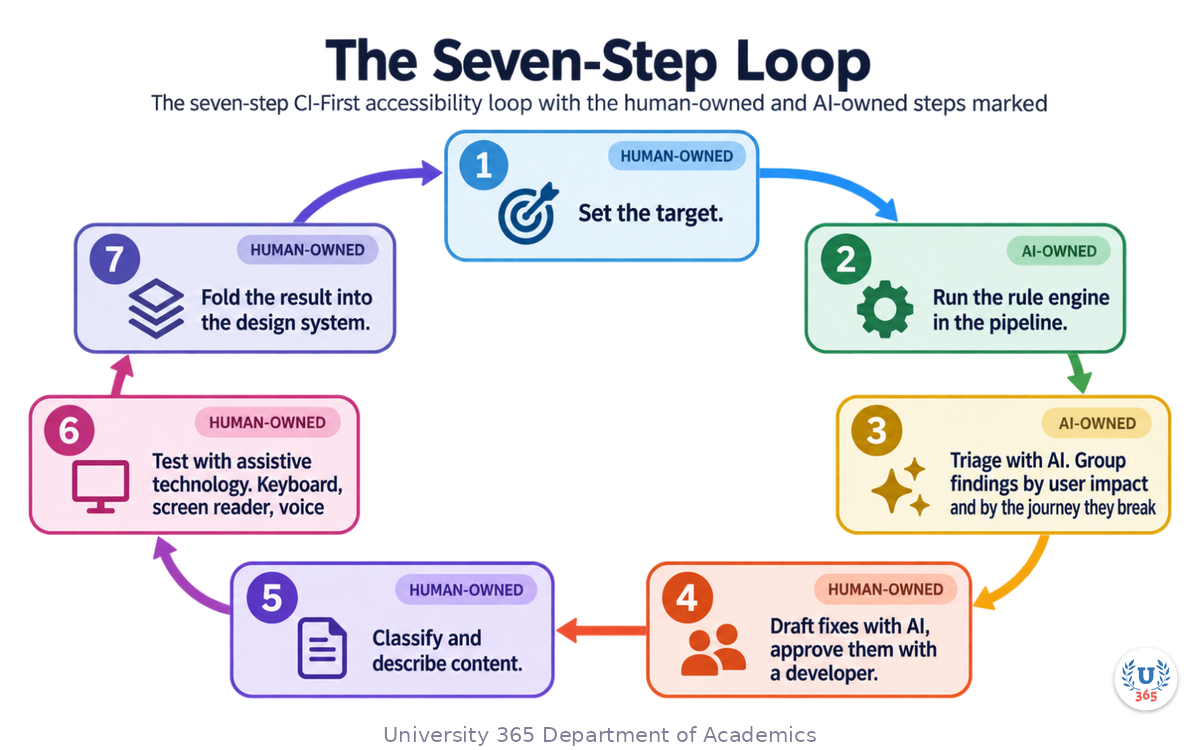
The Seven-Step Loop
Set the target. Name the standard and level, for example WCAG 2.2 Level AA, and name the scope in pages and flows.
Run the rule engine in the pipeline. Wire it into continuous integration so a new violation fails the build on the component that introduced it.
Triage with AI. Group findings by user impact and by the journey they break. Fix the journey-breaking items before the cosmetic ones.
Draft fixes with AI, approve them with a developer. Every generated snippet is a proposal, never a commit.
Classify and describe content. A human classifies images, AI drafts the descriptions, a human approves the published text.
Test with assistive technology. Keyboard, screen reader, voice. Record what you tested and at which level.
Fold the result into the design system. Every accessible pattern you had to build by hand becomes a component default.
Steps 2, 3 and 4 are where AI removes most of the cost. Steps 1, 5 and 6 are where a human is not replaceable.
Feynman Summary: Explain It Like You Are 12
Imagine you are building a house for a friend who uses a wheelchair. You check the front door and it is wide enough. You check the hallway and it is wide enough. Everything on your checklist passes. Then your friend arrives and cannot reach the light switches, because the switches were never on your list.
Accessibility tools work like that checklist. They are good at checking the things that can be checked by looking at one piece of the building at a time: does the image have a description, is the text dark enough on its background, is the button big enough to hit. Those checks are fast and they catch real problems, but they only cover about a third of the list.
The rest needs a person. Only a person can say whether a description actually describes the picture, whether the order of the page makes sense when it is read aloud, or whether the whole checkout flow works when your hands are not on a mouse.
AI sits in the middle. It can look at a picture and write a first description. It can read a pile of errors and tell you which ones break the most important journeys. It can suggest a corrected piece of code. But it does not know what your page is trying to say, and it cannot experience your product the way your user will.
So the rule is simple. Let the machine draft, let the machine sort, let the machine measure. You classify, you judge, you decide what ships.
Mindmap: The Complete Picture
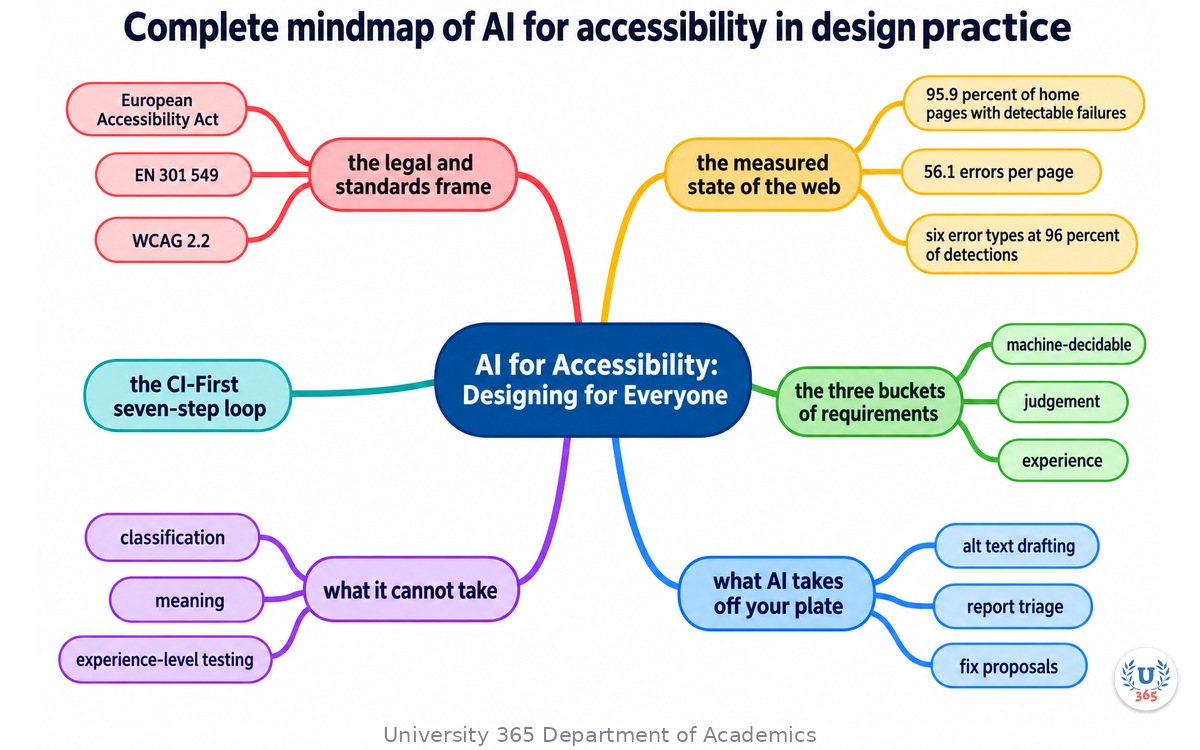
The mindmap shows the whole structure of what you learned: the legal and standards frame (European Accessibility Act, EN 301 549, WCAG 2.2, the nine new success criteria); the measured state of the web (95.9 percent of home pages with detectable failures, 56.1 errors per page, six error types at 96 percent of detections); the three buckets of requirements (machine-decidable, judgement, experience); what AI takes off your plate (alt text drafting, report triage, fix proposals, semantic checks, palette computation); what it cannot take (classification, meaning, experience-level testing); and the CI-First seven-step loop that keeps the human at the decision points.
UNOP Sound (University 365 Neuroscience Oriented Pedagogy)
Take five minutes to consolidate your memory. Play the isochronous tone track (10Hz alpha frequency) with your eyes closed. Alpha-frequency tones after a learning session support consolidation, helping move what you just learned from short-term to long-term memory.
[Audio player: UNOP Post-Lecture Isochrone (10Hz, 5 minutes)]
Practical Exercise: Run an Accessibility Triage on One Screen
Exercise: Triage, Fix, and Report
Choose one real screen you designed or maintain. A sign-up form, a dashboard card or a product page all work.
Set the target. Write one sentence naming the standard, level and scope. Example: "WCAG 2.2 Level AA for the account creation flow, desktop and mobile."
Run the rule engine. Run your scanner of choice on the screen and export the findings.
Triage with AI. Give the model the findings plus the page markup and ask two questions: which findings break a user journey, and what is the user impact of each. Produce a ranked list.
Classify every image on the screen. Mark each as informative or decorative. This is your judgement, not the model's, and it takes seconds per image.
Draft descriptions and labels with AI. For informative images, generate descriptions from the image plus page context. For links and buttons, ask the model to flag any name that carries no information out of context.
Approve the text yourself. Rewrite anything that describes objects without conveying purpose. Delete any description attached to a decorative image.
Test with a keyboard. Tab through the whole screen. Record three things: is the focus order sensible, is focus always visible, and does any element trap focus.
Write a one-paragraph statement. Name the standard, the scope, what you tested, what tools you used and what remains untested.
What to Look For
The triage step will reorder your backlog. Expect at least one finding that the rule engine rated minor to be journey-breaking in practice.
Some descriptions will be accurate and useless. That is the normal output of a first draft, and it is why step 6 exists.
The keyboard pass will find something no scanner reported. It always does.
CI-First Connection
Steps 1, 4, 6, 7 and 8 are human work. Steps 2, 3 and 5 are where AI removes hours. If you skipped step 8, you cannot honestly claim conformance, because the statement is the part where you separate what you measured from what you assumed.
Glossary
Term | Definition |
**WCAG 2.2** | The Web Content Accessibility Guidelines published as a W3C Recommendation on 5 October 2023. It contains 86 success criteria across levels A, AA and AAA, adds nine criteria over WCAG 2.1 and removes 4.1.1 Parsing as obsolete. |
**Success Criterion** | One testable requirement in WCAG, identified by number and assigned a conformance level. |
**Conformance Level** | A, AA or AAA. Level AA is the common procurement and regulatory target, but the applicable requirement comes from the relevant law, contract or policy. |
**EN 301 549** | The European harmonised standard for accessibility requirements in ICT procurement and regulation. It currently references WCAG 2.1. |
**European Accessibility Act** | Directive 2019/882/EU. Member states had to transpose it by 28 June 2022 and apply their measures from 28 June 2025, covering a defined set of products and consumer services. |
**axe-core** | The open-source accessibility rule engine maintained by Deque, embedded in Google Lighthouse, in [Microsoft's accessibility assessment tool](https://accessibilityinsights.io) and in most browser extensions. |
**Automated Coverage** | The share of WCAG success criteria a rule engine can decide on its own. Published estimates commonly place it around 30 to 40 percent. |
**Alt Text** | The text alternative for an image. It describes what the image shows and its purpose in context, and it is empty for a decorative image. |
**Decorative Image** | An image that carries no information a reader needs. Its correct alt value is empty, so assistive technology skips it. |
**Focus Not Obscured** | Success criterion 2.4.11. A component that receives keyboard focus must not be entirely hidden by author-created content such as sticky headers or overlays. |
**Dragging Movements** | Success criterion 2.5.7. Any functionality that requires dragging must also be achievable with a single pointer without dragging. |
**Target Size (Minimum)** | Success criterion 2.5.8. Interactive targets must be at least 24 by 24 CSS pixels, with defined exceptions. |
**Accessible Authentication** | Success criterion 3.3.8. Do not impose a cognitive function test as a login gate where an alternative exists. |
**Keyboard Trap** | A state where keyboard focus enters a component and cannot leave it. |
**Reading Order** | The order in which assistive technology announces page content. It must match the meaning of the page, not necessarily the pixel layout. |
**Assistive Technology** | Software or hardware that enables access, such as a screen reader, a screen magnifier, voice control or a switch device. |
**Reduced Motion Preference** | An operating system setting a user enables to request less animation. Designs should respect it. |
**CI-First** | Co-Intelligence First. The human is the ruler and orchestrator; AI is the amplifier. |
Quiz: TEST YOUR UNDERSTANDING
1. What share of WCAG success criteria can automated tools decide on their own, according to published estimates?
A) About 10 percent
B) Roughly 30 to 40 percent
C) About 75 percent
D) All of them, with a capable enough model
2. An image on your page is purely decorative. What should its alt value be?
A) A short description of the colours
B) The word "image"
C) An empty value, so assistive technology skips it
D) The file name
3. Which WCAG 2.2 success criterion requires an alternative to dragging?
A) 2.4.11 Focus Not Obscured
B) 2.5.7 Dragging Movements
C) 3.3.7 Redundant Entry
D) 2.5.8 Target Size
4. In the draft-then-approve workflow for AI-generated alt text, which step must a human perform?
A) Nothing, the model output can ship directly
B) Classifying each image as informative or decorative
C) Choosing the image file format
D) Setting the image width in pixels
5. Which of these tasks should stay with a human rather than being delegated to AI?
A) Computing a contrast ratio from two hex values
B) Grouping a scanner report by user impact
C) Judging whether a screen reader announcement makes sense
D) Measuring the pixel size of a button
Answers: 1-B, 2-C, 3-B, 4-B, 5-C
Related Resources
U365 INSIDE Publications
UX Research with AI: User Interviews at Scale: Research methods that feed inclusive design decisions
Design Systems Powered by AI: How to make the accessible pattern the default component
External Resources
Web Content Accessibility Guidelines (WCAG) 2.2: The W3C Recommendation itself, and the source of every success criterion number quoted here: w3.org/TR/WCAG22
Understanding WCAG 2.2: W3C's plain-language explanation of each success criterion, with sufficient techniques: w3.org/WAI/WCAG22/Understanding
The WebAIM Million: The annual automated accessibility analysis of the top one million home pages, including the 2026 edition: webaim.org/projects/million
WHO Disability and Health Fact Sheet: The global prevalence estimate cited in this lecture: who.int/news-room/fact-sheets/detail/disability-and-health
axe-core: Deque's open-source accessibility rule engine, with its WCAG rule mapping: github.com/dequelabs/axe-core
WAI-ARIA Authoring Practices Guide: The reference for accessible behaviour of custom widgets: w3.org/WAI/ARIA/apg
Related U365 Lectures (Coming Soon)
Lecture 2: AI for Prototyping: From Sketch to Interactive in 15 Min (UID, UX/UI Design Series)
Lecture 4: AI in Web Design: From Wireframe to Deployed Site (UID, UX/UI Design Series)
Lecture 10: The Future of Creative Work: Human + AI Collaboration (UID, Creative Technology Series)
U.Copilot for This Lecture
Discuss this lecture with U.Copilot, your AI chat companion trained on this content.
Copy and paste the following prompt into the U.Copilot chat on university-365.com:
You are U.Copilot for Lectures, an AI chat companion specially trained on University 365 lecture content. You are helping a Fellow who just completed the lecture "AI for Accessibility: Designing for Everyone" from the UX/UI Design series at the U365 Institute of Design (UID). Your role is to help the Fellow deepen their understanding of accessibility in design practice. You can: - Clarify any concept from the lecture (WCAG 2.2, success criteria, the three buckets of requirements, automated coverage, alt text, focus management, target size, reduced motion) - Walk through a specific success criterion and what it requires in a real interface - Help them triage a scanner report into an impact-ordered work queue - Review an alt text draft they wrote and say whether it conveys purpose or only content - Explain how accessibility patterns belong in a design system rather than in per-team fixes - Connect the lecture content to practical design tasks Always maintain U365's CI-First approach: encourage the Fellow to think critically, verify AI outputs, and maintain human judgment as the orchestrator of the design process. Use the UP-Context Method: provide context-rich, role-aware responses that account for the Fellow's learning level and goals.
Next Steps
Now that you understand where AI changes accessibility work and where it does not, here is what to do next:
Run the practical exercise above on one real screen you own, and write the closing statement even if the screen fails
Wire a rule engine into your build so a new violation fails the pipeline on the component that introduced it
Audit your design system for the accessible defaults: focus states, target sizes, contrast pairs, error announcements and reading order
Test one flow with a screen reader and record what you heard, not what you expected
Take Lecture 4 in this series, "AI in Web Design: From Wireframe to Deployed Site", to see how generated layouts must be checked before they ship
Accessibility stops being a compliance task the moment you treat it as a design property. The tools will keep improving, and the automated share of the standard will keep growing, but the part that decides whether a product is usable will stay with the designer who classified the images, ordered the journey and listened to the output.
IMPORTANT NOTICE
This lecture is published by University 365 as part of its INSIDE Publications Hub. The content is free to read for all visitors. Lectures in this series may be part of a structured academic program leading to a Micro-Credential for your Career (MCC). To enroll in an academic program, visit university-365.com/tuition.
This content is for educational purposes. While we strive for accuracy, AI and accessibility standards are moving fields. Verify current technical and legal requirements against the primary sources for professional applications. Applicability of any accessibility law to a specific product is a legal question for qualified counsel.
Copyright University 365, Inc. All rights reserved. This content is protected under University 365's copyright policies. For permissions or inquiries, contact uda@university-365.com.
Published by the Department of Academics, University 365.
Lecture delivered by the University 365 Institute of Design (UID).
Joe Borazian, Dean of Design, UID
Signed for the academic year 2026.




Comments