
UX Research with AI: User Interviews at Scale

Updated: Oct 1


UID University 365 Institute of Design
Series UX/UI Series | Level Basic (Free)
Duration 25 minutes | Access Free
Digital Design, UX/UI, Visual Communication, Motion Graphics, Creative Technology

UNOP Sound (University 365 Neuroscience Oriented Pedagogy)
Take five minutes to prepare your brain. Play the isochronous tone track (40Hz gamma frequency) with your eyes closed. Gamma-frequency tones before a learning session raise attention and make the material easier to absorb.
[Audio player: UNOP Pre-Lecture Isochrone (40Hz, 5 minutes)]
In this Lecture
The Hook: Why UX Research Needs AI Now
You are a UX researcher at a growing SaaS company. Your product manager wants to understand why trial users churn at day 14. You need 20 user interviews. Scheduling takes two weeks. Transcribing takes another week. Coding and synthesizing takes a third. By the time you present findings, the product team has already shipped three new features based on guesses.
This is the bottleneck that has defined UX research for a decade. The depth of qualitative research is undeniable, but the speed is brutal. In 2026, product teams ship weekly. Research cycles of three weeks are not a luxury. They are a liability.
AI-powered UX research tools compress that timeline from weeks to hours. An AI moderator can conduct 200 interviews in 24 hours, adapt its questions based on what each participant says, and deliver structured themes with verbatim quotes by the next morning. The researcher shifts from data collection to data interpretation, which is where their expertise actually adds value.
The question is not whether AI belongs in your research workflow. In 2026, it already does. The question is whether you understand its capabilities and limitations well enough to use it without compromising research integrity.

What AI-Powered UX Research Actually Is
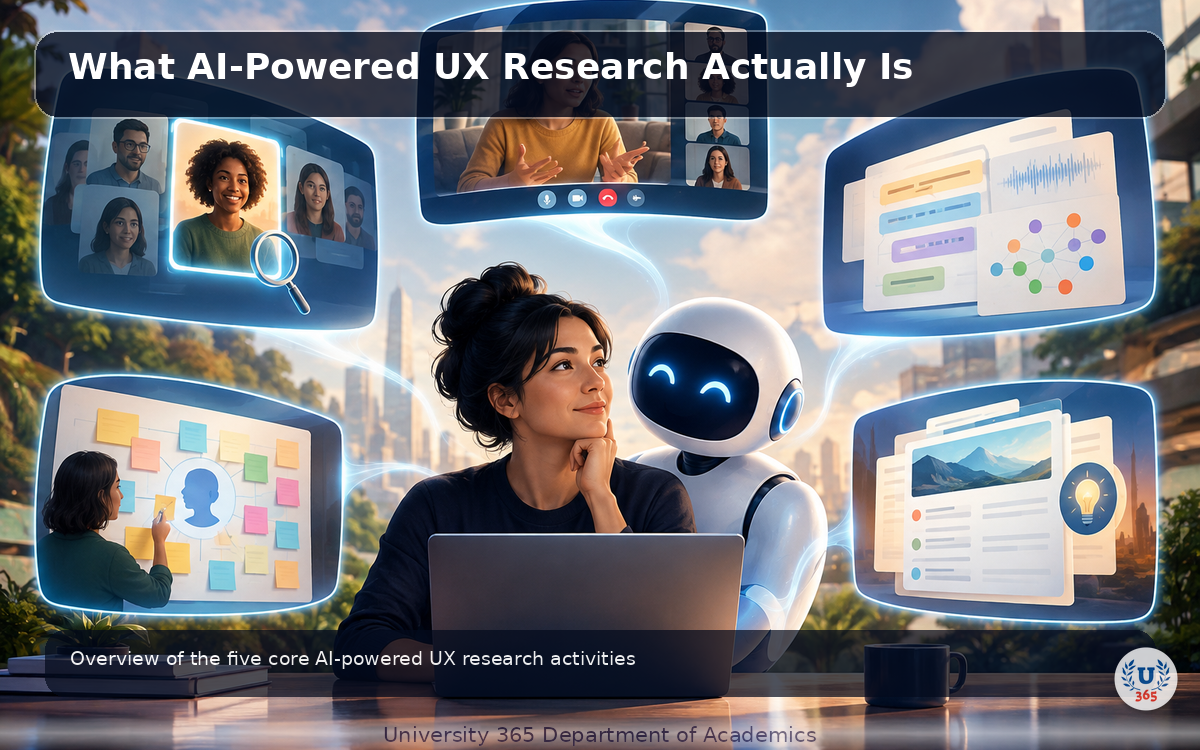
AI-powered UX research is the application of large language models and natural language processing to the research workflow. It spans five core activities: conducting interviews, simulating participants, analyzing qualitative data, detecting sentiment, and clustering findings into themes.
The foundation is the same large language model technology that powers ChatGPT and Claude. These models understand natural language, generate human-like questions, and extract patterns from unstructured text. What makes them useful for UX research is that they can operate at a scale no human team can match.
A human researcher can conduct 5 to 8 interviews per day before fatigue degrades quality. An AI moderator can run 200 to 300 conversations simultaneously, 24 hours a day, in 50+ languages, without a single scheduling conflict. Each interview can last 30 minutes or more, with adaptive follow-up questions that probe deeper based on participant responses.
The key distinction is between AI that conducts research and AI that analyzes research. Some tools do both. Some specialize. Understanding this difference is critical for building a workflow that produces trustworthy insights rather than AI-generated hallucinations dressed up as findings.
AI-Moderated Interviews: Conducting 200 Conversations in 24 Hours
AI-moderated interviews are the most transformative application of AI in UX research. Instead of a human researcher sitting across from a participant, an AI agent conducts the conversation. The participant joins through a link, speaks naturally by voice or text, and the AI adapts its questions in real time based on what the participant says.
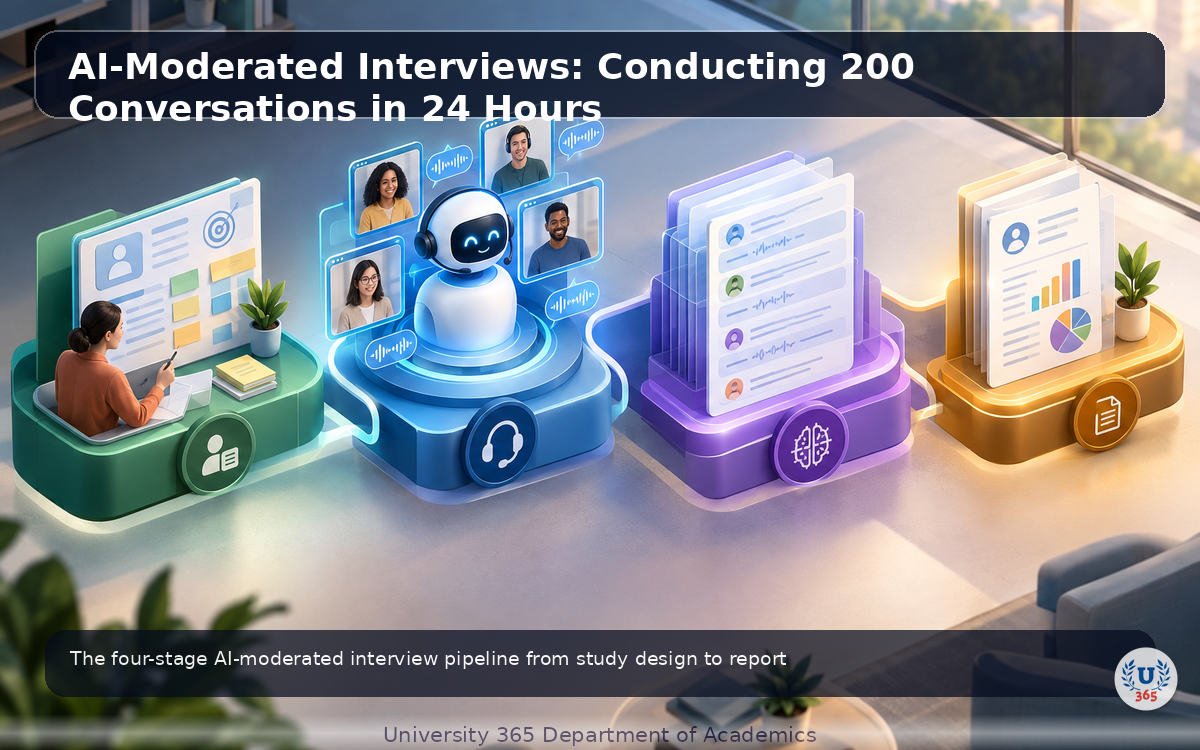
The process works in four stages. Stage 1 is study design. The researcher defines the research goals, target audience, and key questions. The AI generates an interview guide and suggests follow-up probes. The researcher reviews and approves the guide before any interview begins.
Stage 2 is recruitment. Participants receive a link and join at their convenience. No scheduling. No time zone coordination. The AI is available 24/7. Platforms like User Intuition, Outset, and Conveo offer built-in panels of 4 million+ participants, or you can use your own recruited users.
Stage 3 is the interview itself. The AI moderator asks questions, listens to responses, and generates adaptive follow-ups. If a participant mentions a frustration with onboarding, the AI probes deeper: "Tell me more about what happened during onboarding. What specifically frustrated you?" This is not a rigid script. It is a dynamic conversation that mirrors what a skilled human moderator would do.
Stage 4 is analysis. Each interview is transcribed, summarized, and tagged with themes. The platform aggregates findings across all interviews, identifies patterns, and generates a report with verbatim quotes backing every claim. Results arrive in hours, not weeks.
The numbers are striking. Traditional qualitative research takes 6 to 12 weeks and costs $15,000 to $500,000 per project. AI-moderated interviews deliver comparable depth in 24 hours at a fraction of the cost. A typical study with 200 participants costs under $5,000 and produces 30+ minute interviews with adaptive probing.
Synthetic Personas: Simulating Users Before You Recruit Them
Synthetic personas are AI-generated representations of user segments that can participate in simulated research. Instead of recruiting real humans, you generate hundreds of synthetic respondents based on personas built from your first-party data: web analytics, CRM records, existing research documents, and public demographic data.
The concept is controversial but increasingly practical. Platforms like Delve AI and Synthetic Users generate AI participants that mimic the demographics, behaviors, and decision-making patterns of specific user segments. Each synthetic participant develops an individual personality profile based on the OCEAN model (Openness, Conscientiousness, Extraversion, Agreeableness, Neuroticism) and maintains context and continuity across an interview.
The right way to use synthetic personas is as a discovery co-pilot, not a replacement for real research. You front-load the problem space by running simulated interviews to surface potential pain points, test hypotheses, and refine your interview questions. Then you spend your real research budget on the areas where nuance matters most.
For example, you are designing a new financial dashboard for small business owners. You generate 50 synthetic personas based on your existing user data: a bakery owner, a freelance designer, a startup CEO, a restaurant manager. You run simulated interviews about their accounting workflows. The synthetic personas surface themes around "overwhelming tax complexity" and "fear of making mistakes in bookkeeping." You use these themes to build a sharper interview guide for your real user study.
The wrong way to use synthetic personas is to treat their output as definitive findings. Synthetic participants do not have real experiences. They generate plausible responses based on patterns in training data. A synthetic bakery owner has never actually struggled with tax season. Use them for exploration and hypothesis generation. Validate with real humans before making product decisions.
AI Analysis of Qualitative Data: From Transcripts to Themes
Even if you conduct interviews the traditional way, AI transforms what happens after the interview ends. The analysis phase is where most research time is spent, and it is where AI delivers the most immediate productivity gains.
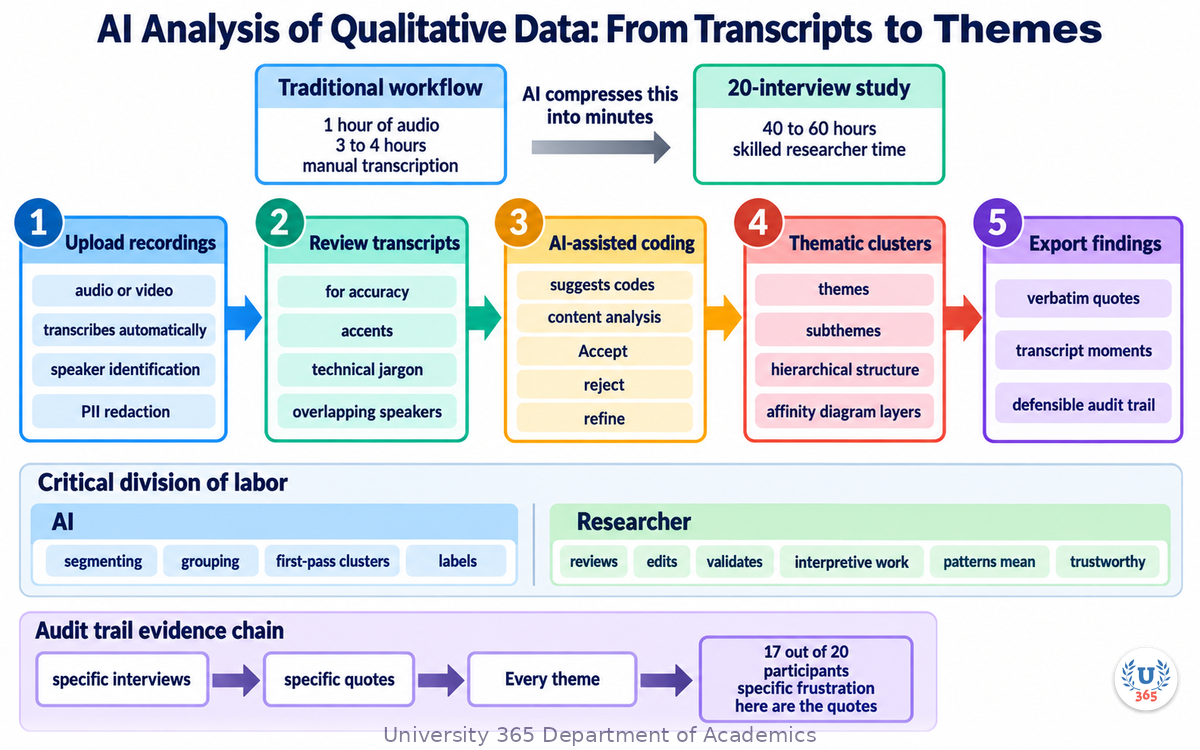
The traditional qualitative analysis workflow is labor-intensive. You transcribe each interview (1 hour of audio equals 3 to 4 hours of manual transcription). You read through transcripts and apply codes: labels that categorize segments of text. You group codes into themes. You write a synthesis report. For a 20-interview study, this process takes 40 to 60 hours of skilled researcher time.
AI compresses this into minutes. Automatic transcription tools like Otter.ai, Trint, and Dovetail produce accurate transcripts in over 40 languages within seconds of upload. AI-assisted coding platforms like Dovetail, Condens, and Evidano analyze transcripts, suggest codes, identify themes, and tag relevant quotes automatically.
The workflow becomes collaborative. The AI proposes the first-pass clusters and labels. The researcher reviews, edits, and validates. This is the critical division of labor: AI handles the repetitive work of segmenting and grouping, while the researcher handles the interpretive work of deciding what the patterns mean and whether they are trustworthy.
A practical AI-assisted analysis workflow looks like this. Step 1: Upload audio or video recordings. The platform transcribes automatically with speaker identification and PII redaction. Step 2: Review transcripts for accuracy. AI transcription is good but not perfect, especially with accents, technical jargon, or overlapping speakers. Step 3: Run AI-assisted coding. The platform suggests codes based on content analysis. Accept, reject, or refine each suggestion. Step 4: Generate thematic clusters. The AI groups related codes into themes and subthemes, creating a hierarchical structure that mirrors traditional affinity diagram layers. Step 5: Export findings with verbatim quotes linked to specific transcript moments.
The result is a defensible audit trail. Every theme traces back to specific quotes from specific interviews. This matters when stakeholders challenge your findings. Instead of saying "we noticed a pattern," you can say "17 out of 20 participants mentioned this specific frustration, and here are the quotes."
Sentiment Analysis of User Feedback: Reading Emotion at Scale
Sentiment analysis uses natural language processing to detect and categorize emotions in text. For UX researchers, it answers a question that traditional coding struggles with: how do users feel about specific features, workflows, or touchpoints?
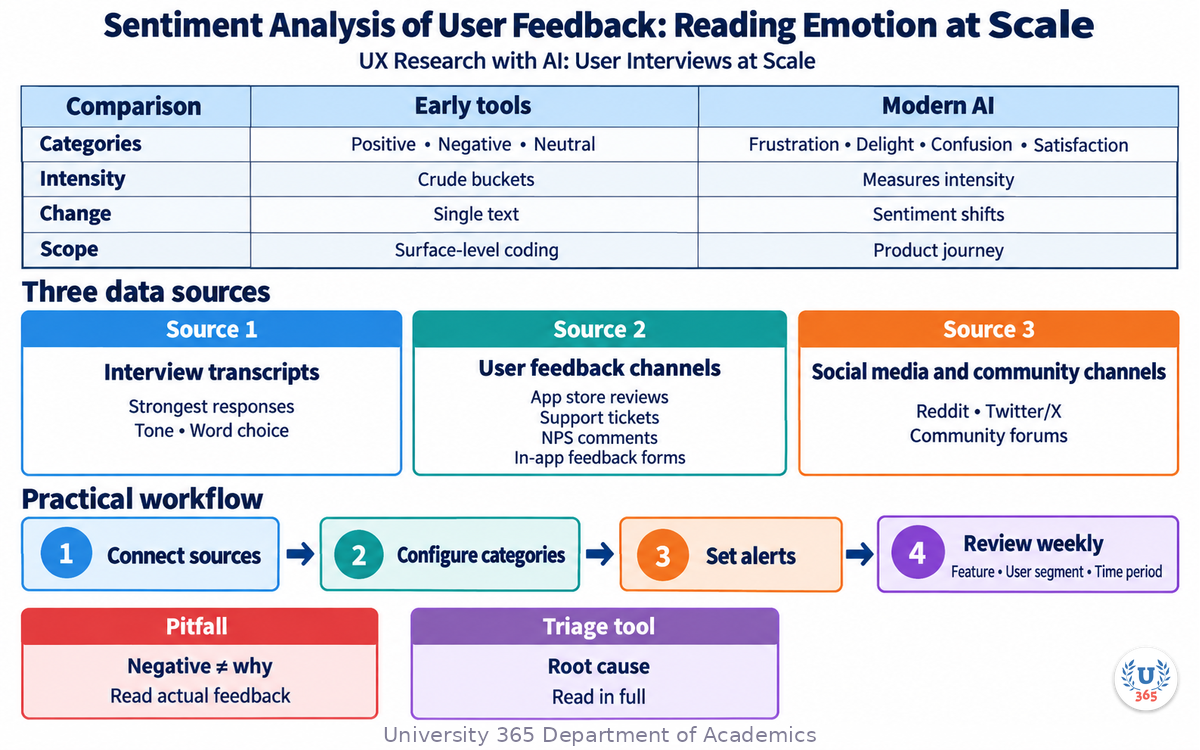
The technology has matured significantly. Early sentiment analysis tools classified text into three crude buckets: positive, negative, and neutral. Modern AI-powered sentiment analysis detects specific emotions (frustration, delight, confusion, satisfaction), measures intensity, and tracks sentiment shifts across a conversation or across a product journey.
For UX research, sentiment analysis works across three data sources. Source 1 is interview transcripts. You run sentiment analysis across all your interview data to see which topics generate the strongest emotional responses. A participant might say "the new dashboard is fine" with neutral words but show frustration in their tone and word choice. Sentiment analysis catches what surface-level coding misses.
Source 2 is user feedback channels. App store reviews, support tickets, NPS comments, and in-app feedback forms generate thousands of text data points per month. No human team can read all of them. AI sentiment analysis processes every single response, categorizes by emotion and topic, and flags emerging issues before they escalate.
Source 3 is social media and community channels. Product mentions on Reddit, Twitter/X, and community forums contain unfiltered user sentiment. AI tools like Kraftful and Pendo aggregate this feedback, identify trends, and prioritize issues based on frequency and emotional intensity.
The practical workflow is straightforward. Connect your feedback sources to an AI sentiment analysis platform. Configure the categories and emotions you want to track. Set up alerts for sudden sentiment shifts. Review weekly dashboards that show sentiment trends by feature, by user segment, and by time period.
The pitfall is over-relying on automated sentiment scores without reading the underlying text. A sentiment score of "negative" does not tell you why the user is unhappy. It tells you that they are. You still need to read the actual feedback to understand the root cause. Use sentiment analysis as a triage tool that points you toward the feedback worth reading in full, not as a replacement for reading it.
Automated Affinity Diagramming: Clustering Insights Without Sticky Notes
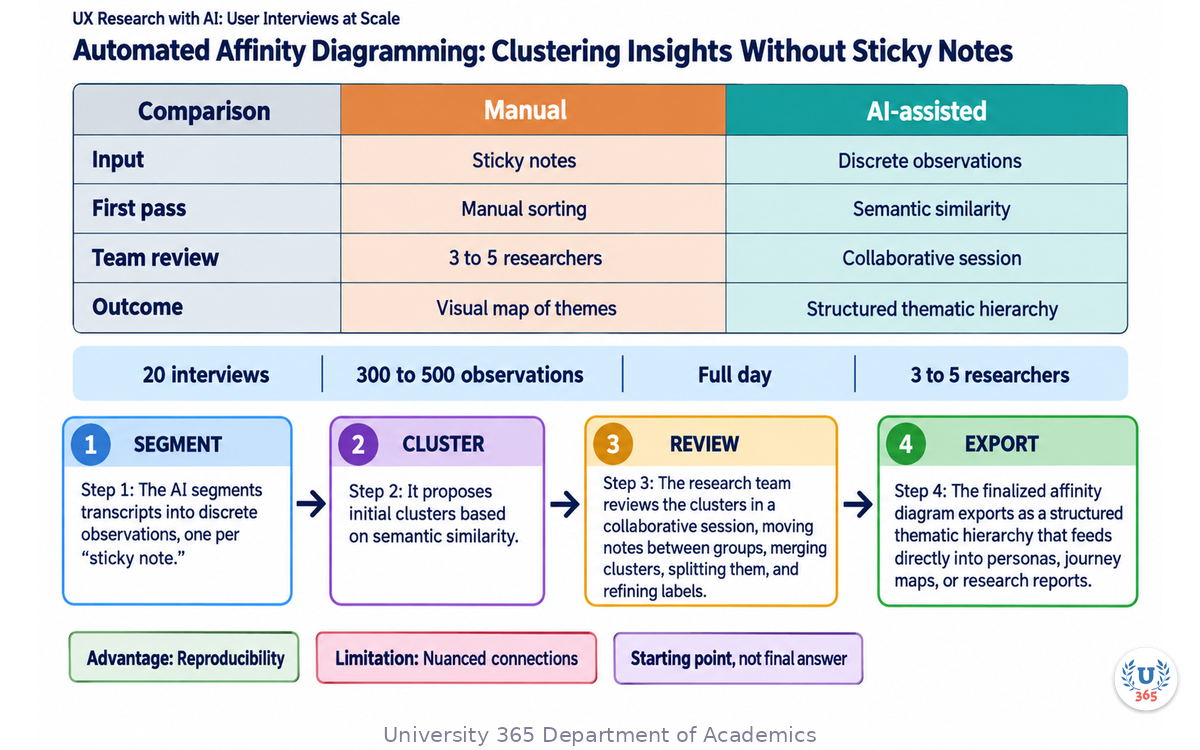
Affinity diagramming is the most physical method in UX research. You write observations on sticky notes, spread them across a wall, and group related notes into clusters. Each cluster gets a label that names the pattern. The result is a visual map of themes that emerged from the data.
It is also the most time-consuming synthesis method. A 20-interview study generates 300 to 500 individual observations. Clustering them manually takes a full day with a team of 3 to 5 researchers. For larger studies, it becomes impractical. Researchers abandon affinity diagramming not because it lacks value, but because it does not scale.
AI changes this. Tools like Dovetail, Condens, Evidano, and the open-source Splat tool use embedding-based semantic similarity to propose initial clusters automatically. The AI reads all your observations, computes semantic relationships between them, and groups related items together. It suggests cluster labels based on the dominant themes in each group.
The workflow preserves the collaborative nature of affinity diagramming while removing the manual sorting burden. Step 1: The AI segments transcripts into discrete observations, one per "sticky note." Step 2: It proposes initial clusters based on semantic similarity. Step 3: The research team reviews the clusters in a collaborative session, moving notes between groups, merging clusters, splitting them, and refining labels. Step 4: The finalized affinity diagram exports as a structured thematic hierarchy that feeds directly into personas, journey maps, or research reports.
The key advantage is not speed alone. It is reproducibility. Manual affinity diagramming produces different results depending on who is in the room and how tired they are. AI-assisted clustering produces consistent first-pass results that the team can then refine. This matters for research credibility. When a stakeholder asks "how did you arrive at these themes," you can show them the cluster structure and the evidence behind each group.
The limitation is that AI clustering can miss nuanced connections that a human researcher with deep domain knowledge would catch. The AI groups based on semantic similarity, which means it clusters notes that use similar words. A skilled researcher might group two notes that use completely different language but describe the same underlying problem. Always treat AI-proposed clusters as a starting point, not a final answer.
AI-Powered Survey Analysis: Turning Open Text into Action
Surveys remain the most common research method in UX. They are fast, cheap, and scalable. But the open-ended questions that produce the richest insights are also the hardest to analyze. A survey with 500 responses and two open-ended questions generates 1,000 text answers. Reading and coding them manually takes days.
AI-powered survey analysis tools solve this. They read every open-ended response, identify themes, detect sentiment, and produce structured summaries in minutes. Tools like BlockSurvey, Alchemer, and Conveo analyze open-text responses using a combination of thematic analysis, sentiment detection, and natural language processing.
The workflow has three stages. Stage 1 is survey design. AI tools can generate survey questions based on your research goals, suggest question types, and flag leading or biased wording before you launch. This prevents the common problem of collecting thousands of responses to poorly designed questions.
Stage 2 is data collection. Traditional survey platforms distribute the survey and collect responses. Some AI-native platforms go further by turning the survey into a conversation. Instead of a rigid form, the AI asks follow-up questions based on each response, turning a 3-minute survey into a 10-minute adaptive interview that captures the "why" behind the "what."
Stage 3 is analysis. The AI reads all open-ended responses, identifies recurring themes, counts frequency, and cross-references with demographic or behavioral data. You can ask questions like "what are the top 5 pain points mentioned by power users" and get an answer backed by specific quotes in seconds.
The pitfall is treating AI survey analysis as a black box. When the AI says "42% of responses mention onboarding difficulties," you need to verify. Read a sample of the underlying responses. Check that the AI's theme labels accurately describe the content. AI survey analysis is fast but not infallible. It can miscategorize responses, miss sarcasm, or cluster unrelated answers together. Use it to accelerate analysis, not to replace human judgment.
Comparing AI Research Tools: Which One Fits Your Workflow
The AI UX research tool landscape in 2026 is broad. Knowing which tool to use for which research activity is part of being a competent UX researcher.
Tool Category | Example Tools | Best For | Scale | Limitation |
AI-Moderated Interviews | User Intuition, Outset, Conveo, Whyser | Deep qualitative interviews at scale | 200-1000+ per week | Requires real participants, cost per interview |
Synthetic Personas | Delve AI, Synthetic Users | Early exploration, hypothesis testing | Hundreds of simulated users | Not real data, requires validation |
Qualitative Analysis | Dovetail, Condens, Evidano | Transcription, coding, theme extraction | Unlimited transcripts | Researcher must validate AI suggestions |
Sentiment Analysis | Kraftful, Pendo, Hotjar | Emotion detection in feedback | Thousands of data points | Misses context, needs human review |
Survey Analysis | BlockSurvey, Alchemer, Conveo | Open-ended response analysis | Thousands of responses | Can miscategorize, needs sampling |
Affinity Diagramming | Dovetail, Condens, Splat | Clustering observations into themes | 300-500+ notes | AI misses domain-specific connections |
The practical pattern for a UX team in 2026 is to combine tools across the research lifecycle. Use synthetic personas for early exploration and question refinement. Run AI-moderated interviews for large-scale discovery. Use AI-assisted analysis for transcription and coding. Apply sentiment analysis for continuous feedback monitoring. Use automated affinity diagramming for synthesis. Each tool fills a specific gap. No single platform does everything well.
For teams just starting, the recommended stack is: one AI-moderated interview tool (for discovery at scale), one qualitative analysis platform (for coding and synthesis), and one sentiment analysis tool (for continuous feedback monitoring). This covers 80% of research needs. Add survey analysis and synthetic personas as your team matures.
Common Pitfalls and How to Avoid Them
Pitfall 1: Treating AI findings as ground truth. AI-generated themes, sentiment scores, and summaries are hypotheses, not conclusions. Always validate with the underlying data. Read the raw quotes. Check that the AI's interpretation matches what the participant actually said.
Pitfall 2: Not disclosing AI moderation to participants. Ethical research requires transparency. Participants have the right to know they are talking to an AI, not a human. Most platforms make this disclosure by default. Do not disable it. Transparency builds trust and improves data quality.
Pitfall 3: Using synthetic personas for validation. Synthetic personas are for exploration, not validation. They generate plausible responses based on patterns in training data. They do not have real experiences. Never make product decisions based solely on synthetic persona feedback. Always validate with real users.
Pitfall 4: Ignoring bias in AI moderation. AI moderators can exhibit bias in their questioning patterns. They may probe more deeply with participants who use certain language styles, or steer conversations toward themes that align with their training data. Review interview transcripts regularly to check for moderator bias. Adjust your interview guide to counteract it.
Pitfall 5: Over-automating the synthesis process. AI can propose clusters, themes, and summaries in minutes. But the interpretive work of deciding what the findings mean for your product is a human responsibility. If you accept AI-generated insights without question, you are not doing research. You are doing data processing.
Pitfall 6: Not maintaining a research repository. AI tools generate a lot of output: transcripts, themes, reports, sentiment dashboards. Without a central repository, this knowledge scatters across platforms and team members. Use a tool like Dovetail or Notion to store all research findings in a searchable, linked format. Future research should build on past research, not start from scratch.
Pitfall 7: Assuming AI research is cheaper in all cases. AI-moderated interviews at scale are cost-effective. But for a small study of 5 to 8 participants, traditional interviews may be more efficient. AI tools have subscription costs, learning curves, and setup overhead. Match the tool to the research scope.
Study Design Before Tooling: Writing a Research Plan AI Can Execute
A model can run two hundred interviews. It cannot decide what the study is for. That decision is the work that makes the automation useful rather than merely fast.
Write the decision the study will inform
State the decision in one sentence and name the person who will make it: "We will decide whether to keep the two-step signup, and the product lead will decide it." A study with no named decision produces findings that circulate and change nothing.
Turn the decision into three or four research questions
Each question must be answerable by something a participant can say or do. "Why do users abandon onboarding?" is not answerable. "At which step do users stop, and what do they say at that moment?" is. Write the questions before you write a single interview prompt.
Choose the method that answers the question
Interviews answer why and how. Surveys answer how many and how strongly. Behavioural instrumentation answers what people did. A synthetic persona answers what a designer overlooked. Naming the method before the tool prevents the common failure of running a survey because a survey tool was already open.
State the sample and the reason for it
Say how many participants, from which segment, recruited how, and why that number. Five participants for a flow defect and thirty for a prevalence estimate are both defensible; the number with no reason attached is not.
Pre-register the analysis plan
Write what will count as a theme, how many mentions make it a finding, and how you will record the counterexamples. Deciding this after the data arrives is how a study finds whatever the researcher already believed.
Put the plan where the team can argue with it
A one-page plan reviewed by the product lead, the researcher, and one engineer takes twenty minutes and prevents a month of work on the wrong question.
Step 8: Synthetic Personas, Honestly
A synthetic persona is a model's reconstruction of a plausible user, generated from a description or from prior research. It is useful in a narrow window and dangerous outside it.
What a synthetic persona is good for
Exploring how a request could be misread. Generating candidate questions for a real interview. Stress-testing a flow against a scenario you cannot recruit for, such as a user with a very old device or an unusual regulatory constraint. Surfacing assumptions the team has not stated out loud.
What it cannot do
It cannot tell you what your users do. It cannot estimate a rate, a preference, or a prevalence. A model asked to rank five features will produce a ranking that reflects the shape of its training data, not the priorities of your market.
Build one from real evidence, not from a mood board
Where you use a synthetic persona, build it from your own research: the segment definition, the tasks you have observed, the constraints you have recorded, and the language participants actually used. A persona generated from a paragraph of imagination produces imagination back.
Use it to generate, not to decide
Run a synthetic session to produce a list of twenty questions you could ask a real participant. Take the questions to real participants. The model accelerates the preparation and never the verdict.
Label it everywhere
Mark synthetic output in the working file, in the report, and in any deck. A synthetic quote that appears in a stakeholder deck without a label becomes a user quote by the third meeting.
Step 9: Reading Sentiment Without Overclaiming
Sentiment scoring is the most over-interpreted output in the whole stack. It is a filter and a triage signal, and it is not a measurement of feeling.
Treat the score as a sort order, not a verdict
Use sentiment to order a thousand comments so the most negative reach a human first. Do not report an average sentiment or a percentage positive, because the score is a model output with unknown calibration on your domain.
Check the model on your own data first
Score fifty comments a human has already read and compare. Where the model disagrees with a human on a third of them, the score is a sorting convenience and nothing more. Record the agreement rate; it is the only defensible number to publish about the model.
Watch for the failure classes
Negation, sarcasm, mixed sentences, and domain language are where scoring fails most. "Great, another outage" scores positive on many models. A sentence naming a product defect in neutral language scores neutral. Read the top and bottom of every sort before you draw a conclusion.
Never average across languages
Scores are not comparable between languages, because the training data and the calibration differ. Report by language or do not report an aggregate at all.
Keep the human judgement in the record
Where a human disagrees with the model, keep both values. The disagreement is the interesting data, and it is what tells you whether the score can be trusted for the next study.
Step 10: Quality Control When a Model Analyses at Scale
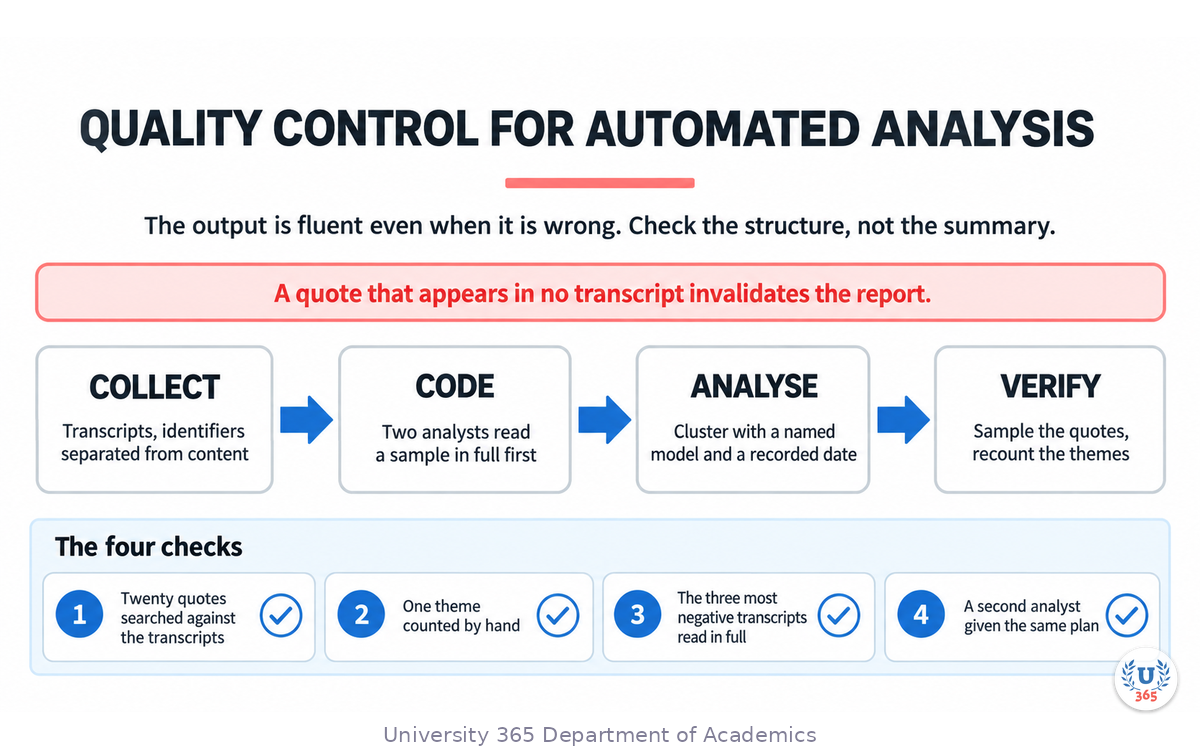
Automated analysis fails quietly. The output is fluent and confident even when it is wrong, so the checks must be structural rather than a reading of the summary.
Verify every quotation against the transcript
Take a random sample of twenty quotes from the analysis and search the transcripts for each one. A quotation that appears in no transcript means the model invented it, and a report containing one invented quote has no evidential value. This single check catches the most serious failure class.
Check the counts against the raw data
If the analysis says a theme appeared in fourteen interviews, count the interviews that contain it. Model counts drift, particularly where a theme is split between closely related codes.
Look for the theme that is missing
Read the three most negative transcripts in full and check whether the report contains their complaint. A summary that omits the strongest signal is usually a summary that smoothed over it.
Run the two-analyst test
Give the same transcripts to a second analyst, human or model, with the same plan, and compare the theme lists. The overlap tells you how much of the result is the data and how much is the method.
Keep the counterexamples
Record the participants who did not fit the theme. A finding with three counterexamples is stronger than one with none, because it has been tested rather than merely counted.
Version the analysis
Record the model, the version, the prompt, and the date with every analysis. A theme list produced by an unnamed model on an unnamed date cannot be reproduced, and a study that cannot be reproduced cannot be trusted twice.
Case Study: Two Hundred Interviews in a Week
A team needed to know why a self-serve product lost users in the first fortnight. They had run sixteen interviews by hand over three months and had learned a great deal about sixteen people.
They wrote the decision first: whether to invest the next quarter in onboarding or in the first-week experience, decided by the head of product. Two research questions followed. Where do users stop in the first ten days, and what do they say at the moment they stop?
Recruitment targeted the segment that had signed up and then gone quiet, one hundred and forty of them, in three languages. The consent form named the transcription tool and the analysis system, stated a ninety-day retention period, and offered a summary to every participant.
Interviews ran asynchronously over five days, each participant answering the same eight questions in their own time, at an average of eleven minutes each. Two hundred and six responses came back, one hundred and ninety-two of them complete. Two research assistants read the first thirty in full before any automation ran, which produced the codebook and the agreement baseline.
Analysis ran in two passes. The first was automated clustering to find candidate themes; the second was two analysts reading a sample of forty transcripts against the candidate list. The automated pass produced eleven themes. The manual pass confirmed seven, merged three into one, and added one theme the model had missed entirely: a pricing page that loaded in a different currency than the one the user had been quoted.
Quality control found two defects. The quotation check found three quotes that did not exist in the transcripts, all three phrased more neatly than anything a participant had said, so every quote in the report was replaced with a verified one. The count check found that a theme reported as appearing in nineteen interviews actually appeared in twenty-six, because the model had split it between two codes.
The decision was made in the fifth day: invest in the first week, not in onboarding. The currency defect alone was fixed the same week and removed a support ticket category.
Cost: five days, a small transcription and analysis budget, and roughly two days of analyst time. The same study by hand would have taken two quarters.
Consent and Data Handling When You Run Sessions at Volume
Running more conversations means handling more personal data, and the obligations scale with the volume rather than with the tool.
Consent must name the tools, not just the study
A consent form that says "we will record this session" is incomplete when a model summarises the transcript. Say which systems process the data, where it is stored, how long it is kept, and who can see it. Participants agree to the study they were told about, not to the one that was actually run.
Separate identity from content before analysis
Give each participant an identifier, keep the mapping in a controlled location, and strip names from anything that reaches a model. This is a one-hour engineering task that removes an entire class of risk.
Check what the vendor does with your data
Read the retention and training terms of every tool in the path. Some vendors train on submitted content by default and offer an opt-out; some do not retain at all. Settle this before the first session, because it is a procurement decision rather than a design one.
Set a deletion date at the start
Decide how long the transcripts, recordings, and derived summaries live, and put the deletion in the calendar. Data that was meant to be deleted after the study is the most common finding of a later audit.
Never mix synthetic responses into a real count
A synthetic persona is a hypothesis, not a participant. Label synthetic output in every report where it appears, and keep it out of any figure that describes real people.
Feynman Summary: Explain It Like You Are 12
Imagine you want to know what people think about a new video game. You could talk to 5 people yourself, write down what they say, and spend a week organizing their answers. Or you could send a robot to talk to 200 people at the same time, while they sleep, in any language, and have a summary ready by breakfast.
That robot is AI-powered UX research. It does three big jobs.
First, it talks to people. Instead of you scheduling meetings and asking questions one at a time, the AI asks questions to hundreds of people at once. It listens to their answers and asks follow-up questions, just like a real researcher would. If someone says "the game is too hard," the AI asks "what specifically was hard?" without you being there.
Second, it reads what people wrote. If you have 500 survey responses with long answers, the AI reads all of them in seconds and tells you the main things people said. It can tell if people are happy, frustrated, or confused by looking at the words they used. This would take you days to do by hand.
Third, it organizes everything. Think of it like sorting a giant pile of sticky notes into neat groups. The AI reads all the notes, puts similar ones together, and writes a label for each group. You still check its work, but it does the boring sorting part for you.
The catch is that the robot is smart but not perfect. Sometimes it misunderstands what people mean. Sometimes it groups things wrong. Your job is to use the robot to do the heavy lifting, then check its work and make the final decisions. The robot does the work. You do the thinking.
Mindmap: The Complete Picture
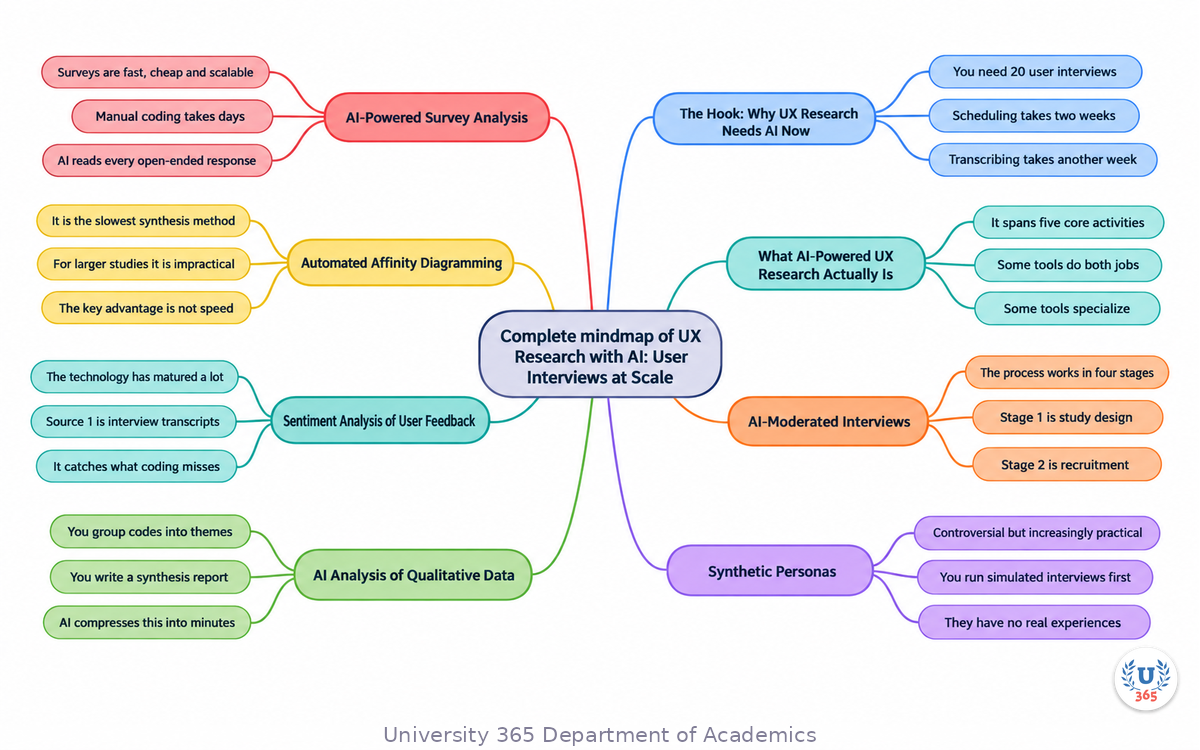
This mindmap shows the full AI-powered UX research ecosystem. The center node is AI UX Research. Six branches extend outward: AI-moderated interviews (study design, recruitment, adaptive moderation, automated reporting), synthetic personas (persona generation, OCEAN model, discovery co-pilot, hypothesis testing), qualitative analysis (auto-transcription, AI-assisted coding, thematic clustering, audit trail), sentiment analysis (interview transcripts, feedback channels, social media, emotion detection), automated affinity diagramming (observation segmentation, semantic clustering, collaborative refinement, thematic export), and survey analysis (AI survey design, adaptive follow-ups, theme extraction, quote-backed summaries).
UNOP Sound (University 365 Neuroscience Oriented Pedagogy)
Take five minutes to consolidate your memory. Play the isochronous tone track (10Hz alpha frequency) with your eyes closed. Alpha-frequency tones after a learning session support consolidation, helping move what you just learned from short-term to long-term memory.
[Audio player: UNOP Post-Lecture Isochrone (10Hz, 5 minutes)]
Practical Exercise: Run Your First AI-Moderated Interview Study
This exercise takes 60 minutes and requires access to an AI-moderated interview platform (free trials are available for most tools).
Objective: Conduct a mini user research study about mobile app onboarding experiences using AI-moderated interviews, and compare the results to what a traditional study would produce.
Step 1: Choose a platform. Sign up for a free trial of one of the following: User Intuition, Outset, Conveo, or Whyser. Any of these will let you run a small study without payment.
Step 2: Define your research goal. Write one clear question: "What frustrates users most about mobile app onboarding?" Keep it specific. Avoid broad questions like "what do users think about apps?"
Step 3: Configure your study. Enter your research goal into the platform. Review the AI-generated interview guide. Check that the questions are open-ended and non-leading. Add 2 to 3 custom follow-up probes that you want the AI to ask.
Step 4: Set your target audience. Define the participant criteria: "smartphone users who have downloaded at least 3 apps in the past month." Most platforms offer built-in panels for recruitment.
Step 5: Launch a small study. Set the target to 10 to 20 participants. This is enough to surface themes without spending significant budget. The study should complete within 24 hours.
Step 6: Review the results. Read the AI-generated summary report. Then read 3 to 5 full interview transcripts. Compare the AI summary to what you read in the transcripts. Did the AI capture the key themes accurately? Did it miss anything?
Step 7: Write a one-page findings document. List the top 3 themes with supporting quotes. Note any themes the AI missed that you found in the transcripts. This exercise teaches you both the power and the limitations of AI-moderated research.
Deliverable: A one-page research summary with 3 themes, each backed by at least 2 verbatim quotes from the AI-moderated interviews, plus a 3-sentence reflection on what the AI captured well and what it missed.
Glossary
Term | Definition |
AI-Moderated Interview | A qualitative research method where an AI agent conducts user interviews autonomously, adapting questions based on participant responses. |
Synthetic Persona | An AI-generated representation of a user segment that can participate in simulated research. Used for exploration, not validation. |
OCEAN Model | The five-factor personality model (Openness, Conscientiousness, Extraversion, Agreeableness, Neuroticism) used to generate synthetic persona personalities. |
Sentiment Analysis | Natural language processing technique that detects and categorizes emotions in text data. |
Affinity Diagramming | A qualitative synthesis method that groups individual observations into thematic clusters. Also called KJ analysis. |
Thematic Coding | The process of labeling segments of qualitative data with descriptive codes that categorize content. |
Laddering | An interview technique that probes deeper with each question to uncover underlying motivations. Often uses 5-7 levels of probing. |
PII Redaction | Automatic removal of personally identifiable information from transcripts to protect participant privacy. |
NLP | Natural Language Processing. The field of AI that enables computers to understand, interpret, and generate human language. |
Research Repository | A centralized, searchable store of research findings, transcripts, and insights that compounds knowledge across studies. |
Embedding | A numerical representation of text that captures semantic meaning, enabling AI to measure similarity between observations. |
Automated Transcription | AI-powered conversion of audio or video recordings into text, with speaker identification and timestamping. |
Quiz: TEST YOUR UNDERSTANDING
What is the primary advantage of AI-moderated interviews over traditional user interviews?
A) They produce higher-quality insights than human moderators
B) They can conduct hundreds of interviews simultaneously in 24 hours
C) They eliminate the need for human researchers entirely
D) They are always cheaper than any other research method
How should synthetic personas be used in UX research?
A) As a replacement for real user research to save costs
B) As a validation tool to confirm findings from real interviews
C) As a discovery co-pilot for early exploration and hypothesis generation
D) As the sole basis for making product decisions
What is the critical division of labor in AI-assisted qualitative analysis?
A) AI handles interpretation, humans handle data entry
B) AI handles repetitive segmentation and grouping, humans handle interpretation and validation
C) AI and humans do identical tasks in parallel for cross-checking
D) Humans transcribe, AI does everything else
Which data source is NOT typically analyzed with sentiment analysis in UX research?
A) App store reviews
B) Interview transcripts
C) Support tickets
D) Server performance logs
What is the main limitation of AI-powered affinity diagramming?
A) It cannot handle more than 50 observations
B) It requires specialized hardware to run
C) It clusters based on semantic similarity and may miss domain-specific connections
D) It produces non-reproducible results across runs
Answers: 1-B, 2-C, 3-B, 4-D, 5-C
Related Resources
U365 INSIDE Publications
AI Image Generation: Stable Diffusion for Designers - Understand AI tools for design from a production perspective
External Resources
Dovetail: AI Tools for UX Research - Comprehensive list of 25 AI UX research tools
Nielsen Norman Group: Artificial Intelligence Research - Research-backed guidance on AI in UX
Interaction Design Foundation: Persona Creation - Foundational persona methodology
QuAD: Deep-Learning Assisted Qualitative Data Analysis - Academic research on AI-assisted affinity diagramming
User Interviews: 2025 State of User Research Report - Industry benchmark data on research practices
Related U365 Lectures (Coming Soon)
AI Prototyping Tools: From Wireframe to Interactive Prototype (UX/UI Series, Lecture 3)
Design Systems Powered by AI (UX/UI Series, Lecture 5)
AI in Web Design: From Wireframe to Deployed Site (UX/UI Series, Lecture 9)
U.Copilot for This Lecture
Copy and paste the following prompt into the U.Copilot AI agent on university-365.com to continue exploring this topic:
I just completed the UID lecture "UX Research with AI: User Interviews at Scale." I want to design an AI-powered research workflow for my current project. Can you help me: 1. Recommend which AI research tools fit my project scope (5 users vs 500 users, discovery vs validation) 2. Draft an interview guide for an AI-moderated study about my product's user onboarding experience 3. Identify which research activities I should keep human-led and which I can delegate to AI 4. Create a checklist for validating AI-generated research findings against raw data
Next Steps
Sign up for a free trial of an AI-moderated interview platform (User Intuition, Outset, Conveo, or Whyser) and run a 10-participant study on any topic you choose.
Take 5 existing user interview transcripts and upload them to an AI qualitative analysis tool (Dovetail, Condens). Compare AI-generated themes to your manual coding.
Connect one feedback source (app reviews, support tickets, or NPS comments) to a sentiment analysis tool. Review the dashboard for one week.
Generate 3 synthetic personas for your current product's target audience. Run a simulated interview study. Compare findings to what you know from real user research.
Enroll in the UID UX/UI Design program at university-365.com/uid to access hands-on labs, instructor feedback, and a community of designers working with AI research tools.
Read the next lecture in this series: "AI Prototyping Tools: From Wireframe to Interactive Prototype" to learn how AI accelerates the design iteration cycle.
IMPORTANT NOTICE
Copyright University 365, Inc. All rights reserved.
This lecture is part of the UID (University 365 Institute of Design) UX/UI Design series. It is published as a free educational resource under the 5M2S (5 Minutes to Success) and UNOP (University 365 Neuroscience-Oriented Pedagogy) formats.
For enrollment in UID programs, visit university-365.com/tuition. For permissions or inquiries, contact uda@university-365.com.
The educational content in this lecture is current as of September 2026. AI research tools evolve rapidly. Verify current platform capabilities, pricing, and data privacy policies before using any tool in commercial work. Always disclose AI involvement to research participants and follow your organization's ethical research guidelines.
Published by the Department of Academics, University 365.
Lecture delivered by the University 365 Institute of Design (UID).
Joe Borazian, Dean of Design, UID
Signed for the academic year 2026.





Comments