
AI Code Generation: Copilot, Cursor, and Beyond


UIT University 365 Institute of Technology
Series DevTools Series | Level Basic (Free)
Duration 15 to 20 minutes | Access Free
IT Engineering, AI and Applied AI, Data Science, Software Development, Digital Transformation

UNOP Sound (University 365 Neuroscience Oriented Pedagogy)
Take five minutes to prepare your brain. Play the isochronous tone track (40Hz gamma frequency) with your eyes closed. Gamma-frequency tones before a learning session raise attention and make the material easier to absorb.
[Audio player: UNOP Pre-Lecture Isochrone (40Hz, 5 minutes)]
In this Lecture

The Hook: Two Findings That Do Not Agree
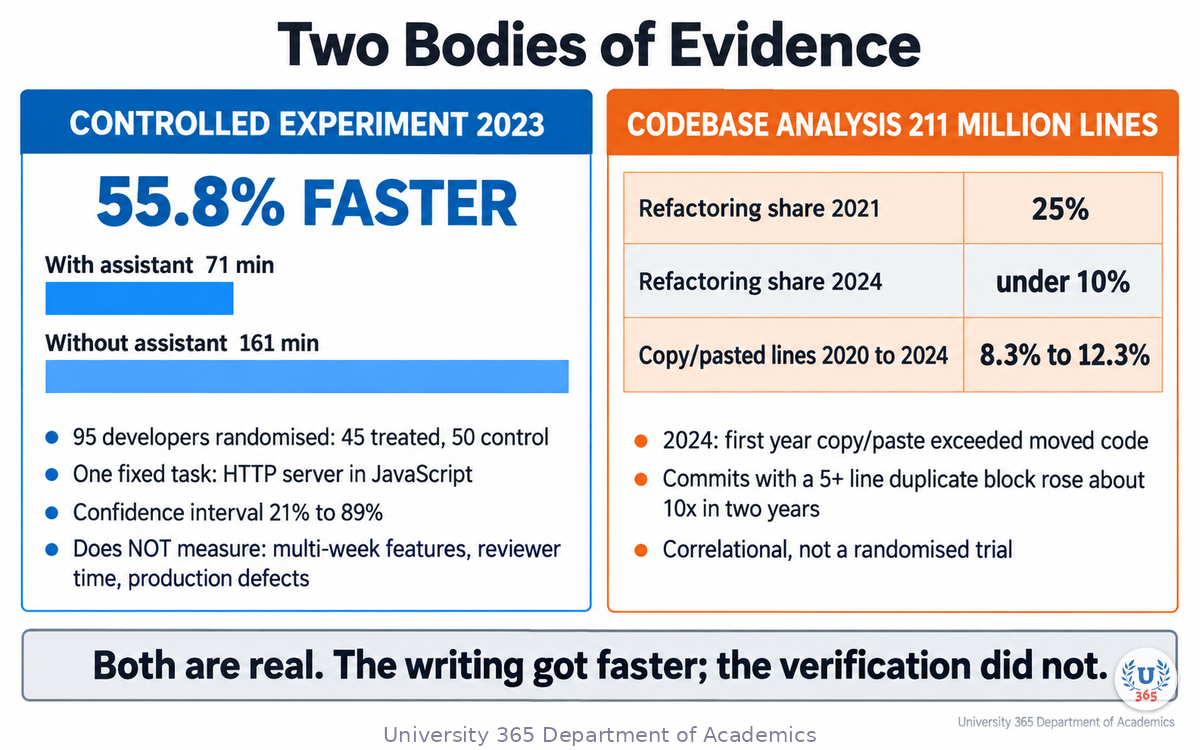
In 2023, a controlled experiment put 95 developers on the same task: implement an HTTP server in JavaScript as quickly as possible. Half of them had an AI pair programmer in their editor. Half did not, and were free to use the internet and Stack Overflow.
The group with the AI assistant finished 55.8% faster. Average completion time was 71 minutes against 161 minutes.
Two years later, an analysis of 211 million changed lines of code across the repositories of Google, Microsoft, Meta and large enterprises reported the opposite drift. The share of changed lines that were refactoring fell from 25% in 2021 to under 10% in 2024. The share of copy/pasted lines rose from 8.3% in 2020 to 12.3% in 2024. In 2024, for the first year on record, within-commit copy/paste exceeded moved code.
Both measurements are real. They are not in conflict. The first measures one well-specified task with a known solution shape. The second measures what happens to a codebase when thousands of developers use these tools every day without changing how they verify the output.
This lecture is about the gap between those two numbers, and about the parts of the work that decide which side of it you land on.
Step 1: Three Generations of Code Assistance
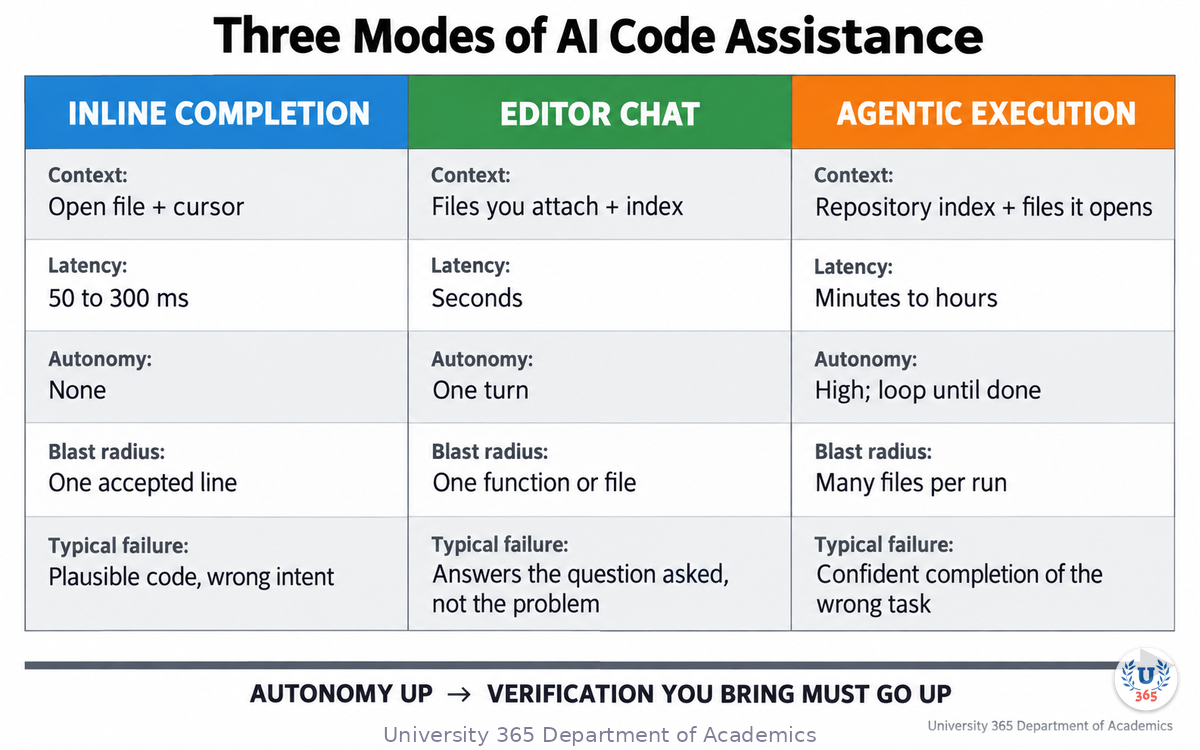
The tools grouped under "AI coding assistant" do not do the same job. There are three distinct modes, and they differ on five dimensions: how much of your project they can see, how long you wait, how much they do without you, what they cost, and how they fail.
Mode 1: Inline completion
The tool watches your cursor and the current file and proposes the next few lines. You press Tab to accept. This is the mode GitHub Copilot launched with in 2021, and it is still the highest-frequency use of these tools.
Context: the open file, the cursor position, sometimes a few neighbouring files.
Latency: tens to a few hundred milliseconds. Anything slower breaks typing.
Autonomy: none. Every suggestion is a proposal you accept or reject.
Failure: plausible code that compiles but does not match your intent or your conventions.
Mode 2: Chat tied to an editor
You describe the change in words. The assistant writes a whole function, a test, a migration or an explanation, and can be pointed at specific files.
Context: whatever you attach, plus an index of the project in some products.
Latency: seconds.
Autonomy: none between turns, but it can produce multi-file output in one turn.
Failure: it answers the question you asked, not the problem you have. A vague prompt produces code that is locally reasonable and globally wrong.
Mode 3: Agentic execution
The assistant gets a goal, then reads files, writes edits, runs commands and reads the output. It repeats that loop until it believes the goal is met. This is the mode behind the current generation of command-line and IDE agents.
Context: a repository index, plus whatever the agent chooses to open during its loop.
Latency: minutes to hours.
Autonomy: high. It can change many files before you look.
Failure: confident completion of the wrong task. Without a test or a check it can observe, the loop has no way to discover it was wrong.
The engineering consequence is simple. Mode 1 has a bounded blast radius: the worst case is a bad line you accept. Mode 3 has an unbounded blast radius: the worst case is a refactor across twenty files that passes no check and reads plausibly. The controls you need are different for each.
Step 2: What Happens Between Your Keystroke and the Suggestion
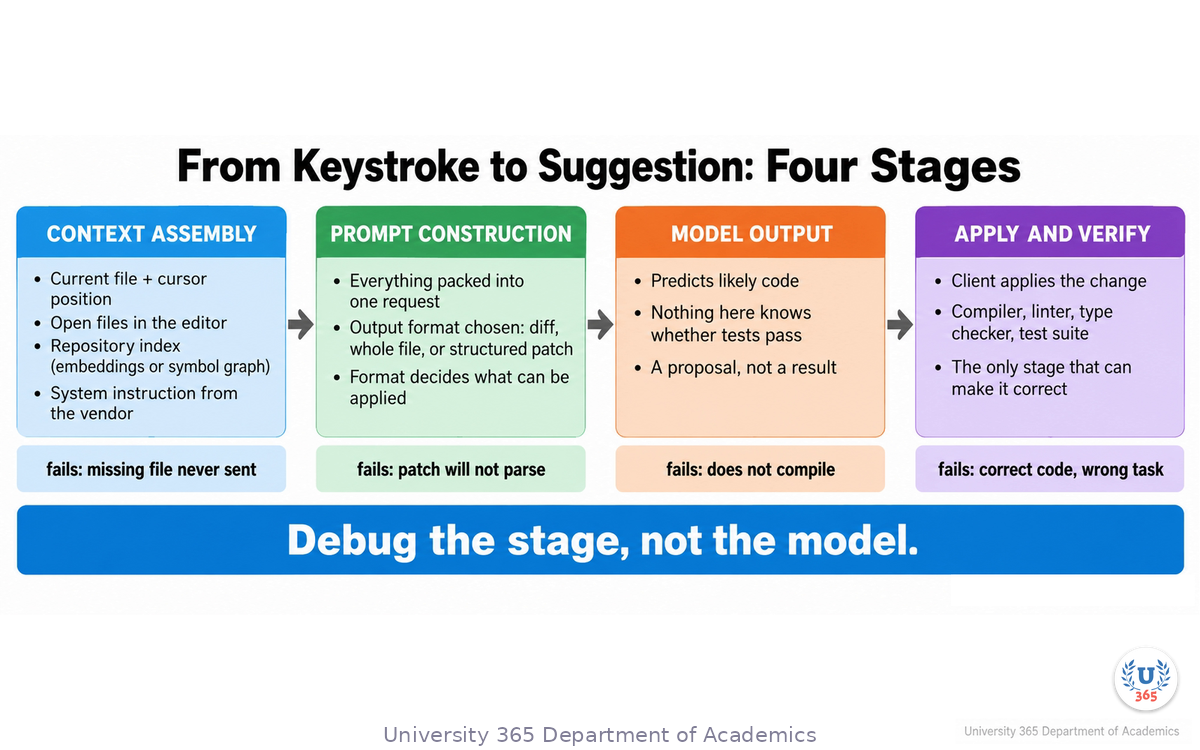
A common mental model is that the assistant "reads your project". It does not. What happens in the interval between your action and the suggestion is a pipeline, and every stage can lose information.
Stage 1: Context assembly
The client, not the model, decides what to send. Typical inputs:
the file you are editing and your cursor position
files that are currently open in your editor
an index of the repository, built from embeddings, keyword search, or a symbol graph
the text of the issue or ticket, if the tool is connected to one
recent terminal output, for agentic modes
a system instruction written by the tool vendor
If the client does not send a file, the model cannot know it exists. This is why the same model inside two different products behaves differently on the same repository.
Stage 2: Prompt construction
Everything above is packed into a single request with instructions about the output format. The format matters more than it looks:
a unified diff is compact and reviewable but fails on long or heavily restructured blocks
a whole-file rewrite is easy for the model and expensive to review
a structured edit format lets the client apply changes precisely and reject the ones that do not parse
Stage 3: The model
The model produces a continuation. It was trained to predict likely code, which means it optimises for text that looks like the code it has seen. Nothing in this stage knows whether your tests pass.
Stage 4: Application and verification
The client applies the change and then, in the good cases, runs a compiler, a linter, a type checker or a test suite. This is the only stage that can turn a plausible edit into a correct one. Everything before it is a proposal.
When you debug a bad suggestion, ask which stage failed. If the model invented a function that already exists in your repository, stage 1 is the problem. If it produced a valid patch in the wrong format, stage 2 is the problem. If it wrote code that does not compile, stage 3. If it wrote correct code for the wrong task, stage 4, because the check you ran did not test the behaviour you wanted.
Step 3: The Measured Productivity Effect
The 2023 experiment is worth reading in full because the details tell you what was and was not measured.
What was measured
95 professional developers were randomised: 45 in the treated group, 50 in the control group.
The task was fixed: implement an HTTP server in JavaScript as quickly as possible.
The control group had no AI assistant and was otherwise unconstrained. They could search the internet and copy from Stack Overflow.
35 developers across both groups completed the task and the survey.
The treated group completed the task 55.8% faster, with a 95% confidence interval from 21% to 89%.
Average completion time: 71.17 minutes with the assistant, 160.89 minutes without.
The study also reports a heterogeneous effect. Developers with less programming experience, older developers, and developers who already coded more hours per day gained the most. That last one is worth pausing on: the tool amplified people who were already practising, rather than replacing practice.
What was not measured
The task was self-contained, single-language, browser-adjacent, and had a well-known solution shape. Many developers have written an HTTP server in JavaScript before, which means the model has seen the pattern thousands of times.
The study did not measure:
multi-week feature work in a large codebase
maintenance and debugging of code someone else's model wrote
the reviewer's time
the cost of defects that reach production
Read the 55.8% as what it is: a strong result on one task class, in the environment where these tools are strongest. Do not read it as an organisation-wide productivity figure.
Step 4: The Measured Quality Effect
The second body of evidence looks at what happens to the code itself.
The 2025 analysis
A code-analytics study examined 211 million changed lines authored between January 2020 and December 2024, drawn from repositories owned by Google, Microsoft, Meta and enterprise corporations. It reports:
lines classified as refactoring (changed lines that were moved rather than added) fell from 25% of changed lines in 2021 to under 10% in 2024
lines classified as copy/pasted (cloned) rose from 8.3% in 2020 to 12.3% in 2024
2024 was the first year on record in which within-commit copy/paste exceeded moved code
commits containing a duplicated block of five lines or more rose roughly tenfold over two years
The 2026 follow-up
A later report from the same publisher tracked seven signals indexed to 2023 and reported, as AI authorship scaled: within-commit copy/paste up 41%, code block duplication up 81%, error-masking constructs up 47%, and two-week code churn up 15%.
How to read these numbers
They are measurements of change, not controlled experiments. The studies compare time periods and codebases, not randomly assigned developers, so they establish correlation with the wider adoption of these tools. Other explanations exist: faster release cycles, more contributors, changes in hiring.
The mechanism, however, is easy to state and easy to check in your own repository. A model that cannot see your codebase will produce a helper function that already exists somewhere else. It is easier to paste that function next to the call site than to find and reuse the original. Do this a few thousand times and the refactoring share falls while duplication rises.
You can test the mechanism on your own project in an afternoon: count duplicates, count how often a new utility is added next to an existing one, and count how many lines added last month were edited again this month.
Step 5: Context Is the Binding Constraint
Almost every disappointing result from these tools traces back to a context problem rather than a model problem.
What the assistant usually cannot see
the whole repository, unless an index is configured and current
the team's conventions, which usually live in people's heads and in review comments
the incident last quarter that produced the defensive check in a function you are about to simplify
the reason a module is shaped the way it is
The failure signatures
You can recognise a context failure by its shape:
it writes a second version of a utility that already exists
it ignores your error-handling pattern and throws where your codebase returns a result type
it uses a deprecated API because the deprecation is recent
it repeats a workaround that your team removed on purpose
it treats a deliberately unusual design as a mistake and "fixes" it
What reduces context failures
a short project brief in the repository that states stack, conventions and constraints
keeping the index current, and knowing what the index excludes
naming the files that matter in the request, instead of describing them
reviewing generated code as you would review a contractor's first pull request: for fit, and for correctness
Step 6: Tests Are the Contract
An agentic assistant runs a loop: propose, edit, run, observe, repair. Remove the observation and the loop becomes a sequence of guesses.
The test suite is what an agent observes. It is also the only artefact in the loop that encodes what you actually want.
The working setup
one command that runs the relevant tests quickly, without a full build
a failing test before the change, when the change is a bug fix
small diffs, so a failure points at a small surface
reviewable commits, one logical change each
A concrete sequence
Say you have a function that computes a refund total and it rounds incorrectly on a currency whose minor unit is not 100. The sequence that works:
Write a test that asserts the correct rounding for that currency. Run it. Watch it fail for the expected reason.
Ask the assistant to make the test pass, with the test file and the function file both named in the request.
Run the test. If it passes, run the existing suite to check nothing else moved.
Read the diff. Confirm the change is a rounding fix and not a rewrite of the currency table.
Commit the test and the fix together.
The failing test did three jobs at once: it told the assistant what "correct" means, it gave the agentic loop something to observe, and it left the repository with one more fact written down.
Step 7: Choosing the Right Mode
The most common mistake with these tools is using the wrong mode for the task. A short table is more useful here than a general rule.
Task | Mode | Why |
Boilerplate, config, repetitive mapping code | Inline completion | Low risk, high volume, easy to inspect |
Unfamiliar API or library, first contact | Chat | You want an explanation and a small example to read, not a patch to trust |
Multi-file change with existing tests | Agentic | The agent can iterate against the suite |
Security-sensitive code: authentication, crypto, payment | Chat for explanation only | You write, or you closely review, every line |
Legacy code with no tests | Chat, then write tests first | An agent without tests has nothing to observe |
A production incident | Neither | Diagnosis under time pressure is a human task; the model can summarise logs |
Large mechanical migration with a strong type system | Agentic | The compiler is the verification loop |
Two rules sit behind the table. First, the more autonomous the mode, the more verification you need in place before you start. Second, if you cannot describe the acceptance criterion, no mode will help, because the model will optimise for something else.
Step 8: Security, Licensing and Provenance
Three risks belong in any professional review of these tools.
Copied or licensed content
A model trained on public code can generate a block that is very close to a specific public file. Some products offer filters that reduce the likelihood of long verbatim matches, but a filter is a mitigation, not a guarantee. In a commercial repository, the practical controls are a dependency and licence policy, a scan for suspicious verbatim blocks in sensitive modules, and a documented decision about which licences are acceptable.
Secrets and data exposure
Context assembly reads files. If your client is not configured to exclude them, the file it reads can include a .env, a credentials file or a customer data fixture. The controls are an exclusion list in the client, keys in a secret manager rather than in the repository, and a rule that no production data is used in prompts.
Prompt injection through repository content
An agent processes file contents as input. A dependency README, a code comment, or a test fixture can contain text that reads like an instruction to the agent. If the agent has shell access, that text can attempt to make it run something. The controls are a restricted environment for agentic runs, a review of what the agent executed, and a habit of treating every file as untrusted input.
The overall rule: treat model output as untrusted input to your pipeline, and treat repository content as untrusted input to the model.
Step 9: The Working Practice
Everything above reduces to five practices. They are not new. They are the practices that made code review work before these tools existed, applied to a faster author.
You own the interface. Decide the contract, the names and the error behaviour before the code is written. A model cannot choose your abstractions.
You own the specification. A failing test is a specification that cannot be argued with.
You own the diff. Read every line before it is committed. If you cannot explain a line, ask for it to be removed or explained.
You own the review. A fast author can starve a small review team. Measure the review queue, and the writing speed.
You own the context. The brief, the index and the conventions are inputs you control, and they decide most of the output quality.
This is the CI-First position in practice. The human is the ruler and the model is the amplifier. An amplifier is useful in proportion to the quality of the signal you feed it, and it cannot tell you whether the signal was worth amplifying.
The two findings at the start of this lecture are not a contradiction. They are a description of the same system: the writing got faster, and the verification did not. The people who capture the gain are the ones who moved the verification forward with the writing.
Feynman Summary: Explain It Like You Are 12
Imagine a very fast assistant who has read a huge pile of programming books and other people's code, but has never seen your project.
You ask for a function. The assistant writes one that looks exactly like the functions in those books. It is usually good. But it does not know that you already have a function just like it in a file two folders away, and it does not know that your team decided last year never to do the thing it just did.
So you get something useful and slightly out of place, very quickly.
Now here is the part that decides whether this helps you or hurts you. If you have a test that says what the function must do, you can run it and see immediately whether the assistant got it right. If you do not have a test, you have to read every line and decide for yourself, which is slower than writing it yourself would have been.
The tools make writing fast. They do not make checking fast. So the amount you gain depends on how much of your work you have already turned into something a machine can check.
Mindmap: The Complete Picture
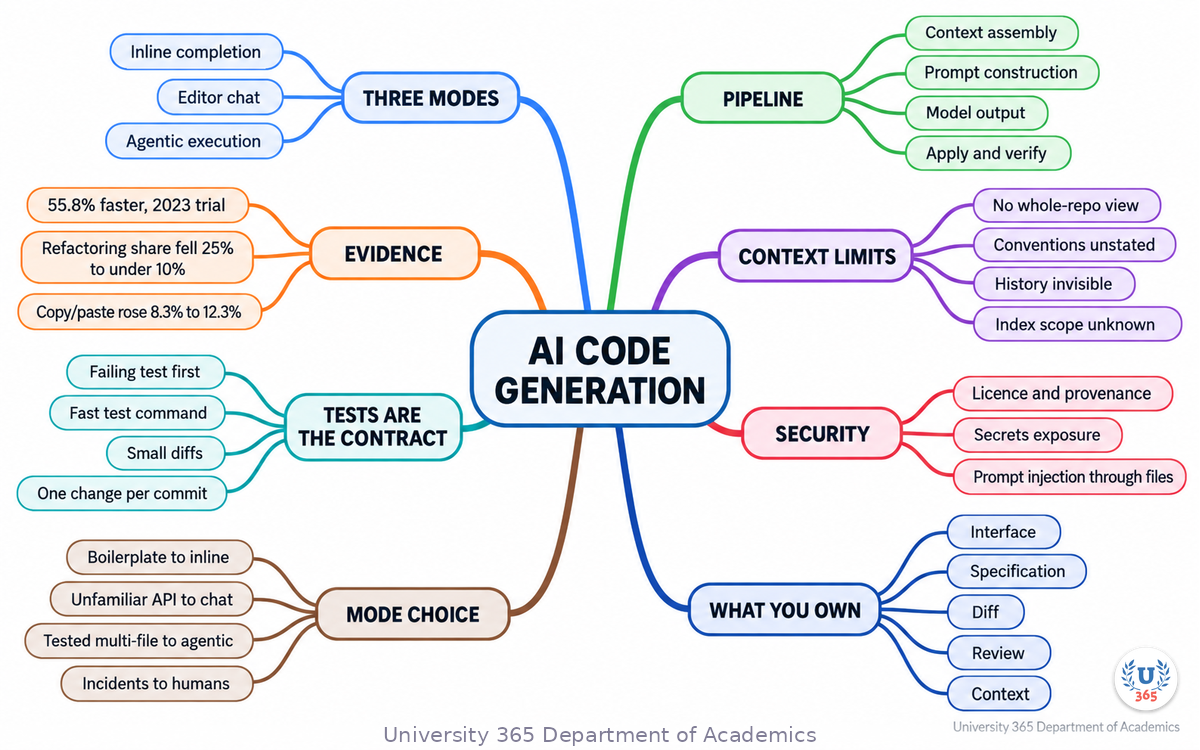
The mindmap shows the full structure of what you learned: three modes of assistance, the four-stage pipeline from context assembly to verification, the two bodies of measured evidence, the context constraint, the test-first loop, the mode-selection table, the three security risks, and the five practices you own.
UNOP Sound (University 365 Neuroscience Oriented Pedagogy)
Take five minutes to consolidate your memory. Play the isochronous tone track (10Hz alpha frequency) with your eyes closed. Alpha-frequency tones after a learning session support consolidation, helping move what you just learned from short-term to long-term memory.
[Audio player: UNOP Post-Lecture Isochrone (10Hz, 5 minutes)]
Practical Exercise: Run an Agentic Change Under Review
Objective
Make one real change in a repository you know, using an agentic assistant, and produce a written record of what you verified.
Steps
Pick a small change worth making: a bug with a clear reproduction, or a refactor with an existing test that covers it.
Write the acceptance criterion in one sentence. Example: "Calling refundTotal(1999, 'JPY') returns 1999 when the minor unit is 1."
Write a failing test that states that criterion. Run it. Save the failing output.
Note the context you will give the assistant: the test file, the implementation file, and any convention file in your repository.
Run the agentic change. Do not review file by file as it goes; let it finish and read the resulting diff once.
Run the test again. Record the result.
Run the full suite for the affected module. Record the result.
Read the diff line by line and answer three questions: Is every change required by the criterion? Did it touch anything outside the scope? Would you have written any line differently, and if so, why?
Write four lines: the criterion, the test result, the suite result, and the one line in the diff you were least comfortable with.
What to Look For
If the agent needed more than two repair cycles, your test command is probably too slow or too coarse.
If the diff touched files you did not mention, your context brief is missing a constraint.
If the change passes the test but you cannot explain one line, that line is the exercise's real output. Ask about it before committing.
Glossary
Term | Definition |
**Inline completion** | A suggestion of the next lines of code, accepted or rejected with a keystroke, with no autonomy. |
**Agentic coding** | An assistant that reads files, edits them and runs commands in a loop until a goal is met. |
**Context assembly** | The client-side step that decides which files, indexes and instructions are sent to the model. |
**Repository index** | A searchable representation of a codebase, built from embeddings, keyword search or a symbol graph, used to find relevant files. |
**Edit format** | The structured form of a model's change: a unified diff, a whole-file rewrite, or a structured patch. |
**Blast radius** | The set of files and behaviours a change can affect if it is wrong. |
**Code churn** | The share of recently written code that is modified or deleted shortly after it is written. |
**Code clone** | A block of code duplicated from elsewhere in the same repository. |
**Refactoring share** | The portion of changed lines that were moved or restructured rather than added. |
**Verification loop** | The cycle of running a compiler, linter or test suite after a change and reacting to the result. |
**Prompt injection** | Text inside a file or document that attempts to direct an AI assistant to take an unintended action. |
**Provenance** | The record of where a piece of code came from and under which licence. |
**CI-First** | The U365 principle that the human is the ruler and orchestrator, and AI is the amplifier. |
**Blast-radius control** | Choosing a less autonomous mode for a higher-risk change, so the worst case stays small. |
Quiz: TEST YOUR UNDERSTANDING
1. In the 2023 controlled experiment, what did the treated group's 55.8% faster completion measure?
A) Productivity across a whole engineering organisation
B) Completion time on one self-contained, well-specified task
C) The reduction in code review time
D) The long-run maintenance cost of AI-written code
2. Why does the model often write a helper function that already exists in your repository?
A) It prefers duplicating code over reusing it by design
B) It was trained on repositories without shared utilities
C) Context assembly did not send the file that contains the existing helper
D) It cannot read function names
3. What turns an agentic loop from a sequence of guesses into a verifiable process?
A) A larger context window
B) A stronger base model
C) Something it can observe, such as a test suite or a type checker
D) More autonomy
4. Which mode is appropriate for a multi-file migration in a codebase with strong static types and good test coverage?
A) Inline completion
B) Agentic execution
C) Chat with no file references
D) None of them
5. What is the practical rule for model output in a professional pipeline?
A) Trust it when the model is large enough
B) Trust it when the tests pass, without reading the diff
C) Treat it as untrusted input and verify it before it reaches the main branch
D) Treat it as trusted if it compiles
Answers: 1-B, 2-C, 3-C, 4-B, 5-C
Related Resources
U365 INSIDE Publications
How LLMs Actually Work: Transformers in 20 Minutes: the architecture behind every coding assistant
RAG vs Fine-Tuning: When to Use Each: why context beats retraining for facts that change
External Resources
The Impact of AI on Developer Productivity: Evidence from GitHub Copilot (Peng, Kalliamvakou, Cihon, Demirer, 2023): the controlled experiment cited in Step 3: arxiv.org/abs/2302.06590
AI Copilot Code Quality (GitClear, 2025): the 211 million line analysis cited in Step 4: gitclear.com/ai_assistant_code_quality_2025_research
The Maintainability Gap (GitClear, 2026): the follow-up signal set cited in Step 4: gitclear.com/the_ai_code_quality_maintainability_gap
SWE-bench (Jimenez et al., 2023): the benchmark that measures automated resolution of real GitHub issues in Python repositories: swebench.com
Attention Is All You Need (Vaswani et al., 2017): the original transformer paper: arxiv.org/abs/1706.03762
Related U365 Lectures (Coming Soon)
Lecture 7: Model Quantization: Running LLMs on Your Laptop (UIT, AI Engineering)
Lecture 8: AI Safety and Alignment: Why Hallucinations Happen (UIT, AI Foundations)
U.Copilot for This Lecture
Discuss this lecture with U.Copilot, your AI chat companion trained on this content.
Copy and paste the following prompt into the U.Copilot chat on university-365.com:
You are U.Copilot for Lectures, an AI chat companion trained on University 365 lecture content. You are helping a Fellow who just completed the lecture "AI Code Generation: Copilot, Cursor, and Beyond" from the DevTools Series at the U365 Institute of Technology (UIT). Your role is to help the Fellow choose and control AI coding tools. You can: - Explain the three modes of assistance (inline completion, editor chat, agentic execution) and when each is appropriate - Walk through the four-stage pipeline: context assembly, prompt construction, model output, application and verification - Discuss the measured evidence: the 2023 controlled experiment on completion time, and the code-quality analyses on duplication, refactoring share and churn - Help the Fellow design a verification loop for a specific repository, including test command choices - Review a diff the Fellow pasted, and ask the questions a reviewer should ask - Discuss security, licensing and prompt-injection risks in an agentic setup Always maintain the U365 CI-First approach: the human is the ruler and the AI is the amplifier. Encourage the Fellow to verify output rather than trust it. Use the UP-Context Method: ask about the Fellow's project, stack and constraints before giving specific advice.
Next Steps
Now that you understand how these tools work and where they fail, here is what to do next:
Run the practical exercise on a real change in a repository you know, and keep the four-line record.
Audit your repository for the context failures in Step 5: duplicated utilities, inconsistent error handling, deprecated calls.
Time your test command. If it takes more than a couple of minutes for the module you work in, that is the highest-value fix available to you.
Write or update the project brief for one repository, so the next request starts informed.
Take the next lecture in this series, "Model Quantization: Running LLMs on Your Laptop", to see what happens when you run a model on your own hardware.
AI coding tools reward preparation more than they reward adoption. The teams that gain are the ones that made their work checkable before they made it faster.
IMPORTANT NOTICE
This lecture is published by University 365 as part of its INSIDE Publications Hub. The content is free to read for all visitors. Lectures in this series may be part of a structured academic program leading to a Micro-Credential for your Career (MCC). To enroll in an academic program, visit university-365.com/tuition.
This content is for educational purposes. While we strive for accuracy, AI is a fast-moving field. Verify current tool behaviour and benchmark results against primary sources for professional applications.
Copyright University 365, Inc. All rights reserved. This content is protected under University 365's copyright policies. For permissions or inquiries, contact uda@university-365.com.
Published by the Department of Academics, University 365.
Lecture delivered by the University 365 Institute of Technology (UIT).
Sam Utteker, Dean of Technology, UIT
Signed for the academic year 2026.




Comments