
The AI Stack 2026: What Every Developer Needs



UIT University 365 Institute of Technology
Series AI Engineering | Level Basic (Free)
Duration 15 to 20 minutes | Access Free
IT Engineering, AI and Applied AI, Data Science, Software Development, Digital Transformation

UNOP Sound (University 365 Neuroscience Oriented Pedagogy)
Take five minutes to prepare your brain. Play the isochronous tone track (40Hz gamma frequency) with your eyes closed. Gamma-frequency tones before a learning session raise attention and make the material easier to absorb.
[Audio player: UNOP Pre-Lecture Isochrone (40Hz, 5 minutes)]
In this Lecture

The Stack You Actually Ship
You ship a feature that answers questions from your company's documents. It works in the demo. Three weeks later you cannot explain the bill, you cannot tell whether last Tuesday's prompt change made answers better or worse, and one user's runaway loop burned a month of budget in an afternoon.
None of those failures were model failures. They were architecture failures, and they cluster in the layers that sit around the model. The model is one layer of six. This lecture walks the whole stack, layer by layer, with the decision each layer forces and the symptom that appears when you skip it. By the end you will have a stack you can defend, a short list of what to build first, and the four levers that control almost all of your cost.
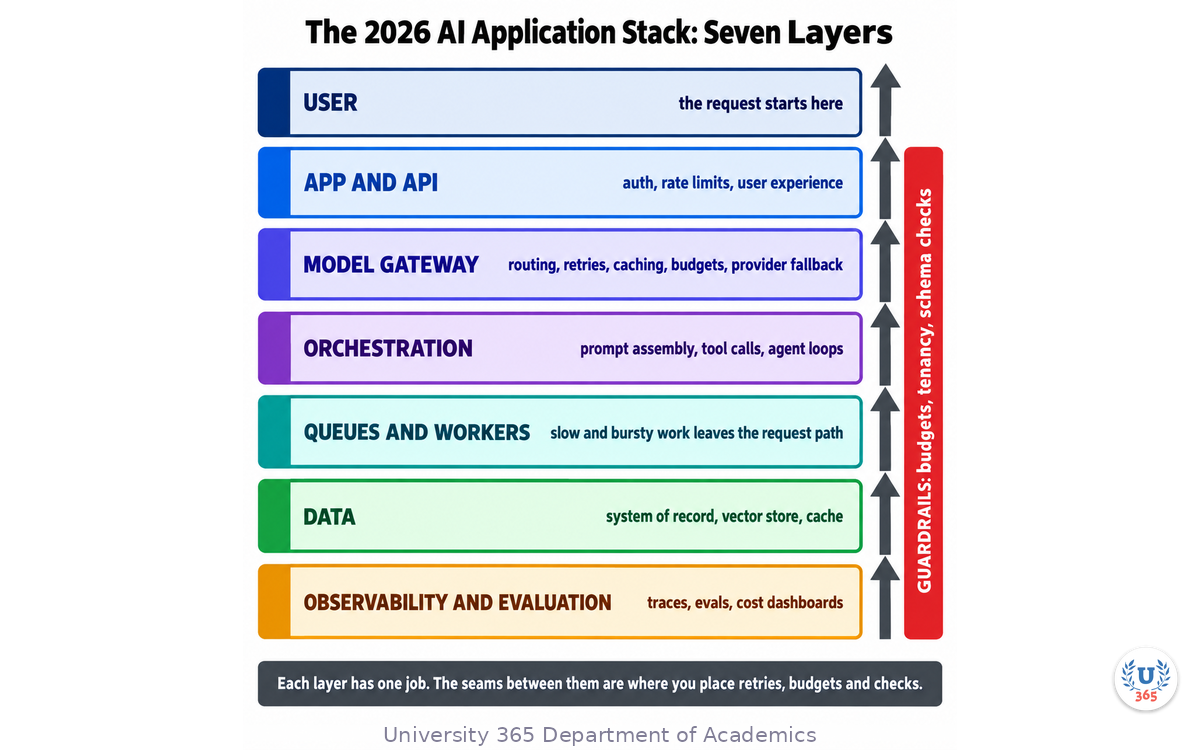
The seven layers at a glance
USER App and API layer: auth, rate limits, user experience Model gateway: routing, retries, caching, budgets, fallback Orchestration: prompt assembly, tool calls, agent loops Queues and workers: slow and bursty work off the request path Data: system of record, vector store, cache Observability and evaluation: traces, evals, cost dashboards Guardrails: budgets, content checks, tenancy scoping
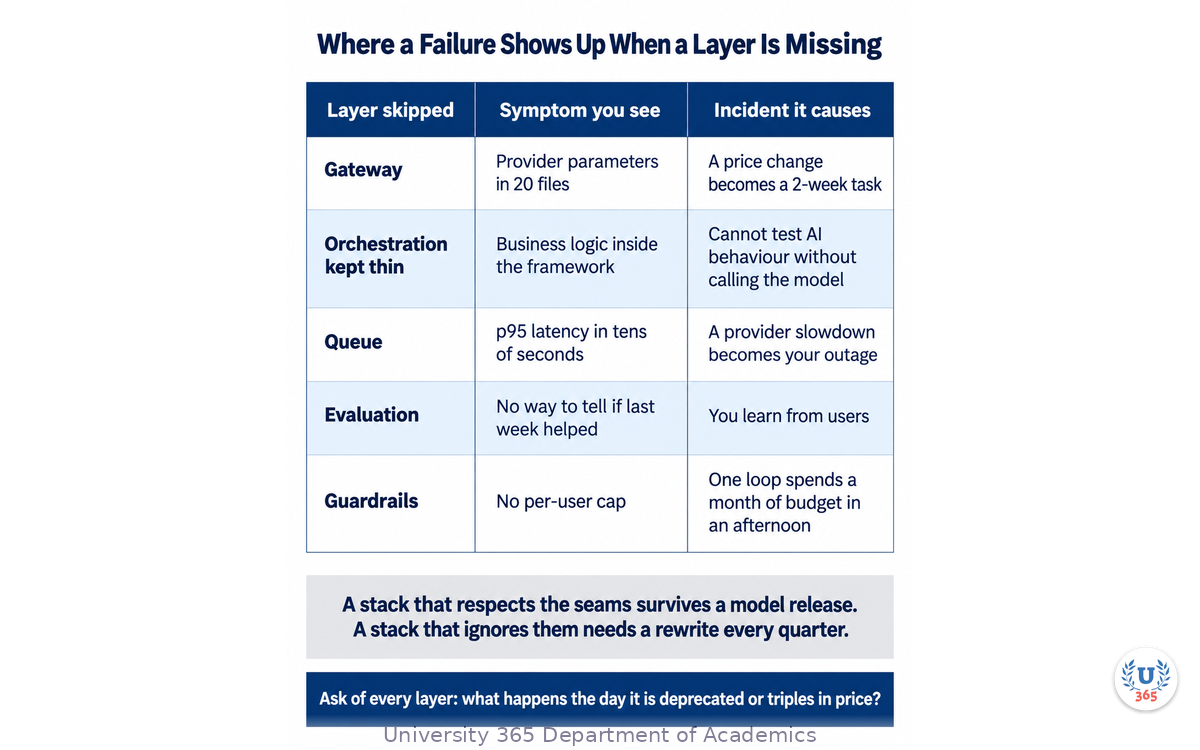
Each layer has one job. The seams between them are where you place retries, budgets, and checks. A stack that respects the seams survives a model release; a stack that ignores them needs a rewrite every quarter.
Layer 1: The Model Gateway
The most expensive mistake in an AI application is coupling. A codebase that calls one vendor's SDK from fifty places cannot switch when that vendor deprecates a model, changes prices, or has a bad week of uptime.
Put a gateway in front. One layer routes requests to the right model, handles authentication and retries, enforces budgets, applies caching, and fails over to an alternate provider.
app code -> gateway.complete(request) -> provider
Swapping models becomes a configuration change rather than a project. Three responsibilities belong here and nowhere else:
Routing. Send the hard reasoning to a frontier model and the classification, extraction, and tagging to a small one. Most production traffic does not need a frontier model, and routing it there is the single largest avoidable cost.
Fallback. On a provider timeout or error, try the next provider before failing. Every serious provider has bad minutes.
Metering. Count tokens and cost per tenant per request. You cannot control a number you do not record at the point of use.
The symptom when you skip it
Your application code contains provider-specific parameters in twenty files, and a price change becomes a two-week task.
Layer 2: Orchestration
Orchestration is where the AI logic lives: prompt assembly, tool calls, agent loops, and multi-step workflows. Keep it explicit and testable, and keep it thin.
Workflows before agents, by default
This is the most consequential choice in the layer. A deterministic chain of model calls is predictable, debuggable, and cheap. A free-roaming agent is powerful and introduces variance and cost that you then have to contain.
Start with the simplest orchestration that solves the problem and add autonomy only where it earns its keep. Most production use cases need a workflow, not an agent: retrieve, assemble, call once, validate, return. Reach for an agent loop when the number of steps genuinely cannot be known in advance, such as a task that must search until it finds an answer.
Keep domain logic out
Do not let the orchestration framework grow to own your business logic. Teams that invert this end up unable to test or debug their AI behaviour without invoking the model, which turns every bug into an experiment and every experiment into a bill. The framework assembles context and calls tools. Your application decides what the rules are.
Tool interfaces as a stable boundary
If your agents call tools, define those tools behind a stable interface. A protocol boundary such as the Model Context Protocol lets the same tool serve multiple models and frameworks, and it keeps your integrations from being rewritten when you change the reasoning layer.
Layer 3: Queues and Workers
AI work is slow and bursty. A generation can take many seconds, traffic spikes, and provider rate limits throttle you. Doing that work inside a web request is a recipe for timeouts and a poor experience.
Push it to a queue:
request -> enqueue job -> 202 Accepted + job id worker pool -> respects provider rate limits, retries, writes result notify -> push the result when it is ready
Three rules make this layer work:
Enqueue, do not block. Accept the request, create a job, return a handle immediately.
Rate-limit at the worker. Concentrate provider rate-limit handling in the worker pool, so a traffic spike queues gracefully instead of erroring out.
Retry with backoff and a dead-letter queue. Transient provider errors are normal. Route persistent failures somewhere visible instead of losing them.
The symptom when you skip it
Your p95 latency is measured in tens of seconds, and a provider slowdown becomes an outage of your own product.
Layer 4: The Data Layer
Three distinct stores serve three distinct jobs, and conflating them causes pain that shows up months later.
System of record: a relational database. Users, jobs, results, conversations, audit, billing. This is the source of truth.
Vector store: embeddings for retrieval. Start with the vector extension of the database you already run. For workloads under roughly ten million vectors, that delivers single-digit-millisecond to low-tens-of-milliseconds p95 latency at a small monthly cost, and it keeps your embeddings in the same transaction as your documents and your permission rows. That last property is the real advantage: "only search what this user is allowed to see" becomes a WHERE clause instead of a distributed consistency problem. Move to a dedicated vector database past roughly fifty to one hundred million vectors, or when you need first-class hybrid search and heavy metadata filtering at scale.
Cache: prompt and response caching, rate-limit counters, session state. Caching is a first-class cost-control mechanism, not an optimization you add later. The stable part of your system prompt and your retrieved context are re-sent on every turn; caching them at the provider or in your own store stops you paying full price for the same tokens repeatedly.
Retrieval before fine-tuning
Feeding your data to the model at query time is cheaper to build, cheaper to maintain, and updates the moment your data changes. Fine-tuning changes behaviour, not knowledge, and it is the expensive option. Start with retrieval. Add fine-tuning only when retrieval cannot fix the behaviour you need.
Layer 5: Observability and Evaluation
You cannot operate a non-deterministic system you cannot see. Ordinary logging is not enough, because the failure you care about is a quality regression, not a stack trace.
Traces
Log every model call: prompt, model version, output, token counts, latency, and cost, correlated across the steps of one request. Without request-level correlation you can see that a call was slow but not which step caused it.
Evaluation
Build a fixed set of real inputs with expected outcomes, and run it in CI. Fifty representative cases will catch the regression when a provider silently updates a model behind the same name, and nothing else will. Prompt engineering without evaluations is guessing with extra steps.
Cost dashboards
Break cost down by feature and by tenant. Cost in an AI application is an architecture concern: it is driven by how much context you send, how many steps an agent takes, whether you cache, and which model handles which job. Bolting cost control on at the end is painful, because by then the decisions are structural.
Two policies you need before you log anything
Decide your PII and retention policy for prompts and outputs before the first trace lands in storage: prompts routinely contain customer data. And decide what happens when an evaluation fails, or the eval set becomes a dashboard nobody acts on.
The symptom when you skip it
You learn about quality problems from your users, and you have no way to tell whether last week's change helped.
Layer 6: Guardrails
Guardrails sit across the layers and enforce the limits you cannot trust application code to remember.
Per-user token and spend budgets, enforced server side. A hard daily cap per account. One scripted user can otherwise spend a month of budget in an afternoon.
Tenancy scoping. Every retrieval path must filter by the caller's permissions. In multi-tenant products this is a data-layer property, not a prompt instruction.
Input and output checks. Validate structured output against a schema before you act on it. A model that returns prose where you expected JSON will fail somewhere downstream, and you want that failure at the boundary.
Confirmation before irreversible actions. Anything that spends money, sends a message, or deletes a record goes through a human decision, or at minimum an idempotency key with an audit trail.
The symptom when you skip it
Your first incident is also your first guardrail.
The Four Cost Levers
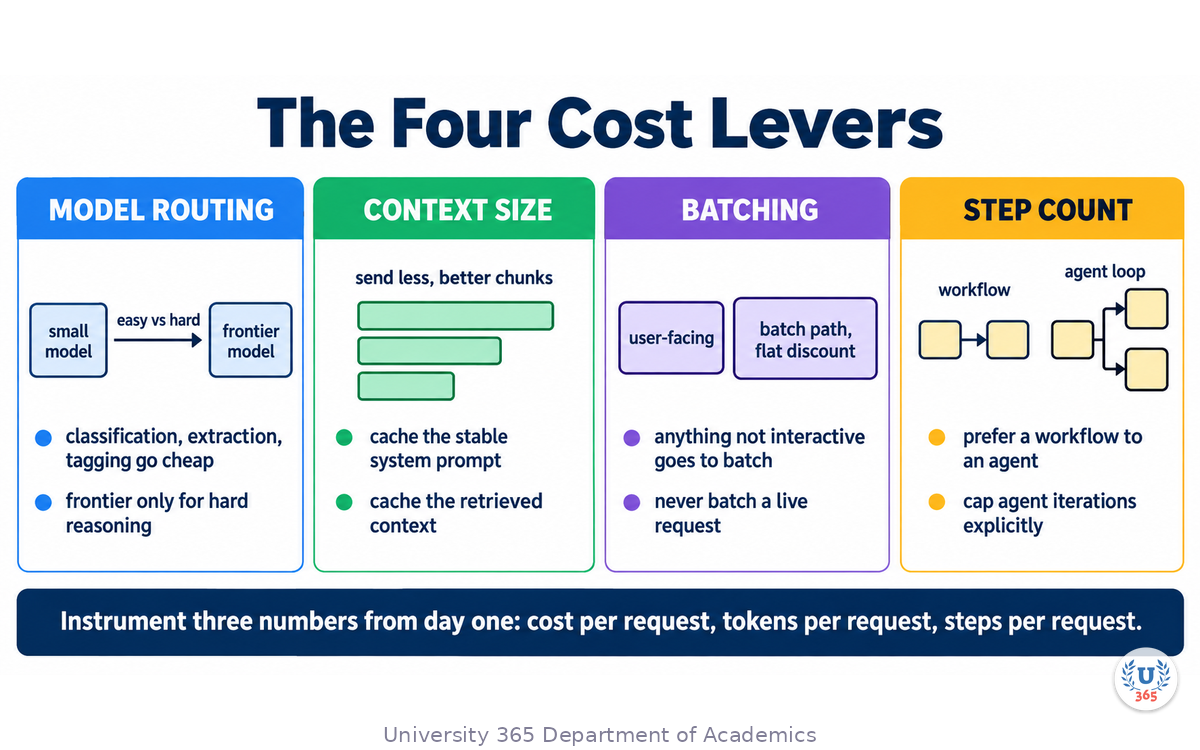
Almost all of your spend is controlled by four decisions. Make them deliberately, and measure each one.
Lever | What it controls | The move |
**Model routing** | Cost per call | Small model for classification, extraction and tagging; frontier model only for hard reasoning |
**Context size** | Tokens per call | Retrieve fewer, better chunks; cache the stable system prompt and retrieved context |
**Batching** | Unit price | Anything not user-facing goes through the batch path, which is typically a flat discount |
**Step count** | Calls per request | Prefer a workflow to an agent; cap agent iterations explicitly |
Three numbers to instrument from day one
Record cost per request, tokens per request broken down by feature, and steps per request. When a bill surprises you, one of those three will explain it, and you will find it in minutes instead of days.
Latency follows the same shape
A response that takes four seconds when it should take one is a churn problem. The fixes are the same levers: caching, routing easy calls to smaller models, and cutting context. Latency is an architecture outcome, not a hosting setting.
What to Build First: A Starter and a Scale Stack
Two stacks, and most builds migrate between them piece by piece rather than choosing once.
Layer | Starter stack | Scale stack |
Infrastructure | Hosted model API plus a serverless app | Multi-provider routing; self-hosted inference where volume justifies it |
Data | Relational database with a vector extension | Dedicated data platform plus a vector database for retrieval scale |
Model | One hosted model | Routed multi-model: cheap tier for routine calls, frontier for hard ones, fine-tuned where it pays |
Orchestration | Direct API calls through a thin gateway | Graph-based workflows with human checkpoints |
Application | Standard web app | Multi-tenant, integrated with existing systems |
Observability | Basic logging plus a trace tool | Full evaluation, tracing, drift detection, cost dashboards |
The sequence that keeps cost and risk down
Start with the use case, not the tools. Define the one job the AI does and what "correct" means for it. The stack follows from that definition.
Prove the idea with one hosted model. One API, one prompt, no infrastructure. Confirm the model can do the job before you build around it.
Add retrieval when the model needs your data. This is where most products find their real value.
Add the evaluation layer before you scale. Wire in tracing and automated checks so you can trust the output as volume grows.
Move pieces in-house only when the numbers say so. Revisit self-hosting, a dedicated vector store, or fine-tuning once you have real usage data.
The test for any layer
Ask what happens to your application on the day that component is deprecated or triples in price. If the answer is "we change a configuration file", the layer is built correctly. If the answer is "we rewrite the feature", the layer is coupled, and that coupling is the actual defect.
Feynman Summary: Explain It Like You Are 12
Imagine you open a small restaurant. The recipe is not the hard part. What is hard is having a kitchen that works when forty people arrive at once.
You need someone at the door taking orders quickly, so nobody waits in a line (that is the gateway, it decides which cook handles what). You need a kitchen that follows a written recipe every time, rather than a cook who invents something (that is orchestration; a fixed recipe is easier to trust than free improvisation). You need a ticket rail where orders wait their turn, because you cannot cook everything instantly (that is the queue). You need three kinds of storage: the ledger with the real records, the pantry you reach into while cooking, and a shelf of pre-made sauces so you are not remaking the same base forty times (that is the database, the vector store, and the cache). You need someone tasting the food now and then to check it still tastes right (that is evaluation). And you need a rule that no single table can run up an unlimited tab (that is the guardrail).
Notice that none of those jobs is the recipe. The recipe is just one thing in the kitchen. Most AI products fail because of the kitchen, not the recipe.
Mindmap: The Complete Picture
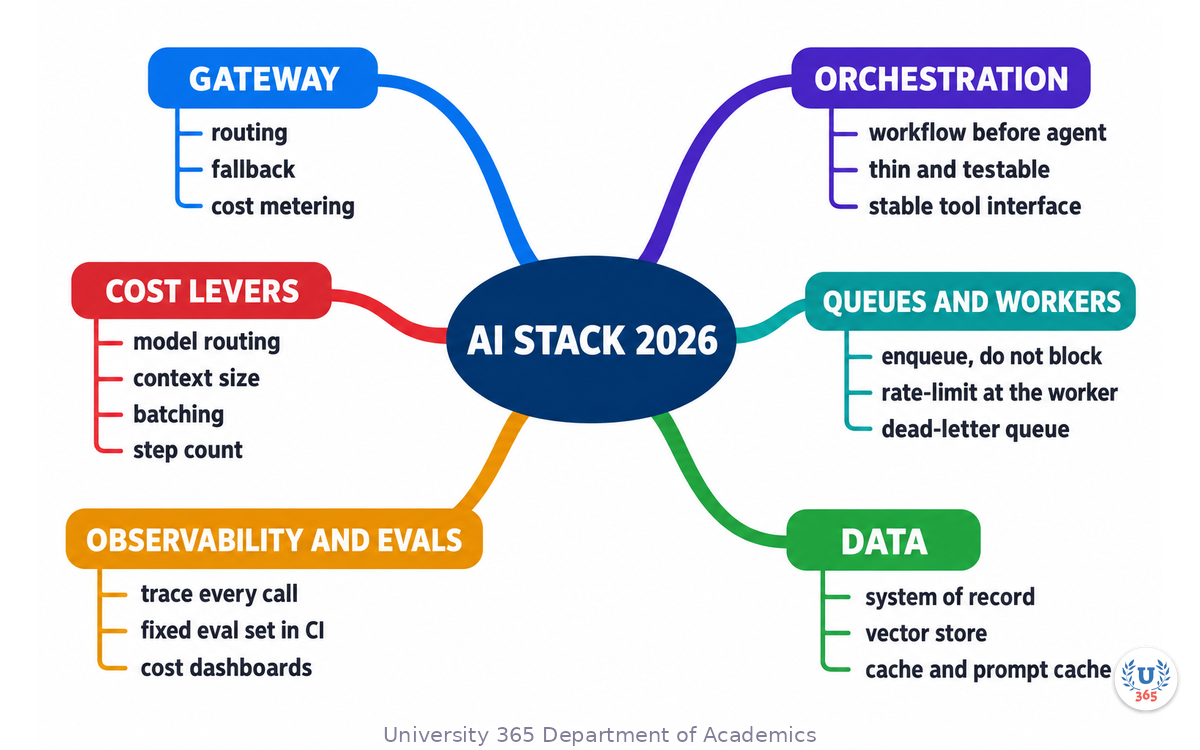
The mindmap puts the request path down the centre and branches to each layer, the decision that layer forces, the symptom of skipping it, and the cost levers that cross all of them.
UNOP Sound (University 365 Neuroscience Oriented Pedagogy)
Take five minutes to consolidate your memory. Play the isochronous tone track (10Hz alpha frequency) with your eyes closed. Alpha-frequency tones after a learning session support consolidation, helping move what you just learned from short-term to long-term memory.
[Audio player: UNOP Post-Lecture Isochrone (10Hz, 5 minutes)]
Practical Exercise: Map One Request Through the Stack
This exercise takes about 20 minutes on paper, and it is the highest-value planning you can do before writing code.
Step 1: Pick one real feature
Choose a feature you have built or intend to build. Write one sentence describing the single job it does, and one sentence describing what a wrong answer would cost.
Step 2: Trace one request through the seven layers
For each layer, write what it does in your feature, or write "absent" and decide whether the absence is acceptable.
App and API: who can call it, and what limits apply per user
Gateway: which model, what fallback, where cost is metered
Orchestration: how many model calls, and whether the step count is known in advance
Queues: which work leaves the request path, and what the user sees while it runs
Data: system of record, retrieval source, what is cached
Observability: what you log, and the fifty cases you would test on
Guardrails: budget cap, tenancy filter, schema validation, what needs confirmation
Step 3: Name the seam
For each boundary between layers, write where the retry, budget, or check lives. A seam with no owner is where the incident will happen.
Step 4: Choose the four cost levers
For your feature, write the model routing rule, the retrieval size, whether anything can be batched, and the cap on steps. Estimate cost per request from those numbers.
What to look for
If you cannot finish Step 2 without inventing components, you have found your build order. If the step count in Layer 2 is unknowable, you have found where an agent is genuinely required, and everywhere else a workflow will do.
Applied AI connection
This is the review you run on any AI feature before it ships, and again after the first month of real traffic. The mapping takes twenty minutes and prevents the rewrite that takes a quarter.
Glossary
Term | Definition |
**Model gateway** | A single layer that routes model requests, handles auth and retries, meters cost, and fails over between providers. |
**Orchestration** | The code that assembles prompts, calls tools, and sequences model calls. |
**Workflow** | A deterministic, pre-defined sequence of steps. Predictable and cheaper than an agent loop. |
**Agent loop** | A model-driven loop in which the number of steps is decided at run time. Powerful, variable, and costly. |
**Queue** | A store of pending jobs that moves slow work off the request path so the API returns immediately. |
**Worker** | A process that consumes jobs from a queue, respecting provider rate limits and retrying transient failures. |
**Dead-letter queue** | Where jobs go after their retries are exhausted, so failures stay visible instead of disappearing. |
**System of record** | The relational database that holds users, jobs, results, and audit as the source of truth. |
**Vector store** | A store of embeddings used for similarity search in retrieval. |
**pgvector** | A Postgres extension that adds vector columns and similarity search to an existing relational database. |
**Prompt cache** | A cache of the stable, repeated part of a prompt so you do not pay full price to resend it each turn. |
**Trace** | The recorded path of one request across every model and tool call, with prompt, output, tokens, latency, and cost. |
**Evaluation set** | A fixed set of real inputs with expected outcomes, run in CI to detect quality regressions. |
**Regression** | A drop in answer quality after a change to a prompt, a model version, or retrieved data. |
**Guardrail** | A server-side limit or check that constrains what a request can spend or do. |
**Token budget** | A hard cap on tokens or spend per user or per day, enforced outside the model. |
**Tenancy scoping** | Filtering every retrieval by the caller's permissions so one customer never sees another's data. |
**Idempotency key** | A client-supplied identifier that lets a retried request be recognised instead of executed twice. |
**Batch API** | A non-interactive submission path that trades latency for a lower unit price. |
**Fine-tuning** | Additional training that changes a model's behaviour. It does not reliably add knowledge; retrieval does. |
**p95 latency** | The response time below which 95 percent of requests complete. The number users actually feel. |
Quiz: TEST YOUR UNDERSTANDING
1. What is the primary reason to put a model gateway in front of your application?
A) It makes the model produce better answers
B) It gives one place for routing, retries, cost metering and provider fallback
C) It removes the need for a vector store
D) It reduces the model's token prices
2. When should you reach for an agent loop rather than a fixed workflow?
A) Whenever you want better quality
B) When the number of steps genuinely cannot be known in advance
C) Whenever the task involves retrieval
D) Always, because agents are more capable
3. Why push long AI work onto a queue instead of running it inside the web request?
A) Queues are cheaper to host
B) Generations take seconds and can spike, so blocking the request causes timeouts and poor experience
C) Queues remove the need for rate limiting
D) The model API rejects requests made from a web server
4. Which statement about retrieval and fine-tuning is correct?
A) Fine-tuning adds knowledge more cheaply than retrieval
B) Retrieval updates the moment your data changes; fine-tuning changes behaviour and is more expensive
C) They are interchangeable
D) Fine-tuning is required before retrieval can work
5. What is the single most valuable evaluation practice in this lecture?
A) Reading the model's release notes each month
B) A fixed set of real inputs with expected outcomes, run in CI on every prompt or model change
C) Asking the model to rate its own answers
D) Comparing vendor leaderboards
Answers: 1-B, 2-B, 3-B, 4-B, 5-B
Related Resources
U365 INSIDE Publications
Lecture: RAG vs Fine-Tuning: When to Use Each: The retrieval layer decision in full, with cost and maintenance comparisons
Lecture: How LLMs Actually Work: Transformers in 20 Minutes: What the model layer is doing while your stack is calling it
External Resources
Attention Is All You Need (Vaswani et al., 2017): The transformer paper behind the model layer: arxiv.org/abs/1706.03762
Images and vision (OpenAI API documentation): How multimodal inputs are billed in tokens, which drives the context-size lever: developers.openai.com/api/docs/guides/images-vision
Related U365 Lectures (Coming Soon)
Multimodal AI: When Models See and Hear, in the AI Frontiers series
Model Quantization: Running LLMs on Your Laptop, in the AI Engineering series
U.Copilot for This Lecture
Use this prompt with your own AI assistant to review the stack behind a feature you own, and to get a build order out of the result. It follows the UP-Context method: context first, then the task, then the constraints, then the output shape.
CONTEXT I am reviewing the architecture of one AI feature I own. The feature is: [one sentence] The single job it does: [one sentence] What a wrong answer costs: [state the consequence] Expected volume: [requests per day] Current stack: [list what exists today, or write "nothing yet"] Current monthly AI spend: [number, or "unknown"] TASK 1. Trace one request through these seven layers and say for each whether it exists in my feature: app and API, model gateway, orchestration, queues and workers, data, observability and evaluation, guardrails. Mark each as present, partial, or absent. 2. For every layer marked absent or partial, state the failure symptom I should expect, in one sentence. 3. Give me a build order: the three changes with the highest ratio of risk removed to effort spent. 4. Name the four cost levers for my feature with a concrete setting for each: model routing rule, retrieval size, what can be batched, and a cap on steps per request. CONSTRAINTS Use only the information I gave you plus what is in this conversation. Do not invent benchmark numbers or prices. Where a number is needed and missing, say which measurement would produce it. OUTPUT A table with one row per layer: layer, status, evidence from my description, and the symptom if it stays absent. Then the build order as a numbered list of three items, one line each. Then the four cost lever settings as a short list. End with the first three things I should instrument.
Next Steps
Run the mapping exercise on one feature you own, and write the seam owner for every boundary between layers
Add the gateway before you add the second model. Routing without a gateway turns into a rewrite
Build the evaluation set now. Fifty real cases with expected outcomes, in CI, before you tune another prompt
Set a per-user budget today. It is a few hours of work and it removes your largest uncontrolled risk
Read the previous lecture in this series, "RAG vs Fine-Tuning: When to Use Each", if you have not settled your retrieval layer yet
The model is a commodity you rent. Your advantage lives in the layers around it: how well you route, how well you cache, how well you check, and how well you feed it. Build the kitchen, not just the recipe.
IMPORTANT NOTICE
This lecture is published by University 365 as part of its INSIDE Publications Hub. The content is free to read for all visitors. Lectures in this series may be part of a structured academic program leading to a Micro-Credential for your Career (MCC). To enroll in an academic program, visit university-365.com/tuition.
This content is for educational purposes. While we strive for accuracy, AI is a fast-moving field. Verify current technical details against primary sources for professional applications.
Copyright University 365, Inc. All rights reserved. This content is protected under University 365's copyright policies. For permissions or inquiries, contact uda@university-365.com.
Published by the Department of Academics, University 365.
Lecture delivered by the University 365 Institute of Technology (UIT).
Sam Utteker, Dean of Technology, UIT
Signed for the academic year 2026.




Comments