
Don't Let ChatGPT Misremember You: Controlling AI Memory

Updated: Oct 8


UIT University 365 Institute of Technology
Series AI Skills Series | Level Basic (Free)
Duration 25 minutes | Access Free
IT Engineering, AI and Applied AI, Data Science, Software Development, Digital Transformation

UNOP Sound (University 365 Neuroscience Oriented Pedagogy)
Take five minutes to prepare your brain. Play the isochronous tone track (40Hz gamma frequency) with your eyes closed. Gamma-frequency tones before a learning session raise attention and make the material easier to absorb.
[Audio player: UNOP Pre-Lecture Isochrone (40Hz, 5 minutes)]
In this Lecture

The Assistant That Remembers Wrong
You asked an assistant for help with a budget last month, and now every planning question comes back framed around cost cutting. You never told it to treat you that way. Somewhere between those conversations it formed a view of you, and it is applying that view to work that has nothing to do with it.
This is the ordinary failure of AI memory. Not a dramatic breach, just an accumulation of assumptions you did not write, cannot see at a glance, and keep paying for in every answer. The assistant is not malfunctioning. It is doing what the feature was designed to do, and the design has more surfaces than most people realize.
Memory is also one of the few AI features where the wrong setting is expensive in a way that is hard to notice. A wrong answer is visible. A wrong set of assumptions is invisible, because the assistant never tells you the framing it applied. You get the output, not the premise.
This lecture takes memory apart. It covers the layers that actually exist, where each control lives as of 2026, why clearing one surface leaves the others intact, a concrete audit you can run in twenty minutes, what belongs in memory and what must never go there, and the compliance question that most guidance skips: what happens when the memory contains another person's information.
What Memory Actually Is: Three Separate Layers
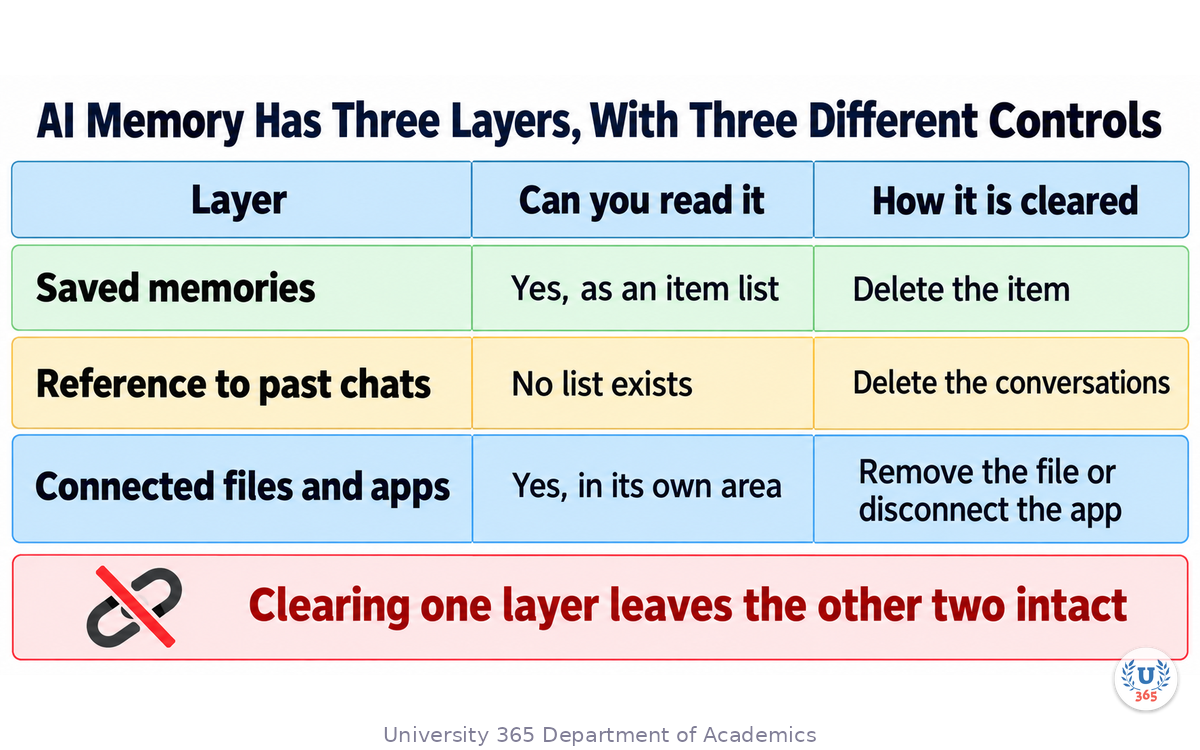
Memory is not one feature. Treating it as one is the source of most of the confusion, including the belief that turning it off made you forgettable when it did not.
Layer 1: explicitly saved memories. Facts the assistant decided were worth keeping, written down as items. You can usually read these as a list, correct an item, delete an item, or delete them all. This layer is auditable: it is the only part of memory you can read directly through the product interface.
Layer 2: reference to past conversations. A separate capability in which the assistant draws on your earlier chats when they seem relevant, without any item having been explicitly saved. There is no list to inspect. It is inferred at request time.
Layer 3: connected context. Files you have uploaded, and applications you have connected to the assistant. These are not memories in the same sense, and they are a common source of what looks like a memory failure: an assistant that appears to know something about a project because a document about it is still in a connected source.
OpenAI's own Memory FAQ describes the first two as separately controlled settings on most accounts, and states plainly that turning off saved memories also turns off reference to chat history. It also states that saved memories are stored separately from your chat history, so deleting a conversation does not remove the memory that came out of it. Read that sentence twice. It is the core of the deletion model in the section below.
What changed in 2026. During 2026, accounts began showing a revised Personalization panel in which a single memory control governs a written summary of what the assistant believes about you, synthesised from your conversations rather than only from facts you asked it to save. Product guides covering the rollout report that the older saved-memories list remains reachable from the same panel, and OpenAI's FAQ continues to describe saved memories as a separate, individually manageable thing. Plans and regions have not moved at the same time, so your own panel may still show the older two-switch layout. Open your settings and read what is actually there rather than assuming which layout you have; this is a fact you can check in thirty seconds and cannot infer.
Why "the assistant remembers" is three questions, not one
When something goes wrong, ask which layer produced it:
Did the assistant state a fact about me that I typed once? That is layer 1, and you can find it in the memory list.
Did it seem to know a context I never saved? That is layer 2, and no list will show it to you.
Did it know about a project's content? That may be layer 3, a connected file or application, not memory at all.
Most "memory is broken" reports are a wrong-layer diagnosis. The fix is different for each: layer 1 has an editable list, layer 2 has a toggle and a chat-deletion path, layer 3 has connected apps and uploads to disconnect.
Where the Controls Live in 2026
The controls are not hidden, but they are behind enough clicks that most people have never opened them. Here is the map, stated as surfaces rather than as a single setting, because the surfaces are separate.
The memory settings panel. On most accounts this is reachable from your profile menu, then Settings, then Personalization. Depending on your plan and region it shows either one memory control with a written summary of what the assistant believes about you, or two switches covering saved memories and chat history reference. This panel is where you read and correct what the assistant thinks it knows.
The saved-memories list. Reachable from the memory panel. It shows individual items, each editable and deletable. If your account still uses the two-switch layout, this is the list those switches govern. If your account shows the newer summary panel, the older list is still available from a link, and OpenAI's FAQ continues to describe it as separately manageable.
Temporary chat. A per-conversation mode, usually started from a dedicated entry point rather than from a normal new chat. OpenAI documents it as excluding a conversation from memory: it does not reference existing memories and does not create new ones. It is the correct tool for one sensitive question. It is not a substitute for managing memory, because it applies to one conversation and changes nothing about what is already stored.
Connected applications and uploaded files. Typically in the settings area for connectors or in the conversation itself. These carry context that behaves like memory and is not governed by the memory toggles.
Custom instructions. A separate static text block that applies to new conversations. It is not memory, it is not dynamic, and it is not cleared by the memory controls. Confusing it with memory is common, because both shape behaviour globally.
Read this before you conclude anything
Product interfaces change faster than documentation. Treat the map above as a starting point and verify it against your own account, because a setting's label and location have moved repeatedly. When a control's position matters to a decision, open the panel and read it rather than relying on a guide, including this one.
What Memory Is Not: Instructions, Files and Projects
Four things get mistaken for memory, and each mistake leads to a wrong fix.
Memory is not custom instructions. Custom instructions are static text you wrote, applied to new conversations, and they do not change unless you change them. Memory is dynamic: it is updated as the assistant learns about you, and it can hold a conclusion you never typed. If you want a rule to hold every time, put it in custom instructions. If you want the assistant to accumulate context, that is memory, and it needs pruning.
Memory is not project context. In products that offer persistent workspaces, a workspace holds its own instructions, its own files, and on some plans its own memory setting, so conversations inside it can draw on each other. That sharing is a property of the workspace, not of your account-wide memory, and it is configured per workspace. The next lecture in this series covers that boundary in detail, and it is the surface most often misdiagnosed as a memory fault.
Memory is not a file library. A document you uploaded is retrieved when a question makes it relevant, not injected into every conversation. An assistant that fails to use a file it has is usually a retrieval miss, not a memory failure. The fix is to name the file or quote a distinctive phrase from it, not to edit your memories.
Memory is not the current conversation. Everything in the conversation you are having is available to the assistant for that conversation regardless of memory settings. Turning memory off does not make the current chat amnesiac, and that distinction matters when you are reasoning about whether a sensitive detail can influence later answers. It can influence this one either way.
The practical rule
Before you change a setting, name the surface you actually want to affect. "Every conversation, everywhere" is memory or custom instructions. "Every conversation inside this workspace" is workspace instructions or files. "Reference material for this project" is the workspace's file area. "Just this conversation" is the conversation itself.
The Deletion Model, and Why Clearing One Surface Is Not Enough
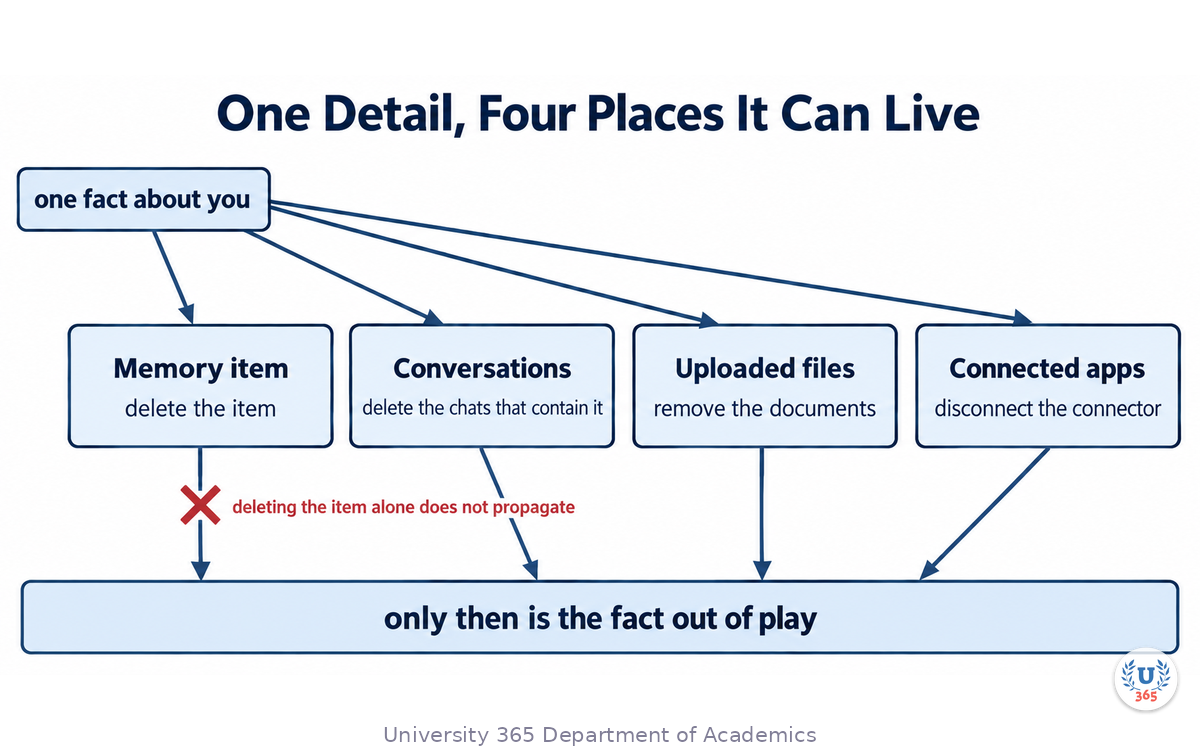
Deletion is where the design most often surprises people, and the surprises are documented rather than secret.
Deleting a conversation does not delete the memories from it. OpenAI's Memory FAQ states this directly: saved memories are stored separately from chat history, so a memory that came out of a chat survives deleting the chat. If you want a detail gone, you have to remove the memory item and consider the conversation separately.
Turning memory off does not delete what is already remembered. The FAQ states that turning saved memory off does not delete anything already remembered, and that the toggle and the deletion are separate actions. A user who flips the switch and assumes the data is gone has made a reasonable inference from an unhelpful label. Look for a separate delete action rather than treating the toggle as removal.
Deleting a conversation is the path for the reference-to-history layer. Because that layer has no list, the only durable way to reduce what it can draw on is to remove the conversations themselves. OpenAI documents that turning the reference setting off also deletes information remembered from past conversations, with deletion completing within a period of days rather than instantly.
A deleted memory may be retained for a limited period. The FAQ notes that a log of deleted saved memories may be retained for a bounded window for safety and debugging. That is normal engineering practice and worth knowing, because it means "deleted" and "gone" are not the same word.
Some safety behaviour sits outside your personalization settings. The FAQ states that turning memory off does not disable safety features that may use limited, safety-relevant context in rare high-risk situations. This is a different purpose from personalization, and it is documented rather than hidden.
The four-surface deletion checklist
A complete removal of one detail usually requires all four of these, and skipping any one leaves the detail influencing answers:
The memory item. Delete it from the saved-memories list, or correct the summary if your account uses the summary panel.
The conversations. Delete the chats where you shared or referenced the detail. This is the only lever for the reference-to-history layer.
The files. Delete or remove the uploaded documents that contain it.
The connected applications. Disconnect any connector that can surface it.
OpenAI's FAQ states this multi-surface requirement explicitly, and it is the reason a user can clear their memory list, still see the assistant reference the fact, and conclude the product is broken. It is not broken. It is four storage locations that are not linked by one delete action.
A Worked Audit of Your Own Memory
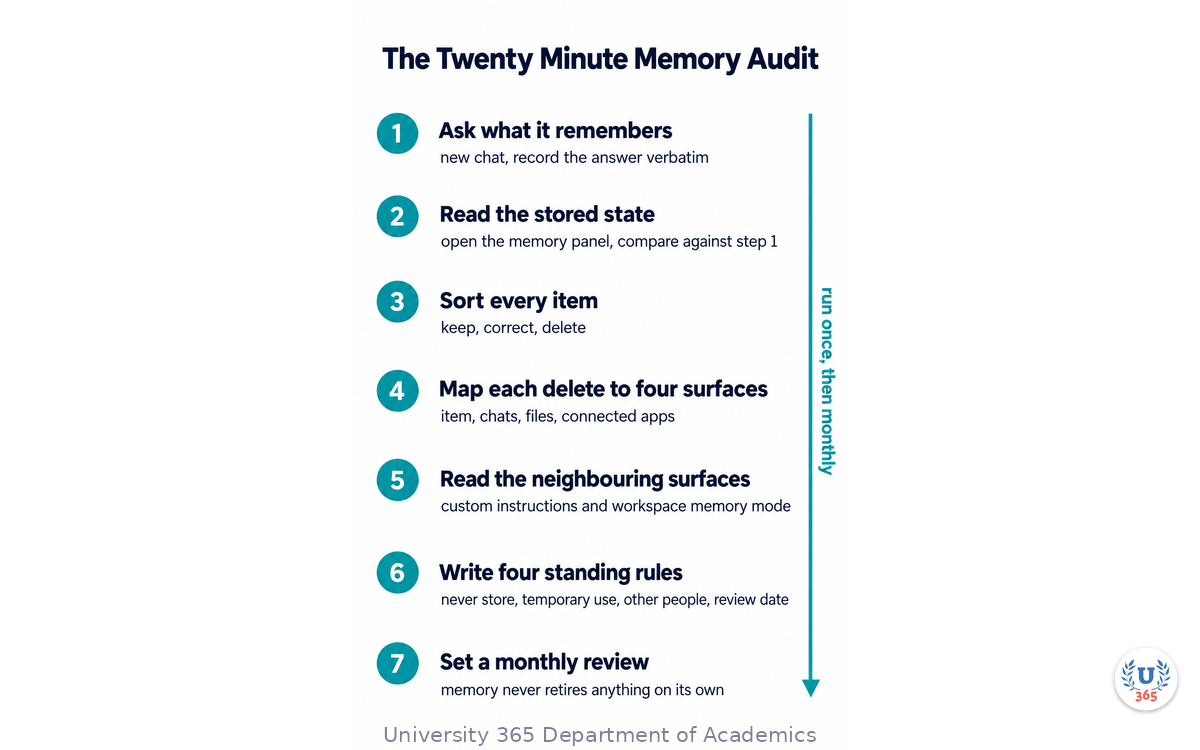
This is the twenty-minute procedure. It produces a written record, which is the difference between an audit and a browse.
Step 1: Ask the assistant directly. Open a new conversation and ask what it remembers about you. This surfaces the saved items in the assistant's own words, and it is often faster than navigating menus. Record the answer verbatim; do not summarise it.
Step 2: Open the memory panel and read the actual stored state. Compare it against step 1. This is where you find the entries the assistant did not choose to mention. Expect surprises; the reported experience of most people opening this panel for the first time is exactly that.
Step 3: Open the saved-memories list. If your account uses the summary panel, follow the link to the older list. Read every item and sort each into one of three buckets: keep, correct, delete.
Step 4: Reconcile the buckets against the four surfaces. For every item you marked delete, write down which of the four surfaces will still carry it: the item itself, the conversations, the files, the connected applications. An item you delete from the list and leave in three conversations is not deleted.
Step 5: Check the two account-level context controls as well as memory. Custom instructions and the workspace memory setting both shape behaviour and neither is cleared by the memory list. Read them as part of the audit.
Step 6: Write the four lines you will actually enforce. The rules that survive contact with a busy month are the ones you can state in a sentence each. Examples: "nothing about health goes into a regular chat", "no client names in memory", "audit the memory list on the first of the month", "a new workspace gets its memory setting chosen deliberately before the first chat".
Step 7: Set a repeat date. Memory only accumulates. Nothing in the system retires a stale fact on your behalf, so a project that ended last year can still sit under today's answer as an assumption. A monthly review is the whole maintenance burden, and skipping it is how the problem in the opening section was built.
What the audit usually finds
The recurring findings are consistent enough to predict. A handful of facts that are obviously wrong because a circumstance changed. A cluster of assumptions drawn from one short episode and never revisited. At least one item that contains another person's name, because it was mentioned in a work conversation. And an item that is really a project instruction sitting in the wrong layer, where it nudges every unrelated conversation.
That last one is the most valuable fix. Moving a project rule out of memory and into the right place removes a permanent source of misalignment, and it takes one minute.
What Belongs in Memory and What Must Never Go There
Memory is a convenience layer. It is not a vault and it is not a record of your preferences at their most detailed. The right contents are the details you would otherwise retype in every conversation, and nothing else.
Worth keeping. The role and context that shapes most of your questions. Durable style preferences such as language, level of detail, and the format you want. Your technical environment, because a wrong environment assumption produces output you have to redo. Recurring constraints that genuinely apply across projects, such as an accessibility requirement.
Keep out, and why. Each exclusion below follows from a property of the system rather than from caution for its own sake.
Credentials, keys and account numbers. Memory is readable by the model on every relevant request. A secret in memory is a secret in an LLM-readable store, and the convenience is trivially small.
Health information. The assistant will form conclusions from it and apply them subtly across unrelated answers. If a health context is needed, it belongs in a conversation scoped to that task, or in a temporary chat.
Another person's personal information. Names, addresses, and personal details of colleagues, family or clients. They did not consent to being held in your assistant's memory, and you are now the custodian of their data in a system they do not control. This is the exclusion with a compliance dimension, and the next section treats it properly.
Financial account details. The same reasoning as credentials, with more consequences.
One-off curiosities. A topic you explored once because you wondered about it should not frame every future answer. Use a temporary chat for the next one.
Anything with an expiry date. A trip next month, a deadline, a temporary engagement. A durable store holding a temporary fact produces wrong answers after the fact, and someone has to remember to remove it.
The test to apply
For any candidate item, ask two questions. Would I want this to shape an answer in a completely unrelated conversation six months from now? And would I be comfortable if a colleague read this item? Two yeses means keep it. Anything else means it belongs somewhere else: the current conversation, a temporary chat, a workspace file, or a tool designed for secrets.
Memory and Compliance: Consent, Retention and Other People
This is the part that most memory guidance omits, and it is the part with consequences outside your own account.
Your memory is a store of personal data about you, held by a third party. That is unremarkable and it is worth stating precisely, because the obligations that follow are about data handling rather than about preferences. You should know where the data lives, how long it is kept, and what a deletion actually does. The section above gives you the deletion mechanics; the retention window for deleted items is documented, and it is finite.
Data about other people is the real exposure. A colleague's name in a memory item, a client's situation summarised in a saved fact, a family member's health detail: each of those is someone else's personal data, entered by you, into an account they do not control and cannot audit. In a work setting this creates a data-handling question that has nothing to do with whether the assistant is helpful.
The practical controls, in order. First, do not put other people's personal details into memory at all; this single rule removes the exposure rather than managing it. Second, if a conversation needs personal details about someone, use a temporary chat so the conversation does not feed memory. Third, if a detail is needed repeatedly for work, put the non-identifying part into the workspace as a document and keep the identifying part out. Fourth, in a regulated setting, check what your organization's own policy says about which assistants may hold which categories of data, because that policy overrides your personal preference and usually already exists.
Two organizational questions worth answering before the next rollout. Who is accountable for the content of a shared workspace's memory, and what is the retention expectation for the conversations inside it? If nobody can answer both, the workspace is holding data under a policy nobody has agreed to.
The honest boundary. This lecture is about controls you can operate, not legal advice. For contractual, employment or regulatory obligations attached to personal data, the governing rule is your organization's policy and the applicable law, not a product setting.
Memory Across Tools: Why Your Other Assistants Differ
Memory behaviour is not standard across products, and a control that exists in one may be absent, renamed, or scoped differently in another. Three consequences follow.
Do not assume the mental model transfers. A user who has learned the layered model in one assistant will mispredict another, because several products persist context implicitly in a workspace or project and expose no equivalent of an item list. The right first action in any new tool is to find its memory surface, not to assume it has one.
A workspace-scoped assistant can look like an account-scoped one. Several products now offer persistent workspaces whose conversations share context with each other, and some can be shared with other people. A shared workspace is usually set to keep its context contained, which is a boundary in one direction only: it stops outside context entering, and it stops its context leaving. If you work across a personal account and a work account, that boundary is doing real work for you, and it is worth knowing that sharing a workspace typically forces that setting and cannot be reverted.
Agents inherit the question. When you connect an assistant to your own tools and documents, the same three-layer model reappears in a new form: a system prompt that is static, a retrieval layer that pulls documents when relevant, and whatever you choose to persist between runs. The controls are yours to build, which means the audit in this lecture becomes a design decision rather than a settings change. Our earlier lecture on the Model Context Protocol covers the access side of that, and it is the right companion to this one.
The transferable core
Strip away the product names and four questions apply to any assistant you use. What does it store, can I read it, can I delete it, and does deletion propagate to everything that holds the copy? If a tool cannot answer those four, treat it as holding state you cannot govern, and adjust what you type accordingly.
Keeping Memory Honest as the Model Changes
Memory is not a static file the assistant reads. It is retrieved and applied by whichever model version is serving the request, and that pipeline is retuned with new versions.
The same stored data can surface differently after an update. A model release changes two things at once: the answer quality, and which stored items get pulled into context and how strongly they are weighted. A fact that reliably appeared last month can stop appearing, and one the assistant used to ignore can start shaping answers. Your data did not change; the retrieval did. This is a documented class of user experience after major releases, and it is not something a setting fixes.
Two practical consequences. First, when answers seem off after an update, check the memory panel before assuming the model got worse. Second, if a detail must apply on every single request, do not rely on memory retrieval to deliver it. Put it in custom instructions or in the workspace instructions, which are static and applied rather than retrieved.
Memory is a convenience, not a contract. A retrieved store summarizes and selects. Anything that must be present every time belongs in a surface that is applied every time. This distinction explains a large share of complaints that a rule "stopped working" when nothing was deleted.
Re-audit after any major release. The monthly review is a floor, not a ceiling. A model change is a specific trigger for opening the panel, because the population of items in use may have shifted even though the list did not.
Feynman Summary: Explain It Like You Are 12
Imagine a very helpful assistant who keeps a small notebook about you. When you say something it thinks is important, it writes a line in the notebook. Later, before answering, it reads the notebook.
Now imagine there is a second habit it has. It sometimes remembers things from your old conversations without writing them in the notebook at all. You cannot read that part, because there is no list. And a third habit: it can also look at files you gave it and apps you connected, which look like memories but are stored somewhere else entirely.
Here is the trap. If you tear a page out of the notebook, the assistant may still remember the fact from an old conversation. If you turn the notebook off, the pages you already wrote are still there. If you delete a conversation, the line it wrote in the notebook stays. Three places, three different switches, and clearing one does not clear the others.
So the safe habits are simple. Keep the notebook short and only for boring things, like how you want answers formatted. Never write down a password, anything about your health, or anything about another person. Once a month, open the notebook and cross out what is no longer true. And for the one question you never want remembered, use the mode that does not read or write the notebook at all.
Mindmap: The Complete Picture
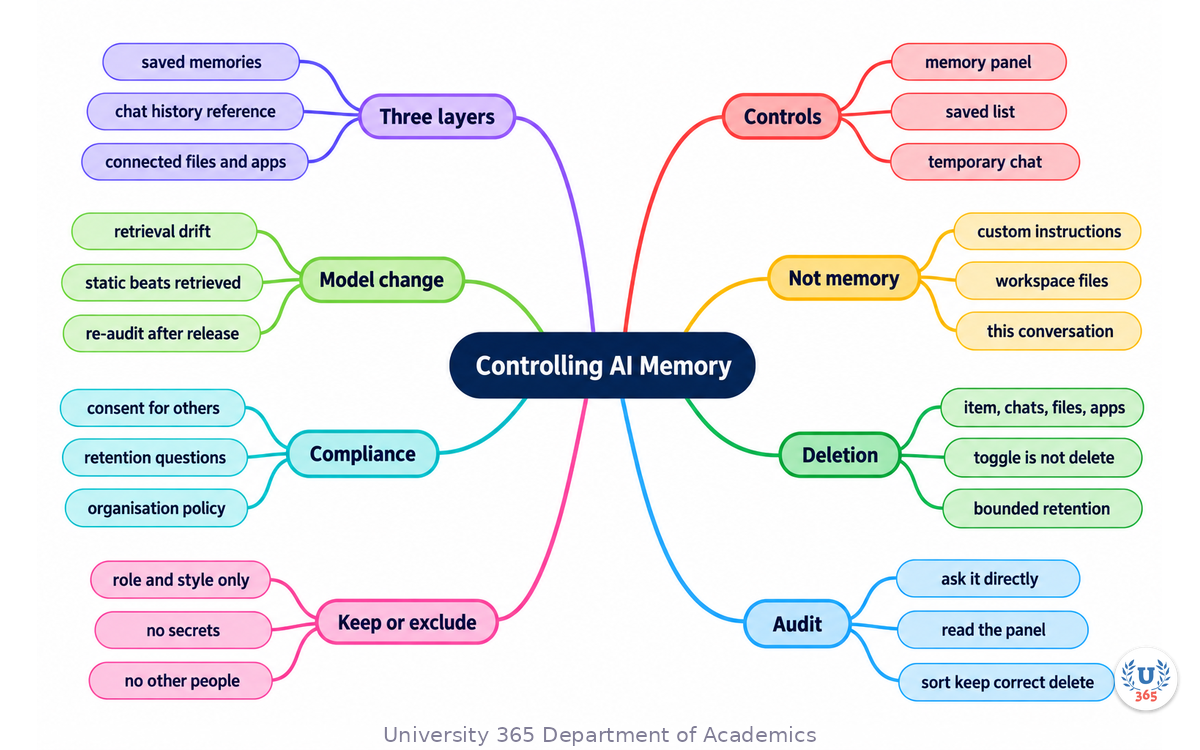
The mindmap puts the layers at the centre and branches to the controls, the neighbouring surfaces that are not memory, the four-surface deletion model, the audit, the keep-and-exclude rules, the compliance question and the effect of model changes.
UNOP Sound (University 365 Neuroscience Oriented Pedagogy)
Take five minutes to consolidate your memory. Play the isochronous tone track (10Hz alpha frequency) with your eyes closed. Alpha-frequency tones after a learning session support consolidation, helping move what you just learned from short-term to long-term memory.
[Audio player: UNOP Post-Lecture Isochrone (10Hz, 5 minutes)]
Practical Exercise: Run a Four-Surface Memory Audit
This exercise takes about twenty minutes and produces a one-page record you can act on. Do it on your own account, and do it once before the end of the week, because the findings decay in usefulness if left as an intention.
Step 1: Capture what the assistant thinks it knows
Open a new conversation and ask what it remembers about you. Save the answer as text. Do not edit it while saving it.
Step 2: Read the stored state
Open the memory panel and read the actual contents, including the saved-memories list if your account exposes one. Put the two outputs side by side. Note every item that step 1 did not mention.
Step 3: Sort every item into keep, correct or delete
Write the three buckets out. For each item, note the reason in five words. An item you cannot justify in five words goes in delete.
Step 4: Map each delete to its four surfaces
For every deleted item, write which of these still carries it: the list item, the conversations, the uploaded files, the connected applications. Then do the removal for each. A delete with unremoved copies is a false sense of safety.
Step 5: Read the neighbouring surfaces
Open custom instructions and any persistent workspace you use. Read the instructions and check the workspace's own memory setting. Note anything that has become stale.
Step 6: Write your four standing rules
Four sentences, in your own words, covering: what never goes into memory, when you use a temporary chat, what you do with another person's details, and when you review. Keep them somewhere you will see them.
Step 7: Set the review date
Put a monthly reminder in your calendar. Memory accumulates and does not retire anything on its own; the reminder is the entire maintenance plan.
What to look for
If step 1 and step 2 disagree by more than two items, you have been running on assumptions you could not read, and that gap is the finding. If any item in the delete bucket maps to all four surfaces, you have found the case that explains why previous cleanups did not stick. If any item contains another person's name, that is the item to fix first, before the convenience items.
Applied AI connection
This is CI-First applied to a personal data system. The human is the owner of the record: you decide what is stored, you verify the state instead of assuming it, you check that a deletion propagated, and you re-audit on a schedule. The assistant is an amplifier whose memory is a tool you govern. Nothing here delegates the judgement about what should be known about you.
Glossary
Term | Definition |
Saved memory | An explicitly stored fact an assistant keeps about you, usually readable and editable as a list. |
Reference to chat history | A separate capability in which an assistant draws on past conversations without any item being explicitly saved; it has no inspectable list. |
Connected context | Uploaded files and connected applications that supply project context and behave like memory while being stored elsewhere. |
Custom instructions | Static text you wrote that applies to new conversations; it is not memory and is not cleared by memory controls. |
Temporary chat | A per-conversation mode that does not reference existing memories and does not create new ones. |
Memory summary | A written account of what an assistant believes about you, synthesised from conversations rather than from saved items, shown on newer settings panels. |
Memory panel | The settings surface where memory is read, corrected, toggled and deleted. |
Project-only memory | A workspace setting that limits the workspace's context to conversations inside it and blocks account-level memories from entering. |
Four-surface deletion | The recognition that removing a detail requires acting on the memory item, the conversations, the uploaded files and the connected applications. |
Memory cap | A practical limit on the number of stored items, after which older items may be overwritten or new ones may not be saved. |
Retrieval drift | A change in which stored items a model surfaces and how strongly, caused by a model version change rather than by any edit you made. |
Consent dimension | The data-handling obligation created when memory contains another person's personal information. |
Retention window | The documented period for which deleted memory records may be retained for safety and debugging. |
Memory audit | A scheduled review that reads the stored state, sorts items into keep, correct or delete, and verifies that deletions propagated. |
Safety context | Limited safety-relevant context that an assistant may use in rare high-risk situations, independent of personalization settings. |
Static versus retrieved | The distinction between a rule that is applied to every request and a stored fact that is selected when relevant; only the first is guaranteed. |
Quiz: TEST YOUR UNDERSTANDING
1. Which part of AI memory is directly readable as a list you can edit?
A) Reference to past conversations
B) Saved memories
C) Connected applications
D) The current conversation
2. You delete the conversation where you first mentioned a detail. What remains?
A) Nothing; the detail is fully removed
B) The saved memory that came from that conversation, because saved memories are stored separately from chat history
C) Only the connected applications copy
D) Only the custom instructions copy
3. You turn the memory toggle off. What does that do to items already remembered?
A) It deletes them immediately
B) It stops them being used but does not delete them; deletion is a separate action
C) It converts them into custom instructions
D) It moves them into the saved-memories list
4. What is the correct tool for a single sensitive question you do not want to influence future answers?
A) Turning memory off account-wide forever
B) A temporary chat, which neither references nor creates memories
C) Deleting every past conversation
D) Editing custom instructions
5. Which of the four surfaces is the only lever that reduces what the reference-to-history layer can draw on?
A) The saved-memories list
B) The conversations themselves
C) The connected applications
D) Custom instructions
6. A rule must apply to every single request without exception. Where does it belong?
A) In a saved memory, because memories are always considered
B) In custom instructions or workspace instructions, because they are applied rather than retrieved on relevance
C) In a connected file, so it is retrieved when needed
D) Nowhere; rules cannot be guaranteed
7. Why is another person's name in your memory a compliance issue rather than only a preference issue?
A) Because it makes the memory list longer
B) Because it is someone else's personal data, held in a system they do not control and cannot audit
C) Because it slows retrieval
D) Because it cannot be deleted
8. What is retrieval drift?
A) Memory items being deleted by the provider
B) A change in which stored items a model surfaces after a version update, without any edit by you
C) The memory list sorting itself
D) A workspace losing its instructions
9. Your assistant keeps referencing a project document you did not save to memory. What is the most likely layer?
A) Saved memories
B) Connected context, such as an uploaded file or a connected application
C) Custom instructions
D) There is no explanation; it is a fault
10. Why does a single delete action not remove a detail completely?
A) Because deletions are queued for a week
B) Because the item, the conversations, the files and the connected applications are separate stores that one action does not reach
C) Because memory is stored on your device only
D) Because custom instructions override deletion
Answers: 1-B, 2-B, 3-B, 4-B, 5-B, 6-B, 7-B, 8-B, 9-B, 10-B
Related Resources
U365 INSIDE Publications
Lecture: Hidden context in ChatGPT Projects: how to stay in control: the workspace boundary that is most often misdiagnosed as a memory fault
Lecture: Prompt Engineering: Craft the Best Prompts with the OPRO Method: how to measure whether a prompt change actually helped, which is the same discipline this audit applies to settings
Lecture: The Model Context Protocol (MCP): Connecting AI to Everything: the access model behind connected applications and their credentials
External Resources
Projects and chats (ChatGPT Learn documentation): how a project holds shared files, instructions and sources, and how chats and sources are attached: learn.chatgpt.com/docs/projects
Using projects in ChatGPT (OpenAI Academy): the practical guide to when a persistent workspace is the right container for ongoing work, and project-only memory as a containment option: openai.com/academy/projects
Memory and new controls for ChatGPT (OpenAI announcement): the original two-setting model of memory and the controls a user is given over it: openai.com/index/memory-and-new-controls-for-chatgpt
Memory FAQ and Projects in ChatGPT (OpenAI Help Center): the two primary articles behind this lecture's controls map and deletion model. Search those exact titles in the OpenAI Help Center. Their articles are the authoritative source, and the help centre is not reachable from an automated client, so open them in a browser rather than relying on a link here.
Data Controls FAQ (OpenAI Help Center): the setting that governs whether your content is used to improve models, which is separate from memory. Same note: search the title in the help centre.
Related U365 Lectures (Coming Soon)
Auditing Connected Applications: What Your Assistant Can Already Reach, in the AI Skills Series
Personal Data in AI Tools: A Practitioner's Control Checklist, in the AI Skills Series
U.Copilot for This Lecture
Use this prompt with your own AI assistant to plan a memory cleanup for your situation. It follows the UP-Context-Engineering method: context first, then the task, then the constraints, then the output shape.
CONTEXT I want to audit and clean up what an AI assistant remembers about me. The assistant and plan I use: [product and plan] What its memory panel shows me: [one memory control with a summary, or two switches, or I have not opened it] What I use it for most: [work tasks, personal tasks, both] Whether I use persistent workspaces in it: [yes, how many, or no] Whether I have connected applications or uploaded files in it: [list them, or write none] Anything sensitive I know I have discussed with it: [describe the category, do not paste the content] Whether my organisation has a policy on which data may go into AI tools: [yes, describe it, no, or do not know] TASK 1. Tell me which memory layer is most likely causing problems for my usage pattern, and why. 2. Write the exact audit steps for my account layout, in order, including what to read on each screen. 3. For each category of sensitive content I listed, tell me which of the four surfaces could still hold it, and the removal action for each. 4. Give me four standing rules tailored to my usage, in one sentence each: what never goes into memory, when to use a temporary chat, how to handle another person's details, and the review cadence. 5. Tell me what to move out of memory into a static instruction, for the items that must apply on every request. 6. List the questions I should ask my organisation if a policy exists, and the questions to answer myself if it does not. CONSTRAINTS Use only what I gave you plus this conversation. Do not ask me to paste credentials, health details or another person's identifiable information. Where a control's label or location depends on my plan or region, tell me to verify it in my own settings rather than asserting it. Do not give legal advice; for contractual or regulatory obligations, tell me to consult my organisation's policy. Do not use em dashes. OUTPUT First, which layer is the likely cause and why. Then the ordered audit steps. Then a table with one row per sensitive category: category, surfaces that may hold it, removal action. Then the four standing rules. Then the list of items to move into a static instruction. Then the policy questions.
Next Steps
Open the memory panel today and read what is actually there. Thirty seconds of reading replaces months of inference about what the assistant knows, and most people have never done it.
Delete or correct anything that has become untrue, and follow the four surfaces for each item. A deletion that leaves the conversations, files and connected applications intact has changed nothing.
Write your four standing rules and put them where you will see them. What never goes into memory, when to use a temporary chat, what you do with another person's details, and your review cadence.
Move every rule that must apply on every request into a static instruction. Memory is a convenience that is retrieved when relevant, not a contract that is applied every time.
Put a monthly review in your calendar, and re-open the panel after any major model release. Memory accumulates, retires nothing on its own, and can be applied differently by a new model version without any change to the list.
Memory is the feature that makes an assistant feel like it knows you, and it is the feature most likely to hold a version of you that you never wrote. Read it, prune it, and keep the judgement about what should be known about you where it belongs, which is with you.
IMPORTANT NOTICE
This lecture is published by University 365 as part of its INSIDE Publications Hub. The content is free to read for all visitors. Lectures in this series may be part of a structured academic program leading to a Micro-Credential for your Career (MCC). To enroll in an academic program, visit university-365.com/tuition.
This content is for educational purposes. While we strive for accuracy, AI is a fast-moving field. Verify current technical details against primary sources for professional applications.
Copyright University 365, Inc. All rights reserved. This content is protected under University 365's copyright policies. For permissions or inquiries, contact uda@university-365.com.
Published by the Department of Academics, University 365.
Lecture delivered by the University 365 Institute of Technology (UIT).
Sam Utteker, Dean of Technology, UIT
Signed for the academic year 2026.





Comments