
Gemini 3.6 Flash: Google's Fast Multimodal Model for Academic and Professional Work

Updated: Oct 16
Status: Active | Last tested: 2026-08-25 (Gemini 3.6 Flash, released July 21, 2026) | Re-check: trigger-based (max 6 months)
Active: the tool is current and recommended.


In this Tool Review
Tool Snapshot
Tagline: Google's fast multimodal model in the 3.6 series
Category: Large Language Model, Multimodal AI
Provider: Google DeepMind
Version tested: Gemini 3.6 Flash (released July 21, 2026)
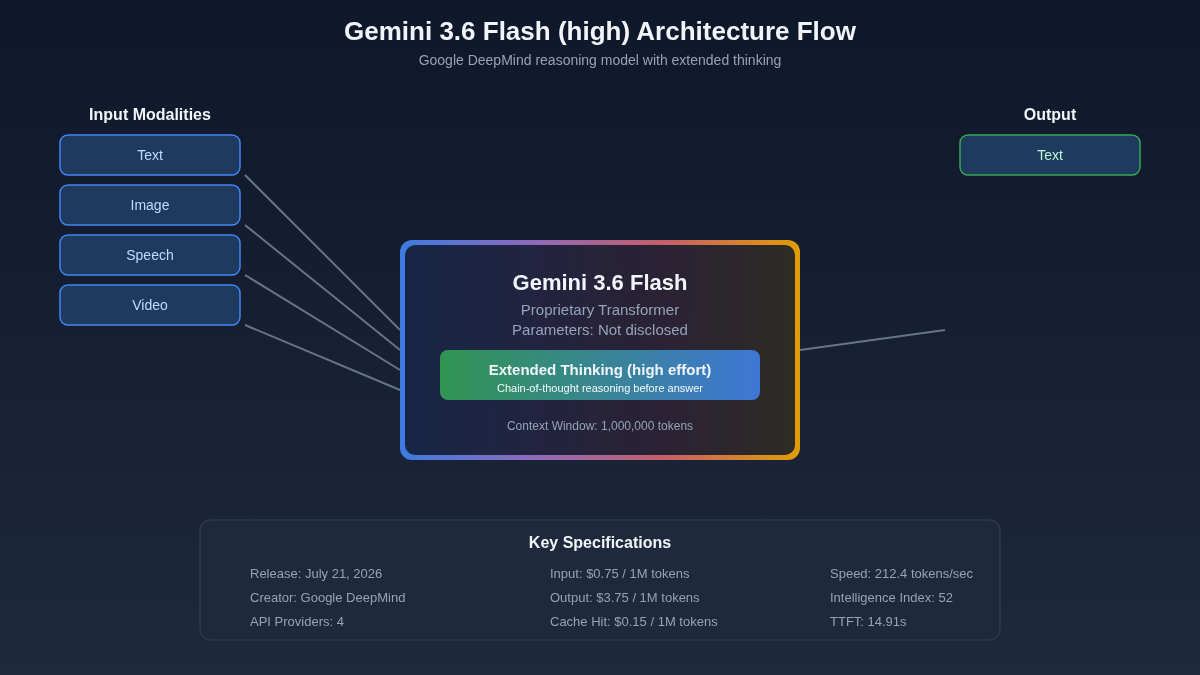
Context window: 1M tokens
License: Proprietary
Platforms: Google AI Studio, Google Cloud API, Vertex AI
Primary use cases:
Text generation and revision for academic and professional writing
Multimodal analysis: text, image, speech, and video input in a single session
Rapid prototyping of structured documents and summaries
Coding assistance and code review across multiple languages
Real-time translation and cross-language research
Pricing summary: Freemium. Free tier available on Google AI Studio with rate limits. Paid API access via Google Cloud with usage-based pricing. Pricing as of July 2026.
Official links:
Website: https://aistudio.google.com
Documentation: https://ai.google.dev/docs
Help center: https://ai.google.dev/support
Status page: https://status.cloud.google.com
Community: https://www.reddit.com/r/GoogleGemini
LLM specifications:
Context Window: 1M tokens
Effort Levels: Low effort and high effort variants
Parameters: Not publicly disclosed
Architecture: Transformer-based, multimodal (text, image, speech, video input)
Available Platforms: Google AI Studio (free tier), Google Cloud API, Vertex AI
Model Variants: Low effort (fast, cost-efficient), High effort (deeper reasoning)
Comparison References: See ollama.com/search for local deployment options and arena.ai (LMSYS Chatbot Arena) for benchmark rankings
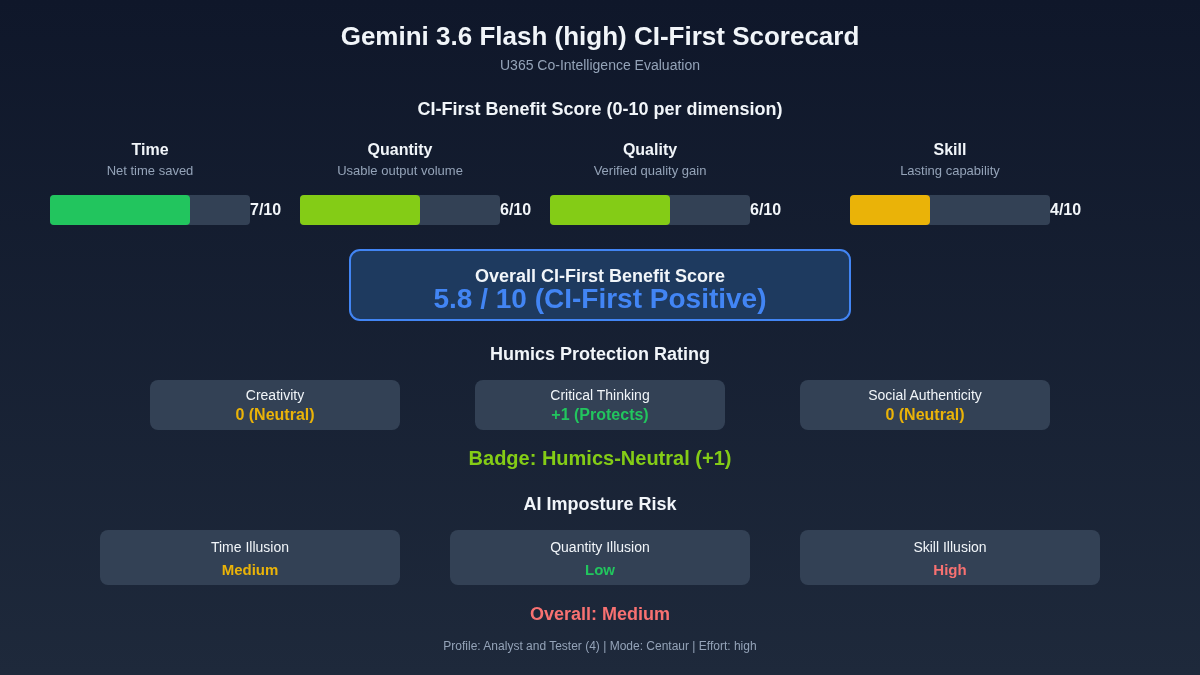
CI-First Benefit Score | 5.3 / 10 (CI-First Positive) |
Time / Quantity / Quality / Skill | 6 / 5 / 6 / 4 |
CI-First Profile | Co-Worker and Assistant (2) |
Humics Protection | Humics-Neutral (0/+3) |
AI Imposture Risk | Medium |
User Sentiment | Mixed (early stage, limited data) |
Pricing | Freemium (free tier with rate limits) |
Platforms | Google AI Studio, Google Cloud API, Vertex AI |
For detailed explanations of the CI-First evaluation terms used in this review, including CI-First Benefit Score, CI-First Profile, Humics Protection Badge, AI Imposture Risk, and User Sentiment, see the Glossary at the end of this publication.
The Problem
Finding a fast, multimodal AI model that handles text, images, speech, and video in a single session is hard. Most models specialize in one or two input types. When you need to analyze a chart from a PDF, transcribe a lecture recording, and draft a summary in one workflow, you often switch between three or four tools. Each switch costs time and breaks your train of thought.
Students and professionals working on research projects, market analysis, or multimedia content face this problem daily. You have a research paper with figures, a video of a presentation, and notes from a meeting. You need a model that can process all of it without forcing you to break the task into separate tool sessions.
The speed question matters too. Larger models like Gemini 3.7 Flash or Claude Sonnet 5 produce strong results but take longer and cost more per query. For routine tasks like summarization, translation, and initial drafting, you need a model that returns in seconds, not minutes, while still handling multimodal input.
The Outcome
A Fellow using Gemini 3.6 Flash gets a single model that accepts text, images, speech, and video in one session. You can paste a research paper, upload a chart image, and ask the model to analyze both together. The low effort variant returns in seconds for routine tasks. The high effort variant gives you deeper reasoning when you need it.
For a student writing a literature review, this means uploading a figure from a paper, asking the model to explain what the chart shows, and getting an answer you can verify against the paper text. For a professional analyzing a competitor's product video, it means uploading the video clip and asking for a summary of the key claims, all in one tool.
The time savings are concrete for routine multimodal tasks. A workflow that required three tools (text model, image analyzer, transcription tool) becomes a single session. The quality is sufficient for first drafts and initial analysis, with verification steps catching errors before final use.
Who Should Use Gemini 3.6 Flash
Learner categories:
Learner Type | Skill Level | How Gemini 3.6 Flash Helps | U365 Program Connection |
Students (Bachelor, Master) | Beginner to Intermediate | Faster multimodal research and drafting. Learn to work with AI as a co-worker, not a replacement. | UIT AI Developer Specialist and Data Scientist, UDA thesis work |
Professionals (career upskilling) | Intermediate | Rapid multimodal analysis for reports, presentations, and competitive intelligence. | UIB Business Management, UDE market analysis |
Everyone (lifelong learners) | Beginner | Quick answers to questions involving text and images. Builds the habit of verifying AI output. | LIPS Collect phase, SL-OS information intake |
U365 Institutes Alignment
Rating. High
Why. Multimodal AI is core to AI and data science curriculum. Students learn to work with models that process multiple input types.
The limit that holds the row. The model processes text, image, speech and video input; it teaches no modelling, no architecture and no evaluation design, and the review records that Google publishes no parameter count, no architecture detail and no independently verified benchmark set. The engineering competency that remains is designing a multimodal test: choosing the input types, defining what a correct reading of a chart or a clip must contain, and measuring the model against it. The review's own limits note the model is weaker than its larger siblings on complex reasoning, so the row's High rests on the multimodal work a Fellow measures, and no published U365 programme assesses that test design for this family: a word-start accent-folded search over all 79 published programme descriptions returns zero matches for multimodal, model evaluation, benchmark and test design.
Rating. High
Why. Market analysis with charts, competitor video analysis, and report drafting are daily tasks.
The limit that holds the row. The model reads charts and clips and drafts reports; it supplies no market framework, no valuation method and no statement of what a competitor claim means for a business, which the review's own workflow leaves to the Fellow (mark each claim factual or opinion, verify, then draft). The business competency that remains is evidence discipline over competitor material: building the claim table, separating assertions from opinions, and owning the conclusion. That competence is exercised on published material the model merely accelerates, and the row's High describes that disciplined analysis rather than the drafting.
Rating. High
Why. Content analysis across text, image, and video supports media studies and marketing coursework.
The limit that holds the row. The model analyses media across three input types; it writes no campaign, makes no editorial judgement and supplies no standard for whether a summary of a video is faithful, which the review records as variable ('video analysis quality varies with video complexity and audio quality'). The communication competency that remains is verification-first media analysis: checking the summary against the source, naming where the reading fails, and treating machine analysis as an input to editorial work rather than the work itself. The row stands at High for assessed analysis with verification, not for content production.
Rating. Medium
Why. Design feedback on uploaded mockups is useful, but the model is not a design tool.
The limit that holds the row. The model gives feedback on an uploaded mockup; it produces no design artefact, holds no design system and evaluates no design against a written brief, and the row's own reason says it is not a design tool. The design competency that remains is critique discipline: preparing the mockup, formulating the questions the critique must answer, and deciding which feedback survives the brief. The review's own caution applies here directly, that if you cannot read the chart yourself you are in the illusion, so the row stands at Medium only where the Fellow's own design reading leads.
Skill level required: Beginner. The ability to write clear prompts and verify AI output is the main skill.
Prerequisites: Basic web literacy. Familiarity with AI chat interfaces helps but is not required.
Typical time to first result: 2 minutes.
Typical time to competence: 3 to 5 hours of active use to learn effective prompting and verification habits.
How Gemini 3.6 Flash Works
Inputs: Text prompts, images (PNG, JPEG), audio files (speech input), and video clips. All input types can be combined in a single session.
Outputs: Text responses including summaries, analysis, code, translations, and structured documents. The model does not generate images, audio, or video output.
Underlying technology
LLMs or models used: Gemini 3.6 Flash, part of Google's Gemini 3.6 series. Released July 21, 2026.
Notable technical features: Multimodal input processing (text, image, speech, video), two effort levels (low and high), 1M token context window, native support for long documents.
Integrations: Google AI Studio (web interface), Google Cloud API, Vertex AI. No native Microsoft 365 integration. Works with third-party tools via API.
LLM specifications
Context window size: 1M tokens. The model accepts very long documents, transcripts, and multiple images in a single query.
Parameter count: Not publicly disclosed.
Architecture details: Transformer-based model with multimodal input encoders. Google has not published full architecture details.
Available effort levels: Low effort (fast, cost-efficient, suitable for routine tasks) and high effort (deeper reasoning, slower, suitable for complex analysis).
Benchmark scores: Performance benchmarks place Gemini 3.6 Flash between Gemini 3.7 Flash and Claude Sonnet 5. Specific benchmark scores (MMLU, HumanEval, GSM8K, MATH) have not been independently verified as of this writing. Check arena.ai (LMSYS Chatbot Arena) for current community ELO rankings.
Available platforms: Google AI Studio (free tier with rate limits), Google Cloud API (paid, usage-based), Vertex AI (enterprise). See ollama.com/search for any local deployment options.
Model variants: Low effort variant (optimized for speed), high effort variant (optimized for reasoning depth). No separate vision, coding, or long-context variants. The single model handles all input types.
Getting Started with Gemini 3.6 Flash
Required accounts: A Google account. Google AI Studio is free with rate limits. No credit card needed for the free tier. API access requires a Google Cloud account with billing enabled.
Installation: Web only for Google AI Studio. No installation required. For API access, install the Google Cloud SDK or use the REST API directly.
First-time configuration
1. Go to Google AI Studio and sign in with your Google account.
2. Select Gemini 3.6 Flash from the model dropdown.
3. Choose your effort level: low for routine tasks, high for complex analysis.
4. (Optional) For API access: create a Google Cloud project, enable the Gemini API, and generate an API key.
First 15 minutes checklist
☐ Task 1: Paste a paragraph of text and ask the model to summarize it in 3 bullet points.
☐ Task 2: Upload an image (a chart, diagram, or screenshot) and ask the model to describe what it shows.
☐ Task 3: Verify the image description against the original image. Are the details accurate?
☐ Task 4: Try a combined prompt: paste text and upload an image, then ask a question that requires both.
Result: You have a working multimodal session and a feel for how the model handles text and images together.
Real Workflows
Workflow 1: Multimodal Literature Review with Image Analysis
Learner type: Students (Bachelor, Master)
CI-First benefit tags: Time, Quality
Connects to: UIT AI Developer Specialist and Data Scientist, UDA thesis work
Time estimate: 20 minutes (prompt, verify, store)
Step | You Do | Tool Does |
1 | You paste the text of a research paper section into the prompt. | The tool does nothing yet. |
2 | You upload a figure or chart from the same paper. | The tool receives the image alongside the text. |
3 | You ask: "Explain what this chart shows and how it relates to the text I pasted." | The tool analyzes both inputs together and produces an explanation. |
4 | You verify the explanation against the chart and the paper text. You compare. | The tool does nothing. |
5 | You write a 2-sentence summary in your own words and store it in your LIPS Digital Second Brain. You execute. | The tool does nothing. |
Sample prompt:
I am a U365 student working on a literature review about [topic]. Here is a section of a research paper and a chart from the same paper. Explain what the chart shows in plain language. Then tell me how the chart supports or contradicts the claims in the text. Flag anything in the chart that the text does not mention.
Verification checklist:
☐ Multi-Model Check: Run the same prompt with Claude Sonnet 5 or ChatGPT and compare the chart analysis. If they disagree on what the chart shows, investigate the discrepancy.
☐ External Source: Read the figure caption and the surrounding paragraph in the original paper. Does the model's explanation match what the authors wrote?
☐ Human Review: Share your summary with your thesis advisor or a peer. Ask: "Did I capture the chart's meaning correctly?"
☐ CI-First Test: Can you explain the chart and its relation to the text without the model? [Y/N]
Workflow 2: Competitive Video Analysis for a Business Report
Learner type: Professionals (career upskilling)
CI-First benefit tags: Time, Quantity
Connects to: UIB Business Management diploma, UDE market analysis
Time estimate: 25 minutes (upload, analyze, verify, draft)
Step | You Do | Tool Does |
1 | You upload a short video clip of a competitor's product demo or keynote. | The tool processes the video input. |
2 | You ask: "Summarize the key claims this speaker makes about their product. List each claim as a bullet point." | The tool transcribes and analyzes the video, producing a claim list. |
3 | You verify each claim against the video. You watch the relevant sections to confirm the model did not invent claims. | The tool does nothing. You verify. |
4 | You ask a follow-up: "For each claim, note whether it is a factual statement or a marketing opinion." | The tool classifies the claims. |
5 | You draft a 1-page competitive brief using the verified claims and store it in LIPS under the project. You write and store. | The tool does nothing. |
Sample prompt:
I am a U365 professional analyzing [competitor name] for a competitive intelligence report. This is a video of their product demo. List every specific claim the speaker makes about the product (features, pricing, performance, comparisons to competitors). For each claim, mark whether it is a factual assertion or a marketing opinion. If the speaker cites a number, note the exact number.
Verification checklist:
☐ Multi-Model Check: Ask ChatGPT or Claude to analyze the same video. Compare the claim lists. If one model finds claims the other missed, investigate.
☐ External Source: Cross-check any factual claims (pricing, performance numbers) against the competitor's official website or documentation.
☐ Human Review: Share the competitive brief with your team lead. Ask: "Do these claims match what you know about [competitor]?"
☐ CI-First Test: Can you present the competitor's key claims and your assessment without the model? [Y/N]
Strengths, Limits, and AI Imposture Risk
Strengths
CI-First Benefit | Strength | Evidence |
Time | Fast responses for routine multimodal tasks. The low effort variant returns in seconds. Switching between text, image, and video in one session eliminates tool-switching time. | A multimodal task that required three separate tools (text model, image analyzer, transcription) becomes one session. |
Quantity | Moderate increase. The model handles multiple input types in one session, increasing the range of tasks you can complete. | A single session can process a research paper, analyze a chart, and summarize a video clip. |
Quality | Moderate for first drafts and initial analysis. The high effort variant produces deeper reasoning. Quality drops on complex reasoning and niche topics. | First drafts are usable after verification. The model handles common tasks well but can produce subtle errors on specialized topics. |
Skill | Marginal. The model produces output but does not actively teach the user. Users who only copy outputs without verifying do not build skill. | Users learn prompting patterns over time, but the model does not explain its reasoning or teach the underlying skill. |
Limits
The model can produce subtle factual errors that look correct on the surface. Without verification, these errors propagate into your work.
The 1M token context window is large, but the model does not maintain consistent quality across very long inputs. Attention degrades on long documents.
Video analysis quality varies. The model can miss details in fast-moving or complex video content. Transcription accuracy depends on audio quality.
The model does not generate images, audio, or video. It is a text-output model with multimodal input, not a full creative tool.
Google has not published full architecture details or parameter count, making independent evaluation harder.
Benchmark placement between Gemini 3.7 Flash and Claude Sonnet 5 is based on available comparisons, but specific benchmark scores (MMLU, HumanEval, GSM8K, MATH) have not been independently verified as of this writing.
AI Imposture Risk
Time Illusion
Rating. Medium
Evidence. The model is fast, but multimodal tasks require verification across input types. A user who uploads a video and accepts the summary without watching the relevant sections saves apparent time but risks shipping errors.
Quantity Illusion
Rating. Medium
Evidence. The model produces plausible analysis across text, image, and video that looks complete. Users may accept the output without checking whether the model missed details in the video or misread the chart.
Skill Illusion
Rating. Medium
Evidence. The model produces expert-looking analysis of charts and videos. A user who cannot independently read charts or analyze video content may believe they have the skill when they are relying entirely on the model.
Overall Imposture Risk: Medium
One trap is not Low. All three are Medium. The model is fast and produces plausible output across input types, which creates the appearance of competence. The verification burden falls on the user.
U365 Co-Intelligence Rating
CI-First Profile
Primary profile: Co-Worker and Assistant (2). The model handles execution tasks: drafting, summarizing, and analyzing across input types. The human directs and reviews.
Secondary profiles: Professor, Coach and Tutor (3) when used for learning, Analyst and Tester (4) when used for data analysis.
CI-First Benefit Score
Time
Score (0-10). 6
Rationale. Moderate savings. Fast responses for routine tasks. Multimodal input in one session eliminates tool-switching. Verification time reduces net savings.
Quantity
Score (0-10). 5
Rationale. Moderate increase. Handles multiple input types, increasing task range. Output is text only, limiting volume for creative or visual tasks.
Quality
Score (0-10). 6
Rationale. Moderate improvement for first drafts and initial analysis. Quality drops on complex reasoning and niche topics. Verified output is usable.
Skill
Score (0-10). 4
Rationale. Marginal. The model produces output but does not actively teach. Users who verify and reproduce build some skill. Users who copy outputs do not.
CI-First Benefit Score: 5.3 / 10 (CI-First Positive)
Humics Protection Badge
Dimension | Rating | Rationale |
Creativity | Neutral | The model can spark ideas through multimodal input, but it can also replace the user's creative thinking if used passively. Balanced effect. |
Critical Thinking | Neutral | The model produces analysis but does not require verification by design. Users who verify build critical thinking. Users who accept output do not. The tool itself is neutral. |
Social Authenticity | Neutral | The model is not primarily a communication tool. It can draft communication, which may replace or support the user's voice depending on how it is used. |
Humics Protection Score: 0 / +3
Badge: Humics-Neutral
Superhuman Usage Guidance
When to invite this tool:
Multimodal research tasks combining text, images, and video in one session
Rapid first drafts and initial analysis where speed matters more than precision
Translation and cross-language tasks
Summarization of long documents within the 1M token context window
Routine coding assistance and code review
When to keep this tool out:
Final judgment on contested topics where you need to read original sources
Tasks requiring image, audio, or video generation (this model only outputs text)
Decisions requiring ethical judgment or empathetic communication
Any task where you cannot verify the model's output against the source material
U365 method integration:
LIPS + CARE: Use the model in the Collect phase to process and summarize multimodal inputs. Store verified outputs in LIPS. Do not let it replace the Action Plan or Execute phases.
ULM + EVA: Supports the Career domain (professional research and drafting) and Quality of Life domain (learning and curiosity). Fits the Explore phase of EVA.
UP-Context-Engineering: Provide your U365 role, project context, and verification requirements in the prompt. The model responds well to structured context.
SL-OS: The model fits as a processing tool within the SL-OS workflow. Outputs feed into OneNote and SharePoint manually. No native Microsoft 365 integration.
UNOP: Supports multi-modal learning by processing text, image, and video together. Does not enforce spaced repetition or active recall. The user must build those practices separately.
Over-delegation warning: The main risk is accepting multimodal analysis without verification. The model produces plausible chart explanations, video summaries, and document analysis that look correct. If you stop checking the model's output against the source material, your analytical skill erodes. The model reads the chart for you, but if you cannot read the chart yourself, you are in the Skill Illusion. The Superhuman verifies. The Sub-human ships unverified.
What Users Say
Aggregate Rating Table
Platform | Rating | Number of reviews | Link |
Google AI Studio | No standalone reviews. Available as a model within Google AI Studio. | ||
Trustpilot | No reviews found on Trustpilot for Gemini 3.6 Flash. | ||
G2 | No reviews found on G2 for Gemini 3.6 Flash. | ||
Capterra | No reviews found on Capterra for Gemini 3.6 Flash. | ||
Product Hunt | No Product Hunt listing found for Gemini 3.6 Flash. | ||
App Store | No standalone app. Available within the Google AI Studio web interface. | ||
Google Play | No standalone app. Available within the Google AI Studio web interface. | ||
Reddit sentiment | Mixed. Users discuss Gemini 3.6 Flash in the context of the Gemini model family. Some praise its speed and multimodal capabilities. Others note it is not as strong as Gemini 3.7 Flash or Claude Sonnet 5 on complex reasoning. | Multiple threads | |
Futurepedia | No listing found for Gemini 3.6 Flash. | ||
FutureTools | No listing found for Gemini 3.6 Flash. |
Note: Gemini 3.6 Flash was released July 21, 2026. As of this writing (August 25, 2026), independent review platforms have not accumulated reviews for this specific model. Reviews exist for the Gemini model family as a whole, but not for the 3.6 Flash variant specifically. This section will be updated as reviews become available.
What Users Praise
Early user discussion on Reddit and developer forums notes the model's speed for routine tasks and its multimodal convenience. Users who combine text and image analysis in one session report that it removes the friction of switching tools. The low effort variant is noted as fast enough for real-time drafting. The 1M token context window is praised for handling long documents and transcripts in a single query.
What Users Complain About
Users note that Gemini 3.6 Flash is not as strong as Gemini 3.7 Flash or Claude Sonnet 5 on complex reasoning tasks. The model can produce subtle errors on specialized topics. Some users report that video analysis quality varies with video complexity and audio quality. The lack of native Microsoft 365 integration is a friction point for users in enterprise workflows. The free tier rate limits on Google AI Studio are noted as restrictive for heavy use.
Sentiment Summary
Overall sentiment: Mixed (early stage, limited data)
Key themes:
Speed and multimodal convenience are the top praised features
Complex reasoning quality is below Gemini 3.7 Flash and Claude Sonnet 5
Video analysis quality varies by input quality
Free tier rate limits are restrictive for heavy use
No native Microsoft 365 integration
U365 Editorial Note
User sentiment is early and limited, but it aligns with the CI-First evaluation in Section 8. Users praise the speed and multimodal convenience, which the CI-First framework scores as Time Benefit 6 (moderate savings). The complaint that the model is weaker on complex reasoning aligns with the Quality Benefit 6 (moderate improvement, drops on complex reasoning). The Skill Illusion risk rated Medium in Section 7 is reflected in user reports of subtle errors on specialized topics: the model produces plausible output that requires verification. The tension to note: users value the speed, but the CI-First Benefit Score is 5.3 (CI-First Positive, not CI-First Strong). The speed is real, but the verification burden reduces the net benefit. Users who skip verification are in the Imposture traps described in Section 7.
Comparison and Alternatives
Alternative | When to Choose |
Gemini 3.7 Flash | You need the strongest model in the 3.6 series and can accept higher cost and latency. |
Claude Sonnet 5 | You need speed and cost efficiency over maximum capability. |
ChatGPT (GPT-5) | You need broader multimodal generation (text, image, audio output) alongside analysis. |
Gemini 3.6 Pro | You need deeper reasoning and can accept slower responses and higher cost. |
Where Gemini 3.6 Flash is clearly better
Speed and cost for routine multimodal tasks. If your work involves combining text, image, and video analysis in one session, and you need fast responses, Gemini 3.6 Flash is the right tool. The low effort variant returns in seconds, and the 1M token context window handles long documents without chunking. The free tier on Google AI Studio makes it accessible for students and individual professionals.
Where Gemini 3.6 Flash is clearly worse
Complex reasoning and deep analysis. Gemini 3.7 Flash and Claude Sonnet 5 produce stronger results on reasoning-heavy tasks. If your work requires the highest quality reasoning, long-form writing, or specialized domain analysis, the 3.6 Flash variant is not the right choice. It is a fast co-worker, not a deep thinker.
Verdict and Next Steps
Verdict
Who should adopt it: Fellows, students, and professionals who need fast multimodal analysis combining text, images, and video. Anyone who wants a single model for routine research, drafting, and translation tasks.
When: At the start of a research project, literature review, or competitive analysis where speed and multimodal input matter more than maximum reasoning depth.
For what: Rapid first drafts, multimodal summarization, translation, and initial analysis where you will verify before final use.
UP-Context-Engineering prompt pack:
1. "I am a U365 [Fellow/student/professional] working on [project description]. I need to analyze [text and image or video input]. Give me a structured summary with key findings. Flag anything you are uncertain about so I can verify it."
2. "Act as my research analyst (AI Profile 4: Analyst and Tester). I am exploring [topic] for [purpose]. I have uploaded [document and image]. Analyze both together and tell me: what does the chart show, how does it relate to the text, and what should I verify independently?"
3. "I am building a LIPS entry for [project]. I have a [video clip] and [text notes] from the same session. Summarize the key points from both, noting where the video and text agree or disagree. I will verify the summary against the sources before storing it."
Related U365 content:
U365's Recommendations to Learn More
This section curates the best resources we found for learning Gemini 3.6 Flash. Every link was verified active as of 2026-09-03. We include official documentation, community tutorials, and video walkthroughs. Individual creators are welcome when their content teaches something this post does not.
Official learning resources
Video tutorials and channels
Written tutorials and deep-dive articles
Community and social
We curate resources by content quality, not source type. Individual creators and community experts are included when their work teaches something this post does not. Exclude only promotional or affiliate content.
Glossary
CI-First Benefit Score
A composite score from 0 to 10 that measures the net benefit of using an AI tool after accounting for the time spent prompting, verifying, and correcting its output. It is calculated as the average of four dimensions: Time (net time saved), Quantity (usable output volume increase), Quality (verified, durable quality improvement), and Skill (genuine lasting capability built). For Gemini 3.6 Flash, the score is 5.3/10 (CI-First Positive), reflecting moderate savings from speed and multimodal convenience, offset by the verification burden required to catch subtle errors.
CI-First Profile
A classification of how an AI tool functions in relation to human intelligence, drawn from five profiles: (level 1) Co-Creator and Thought Partner, (level 2) Co-Worker and Assistant, (level 3) Professor, Coach and Tutor, (level 4) Analyst and Tester, and (level 5) Challenger and Devil's Advocate. Lower level numbers indicate higher AI autonomy in the collaboration. Gemini 3.6 Flash is classified as Co-Worker and Assistant (level 2) primarily, with secondary profiles as Professor, Coach and Tutor (level 3) for learning contexts and Analyst and Tester (level 4) for data analysis tasks. The human directs and reviews; the tool executes.
Humics Protection Badge
A rating from -3 to +3 that assesses whether an AI tool protects or erodes human qualities across three dimensions: Creativity, Critical Thinking, and Social Authenticity. Each dimension is rated as Protects (+1), Neutral (0), or Erodes (-1). The sum determines the badge: +2 to +3 is Humics-Friendly, -1 to +1 is Humics-Neutral, and -2 to -3 is Humics-Risky. Gemini 3.6 Flash scores 0/+3 (Humics-Neutral), meaning it neither actively protects nor erodes human qualities. The effect depends on how the user engages with the tool.
AI Imposture Risk
An assessment of how easily an AI tool can create the illusion of competence without genuine skill transfer. It evaluates three traps: Time Illusion (saving apparent time but shipping errors), Quantity Illusion (producing plausible output that looks complete but misses details), and Skill Illusion (producing expert-looking analysis that the user cannot reproduce independently). Each trap is rated Low, Medium, or High. Gemini 3.6 Flash is rated Medium across all three traps, resulting in an overall Medium risk. The model's speed and plausible multimodal output create the appearance of competence that requires active verification to counter.
User Sentiment
An aggregated summary of public user opinion about an AI tool, drawn from review platforms (Trustpilot, G2, Capterra), community forums (Reddit, Product Hunt), and app stores. For Gemini 3.6 Flash, user sentiment is Mixed (early stage, limited data) as of August 2026. Users praise the speed and multimodal convenience while noting weaker complex reasoning compared to Gemini 3.7 Flash and Claude Sonnet 5. This sentiment aligns with the CI-First evaluation: the speed benefit is real but the verification burden reduces the net benefit.
Sources
Using the latest Gemini models (Gemini API docs): https://ai.google.dev/gemini-api/docs/latest-model
Gemini API reference (Google AI for Developers): https://ai.google.dev/api
Gemini models overview (Google AI for Developers): https://ai.google.dev/gemini-api/docs/models
Gemini 3.6 Flash (Google DeepMind): https://deepmind.google/models/gemini/flash
Gemini 3.6 Flash on Hugging Face (community): https://huggingface.co/crosbylegal/gemini-3.6-flash
Gemini 3.6 Flash Coding Test (YouTube): https://youtube.com/watch?v=AMdNcjl_8hI
Google AI Studio + Gemini 3.6 Flash is INSANE! (YouTube): https://youtube.com/watch?v=RagbkFEb7vY
Google's New 3 Gemini Models Are Incredible (YouTube): https://youtube.com/watch?v=0fFHBHQ_d2I
Google AI Studio (web interface): https://aistudio.google.com
r/GoogleGemini community (Reddit): https://www.reddit.com/r/GoogleGemini




Comments