
Gemini Notebook (NotebookLM): Google's Source-Grounded AI Research Assistant

Updated: Oct 16

Status: Active | Last tested: 2026-08-25 (current web version) | Re-check: trigger-based (max 6 months)
Active: the tool is current and recommended.


In this Tool Review
Tool Snapshot
Tagline: Your AI-powered research assistant that grounds every answer in your own sources
Category: AI Research, Document Q&A, Knowledge Management
Provider: Google
Version tested: Current web version (July 2026, Gemini 3.5)
License: Proprietary (freemium)
Platforms: Web, iOS, Android
Primary use cases:
Summarizing multiple research papers, reports, and documents into one coherent overview
Generating podcast-style Audio Overviews from your study materials
Asking source-grounded questions with inline citations for academic or professional work
Creating study aids: flashcards, slide decks, and infographics from uploaded sources
Analyzing YouTube videos and websites by adding their content as notebook sources
Pricing summary: Freemium. Free tier: up to 100 sources per notebook, 50 notebooks, 3 Audio Overviews per day. NotebookLM Plus (included with Google One AI Premium at $19.99/month or $199.99/year): 500 sources per notebook, 500 notebooks, 20 Audio Overviews per day, Video Overviews, and shared collaborative notebooks. Enterprise pricing via Google Workspace and Google Cloud.
Official links:
Website: https://notebooklm.google/
Help center: https://support.google.com/product/14247110
Blog announcement: https://blog.google/technology/ai/notebooklm-google-ai/
Wikipedia: https://en.wikipedia.org/wiki/NotebookLM
Community: https://www.reddit.com/r/NotebookLM/
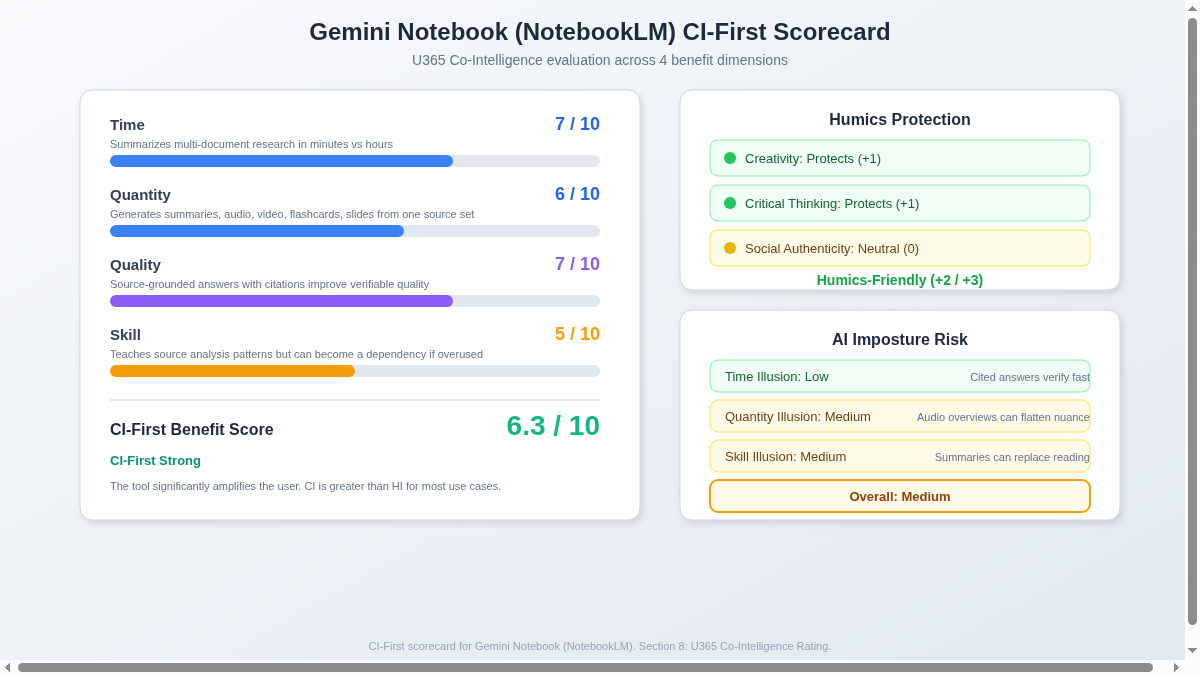
CI-First Benefit Score | 6.3 / 10 (CI-First Strong) |
Time / Quantity / Quality / Skill | 7 / 6 / 7 / 5 |
CI-First Profile | Co-Creator and Thought Partner (1) |
Humics Protection | Humics-Friendly (+2/+3) |
AI Imposture Risk | Medium |
User Sentiment | Predominantly Positive |
Pricing | Freemium ($0 / $19.99 per month) |
Platforms | Web, iOS, Android |
For detailed explanations of the CI-First evaluation terms used in this review, including CI-First Benefit Score, CI-First Profile, Humics Protection Badge, AI Imposture Risk, and User Sentiment, see the Glossary at the end of this publication.
The Problem
Researchers, students, and professionals face a constant challenge: synthesizing information from multiple sources takes hours of careful reading, note-taking, and cross-referencing. You have the documents, articles, and papers, but making connections between them consumes your time and cognitive energy.
Standard AI chatbots do not solve this problem well. They answer from their training data, not from your specific sources. You cannot verify where their information comes from. A sourceless answer is a liability in academic work, professional research, or any context where accuracy matters.
Without source-grounding, you face a choice: trust an AI that might hallucinate, or spend hours doing the synthesis manually. Neither option is ideal for a Fellow or professional who needs both speed and accountability.
The Outcome
A Fellow using Gemini Notebook gets grounded answers in seconds. Each claim links to the specific source it came from, so you can click through and verify. For a literature review, you upload 5 to 10 papers and ask, "What are the main methodological differences between these studies?" The tool synthesizes across sources and cites each one.
For audio learners, the Audio Overview feature converts your documents into a podcast-style discussion between two AI hosts who discuss the key themes. A 2-hour reading session becomes a 10-minute audio overview you can listen to during your commute.
For exam preparation, the tool generates flashcards, slide decks, and infographics from your course materials. One source set produces multiple study formats, saving hours of manual preparation time.
Who Should Use Gemini Notebook (NotebookLM)
Learner categories:
Fellow Category | Skill Level | Why Use This Tool | U365 Program Connection |
Students (Bachelor, Master) | Beginner | Faster research for assignments and thesis work. Learn to frame research questions across multiple sources. | Research methods practice, UDA thesis and dissertation work, UIT data science projects. No published U365 credential assesses research methods as a named component, and none is asserted. |
Professionals (career upskilling) | Beginner to Intermediate | Rapid document analysis and competitive intelligence without a research team. | UDG growth and partnerships, UIB business management, UDE market analysis |
Everyone (lifelong learners) | Beginner | Quick sourced answers from personal documents. Builds source-verification habits. | LIPS Collect phase, SL-OS information intake, ULM Career domain |
U365 Institutes Alignment
Rating. High
Why. Technical documentation analysis, research paper synthesis, data science project support.
The limit that holds the row. The tool grounds answers in the sources supplied; it teaches no engineering, data science or evaluation method of its own, and the review's own limits section records that source-grounding reduces but does not eliminate hallucination and that every claim still has to be checked against the original document. The verification practice is the competency, and the tool does not supply it: the review keeps fact-checking with the reader, and this post itself records that no published U365 credential assesses research methods as a named component. A word-start, accent-folded search over all 79 published programme descriptions returns zero matches for citation, source-grounded and reproducibility, with retrieval (2), research (4) and grounding (3) as the near hits.
Rating. High
Why. Market research, competitive analysis, business plan source management.
The limit that holds the row. The tool manages sources and produces a synthesis; it teaches no management, finance or entrepreneurship content, and it does not size, price or defend the decision the synthesis feeds. The review records that the source-grounding reduces but does not eliminate misattribution, and that the free tier caps sources at 100 per notebook, so the appraisal includes judging when the tool's own bounds change the answer. No published U365 programme assesses that appraisal: a word-start, accent-folded search over all 79 published programme descriptions returns zero matches for total cost, procurement, unit economics and licence, with financial analysis (2), business plan (2) and market research (1) as the near hits.
Rating. High
Why. Content research, source gathering, fact-checking for articles and campaigns.
The limit that holds the row. The tool gathers, cites and checks against the sources supplied; it writes no copy and sets no register, and the review records that the Audio Overviews can flatten nuance into a standardised conversational format. The competency that remains is the editorial judgement over machine synthesis: what a citation actually supports, what a summary dropped, and what a reader is owed about how the answer was produced. No published U365 programme assesses that judgement: a word-start, accent-folded search over all 79 published programme descriptions returns zero matches for editorial, fact-check, disclosure and publication, with audience (6), brand (6), content strategy (1) and copywriting (1) as the near hits.
Rating. Medium
Why. Design research, user study analysis, trend documentation.
The limit that holds the row. The tool reads and synthesises research material; it produces no design artefact, no prototype and no critique against a brief, and it does not run a user study. The competency that remains is the research judgement: framing what the study must answer, reading the synthesis against the raw material, and deciding which trend evidence is strong enough to carry into a design. No published U365 programme assesses that judgement over machine synthesis: a word-start, accent-folded search over all 79 published programme descriptions returns zero matches for user research, usability, information architecture and critique, with design (23), visual (9) and typography (2) as the near hits.
Skill level required: Beginner. No technical knowledge needed. The ability to organize documents and ask clear questions is the main skill.
Prerequisites: A Google account. Web literacy helps (knowing how to evaluate source credibility).
Typical time to first result: 5 minutes (upload a document, get a summary).
Typical time to competence: 1 to 2 hours of active use to learn effective query patterns and source organization.
How Gemini Notebook (NotebookLM) Works
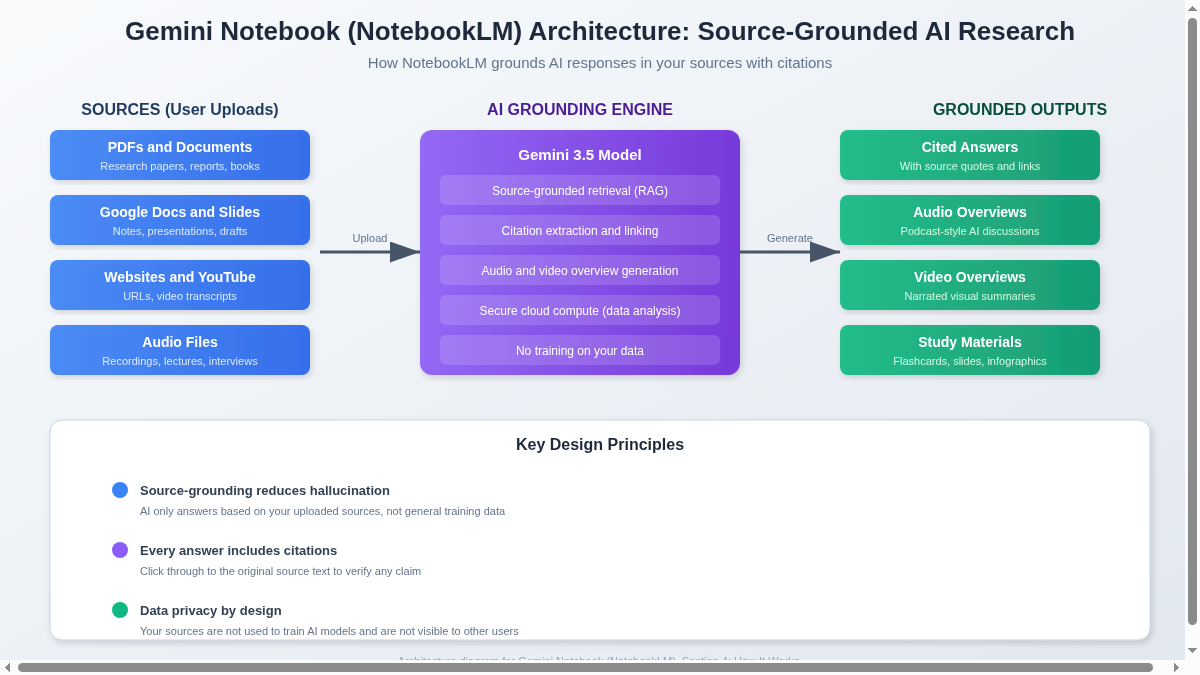
Inputs: PDFs, Google Docs, Google Slides, websites (URLs), YouTube videos (via transcripts), audio files, pasted text, and Google Drive files. You organize sources into notebooks, each containing up to 100 sources (free tier) or 500 sources (Plus tier).
Outputs: Cited text answers with inline source quotes, Audio Overviews (podcast-style AI discussions), Video Overviews (narrated visual summaries), study materials (flashcards, slide decks, infographics), data tables, and mind maps.
Underlying technology
LLMs used: Gemini 3.5 models (as of June 2026). The tool was previously powered by Gemini 1.5 Pro and Gemini 2.0.
Notable technical features: Source-grounded retrieval-augmented generation (RAG) that constrains answers to your uploaded sources, inline citation extraction with source quotes, Audio Overview generation using two AI voice hosts, Video Overview generation with narration and visuals, secure cloud compute for data analysis (code execution), support for 80+ languages in audio and video overviews.
Integrations: Google Drive (Docs, Slides), YouTube, Google Workspace, Google Cloud (enterprise). No third-party integrations outside Google products. No API access for external developers as of August 2026.
Key design principle
The model only has access to the source material you choose to upload. Your files and dialogue with the AI are not visible to other users. Google does not use your data to train new AI models. This privacy posture makes NotebookLM suitable for sensitive research and professional documents.
Getting Started with Gemini Notebook (NotebookLM)
Required accounts: A free Google account. No credit card needed for the free tier. NotebookLM Plus requires a Google One AI Premium subscription ($19.99/month).
Installation
Web app at notebooklm.google.com. Mobile apps available for iOS and Android (launched 2025). No browser extension or desktop app.
First-time configuration
1. Go to notebooklm.google.com and sign in with your Google account.
2. Click "Create new notebook" and give it a name.
3. Add sources: upload PDFs, paste text, add Google Drive documents, or paste a website URL.
4. Wait a few seconds for the tool to process each source and generate a summary.
5. Start asking questions in the chat box, or generate an Audio Overview.
First 15 minutes checklist
☐ Create a notebook and add 2 to 3 sources (a PDF, a Google Doc, and a website URL).
☐ Read the auto-generated summary and key topics.
☐ Ask a specific question about the sources and click through the citation to verify the answer.
☐ Generate an Audio Overview and listen to the first 2 minutes.
☐ Save a useful answer or export the Audio Overview for later reference in your LIPS Digital Second Brain.
Result: You have a grounded research notebook with cited answers and an audio summary you can verify and store.
Real Workflows
Workflow 1: Research a Topic Across Multiple Papers for a Literature Review
Learner type: Students (Bachelor, Master)
CI-First benefit tags: Time, Quality
Connects to: Research methods practice, UDA thesis and dissertation work, UIT data science projects. No published U365 credential assesses research methods as a named component, and none is asserted.
Time estimate: 20 minutes (upload, query, verify, store)
What you do vs what the tool does:
Step | You do | The tool does |
Step 1 | Collect 3 to 5 relevant papers as PDFs | Nothing yet |
Step 2 | Create a new notebook and upload all PDFs as sources | Processes each source, generates summaries and key topics |
Step 3 | Ask a specific synthesis question across all sources | Answers with inline citations from each source |
Step 4 | Click through 2 to 3 citations and read the original text | Nothing, you verify |
Step 5 | Evaluate whether the synthesis is accurate and complete | Nothing, you judge |
Step 6 | Store the answer and source links in your LIPS Digital Second Brain | Nothing, you execute |
Sample prompt:
Based on these sources, what are the main methodological differences between the studies? For each difference, cite the specific source and quote the relevant passage. Organize your answer as a comparison table with columns: Method, Study A, Study B, Study C.
Verification checklist:
☐ Multi-Model Check: Run the same question through ChatGPT or Claude with the same documents attached. Compare which sources each tool cites and whether their syntheses agree.
☐ External Source: Click through to at least 3 cited source passages and read the original text. Confirm the claim matches what the source says.
☐ Human Review: Share your synthesis with your thesis advisor or a peer. Ask: "Does this accurately represent the methodological landscape?"
☐ CI-First Test: Can you explain the methodological differences in your own words without NotebookLM? [Y/N]
Workflow 2: Create an Audio Overview for Exam Preparation
Learner type: Everyone (lifelong learners)
CI-First benefit tags: Time, Quantity, Quality
Connects to: LIPS Collect phase, SL-OS daily learning routine, ULM Career domain, UNOP multi-modal learning
Time estimate: 15 minutes (upload, generate, listen, verify)
What you do vs what the tool does:
Step | You do | The tool does |
Step 1 | Collect your course materials (lecture notes, textbook chapters, study guides) | Nothing yet |
Step 2 | Create a notebook and upload all materials as sources | Processes sources and generates a document guide |
Step 3 | Click "Generate Audio Overview" and wait 5 to 10 minutes | Creates a podcast-style discussion between two AI hosts covering key themes |
Step 4 | Listen to the Audio Overview during your commute or workout | Nothing, you learn |
Step 5 | Note any claims that seem oversimplified or missing nuance | Nothing, you evaluate |
Step 6 | Verify 2 to 3 key claims against the original source documents | Nothing, you verify |
Step 7 | Save the Audio Overview link in your LIPS Digital Second Brain under the relevant course | Nothing, you execute |
Sample prompt:
Generate an Audio Overview that focuses on the key concepts from Chapter 3 and Chapter 5 of these materials. Emphasize the practical applications and common exam questions. Use a conversational tone suitable for review during a commute.
Verification checklist:
☐ Multi-Model Check: Ask the same question in text form within NotebookLM and compare the text answer to what the Audio Overview discusses. Check for omitted topics.
☐ External Source: Open 2 source documents and confirm the Audio Overview accurately represents the key points.
☐ Human Review: Share the Audio Overview with a study partner. Ask: "Did this cover the material we need for the exam?"
☐ CI-First Test: After listening, can you explain the key concepts in your own words without the Audio Overview? [Y/N]
Strengths, Limits, and AI Imposture Risk
Strengths
The tool delivers clear CI-First benefits in these areas:
CI-First Benefit | Strength | Evidence |
Time | Summarizes multi-document research in minutes instead of hours | A 2-hour literature synthesis becomes a 5-minute query plus 10 minutes of citation verification |
Quantity | Generates multiple output formats from one source set | One notebook produces text answers, Audio Overviews, Video Overviews, flashcards, slide decks, and infographics |
Quality | Source-grounded answers with inline citations improve verifiable quality | Every claim links to a specific source quote, making verification straightforward |
Skill | Teaches source-analysis patterns through guided questioning | Users learn to frame better research questions by seeing how the tool structures cross-source synthesis |
Limits
Audio Overviews can flatten complex nuance into a standardized conversational format. The AI hosts simplify arguments and sometimes add American cultural context that is not relevant to the source material.
Source-grounding reduces but does not eliminate hallucination. The tool can still misattribute claims to sources or miss important context. Always fact-check against original documents.
No third-party integrations outside Google products. You cannot connect NotebookLM to Notion, Slack, or Microsoft 365 directly. Export is manual.
The free tier limits Audio Overviews to 3 per day and 100 sources per notebook. Complex research projects may exceed these limits.
Audio Overview generation takes 5 to 10 minutes. This is not instant. Plan ahead.
Video Overviews and collaborative notebooks require the paid Plus tier.
AI Imposture Risk
Time Illusion
Rating. Low
Evidence. Cited answers verify fast because each claim links to a source. Verification overhead is low compared to ungrounded AI tools.
Quantity Illusion
Rating. Medium
Evidence. Audio Overviews produce polished, engaging content that can flatten nuanced arguments into a simplified format. The output sounds comprehensive but may omit important details.
Skill Illusion
Rating. Medium
Evidence. Users may rely on summaries instead of reading source documents. Over time, this can erode the deep reading skill that research requires. The tool does not teach reading comprehension, it substitutes for it.
Overall Imposture Risk: Medium
U365 Co-Intelligence Rating
CI-First Profile
Primary profile: Co-Creator and Thought Partner (1). The tool collaborates on ideation, synthesis, and creative connections across sources.
Secondary profiles: Professor, Coach and Tutor (3). The study materials and Audio Overviews teach while producing. Analyst and Tester (4). The tool analyzes and cross-references sources.
CI-First Benefit Score
Time
Score (0-10). 7
Rationale. Summarizes multi-document research in minutes. Citation verification is quick. Net time savings are strong after accounting for upload and query overhead.
Quantity
Score (0-10). 6
Rationale. Generates multiple formats (text, audio, video, flashcards, slides) from one source set. Useful but some formats flatten nuance.
Quality
Score (0-10). 7
Rationale. Source-grounded answers with citations improve verifiable quality. Quality holds up under inspection better than ungrounded AI tools.
Skill
Score (0-10). 5
Rationale. Teaches source-analysis patterns but can become a dependency if users stop reading sources. Skill benefit requires active engagement.
CI-First Benefit Score: 6.3 / 10 (CI-First Strong)
Humics Protection Badge
Dimension | Rating | Rationale |
Creativity | Protects (+1) | The tool sparks new connections across sources the user might not have made. It does not replace creative thinking, it supports it by surfacing cross-source patterns. |
Critical Thinking | Protects (+1) | Inline citations require the user to verify claims against sources. This builds the source-verification habit rather than eroding it. |
Social Authenticity | Neutral (0) | The tool does not draft communication for the user. Audio Overviews are AI-generated content, not user communication. |
Humics Protection Score: +2 / +3
Badge: Humics-Friendly
Superhuman Usage Guidance
When to invite this tool:
Synthesizing multiple documents into a coherent overview with citations
Generating study materials (flashcards, audio overviews) from course content
Cross-referencing claims across 3 or more sources
Getting a quick summary of a long document before deciding whether to read it fully
When to keep this tool out:
Tasks requiring original creative writing (the tool synthesizes, it does not originate)
Tasks where you need to build deep reading comprehension (use the tool to supplement, not replace, reading)
Tasks involving sensitive personal data you do not want on any cloud platform
Final academic or professional submissions without human review of every cited claim
U365 method integration:
LIPS + CARE: NotebookLM outputs feed the Collect phase of LIPS. Cited answers and Audio Overviews become organized knowledge items in your Digital Second Brain. The tool supports the Review step by providing source-grounded summaries.
ULM + EVA: The tool supports the Career and Finance, and Quality of Life domains by reducing research time. Audio Overviews support the Explore phase by giving you a quick overview of new topics.
UP-Context-Engineering: NotebookLM responds well to structured prompts. Provide context about your research goal, specify which sources to prioritize, and request a specific output format. The tool performs better with clear constraints.
SL-OS: The tool does not integrate directly with Microsoft 365. Export answers manually to OneNote or SharePoint. Audio Overview links can be stored in Outlook tasks or To Do.
UNOP: Audio Overviews align with neuroscience-oriented pedagogy by providing multi-modal learning (audio input alongside text). Spaced repetition is not built in, but flashcards generated by the tool can feed into external spaced-repetition tools.
Over-delegation warning: If you stop reading source documents and rely only on NotebookLM summaries, your deep reading comprehension erodes. The Skill dimension scores 5, not 7 or 8, because the tool can substitute for the reading skill it should support. If your HI drops because you stop reading critically, your CI-First score drops even though the tool stays the same. Use NotebookLM to supplement reading, not replace it. Always read at least one source document in full for every notebook you create.
What Users Say
Aggregate Rating Table
Platform | Rating | Reviews |
Google Play | No reviews found | N/A |
r/NotebookLM subreddit | Predominantly Positive | Active community |
Futurepedia | Listed | N/A |
What Users Praise
Users consistently praise the Audio Overviews feature as a standout. The podcast-style format makes complex documents accessible during commutes and workouts. Researchers appreciate the source-grounding: answers come with citations, which builds trust compared to sourceless AI chatbots. Students use the tool to synthesize multiple papers for literature reviews and report significant time savings. The free tier is generous enough for most student use cases.
What Users Complain About
Users report that Audio Overviews can flatten nuanced arguments into an overly conversational format. Some users note the AI hosts add American cultural references that feel out of place for non-American source material. The free tier limits (3 Audio Overviews per day, 100 sources per notebook) frustrate power users. Video Overviews and collaborative features require the paid Plus tier. Some users want better export options and integration with tools outside Google products.
Sentiment Summary
Overall sentiment: Predominantly Positive
Key themes:
Audio Overviews are the most praised feature, with users calling them transformative for auditory learners
Source-grounding with citations is the core differentiator that builds trust
Free tier is generous for students but power users hit limits quickly
Lack of third-party integrations is the most common complaint
The tool is evolving rapidly, with frequent feature additions (Video Overviews, infographics, data tables)
U365 Editorial Note
User sentiment aligns with the CI-First evaluation in most areas. Users praise the source-grounding that the CI-First framework also scores highly on (Quality: 7/10). The Audio Overview praise matches the Quantity benefit (6/10), but user complaints about flattened nuance confirm the Quantity Illusion risk rated Medium. The lack of third-party integrations does not affect CI-First scores but limits SL-OS integration. The Skill Illusion risk (Medium) is something users do not complain about, which is itself a warning sign: users may not realize they are reading less because the summaries feel sufficient. This is exactly the kind of silent skill erosion the CI-First framework is designed to flag.
Comparison and Alternatives
Alternative | When to Choose |
Perplexity AI | You need long-context analysis of large documents with nuanced reasoning |
Notion AI | You need audio overviews and multi-format study materials from your sources |
ChatGPT | You need general-purpose AI assistance beyond source-grounded research |
Claude | You need advanced analysis and coding support with large context windows |
Where Gemini Notebook is clearly better
Gemini Notebook excels at source-grounded synthesis. When you need to answer questions based on specific documents you provide, with inline citations you can verify, no competing tool matches this combination. The Audio Overview feature is unique in the market: no other tool converts your documents into podcast-style discussions. For students who need multi-modal study materials (flashcards, slides, audio, video) from one source set, NotebookLM produces more formats than any alternative.
Where Gemini Notebook is clearly worse
Gemini Notebook is worse for real-time web research. Perplexity AI searches the open internet and cites live sources. NotebookLM only works with documents you upload. It is worse for general-purpose AI assistance. ChatGPT and Claude handle coding, creative writing, and analysis tasks that NotebookLM is not designed for. It is worse for workflow integration. Notion AI integrates with your existing notes and projects. NotebookLM is a standalone tool with no third-party integrations outside Google.
Verdict and Next Steps
Who should adopt it: Students, researchers, and professionals who work with multiple documents and need source-grounded synthesis with citations.
When: At the start of a research project, literature review, or exam preparation period.
For what: Synthesizing multiple sources into cited answers, generating Audio Overviews for auditory learning, and creating study materials from course content.
UP-Context-Engineering prompt pack:
Here are 2 reusable prompts tailored to the U365 prompting method. Copy them into Gemini Notebook with your own context.
1. Context: I am writing a literature review on [topic] for my [degree program]. Role: AI as a research assistant working only from the supplied sources. I own the review; you compare and cite. Profile: Act as an Analyst and Tester, reading each source rather than restating it. Task: Compare the methodologies used in these [N] sources. Constraints: Focus on data collection methods and sample sizes. Cite each source with a direct quote. Output format: Comparison table with columns for Method, Sample Size, Key Finding, and Source Citation. Memory: the comparison table and its direct quotes belong in my literature-review record, because the conversation keeps no source list. UP-Context-Engineering verification: I open each source and read the quoted sentence myself before the table is used, I check each sample size against the paper, and I can explain the method classification without the tool. Data safety: this pack carries no personal data. I do not paste licensed papers, an examination copy or a participant list into it, and I keep the comparison in my own store.
2. Context: I am preparing for an exam on [subject] using these course materials. Role: AI as a study coach working only from the supplied materials. I own the studying; you structure and test. Profile: Act as a Professor, Coach and Tutor, building my recall rather than summarising for me. Task: Identify the 10 most important concepts across all sources and create a study guide. Constraints: Prioritize concepts that appear in multiple sources. Include a brief definition and the source citation for each concept. Output format: Numbered list with concept name, definition, citation, and importance indicator (appears in N sources). Memory: the study guide and my own answers belong in my learning record, because the conversation keeps no study state. UP-Context-Engineering verification: I write each definition in my own words before I treat the guide as done, I check every citation against the source material, and I can list the ten concepts a day later without the tool. Data safety: this pack carries no personal data. I do not paste licensed course material, an examination paper or another student's notes into it, and I keep the guide in my own store.
Related U365 content:
INSIDE Tools: Perplexity AI (complementary tool for web-sourced research)
Research methods practice (the activity that benefits from source-grounded synthesis). No published U365 credential assesses research methods as a named component, and none is asserted.
How-To Hub: Research with AI tools (pending creation)
U365's Recommendations to Learn More
This curated list helps you go deeper with Gemini Notebook (NotebookLM). Every link was verified active as of 2026-09-03.
Official learning resources
Website: https://notebooklm.google/
Help center: https://support.google.com/gemininotebook/?hl=en
Blog: https://blog.google/innovation-and-ai/products/gemini-notebook/notebooklm-gemini-notebook/
Blog: https://blog.google/innovation-and-ai/products/notebooklm/better-research-notebooklm/
Blog: https://blog.google/innovation-and-ai/products/notebooklm-beginner-tips/
Video tutorials and channels
Written tutorials and deep-dive articles
Community and social
AIToolDiscovery: https://aitooldiscovery.com/guides/notebooklm-reddit
We curate by content quality, not source type. Individual creators and community experts are welcome when they produce the best teaching material. Each link was verified active before publication.
Glossary
CI-First Benefit Score
A 0 to 10 score measuring how much a tool genuinely helps you think and work better, after accounting for the time you spend prompting, verifying, and correcting it. It averages four dimensions: Time saved, usable Quantity of output, verified Quality improvement, and lasting Skill built. Scores of 6.1 to 8.0 are CI-First Strong, meaning the tool delivers real value. Gemini Notebook scores 6.3, placing it in the Strong band with Time (7) and Quality (7) as the highest dimensions and Skill (5) as the lowest, reflecting the risk of over-relying on summaries instead of reading sources.
CI-First Profile
A classification of how an AI tool collaborates with you, chosen from five profiles: (level 1) Co-Creator and Thought Partner, (level 2) Co-Worker and Assistant, (level 3) Professor, Coach and Tutor, (level 4) Analyst and Tester, (level 5) Challenger and Devil's Advocate. Lower level numbers indicate higher AI autonomy in the collaboration. Gemini Notebook's primary profile is Co-Creator and Thought Partner (level 1) because it helps you synthesize and connect ideas across sources. Its secondary profiles are Professor, Coach and Tutor (level 3) for its study materials and Analyst and Tester (level 4) for its cross-referencing capability.
Humics Protection Badge
A rating of whether a tool protects or erodes your human intelligence across three dimensions: Creativity, Critical Thinking, and Social Authenticity. Each dimension is rated Protects (+1), Neutral (0), or Erodes (-1). The sum determines the badge: +2 to +3 is Humics-Friendly, -1 to +1 is Humics-Neutral, and -2 to -3 is Humics-Risky. Gemini Notebook scores +2 (Humics-Friendly) because it protects Creativity (+1) by surfacing cross-source connections and protects Critical Thinking (+1) by requiring citation verification, while being Neutral (0) on Social Authenticity since Audio Overviews are AI-generated content, not user communication.
AI Imposture Risk
An assessment of how easily a tool can create a false sense of competence across three traps: Time Illusion (thinking you saved more time than you did), Quantity Illusion (mistaking volume for value), and Skill Illusion (believing you learned a skill when you actually outsourced it). Each trap is rated Low, Medium, or High. Gemini Notebook has Low Time Illusion (citations make verification fast), Medium Quantity Illusion (Audio Overviews sound comprehensive but may omit details), and Medium Skill Illusion (users may stop reading sources). Overall risk: Medium.
User Sentiment
An aggregate of real user reviews and community discussions from platforms like Trustpilot, G2, Product Hunt, Reddit, app stores, and AI tool directories. It captures what actual users praise and complain about, not what the tool's marketing claims. For Gemini Notebook, sentiment is Predominantly Positive: users praise Audio Overviews and source-grounding, while complaints focus on flattened nuance in audio output, free tier limits, and lack of third-party integrations. The CI-First framework cross-checks this sentiment against the evaluation scores to identify blind spots users may not notice, such as the silent Skill Illusion risk.
Sources
Gemini Notebook (NotebookLM) official site https://notebooklm.google/
Gemini Notebook Help Center https://support.google.com/gemininotebook/?hl=en
Google Blog: NotebookLM is now Gemini Notebook (Jul 2026) https://blog.google/innovation-and-ai/products/gemini-notebook/notebooklm-gemini-notebook/
Google Blog: Do better research with NotebookLM (Jul 2026) https://blog.google/innovation-and-ai/products/notebooklm/better-research-notebooklm/
Google Blog: Original NotebookLM announcement https://blog.google/technology/ai/notebooklm-google-ai/
Google Blog: 8 expert tips for getting started with NotebookLM https://blog.google/innovation-and-ai/products/notebooklm-beginner-tips/
Google Blog: Chat in NotebookLM - powerful research partner https://blog.google/innovation-and-ai/models-and-research/google-labs/notebooklm-custom-personas-engine-upgrade/
Google Blog: 6 ways to use NotebookLM to master any subject https://blog.google/innovation-and-ai/models-and-research/google-labs/notebooklm-student-features/
Google Blog: Flexible usage limits for Gemini Notebook https://blog.google/innovation-and-ai/products/gemini-notebook/new-flexible-usage-limits/
Wikipedia: NotebookLM https://en.wikipedia.org/wiki/NotebookLM
r/NotebookLM subreddit https://www.reddit.com/r/NotebookLM/
AIToolDiscovery: NotebookLM Reddit Review (2026) https://aitooldiscovery.com/guides/notebooklm-reddit
EnterpriseDNA: NotebookLM practitioner review https://enterprisedna.co/resources/blog/practitioner-notebooklm-review
DataCamp: NotebookLM tutorial https://www.datacamp.com/tutorial/notebooklm
Google Sites Wiki: NotebookLM Tutorial https://sites.google.com/view/notebook-lm/tutorial
Android Police: NotebookLM for YouTube learning https://www.androidpolice.com/im-using-notebooklm-to-watch-youtube-for-me-and-im-learning-twice-as-much
YouTube: The Ultimate Google NotebookLM Guide (2026 Full Tutorial) by Franklin AI https://www.youtube.com/watch?v=HPUtD1S5XRI
YouTube: How to Use Google NotebookLM (Full Tutorial) by Kevin Stratvert https://www.youtube.com/watch?v=uSVBfyHBiDU
YouTube: How to Use Google NotebookLM Step-by-Step Guide (2026) https://www.youtube.com/watch?v=iQGdKNaJnKE




Comments