
Google AI Studio: Google's Free Developer Playground for Gemini AI

Updated: Oct 16
Status: Active | Last tested: 2026-09-12 (current web version) | Re-check: trigger-based (max 6 months)
Active: the tool is current and recommended.


In this Tool Review
Tool Snapshot
Category: AI Development Platform
Provider: Google / Google DeepMind
Version tested: Current web version (September 2026)
License: Proprietary (free tier + pay-as-you-go API)
Platforms: Web browser (aistudio.google.com), Android app
Google AI Studio is a browser-based developer playground for prototyping, testing, and deploying applications with Google's Gemini models. It provides direct access to Gemini 3.8 Flash, Gemini 3.1 Pro, Nano Banana image generation, Veo video generation, Lyria music generation, and Gemini TTS, all through a single interface with zero setup.
Primary use cases
Prototyping AI chat interfaces and prompt engineering with Gemini models
Testing multimodal inputs (text, images, audio, video, PDFs) against Gemini
Generating API keys and exporting production-ready code in Python, JavaScript, Go, Java, or C++
Building full-stack applications with vibe coding and Firebase integration
Fine-tuning models via CSV or Google Sheets uploads
Testing function calling, structured output, and Google Search grounding
Official links
Website: https://aistudio.google.com
Documentation: https://ai.google.dev/gemini-api/docs
Pricing: https://ai.google.dev/pricing
API keys: https://aistudio.google.com/apikeys
Community: https://discuss.ai.google.dev
Pricing summary: Free tier with no credit card required (limited model access, 5-15 RPM, data used to improve Google products). Paid tier: pay-as-you-go per million tokens. Gemini 3.8 Flash: $0.75/1M input, $3.75/1M output (through Dec 31, 2026). Gemini 3.1 Flash-Lite from $0.10/1M input. Grounding with Google Search: 5,000 free requests/month, then $14 per 1,000 requests.
Indicator | Value |
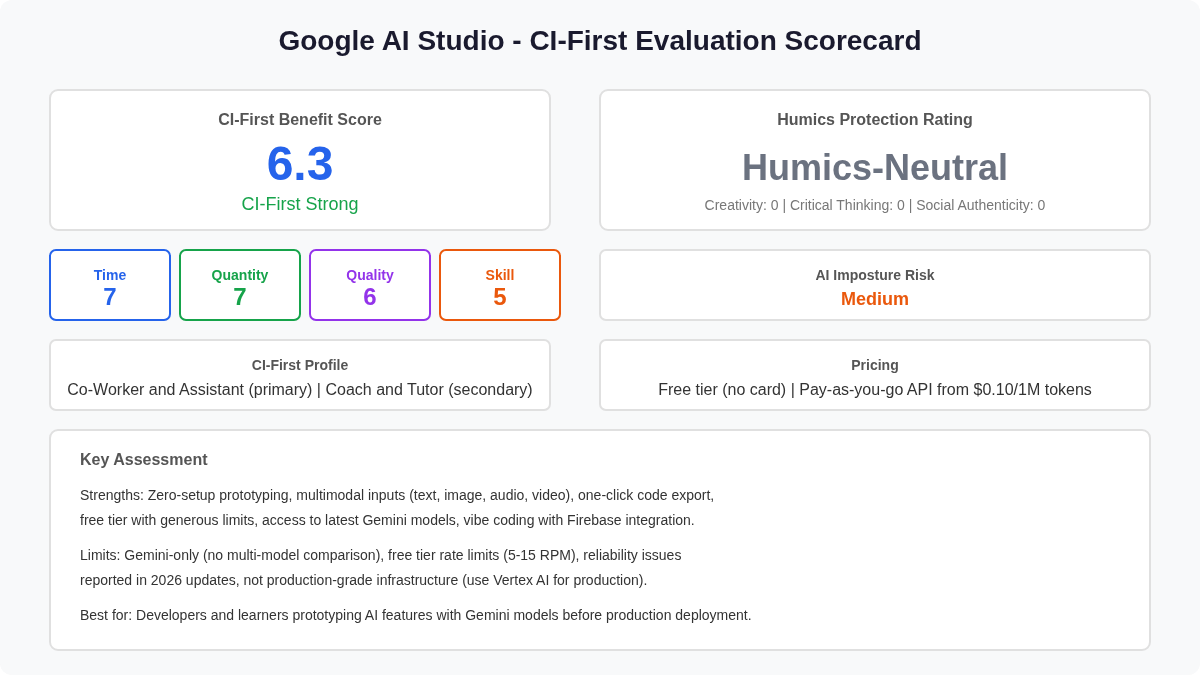
CI-First Benefit Score | 6.3 / 10 - CI-First Strong |
Time / Quantity / Quality / Skill | 7 / 7 / 6 / 5 |
CI-First Profile | Co-Worker and Assistant (primary), Professor, Coach and Tutor (secondary) |
Humics Protection | Humics-Neutral |
AI Imposture Risk | Medium |
User Sentiment | Mixed (Trustpilot 3/5, Product Hunt 5/5, Reddit mixed) |
Pricing | Free tier (no card) + pay-as-you-go API from $0.10/1M tokens |
Platforms | Web browser, Android app |
Available Models | Gemini 3.8 Flash, 3.7 Flash, 3.6 Flash, 3.5 Flash, 3.1 Pro, Nano Banana, Veo, Lyria, TTS |
See the Glossary at the end of this post for definitions of all CI-First terms used above.
The Problem
Developers who want to build AI-powered applications face a cold-start problem. Before writing any production code, they need to test prompts, understand model capabilities, configure parameters like temperature and safety settings, and evaluate multimodal inputs. Setting up a local development environment with API keys, SDKs, and test harnesses takes hours before the first meaningful experiment.
The gap between idea and working prototype is where most AI projects stall. Developers need a space to iterate quickly, see results immediately, and export the working configuration into production code without rebuilding everything from scratch.
The Outcome
Google AI Studio collapses the prompt-to-production cycle into a single browser session. You open the web interface, select a Gemini model, write a prompt, attach files, configure parameters, and see the response in real time. When the output is right, you click Get Code and AI Studio generates the matching API call in your language of choice.
For learners and prototyping developers, the free tier requires no credit card and no installation. You can test multimodal inputs (images, audio, video up to one hour, PDFs), experiment with system instructions, try function calling, and test Google Search grounding, all within the browser. The platform also supports vibe coding: describe an app in natural language and AI Studio generates a full-stack application with authentication, live database, and external API connections.
Who Should Use Google AI Studio
U365 Fellow Category | How They Use It |
Students | Learn prompt engineering, test Gemini model capabilities, build AI-powered projects for coursework, prototype AI features without backend setup |
Professionals | Prototype AI features before production deployment, test multimodal use cases, generate API keys for integration into existing applications, fine-tune models on domain data |
Everyone | Experiment with AI models for free, build personal tools with vibe coding, generate images and video with Nano Banana and Veo, explore real-time voice interactions with Gemini Live |
Skill level: Beginner to advanced. Beginners can start prompting immediately with natural language. Advanced users can configure temperature, top-p, safety settings, stop sequences, and system instructions.
Prerequisites: A Google account. No installation, no credit card for the free tier. For API integration, a Google Cloud project with billing enabled.
Time to first result: Under 5 minutes. Sign in, select a model, type a prompt, see the response.
Time to competence: 2-4 hours for basic prompt engineering and code export. 1-2 days for advanced features (function calling, structured output, grounding, model tuning).
U365 Institutes Alignment
UIT (Technology, AI, Data Science)
Relevance. High
Why. Direct fit: AI Studio is the primary tool for AI development, prompt engineering, and prototyping with Gemini models. UIT students learn the full AI development workflow here.
The limit that holds the row. The platform performs the prototyping the reason names, prompt engineering, model testing and code export; it teaches no software engineering, no systems design and no production engineering of its own, and the review's own limits set the boundary: Gemini-only with no multi-model comparison inside the platform, free-tier rate limits that force waiting, and production deployment that requires Vertex AI. The over-delegation warning states the consequence, that vibe coding can produce working applications without the user understanding the underlying code, and the competency that remains is the review's own instruction: read and understand the generated code, be able to explain how the app works, and carry only reviewed output into a deployment. A word-start accent-folded search over the title and full description of all 79 published programme descriptions returns zero matches for software engineering, systems design, code review, debugging and production deployment, so the row stands at High for supervised prototyping and not for shipping unverified output.
UIB (Business Management, Entrepreneurship)
Relevance. Medium
Why. Business students can use vibe coding to prototype AI-powered business tools and customer-facing applications without deep coding knowledge.
The limit that holds the row. The platform prototypes the business tools the reason names without deep coding knowledge; it teaches no management, finance, entrepreneurship or leadership content, and it supplies no method for deciding whether a prototyped tool should reach customers. The review supplies the facts for that decision and not the decision: free-tier content is used to improve Google products, the keep-out list names production deployment, security-critical code generation and tasks requiring guaranteed reliability and uptime, and the vibe coding limits record security issues, overwritten builds and debugging that requires manual code inspection. The business competency that remains is the adoption judgement: what the prototype proves, what leaves the sandbox, and what data may touch it. No published U365 programme assesses that judgement: a word-start accent-folded search over the title and full description of all 79 published programme descriptions returns zero matches for business case, total cost of ownership, unit economics and procurement, so the row holds at Medium for prototype building and not for a production decision.
UIC (Digital Communication, Marketing)
Relevance. Medium
Why. Communication students can test multimodal content generation (images with Nano Banana, video with Veo) and prototype AI-powered communication tools.
The limit that holds the row. The platform generates and edits the multimodal assets the reason names, images with Nano Banana and video with Veo, and it prototypes the communication tools around them; it writes no campaign, chooses no brand voice and holds no publication standard of its own, and the boundary is measured on the page: free-tier rate limits of 5-15 RPM force waiting, reliability issues are reported through the 2026 updates, and free-tier content is used to improve Google products. The communication competency that remains is publication judgement over machine-generated media: what may go out, what is disclosed about how it was made, and who owns the final read. No published U365 programme assesses that judgement over generated media: a word-start accent-folded search over the title and full description of all 79 published programme descriptions returns zero matches for editorial, disclosure, brand voice, audience analysis and publication, so the row holds at Medium for generation testing and not for communication craft.
UID (Digital Design, UX/UI)
Relevance. Medium
Why. Design students can use image generation and editing capabilities, prototype AI-powered design tools, and test multimodal design workflows.
The limit that holds the row. The platform generates and edits images and lets the Fellow prototype and test design tools around them; it supplies no design method, no layout control and no critique against a brief of its own, and the review's boundaries apply here as well: reliability issues are reported in the 2026 updates, free-tier content is used to improve Google products, and the keep-out list names production deployment and security-critical generation. The design competency that remains is evaluation over generated and edited material: stating the brief, testing what the model returns against it, and naming the point where image generation stops carrying the intent. No published U365 programme assesses that evaluation work: a word-start accent-folded search over the title and full description of all 79 published programme descriptions returns zero matches for design system, wireframe, user research, usability and design critique, so the row holds at Medium for design-tool prototyping and not for design production.
How Google AI Studio Works
Inputs: Text prompts, system instructions, files (PDF, images, audio, video up to one hour), temperature and top-p parameters, safety settings, stop sequences, function declarations, structured output schemas.
Outputs: Text responses, generated code (Python, JavaScript, Go, Java, C++, cURL), images (Nano Banana), video (Veo), audio (Gemini TTS), music (Lyria), structured JSON, function call results.
Integrations: Google Cloud (Vertex AI for production), Firebase (for vibe coding apps), Google Search (grounding), Google Maps (grounding), Google Workspace, Android (native app). SDKs available for Python, JavaScript, Go, Java, and C++.
Underlying technology
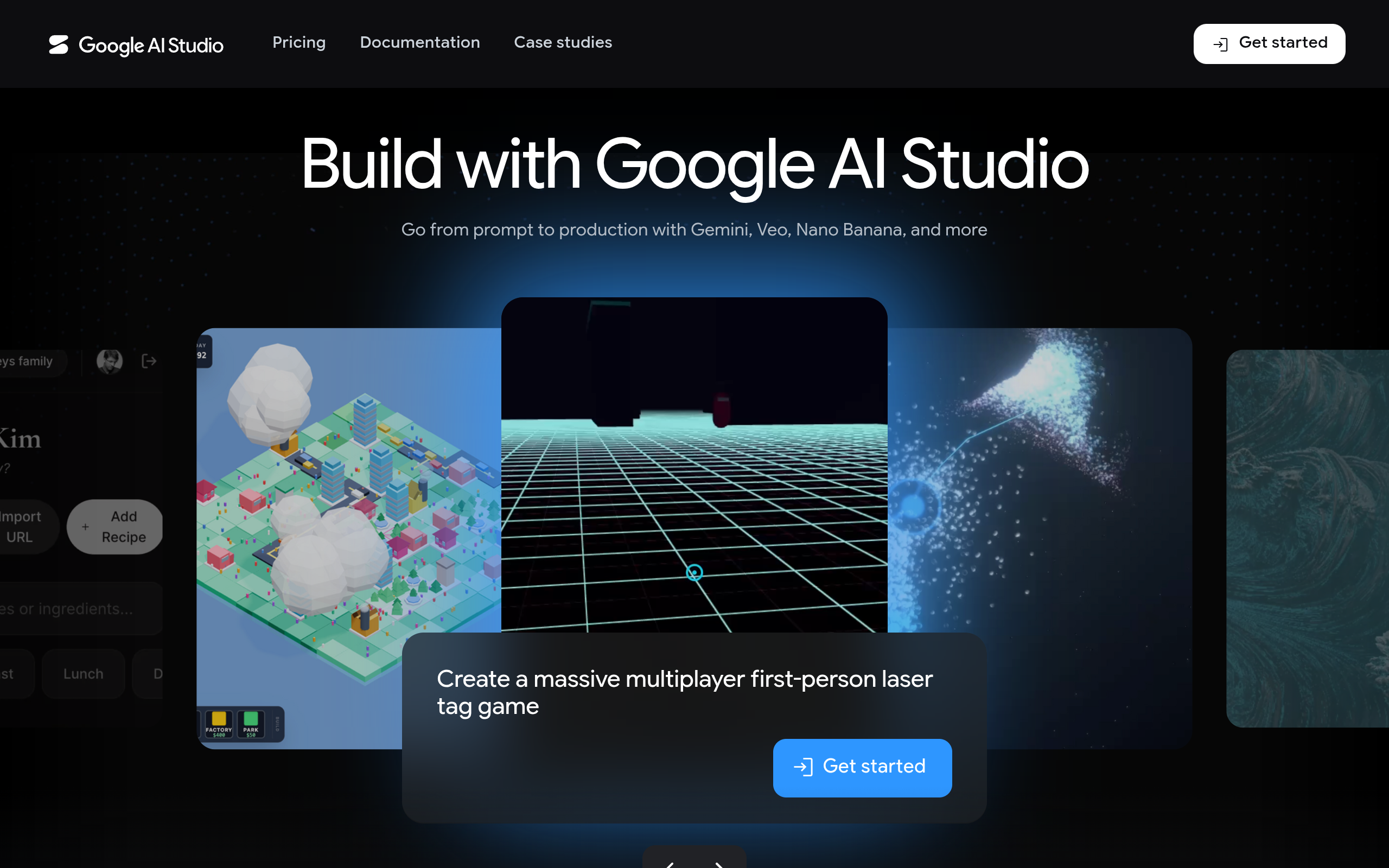
Google AI Studio is a web-based frontend for the Gemini API. It connects directly to Google's model serving infrastructure, providing the same models available through the Gemini Developer API and Vertex AI. The platform supports the Interactions API for building stateful, multi-turn agents with managed tool execution and conversation history. Managed Agents run in isolated Linux environments with reasoning and code execution capabilities.
Key technical features
Multimodal input: text, images, audio, video (up to 1 hour), PDFs, all in a single prompt
System instructions: define the AI persona and rules before the user prompt
Function calling: declare functions so the model can request your code to run specific actions
Structured output: enforce JSON schema responses for reliable parsing
Google Search grounding: get answers reflecting current information with source citations
Context caching: cache repeated system prompts to reduce costs and latency
Model tuning: fine-tune models via CSV or Google Sheets uploads
Safety settings: configure content filters across four categories
Vibe coding: generate full-stack apps with authentication, database, and API connections
Interactions API: build stateful agents with managed tool execution (GA since June 2026)
Managed Agents: autonomous agents with reasoning and code execution in isolated environments
Getting Started
Installation
No installation required. Google AI Studio runs entirely in the browser at aistudio.google.com. An Android app is also available. You need a Google account to sign in. The free tier requires no credit card.
First-time configuration
Go to aistudio.google.com and sign in with your Google account
Click Get started to accept the terms of service
Select a model from the sidebar (Gemini 3.8 Flash is the current default for new chats)
Optionally configure system instructions, temperature, top-p, and safety settings in the right panel
Type your prompt in the chat interface and press Enter to see the response
To get an API key for production code, click Get API key in the left sidebar
First 15 minutes checklist
☐ Sign in to aistudio.google.com with your Google account
☐ Select Gemini 3.8 Flash from the model dropdown
☐ Write your first prompt and observe the response
☐ Attach an image or PDF to test multimodal input
☐ Adjust temperature to 0.7 and re-run to see output variation
☐ Click Get Code to export the API call in your preferred language
☐ Generate an API key for production integration
☐ Explore the Apps gallery to see remixable example projects
Real Workflows
Workflow 1: Prototyping a Customer Support Chatbot
Learner type: Professional developer prototyping an AI feature for production.
CI-First benefit tags: Time, Quality
U365 program connection: LIPS+CARE (Collect prompts, Action plan the integration, Review the output, Execute the deployment).
You do | AI Studio does |
Write system instructions defining the support agent persona and rules | Applies the system instructions to every response, maintaining consistency |
Upload a PDF with product documentation and FAQs | Processes the document and uses it as context for answers |
Set temperature to 0.3 for consistent, factual responses | Generates responses with reduced randomness for factual accuracy |
Test with 5-10 sample customer questions | Returns answers grounded in the uploaded documentation |
Click Get Code to export the working configuration | Generates Python or JavaScript API call with all parameters set |
Sample prompt: System instruction: You are a customer support agent for [Company]. Answer questions based only on the provided documentation. If you do not know the answer, say so and suggest contacting human support. Keep responses under 100 words.
☐ Multi-Model Check: Run the same prompts through Claude or GPT and compare response quality
☐ External Source: Verify that answers match the source documentation, not hallucinated content
☐ Human Review: Have a support team member review 10 sample responses for accuracy and tone
☐ CI-First Test: Can you explain why each response is correct without the tool? If not, investigate before deploying
Workflow 2: Building a Full-Stack App with Vibe Coding
Learner type: Student or professional exploring AI-assisted app development.
CI-First benefit tags: Time, Quantity, Skill
U365 program connection: UNOP (Neuroscience-Oriented Pedagogy): active learning through building, not passive consumption.
You do | AI Studio does |
Describe the app you want in natural language | Generates a full-stack application with frontend, backend, and database |
Refine the description based on the generated preview | Iterates on the code and updates the live preview |
Test the app in the browser preview | Runs the app with authentication and live database in a sandboxed environment |
Export or deploy the app | Provides the codebase and deployment options via Firebase |
Sample prompt: Build a language learning app that provides a real-time conversational AI partner for practice. Include a chat interface, language selection, and progress tracking.
☐ Multi-Model Check: Compare generated code structure with a reference implementation from a different AI tool
☐ External Source: Run the generated code locally and verify it works outside AI Studio's sandbox
☐ Human Review: Review the code for security issues, especially authentication and data handling
☐ CI-First Test: Can you explain how each part of the generated app works? If not, study the code before deploying
Workflow 3: Testing Multimodal Document Analysis
Learner type: Business analyst or researcher working with mixed-format documents.
CI-First benefit tags: Time, Quality
U365 program connection: LIPS (Life-Interests-Projects-System): organize research documents and extract actionable information.
You do | AI Studio does |
Upload a 50-page PDF report and an image chart | Processes both inputs and understands the relationship between text and visual data |
Ask specific questions about the document content | Returns answers with references to the source material in the document |
Request a structured summary in JSON format | Generates a structured output following your JSON schema specification |
Export the working prompt and configuration | Generates API code to automate document analysis in production |
☐ Multi-Model Check: Run the same document through Claude or GPT-4 and compare extraction accuracy
☐ External Source: Manually verify 3-5 extracted facts against the source document
☐ Human Review: Have a domain expert review the summary for completeness and accuracy
☐ CI-First Test: Can you verify the extracted information without the tool? If not, do not rely on it for decisions
Strengths, Limits, AI Imposture Risk
Strengths
Dimension | Score | Evidence |
Time | 7 | Zero-setup prototyping saves hours of environment configuration. Code export eliminates manual API integration. Vibe coding produces working apps in minutes. |
Quantity | 7 | Multiple model variants, multimodal inputs, and remixable starter apps multiply what a single developer can prototype in a session. |
Quality | 6 | Gemini 3.8 Flash produces strong output for coding and reasoning tasks. Quality is inconsistent for complex prompts and rate limits force model downgrades. |
Skill | 5 | The platform teaches prompt engineering through iteration but vibe coding can mask lack of coding understanding. Code export helps users learn API patterns. |
Limits
Gemini-only: no multi-model comparison within the platform. You cannot test Claude, GPT, or open-source models side by side.
Free tier rate limits: 5-15 RPM depending on model. Intensive sessions hit limits quickly, causing 429 errors.
Reliability issues: users report sync errors, internal error messages, infinite thinking loops, and lost project progress in 2026 updates.
Not production infrastructure: AI Studio is for prototyping. Production deployment requires Vertex AI or the Gemini Enterprise Agent Platform.
Data privacy on free tier: content is used to improve Google products. Upgrade to paid tier for private data handling.
Vibe coding limitations: generated apps may have security issues, overwritten builds, and debugging requires manual code inspection.
API key restrictions: starting June 19, 2026, Gemini API stopped accepting requests from unrestricted API keys.
AI Imposture Risk
Time Illusion
Level. Medium
Evidence. Simple prompts are fast, but complex configurations (function calling, structured output, model tuning) require iteration. Rate limits force waiting. Reddit users report spending hours debugging vibe-coded apps that looked correct but failed at runtime.
Quantity Illusion
Level. Medium
Evidence. The platform generates polished-looking code and apps quickly, but Trustpilot reviewers report non-working code, API errors, and inconsistent model behavior. Surface quality does not always survive verification.
Skill Illusion
Level. Medium
Evidence. Vibe coding produces working apps for users who cannot code, creating the appearance of programming skill. Code export helps, but users who never read the generated code do not develop real capability.
Overall AI Imposture Risk: Medium. All three traps at Medium with mitigations. Use AI Studio for prototyping, not for shipping unverified code to production.
U365 Co-Intelligence Rating
CI-First Profile
Primary: Co-Worker and Assistant (level 2). Google AI Studio executes prototyping tasks: generating code, processing multimodal inputs, and producing API configurations. The user directs and reviews.
Secondary: Professor, Coach and Tutor (level 3). The platform teaches prompt engineering through iteration. Code export shows users how to structure API calls. Model comparison across Gemini variants helps users understand model capabilities and limitations.
CI-First Benefit Score
Time
Score. 7
Rationale. Zero setup, browser-based, one-click code export. Saves 50-75% of prototyping time. Rate limits and reliability issues reduce the score from 8.
Quantity
Score. 7
Rationale. Multiple model variants, multimodal inputs, and remixable apps multiply output. A developer can prototype 3-5x more features in a session compared to manual setup.
Quality
Score. 6
Rationale. Gemini 3.8 Flash produces strong coding and reasoning output. Quality drops on complex prompts. Vibe-coded apps require manual verification. Inconsistent reliability in 2026.
Skill
Score. 5
Rationale. Teaches prompt engineering through iteration. Code export shows API patterns. But vibe coding can substitute AI for learning, and the platform does not require understanding to produce output.
CI-First Benefit Score: (7 + 7 + 6 + 5) / 4 = 6.3 - CI-First Strong
Humics Protection Badge
Humics Protection Score: 0 - Humics-Neutral
Creativity: 0 (Neutral).
AI Studio can spark ideas through prompt iteration and expose users to new model capabilities. But vibe coding replaces the user's own creative process for app generation. Balanced.
Critical Thinking: 0 (Neutral).
The platform requires users to evaluate model output, and code export makes verification concrete. But the ease of generating polished-looking output can encourage shipping without review. Balanced.
Social Authenticity: 0 (Neutral).
AI Studio operates in a development context that does not directly touch interpersonal communication. The tool neither strengthens nor weakens social authenticity.
Superhuman Usage Guidance
When to invite the tool: Prototyping AI features with Gemini models, testing multimodal inputs, generating API code, learning prompt engineering, building proof-of-concept applications.
When to keep the tool out: Production deployment (use Vertex AI), multi-model evaluation (use a platform that supports Claude, GPT, and Gemini side by side), security-critical code generation, tasks requiring guaranteed reliability and uptime.
U365 method integration: Use LIPS+CARE to collect prompts and configurations, create an action plan for integration, review output against external sources, and execute deployment through Vertex AI. Apply UP-Context-Engineering to give Gemini the right institutional context for U365-specific tasks.
Over-delegation warning: Vibe coding can produce working applications without the user understanding the underlying code. This creates a Skill Illusion. Always read and understand generated code before deploying. If you cannot explain how the app works, you are in the illusion. Use AI Studio as a Professor, Coach and Tutor (Profile 3), not just a Co-Worker (Profile 2). After the tool generates code, try to reproduce the result yourself.
What Users Say
Aggregate Rating Table
Platform | Rating | Count | Sentiment |
Trustpilot (aistudio.google.com) | 3.0/5 | ~10 reviews | Mixed: praise for free access and model quality, complaints about rate limits, reliability, and billing |
Product Hunt | 5.0/5 | 1 review | Positive: praised for full-stack vibe coding capabilities |
Reddit (r/GoogleAIStudio, r/vibecoding) | Mixed | Multiple threads | Mixed: strong praise for prototyping speed, criticism for reliability issues, overwrites, and rate limits |
SearchTools.ai | Positive | Aggregated | 117 million monthly visits, positive developer sentiment for free tier access |
G2 | No reviews found | 0 | Google AI Studio does not have a dedicated G2 listing |
Capterra | No reviews found | 0 | No dedicated Capterra listing |
Futurepedia | No reviews found | 0 | No dedicated Futurepedia listing |
What Users Praise
Free tier with no credit card required, generous for prototyping
Direct access to latest Gemini models, including SOTA reasoning
One-click code export in multiple languages saves integration time
Multimodal support (text, image, audio, video) in a single interface
Vibe coding produces working apps from natural language descriptions
Clean, focused interface that is easy for beginners to start using
What Users Complain About
Rate limits on the free tier hit quickly during intensive sessions
Reliability issues: sync errors, internal errors, infinite thinking loops
Vibe coding can overwrite complete builds, losing progress
Billing confusion: unclear when free tier limits are reached
Model instability: models sometimes work worse than expected, but API costs still apply
Not suitable for production: lacks the reliability and features of Vertex AI
History management is messy, leading users to build Chrome extensions to fix it
Sentiment Summary
User sentiment is mixed. Developers appreciate the zero-setup prototyping experience and free access to Gemini models. The platform's 117 million monthly visits indicate broad adoption. However, reliability issues in 2026 updates, rate limit frustrations, and the gap between prototyping and production create consistent negative feedback. The positive reviews focus on what the tool enables (fast prototyping, free access), while negative reviews focus on what it breaks (reliability, billing clarity, lost progress).
U365 Editorial Note
The mixed sentiment aligns with the CI-First evaluation. Google AI Studio scores 6.3/10 (CI-First Strong) because it delivers clear time and quantity benefits for prototyping. The Medium AI Imposture Risk reflects real user complaints: polished-looking output that fails at runtime (Quantity Illusion), vibe-coded apps that mask lack of coding skill (Skill Illusion), and time spent debugging issues that negate initial speed gains (Time Illusion). Users who treat AI Studio as a prototyping sandbox and verify output before production use report positive experiences. Users who ship unverified output report negative ones.
Comparison and Alternatives
Tool | Best for | Key difference from AI Studio |
OpenAI Playground | Testing GPT models | Supports GPT models only. Similar zero-setup prototyping experience. No multimodal input beyond images. No vibe coding. |
Anthropic Console | Testing Claude models | Supports Claude models only. Clean interface for prompt testing. No image, video, or audio generation. No vibe coding. |
Vertex AI | Production deployment | Google's enterprise ML platform. Same Gemini models but with production infrastructure, MLOps, model garden, and enterprise security. Use AI Studio to prototype, Vertex AI to deploy. |
Cursor | AI-assisted coding | IDE-integrated AI coding with multi-model support. Better for sustained coding workflows. No multimodal testing or model tuning interface. |
Replit | Building and deploying apps | Full development environment with hosting. Multi-model AI support. More structured than vibe coding but requires more coding knowledge. |
Where Google AI Studio is clearly better
Free tier generosity: no credit card, generous token limits, access to SOTA models
Multimodal breadth: text, image, audio, video, PDFs, music, and TTS in one interface
Code export speed: one click to get working API calls in 5 languages
Vibe coding: full-stack app generation with Firebase integration, unmatched by OpenAI or Anthropic playgrounds
Where Google AI Studio is clearly worse
Model diversity: Gemini only. No way to test Claude, GPT, or open-source models in the same interface
Production readiness: not a deployment platform. Vertex AI or cloud infrastructure required for production
Reliability: user-reported sync errors, internal errors, and lost progress are more frequent than on competing playgrounds
History management: no built-in folder or tag system for organizing prompts and projects
Verdict and Next Steps
Google AI Studio is the right first stop for anyone building with Gemini models. It scores 6.3/10 (CI-First Strong) because it removes the friction between idea and prototype, provides free access to Google's latest AI models, and exports production-ready code in one click. The Medium AI Imposture Risk is real: vibe coding can create the illusion of programming skill, and polished-looking output can mask runtime failures. Use AI Studio as a prototyping sandbox, verify everything, and deploy through Vertex AI.
Who should adopt: Developers, students, and professionals who want to prototype AI features with Gemini models. Especially valuable for UIT (Technology, AI, Data Science) students learning the AI development workflow.
When: Now. The free tier requires no commitment and the platform is actively updated with new models and features.
For what: Prompt engineering, multimodal testing, API code generation, vibe coding prototypes, and learning the Gemini API surface.
UP-Context-Engineering Prompt Pack
Prompt 1: System instruction for domain-specific analysis. You are an expert analyst in [domain]. Analyze the following document and extract: (1) key findings, (2) supporting evidence with page references, (3) potential risks, (4) recommended actions. Format as structured JSON.
Prompt 2: Vibe coding with requirements. Build a [app type] with the following features: [feature 1], [feature 2], [feature 3]. Use a clean, modern UI with [design language]. Include user authentication and data persistence. The target audience is [audience].
Prompt 3: Multimodal comparison. I have uploaded [image/document/audio]. Compare what you see in this file with the following text description: [description]. Identify three differences and explain which version is more accurate and why.
Related U365 Content
INSIDE Tools reviews for Gemini 3.7 Flash, Gemini 3.6 Flash, and other Gemini models
CI-First Evaluation Framework overview
UP-Context-Engineering prompting method guide
LIPS+CARE information processing workflow
U365's Recommendations to Learn More
Official learning resources
Google AI Studio: https://aistudio.google.com
Gemini API documentation: https://ai.google.dev/gemini-api/docs
Gemini API pricing: https://ai.google.dev/pricing
Gemini Cookbook (GitHub): https://github.com/google-gemini/cookbook
Google AI for Developers community: https://discuss.ai.google.dev
Video tutorials and channels
Google AI Studio Tutorial 2026 - Beginner to Expert in 10 Prompts by Tech Express (Published May 13, 2026): https://www.youtube.com/watch?v=9xXo8ndCkY0
How to use Google AI Studio (2026) Full Tutorial by Tech Express (Published Jun 27, 2025): https://www.youtube.com/watch?v=5E3cVP7UYG8
Google AI Studio Tutorial - Stream with Gemini and Build Your Own AI App in Minutes by TechWhistle (Published Sep 23, 2025): https://www.youtube.com/watch?v=kVgUWwY8JNc
Google AI Studio Tutorial 2026 | Beginner to Expert in 10 Prompts! by Tech Express (Published May 13, 2026)
How to use Google AI Studio (2026) Full Tutorial by Tech Express (Published Jun 27, 2025)
Written tutorials and deep-dive articles
Google AI Studio Review 2026 by Vantaige: https://vantaige.io/ai-tool/google-ai-studio
Google AI Studio Review 2026 by ToolCenter: https://toolcenter.ai/en/articles/google-ai-studio-review-2026
Google AI Studio: Features, Costs and Limitations by WebsiteBuilderExpert: https://www.websitebuilderexpert.com/vibe-coding/google-ai-studio
Google AI Studio Pricing by NoCode MBA: https://www.nocode.mba/articles/google-ai-studio-pricing
Community and social
Google AI for Developers community forum: https://discuss.ai.google.dev
r/GoogleAIStudio on Reddit: https://www.reddit.com/r/GoogleAIStudio
Gemini API Cookbook on GitHub: https://github.com/google-gemini/cookbook
Google AI Studio on Product Hunt: https://www.producthunt.com/products/google-ai-studio-8
Resources on X
Dedicated X channels for Google AI Studio updates and community discussion:
Google for Developers (@googledevs): https://x.com/googledevs
Google AI (@GoogleAI): https://x.com/GoogleAI
No specific X posts with video content about Google AI Studio were found at the time of review. The tool's updates are primarily communicated through the Google AI blog and the official documentation changelog.
Glossary
CI-First Benefit Score
A 0-10 score that measures how much an AI tool delivers the 4 Key AI Benefits defined by University 365: Time (doing things faster), Quantity (producing more usable output), Quality (producing better output), and Skill (building lasting capability). The overall score is the arithmetic mean of the four dimensions. Scores of 6.1-8.0 indicate CI-First Strong: the tool significantly amplifies the user and is a core tool for the Superhuman workflow.
CI-First Profile
A classification of the role AI plays in the Co-Intelligence relationship. University 365 defines 5 AI Profiles: (level 1) Co-Creator and Thought Partner, (level 2) Co-Worker and Assistant, (level 3) Professor, Coach and Tutor, (level 4) Analyst and Tester, (level 5) Challenger and Devil's Advocate. Lower level numbers indicate higher AI autonomy. Attributing a profile to AI before giving it a task is a core CI-First discipline.
Humics Protection Badge
A rating that assesses whether a tool protects, leaves neutral, or erodes the three core human capabilities: Creativity, Critical Thinking, and Social Authenticity. The badge ranges from Humics-Friendly (+2 to +3, the tool strengthens the human) through Humics-Neutral (-1 to +1, mixed or balanced effects) to Humics-Risky (-2 to -3, sustained use causes cognitive atrophy).
AI Imposture Risk
The threat that using an AI tool traps the user in one of three usage illusions: Time Illusion (appearing to save time while actually losing it to prompting and verification), Quantity Illusion (producing high volume that looks good but does not hold up under inspection), and Skill Illusion (appearing to have skills while not developing them). The risk is rated Low, Medium, or High based on the tool's characteristics and specific evidence.
User Sentiment
An aggregate assessment of user feedback across review platforms (Trustpilot, G2, Capterra, Product Hunt), community forums (Reddit), and adoption signals (monthly visits, API usage). User sentiment is reported honestly, including platforms where no reviews are found. The sentiment is connected to the CI-First evaluation to show whether user experience aligns with the structural assessment.
Sources
Google AI Studio official website: https://aistudio.google.comhttps://aistudio.google.com
Gemini API models documentation: https://ai.google.dev/gemini-api/docs/modelshttps://ai.google.dev/gemini-api/docs/models
Gemini Developer API pricing: https://ai.google.dev/pricinghttps://ai.google.dev/pricing
CloudZero: Gemini pricing in 2026: https://www.cloudzero.com/blog/gemini-pricinghttps://www.cloudzero.com/blog/gemini-pricing
WebsiteBuilderExpert: Google AI Studio features, costs, and limitations: https://www.websitebuilderexpert.com/vibe-coding/google-ai-studiohttps://www.websitebuilderexpert.com/vibe-coding/google-ai-studio
NoCode MBA: Google AI Studio pricing: https://www.nocode.mba/articles/google-ai-studio-pricinghttps://www.nocode.mba/articles/google-ai-studio-pricing
DataStudios: Google AI Studio pricing and production billing: https://www.datastudios.org/post/google-ai-studio-pricing-free-access-usage-limits-api-costs-and-production-billing-in-early-2026https://www.datastudios.org/post/google-ai-studio-pricing-free-access-usage-limits-api-costs-and-production-billing-in-early-2026
SearchTools.ai: Google AI Studio details and reviews: https://searchtools.ai/t/google-ai-studiohttps://searchtools.ai/t/google-ai-studio
Vantaige: Google AI Studio review 2026: https://vantaige.io/ai-tool/google-ai-studiohttps://vantaige.io/ai-tool/google-ai-studio
MyAIVerdict: Google AI Studio review 2026: https://myaiverdict.com/google-ai-studio-reviewhttps://myaiverdict.com/google-ai-studio-review
ToolCenter: Google AI Studio review 2026: https://toolcenter.ai/en/articles/google-ai-studio-review-2026https://toolcenter.ai/en/articles/google-ai-studio-review-2026
Trustpilot: aistudio.google.com reviews: https://www.trustpilot.com/review/aistudio.google.comhttps://www.trustpilot.com/review/aistudio.google.com
Product Hunt: Google AI Studio 2.0: https://www.producthunt.com/products/google-ai-studio-8https://www.producthunt.com/products/google-ai-studio-8
Reddit: r/GoogleAIStudio community: https://www.reddit.com/r/GoogleAIStudiohttps://www.reddit.com/r/GoogleAIStudio
CheckThat.ai: Google AI Studio details and features: https://checkthat.ai/brands/google-ai-studiohttps://checkthat.ai/brands/google-ai-studio
YouTube: Google AI Studio Tutorial 2026 by Tech Express: https://www.youtube.com/watch?v=9xXo8ndCkY0https://www.youtube.com/watch?v=9xXo8ndCkY0
YouTube: How to use Google AI Studio 2026 Full Tutorial by Tech Express: https://www.youtube.com/watch?v=5E3cVP7UYG8https://www.youtube.com/watch?v=5E3cVP7UYG8
YouTube: Google AI Studio Tutorial Stream with Gemini by TechWhistle: https://www.youtube.com/watch?v=kVgUWwY8JNchttps://www.youtube.com/watch?v=kVgUWwY8JNc




Comments