
GPT-6 Astra: OpenAI's Frontier Model for Computer Use, Coding, and Science

Updated: Oct 16
Status: Active | Last tested: 2026-09-07 (GPT-6 Astra, initial release) | Re-check: trigger-based (max 6 months)
Active: the tool is current and recommended.


In this Tool Review
Tool Snapshot
Category: Large Language Model
Provider: OpenAI
Version tested: GPT-6 Astra (September 2026, initial release)
Parameters: Not publicly disclosed
Context window: 1,050,000 tokens (1.05M)
License: Proprietary
Platforms: ChatGPT (Plus, Pro, Business, Enterprise), OpenAI API, Microsoft Azure, AWS Bedrock
Tagline: "A new generation of intelligence" - OpenAI's most capable model for complex reasoning, software engineering, computer use, and science.
Complex multi-step coding and software engineering tasks
Computer use: navigating desktop applications, browsers, and workflows autonomously
Scientific research and data analysis across biology, chemistry, physics, and mathematics
Professional document creation, research summaries, and report drafting
Cybersecurity: vulnerability identification and defensive security analysis (gated)
Pricing summary: Paid - API: $10/M input, $50/M output tokens (short context). Long context (>272K tokens): $20/M input, $75/M output. ChatGPT Plus ($20/mo), Pro ($100-$200/mo), Business, Enterprise. Cached input: $1/M tokens.
Context Window: 1,050,000 tokens (1.05M), max output 128,000 tokens
Effort/Thinking Levels: low, medium, high, max (reasoning.effort parameter)
Parameters: Not publicly disclosed; trained on 100,000+ GPUs at Stargate site in Texas
Architecture: Transformer with recurrent depth (looped transformers) for reasoning efficiency
Available Platforms: OpenAI API (gpt-6-astra), ChatGPT, Microsoft Azure, AWS Bedrock, OpenRouter
Model Variants: GPT-6 Astra (standard), GPT-6 Astra Pro (higher limits for Pro/Business/Enterprise)
Benchmark Scores: ARC-AGI-3: 99.9%, GPQA Diamond: 96.0%, OSWorld 2.0: 72.6%, Terminal-Bench 4.0: 57.9%, FrontierMath Tier 4: 97.6%
Modality: Multimodal input (text, images, computer screen), text output
Cached Input: $1/M tokens (prompt prefix caching)
License: Proprietary (Zero Data Retention available for eligible API customers)
Indicator | Value |
Time / Quantity / Quality / Skill | 8 / 7 / 8 / 5 |
CI-First Benefit Score | 7.0 / 10 (CI-First Strong) |
CI-First Profile | Co-Creator and Thought Partner (1), Co-Worker (2), Analyst (4) |
Humics Protection | Neutral (0) |
AI Imposture Risk | Medium |
User Sentiment | Mixed (early access, limited reviews) |
Pricing | Paid ($10/$50 per M tokens API; ChatGPT $20-$200/mo) |
Platforms | ChatGPT, API, Azure, AWS Bedrock, OpenRouter |
Context Window | 1,050,000 tokens (1.05M) |
These indicators are defined in the Glossary at the end of this review.
The Problem
Large language models have improved steadily, but a gap remains between what models can do in benchmarks and what they can do in real, sustained work. Most frontier models excel at single-turn tasks: answering a question, writing a function, summarizing a document. When you ask them to navigate a desktop application, run a multi-hour coding session, or conduct research that requires following links and verifying sources, they lose track, make errors, and require constant supervision.
Professionals, researchers, and students who need AI to handle complex, multi-step workflows end up babysitting the model. They write prompts, check outputs, correct mistakes, and re-paste context that the model forgot. The net time savings shrink. The quality gains become inconsistent. The tool that was supposed to amplify their work becomes another thing they have to manage.
For U365 Fellows working across technology, business, communication, and design disciplines, the problem is acute. A fellow who wants to use AI for a capstone project, a business plan, or a research paper needs a model that can hold a large context, follow instructions across many turns, and produce work that holds up under verification. Most models handle one of these demands well. Few handle all three.
The Outcome
GPT-6 Astra delivers a model that can hold 1.05 million tokens of context, navigate desktop applications and browsers autonomously, and sustain multi-step coding and research workflows with fewer errors than its predecessors. OpenAI reports a misaligned-outcome rate of 3.4% in realistic work environments, down from 18.8% for GPT-5.6 Sol. That means the model stays on task, respects boundaries, and produces work you can verify without re-reading every line.
For a U365 Fellow, the concrete outcomes are: coding tasks that took hours of back-and-forth now complete in a single session; research projects that required manual source-checking can be partially automated with the model pulling relevant context; and documents that needed multiple drafts can be produced in fewer iterations. The 1.05M context window means you can feed an entire codebase, a full contract set, or a year of notes into one request without chunking.
The trade-off is cost. At $10 per million input tokens and $50 per million output tokens, Astra is 2.5x the price of GPT-5.6 Sol. For fellows on a ChatGPT Plus plan ($20/month), access is included but rate-limited. For API users, costs add up quickly on long-context tasks. The model is powerful, but it is not cheap, and the long-context surcharge (2x input, 1.5x output above 272K tokens) makes large-context work notably more expensive.
Who Should Use GPT-6 Astra
Learner type | Difficulty | Typical ROI | Career path |
Students (Bachelor, Master) | Beginner to Intermediate | Research assistance, coding help, study guides. Accessible via ChatGPT Plus. | All U365 programs benefit, especially UIT and UIC |
Professionals (career upskilling) | Intermediate | Complex coding, data analysis, document automation, agentic workflows. Best ROI for Pro plan. | UIT software engineering, UIB data-driven decisions, UID tool prototyping |
Everyone (lifelong learners) | Beginner | General reasoning, learning new topics, daily productivity. ChatGPT Plus sufficient. | ULM Career and Finance, and Quality of Life domains, SL-OS integration |
U365 Institutes Alignment
UIT (Technology, AI, Data Science)
Relevance. High
Why. Astra is the strongest model for coding, computer use, and data science. Directly relevant for UIT fellows working on software engineering, AI projects, and data analysis.
The limit that holds the row. The model codes, navigates software and analyses data; it teaches no engineering discipline of its own, the page's own limits record that OpenAI's evaluations found its written reasoning harder to monitor than its predecessor's, and the Skill note names the dependency risk, with no active tutoring mode and computer use that can mask a lack of understanding. What remains is verification of the run: reading what changed, testing the fix, and tracing the logic the model does not write out. No published U365 programme assesses review of agent-completed work as a named component: a word-start accent-folded search over the title and full description of all 79 published programme descriptions returns zero matches for software engineering, code review, model evaluation and test design, and the near hits that exist (testing 3, data analysis 3, data science 2) sit in security, data and analyst programmes, together with one entrepreneurship module that tests a business idea, and none of them assesses the verification of a model's output. The row stands at High for work a Fellow verifies.
UIB (Business Management, Entrepreneurship)
Relevance. Medium
Why. Business analysis, financial modeling, market research, and professional document creation benefit from Astra's reasoning and context capacity.
The limit that holds the row. The model drafts analyses and reports; it supplies no management method, no market framework and no decision rule, and the page's published cost structure makes the workload appraisal part of the work rather than a feature. What remains is the review of an analysis against source data and the costing of the run behind it. No published U365 programme assesses that appraisal as a named component: a word-start accent-folded search over the title and full description of all 79 published programme descriptions returns zero matches for total cost of ownership, unit economics, business automation and document creation, and the near hits that exist (business analysis 1, market research 1, financial modeling 1) sit in the Business Analysis Professional, Marketing Coordinator and Financial Analysis Specialist programmes, which assess the disciplines themselves rather than the appraisal of model output. The row stands at Medium.
UIC (Digital Communication, Marketing)
Relevance. Medium
Why. Content drafting, research summaries, and browser-based research workflows. Astra's computer use can automate web research for communication projects.
The limit that holds the row. The model drafts and browses; it writes no register, sets no publication standard and supplies no audience analysis, and the harder-to-monitor reasoning means every kept claim has to be checked against a source the Fellow holds, which the page's own prompt packs require. What remains is source-bound drafting with a traceable trail: the Fellow sets the message and the audit, and verifies each claim before publication. No published U365 programme assesses that drafting discipline as a named component: a word-start accent-folded search over the title and full description of all 79 published programme descriptions returns zero matches for browser research, research synthesis, document analysis, editorial and brand voice, and the near hits that exist (copywriting 1, social media 6) sit in the Social Media Marketing Manager and related programmes, which assess platform craft rather than the checking of machine-drafted material. The row stands at Medium.
UID (Digital Design, UX/UI)
Relevance. Medium
Why. Astra's spatial reasoning and visual understanding (3D modeling, Blender, KiCad) are relevant for design prototyping and UX research.
The limit that holds the row. The model operates design tools and reads visual material; it produces no design artefact of its own, evaluates no design against a brief and supplies no design method, and the surfaces the live reason names are tools the model drives rather than design decisions it defends. What remains is specification and evaluation of the prototype run: the brief, the acceptance check, and the record of where the model's reading stopped carrying the intent. No published U365 programme assesses that evaluation as a named component: a word-start accent-folded search over the title and full description of all 79 published programme descriptions returns zero matches for 3d modeling, blender, kicad, design prototyping and ux research, and the near hits that exist (three dimensional 1, interaction design 2, prototyping 2) sit in the design programmes, which assess the production craft rather than the evaluation of a computer-use run. The row stands at Medium.
Skill level required: Beginner for ChatGPT usage. Intermediate for API integration and agentic workflows.
Prerequisites: A ChatGPT Plus, Pro, Business, or Enterprise subscription, or an OpenAI API key. For computer use features, ChatGPT Pro or higher. For coding workflows, familiarity with the Codex CLI or API is helpful.
Typical time to first result: 5 minutes. Open ChatGPT, select GPT-6 Astra, type a prompt.
Typical time to competence: 2-4 weeks for effective prompt engineering and verification habits. Longer for API integration and agentic workflow design.
How GPT-6 Astra Works
Inputs: Text prompts, images, files (PDFs, code, documents), computer screen captures (for computer use), structured data, and URLs. The model accepts up to 1.05M tokens of combined input.
Outputs: Text responses, code, structured data, charts and plots, web pages, 3D models (via computer use with Blender or similar), and agent actions (clicking, typing, navigating applications).
Underlying technology
GPT-6 Astra uses a Transformer architecture enhanced with recurrent depth (looped transformers), a technique that increases reasoning efficiency by allowing the model to iterate internally on problems. OpenAI trained the model on more than 100,000 GPUs at their Stargate site in Texas, their largest training run to date. The model uses reasoning.effort levels (low, medium, high, max) to control how much internal computation it devotes to a problem before responding.
Key technical features include: prompt prefix caching ($1/M tokens for reused prefixes), context preservation across compaction events in Codex (the model keeps notes across context windows instead of compressing everything into a single summary), and Zero Data Retention for eligible API customers. Private Safety Processing is being tested to strengthen safety monitoring while preserving customer privacy.
Notable capabilities
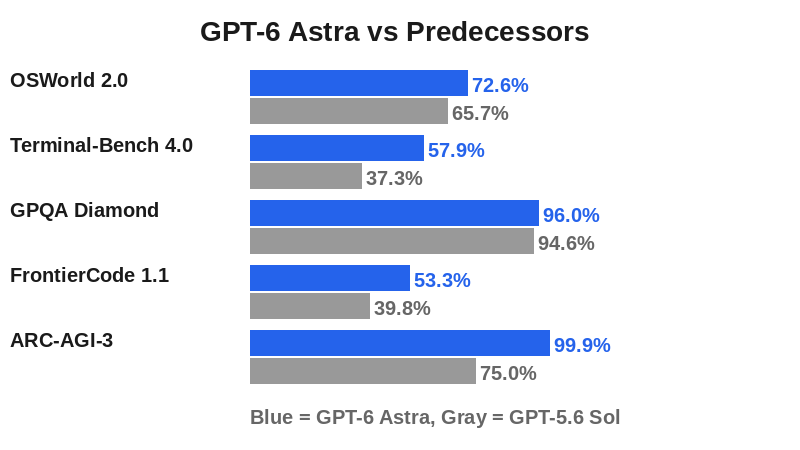
Computer use: Astra can navigate desktop applications (Excel, Blender, KiCad, Power BI), conduct browser-based research, fill out forms, perform QA checks on websites, and operate software autonomously. On OSWorld 2.0, it scores 72.6% in about 40 minutes per task, compared to 65.7% at 75 minutes for GPT-5.6 Sol.
Coding: Terminal-Bench 4.0 score of 57.9% (vs 37.3% for Sol). FrontierCode 1.1 score of 53.3%. The updated Codex harness delivers 1.9x faster task completion. Context preservation across compaction events means the model remembers why a fix failed or how a component behaves across long coding sessions.
Science: GPQA Diamond score of 96.0% (graduate-level biology, chemistry, physics). FrontierMath Tier 4 saturation at 97.6%. Terminal-Bench Science 0.1 at 64.6% (vs 22.4% for Sol).
Cybersecurity: First OpenAI model to reach the Critical threshold in the Preparedness Framework. Can identify and develop zero-day exploits. Advanced cyber capabilities are gated behind the Daybreak program.
Integrations
OpenAI API (gpt-6-astra endpoint), ChatGPT (Plus, Pro, Business, Enterprise), Microsoft Azure, AWS Bedrock, OpenRouter. Codex CLI integration with context preservation. Sites in ChatGPT for creating, hosting, and sharing web pages. The model is available through the Responses API which supports tool use, web search, and computer use.
Benchmark highlights
ARC-AGI-3: 99.9% (with Responses API harness). GPQA Diamond: 96.0%. OSWorld 2.0: 72.6%. Terminal-Bench 4.0: 57.9%. FrontierMath Tier 4: 97.6%. FrontierCode 1.1: 53.3%. ExploitBench: 100%. BenchCAD Vision2Code: 95.9%. OpenAI MRCR v2 (256K-512K): 100%, (512K-1M): 96.3%. Note: benchmarks measure specific capabilities and do not capture real-world usefulness. See arena.ai (LMSYS Chatbot Arena) for independent community rankings.
Getting Started with GPT-6 Astra
Required accounts: A ChatGPT Plus ($20/month), Pro ($100 or $200/month), Business, or Enterprise subscription. For API access, an OpenAI account with billing enabled. No separate installation needed for ChatGPT. For Codex CLI, install the OpenAI Codex tool.
Installation
Web access: No installation required. Go to chatgpt.com and select GPT-6 Astra from the model picker. The model is rolling out to Plus, Pro, Business, and Enterprise accounts over the days following September 4, 2026.
API access: Create an OpenAI account at platform.openai.com, add billing, generate an API key, and call the gpt-6-astra endpoint. The model is also available through Microsoft Azure, AWS Bedrock, and OpenRouter.
Codex CLI: Install via npm (npm install -g @openai/codex) or download from the official documentation. Configure your API key in the config.toml file. Enable the experimental context preservation feature for long coding sessions.
First-time configuration
1. If using ChatGPT: open chatgpt.com, select GPT-6 Astra from the model dropdown. If you do not see it, your plan may not have access yet. Check the OpenAI status page for rollout updates.
2. If using the API: set reasoning.effort to medium for most tasks. Use low for simple questions, high or max for complex reasoning. Set max_tokens to 128000 for long outputs.
3. For computer use: enable the computer use tool in the Responses API. Be prepared to supervise the first few runs. Astra is more autonomous than predecessors but still benefits from oversight.
4. For Codex CLI: set your preferred effort level in config.toml. Enable context preservation (experimental) for multi-file coding sessions.
First 15 minutes checklist
☐ Open ChatGPT and select GPT-6 Astra from the model picker
☐ Ask a question that requires multi-step reasoning (e.g., "Explain how transformer attention works, then write a Python implementation")
☐ Try a coding task: paste a function and ask Astra to review it for bugs and suggest improvements
☐ Test the context window: paste a long document (10+ pages) and ask specific questions about its contents
☐ Verify the output: check at least one factual claim against an independent source
Result: After 15 minutes, you should have a working understanding of Astra's reasoning depth, coding ability, and context handling. You should have verified at least one output against an external source.
Real Workflows
Workflow 1: Research and Literature Review
Learner type: Students and Professionals
CI-First benefit tags: Time, Quantity, Quality
Connects to: UIT research projects, UIC communication research, U365 capstone projects
Time estimate: 45 minutes including verification
Step | You do | Astra does |
1 | Define your research question and scope | Suggests search terms and sub-questions |
2 | Paste your research notes and source documents (up to 1M tokens) | Reads and organizes the full context, identifies key themes |
3 | Ask Astra to draft a literature review with citations | Drafts the review, pulling from your pasted sources |
4 | Review the draft, check citations against original sources | Refines based on your feedback and corrections |
5 | Verify key claims against external sources (Google Scholar, databases) | Suggests additional sources to check |
Sample prompt: Context: I am writing a literature review and I will cite only the source documents I hold. The documents are provided below and the topic is stated. Role: AI as a literature reviewer working only from my sources. I own the argument; you synthesise and flag. Profile: Act as a Co-Worker and Assistant for the drafting pass, organising my material rather than inventing it. Task: draft a 2000-word literature review that synthesises the key findings, identifies gaps in the literature, and cites each source inline; flag every claim you are uncertain about and state which source supports each claim. Constraints: use only the documents I provide; never cite a paper that is not among them. One claim, one source: do not merge findings across sources. Output format: the review with inline citations, the gaps, and the uncertainty flags listed at the end. Memory: the approved review and its source map belong in my own project record and in my LIPS Digital Second Brain, not in the conversation. UP-Context-Engineering verification: I verify each citation against my own source files before I submit anything, I rewrite in my own words where the argument must be mine, and I can name each source's contribution without the tool. Data safety: this pack carries no personal data. I do not paste an unpublished manuscript, a supervisor's notes or a participant dataset into it, and I keep the source set in my own store.
Verification checklist
☐ Multi-Model Check: Run the same research question through Claude or Gemini and compare key findings
☐ External Source: Verify at least 3 citations against the original source documents or Google Scholar
☐ Human Review: A peer or advisor reads the review and checks for logical gaps or unsupported claims
☐ CI-First Test: Can you explain and defend every claim in the review without Astra? If not, revisit the sources yourself
Workflow 2: Multi-File Code Review and Refactoring
Learner type: Professionals (UIT fellows) and advanced students
CI-First benefit tags: Time, Quality, Skill
Connects to: UIT software engineering courses, U365 coding bootcamps, capstone code projects
Time estimate: 60 minutes including verification
Step | You do | Astra does |
1 | Paste your entire codebase or connect via Codex CLI | Reads the full codebase within its 1.05M context window |
2 | Ask for a code review: bugs, security issues, style violations | Reviews all files, identifies bugs with file and line references |
3 | Review the findings, decide which to fix | Suggests fixes and refactoring approaches |
4 | Apply fixes manually or let Codex apply them | Applies fixes, runs tests, reports results |
5 | Run the test suite yourself and verify the fixes | Summarizes what changed and what to watch for |
Sample prompt: Context: I am reviewing a codebase of several files and I will act on the findings. The code is provided below and the stack is stated. Role: AI as a code reviewer working from the provided code. I own which findings are acted on; you test and report. Profile: Act as an Analyst and Tester, reproducing each finding rather than trusting a pattern. Task: review the codebase for bugs, security vulnerabilities and quality issues; for each finding give the file and line, the issue, the suggested fix and the severity (critical, high, medium or low). Then propose 3 refactoring improvements that would make the codebase easier to maintain. Constraints: never claim a fix works without the test that proves it; where a finding depends on code outside the provided set, say so. Do not rewrite whole modules as part of a review. Output format: the ranked findings with file, line, severity and fix each, then the 3 refactoring proposals. Memory: the accepted findings and the test evidence belong in my own repository record, because the conversation keeps no history. UP-Context-Engineering verification: I reproduce each critical finding myself before I act on it, I run the test suite after every change, and I can defend each accepted fix without the tool. Data safety: this pack carries no personal data. I do not paste proprietary code, credentials or production data into it, and I keep the review record in my own repository.
Verification checklist
☐ Multi-Model Check: Run the same code review through Claude Fable 5.1 or Gemini and compare findings
☐ External Source: Run the test suite and verify all tests pass after fixes. Check any security findings against OWASP guidelines
☐ Human Review: A senior developer reviews the applied fixes and the code review findings
☐ CI-First Test: Can you explain each bug Astra found and why the fix works? If not, study the code before applying the fix
Workflow 3: Business Analysis with Computer Use
Learner type: Professionals (UIB fellows) and advanced students
CI-First benefit tags: Time, Quantity
Connects to: UIB business management courses, U365 entrepreneurship programs, ULM Career domain
Time estimate: 30 minutes including verification
Step | You do | Astra does |
1 | Provide Astra with a financial dataset or business scenario | Analyzes the data and identifies key metrics and trends |
2 | Ask Astra to generate a summary report with charts | Creates a structured report with data visualizations |
3 | Review the analysis and check the numbers against your source data | Refines the analysis based on your feedback |
4 | Ask Astra to draft a strategic recommendation based on the analysis | Drafts a recommendation with supporting evidence from the data |
5 | Verify the recommendation against industry benchmarks and your own judgment | Suggests additional data points or scenarios to consider |
Sample prompt: Context: I am analysing a quarter of financial data and the numbers will be used for decisions. The dataset or file is provided. Role: AI as a business analyst working only from my data. I own the conclusions; you analyse and flag. Profile: Act as an Analyst and Tester, checking the numbers rather than dressing them. Task: analyse revenue trends, identify the top 3 growth opportunities and the top 3 risks, and draft a summary report with recommendations; support each point with the specific numbers from the data, and flag any calculation you are uncertain about. Constraints: compute only from the provided data; never round away a contradiction and never invent a benchmark. Where a figure is missing, name it rather than estimating it. Output format: the trend analysis, the three opportunities and three risks with figures, the recommendations, and the uncertainty list. Memory: the analysis and the data version belong in my own records, with the source file I used, because the conversation keeps no audit trail. UP-Context-Engineering verification: I recompute the key figures myself before anything goes out, I check each recommendation against the numbers it cites, and I can defend the analysis without the tool. Data safety: this pack carries no personal data. I do not paste an unpublished ledger, a payroll figure or a named customer's contract into it, and I keep the analysis in my own store.
Verification checklist
☐ Multi-Model Check: Ask Gemini or Claude to analyze the same data and compare key findings
☐ External Source: Verify financial figures against your original source data. Check industry benchmarks independently
☐ Human Review: A colleague or advisor reviews the strategic recommendation for soundness
☐ CI-First Test: Can you defend the recommendation using the data without Astra? If not, re-examine the analysis yourself
Strengths, Limits, and AI Imposture Risk
Strengths
CI-First Benefit | Strength | Evidence |
Time | Strong savings on coding, research, and multi-step workflows. OSWorld tasks complete in 40 min vs 75 min for predecessor. | 72.6% OSWorld 2.0 at 40 min/task vs 65.7% at 75 min for Sol. Codex harness 1.9x faster. |
Quantity | 1.05M context window enables processing entire codebases or document sets in one request. 65% fewer output tokens than Opus 5 at highest settings. | 1,050,000 token context. 100% MRCR v2 8-needle at 256K-512K. 96.3% at 512K-1M. |
Quality | Misaligned-outcome rate dropped to 3.4% from 18.8%. Near-expert output on coding and science tasks. | 3.4% misalignment vs 18.8% for Sol. 96.0% GPQA Diamond. 95.9% BenchCAD Vision2Code. |
Skill | Moderate. Teaches through code review feedback and research scaffolding. Risk of dependency if used as a black box. | Model flags uncertainty and provides explanations. But no active tutoring mode built into the base model. |
Limits
Writing quality: multiple early testers report Astra's prose is worse than its predecessor. Artificial Analysis measured a drop of roughly 80 Elo points on a benchmark of economically valuable professional work. Astra is stronger at structured output than at creative or persuasive writing.
Cost: at $10/$50 per million tokens, Astra is 2.5x the price of GPT-5.6 Sol. Long-context surcharge doubles input cost above 272K tokens. Budget-conscious users may find Sol or Claude Fable 5.1 more cost-effective for many tasks.
Monitorability: OpenAI's own evaluations found Astra's written reasoning harder to monitor than Sol's. The model solves problems with fewer written steps, which makes it harder for a human supervisor to trace its logic. This is a direct CI-First risk: if you cannot see the reasoning, you cannot verify it.
Access friction: enterprise admins must enable Astra per workspace, and it is off by default at launch. The rollout was bumpy, with users reporting delays, broken blog posts, and frustration that influencers got early access while paying users did not.
Cybersecurity gating: the model's most advanced cyber capabilities are gated behind the Daybreak program. Legitimate defensive security work may be slowed or blocked by safety checks. OpenAI acknowledges this trade-off.
Humanity's Last Exam: Astra scores 57.2% with tools, below Claude Fable 5.1's 65.0%. Not a clean sweep across all benchmarks.
AI Imposture Risk
Time Illusion
Rating. Low
Evidence. Astra produces usable output with moderate prompting. Computer use and coding tasks show measurable wall-clock time savings. The 1.05M context window eliminates chunking overhead. Verification is needed but not excessive for most tasks.
Quantity Illusion
Rating. Medium
Evidence. Astra generates large volumes of polished output. Code reviews, research drafts, and analyses look complete. But the harder-to-monitor reasoning means subtle errors can hide in convincing-looking output. The 3.4% misalignment rate is low but not zero.
Skill Illusion
Rating. Medium
Evidence. Astra produces expert-looking code, analysis, and research for users who may lack the skill to evaluate it. The model's computer use capability amplifies this: users can delegate entire workflows without understanding the steps. Without deliberate verification habits, users risk believing they can do work they cannot do without the tool.
Overall Imposture Risk: Medium - Two traps rated Medium. The model's power and polish increase the risk of accepting unverified output. Disciplined verification habits mitigate this.
U365 Co-Intelligence Rating
CI-First Profile
Primary profile: Co-Creator and Thought Partner (1)
Secondary profiles: Co-Worker and Assistant (2), Analyst and Tester (4)
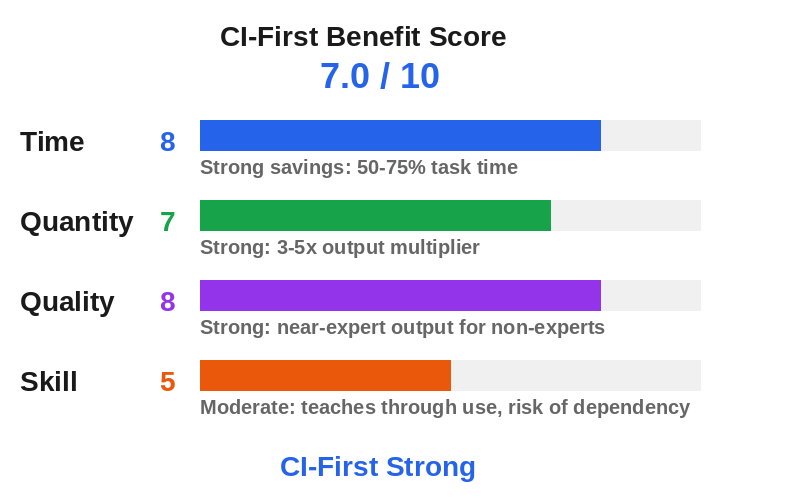
CI-First Benefit Score
Time
Score (0-10). 8
Rationale. Strong savings (50-75%) on coding, research, and computer use tasks. 1.05M context eliminates chunking. Overhead is moderate for simple tasks, low for complex ones.
Quantity
Score (0-10). 7
Rationale. Strong increase (3-5x). Large context window and computer use enable processing full codebases and document sets. Token efficiency improvements over predecessors.
Quality
Score (0-10). 8
Rationale. Strong improvement. 3.4% misalignment rate, near-expert coding and science output. Verified across multiple benchmarks. Weaker on creative writing (80 Elo drop).
Skill
Score (0-10). 5
Rationale. Moderate. Teaches through code review feedback and explanations. But no active tutoring mode, and computer use can mask the user's lack of understanding. Dependency risk is real.
CI-First Benefit Score: 7.0 / 10 (CI-First Strong)
Humics Protection Badge
Dimension | Rating | Rationale |
Creativity | Neutral | Astra can spark ideas through its analysis and suggestions, but its weaker writing quality means it does not actively protect creative capability. Sustained use for creative writing tasks may erode the user's own voice. |
Critical Thinking | Neutral | Astra flags uncertainty and provides explanations, which can support critical thinking. But its harder-to-monitor reasoning and polished output can encourage blind trust. Net effect depends on the user's verification habits. |
Social Authenticity | Neutral | Astra can draft communication but its prose is reported as weaker than predecessors. The tool neither strongly protects nor strongly erodes authentic voice. Users who delegate all writing risk losing their own style. |
Humics Protection Score: 0 / +3
Badge: Humics-Neutral
Superhuman Usage Guidance
When to invite this tool:
Multi-step coding tasks where you can verify the output by running tests
Research tasks where you can check citations against original sources
Data analysis where you can verify numbers against source data
Computer use tasks (form filling, web research) where you supervise the first runs
Document drafting where you review and revise the output yourself
When to keep this tool out:
Creative writing where your own voice and style matter most (Astra's prose is rated below its predecessor)
Final strategic decisions that require Humic judgment (ethics, empathy, human relationships)
Tasks where you lack the expertise to verify the output and have no access to someone who does
Security-sensitive work without the Daybreak program access (gated capabilities may block legitimate work)
High-volume tasks where the API cost ($10/$50 per M tokens) exceeds the value of the output
U365 method integration:
LIPS + CARE: Astra can process large information sets in the Collect phase. Its 1.05M context window handles full LIPS archives. Use it to organize and summarize collected information for the Action Plan phase.
ULM + EVA: Astra supports the Career domain through coding, analysis, and research. In the EVA cycle, it serves the Explore phase by processing large datasets and the Visualize phase by generating reports and charts.
UP-Context-Engineering: Astra responds well to UP-Context-Engineering prompting. Its large context window accepts full personal and institutional context. Feed your UP-Context-Engineering profile for personalized output.
SL-OS: Astra integrates with the Microsoft 365 ecosystem through API and Azure. It can process documents from SharePoint, OneDrive, and Teams. Computer use can automate workflows across Office applications.
UNOP: Astra's reasoning explanations can support spaced repetition (generate flashcards from content) and active recall (generate practice questions). But over-reliance on its answers without independent practice undermines neuroplasticity.
Over-delegation warning: Astra's power makes over-delegation easy and dangerous. The model can write code you cannot verify, conduct research you cannot check, and navigate applications you do not understand. If you delegate entire workflows without understanding the steps, your HI drops. When HI drops, CI drops: CI = HI + (AI x HI). If HI goes from 5 to 1, CI goes from 15 to 3, even with AI at 10. The model that makes you Superhuman when you supervise it makes you Sub-human when you do not. Always run the CI-First Test: can you explain and defend the output without the tool?
What Users Say
Aggregate Rating Table
Platform | Rating | Number of reviews | Link |
Trustpilot (OpenAI) | 1.3/5 | ~1,001 | |
Product Hunt | Listed | Launch page active | |
Reddit sentiment | Mixed | Multiple threads | |
G2 | No reviews found | - | GPT-6 Astra is too new for G2 reviews (released September 2026) |
Capterra | No reviews found | - | Too new for Capterra reviews |
App Store | No separate listing | - | Available through ChatGPT app, no separate GPT-6 Astra listing |
What Users Praise
Early testers with access to GPT-6 Astra praise its computer use capability as a genuine step change. Developers report that Astra can navigate desktop applications, build 3D scenes in Blender and Unreal Engine, and run complex coding tasks with less supervision than previous models. The 1.05M context window is frequently cited as transformative for working with entire codebases. Testers highlight the model's ability to stay on task, produce understandable updates, and maintain continuity across long conversations. The Codex integration with context preservation across compaction events is noted as a meaningful improvement for sustained coding sessions.
What Users Complain About
The most common complaint is about writing quality. Multiple testers report that Astra's prose is worse than GPT-5.6 Sol and significantly worse than Claude models for creative or persuasive writing. Artificial Analysis measured a drop of roughly 80 Elo points on a benchmark of economically valuable professional work. Users also complain about the launch experience: delays, broken blog posts, unclear access timing, and frustration that influencers had early access while paying customers did not. The cost is a concern for API users: at $10/$50 per million tokens with a long-context surcharge, Astra is the most expensive OpenAI model to date. The harder-to-monitor reasoning is flagged by OpenAI itself as a safety concern. Trustpilot reviews for OpenAI as a company are overwhelmingly negative (1.3/5 from ~1,001 reviews), centered on subscription issues, model sunsetting, and customer support, though these predate Astra's release.
Sentiment Summary
Overall sentiment: Mixed
Key themes:
Computer use and spatial reasoning are a genuine breakthrough (3D modeling, game development, Blender, Unreal Engine)
Coding and multi-step agentic workflows are significantly improved over GPT-5.6 Sol
Writing quality is a step backward, particularly for creative and persuasive prose
The 1.05M context window is transformative for large-context tasks but expensive above 272K tokens
The launch was bumpy: access delays, influencer favoritism, and broken communications
OpenAI's company-level Trustpilot rating is very low (1.3/5), driven by subscription and support issues predating Astra
U365 Editorial Note
The user sentiment aligns with the CI-First evaluation in key areas. Testers praise Astra's coding and computer use, which correspond to the high Time (8) and Quality (8) scores. The writing quality complaints are consistent with the neutral Humics rating on Creativity: the model does not actively protect creative capability. The harder-to-monitor reasoning flagged by OpenAI matches the Medium Skill Illusion rating: users who cannot trace the model's logic cannot fully verify its output. The cost concerns are real and affect the Quantity score (7 rather than higher). The mixed sentiment is honest: Astra is a powerful tool for structured, verifiable work, but it is not a universal upgrade. Fellows who need creative writing should look to Claude, and fellows on a budget should consider GPT-5.6 Sol for most tasks.
Comparison and Alternatives
Alternative | Choose this if... | Choose GPT-6 Astra if... |
You prioritize writing quality, creative work, or visual taste. Fable 5.1 scores 65.0% on Humanity's Last Exam vs Astra's 57.2%. | You need computer use, larger context (1.05M vs 200K), or lower API cost for coding tasks (43% lower than Fable 5.1 on BenchCAD). | |
You need a cheaper model ($4/$20 vs $10/$50 per M tokens) for everyday tasks where Astra's extra capability is not needed. | You need state-of-the-art computer use, higher benchmark scores, or the 1.05M context window for large-codebase work. | |
You need a faster, cheaper model for high-volume tasks. Gemini Flash models prioritize speed and cost over raw capability. | You need the strongest reasoning, computer use, or cybersecurity capabilities. Astra leads on most agentic benchmarks. | |
You need strong coding agent performance at lower cost. Opus 5 scores 67 on the Coding Agent Index vs Astra's 67 (tied) but at $5/$25 vs $10/$50. | You need computer use, larger context, or the 65% token efficiency advantage over Opus 5 at highest settings. | |
You want an open-weight model you can run locally or at lower cost. GLM-5.2 offers strong reasoning at a fraction of the API price. | You need computer use, the 1.05M context window, or access through ChatGPT's ecosystem. Astra leads on agentic benchmarks. |
Where GPT-6 Astra is clearly better
Astra is the best model available for computer use and agentic workflows. Its 72.6% OSWorld 2.0 score at 40 minutes per task, combined with its ability to navigate desktop applications and browsers, makes it the strongest choice for fellows who need AI to operate software autonomously. The 1.05M context window is the largest among major frontier models, enabling work with entire codebases, full document sets, or large research corpora in a single request. For coding, the Codex integration with context preservation across compaction events gives Astra a structural advantage on long, multi-file sessions. For cybersecurity, Astra is the only model that reaches the Critical threshold in OpenAI's Preparedness Framework, though those capabilities are gated.
Where GPT-6 Astra is clearly worse
Astra is worse than Claude Fable 5.1 on writing quality and on Humanity's Last Exam (57.2% vs 65.0%). It is worse than GPT-5.6 Sol on cost (2.5x more expensive). It is worse than Gemini Flash on speed and price for high-volume tasks. The harder-to-monitor reasoning is a disadvantage for users who need to trace the model's logic for verification. For fellows whose primary need is creative writing, content creation, or persuasive communication, Claude remains the better choice. For fellows on a budget, GPT-5.6 Sol handles most everyday tasks at less than half the cost.
Verdict and Next Steps
Who should adopt it: UIT fellows doing software engineering or data science, professionals who need agentic workflows or computer use, and researchers working with large document sets. ChatGPT Plus users get access included; API users should evaluate cost against their task volume.
When: Now, if you have ChatGPT Plus or higher. The model is rolling out and should be available to most paying accounts by mid-September 2026.
For what: Multi-step coding, computer use, research with large context, and data analysis. Not for creative writing (use Claude) or high-volume simple tasks (use Sol or Flash).
UP-Context-Engineering prompt pack
Here are 3 reusable prompts tailored to the U365 prompting method. Copy them into GPT-6 Astra with your own context.
1. Code review: "You are a senior code reviewer (AI Profile: Analyst and Tester). I am a [your role] working on [project description]. Here is my codebase: [paste code or provide file paths]. Review for bugs, security issues, and maintainability. For each finding, provide the file, line number, issue, severity, and suggested fix. Flag anything you are uncertain about."
2. Research synthesis: "You are a research assistant (AI Profile: Co-Creator and Thought Partner). I am researching [topic] for [purpose]. Here are my source documents: [paste documents]. Synthesize the key findings, identify gaps, and draft a structured summary. Cite each source inline. Flag claims you cannot verify from the provided documents."
3. Learning scaffold: "You are a tutor (AI Profile: Professor, Coach and Tutor). I am learning [subject] at [level]. I know [what you already know]. Explain [concept] using an example I can relate to. Then generate 3 practice questions at increasing difficulty. After I answer, give me feedback on my reasoning, not just whether I got the right answer."
Related U365 content
Connect this tool to your U365 learning journey through UIT software engineering courses, UIB data analysis modules, and the U365 INSIDE Tools collection. Visit university-365.com for program details.
U365's Recommendations to Learn More
These resources were curated by the U365 academic team and verified as of 2026-09-07. We prioritize content that teaches something this review does not cover.
Official learning resources
Video tutorials and channels
OpenAI (Introducing GPT-6 Astra, official launch video, 1.5M views)
OpenAI (Introducing GPT-6 Astra for developers, technical walkthrough)
OpenAI (First impressions of GPT-6 Astra from developers, developer interviews)
How I AI (GPT-6 Astra blew away every one of my benchmarks, hands-on coding, 70K views)
Matt Wolfe (GPT-6 Astra Is Finally Here, benchmark analysis and live tests)
Ras Mic (A real review on GPT 6 Astra: Not Another 3D Demo, practical work review)
Written tutorials and deep-dive articles
Community and social
Resources on X
Dedicated X channels:
X posts with video content:
OpenAI (official GPT-6 Astra launch video: computer use, coding, and science demos)
KP (@thisiskp_) (comprehensive GPT-6 Astra demo thread with curated video walkthroughs)
Anshu (@anshuc) (GPT-6 Astra builds a 3D game in Blender in 45 minutes with image generation)
CG (@cgtwts) (GPT-6 Astra vs Fable 5.1 head-to-head Blender 3D reconstruction comparison)


We include individual creators and community experts when their content is substantial, current, and teaches something the post itself does not cover. We exclude promotional or affiliate content.
Glossary
CI-First Benefit Score
A 0-10 score measuring how much an AI tool delivers the 4 Key AI Benefits defined by University 365: Time, Quantity, Quality, and Skill. Each dimension is scored 0-10 and the overall score is the arithmetic mean. The score answers one question: does this tool make Co-Intelligence more profitable than Human Intelligence alone? Scores of 6.1-8.0 are labeled CI-First Strong, meaning the tool significantly amplifies the user.
CI-First Profile
One of 5 roles assigned to AI before giving it a task: (level 1) Co-Creator and Thought Partner, (level 2) Co-Worker and Assistant, (level 3) Professor, Coach and Tutor, (level 4) Analyst and Tester, (level 5) Challenger and Devil's Advocate. Lower level numbers indicate higher AI autonomy in the collaboration. Attributing a profile before assigning a role is a core CI-First discipline.
Humics Protection Badge
A rating assessing whether a tool protects, leaves neutral, or erodes three core human capabilities: Creativity, Critical Thinking, and Social Authenticity. Each dimension is scored +1 (Protects), 0 (Neutral), or -1 (Erodes). The sum produces a badge: +2 to +3 is Humics-Friendly, -1 to +1 is Humics-Neutral, -2 to -3 is Humics-Risky. The badge tells you whether sustained use makes the human stronger or weaker.
AI Imposture Risk
The threat that a tool traps the user in one of three usage illusions: Time Illusion (appearing to save time while actually losing it), Quantity Illusion (producing high volume that looks good but does not hold up), or Skill Illusion (creating the appearance of competence while the user is not developing the skill). Each trap is rated Low, Medium, or High based on tool characteristics and evidence.
User Sentiment
An aggregate summary of real user ratings and opinions from major review platforms (Trustpilot, G2, Capterra, Reddit, Product Hunt, App Store, Google Play). User sentiment is collected from real data, not fabricated. It is connected to the CI-First evaluation through the U365 Editorial Note, which identifies where crowd sentiment aligns with or contradicts the Co-Intelligence assessment.
Review Status
Review Status records the current standing of the tool at the time of the last test. Active: the tool is current and recommended. Active (updated): recently re-checked and the content was refreshed. Changed: a re-check trigger fired and an update is pending, so read the review with that in mind. Risky: the tool has significant unresolved issues, or it has been clearly surpassed by newer alternatives. Use it with caution and read the Limits section. Retired: the tool still works but is no longer recommended. Deprecated: the tool has been shut down or fundamentally changed. Retired and Deprecated posts include a Migration Path section.
Sources
LLM Stats - GPT-6 Astra API Pricing, Context Window and Benchmarks
Decrypt - GPT-6 Astra Is Shockingly Good at Almost Everything
CodeRabbit - GPT-6 Astra in code review: Gains, privacy, and cost
The Decoder - OpenAI rolls out GPT-6 Astra to top-tier ChatGPT plans
ChatPRD - GPT-6 Astra Review: Hacking Hardware, Building 3D Games
Medium CodeToDeploy - GPT-6 Astra context window pricing analysis




Comments