
llama.cpp: The C/C++ Inference Engine That Powers Local AI Everywhere

Updated: Oct 17
Status: Active (updated) | Last tested: 2026-10-17 (v0.7.0) | Re-check: trigger-based (max 6 months)
Active (updated): the tool is current and recommended. This review was recently re-checked and the content was refreshed.


In this Tool Review
Tool Snapshot
Category: Inference Engine
Provider: ggml-org (Georgi Gerganov)
Version tested: v0.7.0 (Oct 2026)
License: MIT
Platforms: macOS, Linux, Windows, Android, iOS, Web (WebGPU)
Primary use cases:
Running LLMs locally on consumer hardware (CPU, GPU, or hybrid)
Quantizing models to GGUF format for reduced memory footprint
Serving LLMs via an OpenAI-compatible API server
Converting Hugging Face models to GGUF format
Running vision-language models (VLMs) locally
Benchmarking and evaluating quantized model performance
Official links:
Website: https://llama.app
GitHub: github.com/ggml-org/llama.cpp
Documentation: github.com/ggml-org/llama.cpp/tree/master/docs
Releases: github.com/ggml-org/llama.cpp/releases
Brand kit: github.com/ggml-org/llama.brand
Pricing summary: Free and open-source (MIT license). No paid tiers, no subscription, no usage limits. Self-hosted on your own hardware.
CI-First Benefit Score | 8.3/10 (Transformative) |
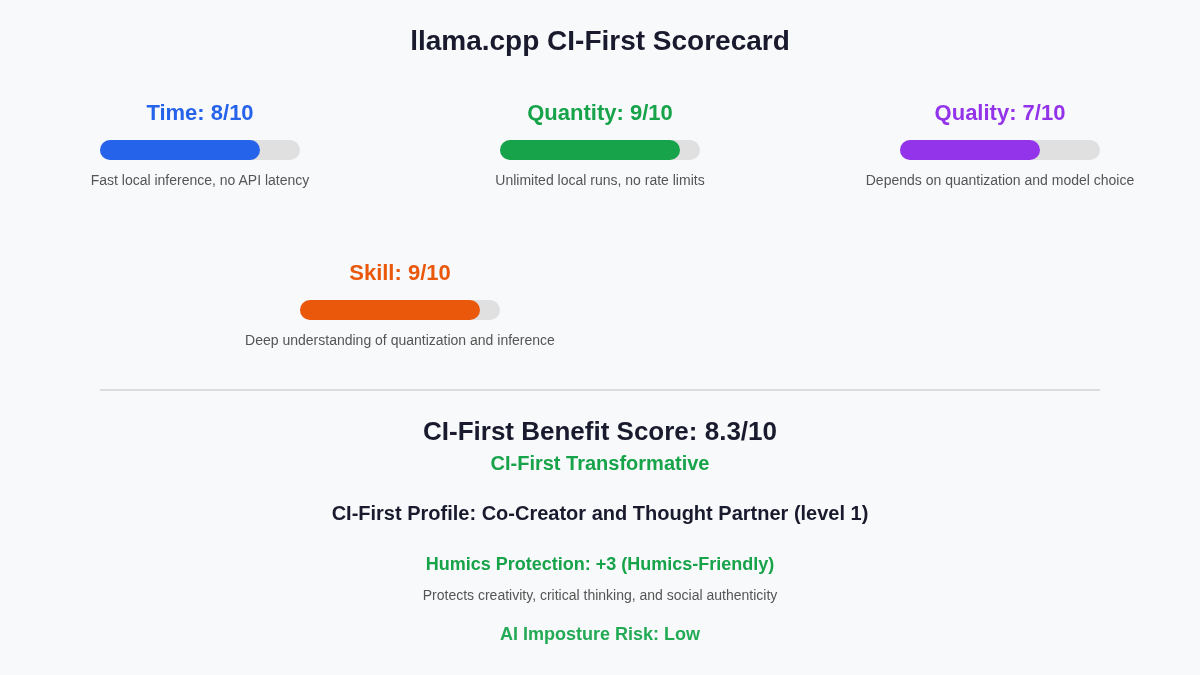
Time / Quantity / Quality / Skill | 8 / 9 / 7 / 9 |
CI-First Profile | Co-Creator and Thought Partner (level 1) |
Humics Protection | +3 (Humics-Friendly) |
AI Imposture Risk | Low |
User Sentiment | Positive (131,463 GitHub stars, 24,479 forks as of 2026-10-17) |
Pricing | Free (MIT license) |
Platforms | macOS, Linux, Windows, Android, iOS, Web |
For detailed explanations of the CI-First evaluation terms used in this review, including CI-First Benefit Score, CI-First Profile, Humics Protection Badge, AI Imposture Risk, and User Sentiment, see the Glossary at the end of this publication.
The Problem
Running large language models locally used to require expensive cloud APIs, proprietary runtime licenses, or hardware-specific frameworks that locked you into a single vendor. Developers and researchers who wanted privacy, offline access, or full control over their inference pipeline had no portable, lightweight option that worked across CPUs, GPUs, and mobile devices.
Model quantization was equally fragmented. Each framework had its own format, its own quality tradeoffs, and its own hardware support. Converting a model for local use meant navigating a maze of incompatible tools, with no consensus on how to compress models efficiently without destroying quality.
The Outcome
llama.cpp gives you a single, dependency-free C/C++ inference engine that runs quantized LLMs on almost any hardware: Apple Silicon, NVIDIA GPUs, AMD GPUs, Intel GPUs, mobile phones, web browsers, and even mainframes. The GGUF format has become the de facto standard for local model distribution, supported by Hugging Face, Ollama, LM Studio, and dozens of downstream projects.
You get 1.5-bit to 8-bit integer quantization, an OpenAI-compatible API server, built-in web UI, multi-GPU tensor parallelism, and support for vision-language models. All of it is MIT-licensed, community-driven, and actively maintained with 7,710 releases and more than 2,000 contributors on GitHub.
Who Should Use It
U365 Fellows (Students) | Learn how LLM inference works at the metal level. Understand quantization tradeoffs, memory management, and the GGUF format that powers most local AI tools. |
Professionals | Run models locally for privacy, offline work, or cost control. Serve LLMs to internal tools without cloud dependency. Benchmark quantized models for production deployment. |
Everyone | Use llama.cpp indirectly through Ollama, LM Studio, or any tool built on top of it. The GGUF format it created is the backbone of the local AI movement. |
U365 Institutes Alignment
Rating. High (primary)
Why. The competency is measuring an inference system on your own hardware and defending the configuration from the numbers you produced. The Fellow selects a quantization format against a stated quality, throughput and resident-memory budget, sets the context size and the layers that go to the accelerator, runs a benchmark, reads tokens per second and memory use from a run they started themselves, and then states what the two builds compared do and do not do. The tensor library, the GGUF container and the memory-mapped load path are read as published engineering artefacts rather than as a vendor interface, and the licence and the exit path are readable before anything depends on them. Nothing between the Fellow and the model is mediated, so the measurement is theirs and the number is checkable. The decisive competency is the separation of a configuration claim from a measurement: the engine reports its own throughput, and a Fellow who can say which of the two moved, and by how much on which hardware, is doing evaluation work that transfers to every system that runs on someone else's stack
The limit that holds the row. The product teaches the machinery, not software engineering. It publishes no SDK, no model-training path and no evaluation surface, so a technology cohort builds configuration, measurement and appraisal competence rather than application code. No published U365 programme assesses quantization, model-compression literacy or inference-system configuration, and a verified term search over all 79 published programme descriptions returned zero matches for quantization, quantisation, gguf, compression, pruning, distillation, model weights, inference, gpu, cuda, backend, benchmark, serving, throughput, latency and command line. The row stands at High rather than Medium because the measured surface is the Fellow's own machine, which is a stronger teaching position than a hosted endpoint that returns a verdict with its confidence attached to a page a reader cannot open
Rating. Medium
Why. Two competencies, both costable from a published record. The first is licence and exit-path appraisal before adoption: MIT terms, a model format that the major local runtimes all read, and a build that runs with no account, no key and no metered service, which together fix what switching away later would cost. The second is self-hosting economics: own compute against a metered API, with the hardware, the electricity and the operator time inside the comparison rather than outside it. Every one of the two survives the removal of the engine, because both are decisions about a category rather than operations inside this product, and both are readable from documents the vendor publishes
The limit that holds the row. The tool teaches no management, finance, entrepreneurship or leadership content of its own, and it produces nothing a business cohort can be assessed on. A verified term search over all 79 published programme descriptions returned zero matches for total cost of ownership, procurement, vendor management, unit economics, business case, cost per token, infrastructure cost, capacity planning, break-even, own hardware and electricity. The nearest verified teaching is Financial Analysis Specialist, whose published outcomes are statement dissection, financial modelling and forecasting, and it publishes no vendor-appraisal or computing-economics outcome. The rating is Medium rather than High because the subject matter is a technology decision with a cost reading attached, not a commercial subject in its own right, and the four sibling inference-engine reviews carry the same Medium. The contrast with the TickClip review is recorded, where the UIB row is High: there the product's entire subject was a price and an offer, and here the product's subject is an engine
Rating. Low
Why. A reading contact, not a communication competency. The Fellow can read a local deployment as a publication boundary: what a machine drafted may not leave the machine, and what has to be read by a person before any of it is published. That judgement is real, and it is exercised on material the Fellow owns rather than on a case study, which is worth the reading
The limit that holds the row. Nothing in the communication competency set is exercised as a communication act. The engine writes nothing in a person's voice, evaluates no audience, produces no campaign and carries no editorial workflow: the drafting is done by whichever model is loaded, and this product supplies the execution layer beneath it. No published U365 programme assesses disclosure practice or editorial judgement over machine-drafted text, and the measured position is stated rather than claiming an empty catalogue: editorial, disclosure and conflict of interest return zero matches, while the marketing group carries the campaign and audience vocabulary listed below. No UIC credential chain is mapped for this tool. The published row was Medium and its stated reason was Content teams run local models for drafting, summarization, and research without API costs, which is a description of what the product does for them rather than a competency the Fellow keeps. The nearest published teaching is the marketing group, and it is stated rather than implying an absence: a word-start accent-folded search over all 79 published programme descriptions returns 6 programmes for audience, 6 for social media, 1 for campaign, 1 for content strategy and 1 for copywriting, and zero for editorial, disclosure and conflict of interest. Those programmes assess campaign craft and audience work that a content team produces, not the judgement about whether a machine-drafted recommendation may be published without saying so, so they are adjacent anchors rather than an assessment home for this row. The correction is consistent with two published siblings on the same finding: the UIC row of vLLM is Low and the UIC row of Open WebUI is Low, both inference engines, both carrying no communication craft. The departure is recorded rather than smoothed: Ollama carries UIC Medium on the same class of reason, and that row is the outlier rather than the standard
Rating. Low
Why. A design-cohort reading, not a design act. Two interface objects on this platform are worth reading as decisions someone else made and defended. The model file format is an interoperation design that succeeded well enough to become the de facto container for local models, and the OpenAI-compatible API shape is an interface contract adopted so that one server can be replaced by another without rewriting the caller. Reading either one as a design decision, with the reason it won, is critique with a stated basis
The limit that holds the row. Nothing in the design competency set is exercised as a design act. The product offers no design surface, no template control and no editable artefact, and it evaluates no design against a brief. It builds no disciplinary design competency, so the row stays Low, and no credential chain is mapped. Praising the file format as a good design is not a competency claim and UDA does not make one. The published reason, Design fellows benefit from understanding AI tooling but rarely work with inference engines directly, is an admission of no relevance rather than a reason, and it is replaced so the row states the reading that remains
Skill level: Intermediate to advanced. Command-line experience required. C/C++ compilation knowledge helpful for building from source.
Prerequisites: A model in GGUF format (available from Hugging Face). Basic terminal familiarity. Hardware with sufficient RAM or VRAM for the target model size.
Time to first result: 15 minutes (install via pre-built binary, download a small GGUF model, run llama-cli).
Time to competence: 2 to 4 weeks (understand quantization formats, server configuration, GPU offload tuning, and multi-backend builds).
How It Works
Underlying Technology
llama.cpp is a plain C/C++ implementation with zero external dependencies. It runs LLM and VLM inference using the GGML tensor library and the GGUF model format. GGUF stores model weights (optionally quantized) alongside metadata for memory-mapped, zero-copy loading. This means models load fast and start generating tokens immediately without decompression overhead.
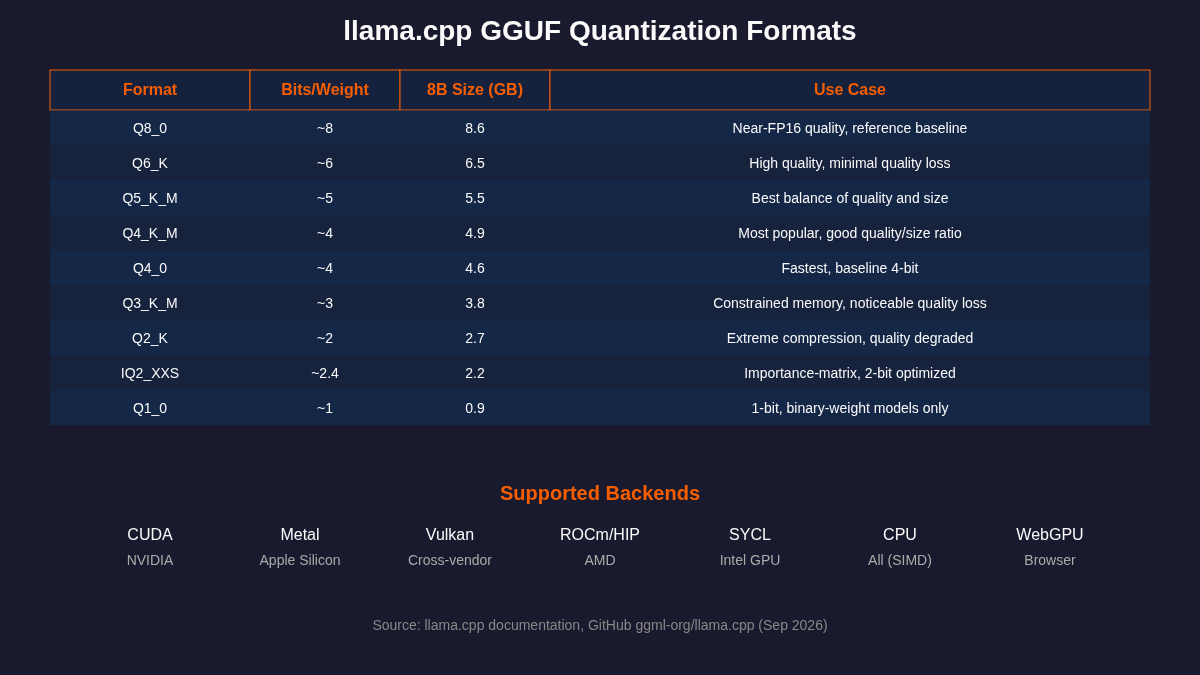
The engine applies post-training weight-only quantization. Weights are compressed offline into GGUF formats (Q4_0, Q4_K_M, Q5_K_M, Q8_0, IQ2, Q1_0, and more). Activations stay in floating-point precision during inference, though some kernels temporarily quantize activations within individual operations.
Key Technical Features
Backend support: 16 hardware backends including CUDA (NVIDIA), Metal (Apple Silicon), Vulkan (cross-vendor GPU), ROCm/HIP (AMD), SYCL (Intel), CPU (SIMD-optimized for ARM NEON, AVX2, AVX-512, AMX, RISC-V), WebGPU, and more.
Quantization: 1.5-bit to 8-bit integer quantization with over 20 format variants. The K-quant family (Q2_K through Q6_K) uses superblocks for improved quality. Importance matrix (imatrix) support enables better low-bit quantization.
Multi-GPU: Backend-agnostic tensor parallelism (April 2026) splits individual matrix operations across GPUs. Previous layer-splitting approach kept GPUs idle between layers. Tensor parallelism keeps all GPUs busy on every token, delivering 3 to 4x throughput gains.
API server: llama-server provides an OpenAI-compatible REST API with a built-in web UI. Supports streaming, tool calling, structured output via GBNF grammars, speculative decoding, and multimodal inputs.
CPU+GPU hybrid: Partially offload models larger than VRAM capacity. Layers split between GPU and CPU automatically, so you can run models that exceed your GPU memory.
KV cache optimization: Walsh-Hadamard rotation enables Q4_0 KV cache quantization for reasoning tasks, cutting KV cache VRAM usage by 4x compared to FP16.
Setup and Onboarding
Required accounts: None. No account, no login, no API key needed. Download a binary or build from source.
Installation Options
Option 1 (Easiest): Visit llama.app and follow the installer script. It auto-detects Metal, CUDA, or Vulkan and downloads the correct pre-built binary.
Option 2 (Docker): Pull the official Docker image. Choose CPU, CUDA, ROCm, Vulkan, or SYCL variant. Run with docker run and mount a models directory.
Option 3 (Pre-built binaries): Download from the GitHub releases page. Nightly builds available. Windows binaries include CUDA and Vulkan variants.
Option 4 (Build from source): Clone the repo, run cmake -B build and cmake --build build. Add -DGGML_CUDA=ON, -DGGML_METAL=ON, or -DGGML_VULKAN=ON for GPU acceleration. CMake is the only build system (Makefile removed July 2025).
15-Minute Checklist
Install llama.cpp (binary, Docker, or build from source)
Download a GGUF model from Hugging Face (start with Qwen3.5-0.8B or Gemma 4 2B)
Run: llama cli -m model.gguf -p "Hello, what can you do?"
Launch the API server: llama serve -m model.gguf (the default port is 9931 since v0.7.0)
Open the web UI at http://localhost:9931 in your browser
Test GPU offload: add -ngl 99 to move all layers to GPU
Experiment with quantization: llama-quantize model-f16.gguf model-q4_k_m.gguf Q4_K_M
Real Workflows
Workflow 1: Local Coding Assistant with Privacy
Learner type: Professional developer
CI-First benefit tags: Time (8), Quantity (9), Quality (7), Skill (9)
U365 program connection: ULM+EVA (Evaluate-Verify-Authenticate), LIPS+CARE (privacy-preserving local AI)
You do | llama.cpp does |
Choose a coding model (Qwen3.6-27B, DeepSeek V4) | Loads the GGUF file and maps layers to GPU |
Send a coding prompt via llama-cli or API | Generates code with the quantized model |
Review, test, and verify the output | Streams tokens at 25 to 75 tokens/second depending on hardware |
Sample prompt: Write a Python function that validates an email address using regex, with docstring and type hints.
Verification checklist:
Multi-Model: Compare output with a cloud model (Claude, GPT) for quality reference
External Source: Run generated code through a linter and test suite
Human Review: Check logic, edge cases, and security before using in production
CI-First Test: Did building this locally teach you about model capabilities and limitations?
Workflow 2: Serving a Local API for Internal Tools
Learner type: Technical professional or advanced student
CI-First benefit tags: Time (9), Quantity (9), Quality (7), Skill (8)
U365 program connection: SL-OS (Systems Lifecycle), UNOP (U365 Network of Practices)
You do | llama.cpp does |
Select a model and launch llama-server | Exposes OpenAI-compatible /v1/chat/completions endpoint |
Point your app, IDE plugin, or script to localhost:9931 (v0.7.0 default) | Handles concurrent requests with multi-slot processing |
Configure context length, GPU layers, and quantization | Manages KV cache, speculative decoding, and memory |
Sample command: curl http://localhost:9931/v1/chat/completions -H 'Content-Type: application/json' -d '{"model":"qwen3","messages":[{"role":"user","content":"Summarize this document"}]}'
Verification checklist:
Multi-Model: Compare API responses with OpenAI API for the same prompts
External Source: Monitor token throughput and latency with llama-bench
Human Review: Verify that private data stays on your machine (no network calls)
CI-First Test: Did setting up the server teach you about API architecture and inference serving?
Workflow 3: Comparing Quantization Levels on the Same Model
Learner type: Advanced student, researcher, or engineer choosing a deployment format
CI-First benefit tags: Time (8), Quantity (8), Quality (7), Skill (9)
U365 program connection: ULM+EVA (Explore-Visualize-Action Plan), UNOP (measure before you conclude)
You do | llama.cpp does |
Quantize the same base model twice with llama-quantize, to Q4_K_M and to Q8_0 | Loads both GGUF files and maps each one to the same backends |
Send the same prompts to both builds: a reasoning question, a code task and a document summary | Runs both quantizations and streams tokens for each, so the two runs are comparable turn for turn |
Record tokens per second with llama-bench, resident memory from the operating system, and grade the outputs against a reference | Reports throughput and memory for each quantization level |
Sample command: llama-quantize model-f16.gguf model-q4_k_m.gguf Q4_K_M, then llama-bench -m model-q4_k_m.gguf -m model-q8_0.gguf -p 512 -n 128
Verification checklist:
Multi-Model: repeat the comparison on a second model family so the quantization effect is separated from the model's own behaviour
External Source: check the throughput you measured against the project's own build and benchmark documentation
Human Review: read every output before accepting it. A quantization that holds up on one short prompt can fail on a longer one
CI-First Test: can you state which level you would ship, and why, in one sentence, from your own measurements?
Strengths, Limits, and AI Imposture Risk
Strengths
Dimension | Assessment |
Time | Local inference eliminates network latency. First token arrives in milliseconds. Pre-built binaries get you running in under 5 minutes. |
Quantity | Unlimited generation runs. No rate limits, no API quotas, no per-token costs. Run a model 24/7 on your own hardware. |
Quality | Quality depends on the model and quantization level. Q4_K_M preserves most of the model's capability. Q8_0 is nearly indistinguishable from FP16. |
Skill | Using llama.cpp builds deep understanding of how LLMs work: quantization, memory mapping, KV cache, and hardware acceleration. No black-box abstraction. |
Limits
Steeper learning curve than wrapper tools like Ollama or LM Studio. Command-line flags and build options require study.
Rapid release cadence (3+ builds per day) can introduce regressions. Pin to a stable release for production use.
Documentation is scattered across README, wiki, and GitHub discussions. No single comprehensive manual.
The built-in web UI includes a models manager that downloads from Hugging Face and handles search, filters, favorites, load/unload and delete, but versioning GGUF files is still manual.
GPU performance requires understanding of layer offload tuning, especially with uneven VRAM across multiple cards.
Not optimized for high-throughput multi-user serving. Use vLLM or TGI for production concurrent workloads.
AI Imposture Risk Assessment
Dimension | Risk | Evidence |
Time Illusion | Low | No hidden latency. Token generation speed is transparent and measurable with llama-bench. |
Quantity Illusion | Low | Output volume is genuine. No rate limits or artificial caps. You see exactly what the model produces. |
Skill Illusion | Low | The tool itself builds real skill. Understanding quantization and inference internals is transferable knowledge, not dependency. |
Overall AI Imposture Risk: Low. llama.cpp is transparent about its capabilities. Users see real performance, real quality, and real limitations. There is no marketing layer hiding the model's behavior.
U365 Co-Intelligence Rating
CI-First Profile: Co-Creator and Thought Partner (level 1)
llama.cpp earns the highest CI-First Profile. It does not replace human intelligence; it gives you direct access to the machinery of LLM inference so you can build, experiment, and create with full understanding. You control the model, the quantization, the hardware, and the output. No vendor mediates between you and the model.
CI-First Benefit Score
Dimension | Score | Rationale |
Time | 8/10 | Local inference is instant. No network round-trips. Setup takes 15 minutes with pre-built binaries. |
Quantity | 9/10 | Unlimited runs. No quotas. You own the compute. Generate as much as your hardware allows. |
Quality | 7/10 | Depends on model choice and quantization. Q4_K_M is the sweet spot. Q8_0 approaches FP16 quality. |
Skill | 9/10 | Direct exposure to inference internals builds genuine, transferable expertise. |
Overall | 8.3/10 | CI-First Transformative |
Humics Protection Badge
Dimension | Rating | Reason |
Creativity | +1 (Protects) | Full control over model selection, quantization, and prompting encourages creative experimentation. |
Critical Thinking | +1 (Protects) | Transparency of the inference pipeline forces users to understand what they are running, not trust a black box. |
Social Authenticity | +1 (Protects) | Local, private inference preserves authentic human interaction. No data leaves your machine. |
Badge: Humics-Friendly (+3)
Superhuman Usage Guidance
When to invite the tool:
Running models locally for privacy, offline work, or cost control
Learning how LLM inference and quantization actually work
Serving LLMs to internal tools without cloud dependency
Benchmarking quantized models for production deployment decisions
Converting and quantizing models for edge devices or mobile deployment
When to keep the tool out:
High-throughput multi-user serving (use vLLM or TGI instead)
Non-technical users who need a GUI-first experience (use LM Studio or Ollama)
Production environments requiring stable, tested releases (pin to v0.x tagged releases, not nightly builds)
U365 method integration: LIPS+CARE (privacy-preserving local AI), ULM+EVA (evaluate model output before trusting it), UP-Context-Engineering (context-aware model selection).
Over-delegation warning: llama.cpp is a runtime, not a replacement for human judgment. Quantized models produce lower-quality output than their full-precision counterparts. Always verify critical output against external sources and human review. The tool builds real skill only if you understand what it does, not if you treat it as a magic box.
What Users Say
Platform | Rating/Score | Reviews/Count |
GitHub Stars | N/A (community) | 131,463 stars, 24,479 forks (GitHub API, 2026-10-17) |
GitHub Contributors | N/A | More than 2,000 (GitHub contributors API with anonymous accounts, 2026-10-17) |
Reddit (r/LocalLLaMA) | Mixed to Positive | Multiple threads, strong community |
Trustpilot | No reviews found | Open-source project, not a commercial product |
G2 | No reviews found | Developer tool, not enterprise SaaS |
Capterra | No reviews found | Developer tool, not enterprise SaaS |
What Users Praise
Performance: Users report 10 to 15 percent throughput improvement over Ollama when running the same model with optimized flags. One Reddit user (u/Ok-Drawer5245) measured GPU utilization jumping from 80 percent with Ollama to 97 percent with llama.cpp.
Control: Advanced users praise the granular control over GPU offload, context size, and quantization. The ability to tune every parameter for their specific hardware setup is a key differentiator.
Stability: A 4-hour coding session with Qwen3.6-27B on AMD R9700 (Reddit, June 2026) processed 7.2 million tokens without crashing, demonstrating production-readiness for long sessions.
Portability: Runs on everything from Raspberry Pi to multi-GPU servers to web browsers via WebGPU.
What Users Complain About
Documentation: Multiple users cite poor or scattered documentation. One Reddit user wrote that the docs are lacking but acknowledged that docs are generally lacking everywhere.
Stability with nightly builds: One Reddit thread (March 2026) called llama.cpp a vibe-coded mess citing 3 releases per day, each introducing potential bugs. Pinning to stable releases is essential.
Learning curve: Users transitioning from Ollama or LM Studio report frustration with command-line flags and configuration. Performance degradation in long conversations was reported by one user running Qwen 3.6 35B.
Rapid release churn: 7,000+ releases make it hard to track what changed. Each git tag can introduce new behavior without clear changelogs.
Sentiment Summary
Community sentiment is overwhelmingly positive for the project's mission and execution. The 131,463 GitHub stars and 24,479 forks speak to broad adoption and active community engagement. Criticism focuses on documentation, release stability, and the learning curve, not on the core inference quality or the project's direction.
U365 Editorial Note
The community sentiment aligns with our CI-First evaluation. Users who invest time in learning the tool report transformative benefits: privacy, unlimited generation, and deep understanding. Users who expect a turnkey experience are frustrated. llama.cpp rewards investment in understanding, which is exactly what the CI-First framework measures in its Skill dimension (9/10).
Comparison and Alternatives
Tool | Choose if... |
Ollama | You want the easiest setup. Ollama wraps llama.cpp with model management and a simple CLI. Trade-off: less control over tuning and 10 to 15 percent lower throughput. |
LM Studio | You want a GUI desktop app. LM Studio uses llama.cpp internally but adds a polished interface, model browser, and chat UI. Trade-off: closed-source desktop wrapper. |
vLLM | You need high-throughput multi-user serving in production. vLLM excels at concurrent batching. Trade-off: GPU-only, heavier setup, no CPU fallback. |
MLX | You are on Apple Silicon only and want Apple-native optimization. MLX is developed by Apple. Trade-off: macOS-only, fewer quantization options. |
TensorRT-LLM | You need maximum NVIDIA GPU performance for production. Trade-off: NVIDIA-only, complex build, no CPU or AMD support. |
llama.cpp is better when you need portability, CPU support, fine-grained control, or privacy. It is worse when you need high-throughput multi-user serving, a GUI-first experience, or vendor-optimized GPU kernels for a single platform.
Verdict and Next Steps
llama.cpp is the foundational tool of the local AI movement. It created the GGUF format, pioneered CPU-optimized LLM inference, and now supports 16 hardware backends from mobile phones to mainframes. If you care about how LLMs actually work, this is where you start.
Who should adopt: Developers, researchers, and technical professionals who want local, private, cost-free LLM inference. Students learning AI internals. Anyone building tools that need an OpenAI-compatible local API.
When: Now. The v0.7.0 release (October 2026) is the current stable release. Start with pre-built binaries and a small model. Move to building from source only when you need custom GPU backends.
For what: Local coding assistants, privacy-preserving document processing, offline LLM serving, model quantization experiments, and learning how inference engines work.
UP-Context-Engineering Prompt Pack
Prompt 1 (Quantization Comparison): Run the same model at Q4_K_M and Q8_0. Ask both versions to solve a math problem, write code, and summarize a document. Compare output quality, speed (tokens/second), and memory usage. Record your findings.
Prompt 2 (Server Configuration): Launch llama-server with --ctx-size 32768 and a 27B model. Connect your IDE or coding tool to the local API. Test with a real coding task. Measure latency, throughput, and quality. Adjust GPU layers to find the optimal balance for your hardware.
Prompt 3 (Multi-Backend Benchmark): Build llama.cpp with CPU-only, then with CUDA or Metal. Run llama-bench with the same model and quantization. Compare tokens/second across backends. Document the hardware acceleration impact.
Related U365 Content
Status and Last Tested
Status: Active (updated) | Last tested: 2026-10-17 (v0.7.0) | Re-check: trigger-based (max 6 months)
Re-check triggers: New major version release (v0.7.0+), significant backend changes (new hardware support), breaking changes to GGUF format, or major quantization format additions.
U365's Recommendations to Learn More
Official Learning Resources
llama.cpp README and Quick Start: Installation, quick start commands, and supported backends.
Build Documentation: How to build from source with GPU backends (CUDA, Metal, Vulkan, SYCL, ROCm).
llama-server REST API: Full API reference for the OpenAI-compatible server.
Quantize Tool README: All quantization formats, options, and size comparisons.
llama.app: Official installer and getting started guide.
Video Tutorials and Channels
Run Large Language Models on Your Computer Using llama.cpp - Complete Beginner's Guide (Published Jul 18, 2026, 32:57)
Run AI Models Locally with llama.cpp (Published Apr 29, 2026, 12:25)
How to Run Local LLMs with Llama.cpp: Complete Guide (Published Sep 7, 2025, 2:57:24)
Written Tutorials and Deep-Dive Articles
How to Install llama.cpp on Windows, Mac, Linux and Termux (2026) by Nishchay Kaushik. Comprehensive cross-platform installation guide.
llama.cpp Releases in April 2026: Tensor Parallelism, 1-Bit Quantization, and More by Matthew Diakonov on Fazm. Detailed analysis of major feature releases.
Which Quantization Should I Use? A Unified Evaluation of llama.cpp Quantization on arXiv. Academic paper comparing all quantization formats.
Why llama.cpp's Cross-Platform and CUDA Improvements Make Local Inference Practical for Enterprises on Kimbodo AI Research.
llama.cpp vs MLX: Cross-Platform LLM Runtime vs Apple Silicon on Cactus Compute. Detailed comparison of two local inference engines.
Community and Social
r/LocalLLaMA on Reddit: The most active community for local LLM discussion, including llama.cpp tips and benchmarks.
r/llamacpp on Reddit: Dedicated subreddit for llama.cpp-specific discussions and troubleshooting.
llama.cpp GitHub Discussions: Ask questions, share projects, and follow development discussions.
ggml-org on GitHub: The organization behind llama.cpp and the GGML tensor library.
Resources on X
Dedicated X channels:
Georgi Gerganov (@ggerganov): Creator of llama.cpp and GGML. Posts updates on new features and releases.
Tech With Tim (@TechWithTimm): Local AI stack guide featuring llama.cpp (Sep 2026).
Alok (@analogalok): Running diffusion models with llama.cpp experimental branch on RTX 3090 (Aug 2026).
Apex Tech Outlet (@ApexTechOutlet): NVIDIA reports 1.9x faster llama.cpp inference on RTX systems (Sep 2026).
CI-First Evaluation Summary Card
Field | Value |
Tool | llama.cpp (llama.app; github.com/ggml-org/llama.cpp) |
Vendor | ggml-org (Georgi Gerganov), open-source project under the MIT licence |
Category | Inference engine for local LLM and vision-language-model serving |
Date | 2026-10-17 |
Version reviewed | v0.7.0 (Ubuntu x64 CPU prebuilt, build b11669, commit 620d2225c) |
CI-First Benefit Score | 8.3 / 10 |
Band | CI-First Transformative |
Time | 8 |
Quantity | 9 |
Quality | 7 |
Skill | 9 |
Humics Protection Score | +3 of +3 |
Humics Badge | Humics-Friendly |
Humics: Creativity | +1, protects |
Humics: Critical Thinking | +1, protects |
Humics: Social Authenticity | +1, protects |
AI Imposture Risk overall | Low |
Trap: Time Illusion | Low |
Trap: Quantity Illusion | Low |
Trap: Skill Illusion | Low |
CI-First Profile | Co-Creator and Thought Partner (level 1) |
Collaboration Mode | Centaur recommended; Cyborg available at Low Imposture Risk |
Review Status | Active (updated) |
Last tested | 2026-10-17 |
Clause 5.2.3-a, agent-authored procedural memory | Null. llama.cpp writes no skills, no memory store and no standing instructions. It is a runtime with no agent surface |
Clause 4.2-a, agent-mediated conversation | Null. Nothing in scope connects the tool to a channel that sends text in the user's name |
Clause 7.5, team-level rooms | Null. The RPC backend, tensor parallelism and the router's child processes are several model processes, not several agents sharing one channel with the human |
Section 7c finding | None recorded for this review |
Institutes | UIT High (primary), UIB Medium, UIC Low, UID Low |
Framework | CI-First Evaluation Framework v1.2 |
Evidence | Hands-on run of the v0.7.0 Ubuntu x64 CPU prebuilt, read 2026-10-17: command line generation, the serve health check, the OpenAI-compatible /v1/models and /v1/chat/completions endpoints, the built-in web UI, llama-quantize --dry-run and llama-bench |
Re-check trigger | Any release that changes the GGUF format or a supported backend, or a new minor line becoming stable |
Glossary
CI-First Benefit Score
A 0-10 score measuring the net benefit a tool delivers after accounting for the time, effort, and skill required to use it. Sub-scores cover Time saved, Quantity of usable output, Quality of results, and Skill built. The score reflects genuine value, not surface-level convenience.
CI-First Profile
A classification of how a tool relates to human intelligence, from level 1 (Co-Creator and Thought Partner) to level 5 (Challenger and Devil's Advocate). Higher profiles indicate tools that collaborate with humans rather than replacing or eroding human capability.
Humics Protection Badge
A rating of how a tool affects three human capabilities: creativity, critical thinking, and social authenticity. A +3 badge (Humics-Friendly) means the tool actively protects all three. A -3 badge (Humics-Risky) means the tool erodes them.
AI Imposture Risk
An assessment of whether a tool creates false confidence in its output. Measures three illusion types: Time Illusion (does it feel faster than it is), Quantity Illusion (does it produce volume without value), and Skill Illusion (does it create dependency instead of learning). Low risk means the tool is transparent about its capabilities.
User Sentiment
An aggregate measure of community and user feedback from review platforms, forums, and social media. Combines quantitative ratings (stars, upvotes) with qualitative analysis of what users praise and complain about.
Review Status
Review Status records the current standing of the tool at the time of the last test. Active: the tool is current and recommended. Active (updated): recently re-checked and the content was refreshed. Changed: a re-check trigger fired and an update is pending, so read the review with that in mind. Risky: the tool has significant unresolved issues, or it has been clearly surpassed by newer alternatives, so use it with caution and read the Limits section. Retired: the tool still works but is no longer recommended. Deprecated: the tool has been shut down or fundamentally changed. Retired and Deprecated posts include a Migration Path section.
Sources
llama.cpp GitHub Repository - https://github.com/ggml-org/llama.cpp
llama.cpp LICENSE (MIT) - https://github.com/ggml-org/llama.cpp/blob/master/LICENSE
llama.cpp Build Documentation - https://github.com/ggml-org/llama.cpp/blob/master/docs/build.md
llama.brand - Official Brand Assets - https://github.com/ggml-org/llama.brand
llama.cpp v0.7.0 Release - https://github.com/ggml-org/llama.cpp/releases/tag/v0.7.0
Fazm: llama.cpp Releases in April 2026 - https://fazm.ai/blog/llama-cpp-release-april-2026
arXiv: Which Quantization Should I Use? - https://arxiv.org/pdf/2601.14277v1
Hugging Face GGUF Documentation - https://huggingface.co/docs/transformers/gguf
Cactus Compute: llama.cpp vs MLX - https://cactuscompute.com/compare/llama-cpp-vs-mlx
X: Tech With Tim - Local AI Stack - https://x.com/TechWithTimm/status/2094772263346217426
X: Apex Tech Outlet - NVIDIA 1.9x faster llama.cpp - https://x.com/i/status/2097147912962879963




Comments