
LM Studio: The Desktop App That Makes Local LLMs Accessible

Updated: Oct 17

Status: Active (updated) | Last tested: 2026-09-10 (v0.4.23) | Re-check: trigger-based (max 6 months)
Active (updated): the tool is current and recommended. This review was recently re-checked and the content was refreshed.


In this Tool Review
Tool Snapshot
Category: Local LLM Runtime and AI Tooling
Provider: Element Labs (formerly Modifiable)
Version tested: 0.4.23 (Aug 28, 2026)
License: Proprietary desktop app (free for personal and commercial use). CLI (lms) and SDKs are MIT licensed.
Platforms: macOS (Apple Silicon), Windows (x64/ARM64), Linux (x64)
Tagline: "Discover, download, and run local LLMs on your computer, entirely offline."
Primary use cases:
Download and run open-weight LLMs (Llama, Qwen, DeepSeek, Mistral, GLM, Phi, Gemma) locally
Serve local models via an OpenAI-compatible API on localhost:1234
Chat with documents entirely offline (RAG without cloud dependencies)
Connect local models to coding tools like Claude Code, Codex, and Continue.dev via Anthropic-compatible API
Run an AI agent (Bionic) for document editing, coding, and voice transcription with local models
Pricing summary: Free. No paid tiers, no per-token billing, no subscription. The desktop app, CLI, and SDKs are all free for personal and commercial use.
Official links:
Website: https://lmstudio.ai
Documentation: https://lmstudio.ai/docs
Download: https://lmstudio.ai/download
Brand assets: https://lmstudio.ai/brand
Changelog: https://lmstudio.ai/changelog/lmstudio
Community (Discord): https://discord.gg/aPQfnNkxGC
GitHub (CLI): https://github.com/lmstudio-ai/lms
GitHub (Python SDK): https://github.com/lmstudio-ai/lmstudio-python
CI-First Benefit Score | 6.3 / 10 (CI-First Strong) |
Sub-scores | Time / 7 / Quantity / 6 / Quality / 6 / Skill / 6 |
CI-First Profile | Co-Worker and Assistant (primary), Professor, Coach and Tutor (secondary) |
Humics Protection | Humics-Neutral (+1) |
AI Imposture Risk | Medium |
User Sentiment | Predominantly Positive (5.0 on Product Hunt, 7 reviews) |
Pricing | Free (no paid tiers) |
Platforms | macOS, Windows, Linux |
Inference Engines | llama.cpp (GGUF), Apple MLX, Splash (experimental, Apple Silicon) |
Scores in the table above are explained in the Glossary at the end of this post.
The Problem
Cloud-based AI services like OpenAI, Anthropic, and Google charge per token. For heavy users, developers running automated pipelines, and organizations with privacy constraints, those costs accumulate fast. Every prompt sent to a hosted API leaves your device, transit through third-party servers, and becomes subject to rate limits, outages, and data retention policies you cannot control.
Running open-weight models locally solves these problems, but the technical barrier has historically been high. Command-line tools like llama.cpp require compiling, configuring runtime parameters, managing GGUF quantization formats, and scripting API servers. Ollama simplifies deployment but still operates primarily through a CLI and requires separate GUI tools for a chat interface. For developers and learners who want local AI without a terminal-first workflow, the options were either too technical or too limited.
The gap: a desktop application that handles model discovery, download, inference configuration, API serving, and chat in one installed app, without requiring command-line knowledge to get started.
The Outcome
LM Studio gives you a desktop application where you search for open-weight models on Hugging Face, download them as quantized GGUF or MLX files, load them with a single click, and chat or serve an API entirely on your machine. No data leaves your device. No per-token billing. No API keys to manage.
For a U365 Fellow in a technology program, this means you can run a 7B-14B model on a laptop with 16GB of RAM, experiment with prompt engineering against frontier open models like Qwen 3.5 or DeepSeek V4, and connect those models to coding assistants like Claude Code via a local Anthropic-compatible endpoint. For a professional, it means prototyping AI-powered applications against a local OpenAI-compatible API without cloud costs during development.
The concrete outcome: you go from zero to a running local LLM with an accessible API in under 15 minutes, on hardware you already own, at no cost.
Who Should Use LM Studio
LM Studio serves three U365 Fellow categories:
Learner type | Difficulty | Typical ROI | Career path |
Students (Bachelor, Master) | Beginner to Intermediate | Hands-on experience with local LLM deployment, quantization, and API serving without cloud costs | UIT (Technology, AI, Data Science), AI courses, capstone projects |
Professionals (career upskilling) | Intermediate | Prototype AI applications locally, test models before committing to cloud deployment, maintain data privacy | UIT advanced tracks, UIB Digital Transformation Strategist |
Everyone (lifelong learners) | Beginner | Private AI chat with documents, offline model experimentation, understanding how LLMs work under the hood | U365 AI literacy practice, UNOP-aligned learning |
Skill level required: Beginner for chat use. Intermediate for API serving and model configuration. No coding required for basic usage; Python or TypeScript helpful for API integration.
Prerequisites: A computer with at least 8GB RAM (16GB recommended). A GPU is beneficial but not required for smaller models. Basic understanding of what an LLM is and why you want to run one locally.
Typical time to first result: 10 to 15 minutes (download app, search for a model, download a 4GB quantized model, start chatting).
Typical time to competence: 2 to 4 hours to understand quantization levels, GPU offload settings, context length, and API serving. 1 to 2 days to integrate local models into a development workflow.
U365 Institutes Alignment
UIT (Technology, AI, Data Science)
Relevance. High
Why. Core tool for local LLM deployment, API serving, and AI application development. Directly supports coding, data science, and AI engineering curricula.
The limit that holds the row. The tool makes local deployment the Fellow's own operation: requests run on the Fellow's hardware, so the machine is the ceiling, the newest runtime path is gated behind one hardware class and two models, and the learning curve the review describes, quantisation, GPU offload and context handling, is unchanged by the latest release. The competency that remains is deployment and inference work measured on the machine in front of the Fellow: what memory it has, what the runtime selector changes, and what the output costs in time. The row stands at High for that local deployment work and not for a taught engineering discipline.
UIB (Business Management, Entrepreneurship)
Relevance. Medium
Why. Useful for cost-conscious AI prototyping. Entrepreneurs can test AI features without cloud API spend. Privacy benefit for sensitive business data.
The limit that holds the row. The spend the reason names moves rather than disappears: a local prototype replaces cloud API fees with hardware the Fellow must size and operate, local requests are bounded by the speed of that hardware, and the fastest new path is gated behind one hardware class most readers do not have. The judgement that remains is the cost-conscious prototype decision itself: sizing the machine against the workload and pricing it against the cloud spend it displaces. The row holds at Medium for that appraisal and not for a business method.
UIC (Digital Communication, Marketing)
Relevance. Low to Medium
Why. Content generation with privacy. Useful for drafting and brainstorming with local models, though cloud-based tools often offer better model quality for marketing tasks.
The limit that holds the row. The privacy the reason names is a property of running locally rather than a quality advantage: the weights are the weights the Fellow chooses, model quality still depends on the model selected, and cloud-based tools often offer better quality for marketing tasks, which the reason itself records. The competency that remains is publication judgement over locally drafted text: what is drafted on hardware the Fellow controls, and what standard the output has to meet before it goes out under an institute's name. The row holds at Low to Medium as a private drafting utility and not for communication craft.
UID (Digital Design, UX/UI)
Relevance. Low
Why. Limited direct application for design workflows. Could support design documentation and research tasks with local AI assistance.
The limit that holds the row. The tool produces no design artefact and evaluates no design against a brief: it serves models, and its runtime and context controls are operator surfaces rather than design material. The competency that remains is the documentation support the reason names, design notes and research tasks carried out with a local model, with the output checked by the Fellow before it is relied on. The row holds at Low for that support and not for design capability.
How LM Studio Works
Inputs: Text prompts in the chat interface, documents attached for RAG, API requests (OpenAI-compatible JSON) from external applications, model files (GGUF or MLX) downloaded from Hugging Face.
Outputs: Generated text responses, chat completions via API, embeddings via /v1/embeddings endpoint, document answers with context, voice transcriptions (in Bionic).
Underlying technology
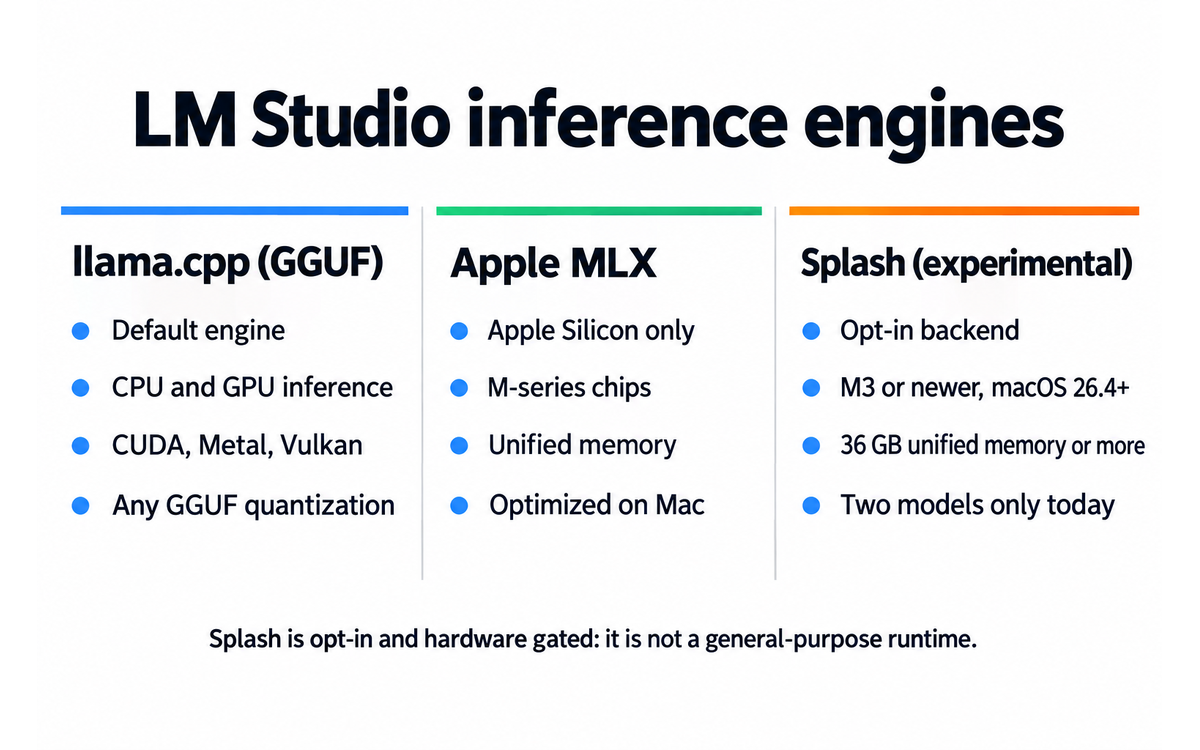
LM Studio is a graphical front-end for two general-purpose inference engines, plus one experimental opt-in backend:
llama.cpp: The dominant open-source inference engine for GGUF format models. LM Studio bundles it and handles runtime updates. Supports CPU and GPU inference (CUDA, Metal, Vulkan).
Apple MLX: Apple's machine learning framework for Apple Silicon. LM Studio supports MLX on Mac for optimized performance on M-series chips with unified memory.
Splash (experimental): An opt-in Apple Silicon backend from Inco AI, installed under Settings > Runtime, Experimental backends. It requires an M3-or-newer Mac running macOS 26.4 or later with at least 36 GB of unified memory, and today it reads only the two models it supports, Qwen3.6-35B-A3B and Qwen3.8-27B.
Key technical features
OpenAI-compatible API server at localhost:1234 with /v1/chat/completions, /v1/completions, /v1/embeddings, and /v1/models endpoints
Anthropic-compatible API endpoint at /v1/messages (added in 0.4.1) for Claude Code, Codex, and other Anthropic SDK clients
MCP (Model Context Protocol) client support for connecting local models to external tools
Hugging Face model search and download with quantization filtering (Q4_K_M, Q5_K_M, Q8_0, etc.)
Document chat (RAG) with file attachments, processed entirely offline
GPU offload configuration with layer-by-layer control
Context length and flash attention settings
LM Studio Engine Protocol for improved reasoning model support and speculative decoding
Headless mode (llmster) for server and CI environments without a GUI
LM Link for routing model inference across devices on a local network
Python SDK (lmstudio-python) and TypeScript SDK (lmstudio-js) for programmatic access
CLI tool (lms) for chat, model downloads, daemon management, and server control
Integrations
Claude Code (via Anthropic-compatible local endpoint)
OpenAI Codex (via Anthropic-compatible endpoint)
Continue.dev (via OpenAI-compatible endpoint)
LangChain and LlamaIndex (via OpenAI-compatible endpoint)
AnythingLLM (via OpenAI-compatible endpoint)
MCP servers (as MCP client)
LM Link (cross-device model routing)
Locally mobile app (iPhone and iPad, via LM Link)

Getting Started with LM Studio
Required accounts: None. LM Studio requires no account, no sign-up, and no API key. Download the app and run it.
Installation: Download the installer from lmstudio.ai/download for your operating system. macOS (Apple Silicon), Windows (x64/ARM64), and Linux (x64) are supported. The app is a native Electron application with bundled inference engines.
Experimental backend: Version 0.4.25 adds Splash, an experimental opt-in inference backend for Apple Silicon, and it is installed under Settings > Runtime, Experimental backends. It needs an M3-or-newer Mac running macOS 26.4 or later with at least 36 GB of unified memory, and it reads only the two models it supports today (Qwen3.6-35B-A3B and Qwen3.8-27B). The speed figures circulating for it are the engine vendor's own launch benchmarks and have not been independently reproduced.
First-time configuration
1. Open LM Studio. The welcome screen guides you through model selection.
2. Use the search bar to find a model. Filter by Hugging Face, quantization format (GGUF), and hardware compatibility. LM Studio shows recommended quantization levels for your hardware.
3. Click Download on a model. LM Studio pulls the GGUF file from Hugging Face. A 4GB Q4_K_M quantization of a 7B model downloads in a few minutes.
4. Once downloaded, load the model in the Chat tab. Configure GPU offload (set to Max if you have a GPU) and context length (start with 8192).
5. Start chatting. Type a prompt and press Enter. The model generates a response locally.
First 15 minutes checklist
☐ Download and install LM Studio from lmstudio.ai/download
☐ Search for a model matching your hardware (try Qwen 3.5 7B Q4_K_M for 16GB RAM, or Phi-4 Mini for 8GB RAM)
☐ Download the model and load it in the Chat tab
☐ Send your first prompt and verify the model responds
☐ Enable the local API server (Developer tab) and test with a curl request to localhost:1234/v1/chat/completions
Result: You have a running local LLM with a chat interface and an OpenAI-compatible API server. You can now connect external tools, run prompts, and experiment with different models.
Real Workflows
Workflow 1: Local AI Coding Assistant with Claude Code
Learner type: Professional (UIT technology track)
CI-First benefit tags: Time, Quality, Skill
Connects to: UIT AI Developer Specialist, capstone projects
Time estimate: 30 minutes including model download and verification
What you do vs what the tool does:
Step | You do | The tool does |
1 | Download and install LM Studio, search for Qwen 3.5 Coder or DeepSeek V4 | Downloads and caches the GGUF model file from Hugging Face |
2 | Load the model and enable the local API server in the Developer tab | Starts an Anthropic-compatible endpoint at localhost:1234/v1/messages |
3 | Configure Claude Code to use the local endpoint by setting the API base URL | Serves model responses to Claude Code as if it were the Anthropic API |
4 | Write a coding task prompt in Claude Code and review the output | Generates code suggestions locally, with zero data leaving your machine |
5 | Verify the generated code by running it in your development environment | Provides a second response if you ask for corrections or explanations |
Sample prompt:
Context: I am building a Python Flask REST API for a university project. I need to add JWT authentication. Role: AI as a Co-Worker and Assistant for the implementation. I own the review and the merge. Profile: Act as a Co-Worker and Assistant, implementing one bounded function. Task: Write a middleware function that validates JWT tokens from the Authorization header and returns 401 for invalid or expired tokens. Constraints: Use PyJWT library, keep it under 30 lines, include error handling for missing headers. Output format: Complete Python function with docstring. Memory: the function and the tests that prove it belong in my repository record, because the session keeps no history. UP-Context-Engineering verification: I run the middleware against an expired token and a missing header myself before it ships, I read the function end to end, and I can explain each line without the tool. Data safety: this pack carries no personal data. I do not paste credentials, signing keys or customer tokens into it, and I keep the code in version control.
Verification checklist:
☐ Multi-Model Check: Run the same prompt through a cloud-based model (GPT-5.2 or Claude) and compare the local model's output for correctness and completeness
☐ External Source: Verify the PyJWT documentation matches the API usage in the generated code
☐ Human Review: Run the generated code in your Flask project and test with valid and invalid tokens
☐ CI-First Test: Can you explain how JWT validation works without the tool? If not, study the code before using it
Workflow 2: Private Document Q&A with RAG
Learner type: Everyone (lifelong learners, professionals)
CI-First benefit tags: Time, Quality
Connects to: U365 AI literacy practice, LIPS information management
Time estimate: 20 minutes including model load and document upload
What you do vs what the tool does:
Step | You do | The tool does |
1 | Load a model with adequate context length (Qwen 3.5 14B or Llama 4 Scout with 32K context) | Loads the model into memory with your configured GPU offload settings |
2 | Attach a PDF or text document to the chat using the attachment button | Processes the document locally, creates embeddings, and prepares it for RAG queries |
3 | Ask specific questions about the document content | Retrieves relevant passages and generates answers grounded in the document |
4 | Verify answers against the source document by checking cited passages | Highlights relevant sections when answering document-based questions |
Sample prompt:
Context: I have attached a 40-page research paper on transformer architectures. Role: AI as a Co-Worker and Assistant for the reading pass. I own the conclusions. Profile: Act as an Analyst and Tester, working only from the attached paper. Task: Summarize the key contributions in 5 bullet points, then explain how their attention mechanism differs from standard multi-head attention. Constraints: Only use information from the attached document. Do not add external knowledge. Output format: Bullet list summary followed by a paragraph explanation. Memory: the summary and the comparison belong in my own study record, because the conversation keeps no source. UP-Context-Engineering verification: I check the explanation against the attached paper myself, I can restate the attention mechanism without the tool, and I confirm nothing came from outside the document. Data safety: this pack carries no personal data. I do not paste a licensed paper, a supervisor's comments or a participant dataset into it, and I keep the summary in my own store.
Verification checklist:
☐ Multi-Model Check: Ask the same questions to a cloud-based model with the same document and compare answers
☐ External Source: Cross-check key claims against the document's abstract and conclusion sections
☐ Human Review: Read the cited passages yourself to confirm the summary is accurate and not hallucinated
☐ CI-First Test: Can you explain the paper's contributions to a peer without the tool? If not, re-read the source
Workflow 3: Comparing Quantization Levels on the Same Model
Learner type: Everyone (lifelong learners, professionals)
CI-First benefit tags: Time, Quality
Connects to: UIT (Technology, AI, Data Science), AI courses
Time estimate: 25 minutes including two model downloads and a side-by-side comparison
What you do vs what the tool does:
Step | You do | The tool does |
1 | Download the same model at two quantization levels (for example Q4_K_M and Q5_K_M) | Caches both GGUF files from Hugging Face and shows the disk size of each |
2 | Load the first quantization and run the same prompt three times | Serves the model with your GPU offload and context settings and reports tokens per second |
3 | Load the second quantization and repeat the same three prompts | Swaps the runtime to the new file without touching your chat history or API server |
4 | Compare the answers side by side and decide which level to keep for daily work | Keeps both models installed so you can switch back at any time |
Sample prompt:
Context: I have one model I use daily and I want to know whether a larger quantization file is worth the disk space and the slower load. Role: AI as an Analyst and Tester for the measurement pass. I own the decision about which file I keep. Profile: Act as an Analyst and Tester, working only from the answers the two quantizations produced in this session. Task: Compare the answers the two quantization levels gave to the same three prompts, say where they differ in meaning rather than in wording, and state which level gave the more accurate answer. Constraints: Compare only the answers produced in this session. Do not add claims about benchmarks from the model cards or from vendor pages. Output format: A three-row comparison, one row per prompt, with the observed difference and a one-line verdict. Memory: the comparison and the verdict belong in my own notes, because the conversation keeps no record. UP-Context-Engineering verification: I read both answers myself, I re-run the prompt I am least sure about, and I can explain which quantization I kept and why without the tool. Data safety: this pack carries no personal data. I do not paste internal documents, credentials or a colleague's unpublished work into it, and I keep the comparison in my own store.
Verification checklist:
☐ Multi-Quantization Check: Ask the same three prompts at each level and read the answers side by side before judging either file
☐ External Source: Check the vendor's own documentation for what each quantization level changes, and treat it as a claim until your own runs agree
☐ Human Review: Read the answers you are about to rely on, and keep the quantization whose answers you could defend to a colleague
☐ CI-First Test: Can you say which quantization you kept and why, and what it cost in load time and disk space? If not, re-run the comparison before you settle.
Strengths, Limits, and AI Imposture Risk
Strengths
LM Studio delivers clear CI-First benefits in these areas:
CI-First Benefit | Strength | Evidence |
Time | Eliminates cloud API setup, key management, and per-token billing. One-click model download and load. API server starts in seconds. | Going from zero to a running local API in under 15 minutes, vs hours for a self-hosted vLLM or llama.cpp setup |
Quantity | Serves unlimited requests at no cost. Can run multiple models simultaneously with adequate hardware. No rate limits. | Developers report running continuous automated testing pipelines against the local API without token limits |
Quality | Provides optimized llama.cpp and MLX inference with GPU offload. Quality depends on model choice, but the tool maximizes each model's potential. | Community benchmarks show LM Studio achieving competitive token generation speeds (40+ tokens/s on suitable hardware) |
Skill | Teaches quantization, GPU offload, context management, and API architecture through a visual interface. Users learn by adjusting settings and seeing results. | The settings panel exposes inference parameters that CLI tools hide, making the learning curve gentler |
Limits
Model quality is bounded by your hardware. A laptop with 8GB RAM cannot run frontier models effectively. The best results require 32GB+ RAM or a dedicated GPU with 12GB+ VRAM.
The desktop app is proprietary, not open-source. The CLI (lms) and SDKs are MIT licensed, but the core application is closed. Some community members consider this a dealbreaker for a tool in the open-source AI ecosystem.
API server performance is slower than production-grade inference servers like vLLM or TGI. Reddit users report LM Studio is adequate for development but not for high-throughput production serving.
No built-in fine-tuning capability. You can run inference on pre-trained models but cannot train or fine-tune within the app.
Model selection is overwhelming for beginners. The Hugging Face search returns hundreds of quantization variants, and choosing the right one requires understanding GGUF formats and hardware constraints.
Bionic (the agent app) is in early preview and has received mixed feedback on Reddit about its agentic capabilities compared to cloud-based alternatives.
The fastest new path is restricted to one hardware class and two models. Splash needs an M3-or-newer Mac with at least 36 GB of unified memory and reads only the two models it ships for, so it accelerates one class of machine rather than serving as a general-purpose runtime.
AI Imposture Risk
Time Illusion
Rating. Low
Evidence. The tool genuinely saves time: one-click model load, no API key management, no cloud configuration. The time investment is in model download (one-time) and hardware tuning (optional). Net time savings are consistent.
Quantity Illusion
Rating. Low
Evidence. Output volume is transparent: you see the model, the quantization level, and the token generation speed. No illusion of quality from volume. The tool does not mask model limitations.
Skill Illusion
Rating. Medium
Evidence. Running a local LLM via a polished GUI can create the impression of understanding LLM deployment without actually learning the underlying mechanics. A user who downloads models and chats without understanding quantization, context windows, or inference parameters may believe they have AI engineering skills they do not possess.
Overall Imposture Risk: Medium. The tool itself is transparent about what it does. The risk lies in users conflating the ability to run a GUI app with understanding local AI deployment.
U365 Co-Intelligence Rating
CI-First Profile
Primary profile: Co-Worker and Assistant (level 2). LM Studio executes the heavy lifting of model management, inference, and API serving. The user directs which models to load and how to use them.
Secondary profile: Professor, Coach and Tutor (level 3). The visual interface exposes inference parameters, quantization options, and performance metrics that teach the user how local LLM inference works.
CI-First Benefit Score
Time
Score (0-10). 7
Rationale. One-click model download and load. No cloud setup. API server ready in seconds. Model download time is the main overhead, and it is a one-time cost.
Quantity
Score (0-10). 6
Rationale. Unlimited local requests at no cost. Can serve multiple clients. Quantity is bounded by hardware speed, not API limits, but local inference is slower than cloud for large models.
Quality
Score (0-10). 6
Rationale. Quality depends entirely on the model chosen. LM Studio maximizes each model's potential through optimized inference, but a 7B model cannot match a frontier cloud model. The tool provides good tools for maximizing what you have.
Skill
Score (0-10). 6
Rationale. The visual interface teaches quantization, GPU offload, and context management through experimentation. Users who engage with the settings learn real concepts. Those who treat it as a black box gain less.
CI-First Benefit Score: 6.3 / 10 (CI-First Strong)
Humics Protection Badge
Dimension | Rating | Rationale |
Creativity | Neutral (0) | LM Studio provides access to models. Whether creativity is protected or eroded depends on how the user interacts with the model, not the tool itself. |
Critical Thinking | Protects (+1) | Running models locally with visible performance metrics and configuration options encourages the user to think critically about model selection, quantization trade-offs, and output quality. The transparency fosters evaluation rather than blind trust. |
Social Authenticity | Neutral (0) | The tool operates in the technical infrastructure layer. It does not directly affect social communication or authentic voice. |
Humics Protection Score: +1 / +3
Badge: Humics-Neutral
Superhuman Usage Guidance
When to invite this tool:
Prototyping AI-powered applications without cloud API costs during development
Running privacy-sensitive document analysis and Q&A entirely offline
Learning how LLM inference works through hands-on experimentation with real models
Connecting local models to coding assistants like Claude Code for private development workflows
Testing and comparing multiple open-weight models side by side
When to keep this tool out:
Production serving with high throughput requirements (use vLLM or TGI instead)
Tasks requiring frontier model quality that your hardware cannot support locally
Fine-tuning or training custom models (LM Studio is inference-only)
Team-based workflows requiring centralized model serving (Ollama with Open WebUI is better for shared infrastructure)
U365 method integration:
LIPS + CARE: Local model outputs can feed into the LIPS Digital Second Brain. Use LM Studio for private document processing in the Collect phase.
ULM + EVA: Supports the Career domain by enabling cost-effective AI prototyping. Use in the Explore phase to test AI ideas before committing to cloud infrastructure.
UP-Context-Engineering: LM Studio responds well to UP-Context-Engineering prompting. Feed your personal context into the chat interface the same way you would with a cloud model.
SL-OS: Complements the SL-OS ecosystem by providing a private AI layer. Integrates with Microsoft 365 workflows via the local API endpoint.
UNOP: Hands-on experimentation with model parameters aligns with neuroscience-oriented pedagogy. Active manipulation of inference settings supports experiential learning.
Over-delegation warning: Running a local LLM through a polished GUI can create the illusion of AI engineering competence. Downloading models and chatting is not the same as understanding inference optimization, quantization theory, or model architecture. If you cannot explain why you chose a specific quantization level or how GPU offload affects performance, you are in the Skill Illusion. Engage with the settings panel, read the llama.cpp documentation, and experiment with different configurations to build genuine understanding. If HI drops, CI-First drops.
What Users Say
Aggregate Rating Table
Platform | Rating | Number of reviews | Link |
Product Hunt | 5.0/5 | 7 reviews, 200 upvotes | |
Reddit (r/LocalLLaMA) | Predominantly Positive | Multiple threads, hundreds of comments | |
AlternativeTo | Not rated (listed) | N/A | |
Trustpilot | No reviews found | N/A | N/A |
G2 | No reviews found | N/A | N/A |
Capterra | No reviews found | N/A | N/A |
What Users Praise
Users consistently praise LM Studio for its ease of use and polished interface. Reddit commentators highlight that it is the fastest path from zero to a running local LLM: one download, one model search, one click. The built-in Hugging Face search with hardware compatibility recommendations removes the guesswork from model selection. Developers appreciate the OpenAI-compatible API server, which lets them swap cloud endpoints for localhost with a single line change. The Anthropic-compatible endpoint added in 0.4.1 is frequently cited as a key feature for connecting Claude Code and Codex to local models. Performance is praised: users report 40+ tokens/s on suitable hardware, competitive with or faster than Ollama for GGUF inference.
What Users Complain About
The most common complaint is the proprietary license. Reddit users in r/LocalLLaMA repeatedly flag that the desktop app is closed-source, which conflicts with the open-source ethos of the local AI community. Some users prefer Ollama specifically because it is MIT licensed. A second complaint is that LM Studio is a single-machine tool: it does not support centralized model serving for teams. Users who need to host one model and connect multiple clients prefer Ollama with Open WebUI. Performance as an API server is described as adequate for development but slower than production-grade servers like vLLM. Finally, some users find the Bionic agent app to be an early-stage product that does not yet match cloud-based agent capabilities.
Sentiment Summary
Overall sentiment: Predominantly Positive
Key themes:
Best-in-class user experience for local LLM beginners: one install, one click, running model
Strong OpenAI and Anthropic API compatibility enables seamless tool integration
Proprietary license is the main friction point for open-source purists
Not suited for production serving or team workflows (use Ollama or vLLM)
Bionic agent app shows promise but is early-stage
U365 Editorial Note
The user sentiment aligns well with the CI-First evaluation. Users praise the Time Benefit (one-click setup) and the tool's transparency about model configuration, which supports the Critical Thinking Humic. The proprietary license complaint does not affect the CI-First score directly but is worth noting for organizations that prioritize open-source infrastructure. The Skill Illusion risk (Medium) is not widely discussed in user reviews, which is itself a signal: users focus on the convenience and speed without flagging the risk of conflating GUI operation with AI engineering understanding. This confirms the CI-First framework's value: it identifies a risk that user sentiment alone does not surface.
Comparison and Alternatives
Alternative | "Choose [Alternative] if..." | "Choose LM Studio if..." |
You need an open-source (MIT) tool, CLI-first workflow, or centralized model serving for a team | You want a desktop GUI with built-in model search, one-click load, and no command-line usage | |
You want a fully open-source desktop app with plugin extensibility and multiple API endpoints | You want more stable releases, better model discovery, and a simpler interface for beginners | |
You want a lightweight chatbot focused on CPU inference and simple Q&A | You need an API server, MCP support, developer tooling, and integration with coding assistants | |
You need high-throughput production serving with batching, quantization, and multi-GPU support | You need a local development and prototyping environment, not a production server | |
You want a polished alternative with different UI priorities and local document features | You want the largest community, most frequent updates, and Anthropic API compatibility |
Where LM Studio is clearly better
LM Studio excels at the beginner-to-intermediate onboarding experience. No other local LLM tool offers the same combination of built-in Hugging Face search, hardware compatibility recommendations, one-click model load, visual inference configuration, and dual OpenAI and Anthropic API compatibility in a single desktop app. For a developer who wants to connect Claude Code to a local model, LM Studio is the fastest path. For a student who wants to understand what quantization means by adjusting it and seeing the results, the visual interface is more instructive than a CLI flag.
Where LM Studio is clearly worse
LM Studio is worse for production serving. It is a desktop application, not a server framework. vLLM, TGI, and even Ollama in headless mode are better choices for hosting models that serve multiple clients with high throughput. LM Studio is also worse for open-source purists: the core app is proprietary, while Ollama and Jan AI are fully open-source. For team workflows where multiple developers need to access the same model, a centralized Ollama server with Open WebUI is a better architectural choice than running LM Studio on each developer's machine.
Verdict and Next Steps
Who should adopt it: UIT students and professionals who want to run local LLMs without command-line expertise. Developers who need a local OpenAI or Anthropic-compatible API for prototyping. Anyone with privacy requirements that rule out cloud-based AI.
When: At the start of a project that involves AI, when you want to test ideas locally before committing to cloud infrastructure. At the beginning of a UIT course on AI engineering, to build hands-on intuition about model inference.
For what: Local model experimentation, private document Q&A, prototyping AI applications, and connecting local models to coding assistants.
UP-Context-Engineering prompt pack:
1. Context: I am a UIT student learning about LLM deployment. Role: AI as a Professor, Coach and Tutor for the explanation. I own the learning; you teach and then test. Profile: Act as a Professor, Coach and Tutor, explaining with numbers and a comparison table. Task: Explain what Q4_K_M quantization means, why it reduces model size, and what trade-offs it introduces compared to Q8_0 or FP16. Constraints: Use concrete numbers (file size, memory usage, quality loss). Output format: 3-paragraph explanation with a comparison table. Memory: the explanation and the comparison table belong in my learning record, because the conversation keeps no study plan. UP-Context-Engineering verification: I can reproduce the trade-off numbers from the comparison table a day later without the tool, I check one figure against a real model file, and I state which quantisation I would choose and why. Data safety: this pack carries no personal data. I do not paste a licensed model file, a customer dataset or private code into it, and I keep my notes in my own store.
2. Context: I am building a Python application that uses the OpenAI SDK. I want to test it against a local model served by LM Studio at localhost:1234. Role: AI as a Co-Worker and Assistant for the configuration change. I own whether it ships. Profile: Act as a Co-Worker and Assistant, changing only the client initialisation. Task: Write the minimal code changes needed to point the OpenAI client to my local server instead of the cloud API. Constraints: Show only the client initialization change. Output format: Python code block with comments. Memory: the change and the test invocation belong in my repository record, because the session keeps no history. UP-Context-Engineering verification: I run the changed client against the local server myself before it is adopted, I check that only the initialisation changed, and I can explain the diff without the tool. Data safety: this pack carries no personal data. I do not paste API keys, customer prompts or proprietary code into it, and I keep the change in version control.
3. Context: I have a 16GB RAM MacBook Pro M3 and want to run a local coding assistant. Role: AI as an Analyst and Tester for the shortlist. I own the recommendation. Profile: Act as an Analyst and Tester, checking each candidate against my memory budget. Task: Recommend the best 3 models for coding tasks that fit in my memory budget, with their quantization level and expected token speed. Constraints: Only recommend models available on Hugging Face in GGUF format. Output format: Comparison table with model name, quantization, file size, and expected performance. Memory: the shortlist, the quantisation levels and the speeds belong in my own hardware record, because the session keeps no benchmark of my machine. UP-Context-Engineering verification: I load at least one shortlisted model on my own machine before I rely on the list, I check the file sizes against the quantisation named, and I can explain the trade-offs without the tool. Data safety: this pack carries no personal data. I do not paste a licence key, a private dataset or proprietary code into it, and I keep the shortlist in my own store.
Related U365 content:
UIT AI Developer Specialist, nearest published anchor for hands-on local AI deployment
U365 AI literacy courses: understanding how LLMs work under the hood
INSIDE Tools reviews on Ollama and vLLM for comparison with production-grade alternatives
U365's Recommendations to Learn More
The following resources were curated to complement this review. Each was verified as active on 2026-10-17. We prioritize content that teaches something the post itself does not cover: specific setup walkthroughs, integration tutorials, and community perspectives.
Official learning resources
LM Studio Documentation: https://lmstudio.ai/docs
LM Studio Developer Docs (API, SDKs, CLI): https://lmstudio.ai/docs/developer
LM Studio Changelog: https://lmstudio.ai/changelog/lmstudio
LM Studio Brand Guidelines: https://lmstudio.ai/brand
Video tutorials and channels
The Unbeatable Local AI Coding Workflow (Full 2026 Setup) by Zen van Riel: https://www.youtube.com/watch?v=3zSANOIBHYw
LM Studio Just Got a Huge Upgrade (Bionic) by Bart Slodyczka: https://www.youtube.com/watch?v=3txBLHPG_rg
Run ANY Open-Source Model LOCALLY (LM Studio Tutorial) by Matthew Berman: https://www.youtube.com/watch?v=yBI1nPep72Q
Master Local AI in 29 minutes (LM Studio + AnythingLLM) by Keith AI: https://www.youtube.com/watch?v=unPhOGyduWo
The Unbeatable Local AI Coding Workflow (Full 2026 Setup) by Zen van Riel. Community walkthrough covering LM Studio Link, Claude Code integration, and local coding workflow.
LM Studio Just Got a Huge Upgrade (Bionic) by Bart Slodyczka. Community walkthrough of the Bionic agent app and new features.
Run ANY Open-Source Model LOCALLY (LM Studio Tutorial) by Matthew Berman. In-depth tutorial covering the easiest-to-use LLM software.
Master Local AI in 29 minutes (LM Studio + AnythingLLM) by Keith AI. Community walkthrough combining LM Studio with AnythingLLM for RAG workflows.
Written tutorials and deep-dive articles
LM Studio Tutorial: Get Started with Local LLMs (DataCamp): https://www.datacamp.com/tutorial/lm-studio
LM Studio: Running Local LLMs (Thunder Compute): https://www.thundercompute.com/blog/lm-studio-local-llm
Set Up LM Studio: Local AI Models in 12 Steps (Tech Insider): https://tech-insider.org/au/lm-studio-setup-local-ai-models-2026/
Jan AI vs LM Studio 2026: Features, Speed, UI Comparison (PromptQuorum): https://www.promptquorum.com/local-llms/lm-studio-vs-jan-ai
Community and social
LM Studio Discord: https://discord.gg/aPQfnNkxGC
r/LocalLLaMA on Reddit: https://www.reddit.com/r/LocalLLaMA/
LM Studio on Product Hunt: https://producthunt.com/products/lm-studio-2
LM Studio on AlternativeTo: https://alternativeto.net/software/lm-studio/
Resources on X
Dedicated X channels:
LM Studio official (@lmstudio): https://x.com/lmstudio
These resources are curated for content quality and relevance. Individual creators are included when their tutorials are substantial, current, and produced by serious users of the tool. Links verified as of 2026-10-17.
Glossary
CI-First Benefit Score
A 0 to 10 score that measures how much an AI tool delivers the 4 Key AI Benefits defined by University 365: Time (doing things faster), Quantity (producing more in the same time), Quality (producing better work), and Skill (learning what you did not know). The overall score is the arithmetic mean of the four dimensions. The interpretation bands are: 0 to 2.0 CI-First Negative, 2.1 to 4.0 CI-First Neutral, 4.1 to 6.0 CI-First Positive, 6.1 to 8.0 CI-First Strong, 8.1 to 10.0 CI-First Transformative.
CI-First Profile
The role the AI plays in the Co-Intelligence relationship, chosen from 5 levels: (level 1) Co-Creator and Thought Partner, (level 2) Co-Worker and Assistant, (level 3) Professor, Coach and Tutor, (level 4) Analyst and Tester, (level 5) Challenger and Devil's Advocate. Lower level numbers indicate higher AI autonomy. Assigning a profile to AI before giving it a task is a core CI-First discipline.
Humics Protection Badge
A rating that assesses whether a tool protects, leaves neutral, or erodes three core human capabilities: Creativity, Critical Thinking, and Social Authenticity. Each dimension is scored +1 (Protects), 0 (Neutral), or -1 (Erodes). The sum produces a badge: +2 to +3 Humics-Friendly, -1 to +1 Humics-Neutral, -2 to -3 Humics-Risky. The badge signals whether sustained use strengthens or weakens the human.
AI Imposture Risk
The threat that a tool creates one of three usage illusions: Time Illusion (appearing to save time while actually losing it), Quantity Illusion (producing volume that looks good but does not hold up under inspection), or Skill Illusion (creating the appearance of competence without developing the underlying skill). Each trap is rated Low, Medium, or High. The overall risk is Low if all traps are Low, Medium if one, two or three are Medium, and High if two or more are High.
User Sentiment
The aggregate opinion of users across major review platforms (Product Hunt, Reddit, G2, Trustpilot, AlternativeTo, and others). User sentiment is collected from real ratings and review text, not fabricated. The U365 Editorial Note connects crowd sentiment to the CI-First evaluation, noting where user praise or complaints align with or contradict the Co-Intelligence assessment.
Review Status
Review Status records the current standing of the tool at the time of the last test. Active: the tool is current and recommended. Active (updated): recently re-checked and the content was refreshed. Changed: a re-check trigger fired and an update is pending, so read the review with that in mind. Risky: the tool has significant unresolved issues, or it has been clearly surpassed by newer alternatives. Use it with caution and read the Limits section. Retired: the tool still works but is no longer recommended. Deprecated: the tool has been shut down or fundamentally changed. Retired and Deprecated posts include a Migration Path section.
Sources
LM Studio official website: https://lmstudio.ai
LM Studio documentation: https://lmstudio.ai/docs/app
LM Studio brand guidelines: https://lmstudio.ai/brand
LM Studio changelog: https://lmstudio.ai/changelog/lmstudio
LM Studio app terms of service: https://lmstudio.ai/app-terms
LM Studio CLI (GitHub, MIT license): https://github.com/lmstudio-ai/lms
LM Studio Python SDK (GitHub, MIT license): https://github.com/lmstudio-ai/lmstudio-python
LM Studio on Product Hunt (5.0 rating, 7 reviews): https://producthunt.com/products/lm-studio-2
LM Studio on AlternativeTo: https://alternativeto.net/software/lm-studio/
Reddit r/LocalLLaMA discussion on LM Studio: https://www.reddit.com/r/LocalLLaMA/comments/1g6dw9q/is_llm_studio_good/
LM Studio on CB Insights (company profile, funding): https://www.cbinsights.com/company/lm-studio
Thunder Compute: LM Studio Running Local LLMs: https://www.thundercompute.com/blog/lm-studio-local-llm
Tech Insider: Set Up LM Studio Local AI Models in 12 Steps: https://tech-insider.org/au/lm-studio-setup-local-ai-models-2026/
PromptQuorum: Jan AI vs LM Studio 2026 comparison: https://www.promptquorum.com/local-llms/lm-studio-vs-jan-ai
DataCamp: LM Studio Tutorial: https://www.datacamp.com/tutorial/lm-studio
YouTube: The Unbeatable Local AI Coding Workflow by Zen van Riel: https://www.youtube.com/watch?v=3zSANOIBHYw
YouTube: LM Studio Bionic upgrade by Bart Slodyczka: https://www.youtube.com/watch?v=3txBLHPG_rg
YouTube: Run ANY Open-Source Model LOCALLY by Matthew Berman: https://www.youtube.com/watch?v=yBI1nPep72Q
YouTube: Master Local AI in 29 minutes by Keith AI: https://www.youtube.com/watch?v=unPhOGyduWo




Comments