
MiniMax M3: Frontier Multimodal Model with 1M Context for Coding and Agentic Work

Updated: Oct 16
Status: Active | Last tested: 2026-08-25 (current web version) | Re-check: trigger-based (max 6 months)
Active: the tool is current and recommended.


In this Tool Review

Tool Snapshot
Tagline: Frontier multimodal coding model with 1M context window
Category: Large Language Model, Multimodal AI, Coding and Agentic
Provider: MiniMax
Version tested: M3 (current web version, Aug 2026)
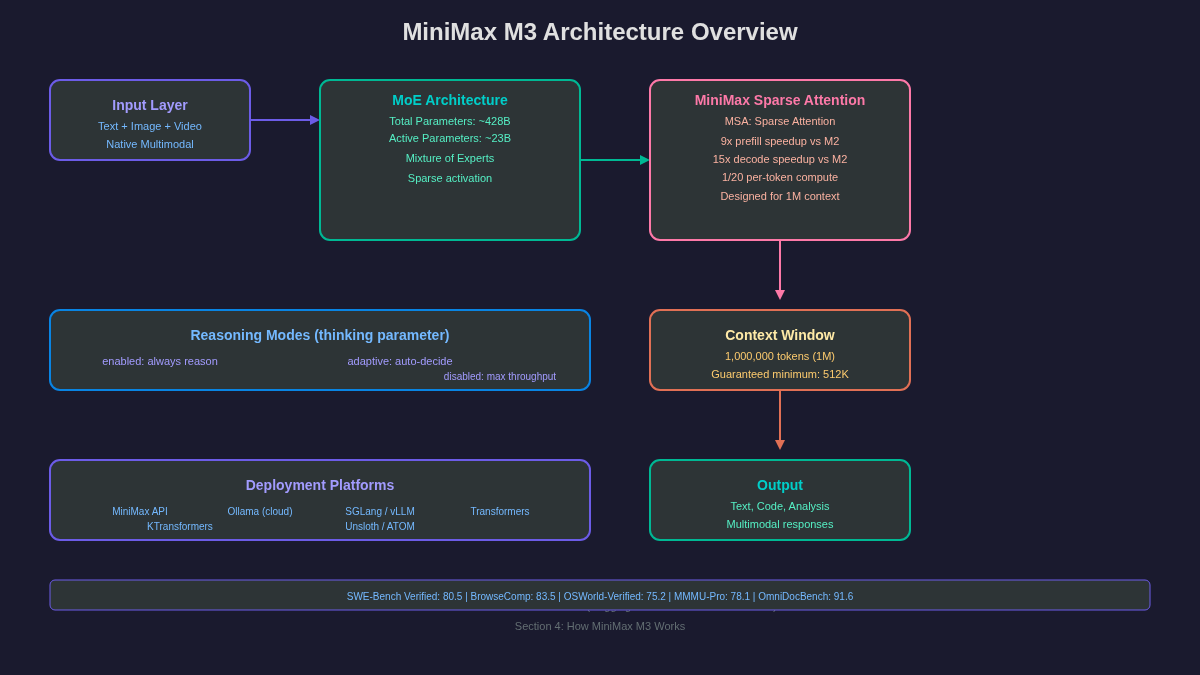
Parameters: ~428B total, ~23B activated (Mixture of Experts)
Context window: 1,000,000 tokens (1M), guaranteed minimum 512K
License: MiniMax Community License (open weights for self-hosting)
Platforms: API (MiniMax Platform), Ollama, SGLang, vLLM, Transformers, KTransformers, Unsloth, ATOM
Primary use cases:
Long-context coding and software engineering tasks
Agentic workflows with tool use and multi-step reasoning
Multimodal understanding of text, images, and video
Document analysis and long-range information extraction
Complex reasoning with adaptive thinking modes
Pricing summary: Pay-as-you-go API on MiniMax Platform (token-based). Token Plan subscription tiers: Plus, Max, Ultra. Pricing varies by model and modality. Contact platform.minimax.io for current rates. Open-weights model available for self-hosting at no cost.
Official links:
Website: https://www.minimax.io
Documentation: https://platform.minimax.io/docs/guides/text-generation
API Platform: https://platform.minimax.io
Agent: https://agent.minimax.io
HuggingFace: https://huggingface.co/MiniMaxAI/MiniMax-M3
ModelScope: https://modelscope.cn/organization/minimax
LLM specifications
Context Window: 1,000,000 tokens (1M), guaranteed minimum 512K
Effort Levels: Three modes via thinking parameter: enabled (always reason), adaptive (auto-decide), disabled (max throughput)
Parameters: ~428B total parameters, ~23B activated parameters (Mixture of Experts)
Architecture: Mixture of Experts (MoE) with MiniMax Sparse Attention (MSA), native multimodal training from step one
Available Platforms: API (MiniMax Platform), local (Ollama cloud tag), self-host (SGLang, vLLM, Transformers, KTransformers, Unsloth, ATOM)
Model Variants: Single model: MiniMax-M3 (multimodal, text+image+video input). Previous: M2.7, M2.5, M2.1, M2, M1 series.
Comparison References: See ollama.com/library/minimax-m3 for local deployment. See arena.ai (LMSYS Chatbot Arena) for community rankings.
At a Glance
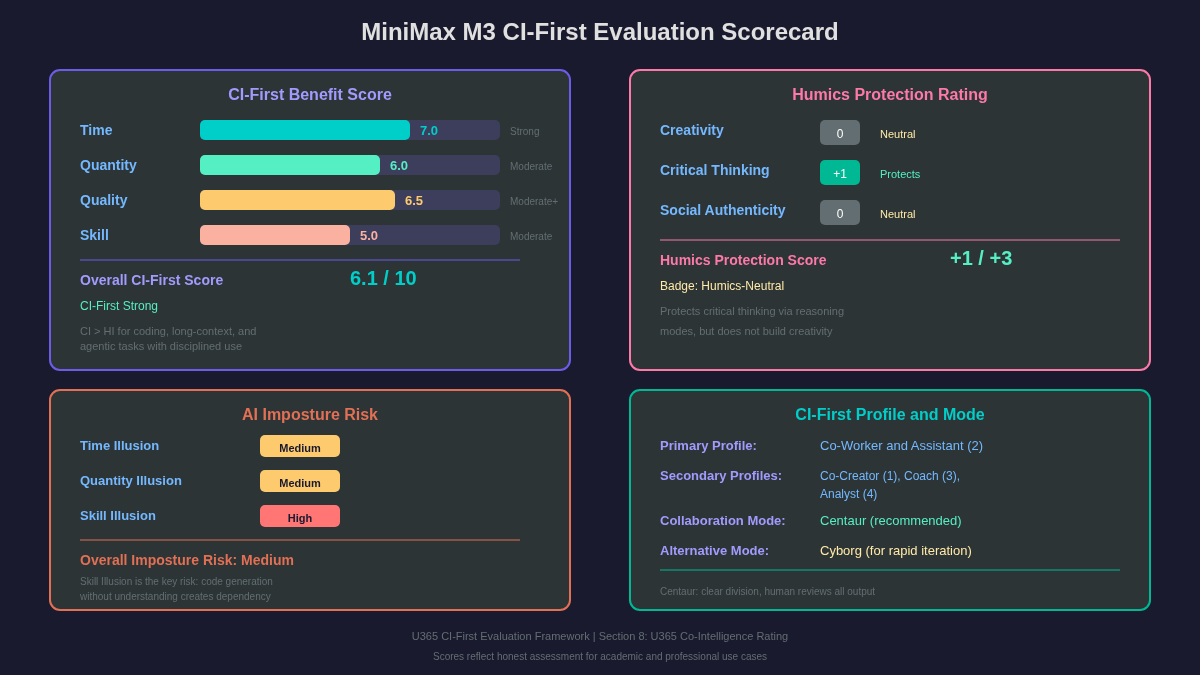
CI-First Benefit Score | 6.1 / 10 (CI-First Strong) |
Time / Quantity / Quality / Skill | 7.0 / 6.0 / 6.5 / 5.0 |
CI-First Profile | Co-Worker and Assistant (2) |
Humics Protection | Humics-Neutral (+1/+3) |
AI Imposture Risk | Medium (1 High trap: Skill Illusion) |
User Sentiment | Mixed (early adopter phase, limited reviews) |
Pricing | Pay-as-you-go API, open-weights for self-host |
Platforms | API, Ollama, SGLang, vLLM, Transformers, KTransformers |
For detailed explanations of the CI-First evaluation terms used in this review, including CI-First Benefit Score, CI-First Profile, Humics Protection Badge, AI Imposture Risk, and User Sentiment, see the Glossary at the end of this publication.
The Problem
Working with large codebases, long documents, or complex agentic workflows requires a model that can maintain context over extended inputs. Most LLMs max out at 128K or 200K tokens, which means you must chunk, summarize, or truncate critical information. This fragmentation breaks the continuity needed for tasks like understanding an entire repository, analyzing a long video, or running a multi-step agent that references earlier decisions.
For professionals and students in coding-intensive fields, the gap between what a model can theoretically handle and what it can practically process at full quality is frustrating. You spend time managing context limits instead of solving the actual problem.
MiniMax M3 from MiniMax (a Chinese AI company founded in 2021) addresses this with a 1 million token context window backed by MiniMax Sparse Attention (MSA). The model is a Mixture of Experts architecture with 428 billion total parameters and 23 billion activated parameters, designed specifically for coding, agentic workflows, and long-context multimodal tasks.
The Outcome
A U365 Fellow working on a software engineering project can feed an entire codebase (or large portions of it) into MiniMax M3 and ask questions about architecture, dependencies, or specific bugs without losing context. The 1M token window with a guaranteed minimum of 512K tokens means the model retains information from the beginning of the conversation through extended multi-turn interactions.
For multimodal work, the native multimodal training (text, image, and video from the first training step) means the model can analyze a long video alongside text instructions, or interpret images embedded in documents. This is useful for design students reviewing UI mockups, for data science students analyzing visual data, and for professionals creating reports with mixed media.
The adaptive reasoning mode lets you choose when the model spends extra compute on harder problems. For simple queries, disabled mode gives fast responses. For complex coding or reasoning, adaptive or enabled mode produces deeper analysis. You control the cost-quality tradeoff.
Who Should Use MiniMax M3
Learner categories
Fellow Category | Level and Profile |
Students (Bachelor, Master) | Intermediate. Students gain a reasoning partner with a 1M context window that can process entire codebases, research papers, and technical documentation in a single prompt. Useful for thesis research, code analysis, and multimodal document understanding. Aligns with UIT (Technology, AI, Data Science). |
Professionals (career upskilling) | Intermediate to Advanced. Professionals gain a model that handles million-token documents, generates production code, and reasons through complex technical problems. Useful for contract review, codebase analysis, technical documentation processing, and multimodal research. Aligns with UIT (Technology, AI, Data Science) and UIB (Business Management, Entrepreneurship). |
Everyone (lifelong learners) | Intermediate. Lifelong learners gain a tool that explains its reasoning and handles very long documents and images. Useful for personal research, learning new topics, and analyzing complex information from multiple sources. Aligns with UIC (Digital Communication, Marketing) and UID (Digital Design, UX/UI). |
U365 Institutes Alignment
Rating. High
Why. Code generation, long-context codebase analysis, and multimodal technical documentation align directly with IT curriculum.
The limit that holds the row. The model writes code and analyses a repository; it teaches no software engineering, no testing discipline and no architecture judgement, and the review's own over-delegation warning states the boundary: if you accept generated code without reading and understanding it, your HI drops, and a user who cannot reproduce the key logic is in the Skill Illusion. The review also records that most benchmark scores are self-reported by the vendor and that self-hosting the 428B model is practically difficult, so measurement on the Fellow's own tasks remains the only reliable evidence. The row stands at High for measured engineering work with verification, and the High Skill Illusion trap is the reason the limit is stated rather than implied.
Rating. Medium
Why. Long-context contract analysis and technical documentation processing support business research and entrepreneurship coursework.
The limit that holds the row. The model reads contracts and technical documents in long context; it applies no legal or commercial standard, reaches no business conclusion and verifies no clause against the counterparty's obligations, which remain the Fellow's work by the review's own workflow (verify key claims against the original source, note where the summary differs). The business competency that remains is source-bound document appraisal with a traceable citation trail, and no published U365 programme assesses contract or documentation appraisal: a word-start accent-folded search over all 79 published programme descriptions returns zero matches for contract, supplier, terms of service and procurement, so the row stays at Medium.
Rating. Medium
Why. Multimodal content analysis supports media research and digital communication studies.
The limit that holds the row. The model analyses media content; it produces no communication artefact, holds no editorial standard and makes no judgement about what may be published from it. The competency that remains is research discipline over multimodal material: defining the questions, checking the model's readings against the originals, and recording where sources disagree. The review's own workflow supplies exactly that discipline and attributes the conclusions to the Fellow. No published U365 programme assesses multimodal media research as a named component: a word-start accent-folded search over all 79 published programme descriptions returns zero matches for media analysis, video analysis, image analysis and content analysis, so the row stays at Medium.
Rating. Low-Medium
Why. Multimodal image understanding supports design research but the model is not a design tool.
The limit that holds the row. The model reads images and UI mockups; it produces no design artefact, authors no interaction or visual decision and evaluates no design against a brief. The row is capped where the reason itself caps it: the tool supports design research, which is reading and comparison, and not design production. The design competency that remains is critique with a stated basis over supplied material, and the row holds at Low-Medium because that reading exercise is real but partial.
Skill level required: Intermediate. You should understand how to structure prompts, use system messages for context, and verify AI output against authoritative sources.
Prerequisites: Basic understanding of API usage or the MiniMax Agent platform. An API key from platform.minimax.io or access to MiniMax Agent. Familiarity with prompt engineering concepts (system prompts, few-shot examples, chain-of-thought) will improve results.
Time to first result: 10 minutes. Create an account, make a simple text prompt, and receive a response.
Time to competence: 2-4 weeks of regular use to learn effective prompting patterns, context management, and verification workflows.
How MiniMax M3 Works
Inputs: Natural language text prompts, images (PNG, JPEG, WebP), video (frame sequences), and code. The model processes all three modalities natively from a single architecture, not through separate encoders stitched together.
Outputs: Generated text, code, analysis, and multimodal responses. The model can describe images, answer questions about video content, write and debug code, and perform agentic tool-use workflows.
Underlying technology
Architecture: Mixture of Experts (MoE) with 428 billion total parameters and 23 billion activated parameters. Only a subset of experts is active per token, making the model efficient despite its size.
MiniMax Sparse Attention (MSA): A custom sparse attention operator that reduces compute and memory footprint for million-token contexts. MSA delivers 9x prefill speedup and 15x decode speedup compared to MiniMax M2 at 1M context, reducing per-token compute to 1/20 of standard attention.
Native Multimodality: Mixed-modality training from the first training step enables deeper semantic fusion across text, image, and video. This is not a bolted-on vision encoder; the model learns cross-modal relationships from the ground up.
Context Window: 1,000,000 tokens (1M) with a guaranteed minimum of 512K tokens. Designed for long-range agent tasks, long-range coding, and long-video understanding.
Reasoning Modes: Three modes controlled by the thinking parameter: enabled (always use extended reasoning), adaptive (model decides when to reason deeper), disabled (skip reasoning for maximum throughput). Recommended inference parameters: temperature=1.0, top_p=0.95.
Benchmark highlights
Coding: SWE-Bench Verified 80.5, SWE-Bench Pro 59.0, Terminal Bench 2.1 66.0
Cowork: BrowseComp 83.5, GDPval rubrics 74.8, MCP Atlas 74.2, Claw-Eval 74.5
GUI: OSWorld-Verified 75.2
Multimodal: OmniDocBench 91.6, MMMU-Pro 78.1, Video-MMMU 84.6, VideoMME (w/ sub) 85.4
Reasoning: IMO 2025 35/42, USAMO 2026 36/42
Available platforms and APIs
MiniMax API (platform.minimax.io), MiniMax Agent (agent.minimax.io), Ollama (ollama.com/library/minimax-m3, cloud tag), SGLang, vLLM, Transformers (HuggingFace), KTransformers, Unsloth, ATOM (AMD ROCm).
Model variants
Single model MiniMax-M3. Previous generations include M2.7, M2.5, M2.1, M2, and M1 series, all still available on the API platform.
Integrations
OpenAI-compatible API (works with Claude Code, Cline, OpenClaw, and any OpenAI-compatible tool via Subscription Key), MiniMax Code desktop and web app, MCP tools for coding scenarios.
Getting Started with MiniMax M3
Required accounts: Free or paid account at platform.minimax.io for API access. No account needed for local deployment via Ollama or HuggingFace download.
Installation (API)
1. Go to https://platform.minimax.io and create an account.
2. Generate an API key in the console.
3. Use the OpenAI-compatible API endpoint with your key.
4. Select model MiniMax-M3 in your API calls.
Installation (local via Ollama)
Run: ollama pull minimax-m3 (uses cloud tag by default)
Or: ollama run minimax-m3
Note: The full 428B parameter model requires significant hardware. The Ollama cloud tag provides API-level access without local GPU requirements.
Installation (self-hosting)
Download: hf download MiniMaxAI/MiniMax-M3 --local-dir MiniMax-M3
Recommended frameworks: SGLang, vLLM, Transformers, KTransformers, Unsloth, ATOM (AMD ROCm)
Hardware requirements: Significant GPU resources required for the full 428B model. KTransformers supports offloading for reduced hardware requirements.
First-time configuration
1. Choose your deployment method (API is fastest for beginners).
2. If using API: set temperature=1.0 and top_p=0.95 for best results.
3. Select your reasoning mode: start with adaptive for general use.
4. If using with coding tools (Claude Code, Cline): use the Subscription Key from Token Plan.
First 15 minutes checklist
☐ Make an API call with a text prompt asking for a code explanation.
☐ Try an image input: ask the model to describe an image you provide.
☐ Test adaptive reasoning mode on a complex coding question.
☐ Compare the output with disabled reasoning mode on the same question.
☐ Save a useful response to your LIPS Digital Second Brain.
Result: You have tested text and multimodal inputs, compared reasoning modes, and have a feel for the model response quality.
Real Workflows
Workflow 1: Long-Context Code Analysis for a Software Project
Learner type: Students and Professionals (UIT)
CI-First benefit tags: Time, Quality
Connects to: UIT Software Development micro-course, UDA thesis and project work
Time estimate: 20 minutes (including verification)
You do | The tool does |
Step 1: You identify the codebase or repository section you want to analyze. | The tool does nothing yet. |
Step 2: You paste the relevant code (or a summary of the structure) into the MiniMax M3 API call with adaptive reasoning enabled. | The tool processes the full context and generates an analysis of the code architecture, dependencies, and potential issues. |
Step 3: You review the analysis and identify specific functions or modules to investigate further. | Nothing, you evaluate. |
Step 4: You ask follow-up questions about specific parts of the code. | The tool answers with full context from the original input (no re-prompting needed thanks to the 1M context window). |
Step 5: You verify the analysis against the actual code and store verified findings in your LIPS Digital Second Brain. | Nothing, you execute. |
Sample prompt:
I am working on a Python project with the following structure. Analyze the code below and identify: (1) the main architectural patterns used, (2) potential circular dependencies, (3) any functions that could be refactored for clarity. Provide specific line references where possible.
[paste your code or repository structure here]
Verification checklist:
☐ Multi-Model Check: Run the same code analysis through Claude or GPT and compare which issues both models flag. If only one model flags an issue, investigate manually.
☐ External Source: Open the actual code in your IDE and verify the claimed circular dependencies or architectural patterns exist.
☐ Human Review: Share the analysis with a peer or advisor. Ask: Does this analysis match your understanding of the codebase?
☐ CI-First Test: Can you explain the code architecture and the identified issues without the tool? [Y/N]
Workflow 2: Multimodal Document Analysis for Research
Learner type: Students and Professionals (all institutes)
CI-First benefit tags: Time, Quantity, Quality
Connects to: URC research methodology, UDA thesis work, LIPS Collect phase
Time estimate: 30 minutes (including verification)
You do | The tool does |
Step 1: You gather the documents you need to analyze (text reports, images, video clips relevant to your research topic). | The tool does nothing yet. |
Step 2: You provide the documents to MiniMax M3 via the API, asking for a structured analysis with specific research questions. | The tool processes text, images, and video natively and generates a synthesized analysis. |
Step 3: You review the analysis and identify which claims need source verification. | Nothing, you evaluate. |
Step 4: You ask targeted follow-up questions about specific sections, images, or video segments. | The tool answers with full context from all provided documents. |
Step 5: You cross-check claims against original sources and write a 1-page research summary in your own words. | Nothing, you synthesize and execute. |
Sample prompt:
I am researching [topic]. I have attached the following documents: [text document], [image of a chart/diagram], and [video clip]. Based on these materials, answer: (1) What are the key findings presented? (2) Where do the sources disagree? (3) What additional evidence would strengthen the argument? Cite specific parts of each document.
Verification checklist:
☐ Multi-Model Check: Ask the same research questions through Gemini (which also supports multimodal input) and compare the findings.
☐ External Source: Go back to the original documents and verify that the claims attributed to each source are accurate. Check at least 3 specific claims.
☐ Human Review: Share your research summary with your thesis advisor or a peer. Ask: Are the findings accurate and the disagreements correctly identified?
☐ CI-First Test: Can you explain the key findings and disagreements in your own words without the tool? [Y/N]
Strengths, Limits, and AI Imposture Risk
Strengths
The model delivers clear CI-First benefits in these areas:
Dimension | Assessment | Evidence |
Time | Strong. The 1M context window eliminates the need to chunk and re-summarize large inputs. MSA delivers 9x prefill and 15x decode speedups versus the previous generation, making long-context processing practical. | Official benchmark shows 9x prefill speedup at 1M context vs M2. |
Quantity | Moderate. The model can process and generate large volumes of analysis across coding, cowork, and multimodal tasks. The adaptive reasoning mode lets you scale effort per query. | High scores across BrowseComp (83.5), MCP Atlas (74.2), and Claw-Eval (74.5) indicate consistent output across diverse agentic benchmarks. |
Quality | Moderate+. Frontier-level performance on coding benchmarks (SWE-Bench Verified 80.5) and multimodal benchmarks (OmniDocBench 91.6). | Benchmark comparison shows competitive results against Claude Opus 4.7, GPT 5.5, and Gemini 3.1 Pro on multiple tasks. |
Skill | Moderate. The model can teach coding patterns and explain reasoning, but the Skill Illusion risk is real: users may accept generated code without understanding it. | High SWE-Bench Verified score (80.5) shows the model can solve coding problems, but the gap between accepting solutions and understanding them is the key risk. |
Limits
The model is weak or brittle in these areas:
Local deployment is impractical for most users. The 428B parameter model requires significant GPU resources. The Ollama cloud tag and API are the practical access paths.
The model is from a Chinese AI company. Some users may have compliance or data residency concerns about API usage through servers in certain jurisdictions.
Benchmark scores, while strong, are self-reported by MiniMax using internal evaluation infrastructure. Independent third-party verification is limited.
The model is new (released June 2026 based on the HuggingFace model card). Real-world performance at scale and edge cases are still being discovered.
Reasoning mode selection adds complexity. Users must understand when to use enabled vs adaptive vs disabled mode, and the wrong choice wastes time or degrades quality.
AI Imposture Risk
Time Illusion
Level. Medium
Evidence. The 1M context window and MSA speedups deliver real time savings for long-context tasks, but the reasoning modes add latency. Users who enable extended reasoning for simple queries waste time. The adaptive mode mitigates this but requires awareness.
Quantity Illusion
Level. Medium
Evidence. The model generates large volumes of analysis and code, but some outputs contain subtle errors that look polished. Users who do not verify code or factual claims before using them fall into the Quantity Illusion.
Skill Illusion
Level. High
Evidence. The model produces expert-looking code for users who lack the skill to evaluate it. Users believe they can program because the tool does it for them. The gap between accepting generated code and understanding it creates dependency over time.
Overall Imposture Risk: Medium (one High trap with mitigations available through verification checklists).
U365 Co-Intelligence Rating
CI-First Profile
Primary profile: Co-Worker and Assistant (2). The model primary value is doing work: coding, analysis, and agentic task execution.
Secondary profiles: Co-Creator and Thought Partner (1), Professor, Coach and Tutor (3), Analyst and Tester (4). The reasoning modes and multimodal capabilities support ideation, teaching, and analysis roles.
CI-First Benefit Score
Time
Score. 7.0
Justification. Strong savings for long-context and coding tasks. MSA delivers real speedups. Overhead is minimal relative to savings for tasks that need 1M context.
Quantity
Score. 6.0
Justification. Consistent output across coding, cowork, and multimodal benchmarks. The user produces more usable work, but quality verification is required.
Quality
Score. 6.5
Justification. Clear quality gains on coding (SWE-Bench 80.5) and multimodal (OmniDocBench 91.6) tasks. Output is consistently better after verification.
Skill
Score. 5.0
Justification. The model teaches through explanation and reasoning traces, but the Skill Illusion risk limits the genuine skill-building score. Users who actively study the model reasoning gain real capability; passive users do not.
CI-First Benefit Score: 6.1 / 10 (CI-First Strong)
Humics Protection Badge
Dimension | Rating | Description |
Creativity | 0 (Neutral) | The model does not actively spark user creativity or replace it. It executes tasks the user directs. |
Critical Thinking | +1 (Protects) | The adaptive reasoning mode and the need to verify output (due to Skill Illusion risk) train the user to think critically about AI output. The model surfaces its reasoning, which helps the user evaluate. |
Social Authenticity | 0 (Neutral) | The model does not affect social communication directly. |
Humics Protection Score: +1 / +3
Badge: Humics-Neutral
Superhuman Usage Guidance
When to invite this tool:
Long-context coding tasks where the 1M window eliminates chunking overhead
Agentic workflows with tool use (MCP Atlas, BrowseComp scenarios)
Multimodal document analysis combining text, images, and video
Complex reasoning tasks where adaptive mode can engage deeper analysis
When to keep this tool out:
Tasks where you lack the skill to verify the output (the Skill Illusion trap)
Creative writing or original ideation where the model adds no value
Simple queries where enabled reasoning mode wastes time
Production deployments without independent benchmark verification
U365 method integration
LIPS + CARE: Model output feeds into the Collect and Review phases. Generated analysis and code summaries go into LIPS under the relevant project.
ULM + EVA: Supports the Career domain (coding, professional productivity) and Quality of Life domain (reducing time on routine analysis).
UP-Context-Engineering: Responds well to structured prompting with context, role, task, and constraints. The 1M context window makes it possible to provide extensive personal or project context.
SL-OS: API integrates with coding tools (Claude Code, Cline) that connect to the SL-OS workflow. No direct Microsoft 365 integration.
UNOP: The reasoning modes support active recall and spaced practice when used as a Professor, Coach and Tutor (Profile 3): ask the model to explain, then try to reproduce the explanation yourself.
Over-delegation warning
The primary risk with MiniMax M3 is over-delegating coding and analysis tasks without understanding the output. If you accept generated code without reading and understanding it, your HI drops. Per the CI-First formula, if HI drops while AI stays constant, CI drops. A user who delegates all coding to M3 without learning from the output becomes dependent, not Superhuman. Use the verification checklist on every workflow. After the model produces code, try to reproduce the key logic yourself. If you cannot, you are in the Skill Illusion.
What Users Say
View on HuggingFace View on Ollama View on GitHub
Aggregate Rating Table
Platform | Status | Reviews | Rating |
Trustpilot | No reviews found on Trustpilot. | N/A | N/A |
G2 | No reviews found on G2. | N/A | N/A |
Capterra | No reviews found on Capterra. | N/A | N/A |
Product Hunt | No reviews found on Product Hunt. | N/A | N/A |
Reddit sentiment | Mixed (early adopter discussions focused on benchmark comparisons and API pricing) | Limited threads | N/A |
Futurepedia | No reviews found on Futurepedia. | N/A | N/A |
What Users Praise
The model is new (released mid-2026), so community feedback is limited to early adopters on HuggingFace, GitHub, and developer forums. Early sentiment focuses on the impressive 1M context window, the MSA efficiency improvements over M2, and the strong coding benchmark scores (SWE-Bench Verified 80.5). Developers appreciate the open-weights release on HuggingFace and the multiple deployment framework options (SGLang, vLLM, Transformers, KTransformers).
What Users Complain About
Early complaints center on the practical difficulty of self-hosting a 428B parameter model, the limited independent benchmark verification (most scores are self-reported by MiniMax), and the complexity of choosing between three reasoning modes. Some users note that the Ollama cloud tag is the only practical local option for most developers.
Sentiment Summary
Overall sentiment: Mixed (early adopter phase)
Key themes:
Impressive architecture specs (428B/23B MoE, 1M context, MSA)
Strong coding and agentic benchmark scores
Self-hosting is impractical for most users due to model size
Limited independent benchmark verification
Multiple deployment framework support is a plus
API access through MiniMax Platform is the practical path for most users
U365 Editorial Note
The early community sentiment aligns with the CI-First evaluation. Users praise the context window and coding benchmarks, which correspond to the strong Time (7.0) and Quality (6.5) scores. The complaints about self-hosting difficulty and limited independent verification align with the Medium Imposture Risk rating. The Skill Illusion risk (rated High in the CI-First framework) is not yet widely discussed in community reviews because the model is too new for users to have experienced the dependency pattern. This is the gap the U365 evaluation fills: flagging the risk before users encounter it.
Comparison and Alternatives
MiniMax M3 occupies a unique position: a frontier multimodal model with 1M context from a Chinese AI company, available via both API and open weights.
Alternative | Choose [Alternative] if... | Choose MiniMax M3 if... |
Claude (Anthropic) | You need the strongest coding model with deep reasoning and a mature tooling and integration environment. Claude Opus 4.7 scores higher on SWE-Bench Verified (87.6 vs 80.5). | You need 1M context at lower cost and open-weights access. |
GPT (OpenAI) | You need broad tool integration, reliability, and the highest scores on Terminal Bench (78.2) and agentic benchmarks. | You need native multimodal training and longer context than GPT models offer. |
Gemini (Google) | You need strong multimodal capability with Google platform integration. Gemini 3.1 Pro scores higher on MMMU-Pro (80.5 vs 78.1). | You need open-weights and the 1M context guarantee. |
DeepSeek V4 Pro | You want another Chinese AI model with strong coding capabilities. DeepSeek V4 Pro scores 80.6 on SWE-Bench Verified (comparable). | You need native multimodal (text+image+video) and MSA efficiency. |
Kimi K2.6 Thinking | You want a strong open reasoning model from a Chinese AI company. Kimi K2.6 scores 80.2 on SWE-Bench Verified. | You need multimodal and the 1M context window. |
Where MiniMax M3 is clearly better
The 1M token context window with MSA is the key differentiator. No competing model in this comparison offers both a 1M context window and open-weights access. The native multimodal training (text, image, and video from step one) is also a structural advantage over models that add vision as a separate encoder. For users who need to process entire codebases, long documents, or long videos in a single context, MiniMax M3 is the most practical option.
Where MiniMax M3 is clearly worse
MiniMax M3 scores below Claude Opus 4.7 and GPT 5.5 on most coding benchmarks (SWE-Bench Verified: 80.5 vs 87.6 and 82.9). It also scores below Gemini 3.1 Pro on multimodal benchmarks like MMMU-Pro (78.1 vs 80.5) and VideoMME (85.4 vs 89.4). The platform maturity is lower: fewer integrations, less community tooling, and limited independent benchmark verification. For users who need the absolute best coding or reasoning performance and do not need the 1M context, Claude or GPT are better choices.
Verdict and Next Steps
Who should adopt it: UIT students and professionals working on long-context coding, agentic workflows, or multimodal document analysis. Researchers who need to process large documents with mixed media content.
When: Now, if you have a specific task that benefits from the 1M context window or native multimodal processing. Wait for independent benchmark verification if you need production-grade reliability.
For what: Long-context code analysis, agentic tool-use workflows, and multimodal document understanding.
UP-Context-Engineering prompt pack
Here are 3 reusable prompts tailored to the U365 prompting method. Copy them into MiniMax M3 with your own context.
1. Context: I am working on [project description] with the codebase structure stated below, and I need the most critical issues found before I schedule fixes. Role: AI as an Analyst and Tester (Profile 4) reviewing the code I supply. I interpret and decide; you analyse. Profile: Act as an Analyst and Tester, finding defects rather than rewriting the code. Task: analyse the code for [specific concern: security, performance, architecture] and focus on the top 3 most critical issues. Constraints: focus on the top 3 issues only, do not suggest cosmetic changes, and do not propose a full rewrite. Output format: for each issue, the file name, the line range, the problem and a concrete fix. Memory: the review findings and the fixes I schedule belong in my own project record, because the conversation will not be re-read. UP-Context-Engineering verification: I reproduce each reported issue in my own copy before I schedule a fix, I prioritise the three issues myself, and I can explain each accepted finding without the tool. Data safety: this pack carries no personal data. I do not paste proprietary source, a production credential or an unannounced feature plan into it, and I keep the review record in my own store.
2. Context: I am studying [topic] and I have attached [documents, images, videos], and the synthesis has to keep every source distinguishable. Role: AI as an Analyst and Tester (Profile 4) synthesising the sources I supply. I own the conclusions and the citation trail. Profile: Act as an Analyst and Tester, synthesising from the attachments rather than from general knowledge. Task: synthesize the key findings and identify where the sources disagree. Constraints: cite specific parts of each document, do not invent information not present in the sources, and mark an area as uncovered rather than filling it in. Output format: a structured summary with findings, disagreements and gaps in the evidence. Memory: the synthesis and its citation map belong in my own research record, because the conversation will not be read again. UP-Context-Engineering verification: I check each cited passage in the source myself, I list the disagreements the synthesis may have softened, and I can present the findings without the tool. Data safety: this pack carries no personal data. I do not paste an unpublished dataset, a participant record or a document under a confidentiality agreement into it, and I keep the synthesis in my own store.
3. Context: I am learning [programming concept or framework] and I want to build the skill, not just read a good explanation. Role: AI as a Professor, Coach and Tutor (Profile 3) teaching the concept while I do the work. I own the learning; you explain and set the practice. Profile: Act as a Professor, Coach and Tutor, teaching the concept and setting one exercise for me. Task: explain [concept] with a practical example I can run, then give me one exercise to practise the concept myself. Constraints: keep the explanation under 500 words, include one complete runnable example, and do not write the solution to the exercise. Output format: the explanation, the code example, then the exercise. Memory: my worked attempt and the corrections belong in my own learning record, because the conversation holds no standing plan. UP-Context-Engineering verification: I run the example myself, I complete the exercise before asking for any review, and I can re-explain the concept a day later without the tool. Data safety: this pack carries no personal data. I do not paste proprietary code, a licensed course exercise or a colleague's submission into it, and I keep my practice record in my own store.
Related U365 content
UIT Software Development micro-course
URC research methodology content on AI-assisted research
LIPS Digital Second Brain setup guide for storing AI-generated analysis
U365's Recommendations to Learn More
Curated resources to deepen your understanding of MiniMax M3. Every link was verified active as of 2026-09-03.
Official learning resources
MiniMax M3 Model Page: https://www.minimax.io/models/text/m3
MiniMax M3 Blog Announcement: https://www.minimax.io/blog/minimax-m3
MiniMax API Documentation - Text Generation: https://platform.minimax.io/docs/guides/text-generation
MiniMax API Documentation - Models Overview: https://platform.minimax.io/docs/guides/models-intro
HuggingFace Model Card: https://huggingface.co/MiniMaxAI/MiniMax-M3
GitHub Repository: https://github.com/MiniMax-AI/MiniMax-M3
Technical Report (arXiv): https://arxiv.org/abs/2606.13392
Video tutorials and channels
MiniMax M3 FREE in VS Code and Claude Code | 1M Context, Agentic AI and Multimodal Coding: https://youtube.com/watch?v=E2af_RWfnyI
Make Claude Code Free with MiniMax M3: https://youtube.com/watch?v=cM04o9gLWm4
I Used MiniMax M3 to Build a Pokemon TCG App: https://youtube.com/watch?v=_HztCoOGBKo
I Built the Same App With MiniMax M3 and Composer: https://youtube.com/watch?v=da5nLxqbTxE
Minimax Code + M3: Crazy Alternative to Claude, Codex!: https://youtube.com/watch?v=lyhnXvNnhsU
Written tutorials and deep-dive articles
MiniMax M3 on Dell Enterprise Hub (Hugging Face): https://dell.huggingface.co/models/MiniMaxAI/MiniMax-M3
HuggingFace Community Discussions: https://huggingface.co/MiniMaxAI/MiniMax-M3/discussions
Community and social
MiniMax Discord Community: https://discord.com/invite/DPC4AHFCBw
Reddit r/MiniMax_AI Discussion: https://www.reddit.com/r/MiniMax_AI/comments/1ttkwvu/minimax_m3_any_good/
This curation favors content that teaches something the post itself does not cover: hands-on deployment walkthroughs, coding tool integrations, and community-reported edge cases. Individual creators are included when their content meets the quality bar.
Glossary
CI-First Benefit Score
A composite score from 0 to 10 that measures whether an AI tool genuinely builds human intelligence rather than replacing it. It averages four dimensions: Time (net time saved after accounting for prompting and verification), Quantity (usable output volume, not surface volume), Quality (verified, durable improvement), and Skill (lasting capability built, not dependency created). For MiniMax M3, the score is 6.1/10 (CI-First Strong), driven by strong Time (7.0) and Quality (6.5) but limited Skill (5.0) due to the High Skill Illusion risk. Scores below 4.0 are CI-First Neutral or Negative; scores above 6.0 indicate genuine co-intelligence benefit.
CI-First Profile
One of five roles an AI tool plays in a co-intelligence workflow: (level 1) Co-Creator and Thought Partner, (level 2) Co-Worker and Assistant, (level 3) Professor, Coach and Tutor, (level 4) Analyst and Tester, (level 5) Challenger and Devil's Advocate. MiniMax M3 is primarily a Co-Worker and Assistant (Profile 2) because its main value is executing work: coding, analysis, and agentic task execution. Secondary profiles include Professor, Coach and Tutor (level 3) through its reasoning modes and Analyst and Tester (level 4) through its benchmark evaluation capabilities.
Humics Protection Badge
A rating from -3 to +3 that measures whether a tool protects or erodes human qualities: Creativity, Critical Thinking, and Social Authenticity. Each dimension scores +1 (Protects), 0 (Neutral), or -1 (Erodes). MiniMax M3 scores +1 overall (Humics-Neutral): Critical Thinking is protected (+1) because the adaptive reasoning mode and verification requirements train users to evaluate AI output, while Creativity and Social Authenticity are Neutral (0). A score of +2 or +3 earns a Humics-Friendly badge; -2 or -3 earns Humics-Risky.
AI Imposture Risk
An assessment of how a tool can create false confidence in users across three dimensions: Time Illusion (wasted time masked as productivity), Quantity Illusion (volume of output masking low quality), and Skill Illusion (accepting AI output without understanding it). Each is rated Low, Medium, or High with cited evidence. MiniMax M3 has an Overall Imposture Risk of Medium: Time Illusion is Medium (reasoning modes add latency for simple queries), Quantity Illusion is Medium (polished output with subtle errors), and Skill Illusion is High (expert-looking code for users who cannot evaluate it). The Skill Illusion is the primary trap, mitigated by verification checklists.
User Sentiment
An aggregate summary of real user reviews from platforms like Trustpilot, G2, Capterra, Product Hunt, Reddit, and Futurepedia. For MiniMax M3, sentiment is Mixed (early adopter phase) because the model is too new for broad community feedback. No reviews were found on Trustpilot, G2, Capterra, Product Hunt, or Futurepedia. Limited Reddit threads focus on benchmark comparisons and API pricing. The U365 Editorial Note connects this sentiment to the CI-First evaluation: early praise aligns with strong Time and Quality scores, while concerns about self-hosting and limited verification align with the Medium Imposture Risk.
Sources
MiniMax M3 Official Model Page: https://www.minimax.io/models/text/m3
MiniMax M3 Blog Announcement: https://www.minimax.io/blog/minimax-m3
MiniMax API Documentation - Text Generation: https://platform.minimax.io/docs/guides/text-generation
MiniMax API Documentation - Models Overview: https://platform.minimax.io/docs/guides/models-intro
MiniMax M3 on HuggingFace: https://huggingface.co/MiniMaxAI/MiniMax-M3
MiniMax M3 HuggingFace Discussions: https://huggingface.co/MiniMaxAI/MiniMax-M3/discussions
MiniMax M3 GitHub Repository: https://github.com/MiniMax-AI/MiniMax-M3
MiniMax M3 Technical Report (arXiv): https://arxiv.org/abs/2606.13392
MiniMax Discord Community: https://discord.com/invite/DPC4AHFCBw
MiniMax M3 FREE in VS Code and Claude Code (YouTube): https://youtube.com/watch?v=E2af_RWfnyI
Make Claude Code Free with MiniMax M3 (YouTube): https://youtube.com/watch?v=cM04o9gLWm4
I Used MiniMax M3 to Build a Pokemon TCG App (YouTube): https://youtube.com/watch?v=_HztCoOGBKo
I Built the Same App With MiniMax M3 and Composer (YouTube): https://youtube.com/watch?v=da5nLxqbTxE
MiniMax ModelScope: https://modelscope.cn/organization/minimax




Comments