
Ollama: Local AI Runtime for Open Models and Private Prototyping

Updated: 7 days ago

Status: Active (updated) | Last tested: 2026-10-17 (v0.40.5) | Re-check: trigger-based (max 6 months)
Active (updated): the tool is current and recommended. This review was recently re-checked and the content was refreshed.


In this Tool Review
Tool Snapshot
Category: Infrastructure and DevOps
Provider: Ollama
Version tested: v0.40.5 (x86-64 Linux binary; version, boot, model pull, decision models in the CLI and through /v1/systemone, generate, structured output, OpenAI-compatible chat, tool calls, embeddings, Modelfile create and rm verified 2026-10-17)
License: MIT
Platforms: macOS, Windows, Linux; local hardware and Ollama cloud
Ollama is a local model runner and API for downloading, managing, and serving open models. Its central value is control over where inference runs. Local workloads stay on your machine, while Ollama also offers cloud plans for larger models.
Primary use cases
Run an open model locally for private drafting, coding, or document analysis.
Expose a local REST API to a Python or JavaScript application.
Prototype an AI feature without committing to one hosted provider.
Switch between models and quantizations while keeping the application interface stable.
Pricing summary: Free for local use. Ollama Pro is $20/month or $200/year ($16.67/month billed annually). Max is $100/month. Team is $500/month for teams scaling with open models, and Enterprise is quoted on request. Cloud plans draw on usage credits.
Official links
Website: https://ollama.com/
Documentation: https://docs.ollama.com/
API reference: https://docs.ollama.com/api
GitHub: https://github.com/ollama/ollama
Community Discord: https://discord.gg/ollama
At a Glance
Indicator | Assessment |
CI-First Benefit Score | 7.0/10, CI-First Strong (Time 8, Quantity 6, Quality 6, Skill 8) |
CI-First Profile | Co-Worker and Assistant, secondary Professor, Coach and Tutor |
Humics Protection | Humics-Friendly (+2) |
AI Imposture Risk | Medium |
User Sentiment | 5.0/5 on Product Hunt, 47 reviews |
Pricing | Free local use; Pro $20/month; Max $100/month; Team $500/month; Enterprise custom |
Platforms | macOS, Windows, Linux; local and cloud |
The Problem
Hosted AI is convenient, but it can create recurring costs, provider dependency, and restrictions on where prompts and documents are processed. Learners and developers also need a repeatable way to test several open models without rebuilding their application each time.
Ollama addresses the deployment problem rather than the whole productivity problem. It gives you a local model service, model management commands, and an API that other applications can call. You still need to choose a model, manage hardware limits, and verify every result.
The Outcome
With a suitable model and enough memory, you can run an offline or local-first workflow, keep local inputs on your own machine, and replace a hosted endpoint during prototyping. The practical outcome is a controllable test environment for coding, document analysis, and model comparison.
The result is strongest when you use Ollama as infrastructure under your judgment. It does not remove the need for prompt design, evaluation, security review, or human review.
Who Should Use Ollama
Learner type | Difficulty | Typical ROI | Career path |
Students | Intermediate | A low-cost environment for learning APIs, model behavior, and verification. | UIT: Technology, AI, Data Science |
Professionals | Intermediate | Private prototyping and repeatable evaluation of open models. | |
Everyone | Beginner to intermediate | A practical introduction to local AI, if the computer can run the selected model. |
U365 Institutes Alignment
Rating. High
Why. Ollama exposes model serving, APIs, hardware acceleration, and evaluation decisions.
The limit that holds the row. The runtime exposes the serving surface this row names, model serving, APIs, hardware acceleration and the evaluation decisions around them, as machinery the Fellow works rather than a discipline the runtime teaches, and the competency that remains is the deployment and appraisal work in full: choosing a model against the machine's memory and acceleration, standing the local service up and keeping it running, and evaluating every result, because the review's own Quality row records that the runtime does not guarantee model quality and its Limits bullets state that a local runtime does not make a weak or hallucinating model reliable. The over-delegation warning carries the same edge: the model must not write code, summarize sources or make decisions the Fellow cannot reproduce and test. A word-start accent-folded search over all 79 published programme descriptions returns zero matches for model serving, hardware acceleration, inference, quantization, gpu, throughput and latency, with deployment (2) and api (1) as the near hits, so the row stands at High for measured engineering work on the Fellow's own hardware, under verification, and not for delegation without review.
Rating. Medium
Why. Useful for testing privacy-sensitive prototypes and estimating operating trade-offs.
The limit that holds the row. The runtime teaches no management, finance or entrepreneurship content, and it produces nothing a business cohort can be assessed on; what it supplies is the raw material for the two appraisals the row's reason names, and both stay with the Fellow. The operating trade-off is written from the page's own figures: free local use against Pro at $20/month, Max at $100/month and Team at $500/month, with cloud plans drawing on usage credits, and the Limits bullets record the overhead that enters the comparison: hardware, drivers, storage and updates. The placement decision for a privacy-sensitive prototype is the second appraisal: what stays on the machine, what goes to a cloud plan, and what the cloud-versus-local difference changes about the data, which the Limits bullets name as a different privacy and usage model. No published U365 programme assesses either work: a word-start accent-folded search over all 79 published programme descriptions returns zero matches for total cost of ownership, unit economics, business case, procurement, vendor management, cost per token, infrastructure cost, privacy and data protection, so the row stays at Medium.
Rating. Medium
Why. Useful for local drafting and content experiments, with human review for voice and factual claims.
The limit that holds the row. The runtime composes nothing in a person's voice and carries no editorial workflow of its own: the drafting is done by whichever model is loaded, and this product supplies the execution layer beneath it, so no campaign, brand voice, audience analysis or copy originates with it. The competency that remains is the review the row's reason names, human review for voice and factual claims before machine-drafted text is published, together with the publication boundary a local-first setup makes the Fellow define: what source material may be run locally, and what must stay on the machine. No published U365 programme assesses disclosure practice or editorial judgement over machine-drafted text: a word-start accent-folded search over all 79 published programme descriptions returns zero matches for editorial, disclosure, conflict of interest and provenance, while brand, social media and audience return 6 each and campaign, copywriting and content strategy return 1 each, all of them production and channel programmes rather than an assessment of what may be published from a machine draft.
Rating. Low
Why. Relevant mainly when a design workflow calls a local multimodal model through an application.
The limit that holds the row. The runtime serves models; it produces no design artefact, specifies no layout, interaction or prototyping work and evaluates no design against a brief, and the row's reason confines it to the case where a design workflow calls a local multimodal model through an application. The competency that remains is that boundary decision and its operational side: which local model may handle image or text work inside the workflow, running it on hardware the Fellow controls, and judging the result against the brief rather than accepting it. A word-start accent-folded search over all 79 published programme descriptions returns zero matches for design system, user research, information architecture, critique and accessibility, with typography (2), layout (3), color (5) and interaction design (2) as the near hits inside production-craft programmes, so the row stays at Low.
Skill level required: Beginner for basic commands; intermediate for APIs, model selection, and deployment.
Prerequisites: A supported computer, terminal access, enough memory for the chosen model, and basic command-line literacy.
Typical time to first result: About 10 to 15 minutes for installation and a small model, subject to download speed and hardware.
Typical time to competence: Several focused sessions covering model selection, API use, performance, and verification.
How Ollama Works
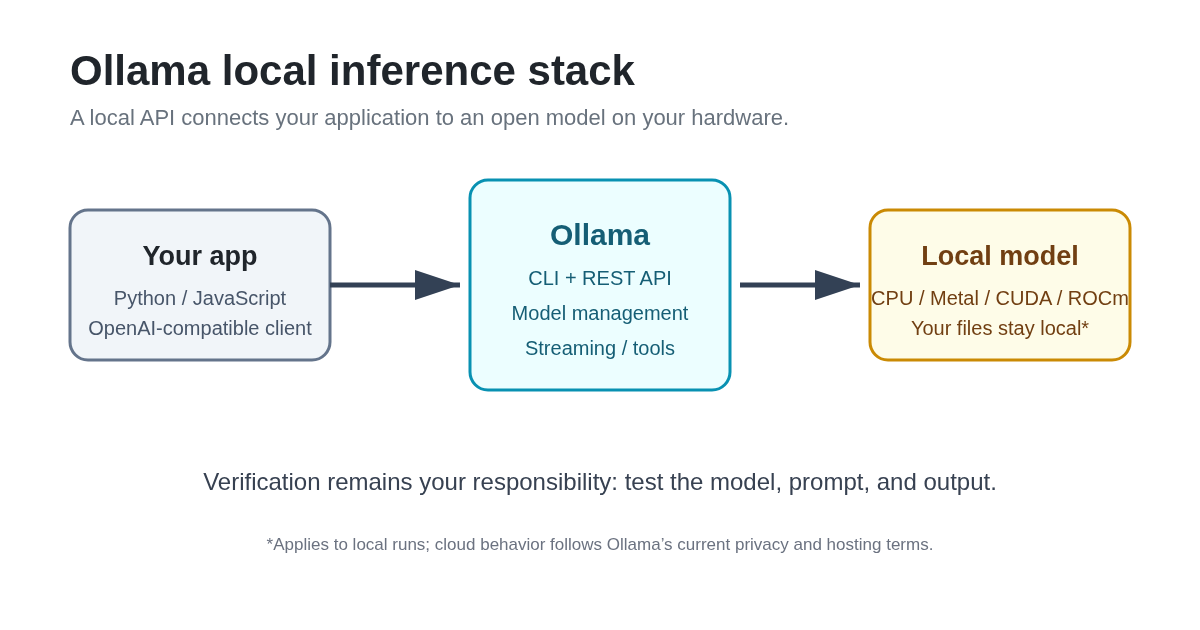
You give Ollama a model name, prompt, conversation, image, or API request. Ollama downloads or loads the model, schedules it on available CPU or GPU hardware, and returns generated text, thinking output when supported, structured output, tool calls, or embeddings depending on the endpoint and model.
Underlying technology
Model backends: Ollama supports a range of open models and maintains model packaging and runtime compatibility. The exact architecture belongs to the selected model.
API: The official API includes generation, chat, embeddings, structured output, streaming, and tool-related request fields.
Hardware: Official documentation covers NVIDIA GPUs, AMD GPUs through ROCm, Apple GPUs through Metal, and Vulkan support on Windows and Linux.
Integrations: Ollama documents Python and JavaScript libraries, OpenAI-compatible usage, Docker, and integrations with coding agents and other applications.
Getting Started with Ollama
Installation
Download the current installer from https://ollama.com/download. On Linux, follow the installation instructions in the official documentation. Then open a terminal and run a small model from the model library, such as ollama run gemma3, after checking that the model fits your hardware.
First-time configuration
1. Install Ollama from the official download page.
2. Choose a small model whose memory requirement fits your machine.
3. Run the model and test a short, low-risk prompt.
4. If using an application, read the API documentation and set the endpoint explicitly.
First 15 minutes checklist
☐ Install Ollama and confirm the CLI responds.
☐ Run a small model and ask it to explain one short paragraph.
☐ Compare one answer with a second model or an external source.
☐ Save the model name, prompt, and verification result in your project notes.
Result: a documented first local inference and a baseline for deciding whether the model is useful on your hardware.
Real Workflows
Workflow 1: Local document briefing
Learner type: Student or professional
CI-First benefit tags: Time, Quality, Skill
Connects to: UIT (Technology, AI, Data Science) and any U365 project requiring source review
Time estimate: 20 to 40 minutes including verification
Step | You do | Ollama does |
1 | Select a short document you are allowed to process locally. | Loads the selected model. |
2 | Ask for a structured briefing with claims separated from questions. | Generates a draft briefing. |
3 | Check each claim against the source document. | Provides a second-pass explanation when asked. |
4 | Rewrite the final briefing in your own words. | Suggests structure or missing points. |
Sample prompt: Context: I will provide one document and I need a briefing I can act on rather than a summary I have to re-read. Role: AI as a Professor, Coach and Tutor (Profile 3), working only from the document I supply. I own the reading and the decisions; you brief and test my understanding. Profile: Act as a Professor, Coach and Tutor, teaching rather than performing the reading for me. Task: produce a briefing with section references, the uncertainties in the document, and three questions for my review. Constraints: use only the supplied text, label every unsupported claim, and send me back to the passage rather than paraphrasing around it. Output format: headings, bullets, and a final verification list. Memory: the briefing, my answers to the three questions and the sections I still owe a reading belong in my own learning record, because the chat holds no standing plan. UP-Context-Engineering verification: I answer the three questions before I use the briefing; I open at least two of the cited sections myself; and I can restate the document's argument a day later without the tool. Data safety: this pack carries no personal data. I do not paste a confidential contract, a colleague's draft or a file I am not cleared to process into it, and I keep the briefing in my own store.
☐ Multi-Model Check: compare the briefing with a second model.
☐ External Source: check claims against the original document.
☐ Human Review: confirm that citations and interpretation match the source.
☐ CI-First Test: can you explain and defend the briefing without Ollama?
Workflow 2: Local API prototype
Learner type: Professional or UIT student
CI-First benefit tags: Time, Quantity, Skill
Connects to: UIT (Technology, AI, Data Science)
Time estimate: 30 to 60 minutes
Step | You do | Ollama does |
1 | Define the input, output schema, and failure behavior. | Accepts a structured generation request. |
2 | Call the local REST API from a small script. | Streams or returns the response. |
3 | Test normal, empty, long, and adversarial inputs. | Generates outputs for each test case. |
4 | Record latency, errors, and model name. | Reports response metadata where supported. |
Sample prompt: Role: Analyst and Tester. Context: this is a prototype, not a production decision system. Task: return JSON with summary, evidence, uncertainty, and next_action. Constraints: never invent evidence; use null when evidence is missing. Format: valid JSON only.
☐ Multi-Model Check: run equivalent cases with a second model.
☐ External Source: test outputs against known fixtures or source data.
☐ Human Review: inspect security, privacy, and error handling before sharing.
☐ CI-First Test: can you maintain and debug the script without generated code?
Workflow 3: Model comparison for a learning task
Learner type: Everyone
CI-First benefit tags: Quality, Skill
Time estimate: 30 minutes
Step | You do | Ollama does |
1 | Write one fixed prompt and evaluation rubric. | Runs each selected model. |
2 | Keep temperature and context conditions comparable. | Returns comparable outputs. |
3 | Score accuracy, clarity, and uncertainty. | Provides candidate answers. |
4 | Choose based on the rubric, not style alone. | Does not make the final selection. |
Sample prompt: Context: I have two model answers to the same question and I need to know where they actually disagree before I rely on either. Role: AI as a Challenger and Devil's Advocate (Profile 5), attacking both answers rather than picking a favourite. I own the choice; you surface the disagreement. Profile: Act as a Challenger and Devil's Advocate, testing the answers rather than defending one. Task: compare the two answers, identify the factual disagreements, the missing assumptions and the verification steps each answer needs. Constraints: do not choose a winner without evidence, quote the part of each answer you are judging, and separate a factual disagreement from a difference in tone or style. Output format: a comparison table, followed by a recommendation with its confidence level. Memory: the comparison and the answer I finally relied on belong in my own learning record, because the next comparison will start from it. UP-Context-Engineering verification: I check each claimed disagreement against the two answers myself; I run the verification step the winning answer still needs; and I can say what would change my choice without reopening this conversation. Data safety: this pack carries no personal data. I do not paste a licensed answer key, another student's work or a private document into it, and I keep the comparison in my own store.
☐ Multi-Model Check: compare at least two local models and one hosted model when permitted.
☐ External Source: verify the disputed claims independently.
☐ Human Review: review the rubric and final choice.
☐ CI-First Test: can you state why the selected model won without relying on fluency?
Strengths, Limits, and AI Imposture Risk
Strengths
CI-First Benefit | Strength | Evidence |
Time | Fast setup and model switching for local experiments. | Official quickstart and model library support a short path to first inference. |
Quantity | Lets one application test or serve multiple open models. | CLI, API, libraries, and integrations support repeated workflows. |
Quality | Provides a consistent runtime surface for controlled comparisons. | The runtime does not guarantee model quality; the user must evaluate the selected model. |
Skill | Makes model serving and evaluation visible to the learner. | The CLI, API, hardware, and model choices create real technical practice. |
Limits
Performance depends heavily on model size, quantization, memory, and available acceleration.
A local runtime does not make a weak or hallucinating model reliable.
Hardware setup, drivers, storage, and updates can create operational overhead.
Cloud plans introduce a different privacy and usage model than local inference.
AI Imposture Risk
Trap | Rating | Evidence |
Time Illusion | Medium | Setup is simple, but selecting models, downloading weights, tuning memory, and verifying output consume time. |
Quantity Illusion | Medium | The API can generate large volumes, but local inference does not provide factual guarantees. |
Skill Illusion | Low | Ollama exposes technical decisions, but users can still copy prompts or code without understanding them. Require reproduction and testing. |
Overall Imposture Risk: Medium
U365 Co-Intelligence Rating
CI-First Profile
Primary profile: Co-Worker and Assistant (level 2)
Secondary profile: Professor, Coach and Tutor (level 3), Analyst and Tester (level 4)
CI-First Benefit Score
Dimension | Score | Rationale |
Time | 8 | Short path to local inference and model switching, with hardware overhead. |
Quantity | 6 | Supports repeated generation and parallel application experiments, but throughput varies. |
Quality | 6 | Creates a controlled test surface; model quality still depends on the chosen model and verification. |
Skill | 8 | Requires and teaches practical skills in APIs, deployment, hardware, and evaluation. |
CI-First Benefit Score: 7.0/10 (CI-First Strong)
Humics Protection Badge
Dimension | Rating | Rationale |
Creativity | Protects | Local experimentation supports iterative human direction and model comparison. |
Critical Thinking | Protects | The user must choose models, test behavior, and inspect outputs. |
Social Authenticity | Neutral | The runtime does not improve interpersonal communication by itself. |
Humics Protection Score: +2 / +3
Badge: Humics-Friendly
Superhuman Usage Guidance
When to invite Ollama: local-first prototypes, model comparison, private document experiments, API learning, and repeatable test harnesses.
When to keep Ollama out: high-stakes decisions without expert review, workloads that exceed your hardware budget, or any task where you cannot verify the output.
U365 method integration: use LIPS + CARE to store prompts, model versions, test cases, and review notes; use ULM + EVA to connect tool use to a concrete outcome; use UP-Context-Engineering to define role, context, task, constraints, and format; use SL-OS only when the local service has a documented place in your broader operating system; use UNOP by requiring retrieval, explanation, and independent practice.
Over-delegation warning: do not let a local model write code, summarize sources, or make decisions that you cannot reproduce and test. Local execution protects data location, not judgment quality. If your HI drops, CI-First drops.
What Users Say
Aggregate Rating Table
Platform | Rating | Number of reviews | Link |
GitHub | 183,559 stars; 18,347 forks; 4,320 open issues | Repository metrics | https://github.com/ollama/ollama |
Product Hunt | 5.0/5 | 47 reviews | https://www.producthunt.com/products/ollama/reviews |
Trustpilot | No reviews found | Not available | https://www.trustpilot.com/ |
G2 | No reviews found | Not available | https://www.g2.com/ |
Capterra | No reviews found | Not available | https://www.capterra.com/ |
Mixed technical discussion | No reliable aggregate rating | https://www.reddit.com/r/ollama/ |
What Users Praise
Product Hunt reviewers praise the low-friction setup, local and offline use, privacy, model switching, terminal workflow, and integration with existing tools. The GitHub repository shows substantial public activity and adoption, but stars are not a quality rating.
What Users Complain About
The available review material points to hardware and VRAM management, performance differences between machines, serialized or concurrent-request limits in some workflows, and the need to manage updates and model choice. These concerns are consistent with a runtime whose result depends on the model and hardware.
Sentiment Summary
Positive sentiment about setup simplicity and privacy.
Mixed sentiment about speed and hardware requirements.
Technical users expect more control than a hosted chat product provides.
U365 Editorial Note
User sentiment aligns with the CI-First evaluation: Ollama is strong where it reduces friction in local experimentation and builds technical capability. The same local control increases responsibility for model evaluation, memory planning, and maintenance, which is why the score is Strong rather than Transformative and the overall imposture risk is Medium.
Comparison and Alternatives
Alternative | Choose the alternative if... | Choose Ollama if... |
LM Studio | You want a desktop GUI with less terminal work. | You want a CLI/API-first runtime and broad application integration. |
llama.cpp | You need lower-level runtime control or direct benchmarking. | You want simpler model management and a ready-to-use service. |
vLLM | You need high-throughput GPU serving for a production server. | You are prototyping locally or serving a smaller workload. |
Open WebUI | You need a browser interface, multi-user features, or RAG on top of a model runner. | You need the model runtime and API layer itself. |
Where Ollama is clearly better
Ollama is a strong starting point when you want a short path from installation to a locally served model, with a model library, CLI, REST API, and common integration paths.
Where Ollama is clearly worse
It is not the best choice when you need enterprise-scale throughput, centralized governance, a complete end-user workspace, or low-level performance tuning. In those cases, compare vLLM, llama.cpp, or a user interface built on top of a runtime.
Verdict and Next Steps
Adopt Ollama if you want to learn local model serving, build a privacy-conscious prototype, or compare open models on hardware you control. Start with a small model, document your tests, and keep a second model or external source in the verification loop.
UP-Context-Engineering prompt pack
1. Context: I am learning local model serving with Ollama and I will provide my hardware details, so the plan has to fit what I actually have. Role: AI as a Professor, Coach and Tutor (Profile 3) for the learning path, with me running every command. Profile: Act as a Professor, Coach and Tutor, teaching the plan rather than assuming the setup. Task: recommend a small test plan I can run in one sitting, with the observation that tells me whether the model suits my machine. Constraints: state your assumptions, do not claim a model will fit without checking the memory it needs, and include a fallback for the case where it does not. Output format: prerequisites, commands, the expected observations, and a verification checklist. Memory: the plan, the results I observed and the model I settled on belong in my own learning record, because this conversation will not be re-read. UP-Context-Engineering verification: I run the plan myself and record what the machine actually did; I check the memory arithmetic against my own hardware rather than the plan's assumption; and I can explain why the chosen model fits without the tool. Data safety: this pack carries no personal data. I do not paste a licence key, a colleague's hardware inventory or an unpublished benchmark into it, and I keep the test record in my own store.
2. Role: Analyst and Tester. Context: I have two Ollama model outputs for the same task. Task: compare factual accuracy, completeness, uncertainty, and resource cost. Constraints: do not reward fluent wording without evidence. Format: scored table and recommendation.
3. Context: this local AI prototype may process private project material, and I need the risks named before it touches anything real. Role: AI as a Challenger and Devil's Advocate (Profile 5), attacking the prototype rather than reassuring me about it. I own the decision to run it; you find the failure cases. Profile: Act as a Challenger and Devil's Advocate, separating what the local run changes from what it does not. Task: identify the privacy, security, maintenance and verification risks in this prototype. Constraints: separate local-run assumptions from cloud-run assumptions, name the evidence behind each risk rather than a general concern, and do not assume a control is in place because it usually is. Output format: a risk register with each risk, its evidence, its mitigation and its owner. Memory: the register, the mitigations I accepted and the ones I left open belong in my own project record, because the prototype will outlive this conversation. UP-Context-Engineering verification: I read every risk before the prototype handles live material; I confirm the local and cloud assumptions myself rather than adopting yours; and I can say which risks I am carrying and why. Data safety: this pack carries no personal data. I do not paste a customer dataset, a model file under a private licence or an unpublished system description into it, and I keep the risk register in my own store.
Related U365 content
U365's Recommendations to Learn More
We curate resources that go deeper than this review. Every link below was verified active as of 2026-10-17. We prioritize official documentation, substantial community tutorials, and creators who use Ollama seriously.
Official learning resources
Video tutorials and channels
Ollama Tutorial for Beginners (2026): Run LLM Models Locally for Free by James NoCode (Published Jun 21, 2026)
How to Install Ollama and Run Models Locally (2026) by The Code City (Published Mar 18, 2026)
How to Run Local LLMs with Ollama: A Step-by-Step Guide by Srce Cde (Published Feb 2, 2026)
Learn Ollama in 15 Minutes - Run LLM Models Locally for FREE by Tech With Tim (Published Jan 13, 2025)
Written tutorials and deep-dive articles
Community and social
We judge resources by content quality, not source type. Individual creators and community experts are welcome when they teach something this review does not. We exclude promotional or affiliate content.
Resources on X
Dedicated X channels:
X posts with video content:
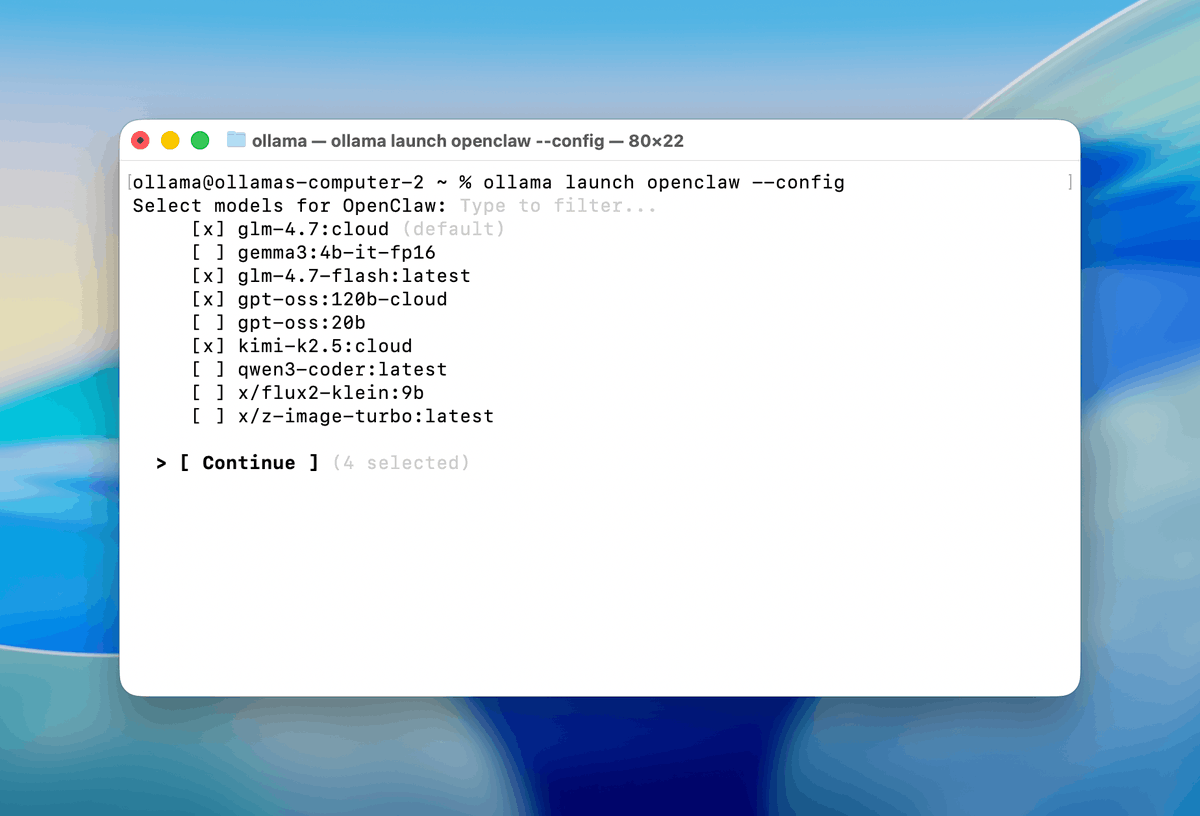
Ollama on X: connecting OpenClaw to local models with ollama launch (Ollama official account)
Glossary
CI-First Benefit Score
A 0 to 10 assessment of net Time, Quantity, Quality, and Skill benefit after prompting, verification, correction, and learning overhead.
CI-First Profile
The role the user assigns to the AI, from highest autonomy to lowest: (level 1) Co-Creator and Thought Partner, (level 2) Co-Worker and Assistant, (level 3) Professor, Coach and Tutor, (level 4) Analyst and Tester, (level 5) Challenger and Devil's Advocate. Lower level numbers indicate higher AI autonomy. The user remains the decision-maker at every level.
Humics Protection Badge
A rating of whether a tool protects, leaves neutral, or erodes Creativity, Critical Thinking, and Social Authenticity.
AI Imposture Risk
The risk that apparent speed, output volume, or competence hides verification costs, weak quality, or missing human skill.
User Sentiment
A summary of real user ratings and recurring themes, kept separate from the U365 editorial evaluation.
Review Status
Review Status records the current standing of the tool at the time of the last test. Active: the tool is current and recommended. Active (updated): recently re-checked and the content was refreshed. Changed: a re-check trigger fired and an update is pending, so read the review with that in mind. Risky: the tool has significant unresolved issues, or it has been clearly surpassed by newer alternatives. Use it with caution and read the Limits section. Retired: the tool still works but is no longer recommended. Deprecated: the tool has been shut down or fundamentally changed. Retired and Deprecated posts include a Migration Path section.




Comments