
Open WebUI: The Self-Hosted AI Platform That Brings ChatGPT to Your Own Infrastructure

Updated: Oct 17

Status: Active (updated) | Last tested: 2026-10-17 (v0.12.3) | Re-check: trigger-based (max 6 months)
Active (updated): the tool is current and recommended. This review was recently re-checked and the content was refreshed.


In this Tool Review
Tool Snapshot

Tagline: Self-hosted AI platform, extensible, feature-rich, user-friendly, runs entirely offline.
Category: Productivity and Automation
Provider: Open WebUI (Timothy Jaeryang Baek)
Version tested: v0.12.3 (2026-10-16), self-hosted pip/uv path verified 2026-10-17
License: Custom Open WebUI License (BSD-3 base + branding clause, free for 50 or fewer users, Enterprise license for white-labeling or 50+ users)
Platforms: pip, uv, Docker, Kubernetes (kubectl, kustomize, helm), Web, Desktop app, PWA
Primary use cases:
Chat with local and cloud LLMs through a single interface
Build RAG pipelines over your document libraries with 13 vector database options
Manage multi-user access with granular RBAC and user groups
Automate recurring prompts on schedules with the Automations feature
Run multi-model conversations to compare responses side by side
Official links:
Website: https://openwebui.com
Documentation: https://docs.openwebui.com
Discord: https://discord.gg/5rJgQTnV4s
Pricing summary: Free for self-hosted (50 or fewer users). Enterprise: custom pricing (reported around $5,000/year for first 50 users, around $3/user/month beyond that) for white-labeling, branding removal, and enterprise features.
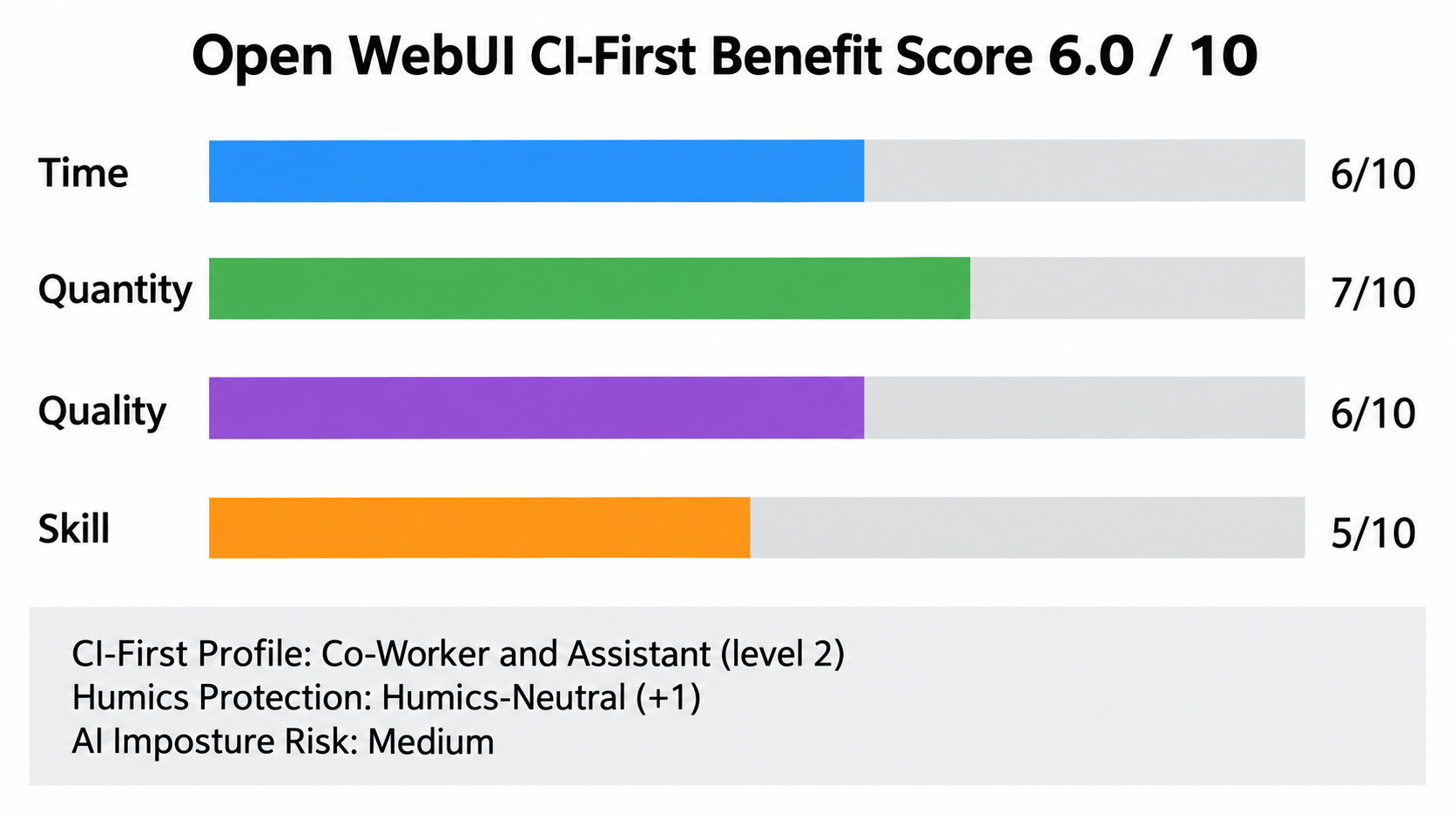
CI-First Benefit Score | 6.0/10 (CI-First Positive) |
Time / Quantity / Quality / Skill | 6 / 7 / 6 / 5 |
CI-First Profile | Co-Worker and Assistant (level 2), Co-Creator and Thought Partner (level 1) |
Humics Protection | Humics-Neutral (+1) |
AI Imposture Risk | Medium |
User Sentiment | 155,947 GitHub stars, mixed Reddit sentiment |
Pricing | Free (self-hosted, 50 or fewer users), Enterprise (custom) |
Platforms | pip, uv, Docker, Kubernetes, Web, Desktop, PWA |
GitHub Stats | 155,947 stars, 22,697 forks, 256 open issues |
For detailed explanations of the CI-First evaluation terms used in this review, including CI-First Benefit Score, CI-First Profile, Humics Protection Badge, AI Imposture Risk, and User Sentiment, see the Glossary at the end of this publication.
The Problem
Running LLMs locally or through cloud APIs means dealing with fragmented interfaces. You use one tool for Ollama, another for OpenAI-compatible APIs, and a third for document search. Teams that need shared access end up sharing API keys or building custom wrappers. Enterprise requirements like RBAC, audit logs, and SSO are absent from most self-hosted solutions.
The result is wasted time, inconsistent configurations, and security gaps. Developers spend hours wiring together disparate tools instead of working with their models. IT administrators lack visibility into who is using which model and why. Teams duplicate effort because there is no shared workspace for conversations, knowledge, and prompts.
Open-source LLM interfaces exist, but most are single-user, limited in features, or difficult to deploy at scale. The gap between a personal chat tool and a production-ready AI platform is wide.
The Outcome
Open WebUI gives you a single, self-hosted interface for Ollama and OpenAI-compatible APIs. You deploy it with Docker or pip, configure your model connections, and your team accesses everything through one URL. The platform handles user management, RBAC, and access control without requiring you to build those systems yourself.
You get a persistent workspace where conversations, documents, and knowledge are shared across your organization. RAG pipelines connect to 13 vector databases with hybrid BM25 and vector search. Automations schedule recurring prompts. Multi-model conversations let you compare responses from different models side by side. The interface works on mobile, desktop, and as a PWA.
For teams that need enterprise features, the Enterprise license adds LDAP/AD, SSO, SCIM 2.0, and white-labeling. The free tier supports up to 50 users with all core features, which covers most small to mid-size teams.
Who Should Use Open WebUI
Open WebUI serves three primary audiences. The table below maps each U365 Fellow category to the tool's relevance.
Fellow Category | Relevance | How They Use It |
Students | High | Learn AI system architecture by deploying and configuring models, RAG pipelines, and tools |
Professionals | High | Set up private AI infrastructure for teams, automate workflows, manage multi-user access |
Everyone | Medium | Use as a personal AI chat interface if comfortable with Docker or pip installation |
U365 Institutes Alignment
Rating. High (primary)
Why. Two competencies, both about directing a system rather than running it. Retrieval design: choosing the embedding model, the vector backend, the chunking strategy and the reranker for a private corpus, and reading a returned answer for whether it actually answers the question. Self-hosted platform direction: deciding what may run on the instance, what each connection and model route is for, and reading the deployment's own behaviour when a step fails.
The limit that holds the row. The tool supplies no engineering standard of its own. It publishes no model card, no accuracy figure and no benchmark, so a Fellow appraises it by reading its behaviour rather than by measuring it. A U365 programme assesses the competency: the RAG Essentials certificate for retrieval, Cloud Computing Specialist for deployment, and the wider UIT diploma and degree family.
Rating. Medium
Why. Two competencies. Costed appraisal of a self-hosted service: reading the licence boundary between the free tier and the Enterprise tier, computing the cost of running and maintaining the instance, and defending the tier choice against the work it replaces. Information-ownership specification: who may build a collection from which documents, who owns the collection, and when it is re-read.
The limit that holds the row. No published U365 programme assesses software licence tiering or total cost of ownership for a self-hosted platform. The nearest anchors are Financial Analysis Specialist and Business Analysis Professional, and neither publishes a licence or total-cost position. A High rating would rest on two competencies with no credential outcome behind either, so the row is Medium.
Rating. Low
Why. A reading contact, not a communication craft. What remains is the decision about what an answer drawn from a private corpus may be published as, and what a reader is owed about where it came from.
The limit that holds the row. The tool composes no communication craft. It teaches no register, no audience analysis and no measurement of whether a message worked, and it supplies no editorial standard for material built on a corpus. The competency that remains is a sourcing and attribution decision, which UIC programmes assess in coursework rather than against a published outcome.
Rating. Low
Why. A reading contact, not a design act. A designer takes one thing from this tool: reading how a knowledge pipeline behaves before a design decision depends on it.
The limit that holds the row. Nothing in the UID competency set is exercised as a design decision. The tool produces no design artefact, specifies no layout, interaction, prototyping or motion work, and evaluates no design against a brief.
Skill level: Intermediate to advanced. Requires comfort with command-line tools, Docker, and basic networking concepts.
Prerequisites: Docker installed, or Python 3.11+ with pip/uv. Ollama installed for local model inference. Basic understanding of LLM APIs.
Time to first result: 30 to 60 minutes (Docker pull, configuration, first chat).
Time to competence: 2 to 3 days for basic usage. 1 to 2 weeks for RAG, user groups, and automations.
How Open WebUI Works
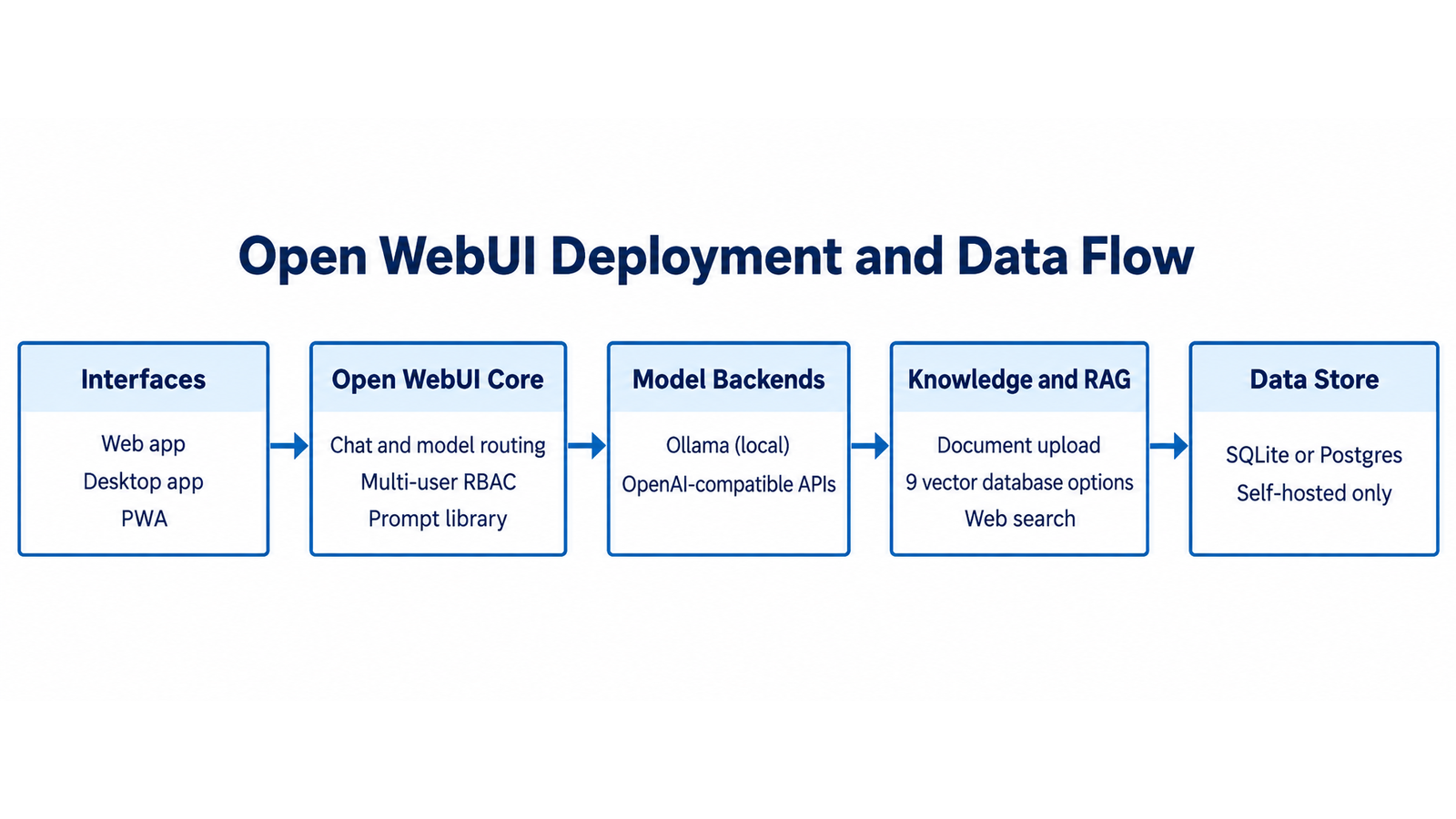
Open WebUI is a Python and SvelteKit application that runs as a web server. It connects to Ollama for local model inference and to any OpenAI-compatible API for cloud models. The frontend renders in the browser, the backend handles model routing, user management, and RAG operations.

Underlying Technology
Backend: Python (FastAPI), SQLite or PostgreSQL for data storage, Redis for horizontal scaling.
Frontend: SvelteKit, responsive design, PWA support.
Model integration: Ollama API, OpenAI-compatible API format (LMStudio, GroqCloud, Mistral, OpenRouter, vLLM).
RAG: Sentence Transformers for embeddings, 13 vector database backends (Chroma, PGVector, Qdrant, Milvus, Elasticsearch, OpenSearch, Pinecone, S3Vector, Oracle 23AI, openGauss, MariaDB Vector, Weaviate, Valkey), hybrid BM25 and vector search with reranking.
Key Technical Features
Inputs: Text, images (for vision models), documents (for RAG), voice (STT).
Outputs: Text, images (DALL-E, Gemini, ComfyUI, AUTOMATIC1111), audio (TTS), artifacts.
Integrations: Google Drive, OneDrive/SharePoint, OpenTelemetry, LDAP/AD, SSO (Okta, Azure AD, Google Workspace), SCIM 2.0.
Plugin system: Filters, Actions, Pipes, Tools, Skills, MCP, MCPO, OpenAPI. Plugins extend the platform with custom logic, external data sources, and tool calls.
Scalability: Redis-backed sessions, WebSocket connections, multi-worker support for horizontal scaling. SQLite for small deployments, PostgreSQL for production.
Getting Started
Installation
The fastest path is Docker. Pull the official image and run it with Ollama:
docker run -d -p 3000:8080 --gpus=all -v ollama:/root/.ollama -v open-webui:/app/backend/data --name open-webui --restart always ghcr.io/open-webui/open-webui:main
For pip installation:
pip install open-webui
Then run: open-webui serve (starts on port 8080)
For Kubernetes, the project provides kubectl, kustomize, and Helm chart deployments. See the official documentation for cluster-specific configuration.
First-Time Configuration
1. Open http://localhost:3000 in your browser. The first registered user becomes the admin.
2. Navigate to Settings, then Connections. Add your Ollama URL (default: http://localhost:11434) or OpenAI-compatible API endpoints.
3. Go to Settings, then Models to select which models are available. Pull models in Ollama first (ollama pull llama3.2).
4. Configure RAG in Settings, then Documents. Choose your vector database, embedding model, and reranking model.
5. Set up user groups in Settings, then Users if you need role-based access control for a team.
First 15 Minutes Checklist
Docker container running and accessible on port 3000
Admin account created (first registered user)
At least one Ollama model pulled and connected
First chat message sent and response received
RAG vector database selected (ChromaDB is the default)
Real Workflows
Two workflows that show how UIT and UIB Fellows can use Open WebUI in their academic work.
Workflow 1: RAG Over Course Materials (UIT Fellow)
Learner type: UIT student in AI or Data Science
CI-First benefit tags: Quality (6/10), Quantity (7/10)
U365 program connection: Bachelor of Science in IT (B.Sc.), AI and machine learning strand
Step | You Do | Open WebUI Does |
1 | Upload course PDFs and lecture notes | Chunks documents, generates embeddings, stores in vector database |
2 | Ask a question about the course material | Retrieves relevant chunks via hybrid BM25 and vector search, sends context to the model |
3 | Review the answer and check the cited sources | Displays source citations with relevance scores |
4 | Refine the question or ask follow-up questions | Maintains conversation context, retrieves additional chunks as needed |
Sample prompt: Context: I am studying a machine learning concept and my course materials are uploaded to my own workspace, with the topics stated. Role: AI as a study assistant working only from my course materials. I own the learning; you explain from my own material. Profile: Act as a Professor, Coach and Tutor, explaining the concept against my course's framing rather than a generic one. Task: explain the difference between supervised and unsupervised learning using examples from the course materials I uploaded, and state which sections you drew each example from. Then set three questions I should be able to answer. Constraints: use only the uploaded materials; where the course frames a concept its own way, follow the course rather than correcting it, and say so if the two differ. Output format: the explanation with section references, the examples, and the three self-test questions. Memory: the explanation and my own answers belong in my learning record, because the workspace holds the documents and not my study state. UP-Context-Engineering verification: I answer the three questions in my own words before I treat the topic as learned, I check each section reference myself, and I can explain the difference without the tool a day later. Data safety: this pack carries no personal data. I do not paste licensed course content, an exam paper or another student's work into it, and I keep my notes in my own store.
Verification checklist:
Multi-Model Check: Ask the same question with two different models and compare answers
External Source: Cross-check the explanation against a textbook or academic paper
Human Review: Verify the cited course material actually contains the referenced information
CI-First Test: Did the RAG answer teach you something, or did it just save you search time?
Workflow 2: Team Knowledge Base (UIB Fellow)
Learner type: UIB student in Business Management or Entrepreneurship
CI-First benefit tags: Time (6/10), Quantity (7/10)
U365 program connection: Bachelor of Business Administration (B.B.A.), strategy and innovation strand
Step | You Do | Open WebUI Does |
1 | Create a shared workspace and invite team members | Manages user accounts, roles, and access permissions |
2 | Upload business documents, market research, and strategic plans | Indexes documents for RAG, makes them searchable across the team |
3 | Set up an automation to generate a weekly market summary prompt | Runs the prompt on schedule, stores the output in a shared channel |
4 | Review the summary in the team channel and discuss findings | Provides a shared space for team and AI collaboration in real time |
Sample prompt: Context: I am summarising this week's market research for a team that will act on it, and the documents are in my workspace. Role: AI as an analyst summarising my own market research documents. I own the conclusions; you summarise and flag. Profile: Act as an Analyst and Tester, separating what the documents show from what they suggest. Task: summarise the key trends from the market research documents, focusing on competitor movements and customer sentiment, and cite the document each trend comes from. Then list the questions the documents cannot answer. Constraints: use only the uploaded documents; never extrapolate a trend from one data point. Where sentiment evidence is thin, say so rather than smoothing it. Output format: the trends with document citations, the sentiment reading with its evidence, and the open questions. Memory: the accepted summary and its source map belong in my own project record, because the workspace holds files and not the record of judgement. UP-Context-Engineering verification: I check each trend against the cited document before it circulates, I confirm the sentiment reading against the underlying comments, and I can defend each trend in the team review. Data safety: this pack carries no personal data. I do not paste an unpublished report, a customer's identity or a competitor's confidential material into it, and I keep the summary record in my own store.
Verification checklist:
Multi-Model Check: Run the summary with two models and compare coverage of key points
External Source: Verify market data against external sources (industry reports, news)
Human Review: Team reviews the summary for accuracy and missing context
CI-First Test: Did the automation save time without replacing critical analysis?
Workflow 3: Personal Study Assistant for a UIC Fellow
Learner type: UIC student in Digital Communication or Marketing
CI-First benefit tags: Skill (5/10), Quality (6/10)
U365 program connection: Bachelor in Communication & Marketing (B.C.), digital communication and analytics strand
Step | You Do | Open WebUI Does |
1 | Create a Workspace folder for the course and enable Notes | Keeps a private, versioned store of your notes beside the model, away from any vendor cloud |
2 | Draft a campaign brief and paste it into Notes | Stores it as source context that every later prompt in the workspace can read |
3 | Ask for three counter-arguments to your own brief, citing the course reading | Retrieves the relevant course chunks and returns sourced counter-arguments |
4 | Write the final argument yourself in the Notes pane, keeping the model's output as reference | Stays out of the final drafting step so the submitted work is yours |
Sample prompt: Context: I am preparing a campaign brief and I want my positioning tested before it goes out. My course reading on audience segmentation is uploaded, and the brief is provided. Role: AI as a critical reader working from my own course reading. I own the brief; you challenge it from the reading. Profile: Act as a Challenger and Devil's Advocate, testing the positioning rather than polishing it. Task: using the course reading on audience segmentation that I uploaded, list three counter-arguments to the positioning in my campaign brief, and cite the section each argument comes from. Then name the counter-argument I should answer first. Constraints: argue only from the uploaded reading; where the reading does not cover a claim, say so rather than importing outside theory. Do not rewrite the brief; the revision is mine. Output format: the three counter-arguments with section citations, and the one to answer first with the reason. Memory: the counter-arguments and my revisions belong in my own project record, because the workspace holds the reading and not my decisions. UP-Context-Engineering verification: I open each cited section myself before accepting an argument, I can answer each counter-argument from the reading without the tool, and I record which argument changed the brief. Data safety: this pack carries no personal data. I do not paste a client brief under NDA, an unpublished audience dataset or another student's work into it, and I keep the brief record in my own store.
Verification checklist:
☐ Multi-Model Check: run the same counter-argument request against two different models and compare
☐ External Source: confirm the cited reading section actually argues what the model claims
☐ Human Review: rewrite the final argument in your own words before submitting
☐ CI-First Test: did the counter-arguments change your thinking, or only save you drafting time?
Strengths, Limits, AI Imposture Risk
Strengths
Dimension | Score | Why |
Time | 6/10 | Unified multi-model access saves time once configured. Initial Docker and Ollama setup requires investment. |
Quantity | 7/10 | Multi-model conversations, RAG, automations, and scheduled prompts multiply output significantly |
Quality | 6/10 | RAG with 13 vector databases and hybrid search improves output grounding. Quality depends on the underlying model, not the UI layer |
Skill | 5/10 | Platform exposes model parameters, RAG configuration, and tool use. Primarily a deployment tool rather than a skill builder |
Limits
Docker requirement adds friction for non-technical users. The pip install path exists but is less common
The license change from BSD-3 to a custom license upset some community members. Commercial use beyond 50 users requires an Enterprise license
Some features feel shallow or buggy according to Reddit feedback. The breadth of features means some are less polished than dedicated tools
RAG quality depends on the embedding model and reranker you configure. Default settings may not produce optimal results
Self-hosting means you are responsible for updates, backups, and security patches
The platform is Python and SvelteKit, which limits contribution from developers who do not work in these languages
AI Imposture Risk
Dimension | Level | Evidence |
Time Illusion | Medium | Docker and Ollama setup overhead, configuration complexity. Initial investment before time savings appear |
Quantity Illusion | Low | RAG provides source citations that ground the output. Multi-model conversations produce verifiable comparisons |
Skill Illusion | High | Framework clause 5.2.3-a applies and reaches its High threshold. Open WebUI is an agent platform, so the model itself is handed the memory tools and calls add_memory and replace_memory_content inside its own loop, and tool approval defaults to running freely, which is the clause's condition of a revision made during use with no per-write human decision. What holds the overall Imposture Risk at Medium is the configuration: memories are listed in personalization settings where you can read, search, edit and remove them, and the background writer that drafts memories on a turn interval is off by default. A reader who switches that writer on, or who never opens the memory list, holds a High skill illusion rather than a Medium one. |
Overall AI Imposture Risk: Medium One trap is High and it carries clear mitigations, which framework Section 5.3 rates as Medium overall. The three trap values above are published together so the overall can be read against them.
Clause check against the CI-First Framework v1.2 pedagogical clauses, recorded explicitly:
5.2.3-a, agent-authored procedural memory: APPLIES. The 0.11 line writes procedural memory and skills on the user's behalf. Version 0.11.4 adds a command that turns the workflow you just completed into a reusable skill written to the terminal workspace and authored to Open WebUI's own skill standards, every reachable skill is listed to the model by name and description with the full text loaded when the model decides to use it, and the memory tools let a model add and revise stored memories during a conversation. The clause's High threshold is reached because the agent can revise that memory during use with no per-write human decision. The value is conditional on the configuration: the unprompted background writer is off by default, and the memory list in personalization settings is the surface on which a reader keeps the rating at Medium.
4.2-a, agent-mediated conversation: NULL. This clause returns a null and the boundary is worth stating. Where Open WebUI runs a model into a shared Channel the reply is attributed to that model by name and by an @ mention, so agent-authored text is not presented as the person's own voice to other people, and the platform does not substitute agent interaction for human contact. Under clause 4.2-a a shared room is neutral by that test alone, so Social Authenticity stays neutral.
7.5, team-level rooms: APPLIES. Channels are several models and the human in one timeline, and v0.11.0 adds sub-agents that run additional agents inside one task. The clause requires Centaur for any room with more than one agent and removes Cyborg for it, and this review records Centaur in the Collaboration Mode section above. A room carries no profile of its own: attribute a profile to each agent before the room opens.
U365 Co-Intelligence Rating

CI-First Profile
Primary: Co-Worker and Assistant (level 2). Open WebUI functions as a capable assistant that handles model routing, user management, and RAG operations. It reduces the workload of managing AI infrastructure.
Secondary: Co-Creator and Thought Partner (level 1). The platform supports creative work through multi-model conversations, image generation, and customizable agents. It can serve as a thought partner when configured with the right models and prompts.
CI-First Benefit Score
Score: 6.0/10 (CI-First Positive)
Time
Value. 6/10
Rationale. Once configured, saves time with unified multi-model access. Docker setup and Ollama configuration require initial investment
Quantity
Value. 7/10
Rationale. Multi-model conversations, RAG over document libraries, automations, and scheduled prompts multiply output significantly
Quality
Value. 6/10
Rationale. RAG with 13 vector databases and hybrid search improves output grounding. Quality depends on underlying model, not the UI layer
Skill
Value. 5/10
Rationale. Platform exposes model parameters, RAG configuration, and tool use, teaching users about AI system architecture. But primarily a deployment tool
Calculation: (6 + 7 + 6 + 5) / 4 = 6.0/10
Humics Protection Badge
Badge: Humics-Neutral (+1)
Creativity: 0 (neutral). The platform does not protect or erode creative thinking. It is a tool for running models, not a creative assistant itself
Critical Thinking: +1 (protects). RAG with source citations encourages verification. The multi-model comparison feature supports critical evaluation of AI output
Social Authenticity: 0 (neutral). The platform does not affect social interaction patterns
Superhuman Usage Guidance
When to invite Open WebUI: Deploying and managing multi-user AI infrastructure, setting up RAG pipelines, automating recurring prompts, comparing model outputs, and providing team access to shared model resources.
When to keep it out: Tasks that require a single specialized tool (coding, image editing, data analysis). Open WebUI is a platform for running models, not a replacement for domain-specific tools.
U365 method integration: Use with LIPS+CARE for document analysis workflows. Configure RAG over U365 course materials for ULM+EVA learning sessions. The Automations feature supports UNOP recurring practice prompts.
Over-delegation warning: Do not rely on Open WebUI RAG as your only source of truth. Always cross-check RAG output against the original documents. The platform makes it easy to query your knowledge base, but the quality of answers depends on your chunking strategy, embedding model, and reranker configuration. If you stop reading the source documents and trust only the RAG summaries, you lose the ability to verify and contextualize information.
What Users Say
Aggregate Rating Table
Platform | Rating | Reviews |
GitHub | 155,947 stars | Massive community traction, 22,697 forks, 256 open issues |
G2 | Listing exists | Specific rating and count not extracted |
Mixed | Praise for features and active development. Complaints about bloat and license change | |
Trustpilot | No reviews | No reviews found on Trustpilot |
Product Hunt | Not checked | Not specifically checked for reviews |
What Users Praise
Best self-hosted LLM UI available, most feature-rich option
Active development with frequent updates and new features
Broad model integration: Ollama, OpenAI-compatible APIs, and many providers
Strong RAG capabilities with multiple vector database options
Granular RBAC and user group management for team deployments
What Users Complain About
Some features feel shallow or buggy given the breadth of the platform
The license change from BSD-3 to a custom license upset some community members
Docker requirement adds friction for non-technical users
Platform can feel bloated with features that not everyone needs
Sentiment Summary
Community sentiment is mixed but predominantly positive. The 155,947 GitHub stars indicate massive adoption and satisfaction. Reddit discussions (r/LocalLLaMA, r/OpenWebUI) praise the feature set and development pace while raising valid concerns about feature depth, licensing, and deployment complexity. The complaints are characteristic of a project that grew fast and added features faster than it could polish each one.
U365 Editorial Note
The user sentiment aligns with the CI-First evaluation. The Quantity benefit (7/10) matches the praise for feature breadth and multi-model support. The Time benefit (6/10) reflects the setup friction that Reddit users report. The Skill benefit (5/10) is consistent with the complaint that the platform is primarily a deployment tool rather than a learning instrument. The Medium AI Imposture Risk aligns with the concern that some features feel shallow: users may mistake platform complexity for depth of capability.
Comparison and Alternatives
Tool | License | Best For | Choose Over Open WebUI If |
LM Studio | Closed-source | Single-user desktop simplicity | You want a desktop app with built-in model browser and no server setup |
LibreChat | MIT | Multi-provider chat | You want a ChatGPT-like interface for comparing multiple API providers |
AnythingLLM | MIT | Document chat out of the box | You want strong RAG with minimal configuration and Docker or desktop option |
Jan | Open-source | Minimalism | You want a minimal, lightweight Electron app without server complexity |
Onyx | Open-source | Enterprise knowledge management | You need 40+ connectors and a cloud option with enterprise focus |
Where Open WebUI is clearly better
Multi-user RBAC and user groups: more granular than LibreChat, AnythingLLM, or Jan
Feature breadth: RAG, automations, channels, notes, calendar, image generation, and voice in one platform
Model integration breadth: Ollama plus any OpenAI-compatible API, with multi-model conversations
Enterprise features: LDAP/AD, SSO, SCIM 2.0, OpenTelemetry, horizontal scaling
Plugin system: Filters, Actions, Pipes, Tools, Skills, MCP, MCPO, OpenAPI
Where Open WebUI is clearly worse
Setup complexity: LM Studio and Jan are simpler for single-user desktop use
RAG out of the box: AnythingLLM provides stronger RAG with less configuration
License clarity: MIT-licensed alternatives (LibreChat, AnythingLLM) have clearer licensing terms
Minimalism: Jan offers a cleaner, more focused experience without feature bloat
Enterprise connectors: Onyx has 40+ pre-built connectors vs Open WebUI's plugin-based approach
Verdict and Next Steps
Open WebUI is the most feature-rich self-hosted AI platform available. If you need a single interface for local and cloud models, with multi-user access, RAG, automations, and enterprise features, it is the clear choice. The CI-First Benefit Score of 6.0/10 (Positive) reflects genuine productivity gains once the platform is configured, balanced against the setup investment and the risk of over-relying on RAG summaries.
Who should adopt: Teams and individuals who want private, self-hosted AI infrastructure with multi-user support. UIT Fellows learning AI system architecture. UIB Fellows building private knowledge bases for business teams.
When: Now, if you have Docker installed and a use case for multi-model chat or RAG. The v0.12.3 release is stable and actively maintained.
For what: Multi-model chat, RAG over document libraries, team knowledge bases, automated recurring prompts, and enterprise AI deployment.
UP-Context-Engineering Prompt Pack
Prompt 1 (RAG Setup): Context: I am configuring retrieval over my own PDF course materials and I want the settings that suit academic documents. The document set and the local deployment are stated. Role: AI as a retrieval-configuration assistant working to my document set. I own the configuration; you propose and explain. Profile: Act as an Analyst and Tester, proposing settings with their reasons rather than defaults. Task: walk me through configuring the retrieval system with my vector store, including chunk size, chunk overlap, embedding-model selection and reranking settings for academic documents, and explain what each setting changes about retrieval. Then state how I should test the configuration against my own documents. Constraints: name the trade-off of each setting rather than presenting a default as best; where a setting depends on the embedding model, say so. Never promise a retrieval quality level. Output format: the settings with reasons and trade-offs, the test plan on my own documents, and the one setting to change first if retrieval misses citations. Memory: the working configuration and the test results belong in my own deployment notes, because the tool keeps no history. UP-Context-Engineering verification: I run the retrieval test on my own documents before I rely on the configuration, I verify that cited passages exist in the source PDFs, and I can explain each setting's purpose without the assistant. Data safety: this pack carries no personal data. I do not paste licensed course content, an access-restricted PDF or a student's record into the index, and I keep the configuration record in my own store.
Prompt 2 (Multi-Model Comparison): Context: I am comparing two models on a coding task inside my own deployment, and the models and the task are stated. Role: AI as an evaluation designer for a fair model comparison. I own the comparison; you fix the conditions. Profile: Act as an Analyst and Tester, holding the conditions equal rather than cheering a winner. Task: set up a multi-model comparison on the stated coding task; state the parameters to hold constant (including temperature, context and evaluation criteria), the prompt both models receive, and how I should score the outputs. Then name what the comparison cannot show. Constraints: one prompt, one task, same conditions for both models; never present a preference as a result. Where a difference is within noise, say so rather than ranking it. Output format: the fixed conditions, the shared prompt, the scoring rubric, and the comparison's limits. Memory: the comparison setup and the outputs belong in my own evaluation record, because the deployment keeps conversations and not evaluations. UP-Context-Engineering verification: I run both models myself under the stated conditions, I score blind against the rubric, and I can defend the comparison design without the assistant. Data safety: this pack carries no personal data. I do not paste proprietary code, customer data or an unreleased project into the comparison, and I keep the evaluation record in my own store.
Prompt 3 (Automation): Context: I am setting up a recurring summary over my business document library inside my own deployment, and the schedule and the library are stated. Role: AI as an automation assistant building one bounded scheduled task. I own the library and the schedule; you assemble the task. Profile: Act as a Co-Worker and Assistant for the automation step, wiring the stated task rather than extending it. Task: create the automation that runs the weekly market summary against my document library; state the schedule, the model, the prompt and the retrieval settings to use, and what the run should report. Then state how I will know a run failed silently. Constraints: the summary reads only from the library I named; never let the task write into the library. Where a setting interacts with the retrieval configuration, name the interaction. Output format: the task definition with schedule, model, prompt and settings; the run report format; and the silent-failure markers. Memory: the task definition and the run record belong in my own operations notes, because the deployment keeps the schedule and not the reasoning. UP-Context-Engineering verification: I review the first runs against the library myself before trusting the summary, I keep the retrieval settings under review, and I can explain what the automation does and cannot do. Data safety: this pack carries no personal data. I do not paste a customer document, an access-restricted report or credentials into the automation, and I keep the task record in my own store.
U365's Recommendations to Learn More
We curated the resources below to help you go beyond this review. Each link was verified active as of 2026-10-17.
Official learning resources
Open WebUI Documentation: https://docs.openwebui.com
Open WebUI GitHub: https://github.com/open-webui/open-webui
Open WebUI Homepage: https://openwebui.com
Video tutorials and channels
Open WebUI Tutorial | Local AI Without Limits (RajeshKumar AR): https://www.youtube.com/watch?v=N-Hp8TLfnIU
Open WebUI Tutorial and Windows Install (StuffAboutStuff): https://www.youtube.com/watch?v=2CM8dYHTKp4
Open WebUI Course playlist (DigitalBrainBase, now The Personal AI Architecture, 37 videos): https://www.youtube.com/playlist?list=PL_rTgQnnMXsXAsEiid-tWhaj03SsP4U5Z
Open WebUI Tutorial | Local AI Without Limits by RajeshKumar AR | AI Automation
Open WebUI Tutorial and Windows Install by StuffAboutStuff
Written tutorials and deep-dive articles
Open WebUI Docs - Getting Started: https://docs.openwebui.com/getting-started
Open WebUI Docs - RAG: https://docs.openwebui.com/features/chat-conversations/rag/
Community and social
Open WebUI Discord: https://discord.gg/5rJgQTnV4s
r/OpenWebUI subreddit: https://www.reddit.com/r/OpenWebUI
Resources on X
Dedicated X channels:
Open WebUI on X: https://x.com/OpenWebUI
We select resources based on content quality, not source type. Community creators are included when their tutorials teach something this review does not cover.
CI-First Evaluation Summary Card
Tool | Open WebUI (openwebui.com) |
Category | Self-hosted AI platform and interface |
CI-First Profile | Primary: Co-Worker and Assistant (2). Secondary: Co-Creator and Thought Partner (1) |
Collaboration Mode | Centaur |
CI-First Benefit Score | 6.0 / 10, CI-First Positive |
Time / Quantity / Quality / Skill | 6 / 7 / 6 / 5 |
Humics Protection Badge | Humics-Neutral (+1) |
AI Imposture Risk | Medium overall, with Skill Illusion High |
Status | Active (updated) |
Last tested | 2026-10-17 |
Version tested | v0.12.3 |
License | Custom Open WebUI License (BSD-3 base + branding clause) |
Glossary
CI-First Benefit Score
A 0-10 score that measures how much a tool genuinely benefits human co-intelligence, calculated as the average of four sub-scores: Time (net time saved after accounting for setup, prompting, and verification), Quantity (usable output volume increase, verified not just surface volume), Quality (verified, durable quality improvement, not surface polish), and Skill (genuine lasting capability built, not dependency created). Scores of 0-2.0 are CI-First Negative, 2.1-4.0 are CI-First Neutral, 4.1-6.0 are CI-First Positive, 6.1-8.0 are CI-First Strong, and 8.1-10.0 are CI-First Transformative. Open WebUI scores 6.0/10 (CI-First Positive), meaning it provides genuine productivity benefits but requires initial setup investment and does not build deep skills.
CI-First Profile
A classification of how an AI tool collaborates with humans, based on five levels of AI autonomy: (level 1) Co-Creator and Thought Partner, (level 2) Co-Worker and Assistant, (level 3) Professor, Coach and Tutor, (level 4) Analyst and Tester, (level 5) Challenger and Devil's Advocate. Lower level numbers indicate higher AI autonomy in the collaboration. Open WebUI is classified as Co-Worker and Assistant (level 2) primary, Co-Creator and Thought Partner (level 1) secondary, because it handles model routing and infrastructure management autonomously while supporting creative work through multi-model conversations and configurable agents.
Humics Protection Badge
A rating that measures whether a tool protects or erodes three distinctively human capabilities: Creativity, Critical Thinking, and Social Authenticity. Each dimension is scored +1 (protects), 0 (neutral), or -1 (erodes). The sum determines the badge: +2 to +3 is Humics-Friendly, -1 to +1 is Humics-Neutral, -2 to -3 is Humics-Risky. Open WebUI scores +1 (Humics-Neutral) because its RAG with source citations encourages critical thinking and verification, while having no effect on creativity or social authenticity.
AI Imposture Risk
An assessment of how much a tool can create illusions of productivity, capability, or understanding that do not reflect genuine human skill. Three dimensions are evaluated: Time Illusion (does the tool's setup cost mask the time it actually saves), Quantity Illusion (does the output volume hide quality gaps), and Skill Illusion (does the tool make users feel more capable than they are). Each is rated Low, Medium, or High. The overall risk is Low if all are Low, Medium if 1-2 are Medium or 1 is High with mitigations, and High if 2 or more are High. Open WebUI has Medium overall risk: Time Illusion is Medium (setup overhead), Quantity Illusion is Low (RAG provides citations), and Skill Illusion is High (users may attribute model quality to their own platform configuration skill).
User Sentiment
An aggregated assessment of what real users say about a tool across multiple platforms, including GitHub (stars, forks, issues), G2, Reddit, Trustpilot, Product Hunt, and community forums. The sentiment is categorized as positive, mixed, or negative, with specific praise and complaint themes extracted. For Open WebUI, sentiment is mixed but predominantly positive: 155,947 GitHub stars indicate massive adoption, while Reddit discussions raise concerns about feature depth, licensing changes, and deployment complexity.
Review Status
Review Status records the current standing of the tool at the time of the last test. Active: the tool is current and recommended. Active (updated): recently re-checked and the content was refreshed. Changed: a re-check trigger fired and an update is pending, so read the review with that in mind. Risky: the tool has significant unresolved issues, or it has been clearly surpassed by newer alternatives. Use it with caution and read the Limits section. Retired: the tool still works but is no longer recommended. Deprecated: the tool has been shut down or fundamentally changed. Retired and Deprecated posts include a Migration Path section.
Sources
Open WebUI GitHub repository: https://github.com/open-webui/open-webui
Open WebUI official website: https://openwebui.com
Open WebUI documentation: https://docs.openwebui.com
Open WebUI Discord community: https://discord.gg/5rJgQTnV4s
r/OpenWebUI subreddit: https://www.reddit.com/r/OpenWebUI
r/LocalLLaMA subreddit: https://www.reddit.com/r/LocalLLaMA
G2 Open WebUI reviews page: https://www.g2.com/products/open-webui/reviews
Open WebUI Tutorial by RajeshKumar AR on YouTube: https://www.youtube.com/watch?v=N-Hp8TLfnIU
Open WebUI Tutorial by StuffAboutStuff on YouTube: https://www.youtube.com/watch?v=2CM8dYHTKp4
Open WebUI What It Can Do by Case Done by AI on YouTube: https://www.youtube.com/watch?v=du9M6Epqp94




Comments