
OpenRouter: One API for Many AI Models and Providers

Updated: Oct 16
Status: Active | Last tested: 2026-08-31 (current web and API version) | Re-check: trigger-based (max 6 months)
Active: the tool is current and recommended.


In this Tool Review
Tool Snapshot
Tagline: "The Unified Interface For Every Model" (OpenRouter homepage headline).
Category: Infrastructure and DevOps
Provider: OpenRouter (acquisition by Stripe announced August 19, 2026; the product continues unchanged)
Version tested: Current web and API version, reviewed 2026-08-31
License: Proprietary hosted gateway; underlying models carry their own licenses
Platforms: Web app, REST API, OpenAI-compatible SDKs, Agent SDK, MCP server
Primary use cases:
Route one request format to 500+ models from 80+ providers
Compare candidate models on the same task before committing code or budget
Configure automatic fallbacks when a provider errors or rate limits
Control privacy per request, including blocking providers that may train on prompts
Consolidate AI spend in one prepaid credit balance with per-key usage logs
Pricing summary: Freemium. Free tier: 25+ free models, 50 requests per day, community support. Pay-as-you-go: provider list prices with no markup, a 5.5% fee on credit purchases ($0.80 minimum), and bring-your-own-key use free up to $25,000 per month of list-price inference. Enterprise: fee discounts, SSO, contractual SLAs, invoicing. Pricing verified 2026-08-31.
Official links:
Website: https://openrouter.ai/
Quickstart: https://openrouter.ai/docs/quickstart
Models catalog: https://openrouter.ai/models
Pricing: https://openrouter.ai/pricing
Rankings: https://openrouter.ai/rankings
Trust Center: https://trust.openrouter.ai/
Community (Discord): https://discord.gg/openrouter
GitHub organization: https://github.com/OpenRouterTeam
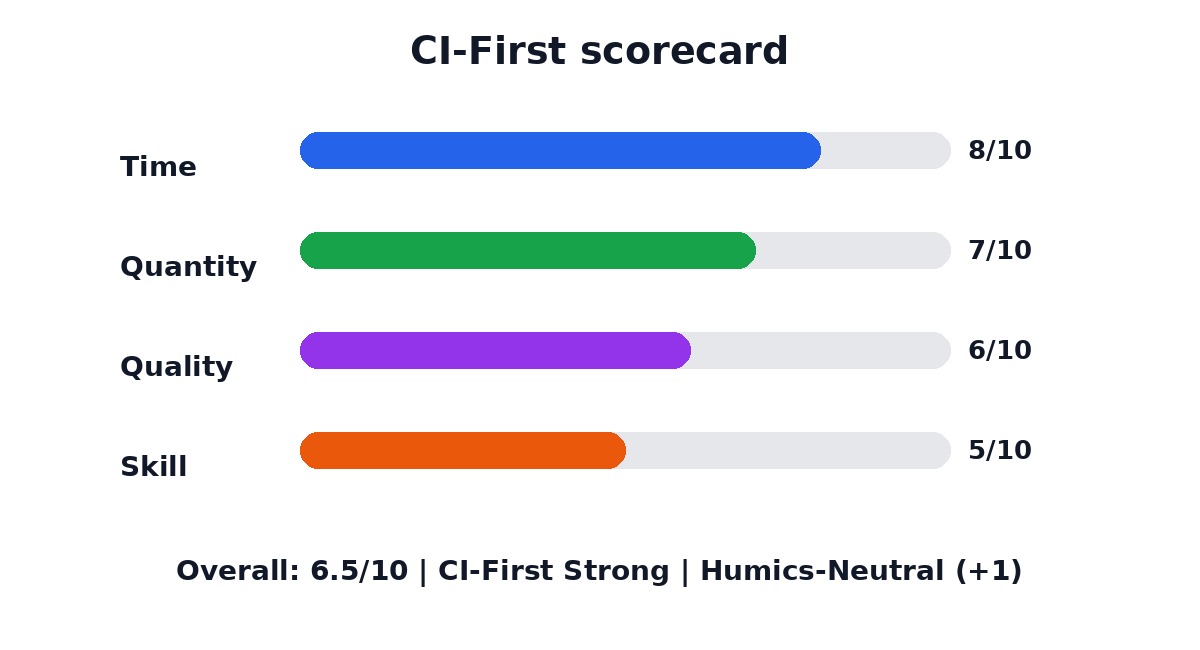
CI-First Benefit Score | 6.5 / 10 (CI-First Strong) |
Time / Quantity / Quality / Skill | 8 / 7 / 6 / 5 |
CI-First Profile | Analyst and Tester (level 4); Co-Worker and Assistant (level 2) |
Humics Protection | Humics-Neutral (+1) |
AI Imposture Risk | Medium |
User Sentiment | Mixed (Trustpilot 1.8/5, 33 reviews) |
Pricing | Free tier; pay-as-you-go (5.5% credit fee); Enterprise |
Platforms | Web, REST API, OpenAI-compatible SDKs, Agent SDK |
Best fit | Multi-model API prototyping, provider comparison, fallback design |
For detailed explanations of the CI-First evaluation terms used in this review, including CI-First Benefit Score, CI-First Profile, Humics Protection Badge, AI Imposture Risk, and User Sentiment, see the Glossary at the end of this publication.

The Problem
Building on several AI models usually means separate accounts, separate API keys, separate billing, and separate integration code for every provider. Prices, rate limits, and data policies differ per provider, so comparing models on the same task requires duplicated work. When a provider goes down, your application breaks unless you build failover logic yourself.
The problem hits builders hardest: a student prototyping with open models, a professional shipping an internal tool, a team that wants the best price and latency per request. Without a routing layer, every model change means new authentication code, new error handling, and another bill to reconcile.
The Outcome
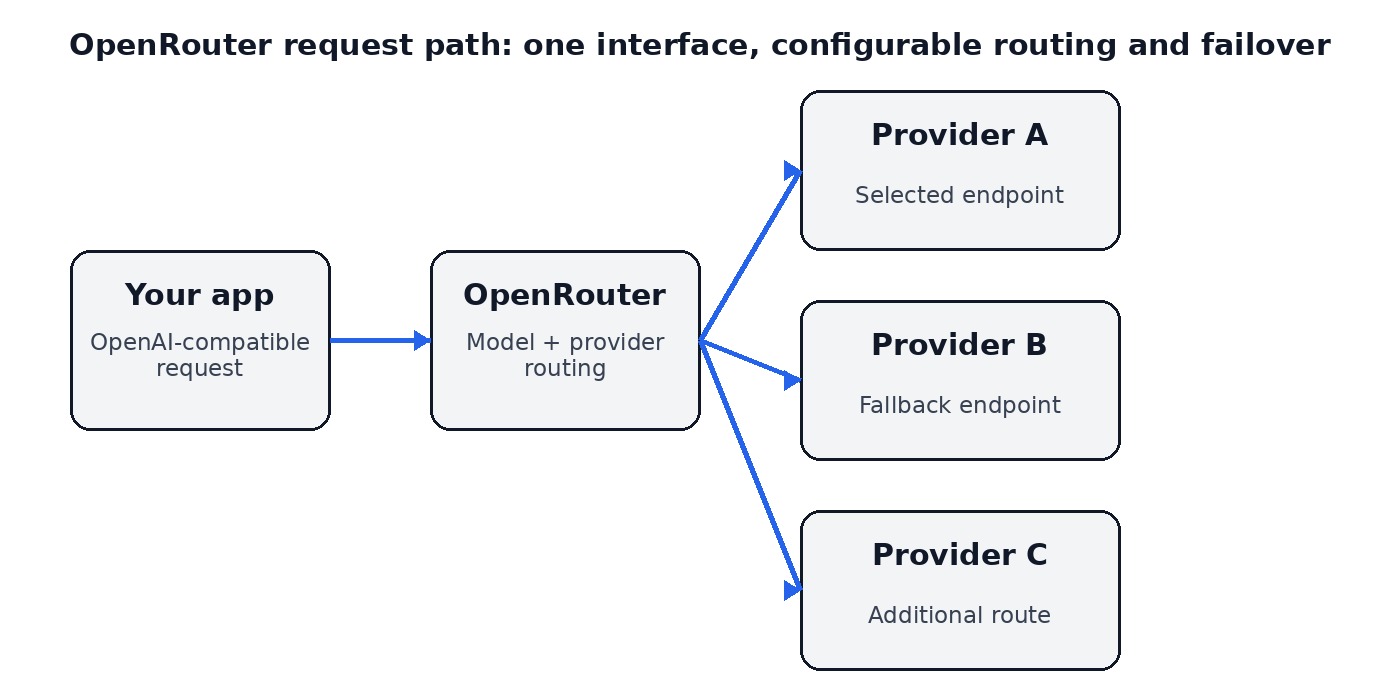
OpenRouter gives you one OpenAI-compatible endpoint, one API key, and one credit balance across 500+ models from 80+ providers (catalog figures as of this review). You switch models by changing the model identifier, add automatic fallbacks with one routing field, and read which model and provider answered in every response.
For a U365 Fellow, the concrete outcome is a repeatable evaluation routine: run the same prompt through candidate models, compare price, latency, and output quality in one log, then commit to a route with your own judgment. Teams get consolidated usage analytics and per-request privacy controls, such as blocking providers that may train on prompts, instead of per-provider policy research.
Who Should Use OpenRouter
Learner type | Difficulty | Typical ROI | Career path |
Students (Bachelor, Master) | Intermediate | Learn multi-provider API integration, model comparison, and cost-aware design on one account | UIT programs and applied AI modules in any U365 degree |
Professionals (career upskilling) | Intermediate | Rapid model selection, fallback resilience, and consolidated billing for prototypes and internal tools | U365 professional programs and applied AI career tracks |
Everyone (lifelong learners) | Advanced | Useful only if you build or automate with AI APIs; casual chat users do not need a gateway | Optional enrichment for U365 method practice |
U365 Institutes Alignment
UIT (Technology, AI, Data Science)
Relevance. High
Why. API prototyping, routing, fallback design, and model evaluation are direct technical competencies; students practice real integration patterns.
The limit that holds the row. The gateway routes and logs; it verifies nothing and teaches no evaluation method of its own, and the review's own limits section says the accuracy check stays with the user and that model identifiers and prices change so untested routes break silently. The competencies that remain are the ones the review's workflows exercise: define the rubric and the expected answer before any call, force failures to test the chain, and keep a personal evaluation routine. A word-start accent-folded search over the title and full description of all 79 published programme descriptions returns zero matches for model evaluation, failover, fallback and model selection, so the row stands at High for measured integration practice and not for the gateway's routing as a verified answer.
UIB (Business Management, Entrepreneurship)
Relevance. Medium
Why. Usage analytics, budget controls, and per-model pricing support cost-aware AI product decisions; not a business curriculum tool itself.
The limit that holds the row. The usage analytics and budget controls are operational surfaces; the row's own reason records that this is not a business curriculum tool, and the review's third workflow puts the policy decision on the team: which providers may see the prompts, what the budget is, and how spend is reviewed together. The competency that remains is cost-aware AI product appraisal, read from the activity log and decided by the Fellow. A word-start accent-folded search over the title and full description of all 79 published programme descriptions returns zero matches for total cost of ownership, unit economics, procurement and budget control, so the row stays at Medium for cost-aware operations and not for a management competency.
UIC (Digital Communication, Marketing)
Relevance. Low
Why. Communication workflows meet the gateway at most indirectly through chat clients; it serves builders, not content work.
The limit that holds the row. The row is Low because the gateway serves builders: the review records that communication workflows meet it at most indirectly through chat clients, and it composes nothing, chooses no register and measures no audience. The competency that remains belongs to whatever content surface a team builds on it: the reading of a routing and data policy before that surface ships. A word-start accent-folded search over the title and full description of all 79 published programme descriptions returns zero matches for editorial, brand voice, audience analysis and disclosure, so the row stays Low.
UID (Digital Design, UX/UI)
Relevance. Low
Why. No design workflow relevance; designers encounter OpenRouter only when they build AI features.
The limit that holds the row. The row is Low because the design workflow does not meet the gateway: the review records that designers encounter it only when they build AI features. It offers no production surface, shapes no interface and supports no critique against a brief. The competency that remains belongs to the build rather than the design: reading a provider policy before an AI feature ships is engineering practice, and no UID assessment covers it. A word-start accent-folded search over the title and full description of all 79 published programme descriptions returns zero matches for user research, usability and design brief, so the row stays Low.
Skill level required: Intermediate. You need basic API concepts (HTTP, JSON, keys) and a test prompt with a known expected answer.
Prerequisites: Basic programming, or a no-code AI tool that accepts an OpenAI-compatible endpoint, plus a method for checking output quality.
Typical time to first result: 15 minutes. Sign up, create a key, send one request, and see the selected model in the response.
Typical time to competence: 1 to 2 weeks of regular use to learn routing fields, provider policies, and a personal evaluation routine.
How OpenRouter Works
Inputs: Your messages plus a model identifier (a specific model, openrouter/auto for automatic selection, or a model list that defines fallback order), optional provider constraints (allowed or ignored providers, data policy, price ceiling, latency and throughput preferences), and optional tools.
Outputs: The model response, the selected model and provider in the response metadata, and usage data (prompt and completion tokens, cost) for your logs.
Underlying technology
OpenRouter is a hosted routing layer, not a model. It passes your request to an inference provider and passes through provider list prices without markup. Provider routing can sort by price, throughput, or latency, filter by quantization, require full parameter support, and enforce data policies. If the chosen provider fails, fallbacks move the request to the next allowed route automatically.
The auto router (openrouter/auto) classifies your prompt by task and routes to a model that fits the requested cost tier, with session stickiness available through a session identifier. Model variants change routing behavior per request: :nitro sorts providers by throughput, :floor sorts by lowest price, :exacto optimizes for tool-calling reliability, and :free selects free variants.
Key technical features
One OpenAI-compatible endpoint; existing OpenAI SDKs work by changing the base URL
Automatic provider fallbacks with per-request ordering and ignore lists
Provider sorting by price, throughput, or latency, plus max price ceilings
Data policy controls: per-request allow or deny for providers that may train on prompts, and zero-data-retention filtering
Usage logs and analytics per model, provider, and API key
Enterprise in-region routing: eu.openrouter.ai for EU processing, us.openrouter.ai for US processing
Integrations
Integrations: REST API, official TypeScript and Python SDKs, an Agent SDK for tool-calling loops, an MCP server, a Vercel AI SDK provider, and a web chat interface. The company reports 250,000+ applications using OpenRouter and more than 10 million developers and companies in its acquisition announcement (August 2026).
Getting Started with OpenRouter
Required accounts: A free OpenRouter account. Credits are needed only for paid models; the free tier includes 25+ free models at 50 requests per day with community support.
Installation
Web: no installation; chat directly at openrouter.ai/chat
API: any HTTP client, or point an existing OpenAI SDK at https://openrouter.ai/api/v1
SDKs: npm install @openrouter/sdk (TypeScript) or pip install openrouter (Python)
Agents: npm install @openrouter/agent
First-time configuration
1. Create an account and add a small amount of credits. Provider prices pass through with no markup; credit purchases carry a 5.5% fee ($0.80 minimum). Holding 10 credits raises free-model limits to 1,000 requests per day.
2. Create an API key with the narrowest practical scope and store it outside your code repository.
3. In privacy settings, decide whether to allow providers that may train on prompts (you can deny them account-wide and per request). Separately, you can opt in to let OpenRouter use your prompts to improve the product for a 1% discount; this is off by default and OpenRouter states it never stores prompts unless you opt in.
4. Run a first request with a test prompt whose expected answer you already know.
5. Check the response metadata: selected model, provider, token usage, and cost.
First 15 minutes checklist
☐ Send one request to a specific model and read the response
☐ Send the same prompt to a second model and compare outputs
☐ Test one fallback: request a model list and force the first entry to fail
☐ Set your data policy (allow or deny training providers) and confirm it applies
Result: A working request path with model visibility, one comparison result, and a privacy decision you set deliberately.
Real Workflows
Workflow 1: Compare Three Models Before Committing
Learner type: Student or analyst
CI-First benefit tags: Quality, Skill
Connects to: UIT programs and any U365 module that includes model or tool evaluation
Time estimate: 30 minutes including verification (10 minutes setup, 15 minutes runs and comparison, 5 minutes review)
Step | You do | The tool does |
1 | Define the task, the rubric, and the expected answer before any call | Nothing yet: your judgment sets the standard |
2 | Send the same prompt to three candidate models | Returns each response with model, provider, tokens, and cost |
3 | Add provider constraints if price or data policy matters | Filters routes to providers that match your rules |
4 | Score each output against your rubric | Logs usage so you can compare cost per model |
5 | Pick the winning route and record why | Keeps the history for your decision log |
Sample prompt:
"Task: answer this question in under 150 words: [your question]. Constraints: show the reasoning steps you used. Output format: plain text." Keep the prompt identical across all three models so the comparison is fair.
Verification checklist:
☐ Multi-Model Check: the workflow is itself a multi-model check; add one model from a different provider family
☐ External Source: verify the factual content of the winning answer against an independent source
☐ Human Review: you score each output against your rubric before deciding
☐ CI-First Test: can you explain and defend the chosen route without the tool?
Workflow 2: Build a Fallback Chain for a Prototype
Learner type: Professional (developer or technical builder)
CI-First benefit tags: Time, Quality
Connects to: U365 professional programs and applied AI career tracks
Time estimate: 45 minutes including verification (15 minutes routing design, 20 minutes failure tests, 10 minutes review)
Step | You do | The tool does |
1 | List the models allowed for the task and order them | Stores your model list as the fallback order |
2 | Add provider rules: allowed or ignored providers, data policy, max price | Applies the rules on every request |
3 | Send a normal request and record model, provider, latency, and cost | Returns routing metadata in the response |
4 | Force failures (invalid provider, tiny price ceiling) and watch the chain | Falls back to the next allowed route automatically |
5 | Decide retry and alert policy in your app | Provides usage logs for monitoring |
Sample prompt (failure-test probe):
"Return the single word OK. Do not add anything else." A minimal probe tests routing without wasting tokens while you break routes on purpose.
Verification checklist:
☐ Multi-Model Check: confirm the chain crosses at least two different providers
☐ External Source: check the provider status page before blaming the router for a failure
☐ Human Review: a second person reads the routing rules for price and policy mistakes
☐ CI-First Test: can you explain what happens on the first, second, and third failure without looking it up?
Workflow 3: Keep Team AI Usage Private and Costed
Learner type: Professional team
CI-First benefit tags: Time, Quantity
Connects to: U365 professional programs; ULM Career and Finance, and Quality of Life domains for budget control
Time estimate: 30 minutes including verification (10 minutes policy settings, 10 minutes key setup, 10 minutes spend check)
Step | You do | The tool does |
1 | Decide the data policy: deny providers that may train on prompts | Enforces the policy at routing time |
2 | Set a credit budget and a spending cap | Tracks usage per model and key |
3 | Create one key per project or member | Reports usage per key in the activity log |
4 | Run a normal week of work | Aggregates spend and usage analytics |
5 | Review the activity log together | Exports the data for your records |
Sample prompt (spend review):
"Role: financial reviewer. Context: here is our OpenRouter activity export for last week. Task: list the three costliest models and what changed week over week. Constraints: use only the data given. Output format: a three-row table with model, spend, and change."
Verification checklist:
☐ Multi-Model Check: compare the activity log totals with your own credit balance change
☐ External Source: open the provider list and confirm blocked providers are absent from logs
☐ Human Review: the team lead confirms the data policy matches the project's confidentiality rules
☐ CI-First Test: can each member state which providers see their prompts and why?
Strengths, Limits, and AI Imposture Risk
Strengths
CI-First Benefit | Strength | Evidence |
Time | One endpoint and one key replace per-provider integration and failover code | OpenAI-compatible API; automatic fallbacks on provider errors |
Quantity | One test setup covers 500+ models and 80+ providers | Model catalog and provider routing documented on openrouter.ai |
Quality | Routing can pick providers by uptime, latency, and full parameter support | Provider sorting by price, throughput, or latency; parameter enforcement |
Skill | Provider policy tables and usage analytics teach deliberate model choice | Per-provider data retention and training policies published in the docs |
Limits
The gateway does not verify model output; every accuracy check stays with you
Free models are rate limited (20 requests per minute; 50 requests per day below 10 credits, 1,000 above) and unsuitable for production
Model identifiers and prices change; untested routes break silently, a recurring complaint on Trustpilot
A single gateway does not create a service-level agreement with every provider; Enterprise contracts add them
Pay-as-you-go support is community and email; Trustpilot reviews describe slow responses at production scale
AI Imposture Risk
Time Illusion
Rating. Medium
Evidence. One API removes integration work, but evaluation, monitoring, and fallback testing still take time; free-tier rate limits cause retry loops (Trustpilot, Reddit)
Quantity Illusion
Rating. Medium
Evidence. 500+ models invite broad testing, but volume of outputs is not volume of decisions; outputs need the same verification as direct calls
Skill Illusion
Rating. Medium
Evidence. Auto routing can hide provider differences and let a selector decide the authoritative model; the abstraction can leave you unable to work with a provider directly
Overall Imposture Risk: Medium. All three traps are Medium with clear mitigations: pin critical routes, verify outputs independently, and always know which provider answered.
U365 Co-Intelligence Rating
CI-First Profile
Primary profile: Analyst and Tester (level 4). OpenRouter's value is evidence for your decisions: prices, latency, provider policies, and usage logs that you interpret.
Secondary profile: Co-Worker and Assistant (level 2). Auto routing and fallbacks execute the plan you define.
CI-First Benefit Score
Score | Rationale |
Time: 8 | One interface replaces multi-provider integration and failover engineering; model switches are identifier changes |
Quantity: 7 | The same test setup compares many models and providers; output volume still needs review |
Quality: 6 | Routing improves fit (uptime, latency, price, parameters) but does not verify correctness |
Skill: 5 | Deliberate model choice builds evaluation habits; the abstraction hides provider-level detail |
CI-First Benefit Score: 6.5 / 10 (CI-First Strong)
Humics Protection Badge
Dimension | Rating | Rationale |
Creativity | Neutral | A routing layer does not touch ideation |
Critical Thinking | Protects | Published provider policies, prices, and usage logs force explicit trade-off decisions |
Social Authenticity | Neutral | No role in interpersonal communication |
Humics Protection Score: +1 / +3
Badge: Humics-Neutral
Superhuman Usage Guidance
When to invite this tool:
Model comparison and selection before committing code or budget
Prototypes and internal tools that need multi-provider resilience
Cost and privacy governance for team AI usage
When to keep this tool out:
Single-provider use cases where a direct API is simpler
Final judgment: never let automatic selection decide which answer is authoritative
Regulated work that needs a contractual service-level agreement on every request (use Enterprise or direct contracts)
U365 method integration:
LIPS + CARE: usage logs and exports feed your second brain's project records
ULM + EVA: spend analytics support Career and Finance, and Quality of Life domain budgets
UP-Context-Engineering: the gateway passes full context faithfully; the prompt method is unchanged
SL-OS: API keys and activity logs integrate with Microsoft 365-based team workflows
UNOP: model comparison routines practice active evaluation, not passive consumption
Over-delegation warning: If you let the router choose models silently, you lose the habit of asking why a model fits a task. Pin your default routes, review which provider answered, and re-run your comparison regularly. If HI drops, CI drops with it.
What Users Say
Aggregate Rating Table
Platform | Rating and data | Notes |
1.8 / 5 from 33 reviews (unclaimed profile, "Poor" band) | Verified directly on trustpilot.com, 2026-08-31 | |
Product pages exist; no verified rating or review count found | Checked 2026-08-31 | |
Capterra | No OpenRouter listing found | Checked 2026-08-31 |
OpenRouter Model Fusion (a public experiment): 130 upvotes, 7 comments, number 7 of its day, April 4, 2026, per launch tracker hunted.space | The main gateway has no verified launch page | |
r/openrouter: 29K members; sentiment mixed | Convenience and breadth praised; billing glitches, rate limits, and outages criticized | |
OpenRouterTeam: 39 public repos, 3,881 followers; top repo (ai-sdk-provider) 683 stars | Adoption signal for integrations, not a service rating | |
App Store and Google Play | No official native apps | Checked 2026-08-31 |
Futurepedia and FutureTools | No verified listing found | Checked 2026-08-31 |
What Users Praise
Developer communities praise the convenience: one interface for hundreds of models, cheap experimentation (one reviewer wrote "I've spent so little since April and I feel like I'm doing a lot"), automatic fallbacks, and fast model switching. A well-known community thread calls the breadth almost too good to be true for hobby and app use.
What Users Complain About
Complaints concentrate at production scale. Support and billing responses are slow, the dominant Trustpilot theme (a May 2026 third-party analysis found 79 percent of Trustpilot reviews at one star). Free-model rate limits frustrate builders. During one outage, users reported delayed logging that appeared to double-charge credits. Model identifier changes broke dependent apps.
Sentiment Summary
Overall sentiment: Mixed. Developer adoption signals (GitHub followers, r/openrouter size, featured apps) are positive, while the loudest public complaints come from paying users hitting support and billing limits. Context: Stripe announced an agreement to acquire OpenRouter on August 19, 2026 (over $7 billion per Bloomberg), with the company stating the product, pricing, and roadmap continue unchanged.
Key themes:
One API for many models is the core loved value
Free tier limits push users to pay or leave
Support and billing responsiveness at production scale is the main complaint
The Stripe acquisition raises long-term questions users are watching
U365 Editorial Note
Sentiment aligns with the CI-First evaluation. The praised convenience matches the Time (8) and Quantity (7) benefits, and the complaint themes (silent route changes, billing surprises, support gaps) match the Medium imposture risks in this review: automation hides decisions you should make deliberately. Trust with a routing layer is earned by pinning routes and reading logs, which is exactly the discipline the Superhuman guidance prescribes.
Comparison and Alternatives
Alternative | Choose the alternative if | Choose OpenRouter if |
Direct provider API (OpenAI, Anthropic, Google) | You use one provider and want the simplest path and a direct support relationship | You need many models or providers behind one endpoint |
LiteLLM (open source) | You want a self-hosted gateway you control end to end | You prefer a hosted service with no infrastructure to run |
Ollama | You need local execution and full data locality | You need frontier and hosted models beyond what local execution covers |
Cloud provider gateways (Azure AI, AWS Bedrock, Vertex AI) | You need enterprise identity, regional compliance, and provider contracts | You want breadth across labs without multi-cloud paperwork |
Where OpenRouter is clearly better
Breadth and speed of comparison. No direct provider or self-hosted tool offers 500+ models from 80+ providers with per-request data policy controls and automatic fallbacks in one account. For evaluation work, that breadth is the product.
Where OpenRouter is clearly worse
Governance at scale. Pay-as-you-go support is community and email, there is no contractual service-level agreement per provider, and the 5.5% credit fee adds cost a direct API avoids. Regulated or contractual work fits direct provider agreements or cloud gateways better.
Verdict and Next Steps
Who should adopt it: Builders, students, and teams who call multiple models and want one endpoint, one bill, and honest comparison data.
When: At the start of a prototype or evaluation cycle; re-check routes whenever a model or price changes.
For what: Model selection, multi-provider prototyping, fallback design, and cost-aware team usage. Not for single-provider simplicity or contract-backed production.
UP-Context-Engineering prompt pack: copy these into your own workflow with your context added.
1. [Role: model analyst. Context: I am choosing a model for [task]. Constraints: budget [X], privacy policy [Y]. Task: give me a three-model comparison plan with rubric and cost estimate. Output format: table.]
2. [Role: reliability reviewer. Context: my app calls [model list] through OpenRouter. Task: design the fallback order and the failure test cases. Constraints: data policy deny for training providers. Output format: numbered list.]
3. [Role: spend auditor. Context: here is my OpenRouter activity export. Task: find the three costliest routes and suggest substitutions with trade-offs. Output format: three rows with model, cost, and substitution.]
U365's Recommendations to Learn More
These links are curated, not collected. Each one teaches something this review does not cover in depth, from official API documentation to community discussions. Every link was verified active as of 2026-09-03.
Official learning resources
Video tutorials and channels
Written tutorials and deep-dive articles
Community and social
We judge learning resources by content quality, not source type: independent creators and community experts are included when they teach something the official material does not. Community sources are labeled as such; promotional and affiliate content is excluded.
Glossary
CI-First Benefit Score
A 0 to 10 score measuring how much an AI tool delivers the 4 Key AI Benefits: time saved, verified output quantity, durable quality, and lasting skill. Each dimension is scored 0 to 10 and the overall score is the average, rounded to one decimal. Bands: 0 to 2.0 CI-First Negative, 2.1 to 4.0 CI-First Neutral, 4.1 to 6.0 CI-First Positive, 6.1 to 8.0 CI-First Strong, 8.1 to 10.0 CI-First Transformative. OpenRouter scores 6.5 (Strong): strong time and quantity gains for multi-model work, with quality and skill gains that depend on your verification discipline.
CI-First Profile
The role AI plays in the Co-Intelligence relationship. Five levels exist: (level 1) Co-Creator and Thought Partner, (level 2) Co-Worker and Assistant, (level 3) Professor, Coach and Tutor, (level 4) Analyst and Tester, (level 5) Challenger and Devil's Advocate. Lower level numbers mean higher AI autonomy in the collaboration. OpenRouter's primary profile is Analyst and Tester (level 4): it supplies evidence for decisions you make.
Humics Protection Badge
A rating of whether a tool protects, leaves neutral, or erodes the three uniquely human capabilities: creativity, critical thinking, and social authenticity. Each dimension scores +1 (protects), 0 (neutral), or -1 (erodes); the sum gives the badge: +2 to +3 Humics-Friendly, -1 to +1 Humics-Neutral, -2 to -3 Humics-Risky. OpenRouter is Humics-Neutral (+1): critical thinking is protected by published provider policies and usage data; creativity and social authenticity are untouched.
AI Imposture Risk
The risk that apparent time, volume, or skill gains are misleading because verification, judgment, or learning did not happen. Three traps are rated Low, Medium, or High: Time Illusion, Quantity Illusion, and Skill Illusion. OpenRouter rates Medium on all three: routing convenience can hide which model answered, volume of outputs is not volume of decisions, and the abstraction can leave provider knowledge undeveloped.
User Sentiment
A summary of observable user praise and complaints from identifiable review and community sources, with counts and dates so you can verify them. For OpenRouter, public sentiment is mixed: developer communities are positive about breadth and convenience, while Trustpilot reviews (1.8 of 5 from 33 reviews at the time of writing) concentrate on support, billing, and rate limits.
Sources
OpenRouter Quickstart: https://openrouter.ai/docs/quickstart
OpenRouter data collection policy: https://openrouter.ai/docs/guides/privacy/data-collection
OpenRouter provider logging policies: https://openrouter.ai/docs/guides/privacy/provider-logging
OpenRouter Auto Router: https://openrouter.ai/docs/guides/features/model-routing
OpenRouter provider routing: https://openrouter.ai/docs/guides/routing/provider-selection
Trustpilot, Openrouter reviews: https://www.trustpilot.com/review/openrouter.ai
G2, OpenRouter product page: https://ai.g2.com/product/u-openrouter-multi-model-council
Reddit, r/openrouter community: https://www.reddit.com/r/openrouter
GitHub, OpenRouterTeam organization: https://github.com/OpenRouterTeam
TrueFoundry, OpenRouter Reviews 2026: https://www.truefoundry.com/blog/openrouter-reviews




Comments