
Wispr Flow: AI Voice Dictation That Actually Works

Updated: Oct 16

Status: Active | Last tested: 2026-08-29 (current web version) | Re-check: trigger-based (max 6 months)
Active: the tool is current and recommended.


In this Tool Review
Tool Snapshot
Tagline: "Don't type, just speak."
Category: Voice and Dictation
Provider: Wispr AI
Version tested: Current web version (August 2026)
License: Proprietary
Platforms: Mac, Windows, iOS, Android
Primary use cases:
Dictating emails, Slack messages, and documents 4x faster than typing
Writing content (blogs, reports, essays) by speaking naturally
Coding and prompting AI tools (ChatGPT, Claude, Cursor) with voice
Multilingual dictation with automatic code-switching across 100+ languages
Meeting notes and voice memos via the Notetaker feature (Mac only)
Pricing summary: Freemium. Free plan: 2,000 words/week (desktop), 1,000/week (iPhone). Pro: $15/mo or $12/mo annual ($144/yr). Enterprise: from $18-23/user/mo. 14-day Pro trial, no credit card required. Students and educators get 50% off Pro.
Official links:
Website: https://wisprflow.ai
Pricing: https://wisprflow.ai/pricing
Help center: https://docs.wisprflow.ai
Download: https://wisprflow.ai/downloads
Media kit: https://wisprflow.ai/media-kit
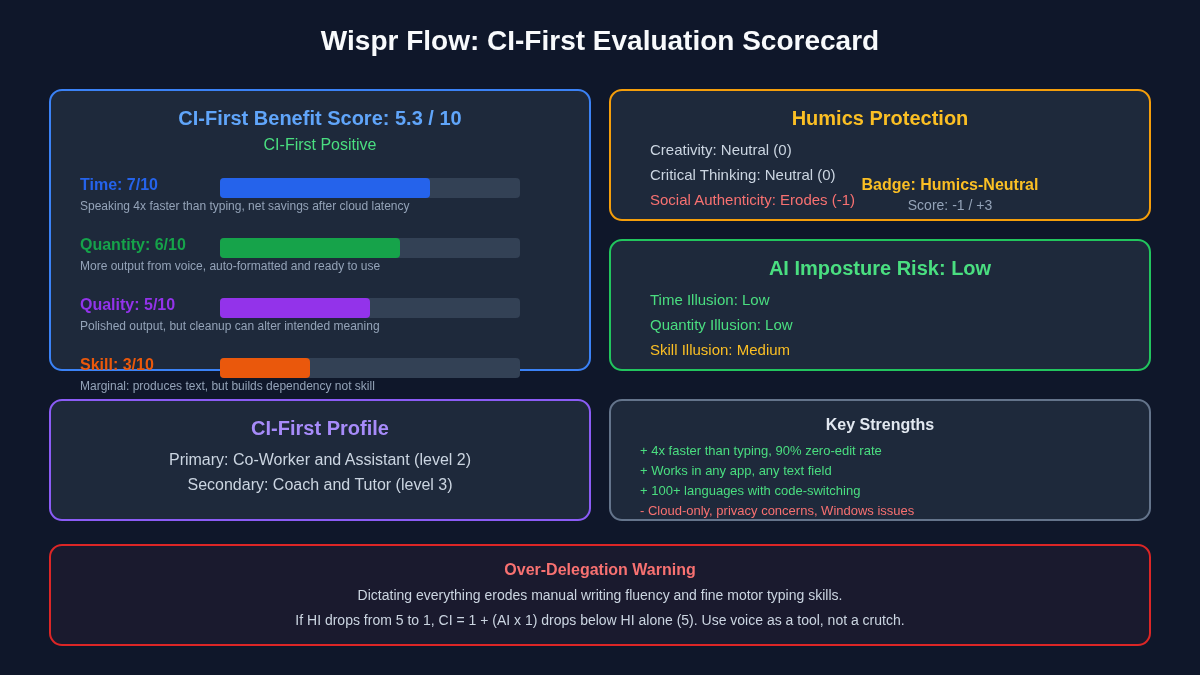
CI-First Benefit Score | 5.3 / 10 (CI-First Positive) |
Time / Quantity / Quality / Skill | 7 / 6 / 5 / 3 |
CI-First Profile | Co-Worker and Assistant (level 2) |
Humics Protection | Humics-Neutral (Score: -1/+3) |
AI Imposture Risk | Medium (Time Low, Quantity Low, Skill Medium) |
User Sentiment | Mixed (G2: 4.5/5, App Store: 4.5/5, Trustpilot: 2.7/5) |
Pricing | Freemium ($0 - $15/mo) |
Platforms | Mac, Windows, iOS, Android |
Speed Factor | ~4x faster than typing (220 wpm vs 45 wpm) |
For detailed explanations of the CI-First evaluation terms used in this review, including CI-First Benefit Score, CI-First Profile, Humics Protection Badge, AI Imposture Risk, and User Sentiment, see the Glossary at the end of this publication.
The Problem
Typing is slow. The average person types at 45 words per minute but speaks at 150 to 220 words per minute. That gap means you lose time every time you translate thoughts into keystrokes, especially for long emails, reports, or documentation.
Built-in dictation tools like Apple Dictation, Siri, or Windows Voice Typing make things worse, not better. They transcribe your raw speech including every "um," "ah," repetition, and mid-sentence correction. You end up spending as much time editing the transcription as you would have spent typing. The result is voice dictation that feels slower than typing, not faster.
Professionals who write a lot, developers who prompt AI tools, and multilingual users who switch between languages face this problem daily. The keyboard becomes a bottleneck between thought and output.
The Outcome
Wispr Flow turns your spoken words into clean, formatted text in any application. You press a hotkey, speak naturally with pauses, hesitations, and self-corrections, and the tool delivers polished text where your cursor sits. The cleanup is automatic: filler words are removed, punctuation is added, and your self-corrections are resolved so the output reads as if you wrote it carefully.
For a U365 Fellow, the concrete outcome is writing at the speed of speech instead of the speed of typing. A 500-word email that takes 11 minutes to type can be dictated in under 3 minutes. A student drafting an essay outline, a professional composing a project update, or a developer prompting Cursor can all get their thoughts out faster and with less friction.
The tool works across Mac, Windows, iOS, and Android in any text field, so you use one voice input method everywhere instead of learning the quirks of five different built-in dictation systems.
Who Should Use Wispr Flow
Learner type | Difficulty | Typical ROI | Career path |
Students (Bachelor, Master) | Beginner | Dictate essays, notes, and discussion posts 3-4x faster than typing | All U365 programs benefit from faster writing |
Professionals (career upskilling) | Beginner to Intermediate | Save 1+ hour per day on emails, Slack, documentation | Any U365 professional program or MCC |
Everyone (lifelong learners) | Beginner | Capture ideas faster, reduce keyboard strain, write more naturally | ULM Career and Finance, and Quality of Life domains |
U365 Institutes Alignment
UIT (Technology, AI, Data Science)
Relevance. High
Why. Developers can dictate code, prompts, and technical documentation. Flow recognizes camelCase, snake_case, file paths, and technical terms. Supports Cursor and Windsurf integration.
The limit that holds the row. The service publishes no region, no model card, no independent accuracy figure and no offline mode, so nothing in the row can be measured on the Fellow's own side. The row moves to Medium if a later refresh finds the settings screen no longer publishes the capture control, or if the vendor withdraws the read-back-verifiable output claim.
UIB (Business Management, Entrepreneurship)
Relevance. High
Why. Professionals dictate emails, Slack messages, reports, and business proposals faster. Context-aware formatting adapts tone per app.
The limit that holds the row. The tool teaches no management, finance, entrepreneurship or leadership content of its own, and neither decision has a published U365 assessment home. It reads a licence and a data-handling position; it does not produce a management artefact the institute assesses.
UIC (Digital Communication, Marketing)
Relevance. High
Why. Content creators and copywriters dictate captions, blog drafts, and newsletters at speaking speed. Multilingual support with code-switching benefits international communication.
The limit that holds the row. Nothing in the communication competency set is exercised as a communication act, and no published U365 programme assesses a disclosure rule or an editorial standard over altered text: the term search returns zero for editorial, disclosure, proofread, conflict of interest, style guide, tone of voice and brand voice. The row holds at Medium rather than dropping to Low because the tool captures the Fellow's own words and then alters them, which leaves a voice-integrity decision the Fellow owns.
UID (Digital Design, UX/UI)
Relevance. Medium
Why. Designers benefit from faster documentation and communication, but the tool does not directly support design-specific workflows. Useful for design briefs, UX research notes, and stakeholder updates.
The limit that holds the row. The product produces no design artefact, specifies no layout, interaction, prototyping or motion work, and evaluates no design against a brief; the term search returns zero for usability, user research, wireframe and research ethics. The row is Low rather than Medium because there is no session-design decision here and no capture practice to design around, and Low rather than a held Medium because the two siblings that publish a reading contact without a design act, FluidVoice and llama.cpp, both carry Low. No UID credential chain is mapped.
Skill level required: Beginner. If you can speak, you can use Flow.
Prerequisites: None. No coding, technical knowledge, or special hardware required. A working microphone (built-in or external) is the only requirement.
Typical time to first result: 5 minutes. Download the app, grant microphone permission, press the hotkey, and start dictating.
Typical time to competence: 1 to 2 weeks of regular use to learn the hotkey habit, configure your personal dictionary, and develop a natural speaking rhythm that produces clean output.
How Wispr Flow Works
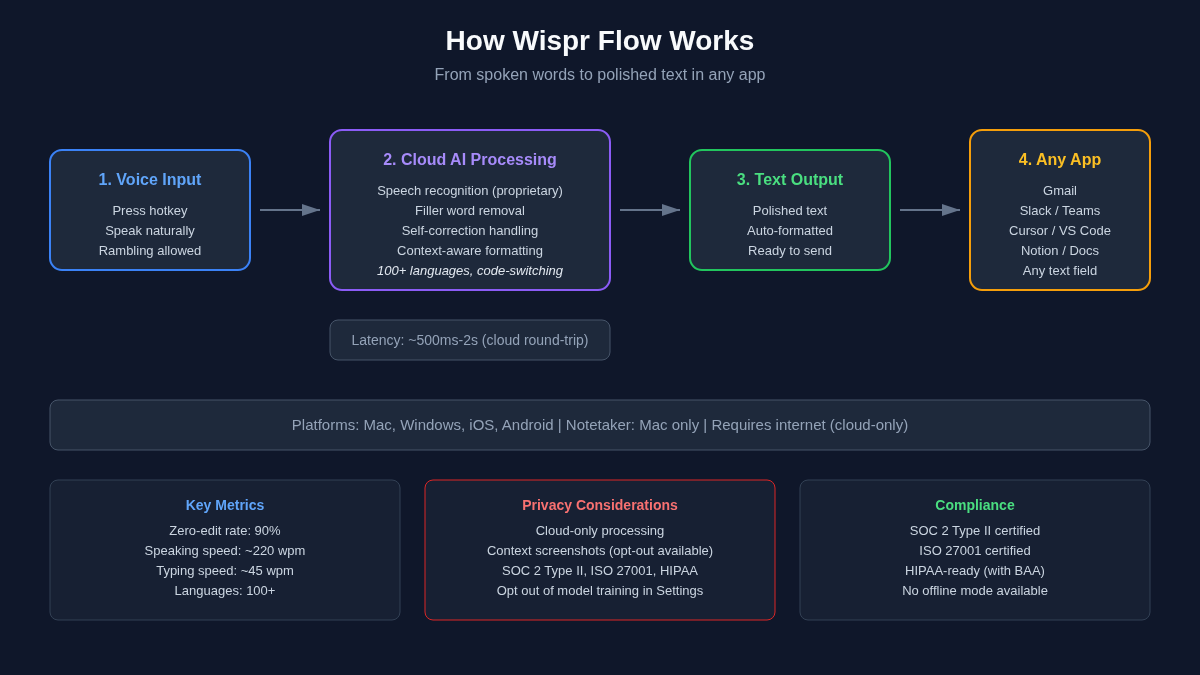
Inputs: Your voice through a microphone (built-in or external). You press a hotkey, speak naturally, and Flow processes your speech. It also reads context from your active screen to improve accuracy for names and terms.
Outputs: Clean, formatted text inserted directly into whatever application your cursor is in. The text has filler words removed, punctuation added, and self-corrections resolved. Output can include formatted emails, numbered lists, paragraphs, and code snippets.
Underlying technology
Wispr Flow uses proprietary speech recognition models layered on top of cloud-based transcription. The company states it is not simply a wrapper around OpenAI's Whisper and predates it. The post-processing layer handles the hardest part: detecting and resolving self-corrections ("let's meet at 5, actually 6"), removing filler words, formatting text based on context, and recognizing uncommon names and technical terms from screen context.
The tool requires an active internet connection for all processing. There is no offline mode. Cloud round-trip adds 1 to 2 seconds of latency for longer dictations, though shorter phrases appear in approximately 500ms.
Key technical features
Zero-edit accuracy: 90% of dictation requires no manual correction (per Wispr's own benchmark)
Self-correction handling: Say "5 pm, actually 6" and get "6 pm" automatically
Context-aware formatting: Detects the app you are in and formats accordingly (casual in Slack, formal in email)
Personal dictionary: Learns your names, jargon, and technical terms as you use it
Developer features: Recognizes camelCase, snake_case, file paths, and tool names (Supabase, Vercel, git diff)
100+ languages: Supports multilingual dictation with mid-sentence code-switching
Notetaker: Meeting transcription and voice memo capture (Mac only), with speaker identification and MCP access to Claude, ChatGPT, and other AI tools
Integrations
Integrations: Works in any text field in any application. No plugins or API integrations required. Notable supported apps include Gmail, Slack, Microsoft Teams, Notion, Google Docs, VS Code, Cursor, Windsurf, ChatGPT, Claude, iMessage, and any browser text field. The Notetaker connects to calendar and Slack, and supports MCP for passing meeting notes to AI tools.
Getting Started with Wispr Flow
Required accounts: A free Wispr Flow account. No credit card required to start. The 14-day Pro trial activates automatically on first sign-up.
Installation
Mac: Download from wisprflow.ai/downloads or the Mac App Store
Windows: Download from wisprflow.ai/downloads or the Microsoft Store
iOS: Download from the App Store (Wispr Flow: AI Voice Keyboard)
Android: Download from Google Play (Wispr Flow: AI Voice-to-Text)
First-time configuration
1. Download and install the app for your platform.
2. Launch the app and sign in (or create a free account).
3. Grant microphone permission when prompted.
4. Grant accessibility permissions (Mac) or Android Accessibility Service permission if prompted.
5. Press the default hotkey (Cmd+Shift+H on Mac, Ctrl+Shift+H on Windows) to start dictating.
6. Optional: Add custom words to your personal dictionary in Settings.
First 15 minutes checklist
☐ Download and install Wispr Flow on your primary device
☐ Grant microphone and accessibility permissions
☐ Open a text field (email, note, or document) and press the hotkey
☐ Dictate a 3-sentence message with a deliberate self-correction (say "actually" and restate)
☐ Verify the output has no filler words and your correction was resolved
☐ Try dictating in a second language if you are multilingual
☐ Add 3 custom names or technical terms to your dictionary
Result: You can dictate clean, formatted text in any application on your device. The 14-day Pro trial is active, giving you unlimited words during that period.
Real Workflows
Workflow 1: Dictating Professional Emails
Learner type: Professional
CI-First benefit tags: Time, Quantity
Connects to: Any U365 professional program or MCC involving communication
Time estimate: 10 minutes including verification (3 min dictation, 5 min review, 2 min editing)
Step | You do | Wispr Flow does |
1 | Open your email client and start a new message | Activates when you press the hotkey |
2 | Press hotkey and speak your email naturally | Transcribes, removes filler words, adds punctuation |
3 | Self-correct mid-sentence if needed ("actually, let me rephrase") | Resolves the correction and outputs only the final version |
4 | Review the output in your email body | Formats as an email with appropriate greeting and closing |
5 | Edit any names or details, then send | Learns from your edits for future accuracy |
Sample prompt:
"Hi Marcus, just wanted to give you a quick update on the project. We are on track to deliver the first phase by Friday, though there might be a slight delay on the second phase because we are still waiting on the legal team to review the terms. I will have a firm timeline for you by end of day Thursday. Let me know if you have any questions. Thanks, and hope you are having a good week."
Verification checklist:
☐ Multi-Model Check: Read the email aloud to yourself or have a colleague review it for tone and clarity
☐ External Source: Verify any factual claims (dates, deadlines, names) in the email against your project notes
☐ Human Review: Check that the AI cleanup did not alter your intended meaning or remove important nuances
☐ CI-First Test: Can you explain and defend every sentence in this email without Flow? [Y/N]
Workflow 2: Voice-Prompting AI Tools for Research
Learner type: Student
CI-First benefit tags: Time, Quality
Connects to: Any U365 degree or diploma program involving AI-assisted research
Time estimate: 15 minutes including verification (5 min voice prompting, 7 min AI processing, 3 min verification)
Step | You do | Wispr Flow does |
1 | Open ChatGPT, Claude, or Cursor and click the prompt field | Ready to transcribe when you press the hotkey |
2 | Press hotkey and speak a detailed research question with full context | Transcribes your detailed prompt with proper formatting |
3 | Speaking gives you more context and detail than typing would | Formats the prompt with paragraphs and structure for the AI tool |
4 | Review the prompt in the AI tool, then submit | Not involved in this step |
5 | Verify the AI response using multi-model check and external sources | Not involved in this step |
Sample prompt (dictated into ChatGPT):
"I am writing a research paper on the impact of AI voice dictation tools on writing productivity in academic settings. Can you help me structure a literature review section? I need to cover three areas: first, the history of speech-to-text technology in education, second, current AI-powered dictation tools and their accuracy rates compared to traditional typing, and third, studies on how voice input affects writing quality and cognitive load. For each area, give me 3 to 5 key references I should look up, and suggest a paragraph structure for the section. Keep the tone academic but accessible."
Verification checklist:
☐ Multi-Model Check: Run the same research question through a second AI tool (e.g., Claude if you used ChatGPT) and compare the responses
☐ External Source: Verify at least 2 of the suggested references exist by searching Google Scholar or your university library
☐ Human Review: Check that the AI-generated literature review structure makes logical sense for your paper
☐ CI-First Test: Can you explain the research structure and defend your sources without the AI tool? [Y/N]
Strengths, Limits, and AI Imposture Risk
Strengths
CI-First Benefit | Strength | Evidence |
Time | 4x faster than typing for most users | 220 wpm speaking vs 45 wpm typing; 90% zero-edit rate means no manual cleanup |
Quantity | More output in the same time, formatted and ready to use | Users report saving 1+ hour per day by eliminating the editing cycle |
Quality | Clean, formatted output that reads like edited writing | Auto-formats emails, lists, and paragraphs; recognizes technical terms from screen context |
Skill | Marginal | The tool produces text for you but does not teach writing skills. Users who dictate everything may lose manual writing fluency over time. |
Limits
Cloud-only processing: requires an active internet connection. No offline mode. Users handling confidential client data, legal, or medical information should consider alternatives with local processing
Privacy concerns: the context-awareness feature captures screenshots of active windows. Users can opt out in Settings > Data and Privacy, but the default behavior drew significant community criticism
Windows reliability: multiple users report crashes, high RAM usage (800MB on some machines), and inconsistent behavior on Windows compared to Mac
Customer support: Trustpilot reviews consistently cite unresponsive or AI-only support responses. Top users report no resolution path for issues
Subscription cost: $144-$180/year with no lifetime option. Competitors like Superwhisper and VoiceInk offer local processing at lower or one-time costs
AI cleanup can alter meaning: the aggressive cleanup layer sometimes rewrites text more than expected, changing tone or intent. Users on Trustpilot flag this as a fidelity issue
Free tier limits: 2,000 words/week on desktop and 1,000/week on iPhone are too restrictive for daily professional use. Android is unlimited on the free plan
AI Imposture Risk
Time Illusion
Rating. Low
Evidence. The tool produces usable output with minimal prompting. Net time savings are consistent for most users. The 90% zero-edit rate means verification is quick. Cloud latency adds 1-2 seconds but does not negate the speed advantage.
Quantity Illusion
Rating. Low
Evidence. The output is either clearly correct or clearly wrong, making it easy to verify. Volume is modest per dictation session. The tool does not generate large volumes of unsolicited content.
Skill Illusion
Rating. Medium
Evidence. Users who dictate everything may lose manual writing and typing fluency. The tool produces polished text without teaching the user how to write. Long-term dependency risk is real, especially for students who should be developing writing skills.
Overall Imposture Risk: Medium. Framework Section 5.3 places the overall level at Low only when all three traps are Low, and this review rates Skill Illusion Medium, so the overall level is Medium. Time Illusion and Quantity Illusion are Low because net time savings are real and the output is easy to verify. The Medium rating is on Skill: dictation produces polished text without teaching the writing, and the risk is highest for a Fellow who substitutes it for writing practice rather than for typing.
U365 Co-Intelligence Rating
CI-First Profile
Primary profile: Co-Worker and Assistant (level 2). Flow handles the execution task of turning speech into text. The human directs what to say and reviews the output.
Secondary profile: Professor, Coach and Tutor (level 3). When used deliberately, Flow can teach users to speak more clearly and structure their thoughts before dictating. The personal dictionary feature builds vocabulary awareness.
CI-First Benefit Score
Time
Score (0-10). 7
Rationale. Speaking is 4x faster than typing. Net savings hold after accounting for cloud latency and occasional review.
Quantity
Score (0-10). 6
Rationale. Users produce more text in the same time. Auto-formatting reduces post-processing work, increasing usable output volume.
Quality
Score (0-10). 5
Rationale. Output is clean and formatted, but the AI cleanup can sometimes alter intended meaning. Quality is moderate, not transformative.
Skill
Score (0-10). 3
Rationale. The tool produces text but does not build lasting writing capability. Marginal skill benefit from vocabulary awareness. Dependency risk for students.
CI-First Benefit Score: 5.3 / 10 (CI-First Positive)
Humics Protection Badge
Dimension | Rating | Rationale |
Creativity | Neutral (0) | Dictating instead of typing does not directly affect creative ideation. The user's ideas remain their own. The cleanup layer does not generate content, only formats it. |
Critical Thinking | Neutral (0) | The tool does not require or prevent critical thinking. Users who review their output critically are unaffected. Users who accept output blindly face the same risk as with any AI tool. |
Social Authenticity | Erodes (-1) | The AI cleanup layer can alter the user's authentic voice by smoothing out natural speech patterns. Over time, dictated text may sound more like the AI's formatting than the user's voice. Trustpilot users flag this as a tone-fidelity issue. |
Humics Protection Score: -1 / +3
Badge: Humics-Neutral
Superhuman Usage Guidance
When to invite this tool:
Drafting emails, Slack messages, and quick communications where speed matters more than craft
Capturing ideas and voice memos before they slip away
Prompting AI tools (ChatGPT, Claude, Cursor) with richer, more detailed context than you would type
Multilingual dictation where code-switching between languages is needed
Reducing physical typing strain for users with repetitive strain injury or mobility limitations
When to keep this tool out:
Writing tasks where your authentic voice and personal style are the primary value (creative writing, personal essays, opinion pieces)
Tasks involving confidential, legal, or medical information where cloud processing is not acceptable
Learning to write or improving writing skills: dictating everything prevents the physical and cognitive practice of writing
Tasks where the AI cleanup alters your intended meaning or tone in ways that matter
U365 method integration:
LIPS + CARE: Dictate notes and information into your LIPS Digital Second Brain faster. Flow supports the Collect phase by letting you capture information at speaking speed.
ULM + EVA: Supports the Career and Finance, and Quality of Life domains by reducing typing strain and freeing time for higher-value activities. Use in the Explore phase to capture initial thoughts quickly.
UP-Context-Engineering: Flow responds well to spoken context. Dictating detailed prompts with full context to AI tools produces better output than terse typed prompts.
SL-OS: Works within the Microsoft 365 environment (Teams, Outlook, Word) as a voice input layer. Complements but does not replace the SL-OS workflow.
UNOP: Voice input engages different cognitive pathways than typing, which may support multi-modal learning. However, over-reliance on dictation may reduce the active recall practice that UNOP emphasizes.
Over-delegation warning: Dictating everything you write erodes manual writing fluency and fine motor typing skills. If your HI (Human Intelligence) for writing drops from 5 to 1 because you never practice, your CI (Co-Intelligence) drops: CI = 1 + (AI x 1) = 2, which is lower than your original HI alone (5). The tool becomes a crutch, not a collaborator. For students especially, maintain regular manual writing practice alongside dictation. Use Flow for speed, not for skill replacement.
What Users Say
Aggregate Rating Table
Platform | Rating | Number of reviews | Link |
G2 | 4.5/5 | 17 reviews | g2.com/products/wispr-flow/reviews |
Product Hunt | 4.7/5 | 75 reviews | producthunt.com/products/wisprflow |
App Store (iOS) | 4.5/5 | 8,500+ ratings | apps.apple.com/us/app/wispr-flow-ai-voice-keyboard |
Google Play | 4.1/5 | ~3,560 reviews | play.google.com/store/apps/details?id=com.wispr.flowapp |
Trustpilot | 2.7/5 | ~15 reviews | trustpilot.com/review/wisprflow.ai |
Reddit sentiment | Mixed | Multiple threads | reddit.com/r/macapps, r/AIToolsTipsNews |
What Users Praise
Users consistently praise Wispr Flow's speed and accuracy. The 90% zero-edit rate means most dictation requires no manual correction. Reviewers on Product Hunt and G2 describe it as transformative for daily workflows, especially for email, Slack, and documentation. The multilingual support with code-switching draws particular praise from bilingual users. Developers appreciate the tool's recognition of technical terms, camelCase, and code-specific formatting. The cross-platform consistency (one tool on Mac, Windows, iOS, and Android) is frequently cited as a key advantage over built-in dictation.
What Users Complain About
Privacy is the dominant complaint. The context-awareness feature captures screenshots of active windows, which drew significant criticism on Reddit and in independent reviews. Users can opt out in Settings, but the default behavior eroded trust. Windows reliability is the second major complaint: users report crashes, high RAM usage, and inconsistent behavior compared to the Mac version. Customer support is consistently cited as unresponsive, with multiple Trustpilot reviewers reporting no resolution after weeks of waiting. The subscription pricing ($15/month with no lifetime option) draws criticism when cheaper local alternatives exist. Finally, the aggressive YouTube advertising campaign annoys users and is frequently mentioned in negative reviews.
Sentiment Summary
Overall sentiment: Mixed. App stores show strong ratings (4.1-4.5/5), but Trustpilot and Reddit reveal a polarized user base.
Key themes:
Core dictation quality is genuinely impressive and fast
Privacy concerns are real and under-addressed by the company
Windows version is significantly less stable than Mac
Customer support is unresponsive for paying users
Subscription cost is high compared to local alternatives
Aggressive advertising creates negative brand perception
U365 Editorial Note
The user sentiment aligns with the CI-First evaluation on most points. The high app store ratings (4.1-4.5) correspond to the tool's genuine Time Benefit (7/10) and Quantity Benefit (6/10). Users who rate it positively are experiencing the real speed and output gains the CI-First framework identifies. The Trustpilot complaints about privacy and Windows reliability do not contradict the CI-First evaluation, but they highlight operational risks the scoring framework does not capture. The Skill Illusion (Medium) aligns with the concern that dictating everything erodes writing fluency. The Humics-Neutral badge reflects the tension users feel: the tool is useful but the AI cleanup sometimes alters their authentic voice, which is the Social Authenticity erosion the Humics rating captures.
Comparison and Alternatives
Alternative | Choose this if... | Choose Wispr Flow if... |
Superwhisper | You want local, offline processing with full privacy and no subscription. Mac-focused with 100+ languages. | You need cross-platform support (Windows, iOS, Android) and prefer managed cloud convenience over local setup. |
VoiceInk | You want a free, open-source, local dictation tool on Mac with one-time purchase options. | You want automatic formatting, self-correction handling, and context-aware tone adaptation without manual configuration. |
Apple Dictation | You want a free, built-in solution with on-device processing and no subscription. | You need zero-edit output, self-correction resolution, cross-platform support, and context-aware formatting that built-in tools cannot provide. |
Otter.ai | Your primary need is meeting transcription with speaker identification and searchable archives. | Your primary need is real-time dictation into any app, not meeting recording. Wispr Flow also includes a Notetaker for meetings. |
TalkTastic | You want a competitor with local Whisper processing for offline use and Claude integration. | You want a more mature product with broader platform support and a larger user community. |
Where Wispr Flow is clearly better
Wispr Flow's intelligent cleanup layer is its core differentiator. No built-in dictation tool handles self-corrections, formats text based on context, and learns your personal vocabulary. The cross-platform consistency is also unmatched: it is the only major AI dictation tool working on all four platforms (Mac, Windows, iOS, Android) with the same accuracy and formatting. The 90% zero-edit rate, if accurate, means most dictation requires no manual correction, which is a genuine time saving. The Notetaker feature with MCP integration (passing meeting notes to Claude and ChatGPT) adds value beyond dictation.
Where Wispr Flow is clearly worse
Wispr Flow is clearly worse on privacy. Cloud-only processing means your voice data is sent to servers. The screenshot-capture feature for context awareness, even with opt-out, has damaged trust. Competitors like Superwhisper and VoiceInk process everything locally with no data leaving your device. The subscription pricing ($144-$180/year with no lifetime option) is high when Superwhisper offers local processing at $8/month and VoiceInk is free or one-time. Windows reliability is a real weakness: the Mac version is stable, but Windows users report frequent crashes and high resource usage. Customer support is consistently cited as a weakness across multiple review platforms.
Verdict and Next Steps
Who should adopt it: Professionals and students who write a lot and want to produce text 4x faster. Best for email, Slack, documentation, and AI tool prompting. Not for users handling confidential data or those who want offline processing.
When: Start during a period of heavy writing workload (thesis writing, project documentation, email-intensive role). The 14-day Pro trial lets you test unlimited dictation before committing.
For what: Speed drafting of communications and first-draft content. Use it to get thoughts out fast, then review and refine manually.
UP-Context-Engineering prompt pack:
1. Context: I am dictating a project update email to my manager [name], and the facts and dates in it are already decided. Role: AI as a Co-Worker and Assistant (Profile 2) formatting what I dictated. I own the facts and the sending decision. Profile: Act as a Co-Worker and Assistant, formatting my words rather than improving my message. Task: format this dictated text into a clear, professional email with a greeting and a closing. Constraints: keep my original meaning, do not change any fact or date, do not add a promise I did not make, and do not invent a recipient's name. Output format: a ready-to-send email. Memory: the sent email and any edits I made belong in my own mail record, because the dictation tool keeps no history for me. UP-Context-Engineering verification: I read the formatted email line by line against what I dictated, I confirm every date and number, and I can explain the message's purpose without the transcript. Data safety: this pack carries no personal data. I do not paste a confidential project name, a colleague's review content or a customer detail into it, and I keep the draft in my own store.
2. Context: I am a student dictating the first draft of an essay introduction, and the argument has to stay mine. Role: AI as a Professor, Coach and Tutor (Profile 3) reading my draft back to me. I own the essay and every change to it. Profile: Act as a Professor, Coach and Tutor, showing me the mechanics rather than rewriting for me. Task: listen to my dictated text, identify the main argument, then suggest two ways to tighten the thesis statement. Constraints: preserve my voice and ideas, do not rewrite the piece for me, and explain each suggestion in one clause. Output format: my original text, then the two suggestions below it. Memory: my draft versions and the changes I accepted belong in my own writing record, because the tool holds no memory of my argument. UP-Context-Engineering verification: I make each edit myself in the draft, I read the thesis aloud to check it still sounds like mine, and I can explain why the final wording is stronger without the tool. Data safety: this pack carries no personal data. I do not paste an examination submission, a teacher's feedback or another student's essay into it, and I keep my drafts in my own store.
3. Context: I am dictating notes into my LIPS system after a meeting, and the notes are the only record of what happened. Role: AI as a Co-Worker and Assistant (Profile 2) organising what I dictated. I own the notes and every entry they produce. Profile: Act as a Co-Worker and Assistant, organising my words without adding to them. Task: organise this dictated text into action items, decisions, and follow-up questions. Constraints: use my own words, do not add information I did not say, mark an owner as unassigned rather than guessing one, and do not turn an open question into a decision. Output format: three sections with bullet points. Memory: the organised notes and their entries live in my own LIPS record, and anything with a date goes to my task list, because the dictation tool is not my system of record. UP-Context-Engineering verification: I read every item against what I said in the meeting, I assign the owners myself, and I can find each commitment again from my own notes without the tool. Data safety: this pack carries no personal data. I do not paste a personnel discussion, a customer negotiation or a colleague's remark into it, and I keep the record in my own store.
U365's Recommendations to Learn More
These links are curated, not collected. Each one teaches something this review does not cover in depth, from official setup guides to community walkthroughs. Every link was verified active as of 2026-09-02.
Official learning resources
Wispr Flow Help Center (setup guides, troubleshooting, and practical tips, docs.wisprflow.ai)
Official Setup Guide (install, sign in, grant permissions, first dictation in about 5 minutes)
Using Wispr Flow collection (languages, IDE integrations, snippets, dictionary, Command Mode)
Voice Interface API documentation (WebSocket and REST integration for developers)
Video tutorials and channels
Written tutorials and deep-dive articles
Community and social
We judge learning resources by content quality, not source type: independent creators and community experts are included when they teach something the official material does not. Community sources are labeled as such; promotional and affiliate content is excluded.
Glossary
CI-First Benefit Score
A 0-10 score measuring how much an AI tool delivers the 4 Key AI Benefits defined by University 365: Time, Quantity, Quality, and Knowledge and Skill. Each dimension is scored 0-10 and the overall score is the arithmetic mean, rounded to one decimal place. The score answers one question: does this tool make Co-Intelligence more profitable than Human Intelligence alone? For Wispr Flow, the CI-First Benefit Score is 5.3/10 (CI-First Positive), meaning the tool delivers clear net benefit for most users. The Time score (7) reflects the genuine speed gain from speaking vs typing. The Skill score (3) reflects the marginal lasting capability built, as dictation does not teach writing.
CI-First Profile
One of 5 AI profiles that define the role AI plays in the Co-Intelligence relationship: (level 1) Co-Creator and Thought Partner, (level 2) Co-Worker and Assistant, (level 3) Professor, Coach and Tutor, (level 4) Analyst and Tester, (level 5) Challenger and Devil's Advocate. Lower level numbers indicate higher AI autonomy in the collaboration. Attributing a profile to AI before giving it a task is a core CI-First discipline. Wispr Flow's primary profile is Co-Worker and Assistant (level 2) because it handles the execution task of turning speech into text, with the human directing and reviewing. Its secondary profile is Professor, Coach and Tutor (level 3) because deliberate use can teach users to speak more clearly and build vocabulary awareness.
Humics Protection Badge
A badge assessing whether a tool protects, leaves neutral, or erodes the 3 core human capabilities: Creativity, Critical Thinking, and Social Authenticity. Each dimension is rated +1 (Protects), 0 (Neutral), or -1 (Erodes). The sum produces a score from -3 to +3: +2 to +3 is Humics-Friendly, -1 to +1 is Humics-Neutral, -2 to -3 is Humics-Risky. Wispr Flow receives a Humics-Neutral badge with a score of -1: Creativity is Neutral (dictation does not affect ideation), Critical Thinking is Neutral (the tool does not prevent or require critical evaluation), and Social Authenticity Erodes (-1) because the AI cleanup layer can alter the user's natural voice over time.
AI Imposture Risk
An assessment of how likely a tool is to trap the user in one of 3 usage illusions: Time Illusion (the appearance of saving time when net savings are small), Quantity Illusion (high volume that looks good but does not hold up under inspection), and Skill Illusion (the appearance of competence without actual skill development). Each trap is rated Low, Medium, or High. Wispr Flow's overall AI Imposture Risk is Medium, because its Skill Illusion rating is Medium and framework Section 5.3 sets the overall level at Low only when all three traps are Low. Time Illusion is Low (net time savings are real and measurable), Quantity Illusion is Low (output is easy to verify), and Skill Illusion is Medium (long-term dictation dependency may erode manual writing fluency, especially for students).
User Sentiment
An aggregate rating and qualitative summary of user opinions across major review platforms. For Wispr Flow, user sentiment is Mixed: app store ratings are strong (4.1-4.5/5 across iOS and Google Play), G2 rates it 4.5/5, and Product Hunt rates it 4.7/5, but Trustpilot sits at 2.7/5 with complaints about privacy, Windows reliability, and customer support. The polarization suggests the core dictation technology works well, but operational issues around privacy, platform stability, and support create a trust gap that the positive app store ratings do not capture.




Comments