
AI for SEO: Content That Ranks


UIC University 365 Institute of Communication
Series Marketing | Level Basic (Free)
Duration 15 to 20 minutes | Access Free
Digital Communication, Marketing, Branding, Content Strategy, Media Studies

UNOP Sound (University 365 Neuroscience Oriented Pedagogy)
Take five minutes to prepare your brain. Play the isochronous tone track (40Hz gamma frequency) with your eyes closed. Gamma-frequency tones before a learning session raise attention and make the material easier to absorb.
[Audio player: UNOP Pre-Lecture Isochrone (40Hz, 5 minutes)]
In this Lecture

The Hook: The Page Nobody Finds
You spent a week on a page. It is accurate, well written, and useful. Three months later it has 40 impressions and one click. A competitor's page, half the length, answers the same question and sits at the top of the results. Above both of them, an AI Overview summarizes the answer before anyone scrolls.
Nothing about that picture means search stopped working. It means the job changed shape. You are no longer only competing for a blue link. You are competing to be the page that a retrieval system selects, reads, and quotes when it assembles an answer.
The good news is that this is a discipline you can learn and measure. In the next 20 minutes you will learn how search engines select content for AI-generated answers, how to research topics with AI assistance, how to write pages that survive retrieval, and how to prove that your work moved a number.
Step 1: How Search Changed: Answers Before Clicks
Google published its first official guidance for AI features on Search in May 2026, on the Search Central documentation site, titled "AI features and your website." Read that document yourself. Its central claim is short: there are no additional requirements to appear in AI Overviews or AI Mode, and no special optimizations are necessary. The fundamentals you already know still do the work.
What changed is the machinery around those fundamentals. Three mechanisms matter for your content.
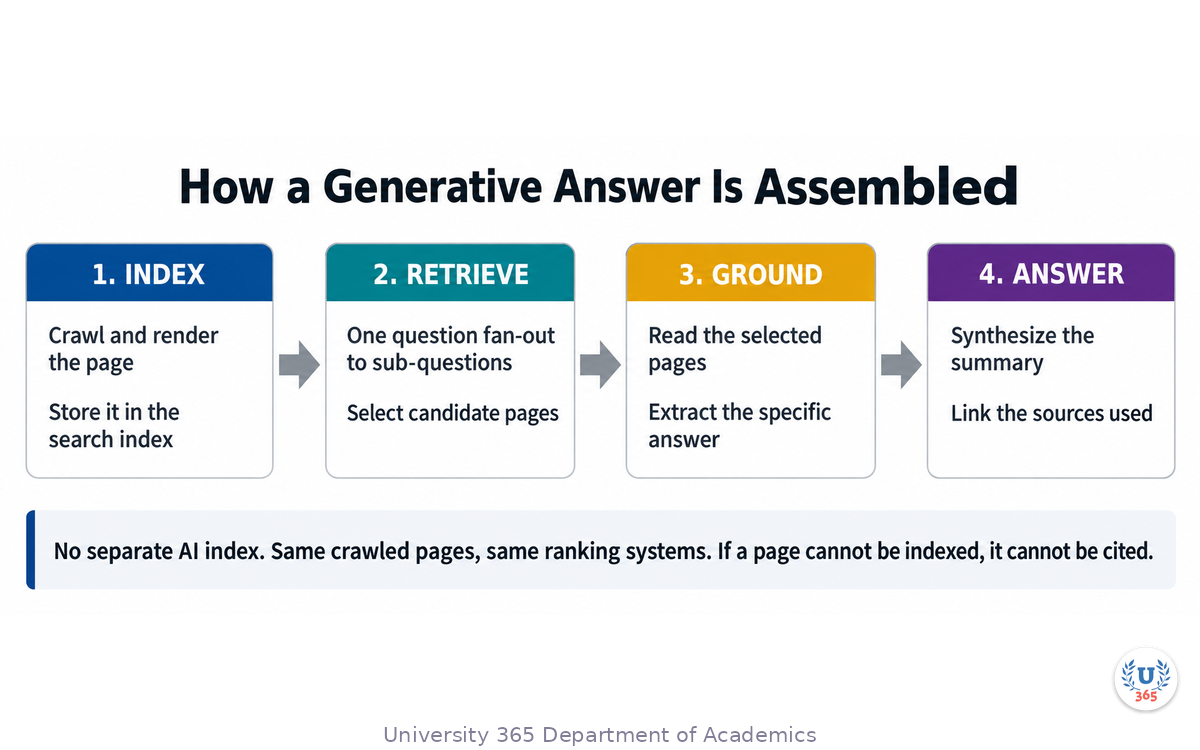
One index, not two. AI Overviews and AI Mode draw from the same crawled and indexed pages that power classic results. There is no separate AI index to court. If a page is blocked from regular search results, it is also unavailable to the AI features. Crawlability is the entry ticket.
Retrieval-grounded generation. The systems do not answer from memory about your brand. They retrieve relevant indexed pages in real time and then generate a summary, linking the sources they used. Your page has to be retrievable and extractable: clearly written, clearly structured, with a specific answer near a clear heading. An answer buried in paragraph fourteen is hard to retrieve. The same answer under a descriptive heading is easy.
Query fan-out. A single question is decomposed into several related sub-questions, and those sub-questions are searched in parallel. One page can therefore be pulled into many different answers, and a page that answers only the head question may be passed over for a sub-question it never addressed. The practical consequence: each section of your page should stand as a clean answer to a smaller, specific question.
What Google explicitly says you do not need
The same document removes a set of tactics that vendors sold hard during 2025. You do not need to publish an llms.txt file for Google Search. You do not need AI-specific markup or a Markdown mirror of your pages. You do not need to break your content into small chunks. You do not need to rewrite in an "AI-friendly" voice. There is no special schema.org markup that unlocks AI features.
Spend the budget you were going to spend on those on original content instead.
The one thing that outweighs the rest
Non-commodity content is the strongest content signal in this guide, and Google says so directly. Commodity content is a page a model could assemble by averaging the current top results. Non-commodity content carries something no other page has: your own data, a documented process, a specific decision, a real result.
Test one of your pages with five questions. Could a model write this section by averaging the top ten results? Does it contain first-hand data or a decision only your organization could report? If you removed your logo, would it be indistinguishable from a competitor's page? Does it take a clear position, or only summarize consensus? Is there a specific number, name, or date a generic article would not have? If you answer badly on most of those, the page is commodity, and it is a rewrite candidate.
Step 2: The Four Jobs a Query Does
Keyword research fails most often because it treats every query as the same kind of request. A person typing "what is a content brief" wants a definition. A person typing "best content brief template" is shopping. If you serve the wrong job, you lose the click even when your content is better.
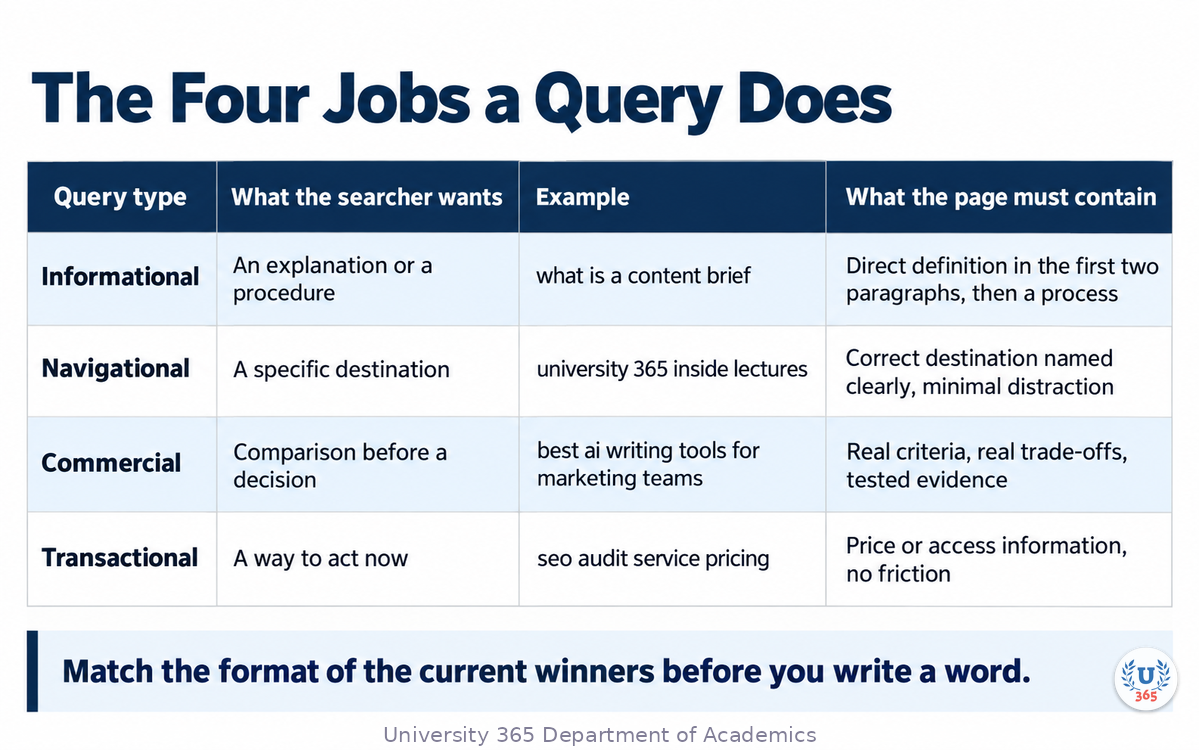
Use this classification on every target query before you write. The column that matters is the last one: what the page must contain to win.
Query type | What the searcher wants | Example | What the page must contain |
Informational | An explanation or a procedure | what is a content brief | A direct definition in the first two paragraphs, then a process |
Navigational | A specific destination | university 365 inside lectures | The correct destination named clearly, minimal distraction |
Commercial | Comparison before a decision | best ai writing tools for marketing teams | Real criteria, real trade-offs, tested evidence |
Transactional | A way to act now | seo audit service pricing | Price or access information, no friction between reader and action |
Two habits make this classification useful.
First, write the intent next to the query in your research sheet. A spreadsheet of 800 keywords without intent is a list of guesses.
Second, match the format of the winners. If every result on page one for a query is a step-by-step guide, publish a step-by-step guide. If every result is a comparison table, publish a comparison table. Format mismatch is a ranking problem you can fix before you write a word.
Where AI helps in this step
AI is fast at grouping and slow at judging. Use it for grouping. Give a language model your raw query export and ask it to cluster the queries by the job the searcher is trying to complete, and to name each cluster with a descriptive label. Then you review the clusters yourself, merge the ones that are the same job, and delete the ones that do not match your audience.
Do not ask a model which keyword has the best traffic potential. It cannot know your market, your authority, or your conversion path. That judgment is yours.
Step 3: Build the Page So It Can Be Retrieved
A page that ranks is a page that can be understood in pieces. Here is the structure that survives both classic ranking and retrieval-based answer generation.
Answer first, then elaborate
Put the direct answer in the first two or three sentences under your main heading. Not a story, not a definition of the problem, not a promise about what the reader will learn later. The answer. Readers stay when they get the answer; retrieval systems extract when the answer is extractable.
One heading, one question, one answer
Every H2 should be readable as a question a real person would ask, and the paragraph under it should answer that question without requiring the previous section. This is what makes a page usable by query fan-out: each section is a clean, separable answer.
Weak heading: "Content optimization considerations."
Strong heading: "How many times should a keyword appear on a page?"
Name the entities
Search systems work with entities rather than with strings alone. If your page is about a specific method, name it and define it once, precisely. If it references a tool, a standard, or a regulation, name it in full the first time and use the same name consistently. Vague references weaken the retrieval signal.
Link internally with intent
Internal links are how a search engine learns which pages you consider important and how your topics relate. Link from a strong page to a weaker one using descriptive anchor text that names the destination topic. Six well-placed internal links with meaningful anchors do more than sixty sitewide footer links with the text "read more."
Keep the page about one job
A page that tries to cover six unrelated queries competes for none of them. If two topics do not share a searcher's intent, they belong on two pages.
Step 4: AI-Assisted Keyword and Topic Research
Keyword work has four stages. AI shortens two of them and should not touch the other two.
Stage 1: Collect seeds (you)
Start from the questions your audience actually asks. Support tickets, sales calls, search queries in your own analytics, and the questions your team answers repeatedly are better seeds than any generated list. Write them down as questions, in the audience's words.
Stage 2: Expand and cluster (AI)
Give the model your seeds and ask for two things: a list of related sub-questions a person would ask next, and a grouping of the whole set by the job the searcher is trying to complete. Ask it to mark, for each cluster, whether the intent is informational, navigational, commercial, or transactional.
Then verify every cluster against real data before you commit to it. Open your search console query report and check whether those questions produce impressions for your site today. If a cluster has no impressions and no competitor coverage, treat it as an untested hypothesis, not a plan.
Stage 3: Choose and prioritize (you)
Prioritize by the value of the answer, not by estimated volume alone. A cluster with modest volume that is directly tied to what you sell beats a high-volume cluster that attracts readers who will never become students, clients, or customers. This is the CI-First judgment in practice: human intelligence sets the strategy, AI accelerates the analysis.
Stage 4: Build the content brief
The brief is the artifact that makes AI assistance safe. A model writing against a vague instruction produces commodity copy. A model writing against a precise brief produces a usable first draft. Include, at minimum:
the target question and its intent type;
the specific sub-questions the page must answer;
the entities that must appear, named exactly;
the evidence you will supply, which the model cannot invent;
the internal links to place, with their anchor text;
the format, matching the format of the current ranking pages;
what the page must not do, such as claiming statistics you cannot source.
Step 5: Draft With AI Without Losing E-E-A-T
Google's guidance on helpful content is organized around three questions: Who created the content, How it was created, and Why it was created. AI assistance does not break that framework. Carelessness does.
Who
Name the author. Give a byline where a reader would expect one, and link it to information about that person. An anonymous page competes against pages with a real, verifiable author, and it loses on trust.
How
Be transparent about how the content was produced. If AI assisted the first draft, a short disclosure costs nothing and protects you. Google's documentation states plainly that using automation including AI to produce content primarily to manipulate rankings violates its spam policies. Using AI to accelerate a process that a human directs, reviews, and takes responsibility for is a different thing.
Why
Write because the page helps a specific person do a specific thing. The signal that distinguishes your page from commodity content is not the prose quality. It is whether you had something to say that the model could not already say.
The four-step review that keeps the quality
Fact-check every number. A model will produce a plausible statistic without a source. Replace it with a value you can cite or delete the sentence.
Add the experience only you have. Insert your own example, your own result, the specific decision behind it.
Delete the filler. If a paragraph only transitions to the next one, it is not content.
Read it in the audience's voice. Keep the audience's words for the questions, even when the answer is written in your brand voice.
Step 6: Technical Eligibility: Crawl, Render, Snippet
You can write the best page of your career and lose it to a technical default. Four checks decide whether a page is in the running.
Crawl and render
A page must be crawlable and indexable to appear in search or in AI features. Confirm that your robots.txt does not block the page and that important content is present in the served HTML rather than injected only by client-side scripts. The test is simple: open the page source and search for one of your own sentences. If it is not in the source, an automated system may never see it.
Page experience and Core Web Vitals
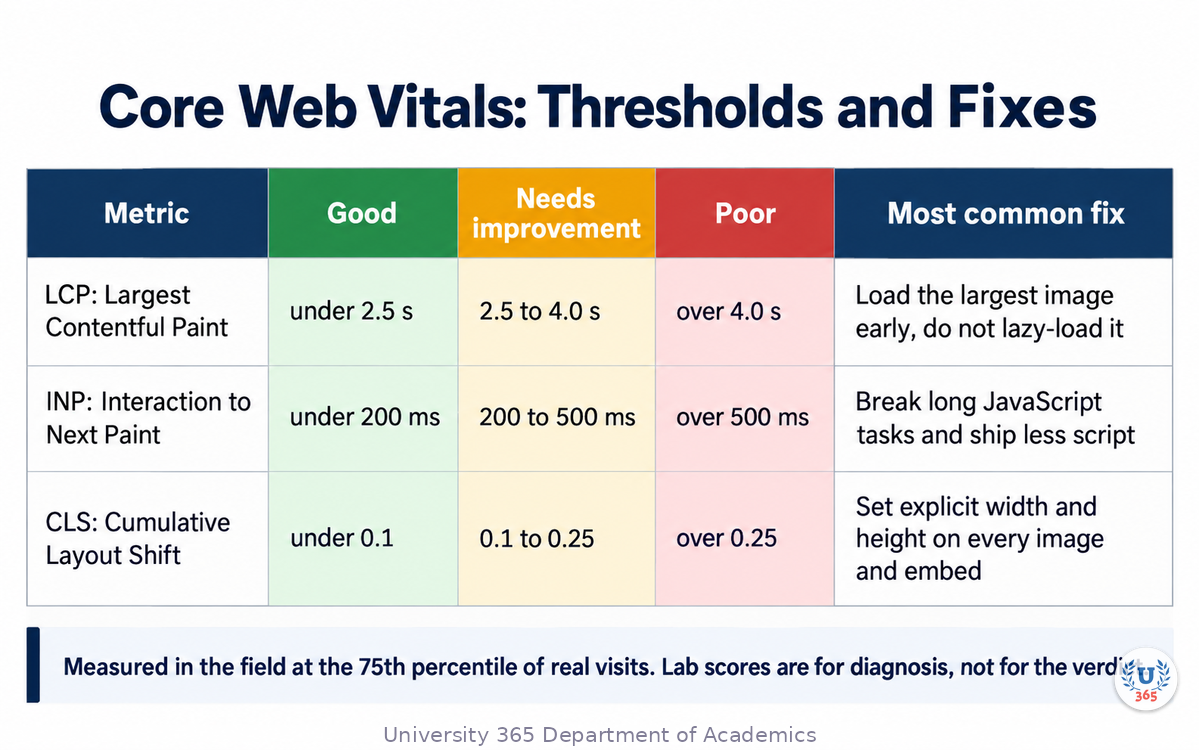
Page experience is a documented input, not a tiebreaker. The Core Web Vitals are three field metrics, evaluated at the 75th percentile of real visits:
Metric | What it measures | Good | Needs improvement | Poor |
Largest Contentful Paint (LCP) | Loading speed of the largest visible element | under 2.5 seconds | 2.5 to 4.0 seconds | over 4.0 seconds |
Interaction to Next Paint (INP) | Responsiveness to a click, tap, or keypress | under 200 milliseconds | 200 to 500 milliseconds | over 500 milliseconds |
Cumulative Layout Shift (CLS) | Visual stability during load | under 0.1 | 0.1 to 0.25 | over 0.25 |
Two practical fixes cover most failures. Give every image and embed explicit width and height so the browser reserves the space before the file arrives, which is where most layout shift comes from. Render the largest above-the-fold image early instead of lazy-loading it, which is where most slow paint comes from.
Snippet eligibility
To be shown as a supporting link in an AI Overview or AI Mode, a page must be indexed and eligible to be shown with a snippet. Three directives remove that eligibility: the nosnippet meta tag, max-snippet with a value of zero, and the data-nosnippet attribute wrapped around sections of HTML. Audit them against your most valuable pages. A leftover directive from a past experiment can remove a page from the answer layer entirely.
Structured data
Structured data is not required for generative AI features, and no special markup unlocks them. Keep using it anyway for rich results and accuracy. Match the markup to the visible text on the page.
Step 7: Measuring What Actually Moved
You cannot manage this work without a baseline. Capture yours before you change anything.
Establish the baseline
Record, for each target page: impressions, clicks, click-through rate, average position, and the queries that page appears for. Four weeks of data is a reasonable starting window.
Read the right report
Clicks and impressions from AI Overviews and AI Mode are consolidated into the Performance report in Search Console, inside the Web search type, alongside organic results and featured snippets. If one URL appears both in an AI Overview and in the classic results, that counts as a single impression. Do not expect a separate AI report, and do not read a flat impression count as proof that the AI features ignore you.
Track answer presence manually
There is no supported API that reports whether your page was cited in a generative answer. Check it by hand on a fixed schedule, using a fixed set of ten to twenty questions that matter to your audience. Record which sources are cited and whether you are among them. A monthly manual check of twenty questions beats a dashboard of invented metrics.
Separate the signals
When a page improves, identify which change did it. If you rewrote the headings, added evidence, fixed layout shift, and repaired a snippet directive in the same week, you have learned nothing you can repeat. Ship one change per measurement cycle.
The CI-First review loop
Once a month, review three things: pages that lost position, pages that gained answer presence, and queries that appeared that you did not target. Then decide the next single change per page. The point is not to automate the judgment. The point is to keep the judgment informed by real evidence.
Feynman Summary: Explain It Like You Are 12
Imagine a giant library where every book in the world sits on shelves. When you ask the librarian a question, they do not answer from their own memory. They walk to the shelves, pull the books that fit your question, read the right paragraphs, and write you a short answer with the book titles attached.
That is how modern search answers work. The librarian is a machine, the shelves are the search index, and the books are web pages.
Now, three things follow.
If your book never made it into the library, it can never be pulled off the shelf. So the page has to be findable and readable by the machine.
If your answer is buried in the middle of chapter nine, the librarian might never reach it in time. So put the answer at the top of the right section.
And if your book says the same thing as nine hundred other books, the librarian has no reason to pick yours. So write the part only you can write: what you measured, what you tried, what happened.
Everything else is details.
Mindmap: The Complete Picture
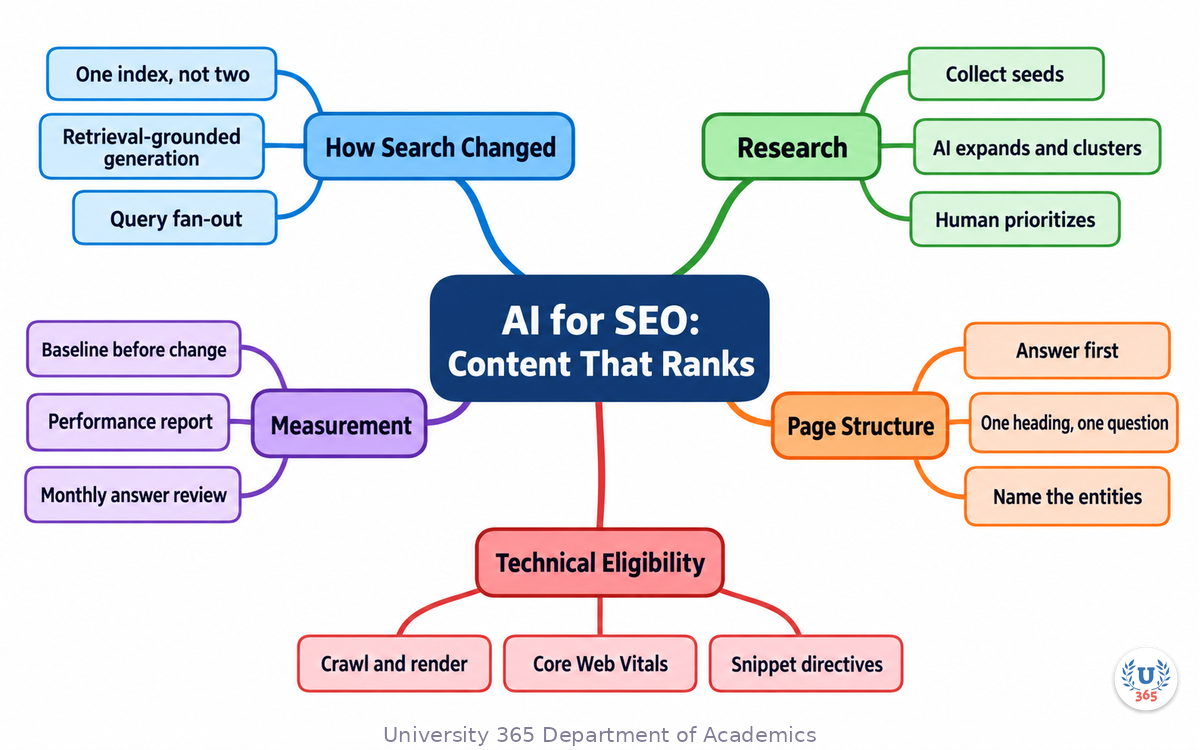
The mindmap gathers the lecture into one view: research inputs on one side, the page-level structure in the middle, technical eligibility below, and the measurement loop that feeds the next cycle.
UNOP Sound (University 365 Neuroscience Oriented Pedagogy)
Take five minutes to consolidate your memory. Play the isochronous tone track (10Hz alpha frequency) with your eyes closed. Alpha-frequency tones after a learning session support consolidation, helping move what you just learned from short-term to long-term memory.
[Audio player: UNOP Post-Lecture Isochrone (10Hz, 5 minutes)]
Practical Exercise: Rebuild One Page With AI
Choose one page you own that gets impressions but few clicks. Work through the exercise in order, and write your answers down. The written record is what makes the review possible later.
Part 1: Diagnosis (20 minutes)
Open the page in Search Console. Record impressions, clicks, click-through rate, and average position for the last 28 days.
List the top five queries that page appears for. For each one, label the job the searcher is trying to complete: informational, navigational, commercial, or transactional.
Open the page and read only the headings. Ask: does each heading read as a question a person would ask, and does the paragraph under it answer that question without help from any other section?
View the page source and search for one sentence of your body copy. If it is absent, note it as a rendering problem.
Check the page for snippet-blocking directives: nosnippet, max-snippet with zero, data-nosnippet.
Run the page through a Core Web Vitals check and write down LCP, INP, and CLS.
Part 2: The brief (20 minutes)
Draft a brief with these fields filled in:
Target question and its intent type.
Four sub-questions the page must answer.
Entities that must be named exactly.
Evidence you will supply, with its source.
Three internal links with their anchor text.
The format the current top pages use.
Three things the page must not claim.
Part 3: The draft and the review (40 minutes)
Ask an AI assistant to draft one section against your brief, supplying the evidence you gathered. Then apply the four-step review: fact-check every number, add the experience only you have, delete the filler, and read it in the audience's voice. Rewrite the opening paragraph so the direct answer appears in the first two sentences.
What to look for
A page that gains answer presence usually changes in three ways: the answer moves up, the sections become separable, and the evidence becomes specific. If your draft reads smoothly but contains no fact a competitor could not also write, you have produced commodity content and the exercise is not finished.
Applied CI-First connection
You did the diagnosis, the prioritization, and the final review. The assistant did the expansion, the clustering, and the first-pass drafting. That division is the whole method: human intelligence sets the target and owns the judgment, AI supplies speed. Reverse the division and you get volume without value.
Glossary
Term | Definition |
AI Overview | A summary panel generated by Google Search that answers a query using retrieved pages, with links to the sources it used. |
AI Mode | A conversational search surface in Google Search that decomposes a query into sub-queries and synthesizes an answer from multiple pages. |
Query fan-out | The process of breaking one user question into several related sub-questions that are searched in parallel to gather supporting content. |
Retrieval-augmented generation (RAG) | A method where a system retrieves relevant documents from an index and then generates an answer grounded in those documents. |
Snippet eligibility | The state of a page that allows search engines to show a text preview of it. Blocked by nosnippet, max-snippet with zero, or data-nosnippet. |
Core Web Vitals | Three field metrics that measure page experience: Largest Contentful Paint, Interaction to Next Paint, and Cumulative Layout Shift. |
Largest Contentful Paint (LCP) | The time until the largest visible element in the viewport finishes rendering. Good is under 2.5 seconds. |
Interaction to Next Paint (INP) | The latency between a user interaction and the next visual update. Good is under 200 milliseconds. |
Cumulative Layout Shift (CLS) | A unitless score for how much visible content moves during load. Good is under 0.1. |
E-E-A-T | Experience, Expertise, Authoritativeness, and Trustworthiness: the quality concepts Google's rater guidelines use to assess page quality, with trust as the most important. |
Non-commodity content | Content carrying first-hand data, a specific decision, or a result that a model could not assemble by averaging other pages. |
Search intent | The job a searcher is trying to complete with a query, commonly grouped as informational, navigational, commercial, or transactional. |
Entity | A distinct thing a page is about, such as a method, product, organization, or person, which search systems represent separately from text strings. |
Content brief | A written specification for a page: target question, required sub-questions, entities, evidence, links, and format. |
Structured data | Machine-readable markup that describes page content. Useful for rich results; not required for generative AI features on Google Search. |
Internal link | A link from one page of your site to another, used to show relationships and importance between pages. |
Scaled content abuse | Generating large volumes of content primarily to manipulate search rankings, which violates Google's spam policies. |
CI-First (Co-Intelligence First) | The University 365 approach in which human intelligence is the orchestrator and AI is the amplifier. |
Quiz: TEST YOUR UNDERSTANDING
1. According to Google's May 2026 guidance for AI features on Search, what is required to appear in AI Overviews?
A) A published llms.txt file
B) AI-specific schema.org markup
C) No additional requirements beyond standard SEO fundamentals
D) Content split into small, separate chunks
2. Why does query fan-out change how you should structure a page?
A) It requires one page per query variation
B) Each section should stand as a clean answer to a smaller, specific question
C) It means keyword density matters more than before
D) It means long pages always outperform short pages
3. Which of these removes a page from being shown with a snippet?
A) The nosnippet directive
B) A canonical tag
C) An internal link with descriptive anchor text
D) A comparison table
4. What are the good thresholds for the Core Web Vitals?
A) LCP under 5 seconds, INP under 1 second, CLS under 0.5
B) LCP under 2.5 seconds, INP under 200 milliseconds, CLS under 0.1
C) LCP under 1 second, INP under 500 milliseconds, CLS under 0.25
D) LCP under 4 seconds, INP under 300 milliseconds, CLS under 0.2
5. Which task should you keep for yourself rather than delegating to an AI assistant?
A) Clustering a keyword list by search intent
B) Expanding a seed question into related sub-questions
C) Deciding which topic cluster is worth the investment
D) Producing a first draft against a written brief
Answers: 1-C, 2-B, 3-A, 4-B, 5-C
Related Resources
U365 INSIDE Publications
Lecture: AI for Social Media Strategy: Platform ranking signals, social listening, and campaign measurement with AI
Lecture: AI Content Generation: Beyond ChatGPT: The multi-tool content pipeline and quality control
Lecture: Brand Voice in the AI Era: Training AI on brand guidelines and detecting voice drift
External Resources
AI features and your website (Google Search Central): the official guidance for AI Overviews and AI Mode: developers.google.com/search/docs/appearance/ai-features
Creating helpful, reliable, people-first content (Google Search Central): the Who, How, and Why framework behind E-E-A-T: developers.google.com/search/docs/fundamentals/creating-helpful-content
Web Vitals (web.dev): the Core Web Vitals definitions and thresholds: web.dev/articles/vitals
Search Quality Rater Guidelines (Google): the public document that defines E-E-A-T and page quality: static.googleusercontent.com/media/guidelines.raterhub.com
Search Console Performance report (Google Search Central): where AI Overviews and AI Mode clicks are reported: support.google.com/webmasters/answer/7576553
Related U365 Lectures
Lecture 4: The AI Press Release: Automating PR (UIC, Content Strategy Series)
Lecture 8: Sentiment Analysis for Brand Monitoring (UIC, Marketing Series)
U.Copilot for This Lecture
Discuss this lecture with U.Copilot, your AI chat companion trained on this content.
Copy and paste the following prompt into the U.Copilot chat on university-365.com:
You are U.Copilot for Lectures, an AI chat companion specially trained on University 365 lecture content. You are helping a Fellow who just completed the lecture "AI for SEO: Content That Ranks" from the Marketing series at the U365 Institute of Communication (UIC). Your role is to help the Fellow apply AI-assisted search optimization to real work. You can: - Explain how search systems select pages for AI-generated answers - Walk through classifying a query by the job the searcher is trying to complete - Help draft a content brief with target question, sub-questions, entities, and evidence - Review a page structure and identify sections that are not separable answers - Explain Core Web Vitals thresholds and the most common fixes for each metric - Check a page for snippet-blocking directives and rendering problems - Design a monthly measurement routine for answer presence Always maintain U365's CI-First approach: the human sets the target and owns the judgment, AI supplies speed. Remind the Fellow to source every number and to add evidence only they can provide. Use the UP-Context Method: provide context-rich, role-aware responses that account for the Fellow's level, their audience, and the business goal behind the page.
Next Steps
Now that you understand how AI-era search selects content, here is what to do next:
Complete the practical exercise on one page: diagnosis, brief, draft, review.
Capture your baseline in Search Console before you change anything, so improvement is measurable.
Audit snippet directives on your ten most valuable pages and remove anything that blocks previews.
Build one content brief and reuse the same template for every page in the cluster.
Take the next lecture in this series to connect search performance with your wider marketing measurement.
Search has not stopped rewarding good pages. It has stopped rewarding pages that only restate what everyone else already wrote. Bring evidence, name your entities, answer the question at the top of the right section, and make the page technically reachable. The rest is iteration, and iteration is measurable.
IMPORTANT NOTICE
This lecture is published by University 365 as part of its INSIDE Publications Hub. The content is free to read for all visitors. Lectures in this series may be part of a structured academic program leading to a Micro-Credential for your Career (MCC). To enroll in an academic program, visit university-365.com/tuition.
This content is for educational purposes. Search engines, their guidance, and their AI features change frequently. Verify current documentation and metric thresholds against the primary sources linked above before applying them in a professional engagement.
Copyright University 365, Inc. All rights reserved. This content is protected under University 365's copyright policies. For permissions or inquiries, contact uda@university-365.com.
Published by the Department of Academics, University 365.
Lecture delivered by the University 365 Institute of Communication (UIC).
Lea Loringam, Dean of Communication, UIC
Signed for the academic year 2026.




Comments