
Designing AI Products: Uncertainty, Confidence and Recovery


UID University 365 Institute of Design
Series UID UX/UI Series
Duration 25 minutes
Digital Design, UX/UI, Visual Communication, Motion Graphics, Creative Technology

UNOP Sound (University 365 Neuroscience Oriented Pedagogy)
Take five minutes to prepare your brain. Play the isochronous tone track (40Hz gamma frequency) with your eyes closed. Gamma-frequency tones before a learning session raise attention and make the material easier to absorb.
[Audio player: UNOP Pre-Lecture Isochrone (40Hz, 5 minutes)]
In this Lecture


Designing AI Products: Uncertainty, Confidence and Recovery
The Model Will Be Wrong. Design for That.
Every design system you have inherited assumes a deterministic machine. A button press submits a form. A form either succeeds or returns an error. The same input produces the same output, and the interface can promise what will happen next.
An AI feature breaks that contract. The same input can produce different outputs. The system can be confidently wrong. It can be slow in a way that looks like a freeze, or fast in a way that hides a mistake. It can fail without an error code, because a plausible answer is not an error.
Designers who treat the model as a smarter function ship interfaces that feel magical in the demo and untrustworthy in the week. The ones who design for uncertainty ship products that people rely on, because the interface makes the system's limits legible and gives the user a way back.
This lecture gives you that design vocabulary: how to show confidence, provenance and preview; how to design recovery; how input and output shape trust; how latency becomes part of the experience; and how to test an AI feature before it reaches users.

Designing AI Products: Uncertainty, Confidence and Recovery
Why AI Breaks the Interface Contract
The interface contract has three promises: predictability, reversibility and explainability. AI challenges all three.
Predictability. A deterministic system maps input to output. A model maps input to a probability distribution over outputs. The same prompt can yield different answers across runs, models and contexts. The variance is not a bug to eliminate; it is a property to design around.
Reversibility. A form submission can be undone or corrected. A generated document, a sent email, a filed summary or a triggered action may not be reversible. The cost of a wrong output depends on what the system is allowed to do with it. Design the permission level to match the reversibility.
Explainability. A rule-based system can show the rule that fired. A model can show a rationale, but the rationale is generated, not a trace of the computation. The interface must distinguish between "here is why" and "here is a plausible explanation", and give the user access to the actual evidence: the sources, the inputs, the retrieved passages.
There is a fourth break that matters commercially: expectation. Users bring the cultural expectation of a chatbot: fluent, confident, endlessly patient. That expectation is a design asset and a liability. Fluent confidence invites over-trust; patience invites long, vague prompts. The interface has to calibrate both.
The design question is not "how do we make the model reliable?" It is "how do we make the system's reliability visible and its failures recoverable?"

Designing AI Products: Uncertainty, Confidence and Recovery
Designing for Uncertainty
Uncertainty is not one thing. Separate three kinds, because each needs a different treatment.
Aleatoric uncertainty comes from the task itself: ambiguous input, missing context, multiple valid answers. The right treatment is to ask, narrow or offer options, not to display a fake percentage.
Epistemic uncertainty comes from missing knowledge: the model does not know, the source is absent, the question is outside the corpus. The right treatment is to say what is missing and where to find it.
System uncertainty comes from the pipeline: retrieval failed, a tool timed out, the model version changed. The right treatment is a visible status and a fallback, not a confident answer built on nothing.
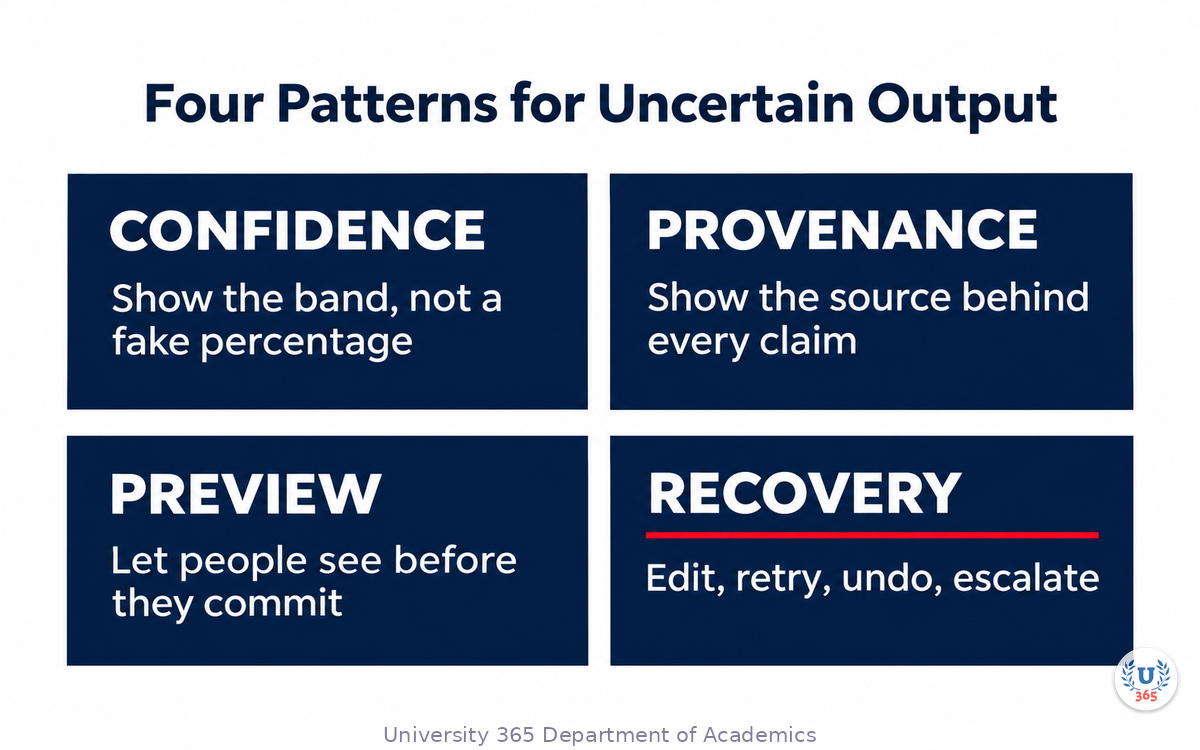
Four interface patterns cover most cases.
1. Confidence, honestly framed
A percentage from a model is rarely calibrated across tasks. Prefer qualitative bands tied to behaviour: "high confidence, cited from two sources", "low confidence, no source found". If you show a number, calibrate it against outcomes and label what it means. A confidence meter that is wrong is worse than no meter, because it transfers trust to a number the user cannot verify.
2. Provenance
Show the source behind each material claim: the document, the passage, the date, the page. Make it inspectable in one click. Provenance does three jobs: it lets the user verify, it spreads accountability to the source, and it makes the system's reasoning auditable after the fact.
3. Preview before commit
For any output with a cost, show it before it takes effect: a draft before sending, a diff before applying, a summary before filing. Preview is the cheapest recovery mechanism ever designed. Use it whenever the action is irreversible or visible to someone else.
4. Explicit scope
Tell the user what the system can and cannot do, in the interface, not in a help article. "Answers from the 2024 policy library" is a scope statement. "Ask me anything" is a promise the system cannot keep.

Designing AI Products: Uncertainty, Confidence and Recovery
The Recovery Pattern
Recovery is the core of AI product design. Users forgive a wrong answer when the path back is obvious; they abandon a product when a wrong answer traps them.
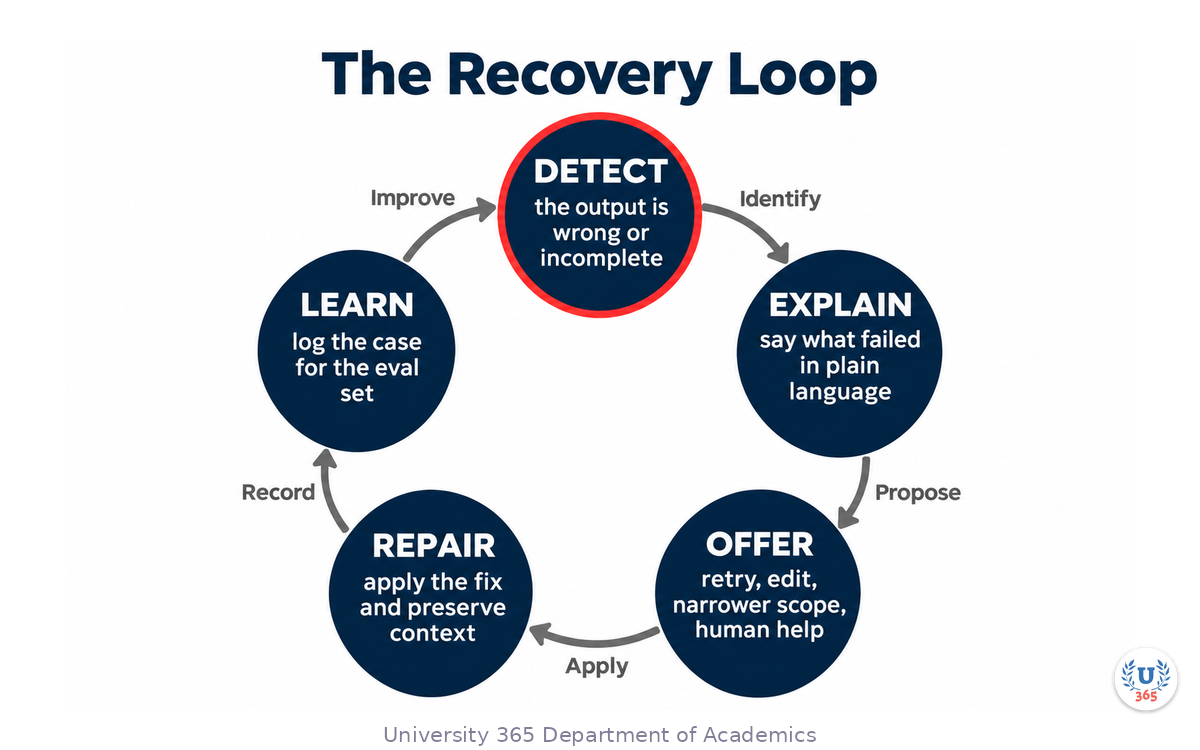
Design recovery as a loop with five steps.
Detect. The system must notice that something went wrong: a failed validation, a missing source, a user correction, a confidence below threshold. Detection is a product capability as well as a model capability.
Explain. Say what failed in plain language: "I could not find a current policy for this region", not "Error 422". The explanation should name the missing input or the failed step and avoid blaming the user.
Offer. Give specific next actions: retry with a narrower scope, edit the input, upload the missing document, switch to a different model, or hand off to a human. A generic "try again" is not an offer.
Repair. Apply the fix without losing the context. If the user edits the prompt, keep the attachments. If they escalate, pass the conversation and the evidence. Repair that requires re-entering everything is punishment.
Learn. Log the case, the correction and the outcome. Feed it into the evaluation set. Recovery is also a data source: the failures users correct are the most valuable test cases you will ever get.
Two design rules make the loop usable. First, every generated output needs a visible edit path, even if the edit is "copy and change it elsewhere". Second, every irreversible action needs a confirmation that states the consequence, not a generic "are you sure?".

Designing AI Products: Uncertainty, Confidence and Recovery
Input Design
The input is part of the model's context. Design it as carefully as the output.
Give the task a shape. A free-text box invites vague prompts. A structured input with a goal, a context field, an audience and a constraint produces better outputs and teaches the user what the system needs.
Offer examples. Few-shot examples in the interface ("show me an example") improve both the prompt and the user's mental model. Examples are also a place to demonstrate the boundaries: what a good request looks like, and what the system will refuse.
Make constraints visible. If the answer must be under 200 words, in French, compliant with a policy, or drawn from a specific library, show those constraints as controls, not as hidden prompt text. The user should know what the system is optimizing for.
Handle the empty state. The first screen decides whether the feature is understood. Show three real use cases, one example output, and the scope. Do not open with a blank box and a blinking cursor.
Preserve context across turns. If the user uploads a document, keep it attached. If they narrow the scope, show the active filters. Context that disappears forces repetition and erodes trust.
Design the refusal. A refusal is a valid output. Make it specific: what the system cannot do, why, and what the user can do instead. A vague refusal ("I can't help with that") reads as a bug.

Designing AI Products: Uncertainty, Confidence and Recovery
Output Design
The output is where trust is won or lost. Five properties matter.
Structure. Use headings, lists and tables when the content has structure. A wall of generated prose is hard to scan and hard to verify. Structure also makes the output easier to edit.
Citations. Attach sources to claims, not to the document as a whole. A citation list at the bottom is better than nothing; inline markers are better. If a claim has no source, mark it as the model's inference.
Diffs. When the system changes an existing artefact, show what changed. A diff is the difference between "the AI rewrote my contract" and "the AI proposed three edits I can accept or reject".
Length control. Generated output tends to expand. Give the user a length control tied to the task: a summary of five bullets, a reply of three sentences, a report of one page. Length is a design parameter, not a model accident.
Voice and format controls. If the brand has a voice, make it selectable and show the effect. If the output must follow a template, render the template. The user should not have to rewrite the output to make it usable.
One anti-pattern deserves a name: the confidence uniform. A generated answer styled exactly like human-authored content, with no marker of origin, invites the user to treat it as verified. Mark generated content at the point of use, especially when it will be forwarded or published.

Designing AI Products: Uncertainty, Confidence and Recovery
Latency and Streaming
Latency is not a technical metric; it is a design material.
A response that arrives in 300 milliseconds feels like a command. A response that takes eight seconds feels like a request. A response that streams token by token feels like a conversation. Each sets a different expectation, and the interface must match the expectation it creates.
Under one second. Show the result directly. No spinner. The interaction is a tool.
One to five seconds. Acknowledge immediately, show progress, and keep the interface responsive. If the user can do something else while waiting, say so.
Five to thirty seconds. Stream the output, or show a structured progress state: retrieved sources, drafting, checking. A progress state that names the steps builds trust and makes a failure diagnosable.
Longer than thirty seconds. Move the task to a queue with a notification. Do not hold the user hostage to a spinner. Show the job status and let them leave.
Streaming has a cost: the user sees the answer before it is validated. If validation can change the answer, do not stream the final text; stream a progress narrative and present the validated output at the end. The rule is simple: never stream a claim you may have to retract.

Designing AI Products: Uncertainty, Confidence and Recovery
Trust Calibration
The goal is not maximum trust. It is calibrated trust: the user relies on the system where it is reliable and checks it where it is not.
Over-trust looks like accepting a generated contract clause without reading it, forwarding a summary without checking the numbers, or letting an agent send an email because it sounded confident.
Under-trust looks like ignoring a system that is right 95 percent of the time, or spending more time checking than the task would have taken.
Four design levers calibrate trust.
Track record. Show the system's accuracy on this type of task, in plain language: "on 200 similar invoices, this match was correct 96 percent of the time". A track record is more honest than a confidence score.
Selective automation. Automate the easy cases and route the hard ones to a human. The interface should make the routing visible so the user understands why this case needs review.
Friction where it matters. Add a confirmation step for irreversible actions, and remove friction for reversible ones. Friction is a signal of consequence.
Post-hoc audit. Give the user a way to see what the system did after the fact: the sources, the actions, the version. Auditability sustains trust after a failure.
Designing AI Products: Uncertainty, Confidence and Recovery
Testing AI Experiences
You cannot test an AI feature with a single happy path. Test the distribution.
Scenario sets. Build thirty scenarios: ten typical, eight hard, five adversarial, five historical failures, two edge cases. For each, define the expected user experience as well as the expected answer. What should the interface show? What should the user be able to do next?
Failure injection. Force retrieval failures, timeouts, empty results, contradictory sources and model refusals. Observe whether the interface explains, offers and repairs. A feature that only works when the model works is not designed.
Comprehension tests. Show the interface to five users and ask them to explain what the system did and how confident they should be. If they cannot, the confidence and provenance design has failed, regardless of model quality.
Longitudinal checks. Watch the same users over two weeks. Trust calibration changes with experience: initial over-trust, then a correction after the first failure, then a stable pattern. Design for the second week, not the first minute.
Instrument the recovery path. Measure how often users edit, retry, escalate or abandon. The recovery rate is a product metric. A high abandonment rate after a failure is a design defect, not a model defect.
Designing AI Products: Uncertainty, Confidence and Recovery
The AI Feature Design Checklist
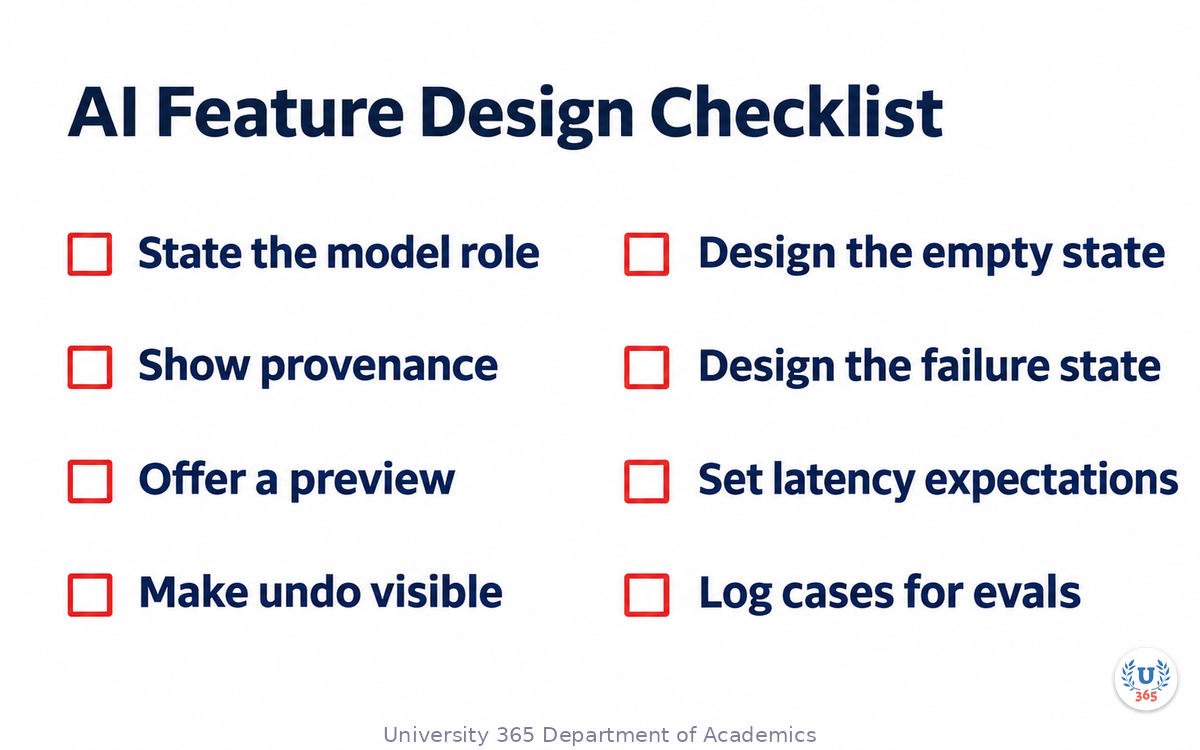
Before you ship, answer these eight questions in writing.
Model role. What is the model doing, and what is the deterministic system doing? Name the boundary.
Provenance. Can the user see the source of every material claim in one click?
Preview. Can the user see the output before it takes effect?
Undo. Can the user reverse or correct the output without redoing the work?
Empty state. Does the first screen teach the scope with a real example?
Failure state. Does the interface explain a failure and offer a specific next step?
Latency. Does the interface set the right expectation for the time the task takes?
Learning loop. Is every correction logged and fed into the evaluation set?
If any answer is "no", the feature is not ready. None of these are model problems; they are design decisions that determine whether the model's capability reaches the user as value.
Designing AI Products: Uncertainty, Confidence and Recovery
Case Study: The Contract Review Screen
A legal operations team adds an AI feature to a contract review tool. The first design shows a summary of the contract and a list of "risks" with a confidence score. Lawyers ignore it after two weeks. The reason is not accuracy. The reason is that the screen gives them no way to verify, no way to correct and no way to see what the model read.
The redesign changes five things.
The source pane. Every risk card links to the clause it came from, marked in the document. One click shows the passage in context. The lawyer no longer has to trust the summary; they can check the sentence.
The rubric. The risks are grouped by the firm's own review categories, with the firm's severity labels. The model classifies; the rubric belongs to the firm. The screen shows the category first, the model's note second.
The edit path. Each risk card can be accepted, edited, dismissed or escalated, with a reason. The edits are logged and become training cases for the next evaluation. The lawyer's correction is the most valuable data the product produces.
The confidence language. The percentage is replaced by a band tied to evidence: "High: clause found in the current template", "Medium: similar clause found in two prior contracts", "Low: no matching clause, review manually". The band tells the lawyer what to do, not what the model feels.
The failure state. When the document cannot be parsed, the screen says which pages failed and offers a manual upload, instead of showing an empty summary. The lawyer can recover in one step.
Adoption changes within a month. The lawyers still read the contract; they now use the screen to find the clauses faster and to record their judgment. The model did not get better. The interface made its output usable.
The lesson generalises: in professional work, the value of an AI feature is often the navigation and the record, not the generation. Design the verification path first, and the generation becomes useful.
Designing AI Products: Uncertainty, Confidence and Recovery
Designing for Agents, Not Just Chat
An agent is a different design problem. A chat feature produces text; an agent takes actions. The interface must show what it is doing, what it may do, and how to stop it.
Show the plan before execution. For any multi-step task, display the steps the agent intends to take and the tools it will use. Let the user approve, edit or cancel. A plan is the agent equivalent of a preview.
Scope the permissions visibly. Show the systems the agent can access and the actions it can take. Separate read from write. Require explicit confirmation for irreversible actions: sending, paying, deleting, publishing, filing.
Make the activity log readable. A trace is for engineers; an activity log is for users. Write it in plain language: "Read the invoice", "Matched the purchase order", "Prepared a payment for approval". The log is the user's evidence and the auditor's record.
Design interruptibility. The user must be able to pause, stop or take over at any point. An agent that cannot be interrupted is a risk, not a feature. Show the stop control persistently during execution.
Design the handoff. When the agent escalates, pass the context: what it did, what it found, what remains. A handoff that starts from zero wastes the work and annoys the human.
Set the blast radius. Decide, in the design, the maximum consequence of an error: one email, one record, one payment up to a limit. The blast radius is a product decision, not a model setting.
The failure mode to avoid is the black-box autopilot: a progress spinner, no plan, no log, no stop. It demos well and cannot be trusted with real work.
Designing AI Products: Uncertainty, Confidence and Recovery
Accessibility and Inclusion
AI features introduce new accessibility failure modes, and the fixes are mostly design discipline.
Generated text and screen readers. Streaming output that updates constantly can overwhelm a screen reader. Announce completion, provide a stable reading order, and let the user pause updates. Mark generated regions with the appropriate ARIA live settings, tested with real assistive technology.
Confidence and provenance. A colour-only confidence indicator excludes colour-blind users. Pair colour with text and shape. Provenance popovers must be keyboard reachable and readable by screen readers, not hover-only.
Input alternatives. Voice input helps some users and excludes others in shared spaces. Offer text and voice, and never make voice the only path. The same applies to image upload: always provide a text alternative.
Plain language. Generated explanations tend to be verbose. Offer a short version and a detailed version, and keep the short version at a reading level the audience can use. Plain language is an accessibility feature and a trust feature.
Language and locale. Test the interface in the languages your users actually use, including right-to-left scripts and long compound words. Generated layouts that assume English break quickly.
Error recovery. Recovery copy must be specific and translatable. "Something went wrong" is inaccessible in practice because it gives no next step. Name the failure and the action.
Accessibility testing belongs in the same scenario set as everything else: include screen-reader users, keyboard-only users and users with cognitive load in the comprehension tests.
Designing AI Products: Uncertainty, Confidence and Recovery
What to Measure After Launch
Design decisions need evidence after launch as well as before.
Task completion. The share of sessions that end with the user's task completed, not with an abandoned draft. Define completion per feature.
Correction rate. How often users edit, reject or override the output. A high correction rate can mean the model is weak or the interface is unclear; inspect the corrections to tell which.
Recovery rate. After a failure, how often does the user recover and complete the task? This is the clearest measure of whether the recovery design works.
Time to trust. How long it takes a new user to reach a stable pattern of use. A feature that requires a month of calibration is expensive; a feature that never calibrates is mistrusted.
Provenance use. How often users open the source, the preview or the activity log. Low use can mean the feature is unnecessary or the affordance is invisible. Test both.
Escalation quality. When users hand off to a human, does the handoff contain the context the human needs? Sample the handoffs monthly.
Review these numbers with the model quality metrics, not instead of them. A model that improves while correction rate rises is a design problem. A design that improves while correction rate stays high is a model problem. The pair tells you where to invest.
Designing AI Products: Uncertainty, Confidence and Recovery
Onboarding and Mental Models
Users arrive with one of three mental models: a search box, a chatbot, or a colleague. Each predicts different behaviour, and the wrong model produces disappointment.
The search box model expects a correct answer to a short query. If the feature is exploratory, this model leads to frustration. Counter it with examples that show iteration and with an interface that invites refinement.
The chatbot model expects conversation, memory and patience. If the feature is a bounded workflow, this model leads to out-of-scope requests and repeated refusals. Counter it with a visible scope and task-shaped inputs.
The colleague model expects judgment, context and accountability. If the feature is a generator, this model leads to over-trust. Counter it with provenance, preview and a clear statement of the model's role.
Onboarding should install the right model in under a minute. Three techniques work.
A worked example on the first screen. Show a real request, the output, and the correction. The user sees the loop as well as the result.
A scope sentence beside the input. "Drafts replies from the 2025 policy library; you review and send." One sentence, always visible.
A first task that succeeds. Design the empty state to start with a task the system does well. Early success builds the habit; early failure teaches the user to avoid the feature.
Measure the mental model with a single question after the first session: "What do you think this tool does, and when should you not use it?" The answers tell you whether the interface taught the boundary.
Designing AI Products: Uncertainty, Confidence and Recovery
Working with Models and Design Systems
AI features stress a design system in three places: states, content and tokens.
States. A deterministic component has default, hover, focus, active, disabled and error. An AI component adds: thinking, streaming, uncertain, partially complete, degraded, refused. Define each state visually and in copy. A component library without these states forces every team to invent them, and the product becomes inconsistent.
Content. Generated text has variable length, variable structure and variable truth. Design containers that tolerate length: truncation rules, expand affordances, scroll regions with clear boundaries. Design typography for scanning: shorter line lengths, stronger hierarchy, space between claims.
Tokens. Confidence bands, provenance markers, generated-content labels and citation chips are new primitives. They need tokens, variants and documentation. Without them, teams hard-code colours and the accessibility work is lost.
Work with the model provider as a design dependency, not a backend detail. Ask for the model's known limits, the failure modes, the latency distribution and the version policy. Design the interface to the limits you can verify, and build a fallback for the ones you cannot.
Keep a design record for each AI feature: the model role, the prompt strategy, the confidence language, the recovery paths, the test set and the known failures. The record is what lets a new designer change the feature without breaking its trust contract.
Designing AI Products: Uncertainty, Confidence and Recovery
The Ethics of Frictionless Generation
The easier generation becomes, the more important the friction becomes. A feature that produces a plausible document in two seconds invites publication without reading. The design choice is not neutral: it shapes how much verification happens in the world.
Three ethical design commitments follow.
Mark generated content at the point of use. A label that disappears on export is not a label. If the output can be forwarded, published or filed, the provenance should travel with it, at least as metadata.
Do not simulate human authorship. Generated text styled as a personal message, a customer review or a colleague's note deceives the recipient. Where the context implies a human author, disclose the generation.
Make the limits visible to the people affected. If an AI system influences a decision about a person (a job application, a loan, a support outcome), the person deserves to know and to have a route to a human. This is a design requirement before it is a legal one.
There is also a craft argument. Frictionless generation produces volume; considered generation produces value. The interfaces that win long-term are the ones that help users think, not the ones that help them avoid thinking. Preview, provenance and recovery are not obstacles to the magic. They are what make the magic safe to use.
Designing AI Products: Uncertainty, Confidence and Recovery
Patterns from Adjacent Products
AI design borrows from older disciplines. Four analogies are useful.
Spell check and grammar tools. These solved the trust problem with inline suggestions, accept and ignore actions, and a visible diff. The lesson: keep the human in the loop at the level of the individual suggestion, not the whole document.
Autocomplete. Autocomplete succeeds because it is fast, reversible and easy to ignore. The lesson: a suggestion that costs nothing to reject can be aggressive; a suggestion that costs a lot to reject must be conservative.
Recommendation systems. Recommendations learned that explanations and controls matter: "why am I seeing this?", "show me fewer like this". The lesson: give users a way to steer the system without writing a prompt.
Aviation automation. Cockpit automation is designed with mode awareness, alerting and clear handoff. The lesson: the user must always know what mode the system is in and who is in control.
The analogies converge on one principle: the interface should make the system's state and the user's control visible at every moment. Generation is new; the discipline of automation is not.
Designing AI Products: Uncertainty, Confidence and Recovery
A Design Review Agenda
Run a thirty-minute review for each AI feature before build. Six questions, six artefacts.
1. Role and boundary (5 minutes). What the model does, what deterministic code does, what the human does. Artefact: a one-page role diagram.
2. Failure modes (5 minutes). The five most likely failures, the user-visible symptom, and the recovery. Artefact: a failure table with copy.
3. Evidence and provenance (5 minutes). Which claims need sources, how they are shown, how they are checked. Artefact: a provenance spec.
4. Permissions and consequences (5 minutes). What the system can read and write, the blast radius, the confirmation steps. Artefact: a permission matrix.
5. States and copy (5 minutes). The full state set, including thinking, streaming, uncertain, refused and degraded. Artefact: state screens with final copy.
6. Measurement (5 minutes). The scenario set, the completion and correction metrics, the learning loop. Artefact: a test plan with thirty cases.
If an artefact is missing, the feature goes back a step. The review is cheap; the rework after launch is not.
Designing AI Products: Uncertainty, Confidence and Recovery
Copy That Sets Expectations
In AI interfaces, copy is a control surface. The words around the output decide whether the user trusts appropriately.
Scope copy. Say what the system reads and what it does not: "Answers from the 2025 policy library. It cannot see your email." A scope sentence prevents the most common category of disappointed prompt.
Uncertainty copy. Avoid "I think" and "maybe". Name the evidence and the action: "No current policy found for this region. Check the regional addendum or ask the policy team." The user needs a next step, not a mood.
Provenance labels. "Source: Supplier Handbook, section 4.2, updated 3 March 2026." A label with a date and a section is verifiable. "According to the documents" is not.
Generated-content labels. "AI draft. Review before sending." Short, at the point of action, and persistent through export where possible. The label protects the user and the recipient.
Recovery copy. Three parts: what happened, why, what to do. "The contract could not be read because pages 4 and 7 are scans. Upload a text version or paste the clauses." This is recovery copy that works.
Refusal copy. "I cannot give legal advice. I can summarise the clauses and flag the ones your playbook marks as high risk." A refusal that offers the adjacent permitted action keeps the user in the product.
Confirmation copy. "This will send the email to 14 customers. Send now or review the list." State the consequence and the audience. "Are you sure?" is not a confirmation.
Write the copy before the model is connected. If the copy cannot be written, the interaction is not understood. Then test the copy with five users: ask them what the system will do next and what they should do if it is wrong. Their answers are the design review.
Designing AI Products: Uncertainty, Confidence and Recovery
Designing for the Second Week
Most AI features are designed for the first minute: the demo, the first successful generation, the delight. The product is judged in the second week, after the first wrong answer.
Three design commitments carry the second week.
Keep the evidence accessible after the session. A user who saw a citation yesterday should be able to find it today. Persist the source, the version and the timestamp with the output. A history that loses provenance turns every past output into an unverifiable claim.
Make the system's changes visible over time. When the model, the prompt or the retrieval corpus changes, tell the user in plain language: "Answers now use the 2026 policy library". Silent upgrades break trust when behaviour shifts, especially if the shift is an improvement the user did not expect.
Design the off-ramp. Some users will stop using the feature. Make the exit clean: export the history, keep the record, state what happens to the data, and leave the door open. A product that traps the user's work punishes the very people who tried it.
Add one organisational commitment: review the first month of failures with the people who use the feature. The design team learns what the scenario set missed, and the users learn that their corrections matter. The second week is a design review with real evidence, and it is the cheapest source of improvement you will get.
Designing AI Products: Uncertainty, Confidence and Recovery
The Design Debt of AI Features
AI features accumulate a specific kind of design debt: invisible states, undocumented prompts, untested failures and copy written under deadline. The debt is invisible in the demo and expensive in production.
Pay it down with four artefacts. A state inventory that lists every state the component can show, including the ugly ones. A copy deck with the final wording for failure, refusal and confirmation. A prompt and model record that states what the system depends on and what happens when it changes. A test set that grows with every corrected failure.
Review the debt quarterly with the design system team. The goal is not a perfect feature; it is a feature whose behaviour is documented, whose failure is designed, and whose next designer can change it without guessing.

Designing AI Products: Uncertainty, Confidence and Recovery
Feynman Summary: Explain It Like You Are 12
Imagine a very fast helper who can write anything you ask, but sometimes makes things up. You would not fire the helper. You would give them a few rules.
Ask them to show their sources. Ask them to give you a draft before they send it. Keep an undo button. Tell them what to do when they are unsure: stop and ask, do not guess. And when they get something wrong, show them the correction so they learn.
That is designing an AI product. The helper is powerful. The rules are what make the power usable.

Designing AI Products: Uncertainty, Confidence and Recovery
Mindmap: The Complete Picture
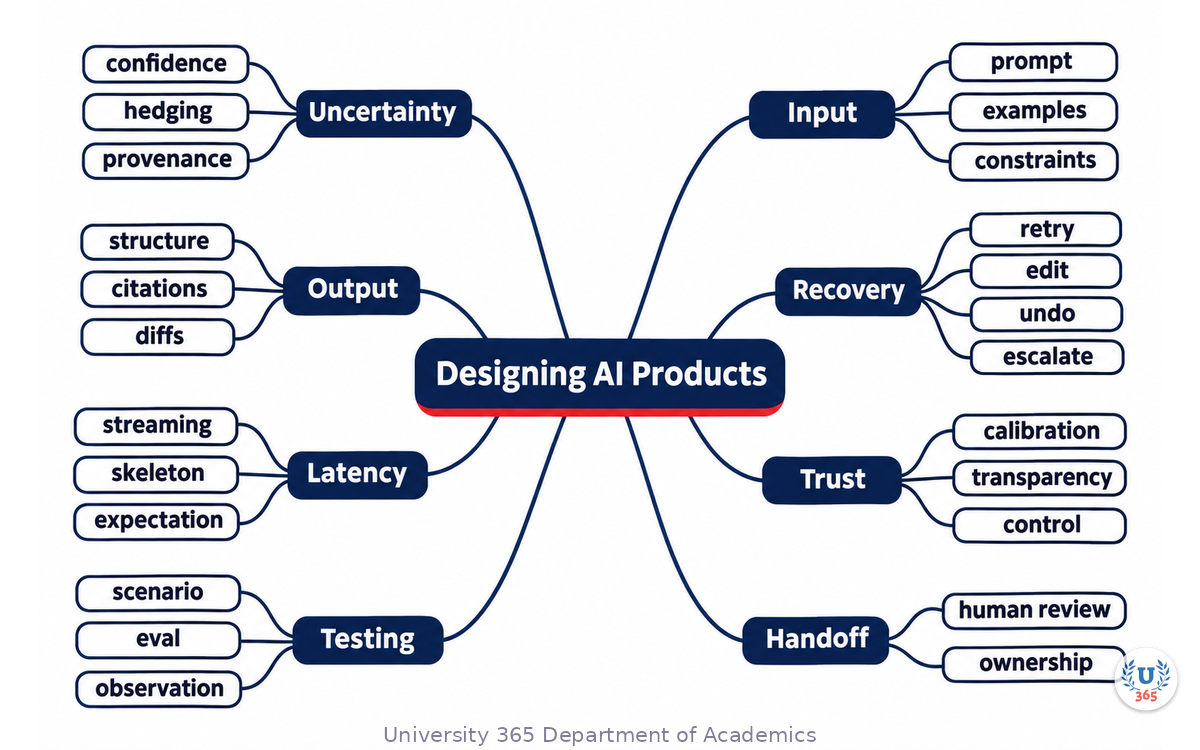
The mindmap shows the whole design system: the uncertainty patterns, the input and output rules, the recovery loop, latency, trust calibration and the test set that keeps the feature honest.
UNOP Sound (University 365 Neuroscience Oriented Pedagogy)
Take five minutes to consolidate your memory. Play the isochronous tone track (10Hz alpha frequency) with your eyes closed. Alpha-frequency tones after a learning session support consolidation, helping move what you just learned from short-term to long-term memory.
[Audio player: UNOP Post-Lecture Isochrone (10Hz, 5 minutes)]
Designing AI Products: Uncertainty, Confidence and Recovery
Practical Exercise: Redesign One AI Screen
Choose one AI feature you use. Redraw the screen with five changes and note the reason for each.
Add provenance. Choose one claim on the screen and attach its source, visible in one click.
Add a preview. Show the output before it commits, with an accept or edit action.
Add a recovery path. Write the exact copy for a failure: what happened, what to do next, how to escalate.
Calibrate confidence. Replace any percentage with a band tied to evidence, or add a track record for this task type.
Fix the empty state. Write the first screen: three real examples, one sample output, one sentence of scope.
Then test the redesigned screen with two people who did not design it. Ask them to explain what the system did and what they would do if it were wrong. If they hesitate, the design still has work to do.

Designing AI Products: Uncertainty, Confidence and Recovery
Glossary
Term | Definition |
Aleatoric uncertainty | Uncertainty that comes from the task itself: ambiguous input, missing context or multiple valid answers |
Epistemic uncertainty | Uncertainty that comes from missing knowledge: the source is absent or the question is outside the corpus |
Provenance | The visible link between a generated claim and the source that supports it |
Preview | Showing an output before it takes effect, with an accept, edit or cancel action |
Recovery loop | The five-step path from detecting a failure to learning from the correction |
Agent | A system that takes multi-step actions with tools, rather than only producing text |
Blast radius | The maximum consequence of one error, decided as a product constraint |
Confidence band | A qualitative statement of reliability tied to evidence, rather than an uncalibrated percentage |
Streaming | Delivering output token by token while it is generated |
Trust calibration | Matching the user's reliance on the system to its actual reliability |
Activity log | A plain-language record of the steps an agent took, readable by users and auditors |
Diff | A view of what changed between the previous artefact and the proposed one |

Designing AI Products: Uncertainty, Confidence and Recovery
Quiz: TEST YOUR UNDERSTANDING
1. Which promise of the classic interface contract does generative AI most directly break?
A) Colour contrast
B) Predictability of output
C) Navigation structure
D) Typography
2. What is the right treatment for epistemic uncertainty?
A) Show a fake percentage
B) Say what knowledge is missing and where to find it
C) Generate a confident answer
D) Hide the uncertainty
3. Which recovery step makes the correction useful for the next release?
A) Detect
B) Explain
C) Learn, by logging the case into the evaluation set
D) Offer
4. Why is a visible diff better than a rewritten document?
A) It is shorter
B) It lets the user accept or reject individual changes
C) It hides the model
D) It avoids citations
5. What does a well-designed agent interface show before execution?
A) Only a spinner
B) The plan, the tools and the permission scope
C) The model weights
D) The invoice
Answers: 1-B, 2-B, 3-C, 4-B, 5-B

Related Resources
U365 INSIDE Publications
External Resources
Related U365 Lectures (Coming Soon)
Agent Experience: Designing for Users Who Delegate (UID UX/UI Series)
Generative UI: From Prompt to Interface (UID UX/UI Series)
Design Ops with AI: Briefs, Reviews and Handoff (UID UX/UI Series)
Designing AI Products: Uncertainty, Confidence and Recovery
U.Copilot for This Lecture
You are my AI product design reviewer. I am designing one AI feature and need a critique before build. Feature: [name and one sentence] User: [who uses it and for what task] Model role: [what the model generates or decides] Current design: [describe the screen, states and actions] Do six things: 1. Name the three interface promises the feature most risks breaking, and why. 2. Classify the uncertainty in this task: aleatoric, epistemic or system. Propose the right pattern for each. 3. Write the full state set: empty, thinking, streaming, uncertain, partial, refused, degraded, failed. Give the user-visible copy and action for each. 4. Design the recovery loop for the most likely failure: detect, explain, offer, repair, learn. 5. Review the permission and blast radius: what the system may read and write, and where confirmation is required. 6. Propose the 30-case test set and the three post-launch metrics I should instrument. Ask me one clarifying question before you start if the task or the model role is ambiguous.
Designing AI Products: Uncertainty, Confidence and Recovery
Next Steps
Choose one AI screen and replace every confidence percentage with a band tied to evidence.
Write the failure copy for the three most likely failures, with the next action in each.
Add a preview and an undo path to any output with a cost.
Build the 30-case scenario set, including five adversarial and five historical failures.
Run the eight-question checklist in a thirty-minute design review before the next build.

Designing AI Products: Uncertainty, Confidence and Recovery
IMPORTANT NOTICE
Copyright University 365, Inc. All rights reserved. This lecture is provided for educational purposes and does not constitute legal, financial or professional advice. For enrollment, visit university-365.com/tuition. For permissions or inquiries, contact uda@university-365.com.
Published by the Department of Academics, University 365.
Lecture delivered by the University 365 Institute of Design (UID).
Joe Borazian, Dean of Design, UID
Signed for the academic year 2026.




Comments