
Flora (FLORA): the generative AI canvas that runs 50 or more models, scored 5.3 on the U365 CI-First Review

Status: Active | Last tested: 2026-09-25 (Flora, as documented at flora.ai and docs.flora.ai in September 2026) | Re-check: trigger-based (max 6 months)
Active: the tool is current and recommended. The six status values, the Humics Protection Badge and the Imposture Risk levels are defined in the Glossary at the end of this post.
What Active means here. Active means the tool is current and recommended. It does not mean the product is verified: no independent measurement of output quality or unit cost exists, the vendor's own model count differs from one of its surfaces to another, and the unpaid plans restrict use to your own internal purposes. Read Section 7c and the Faculty Note on Evidence Quality before adopting this product for client work.
Version reviewed: Flora, as documented at flora.ai and docs.flora.ai in September 2026.


In this Tool Review
The Flora naming, stated before the review begins
Name | What it actually is | Relationship to this review |
Flora / FLORA (flora.ai) | A node-based generative AI canvas connecting 50 or more text, image, video, audio and 3D models in one workspace, with prebuilt workflows the vendor calls Techniques | The subject of this review |
FLORA AND FAUNA FLOWERSHOP, INC. (D/B/A FLORA) | The legal entity named in the vendor's Terms and Privacy Notice | The vendor |
florafauna.ai | A second domain serving the same product, entity and legal documents addressed at flora.ai | The same vendor under an older domain |
Flora, the focus and habit app | A separate productivity application | Not related |
The Flora Culture, Hortus-Flora, businesses named Flora in Flora, Illinois | Florists, landscapers and funeral services that dominate local search for the bare word | Not related |
flora-ai.org | A separate domain with a review platform listing whose page states the company's website has closed | A different domain; nothing was readable there, so nothing is judged from it |
"Flora Inc." in one review site | A layout and brand-kit tool with a $12 plan and SVG export, matching nothing in this vendor's documentation | Excluded as a different or misdescribed product |
The correct counterparty is the entity named in the Terms, and the older domain still appears in live surfaces: the documentation gives a florafauna.ai support address while the pricing and legal pages give a flora.ai one, and the Terms give notice of changes at the older domain. That is migration residue, not a finding. Third-party material about "Flora" in this category is unreliable without checking which product is described: one indexed review scores a design tool at 3.6 out of 5 with layout generation, brand kits and vector export, features this vendor does not document, so that score is not treated as a measurement here.
Tool Snapshot
Field | Value |
Tool | Flora (FLORA), flora.ai |
Vendor | FLORA AND FAUNA FLOWERSHOP, INC. (D/B/A FLORA) |
Category | Generative AI creative workspace, node-based canvas |
CI-First Benefit Score | 5.3 / 10, CI-First Positive |
Sub-scores | Time 7, Quantity 6, Quality 4, Skill 4 |
CI-First Profile | Primary Co-Creator and Thought Partner (level 1) |
Collaboration Mode | Centaur |
Humics Protection | Humics-Neutral (+1 / +3) |
AI Imposture Risk | Medium, with Quantity Illusion High |
Pricing | Freemium and metered: Free $0, Starter $18 per seat, Pro $50, Max $200 |
Status | Active, last tested 2026-09-25 |
Flora (FLORA)
Tagline: "FLORA is the AI-powered canvas for designers, brand teams, and agencies. Generate, edit, and produce visuals across 50+ models in one workspace." (flora.ai, read 2026-09-25.)
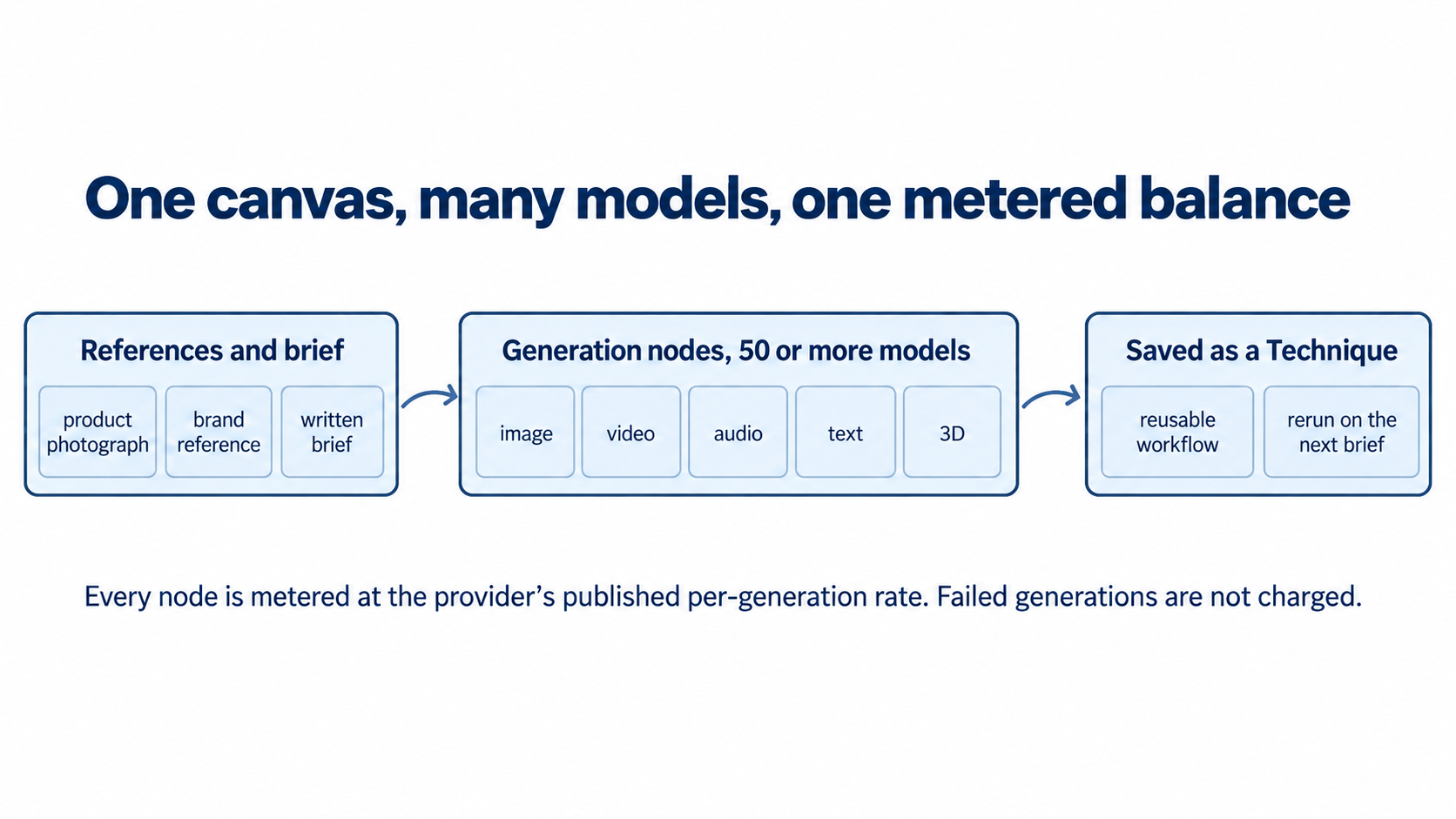
Category: Generative AI creative workspace with a node-based canvas. You place generation blocks, called nodes, on an open canvas and wire them together so one node's output becomes the next node's input. The documentation covers text, image, video, audio, document and 3D nodes, an image layer editor, a timeline editor for assembling clips, batch and router nodes, and a reusable workflow format called Techniques. An agent named FAUNA sits alongside the canvas.
Primary use cases: explore many directions from one reference side by side instead of re-prompting across several subscriptions; save a studio process as a Technique and rerun it on the next brief, on canvas, in the interface, or through the API or MCP; run one approved look across many items with a batch node; carry a concept from still image into motion with generative video and a timeline editor; assemble moodboards and storyboards for client review on a shared canvas; run limited fashion workflows in the Fashion Studio surface included on every plan.
Pricing summary: Freemium with metered usage. Free is $0 (1 seat, 3 active projects, text and image models only, "up to 17 generations free", no API or MCP). Starter is $18 per seat per month with an $18 usage budget per seat, Pro is $50 with $50, Max is $200 with $200. Self-serve plans reach 8 seats; Enterprise is custom and adds single sign-on. Usage is charged at published per-model rates, from under one cent for small text and audio calls to several dollars for high-end image, video and 3D generation. Paid plans carry a launch bonus of extra usage extended through September 30, 2026, and annual billing is stated as 20 percent below monthly. Prices read 2026-09-25 from flora.ai/pricing and the vendor's pricing documentation.
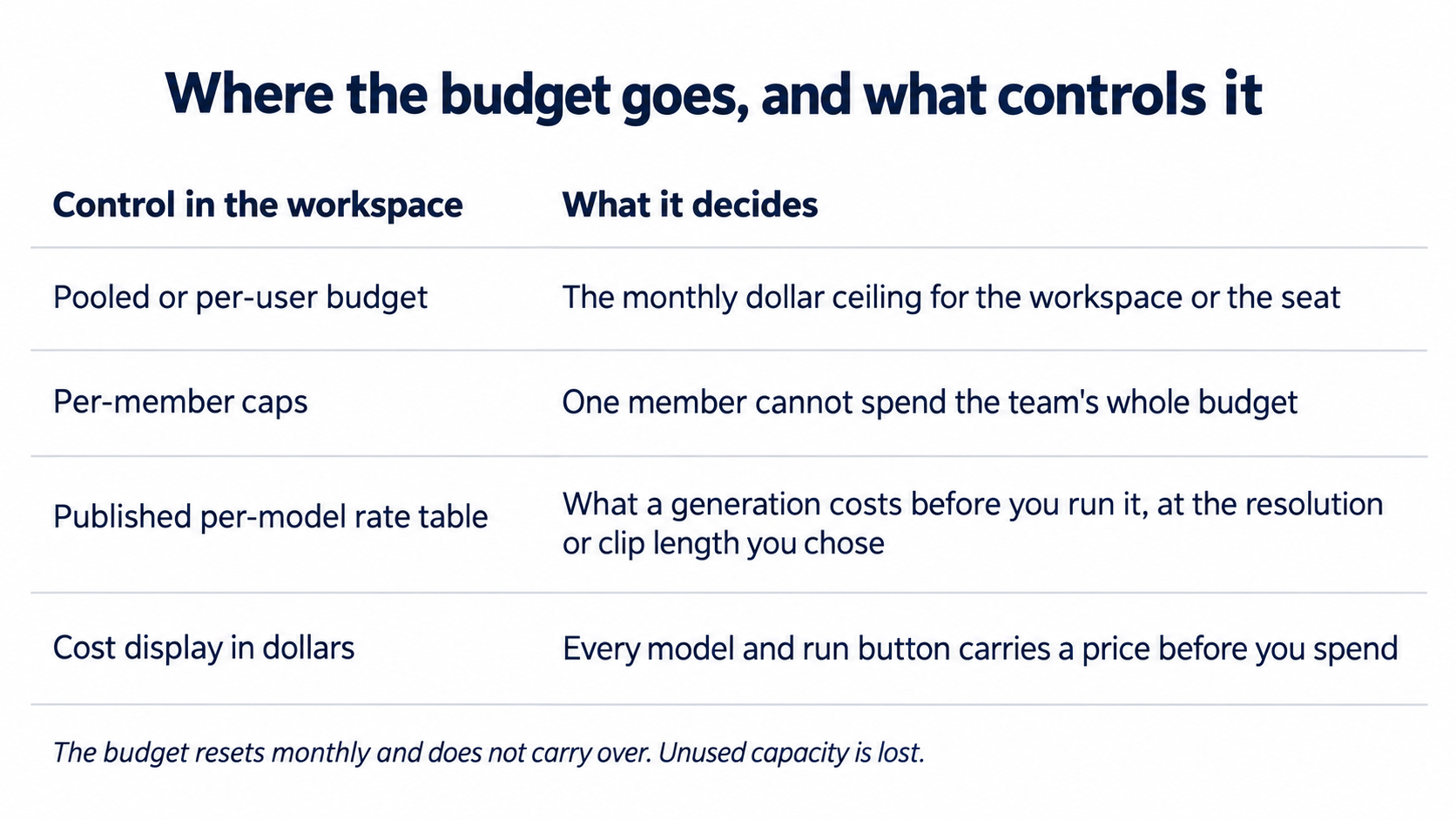
Model catalogue, as documented: text models include Claude Opus 5, Claude Sonnet 5, GPT-5.5, GPT-5.4, GPT-6 Astra, Gemini 3.1 Pro and an OpenAI deep research model, each with a named provider and a per-generation price. Image, video, audio and 3D models are listed the same way, with providers including Google, OpenAI, Anthropic, Black Forest Labs, Recraft, Kling, Pika, ElevenLabs, Meshy and Tripo3D. One rate table covers every supported model, failed generations are not charged, and overage uses the same rates with no markup.
LLM-specific fields: Flora is not a model; it routes to other vendors' models, so no context window, parameter count or architecture is published for the workspace itself. Platforms are a cloud application with API and MCP access from Starter upward. Variants are whatever the connected providers offer. The vendor states new models are added within hours of release, and that administrators can disable models for a workspace and opt in to new models rather than receiving them by default.
Official links: product site https://flora.ai/; pricing https://flora.ai/pricing; documentation https://docs.flora.ai/ and its plain-text index https://docs.flora.ai/llms.txt; how pricing works https://docs.flora.ai/plans-and-billing/pricing.md; per-model rate table https://docs.flora.ai/plans-and-billing/model-pricing.md; canvas https://docs.flora.ai/editor/canvas.md; node overview https://docs.flora.ai/nodes/editor.md; data, security and IP https://docs.flora.ai/legal/data-security-and-ip.md; enterprise https://flora.ai/enterprise-teams; Techniques https://flora.ai/techniques; comparisons https://flora.ai/compare; Trust Center https://trust.flora.ai/; status page https://status.flora.ai/; Terms https://flora.ai/legal/terms-of-service; Privacy https://flora.ai/legal/privacy-notice.
The Problem
You have a brief, a reference set and a deadline, and the work is not one action. It is a sequence: gather references, choose a direction, make a first frame, adjust it, test a variation, turn the still into motion, hold the brand line, hand something finished to a client. In practice that sequence is spread across subscriptions that do not talk to each other. You generate a still in one tool, download it, upload it elsewhere to animate it, re-upload the result into a third tool to edit it, and keep the brand rules in a document nobody reads mid-production.
The second half is process that leaves with the person who has it. A studio that finds a good method for turning a flat product shot into a set of campaign frames has found something valuable. Without a way to capture and rerun it, that method lives in one designer's habits, and the next brief starts near the beginning. You also carry an unquantified cost: each generator has its own subscription, credits and rate changes, so you cannot tell a client what a finished asset cost, or see which teammate spent the budget.
The Outcome
With Flora you work on one canvas instead of across tabs. You drop references, place a generation node, choose a model and branch the result into as many further nodes as you need. Because one node feeds the next, a chain of steps becomes one visible object you can reread, adjust and rerun, replacing the export, download, upload and re-upload cycle with a connection inside one workspace.
For a team, the concrete outcome is that a repeated process becomes a saved asset. When a workflow works, you save it as a Technique and run it on the next brief, so the studio's method becomes something it owns rather than something it remembers. The documented batch node applies one configured look across a list of items in a single run, which is the difference between one product image and a whole catalogue.
The second outcome is visibility. Paid plans pool a monthly dollar budget that grows with each seat, and the documentation states that usage history shows the exact dollar cost per generation, per project and per member, so you can bill from the record rather than an estimate and cap an individual member. The documentation also states that failed generations are not counted. The boundary is that none of this removes judgment: the canvas gives you the machine and a place for your decisions, not the decision.
Who Should Use Flora
Learner type | Difficulty | Typical ROI | Career path |
Students in design, media or marketing | Intermediate | Learn visual direction, consistency and asset production on one canvas; the free tier covers text and image exploration and paid tiers are per seat | |
Professionals in brand, marketing or design | Intermediate | Replace several model subscriptions with one metered workspace and bill client work from a per-generation record | UIB Digital Entrepreneurship and marketing roles; agency and in-house studio work |
Everyone (lifelong learners) | Beginner to intermediate | Explore image and video generation without learning several interfaces; FAUNA is free on every plan | ULM Career and Quality of Life dimensions; personal projects |
Skill level: beginner to place a node and run it, intermediate to build a reliable chain and judge output. Prerequisites: a clear idea of what you are producing and a reference set. No coding. You do need enough visual judgment to tell a good frame from a plausible one, because that is the part the tool does not give you. Time to first result: under 15 minutes on the free tier for a first image. Time to competence: several focused sessions.
U365 Institutes Alignment
The table below is the academic ruling on the operational competency this tool exercises rather than on its subject matter. Ratings are confirmed or corrected against this review's own evidence, and each row carries the limit that holds it, because a relevance rating without its limit is a label rather than a judgement.
Institute | Relevance | Why | The limit that holds the row |
UID (Digital Design, UX/UI) | High (primary), confirmed | The canvas is a design-production surface. A reference set becomes a direction, a direction becomes a batch of assets under one approved look, a still becomes a timed clip through the timeline editor, and the Fellow runs the visual quality gate the tool cannot run. The review's named uses (visual direction, consistency at volume, moodboards and storyboards for client review) are this institute's production work. | The tool teaches no design principles: no typography, no colour theory, no layout, no user research, no information architecture, no accessibility, and no critique of a design against a written brief. It produces no interface artefact, so a UX/UI Fellow gains nothing for interaction design or research. The High describes the surface and the production competency, not design education. |
UIB (Business Management, Entrepreneurship) | Medium (corrected down from High) | Two real competencies. Technology investment appraisal: one pooled monthly dollar budget that grows with each seat, per-member caps, a usage history that shows the cost of each generation, each project and each member, failed generations not charged, and no markup on overage, which together make cost per finished asset computable. Accountable automation governance: which models a workspace permits, who may spend, and what the usage record must show before a client is billed from it. | The tool teaches no management, finance or entrepreneurship content of its own. Because the per-model rates are published and the plan prices are published, the appraisal is a costed exercise rather than an estimate, and that strength is still only two competencies inside a 60-day business diploma landscape, which is why the row is Medium and not High. |
UIC (Digital Communication, Marketing) | Medium (corrected down from High) | The production end of the institute's work. Campaign concepting, social formats, storyboards, ad visuals and short edited video are named uses with documented workflows, and a marketing plan needs those assets. | It builds no communication craft. No copy, no brand voice, no audience analysis, no message strategy, no media planning and no measurement. A UIC Fellow who is assessed on communication still produces the strategy without this tool. No UIC credential chain is mapped, and the assessable production competency is carried by the UID chains earlier in this section. |
UIT (Technology, AI, Data Science) | Low to Medium (corrected down from High) | One genuine competency: composing a working system from heterogeneous third-party model services, pricing each call before it runs, and connecting the canvas to the wider estate through an API or an MCP server. That class of competency has a published assessment home in U365's short certificates rather than in a diploma. | The tool orchestrates other vendors' models and teaches no model engineering, no inference, no evaluation methodology and no data work. The connection layer is configuration rather than curriculum. The row is an observation of a system-composition practice, not a technology curriculum strand. |
Ratings: UID at High, UIT at Low to Medium, UIB at Medium and UIC at Medium, on the rule that a rating without the limit that holds it is a label rather than a judgement.
Primary alignment: UID (Digital Design, UX/UI)
Four competencies, and a Fellow who holds them is doing design production work rather than pressing a generate button.
Holding one direction across many assets. The reference set and the brand rules are the constraint, and the Fellow's job is to keep the set inside them while the tool produces variants. The batch node applies one configured look across a list of items in a single run, which is the difference between a product image and a catalogue, and it is also the point at which consistency stops being a matter of taste and becomes a specification.
Comparing a set against a reference rather than against an impression. The canvas is built for side-by-side branching, so the comparison is cheap and the judgement is still the Fellow's. This is the competency the Quantity Illusion row in Section 9 puts at risk.
Layered image work. The layer editor composes an image into a layered file, so the Fellow keeps the composition editable and can say what changed between two versions.
Still-to-motion assembly. The timeline editor trims, sequences, captions and renders, so the Fellow carries a concept from a still frame into a finished clip inside one workspace rather than across three subscriptions.
The teaching case worth naming here. The review's own Faculty Note records that the vendor does not state one model count: the product site and the documentation say 50 or more models, and the enterprise page and the image generator page say 170 or more, on the same day. A design Fellow who notices that, and who then works from the rate table rather than from the headline, has learned the habit that outlives this product: when a creative tool's value rests on how much it aggregates, check the surfaces against each other before the price and the process rest on the number. That habit belongs in this institute's alignment, because it survives after the launch material stops being current.
The UID limit, stated where a reader can act on it
The High rating is about production, and the institute's education is elsewhere. Nothing in the product teaches typography, colour theory, layout, composition, user research, information architecture or accessibility, which are what the UID diploma carries. A Fellow who uses the canvas without that grounding accumulates production fluency and no design judgement, and the interface will keep producing frames that look finished while the judgement that would reject one of them goes unpractised. That is the erosion the Skill Illusion row in Section 9 names, and the remedy is the assessment artefacts in the Tool to Skill to Credential section rather than more output.
Secondary alignment: UIB (Business Management, Entrepreneurship)
A UIB Fellow can run two exercises on this product, and both produce a number rather than an impression.
First, the total cost of ownership of a creative production line. Not the seat price. The seat price is published, the per-model rate table is published, failed generations are not charged, and overage uses the same rates with no markup, so a Fellow can compute cost per finished asset against a documented baseline and compare it with the same asset produced across separate subscriptions. The third workflow in Section 8 is the exercise written as a prompt, and the required record is the reconciliation of the usage history against an invoice at the end of the first month, line by line.
Second, accountable automation governance. Decide which models a workspace may use, set the per-member caps, name who approves a direction before a set leaves the team, and write the rule for what the usage record must show. The learning outcome is an accepted-risk decision with a named owner, which is management content rather than software content.
The limit that keeps the row at Medium. The product teaches no management, finance or leadership content. The vendor's own comparison and marketing pages are vendor-authored, so the Fellow must treat the figures on them as claims to be tested against their own baseline rather than as data.
Where there is no relevance, and why
No disciplinary relevance for UIC at High, and no UIC credential chain. The tool makes campaign and advertising assets, so it contributes to the production end of a marketing plan, which is why the row is Medium rather than Low. It writes nothing in a person's voice, analyses no audience and plans no channel, and no published independent measurement of the output it makes. A UIC Fellow is assessed on communication, and the assessable competency here is production, which the UID chains carry. The row is published so the judgement is visible rather than left to silence.
No technology curriculum strand for UIT above Low to Medium. The product runs other vendors' models. Model engineering, inference operations, data work and evaluation methodology are UIT territory and none of them is exercised here.
How Flora Works
Inputs: text prompts; reference images; existing video; audio; uploaded documents read into text or rendered to images; brand and style references kept in the workspace. Outputs: images, video clips, audio and voice, text, document extracts, and 3D models that can be staged and captured. The layer editor composes images into a layered file, and the timeline editor trims, sequences, captions and renders clips into a finished video.
Underlying technology: a node graph. A node holds one generation or action and connections carry data between nodes, with typed nodes per modality, an action node for editing, and a custom action node that builds a new tool for your canvas from a written description. Techniques are saved graphs, and the technique builder turns any canvas workflow into a reusable one. A batch node processes a list through the same workflow, a router node sends one set of inputs to many nodes, and FAUNA is the built-in agent, documented as unlimited and free on every plan. The models belong to other vendors and are priced individually. Integrations: API and MCP access from Starter upward; a Slack application that adds a FLORA channel; an export node writing media to local downloads or Google Drive; sign-in through Google or email, with SAML single sign-on reserved for Enterprise; a vendor-published Trust Center and status page.
Getting Started with Flora
Create an account with Google or email and confirm the address.
Double-click the empty canvas to place a node, or open a Technique to see a working graph first.
Connect a reference image to a generation node, so the model works from an image and not a prompt alone.
Run the same reference through two or three models in one family, side by side, and compare.
Turn on Preferences, then Show generation costs in dollars, so every model and run button carries a price before you spend.
Read the rate table for the models you will use and note the range, because cost changes with resolution and clip length.
Confirm what your plan includes and when the budget resets in the header usage bar.
On Free, test the boundary deliberately: text and image only, three projects, and a complimentary allowance rather than a dollar budget.
Save your first working chain as a Technique, even a small one.
Write down the checks you will apply before anyone outside the team sees an output.
Real Workflows
Workflow 1: One product reference into a reviewed set of campaign frames
Place the product photograph and a brand reference on the canvas. Add an image generation node, connect both references, and branch the output into four further nodes, one per direction: studio light, lifestyle context, flat layout, close detail. Turn on the dollar display before running the branch. When a direction wins, save the chain as a Technique and rerun it for the next product with the reference swapped.
UP-Context prompt:
Context: I am producing [deliverable] for [audience]. The reference set is attached. The brand
rules that cannot move are [name two or three, with the source they come from]. The product or
subject must keep [state the properties that must not change: geometry, label text, material,
colour]. Our previous attempt failed because [reason].

Role: AI as Co-Creator and Thought Partner (Profile 1). I set the direction and I decide what is
good enough. You produce directions and comparisons.

Task: Before producing a set, give me [n] named directions from this reference, one short
paragraph each, stating what each direction changes and what it holds constant. Then produce one
frame per direction and put them side by side.

Constraints: Do not restyle the subject. Do not invent a feature, a label or a material the
reference does not show. Keep the label text exactly as photographed. Tell me the cost of each
frame at the model you are using before you run more than one. Say plainly which direction you
cannot produce from this reference and why.

Output format: A table with one row per direction: name, what changes, what is held constant,
the model used and its cost. Then the frames. Then one sentence naming the direction you would
reject if the deadline were today.

UP-Context verification: I read the table before I look at the frames, I choose against the brief
rather than against the prettiest frame, and I record the chosen direction, the rejected ones and
the reason in LIPS. If I cannot state in one sentence why the chosen direction is on brand, it is
not chosen.
☐ Multi-Model Check: run the same reference and prompt through a second image model and compare product geometry and label text; investigate drift before choosing
☐ External Source: compare the chosen frames against the physical product or the original photograph for shape, colour and text accuracy
☐ Human Review: the brand or product owner approves the direction before the set leaves the team
☐ CI-First Test: can you explain and defend why each frame is on-brand without running the model again? [Y/N]
Workflow 2: A client brief into a storyboard and a motion test
Place the brief in a document node so the text is available to the graph. Connect it to a text node that produces a shot list, then to an image node that renders one frame per shot, then to a video node that animates the two most important frames. Add a timeline node to trim and sequence, and use the router node if the same frame set must feed both a still sequence and a motion test. Keep FAUNA for rewriting prompts, not for deciding shots.
UP-Context prompt:
Context: The chosen direction is [name it, with the reference it came from]. The set is [n] items:
[name them]. One approved look must hold across every item. The brand constraints are [list]. The
budget for this run is [amount] and the model I have approved for the batch is [model].

Role: AI as Co-Worker and Assistant (Profile 2) for the build, and Analyst and Tester (Profile 4)
for the comparison. I own the standard and I sign the set off. You produce and you compare.

Task: Build the batch from the approved direction, one pass, and then run the same item through a
second image model that I name. Report, field by field, where the two models disagree: subject
geometry, label text, material, lighting, composition. Then tell me which items you could not
place inside the approved look.

Constraints: Do not change the direction between items. Do not regenerate an item to hide a
disagreement: report it. Do not weaken the brand constraint to make an item fit. Name the model,
the resolution and the cost for every item. Do not produce anything beyond the list of items I
gave you.

Output format: Per item, the file produced and its cost. Then a disagreement table: field, model
A result, model B result, whether the difference matters. Then the count of disagreements and the
disagreement rate as a percentage. Then the items that could not be placed inside the look, with
the reason.

UP-Context verification: I read the disagreement table before I approve the set, I decide which
model the next run uses on that evidence rather than on preference, and I record the disagreement
rate as a measured field in LIPS. The disagreement rate is my only citable quality signal here,
because no independent measurement of this class of output exists. I look at every item in the
set myself before it leaves the team.
☐ Multi-Model Check: generate the shot list with a second text model and compare shot count and flagged gaps
☐ External Source: check every brand constraint against the client's own brand document, not the model's restatement of it
☐ Human Review: a director or senior designer signs off before any video generation is spent
☐ CI-First Test: could you rebuild the shot list from the brief without the tool and defend the differences? [Y/N]
Workflow 3: Put a budget and an approval gate on the canvas before the work starts
Set the workspace budget and the per-member caps before the first generation, not after the first overage. Enable only the models the project has agreed on, so a member cannot reach for a model nobody priced. Run the graph in a review mode where each node's output is inspected before the next node runs, and treat the dollar display as a check to read rather than a number to notice. Keep one deliberately failing branch in the graph, so you can see what the tool does when a generation is rejected.
UP-Context prompt:
Context: I run [team size] on one metered canvas. The agreed monthly budget is [amount]. The
models we have approved are [list]. The person who signs the client deliverable is [name]. Our
last month ended with [what actually happened to the budget].

Role: AI as Analyst and Tester (Profile 4) for this pass. I set the caps and I own the approval
gate. You report and you propose; you do not spend and you do not publish.

Task: Tell me, for this workspace: the per-member caps to set, the models to disable, and the two
points in our process where a person must approve before the next generation is paid for. Then
list what in our current process can exceed the budget silently.

Constraints: Do not produce assets in this pass. Do not treat the plan price as the budget: usage
is metered against the monthly budget and does not carry over. Do not quote the vendor's
comparison page as evidence of anything. If you cannot determine something from the documented
material, say so rather than estimating.

Output format: Three short lists, one per question, then one risk list naming each silent overrun
and the control that closes it, then one sentence on what I must do myself that you cannot do.

UP-Context verification: I read the three lists and I set the caps before the next run, not after
the first overage. I reconcile the usage history against our invoice at the end of the first month,
line by line, and I record the reconciliation in LIPS under the project rather than in the tool.
I keep the person who owns the budget named in writing, because a cap without an owner is a
setting rather than a control.
☐ Multi-Model Check: compare the cost per finished asset against the same asset produced with a second approved model before standardising on one
☐ External Source: reconcile the usage history against your own invoice at the end of the first month, line by line
☐ Human Review: the person who owns the budget approves the caps and the approved-model list, in writing
☐ CI-First Test: can you state the cost of the last asset you shipped without opening the tool? [Y/N]
Strengths, Limits, and AI Imposture Risk
Strengths. The model catalogue is wide and priced openly: every supported model is listed with a provider and a per-generation rate, failed generations are not charged, and overage uses the same rates with no markup. The canvas keeps your process in one place, so a chain becomes a saved Technique, a durable asset rather than a habit. The operating controls are unusually explicit for a creative tool: pooled or per-user budgets, per-member caps, usage history per generation, per project and per member, and workspace-level model enablement.
Limits. No independent measurement exists of output quality, unit cost per finished asset, or reliability. Billing is metered against a budget that resets monthly and does not carry over, so unused capacity is lost and a heavy month costs more than the plan price. Self-serve plans stop at 8 seats, single sign-on is Enterprise-only, and the terms require a paid subscription before you may use the service on behalf of a third party. Cost is dynamic with parameters.
AI Imposture Risk, trap by trap.
Time Illusion: Medium. The savings are real for the specific job of switching between model subscriptions and moving files between services, and the documented cost display removes most estimating overhead. The cost side is real: a node graph must be learned, directions must be branched and compared, and metered generation means the fast path can still be an expensive one.
Quantity Illusion: High. This is a volume tool. It produces dozens of plausible, well-finished frames from one reference, and because the output is visual rather than textual, a weak frame does not announce itself the way a false sentence does. No published independent quality measurement exists to check a set against, and per-generation rates on many image models are low enough that generating far more than you can evaluate is cheap. You are the only quality gate, and you are the part that tires.
Skill Illusion: Medium. The canvas requires you to hold an intention, choose models, wire a graph and judge results, so some real skill accumulates: what each model does, what a reference contributes, how a chain changes an outcome. What erodes is craft judgment rather than tool operation, because the interface makes a plausible output look finished.
Overall AI Imposture Risk: Medium, on the framework rule that one High trap with clear mitigations alongside two Medium traps does not by itself make a High overall rating. The mitigations are the cost display, the side-by-side comparison the canvas is built for, and the verification checklists above.
Section 7c: Output ownership, commercial use, and the no-training commitment
Read from vendor surfaces on 2026-09-25, with vendor statement kept separate from third-party allegation.
Finding 1, commercial use is gated on payment. The Terms state: "Unless you are using the Services subject to a paid subscription plan, you will only use the Services for your own internal purposes and not on behalf of or for the benefit of any third party." A free account is an evaluation account; client work starts at a paid tier.
Finding 2, no-training commitments are stated across the model partners. The data document states: "You retain full ownership and confidentiality over all assets you upload. None of your uploaded files, prompts, or related metadata are used to train or fine-tune models, either by FLORA or by any of our infrastructure or model partners." The same page states that Flora trains no models in house, that each provider has its own policy, and that the no-training position across sub-processors held as of March 26, 2026. The enterprise page repeats it: "No model training. What you make never trains a model, at FLORA or any provider. Your outputs are yours. Everything generated in FLORA is yours to use and own."
Finding 3, commercial distribution carries conditions. The privacy FAQ states that outputs may generally be distributed commercially provided you hold the rights to the inputs you upload or reference, the output does not infringe third-party rights, and the use complies with the applicable model or provider terms. The conditions are the operative part.
Allegation, kept distinct. A third-party review site states that Flora's terms grant "full ownership of all output". No clause in that form was readable in the Terms. The vendor states that your outputs are yours on a marketing surface and that you retain ownership of uploaded assets in a documentation surface. The stronger paraphrase is an allegation, not a finding.
No sub-score changed, and why. Nothing here moves the CI-First Benefit Score, the Humics ratings or the Imposture ratings. The ownership and no-training statements are standard, favourable and vendor-authored: commercially useful rather than pedagogically distinctive, and they do not alter reasoning about how you work. The commercial-use gate affects who may adopt the tool, not how well it performs.
What this section does not do. It is not legal advice, not a contract review, does not verify any vendor statement against a signed agreement or an audit, and does not test whether the stated no-training policy holds in the model providers' own terms.
U365 Co-Intelligence Rating
Dimension | Score | Rationale |
Time | 7 | Strong net savings for combining models and moving assets between steps, the job where the tool competes. Real overhead: learning the canvas, branching directions, evaluating sets, reading a dynamic rate table. |
Quantity | 6 | Moderate and consistent. Parallel branches, batch runs and saved Techniques raise usable output per hour, but every extra output is another you must look at, and the pool is metered. |
Quality | 4 | Marginal, scored down deliberately because no independent measurement exists: no third-party benchmark, no repeatable test, no method behind the directory scores. The low sub-score sits in the Marginal band; the band label for this review stays CI-First Positive rather than higher because of it. |
Skill | 4 | Marginal, conservative by framework rule. Real transferable learning about model behaviour and reference conditioning, offset by the risk that visual craft judgment atrophies when the workspace always offers a next plausible frame. |
CI-First Benefit Score: (7 + 6 + 4 + 4) / 4 = 5.3 (CI-First Positive)
Humics dimension | Rating | Rationale |
Creativity | +1 | Protects. The tool executes a direction you set and lets you branch one idea into many comparisons. An infinite canvas that accelerates your own iteration protects creativity; the decision about what is worth making stays with you. |
Critical Thinking | 0 | Neutral. The canvas invites comparison and the cost display invites scrutiny, a mild protective pull. Against that, polished visual output offers fewer footholds for doubt than text, and the absence of independent measurement leaves no external standard. |
Social Authenticity | 0 | Neutral. Flora is not a communication tool and drafts no correspondence. It touches this Humic only if you use it to assemble material presented as another person's work. |
Humics Protection Score: +1 (Humics-Neutral)
U.Copilot Integration
U.Copilot is the front door to the U365 tool library, at https://www.university-365.com/ucopilot. For this tool, route through it before producing anything, because the specification is where a canvas succeeds or fails: a brief precise enough for U.Copilot to structure is usually specific enough to hold a direction across a set, and a brief that is not is where the volume starts.
Route Fellows to Flora when they
Need several directions from one reference set compared side by side rather than re-prompted across subscriptions
Run a repeated studio process and want it saved as a reusable asset the team owns rather than remembers
Must apply one approved look across many items, where the difference between one product image and a catalogue is the point
Carry a concept from a still frame into motion and want the stills, the clips and the sequence in one workspace
Need the cost of a finished asset from a generation record rather than from an estimate
Are willing to name who signs a set off before it reaches a client, and to keep their own standard for what counts as on brand
Route Fellows away from Flora when they
Cannot staff the judging. The tool makes production cheap and evaluation expensive, and a team that removes the judge has removed the discipline and kept the output
Need the free tier for client work. The terms restrict unpaid use to the user's own internal purposes, so client work starts at a paid tier
Cannot read the rate table or work in measured costs, because the budget is metered and does not carry over
Need a measured reliability or quality guarantee. No independent measurement of this product exists
Are producing an interface, a design system or a user research artefact. The tool produces no interface and evaluates no design against a brief
Are writing copy, planning a channel or analysing an audience. No UIC competency is built here
Need an enterprise governance surface today. Self-serve plans stop at eight seats and single sign-on is Enterprise-only
U.Copilot prompt example for Fellows
I am a U365 Fellow in UID (Digital Design, UX/UI). I want to design a Flora workflow for
[deliverable] that keeps one direction across [n] items. Include:

1. The CI-First Profile and the Collaboration Mode for the session, with Centaur as the mode and
   the reason stated
2. The direction statement in my own words: what this set must hold constant, and what the
   reference contributes
3. The production prompt in the UP-Context order, with a constraints line that names what must not
   change about the subject
4. The model check: the second model to compare against, the fields to compare, and the
   disagreement rate I must record before I approve the set
5. The approval gate: who signs the set off, and what they must see before anything reaches a
   client
6. The cost record: the per-item prices, the pooled budget, the caps to set, and the
   reconciliation against the invoice at the end of the month
7. A first-15-minutes exercise on my own reference set, ending with the process saved as a
   Technique so I can rerun it on the next brief
8. The record I keep in LIPS under CARE, and which parts of this workflow I must do myself
U.Copilot guardrails
State the score beside the risk. 5.3/10, CI-First Positive, with Medium AI Imposture Risk, and name the traps: Quantity Illusion High, Time Illusion Medium, Skill Illusion Medium.
Never present a completed set as evidence of the Fellow's skill. The assessment artefact is the direction statement, the rejected alternatives and the cost record.
Never present vendor aggregation numbers as agreed. The vendor states 50 or more models on two surfaces and 170 or more on two others, on the same day, and the honest statement is that the count is unresolved.
Never quote a directory rating as a measurement. No published independent quality measurement of this product exists, and this review says so.
Never imply the free tier supports client work. Unpaid use is restricted to the user's own internal purposes by the terms.
Never quote the plan price as the cost of a project. Usage is metered against a monthly budget that does not carry over.
Never state or imply that a run produced this review. The version field records the documented release and the date field records the date the sources were read. The published post says nothing beyond that.
Never let the tool's own cost display become the reader's standard. It shows what generation costs, not what the asset is worth.
Tool-choice framing
Present the trade rather than a default:
A studio process that repeats, a brief that arrives again, and a mixed set of models: Flora is the fit, and the saved Technique is the part that outlives the subscription.
Mature editing and an existing team licence, with the tool needed for one step: an established creative suite is the fit, and moving the whole process onto a canvas is not required.
Document, deck and social template assembly by non-designers: a template editor is the honest answer, because that work is assembly rather than generation.
A designed interface, a layout or a design system: an interface design tool is the fit. Flora generates imagery and video, not interfaces.
One model, standardised, with its native controls and terms: the single-model subscription is the fit, and the canvas adds cost rather than capability.
Talking-head presenters, lip sync or automatic captioning as the core need: a video-first presenter platform is the fit. No Flora workflow was found to cover that work.
What Users Say
There is no usable independent review record for this product, and that is the finding.
No profile on a major review platform was readable for Flora the creative canvas. One listing under the name belongs to a different domain whose page states the company's website has closed and reviews can no longer be left; nothing was readable there, so it is treated as unjudged rather than dead and no rating from it is reported.
What exists instead is material of unknown method. One site publishes an average rating in the 4.9 out of 5 range with a user count and an asset count, and no methodology, sample size or review body behind it. Another assigns 3.6 out of 5 to a product with layout generation, brand kits and vector export, features this vendor does not document, so it describes something else. A third site, which discloses that it created no account and did not step through the canvas, reports a composite around 3.85 out of 5 with caveats and separates what it read from what it measured, the only third-party material found that draws that line. Vendor-attributed evidence is the other source: news coverage of the January 2026 funding round names designers at Alibaba, Brex, the agency Pentagram and the entertainment company Lionsgate among users, which are named organisations cited by a journalist rather than published measurements.
U365 editorial note. Treat the absence of an independent record as information, not a gap to be filled with a directory number. Run the same brief through Flora and through your current process on the same day, keep the counts and the costs, and use that record as your evidence.
Comparison and Alternatives
Alternative | Choose Flora if | Choose the alternative if |
Multi-model generation platforms with light workflow features | You need a graph you can save, rerun and share, metered dollar costing and team budgeting in one account | You need fast one-off generations, a simpler surface, or a lower entry price |
Adobe Firefly and Creative Cloud | You want the catalogue to change as faster models appear and cost per generation visible | You need mature editing tools, an existing team licence, and vendor indemnification |
Canva Magic Studio | Your work is model-driven asset production rather than template assembly | Your team produces documents, decks and social templates in one familiar editor |
Figma with AI plugins | Your deliverable is generated imagery and video rather than an interface | Your deliverable is a designed interface, layout or design system |
Single-model image or video subscriptions | You want one budget, one history and one canvas across every model | You standardised on one model and want its native controls and terms |
A video-first platform for avatars and captions | Your video work is generative and cinematic, on the same canvas as your stills | You need talking-head presenters, lip sync or automatic captioning, which no Flora workflow was found to cover |
Verdict and Next Steps
Flora scores 5.3 out of 10, in the CI-First Positive band: clear net benefit for most users, worth adopting with disciplined usage, not yet a tool that redefines what you can do. The reason is specific. The tool is excellent at moving work between models and keeping a process reusable, and it is unmeasurable on quality, because nothing repeatable about how good the output actually is has been published outside the vendor. A workspace that makes it cheap to produce a plausible asset, with no external standard to check it against, is exactly where the Quantity Illusion works. That is why Quality is 4 and why it caps the overall figure.
Adopt it for the job it does best: one canvas, one budget, one usage history, one process you can rerun. Keep your judgment outside it. Use the cost display before every large run, compare directions side by side as the canvas invites, and never let a set leave the team without the checks in Section 8.
Next steps: start on the free tier and test the boundary on purpose; read the rate table for the models you will actually use and turn on the dollar display before your first large run; rebuild one real deliverable on the canvas against your current process on the same day and keep the counts and costs; save the workflow as a Technique even if you do not adopt the tool; and decide the client-work question as a business question using Section 7c.
SL-OS integration
Flora fits SL-OS as a creative production layer a Fellow supervises. It does not replace the Fellow's standard for what counts as on brand, and no set enters SL-OS as a finished asset without the direction, the comparison and the cost record that make it defensible.
LIPS Digital Second Brain record
For every substantive Flora engagement, store under the relevant LIPS Project, or under Career and Finance for skill development, one record containing:
The deliverable, the audience, and the brief the set answers
The direction statement in the Fellow's own words, with the reference set it came from
What the set had to hold constant, and the brand constraint with its source
The CI-First Profile and the Collaboration Mode for the session
The chosen direction, the rejected alternatives, and the reason for each rejection
The disagreement rate: the fields compared across two models, the count of disagreements, and the percentage. This is the measured quality field, and it is required, because no independent measurement of this class of output exists.
The saved process or Technique, named so the Fellow can rerun it on the next brief
The cost record: per-item cost, the pooled budget, the caps in force, and the reconciliation of the usage history against the invoice, including the line-by-line result
The approval record: who signed the set off, and what they saw before it left the team
The checks applied before anything reached a client, and the one check the Fellow would add next time
The Fellow's own statement of what the set does not cover, in writing, rather than an implication that the set is complete
CARE cycle
Collect: the brief, the reference set, the brand constraint with its source, the direction statement, the comparison table, the cost record, and the vendor material the Fellow tested against rather than believed.
Action Plan: before the first paid generation, write the direction, the items, the model to be used and its cost, the second model for the comparison, the caps, and the person who signs the set off.
Review: read the direction statement, look at every item in the set, read the comparison table, reconcile the cost, and confirm that the approved look held across the whole set rather than across the first three items.
Execute: accept the set with the approver's decision recorded, the rejection reasons written, the process saved as a Technique, and the learning outcome written by the Fellow rather than inferred from the output.
ULM and EVA
Career and Finance is the primary domain. The transferable skills are visual direction under constraint, the judgement of what is good enough, and the costing of a produced asset. All three transfer to any production tool.
Quality of Life is conditional. It improves where the Fellow already had a repeated process and the canvas removes the moving of files between subscriptions. It does not improve where the tool adds a review load the Fellow did not previously carry, because every extra plausible frame is another one to judge.
Character and Emotions is touched in one way. Keeping your own standard for what counts as on brand, when the workspace always offers a next plausible frame, is a discipline rather than a feature.
This tool is not recommended for Body and Health, Spirit and Mind, or Social and Love Relationships. Nothing in this release addresses those domains.
Within EVA:
Explore: look at the directions the canvas offers from your reference before committing to one, and compare them against the brief rather than against each other.
Visualize: put the direction, the item set, the comparison fields, the caps and the approval point on one page before the run.
Action Plan: decide what the tool may produce, which model may be used at which cost, who approves, and what the tool may never be trusted to conclude on its own.
My Successful Life cadence
UID Fellows: two sessions per week of 60 to 90 minutes, each closing with one direction defended in writing, one rejected alternative named with its reason, and one set costed from the usage record.
UIB Fellows: one costed production case per project, then a monthly review of cost per finished asset, the caps in force, the reconciliation result, and the accepted risk with its owner.
UIT Fellows: one session per month on the connection layer, taking the canvas to the API or an MCP server and recording what the connection makes possible that the interface does not.
UIC Fellows: on demand, for approved observation of the production end of a campaign, with the strategy, the copy and the channel plan produced without the tool. No dedicated routine is warranted, because no competency in that institute is built here.
All Fellows: the comparison run at the end of every project, with the disagreement rate recorded in LIPS rather than only in the tool.
Microsoft 365 integration
The canvas exports media to local downloads or to Google Drive, and the workspace is a cloud application, so the production record belongs in OneNote or SharePoint rather than in the tool alone.
Keep the direction statement, the approval record and the cost reconciliation in the project's SharePoint folder, so a set can be defended after the account changes.
Sign-in is through Google or email, and single sign-on is reserved for Enterprise, so keep the workspace inside the tenant's own governance before a client deliverable depends on it.
Never store credentials, API keys or unreleased client material in LIPS. A workspace that holds client assets under review should not also hold the keys to the systems those assets came from.
Where the team works across Microsoft 365, keep the approval step inside the channel the team already uses, so the sign-off is a message rather than a memory.
SL-OS fit statement
A conditional fit for a Fellow and a natural fit for a studio process. The canvas is the production layer; the direction, the quality gate, the approval and the cost record are the Fellow's. Where this review records a real limit is where the Fellow must hold the line: the tool will produce a plausible frame for anything described, and nothing in it will tell the Fellow the frame is wrong. Adopted with a named approver, a second-model comparison and a costed record, it returns production time to work the Fellow would rather do. Adopted as a generator, it produces a large set of finished-looking assets nobody has judged.
Status and Last Tested
Re-check: trigger-based, maximum six months. The first two triggers, a first independent measurement and any change to the internal-use restriction on unpaid plans, would change the advice rather than only the wording.
What Active means here. Active means current and recommended for the reader this review describes: a designer, brand team or agency producing visual assets at volume on one canvas. It does not mean the product is verified. No independent measurement of output quality, unit cost per finished asset or reliability exists, the vendor's own model count differs between its product site and its enterprise page, and the no-training position rests on vendor statements that were not tested against the model providers' own terms. A reader who needs a measured quality guarantee, an auditable cost per asset or a contractual no-training commitment should treat those as not yet available.
Version reviewed: Flora, as documented at flora.ai and docs.flora.ai in September 2026.
Re-check triggers:
The usage model. Paid plans meter every generation against a monthly dollar budget that does not carry over, and run on a launch bonus the documentation extends through September 30, 2026. When it ends, capacity drops with no price change.
A first independent measurement of quality or cost per finished asset. None exists, so Quality rests on vendor documentation and on the absence of anything to check it against.
Any change to the internal-use restriction on unpaid plans, which limits unpaid use to your own internal purposes. If it moves, the free-tier advice and Section 7c must be re-read.
A change to FAUNA or Custom Actions that turns the agent from prompt assistance into standing instruction, memory or skill authoring, which would change the Skill Illusion reasoning.
The seat ceiling or team governance. Self-serve plans stop at 8 seats, with single sign-on reserved for Enterprise.
Tool to Skill to Credential
Mastering this tool builds a skill, the skill maps to a U365 competency, and the competency is what a credential recognises. The chain below is stated in the table, on the rule that no credential claim is asserted without verification.
Tool skill | U365 competency | Credential | Institute | Stacks into |
Directing one reference set into a consistent visual direction across many assets, and judging whether a frame is on brand | Visual direction, composition and consistency at volume | Graphic Design Professional (30 days, diploma), verified published 2026-09-25. Its published programme covers ideas and form, layout and composition, typography, colour for design, and inclusive content | UID (Digital Design, UX/UI) | Bachelor in Design (B.D.), then Master in Design (M.D.), as the published programme hierarchy |
Carrying a concept from a still frame into a finished timed clip, with the timeline editor and generative video | Motion design, editing and sequencing | Motion Graphics and VFX Expert (60 days, diploma), verified published 2026-09-25. Its published programme covers motion graphics foundations, motion graphics in After Effects, type in motion, rotoscoping, 3D in After Effects and CINEMA 4D | UID (Digital Design, UX/UI) | Bachelor in Design (B.D.), then Master in Design (M.D.), as the published programme hierarchy |
Choosing a model per step on the canvas, pricing the call before running it, and saving the chain as a reusable Technique | Generative tool orchestration and applied model selection | AI Creator Professional (30 days, diploma), verified published 2026-09-25. Its published programme covers generative AI mechanisms, prompting an image model, Adobe Firefly, Midjourney, Stable Diffusion and AI in Adobe. The published assessment home for the connection layer is the MCP Server from Zero to Deployed certificate (2 days, 1 US academic credit) | None asserted. The catalogue exposes the programme and its duration and does not expose a credit-transfer path from a specialized diploma into a named degree | |
Costing a finished asset from the usage record: pooled budget, per-member caps, per-generation prices and a reconciliation against the invoice | Technology investment appraisal and total cost of ownership | Financial Analysis Specialist (30 days, diploma), verified published 2026-09-25. Its published programme covers corporate financial statements, financial modelling, forecasting and economic modelling | UIB (Business Management, Entrepreneurship) | Bachelor of Business Administration (B.B.A.), then Master of Business Administration (M.B.A.), as the published programme hierarchy |
Verifying what a generative tool actually does from the vendor's own surfaces before the output is used in a client deliverable | Applied tool evaluation and evidence discipline | Confirm with academic team. No published U365 diploma assesses vendor-claim verification for a generative tool. The nearest verified programmes are Data Analyst Expert for the evidence discipline and AI Business Specialist for the tool landscape, and neither publishes this outcome. Recorded below as a curriculum gap | UIT (Technology, AI, Data Science) | None asserted, because no credential is attached |
The four programme anchors below were read from the published U365 catalogue on 2026-09-25, and each resolves to a live programme page. No component title inside any programme is asserted, and no per-programme access level is asserted, because the catalogue does not publish one.
Access level, stated plainly. University 365 has three academic access levels: DISCOVERY, INSIDER and SUPERHUMAN. Specialized diplomas and certificates carry Basic, Foundation and Expert levels: DISCOVERY Fellows can enrol in Basic-level programmes only, INSIDER Fellows in Basic and Foundation programmes, and SUPERHUMAN Fellows in all of them. University degree programmes carry a single Expert level, and the institute pages state they are open to SUPERHUMAN ID Verified Fellows only. Because three of the five chains above name a degree as the published next step, that degree outcome is open to SUPERHUMAN ID Verified Fellows only, and this table is not a degree pathway available to every reader.
The pedagogical condition on the chains. The chains apply only when the Fellow can state why the chosen direction is on brand, name the alternative that was rejected and why, reproduce the cost of the finished asset from the usage record, and describe the process in terms another person could rerun. A set of polished frames is not evidence of the Fellow's skill.
A curriculum gap, recorded rather than filled. U365 publishes no credential that assesses the verification of a generative tool's own claims, so one of the five competencies this tool exercises has no assessment home. It is recorded as a curriculum gap rather than filled with a plausible programme name. Two candidates for a future micro-credential, consistent with this review's own recommendation that the judgement stays outside the tool: applied tool evaluation and claim verification, and metered generative production economics. Neither is a current programme and neither is presented as one.
No credential chain is mapped for UIC (Digital Communication, Marketing). The institute carries Medium relevance for production support, and the tool builds no communication competency that a communication programme assesses. A Fellow who needs the production capability should take a relevant UID programme as an elective.
Framework v1.2 clause note
5.2.3-a, agent-authored procedural memory. Applies, and it does not bite here. Flora builds custom actions from a description and saves reusable Techniques, which are durable artefacts the user reruns. The clause concerns a tool that writes the user's skills, memory stores or standing instructions on the user's behalf, and the mechanism it names is durable procedural memory that outlives the task and is reused later without a per-write human decision. A saved canvas graph and a generated action are workflow artefacts inside the vendor's product, not memory written into your skill store or standing instructions, and the human decides when to save one. Skill Illusion is therefore not held to the no-lower-than-Medium floor by this clause, and is rated Medium on the ordinary evidence in Section 9.
4.2-a, agent-mediated conversation. Null, and the reason is the clause's own terms. The clause addresses the effect on Social Authenticity when agents mediate or compose human conversation: channel composition is neutral, and erosion requires either agent-authored text presented as the person's own voice in a human-facing channel, or substituting agent interaction for human contact. Flora produces visual and media assets and supports a shared workspace. It does not draft a person's messages to other humans, and using it does not replace human contact with an agent. The clause returns a null, and Social Authenticity is scored 0 on the ordinary evidence rather than under this clause.
7.5, team-level multi-agent rooms. Null, and the distinction matters. The clause governs a channel shared by several agents and one human, where each agent needs its own attributed profile before the room opens and Centaur is required because Cyborg is unavailable with more than one agent in the loop. Flora is one workspace with several models, and a model is not an agent with its own role and task boundary. FAUNA is a single agent inside the workspace. Several separately profiled agents sharing one channel was not found in the product, so the clause returns a null. It would apply if the vendor added standing, separately tasked agents to a shared room.
Collaboration Mode statement
Recommended mode: Centaur. The division of labour on a Flora canvas is clear and should be kept clear. The tool generates, converts formats, applies a saved workflow at volume and keeps the record of what it cost; you decide the direction, choose what is good enough, hold the brand standard and sign off before anything reaches a client. Centaur is the mode the framework requires when Imposture Risk is Medium or High, and both conditions hold here: the overall risk is Medium with a High Quantity Illusion. Cyborg co-creation is not the recommended default, because the failure mode with this tool is not a slow loop but a cheap and fast one that produces more plausible material than any human can critically evaluate.
U365's Recommendations to Learn More
Start with the vendor's own documentation rather than a directory page about it. The canvas page and the node overview show what a graph looks like, the pricing page and the rate table tell you what work costs, and the enterprise page states the governance position in one place. Then read the legal surfaces yourself: the commercial-use sentence and the no-training statements in Section 7c decide whether the tool belongs in your workflow.
Official learning resources
The canvas page, which shows what a working graph looks like: https://docs.flora.ai/editor/canvas.md
The node overview, the reference for every block you can place: https://docs.flora.ai/nodes/editor.md
The documentation index, which lists every page the vendor publishes: https://docs.flora.ai/llms.txt
Pricing and the per-model rate table, the two pages that decide what work costs: https://docs.flora.ai/plans-and-billing/pricing.md and https://docs.flora.ai/plans-and-billing/model-pricing.md
Data, security and IP, the page behind the Section 7c findings: https://docs.flora.ai/legal/data-security-and-ip.md
Enterprise and teams, the governance position in one page: https://flora.ai/enterprise-teams
The Trust Center and the service status page: https://trust.flora.ai/ and https://status.flora.ai/
Video tutorials and channels
Four walkthroughs of the canvas, from the vendor's own announcement to a freelance workflow case and a beginner tutorial. They show the surface and how a graph is built. They are demonstrations, and none of the quality or cost findings in this review rests on them.
Written tutorials and deep-dive articles
The vendor's comparison page, which sets the product against named alternatives and is vendor-authored throughout: https://flora.ai/compare
The techniques page, which shows the saved workflows the vendor publishes: https://flora.ai/techniques
A third-party review that discloses it created no account and did not step through the canvas, and separates what it read from what it measured: https://vibedex.ai/blog/flora-ai-review-2026
Resources on X
Dedicated X channels: the vendor's own site footer links to Flora on X at https://x.com/floraai, which is the only product account the vendor declares, alongside its YouTube channel, LinkedIn page, Instagram account and Discord server, all linked from the same footer. No independent practitioner account is named here, because none was verified for this product, and the naming confusion described at the top of this review makes an unverified handle a real risk. Take any handle from the vendor's own footer rather than from a search result.
Flora on X, the account the vendor's own site footer links to: https://x.com/floraai
The vendor's YouTube channel, linked from the same footer: https://www.youtube.com/@florafaunaai
The vendor's LinkedIn page, linked from the same footer: https://www.linkedin.com/company/floraai
The vendor's Discord server, linked from the same footer: https://discord.gg/METuPywABf
For method support inside U365, use the research channel that issued this review, and bring your own measured record.

Community and social
The vendor's Instagram account, linked from its own site footer: https://www.instagram.com/florafaunaai/
The vendor's status page, which is the surface to watch when a generation fails: https://status.flora.ai/
For a measured comparison, run the same brief through Flora and through your current process on the same day and keep the counts and the costs. A directory average is not a substitute for that record.
Glossary
Co-Intelligence (CI-First): The symbiosis of Human Intelligence and Artificial Intelligence, expressed as CI = HI + (AI x HI), with Human Intelligence as the ruler and orchestrator.
Superhuman: A person whose cognitive, creative and strategic capacity is amplified through sustained Co-Intelligence while remaining decisively human and keeping control where machines fail.
Sub-human: What you become when Human Intelligence drops through over-delegation or cognitive atrophy, so the Co-Intelligence result falls even though the AI is unchanged.
AI Imposture Risk: The risk of becoming a zero in your own intelligence equation, delegating the judging as well as the making.
The three illusions: Time Illusion, the appearance of speed while prompting, comparing and verifying consume the saving. Quantity Illusion, mistaking volume for verified quality. Skill Illusion, appearing to hold a capability the tool holds.
Humics: The three capabilities belonging to human intelligence alone: Creativity, Critical Thinking and Social Authenticity, each rated +1 protects, 0 neutral, -1 erodes.
Humics Protection Badge: The sum of the three ratings. +2 to +3 is Humics-Friendly, -1 to +1 is Humics-Neutral, -2 to -3 is Humics-Risky.
The five AI Profiles: Co-Creator and Thought Partner; Co-Worker and Assistant; Coach and Tutor; Analyst and Tester; Challenger and Devil's Advocate.
Centaur mode: Clear division of labour, with human judgment and machine execution held apart. Cyborg mode: Continuous intertwined co-creation in a fast loop, permitted only where Imposture Risk is Low.
CI-First Profile: The role the tool is assigned before it is given a task, chosen from the five AI profiles. Lower level numbers mean higher AI autonomy, and assigning a profile before giving the AI a task is a core CI-First discipline. Flora is primarily a Co-Creator and Thought Partner (level 1), with Co-Worker and Assistant (level 2) and Analyst and Tester (level 4) as secondary roles.
CI-First Benefit Score: The mean of the Time, Quantity, Quality and Skill sub-scores, to one decimal place.
CI-First Benefit band labels: 0 to 2.0 CI-First Negative, 2.1 to 4.0 CI-First Neutral, 4.1 to 6.0 CI-First Positive, 6.1 to 8.0 CI-First Strong, 8.1 to 10.0 CI-First Transformative.
U365 methods referenced: UNOP, University 365 Neuroscience-Oriented Pedagogy. ULM, University 365 Life Management, across Body, Spirit, Character, Social, Career and Quality of Life. EVA, Explore-Visualize-Action Plan. LIPS, Life-Interests-Projects-System, the Digital Second Brain. CARE, Collect-Action Plan-Review-Execute. SL-OS, the Successful Life Operating System. UP-Context, the prompting method that supplies the right context for Co-Intelligence work.
Technique: The vendor's term for a saved canvas workflow that can be rerun, including on later briefs. Node: The vendor's term for one generation or action block on the canvas. FAUNA: The vendor's in-product agent, documented as unlimited and free on every plan.
User Sentiment: The aggregated public opinion from review platforms, community forums and repository activity, reported separately from the CI-First score because crowd sentiment can contradict a rigorous evaluation. For Flora no usable independent review record exists, and the directory figures that do appear carry no disclosed method, so the honest report is that no user sentiment could be established.
Review Status records the current standing of the tool at the time of the last test. Active: the tool is current and recommended. Active (updated): recently re-checked and the content was refreshed. Changed: a re-check trigger fired and an update is pending, so read the review with that in mind. Risky: the tool has significant unresolved issues, or it has been clearly surpassed by newer alternatives. Use it with caution and read the Limits section. Retired: the tool still works but is no longer recommended. Deprecated: the tool has been shut down or fundamentally changed. Retired and Deprecated posts include a Migration Path section.
Sources
All surfaces read on 2026-09-25 unless a date appears on the page itself.
Product site: https://flora.ai/; pricing: https://flora.ai/pricing; enterprise: https://flora.ai/enterprise-teams; Techniques: https://flora.ai/techniques; comparisons: https://flora.ai/compare
Documentation: https://docs.flora.ai/; index: https://docs.flora.ai/llms.txt; pricing: https://docs.flora.ai/plans-and-billing/pricing.md; model rates: https://docs.flora.ai/plans-and-billing/model-pricing.md; canvas: https://docs.flora.ai/editor/canvas.md; nodes: https://docs.flora.ai/nodes/editor.md; data and IP: https://docs.flora.ai/legal/data-security-and-ip.md
Legal: Terms of Service, dated November 17, 2025, https://flora.ai/legal/terms-of-service; Privacy Notice, dated June 1, 2026, https://flora.ai/legal/privacy-notice; Privacy FAQ, https://flora.ai/legal/privacy-faq; sub-processors, https://flora.ai/legal/sub-processors
Trust Center: https://trust.flora.ai/; status page: https://status.flora.ai/
Funding, TechCrunch, January 27, 2026: https://techcrunch.com/2026/01/27/node-based-design-tool-flora-raises-42m-from-redpoint-ventures; vendor newsroom links to ADWEEK and Business Insider coverage of the January 2026 round
Third-party review with disclosed limitations: https://vibedex.ai/blog/flora-ai-review-2026; third-party review of unknown method: https://brandgene.io/blog/comparisons/reviews/flora-ai-review; review platform listing under a different domain: https://trustpilot.com/review/flora-ai.org
Faculty Note on Evidence Quality
This note exists so you can weigh the review rather than trust it.
Vendor claims contradicted by another vendor surface. The model count is not consistent. The product site and the documentation say 50 or more models in one workspace; the enterprise page and the image generator page say 170 or more models on one canvas. Those cannot both describe the same catalogue on the same day, and the gap matters when you are deciding whether Flora aggregates more than your current stack. The launch bonus end date also differs by surface: the pricing page and the documentation say through September 30, 2026, while a marketing page still says through August 31, 2026. The support address differs between the documentation and the legal pages, one naming a florafauna.ai address and the other a flora.ai address, and the Terms give notice of changes at the older domain.
Figures with no published methodology. The average rating in the 4.9 out of 5 range, the user count of 200,000 or more, the user and team count of one million or more, and the asset count of 12 million or more are all vendor-published with no method, no sample and no definition, and one marketing page carries two different user counts. The third-party figures are no better: a composite around 3.85 out of 5 and a 3.6 out of 5 both appear without a disclosed method, and the 3.6 describes a product with features this vendor does not document, so it is not a measurement of this product at all. No third-party quality benchmark, uptime record or unit-cost study was found.
A figure set against a promotional price base, and a competitor comparison. The free allowance is described as up to 17 generations and is footnoted as calculated from one image model at roughly $0.151 per image capped at $2.50 of total usage. That is a promotional baseline on one model, not a general allowance. The vendor's comparison page sets Flora against named alternatives, and its favourable positioning is vendor-authored. One third-party site reported a $12 monthly entry price and a seven-day trial for a product named Flora; neither appears on the vendor's pricing page, where the entry paid plan is $18 per seat per month.
What was not verifiable. No independent reliability or quality measurement exists, no vendor-hosted security certification was read, the Trust Center could not be read without an access step, and no customer was found publishing a quantified result. Where this review relies on vendor documentation, it says so.
Migration Path
Not applicable. A migration path is built for tools that are retired, deprecated or risky enough that a reader must be moved off them, and Flora is none of those. It carries an Active status and a positive band score, and it has no predecessor in the U365 tool estate that would need a replacement plan. The heading is present so the review structure is complete, and no migration plan is built, because building one would imply a recommendation this review does not make.
CI-First Evaluation Summary Card
TOOL: Flora (FLORA), flora.ai PRIMARY USE CASE: node-based generative AI canvas connecting 50 or more image, video, audio, text and 3D models in one metered workspace
CI-FIRST PROFILE: Primary Co-Creator and Thought Partner (1); Secondary Co-Worker and Assistant (2), Analyst and Tester (4) COLLABORATION MODE: Centaur
CI-FIRST BENEFIT SCORE: 5.3 / 10 (CI-First Positive) Time: 7 Quantity: 6 Quality: 4 Skill: 4 Quality is scored down for the absence of independent measurement.
HUMICS BADGE: Humics-Neutral, score +1 / +3 Creativity: Protects | Critical Thinking: Neutral | Social Authenticity: Neutral
AI IMPOSTURE RISK: Medium Time Illusion: Medium - real but narrower savings; a node graph and metered generation carry their own overhead Quantity Illusion: High - cheap, polished volume with no external quality standard to check it against Skill Illusion: Medium - some transferable learning about models and references; visual craft judgment is the part at risk
SUPERHUMAN USAGE: Invite when: exploring directions from a reference, running one approved look across many items, saving and rerunning a studio process, costing client work from a generation record Keep out when: the decision is a creative judgment you must own, the output goes to a client without human sign-off, or you cannot say why one frame is better than another U365 methods: LIPS and CARE at Collect and Review; ULM and EVA for the Career dimension; UP-Context as reference and constraint discipline Over-delegation warning: the cheap generation step is the trap. If you stop judging and start shipping, HI drops and CI = HI + (AI x HI) falls with it. The canvas will always offer a next plausible frame. Verification checklists: see the three workflows in Section 8
STATUS: Active | Last tested: 2026-09-25 | Re-check: trigger-based (max 6 months) FRAMEWORK: CI-First Evaluation Framework v1.2




Comments