
Granola: the AI meeting notepad that records from your own device without a bot in the call

Updated: 13 hours ago
Status: Active | Last tested: 2026-09-25 (Granola as documented at granola.ai and docs.granola.ai, with the complaint in Chamberlain v. Granola filed 30 July 2026) | Re-check: on the outcome of Chamberlain v. Granola, No. 3:26-cv-07926, or on any change to the model-training default, the transparency defaults, or the education-sector compliance position
Active: the tool is current and recommended.
What Active means here. Active means current and recommended for the reader this review describes: one person capturing their own working conversations, with the note structure that Granola's templates produce, on a device their institution manages. It does not mean the recording-consent question is settled. The consent burden sits with the user rather than with the product, the two transparency features exist but are off unless someone turns them on, no independent measurement of transcription accuracy or summary fidelity has been published by any party, and a proposed class action about the capture mechanism was pending against the vendor when this review was written. A reader who needs the tool to announce itself, or who needs a FERPA-compliant or regionally resident system, should treat those as not currently available and act accordingly.
For detailed explanations of the CI-First evaluation terms used in this review, including the Humics Protection Badge and the AI Imposture Risk levels, see the Glossary at the end of this post.
Summary: Granola is an AI meeting-notepad that captures system audio and microphone input on your own device and never sends a bot into the call. The U365 CI-First Evaluation scores it 6.0 out of 10, CI-First Positive, with Humics-Neutral at -1 and AI Imposture Risk High on the strength of the Skill Illusion rating. The design decision is real and the user evidence is consistent; the adoption condition is that your institution owns a disclosure step the product does not perform for you.
Primary institute alignment: UIT (Technology, AI, Data Science) high, for the local-capture agent pattern, the structured-summary pipeline and the Model Context Protocol surface; UIB medium; UIC medium; UID medium. UIT, UIB, UIC and UID are the four institutes of University 365.


In this Tool Review
Status and Re-check
Re-check triggers, stated concretely:
A ruling, settlement, or dismissal in Chamberlain v. Granola, or any amendment to the complaint that adds defendants or claims.
Any change to the model-training default. Today the default is on for individual accounts and off for Enterprise workspaces.
Any change to the transparency default. Today the automated meeting-chat notice and the video watermark are available but are not on unless a user or an administrator turns them on.
Any change to the FERPA or data-residency position, in either direction.
Any independent accuracy benchmark for Granola transcription or summarisation. None has been published by any party that this review could locate.
Status badge conditions
The recommendation is Active on the meeting-capture and note-production use, with conditions on the use rather than on the tool. First, everyone in a meeting is told that the session is being recorded, because the capture mechanism does not announce itself to the other participants. Second, no regulated or protected conversation is captured until the vendor's compliance position changes, since the vendor states that the product is not currently FERPA compliant. Third, note export happens to storage the institution controls rather than staying only in the vendor's workspace.
The Granola naming, and the two domains, stated before the review begins
Three names are in play, and they resolve cleanly.
Granola is the product. It is an AI notepad that runs on the user's own device, captures the device's system audio and microphone input, transcribes the meeting, and produces structured AI-enhanced notes. It is not a bot-based notetaker. Nothing joins the call.
Granola, Inc. is the vendor that sells Basic, Business and Enterprise subscriptions. Granola Labs Ltd. is the vendor's United Kingdom entity, and it is the second named defendant in the class action described in Section 7c.
The domain is the trap. Granola is reachable at granola.ai, and the same product is also served from granola.so. Both host the vendor's pricing page, and both are cited on the vendor's own store listings. The Google Play listing for the Android app carries the support address hey@granola.so while the site it points to is granola.ai. This is ordinary multi-domain housekeeping, not a second product, but a reader who follows a link from a store listing should not conclude that a different company is involved.
One further scope note. Granola ships as a desktop application for macOS and Windows, a mobile application for iPhone and Android, and an Apple Watch companion, plus a browser-based viewer at notes.granola.ai. The browser interface is for viewing and editing existing notes only. It cannot capture or transcribe a meeting. Any workflow that depends on transcription therefore depends on the installed application, which matters for device-management policy in an institution.
Tool Snapshot
Field | Detail |
Product | Granola, the AI notepad for back-to-back meetings |
Vendor | Granola, Inc., with Granola Labs Ltd. as its UK entity |
Category | AI meeting notes and meeting intelligence |
Primary use case | Capture, structure and retrieve what was said in a meeting, without a bot joining the call |
Capture method | Device system audio plus microphone, on the user's own machine. No bot joins the meeting. |
Platforms | macOS, Windows, iOS, Android, Apple Watch companion, and a web viewer at notes.granola.ai |
Transcription providers named by the vendor | Deepgram and Assembly as transcription providers, with OpenAI and Anthropic named as AI providers for summarisation |
Audio retention | Desktop: no audio stored. Mobile: audio temporarily cached, then deleted after transcription completes. |
Transcript retention | Configurable auto-deletion from 1 day to 1 year, or Off. Enterprise administrators can set a workspace-wide policy. |
Storage location | United States-hosted AWS virtual private cloud, encrypted at rest and in transit, backed up daily |
Certifications | SOC 2 Type II. The vendor states ISO 27001 is not yet available. GDPR compliance claimed, with a Data Processing Agreement available on request. |
Compliance gap stated by the vendor | Not currently FERPA compliant. No EU, UK or other regional data residency offered. |
Free tier | Basic, free forever, with limited meeting history and no integrations |
Paid tiers | Business at 14 US dollars per user per month, Enterprise at 35 US dollars per user per month |
Integrations | Calendar, Slack, Notion, Zapier, Attio, HubSpot, Affinity, a Model Context Protocol server, and a REST API on Business and Enterprise |
Chat and models | AI chat within and across meetings, with model selection in Chat and enterprise controls over model choice |
Tool-type variant applied | Agent Platform, with a productivity and meeting-intelligence reading |
The Problem
People in back-to-back meetings face a structural conflict. They can participate fully, or they can take notes well, and the calendar does not usually allow both. The cost of choosing participation is a memory of a conversation that decays within hours. The cost of choosing notes is a meeting in which the senior person in the room spends the hour looking at a keyboard.
AI notetakers were built to resolve that conflict, and the first generation resolved it in a way that created a second problem. Those tools send a bot into the meeting. The bot appears in the participant list and announces itself. That announcement is useful for consent, and it is expensive in two other ways. It changes the social register of the meeting, because a participant who was not invited is now visibly attending. And it makes the tool unusable in a whole class of conversations, which includes interviews, sensitive commercial negotiations, one-to-one performance conversations, and any call where a participant would reasonably ask what the bot is and why it is there.
Institutions met the second problem next. A tool that joins a call needs a licence for every participant who might be joined, a policy for what happens when an external party objects, and a clear answer to what the vendor does with the recording. Those answers are usually available, but the questions arrive at procurement before they arrive at the user, so adoption stalls.
Granola's design decision is to remove the bot and to keep everything on the user's machine. The tool runs locally, reads the audio the computer is already playing and the audio the microphone is already taking, and transcribes it. There is no participant in the meeting other than the people who agreed to be there. That is the whole product decision, and every other judgement in this review follows from it.
The problem Granola solves, stated precisely, is this. How do you capture a meeting faithfully without changing the meeting, and without shipping the raw audio to a place you cannot audit? The vendor's answer is local capture, real-time transcription, deletion of the audio, and retention of the transcript and the notes.
The problem Granola does not solve, and this is the reason Section 7c exists, is the consent problem it has simply moved. A bot that joins the call announces itself. A recorder that runs on your laptop does not. The vendor's documentation is explicit that participants will not see an additional attendee and that the responsibility for telling them is yours. That is a truthful statement of the design. It is also the point at which the governance question becomes your institution's question rather than the vendor's, and at least one plaintiff has now asked a federal court whether the answer the vendor gives is lawful.
The Outcome
For an individual user, the outcome is straightforward and it is real. You click into the meeting, Granola starts listening, you take part in the conversation and type the occasional line, and within a minute of the end you have a structured note with the sections your template asks for. Your own typed lines and the AI-generated content sit in the same note. Your notes are private by default and stay private unless you share them.
What users report repeatedly, and what the platform evidence in Section 14 supports, is a change in attention rather than a change in paperwork. The tool is credited less for producing a document than for allowing the user to stop producing the document manually. That is a genuine outcome, and it is the reason the review scores Time as high as it does.
What you also get, and what you may not notice, is that you have begun accumulating a private, searchable, machine-readable archive of everything you have discussed. Every meeting produces an AI-enhanced note and a transcript. On a paid plan the history is unlimited. Granola Chat can answer questions across that archive, folders let you build cross-meeting intelligence, and the Model Context Protocol server and the REST API let other AI tools read it. On the Business plan, the vendor's own summary of the feature set describes building institutional memory across customer calls, hiring loops and pipeline reviews.
That is the outcome to weigh honestly. You are not buying a note-taker. You are buying a growing record of your working conversations, with the recall advantages that brings and with the retention, consent and provenance questions that a record of other people's words always brings.
Who Should Use Granola
Granola suits you if you spend a large fraction of your week in conversations and you cannot both lead the conversation and write it down.
Use Granola if:
You are in back-to-back meetings and the cost of the meeting is that you forget the details.
You run interviews, user research sessions or discovery calls where a bot in the participant list would change the conversation.
You already take your own notes and you want the AI to fill in around them rather than replace them.
You work alone or in a small team and you want a clean, searchable history of your own calls.
You need a documented consent step that you control, rather than a vendor-controlled bot that joins on its own schedule.
You want meeting context available inside other AI tools through the Model Context Protocol, or through the REST API on a Business or Enterprise plan.
Do not use Granola if:
You need a FERPA-compliant tool for student education records. The vendor states that Granola is not FERPA compliant today.
You need EU, UK or other regional data residency. The vendor states that it does not offer it.
Your legal team's position is that every participant must be notified by the tool itself rather than by you. Granola's transparency features exist, but they are not the default.
You are recording in a jurisdiction whose all-party consent rules your institution treats as non-negotiable and you have not yet built a disclosure step into your meeting protocol. This is the case the live litigation is about.
You want an independent, published accuracy measurement before you standardise. None exists.
For a U365 reader, the practical reading is that Granola is a strong tool for internal working conversations and for external calls where your own disclosure step is reliable, and it is not yet the tool for anything touching student education records.
U365 Institutes Alignment
Ratings below are relevance ratings for a reader deciding where this class of tool belongs in their own study. They are written from a single ratings set so that the prose and the table agree. No credential or programme claim is asserted anywhere in this review.
UIT (Technology, AI, Data Science). High (primary). The competency is reading an agent system's data position and its interface shape as engineering facts. A Fellow who can state what a local-capture design does and does not remove, who can read a retention default as a system property, who can explain what an agent surface exposes by reading its tool list rather than its marketing page, and who can tell an enterprise-enforced setting from an individual default, is exercising judgement that survives the removal of the product. The review carries an unusually clean worked example because the vendor states its own defaults: model training is on for individual accounts and off for enterprise workspaces, transcript retention ships off, audio is not stored on desktop and is deleted after transcription on mobile. The tool teaches no programming, no speech or language modelling and no agent implementation of its own. It publishes a server that other tools can query and an API on paid plans, which a Fellow can read, and the two published certificates teach how to build a server and how to secure one. Neither publishes an outcome in auditing a third-party agent surface or in reasoning about a data flow from a vendor's own pages. Nothing here is assessable as modelling.
UIB (Business Management, Entrepreneurship). Medium. Two competencies, and both are appraisal of a published record. Supplier-claim appraisal: the vendor states in its own documentation that the product is not FERPA compliant and offers no regional data residency, while its terms cap its aggregate liability at 100 US dollars and assign the customer ownership and control of the content, and a federal complaint filed on 30 July 2026 alleges interception and default model training. Deciding which of those statements governs an adoption decision, and writing the answers down before money changes hands, is commercial judgement the Fellow supplies. Disclosure-governance design: the vendor's own consent guidance prescribes telling participants before the recording begins, confirming at the start of the call and capturing the spoken affirmation, and its transparency features ship off, so the control has to be designed, assigned and logged by the adopting side. The tool teaches no management, finance, entrepreneurship or leadership content, and neither competency has a published U365 assessment home. A term search over the descriptions of all 79 published programmes returned zero matches for procurement, vendor management, supplier, counterparty, contract, terms of service, licence, total cost of ownership, sunk cost, build versus buy, cost per, compliance and audit, so the vendor-appraisal competency is coursework and not a credential. The row does not sit at High because both competencies are exercised by reasoning about a published record rather than by operating anything, and the two siblings that carry the same competency are rated Medium.
UIC (Digital Communication, Marketing). Medium. The competency is the interview-consent and disclosure protocol, which the Fellow designs rather than the tool: the disclosure wording and the moment it is spoken, the spoken affirmation captured in the same record as the conversation, the pause step for anything not agreed to, and the retention period matched to the consent obtained. The review's own Workflow 2 is that protocol written out, and its verification checklist is the assessment. The second competency is editorial judgement over a record you did not write: deciding what a machine-authored account of a conversation may say and who may receive it. The tool supplies the capture and not the protocol. It publishes no consent template, no retention default that matches a consent position and no disclosure that runs by default, and the vendor states plainly that participants will not see an additional attendee and that the responsibility is the user's. No published UIC programme assesses interview-consent practice, disclosure wording or record-authoring ethics: the catalogue returns zero matches for consent, disclosure, interview, interviewing, research ethics and media literacy, so the competency is assessed in coursework rather than against a credential.
UID (Digital Design, UX/UI). Medium. The competency is designing a research session so that the recorder does not change it. A Fellow who can decide when a session may be captured, who must be told and how, whether the participant would say the same thing with a bot in the room, and what the captured material may then be used for, is making a design-research decision that survives the removal of the tool. A designer keeping critique notes and reference screenshots in the archive is using it as a reference library, which is a working habit rather than a taught discipline. The tool produces no design artefact, supports no layout, interaction or prototyping work, evaluates no design against a brief and specifies no design method. It builds no UID disciplinary competency of its own, and no credential chain is mapped at UID, because the competency in the row is a research-method decision rather than a design act. The catalogue returns zero matches for usability, usability testing, user testing, user research, research methods and research ethics.
Institute | Rating | The limit that holds the row |
UIT (Technology, AI, Data Science) | High (primary) | The tool teaches no programming, no speech or language modelling and no agent implementation of its own. It publishes a server that other tools can query and an API on paid plans, which a Fellow can read, and the two published certificates teach how to build a server and how to secure one. Neither publishes an outcome in auditing a third-party agent surface or in reasoning about a data flow from a vendor's own pages. Nothing here is assessable as modelling. |
UIB (Business Management, Entrepreneurship) | Medium | The tool teaches no management, finance, entrepreneurship or leadership content, and neither competency has a published U365 assessment home. A term search over the descriptions of all 79 published programmes returned zero matches for procurement, vendor management, supplier, counterparty, contract, terms of service, licence, total cost of ownership, sunk cost, build versus buy, cost per, compliance and audit, so the vendor-appraisal competency is coursework and not a credential. The row does not sit at High because both competencies are exercised by reasoning about a published record rather than by operating anything, and the two siblings that carry the same competency are rated Medium. |
UIC (Digital Communication, Marketing) | Medium | The tool supplies the capture and not the protocol. It publishes no consent template, no retention default that matches a consent position and no disclosure that runs by default, and the vendor states plainly that participants will not see an additional attendee and that the responsibility is the user's. No published UIC programme assesses interview-consent practice, disclosure wording or record-authoring ethics: the catalogue returns zero matches for consent, disclosure, interview, interviewing, research ethics and media literacy, so the competency is assessed in coursework rather than against a credential. |
UID (Digital Design, UX/UI) | Medium | The tool produces no design artefact, supports no layout, interaction or prototyping work, evaluates no design against a brief and specifies no design method. It builds no UID disciplinary competency of its own, and no credential chain is mapped at UID, because the competency in the row is a research-method decision rather than a design act. The catalogue returns zero matches for usability, usability testing, user testing, user research, research methods and research ethics. |
Tool to Skill to Credential
No published U365 credential assesses any of the six competencies this tool exercises, and the finding is not a catalogue defect. It is a statement about the tool: it removes a note-taking burden rather than teaching note-taking judgement, and a U365 credential assesses what a Fellow can do rather than what a tool can do for them. The Skill sub-score of 4 records the same thing from the scoring side.
Every row below does two things. It names the nearest published programme a Fellow could enrol in, and it states what that programme does not publish. An adjacent anchor is useful to a Fellow who wants the neighbouring skill. An adjacent anchor is not a credential claim, and no row here is presented as an assessment home for the competency it names.
Every programme named in the table was read from the published catalogue on 2026-09-25, and no credential or programme claim is asserted without that verification. The catalogue carried 79 published programmes on that date and was read to exhaustion. The term searches recorded with the gaps below were run over the full published description of every one of the 79, not over their titles, because reading titles is not proof.
Tool skill | U365 competency | Credential, and what it does not publish | Institute |
Reading a local-capture agent's data position and its interface shape as engineering facts: what the design removes, what the retention default is, what an agent surface exposes and which settings an administrator can enforce | Reasoning about where data lives, what an agent surface exposes and which controls are enforced rather than available | Full-Stack Web Developer (60 days), published, carries HTML/CSS/Javascript, Git Essential, ECMAScript 6+, React.js, Node.js, SQL and NoSQL, REST APIs and DevOps Foundations, and it is the only programme in the catalogue whose description mentions an API at all. IT Security Specialist (60 days), published, carries Core Concepts, Operating System Security, Network Security, SSL/TLS, Cybersecurity with Cloud Computing, Vulnerability Management, Threat Modeling and AI for Cybersecurity, and it is the only programme whose description mentions threat modelling or cryptography. Neither publishes an outcome in auditing a third-party agent surface, in reading a data flow from a vendor's own documentation, or in distinguishing an administrative control from a shipped default, so the competency in this row is not asserted as credential-recognised. | |
Writing an agent instruction that names one record and one action, keeping a read-back check, and deciding what an agent may write into a personal record | Delegating to an agent with write authority, and designing the boundary and the read-back that make it safe | MCP Server from Zero to Deployed (2 days, certificate) publishes building MCP servers from scratch, elicitation and sampling, managing security and authorisation, and deploying remote servers, and it publishes a Micro-Credential for your Career line of 1 US academic credit and 1.5 ECTS. AI Agents and Workflows Automation with n8n (2 days, certificate) publishes building advanced AI agents, custom MCP servers for multi-agent tool use and workflow automation across connected tools, on the same credit. Neither publishes an outcome in scoping an instruction, in supervising a write into a record the Fellow owns, or in the read-back step that makes the write safe, so the competency is taught rather than assessed. | |
Reading a vendor's own compliance record for an adoption decision: a non-compliance statement, an absent residency option, a training default that differs by tier, a liability cap and an ownership clause | Supplier-claim appraisal and contract reading for a software purchase | Entrepreneur (25 days) publishes Foundations, Finding and Testing Your Idea, Creating a Business Plan, Business Law, Raising Capital and Income Taxe, and Business Analysis Professional (60 days) publishes Business Analysis Foundations, Agile Requirements, Business Benefits Realization, Project Manager Collaboration and Business Process Modeling, and Project Manager Mastery (25 days) publishes Foundations, Ethics, Schedules, Budgets and Teams and Communication. The catalogue search returns zero matches for procurement, vendor management, supplier, counterparty, contract, terms of service, licence, total cost of ownership, sunk cost, build versus buy, cost per, compliance and audit, so the competency is not asserted as credential-recognised. | |
Designing the recording-disclosure and consent protocol for a session with an external participant, and setting retention against the consent obtained | Research-participant consent practice and record-keeping governance | Content Marketing Specialist (30 days) publishes Content Marketing ROI, Content Strategy, Producing and Promoting Live Video, SEO Content Writing and Link Building, and Social Media Marketing Manager (30 days) publishes Social Media: Strategy and Optimization, Copywriting for Social Media, Content Creation Strategy, TikTok and Instagram Reels and Stories: Creative Strategies. Both publish audience-facing content work for a channel. Administrative Professional (30 days) publishes Effective Note-Taking as a named module. None publishes a consent protocol, a disclosure step, a retention rule matched to consent, or the duties owed to the person recorded, and the catalogue returns zero matches for consent, disclosure, interview, interviewing, research ethics and media literacy, so the protocol is assessed in coursework rather than against a credential. | |
Reading a vendor's own surfaces against each other where they disagree, and naming the figure that governs a budget | Evidence appraisal and reconciliation of a supplier's published record | Data Analyst Expert (84 days) publishes Use Excel for Data Analysis, Data Fluency, Statistics Essentials, Data Mining, Power BI, Data Visualization, Tableau Essentials, SQL Data Reporting, Wrangling Data with R and Data Cleaning in Python, and it publishes data reporting and cleaning as outcomes. Financial Analysis Specialist (30 days) publishes Corporate Financial Statement, Financial Modeling, Forecasting Financial Statements and Data and Economic Modeling with Stata. Neither publishes an outcome in reconciling two of a supplier's own documents, in deciding which of two published figures governs, or in keeping the page as the record of what was relied on, so the competency is not asserted as credential-recognised. | |
Keeping a durable meeting-to-decision record whose owners, dates and reasoning can be checked, and knowing which parts of it the human did not write | Record-keeping as a practice, and the verification step over an agent-authored record | Superhuman Expert with AI (30 days, diploma) publishes the SL-OS installation, the ULM and EVA vision loop and the LIPS and CARE execution system, and it states in its own description that it is open to INSIDER and SUPERHUMAN Fellows only. Microsoft 365 Expert (46 days) publishes Excel, Outlook, Word, Microsoft Teams, OneDrive for Business, SharePoint Online, OneNote for Windows and Team Collaboration, and Administrative Professional (30 days) publishes Effective Note-Taking. None publishes an outcome in verifying an agent-authored record, in separating what the human wrote from what the model produced, or in the retention decision over a transcript, and the catalogue returns zero matches for verification, fact check, decision log, action item, audit trail, records management and data governance, so the practice is supported rather than assessed. |
University 365 has three academic access levels: DISCOVERY, INSIDER and SUPERHUMAN. Specialised diplomas and certificates carry Basic, Foundation and Expert levels. DISCOVERY Fellows can enrol in Basic-level programmes only. INSIDER Fellows can enrol in Basic and Foundation programmes. SUPERHUMAN Fellows can enrol in all of them. University degree programmes carry a single Expert level and are open to SUPERHUMAN Fellows only.
No degree chain is asserted for any of the six rows, and no credit transfer is asserted either. Every anchor above is a specialised diploma or a certificate, and no claim is made that completing one awards credit toward a degree or toward any named micro-credential. No micro-credential component title is asserted anywhere in this review: the UIT reconciliation of 2026-09-22 established that four component titles carried by earlier alignment drafts were internal working names that never reached the catalogue. Two micro-credential credit figures are named because the programmes publish them, and neither is a component title.
No access level is asserted for any individual programme, because the catalogue read does not expose a per-programme academic access level, so only the published rule is stated. One qualification is recorded because it is the programme's own statement about itself and it is not generalised: the Superhuman Expert with AI diploma states in its published description that it is open to INSIDER and SUPERHUMAN Fellows only.
Four competencies this tool exercises have no assessment home in the published catalogue, and they are recorded as gaps rather than filled with a plausible programme name. None is a current programme and none is presented as one.
Recording-consent protocol design. No programme assesses disclosure wording, the moment disclosure is made, the capture of an affirmation, or the duties owed to a person who is recorded. Section 7c and Workflow 2 are the worked case, and the vendor's own consent guidance is the reading.
Supplier-claim appraisal for a software purchase. The catalogue carries financial statement analysis, benefits realisation and business law for establishing a venture. It carries nothing on reading a supplier's compliance statements against its contract, on a liability cap, or on deciding what has to be answered in writing before commitment.
Auditing a third-party agent surface. The two MCP certificates teach how to build and secure a server. No programme publishes an outcome in reading somebody else's agent surface, its tool list and its data flow, and stating what the system can and cannot do with the material it receives.
Verification of an agent-authored record. No programme publishes the step that matters most here: telling what a human wrote from what a model produced, and deciding what a durable agent-authored record may be relied on for. The over-delegation warning and the three-stage pattern in this review are the teaching material.
How Granola Works
The capture mechanism
This is the section to read carefully, because it is the product decision.
Granola runs as an application on your computer or phone. On desktop it captures two audio streams: your microphone, and the system audio your machine is already playing, which is the meeting audio you would hear through speakers or headphones. It transcribes that audio as the meeting runs. It does not join the meeting, does not appear in the participant list, and does not create a meeting resource on the platform side. The vendor's help documentation states the position directly: there is no meeting bot, and Granola runs only on your computer and uses your system audio and microphone.
The vendor describes itself as an application for desktop and mobile, much like Apple Notes or Notion, that works with Google Workspace or Microsoft login and integrates with your calendar. The capture is manual by design. The security page states that you have to start Granola for a meeting and that it will not auto-join or auto-record anything. The transcription documentation lists the four ways transcription starts: clicking a meeting notification, opening a meeting from the home screen after its scheduled start time, clicking New Note for an ad-hoc conversation, or being clicked into an upcoming meeting when its scheduled start time arrives, in which case it begins automatically.
That last case is worth pausing on. If you have the note open ahead of time, transcription begins at the scheduled start. The vendor's own documentation warns that if a meeting runs longer than expected, or if you do not end the session, Granola may continue transcribing, and advises clicking End to keep sessions separate. In practice this is the difference between a recorder you started and a recorder you forgot was running.
What is stored, and for how long
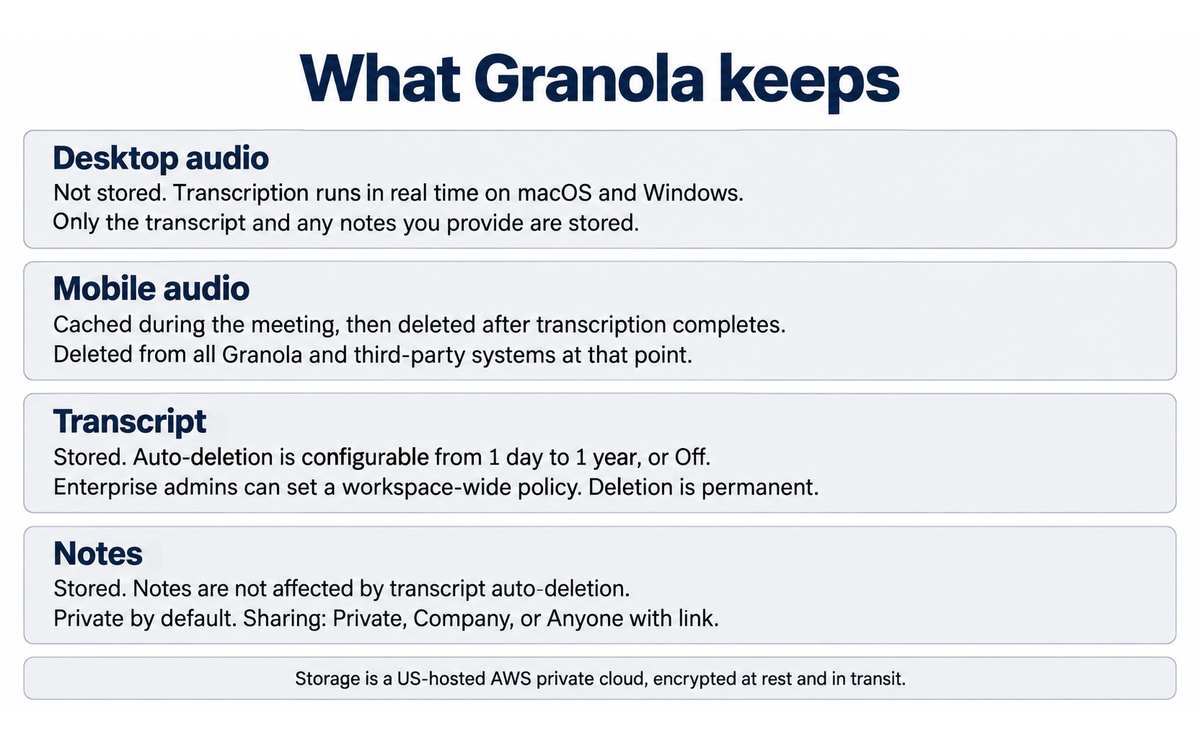
Four separate things are involved and the vendor describes them in four different places. Keeping them apart matters.
Audio on desktop. Granola transcribes in real time on macOS and Windows and does not store the audio from meetings. The security page states that Granola does not store the audio from meetings and stores only the transcript and any notes you provide.
Audio on mobile. The mobile application temporarily caches audio during the meeting and deletes it once transcription completes. The help documentation states that cached audio is deleted from all Granola and third-party systems at that point. The security page says the same thing in the same words, describing transcription after the meeting using temporarily cached audio on mobile.
Transcripts. Transcripts are stored, and their retention is configurable. Individual users can set an auto-deletion period of 1 day, 1 week, 1 month, 3 months, 6 months or 1 year, or set it Off. A one-week cooldown applies before the first deletions take effect. Enterprise administrators can request a workspace-wide policy that applies to all users and cannot be overridden locally, and when a workspace policy is activated, existing transcripts older than the period are deleted immediately with no cooldown. The vendor warns that transcript deletion is permanent and irreversible, that notes are unaffected, and that once a transcript is deleted you can no longer regenerate the notes from it.
Notes. Your AI-enhanced notes and your own typed notes are retained as notes and are not affected by transcript auto-deletion. Notes are private by default, with sharing in three levels: Private, Only your company, and Anyone with link. Administration cannot read your individual notes; administrators on Enterprise can set maximum sharing permissions but cannot view private notes.
Storage. Notes are stored in a United States-hosted AWS virtual private cloud, encrypted at rest and in transit, and backed up daily.
The models
The vendor does not name a single model. Summary notes are produced by what the documentation calls a combination of models, evaluated and switched over time for different meeting types. Transcription is handled by named third-party providers, and the vendor names Deepgram and Assembly. Summarisation uses third-party AI providers, and the vendor names OpenAI and Anthropic. Bringing your own model is not supported today.
Granola Chat lets you select a model, and on Enterprise the administrator has controls over model choice.
Model training, stated exactly
This is the clause that most readers will be looking for, so it is set out carefully.
The default for individual accounts is that anonymised or de-identified data may be used to improve Granola's models. The security page says the vendor trains on your anonymised data, and that you can opt out in Settings. The model-training documentation says that by default Granola may use anonymised data to improve its services, that the data is never sent to third parties, and that you can opt out at any time with a toggle labelled Use my data to improve models for everyone. The toggle applies to the whole account. It is not available in the Android application, so it must be changed from desktop or iOS.
Enterprise workspaces are opted out by default, and administrators can enforce the setting across the organisation from the workspace side, with the toggle relabelled to refer to workspace data.
The privacy policy adds a sentence that a reader should not skim. De-identified and aggregated data that has been lawfully incorporated into AI or analytics models will not be removed from those models and datasets, because removal may not be technically feasible without complete model retraining or database reconstruction. Opting out stops the contribution going forward. It does not withdraw a contribution already made.
Integrations
Granola connects outward through a calendar sync, Slack, Notion, Zapier, three named CRMs, a Model Context Protocol server and a REST API.
Calendar. Granola syncs your calendar, detects meetings, and prepares a pre-meeting brief covering who is attending, what was discussed last time, and what matters now.
Slack. Post a note link to a channel, either per note or for any note added to a folder. The vendor's plan summary describes auto-posting summaries to channels after meetings end.
Notion. Send notes to a personal Notion database.
Zapier. Connect to more than eight thousand applications through the vendor's Zapier templates.
CRMs. Match notes to the right people, company or deal records in Attio, HubSpot or Affinity.
Model Context Protocol. Connect Granola to AI assistants such as Claude and ChatGPT so those assistants can query notes, browse folders, search by date range and read transcripts. The documentation states this is available for all users, with extra folder and transcript tools on paid plans.
REST API. Available on Business and Enterprise. Keys can be scoped to personal notes, public workspace notes, or both.
The Business plan is where the integration surface opens up. The vendor's own plan documentation names Attio, Notion, Slack, HubSpot, Affinity and Zapier as the advanced integrations unlocked at that tier, together with MCP in all your apps and API access, and states that the Basic plan excludes integrations.
The note structure
Granola's notes are template-driven. You choose the meeting type and the note is summarised according to that type. Users repeatedly name the templates as a reason the output is usable, and one of the vendor's quoted reviews puts it directly, that choosing the meeting type so the notes are summarised accordingly is what they value. Notes are also enhanced around your own writing rather than replacing it: you type, Granola transcribes, and the two are combined. A user review describes the behaviour in the same terms, that you can write notes at the same time and it will combine everything.
Pricing
Plan | Price | What it includes | What it excludes |
Basic | 0 US dollars per user per month | AI meeting notes, limited meeting history, AI chat within and across meetings, shared folders, custom note templates, multi-language support, opt out of model training | Integrations, unlimited history, and advanced AI thinking models |
Business | 14 US dollars per user per month | Everything in Basic, plus unlimited meeting notes and history, advanced AI thinking models, advanced integrations with Attio, Notion, Slack, HubSpot, Affinity and Zapier, centralised billing and user management, MCP integration in all your apps, API access | Enterprise security and administration controls |
Enterprise | 35 US dollars per user per month | Everything in Business, plus enterprise-grade security and administration controls, single sign-on, priority support and usage analytics, organisation-wide auto-deletion periods, administrator controls for sharing and API access, model-training opt-out for everyone in the team, and an org-wide notification that Granola is being used | Nothing stated as excluded |
Two figures the vendor publishes elsewhere do not match the pricing page, and both are noted in the Faculty Note rather than resolved here. One vendor blog post describes the Enterprise tier as starting at 30 US dollars and above and requiring a sales conversation, while the pricing page states 35 US dollars per user per month. Another describes the Basic plan as free with unlimited meetings, while the pricing page and the vendor's own plan breakdown describe the free plan as carrying limited meeting history.
Security posture
The vendor holds SOC 2 Type II certification and publishes a Trust Center for the full report. A Data Processing Agreement is available on request, and the vendor states GDPR compliance with a UK entity. ISO 27001 is stated as not yet available. The vendor maintains a public Vulnerability Disclosure Policy and has published post-mortems for resolved vulnerabilities, including a Google Workspace session logout issue, an unmanaged Google Workspace account auto-join issue, and an exposure of an AssemblyAI API key. Publishing a post-mortem is a positive signal about process and should be recorded as one.
The gaps are stated by the vendor and are more decision-relevant than the certifications.
FERPA. Granola is not currently FERPA compliant. The documentation says plainly that if an institution requires FERPA compliance, Granola may not be suitable for use with student education records at this time.
Data residency. The vendor does not offer EU, UK or other regional data residency at this time, and states that it recognises this is important for many customers.
HIPAA. The vendor addresses health data with a Business Associate Agreement framework, with a carve-out under which, where a BAA applies, protected health information is not used to train models, is not sent to consumer-facing AI tools, and is subject to flowdown terms. Outside a BAA, the vendor places responsibility on the user: the user is responsible for providing any required notices and obtaining any required consents before recording or processing a patient encounter, including as required by applicable state recording laws.
Special category data. The privacy policy places the equivalent responsibility on the user for special category personal data, stating that users are responsible for ensuring they have an appropriate lawful basis or a condition under the applicable data protection law, and for providing any notices or obtaining any consents required.
Getting Started with Granola
A 15-minute onboarding checklist
Install the desktop application for macOS or Windows from granola.ai. The web viewer cannot capture audio, so the desktop application is not optional for transcription.
Sign in with a Google Workspace or Microsoft account.
Connect your calendar. Granola uses it to detect meetings and to prepare a pre-meeting brief.
Open Settings, then Preferences, and find the model-training toggle labelled Use my data to improve models for everyone. If you are not authorised to consent to that on behalf of your institution, turn it off before you run your first real meeting. On an Enterprise workspace the toggle is administered at workspace level.
Find Auto deletion period for transcripts under the Data and sharing section, and set a retention period. One month is a reasonable starting point. Confirm the one-week cooldown, and understand that deletion is permanent and that notes cannot be regenerated from a deleted transcript.
Turn on a transparency feature. Granola offers an automated meeting-chat message and a video watermark. Both are available on Free and Business plans for an individual, and both can be enforced workspace-wide by an Enterprise administrator. Turning one on is the difference between a recorder your participants can see and one they cannot.
Create a note template for the meeting type you run most often. This is the feature users name most consistently, and it is where the output quality actually comes from.
Run one low-stakes internal meeting end to end. Confirm the note structure, check the transcript against your memory of the conversation, and note anything the summary got wrong.
Type your own lines during the next meeting. The tool's value is highest when it is enhancing your notes rather than replacing them, and this is also the habit that keeps your critical thinking engaged.
Decide your disclosure wording before your first external call, not during it. Section 7c explains why this is a governance step rather than a courtesy.
What to tell your institution before you deploy it
If you are introducing Granola to a team rather than using it alone, four things need a written answer before the first external meeting. The Business plan unlocks integrations, so if you are on Business or above, add a fifth.
What is our disclosure step, who performs it, and is it logged?
What is our transcript retention period, and who administers it?
Is model training off, and is that enforced at workspace level?
Are we processing anything that falls under a special-category or student-record rule, and if so, is Granola the right tool for that conversation?
Which integrations are enabled, and what does the CRM or Slack destination hold after the note is pushed?
Real Workflows
Each workflow below carries a verification checklist. The checklists are the operative part. The point is not that the tool is unreliable in general, it is that the specific failures the tool can produce are the ones you are least likely to notice.
Workflow 1: A weekly programme review
The situation. A programme meeting with a fixed attendee list, a standing agenda, and a need for a durable record of decisions and owners.
What you do. Create a template for the meeting type with the sections you actually use, for example decisions, owners, and open questions. Open the note before the scheduled start time so transcription begins at the start. Type the two or three things you know you need to capture exactly, so the AI content is built around your own record rather than instead of it. After the meeting, read the generated note and correct the owners and the dates by hand.
Why the tool helps. The time saved is not the typing, it is the reconstruction. A structured draft exists before you have left the room, and the meeting can be conducted without a keyboard.
Verification checklist.
☐ Every named owner in the note is the person who actually agreed to the action
☐ Every date and deadline in the note matches what was said
☐ Every decision recorded includes the reasoning, and not just the outcome
☐ Anything discussed under a confidentiality expectation was handled per your policy
☐ Any section the model invented or overstated has been corrected by hand
Workflow 2: A user or stakeholder interview
The situation. A one-to-one research interview with an external participant, where a bot in the room would change what the participant says.
What you do. Disclose before the session. Granola's own consent guidance recommends informing participants before the recording begins, then confirming verbally at the start of the call, and capturing the participant's spoken affirmation in the transcript so the consent sits in the same record as the conversation. Do that. Use the automated chat message or the watermark as a second signal. Pause transcription if the conversation moves into something the participant did not agree to have recorded, then resume. After the session, set the transcript retention period appropriately and consider a shorter period than your default for this class of content.
Why the tool helps. This is the workflow where the bot-free design is not a convenience but the enabling condition. The conversation can be recorded at all because nobody joined it.
Verification checklist.
☐ Disclosure happened before the substantive discussion, not after
☐ The participant's affirmative response is in the transcript
☐ Any sensitive turn was paused and the pause is visible in the transcript
☐ The transcript retention period for this note matches the consent you obtained
☐ No quote attributed to the participant in the summary says something they did not say
Workflow 3: Turning meeting history into a briefing
The situation. You have weeks of Granola notes and you want an answer that spans them, for example every objection a client raised across a quarter.
What you do. Use Granola Chat across meetings, or connect the Model Context Protocol server to an AI assistant you already use, and query the archive. On Business and Enterprise you can also reach the notes through the REST API. Build the answer, then check it against the individual notes it cites.
Why the tool helps. This is the workflow that turns a note-taker into institutional memory, and the vendor's Business plan is explicitly positioned around it.
This is also the workflow with the highest AI Imposture Risk in the product, and the reason is structural. A synthesis across many transcripts is the kind of output a reader cannot verify from memory. It reads as a finding. It is a generated summary of generated summaries, and every error introduced upstream is now indistinguishable from a fact.
Verification checklist.
☐ Every claim in the synthesis resolves to a specific note you can open
☐ Each cited note actually says what the synthesis says it says
☐ The synthesis distinguishes between what a participant said and what the summary inferred
☐ Any participant covered by the archive consented to a record that persists this long
☐ The output is labelled as a generated synthesis wherever it is shared, not presented as your own finding
Strengths, Limits, and AI Imposture Risk
Strengths
The capture mechanism is a genuine design difference, not a marketing variation. Local device capture with no bot in the participant list changes which meetings can be recorded at all.
Desktop audio is not stored. This is the strongest data-minimisation property in the product, and the vendor is consistent about it across its security page, its help documentation and its privacy policy.
The vendor states its own compliance gaps as plainly as its compliance wins, naming FERPA and data residency rather than leaving them to be discovered.
The note structure is template-driven and combines your writing with the transcription. This is the mechanism behind the user-reported quality, and it is a real one.
The integration surface is unusually open for the category. A Model Context Protocol server available to all users, plus a REST API on paid plans, means meeting context is portable rather than trapped.
Enterprise model training is off by default and administrator-enforceable, which is the right default for the tier where an institution would be buying.
The vendor publishes vulnerability post-mortems, including for its own past incidents, which is a credible process signal.
Transcript auto-deletion with a workspace-wide administrator policy, including immediate enforcement without a cooldown, is a stronger retention control than most competitors publish.
Limits
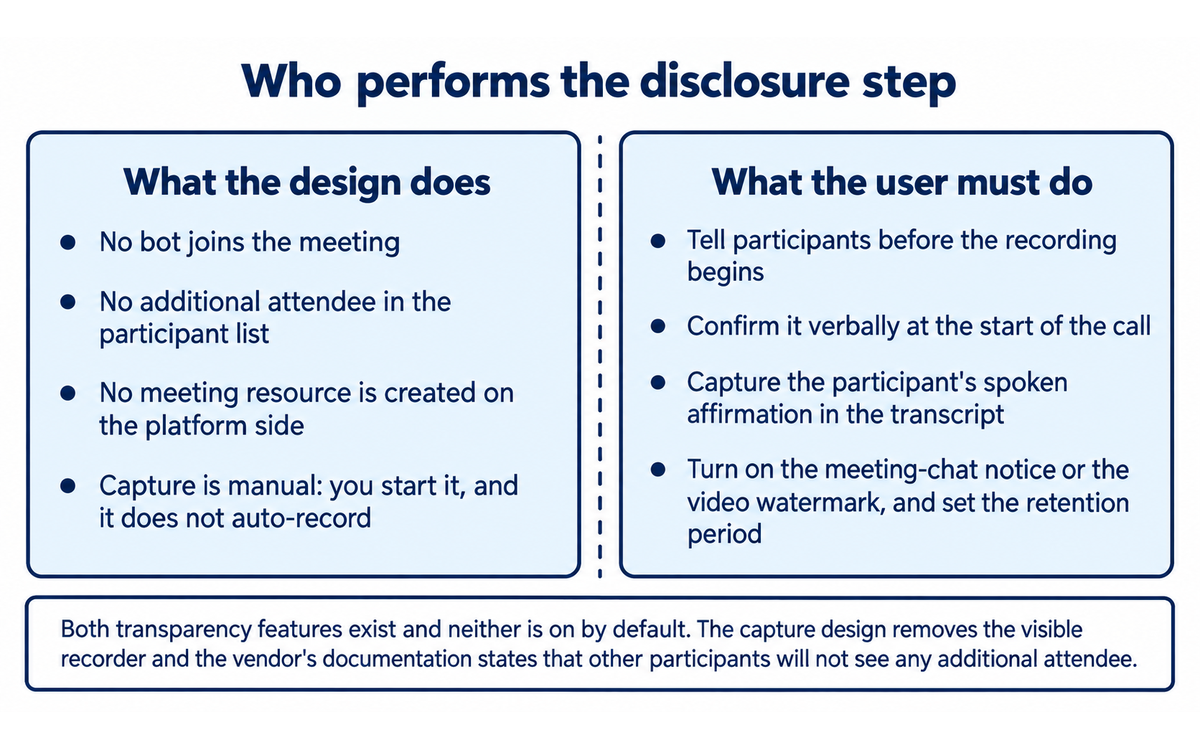
The consent burden is transferred to the user and is not reduced by the design. The vendor states that other participants will not see any additional attendee and that you are responsible for obtaining consent. The tool's answer to consent is a feature you can turn on, not a behaviour you must accept.
The transparency features are not on by default. A user who never discovers the chat-message and watermark settings runs an undisclosed recorder, which is the exact posture the live litigation describes.
Transcript default retention is Off. The control exists and the default is to keep transcripts indefinitely unless someone changes it.
Model-training default is on for individual accounts and the Android application cannot change the setting locally.
The opt-out is prospective. The privacy policy states that de-identified data already incorporated into a model will not be removed, because that is not technically feasible without retraining. An opt-out is not an erasure.
No published independent accuracy measurement exists for transcription quality, speaker attribution or summary fidelity. Every quality figure in circulation comes from the vendor or from users.
The vendor's own surfaces disagree on price and on what the free tier includes, which makes any budget figure read from a blog post unreliable.
No education-sector compliance. Granola is not FERPA compliant, and an institution with student records in scope cannot adopt it for those conversations.
No regional data residency. Storage is in the United States.
The web interface cannot transcribe. Any workflow assuming a browser-only deployment will not work.
Session boundaries are imperfect. If you leave a note open, transcription continues past the end of the meeting, and anything said in the room after the call enters the transcript.
AI Imposture Risk
Trap | Rating | Evidence |
Time Illusion | Medium | The saving is real but it is not where users expect it. Transcription runs in the background, so the meeting itself is not slower, and the note exists within a minute of the end. The overhead users underestimate is downstream: correcting owners and dates, re-reading a transcript, and the disclosure step itself. Users also underestimate the time cost of the cross-meeting workflows, where a query produces a fluent answer that then has to be traced back to individual notes to be trusted. A vendor blog post in circulation states that note cleanup is still needed for niche topics and spelling, which matches what users report. |
Quantity Illusion | Medium | The tool produces structured, readable notes for every meeting, and volume is the point of the product. The exposure is that a well-formatted note is accepted as a complete one. Granola's output is templated, so a missing decision reads as a section that was not needed rather than as a section the model failed to fill. The transcript is the corrective, and it is one click away, which is why this is Medium rather than High: the raw material to check the summary is retained in the same product. On any plan with transcript auto-deletion enabled, that corrective expires on a schedule, and the Quantity Illusion rating rises for anyone who has deleted the transcript and kept the note. |
Skill Illusion | High | This is where the product is most exposed, and the reason is that the tool removes the note-taking skill from the user's practice while delivering a note that looks as though the user wrote it. A user who stops writing their own notes does not build the summarisation, prioritisation and listening discipline that note-taking develops, and nothing in the product replaces it. The second mechanism is the cross-meeting synthesis, where the output is a generated summary of generated summaries with no independent anchor; a user who has never checked a summary against a transcript cannot evaluate the synthesis. The third is disclosure practice, which is a professional judgement the tool lets a user skip entirely. The vendor's own consent documentation recommends verbal confirmation and a documented consent step, which is evidence that the vendor expects the user to exercise a skill the product does not teach. |
Overall AI Imposture Risk: High, driven by the Skill Illusion rating.
Why the score is not higher
The CI-First framework measures benefit to the human net of overhead. Granola performs well on Time, well on Quantity, and moderately on Quality, and the Skill dimension is capped by a product decision rather than a product defect. The tool is built to make note-taking disappear. That is a legitimate goal and a genuine benefit. It is also, in the framework's terms, the definition of a skill offload, and the framework is explicit that the Skill dimension is where illusion is most likely and where a reviewer should be conservative.
Quality is scored at 6 and the cap is measurement, not performance. The notes users describe sound good, and the vendor's transcription providers are credible, but no independent party has published an accuracy figure. The vendor's own category comparison places AI notetakers generally at 85 to 95 per cent accuracy, which is the vendor's own band for a class of tools rather than a measurement of this one, and the same table places human transcription above 99 per cent. That is a vendor-published framing of its own category, and it is the closest thing to a number that exists.
Section 7c: Recording consent and the data flow, stated plainly
This section is a governance finding. It does not change any score in this review, and the reason no score changes is stated at the end of the section.
The finding
Granola's differentiator is that it records a meeting without any participant seeing a recorder. The vendor states this as a design property, and the same property is the subject of a live federal lawsuit in which a meeting participant who never used Granola alleges that the software intercepted her side of a conversation without her knowledge or consent.
These are two separate things and they are kept separate here. The first is a documented design fact. The second is an allegation in a complaint. Nothing in the complaint is proven and Granola had not responded on the merits when this review was written.
The design, quoted from the vendor
The vendor's help documentation states the mechanism in its own words:
Granola runs locally on your device and captures audio directly from your microphone and system audio. No bot joins your meeting. Other participants will not see any additional attendee. This is a core part of our privacy-first design.
The same page states the allocation of responsibility:
You are responsible for obtaining consent from participants before using Granola.
And the vendor's guidance on when to use AI notetaking opens with the instruction:
Always get consent when transcribing others
The vendor's consent guidance goes further than a warning and prescribes the practice, recommending that disclosure happen before the recording begins, that it be confirmed verbally at the start of the call, and that the participant's spoken affirmation be captured in the transcript so that consent is documented in the same record as the conversation. The vendor supplies the notification features to make that repeatable. There are two: an automated meeting-chat message posted when transcription starts, and a video watermark that stays visible throughout the call.
The material finding here is the default. Both transparency features exist. Neither is on unless a user or an administrator turns it on. The vendor's own explanation of why the tools are needed is the sentence that participants will not see any additional attendee. A tool whose distinguishing property is the absence of a visible recorder, whose disclosure mechanism is optional, and whose configuration is controlled by the person who benefits from the recording, is a consent architecture that depends entirely on user discipline.
The litigation
On 30 July 2026, a proposed class action was filed in the United States District Court for the Northern District of California: Chamberlain v. Granola, Inc. and Granola Labs Ltd., No. 3:26-cv-07926, assigned to Judge Edward M. Chen. The plaintiff, Tarra Chamberlain, is a Florida resident and is not a Granola customer. She alleges that Granola's software was present in meetings she attended, run by another participant, and that her side of those conversations was intercepted, transcribed in real time and processed without her knowledge or consent. She further alleges that Granola uses transcription data for commercial purposes, including training its AI models, by default.
The complaint pleads seven claims: the federal Wiretap Act under the Electronic Communications Privacy Act; the California Invasion of Privacy Act at sections 631 and 632; California's computer data and fraud statute; common-law intrusion upon seclusion; California's Unfair Competition Law; and unjust enrichment. It seeks relief on behalf of a proposed nationwide class and a California subclass, with statutory, actual and punitive damages, restitution and disgorgement, injunctive relief and attorneys' fees.
The statutory exposure described in the complaint is material to the reading, not to any finding of liability. Reporting on the filing places the damages available under the federal Wiretap Act at the greater of actual damages, 100 US dollars per day of violation, or 10,000 US dollars, and the California statute at 5,000 US dollars per violation, with the complaint alleging that the proposed classes likely consist of millions of individuals. The complaint reports these are allegations.
Status: filed, no merits ruling, no finding of liability. The parties stipulated in August 2026 to extend the defendants' deadline to respond. A complaint is a set of allegations and a filing date is not a verdict.
Why this is the decision-relevant fact for an institution
Read the two documents against each other and the adoption question becomes concrete.
The vendor's security page states that you have to manually start Granola for a meeting and that it will not auto-join anything, and its transcription documentation states that if you are clicked into an upcoming meeting, Granola starts transcribing automatically at the scheduled start time. Granola therefore records exactly when you told it to, and it is your own action that starts it.
The vendor's product messaging describes the absence of a visible recorder as the advantage. The litigation describes the same absence as the mechanism of the alleged harm. Both readings are of the same engineering fact. Which one applies to your institution depends on whether your institution treats the user's own disclosure step as a sufficient control.
That is a policy question with a defensible answer on both sides, and this section does not resolve it. What it does is name the two mechanisms that decide it: whether your disclosure step is mandatory and logged, and whether the tool's own notification features are required rather than available.
The second half of the finding is the data flow. The vendor's own documents describe a default worth stating plainly. For individual accounts, model training is on by default, and opting out of it does not withdraw data already contributed. For Enterprise workspaces it is off by default and administrator-enforceable. Audio is not stored on desktop and is deleted after transcription on mobile. Transcripts are stored and their retention is Off by default, configurable from one day to one year, with a workspace-wide enterprise policy possible. Notes are retained as notes and are unaffected by transcript deletion. A user who runs Granola on the free or Business tier with default settings is therefore building a permanent, training-eligible, machine-readable archive of every meeting they record, with the notification features available and unused.
The contract terms a reader should know
Two clauses in the vendor's own terms change how a reader should think about what they are buying. They are quoted because the operative wording matters more than a summary of it.
The first is ownership and control. The User Terms state that content an authorised user stores in the service is Customer Data, and that:
you acknowledge and agree that such Customer Data is owned by Customer
This is a favourable position for an institutional buyer and it belongs in the record. The same clause continues with the control that follows from it:
For example, Customer may provision or deprovision your access to the Services, Workspace, or Customer Data, enable or disable third-party integrations, manage permissions, retention and export settings, transfer, assign or consolidate Workspaces, including the Customer Data, and these choices and instructions may result in the access, use, disclosure, modification or deletion of certain or all Customer Data.
Read the two sentences together and the practical position is clear. Your institution owns the content, and your institution can also delete it, including through a consolidation or transfer of workspaces. An institution that adopts Granola should therefore treat workspace administration as a governed role with a documented policy, because the same administrative surface that protects the data can remove it.
The second is liability. The User Terms exclude indirect and consequential damages, and then set a ceiling:
OUR MAXIMUM AGGREGATE LIABILITY TO YOU FOR ANY BREACH OF THE USER TERMS IS ONE HUNDRED DOLLARS ($100) IN THE AGGREGATE.
The governing law and exclusive jurisdiction is the State of California. This is ordinary software-as-a-service drafting and it is not a scandal. It is also the context in which a reader should place any assurance about recording compliance. A vendor's contractual exposure for a consent failure by a user is capped at 100 US dollars per user, while the statutory exposure described in the pending complaint is per violation across a class. The vendor's compliance architecture, the SOC 2 Type II certification and the data-minimisation design are real, and the contract places the recording-consent judgement on the customer, which is exactly where the vendor's own documentation puts it.
Why no score changed
No score changed in this review, and the reason is methodological. The CI-First framework measures benefit to the human across Time, Quantity, Quality and Skill, and it measures the three Humics dimensions. It has no dimension for legal risk, regulatory exposure or supplier conduct. That is correct as methodology and it would be an error to fold a pending lawsuit into a Quality sub-score, because the Quality dimension asks whether the output is good, not whether the practice is lawful. The Skill Illusion rating of High already reflects the consent-skipping behaviour this section documents, so the governance finding is visible in the assessment rather than excluded from it.
What this section does not do
It does not assert that Granola has broken any law. It does not treat a complaint as a finding. It does not advise against the tool, because that would substitute this review's judgement for your institution's, which is the decision the section exists to inform. It states the vendor's own design and documentation, attributes the allegations to the plaintiffs, and names the decision that sits in front of a reader: whether your institution requires the tool to announce itself, or whether your institution's own disclosure step is a sufficient control.
U365 Co-Intelligence Rating
CI-First Profile
Primary: Co-Worker and Assistant (Profile 2). Granola executes the routine work of capturing and structuring a meeting while you direct the conversation and review the result.
Secondary: Analyst and Tester (Profile 4). Granola Chat and the Model Context Protocol surface turn the notes archive into a queryable dataset across meetings, which is analytic work the user would otherwise do by hand.
The product does not operate as a Coach and Tutor (Profile 3) in any meaningful sense. Nothing in Granola teaches you to run a better meeting, and that absence is the reason the Skill dimension scores as it does.
Collaboration Mode: Centaur
Centaur, derived from the framework's own rule. Framework Section 7.2 states that Imposture Risk at Medium or High means Centaur, because Centaur mode is safer, and this review rates overall AI Imposture Risk High on the strength of the Skill Illusion rating. The mode is therefore Centaur rather than Cyborg.
The practical reading for a user is that the division of labour should be explicit and stable. The human runs the conversation, sets the disclosure step, and owns the decisions and the owners recorded in the note. Granola captures, structures and makes the archive queryable. The human does not dissolve into the tool, which is precisely what Cyborg mode would mean for a recorder that runs whether or not you are paying attention to it.
Dimension | Score | Rationale |
Time | 7 | The saving is real and it lands where the problem is. Transcription runs in the background so the meeting is not slowed, and a structured draft exists within a minute of the end. The score is held below 8 by the downstream overhead the tool does not remove: correcting owners and dates by hand, the disclosure step before each external call, and the tracing work required before any cross-meeting synthesis can be trusted. |
Quantity | 7 | Every meeting now produces a durable structured note, and the archive compounds, which is exactly what the Quantity dimension measures. The score is held below 8 because the volume is only useful if it stays navigable, and the searchable unit is the note while the corrective is the transcript, which is deleted on a schedule the user has to choose deliberately. |
Quality | 6 | The notes users describe are clean, structured and usable, and the template mechanism is the reason. The score is capped at 6 by the total absence of independent measurement of transcription accuracy, speaker attribution or summary fidelity. It is also capped by a documented failure mode users report, which is AI-generated content that changes the meaning of what was said, and by the vendor's own category figure placing AI notetakers in an 85 to 95 per cent band against above 99 per cent for human transcription. The cap is measurement and not measured weakness, and the two are distinguished deliberately. |
Skill | 4 | Conservative by principle, because the framework requires it where illusion is most likely. Granola removes the note-taking practice entirely and returns a polished artefact, so the user stops exercising the summarisation, prioritisation and listening discipline that manual note-taking builds, and nothing in the product substitutes a teaching function. A real skill does transfer, which is meeting design and disclosure judgement, and that is why this is a 4 rather than a 2. It is not higher because the common case does not include the deliberate practice that would realise the benefit. |
CI-First Benefit Score: (7 + 7 + 6 + 4) / 4 = 6.0. Band: CI-First Positive.
Humics Protection Rating
Dimension | Rating | Rationale |
Creativity | 0 | Neutral. Granola does not generate the content of a conversation and it does not replace the creation of the work discussed in it. It shapes the record of that work, and a template can as easily flatten a discussion into a fixed shape as preserve what was unusual about it. On balance the effect cancels. |
Critical Thinking | -1 | Erodes. The mechanism is the polished templated note that arrives finished. A reader of that note, including the user who was in the room, is not prompted to ask what was left out, and the transcript that would answer the question is deleted on a schedule if transcript auto-deletion is enabled. The cross-meeting synthesis compounds the effect, because a generated summary of generated summaries carries no signal that it needs checking. |
Social Authenticity | -1 | Erodes. The specific harm is that a summary of a conversation is attributed to the user who recorded it and is frequently shared as the record of what was agreed. Colleagues and external participants receive agent-authored text as the user's account of a conversation they took part in, and in the default configuration they never knew the recording was happening. The Humics dimension is about what happens to authentic human communication, and a meeting record authored by a system that nobody in the conversation agreed to is a direct instance of it. |
Humics Protection Score: 0 + (-1) + (-1) = -1. Badge: Humics-Neutral.
Framework v1.2 clause note
Clause 5.2.3-a, agent-authored procedural memory. Applies. Granola writes durable, agent-authored artefacts into the user's own workspace as a matter of course. Every recorded meeting produces an AI-enhanced note and a stored transcript, the note survives transcript deletion, the archive is unlimited on paid plans, and the content is designed to be retrieved later through Granola Chat, shared folders, the Model Context Protocol server and the REST API. This is procedural memory for a working practice, authored by the agent and retained for the user, and it arrives with no per-write human decision. The clause's instruction is that the Skill Illusion floor is no lower than Medium, and this review records Skill Illusion as High on the evidence set out in Section 11. No score was adjusted to a floor, because the assessed rating already sits above it.
Clause 4.2-a, agent-mediated conversation. Applies, in the common case of the product and not merely in an edge case. The clause returns a null when the surface is a disclosed business agent deploying itself to its own users, or when a change in channel composition changes nothing. Neither null condition holds here. The surface is not a disclosed agent: it is an undisclosed recorder and summariser that authors the record of a conversation on behalf of one participant. The agent changes the composition of the interaction, because the other participants address a person while a system they have not been told about produces the account of what they said. The product's Business plan is positioned around sharing those notes into Slack, Notion and CRM records, which is where the agent-authored text is presented to other humans as the user's own account of a meeting. The boundary is stated explicitly so that a narrower reading is possible: a private note that is never shared and never exported would not reach the clause, and a reviewer who stopped there could return a null. That reading does not describe the product's common case, and the clause is assessed on the common case.
Clause 7.5, team-level rooms. Null. Granola's agent work runs inside a single user's execution. The agent captures, transcribes and summarises for that user, and the shared surfaces in the product, which are folders, workspaces and note links, are human collaboration spaces rather than a channel in which more than one agent acts. There is no team-level room in the clause's sense and no requirement for Centaur follows from it. Centaur is recorded above for the separate reason the framework gives, which is the Imposture Risk rating.
Superhuman Usage Guidance
When to invite Granola.
Routine internal meetings where the cost of losing the detail is real and the sensitivity is low.
Research and discovery conversations where a bot in the room would change what the participant says, provided your disclosure step is in place and logged.
Any meeting type you run repeatedly, where a template turns the output from generic to usable.
Workflow 3 from Section 10, retrieving a decision or an objection across weeks of notes, with the verification checklist applied.
When to keep Granola out.
Any conversation covered by a rule your institution treats as non-negotiable, including student education records while the FERPA position stands.
Conversations where you cannot name every participant and tell them before the recording starts.
Final decisions and commitments. The note records the decision, it does not make it.
Anything you would be unwilling to have stored in a training-eligible archive, unless you have turned model training off and set a retention period first.
Any cross-meeting synthesis that will be circulated without a trace back to the notes it summarises.
U365 method integration.
LIPS and CARE. Granola fits the Collect step of the CARE cycle well and it does not fit the Action Plan, Review or Execute steps. The note is raw material for a second brain, not a replacement for one, and the Model Context Protocol server is the mechanism by which a Granola note can be pulled into a LIPS workflow rather than left in Granola.
UP-Context. Granola responds to structure, and a note template is the natural place to encode it. A template that names the domains you want captured in each meeting type produces a note that matches how you think, and the pre-meeting brief is the surface where personal context about an attendee is most useful.
UNOP. Weak fit, and the honest reading is that it is weak. Spaced repetition and active recall depend on the user reconstructing content from memory, and a recorder that removes the reconstruction removes the practice. If you want the UNOP benefit, read the note and then reproduce its structure yourself before the transcript is deleted.
EVA. Explore and Visualize are supported through the archive and the cross-meeting chat. The Action Plan step is not, because Granola records plans that were made elsewhere.
SL-OS. Meeting notes are a direct input to a Microsoft 365 working environment, and the Slack, Notion and CRM integrations plus the REST API are the ways that input travels. The tool does not write into OneNote, To Do or SharePoint natively, so an institutional deployment needs either the API or a workflow layer such as Zapier to land a note where an SL-OS workflow can use it.
Over-delegation warning.
Over-delegation with Granola is not the user who records everything. It is the user who stops reading. The pattern has three stages and each one is quiet.
First, the user stops taking their own notes, because the generated note is better than their handwriting. The listening discipline that manual note-taking built is now unused.
Second, the user stops reading the transcript, because the note is clean and structured. The corrective is still there, one click away, and it stops being opened.
Third, the user turns on transcript auto-deletion, because keeping transcripts forever felt untidy. The corrective is now gone, and the note is the only record. The Quantity Illusion rating in Section 11 rises for this user specifically, because the raw material that would have caught an error has been deleted by a setting chosen for good housekeeping reasons.
The cross-meeting workflow is where the third stage does its damage. A user who has never checked a summary against a transcript, and who now has no transcripts, asks Granola Chat what was agreed across a quarter and receives a fluent answer. There is nothing in the product that marks that answer as a summary of summaries. If you stop verifying output, your human input drops, and CI-First drops even though the tool has not changed. The Superhuman who stops reading becomes Sub-human.
What Users Say
Ratings and review counts below were read on the dates given. Where a platform shows no reviews, that is stated rather than filled.
Platform | Rating | Reviews | Read on | Notes |
G2, product page | 4.7 out of 5 | 35 | 2026-09-25 | 88 per cent five-star, 8 per cent four-star, 2 per cent three-star |
G2, seller page | 4.8 out of 5 | 30 | 2026-09-25 | Same product, different aggregate; 27 five-star, 2 four-star, 1 three-star |
Apple App Store | 5.0 out of 5 | 8.2 thousand ratings, and 13 thousand ratings on a second store listing surface read on the same day | 2026-09-25 | The two figures appear on different App Store review surfaces for the same application |
Google Play | 4.9 out of 5 | 1.18 thousand reviews, more than 100 thousand downloads | 2026-09-25 | Vendor replies to reviews are visible on the listing |
Product Hunt | 4.8 out of 5 | 53 reviews on one page and 55 on another, read on the same day | 2026-09-25 | Launch on 22 May 2024, 341 upvotes, fifth on the daily leaderboard |
Trustpilot | No reviews | 0 | 2026-09-25 | The Trustpilot profile exists and states that the company has not received any reviews yet |
Capterra | No reviews found on Capterra for this product at the time of writing | |||
GetApp | No reviews found on GetApp for this product at the time of writing |
Two of the rows above are worth naming as findings rather than noise. The same product shows 4.7 with 35 reviews on one G2 surface and 4.8 with 30 reviews on another, and the App Store shows 8.2 thousand ratings and 13 thousand ratings on two surfaces read minutes apart. This review does not resolve which aggregate is current and does not invent a reconciliation. The consistent part is the rating level, which is high everywhere independent users have reviewed the product.
What reviewers praise, in their own terms
The theme that appears on every platform is attention. Reviewers describe the product as letting them stay in the conversation rather than writing it down, and the phrase about not being able to afford a professional note-taker appears more than once.
The second theme is the absence of a bot, and reviewers state it as a reason they chose the product rather than as a feature. One G2 reviewer writes that it is much better than the AI notetakers that join a meeting because it does not disrupt the flow at all. Another says it does not join your calls like other note-takers, that this was a big deal for them, and that the AI is accurate. An App Store reviewer states the design position in the terms the litigation in Section 7c concerns: that it does not join the meeting as a bot, does not require anyone's permission or awareness, and that this alone is worth five stars. That sentence is a user reading the same design fact this review treats as a governance question, and both readings are honest.
The third theme is the combination of your own notes with the transcription. Reviewers describe typing during the meeting and finding the two merged afterwards. This is the mechanism behind the Quality score.
The fourth theme is the templates. Reviewers name the ability to choose the meeting type and have the notes summarised accordingly as the thing that makes the output usable, and several credit it as the reason they upgraded.
What reviewers criticise
Hallucination and meaning change in AI-generated notes. One App Store reviewer states that the AI notes are often hallucinating and change the meaning, making the whole note less usable, and notes that raw notes cannot be edited in the application. A G2 review sentiment summary lists AI inaccuracy among the recurring negatives. This is a direct, user-reported hit on the Quality dimension and it is the reason Section 10's checklists insist on correcting by hand.
Cleanup on niche topics and spelling. A reviewer describes still needing some cleanup for niche topics and spelling, while calling the overall level of note-taking something that was impossible for them before.
Upload failure with data loss. A Google Play reviewer describes a work meeting where the note failed to upload, retries returned the same error, and the only other option offered was to delete the note, losing the information with no way to retain the recording. The vendor replied on the listing asking the user to make contact. This is the sharpest reliability complaint found and it is recorded as a real failure mode: a local-capture product still depends on a working upload, and a failed upload is a lost meeting.
Integration and feature limits on the free tier. Review sentiment summaries list limited features, lack of integration, limited language support and integration issues among the negatives, which matches the vendor's own description of the Basic plan.
Device and environment sensitivity. One reviewer reports that it struggles to capture notes in a car, which is a specific limit of the local-capture approach rather than a defect.
A reviewer reports that the application runs without being invited to a meeting and while the phone screen is locked. Read alongside the vendor's own warning that an open note continues transcribing past the end of a meeting, this is the same behaviour described from the user side as a benefit and by the vendor as something to watch.
U365 editorial note
The user evidence on Granola is unusually consistent for a tool this young, and the reason is that the thing users are reporting is not a feature comparison. They are reporting that a design decision produced a different experience. That is credible evidence about the product's core claim.
It is also evidence that speaks to the wrong question for an institutional reader. Almost every positive review is written by the person who holds the recorder, and the participant on the other side of the call does not write reviews. The Section 7c finding is that the two people in the same meeting are not in the same privacy position, and a review corpus drawn entirely from one of them cannot speak to the other. Read the ratings as strong evidence about the user's experience and as no evidence at all about the participant's.
Comparison and Alternatives
Granola competes in a category that has split along the capture mechanism, and the split is the comparison.
The four closest alternatives
Otter. A bot-based notetaker with a strong consumer reputation, cross-meeting AI chat and in-calendar features. The vendor's own comparison material states a free tier of 300 monthly transcription minutes with a 30 minute per-conversation limit and three audio or video file imports. A bot joins the call.
Fireflies. A bot-based notetaker with the widest integration and automation surface in the category, including a large library of automation skills. The vendor's own comparison material states a free tier limited to 400 minutes of storage per team and a paid entry point from 10 US dollars per seat per month. A bot joins the call. The vendor also offers a bot-free option on some plans, which is worth checking directly if the capture mechanism is your reason for choosing.
Fathom. A bot-based notetaker whose free tier is the most generous in the category on volume, described by Fireflies as unlimited recordings, transcription and storage on free, and by Granola's own comparison as unlimited recordings with advanced AI summaries capped at five meetings per month. A paid entry point around 15 to 19 US dollars per seat per month depending on the surface consulted. A bot joins the call. Fathom has by far the largest independent review volume of the group, with roughly 7,000 reviews on G2.
tl;dv. A bot-based notetaker with a generous free tier and strong CRM push, reported as unlimited recordings, transcription and storage on free with AI notes on the first ten meetings, and a paid entry point around 18 US dollars per seat per month on annual billing. A bot joins the call.
The comparison table
Figures below are drawn from the vendor pages and the comparison material cited in Sources. Where vendors publish different numbers on different surfaces, the spread is noted rather than averaged.
Tool | Capture mechanism | Free tier | Paid entry price | Audio retained | Independent review volume |
Granola | Device system audio and microphone, no bot | Free forever, limited history and no integrations | 14 US dollars per user per month on the Business plan | Desktop no audio stored; mobile cached then deleted | Roughly 35 reviews on G2, 1.18 thousand on Google Play, 8.2 thousand ratings on the App Store |
Otter | Bot joins the call | 300 minutes per month, 30 minutes per conversation, 3 imports | From 8.33 US dollars per month on annual billing on the Pro tier, and 20 US dollars per month on annual billing for Business | Yes, recordings retained under the vendor's policy | Large; the category leader by volume |
Fireflies | Bot joins the call, with a bot-free option on some plans | 400 minutes of storage per team | From 10 US dollars per seat per month on annual billing | Yes, recording storage depends on plan | Roughly 750 reviews on G2 |
Fathom | Bot joins the call | Unlimited recordings, transcription and storage, with AI summaries capped at five meetings per month | Around 15 to 19 US dollars per seat per month depending on the surface | Yes | Roughly 7,000 reviews on G2 |
tl;dv | Bot joins the call | Reported unlimited recordings, transcription and storage, with AI notes on the first ten meetings | Around 18 US dollars per seat per month on annual billing | Yes | Reported across multiple aggregators |
Choose X if
Choose Granola if the reason you have not adopted a notetaker is the bot. If your meetings include interviews, sensitive commercial conversations or one-to-ones where a visible participant would change the conversation, the local-capture design is not a preference, it is the enabling condition. Choose it also if you already take your own notes and want them enhanced rather than replaced, and if you want your meeting context available through a Model Context Protocol server inside the AI tools you already use.
Choose Fathom if you want the largest volume of independent user evidence behind your decision and a free tier that does not ration recordings. It is the safest choice on evidence and the wrong choice if a bot in the call is a problem.
Choose Otter if you want a mature consumer product with strong cross-meeting chat and a low annual entry price, and your meetings are ones where everyone knows a notetaker is present.
Choose Fireflies if your problem is workflow breadth rather than capture. It has the deepest automation and integration surface, and it is the tool to compare against Granola when your notes need to land in many systems rather than one.
Choose tl;dv if your priority is CRM push on a free or low-cost tier and you are comfortable with a bot in the call.
Do not choose any of them, including Granola, on the basis of a published accuracy percentage. No vendor in this comparison publishes an independent measurement, and the only figures in circulation describe a category band rather than a product.
Why the bot-versus-local distinction decides the purchase
Everything else in the table is a configuration. The capture mechanism is not.
A bot-based tool places a participant in the meeting. That participant is visible, which is a consent property, and it is also a constraint, because the tool cannot be used in any conversation where a visible recorder is unacceptable. A local-capture tool removes the constraint and removes the visibility at the same time. The two properties are the same engineering fact.
For an institution, this means the decision is not which tool transcribes better. It is which failure mode you are willing to own. Choose a bot-based tool and your exposure is that a participant objects to a visible recorder and your meeting cannot be recorded. Choose a local-capture tool and your exposure is the one set out in Section 7c: the recording happens, the participant does not see it, and the lawfulness of that depends on a disclosure step that you, not the vendor, have to enforce.
Both are defensible institutional positions. Only one of them is a decision you can make by accident.
Verdict and Next Steps
Granola is the strongest product this review series has evaluated for the specific job of capturing a meeting without changing it. The design decision is real, the user evidence is consistent, the data-minimisation property on desktop audio is well documented, and the vendor states its own compliance gaps rather than hiding them. It scores 6.0, which is CI-First Positive, and that is a recommendation.
It is a recommendation with a condition attached, and the condition is not about the software. It is about whether your institution is prepared to own a disclosure step that the product does not perform for you. A user who turns on the automated chat message or the video watermark has a tool that announces itself. A user who does not has an undisclosed recorder, and the vendor's own documentation says that participants will not see any additional attendee. The difference between those two configurations is a checkbox, and the difference in institutional exposure is the subject of a live federal lawsuit.
The Skill score of 4 is the honest reading and it is also the actionable finding. Granola is built to make note-taking disappear, and it succeeds. What disappears with it is the practice that built your ability to summarise a conversation, and nothing in the product replaces the practice with a teaching function. If you adopt Granola, adopt a compensating habit at the same time, which is to read the note and reproduce its structure yourself before the transcript is deleted.
Next steps, in order
Before your next recorded meeting, turn on one transparency feature. The automated chat message and the video watermark are both available on Free and Business plans for an individual, and an Enterprise administrator can require them workspace-wide.
In Settings under Preferences, decide the model-training toggle deliberately and record the decision. Then set a transcript auto-deletion period and accept the one-week cooldown.
Run one internal meeting and check the note against the transcript before the retention period removes it. This is the only calibration you will get, and it is free.
Write your disclosure wording down and put it in the invitation template for external meetings.
If you are deploying to a team, put the five questions from Section 9 in front of whoever owns information governance, and do not run an external meeting on the tool until you have the answers.
Re-read Section 7c before standardising. The case is live and the re-check trigger at the top of this review exists for that reason.
U365 Tooling Integration
Granola is a meeting-capture layer, and in a U365 working environment that makes it an input to two places.
The first is the Microsoft 365 working surface. Granola does not write into OneNote, To Do or SharePoint natively, so an institutional deployment needs a workflow layer. The Business plan's Zapier integration is the fastest route, and the REST API is the controlled route. A note that is worth keeping should land in the institutional document store rather than staying only inside Granola, and the reason is the same one that makes transcript auto-deletion worth enabling: a record with a single custodian and a single export path is a record you can lose.
The second is a personal knowledge system of the kind U365 builds around the LIPS method. The Model Context Protocol server is the mechanism, and it is available on all plans with additional folder and transcript tools on paid plans. A practitioner who connects Granola to the AI assistant they already use can query years of meeting history without leaving their working environment, and that is the feature this review rates most favourably on the integration side.
For a U365 deployment, one rule is worth writing down before the first seat is provisioned. Meeting records are institutional records when they concern institutional work, and the participant who did not consent to being recorded is an institutional stakeholder. The disclosure step is therefore a governance control, not a user preference, and it should be documented wherever the institution documents its data handling.
U.Copilot integration
In U.Copilot, Granola is a capture layer and never a decision layer. Route to it when you need a record of a conversation and you can state who was told. Route away from it whenever the session touches student education records, because the vendor states the product is not FERPA compliant; whenever a participant cannot be named and told before the recording starts; whenever the output would be treated as the record of a decision rather than as a draft of one; and whenever the archive would hold material whose retention was set by habit rather than by consent. The tool-choice framing is a single question: can you state, before the meeting, who is being told and what the retention period is. If the answer is no, the right choice is a shared agenda document and a written summary you author yourself.
The guardrails that must not be softened.
State the score beside the risk. 6.0 out of 10, CI-First Positive, with High AI Imposture Risk, and name Skill Illusion High rather than the overall level alone.
Turn on a transparency feature before the first recorded external call. Both ship off, and the vendor's own explanation of why they are needed is that participants will not see an additional attendee.
Decide the training toggle deliberately and record the decision. It is on by default for individual accounts, it applies to the whole account, and opting out is prospective: data already contributed is not withdrawn.
Set the transcript retention period deliberately. The default is to keep transcripts, and the transcript is the only corrective to a generated note.
Never present a generated synthesis as your own finding, and never circulate one without a trace back to the notes it summarises.
Never let the note be the only record of a decision. The note records the decision; it does not make it.
Keep the Section 7c finding beside the adoption decision, and state that it moves no sub-score. A reader who sees an unchanged score next to a consent finding must not read the finding as discounted, and must not read it as a score change either.
SL-OS integration
In SL-OS, this tool belongs in Collect and never in Action Plan, Review or Execute. The Successful Life Operating System runs ULM and EVA for vision and LIPS with CARE for execution. Granola fits the Collect step of CARE well and fits no other step: the note is raw material for a second brain rather than a replacement for one, and the Model Context Protocol server is the mechanism by which a note is pulled into a LIPS workflow instead of staying inside the tool. The per-Fellow cadence is one decision before the first seat and one check per external call: confirm the disclosure wording and the retention period, then confirm the note was read against the transcript before the retention period removed it.
The LIPS record this tool writes. One record per substantive engagement, under the relevant project or under the ULM domain it serves, with these fields: the meeting type and the template version, the participants and who disclosed to them, the participant's agreement as captured, the retention period set for this record, the model-training state and who decided it, the export path used and the date the exported note was opened, and every correction made by hand with the reason. The correction log is the field that matters most, because the review records hallucination and meaning change as a live user complaint and the tool publishes no accuracy measurement to calibrate against.
The Microsoft 365 workflow. Granola writes into OneNote, To Do or SharePoint only through an integration or an API call, so a note worth keeping should be landed in the institutional document store rather than left in the vendor's workspace. Keep the disclosure wording and the retention rule in the team's own documented location, because they are governance controls rather than per-user preferences.
The fit statement. Granola fits a Fellow who runs many conversations, can state who was told, and will read the note against the transcript. It does not fit any use touching student education records while the FERPA position stands, it does not fit a session whose participants cannot all be named and told, and it does not fit a Fellow who will stop reading the transcript.
UP-Context prompt pack
Three reusable prompts in the UP-Context order of context, role, task, constraints and output format, each closing with a verification step. Each pack also carries the two disclosures this tool requires, because it writes an agent-authored record into your workspace and, for individual accounts, its training default is on until somebody turns it off.
Prompt pack 1: The note template as a specification, with the training default decided first
Context: the meeting type is [meeting type], and it recurs [how often]. The record has to carry [the sections you actually use, for example decisions, owners, open questions]. My account is on the [Basic / Business / Enterprise] plan, and my model-training setting is [on / off], decided by [who]. My transcript retention period is [period].
Role: AI as Co-Worker and Assistant (Profile 2). You capture and structure. I run the conversation, I own the record, and I correct it by hand before anybody reads it.
Task: turn this into a note template specification whose sections are the ones I listed, in the order I listed them, with a one-line instruction for each section.
Constraints: do not add a section I did not list, and do not rename one. Do not invent an attendee, an owner or a date. Where a section would be empty, say it was not discussed rather than filling it. Do not restate the meeting as prose.
Output format: the template as a list of sections, each with its one-line instruction, then one heading: "What this template will not capture".
UP-Context verification: I read the generated note against the transcript before the retention period removes it, and I correct the owners and the dates myself. I confirm the model-training setting before the first real meeting rather than after it, because that setting applies to the whole account and opting out does not withdraw data already contributed. This tool writes an AI-enhanced note into my own workspace as a matter of course and that note is not a document I reviewed, so I treat every recorded decision as unchecked until I have read it.
Prompt pack 2: The disclosure and consent protocol, written before the first external call
Context: the session is [kind of session] with [who takes part], and it is being recorded in [jurisdiction]. The transcript retention period for this record is [period]. What the participants are told today is [your current wording, or nothing]. The vendor's own guidance is that participants will not see an additional attendee.
Role: AI as Analyst and Tester (Profile 4). You review the protocol. I decide whether the session is recorded at all, and I am the party who tells the participants.
Task: produce the protocol, in the order it will be used, covering who is told, when, in what words, what evidence of the participant's agreement is captured and where, what happens when a participant objects or asks a question, the pause step, and how the retention period is matched to what was agreed.
Constraints: do not write a consent form or claim legal sufficiency. Do not treat a participant's silence as agreement. Where the vendor's documentation leaves the duty on the user, say so rather than assuming the product performs it. Do not name the tool as the party obtaining consent.
Output format: the numbered protocol, then a table of the answers I must be able to give if a participant asks, then one heading: "What must be true before this session runs".
UP-Context verification: I say the wording myself, at the start, before the substantive discussion, and I confirm afterwards that the participant's spoken agreement is in the transcript. I check what the two transparency features are set to, because both ship off and neither announces anything unless somebody turned it on. I record which participant asked what, and I set a shorter retention period than my default where the consent was narrower.
Prompt pack 3: Verifying a synthesis across many meetings before it is circulated
Context: the question is [the question I am asking of the archive]. The period covered is [dates], and the notes in scope are [which notes or folders]. Who will receive the answer is [audience]. The answer will be used for [decision].
Role: AI as Analyst and Tester (Profile 4). You assemble the answer from the notes and you show your work. I own the decision and I own every claim that leaves this account.
Task: answer the question from the notes only, and for each statement, name the note it came from and the sentence in that note that supports it.
Constraints: no claim without a note behind it. Do not average two statements into one, and do not resolve a disagreement between meetings. Distinguish what a participant said from what a summary inferred, and mark every inference. Do not use a note whose transcript has been deleted as evidence for anything finer than the note itself. If the archive cannot answer the question, say so.
Output format: the answer, then a table of statement, source note and the supporting sentence, then one heading: "Statements I could not source".
UP-Context verification: I open every note you cited and read the sentence before I use the statement, and I delete any statement whose note does not support it. I label the result as a generated synthesis wherever it is shared, and I never present it as my own finding. This is a summary of summaries, and the tool gives no signal that it needs checking, so the check is mine and I do it before the answer travels.
One data-safety note belongs with these three, and it is a constraint rather than a disclaimer. Do not paste a transcript, a participant's identifying details, a customer list or any document carrying personal data into a third-party prompt surface or into the tool's own chat. The packs ask for a specification, a protocol and a verification step, and each can be written without naming anybody.
Migration Path
Not applicable. Granola is an Active tool and this review does not recommend a migration away from it. The heading is carried so the review structure is complete, and it states plainly that no migration plan is built here.
The heading is included for completeness of the review structure. Two conditions would change this assessment and both are named in the re-check trigger at the top of the review: an adverse merits ruling in the pending litigation, and a change to the transparency or model-training defaults that removes the controls described in Section 8.
U365's Recommendations to Learn More
Start with the vendor's own security page, because it answers the consent question before a reader has formed a view and it is short. Then read the transcript auto-deletion documentation, because it is where the retention control lives and where the consequence of using it is stated. Then read the consent guidance, which is the document that tells you what the vendor expects you to do about disclosure, and which reads very differently after Section 7c than before it.
For a reader who wants to understand the product decision rather than the feature list, the most useful single exercise is to read the vendor's statement that participants will not see any additional attendee alongside the vendor's own consent guidance recommending verbal confirmation at the start of the call. Those two documents are both current, and the tension between them is the whole adoption question in two paragraphs.
Resources on Granola

Dedicated Granola channels. The vendor maintains a support documentation centre at docs.granola.ai with a published documentation index, a help centre covering consent, security and privacy, an integrations section, and an API reference. The vendor publishes on X at twitter.com/meetgranola, on LinkedIn at linkedin.com/company/meetgranola, and on YouTube at youtube.com/@meetgranola. Security and compliance documentation is available through the vendor's Trust Center, which requires a request for access to the full report.
The card below is the thumbnail for the walkthrough embedded here, and the vendor's X channel is where product announcements are published first.
A step-by-step walkthrough of the product in a Microsoft Teams environment:
A second walkthrough for a reader who wants a general orientation to the product:
For the vendor's own view of how it compares with the alternatives named in Section 15, the vendor publishes comparison material on its blog, including a pricing comparison against Fireflies, Fathom and Otter and a participant-privacy piece setting out how it describes the consent question. Read them as vendor positions and check the figures against the pricing page.
Resources on X
Dedicated X channels
The account to add first is the vendor's own at https://x.com/MeetGranola, because a change to the pricing model, the licence over your content or the model line would be announced there before it reached a documentation page. For this category the accounts worth following alongside it are the practitioner and analyst accounts that publish comparative work, and the competitor accounts named in the comparison section, so that any capability claim in this review can be checked against a measurement rather than against a marketing page.
CI-First Evaluation Summary Card
Field | Result |
Tool | Granola (granola.ai) |
Vendor | Granola, Inc., with Granola Labs Ltd. as its UK entity |
Date | 2026-09-25 |
CI-First Benefit Score | 6.0 |
Band | CI-First Positive |
Time | 7 |
Quantity | 7 |
Quality | 6 |
Skill | 4 |
Humics Protection Score | minus 1 |
Humics Badge | Humics-Neutral |
Humics: Creativity | 0 |
Humics: Critical Thinking | minus 1 |
Humics: Social Authenticity | minus 1 |
AI Imposture Risk overall | High |
Trap: Time Illusion | Medium |
Trap: Quantity Illusion | Medium |
Trap: Skill Illusion | High |
CI-First Profile | Primary Co-Worker and Assistant (Profile 2), secondary Analyst and Tester (Profile 4) |
Collaboration Mode | Centaur |
Review Status | Active |
Clause 5.2.3-a, agent-authored procedural memory | Applies, Skill Illusion recorded High |
Clause 4.2-a, agent-mediated conversation | Applies in the common case |
Clause 7.5, team-level rooms | Null |
Section 7c | Present. Recording consent and the data flow, on a design property and a live allegation kept distinct |
Institutes | |
Re-check trigger | Outcome in Chamberlain v. Granola, No. 3:26-cv-07926, or any change to the model-training default, the transparency defaults, or the FERPA and data-residency positions |
Glossary
Agent-authored artefact
A document, note, summary or record produced by an AI system rather than written by a person, and retained in the user's workspace as though it were a normal working file.
Bot-based notetaker
A meeting tool that joins a call as a visible participant, typically through a meeting-platform integration, and records from inside the meeting.
Centaur
A collaboration mode in which the human and the AI have a stable, explicit division of labour. The human owns the judgement and the output is reviewed at a defined point.
CI-First
U365's method for evaluating and deploying AI so that human intelligence and artificial intelligence compound rather than one substituting for the other.
CI-First Benefit Score
The average of four dimensions, Time, Quantity, Quality and Skill, each scored from 0 to 10, measuring benefit to the human net of the overhead of using the tool.
CI-First Profile
The classification of the role the tool plays for the user under the CI-First framework. This review records Co-Worker and Assistant (Profile 2) as the primary profile and Analyst and Tester (Profile 4) as the secondary one.
Collaboration Mode
The classification of how a human and a tool should divide work. This review records Centaur. The mode is derived from the framework's own rule, which is that Imposture Risk at Medium or High means Centaur because Centaur is safer.
Cyborg
A collaboration mode in which the human and the AI work in continuous, merged iteration with no stable handover point.
Humics
The three human capacities the framework protects: Creativity, Critical Thinking, and Social Authenticity. Each is rated plus one, zero or minus one.
Humics Protection Badge
The sum of the three Humics ratings. Plus two to plus three is Humics-Friendly, minus one to plus one is Humics-Neutral, and minus two to minus three is Humics-Risky. This review records minus one, Humics-Neutral.
AI Imposture Risk
The likelihood that a tool makes a user believe they have a capability or a result they do not have. It is rated across three traps: Time Illusion, Quantity Illusion and Skill Illusion.
User Sentiment
What the public says about the product across review platforms, community forums and repository activity. It is reported separately from the CI-First score, because crowd sentiment can contradict a scored evaluation. Where the two agree the finding is stronger, and where they diverge the divergence is worth explaining.
Local capture
A recording method in which the tool reads audio from the user's own device rather than from inside the meeting platform. No participant is added to the meeting.
Model Context Protocol
An open protocol that lets an AI assistant read from and act on an external system. Granola exposes a server that lets other AI tools query meeting notes, folders and transcripts.
Review Status
The state of a tool as recorded at the top of an INSIDE Tools Review, with the date it was last tested and a re-check trigger. The vocabulary is Active, which means the tool is current and recommended; Risky, which means it has significant unresolved issues or has been clearly surpassed by newer alternatives and should be used with caution; and Retired or Deprecated, which means the tool should not be adopted. This review records Active.
Section 7c
A governance section used in an INSIDE Tools Review when there is a real finding about a supplier's conduct, a tool's permissions or data flow, or a vendor's contract terms. It quotes the operative text verbatim, keeps allegation and finding distinct, changes no score, and states what it does not do.
Skill Illusion
The trap in which a user believes they have acquired a competence because a tool produced competent-looking output on their behalf.
Transcript
The stored text record of what was said in a meeting, produced from the audio. In Granola the transcript is stored and its retention is configurable, while the source audio is not stored on desktop.
Sources
Vendor product and documentation pages.
Granola product site and pricing: https://www.granola.ai/ and https://www.granola.ai/pricing
Granola security page, including the statements on local capture, no stored recordings, model training, storage location and transparency features: https://www.granola.ai/security
Granola documentation index: https://docs.granola.ai/llms.txt
How transcription works: https://docs.granola.ai/help-center/taking-notes/transcription.md
Security, Privacy and Data FAQs, including the FERPA statement and the data-residency statement: https://docs.granola.ai/help-center/consent-security-privacy/security-privacy-data-faqs.md
When to Use AI Notetaking, the consent guidance: https://docs.granola.ai/help-center/consent-security-privacy/getting-consent.md
Let People Know You Are Using Granola, the transparency features: https://docs.granola.ai/help-center/consent-security-privacy/transparency-solutions/introduction.md
Transcript auto-deletion: https://docs.granola.ai/help-center/consent-security-privacy/transcript-auto-deletion.md
Models and training: https://docs.granola.ai/help-center/consent-security-privacy/model-training.md
Integrations with Granola: https://docs.granola.ai/help-center/sharing/integrations/integrations-with-granola.md
User Terms of Service: https://docs.granola.ai/help-center/policies/terms-of-service/user-terms-of-service.md
Platform Terms of Service and Application Terms of Service: https://docs.granola.ai/help-center/policies/terms-of-service/platform-terms-of-service.md
Privacy Policy: https://www.granola.ai/docs/policies/privacy/pp
Data Processing Addendum: https://www.granola.ai/docs/policies/privacy/dpa
Post-mortems published by the vendor for resolved vulnerabilities: https://docs.granola.ai/help-center/policies/security-reports/post-mortem-assembly-ai-api-key-exposure.md and https://docs.granola.ai/help-center/policies/security-reports/post-mortem-legacy-unmanaged-google-accounts-workspace-auto-join.md and https://docs.granola.ai/help-center/policies/security-reports/post-mortem-google-workspace-session-logout-vulnerability.md
Vendor comparison and guidance blog posts cited for pricing and consent framing: https://www.granola.ai/blog/meeting-note-tool-pricing-granola-vs-fireflies-fathom-otter and https://www.granola.ai/blog/ai-notetaker-participant-privacy-consent and https://www.granola.ai/blog/ai-notetaker-privacy-compliance-soc2-gdpr and https://www.granola.ai/blog/granola-pricing-plans-features-roi and https://www.granola.ai/blog/meeting-notes-tool-pricing-benchmarks
Legal and independent sources.
Computerworld report on the filing: https://www.computerworld.com/article/4206255/granola-lawsuit-raises-concerns-over-ai-note-taking-app-privacy.html
Law360 docket entry for Chamberlain v. Granola, Inc., No. 3:26-cv-07926: https://www.law360.com/cases/6a6bb8a18303d9eade14768a
Case summary and complaint analysis: https://www.getvoibe.com/resources/granola-lawsuit/
Case number and procedural detail: https://www.pacermonitor.com/public/case/65990958/Chamberlain_v_Granola%2C_Inc_et_al
Independent analysis of the bot-free capture question: https://www.aimeetingassistantreviews.com/blog/granola-lawsuit-bot-free-capture/
TechCrunch on the vendor's funding and valuation: https://techcrunch.com/2026/03/25/granola-raises-125m-hits-1-5b-valuation-as-it-expands-from-meeting-notetaker-to-enterprise-ai-app
Review platforms and community evidence.
G2 product page: https://www.g2.com/products/granola/reviews
G2 seller page: https://www.g2.com/sellers/granola
Apple App Store listings and reviews: https://apps.apple.com/us/app/granola-ai-meeting-notes/id6739429409
Google Play listing and reviews: https://play.google.com/store/apps/details?id=ai.granola
Product Hunt reviews and launch: https://www.producthunt.com/products/granola and https://www.producthunt.com/products/granola/reviews
Trustpilot profile: https://www.trustpilot.com/review/granola.ai
Competitor pricing and comparison sources.
Otter on Otter compared with Fireflies: https://otter.ai/blog/otter-vs-fireflies
Fireflies on Fireflies compared with Fathom: https://fireflies.ai/blog/fireflies-vs-fathom
Fathom on Fathom compared with Otter: https://www.fathom.ai/vs/otter
tl;dv product site: https://tldv.io/
Category pricing comparison including tl;dv, Fireflies and Fathom: https://qureco.qurio-inc.com/en/blog/meeting-bot-tools-comparison
Faculty Note on Evidence Quality
The evidence for this review is the vendor's own published material, the vendor's own legal documents, independent legal reporting on a filed complaint, and platform review data read directly. Every figure in this review is attributed to the surface it came from, and no rating or benchmark has been invented.
Three points about the evidence base that a careful reader should weigh.
Published figures that disagree with each other. The same product carries 4.7 with 35 reviews on one G2 surface and 4.8 with 30 reviews on another, read on the same day. The App Store shows 8.2 thousand ratings and 13 thousand ratings on two surfaces read minutes apart. Product Hunt shows 53 reviews and 55 reviews on two pages read on the same day. This review does not select a figure to present as correct and does not average them. The spread is the finding, and the consistent part, which is a high rating across every independent platform, is stated as such.
Published figures that disagree within the vendor's own material. The pricing page states the Enterprise tier at 35 US dollars per user per month, while a vendor blog post describes an enterprise tier of 30 US dollars and above requiring a sales conversation. The pricing page and the vendor's plan breakdown describe the free tier as carrying limited meeting history, while another vendor blog post describes the free plan as unlimited meetings. These are small discrepancies and they are named because a reader building a budget from a blog post would get a different number than a reader building it from the pricing page. Take the pricing page.
The accuracy question has no answer in the public record. No independent measurement of Granola's transcription accuracy, speaker attribution or summary fidelity exists. The vendor's own comparison material places AI notetakers in an 85 to 95 per cent band and human transcription above 99 per cent, and that is a vendor's framing of a category rather than a measurement of this product. The Quality sub-score of 6 is capped on that absence, and the cap is a statement about the evidence rather than a statement about the product. The distinction is deliberate and is repeated in Section 11, because a reader who takes a measurement-driven cap for a measured weakness will under-rate a tool that is probably better than the score suggests.
Two further reading notes.
The vendor reports its own resolved security incidents and publishes post-mortems for them. That is recorded as a positive process signal and it is not treated as a negative in the assessment. A vendor that documents its incidents is easier to assess than one that does not.
Every comparison figure in Section 15 was read from the surface named in the Sources, and several of the competitor figures come from competitor-published comparison material. Vendor-published comparisons in this category routinely present the competitor in a configuration that is not the competitor's strongest, so the table in Section 15 states the figures and the reader should confirm the tier and settings on the competitor's own pricing page before buying on the strength of it.




Comments