
Grok Bot: xAI's Always-On AI Agent That Runs on Its Own Cloud Computer

Updated: Oct 16
Status: Active | Last tested: 2026-09-08 (beta, public release) | Re-check: trigger-based (max 6 months)
Active: the tool is current and recommended.


In this Tool Review
Tool Snapshot
Category: AI Agent Platform
Provider: xAI (SpaceXAI)
Version tested: Public beta (August 2026)
License: Proprietary (closed-source)
Platforms: macOS, Windows, Linux desktop, iOS, Android (added post-launch)
Tagline: "AI teammates you can give real work to" (xAI launch announcement, August 11, 2026)
Primary use cases:
Automate multi-step workflows across browser, filesystem, and terminal
Manage inbox, CRM updates, and follow-up drafting from a single Bot
Run scheduled routines that execute recurring tasks without supervision
Coordinate multiple specialized Bots in parallel (sales, ops, engineering)
Learn workflows from screen recordings and persist them as reusable skills
Official links:
Website: https://x.ai/bot
Documentation: https://docs.x.ai/grok-bot
Teams guide: https://docs.x.ai/grok-bot/teams-and-enterprises
Launch announcement: https://x.ai/news/introducing-grok-bot
Cursor help: https://cursor.com/help/grok-bot/plans
Pricing summary: Bundled with eligible plans. Entry at $20/month (Cursor Pro) or $30/month (SuperGrok). Higher tiers: Cursor Pro+ $60, SuperGrok Plus $100, Cursor Teams Premium $120/seat, Cursor Ultra $200. Weekly usage allowance with on-demand overage. No standalone Grok Bot subscription.
CI-First Benefit Score | 5.5 / 10 (CI-First Positive) |
Time / Quantity / Quality / Skill | 7 / 6 / 5 / 4 |
CI-First Profile | Co-Worker and Assistant (level 2) |
Humics Protection | Neutral (0) |
AI Imposture Risk | Medium |
User Sentiment | Mixed (beta, no standalone reviews yet) |
Pricing | Bundled ($20 to $300/month) |
Platforms | macOS, Windows, Linux, iOS, Android |
For detailed explanations of the CI-First evaluation terms used in this review, including CI-First Benefit Score, CI-First Profile, Humics Protection Badge, AI Imposture Risk, and User Sentiment, see the Glossary at the end of this publication.
The Problem
Most AI assistants stop working the moment you close the tab. You prompt, they reply, and the interaction ends. If you need a task done across multiple apps, you become the glue: copying data from the AI into your CRM, then into your email, then into your spreadsheet. The AI helps with each step, but you orchestrate every transition yourself.
This is the gap xAI targets with Grok Bot. Teams and individuals who run repetitive multi-step workflows, such as updating a CRM after a sales call, processing invoices from Gmail, or filing bug reports from a product UI, spend significant time on manual orchestration. The AI can draft the content, but a human still moves it between tools, clicks the buttons, and submits the forms.
The problem is not that AI is not smart enough. It is that AI lives in a chat window while the actual work lives in a dozen different applications. Grok Bot attempts to close that gap by giving the AI its own computer with a browser, filesystem, and terminal, so it can operate the same tools a human would, end to end, without babysitting.
The Outcome
A Grok Bot user delegates a multi-step task by messaging a Bot the way they would text a colleague. The Bot picks up the task, signs into the relevant tools using the user's credentials, works through the steps on its cloud computer, and returns with the work finished. The user does not need to keep their laptop open; the Bot runs in the cloud 24/7.
The concrete outcome is a completed deliverable that lands where a human would put it: the CRM is updated, the follow-up email is drafted in the inbox, the bug ticket is filed with the reproduction steps. For U365 Fellows, this means workflows that previously required manual handoff between AI output and real tools can now be delegated end to end, freeing time for higher-value work that requires human judgment.
The tradeoff is real. The user must trust a Bot with their credentials, accept that its work requires verification, and manage usage limits that xAI does not publish. The outcome is powerful when the workflow is well-defined and the approval checkpoints are set correctly, but it is not a set-and-forget solution for complex, high-stakes work.
Who Should Use Grok Bot
Learner type | Difficulty | Typical ROI | Career path |
Students (Bachelor, Master) | Intermediate | Automate research workflows, inbox triage, and document processing. Useful for capstone projects and thesis research. | AIT and AIB programs benefit from agent automation skills |
Professionals (career upskilling) | Intermediate | Delegate repetitive multi-app tasks (CRM updates, invoice processing, bug triage). Reclaim hours per week for strategic work. | Operations, sales, engineering, and marketing roles benefit most |
Everyone (lifelong learners) | Beginner to Intermediate | Automate personal workflows: email management, expense tracking, travel research. Lower the barrier to multi-app automation. | ULM Career and Finance, and Quality of Life dimensions benefit from time reclaimed |
Skill level required: Intermediate. You need to understand how to describe workflows clearly, set approval boundaries, and verify Bot output. No coding required, but comfort with cloud tools and browser automation concepts helps.
Prerequisites: An eligible subscription (Cursor Pro at $20/month is the cheapest entry point, or SuperGrok at $30/month). A desktop computer running macOS, Windows, or Linux, or an iOS device. Willingness to grant a cloud-based agent access to your tool credentials.
Typical time to first result: 15 to 30 minutes. Install the app, sign in, create a Bot, and assign it a bounded task. The Bot should complete a simple workflow (such as summarizing an email thread and drafting a reply) within minutes.
Typical time to competence: 1 to 2 weeks. Setting up multiple specialized Bots, configuring approval rules, creating routines, and learning which tasks delegate well versus which require human oversight takes sustained experimentation.
U365 Institutes Alignment
UIT (Technology, AI, Data Science)
Relevance. High
Why. Directly relevant: Grok Bot is an AI agent platform. UIT students learn agent architecture, computer use, and workflow automation. Skills transfer to building and managing agent systems.
The limit that holds the row. The platform runs the agent; it teaches no agent engineering of its own, the model router and the security architecture are not published, and the page's own Skill Illusion rating at High names exactly this gap, because the default mode is delegation and a user may stop learning how the work is done. What remains is the engineering the product does not do for a cohort: specifying the workflow, writing the role and the boundary, and reviewing the run against them. No published U365 programme assesses agent operation as a named component: a word-start accent-folded search over the title and full description of all 79 published programme descriptions returns zero matches for agent architecture, agent supervision and security architecture, and the near hits that exist (agent 5, workflow automation 1) sit in the n8n and Superhuman certificate material and the NOVEC acculturation modules, which assess building automations rather than managing a hosted agent. The row stands at High for that management work.
UIB (Business Management, Entrepreneurship)
Relevance. High
Why. Business operations: sales outreach, CRM management, invoice processing, and marketing automation are core Grok Bot use cases. UIB students can automate operational workflows.
The limit that holds the row. The Bot executes the operational tasks the live reason names; it teaches no management, finance or entrepreneurship content, and the constraints the page publishes are the raw material for the appraisal: usage limits are not published, there is no product-specific spend cap, and costs follow the serving model. What remains is the process appraisal and the cost reconciliation: what may be delegated, what stays human, what the approval boundary is, and what a week of routines consumed. No published U365 programme assesses that appraisal as a named component: a word-start accent-folded search over the title and full description of all 79 published programme descriptions returns zero matches for crm, invoice, sales, marketing automation, operational workflows, procurement, vendor management and rate card, and the near hits that exist (customer service 2, administrative 1) sit in the administrative and marketing programmes, which assess the practices themselves rather than the supervision of a delegated workflow. The row stands at High for the supervision competency the page's over-delegation warning names.
UIC (Digital Communication, Marketing)
Relevance. Medium
Why. Marketing campaigns, content scheduling, and social media management can be delegated. Relevance depends on whether the Bot can access the specific marketing tools used.
The limit that holds the row. The Bot operates the channels a Fellow connects; it composes no campaign strategy, holds no brand voice and supplies no editorial standard, and the page's own communication constraint applies: the default writing style is compressed and a user must train it on their voice before delegating communication. What remains is publication judgement over delegation: which channel may be touched at all, what is read before it goes out, and what is disclosed as machine-drafted. No published U365 programme assesses that judgement for delegated channel work: a word-start accent-folded search over the title and full description of all 79 published programme descriptions returns zero matches for content scheduling, social media management and community management, and the near hits that exist (social media 6, campaign 1, copywriting 1) sit in the Social Media Marketing Manager, Content Marketing Specialist and related programmes, which assess channel craft rather than the governance of delegation. The row stands at Medium.
UID (Digital Design, UX/UI)
Relevance. Low
Why. Limited direct relevance. Grok Bot can automate design tool workflows (Figma, Adobe) but its strength is in operational tasks, not creative production.
The limit that holds the row. The Bot automates workflows inside design tools; it produces no design artefact, evaluates no design against a brief and specifies no design method, and the live reason itself records the boundary: its strength is in operational tasks, not creative production. What remains is the specification of the automation and the review of what it did inside the tools a cohort uses. No published U365 programme assesses that review as a named component: a word-start accent-folded search over the title and full description of all 79 published programme descriptions returns zero matches for figma, design tool, visual design, design critique and ux research, and the near hits that exist (design 23, motion 5, graphic design 3, interaction design 2) sit in the design degree and diploma programmes, which assess the production craft rather than the evaluation of an automated workflow. The row stands at Low.
How Grok Bot Works
Inputs: Natural language messages (text or voice via iOS), screen recordings for teach-a-task, scheduled routine triggers, and event-based triggers (Slack messages, GitHub events).
Outputs: Completed multi-step tasks: updated CRM records, drafted emails, filed tickets, processed documents, browser-based actions across web apps, and files created or modified on the cloud VM.
Underlying technology
Models used: xAI's Grok models (Grok 4.6 and newer). The Bot uses a managed model router with automatic failover. Users cannot pick a specific model; billing follows the actual serving model.
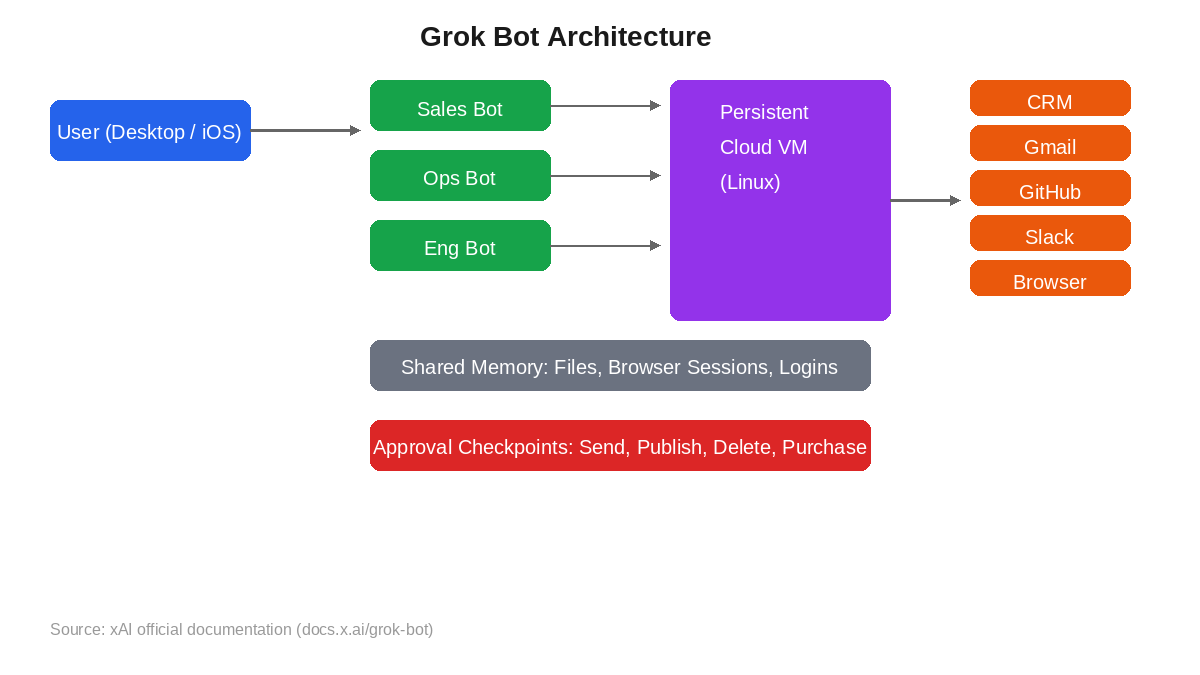
Persistent cloud VM: Each user gets one dedicated managed Linux virtual machine. All of the user's Bots share this VM, its files, browser sessions, and logins. The VM stays running 24/7 regardless of whether the user's device is on.
Computer use: Bots operate apps and websites the way a human does, by navigating pages, entering data, and clicking buttons. This works with tools that have no API or MCP connector. Where MCP connectors exist, Bots can use them for more structured integrations.
Multi-Bot coordination: Multiple Bots can run in parallel, each with its own screen on the shared VM. A chief-of-staff Bot can orchestrate specialist Bots for different work streams (inbox, expenses, recruiting, bug fixes).
Teach a task: When available, a user can record one browser workflow from the computer view. The Bot turns the demonstration into a draft skill that can be reviewed, tested, and turned into a scheduled routine.
Integrations: Browser-based access to any web app. MCP connectors for structured tool access. Plugins for specific services. The Bot signs into tools using the user's own credentials.
Key technical features
State persistence: files, browser sessions, logins, and preferences carry over between interactions. A Bot can go idle for hours while an approval is pending, then pick up exactly where it left off.
Approval checkpoints: sensitive or consequential actions (sending, publishing, deleting, purchasing, changing production systems) can stop for human approval. Passwords, 2FA codes, and CAPTCHAs trigger a computer takeover that hands control back to the user.
Routines and schedules: a routine assigns a workflow to a Bot and tells it when to run, on a schedule or after an event. Routines consume usage even when there is nothing to do, so xAI recommends scoping them to business hours rather than always-on.
Bot sharing: users can share a Bot configuration via a public link. The recipient gets the Bot's setup but not the sender's computer, logins, or conversation history.
Getting Started with Grok Bot
Required accounts: An eligible xAI or Cursor subscription (Cursor Pro at $20/month is the cheapest entry point, or SuperGrok at $30/month). If you have both a Cursor and a SuperGrok subscription, Grok Bot uses whichever has more usage. Sign in with your Cursor account.
Installation
1. Download the Grok Bot desktop app from the Cursor dashboard or x.ai/bot. Available for macOS (Apple silicon and Intel), Windows (x64 and Arm64), and Linux (deb, rpm, or AppImage).
2. For mobile access, download the Grok Bot companion app from the iOS App Store (requires iOS 18 or later). Android support was added post-launch (Android 9 or later).
3. Sign in with your Cursor account. Your existing Cursor SSO and team membership apply automatically.
First-time configuration
1. Check your privacy mode. Legacy Privacy Mode blocks Grok Bot entirely. If enabled, you will be prompted to change it before proceeding.
2. Review the API pricing and pooled billing settings. Understand that on-demand usage is billed from model and token cost, and there is no Grok Bot-specific spend cap yet.
3. Set up approval rules. Add narrow Require Approval rules for actions such as sending, publishing, deleting, purchasing, or changing production systems. Put standing boundaries in each Bot's description.
4. If on a team, review the admin settings in the Cursor dashboard: Cloud Agents toggle, password-manager policy, and team-wide Bot rules.
First 15 minutes checklist
Install the Grok Bot desktop app and sign in with your Cursor account
Create your first Bot and give it a name and a one-sentence role description
Assign the Bot a small, bounded task: ask it to summarize your latest 5 emails and draft replies
Watch the Bot work on its cloud computer screen and verify the output
Check the plan screen to see how much usage the task consumed
Result: After 15 minutes, you have a working Bot, a completed small task, and a baseline for how much usage a simple workflow costs. You can now create specialized Bots and set up routines.
Real Workflows
Workflow 1: Sales CRM Update and Follow-Up Drafting
Learner type: Professional
CI-First benefit tags: Time, Quantity, Quality
Connects to: UIB Business Analysis Professional, ULM Career dimension
Time estimate: 20 minutes to set up, then runs automatically after each sales call
Step | You do | The Bot does |
1 | Describe the Bot's role: you are my sales assistant. After each call, I will paste the transcript. Update the CRM with notes, then draft a follow-up email. | Saves the role description and prepares to receive transcripts |
2 | Paste the call transcript into the Bot chat | Reads the transcript, extracts key points, opens the CRM in its browser |
3 | Wait for the approval prompt before the Bot sends anything | Updates the CRM record with call notes, then drafts a follow-up email in Gmail |
4 | Review the CRM update and the draft email. Edit if needed. Approve sending. | Sends the approved email and confirms completion |
5 | Verify the CRM record is accurate and the email was sent correctly | Reports back with a summary of what was updated and sent |
Sample prompt: Context: I am running an always-on agent that updates my CRM and drafts follow-ups after sales calls, with a human gate before anything sends. The call transcript is provided. Role: AI as a sales operations assistant working from the transcript I just finished the call with. I own the CRM record and the send decision; you extract and draft. Profile: Act as a Co-Worker and Assistant for the capture step, recording what was said rather than reading between lines. Task: update the CRM contact record with the call date, the key discussion points, the objections raised and the next steps; then draft a follow-up email that references one specific point from the conversation. State which transcript line each CRM item comes from. Constraints: never send anything without my approval, and never invent a commitment the prospect did not make. Where the transcript is unclear on a point, mark it rather than smoothing it. Output format: the CRM update with transcript references, the objections list, the draft email, and the unclear points. Memory: the accepted CRM record and the follow-up belong in my CRM and my own notes, because the bot keeps the run and not the decisions. UP-Context-Engineering verification: I open the CRM record and the sent email myself to confirm the notes match what was discussed, I check each objection against the transcript, and I can explain and defend the update without the bot. Data safety: this pack carries no personal data. I do not paste a customer's financial details, an unrelated contact's record or a recording I have no basis to share into it, and I keep the record in my own CRM.
Verification checklist:
Multi-Model Check: Compare the Bot's CRM notes against a second model's summary of the same transcript. If key points differ, investigate.
External Source: Open the CRM record yourself and confirm the notes match what was discussed. Check the sent email in your Sent folder.
Human Review: A sales manager or colleague reviews the follow-up email for tone, accuracy, and appropriateness before it becomes a routine.
CI-First Test: Can you explain and defend the CRM update and email content without the Bot? If not, you are over-delegating. Y/N
Workflow 2: Research Compilation and Document Generation
Learner type: Student
CI-First benefit tags: Time, Quantity, Skill
Connects to: UIT (Technology, AI, Data Science), UNOP learning method
Time estimate: 30 minutes to set up, 15 minutes per research session
Step | You do | The Bot does |
1 | Define the research question and scope: find 5 recent academic papers on [topic]. For each, extract the abstract, key findings, and methodology. | Opens a browser, searches academic databases and Google Scholar |
2 | Monitor the Bot's progress on the cloud computer screen. Intervene if it goes off track. | Identifies 5 relevant papers, reads each one, extracts the requested fields |
3 | Review the extracted data for accuracy. Check that the papers actually exist and the findings are correctly attributed. | Compiles the findings into a structured document on the cloud VM |
4 | Read the compiled document. Add your own analysis and critique. Identify gaps the Bot missed. | Exports the document in your requested format (Markdown, PDF, or docx) |
5 | Verify each citation against the original paper. Add your own synthesis section. | Reports completion with a summary of what was found and where it was saved |
Sample prompt: Context: I am compiling a literature review for my thesis and the topic is stated. The bot searches for papers and extracts fields; I verify existence and attribution before anything is used. Role: AI as a research assistant finding and extracting from published papers. I own the review; you find and extract. Profile: Act as an Analyst and Tester, extracting what the papers say rather than synthesising beyond them. Task: find 5 peer-reviewed papers published in 2025 or 2026 on the stated topic and for each give the full citation, the abstract, 3 key findings, the methodology and the limitations. Compile them into one document. Constraints: do not fabricate any paper or citation; if you cannot verify that a paper exists, say so and drop it. Where a finding is your summary rather than the paper's claim, mark it as such. Output format: the five paper entries with their fields, the existence-check results, and the papers dropped with reasons. Memory: the verified papers and my own critique belong in my own thesis record, because the bot's compilation is not the source of record. UP-Context-Engineering verification: I verify each paper exists on the publisher's site or an index, I read at least one abstract myself, and I can discuss each paper's findings in my own words without the bot. Data safety: this pack carries no personal data. I do not paste unpublished thesis drafts, supervisor correspondence or access-restricted papers into it, and I keep the review record in my own store.
Verification checklist:
Multi-Model Check: Ask a second LLM (Claude, GPT) to independently search for papers on the same topic. Cross-reference the Bot's list against the second model's list.
External Source: Verify each paper exists by searching its title on Google Scholar or the publisher's site. Read at least one abstract yourself.
Human Review: Your thesis advisor or a peer reviews the compiled document for accuracy, relevance, and completeness.
CI-First Test: Can you discuss each paper's findings in your own words without the Bot's document? If not, you have not learned the material. Y/N
Workflow 3: Inbox Triage and Expense Processing Routine
Learner type: Everyone (lifelong learner)
CI-First benefit tags: Time, Quantity
Connects to: ULM Quality of Life dimension, LIPS system for information organization
Time estimate: 30 minutes to set up, then runs on a schedule (e.g., twice daily)
Step | You do | The Bot does |
1 | Create an Ops Bot: you are my operations assistant. Twice daily, check my Gmail inbox. Categorize emails into: urgent, invoices, newsletters, personal. For invoices, extract the amount, vendor, and due date into a spreadsheet. | Saves the role and prepares for the scheduled routine |
2 | Set the routine schedule: run at 9 AM and 3 PM on weekdays only (not 24/7 to conserve usage). | At the scheduled time, opens Gmail, scans the inbox, categorizes emails |
3 | Review the Bot's summary. Check that categorization is correct. Flag any misclassified emails. | For invoices, opens the spreadsheet, enters the extracted data, and reports a summary |
4 | Approve any actions that require it (e.g., marking invoices as paid, forwarding urgent emails). | Executes approved actions and confirms completion |
5 | Weekly: review the expense spreadsheet for accuracy. Reconcile against bank statements. | Provides a weekly summary of emails processed, invoices logged, and usage consumed |
Sample prompt: Context: I am running a scheduled inbox triage with a spreadsheet entry step, and nothing is deleted or archived without my approval. The inbox scope and the schedule are stated. Role: AI as an operations assistant executing one bounded triage routine. I own the approvals; you categorise and extract. Profile: Act as a Co-Worker and Assistant for the routine pass, executing the stated categories rather than reinterpreting them. Task: check my inbox and categorise unread emails from the last 24 hours into urgent, invoices, newsletters and personal; for invoices, extract the vendor name, amount, currency, due date and invoice number into the expense spreadsheet. Then report the summary. Constraints: do not delete or archive any email without my approval; where a category is ambiguous, mark the email rather than guessing. Never enter a figure you cannot read from the document. Output format: the categorised list, the extracted invoice rows, the flagged ambiguities, and the summary of what needs my decision. Memory: the categorisation rules and my corrections belong in my own operations notes, because the bot keeps the schedule and not the reasoning. UP-Context-Engineering verification: I spot-check five emails against the categorisation, I reconcile the extracted figures against the source documents weekly, and I can explain why each email was categorised as it was. Data safety: this pack carries no personal data. I do not paste another person's email, a payment credential or a legal notice into a routine I cannot audit, and I keep the extraction record in my own store.
Verification checklist:
Multi-Model Check: Have a second model review the same inbox and compare categorizations. Discrepancies reveal where the Bot's judgment differs.
External Source: Open Gmail yourself and spot-check 5 emails. Verify the Bot's categorization matches your own judgment.
Human Review: Reconcile the expense spreadsheet against actual bank or credit card statements weekly.
CI-First Test: Can you explain why each email was categorized the way it was? If the Bot's logic is opaque, you are over-delegating. Y/N
Strengths, Limits, and AI Imposture Risk
Strengths
CI-First Benefit | Strength | Evidence |
Time | 24/7 cloud VM eliminates wait time. Tasks continue while your device is off. | xAI FAQ confirms Bot work runs on the cloud computer regardless of device state |
Quantity | Multiple Bots run in parallel, each handling a different work stream. | xAI describes chief-of-staff plus specialist Bots in launch announcement |
Quality | End-to-end completion in real tools (CRM, Gmail, GitHub) instead of chat-only output. | xAI launch: the work lands where a human would put it, in the actual tool |
Skill | Teach-a-task records a workflow and persists it as a reusable skill. Users learn by watching the Bot work. | xAI FAQ describes screen recording to draft skill conversion |
Limits
Usage limits are not published. Weekly allowance size is unknown. Heavy users report hitting limits within 24 hours; others use only 10% of their weekly capacity. xAI acknowledged the issue and reset limits once, but the underlying billing mechanics remain opaque.
No model picker. Users cannot choose a cheaper model to reduce costs. Billing follows the actual serving model including failovers, so two similar tasks may produce different token bills.
All Bots share one cloud computer. Separate Bot names organize work but do not create separate security boundaries. Files, browser sessions, and logins are shared across all of a user's Bots.
No Grok Bot-specific spend cap. On-demand usage is billed from model and token cost with only account-level controls as a brake. A long-running agent task can consume most or all of the trial credit at once.
Beta product with no independent benchmarks. The product launched August 11, 2026. Security architecture details (credential storage, per-Bot scoping, independent audit) are not yet published.
Browser automation is not universal. Sites may block automation, require new logins, present CAPTCHAs, or require human confirmation. The Bot should hand those steps to the user rather than bypassing them.
Grok's default writing style is compressed. Multiple users report that Grok Bot trims sentences aggressively, making its output fragmented. Users must train it on their voice before delegating communication tasks.
AI Imposture Risk
Time Illusion
Rating. Medium
Evidence. Setting up Bots, writing role descriptions, monitoring cloud computer activity, and verifying output all take time. A poorly scoped task can burn through usage limits without completing work. Users report spending significant time managing Bots before they become productive.
Quantity Illusion
Rating. Medium
Evidence. Bots can produce large volumes of output (CRM updates, emails, documents) that look complete. But verification is mandatory: the Bot may update the wrong field, draft an email with subtle inaccuracies, or miss context a human would catch. Volume without verification is the core Imposture trap.
Skill Illusion
Rating. High
Evidence. This is the highest-risk trap. Grok Bot does work end to end in real tools, which means the user may stop learning how to do the work themselves. A student who delegates research compilation to a Bot may never learn to search academic databases. A professional who delegates CRM updates may lose familiarity with their own sales process. The teach-a-task feature mitigates this slightly by requiring the user to demonstrate the workflow first, but the default mode is delegation, not skill-building.
U365 Co-Intelligence Rating
CI-First Profile
Primary profile: Co-Worker and Assistant (level 2). Grok Bot is designed to take on real work, not just answer questions. It operates as a persistent teammate that completes tasks end to end.
Secondary profile: Co-Creator and Thought Partner (level 1) when used for brainstorming workflows or designing Bot routines. The Bot can help structure a process before it is automated.
CI-First Benefit Score
Time
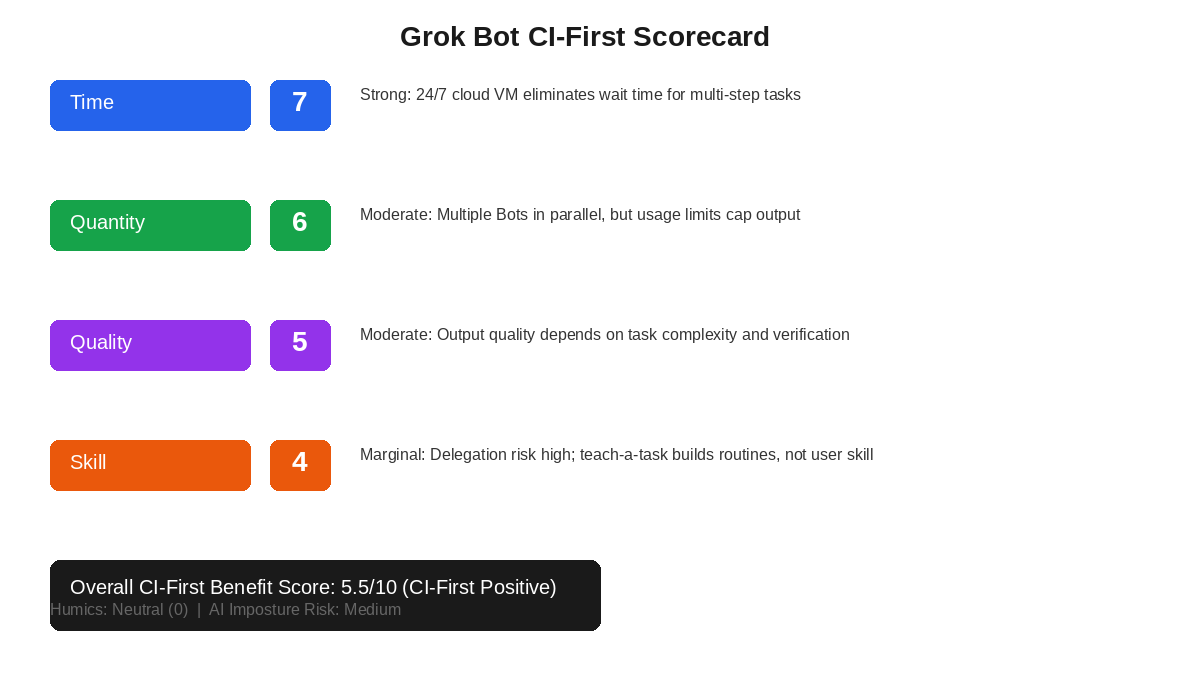
Score. 7
Rationale. Strong savings. The 24/7 cloud VM and end-to-end completion eliminate the manual handoff between AI output and real tools. Net time savings are significant for well-defined, repetitive workflows. Overhead (setup, monitoring, verification) reduces the net gain but does not erase it.
Quantity
Score. 6
Rationale. Moderate increase. Multiple Bots in parallel multiply output. However, usage limits cap the effective volume, and the shared VM means only one computer-use task runs per Bot at a time. A Heavy-plan user hit the limit in 24 hours.
Quality
Score. 5
Rationale. Moderate improvement. End-to-end completion in real tools is a quality gain over chat-only output. But Grok's compressed writing style, the opaque model router, and the lack of independent benchmarks mean quality is inconsistent. Verification is mandatory and non-trivial.
Skill
Score. 4
Rationale. Marginal skill benefit. The teach-a-task feature requires the user to demonstrate a workflow first, which has some learning value. But the default mode is delegation: the Bot does the work, and the user stops doing it. Sustained use risks skill erosion (AI Obesity) rather than skill-building.
Overall CI-First Benefit Score: (7 + 6 + 5 + 4) / 4 = 5.5 / 10 (CI-First Positive)
Humics Protection Badge
Creativity: 0 (Neutral). Grok Bot can spark ideas by demonstrating workflows, but it does not actively strengthen the user's creative capability. It does not erode it either, as long as the user remains the one designing the workflows.
Critical Thinking: 0 (Neutral). The approval checkpoint system requires the user to evaluate Bot actions, which exercises critical thinking. But the 24/7 autonomous mode can encourage hands-off behavior where the user stops questioning output.
Social Authenticity: 0 (Neutral). Grok Bot drafts communication on the user's behalf, which risks replacing authentic voice. However, the compressed writing style forces users to train it on their voice, which can increase self-awareness about communication style.
Humics Protection Score: 0 + 0 + 0 = 0. Badge: Humics-Neutral
The tool neither consistently protects nor erodes human capabilities. Safe to use but does not build core capabilities. The user must actively manage which capabilities they exercise outside the tool to prevent AI Obesity.
Superhuman Usage Guidance
When to invite the tool: Repetitive, well-defined, multi-step workflows that cross multiple applications (CRM updates, inbox triage, invoice processing, bug reproduction and filing). Tasks where the bottleneck is manual orchestration between tools, not the intellectual content.
When to keep the tool out: Tasks requiring original creative work, strategic decision-making, sensitive communication, or tasks where you are still learning the underlying skill. Do not delegate research you have not done yourself at least once. Do not delegate communication where your authentic voice matters.
U365 method integration: In LIPS+CARE, a Grok Bot can handle the Collect and Execute phases for routine information processing. In ULM+EVA, it supports the Career dimension by reclaiming time from operational tasks. In UNOP, it should NOT replace the learning process: students must still perform the cognitive work themselves before delegating the mechanical steps.
Over-delegation warning: Grok Bot's core pitch is giving real work to AI. This is exactly the scenario where AI Imposture risk is highest. If you delegate a workflow you have not mastered yourself, you lose the ability to verify the Bot's output, detect errors, and intervene when it goes wrong. The Bot becomes a black box you depend on but cannot evaluate. Always learn the workflow manually first, then delegate, and continue spot-checking regularly.
What Users Say
Aggregate Rating Table
Platform | Rating | Reviews |
G2 (Grok/xAI) | Not separately rated | 45 reviews for Grok (chatbot), not Grok Bot agent |
Trustpilot (grok.com) | 1.5 / 5 | 460 reviews for Grok chatbot, not Grok Bot agent specifically |
Product Hunt (Grok) | 4.7 / 5 | 17 reviews for Grok chatbot |
Google Play (Grok AI) | 4.9 / 5 | 3,781,500 ratings for Grok chatbot app |
Reddit (r/grok, r/AI_Agents) | Mixed (qualitative) | Multiple threads on Grok Bot agent; sentiment split between excitement and frustration with agent system reliability |
Lenny's Newsletter | Positive (qualitative) | User replaced entire OpenClaw stack with Grok Bot, citing UX and reliability |
LinkedIn (JJ Englert) | Positive (qualitative) | Grok Bot is passing the builder test with flying colors. Almost everyone I talk to is getting real work out of it. |
Note: Grok Bot launched on August 11, 2026 and has no standalone reviews on major platforms yet. The ratings above are for Grok the chatbot, not Grok Bot the agent. Grok Bot-specific sentiment comes from Reddit, newsletter coverage, and LinkedIn posts from early adopters.
What Users Praise
Setup simplicity: users report that creating a Bot and assigning a task feels like onboarding a new coworker, not configuring software. No automations to build, no complex naming, just messaging.
End-to-end completion: work lands in the actual tool (CRM, email, ticket system) instead of a chat window that requires manual copy-paste.
24/7 persistence: the cloud VM keeps running while the user's device is off, so long-running tasks complete overnight.
Mobile companion: the iOS app lets users message Bots, watch the computer screen, and approve actions from a phone.
Migration from OpenClaw: several technical users report replacing their OpenClaw setup with Grok Bot because it stays online reliably without infrastructure maintenance.
What Users Complain About
Usage limits: the most documented complaint. Heavy users hit weekly limits within 24 hours. xAI does not publish allowance sizes, making budget planning impossible.
Compressed writing style: Grok Bot trims sentences so aggressively that its output can be fragmented and hard to follow. Users must train it on their voice before delegating communication.
Opaque billing: no model picker, no per-Bot pricing, no product-specific spend cap. Two similar tasks may produce different token bills due to model failover.
Limited visibility: one user reported not getting the same detailed view of files, commands, and intermediate actions as in tools like Claude Code. When debugging a Bot's process, this matters.
Security unknowns: no published independent security audit. Credential storage details, per-Bot scoping, and the shared VM architecture raise questions for enterprise adoption.
Sentiment Summary
Early adopter sentiment is cautiously positive. Users who already pay for Cursor or SuperGrok and run repetitive multi-app workflows report real productivity gains. The UX is consistently praised as the simplest in the agent category. However, usage limits, opaque billing, and the beta status temper enthusiasm. Users who need predictable costs, Android support, or independent security validation are advised to wait.
U365 Editorial Note
The CI-First evaluation aligns with user sentiment on both sides. The Time benefit (7/10) matches the praise for 24/7 persistence and end-to-end completion. The Skill concern (4/10) matches the complaint that Grok Bot does work for you rather than teaching you how to do it. The Medium AI Imposture Risk, particularly the High Skill Illusion rating, is the U365-specific signal that generic reviews do not surface: the product is genuinely useful for delegation, but delegation without prior mastery is the exact pathway to Sub-human status. The 5.5/10 CI-First Positive score reflects a tool that is worth adopting with disciplined usage boundaries, not a tool to deploy unconstrained.
Comparison and Alternatives
Tool | Type | Price | Key difference |
Hermes Agent | Open-source, model-agnostic | Free (MIT) | Runs on your own infrastructure. You choose the LLM. No usage limits. Requires technical setup. Reviewed on INSIDE. |
OpenClaw | Open-source agent framework | Free | 5,400+ skills, deep messaging-platform integration. Requires self-hosting and maintenance. Had a security incident in February 2026 (since patched). |
Claude Code (Anthropic) | Terminal-based coding agent | Included with Claude subscription | Focused on coding tasks, not general-purpose workflow automation. Lives in your terminal, not a separate cloud VM. Reviewed on INSIDE. |
ChatGPT (OpenAI) | Chatbot with agent features | Free to $200/month | Chat-first, not always-on. No persistent cloud VM. Agent mode exists but does not run 24/7 or sign into your tools with your credentials. |
Where Grok Bot is clearly better
UX simplicity: no infrastructure to set up, no YAML configs, no Docker. Install the app, sign in, message a Bot. This is the lowest barrier to entry in the agent category.
24/7 cloud persistence: the cloud VM runs independently of your device. Hermes Agent and OpenClaw require your own server to be online.
End-to-end tool operation: Bots sign into real apps with your credentials and operate them like a human. ChatGPT and Claude Code do not do this natively.
Mobile companion: the iOS and Android apps let you manage Bots from a phone. Hermes Agent has a desktop app but no mobile companion.
Where Grok Bot is clearly worse
Cost: bundled pricing starts at $20/month but can scale to $300/month with on-demand usage. Hermes Agent is free. OpenClaw is free.
Closed-source: no ability to inspect, modify, or self-host. Hermes Agent and OpenClaw are open-source with active communities.
No model choice: xAI controls which Grok model serves your Bots. Hermes Agent lets you point at any LLM provider.
Usage limits with no published sizes: impossible to budget accurately. Free alternatives have no usage caps (you provide the compute).
Security transparency: no independent audit published. Hermes Agent runs on your own VPS where you control the attack surface.
Skill erosion risk: the product is designed for delegation, not skill-building. Free alternatives like Hermes Agent are more transparent about their agent logic, which helps users learn.
Verdict and Next Steps
Grok Bot is a genuine entrant in the always-on AI agent category, not a chatbot feature update. The persistent cloud VM architecture, end-to-end tool operation, and messaging-based UX make it the simplest way to delegate multi-step workflows without infrastructure. For U365 Fellows who already subscribe to Cursor or SuperGrok and run repetitive operational tasks, it is worth adopting with disciplined approval boundaries.
Adopt if: you already pay for an eligible plan, you have well-defined repetitive workflows that cross multiple applications, and you are comfortable being an early beta user of a security-sensitive product.
Wait if: you need predictable costs, want a fully published security model, need Android support (now available but still maturing), or would rather see independent benchmarks before committing workflows to a new agent architecture. Consider Hermes Agent (free, open-source) as an alternative if you have technical skills and want full control.
UP-Context-Engineering prompt pack:
Prompt 1 (Bot role definition): Context: I am setting up an always-on agent to act under my name across several tools, and the role, the tools and the hard limits are stated. Role: AI as one named team member executing tasks I brief, under a boundary I write. I own every decision and the record; you execute and report. Profile: Act as a Co-Worker and Assistant (2), taking the assignment and reporting back rather than extending the scope. Task: restate the role, the tools you may reach and the limits you will hold; then, for each of the three example tasks I will brief, state what you would do and where you would stop for approval. Constraints: ask before sending, verify data before updating, summarise before acting; never delete emails, make purchases or contact a client directly without my approval. Where a task is outside the stated scope, refuse and name the boundary. Output format: the restated brief, the per-task behaviour with its stop point, and the boundary you will refuse to cross. Memory: the brief, the boundary and the approval record belong in my own operations notes, because the bot keeps what ran and not what I authorised. UP-Context-Engineering verification: I write the boundary down before the agent runs, I check the first week's actions against it, and I can defend every action the agent took under my name. Data safety: this pack carries no personal data. I do not paste credentials, a client list or an unredacted mailbox into it, and I keep the boundary and the approval record in my own secure store.
Prompt 2 (Workflow delegation): Context: I am delegating one task to an always-on agent, and the task, the context and the expected deliverable are stated. Role: AI as one named team member taking a bounded assignment. I own the review and the acceptance decision; you execute and report. Profile: Act as a Co-Worker and Assistant (2), confirming understanding before starting and stopping at the boundary. Task: complete the stated task from the stated context, producing the expected deliverable; confirm your understanding of the task before starting, and stop for my approval before any irreversible action. Then report what you did, what you could not do, and what you assumed. Constraints: no irreversible action without approval; where the context is insufficient, ask rather than inventing it. State assumptions explicitly rather than burying them. Output format: the understanding statement, the deliverable, the done-not-done list, and the assumptions. Memory: the brief, the deliverable and my acceptance belong in my own project record, because the platform keeps the run and not the reasoning. UP-Context-Engineering verification: I review the deliverable against the brief before acceptance, I check each irreversible action against what I approved, and I can explain the work as if I had done it. Data safety: this pack carries no personal data. I do not paste credentials, a customer record or an unreleased document into it, and I keep the brief and the acceptance record in my own store.
Prompt 3 (Routine setup): Context: I am setting up a recurring routine on an always-on agent, and the task, the schedule and the step list are stated. Role: AI as one named team member holding a schedule I set. I own the routine and its review; you run and report. Profile: Act as a Co-Worker and Assistant (2), executing the routine as stated rather than extending its scope. Task: create the routine for the stated task on the stated schedule, following the stated steps, and report a summary each time it runs. It must not run outside the stated hours. State what a silent failure would look like for this routine and what the run report must contain to expose it. Constraints: never add a step to the routine without my approval, and never run outside the stated hours to conserve usage. Where a step fails, stop and report rather than retrying indefinitely. Output format: the routine definition, the run report format with its silent-failure markers, and the stopping rule. Memory: the routine definition, the schedule and the review cadence belong in my own operations notes, because the platform keeps the runs and not the rules. UP-Context-Engineering verification: I read the first runs' reports myself before trusting the routine, I confirm the schedule bounds are enforced, and I can explain what the routine does and what it cannot catch. Data safety: this pack carries no personal data. I do not paste a mailbox extract, a customer record or credentials into the routine, and I keep the routine record in my own store.
Related U365 content:
U365's Recommendations to Learn More
These links are curated, not collected. Each one teaches something this review does not, and all were verified active as of 2026-09-08. Individual creators and community experts are included when their content meets the quality bar: substantial, current, and produced by someone who uses Grok Bot seriously.
Official learning resources
Grok Bot product page (x.ai/bot) with setup guide and plan cards
Grok Bot FAQ (docs.x.ai) covering persistence, approvals, sharing, and privacy
Grok Bot teams and enterprises guide (docs.x.ai) with admin controls and security model
Cursor help: Plans and billing for Grok Bot, including weekly usage and on-demand billing
Video tutorials and channels
Every Grok Bot Concept Explained for Normal People by Nate Herk | AI Automation
Cursor Just Released Grok Bot by Paul J Lipsky
Written tutorials and deep-dive articles
Community and social
Resources on X
Dedicated X channels:
X posts with video content:
We deliberately include individual creators alongside official sources. Nate Herk and Paul J Lipsky produce some of the most practical Grok Bot content available, often more useful than official docs for getting started. Judge by content quality, not source type.
Glossary
CI-First Benefit Score
A 0 to 10 score measuring how much an AI tool delivers the 4 Key AI Benefits defined by U365: Time, Quantity, Quality, and Skill. Each dimension is scored 0 to 10, and the overall score is the arithmetic mean. The score answers one question: does this tool make Co-Intelligence more profitable than Human Intelligence alone? Scores of 0 to 2.0 are CI-First Negative, 2.1 to 4.0 are CI-First Neutral, 4.1 to 6.0 are CI-First Positive, 6.1 to 8.0 are CI-First Strong, and 8.1 to 10.0 are CI-First Transformative.
CI-First Profile
One of 5 AI roles defined by U365: (level 1) Co-Creator and Thought Partner, (level 2) Co-Worker and Assistant, (level 3) Professor, Coach and Tutor, (level 4) Analyst and Tester, (level 5) Challenger and Devil's Advocate. Lower level numbers indicate higher AI autonomy. Grok Bot is classified as level 2 (Co-Worker and Assistant) because it takes on real work and completes tasks end to end.
Humics Protection Badge
A rating assessing whether a tool protects, leaves neutral, or erodes the three core human capabilities defined by Pascal Bornet's Humics framework: Creativity, Critical Thinking, and Social Authenticity. Each dimension is scored +1 (Protects), 0 (Neutral), or -1 (Erodes). The sum produces a badge: +2 to +3 is Humics-Friendly, -1 to +1 is Humics-Neutral, and -2 to -3 is Humics-Risky.
AI Imposture Risk
The threat that a tool traps the user in one of three usage illusions: Time Illusion (appearing fast while actually losing time to prompting and verification), Quantity Illusion (producing high volume that does not hold up under inspection), and Skill Illusion (appearing to demonstrate skills while heading toward error). Each illusion is rated Low, Medium, or High based on the tool's characteristics and evidence.
User Sentiment
An aggregate view of how users rate and discuss the tool across major review platforms (Trustpilot, G2, Capterra, Product Hunt, App Store, Google Play, Reddit). Sentiment is categorized as positive, mixed, or negative, with specific praise and complaint themes identified from real reviews. For beta products with no standalone reviews, sentiment is drawn from early adopter coverage on social platforms and newsletters.
Sources
xAI launch announcement: Introducing Grok Bot (August 11, 2026)
AI Pricing Guru: Grokbot Price 2026 (checked September 4, 2026)
AI Builder Club: Grok Bot Pricing 2026 (checked August 30, 2026)
AIToolsReview: Grok Bot xAI Always-On AI Agents Explained (August 2026)
Lenny's Newsletter: Grok Bot vs OpenClaw user experience report
Reddit r/AI_Agents: Grok Bot validated everything we've been building




Comments