
Ideogram: in-image typography that reads, scored 6.0 on the U365 CI-First Review


Status: Active | Last tested: 2026-09-25 (Ideogram 4.0, released 3 June 2026) | Re-check: trigger-based (max 6 months)
Active: the tool is current and recommended.
What Active means here. Active means current and recommended for the reader this review describes, reading the rendered text at full size before accepting an output. It does not mean any accuracy claim has been verified. No independent party publishes a text-accuracy measurement for this release, the two figures for that capability on the vendor's own surfaces do not agree, and the headline number behind the principal selling point carries no published methodology. A reader who needs a measured guarantee, a permissive licence on published weights, or editable vector output should treat those as not available here.
For detailed explanations of the CI-First evaluation terms used in this review, including the Humics Protection Badge and the AI Imposture Risk levels, see the Glossary at the end of this post.


In this Tool Review
Status and Re-check
Status and Last Tested
Status: Active Last tested: 2026-09-25 Version reviewed: Ideogram 4.0, released 3 June 2026 Next re-check: Trigger-based, maximum six months
Active: the tool is current and recommended.
The status line means the platform and the 4.0 model are live, available on every paid tier and through the API, and worth adopting for the work this review describes. It does not mean any accuracy figure on a vendor page has been independently reproduced. The number behind the product's principal selling point appears as two different values on two of the vendor's own surfaces, and no independent party has published a text-accuracy measurement. That does not block adoption for the common case, where you look at the image and read the words yourself. It does mean a reader who needs a measured guarantee should treat the headline figure as unverified.
Re-check triggers: a first independent text-accuracy measurement; settlement of the vendor's two accuracy figures; publication of the final self-serve commercial terms; any change to the Non-Commercial Model Agreement, which permits modification effective on posting; a change to how credit cost maps to a single image; a published rate card above $300 per month; a material change to review-platform sentiment.
Tool Snapshot
Tagline: "Think it. Make it. Own it." (ideogram.ai, read 2026-09-25.)
Category: AI image generation and generative media: a hosted application, a separate pay-as-you-go API, and a published model whose weights most users cannot use commercially without a second licence. The differentiator the vendor claims is in-image text rendering: legible, correctly spelled typography placed as part of the composition.
Primary use cases: poster, social asset, banner, packaging mock or book cover with a headline you can read, without opening a layout tool for a first draft; campaign key visuals in volume, including batch runs from a prompt list on Pro; bounding-box placement of subjects and text, with Edit, Remix, Reframe and Replace Background used to fix an output rather than regenerate it; transparent cutouts for product and e-commerce work; LoRA fine-tuning of the published weights for a brand-specific model; API integration at a per-image price with no subscription.
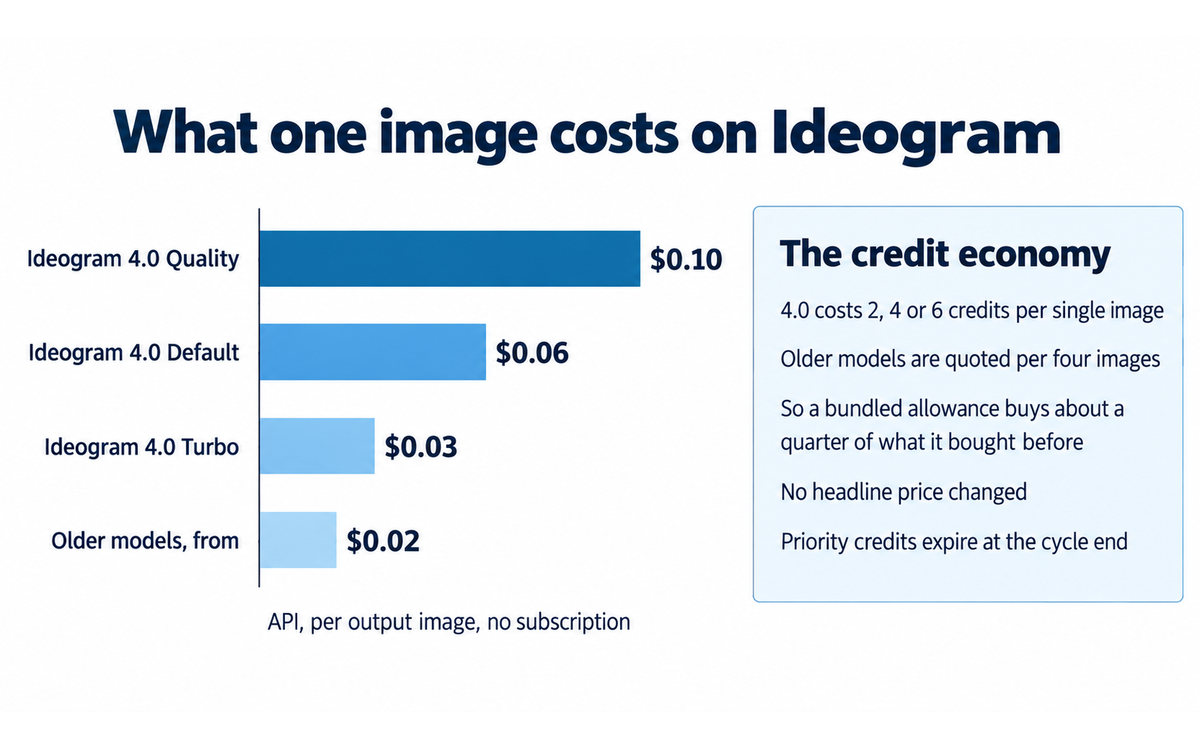
Pricing summary: Two tracks that do not share a balance. The application is credit-based: Free at $0 with weekly slow credits and public images only; Plus at $15 per month billed annually or $20 monthly, with 1,000 priority credits, private generation and 8 concurrent generations; Pro at $42 per month annually or $60 monthly, with 3,500 priority credits and batch generation; Team at $20 per user per month with 1,500 priority credits per user; Enterprise on quotation. The API bills separately per output image, from $0.02 for the oldest model and $0.03 to $0.10 for 4.0 at Turbo, Default and Quality. A third commercial route covers the weights at $300 per month for 10,000 images. Prices read 2026-09-25.
Official links: https://ideogram.ai, https://ideogram.ai/pricing, https://ideogram.ai/api-pricing, https://ideogram.ai/licensing, https://docs.ideogram.ai, https://docs.ideogram.ai/frequently-asked-questions, https://docs.ideogram.ai/plans-and-pricing/ideogram-api, https://developer.ideogram.ai, https://ideogram.ai/features/text-rendering, https://ideogram.ai/models/4.0, https://ideogram.ai/blog/ideogram-4.0, https://huggingface.co/ideogram-ai/ideogram-4-fp8, https://huggingface.co/ideogram-ai/ideogram-4-nf4, https://github.com/ideogram-oss/ideogram4, https://ideogram.ai/legal/tos, https://ideogram.ai/legal/api-tos, https://status.ideogram.ai, https://www.reddit.com/r/ideogramai
Published-weight fields: Ideogram 4.0 is the first Ideogram model whose weights are published, and the first in the family that is not served only from the vendor's own infrastructure; inference code Apache 2.0; weights under the Ideogram Non-Commercial Model Agreement, last updated 3 June 2026, which is not an open-source licence and does not permit commercial use; 9.3 billion parameters in two quantizations, nf4 for CUDA with diffusers support and fp8 for wider hardware without it; gated on Hugging Face, so the agreement must be accepted before the files download; 65,722 downloads last month on the fp8 listing, 485 likes on nf4, 30 Spaces using the fp8 listing.
Model fields: a from-scratch flow-matching text-to-image model on a single-stream diffusion transformer, 34 layers, with text and image tokens concatenated into one sequence and no separate branches; text encoder Qwen3-VL-8B-Instruct, a vision-language model, with hidden states drawn from 13 intermediate layers; structured JSON prompt interface with bounding-box coordinates, per-element descriptions and colour palettes, where plain text works and performs less well because the model was trained on JSON; dual-branch classifier-free guidance; native 2K, with any multiple-of-16 size from 256 to 2048; the nf4 build runs on a single 24 GB GPU.
At a Glance Dashboard
Field | Value |
CI-First Benefit Score | 6.0 / 10 (CI-First Positive) |
Sub-scores | Time 7 / Quantity 7 / Quality 6 / Skill 4 |
CI-First Profile | Primary Co-Worker and Assistant (level 2); secondary Co-Creator and Thought Partner (level 1), Analyst and Tester (level 4) |
Collaboration Mode | Centaur. Cyborg not appropriate |
Humics Protection | Humics-Neutral (-1 / +3): Creativity 0, Critical Thinking -1, Social Authenticity 0 |
AI Imposture Risk | Medium overall: Time, Quantity and Skill all Medium |
Status | Active |
Last tested | 2026-09-25 |
Released | 3 June 2026. Company founded 2022, Toronto |
Access | Browser, iOS, API, and published weights under a separate licence |
Price | Free; Plus $15 per month annual; Pro $42 per month annual; Team $20 per user; Enterprise on quotation; API $0.02 to $0.10 per image; weights licence $300 per month |
Vendor | Ideogram AI, 320 Bay St, Suite 700, Toronto M5H 4A6, per its own terms |
Framework version applied | CI-First Evaluation Framework v1.2 |
Independent measurement | Blind arena, Elo 1017, low thirties overall on roughly eight to twelve thousand votes. No independent text-accuracy measurement |
The Problem
Most image tools are strong at pictures and weak at words. Ask for a poster with a headline and you get something that looks like a poster at thumbnail size and reads as nonsense when you zoom in. Letters merge, a character disappears, and a phrase that has to be exactly right arrives as a near miss. You then set the text by hand in a layout tool, so the generator produced a background rather than an asset.
The cost is not the minute it takes to fix one image. The fix does not scale, and the work that most needs it arrives in volume. A team producing sixty campaign variants needs sixty accurate headlines at a cost and speed that does not involve a designer touching each one.
Underneath sits a trust problem. A generated image is a claim about what a thing looks like, and such claims are now cheap to make at volume. Every tool that lowers the price of making one raises the value of being able to say how it was made.
The third problem is the one nobody advertises. The tools that produce good images are rented. Your outputs may be yours, but the model is not, the price can move, the queue can slow, and the free tier can shrink without notice.
The Outcome
You get a first draft of a designed asset rather than a first draft of an illustration. You describe the composition, including where the text goes and what it says, and the output is something you judge in one glance: the words either read or they do not, and the cost of finding out is one generation rather than an hour of layout work.
The second outcome is volume with a review step attached rather than removed. Pro runs generations from a prompt list and the API is priced per image, so you can produce a campaign's worth of variants and apply your judgement to what survives. You get more candidates, not more finished work. The third outcome concerns the boundary: the weights are published, so a team can run the model on its own hardware and fine-tune it on its own style guide, and under the free agreement that route is research and personal use only.
For a U365 Fellow, the transferable outcome is a judgement rather than an asset: where this class of tool is strong, where it fails, and what a text-rendering claim is worth when two vendor pages disagree about the number.
Who Should Use Ideogram
Learner type | Difficulty | Typical ROI | Career path |
Students (Bachelor, Master) | Beginner to Intermediate. Judging whether text is correct at 2048 pixels rather than at thumbnail size is the skill that decides whether the work is good | Strong, because the free tier and a sub-$20 entry cost sit inside a student budget | |
Professionals (career upskilling) | Intermediate. Prompting a layout with coordinates and a literal text string is a real technique, and knowing when to stop and open a layout tool is the more valuable half | Strong for marketing and brand functions producing text-bearing assets at volume, where the alternative is a designer's hourly rate. Weaker for painterly output | |
Everyone (lifelong learners) | Beginner. The judgement to add is to look at what you got rather than at what you asked for | Moderate. A genuine creative outlet at a low entry price, with the risk of mistaking a competent image for a finished one | SL-OS for creative practice, LIPS Collect and Review phases for keeping your own record |
Skill level required: Beginner to Intermediate. Two techniques separate a good result from a frustrating one: writing the text you want rendered as a literal quoted string, and using structured or bounding-box prompting when placement matters.
Prerequisites: an account at ideogram.ai; a paid tier for private generations, since images are public by default; a separate API account, payment method and agreement acceptance for the API, which does not draw on subscription credits; a Hugging Face account and acceptance of the weights agreement, plus a 24 GB GPU class for the nf4 build.
Typical time to first result: under five minutes from sign-up to a first image with text on it. Typical time to competence: one to two weeks. The habits that shorten it: put the words you want rendered in quotes, generate at publishing resolution before judging legibility, check the credit cost of a setting before a long batch, and remember that older models are charged per four images while 4.0 is charged per single image.
U365 Institutes Alignment
Institute | Relevance | Why | The limit that holds the row |
UID (Digital Design, UX/UI) | High, the only High | Design is the centre of gravity of this release: layout and bounding-box control, a vision-language text encoder built for legible type, native 2K output, and localised editing rather than regenerating. The Fellow has to state the composition before the model can execute it, and that specification is a design decision | Direction, judgement and evaluation only. Vector export is not supported, so the handoff is a bitmap. No type system, no editable layout, no asset library, so the institute's production craft is not exercised. A Fellow who cannot say why one candidate is better has practised nothing |
UIC (Digital Communication, Marketing) | Medium (corrected down from High) | Text-bearing assets are the tool's strongest use case and campaign production is a real workflow. The competency exercised is producing to a brief and judging whether the asset is publishable. No UIC credential chain | The tool teaches no communication content of its own. Every published UIC programme is built on strategy, copy, channel choice and measurement, and none of those is exercised here. It writes nothing in a person's voice |
UIB (Business Management, Entrepreneurship) | Medium (corrected down from High) | An evidenced pricing and licensing case study: two credit tracks that do not share a balance, a bundled allowance whose value fell by roughly a factor of four with no headline price change, a weights licence sold while the fine-tuning right is described as pending, and an Enterprise tier with no list price | A case study the Fellow observes, not a competency the tool builds. The one commercially consequential decision the product forces is whether the bundled allowance is worth its price, which is a question about the vendor's packaging |
UIT (Technology, AI, Data Science) | Medium (narrowed from Medium to High) | Applied AI literacy with free primary material: read a model card, an inference guide and a licence and state what a release permits; tell an open-weight release from an open-source one; read a JSON prompt schema and a bounding-box surface as an interface; reason about two quantizations with different runtime support before planning a deployment | The subject matter is image generation, not model engineering, and the tool builds no programming skill. URC's Skill sub-score of 4 records the same finding. Licence and deployment literacy has no published assessment home, recorded as a gap below |
One sentence statement of the correction. Ratings: UID High, UIC at Medium, UIB at Medium, UIT at Low to Medium, with no UIC credential chain, and maps UID and UIT chains to direction, evaluation and literacy rather than to production craft.
Primary alignment: UID (Digital Design, UX/UI)
Four competencies, and each one is a design decision rather than a tool operation.
Visual briefing as a precision skill. Stating subject, composition, placement, palette and the exact strings to render, precisely enough that a machine can execute the brief without guessing. The competency is the precision, and it is teachable independently of the product.
Direction among candidates. Generating several directions and choosing one against a written standard rather than a gallery preference. The review's own over-delegation warning names this as the capability that goes first when the brief is never written down.
Evaluation of a generated artefact at publishing resolution. Judging composition, hierarchy and type at the size the asset will be used, not at thumbnail size. The review records that the preview hides the defects the Fellow is looking for.
The handoff judgement. Knowing that the tool ends in a bitmap, and deciding where in a pipeline that is acceptable and where a layout tool has to take over.
The teaching case worth naming here. The product's principal claim is a number, and the vendor publishes that number twice at two different values with no published method. A Fellow who learns to notice the pattern, and to ask what a figure was measured on before using it, has acquired the single most transferable habit in this review. The case belongs in the UID alignment, because it survives after the launch material stops being current.
Secondary alignment: UIC (Digital Communication, Marketing)
A UIC Fellow can run one exercise on this product, and it is a production exercise.
Brief, produce, and defend the publish decision. Take a real campaign requirement, write the audience rationale and the channel, specify the asset including the exact headline, produce candidates, and then record which one is publishable and why, with the rejected alternatives and their reasons. The learning outcome is a defended production decision with the reasoning written down before the generation, which is the part that disappears when a tool makes candidate images cheap.
The limit that keeps the row at Medium. No UIC competency is built by the tool. The Fellow brings the communication judgement and the tool executes it, so the exercise is assessed on the Fellow's brief and verdict rather than on the asset.
Secondary alignment: UIB (Business Management, Entrepreneurship)
A UIB Fellow can run two exercises, both on the vendor's own published material.
First, the packaging analysis. Compare what a bundled credit buys before and after the newest model entered the matrix, and state the finding in one sentence: the headline price did not move and what the price buys did. Then answer whether that matters for a Fellow's own volume. The learning outcome is a pricing observation grounded in published figures rather than in an impression.
Second, the licence and commercial-terms reading. Take the four routes the vendor publishes, write what each permits for a real use case, and name the one right a buyer would most want that the vendor describes as not yet final. The learning outcome is a licence position stated in writing before money is committed.
The limit that keeps the row at Medium. Neither exercise requires the tool to be used, and the tool teaches no management, finance or entrepreneurship content of its own. Both are coursework on published vendor material.
Secondary alignment: UIT (Technology, AI, Data Science)
Three exercises, all on free primary material.
First, release literacy. Read the model card, the inference guide and the model agreement, and state in writing what the release permits, what it withholds and where the vendor's own surfaces differ. The distinction between an open-weight release and an open-source one is the outcome.
Second, interface and deployment literacy. Read the JSON prompt schema and the bounding-box control surface as an interface, and reason about the two quantizations with different runtime support before planning a deployment. The outcome is a deployment plan that names what the hardware has to be and what the runtime must support.
Third, evidence literacy. Compare the two text-accuracy figures the vendor publishes on two of its own surfaces, note that neither carries a method, and state what would settle the question. The outcome is a written statement of what is known, what is claimed and what is missing.
The limit that keeps the row at Medium. The tool builds no programming skill and the subject matter is image generation rather than model engineering. Licence, deployment and evidence literacy has no published assessment home in the U365 catalogue, which is recorded as a gap in this review.
How Ideogram Works
Inputs: a text prompt, best expressed as a structured JSON caption carrying a description, a list of elements, bounding-box coordinates, a palette and the literal strings to render; optionally a negative description, a seed, an aspect ratio or explicit resolution, and a rendering speed. For editing, a source image plus an instruction; for remix, a source image plus a prompt and a weight setting how strongly the output keeps the input's structure. The self-hosted route also needs a Hugging Face token, an API key for the hosted prompt expansion, and moderation keys for the screening service the vendor's own tooling calls.
Outputs: a raster image at up to 2048 by 2048 or any supported multiple-of-16 size, with the resolution reported per generation. Transparent-background output is a dedicated operation. Metadata returns with the image, including model, seed, safety result and the actual prompt used, which can differ from the prompt sent.
Underlying technology is detailed in the Tool Snapshot. Integrations named publicly include the REST API, an MCP surface for coding and chat agents, ComfyUI for self-hosted workflows, and third-party platforms that broker access.
Getting Started with Ideogram
Required accounts: an Ideogram account, which the free tier provides; a paid tier for private generations; a separate API account acceptance and payment method; a Hugging Face account with the weights agreement accepted.
Installation: nothing for the application, which runs in the browser at ideogram.ai and as an iOS app. The API is called over HTTPS. The self-hosted route is a Python package installed from the vendor's repository after the weight gate is accepted.
First-time configuration: create an account and decide immediately whether public-by-default is acceptable, because that is the free tier's condition; read the credit matrix rather than the plan cards, because the cards quote an allowance while the matrix quotes what a credit buys; generate one image with text at publishing resolution and read the words, which is the calibration step that determines how much you trust the tool; for API use, accept the developer agreement, add a payment method and create a key, storing it at creation because full values are shown once; for self-hosting, accept the model agreement and plan for a 24 GB GPU class.
First 15 minutes checklist:
☐ Create a free account and generate one image from a plain sentence, to see the baseline.
☐ Generate the same idea with the words you want rendered in quotes, at 2048 pixels, and compare the two at full size.
☐ Generate one asset with an explicit layout instruction and check whether the text landed where you asked.
☐ Download the winner in PNG and open it at full size rather than in the preview, which hides the defects you are looking for.
☐ Work out what your intended monthly volume costs on 4.0 versus an older model before choosing a plan.
☐ Save the prompt and its seed, so reproducing the result does not depend on memory.
Result: two comparable images, one plain-prompt and one with the text written as a literal string, a clear view of what the model does well for your work, and a cost figure for your realistic volume, which is the number that decides between the free tier, Plus, Pro and the API.
Real Workflows
Workflow 1: Produce a campaign asset set with a headline that reads
Learner type: Professional. CI-First benefit tags: Time, Quantity, Quality. Connects to: UIC (Digital Communication, Marketing) production practice, assessed on the Fellow's brief and publish decision rather than on the asset. No UIC credential chain is mapped for this tool. Time estimate: 45 to 70 minutes for twelve variants including the review pass.
You write the brief with audience, offer, the exact headline string and two or three acceptable directions; you write the prompt with the headline in quotes and state the placement; the model expands the prompt and generates three directions at publishing resolution; you read every word at full size and reject anything with a misrendered character; the model generates the remaining variants, and on Pro accepts a batch of prompts; you fix small defects with Edit, Remix or Replace Background rather than regenerating, which the tool applies as a localised change; you move approved assets into your own record and name what each is for.
Sample prompt: Design a square social advertisement for [product] in a [style] direction. Background: [describe]. Headline text block in the upper third, reading exactly "The [offer] starts today". Supporting line directly beneath, reading exactly "[supporting line]". Product subject occupying the lower two thirds. Palette: [three colours]. Do not add any other text. Render the headline large enough to be legible at thumbnail size.
☐ Multi-Model Check: run the same brief through a second generator and compare the rendered headline, not the composition.
☐ External Source: check the rendered text against the brief document character by character.
☐ Human Review: the campaign owner approves the wording and the brand fit.
☐ CI-First Test: can you explain why this asset was chosen, without referring to the tool? [Y/N]
Workflow 2: Build a first-draft poster for review, then stop
Learner type: Student. CI-First benefit tags: Time, Skill. Connects to: UID (Digital Design, UX/UI) coursework. Verified anchors for this competency: the Graphic Design Professional diploma and the AI Creator Professional diploma, both read as published in the live U365 catalogue on 2026-09-25. Time estimate: 25 to 40 minutes.
You write what the poster must communicate, in one sentence, before opening the tool; you choose four directions yourself and the model produces one draft for each; you judge each against that sentence rather than against which looks nicest; the model produces two refinements that change only one thing each; you take the chosen direction into a layout tool and set the text properly; you record what you would have done differently by hand.
Sample prompt: Design a [format] poster on the theme [theme]. Composition: [central subject and its position]. A headline across the lower third reading exactly "[headline]". A secondary line upper right reading exactly "[secondary line]". Typography: [serif or sans, weight, case]. Palette: [colours]. No other text and no watermark.
☐ Multi-Model Check: generate the same direction in a second tool and compare the composition, to learn what is specific to one model.
☐ External Source: check the rendered text and the format against the specification you are submitting to, because a poster at the wrong aspect ratio is a reprint.
☐ Human Review: a tutor or peer reviews legibility and hierarchy.
☐ CI-First Test: could you sketch your four directions without the tool? [Y/N]
Workflow 3: Decide between subscription, API and self-hosting on a real volume
Learner type: Professional. CI-First benefit tags: Time, Skill. Connects to: UIB (Business Management, Entrepreneurship) coursework. Verified anchor for this competency: the Financial Analysis Specialist diploma, read as published in the live U365 catalogue on 2026-09-25. Time estimate: 60 to 90 minutes, spent deciding rather than producing.
You count realistic monthly output and separate what needs 4.0; you read the credit matrix and price that mix; you price it three ways, subscription, per-image API and self-hosted licence, adding compute you must price yourself; you read the licence for the route you are considering, in full; you bring the numbers and the licence boundary to whoever owns the budget and the compliance question; you decide and record the decision with the number behind it. The vendor publishes the matrix and the agreement; nothing here is generated for you.
Sample prompt: Our monthly output is [N] images, of which [M] need an accurate headline. Which route is cheapest: Plus, Pro, the per-image API, or the self-serve weights licence at 300 dollars a month for 10,000 images? Show the arithmetic, state what you assume about which model tier each image type needs, and name what I have to verify myself.
☐ Multi-Model Check: put the same volume question to a second model and compare the assumptions, not the conclusion.
☐ External Source: verify every number against the vendor's pricing and licensing pages.
☐ Human Review: the budget owner and the licence owner review before commitment.
☐ CI-First Test: can you explain the decision in two sentences, including why the other routes were rejected? [Y/N]
Strengths, Limits, and AI Imposture Risk
Strengths
CI-First Benefit | Strength | Evidence |
Time | Strongest here. The loop from brief to reviewable asset collapses, and localised edits remove the regenerate-from-scratch reflex | Edit, Remix, Reframe and Replace Background operate on an existing image and are separate priced endpoints. Background removal is a dedicated operation rather than a second tool |
Quantity | Strong and priced rather than asserted | Pro carries 3,500 priority credits plus batch generation; the API is pay-per-image at $0.03 to $0.10 for 4.0 with no subscription; the Team tier allocates 1,500 credits per seat |
Quality | Moderate. Text rendering is real and layout control is a mechanism rather than a claim | Bounding-box coordinates and per-element descriptions, JSON-trained captions, native 2K. Independent arena data places it first among published-weight entries and outside the top thirty overall |
Skill | Marginal. A genuine learning surface in prompt structure and layout specification | The documentation and the public model card teach how the model was built and what it expects. Against that, the tool substitutes for the judgement it appears to demonstrate |
Limits
The accuracy figure is not one number. The text-rendering page states 95 per cent accuracy against 30 to 50 per cent for most other generators. The model card and third-party coverage of the same release quote 0.97 on an English OCR benchmark. Neither publishes a method, a sample, a prompt distribution or a date.
The independent measurement measures a different thing. Elo 1017, low thirties overall on roughly eight to twelve thousand votes, against 1187 for the leader. That is preference, not accuracy.
The credit economy moves without the price moving. Ideogram 4.0 costs 2, 4 or 6 credits per single image while older models are quoted per four, so a bundled allowance bought roughly a quarter of what it bought before, with no headline price change. Priority credits expire at the cycle end while top-up credits carry over for a year.
The free tier is public and shrinking. Images are public by default, private generation needs a paid plan, and community reports describe slow-queue waits in tens of minutes and allowance changes made without announcement.
The published weights are not commercially usable without a second payment. The self-serve licence is $300 per month for 10,000 images and excludes full-precision weights, hosted API access, support and third-party access. Above 100,000 images a month, or for a customer-facing product, the vendor routes you to Enterprise with no published price.
The copyright and likeness check is opt-in on the API and not applied by default when self-hosting, where you supply your own moderation keys.
No vector export. The documentation states that SVG downloads are not supported and only bitmap formats are available.
AI Imposture Risk
Trap | Rating | Evidence |
Time Illusion | Medium | The saving is structural: a first draft, a background and a cutout all leave the critical path, and a localised edit replaces a regeneration. Held at Medium rather than Low because verification does not shrink, since reading rendered text at full size takes as long as it takes and the headline accuracy number is unsettled, and because the credit system adds a time cost once priority credits run out and the slow queue becomes the practical option, which community reports describe in tens of minutes |
Quantity Illusion | Medium | Volume is genuinely available through batch generation, the per-image API and self-hosting. The illusion is the direct consequence: sixty variants mean sixty candidates and the same amount of judgement. Not Low because the output is convincing enough to mask a misrendered character and the selling point is that you will not need to check the text. Not High because the failure is cheap to detect with a habit rather than an instrument |
Skill Illusion | Medium | The tool's purpose is to let someone who is not a designer produce a designed asset, so it produces expert-looking output for a user who may lack the skill to evaluate it. The judgement of whether composition, hierarchy and typography work is a design competency the tool neither teaches nor requires. Medium rather than High because the gap is legible without expertise: you can see the image and you can see whether it reads. The tool also writes no memory, skill file or standing instruction, so the clause 5.2.3-a floor does not apply and this rating is a judgement rather than a floor |
Overall Imposture Risk: Medium. No trap is High and all three are Medium, which framework Section 5.3 places at Medium. Every trap here has the same cheap mitigation: look at what the tool produced, at the size you will publish it, and read it. Stated plainly, because the label would otherwise read as comfortable: this sits in the middle of the Medium band. The tool's marketing asks you to stop checking the text, and the honest response is to keep checking it for as long as you use the tool.
Framework v1.2 clause note
Three clauses were checked. One applies in a qualified form; two return a null. Each is recorded with its mechanism, because a null reached without checking is worthless.
Clause 5.2.3-a, agent-authored procedural memory: NULL. The clause sets a Skill Illusion floor of no lower than Medium for any tool that creates or revises the user's skills, memory stores or standing instructions on the user's behalf. Ideogram writes none of those. What it retains is the user's own generations and prompt history, which are outputs the user supplied the inputs for rather than procedural memory the agent authored. The triggering mechanism is absent, so no floor applies, and the Medium Skill Illusion rating above is URC's judgement under Section 5.2.3 rather than a floor.
Clause 4.2-a, agent-mediated conversation: NULL, and the clause concerns a different product class. The clause addresses agent-authored text presented as a person's own voice in a human-facing channel, or the substitution of agent interaction for human contact. Ideogram is a text-to-image tool: it generates no conversation, sends no messages, drafts nothing in a person's name, and has no channel in which an agent could speak as the user. The clause is about agent-mediated human conversation, which this product does not do, so the null follows from the subject matter rather than from an absence of evidence. The consequence is recorded so the null is not read as a gap: Social Authenticity is neutral because the product touches no human-facing communication, not because the check was skipped.
Clause 7.5, team-level rooms: NULL. The clause addresses a shared channel in which a human coordinates with several named agents as peers, requires a profile per agent, makes Centaur the required default and rules Cyborg out for a room with more than one agent. Ideogram is one model answering one prompt. Nothing exposes named agents to the user, nothing coordinates several agents inside a conversation the user is in, and the Team tier is seat-based billing for people with a per-seat credit pool. The condition, several agents sharing a channel, is not met. The Collaboration Mode conclusion rests on a different ground, stated in Section 8.
Section 7c: The licence boundary on the published weights, stated plainly
This section is not part of the CI-First score and changes no sub-score. It is here because an institution adopting a generative model also adopts the licence it ships under, and because Ideogram 4.0's headline feature, published weights, is governed by a document that grants less than a reader might infer from the phrase open weight. Nothing below moves the number, and that is said deliberately: a reader who sees an unchanged score beside a licence finding should not read the finding as discounted.
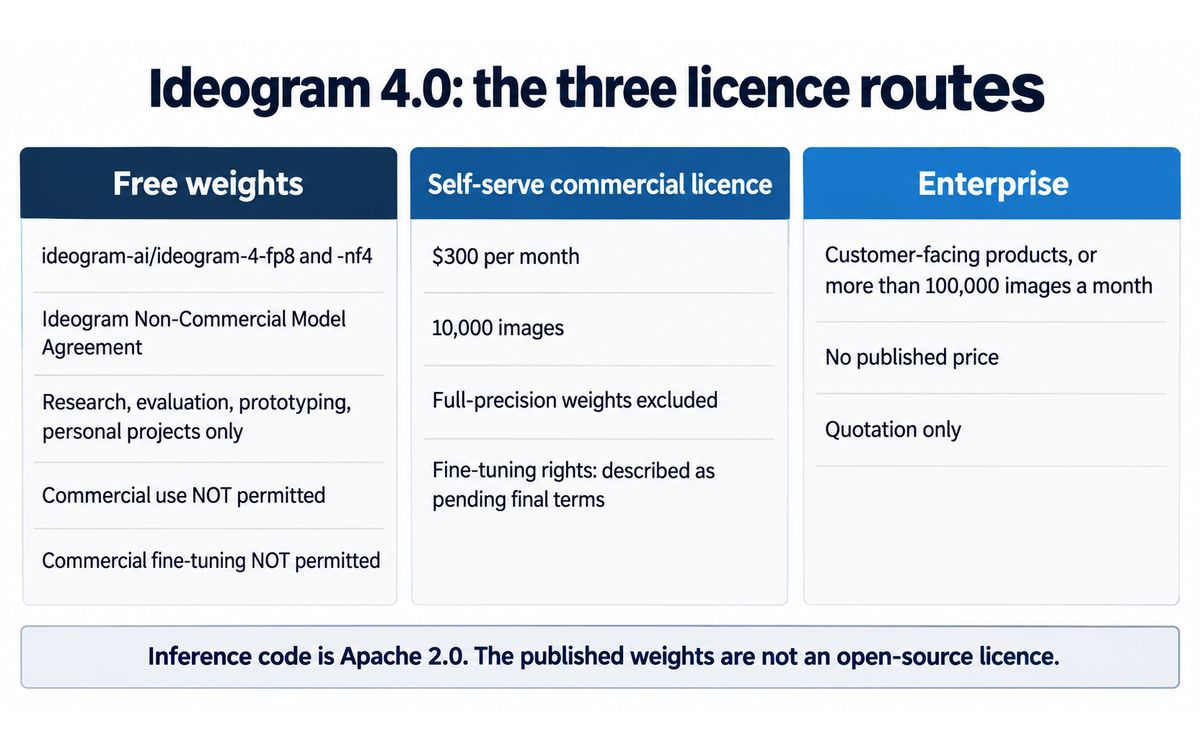
The finding, separated from everything that merely suggests it. The finding is that the vendor sells a self-serve commercial licence at $300 per month while its own licensing page says the commercial fine-tuning rights a self-serve customer would most want are not yet fixed. The page's answer reads, verbatim: "Fine-tuning, LoRAs, and modifications are permitted for non-commercial use under the open weights agreement. Commercial fine-tuning rights should follow the final self-serve terms, or go through Enterprise when the use case needs review." The self-serve product is priced and purchasable on the same page and its exclusions list does not mention fine-tuning at all. A buyer is being asked to pay for a right in a document that says the terms of that right will be finalised later.
That is the finding, and it is not an allegation of bad faith. The vendor publishes the sentence, it routes the uncertain case to Enterprise, and the licence itself is drafted with care. What it establishes is a decision for the buyer: commercial fine-tuning rights are unsettled at the point of purchase and should be confirmed in writing before a budget is committed.
What the free agreement permits, quoted rather than summarised. The agreement is the Ideogram Non-Commercial Model Agreement, last updated 3 June 2026, covering the quantized weights on Hugging Face. The grant is conditional in its own words: "you are only authorized to exercise the rights under this Agreement for Non-Commercial Purposes only, and may not exercise any of the rights under this Agreement for other purposes unless or until Company otherwise expressly grants you such rights in a separate agreement, which Company may grant or not grant in its sole discretion."
The definition of non-commercial is where a reader is most likely to be wrong about their own use. It includes use by a for-profit entity, but only as "use by a for-profit entity solely for testing, evaluation, or research and development in a 'non-production environment'". Student work, private experimentation and internal research sit inside the grant. The same clause closes the door on the case most institutions have: "any use that involves training, fine tuning, or distilling AI models for commercial use or that involves generating Output to include in, or to advertise or promote, revenue-generating products or services, in each case, is not a Non-Commercial Purpose." Generating a campaign image for a revenue-generating product on the free weights is not a non-commercial purpose, and the sentence says so.
The agreement also requires redistribution on terms no less restrictive, requires an attribution notice to travel with any copy, and prohibits military or surveillance purposes, biometric processing, high-risk consequential decisions in listed domains including finance, legal, employment, healthcare, housing, insurance and social welfare, and any use infringing third-party rights including rights of publicity. Two terms move in the reader's direction to note: the provider may terminate at any time on notice and may modify the agreement with the update effective on posting and continued use treated as acceptance, so the document under a self-hoster is not fixed; against that, the vendor states plainly that "We claim no rights in outputs you generate using the Model".
Where the vendor's own surfaces diverge, a lesser observation. The licensing page's comparison table records production and commercial use on the open-weights research route as "Not permitted". The model page for the same release states that the weights "are yours to download, fine-tune, and run on your own hardware" and that "Commercial deployments come with a license that matches your scale". Both can be true of different products, the free weights and the paid licence, and a reader meeting only the model page could conclude that commercial deployment is included. The table is the accurate surface and the model page is the promotional one. The same pattern appears in the hosted contract: the terms state that outputs are yours and may be used commercially, while the developer agreement separately prohibits using user input or output "to develop any product, service, or technology that competes with the Company". The two are compatible, since the restriction concerns competing products rather than using an image in your own work.
What the section does not do. It does not allege unlawful conduct, and it does not treat the free agreement as a trap, because a non-commercial research licence on published weights is a legitimate and common release model. It does not assert what the final self-serve terms will contain, because the vendor has not published them. It does not re-score anything, which is why the score is identical before and after this section. It does not advise against the hosted product, whose position is clean. It puts the licence boundary, the verbatim clauses and one unresolved right in front of the reader before they spend on the weights route, and names the decision: confirm the fine-tuning position in writing, or buy the hosted product, or accept the free agreement for research only.
U365 Co-Intelligence Rating
CI-First Profile
Primary profile: Co-Worker and Assistant (level 2). Secondary profiles: Co-Creator and Thought Partner (level 1), and narrowly Analyst and Tester (level 4).
You state the composition, the words and the palette; the model produces the image; you accept or reject it. That is delegation with review, which the framework places at level 2. Level 1 is still secondary because prompt iteration on a layout is a dialogue: you see what the model did with your instruction, you revise it, and the direction emerges from that loop, which is why the edit, remix and reframe operations exist. Level 4 is a narrow secondary because two features show you what you missed, the describe endpoint that analyses an image and returns a text description, and the response metadata that returns the actual prompt the model used where it differs from yours. Challenger and Devil's Advocate does not apply, because nothing argues against your brief. Coach and Tutor is not assigned: the documentation teaches well, but the tool gives no feedback on your work and builds no capability in you through use.
Collaboration Mode
Recommended mode: Centaur. Alternative mode: none recommended; Cyborg is not appropriate.
Framework Section 7.2 assigns Centaur when the Imposture Risk is Medium or High, which it is. The independent ground is specific: Cyborg is continuous co-creation in a fast loop, and its safeguard is a stopping criterion the human applies after each iteration. Ideogram's unit of work is a finished image, not a fragment of one. The human contribution is the brief, the judgement and the accept-or-reject decision, and all three happen outside the generation. What Cyborg would look like here is a person pressing generate until something looks acceptable, which is the over-delegation behaviour the framework warns about and which no stopping criterion restrains. You own the brief, the standard and the final choice, and the model owns the rendering.
CI-First Benefit Score
Dimension | Score | Rationale |
Time | 7 | Strong savings from structure rather than a claim: a first draft, a background and a cutout all leave the critical path, and a localised edit replaces a regeneration. A per-image API price of three to ten cents supports the same conclusion. Held below 8 because verification does not shrink, reading rendered text at full size is real work, and the queue becomes the limiting factor once priority credits run out |
Quantity | 7 | Strong and priced rather than asserted: batch generation on Pro, a per-image API with no subscription, 1,500 priority credits per Team seat, and self-hosting where the marginal image costs provisioned compute. Held below 8 because the scored quantity is usable output, and the honest count is the count of images someone read at full size |
Quality | 6, in the Moderate band (5 to 6) | Moderate, and the cap is the finding. The capability is real: bounding-box layout control, a vision-language text encoder, native 2K and a JSON prompt interface are mechanisms rather than marketing, and independent blind-preference data places the model first among published-weight entries. It is held at the top of Moderate for one reason, stated as the framework requires: the absence of an independent measurement for the claim the product is sold on. The vendor's own two figures for text accuracy do not agree and no third party publishes one. This is URC scoring the absence of measurement rather than measured weakness, and the band label beside the sub-score is Moderate rather than Strong, which is the ceiling that absence imposes |
Skill | 4 | Marginal, scored conservatively as the framework directs. There is a real learning surface in prompt structure and layout specification, and the public model card teaches how a modern generative model is built, licensed and released. Against that, the product's stated purpose is to remove the need for the skill it appears to demonstrate. Whether a composition, a hierarchy and a type choice work is a design competency the tool neither requires nor builds. Clause 5.2.3-a returns a null, so the 4 is a judgement rather than a floor |
CI-First Benefit Score: (7 + 7 + 6 + 4) / 4 = 6.0 / 10 (CI-First Positive)
Why this score is not higher, and why it is not lower
6.0 is CI-First Positive, one tenth below the Strong band. The band label matters: this is a real recommendation for the reader it fits, not a criticism.
It is not higher because of Quality, and the reason is a measurement failure rather than a capability failure. The framework's Quality test is whether the improvement survives verification, and the capability this product claims above all others is not independently verified. The vendor states 95 per cent on one page and its own release material reports 0.97 on a benchmark on another, neither with a published method. A Strong band would be a claim about reliability that no evidence supports, and inconsistent with the rest of this series, where a smaller discrepancy cost a sibling model a Quality point. It is not lower because everything else is solid and unusually well documented: the time and quantity mechanisms are structural, independent preference data exists and is favourable within its comparison set, output ownership is stated plainly, and the vendor publishes a model card, an inference guide, a prompting guide and a licensing comparison table.
Humics Protection Badge
Dimension | Rating | Rationale |
Creativity | Neutral (0) | The tool executes a direction and does not originate one. You decide the subject, the composition and the words, which leaves your creative decision-making in place. The substitution risk is real and narrow: a reader who generates until something looks acceptable has handed the ideation over, and the workflows above are written to prevent that by requiring the direction to be written down first |
Critical Thinking | Erodes (-1) | Erosion by one documented mechanism. The product is sold on the claim that you no longer need to check the text, and the number behind that claim is published twice by its own vendor at two different values with no methodology. A user who accepts it has been trained out of a verification habit at the exact point where the tool is most convincing, and the failure is invisible at thumbnail size, which is how output is most often reviewed. The mitigation is cheap and is why this is -1 rather than more severe: read every rendered word at full size, in the requested language and script, and re-check the accuracy figure rather than trusting it |
Social Authenticity | Neutral (0) | The product touches no human-facing communication by any route. It generates no conversation, drafts no message and speaks in no one's voice. Clause 4.2-a is explicit that agent-mediated conversation is not erosion by itself, and this product does not mediate conversation at all, which is why the clause returns a null by subject matter. The adjacent concern, that generated imagery can be used to misrepresent, concerns the user's conduct rather than a capability this tool erodes in them |
Humics Protection Score: 0 + (-1) + 0 = -1 / +3 Badge: Humics-Neutral
The erosion is in one place: a tool that tells you to stop checking teaches you to stop checking, at the one point where the output is most convincing and the defect least visible. Every part of that has a control attached. Humics-Neutral describes a tool that neither strengthens nor weakens you on its own, and the point of the framework is that you decide which of the two it becomes.
Superhuman Usage Guidance
When to invite this tool: text-bearing assets at volume, such as campaign variants, social assets, banners, packaging mocks, posters and covers where a headline has to be legible; concepting, where you need six directions before committing and the cost of being wrong should be one generation; product imagery that needs a clean cutout, since background removal is a dedicated operation; work that must stay inside your own perimeter, subject to Section 7c; teaching the economics and the judgement of generative production.
When to keep this tool out: any deliverable where the text must be exactly right and nobody will read it at full size, because if no one opens the file at publishing resolution the tool is a misprint generator with a good hit rate; print or editable-artwork handoffs, because vector export is not supported; work where the painterly visual direction itself is the value; anything that must stay private on the free tier; commercial self-hosting without a licence, and any use of the free weights that advertises or promotes a revenue-generating product, which the agreement names explicitly as not a permitted non-commercial purpose; anywhere the image will be presented as a photograph of something that happened.
U365 method integration: LIPS and CARE, in the Collect and Review phases, by collecting the brief, the exact strings and the constraints before generating and reviewing against the brief rather than against the gallery, with the prompt and seed stored in your Projects pillar; ULM and EVA, primarily Career and Quality of Life, since the case is time returned from production to judgement, with Character touched in keeping your own standard for a finished asset in a tool optimised to present a candidate as one; UP-Context, which the tool responds to unusually well because the model was trained on captions that name every element explicitly; U.Copilot, as the front door that structures the brief before anything is generated, which is the step this class of tool succeeds or fails on; SL-OS, as an input to the workflow rather than a component of it, where the asset belongs in your own record and the judgement belongs to you; UNOP, with no direct application, since the habit it requires is the same habit that makes any generated output trustworthy.
Over-delegation warning: over-delegation here looks like a gallery, generating until something looks acceptable, approving at thumbnail size, and losing the ability to say why one image was chosen over another. The capability that goes first is the design judgement that tells you a composition is wrong, and it goes quietly, because the outputs improve while the judgement does not keep pace. The CI-First formula is unforgiving: if your contribution drops while the model stays strong, the product falls faster than the model alone. The defence is cheap. Write the brief before generating. Open every candidate at publishing size. Read the words. Keep one version of the work you did by hand, so you have a comparison rather than a memory.
U.Copilot Integration
U.Copilot is the front door to the U365 tool library, at https://www.university-365.com/ucopilot. For this tool, route through U.Copilot before generating anything, because the specification work is where this class of tool succeeds or fails, and a brief precise enough for U.Copilot to structure is usually precise enough for the image model to execute.
Route a Fellow to this tool when
Produce text-bearing assets at volume: campaign variants, social assets, banners, packaging mocks, posters, covers, where a headline has to be legible
Need several directions before committing, and the cost of being wrong should be one generation
Need a clean cutout or a localised edit rather than a regeneration
Work on brand, marketing or design coursework and need a publishable first draft inside a personal budget
Want to study how a model is released, licensed and repriced, because this release publishes all three
Route a Fellow away from this tool when
Need editable vector output, multi-page layout or brand templates a team can reuse
Have no habit of reading the rendered text at the size the asset will be used, because that is the one control this tool requires
Need a permissive licence on published weights, since the free agreement excludes commercial use and the commercial route is priced and its fine-tuning right is described as pending
Need output that stays private without paying, because the free tier is public by default
Want a measured accuracy guarantee, because no independent text-accuracy measurement exists
Need a design or communication outcome they must be able to defend as their own work craft, because the tool produces the bitmap and the institute's production craft is not exercised
A U.Copilot prompt example for Fellows
I am a U365 Fellow in UID (Digital Design, UX/UI). I want to use Ideogram for
[deliverable] and I want the brief to be the part I own. Include:

1. The CI-First Profile and the Collaboration Mode for this session, with Centaur
   as the mode and the reason stated
2. A production brief in the UP-Context order, with the exact strings to render,
   their positions, the palette and the acceptance test
3. The two ways this brief is most likely to be misread, and the wording that
   prevents each
4. The review step: what I check on every candidate, and the publishing size I
   check it at
5. The stopping condition: how many candidates I generate before I choose, and
   what makes me stop and finish by hand
6. The licence route I am using for this output and what it permits for this use
7. A first-15-minutes exercise: one asset with a plain prompt and the same asset
   with the text written as a literal string, compared at full size
8. The record I keep in LIPS under CARE, and which parts of this workflow I must
   do myself
Guardrails
State the score beside the risk. 6.0/10, CI-First Positive, with Medium AI Imposture Risk and all three traps named at Medium, rather than the overall level alone.
Never present legible text as verified text. The claim is a vendor claim, the vendor publishes two different figures for it, and neither carries a method. The habit is to read every rendered word at publishing resolution.
Never describe a generated asset as the Fellow's acquired skill. Skill evidence is the Fellow's brief, their rejection reasons and their publish decision.
Never quote a per-image price without the model and the rendering setting it belongs to, because the tiers price differently and the credit cost of a model is not comparable across releases.
Never state or imply that a run produced this review. The version field records the documented release and the date records when the sources were read. The published post says nothing beyond that, and it does not explain how the sources were reached.
Never call this tool a design pipeline. It is a stage in one, and the handoff is a bitmap with no vector export.
Never let a low entry price stand as a recommendation. The free tier is public by default, the allowance has been reduced over time, and the priority credits do not roll over.
Never advise fine-tuning the published weights for commercial work without stating that the free agreement excludes it and that the vendor describes the commercial fine-tuning right as pending.
Tool-choice framing
Present the trade rather than a default:
A legible headline on a designed asset, produced at volume: Ideogram is the fit, and the review's own comparison places it ahead of the general-purpose generators it was set against on typography.
Painterly or atmospheric output: a general-purpose generator is the fit, and this tool is the wrong instrument.
Editable vector artwork or a reusable brand template: a design platform is the fit. Ideogram is the front of the pipeline, not the whole of it.
Self-hosting on permissive terms: another published-weight family is the fit, and this review says so itself.
A measured accuracy guarantee: no tool in this class is the fit, because no independent measurement exists for the claim that matters.
No habit of reading rendered text before publishing: no text-rendering generator is appropriate, because the review step is the control that makes the output safe.
What Users Say
Aggregate Rating Table
Platform | Rating | Number of reviews | Link |
Trustpilot | 4.0 / 5 | 163 reviews, 104 in the last 12 months | |
App Store (iOS) | No aggregate figure read | 322 ratings | |
Product Hunt, 4.0 launch, 5 June 2026 | 250 upvotes | 10 comments, 5th on the daily leaderboard | |
Product Hunt, 3.0 launch, 28 March 2025 | 194 upvotes | 15 comments, 10th on the daily leaderboard, 2 reviews at 5.00 | |
Product Hunt, 2a launch, 1 March 2025 | 214 upvotes | 5 comments, 5th on the daily leaderboard, 2 reviews at 5.00 | |
G2 | No reviews found | No product listing | |
Capterra | No reviews found | No dedicated product page | |
Reddit r/ideogramai | Mixed: positive on text quality, negative on queue and pricing | Multiple long-running complaint threads |
Two notes. The Product Hunt figures were read through a launch-tracking index rather than from the platform itself, so weight them accordingly. The Trustpilot aggregate is the only substantial third-party review corpus this product has, and G2 and Capterra carry no listing at all, which for a B2B reader is itself the finding.
What Users Praise
The consistent positive theme is output quality for the job this tool is bought for. Users switching from general-purpose generators for text-heavy work report a step change in whether the words come out right. The interface is described as approachable, with a usable graphic in minutes for a non-designer. Realism in photographic scenes and typography in designed assets are named most often, and sentiment about text rendering is positive even in threads that are angry about everything else.
What Users Complain About
The dominant complaint is the credit and queue economy rather than the output. Community threads document changes made without announcement: the free allowance reduced over successive periods, the wait between slow-queue generations raised to twenty minutes for everyone including paid users, and reports that the slow queue can be full for hours. Users describe a paid plan that becomes impractical once priority credits are exhausted, with one long-running thread arguing that practical daily output on a cheaper and a premium plan converges because both are limited by queue behaviour rather than by the stated allowance. A second theme is moderation, with content refused that was previously allowed and refusal arriving after credits were spent. A third is support responsiveness, with a portion of the review corpus describing unanswered billing and account problems.
Sentiment Summary
Overall sentiment: Mixed, and it splits by subject: predominantly positive on output quality and specifically on text, predominantly negative on the credit, queue and moderation model.
Key themes: text rendering is why people choose the tool and is the one thing users rarely complain about; the credit economy is what users complain about most, and the complaints concern packaging changes and queue behaviour rather than the price level; the free tier is public, the allowance has been reduced over time, and the community reads the changes as pressure toward subscription; moderation refusals frustrate users both for being applied to content they consider ordinary and for arriving after credits are consumed; support responsiveness and billing disputes recur.
U365 Editorial Note
The sentiment and the evaluation agree in an unusually specific way. Users do not complain about the images. They complain about the meter. That is exactly the pattern the Time and Quantity sub-scores describe: the capability is real and the constraint is the commercial packaging around it. When a user says a plan buys less than the card implies, they are describing the same thing the credit matrix shows, which is that the newest model is charged per single image while the older ones are charged per four.
The divergence belongs on the record too. Community sentiment is warmer about output quality than this review is, because this review scores the absence of an independent measurement for the text-rendering claim while the crowd scores its own experience. Take the positive sentiment as a reason to try the tool and the Quality cap as a reason not to build a print pipeline on an unverified number. The negative sentiment is not about the product at all, and the framework has no dimension for it: complaints about the queue, the allowance, the moderation and the support concern the vendor's conduct of the business rather than the tool's benefit to the user, which is why they are reported and not scored.
Comparison and Alternatives
Alternative | Choose the alternative if | Choose Ideogram if |
Midjourney, https://www.midjourney.com | Your output is painterly or atmospheric and legible text is not part of the brief | You need a headline that reads, a stated layout, or a cutout. The two tools are complements rather than substitutes |
Adobe Firefly, https://firefly.adobe.com/ | Your output must land inside an existing design toolchain, or your organisation needs an indemnification position, or the handoff matters more than the generation | You produce text-bearing assets in volume and the per-image cost matters more than integration |
FLUX and its hosted surfaces, https://blackforestlabs.ai | You are self-hosting and need a permissive licence, or you already run a diffusion pipeline such as ComfyUI. FLUX.2 is the nearest published-weight competitor in the arena data | Legible typography is the requirement. The model card's own comparison places Ideogram 4.0 ahead of FLUX.2 dev on text rendering and the arena places it ahead overall |
GPT Image models, https://platform.openai.com/docs/guides/image-generation | You need the highest overall preference ranking and the best general-purpose fidelity and will pay for it | You want a lower per-image price, published weights you can inspect and fine-tune, or an application your team can use without an API |
Google Gemini image generation, https://deepmind.google/models/gemini | You are already inside Google's stack, or you want a strong general-purpose scene generator | You are producing designed assets with headline text, where the typography evaluation places Ideogram ahead of the Gemini image tier it was set against |
Canva or a comparable design platform, https://www.canva.com | You need editable vector output, multi-page layout, or brand templates a team can reuse | You need many directions quickly and cheaply and will finish the chosen one in a design tool |
Where Ideogram is clearly better. On text inside an image, and on the price of finding out whether an idea works. Legible typography is the capability the company was founded to produce, it is what users rarely complain about, and it is visible in the arena's open-weight comparison where this model leads. A candidate costs three to ten cents through the API, so you can afford six directions before choosing.
Where Ideogram is clearly worse. On the licence route its own release makes possible. The free weights carry a non-commercial agreement, the commercial licence is $300 per month with fine-tuning rights the vendor's own FAQ describes as pending, and Enterprise for customer-facing products has no published price. A reader who wants published weights on permissive terms has a better option in FLUX, and this review says so. The second area is the packaging of the paid product: bundled credits buying roughly a quarter of what they bought before a model release, with no headline price change and no rollover on priority credits. The third is the absence of vector export, which makes the tool a stage in a pipeline rather than a pipeline.
Verdict and Next Steps
Who should adopt it: a marketing or brand function producing text-bearing assets at volume, a designer who needs directions before committing, and a student or lifelong learner who needs a publishable first draft inside a personal budget. Not the reader whose output is painterly, and not the reader who needs editable vector artwork out of the other end.
When: now for the hosted product, because the browser and API routes are mature and the entry price is low. Not yet for commercial self-hosting, until the vendor's own sentence about final self-serve terms is replaced by the terms themselves.
For what: the brief-to-candidate loop, and specifically any asset where the words on the image must be legible. Start on the free tier, read the words at full size, and only then decide whether your real volume justifies Plus, Pro or the API.
UP-Context prompt pack. Three reusable prompts in the U365 prompting method, each written in the UP-Context order with a Role line that assigns the CI-First Profile before the task and a verification close that states what the human does with the output. Copy them into your own context. Pack 1 is the brief you write before the first generation, Pack 2 is the acceptance check on what you generated, and Pack 3 is the route decision on cost and licence.
Prompt pack 1: The brief, written before the first generation
Context: I am producing [asset type] for [audience] in [market or channel].
The intended use is [where it will be published and at what size].
The palette is [colours, or the brand palette]. The type direction is
[serif or sans, weight, case]. My own standard for a finished asset is
[state it in one sentence].

Role: AI as art director, producing a written production brief and nothing else.

User-Persona: write the brief for me, the Fellow, and use my stated standard as the
test every candidate will have to pass.

Audience-Persona: the person the asset is for is [describe them in one or two
sentences, including what they must understand in a glance].

Task:
1. Restate the brief as: subject, composition, placement of each element,
   the exact strings to render, and the palette.
2. List the exact text to render, each string in quotes, spelled exactly as it
   must appear, and state the position of each one.
3. State what must not appear in the image.
4. State the acceptance test: what a candidate has to satisfy to be publishable.
5. Name the two most likely ways this brief will be misread by an image model.

Constraints: no other text in the image beyond the strings listed. Every string
must be legible at the size named in the intended use. Do not generate images;
produce the brief only. If any part of the brief is underspecified, say which part
and ask rather than choosing for me.

Output format: the brief as five labelled lines, then the acceptance test, then
the misreading risks.

**UP-Context verification:** before generating anything, read the brief back and confirm that the strings, the positions and the acceptance test are what you meant. If the brief reads as optional, it is not yet a brief.

**Memory disclosure:** if this brief is produced inside U.Copilot, U.Copilot writes it to your UP-Context working notes. Nothing is written without your confirmation, and you can delete any line.
Prompt pack 2: The acceptance check on a generated asset
Context: I have generated [number] candidates for [asset type] and I have to
choose one or reject all of them. The brief is attached, including the exact
strings to render and the acceptance test.

Role: AI as a critical reviewer, not as a cheerleader. Your job is to find what
fails the brief, not to reassure me.

User-Persona: I am the Fellow and I own the publish decision. Judge the candidates
against the brief as written, not against your own taste.

Audience-Persona: the reader of the finished asset, who will see it at
[publishing size] and will not read a caption.

Task:
1. For each candidate, describe what it actually shows, including every text
   element and where each one sits.
2. For each text element, state whether it is spelled exactly as the brief
   requires, and whether it is legible at the stated publishing size.
3. List every discrepancy between what is shown and what the brief asked for.
4. Recommend one candidate, or recommend rejecting all of them.
5. State what still has to be done by hand before publication.

Constraints: describe what is present rather than what was intended. Say plainly
if any text is unreadable or misspelled. Do not judge the composition against
your own preferences. Do not assume the brief was followed because the image
looks convincing at small size.

Output format: one short block per candidate, then a table of discrepancies,
then the recommendation in two sentences, then the handoff list.

**UP-Context verification:** the check is only complete when every rendered word has been read at the size the asset will be used. If you read it in the preview, you have not checked it. Keep the rejected candidates and their reasons, because the reasoning is the record that matters.
Prompt pack 3: The route decision on cost and licence
Context: my realistic output is [N] images a month, of which [M] need accurate
rendered text. The routes available are the application tiers, the per-image API
and the published weights under the vendor's commercial licence. I also need to
know what each route permits for my intended use.

Role: AI as an analyst producing an argued recommendation from the vendor's own
published figures.

User-Persona: I am the Fellow deciding this, and I will have to explain the
decision to [whoever needs to approve it]. Use the figures I give you and say
when a figure is missing.

Audience-Persona: whoever approves the spend, who cares about the monthly cost,
the exit route and the licence position rather than about the tool.

Task:
1. Cost each route at my volume, and show the arithmetic.
2. State what each route permits and what it withholds for my intended use.
3. Name the figure the vendor does not publish that would change the answer.
4. Recommend one route and name the condition under which that recommendation
   would be wrong.

Constraints: show the arithmetic rather than the conclusion. State every
assumption and name the model or setting each price belongs to. Do not present a
vendor claim as a measurement. If a licence term is described by the vendor as
not final, say so in those words.

Output format: a table of routes with cost and permitted use, then the missing
figure, then the recommendation and its disconfirming condition.

**UP-Context verification:** the decision is complete when it is written down with its assumption, its missing figure and its exit condition. A cost model without a licence position is half a decision.
SL-OS integration
Ideogram fits SL-OS as a production stage a Fellow directs, with the record kept in LIPS. It does not replace the Fellow's standard for a finished asset, and an asset enters SL-OS only with the brief and the acceptance record that make the decision defensible.
The record to keep in LIPS
For every substantive Ideogram engagement, store under the relevant LIPS Project, or under Career and Finance for skill development, one record containing:
The brief as written, including the exact strings to render and their positions
The audience and the channel the asset is for
The acceptance test, and the publishing size the asset will be used at
The candidates produced, the rejected alternatives and the reason for each rejection. This is the field most likely to be omitted and the one that matters most, because a generated asset looks finished whether or not a decision was made
The rendered-text check: every text element read at publishing size, with the result
The handoff note: what the tool cannot produce, namely the editable vector, and who finishes the asset
The licence route used for this output and what it permits for this use
The cost and the model tier used, per image, so the record carries the price basis
The Fellow's own statement of what they did and what the tool did
CARE cycle
Collect: save the brief, the candidates, the rejection reasons, the rendered-text check and the licence note.
Action Plan: before generating, write the brief, the acceptance test, the publishing size, the number of candidates and the stopping condition.
Review: read every rendered word at publishing size, judge the composition against the written brief rather than against the gallery, and confirm the licence permits the intended use.
Execute: accept the asset with the decision recorded, the handoff named, and the learning outcome written by the Fellow rather than copied from the tool.
ULM and EVA
Career and Finance is the primary domain. The transferable skill is direction under a written standard: specifying precisely, judging against the brief, and knowing when to stop and finish by hand. That transfers to any tool that produces a plausible-looking artefact.
Creativity is the domain most exposed, in one specific way. A reader who generates until something looks acceptable has handed the ideation over, and the outputs improve while the judgement does not keep pace. The control is to write the direction down before generating, which is why the Action Plan phase carries the weight here.
Character and Emotions is touched. Keeping your own standard for a finished asset, in a tool optimised to present a candidate as one, is a discipline rather than a feature.
This tool is not recommended for Body and Health, Spirit and Mind, or Social and Love Relationships. Nothing in the release addresses those domains, and the adjacent concern, that generated images can misrepresent, concerns conduct rather than a domain of life.
Within EVA:
Explore: read what the tool does with the brief, at full size, before accepting any claim about how well it renders text.
Visualize: put the brief, the candidates, the acceptance test and the licence route on one page, so the decision is visible rather than remembered.
Action Plan: decide what the tool produces, what you finish by hand, what you never publish unread, and which licence route covers the intended use.
A working cadence
UID Fellows: two sessions per week of 45 to 90 minutes, each closing with one published asset and its written acceptance record, plus one candidate rejected with the reason stated.
UIC Fellows: one campaign exercise per module, brief first, with the audience rationale and the publish decision recorded.
UIB Fellows: one packaging and licence analysis per module, costing a realistic volume across the three routes and naming the figure the vendor does not publish.
UIT Fellows: one release-literacy exercise, reading the model card and the agreement and stating in writing what the release permits, plus one deployment plan naming the memory class and what the runtime supports.
All Fellows: a monthly honesty check using Prompt Pack 3, with the outcome in LIPS rather than in the vendor's project alone.
Microsoft 365 integration
Keep the brief and the acceptance record in OneNote or SharePoint under the same Project the asset belongs to, rather than only in the tool's own history, because the tool retains generations rather than decisions.
Keep the licence route and the permitted use in the project record before any commercial publication, since the free weights exclude advertising or promoting a revenue-generating product.
Publish assets through the tenant's own library or media process, so the asset carries the organisation's record of where it came from.
Keep the cost basis per image in the project record, because the credit cost of a model differs between releases and the price basis is what makes the figure comparable later.
Never store credentials, API keys or account details in LIPS. Use the tenant's secret store, and keep only the licence route and the permitted use in the academic record.
Fit statement
A strong fit as a production stage and a conditional fit as a learning tool. The tool is the instrument that turns a written brief into a reviewable candidate; the direction, the acceptance standard and the publish decision are the Fellow's. Where the review records the real limit is where the Fellow holds the line: the output is a bitmap designed for a headline, so the craft of typography and layout is not exercised, and the licence boundary on the published weights is a decision rather than a detail. Used with a written brief and a read-at-full-size check, it returns time from production to judgement, which is what the Time and Quantity sub-scores describe. Used as a gallery, it produces a folder of candidates and no decision.
Status and Last Tested
Re-check: trigger-based, maximum six months. The triggers are listed above, and the first two, an independent text-accuracy measurement and a reconciliation of the vendor's two accuracy figures, would each change the Quality sub-score rather than only the wording.
Version reviewed: Ideogram 4.0, released 3 June 2026
Tool to Skill to Credential
The chain below is stated in the table, held to the rule that no credential claim is asserted without verification.
Tool skill | U365 competency | Credential | Institute | Stacks into |
Specifying a visual brief precisely enough that a model can execute it: subject, composition, placement, palette and the exact strings to render | Visual briefing and creative direction | Graphic Design Professional (30 days, 124 steps), verified PUBLISHED on 2026-09-25. Its published programme covers ideas, concepts and form, layout and composition, typography and colour for design, which are the decisions this competency consists of | UID (Digital Design, UX/UI) | Bachelor in Design (B.D.), then Master in Design (M.D.). Expert level, SUPERHUMAN only |
Reading a generated asset at publishing resolution and judging whether it is usable, including whether the rendered text is correct | Evaluation of generative output, and the verification habit the framework depends on | AI Creator Professional (30 days, 124 steps), verified PUBLISHED on 2026-09-25. Its published programme covers prompting for generative image tools and the opportunities, issues and ethics of generative AI | UID (Digital Design, UX/UI) | Bachelor in Design (B.D.), then Master in Design (M.D.). Expert level, SUPERHUMAN only |
Costing a generative workflow across subscription, per-image API and self-hosted compute, and reading the licence attached to each | Technology investment appraisal, unit economics and licence literacy | Financial Analysis Specialist (30 days, 124 steps), verified PUBLISHED on 2026-09-25. Its published programme covers financial statement analysis, financial modelling and forecasting. Limit: the appraisal half is assessed there, the licence half is practised | UIB (Business Management, Entrepreneurship) | Bachelor of Business Administration (B.B.A.), then Master of Business Administration (M.B.A.). Expert level, SUPERHUMAN only |
Reading a model card, an inference guide and a licence agreement and stating what a release permits | Applied AI literacy, specifically distinguishing an open-weight release from an open-source one | AI Developer Specialist (18 days, 72 steps), verified PUBLISHED on 2026-09-25. Its published programme covers deep learning foundations, working with large language models, deploying models responsibly and building with transformers | UIT (Technology, AI, Data Science) | Bachelor of Science in IT (B.Sc.), then Master of Science in IT (M.Sc.). Expert level, SUPERHUMAN only |
Running a quantized open-weight model on your own hardware and knowing what the deployment requires, including the memory class and what the runtime supports | Deployment and infrastructure literacy for self-hosted models | Cloud Computing Specialist (30 days, 124 steps), verified PUBLISHED on 2026-09-25. Its published programme covers core concepts, cloud security, cloud storage, cloud networking and the three dominant platforms. Limit: the programme is cloud-facing and on-premises graphical processing deployment is adjacent to it rather than assessed by it | UIT (Technology, AI, Data Science) | Bachelor of Science in IT (B.Sc.), then Master of Science in IT (M.Sc.). Expert level, SUPERHUMAN only |
Iterating with localised edits rather than regenerating, and knowing when to stop and finish by hand | Iterative practice with a stopping criterion, which is the Centaur discipline in operational form | Confirm with academic team. No published U365 programme assesses iteration with a stopping criterion; it is a working method assessed in coaching rather than in a diploma. Recorded as a gap in this section | UID (Digital Design, UX/UI) coursework | None asserted, because no credential is attached |
What is not claimed, in one paragraph. No UIC chain: the tool produces an asset type UIC work uses and builds none of the institute's competencies. No UID production-craft chain: a bitmap with no vector export cannot carry a typography or layout production competency, and the two UID chains above attach to direction and evaluation, never to craft. No chain for fine-tuning or model adaptation, recorded as a gap. No micro-credential component title anywhere, and no per-programme access level.
The programme anchors below were checked against the published U365 catalogue on 2026-09-25. Each is a published programme, with the duration and step count shown, and each resolves to a live programme page. The four institute pages for UID, UIC, UIB and UIT also resolve on the same date.
Programme | Slug | Duration | Steps | Page status |
Graphic Design Professional | graphic-design-professional-diploma | 30 days | 124 | Published |
AI Creator Professional | ai-creator-professional-diploma | 30 days | 124 | Published |
Financial Analysis Specialist | financial-analysis-specialist-diploma | 30 days | 124 | Published |
AI Developer Specialist | ai-developer-specialist-diploma | 18 days | 72 | Published |
Cloud Computing Specialist | cloud-computing-specialist-diploma | 30 days | 124 | Published |
What cannot be verified and is therefore not claimed. Whether completing one of these programmes awards credit toward a named micro-credential, and whether any component of one programme is assessed inside another, are not exposed by the catalogue. The stacking column records the degree ladder the institution publishes in each discipline, which is a statement about the published programme hierarchy rather than a claim that one programme awards credit toward another.
University 365 has three academic access levels: DISCOVERY, INSIDER and SUPERHUMAN.
Specialized diplomas and certificates carry Basic, Foundation and Expert levels. DISCOVERY Fellows can enrol in Basic-level programmes only. INSIDER Fellows can enrol in Basic and Foundation programmes. SUPERHUMAN Fellows can enrol in all of them.
University degree programmes carry a single Expert level and are open to SUPERHUMAN Fellows only. INSIDER and DISCOVERY Fellows cannot enrol in a degree programme without upgrading.
Because five of the six chains above stack into a design, business or IT degree, the degree outcome in those five chains is open to SUPERHUMAN Fellows only. The restriction follows from the programme hierarchy stated above rather than from the tool, and every other chain stays open at the level its own programme states.
UIC credential chain
No UIC credential is mapped for Ideogram. UIC carries Medium relevance, and the tool builds none of the institute's disciplinary competencies. Creating a chain for a tool that does not build the competency would inflate the academic claim and mislead Fellows about where the skill is assessed. A UIC Fellow who needs the underlying capability, which is campaign strategy, copy and measurement, should take a UIC programme directly, and a UIC Fellow who wants the visual direction competency should take the UID programme named in the table as an elective.
The chains apply only where the Fellow can state the brief before generating, explain what a candidate fails to meet, read every rendered word at the size the asset will be used, and name what the tool did not do. Producing a good-looking asset is not evidence of the Fellow's skill.
The assessment artefact must be the Fellow's own work, never the generated image alone. For each chain that means: the written brief including the exact strings to render; at least two rejected alternatives with the reason for each rejection; the publish decision with its justification; the licence route chosen and what it permits for the intended use; and the statement of what the tool cannot produce, which is the editable vector handoff.
Two gaps, recorded rather than filled with a plausible programme name.
Iteration with a stopping criterion. No published U365 programme assesses the discipline of localised editing and knowing when to finish by hand. It is a working method, assessed in coaching under the LIPS and CARE cycle rather than by a credential.
Generative-output verification and model-release literacy. No published U365 credential assesses reading a model card and a licence and stating what a release permits, nor the verification habit of reading generated text at publishing resolution. Both are taught in the UIT and UID programmes named above as practice, and neither is separately assessed. This is the gap the UIT reconciliation of 2026-09-22 first surfaced from the other direction.
UDA's recommendation for a future micro-credential, consistent with the review's own recommendation of a short module on reading generative licences: reading a generative licence and stating what a release permits, which is teachable with no product and is the most transferable item in this release.
Learn More at U365
Related micro-course: none currently available.
Faculty commentary: Hubert Graef, Dean of Research (URC). This release is two products with the same name. The first is a hosted image generator whose licence position is clean, whose output ownership is stated plainly, and whose per-image cost makes iteration cheap. The second is a published-weights model whose free licence excludes the case most organisations have, and whose commercial licence is being sold while the vendor's own page says the rights a buyer most wants are not yet final. The second point is smaller and more useful: the product's central claim is a number, and the vendor publishes that number twice at two different values. Learning to notice that pattern is worth more than any single accuracy figure.
How-To Hub content: none currently available. The candidate article is the fifteen-minute calibration exercise in Section 5, generating the same asset with a plain prompt and with the text written as a literal string and comparing the two at full size.
Further reading: the U365 Tools Reviews index at https://www.university-365.com/tools.
Migration Path
Not applicable. Ideogram is Active and recommended, so no Migration Path is required and none is included. No replacement is proposed, no transfer of work is described, and no migration plan is built.
One narrower point belongs on the record without becoming a migration plan. The only route a reader might need to leave is the self-hosted one, and that is not a migration away from Ideogram but a boundary inside its own licensing: a team that starts on the free weights for research and later wants commercial use needs either the self-serve licence or Enterprise, and the vendor's own comparison table states that production and commercial use is not permitted on the research route. That is a licence step, requiring no data transfer and no rebuild, and it is covered in Section 7c rather than here.
U365's Recommendations to Learn More
Official learning resources
Documentation index, covering prompting, generation settings, private generations, credits and the API: https://docs.ideogram.ai
The frequently asked questions, specifically which credits each tool consumes, whether unused credits roll over, and what happens to private images when a subscription ends: https://docs.ideogram.ai/frequently-asked-questions
The API overview, which states the fact most readers get wrong, that API billing is separate from a subscription: https://docs.ideogram.ai/plans-and-pricing/ideogram-api
The API pricing page, the document to price a volume against: https://ideogram.ai/api-pricing
The pricing page, and specifically the credit matrix rather than the plan cards: https://ideogram.ai/pricing
The licensing page, which carries the four-route comparison table and is the clearest statement of what the free weights permit: https://ideogram.ai/licensing
The non-commercial model agreement in full, specifically the definition of Non-Commercial Purposes: https://huggingface.co/ideogram-ai/ideogram-4-nf4/blob/main/LICENSE.md
The model card, which documents the architecture, the text encoder, the JSON prompting interface and the hardware expectations: https://huggingface.co/ideogram-ai/ideogram-4-fp8
The prompting guide in the open repository, including the magic-prompt section explaining the expansion step: https://github.com/ideogram-oss/ideogram4
The terms of service for the output-ownership statement, and the developer API agreement for the competing-product restriction: https://ideogram.ai/legal/tos and https://ideogram.ai/legal/api-tos
The text-rendering page, read next to the model card, because the two give different values for the same capability: https://ideogram.ai/features/text-rendering
Video tutorials and channels
The three walkthroughs below were each resolved before publication. They are third-party explanations of the release, and no accuracy claim in this review rests on them.
Written tutorials and deep-dive articles
The technical announcement, setting out the single-stream architecture, the vision-language text encoder and the JSON prompting rationale: https://ideogram.ai/blog/ideogram-4.0
The model page, which states the enterprise positioning and the deployment argument for running the model behind your own firewall: https://ideogram.ai/models/4.0
The open repository's prompting and inference documents, the primary source for sampler presets, parameter reference and optimisation: https://github.com/ideogram-oss/ideogram4
Community and social
The vendor's community forum, where the queue, credit and moderation complaints are documented in long-running threads: https://www.reddit.com/r/ideogramai
The official Discord, referenced from the documentation, which is the vendor's support and discussion channel
The API status page, the surface to check when a generation fails: https://status.ideogram.ai
Resources on X
Dedicated X channels:
https://x.com/ideogram, the company's primary channel, where releases, model announcements and design showcases are posted
https://x.com/ideogram_ai, the company's second channel, also active and carrying product posts
Both handles were checked and both resolve.
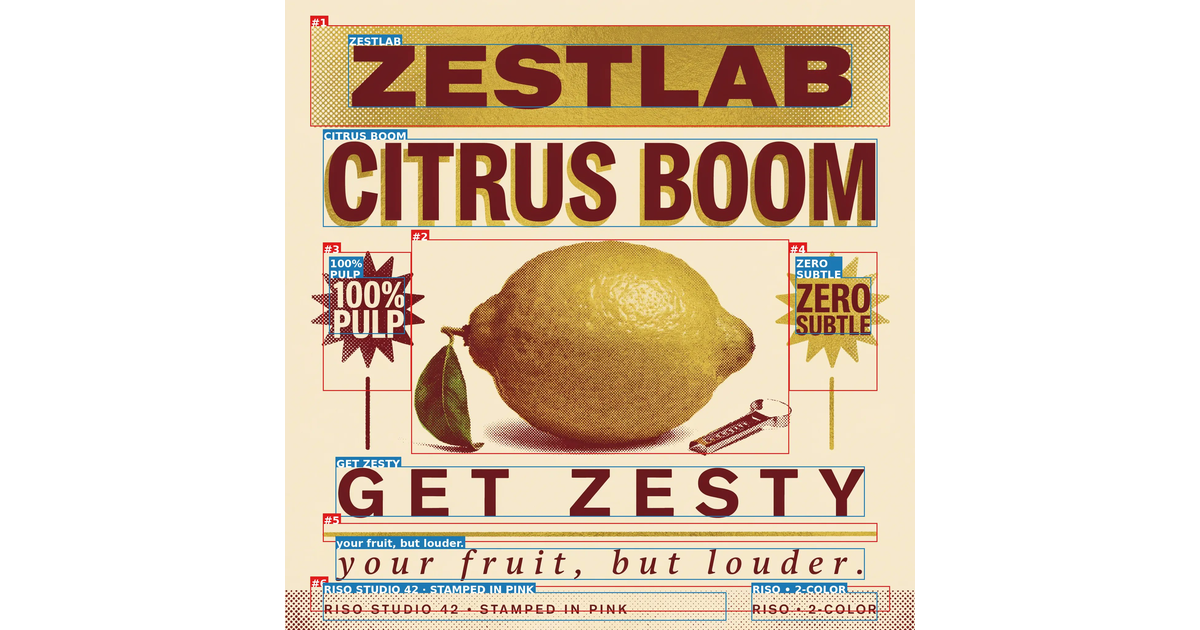
Treat the vendor's own channels as promotional sources: useful for learning that a release happened, not for assessing whether its accuracy claim holds.
Community evidence note
Sentiment in this review is reported from what could be read: a consumer review platform with a substantial corpus, a launch-tracking record of the Product Hunt releases, an app store ratings count, and community discussion reached through search indexing. Specific thread addresses are not cited as evidence, because a thread that could not be opened in full is not a source to which a review should attribute a claim. No figure in this review comes from a page that could not be read.
Glossary
CI-First Benefit Score
The arithmetic mean of four dimensions, each scored 0 to 10, rounded to one decimal: Time, Quantity, Quality, and Knowledge and Skill. It measures what the tool returns net of the overhead of using it. The bands are 0 to 2.0 CI-First Negative, 2.1 to 4.0 CI-First Neutral, 4.1 to 6.0 CI-First Positive, 6.1 to 8.0 CI-First Strong, and 8.1 to 10.0 CI-First Transformative. Ideogram scores 6.0, at the top of the Positive band.
CI-First Profile
The role the AI plays in the working relationship, from a fixed set of five: Co-Creator and Thought Partner, Co-Worker and Assistant, Coach and Tutor, Analyst and Tester, and Challenger and Devil's Advocate. A tool gets a primary profile and any number of secondary ones. Ideogram's primary profile is Co-Worker and Assistant, because you direct and review while the model renders.
Humics Protection Badge
The sum of three ratings, each +1 for protects, 0 for neutral or -1 for erodes, across Creativity, Critical Thinking and Social Authenticity, giving a range of -3 to +3. A score of +2 to +3 is Humics-Friendly, -1 to +1 is Humics-Neutral, and -2 to -3 is Humics-Risky. Ideogram scores -1, which is Humics-Neutral, on one erosion in Critical Thinking and two neutral ratings.
AI Imposture Risk
The likelihood that a tool traps you in one of three illusions. The Time Illusion is the appearance of saving time when net time is lost to prompting and reading. The Quantity Illusion is high volume that looks good and does not survive inspection. The Skill Illusion is the appearance of competence in you while the underlying skill is absent or eroding. Each trap is rated Low, Medium or High with cited evidence, and the overall level is Low when all three are Low and High when two or more are High. Ideogram is Medium overall, with all three traps at Medium.
Collaboration Mode
How the work is divided between you and the AI. Centaur mode is a clear division of labour, where you hold the Humic tasks and delegate processing and drafting. Cyborg mode is continuous intertwined iteration with no fixed boundary. Framework Section 7.2 makes Centaur the required mode whenever the Imposture Risk is Medium or High. Ideogram is Centaur, and Cyborg is not appropriate because the unit of work is a finished artefact and the human judgement sits outside the generation.
User Sentiment
The aggregated public opinion from review platforms, community forums and repository activity, reported separately from the CI-First score because crowd sentiment can disagree with a rigorous evaluation. Where the two agree the finding is stronger, and where they diverge the divergence is worth explaining. Ideogram's sentiment splits by subject rather than being mixed overall: positive on output quality and specifically on text, negative on the credit, queue and moderation model. The most useful observation is that users praise the generation and complain about the meter, which is the distinction the score draws.
Review Status
Review Status records the current standing of the tool at the time of the last test. Active: the tool is current and recommended. Active (updated): recently re-checked and the content was refreshed. Changed: a re-check trigger fired and an update is pending, so read the review with that in mind. Risky: the tool has significant unresolved issues, or it has been clearly surpassed by newer alternatives. Use it with caution and read the Limits section. Retired: the tool still works but is no longer recommended. Deprecated: the tool has been shut down or fundamentally changed. Retired and Deprecated posts include a Migration Path section.
Sources
Vendor primary sources
Ideogram product site and pricing: https://ideogram.ai and https://ideogram.ai/pricing
API pricing page, per-model and per-endpoint rates: https://ideogram.ai/api-pricing
Licensing page, including the four-route comparison table and the three licence documents: https://ideogram.ai/licensing
Text-rendering page, stating 95 per cent accuracy against 30 to 50 per cent for most other generators: https://ideogram.ai/features/text-rendering
Model page, stating that the weights are yours to download and fine-tune and that commercial deployments come with a licence matching your scale: https://ideogram.ai/models/4.0
Technical announcement: https://ideogram.ai/blog/ideogram-4.0
Documentation, frequently asked questions and API overview: https://docs.ideogram.ai and https://docs.ideogram.ai/frequently-asked-questions and https://docs.ideogram.ai/plans-and-pricing/ideogram-api
Developer reference: https://developer.ideogram.ai
Model card for the fp8 build, including the 9.3 billion parameter figure, the single-stream diffusion transformer description, the Qwen3-VL-8B-Instruct text encoder, the JSON prompting interface, the two quantizations, the download and like counts and the benchmark section: https://huggingface.co/ideogram-ai/ideogram-4-fp8
Model card for the nf4 build: https://huggingface.co/ideogram-ai/ideogram-4-nf4
Non-Commercial Model Agreement, last updated 3 June 2026, quoted in Section 7c: https://huggingface.co/ideogram-ai/ideogram-4-nf4/blob/main/LICENSE.md
Open inference repository, Apache 2.0: https://github.com/ideogram-oss/ideogram4
Terms of service, including the output ownership statement and the company address: https://ideogram.ai/legal/tos
Developer API agreement and policy, including the competing-product restriction: https://ideogram.ai/legal/api-tos
Status page: https://status.ideogram.ai
Independent sources
Artificial Analysis text-to-image leaderboard, the blind human-preference arena read for the Elo figure, the overall position and the vote counts: https://artificialanalysis.ai/image/leaderboard/text-to-image
ContraLabs typography evaluation, the blind designer study cited in the model card, with the first-place win rate and the client-work usability rating: https://contralabs.com/research
Independent technical coverage of the release restating the published benchmark figures with their sources, including the X-Omni English OCR value, the layout-control value, the spatial-reasoning value and the prompt-alignment value: https://artificialanalysis.ai/image/leaderboard/text-to-image
Community and community-reported evidence
Trustpilot, 4.0 out of 5 across 163 reviews, 104 in the last 12 months: https://www.trustpilot.com/review/ideogram.ai
Apple App Store ratings count for the iOS application, 322 ratings: https://apps.apple.com/ca/app/ideogram-ai-image-generator/id6476790495
Product Hunt launch records for Ideogram 4.0, 3.0 and 2a, read through a launch-tracking index rather than the platform: https://www.producthunt.com/products/ideogram
Community discussion of the slow queue, the credit allowance and moderation, reached through search indexing from the community root rather than cited thread by thread: https://www.reddit.com/r/ideogramai
Note on verification
Every vendor URL and independent source above was checked before this review was written. Two review platforms carry no listing for this product, reported as a finding rather than an omission. No specific community thread address is cited as the source of a claim, because a thread that could not be opened in full is not a source this review will attribute a number or a quotation to. The video walkthroughs in the recommendations section were each resolved before publication. No number, rating, review count or quotation here was produced by estimation.
Internal sources
CI-First Evaluation Framework v1.2, including the three pedagogical clauses checked in Section 7: https://www.university-365.com/tools
The INSIDE Tools Post Template, for the section structure and the tool-type variants: https://www.university-365.com/tools
The published INSIDE Tools Reviews used as comparative placements, and their consistent treatment of the sub-scores: https://www.university-365.com/tools
CI-First Evaluation Summary Card
Tool | Ideogram |
Vendor | Ideogram AI, Toronto, Ontario, Canada |
Category | Applied AI / AI image generation and generative media |
Version reviewed | Ideogram 4.0, released 3 June 2026 |
Framework applied | CI-First Evaluation Framework v1.2 |
Time | 7 / 10 (Strong) |
Quantity | 7 / 10 (Strong) |
Quality | 6 / 10 (Moderate, capped by the absence of independent measurement) |
Skill | 4 / 10 (Marginal, scored conservatively) |
CI-First Benefit Score | 6.0 / 10 |
Band | CI-First Positive (4.1 to 6.0) |
Humics | Creativity 0, Critical Thinking -1, Social Authenticity 0 |
Humics Badge | Humics-Neutral (-1 / +3) |
Imposture Risk | Time Medium, Quantity Medium, Skill Medium |
Imposture Level | Medium overall |
CI-First Profile | Primary Co-Worker and Assistant (level 2); secondary Co-Creator and Thought Partner (level 1), Analyst and Tester (level 4) |
Collaboration Mode | Centaur, required. Cyborg not appropriate |
Clause 5.2.3-a | Null. The product writes no procedural memory for the user |
Clause 4.2-a | Null. Not an agent-mediated conversation channel |
Clause 7.5 | Null. Several models in one interface is not several agents in a shared room |
Status | Active |
Last tested | 2026-09-25 |
Re-check | Trigger-based, maximum 6 months |
Independent measurement | The text-rendering figure quoted is the vendor's own; no independent typography benchmark was located |
Faculty Note on Evidence Quality
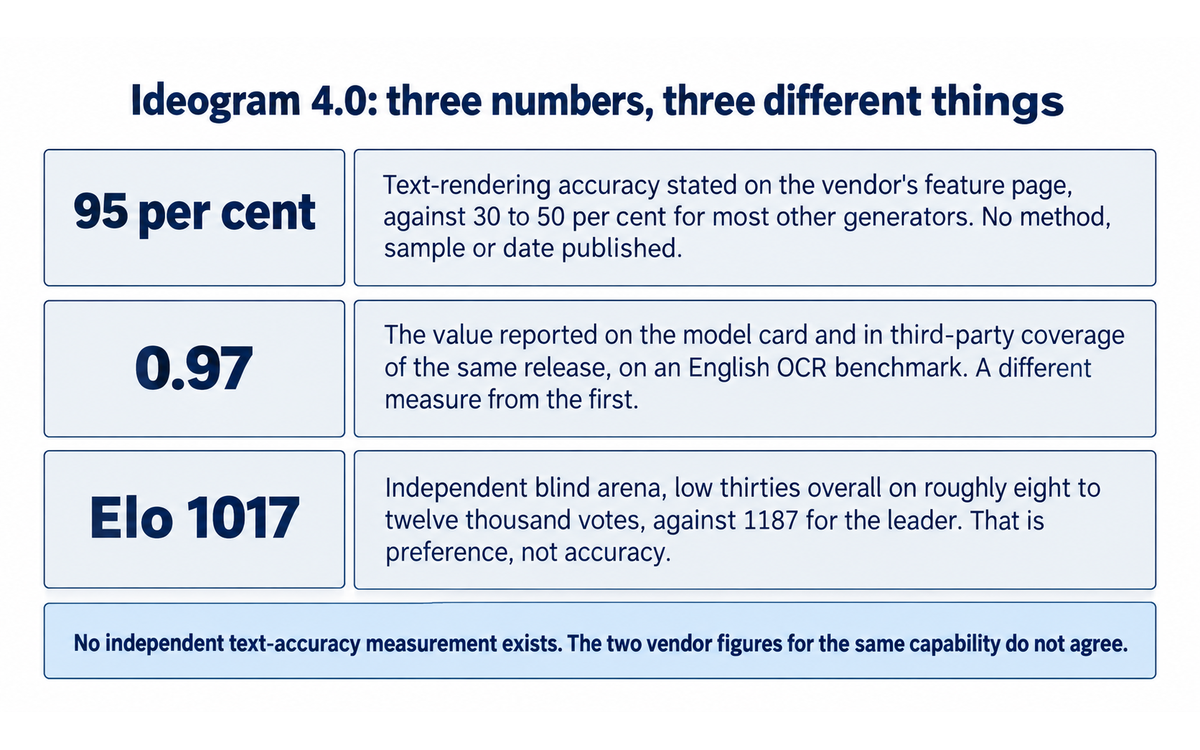
This note records what rests on a vendor claim, what rests on independent measurement, and what is missing.
Every vendor claim contradicted or qualified by another vendor surface.
The text-rendering accuracy figure. The text-rendering page states that Ideogram achieves 95 per cent text rendering accuracy, compared with 30 to 50 per cent for most other generators. The model card and the third-party coverage of the same release report 0.97 on an English OCR benchmark. One is a percentage of an unstated base and the other a benchmark score, and the vendor publishes no methodology, sample size, prompt distribution or date behind either. No independent benchmark of typography quality for this release was located, and the figure the product is sold on therefore rests on the vendor's own measurement alone. This is the primary evidence-quality defect in the release and it is why Quality is capped at 6.
The commercial position of the published weights. The licensing page's comparison table records production and commercial use on the open-weights research route as not permitted and self-hosting there as non-commercial only. The model page states that the weights are yours to download, fine-tune and run and that commercial deployments come with a licence matching your scale. The table is accurate for the free weights and the model page reads as though commercial deployment is included.
Commercial fine-tuning rights. The licensing page sells a self-serve commercial licence at $300 per month while its own FAQ states that commercial fine-tuning rights should follow the final self-serve terms. The product is purchasable and the right is described as not yet fixed. This is the Section 7c finding.
Where the capability sits in the release. The model card's headline states that Ideogram 4 is the best open-weight image model by far, while its own internal benchmark places the model second overall behind a proprietary competitor. The second qualifies the first, and the claim should be read at open-weight scope.
Every figure with no published methodology.
The 95 per cent text-rendering accuracy figure: no method, sample, distribution or date.
The 0.97 text-rendering benchmark value: reported as a benchmark result with no published run, prompt set or scoring procedure from the vendor, and read here only through third-party restatement.
The 47.9 per cent first-place win rate and 3.55 out of 5 usability rating in the blind typography study: the method is more complete than most, described as blind and judged by ten professional designers, and it remains an interested party's study on a four-model field.
The internal human-preference ranking placing the model second overall: the blind-rating method is described and the full scores and prompt set are not published.
The comparison of 30 to 50 per cent accuracy for other generators, in the same sentence as the 95 per cent figure, has no source and no stated measurement of any competitor.
Benchmarks set against a weaker competitor setting or a promotional base.
The typography evaluation in the model card is a four-model field that includes the proprietary tier the vendor is targeting and excludes the leading image models from the independent arena, which sit well above this release on general preference. First place in that field is real and is not first place in the category.
The open-weight comparison, where the model leads other published-weight models at 9.3 billion parameters against far larger competitors, is a favourable framing because it selects the axis where the model wins. It is a legitimate parameter-efficiency argument and it is not a general capability claim, and the model card does present both.
The independent arena is the check on all of this and the most useful number in the review: Elo 1017, low thirties overall, on roughly eight to twelve thousand votes, against 1187 for the leader. The model leads among open-weight entries and does not lead in the category, which is the nuance the vendor's headline omits.
On pricing, any per-image comparison must name the model tier and the rendering setting each price belongs to, because $0.03, $0.06 and $0.10 are three settings of the same model and a bare per-image figure names none of them. The subscription prices have been held flat while the bundled allowance's value changed, because the newest model is charged per single image where older models are charged per four. A year-over-year price comparison shows no change and a comparison of what the price buys shows a large one, so any cost claim measured on price alone rather than on the allowance is measured against a promotional base.
What the independent evidence does and does not establish. It establishes that independent parties have measured something real: a blind arena with a substantial vote count and a designer study run outside the vendor. It does not establish the claim the product is sold on, because neither measures text accuracy and no third party publishes a text-accuracy measurement for this release. The framework's treatment of that gap is to score the absence of measurement rather than to infer weakness from it, which is why Quality sits at 6 at the top of the Moderate band with the band label stated beside it.
What would change this assessment. An independent text-accuracy measurement, a reconciled accuracy figure with a published method, a final self-serve licence stating its fine-tuning rights, and a third-party licence review of the published weights would each move this review, and the first two would move the score.
UNOP alignment.
Supports. UNOP is built on the habit of looking at what was produced rather than at what was asked for, which is exactly the control this tool requires. The fifteen-minute calibration exercise in the review, one asset with a plain prompt and the same asset with the text as a literal string compared at full size, is a UNOP exercise as much as a tool exercise.
Conflicts. Two, both narrow. The tool's central marketing claim asks the reader to stop checking the text, which is the opposite of the UNOP habit, so the claim has to be met with the check rather than filed as a feature. And candidate generation is cheap enough to substitute volume for judgement, which is the failure mode the framework's Quantity dimension exists to name.
Recommendation. Use the tool for production, keep the check for the decision, and use the review's own finding, that the vendor publishes its headline number twice at two different values, as the worked example of why the check is not optional.




Comments