
Krea: real-time AI image, video and 3D generation scored 6.0 on the U365 CI-First Review, with a licence split across two documents

Updated: 13 hours ago
Status: Active | Last tested: 2026-09-25 (Krea, as documented at krea.ai in September 2026) | Re-check: trigger-based, maximum 6 months
Active: the tool is current and recommended.
What Active means here. Active means current and recommended for the reader this review describes: real-time visual exploration on a live canvas, a multi-model generation and finishing pipeline behind one balance, and an agent surface that turns a brief into assets. It does not mean the terms are settled. The platform's own documents place a broad licence over anything you generate beside a narrower weights licence with a revenue test in it, the independent review record is dominated by billing and support complaints rather than by product complaints, and no independent measurement of the platform's quality as a platform exists. A reader who needs one clear licence, a contract that indemnifies them, or a measured quality guarantee should treat those as not currently available and act accordingly.
For detailed explanations of the CI-First evaluation terms used in this review, including the Humics Protection Badge and the AI Imposture Risk levels, see the Glossary at the end of this post.


In this Tool Review
Status and Re-check
Krea is an Active tool. This review reflects the product as its own surfaces describe it on 2026-09-25, across the marketing site, the pricing page, the model library, the documentation set, the release notes, the terms of use, the Business terms of service, the privacy policy and the Krea 2 community licence.
The re-check triggers are specific, because Krea changes fast and three of its moving parts change what a reader should decide.
A new Krea 2 release, or a change to the Krea 2 community licence. The licence carries a revenue threshold that decides whether a company may use the open weights commercially without a separate agreement. If Krea moves that line, the self-hosting path changes for every organisation near it.
Any change to the third-party model roster. More than sixty models sit behind one balance, and which model you can reach is a commercial and legal fact, not a cosmetic one. Models are added and retired on a weekly cadence.
Any change to the commercial-use and training position. The terms of use, the Business terms and the community licence each say something different about outputs, and the differences matter to anyone using generated assets in client work.
The support and billing record. The independent review evidence is dominated by billing and support complaints rather than by product complaints. That is a re-check trigger in its own right.
Re-check: trigger-based, maximum six months. The four triggers are listed at the top of this section, and the first three, a new Krea 2 release or a change to the community licence, a change to the third-party model roster, and a change to the commercial-use position, would each change the score rather than only the wording.
What Krea is, and the naming and scope problem stated first
Readers arriving at Krea meet four different things wearing similar names, and one of them is not a product at all. The scope has to be settled before anything is scored.
Name you will see | What it actually is |
Krea, or Krea AI | The company (KREA.AI, INC.) and the whole browser platform |
Krea Agent | The agent surface, where you write a brief once and the platform plans, picks models, generates and files results |
Krea 1, Krea 2, Krea 2 Turbo, Flux.1 Krea | Krea's own trained models. Krea 1 powers the live canvas; Krea 2 is the first from-scratch foundation model, released to open weights |
Krea Realtime | The real-time canvas surface itself, which runs Krea's own fast models |
Flux, Seedance, Kling, Veo, Nano Banana, Seedream, Recraft V4 and the rest | Third-party models hosted inside the platform, billed in the same compute units |
Two naming traps are worth stating plainly.
Trap one: krea.ai and krea.com, and the .ai suffix is shared with someone else. Krea's own site is krea.ai. The terms of use name the contracting entity as KREA.AI, INC. There is also a separate site at krea-ai.com that describes itself as offering "Krea Community Models" and is not the vendor's property. If you land on a Krea page and it does not offer a sign-in that leads to krea.ai, you are on the wrong site.
Trap two: Krea the platform is not Krea the model. When a leaderboard reports a rank for Krea, it is usually reporting a rank for one Krea-trained checkpoint, not for the platform. The platform's own quality is a different question, and it is the question a designer actually asks, because most of the models a designer will use inside Krea were trained by somebody else.
Scope of this review. This review covers the platform: the canvas, the image and video tools, the enhancer, the 3D tools, the training tools, the agent surface, the pricing and credit model, the legal position on outputs, and the model roster. It does not score the individual third-party models in their own right. Where a third-party model carries its own licence terms that change what you may do with an output, that is treated as a platform-level finding in Section 7c.
Tool type. Krea is a multi-model aggregator with a real-time creative surface, so this review applies the Video and Creative Tool variant of the U365 template, with the Infrastructure variant applied to the model-routing and workspace layers, and the Agent Platform variant applied to the Krea Agent surface.
Tool Snapshot
Field | Detail |
Tool name | Krea |
Vendor | KREA.AI, INC., San Francisco, California |
Official site | krea.ai |
Category | Real-time AI creative suite: image, video, upscaling, 3D, agent |
Core differentiator | A live canvas where the generation updates as you draw, type, or move elements, with no render button |
Architecture | Aggregator. Krea trains some models and hosts many third-party models behind one credit balance |
Own models | Krea 1, Krea 2 (Raw and Turbo), Krea Realtime family, Flux.1 Krea |
Third-party models | OpenAI, Google, ByteDance, Black Forest Labs, Kling, Runway, Lightricks, MiniMax, Alibaba, Ideogram, Recraft, Luma, xAI and others. Independent guides count 60 to 64 or more |
Output formats | Image, video, 3D assets, upscaled image and video, LoRA weights |
Max image upscale | Up to 22K reported for the enhancer stack |
Interfaces | Web app, iOS app, API, MCP server, Slack, ChatGPT plugin |
Agent surface | Krea Agent, open on every plan including Free since 2026-09-10 |
Pricing basis | Compute units. Daily allowance on Free, monthly allowance on paid plans |
Published tiers | Free, Basic and Creator Basic, Pro and Creator Pro, Max and Creator Max, Business, Enterprise |
Commercial use | Licensed on paid plans. Business and Enterprise carry the strongest position |
Free-tier commercial use | Not licensed for commercial use |
Training on your content | Business terms state no training on Business inputs or outputs. The general terms of use contain a broad submission licence |
Indemnification | Business and Enterprise only |
Open weights | Krea 2 Raw and Krea 2 Turbo, under the Krea 2 Community Licence with a revenue threshold |
Independent user rating | Trustpilot near 2.6 to 2.7 out of 5 across 62 reviews. Product Hunt 4.2 out of 5 across 13 reviews. Apple App Store 4.5 out of 5 across 634 ratings. G2 carries only 2 verified reviews |
Independent score | Litmus Score 72. Instawhat StackScore 62 to 70 out of 100 across two of its own pages |
Funding | 47 million US dollars Series B led by Bain Capital Ventures, 500 million post-money, 83 million total |
Reported scale | 30 million or more users across 191 countries, per third-party profiles |
Primary CI-First Profile | Profile 1, AI as Co-Creator and Thought Partner |
Secondary profile | Profile 2, AI as Co-Worker and Assistant |
Collaboration Mode | Centaur |
The Problem
Designers and creative teams do not lack image generators. They lack a way to work with one.
The dominant pattern in generative image work is a loop with a long gap in it. You write a prompt, you wait, four candidates appear, you judge them, you rewrite the prompt, you wait again. Each iteration is a fresh lottery ticket. The thinking you were doing about composition, colour and form is interrupted by a queue. For the part of a project where you are hunting for a direction, that loop is the wrong shape. Iteration is the work, and the queue sits inside the iteration.
Three practical consequences follow.
Model shopping replaces design work. The strongest image at any moment is a moving target. It was one model last spring, another in the summer, and a different one again in the autumn. Teams respond by paying for three or four subscriptions and keeping a mental table of which model handles text, which handles hands, which handles brand-consistent product shots. That is overhead before any creative work starts.
Finishing is a separate purchase. Generation output is often too soft to ship. A 1024 pixel frame becomes a client deliverable only after it is upscaled and cleaned, and the best upscalers have historically been sold separately.
Rights are an afterthought. Designers use generated assets in client and commercial work, and the licence attached to those assets is usually read, if at all, after the fact. On an aggregator, the question is worse than on a single-model tool, because the platform terms and the hosted model terms can say different things.
The Outcome
Krea's answer to all three is to collapse the distance between the idea and the image, and to put the model zoo behind one balance.
The live canvas is the mechanism. You open a Realtime session, type a loose prompt, and then draw. Rough shapes and colour blocks are enough. The output panel redraws as you work, with no render button and no queue. You can also feed the canvas from a webcam, from a shared browser tab, or from an uploaded reference. When a direction lands, you move to a full generation on the model that fits the job, then finish in the enhancer.
Around that canvas Krea has assembled the rest of the workflow: an image tool with a large roster of models, a video tool with frontier models from several vendors, a 3D tool generating objects from text or image, LoRA training for brand and character consistency, an enhancer stack that includes Topaz models, an asset manager, a node editor, and an agent surface that takes a brief and runs the plan.
The practical outcome for a reader is one subscription, one balance and one interface covering work that would otherwise need four tools and a tracking spreadsheet. The practical question, and the one this review spends most of its length on, is what that consolidation costs you in rights, in predictability, and in the skill you keep after the subscription ends.
Who Should Use Krea
Designers and art directors who iterate visually. If your process is fifty loose directions before lunch rather than one well-specified prompt, the live canvas matches how you already think. This is the strongest fit and the reason the tool exists.
Concept artists and illustrators. Style references, LoRA training and the canvas together give a level of control over look and consistency that a prompt box alone does not.
Brand and product teams with a repeatable look. The training path lets you teach the platform a product, a person or a house style, and then generate on-brand assets on demand. Workspace Context lets a whole team start from the same brand assets.
Teams that already pay for several image subscriptions. Aggregation is a real saving at the team level, and the Business tier's flat seat pricing is unusual and worth modelling against your actual headcount.
Small studios that need upscaling as much as generation. The enhancer alone justifies a seat for anyone whose work regularly ends in a large-format asset.
U365 Fellows and institutes running visual coursework. Students meet the real-time working method here in its clearest form, and the Krea 2 open weights give a self-hosting path that keeps the lesson available without a subscription.
Who should not lead with Krea.
Anyone shipping vector or print-perfect brand assets. Krea's own output is raster. Independent reviewers are consistent on this: it is a place to find the idea, not the place to produce the final vector or the print file. Recraft is the better fit for editable vector and brand-system work.
Anyone whose billing predictability is a hard requirement. The independent review record is dominated by billing and support complaints. Read the renewal terms before you commit, and set a reminder before the renewal date.
Anyone who needs phone-first creative work with no browser. There is an iOS app and the agent works on it, but the canvas experience is a web one.
Regulated or highly conservative procurement environments. The general terms of use carry a broad licence over anything you submit, and the no-training commitment is written into the Business terms rather than the general terms. That split is a diligence item, not a blocker, but it needs reading.
Anyone expecting the free tier to cover commercial work. It does not. Free outputs are not licensed for commercial use.
U365 Institutes Alignment
Krea sits naturally in the design and creative-technology institutes, and it has a credible second role in the business institutes because of the multi-model and agent surfaces. The ratings below state the competency a Fellow exercises with the tool and the limit that holds the rating.
Institute | UDA rating | Why, stated as the competency that remains | The limit that holds the row |
UIT (Technology, AI, Data Science) | Medium, confirmed | Appraising a model record before spending on it. The Fellow chooses between more than sixty hosted models on published per-model unit costs and on documented capability, distinguishes an open-weight release from a proprietary one, reads the revenue threshold in the Krea 2 community licence before deciding whether to self-host, and plans a deployment before running it. The tool is the catalogue being appraised; the appraisal is what the Fellow can explain without it. | The tool teaches no programming, no model engineering and no evaluation methodology, and the weights being open does not make the training path, the inference stack or the evaluation surface assessed material. The node editor, the API and the MCP server are configuration surfaces rather than curriculum. Licence and deployment literacy has no published assessment home, and that gap is recorded in the curriculum-gap note below. |
UIB (Business Management, Entrepreneurship) | Medium, confirmed | Two competencies, and both are costable. Usage-based cost appraisal: per-model unit costs are published, premium third-party models drain a balance far faster than Krea's own, monthly units do not roll over on individual plans, purchased packs expire after 90 days, and the Business tier is flat per seat up to 50 seats, so the Fellow computes cost per finished asset from their own usage record and defends the tier choice against a measured burn. Supplier-contract literacy: one output sits under two Krea documents that answer different questions, the training and indemnification commitments stop at Business and Enterprise, and third-party roster models carry their own terms that the platform does not map, so the Fellow reads a licence before a venture is built on it. | The tool teaches no management, finance or entrepreneurship content of its own. The appraisal is a costed exercise inside a diploma landscape that assesses financial statement analysis, modelling and forecasting, and the contract reading is legal literacy applied to a purchase rather than a business discipline. A High rating would rest on two competencies with no credential outcome behind either, so the row is Medium. |
UIC (Digital Communication, Marketing) | Medium, corrected down from the drafted High | The publication rule for a generated asset. Deciding which channels a generated still or clip may carry, whether a generated image may stand in for photography for this client and this audience, what the audience is owed by way of disclosure, what the version metadata records, and who signs off each asset. The review's own second workflow makes exactly that decision: confirm you are not presenting generated output as photography if the client has a policy on it, and disclose the method. Every part of that rule survives the removal of the tool. | The tool builds no communication craft. Content Marketing Specialist publishes content strategy, live-video production, SEO content writing and link building; Social Media Marketing Manager publishes social strategy, copywriting for social and content-creation strategy; Marketing Manager publishes marketing communications strategy and marketing-plan writing. None of those competencies is exercised here, and the tool writes nothing in a person's voice. The reason in the draft credited campaign-asset production, which is the tool performing the task, and no UIC credential chain is mapped. |
UID (Digital Design, UX/UI) | High (primary), confirmed | Directing one visual direction across many assets, and judging each frame against the brief and the destination. The review's own workflows put the quality gate on the Fellow by name: confirm the product geometry is correct because a reshaped product is a factual error in a commercial asset, confirm no invented brand marks or unowned trademarks appear, confirm embedded text is legible and correctly spelled, confirm resolution and colour profile meet the destination, and confirm the licence covering the models used permits the commercial use intended. The steering act is the same competency: change the composition shapes and colour blocks rather than rewrite a prompt, and decide whether three territories are genuinely different at composition level rather than three colourways of one idea. LoRA training and the node editor are the two surfaces where the Fellow's own range is extended rather than replaced. | The tool teaches no design principles: no typography, no colour theory, no layout, no critique of an output against a written brief, and no account of why one model renders text better than another, because the model that renders text belongs to another vendor. Output is raster, so vector, print-ready and typographically precise deliverables leave the platform. The High describes the direction and judgement competency and the surface it is exercised on, not design education, and the Skill sub-score of 4 records the same finding from the scoring side. |
No institute is rated as having no relevance for this tool, and the reason is worth stating. The tool sits on visual production, which is UID territory directly; it produces the assets a campaign runs on, which is UIC territory; it ships an API, an MCP server, a node editor and open weights on its flagship model, which is UIT territory; and its unit economics and its two licence documents raise a supplier question a venture in UIB has to answer. The four ratings therefore spread across High, Medium, Medium and Medium rather than clustering at Low.
Ratings above are confirmed by the University 365 Department of Academics as the academic owner, and each row states the competency a Fellow exercises and the limit that holds the rating.
UNOP (University 365 Neuroscience-Oriented Pedagogy) alignment. UNOP is University 365 Neuroscience-Oriented Pedagogy. Three notes, and the third is the one that constrains use. Supports. Externalising a visual idea early, before it is fully formed, is the ideation step the method favours, and the live canvas is the least costly surface for it that this batch has reviewed. Stroking a shape and seeing the composition answer is a faster feedback loop than writing a prompt, and a fast loop is what makes the early decision cheap. Supports. A trained LoRA or a pinned style reference holds a look across a set, which removes the repeated briefing that interrupts a working session. The method values attention spent on the decision rather than on the tool, and holding the look is what buys that attention back. Conflicts, and this is the controlling note. A surface that produces finished-looking assets on demand is exactly the surface on which a learner substitutes output for understanding. The review's own Skill Illusion row is High for this reason and its over-delegation warning names the failure mode: a hundred plausible frames generated without a judgement formed about any of them. Passive viewing of generated images supports no recall, so generated material supplements study a Fellow has already done and does not substitute for it. Recommendation. Adopt it as a production tool and not as a study aid. The operating rule for a Fellow is to be able to state what they meant by an image, not merely that they made one, and to keep one part of the workflow unassisted, whether that is the composition sketch, the colour decision or the final crop, so the underlying craft keeps its practice. ---
Tool to Skill to Credential
Mastering this platform builds a skill, the skill maps to a U365 competency, and the competency is what a credential recognises. One of the six competencies below has a direct assessment home in a published programme. The other five name the nearest published anchor and state what that anchor does not publish. An adjacent anchor is not a credential claim, and none is presented as one here.
Tool skill | U365 competency | Credential | Institute | Published next step |
Directing one reference set into a consistent visual direction across many assets, and judging whether a frame is on brand and fit for its destination | Visual direction, composition and consistency at volume | Graphic Design Professional (30 days, 124 steps), verified PUBLISHED on 2026-09-25. Its published programme covers Ideas, Concepts, and Form; Layout and Composition; Typography; Think Design; Color for Design; and Creating Inclusive Content, which are the decisions this competency consists of. Limit: it assesses the design decision, and it publishes no generative-production outcome, no model-selection outcome and no upscaling outcome, so the production half of the tool skill has no assessment home | Bachelor in Design (B.D.), then Master in Design (M.D.) 1/2 and 2/2, as the published programme hierarchy. Expert level, SUPERHUMAN only | |
Reading a generated frame at full resolution and deciding whether it is usable, including whether the embedded text is correctly spelled and whether the product geometry is right | Evaluation of generative output against a stated criterion, which is the verification habit the framework depends on | AI Creator Professional (30 days, 124 steps), verified PUBLISHED on 2026-09-25. Its published programme covers Opportunities, Issues, and Ethics; DALL-E: the Art of Prompting; Adobe Firefly; Midjourney: Creating Images; Stable Diffusion; and Leveraging AI in Adobe. Limit: it publishes an ethics and prompting outcome, and it publishes no evaluation, critique or verification outcome for a generated asset | Bachelor in Design (B.D.), then Master in Design (M.D.) 1/2 and 2/2, as the published programme hierarchy. Expert level, SUPERHUMAN only | |
Routing a job across a 60-plus model roster on published per-model unit costs, and reading what an open-weight release permits before using the output | Applied AI literacy: reading a model's cost, capability and licence record and stating what a release permits | AI Developer Specialist (18 days, 72 steps), verified PUBLISHED on 2026-09-25. Its published programme covers Deep Learning Foundations: NLP with TensorFlow; Transformers: Text Classification for NLP Using BERT; Building NLP Apps with Hugging Face Transformers; Introduction to Responsible AI Algorithm Design; and Generative AI: Working with Large Language Models. Limit: it publishes model literacy and responsible deployment, and it publishes no model-selection, cost-per-model or open-weight licence outcome. The nearest anchor for the deployment half is Cloud Computing Specialist (30 days, 124 steps), published, whose modules are core concepts, cloud security, cloud storage, cloud networking and the three dominant platforms, and it is cloud-facing rather than licence-facing | Bachelor of Science in IT (B.Sc.), then Master of Science in IT (M.Sc.) 1/2 and 2/2, as the published programme hierarchy. Expert level, SUPERHUMAN only | |
Costing a per-model, per-generation charge on a workflow whose normal condition is iteration, and reconciling the measured burn against the invoice | Technology investment appraisal and total cost of ownership on a metered service | Financial Analysis Specialist (30 days, 124 steps), verified PUBLISHED on 2026-09-25. Its published programme covers Corporate Financial Statement; Financial Modeling; Forecasting Financial Statements; and Data, and Economic Modeling with Stata. Limit: it publishes costed appraisal and forecasting, and it publishes no usage-based, per-generation or per-seat pricing outcome. Business Analysis Professional (60 days, 252 steps) publishes benefits realisation and business process modelling and publishes no metered-pricing outcome either | Bachelor of Business Administration (B.B.A.), then Master of Business Administration (M.B.A.) 1/2 and 2/2, as the published programme hierarchy. Expert level, SUPERHUMAN only | |
Reading the two licence documents one output sits under, the revenue threshold on the community licence, the Business-tier-only training and indemnification commitments, and the third-party model terms the platform does not map | Commercial and legal literacy applied to a technology purchase decision | Entrepreneur (25 days, 104 steps), verified PUBLISHED on 2026-09-25. Its published programme covers Foundations; Finding and Testing Your Idea; Creating a Business Plan; Business Law; Raising Capital; and Income Taxes. Limit: it publishes a Business Law module and a business-planning outcome, and it publishes no technology-purchase contract-literacy, licence-reading or indemnity outcome, so reading the licence and the competing-use clause is not asserted as credential-recognised | Bachelor of Business Administration (B.B.A.), then Master of Business Administration (M.B.A.) 1/2 and 2/2, as the published programme hierarchy. Expert level, SUPERHUMAN only | |
Deciding which channels a generated asset may be published to, disclosing that a generated asset is not photography where the client has a policy, and naming the human who signs each asset off | Editorial and publication rule applied to generated media: the disclosure the audience is owed and the named reviewer per asset | Content Marketing Specialist (30 days, 124 steps), verified PUBLISHED on 2026-09-25. Its published programme covers Content Marketing ROI; Content Strategy; Producing and Promoting Live Video; SEO Content Writing; and Link Building, and Social Media Marketing Manager (30 days, 124 steps) publishes social strategy, copywriting for social and content-creation strategy. Limit: neither publishes a disclosure, synthetic-media governance or named-reviewer outcome, so the rule is assessed in coursework rather than against a credential | None asserted. No published programme assesses this competency, so no degree chain attaches to the row |
Access levels, stated plainly. University 365 has three academic access levels: DISCOVERY, INSIDER and SUPERHUMAN. Specialised diplomas and certificates carry Basic, Foundation and Expert levels: DISCOVERY Fellows can enrol in Basic-level programmes only, INSIDER Fellows in Basic and Foundation programmes, and SUPERHUMAN Fellows in all of them. University degree programmes carry a single Expert level and are open to SUPERHUMAN Fellows only. No credit transfer from a specialised diploma into a named degree is asserted here, and no micro-credential component title anywhere in this review is asserted, because the catalogue read does not expose one.
Curriculum gaps recorded rather than filled. Four competencies this platform exercises have no assessment home in the published catalogue, and each is recorded with the search that proved it.
Evaluation of a generated visual artefact. A word-boundary term search over the title and the published description of all 79 published programmes returned 0 for critique, 0 for verification, 0 for visual literacy and 0 for asset production. The nearest anchor is AI Creator Professional, whose modules are prompting and ethics, neither of which assesses an output against a stated criterion, so the evaluation competency has no published assessment home.
Open-weight licence and deployment literacy. The same search returned 0 for licence and license, 0 for intellectual property, 0 for indemnification, 0 for terms of service, 0 for model card and 0 for ai literacy. The nearest anchor is AI Developer Specialist for the model-reading half and Cloud Computing Specialist for the deployment half, and neither publishes a licence-reading outcome. The review's own Section 7c makes this competency load-bearing, so the gap is the one a curriculum review should look at first.
Usage-based production economics. The same search returned 0 for cost, 0 for pricing, 0 for price, 0 for usage-based and 0 for metered. The nearest anchor is Financial Analysis Specialist, whose modules are financial statement analysis, modelling and forecasting, which is budgeted appraisal rather than appraisal of a per-generation charge on a workflow whose normal condition is iteration.
Disclosure and named review for generated media. The same search returned 0 for disclosure, 0 for synthetic, 0 for consent, 0 for privacy and 0 for data protection. The nearest anchors are Content Marketing Specialist and Social Media Marketing Manager for the channel and copy half, and neither publishes a disclosure or governance outcome. The review's own second workflow requires the decision, so the gap is real rather than an artefact of this catalogue read.
How Krea Works
Krea is a routing layer with a canvas on top. Understanding the routing explains most of the platform's behaviour, including the credit costs and the rights position.
8.1 The five working surfaces
Realtime, the live canvas. Two panels side by side. On the left, the canvas: select, brush, eraser, background colour, circle, rectangle and triangle shapes, image upload, live webcam capture, and a tool that places an AI-generated image back onto the canvas as a reference layer. On the right, the live output. Both panels update as you work. Draw modes are Draw, Web Camera, Screen Record and Text Only. Aspect ratios are 1:1, 3:2 and 2:3. Resolution is 512px on the fast models and 1024px on the quality models. Video output is available from the same canvas. Frame rate is user-selectable, with options reported on the interface in a range from around 13 frames per second down to 1.
Image. Standard prompt-driven generation across the model roster, with style references, aspect ratios, a prompt expander and generative sliders. Krea 2 outputs at high native resolution on the quality path.
Video. Text-to-video and image-to-video across a roster of frontier third-party models, with start-frame and end-frame control and prompt-driven camera movement. Seedance Studio adds reusable Elements, which bundle up to eight reference images and written guidelines under an @tag so a character, location or object stays consistent between shots.
Enhancer, Edit and the finishing tools. Upscaling across a stack that includes Topaz Photo AI and Topaz Gigapixel alongside Krea's own models, reported up to 22K for images and 8K for video, with three modes: standard for clean detail, bloom for stylised sharpening, and generative for inventing detail at scale. Edit covers inpainting, object add and remove, camera angle changes and lighting changes. Background removal, video style transfer and video upscaling complete the set.
Train. LoRA fine-tuning for image and video, with sharing. The pricing page advertises LoRA training on up to 2,000 images on the Business tier, and 2,000 images per LoRA.
3D. Text-to-3D and image-to-3D object generation.
8.2 Krea Agent
The agent surface takes a written brief, plans the job, selects models, generates and edits images, video and audio, and files the results into a shared context library. It is reachable at krea.ai/agent, from the product switcher, in Slack, and through the Krea plugin for ChatGPT. It is open on every plan, including Free, since 2026-09-10, with launch-week free credits that ended on September 15, 2026.
The context library has three levels, and the distinction matters for teams:
Level | What goes there | Who sees it |
Session files | Uploads and outputs for the current job | You, in that session |
My Context | Personal files and preferences that persist across sessions, including the agent's memory of your preferences | You, in every session |
Workspace Context | Brand guidelines, product sheets, reference boards, approved outputs | Everyone in the workspace, and every teammate's agent |
The agent ships built-in skills, which are written workflows it follows step by step, covering work such as Cinematic Stills, Product Photography, Fashion Photography, Product Packaging Design, Poster Design, Static Ads, TV Show Thumbnails, Art Film Stills, a Krea Marketing set covering ad campaigns, UGC video ads, marketplace cards and Meta Ads creative, Faceless Video, Krea Motion, and Frontend Design. You can save your own skill by asking the agent to write the workflow down, and you can import a skill written elsewhere as a markdown file. Under Integrations, OAuth connections cover Slack, Notion, Linear, Airtable, Webflow, Pinterest, Meta Ads, Google Drive, Google Docs, Google Sheets, Gmail, Dropbox, OneDrive, GitHub, WhatsApp Business, YouTube, Supabase, TikTok Ads, ManyChat, Frame.io and Figma, each with an Allow or Ask permission. Routines, which run a brief on a schedule, and custom named agents are Enterprise surfaces.
8.3 The model roster and who trained what
This is the part of the platform a buyer needs to understand, because the roster is the product.
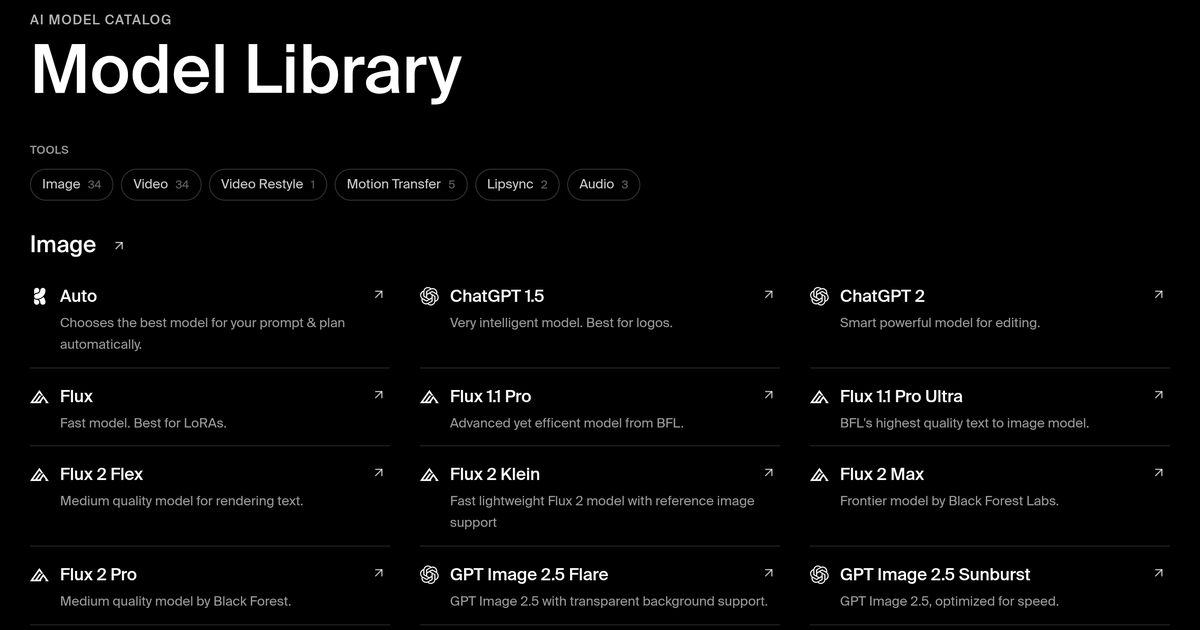
Third-party profiles count the roster at 60 to 64 or more models. Krea's own model library page lists image, video, audio, enhancer, edit, 3D, video restyle, motion transfer and lipsync tools, and each model has its own page. The roster spans:
Vendor family | Examples present on Krea |
Krea | Krea 1, Krea 2, Krea 2 Turbo, Flux.1 Krea, and the Realtime model family |
OpenAI | ChatGPT Image, GPT Image 2.5 Flare and Sunburst, GPT-IMG-2, GPT-6 Astra referenced on the homepage |
Nano Banana, Nano Banana 2, Nano Banana Pro, Imagen, Gemini Omni Flash | |
ByteDance | Seedream 4.5, Seedream 5 Lite, Seedream 5 Pro, Seedance 2.0 and 2.5 |
Black Forest Labs | Flux, Flux 1.1 Pro and Pro Ultra, Flux 2 Pro, Flex, Max and Klein, Flux Kontext, Flux 3 Video, Flux Video Edit |
Kling | Kling 3.0, Kling 3.0 Turbo, Kling O1 |
Runway | Runway Gen-4, Gen-4.5 and Gen-4.5 variants |
Lightricks | LTX-2.3 22B, LTX-2.5 Fast and Pro |
MiniMax | MiniMax H3, H3 Max, H3 Max Turbo, Hailuo |
Alibaba | Wan 2.2, Wan 3.0 |
Others | Ideogram, Recraft V4, Luma UNI-1, Qwen image models, Grok Imagine, Muse Image, Vidu |
Krea describes some of the roster as open models and some as proprietary, and it labels models Legacy where a newer release has superseded them. The practical consequence is that a single Krea subscription gives you access to models that each have their own vendor, their own acceptable use policy and, in some cases, their own licence over outputs. Section 7c treats that consequence directly.
8.4 Compute units
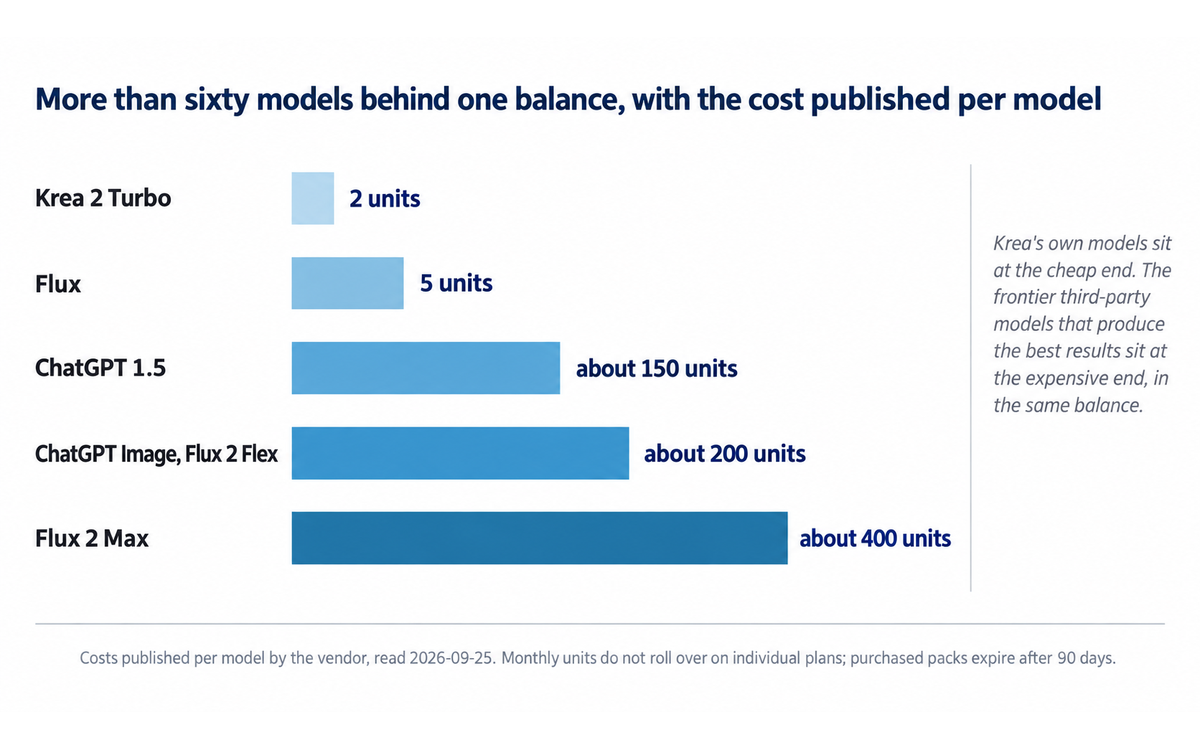
Compute units are the platform's currency, and they cover image generation, video creation, enhancement, editing and model training. Costs are model-specific and are published per model in the documentation, from 2 units for Krea 2 Turbo and 5 for Flux up to roughly 150 for ChatGPT 1.5, roughly 200 for ChatGPT Image and Flux 2 Flex, and roughly 400 for Flux 2 Max. Video is more expensive again, and the homepage lists per-generation figures in the hundreds of units for frontier video models such as Seedance 2.0 and 2.5, MiniMax H3 and Gemini Omni Flash.
Usage is visible in real time, usually within one to two minutes of consumption, in the account's usage statistics page. The agent's orchestrating model also consumes units: on Free the chat model is charged at 5 percent of the model's token price, and on paid plans the included models are free for orchestration while the generations they submit cost the same units they would cost made by hand.
8.5 What happens to your work
Assets are stored in the Krea asset manager. Depending on your tier, you may be able to mark your submissions private, which means other users cannot see them. If your tier does not include private mode, some of your submissions may be visible to other users. The terms place the responsibility for managing that visibility on you. Workspace Context shares approved assets with your whole team. The agent's memory of your preferences is stored in My Context and is personal; you can ask the agent to forget an item.
Getting Started with Krea
9.1 Fifteen-minute first pass
Create an account at krea.ai. The free tier needs no card and gives a small daily compute allowance. Confirm you are on krea.ai and not a lookalike site.
Open Realtime and load a built-in example. Examples ship with a preset canvas and prompt. This is the fastest way to feel how the platform works before you spend units on your own idea.
Draw something rough. A horizon line, two rectangles and a colour block are enough. Watch the output panel redraw as you add each element.
Type a loose prompt underneath. Keep it short. Then move a shape and watch the composition change without a re-generation.
Switch draw mode to Web Camera. Move your hand in front of the camera and watch the output follow. This teaches the tool's range in about thirty seconds.
Send a result to the Enhancer. Upscale it and compare before and after at 100 percent on a detail area such as hair or fabric.
Try the Image tool with a named model. Generate the same prompt on Krea 2, then on Nano Banana Pro, and compare. Model choice is the platform's main quality lever and you should feel it once.
Check your unit burn. Open usage statistics and read the cost of those generations. This is the number that decides your tier.
9.2 First-week checklist
Decide your tier from the unit burn you actually measured, not from the headline unit count. Premium third-party models drain a balance far faster than Krea's own.
Put your brand assets into Workspace Context if you are on a team plan, and stop re-uploading them per session.
Train one LoRA on your own product, person or house style. This is what makes output look like your work rather than generic output.
Set a calendar reminder before your renewal date. The billing record in the independent reviews is the reason.
Read the licence that applies to your tier before you use an output commercially, and read Section 7c of this review first.
If your organisation wants the open weights, run the revenue test in the Krea 2 community licence before you self-host.
9.3 Verification checklist for a first paid month
Generate one asset you would genuinely ship and take it through the whole path: canvas, full generation, enhancer, export.
Confirm the export meets the destination's requirements. Anything needing vectors or print-ready colour management leaves Krea.
Check that your private-mode setting is doing what you expect, and check what is visible on your public profile.
Confirm the tier you bought actually licenses commercial use, and keep the receipt.
Real Workflows
Three workflows follow. Each carries a verification checklist, because the risk in creative tooling is not that the output fails to look good. It is that the output looks good and quietly carries a defect you did not check.
10.1 Workflow one: brand-consistent campaign stills from a live canvas
Job. Produce a set of six on-brand campaign stills for a product, in one afternoon, without a photographer.
Steps.
Train a LoRA on 20 to 40 images of the product or the brand look. Keep the training set clean of third-party marks you do not own.
Open Realtime and load your brand palette onto the canvas as colour blocks. Add a rough product silhouette.
Type a short prompt that names the look, not the subject. Iterate until the composition lands, steering with the canvas rather than rewriting the prompt.
Send the chosen frame to the Image tool and regenerate it at full quality on the model that suits the job. Use a style reference to hold the look.
Upscale in the Enhancer. Use standard mode for clean detail and generative mode only where you need invented detail at large sizes.
Save the approved set into Workspace Context so the next session starts from it.
Prompt pattern for this workflow. Name the composition and the lighting, then the look, then what to avoid. For example: "Wide three-quarter product shot, soft key from the left, matte background in the brand's off-white, editorial studio feel. Render as a clean product photograph, no text, no logos, no hands."
Verification checklist.
Confirm the product geometry is correct. Generative models reshape product edges, and a reshaped product is a factual error in a commercial asset.
Confirm no invented brand marks, competitor logos or unowned trademarks appear anywhere in the frame.
Confirm any embedded text is legible and correctly spelled. Text rendering is the platform's weakest area on its own models, and Krea's own documentation directs text-heavy work to other models on the roster.
Confirm the resolution and colour profile meet the destination.
Confirm the licence covering the models you used permits the commercial use you intend.
10.2 Workflow two: finding a direction before the client meeting
Job. You have an hour before a call and no direction. You need three genuinely different visual territories, not three variations of one.
Steps.
Open Realtime and work the canvas rather than the prompt. Change the colour blocks and the composition shapes to generate different territories, not different prompts.
For each territory, capture a frame and send it to the Enhancer for a presentable version.
Build a moodboard from the frames, and share it as a public link if you need the client to generate from it. The moodboard sharing toggle can be turned off at any time and shows the date it was shared.
In the call, let the client steer the canvas live. This is the workflow the real-time surface was built for, and it changes the meeting from a presentation into a working session.
Verification checklist.
Confirm the three territories are actually different at the composition level, not three colourways of one idea. The canvas encourages convergence, because you are editing one image rather than sampling four.
Confirm nothing in the frames misrepresents the client's product or market position.
Confirm the moodboard link is set to the sharing state you intend before you send it.
Confirm you are not presenting AI output as photography if the client has a policy on that. Disclose the method.
10.3 Workflow three: a briefing-to-assets run with Krea Agent
Job. Turn one written brief into a set of channel-ready assets without writing a prompt per asset.
Steps.
Put the brand guidelines, product sheets and approved references into Workspace Context.
Write one brief that states the deliverable, the channels, the aspect ratios and the constraints.
Choose the effort level. Instant or Medium for single assets and edits; High or Extra High where you want the agent to review and retry its own work. Note that Extra High runs using certain frontier orchestrating models are charged at full token price on paid plans.
Let the agent plan and generate. Open the Generations panel to see each step and what it cost.
Name a built-in skill in the brief if one fits, for example the marketing skill for an ad set.
When a run works, ask the agent to save the process as a named skill so the whole team can rerun it.
Approve the outputs and file them into Workspace Context.
Verification checklist.
Read the brief back and confirm the agent's plan matches what you asked for before you let a long run complete. The agent stops when the workspace runs out of units, and a run that stops mid-brief leaves you with a partial set.
Inspect every generated asset rather than trusting a summary. The agent reports that it generated assets; only you can judge whether they are on brand.
Check the cost of the run in the Usage page, grouped by model and product, before you schedule a routine.
Confirm the saved skill describes the checks you actually ran, not the checks you intended to run. A saved skill is a procedure that the team will follow without re-deriving it.
Confirm that anything the agent posted to an integrated service, such as a Meta Ads account or a Google Drive folder, landed where you intended before the run is closed out.
Strengths, Limits, and AI Imposture Risk
11.1 Strengths
The live canvas is a genuine change in the shape of the work, not a speed tweak. Every independent review reached for the same observation: the wait disappears from the iteration loop, and iteration stops being a lottery. Reviewers describe it as steering rather than prompting.
Aggregation is real and it saves real money. More than sixty models behind one balance, with per-model costs published, removes subscription juggling and the mental table of which service handles which job. For a team, the Business tier's flat pricing across up to 50 seats is unusual in this category.
The enhancer is stronger than the headline feature. Reviewers rate the upscaling path, which includes Topaz Photo AI and Topaz Gigapixel, as best-in-class, and it works on assets you brought in from elsewhere as well as on Krea output.
Open weights on the flagship model. Krea 2 Raw and Turbo shipped as open weights under a community licence, and independent reviewers running local workflows confirm that the checkpoint runs on consumer hardware. That is rare for a commercial generator and it gives a self-hosting path.
The product ships continuously. The changelog runs weekly and covers model additions, product surfaces and API changes. Organisation-level controls, member usage limits and org-wide usage reporting all shipped inside the review window.
The agent surface is unusually well scaffolded. A three-level context library, saved skills, OAuth integrations with per-tool Allow or Ask permissions, and per-member spend limits is a more disciplined delegation model than most agent surfaces offer.
Honest capability labelling inside the product. Krea's own model documentation tells you which model is cheapest, which is best for text, and which is legacy, and it directs text-heavy work away from its own model rather than towards it. That is worth credit.
11.2 Limits
The billing and support record is the single largest limitation, and it is independent of the product. Trustpilot sits near 2.6 to 2.7 out of 5 across 62 reviews. An analysis of all 62 found roughly 60 percent negative, with the top complaint category being customer support failures and the second being billing and subscription issues, that only one of the 62 reviews was verified, and that the company had replied to none of them. The recurring specific complaints are charges continuing after cancellation, unused credits removed when a subscription ends, and refused refunds. Litmus reported the same pattern and noted roughly 10 percent of reviewers using the words scam or fraud. A separate analysis flagged the absence of a status page and of outage communication.
Units do not roll over on individual plans. Monthly compute units on individual plans do not roll over. Separately purchased compute packs must be used within 90 days and do not refresh. Business and Enterprise plans are the exception and do roll over, up to 12 months on an annual plan. For an individual, an unused balance is a loss.
The headline unit counts soften under real use. Premium third-party models drain the balance far faster than Krea's own models. Reviewers advise budgeting for the tier above the one you think you need.
Output quality is inconsistent on the common case. Both user reviews and independent reviews report prompt-adherence failures on human figures, unusable results on a meaningful share of generations, native text rendering that is fair rather than excellent, and character consistency that works only through training or through routing to a third-party model. Aggressive content filtering on innocuous prompts is a recurring complaint.
The canvas needs a good machine and a good connection. Reviewers measured stutter on mid-tier hardware over hotel-grade wifi. The marquee feature is a latency-sensitive one.
No vector output, no print pipeline. Anything destined for vector or print leaves the platform.
Commercial-use licensing is tier-gated, and the free tier is not licensed for commercial use at all.
Indemnification is Business and Enterprise only. Everyone else carries the risk of an intellectual property claim on an output themselves.
The training position is split across documents. See Section 7c.
The third-party roster is a moving target. Models are added and retired on a weekly cadence, so a workflow that depends on one specific model has a shelf life. Any prompt or saved skill that names a model is a document with an expiry date.
No meaningful independent quality measurement of the platform as a platform. See Section 11.4.
11.3 AI Imposture Risk
Trap | Rating | Evidence |
Time Illusion | Medium | The canvas genuinely removes waiting from the iteration loop, which is a real saving and the strongest case in this tool's favour. It is rated Medium rather than Low because the aggregator model imports a new overhead: choosing among more than sixty models, tracking per-model costs, and reading a weekly changelog to know what is current. Reviewers also measure stutter on mid-tier hardware and slower connections, which converts a time saving into a time cost on exactly the machines many users have. The saving is real on the canvas and thinner than advertised at the platform level |
Quantity Illusion | Medium | The platform makes volume cheap and fast, and the canvas invites continuous variation. The trap is that a designer can produce fifty frames and mistake having many options for having advanced the work. Independent reviewers note that the canvas encourages convergence rather than divergence, because you are editing one image rather than sampling four, and that output quality is inconsistent enough that a share of generations is unusable. Credit cost is the second half: premium models drain the balance quickly, so volume hits a hard limit that users discover late |
Skill Illusion | High | The whole value proposition is delegation of visual craft. A user who cannot draw can produce a convincing image, and the tool offers no feedback that builds the underlying skill: no instruction on composition, colour, lighting or type, no critique of what is wrong with an output, and no path for the user's judgement to improve except by generating more. The aggregator design deepens this, because the tool that produces the best text is a different model and the user learns nothing about why. LoRA training and the node editor are genuine skill surfaces, but they are optional detours rather than the main path. U365 framework rule 5.2.3-a raises this trap's floor to no lower than Medium for a tool that writes procedural memory on the user's behalf; Krea Agent does exactly that when it saves a skill from a finished job, so the floor applies and the rating is High on the evidence above |
Overall Imposture Risk: Medium.
Why the overall rating is not simply High. The Time and Quantity traps are each held at Medium by a real, measured benefit, and the product's own documentation is unusually direct about model limitations, which supports the user's critical judgement rather than undermining it.
Why the overall rating is not Low. Skill Illusion is High, and the framework treats the highest trap rating as decisive for the collaboration mode.
11.4 Why this is not higher: the measurement problem
An honest review has to state what nobody has measured.
No independent measurement of the latency claim in the form a designer experiences it. Krea's marketing surfaces state canvas feedback in under 50 milliseconds, and the vendor's interface frames the live mode in frames per second. Independent reviewers report the claim without measuring it, and the same reviewers report stutter on mid-tier hardware. The vendor figure is a component measurement on capable hardware, not a guarantee of the felt experience.
No independent measurement of the platform's output quality as a platform. Krea 2 checkpoints have appearances on independent image leaderboards, and those leaderboards measure the model, not the aggregator. The platform's actual quality is the quality of whichever third-party model the user selects, which is a vendor's claim about a model the platform did not train.
No independent measurement of the agent's completion rate. Krea Agent arrived in September 2026 and no review platform or analyst has published a completion or accuracy figure for it.
A vendor-published comparison that flatters the vendor. Krea's homepage presents two of its released models against a competing model's named versions, with a headline prompt-adherence improvement stated as a percentage. The comparison uses the competitor's named variants as the baseline and publishes no methodology, sample or evaluation protocol. The Krea-side figures come from Krea. Treat the direction as plausible and the magnitude as unverified.
Section 7c: Two licences, one output, stated plainly
This section carries a contract-terms finding. Krea is an aggregator, so an output from the platform is governed by two sets of documents at once: Krea's own terms and, for every third-party model on the roster, the model vendor's terms as they apply to the model's weights and to outputs derived from them. Krea's documents do not resolve that overlap, and a reader who adopts the platform for client work needs to know that before they start.
7c.1 Finding one: one output, two claims over it
Krea's own platform documents make a clean statement. The Business plan terms, last updated 2026-01-01, say:
"You retain all ownership rights in your Inputs and Outputs. Krea does not claim ownership of any of your Inputs or Outputs."
The same document then grants an explicit commercial position:
"Users with Business subscriptions have full, unrestricted commercial rights to their Outputs. Subject to your compliance with these Terms, Krea does not restrict your commercial use of your Outputs."
Read alone, that is a strong position and it is the reason the Business tier exists. Now read the same vendor's other current terms of use, last updated 2024-05-20, against it. The general terms define a much wider category:
"Anything you post, upload, share, store, or otherwise provide or generate through the Services is your 'User Submission'."
And then, on submissions:
"When you submit User Submissions through the Services, you hereby do and shall grant Krea a worldwide, non-exclusive, perpetual, royalty-free, fully paid, sublicensable and transferable license to use, edit, modify, truncate, aggregate, reproduce, distribute, prepare derivative works of, display, perform, and otherwise fully exploit such User Submissions in connection with this site, the Services and our (and our successors' and assigns') businesses ... and including after your termination of your account or the Services."
Two documents, both current, both Krea's. The first says Krea does not claim ownership of outputs, which is true and is a statement about ownership. The second grants Krea a perpetual, sublicensable, transferable exploitation licence over anything you generate, surviving termination, which is a statement about licence. There is no contradiction in law, because ownership and licence are different things, but there is a material difference in practice: a platform can decline to own your output and still hold a broad right to exploit it. The 2024 terms also reserve the right to change the commercial-use terms at any time, and they place the responsibility for lawful commercial use on you.
Two further differences between the two documents matter to a business buyer:
Question | General terms of use (2024-05-20) | Business plan terms (2026-01-01) |
Do you own your outputs | Stated separately in the AI Inputs and Outputs section of the Business document; the general document grants a licence to use content generated through the Services | Yes, expressly, and Krea states it does not claim ownership |
Commercial use | Krea may allow commercialisation of certain content, subject to restrictions, and reserves the right to modify those terms at any time | Full and unrestricted for Business subscribers |
Training on your content | No counterpart commitment in the general document | "No Training on Customer Data": Krea will not use Business subscription inputs or outputs to train its AI models, and the commitment continues to apply to content generated during the Business subscription even after cancellation |
Indemnification | None. You agree to indemnify Krea, and liability is capped at the greater of 100 US dollars or the amounts you paid in the preceding 12 months | Offered to Business and Enterprise, against intellectual property claims on generated content where usage follows the agreement |
Arbitration | Binding individual arbitration in San Francisco County, with a class action waiver | Same structure carried through the separate document |
What this means for a reader. The no-training commitment and the unrestricted commercial licence are Business-tier commitments, not platform-wide ones. An individual on a Basic or Pro plan is relying on the general terms, which are narrower on commercial use and silent on training. The practical action is to read the document that matches the tier you are buying, and if training on your content matters to you, to buy the tier that commits in writing.
7c.2 Finding two: the hosted models carry their own licence over your output
This is the finding this section exists for.
Krea's own flagship model, Krea 2, ships to open weights under the Krea 2 Community Licence Agreement. That licence is a separate legal instrument from the platform terms, and it governs outputs as well as weights. It defines the term explicitly:
"'Output' means any content, data, images, or other materials generated by the Krea Model or any Derivative Model in response to an input or prompt."
And then it conditions commercial use of those outputs on a revenue test:
"2.3 Revenue Threshold for Commercial Use. Commercial Use under this Agreement of the Krea Model, Derivatives, or Outputs is permitted only if you (including all affiliated entities under common ownership or control) have total company-wide annual revenue of less than one million United States [dollars]."
The licence adds that any commercial use that does not satisfy that section requires an Enterprise Licence obtained from Krea before the use, and directs open-source and enterprise enquiries to a separate contact address. It also:
grants only a "limited, non-exclusive, worldwide, non-transferable, non-sublicensable, revocable, royalty-free license", so the grant to the user is revocable;
requires anyone distributing the model or a derivative to rename it with "Krea" at the front and to carry an attribution notice;
requires the distributor to implement content filtering measures and to make an AI disclosure where law or platform policy requires it;
retains all right, title and interest in the model in Krea while granting the user ownership of derivatives they create;
disclaims all warranties and states that Krea has no obligation to indemnify or defend the user against a claim tied to a model, derivative or output.
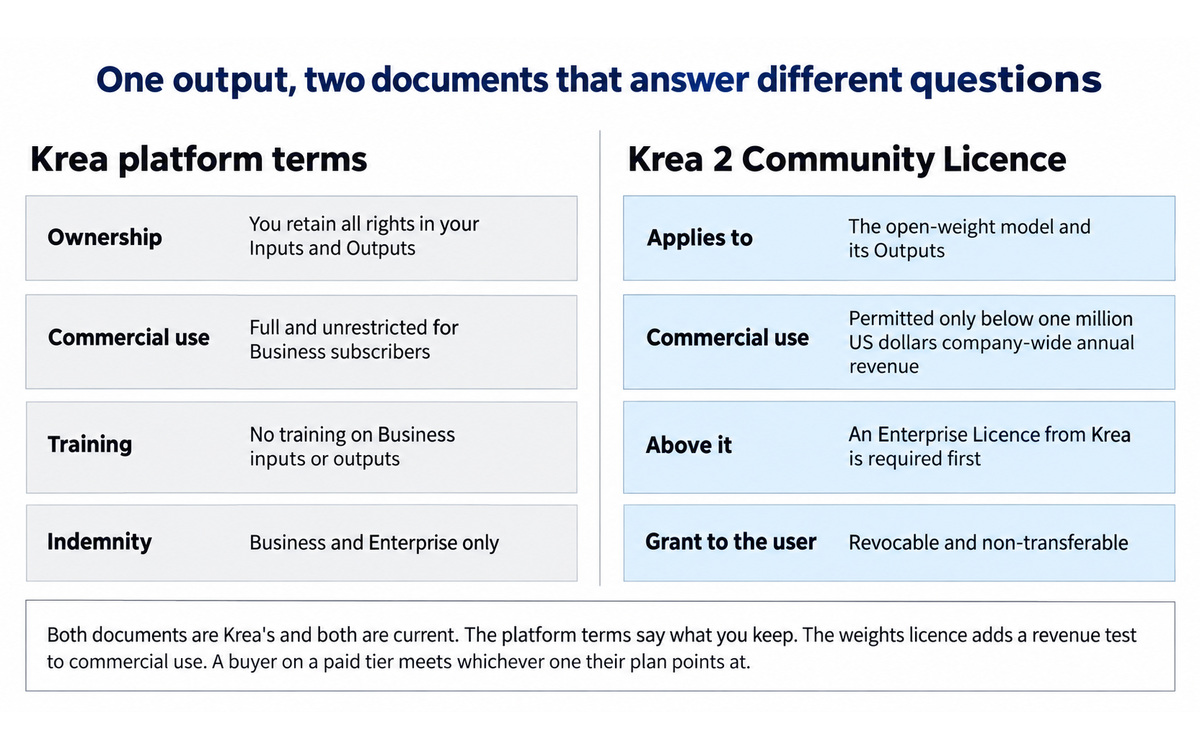
The finding, stated plainly. The platform terms tell a Business subscriber that their outputs carry "full, unrestricted commercial rights" and that Krea "does not restrict your commercial use of your Outputs". The community licence attached to Krea's own open-weights model tells a user that commercial use of that model's outputs is permitted only below a one-million-dollar company-wide revenue threshold, and requires an Enterprise Licence above it. Both documents are Krea's, both are current, and they are not the same document. A reader who reads only the pricing page learns the first. A reader who self-hosts learns the second. A reader who generates inside the platform on a paid tier meets whichever one their plan points at, and the platform does not state which.
The same structural question applies to every third-party model on the roster. Krea hosts models from OpenAI, Google, ByteDance, Black Forest Labs, Kling, Runway, Lightricks, MiniMax, Alibaba, Ideogram, Recraft, Luma and xAI, among others. Those vendors publish their own terms, their own acceptable use policies, and in several cases their own commercial-use conditions, and Krea's pricing page does not map which platform tier satisfies which model vendor's conditions. Krea's own documentation does label some roster entries as open models and some as proprietary, which is a useful signal, and it labels superseded models as Legacy, which is a second useful signal. It does not, anywhere the reader can readily find, state that a given output is also subject to a third party's licence.
What a reader should do with it. Before using a Krea output in client work, identify which model produced it, and check that model's terms. Where a workflow depends on one specific model, record the model name with the asset. Where the roster changes weekly, treat any prompt or saved skill that names a model as a document with a review date. Business and Enterprise buyers should ask Krea in writing which roster models sit inside the indemnification commitment, because the pricing page offers indemnification for "AI-generated content" without naming a model scope.
Allegation and finding are distinct here, and this is a finding, not an allegation. Nothing in this section alleges bad faith, concealment or unlawful conduct. Publishing a platform terms document and a model weights licence that address the same outputs differently is normal practice across the generative media market. The finding is the practical one: the two documents answer different questions, the pricing page publishes only the favourable answer, and the buyer is the one who has to reconcile them.
No score changed as a result of this section, and here is why. The CI-First Benefit Score measures benefit to the human net of overhead. The Humics Protection Rating measures the three human capabilities. The Imposture Risk assessment measures the three usage illusions. None of the three has a dimension for licensing terms, provenance or supplier contracting, so a contract-terms finding has no dimension to move. It is recorded here because an institution adopting the platform is also adopting its contract, and a reader who saw a score next to a rights finding without that explanation would reasonably assume the finding had been discounted.
What this section does not do. It does not give legal advice, and it does not tell you whether the Krea 2 Community Licence's revenue threshold or the platform's commercial-use promise would prevail in a dispute, because that depends on facts this review does not have. It does not assert that any output is unusable. It does not advise avoiding the platform, which would substitute a judgement for your own. It states the two documents, quotes the operative text from each, names the decision they put in front of you, and stops there. If you are making a commercial decision with material value attached to it, take the two documents to a lawyer.
U365 Co-Intelligence Rating
12.1 CI-First Benefit Score
Dimension | Score | Rationale |
Time Benefit | 7 | Strong savings, and the case is unusually clean because the mechanism is measured at the interface rather than claimed in a brochure. The canvas removes the wait from the iteration loop: you draw, the output redraws, and you keep thinking. Independent reviewers converge on this being the fastest way to steer an image in the category. Net of overhead it holds at 7 rather than higher, because the aggregator design adds a new prompt-and-verify loop of its own, which is choosing among more than sixty models, tracking per-model costs, and reading a weekly changelog to know what is current. Reviewers also measure stutter on mid-tier hardware and slow connections, which converts the saving into a cost on exactly the machines many users have |
Quantity Benefit | 7 | Strong increase. The platform makes volume cheap at the interface, a single balance spans image, video, upscaling, 3D and training, and the agent surface converts one brief into a set of channel-specific assets. Per-model costs are published, which is what makes the volume honest rather than an illusion. Held at 7 and not higher because premium third-party models drain the balance far faster than Krea's own, independent reviews report a share of unusable generations, and reviewers advise budgeting for the tier above the one you think you need, which is the point at which quantity stops being free |
Quality Benefit | 6 | Moderate improvement, deliberately capped by measurement rather than by measured weakness. The enhancer is best-in-class by independent report and works on assets you brought in from elsewhere as well as on Krea output, and Krea 2 is genuinely tuned for aesthetic range rather than the default airbrushed look. Against that, text rendering is fair rather than excellent and Krea's own documentation routes text-heavy work to third-party models on the roster, character consistency depends on training or on routing away from Krea's own model, and reviewers report prompt-adherence failures on human figures. Two of the strongest quality claims a reader will meet are a vendor-published head-to-head against a competitor's named variants with no published methodology, and a latency figure nobody outside the vendor has measured. No independent measurement of the platform's quality as a platform exists, which is the same condition that caps quality scores elsewhere in this series |
Skill Benefit | 4 | Marginal, and this is the score that decides the band. The tool's entire value proposition is delegation of visual craft, and it builds very little capability that survives the subscription. There is no instruction on composition, colour, lighting or typography; no critique of what is wrong with an output; no feedback loop that improves the user's judgement except by generating more; and no explanation of why one model handles text better than another, because the model that handles text is somebody else's. LoRA training and the node editor are genuine skill surfaces and they are the honest exceptions, but they are optional detours rather than the main path. The agent surface deepens the problem rather than softening it: it will save a written workflow as a skill, and a skill written by the agent from a session you steered is procedural knowledge you did not author and may not understand |
CI-First Benefit Score: (7 + 7 + 6 + 4) / 4 = 6.0
Band: CI-First Positive (4.1 to 6.0).
Why the band is Positive rather than Strong, and why that is still a recommendation. The arithmetic lands a tenth of a point below the Strong boundary, and the reason is Skill. That is the framework working as designed: a tool that produces expert-looking output for a user who cannot evaluate it scores low on Skill Benefit, and Krea is the clearest case of that pattern in this series so far, because the output genuinely looks expert. A reader should hold the two facts together. Krea is a real recommendation with disciplined use, and it is a recommendation that depends on a human retaining the judgement the tool does not teach.
12.2 Humics Protection Rating
Dimension | Rating | Rationale |
Creativity | +1 | Protects. This is the tool's strongest Humics result and it is not a close call. The canvas is built to keep the user's own hand in the loop: you steer with strokes, shapes and colour blocks rather than describing the result in advance, which is a different cognitive act and a more generative one. Style references, moodboards, generative sliders and LoRA training all extend the user's own range rather than replacing it. Moodboard sharing lets the user hand a live surface to a collaborator rather than a finished artefact. The erosion case exists, which is a user who lets the canvas converge on one image instead of exploring territories, and independent reviewers note the canvas encourages exactly that convergence. The protection outweighs it |
Critical Thinking | -1 | Erodes. The tool presents output with very little support for judging it. There is no provenance signal at the point of export, no confidence indication, no methodology, and no surfaced limitation in the generation interface. The evidence for erosion is that a substantial share of independent user reviews report unusable generations and aggressive content filtering on innocuous prompts, both of which teach a user to accept a plausible frame without checking it. The platform's response to quality uncertainty is to offer another model rather than an explanation. The two strongest counterweights are real: the vendor's own documentation is unusually direct about which model is weakest at text and which models are legacy, and the usage-tracking surface makes cost verifiable. They are not enough to reach neutral, because the judgement the tool asks of a user is about aesthetics and fitness for use, and it gives the user nothing to judge with |
Social Authenticity | 0 | Neutral. The Humics dimension measures the user's own communicative capability, and Krea works in a visual medium rather than a conversational one, so there is no direct substitution of the user's voice. The one surface that touches this dimension is the agent, which can post to Slack, Gmail, Meta Ads, YouTube and WhatsApp Business through OAuth integrations with Allow or Ask permissions. That is agent-mediated communication, and it does not erode Social Authenticity by itself, because the agent acts as a disclosed business surface on the owner's own channels rather than presenting agent-authored text as the person's own voice in a human-facing channel, and the owner can set each integration to Ask. The neutral rating records that the dimension is touched rather than untouched |
Humics Protection Score: (+1) + (-1) + 0 = 0
Badge: Humics-Neutral.
How to use the badge. Humics-Neutral means the tool neither consistently builds nor consistently erodes the human. Krea protects creativity strongly and erodes critical thinking on the same surface, and it asks the user to manage that split deliberately. The management move is concrete: treat the canvas as an exploration instrument whose output is a hypothesis, and put a human verification step between the canvas and anything that ships.
12.3 Collaboration Mode
Recommended mode: Centaur.
Mode rationale: Framework section 7.2 gives the rule, and it leads here: where Imposture Risk is Medium or High the mode is Centaur, because Centaur is safer. Krea's overall Imposture Risk is Medium, so the rule applies. The independent ground is specific to this tool. Cyborg needs a stopping criterion the human applies inside a fast loop across one continuous piece of work. The canvas supplies exactly that, which is why the Cyborg exception is real there. It does not extend further. A Krea Agent run stops when the workspace runs out of units rather than when the work is finished, so nothing inside the run tells you when to stop. A LoRA is trained once and then used in sessions the trainer does not attend, so there is no loop in which to apply a criterion. Centaur mode for Krea means a clear division of labour. The human owns the brief, the judgement of what is on brand, the decision about which model suits the job, the rights check before commercial use, and the final accept or reject. The tool owns the generation, the upscaling and the variation. The boundary should be visible in the workflow, which is why Section 10 puts a verification checklist between every generation step and the ship step.
Two specific Centaur disciplines for this tool:
Never accept a canvas frame into a deliverable without a full-quality regeneration. The live preview is deliberately lower fidelity and is not a proof of the final asset.
Never let the agent close a run unsupervised. The agent stops when units run out, and a run that stops mid-brief leaves a partial set that looks complete in a summary.
12.4 Framework v1.2 clause note
All three clauses are assessed explicitly, and each outcome is stated. Two apply and one returns a null, and the null is a finding in its own right.
Clause 5.2.3-a, agent-authored procedural memory. Applies. The clause raises the Skill Illusion floor to no lower than Medium for a tool that writes procedural memory on the user's behalf. Krea Agent does exactly that. Its documentation describes the mechanism in the vendor's own words: you finish a job, you write "Save this process as a skill called Launch Teaser", and the agent "writes the steps, the models it used and the checks it ran into a skill in your library", which the whole workspace can then rerun. The saved skill is agent-authored procedural memory, it is durable, it is shared at Workspace Context level, and it is written from a single session's run rather than from a validated procedure. The floor applies, and the Skill Illusion rating is recorded as High on the independent evidence in Section 11.3, which is above the floor.
Clause 4.2-a, agent-mediated conversation. Null. The clause governs the erosion of Social Authenticity, and it applies only where agent-authored text is presented as the person's own voice in a human-facing channel, or where agent interaction substitutes for human contact. Krea's one conversational surface is the agent's OAuth integrations, which can act on Slack, Gmail, WhatsApp Business, Meta Ads, YouTube, Notion, Linear and others. That surface does not meet either condition. It is a disclosed business agent acting on the account owner's own channels, each integration carries an explicit Allow or Ask permission that the owner sets, and nothing in it presents agent-authored text as the user's own personal voice to other humans. The condition that would trigger the clause, a person substituting agent conversation for human contact, is not what an image-generation agent does. The null is recorded because it is a finding: Krea's Social Authenticity rating of 0 rests on the absence of a conversational surface, not on the clause having been considered and dismissed.
Clause 7.5, team-level rooms. Null in the common case, and it is worth being precise about why. The clause applies where a shared channel has more than one agent acting in it, which requires Centaur mode. Krea has two team surfaces and neither is a team-level room in that sense. The Workspace Context library is a shared file system that every member and every member's agent can read, and it is explicitly the same context for all of them, but it is a shared library rather than a room in which several agents act on one conversation. The agent itself is a single-execution orchestrator: it plans, selects models, generates and files, within one job, and it does not hand work to a second agent that answers back into the same channel. The one configuration that could qualify is a workspace where each member runs their own agent against the shared Workspace Context, and there the agents do not act on each other; they read the same files. The clause therefore returns a null in the common case, with the shared-context configuration noted so the outcome is not read as a blanket negative.
12.5 Superhuman Usage Guidance
When to invite Krea.
Early-stage visual exploration, where the goal is fifty directions rather than one deliverable.
Any job where the output needs finishing at high resolution and upscaling is a recurring need.
Brand and product work where consistency matters and a LoRA or an Element can hold it.
Team work where a shared brand context removes repeated briefing.
Teaching how the real-time surface works, because it is the clearest available demonstration that generative work does not have to be a queue.
When to keep Krea out.
Final vector, print-ready and typographically precise deliverables. Route those to a vector-native tool.
Any workflow where a licensed, indemnified output is a hard requirement and you are not on Business or Enterprise.
Regulated content where the provenance of a generated asset must be documented to a standard the platform does not publish.
Decisions about a client's brand direction taken from a canvas frame without a full-quality regeneration and a human review.
U365 method integration.
CI-First. Krea is a strong Co-Intelligence partner precisely because the canvas keeps a human hand in the loop, and a weak one wherever it substitutes for the user's judgement. The method's discipline applies directly: attribute the profile before giving the task. Krea's profile on the canvas is Co-Creator, and it should be held there rather than promoted to a delivery role.
ULM. The canvas is a good surface for learning by iteration, which is the mechanism ULM names, provided the learner is directed to articulate why a variation worked. Without that articulation the iteration teaches nothing durable.
EVA. The verification checklists in Section 10 are the EVA step applied to visual output: each asset is verified against a stated criterion, not accepted because it looks good.
CARE, LIPS, SL-OS, UNOP, UP-Context, 5M2S, D2L, T2L and U.Copilot are referenced by name only where the alignment applies. UP-Context can supply a brand and audience context block for the agent's Workspace Context, and T2L is the relevant lens when Krea output is used as course material rather than as a deliverable.
Over-delegation warning. The failure mode for this tool is a designer who stops looking. The canvas is fast enough that a user can generate a hundred plausible frames without forming a judgement about any of them, and the agent is capable enough that a user can ship a full campaign without reading the brief back. Both are over-delegation, and both leave the user less capable of the work than they were. Two disciplines prevent it: hold every output as a hypothesis until a human has stated why it works, and keep one part of the workflow unassisted, whether that is the composition sketch, the colour decision or the final crop, so the underlying skill keeps its practice.
What Users Say
Independent review evidence on Krea splits sharply between the product and the business, and the split is consistent across every platform that carries enough reviews to read.
Platform | Rating | Volume | What it says |
Trustpilot | Approximately 2.6 to 2.7 out of 5 | 62 reviews | 39 percent positive, roughly 60 percent negative. Customer support failures are the single largest complaint category at around 26 percent of reviews, billing and subscription issues are second at around 18 percent, followed by platform instability and inconsistent AI quality. Only one of the 62 reviews was verified, and the company had replied to none of them |
Product Hunt | 4.2 out of 5 | 13 reviews | Positive, describing Krea as a design tool with AI inside. Small sample, and the audience is early adopters |
Apple App Store | 4.5 out of 5 | 634 ratings | Strongly positive on the mobile app, praising the output quality and the value of multiple tools in one price |
G2 | No verified score reported | 2 reviews | Two verified reviews is too small a base to state a rating. A directory reporting a G2 figure of 4.7 out of 5 is reporting almost no evidence |
Capterra | No reviews found on Capterra | None | Not available |
GetApp | No reviews found on GetApp | None | Not available |
Trustpilot replies | 0 of 62 | Full sample | The zero-reply pattern is the finding, not a side note. Competitor platforms sampled in the same analysis replied to around 80 to 95 percent of reviews |
Sentiment analysis of the Trustpilot sample. An independent analysis of all 62 reviews found the positive reviews clustered on three things: the real-time image generation, the enhancer, and the level of creative control. The negative reviews clustered on four: customer support, billing and cancellation, platform instability including freezes and required refreshes with no status page or outage communication, and output inconsistency including prompt-adherence failures and content filters firing on innocuous prompts. Roughly 10 percent of reviewers reached for the words scam or fraud, citing charges that continued after cancellation, leftover credits removed when a subscription ended, and refused refunds.
Independent scores. Litmus gave Krea 72 out of 100 with sub-scores of 7.6 for ease of use, 8.0 for features, 6.8 for value and 5.8 for support, and rated the real-time canvas best in the category. Instawhat's StackScore is inconsistent across its own pages: one page reports 62 out of 100 and another reports 70 out of 100 for the same tool. Treat the spread, not the number, as the finding. ToolJunction ranks Krea 11th of 43 in AI image generators and notes that support is limited to Discord with no direct contact channel and that billing disputes are a recurring complaint.
Community sentiment. The Krea community lives on Discord, and the pattern there mirrors the review platforms: strong enthusiasm for the canvas and the model roster, recurring frustration about a queue when the platform is busy and about content filters. Reviewers repeatedly note the absence of a status page as the reason an outage is hard to distinguish from a local problem.
U365 editorial note on this evidence. The strongest signal in this table is the gap between 4.5 out of 5 on the App Store across 634 ratings and 2.6 to 2.7 out of 5 on Trustpilot across 62 reviews. The two populations are not the same. App Store reviewers rate the mobile experience at the moment of use, and Trustpilot reviewers arrive with a grievance, usually a billing one. Read the App Store figure as evidence about the product's core experience and the Trustpilot figure as evidence about what happens when something goes wrong. Nobody replying to 62 consecutive public reviews is the part of that record a buyer should carry into a procurement decision.
Comparison and Alternatives
The three tools a reader is most likely to weigh against Krea are Leonardo AI and Recraft, both reviewed in this same batch by the same method, and Midjourney. Three more follow, for readers whose need is narrower.
Alternative | Choose the alternative if... | Choose Krea if... |
Leonardo AI (https://leonardo.ai/) | You want a single-vendor image generator with a deep control surface for a predictable per-seat price, you value character and style consistency delivered through guided tools rather than through training, and you would rather not have your output governed by several models' terms at once. Leonardo's strengths are creator control, custom model training, private generations and a Canva-connected workflow, and its model line is the vendor's own rather than an aggregator's | You want the real-time canvas, and you want one balance spanning many vendors' frontier models rather than one vendor's line. Krea's live generation updates as you draw; Leonardo's iteration surface is prompt-and-generate with strong guidance rather than a live canvas. Krea is also the better fit where a workflow needs to switch models mid-project, for text rendering, for a specific video model, or for a specific upscaler |
Recraft (https://www.recraft.ai/) | Your output has to be editable, brand-exact and often vector. Recraft's design intelligence, its vector asset production, its brand-consistent asset system and its strength at typography inside an image are the reasons it exists, and they are exactly the jobs Krea's raster-first output does not serve. Recraft V4 is also available inside Krea's roster, so a reader can test the model without leaving the platform, which is a fair way to decide | Your work lives in the messy exploration phase rather than the brand-system phase, and you want speed of iteration over editability of output. Krea's canvas, its video roster and its upscaling stack cover more of the production pipeline; Recraft covers the last mile of brand asset work better. The honest summary is that these two are complementary and a studio doing both jobs will likely pay for both |
Midjourney (https://www.midjourney.com/) | You want the strongest single aesthetic out of a model with a large stylistic community, you are comfortable in Discord or the web interface, and you do not need a live canvas, a video roster or an upscaler in the same subscription | You want to steer by hand rather than by prompt, you want video and upscaling in the same balance, and you want published per-model costs so that the volume you generate is a financial decision rather than a surprise |
Ideogram (https://ideogram.ai/) | Typography inside the image is the main job. Ideogram is on Krea's own roster for exactly this reason, and its own product is a focused tool for design and text rendering | You want image work as part of a wider pipeline, and you would rather reach Ideogram's strength as one model inside a platform than as a separate subscription |
Freepik AI Suite (https://www.freepik.com/ai) | You want an aggregator at a lower entry price with a large stock library attached, and you are comfortable with the licensing and attribution terms that come with stock-derived assets | You want a real-time creative surface, published per-model unit costs, open weights on the flagship model, and Business-tier terms that commit in writing to no training on your content |
Adobe Firefly (https://firefly.adobe.com/) | Indemnification and IP clearance are the deciding factor, your work already lives in Adobe's applications, and you want a vendor with a published position on training data and legal cover at the tier you can actually buy | You want a wider model roster, a live canvas and a much lower entry price, and you are willing to carry the rights diligence yourself. Firefly's indemnification reaches ordinary paid tiers; Krea's reaches Business and Enterprise only |
Where Krea is clearly better. Three things, and they are the reason this review recommends it. First, the live canvas: no competing tool in this comparison makes generation update as you draw, and it changes the shape of the iteration loop rather than the speed of one step in it. Second, the breadth of the roster behind one balance with published per-model costs, which removes subscription juggling and makes the spend legible. Third, the open weights on Krea 2, which give an exit path that most commercial generators do not offer.
Where Krea is clearly worse. Three things, and a reader should weigh them against the strengths rather than around them. The billing and support record is the weakest in this comparison, and no product strength offsets a charge that continues after cancellation. The rights position is the most fragmented, because an output is governed by the platform's terms and by whichever model vendor's terms apply, and the platform does not map the two. And the finishing path stops at raster: vector, print-ready and typographically precise deliverables leave the platform, which is where Recraft and Ideogram are genuinely stronger.
On the comparison with Leonardo AI and Recraft specifically. Both are reviewed in this batch by the same method and the same framework, and readers should compare them directly rather than through this table. Stated honestly: Leonardo AI is the better choice for a team that wants one vendor's model line with deep control tools and a stable commercial relationship, and Recraft is the better choice for brand and vector asset production. Krea is the better choice where the work is exploratory, visual, iterative and multi-modal, and where the buyer is willing to read the terms. The three are not substitutes for one another, and a studio with all three jobs will get more from paying for two of them than from pretending one covers everything.
Verdict and Next Steps
Verdict. Krea is a genuine advance in how generative image work feels, and it is sold on terms a buyer has to read carefully. The live canvas is the best available answer to the iteration-wait problem, the model aggregation is real money saved, the enhancer is stronger than the headline feature, and the Krea 2 open weights are an unusually honest move for a commercial generator. Against that, the tool teaches the user very little, the rights position splits across two sets of documents with a revenue threshold in one of them, and the independent evidence about billing and support is the worst in the comparison set. Adopt it for exploration, for upscaling, and for multi-model work. Do not adopt it expecting it to build your design judgement, and do not assume the pricing page describes the licence.
CI-First Benefit Score: 6.0 (CI-First Positive). Humics-Neutral (0). Imposture Risk: Medium. Collaboration Mode: Centaur. Status: Active.
Next steps, in order.
Run the free-tier canvas test. Twenty minutes on Realtime with a built-in example tells you whether this way of working suits you. If it does not, nothing else in this review matters for you.
Measure your own unit burn before choosing a tier. Generate the work you actually do for three days and read the usage page. Reviewers consistently advise budgeting for the tier above the one you think you need, because premium models drain a balance far faster than Krea's own.
Identify which model produced each asset you intend to use commercially, and read that model's terms. Section 7c explains why. If you are on a Business or Enterprise plan, ask Krea in writing which roster models sit inside the indemnification commitment.
Train one LoRA on your own product, person or house style in your first fortnight. This is the step that converts generic output into your output.
Put the verification checklists from Section 10 into your working file, and put a named human on the accept-or-reject step for every asset that ships.
Set a renewal reminder two weeks before your billing date, and read the cancellation terms before you subscribe rather than after.
If your organisation is near the community licence threshold, take the two documents to a lawyer before deciding whether to self-host.
UP-Context prompt pack. Six prompts written in the U365 prompting method, for use inside Krea. Replace the bracketed context with your own. Each one carries a Role line, which states where you sit in the working relationship, and a verification close, which is the part you run after the output arrives.
Prompt pack 1: The brand boundary, stated before the first generation
Context: Our brand is [name]. Our approved palette, type and imagery guidance is in the attached workspace context. Our audience is [audience], and the asset will appear in [channel]. What we must never show is [list].
Role: AI as a brand-governance assistant working to a written brand boundary.
Profile: Act as a Co-Creator and Thought Partner (level 1). I own the direction and the final judgement. You generate and vary.
Task: Restate my brand boundary back to me before generating anything: the look we are protecting, the subjects that are in scope, and the three things you will refuse to render.
Constraints: Never invent logos, trademarks, partner marks or product features that do not exist. Never render text unless I name the text. Ask before adding any element I did not describe.
UP-Context verification: state what you checked, what you could not check, and what a human must decide before this is used.
Prompt pack 2: The canvas steering brief
Context: I am exploring a direction for [project] and I do not have a brief yet. The feeling I am after is [three adjectives]. The constraint is [constraint].
Role: AI as a visual co-creator responding to drawn input rather than to a prompt.
Profile: Act as a Co-Creator and Thought Partner (level 1). You translate my strokes into a scene. I steer with the canvas.
Task: Generate from the canvas as I draw, keep the composition readable at each step, and when I stop, describe in one sentence what the current frame is now communicating, so I can judge whether it is what I meant.
Constraints: Keep the style consistent while I move elements. Do not add detail I did not draw or ask for.
UP-Context verification: state what you checked, what you could not check, and what a human must decide before this is used.
Prompt pack 3: The model-routing brief
Context: The job is [job]. The asset needs [resolution, aspect ratio, text or no text, commercial use or not]. My plan is [tier].
Role: AI as a production planner with a published cost sheet in front of it.
Profile: Act as a Co-Worker and Assistant (level 2). I decide, you execute and advise.
Task: Recommend which models on this platform suit this job and say why, including which one you would use for text inside the image, and tell me the approximate unit cost of each option before I generate.
Constraints: State the cost, not an estimate range. If a model you recommend is a third-party model, say so, so I can check its terms before I use the output commercially.
Cost answer requirement, carried from the review's own Centaur disciplines: name the model, the estimated unit cost and the licence that model sits under, so the routing decision and the rights decision are made together rather than one after the other.
UP-Context verification: state what you checked, what you could not check, and what a human must decide before this is used.
Prompt pack 4: The rights check, run before any asset leaves the platform
Context: This asset may appear in [commercial context]. It was generated on [model name, if known] on [date]. My subscription tier is [tier].
Role: AI as a rights and claims reviewer for a commercial asset.
Profile: Act as an Analyst and Tester (level 4). I decide whether to use it.
Task: List every factual claim the image makes that I would have to be able to defend: product features, settings, packaging, environment, implied endorsement. Flag anything that looks invented.
Constraints: Do not reassure me. List the risk items with what a careful reviewer would ask about each.
UP-Context verification: state what you checked, what you could not check, and what a human must decide before this is used.
Prompt pack 5: The agent brief, written for a delegated run
Context: Delivering [deliverable] for [audience] across [channels and aspect ratios]. Brand context is in Workspace Context. We must avoid [constraints].
Role: AI as a delegated production coordinator working inside a stated budget.
Profile: Act as a Co-Worker and Assistant (level 2). I own the brief, the approve step and anything posted outside this workspace.
Task: Plan the run before executing it: the model for each asset type, the approximate unit cost, the sequence, and what you will check before you call an asset finished.
Constraints: Do not post to any integrated service without asking. Stop and report if the plan would exceed [unit budget]. Do not regenerate an approved asset without telling me.
Approval requirement, carried from the review's own Centaur disciplines: name the human who approves each asset type and the point at which the agent stops. Never accept a canvas frame into a deliverable without a full-quality regeneration, and never let the agent close a run unsupervised.
UP-Context verification: state what you checked, what you could not check, and what a human must decide before this is used.
Prompt pack 6: The skill audit, run on any skill the agent saved for the team
Context: The agent saved a skill called [name] from a run on [date]. The team will now rerun it without re-deriving the steps.
Role: AI as a procedure auditor reading a saved workflow back to its author.
Profile: Act as an Analyst and Tester (level 4). I approve the skill before it is used by others.
Task: Read the saved skill back to me step by step, and for each step state what it assumes, what it checks, and what it would silently get wrong if that assumption stopped holding.
Constraints: Do not summarise. Read the steps. Flag any step that names a specific model or a specific integration that may change.
UP-Context verification: state what you checked, what you could not check, and what a human must decide before this is used.
U.Copilot and SL-OS in the U365 context
U.Copilot. Krea is a plausible production surface for U.Copilot-assisted course material, on one condition. U.Copilot's role is to hold the pedagogical intent while the visual asset is produced, so the Krea brief should be written from the learning outcome rather than from the aesthetic, and the asset should be verified against the outcome rather than against taste. The Workspace Context library is the right place to store an institute's approved visual guidance so that every Fellow's agent starts from it. Do not use Krea to generate assessment material or any artefact that carries a factual claim to a learner without a subject-matter review, because the Skill Illusion risk in this tool is High and the output is designed to look finished.
SL-OS. There is no direct SL-OS integration, and it would be a mistake to force one. SL-OS is concerned with how a learner's own operating system of study is built and sustained. Krea affects that only indirectly, and in both directions. Positively, the canvas is a legitimate way to externalise a visual idea early, which supports the learner's own ideation, and the open weights keep that capability available to a student who cannot pay a subscription. Negatively, a tool that produces finished-looking assets on demand is exactly the surface where a learner substitutes output for understanding. The SL-OS discipline that applies is the discipline of authorship: the learner should be able to say what they meant by an image, not merely that they made one.
Status and Last Tested
Status: Active | Last tested: 2026-09-25 | Re-check: on the next Krea 2 model release, on any change to the third-party model roster, or on any change to the community licence revenue threshold.
Active: the tool is current and recommended.
The status is Active with the conditions stated in this review. The tool is current and it is recommended for the use cases in Section 15. The two conditions a reader should carry are the rights position in Section 7c and the billing record in Section 13. Neither is a reason to avoid the tool, and both are reasons to read before you commit.
Version reviewed: Krea, as documented at krea.ai in September 2026.
Migration Path
Not applicable. Krea is Active and recommended, and no Migration Path is required. This heading is included so the section inventory is complete, and it states plainly that no migration plan is built here, because a migration plan exists only for a tool that is Retired, Deprecated or Risky. A reader who wants to reduce dependence on the platform rather than leave it has a smaller decision available, and it belongs in Section 15 rather than here: keep your approved assets and your LoRAs in your own storage, keep the model name recorded beside every asset you ship commercially, and prefer your own composition and colour decisions for anything whose value is your judgement. The re-check triggers at the top of this review are the conditions under which this section would stop being empty.
U365's Recommendations to Learn More
Official learning resources
The product documentation index, which is the entry point to the whole documentation set and lists every page by product surface: https://www.krea.ai/docs/user-guide
The Realtime documentation, for the canvas tools, the four draw modes, the resolution limits, the aspect ratios and the model selection. This is the page to read before your first real project: https://www.krea.ai/docs/realtime
The model overview, which is the single most useful page on the site for a buyer. It organises every image model into Fast, Intelligent, Quality and Legacy categories and publishes speed and credit cost per generation: https://www.krea.ai/docs/user-guide/features/model-overview
The model library, which lists every model page across image, video, audio, enhancer, edit, 3D, video restyle, motion transfer and lipsync: https://www.krea.ai/models
The compute units guide, for what units cover, how to read your usage, what happens when you run out, and the roll-over rules by plan: https://www.krea.ai/docs/user-guide/help-and-support/compute-units
The agent overview and the plans and credits page, for the effort tiers, the pinning rules, the orchestrator's own cost and the launch-credit allowance: https://www.krea.ai/docs/user-guide/agent/overview and https://www.krea.ai/docs/user-guide/agent/plans-and-credits
The context library and skills guide, for the three context levels, saved skills, the integration list and the Allow or Ask permission model: https://www.krea.ai/docs/user-guide/agent/context-library-and-skills
The changelog, which is weekly and is the only reliable way to know what is current: https://www.krea.ai/release-notes
The Krea 2 community licence, which is the document in Section 7c and should be read in full by anyone considering the open weights: https://www.krea.ai/krea-2-licensing
The Business plan terms of service, for the ownership and commercial-use statements and the no-training commitment: https://www.krea.ai/business-terms
The general terms of use, read next to the Business terms, because the two answer different questions: https://www.krea.ai/terms
The privacy policy, for the categories of data collected and the transfers position: https://www.krea.ai/privacy
The pricing page, for the tiers, the unit allowances, the concurrency limits and the Business feature set: https://www.krea.ai/pricing
Video tutorials and channels
Each identifier below was verified through the YouTube oEmbed endpoint on 2026-09-25, with a known-live control returning the same shape of response and a known-dead identifier returning an error, so the check was working rather than passing by default. None of these are vendor-produced, and no claim in this review rests on them. Watch them for what the interface looks like and how a session is driven.
"How to Generate Real-Time Images in Krea.ai | Krea.ai Tutorial 2026", a focused walkthrough of the live canvas and the draw modes, and the best of the set if you watch only one: https://www.youtube.com/watch?v=bVEOCa0UVRE
"KREA AI FULL TUTORIAL | Real-Time Generation, Upscaling, Video & Pattern Tools Explained", the widest coverage of the platform surfaces in one video: https://www.youtube.com/watch?v=cHZXtKObNTo
"Krea AI Tutorial & Review | Is This the Best AI Editor for Creators?", which covers the editor and the real-time canvas together: https://www.youtube.com/watch?v=Yv5AIj3Fdoo
"Krea AI Tutorial 2026 | New Updates | How to Use Krea AI - For Beginners", a slower beginner path: https://www.youtube.com/watch?v=fsrR8u8NvEc
"NEW Krea 2 Update is INSANE!", a first-look at the foundation model release: https://www.youtube.com/watch?v=Y6o-LSv-b4E
Resources on Krea and Resources on X
Dedicated Krea channels. Krea distributes its announcements through its own X account and its Discord community, and the product documentation does not link a vendor-run video channel. The X account is where Krea 2 releases and model additions are announced first.
Use this image as the X/Twitter thumbnail for the post. It is served from the vendor's own media host and resolves on 2026-09-25.
Krea's X account, referred to across independent reviews as the source of the Krea 2 announcement: https://x.com/krea_ai
The Discord community, where the vendor's support happens and where the queue and filter complaints surface in real time: reachable from the community link on the product site
The moodboard sharing feature, for handing a live surface to a collaborator or a client without giving up edit rights: https://www.krea.ai/moodboards
Krea Agent, for the brief-to-assets workflow: https://www.krea.ai/agent
The Krea MCP server, for connecting your own agent to the platform: https://www.krea.ai/mcp

Independent reading
The Litmus review, for the clearest independent statement of the real-time canvas as a category-leading surface, the credit-expiry mechanics and the indemnification gap: https://litmustools.com/review/krea
The designer's review by Omid Saffari, for the workflow narrative and the divergence-versus-delivery boundary that this review also draws: https://omidsaffari.com/blog/krea-ai-review-2026
The analysis of all 62 Trustpilot reviews, for the complaint taxonomy, the zero-reply finding and the verification gap: https://rainaiservices.com/reviews/krea-ai
The ToolJunction listing, for the category ranking, the under-50-millisecond claim as the vendor states it, and the support-channel limitation: https://www.tooljunction.io/ai-tools/krea
The Artificial Analysis text-to-image leaderboard, for where Krea's own checkpoints sit against the models the platform hosts. Read the model name in each row carefully, because a rank belongs to a checkpoint and not to the platform: https://artificialanalysis.ai/image/leaderboard/text-to-image
The Product Hunt listing, for the small-sample early-adopter view: https://www.producthunt.com/products/krea
The Apple App Store listing, for the mobile rating and its much larger sample: https://apps.apple.com/us/app/krea-ai-images-and-videos/id6742134132
Dedicated X channels
The account to add first is the vendor's own at https://x.com/krea_ai, because a change to the pricing model, the licence over your content or the model line would be announced there before it reached a documentation page. For this category the accounts worth following alongside it are the practitioner and analyst accounts that publish comparative work, and the competitor accounts named in the comparison section, so that any capability claim in this review can be checked against a measurement rather than against a marketing page.
Glossary
CI-First Benefit Score
The U365 measure of how much an AI tool delivers the four Key AI Benefits. Four dimensions, each scored 0 to 10: Time, Quantity, Quality, and Knowledge and Skill. The overall score is the arithmetic mean of the four, rounded to one decimal place. Bands: 0 to 2.0 CI-First Negative, 2.1 to 4.0 CI-First Neutral, 4.1 to 6.0 CI-First Positive, 6.1 to 8.0 CI-First Strong, 8.1 to 10.0 CI-First Transformative.
CI-First Profile
One of the five roles an AI plays in a Co-Intelligence relationship: Co-Creator and Thought Partner, Co-Worker and Assistant, Coach and Tutor, Analyst and Tester, Challenger and Devil's Advocate. A tool is classified with a primary profile and one or more secondary profiles.
Collaboration Mode
The working structure that is safest and most effective with a tool. Centaur mode keeps a clear division of labour: the human owns judgement and the final decision, the tool owns execution. Cyborg mode intertwines the two. Where Imposture Risk is Medium or High, the framework assigns Centaur, because Centaur is the safer structure. Krea is Centaur.
Compute units
Krea's internal currency for computational work. Units cover image generation, video creation, enhancement, editing and model training, and the cost differs by model. The documentation publishes a credit cost per model, from 2 units for the fastest model to roughly 400 for the most capable. Monthly units do not roll over on individual plans; purchased packs expire after 90 days.
Humics Protection Badge
A three-dimension rating of whether a tool protects, leaves neutral, or erodes the three human capabilities: Creativity, Critical Thinking and Social Authenticity. Each is rated +1, 0 or -1, and the sum produces the badge: Humics-Friendly at +2 to +3, Humics-Neutral at -1 to +1, Humics-Risky at -2 to -3. Krea is Humics-Neutral at 0.
AI Imposture Risk
The assessment of how likely a tool is to trap a user in one of the three usage illusions: Time Illusion, Quantity Illusion and Skill Illusion. Each trap is rated Low, Medium or High with cited evidence, and the highest trap rating determines the overall risk level and the collaboration mode.
LoRA
A small trained add-on to a generative model that makes it reliably reproduce a specific product, person or visual style. Krea supports image and video LoRA training and LoRA sharing, and the Business tier advertises training on up to 2,000 images.
Open weights
A model whose parameters are published for download, so it can be run on your own hardware or fine-tuned without the vendor's platform. Krea 2 Raw and Krea 2 Turbo are published as open weights under the Krea 2 Community Licence, which permits commercial use only below a stated company-wide revenue threshold.
Compute pack
A one-time purchase of additional compute units, independent of a subscription. Purchased units must be used within 90 days and do not refresh.
User Sentiment
The record of what users say about a tool on review platforms, with the sample size and verification status of each platform stated, because a rating without its volume and its verification status cannot be read.
Review Status
Review Status records the current standing of the tool at the time of the last test. Active: the tool is current and recommended. Active (updated): recently re-checked and the content was refreshed. Changed: a re-check trigger fired and an update is pending, so read the review with that in mind. Risky: the tool has significant unresolved issues, or it has been clearly surpassed by newer alternatives. Use it with caution and read the Limits section. Stale: this review has not been re-checked in over 6 months, so treat details such as pricing and features as unverified. Retired: the tool still works but is no longer recommended. Deprecated: the tool has been shut down or fundamentally changed. Retired and Deprecated posts include a Migration Path section. Krea is Active, with the conditions stated at the status badge.
Sources
Vendor primary sources
KREA.AI, INC., homepage, for the Krea Agent positioning, the product switcher, the Realtime canvas entry point, the Krea MCP surface, the image and video model cards with their per-generation unit figures, and the Krea 2 entry: https://www.krea.ai/
KREA.AI, INC., pricing page, for the Business tier's 80,000 unit allowance, the generation-equivalent examples, the flat pricing across up to 50 seats, the commercial licence statement, the no-training clause reference, the custom roles and model access controls, the per-member spend limits, the SAML SSO support, the priority support with SLA, and the indemnification statement: https://www.krea.ai/pricing
KREA.AI, INC., model library, for the full model roster across image, video, audio, enhancer, edit, 3D, video restyle, motion transfer and lipsync tools, and for the open and proprietary labelling: https://www.krea.ai/models
KREA.AI, INC., model overview documentation, for the Fast, Intelligent, Quality and Legacy categories, the per-model descriptions and the published credit costs: https://www.krea.ai/docs/user-guide/features/model-overview
KREA.AI, INC., Realtime documentation, for the split-panel interface, the canvas tools and their shortcuts, the four draw modes, the aspect ratios, the 512px and 1024px resolution tiers, and the video output from the canvas: https://www.krea.ai/docs/realtime
KREA.AI, INC., changelog, for the weekly release cadence and specifically the 2026-09-10 Krea Agent general release, the launch-week free-credit allowance and its end date, the 2026-09-16 organizations release, workspace capture, tags, member usage limits and org-wide usage reporting, and the 2026-05-12 Krea 2 release: https://www.krea.ai/release-notes
KREA.AI, INC., compute units guide, for what units cover, the near-real-time usage tracking, the non-roll-over rule on individual plans, the roll-over rule for business and enterprise, and the 90-day expiry on purchased packs: https://www.krea.ai/docs/user-guide/help-and-support/compute-units
KREA.AI, INC., Krea Agent plans and credits documentation, for what each plan includes, the orchestrating-model cost model including the 5 percent charge on Free, the effort tiers, the routines and custom-agents Enterprise gating, and the launch-credit allowances by plan: https://www.krea.ai/docs/user-guide/agent/plans-and-credits
KREA.AI, INC., context library and skills documentation, for the three context levels and their visibility, the memory behaviour, the built-in skills list, the save-your-own-skill workflow, and the integration list with the Allow or Ask permission model: https://www.krea.ai/docs/user-guide/agent/context-library-and-skills
KREA.AI, INC., Krea 2 Community License Agreement, for the definitions of Commercial Use, Derivative and Output, the grant of rights, the commercial-use revenue threshold, the Enterprise Licence requirement above it, the distribution and attribution requirements, the content-filtering and AI-disclosure requirements, the intellectual property clauses, the disclaimer of warranties, and the absence of any indemnity obligation: https://www.krea.ai/krea-2-licensing
KREA.AI, INC., Business plan Terms of Service, last updated 2026-01-01, for the ownership of inputs and outputs statement, the commercial use rights for Business subscribers, the no-training-on-customer-data commitment and its survival after cancellation, the team account terms, the liability limitation, the indemnity clause and the arbitration agreement: https://www.krea.ai/business-terms
KREA.AI, INC., Terms of Use, last updated 2024-05-20, for the definition of User Submissions, the perpetual and sublicensable licence granted over anything you post, upload, share, store, provide or generate, the licence granted to other users, the licence granted to you over content generated from the Services, the reservation of the right to modify commercial-use terms, the prohibited-content list, and the arbitration agreement with its class action waiver: https://www.krea.ai/terms
KREA.AI, INC., Privacy Policy, for the categories of personal data collected, the business purposes, the disclosure categories including analytics partners, the data subject rights and the United States hosting and transfer position: https://www.krea.ai/privacy
Independent reviews, ratings and analysis
Trustpilot, Krea review page, for the headline rating and the review corpus: https://www.trustpilot.com/review/krea.ai
Rain AI Services, analysis of all 62 Trustpilot reviews, for the 39 percent positive and 60 percent negative split, the complaint taxonomy with support failures at 26 percent and billing at 18 percent, the 1 of 62 verification figure, the zero-reply finding and the competitor response-rate comparison: https://rainaiservices.com/reviews/krea-ai
Litmus Tools, Krea review, for the 72 overall score and its sub-scores, the under-50-millisecond canvas claim as the vendor states it and the reviewer's own hardware caveat, the 64-plus model count, the 22K upscaling path through Topaz, the credit non-roll-over and 90-day expiry findings, the free-tier commercial-use limitation, the enterprise-only indemnification finding, the pricing tiers, and the Krea 2 parameter count and open-weight statement: https://litmustools.com/review/krea
Omid Saffari, Krea review, for the divergence-versus-delivery boundary, the five working surfaces, the training-to-generation-to-upscaling workflow, and the account of the Krea 2 release on the vendor's X announcements: https://omidsaffari.com/blog/krea-ai-review-2026
The Planet Tools, Krea review, for the company profile including the San Francisco base, the 47 million dollar Series B at a 500 million post-money valuation led by Bain Capital Ventures, the 83 million total raised and the 30 million plus user count across 191 countries: https://theplanettools.ai/tools/krea-ai
Instawhat, Krea StackScore page, for the 64-plus model count and the two different StackScore values reported for the same tool across its own pages: https://instawhat.ai/tools/krea
ToolJunction, Krea listing, for the category ranking, the under-50-millisecond claim, the 30 million user and 83 million funding figures, and the statement that support is limited to Discord with billing disputes a recurring complaint: https://www.tooljunction.io/ai-tools/krea
Product Hunt, Krea product page, for the 4.2 rating across 13 reviews: https://www.producthunt.com/products/krea
Apple App Store, Krea listing, for the 4.5 rating across 634 ratings on the iOS app: https://apps.apple.com/us/app/krea-ai-images-and-videos/id6742134132
Artificial Analysis, text-to-image leaderboard, for the position of Krea's own checkpoints relative to the third-party models the platform hosts, and for the per-checkpoint naming that shows why a leaderboard rank belongs to a model and not to the platform: https://artificialanalysis.ai/image/leaderboard/text-to-image
Note on verification
The platform figures in the sentiment section are attributed to the named third-party analysis that read them, and no figure in this review rests on a page that could not be read. The operative contract text quoted in Section 7c is quoted verbatim from the document named beside it.
CI-First Evaluation Summary Card
Field | Result |
Tool | Krea |
Vendor | KREA.AI, INC. |
Category | Real-time AI creative suite: image, video, upscaling, 3D, agent |
Primary CI-First Profile | Profile 1, AI as Co-Creator and Thought Partner |
Secondary CI-First Profile | Profile 2, AI as Co-Worker and Assistant |
Time Benefit | 7 |
Quantity Benefit | 7 |
Quality Benefit | 6 |
Knowledge and Skill Benefit | 4 |
CI-First Benefit Score | 6.0 |
Band | CI-First Positive |
Humics Creativity | +1 |
Humics Critical Thinking | -1 |
Humics Social Authenticity | 0 |
Humics Protection Score | 0 |
Humics Badge | Humics-Neutral |
Time Illusion | Medium |
Quantity Illusion | Medium |
Skill Illusion | High |
Overall Imposture Risk | Medium |
Collaboration Mode | Centaur |
Framework v1.2 clause 5.2.3-a | Applies |
Framework v1.2 clause 4.2-a | Null |
Framework v1.2 clause 7.5 | Null in the common case |
Status | Active |
Last tested | 2026-09-25 |
Re-check trigger | Krea 2 release, roster change, licence threshold change |
Faculty Note on Evidence Quality
This review rests on three kinds of evidence, and they are not equally strong. Saying which is which is part of the review.
What is well evidenced. The vendor's own product surfaces. Pricing, unit mechanics, model roster, model costs, roll-over rules, context-library behaviour, agent plan gating and the contents of the legal documents were all read from Krea's own pages on 2026-09-25. Where this review quotes operative contract text, the quotation is verbatim from the document named. Those facts a reader can rely on as accurate to the day.
What is moderately evidenced. Independent review coverage. Krea has been reviewed by a reasonable number of independent outlets. Litmus, the designer's review at Omid Saffari, ToolJunction, Instawhat, The Planet Tools and the Trustpilot analysis all reach the same conclusions on the strengths, which is a meaningful signal: the canvas is best in class, the enhancer is underrated, and the billing and support record is poor. Convergent independent findings across outlets with different methods are worth more than any of them alone.
What is weakly evidenced, and where this review has been careful.
The latency claim. Krea's marketing surfaces state canvas feedback in under 50 milliseconds. Nobody outside the vendor has published a measurement of it. Reviewers repeat the figure and separately report stutter on mid-tier hardware over slower connections. This review treats the vendor figure as a claim about capable hardware and does not present it as a guarantee of the felt experience on yours.
The quality comparison. Krea's own comparison material sets two of its models against a competing model's named variants with a headline prompt-adherence improvement stated as a percentage, and publishes no methodology, sample or evaluation protocol. This is a vendor comparing its best setting against a competitor's named setting with no disclosed controls, which is the pattern the framework asks reviewers to check. The direction is plausible, the magnitude is unverified, and this review does not use it as evidence.
The platform's quality as a platform. No independent measurement exists. Leaderboard positions belong to Krea's checkpoints, and the checkpoints are not what most users will spend their units on. The quality sub-score of 6 is therefore capped by measurement absence rather than by measured weakness, and this review says so where the score is given.
Krea Agent's completion rate. The agent reached general availability on 2026-09-10 and no independent completion or accuracy figure exists for it. The review treats the agent as unevaluated and scores nothing on its behalf.
The review corpus is small and unverified. Trustpilot's 62 reviews for a product with 30 million reported users is a thin base, and 1 of the 62 was verified. G2 carries 2 verified reviews. Directory scores that report a G2 figure in the 4.7 range are reporting almost nothing. The 2.6 to 2.7 Trustpilot figure is the strongest user-sentiment number available for the billing and support question, and it should be read as a signal about the complaint pattern rather than as a calibrated satisfaction score.
Two vendor figures appear inconsistently or without a base. Instawhat reports two different StackScore values for Krea on two of its own pages. The vendor's model count is stated as 64-plus on some independent guides and as 60-plus on others, against a roster the reviewer counted as more than 60. Where a number is unstable, this review names the spread rather than picking one. The 22K upscaling figure is a vendor and reviewer statement with no published test behind it.
Company metrics come from third-party profiles, not from the vendor. The funding round, the valuation and the user counts are drawn from independent company profiles and startup databases and are dated. They are useful context and are not load-bearing for any score.
Where the vendor deserves credit for publishing its own weaknesses. Krea's model documentation states plainly which models are weakest at text, which are legacy, and which are cheapest, and it routes text-heavy work away from its own flagship rather than towards it. That is unusual, and it is one of the reasons the Critical Thinking rating is -1 rather than lower.
What this review does not do. Every score is derived from the framework's published rubrics applied to the evidence above, and the evidence line for each score is stated where the score is given. Where a statement depends on a reviewer's own experience it is attributed to the named reviewer, and nowhere is a vendor's claim presented as a measurement.




Comments