
Lovable: full-stack application and website building from a description

Status: Active | Last tested: 2026-09-27 (Lovable, as its product, pricing, documentation and legal pages described it on that date) | Re-check: trigger-based (max 6 months)
Active: the tool is current and recommended.
Reviewed as documented at lovable.dev in September 2026. One subscription covers building a full-stack web application from a written description, running it on the platform's own backend, and changing it in conversation afterwards. Two documents decide whether an institution may use it on learner data, and both are quoted in this review: the opt-out from model training is real, free and available on every plan, and it applies only from the moment it is switched on. The published-address clause and the sensitive-data prohibition are the two a reader has to settle before the first upload. That is why this review spends as much length on the contract as on the builder.
Lovable scores 5.0 out of 10 on the U365 CI-First Review, which is CI-First Positive, with a Humics-Neutral protection badge at -1 / +3 and a Medium AI Imposture Risk carrying Skill Illusion High. A person with a clear process and no engineering background gets a working full-stack application the same day, with a database, a login and an address, and the code is ordinary React and TypeScript that syncs to a repository the institution controls.
For detailed explanations of the CI-First evaluation terms used in this review, including the Humics Protection Badge and the AI Imposture Risk levels, see the Glossary at the end of this post.


In this Tool Review
Status and Re-check
Status: Active | Last tested: 2026-09-27 (Lovable, as its product, pricing, documentation and legal pages described it on that date) | Re-check: trigger-based (max 6 months)
Active: the tool is current and recommended.
For detailed explanations of the CI-First evaluation terms used in this review, including the Humics Protection Badge and the AI Imposture Risk levels, see the Glossary at the end of this post.
Re-check triggers:
A first independent measurement of generated-application quality. No third party has published a repeatable measurement of how far an application built on this platform gets before a human developer must take over, or how often a finished application survives real use. The Quality sub-score rests on the platform's own scans, on security research into the class of defects generated applications carry, and on what users report. A benchmark, a completion study or a named engineering assessment would move the Quality reasoning.
A change to the model-training position, in either direction. The published position today is that workspace data on Free and Pro can be used to train the vendor's models, that the exclusion applies automatically on Business and Enterprise, and that any account may switch training off at no cost, prospectively. A change to the plan mapping, to the prospective-only limit, or to the treatment of end users' data is a re-check.
A change to the licence over your content, or to the clause on de-identified data. The terms take a worldwide, perpetual, royalty-free licence over Customer Data for the vendor's business purposes, including training models and building benchmarks and analytics; de-identified data may be kept and used indefinitely and leaves the definition of Customer Data. Any narrowing or widening changes the adoption position set out in Section 7c below.
A change to the published-address terms. The platform retains ownership of the lovable.app domain, may reclaim or reassign any subdomain at any time, and states that a specific subdomain should not be relied on. If that position changes, or if the custom-domain path changes, the deployment advice changes with it.
A change to the refund, expiry or renewal terms, or to the credit mechanics. Monthly plan credits expire two months after issue, annual plan credits expire one month after the annual period ends, top-up credits last twelve months, and consumption is charged "regardless of the outcome". The platform is also mid-rollout on a single credit balance that covers building, Cloud and AI usage. Any of those moving is a re-check.
A change to the default publishing visibility, or to the scan suite and its defaults. A published application is reachable by anyone with the link unless the builder changes the audience, and the scans that run at publish time check for misconfiguration rather than for intent. A change to the audience default, to what the scans cover, or to the block-publishing default for new workspaces belongs in the Limits reasoning.
A new documented security incident, or a change to the certification set. The platform carries a 2025 row-level security disclosure and a 2026 object-level authorisation disclosure, both recorded in Section 7c with their timelines. A new incident, or a change to the published certifications, belongs in the procurement file rather than in a footnote.
A change to the agent surfaces that act through a connected account. The connectors can act as the person who authorised them, with their permissions and their personal data in scope. A narrower default, or a wider one, changes the Social Authenticity reasoning.
The Lovable name, one brand and two entities, stated before the review begins
A reader who buys this product signs a contract with one company, reads a privacy policy issued by a second, and publishes applications on a domain owned by the vendor. All three matter to an institution, so they are stated before anything else.
Name | What it is | Relationship to this review |
Lovable | The product reviewed here: a browser platform that builds web applications and websites from a written description, hosts them on its own backend, keeps the code in a repository you can connect, and reaches the user through a set of chat and agent surfaces. The working addresses are lovable.dev, the dashboard, the desktop and mobile applications, and the published applications | The subject of this review |
Lovable Labs Incorporated | The company named in the terms of service as the contracting party, on terms last updated 28 August 2026 and effective 15 August 2026, with Delaware law and exclusive jurisdiction in the Delaware courts | The contracting party. A reader comparing the site against a purchase order should use the entity in the terms |
Lovable Labs Sweden AB | The entity the privacy policy names as the data controller, with its registered address in Stockholm and a separate contact point for data protection questions. The policy is effective 15 September 2026 | The data controller. The terms and the privacy policy therefore carry two different issuers |
lovable.app | The domain every published application is served on by default, in the form of a subdomain chosen by the builder | Owned by the vendor and not by the builder. The clause that governs it is quoted in Section 7c, and it is the reason a mission-critical application is published on a custom domain |
Two consequences follow. First, the contract position and the data position are spread across two documents issued by two entities, and this review quotes each one with the document it came from rather than merging them. Second, the address a published application is announced under is a platform asset by default, which makes the custom-domain step a decision rather than a finishing touch.
Tool Snapshot
Lovable
Tagline: The homepage presents the product as the place where you "Build something Lovable" and states the proposition as "Describe what you want in plain language. Watch as Lovable builds production-grade software with you in real time." The pricing page's own description is narrower than the homepage's: "Lovable is an AI software engineer, which enables anyone to build for the web. Simply chat to instantly build websites and web apps, with no technical knowledge needed."
Category: AI application and website builder. A browser platform that turns a written description into a full-stack web application with a database, authentication, storage, server functions and hosting, produces websites and landing pages from the same workspace, and adds agent surfaces that reach the user through Slack, Telegram, a desktop application, a mobile application and the Model Context Protocol.
Primary use cases:
Building an internal tool, dashboard, portal or tracker that would otherwise be a spreadsheet or a per-seat subscription, without a development queue.
Producing a working prototype of a product idea so that the feedback is about the workflow rather than about a mockup.
Publishing a website, landing page, campaign page or microsite with a form, a domain and search metadata attached.
Building an application that adds AI features of its own, such as an assistant, image generation or semantic search, on the platform's AI gateway.
Starting a codebase that a developer can take over: the generated stack is conventional, the code syncs to a repository on every plan including the free tier, and the platform documents the migration to its current template.
Pricing summary: Freemium with a permanent free tier. Free: five build credits a day, capped at thirty a month, and an allowance that covers hosted and AI usage in a deployed application. Pro: $25 a month, from 100 monthly credits, the five daily build credits, credit rollover, top-up purchases, custom domains, removal of the platform badge, and user roles and permissions. Business: $50 a month, from 100 monthly credits, adding a team workspace, internal publishing, single sign-on, the workspace security centre, design templates, role-based access and priority support. Enterprise: a platform fee based on company size, quoted, adding volume-based credit pricing, SCIM provisioning, audit logs, publishing and sharing controls, design systems, custom connectors and dedicated support. A student discount of up to fifty per cent is published for verified student addresses. Plans are priced by credits rather than by seats, so adding members does not change the subscription price, and members draw on one shared balance. Prices, plan features and credit mechanics read from the pricing page, the credits documentation and the subscription-plans documentation on 2026-09-27.
Official links:
Website: https://lovable.dev/
Pricing: https://lovable.dev/pricing
Documentation: https://docs.lovable.dev/
Student discount: https://lovable.dev/students
Security page: https://lovable.dev/security
Trust centre: https://trust.lovable.dev/
Status page: https://status.lovable.dev/
Terms of Service: https://lovable.dev/terms
Privacy Policy: https://lovable.dev/privacy
Data Processing Agreement: https://lovable.dev/data-processing-agreement
Platform Rules: https://lovable.dev/platform-rules
Product changelog: https://lovable.dev/changelog
Templates: https://lovable.dev/templates
Community: https://lovable.dev/community
Builder and agent fields:
Build inputs: a written description typed, dictated or spoken in a chat; an attached document, spreadsheet, screenshot or audio file; a Figma design file or a connected Figma file; a website whose layout is to be matched; a repository; a template from the library; and a prompt carried in from another assistant through the ChatGPT application or the Model Context Protocol server.
Build outputs: a published application or website on a platform subdomain or a connected custom domain; a hosted backend with a database, authentication, storage, server functions and scheduled jobs; an optional mobile wrapper around the published application; presentation, document, spreadsheet and image outputs the platform can generate; and a source repository that syncs to GitHub, GitLab or Bitbucket.
Agent surfaces: a conversation inside the platform and inside each project; the same conversation in Slack, where a workspace administrator connects once and teammates mention the assistant in a channel or write to it directly; a Telegram bot restricted to direct messages and to Free and Pro workspaces; a desktop application that can use local files, the microphone, the camera and the screen where the feature is enabled; a mobile application for building; an inbound Model Context Protocol server that lets another assistant drive the platform; and an outbound one that publishes a built application as a tool for other assistants.
Governance surfaces: workspace roles, groups, single sign-on over SAML or OIDC, SCIM provisioning, two-factor authentication, audit logs on Enterprise, a workspace security centre on Business and Enterprise, per-member monthly credit limits, and workspace knowledge and skills shared across every project in the workspace.
Access model: browser first, with a desktop application and a mobile application for building. There is no self-hosted edition of the builder.
At a Glance Dashboard
Field | Value |
Category | AI application and website builder |
CI-First Benefit Score | 5.0 / 10 (CI-First Positive) |
Sub-scores | Time 6 / Quantity 6 / Quality 5 / Skill 3 |
CI-First Profile | Primary: Co-Worker and Assistant (level 2). Secondary: Analyst and Tester (level 4) on the scan, security and adoption surfaces, and Co-Creator and Thought Partner (level 1) narrowly, in the planning conversation before a build |
Collaboration Mode | Centaur (Imposture Risk Medium with Skill Illusion High) |
Humics Protection | Humics-Neutral (-1 / +3) |
AI Imposture Risk | Medium overall, with Skill Illusion High |
Status | Active |
Last tested | 2026-09-27 |
Access | Browser application, with a desktop application, a mobile application, repository sync and a Model Context Protocol server |
Entry price | Free tier, then $25 a month for Pro |
Contracting entity | Lovable Labs Incorporated, per the terms of service |
Data controller | Lovable Labs Sweden AB, per the privacy policy |
Training position | Free and Pro: workspace data may be used to train the vendor's models, with a free opt-out available on any plan. Business and Enterprise: excluded by default |
Published address | A lovable.app subdomain owned by the vendor, or a custom domain on a paid plan |
The Problem
The software an institution actually needs is small and specific. A placement tracker. An intake form that routes a request to the right person. A dashboard that shows whether a cohort is on track. A campaign page with a form and a domain. Each of those is a few hundred lines of ordinary work, and the queue is the problem: the people who need the tool do not write code, and the people who write code are working on something else. So the tool becomes a spreadsheet that one person maintains, and the institution's data ends up in a file nobody else can read.
Three costs sit inside that gap, and this review measures the platform against each of them.
The fixed cost of a first version. Someone has to create a database, decide who may read and write each record, build the screens, wire a form to an email, add a login, and put the whole thing somewhere with a certificate and a domain. None of that is the interesting part, and all of it is the price of starting. When the price falls to an afternoon, the set of ideas worth building gets larger, because the answer to "should we build this" stops being a budget question.
The cost of being wrong. A first version is always wrong in ways only use reveals: the field that should have been a list, the approval step nobody uses, the report that is needed on Fridays rather than monthly. A prototype that can be corrected in ten minutes gets corrected twenty times. A specification that gets corrected twenty times gets abandoned. That difference, not code elegance, is the strongest argument for this class of tool, and it is the argument the platform's own marketing makes.
The cost nobody measures, which is where this review spends its length. A generated application looks finished the moment it renders. Whether the access rules hold, whether two people can reach data they should not, whether the thing collecting the form is holding personal data it should not, and whether the person who built it can tell a working application from one that merely runs, are questions the preview does not answer. The evidence on generated applications is unusually blunt: security research published in 2025 found inadequate access rules across roughly one in ten of the applications it scanned on this platform, the platform's earliest scan was measured as checking whether an access rule existed rather than whether it worked, and the platform's own terms place the whole review obligation on the customer. And the person best placed to benefit from a builder is usually the person least equipped to audit what it produced.
The Outcome
The concrete outcome is a person with a clear process and no engineering background holding a working application on the same day, with a database, a login and an address, and changing it by describing the change rather than by filing a ticket. The code is ordinary React and TypeScript rather than a proprietary artefact, and it can be read, cloned and taken elsewhere.
What that means in practice, stated as finished work rather than as features. A programme office tracking applications in a spreadsheet has a form, a status field, an approval step and a weekly view by the afternoon, and it can add the second role the week after. A team that needs to test a service before committing a term to it puts a real workflow in front of five people and reads what happened instead of presenting slides. A marketing team publishes a campaign page with a working form, a connected domain and search metadata without touching a build pipeline. A course team builds the small tool it has wanted for two years and attaches an assistant to it that answers from the department's own written material.
What a reader does not get, and this is where the honest accounting starts. The generated interface is competent and not distinctive, so anything where the look is the product still belongs to a designer. Iteration is metered: a build that fights you spends the same credits as a build that works, credits are consumed regardless of whether the output was any good, and the monthly allowance expires. The backend is the platform's, so what moves when you leave is the code and the data you export, not the running system. The address the application was announced under is a vendor-owned subdomain unless a custom domain is connected. The sensitive-data clause forbids health information, financial account numbers, payment card data, government identifiers and biometric data on standard terms, which is a constraint rather than a fault and is easy to miss. And every plan below Business starts from a position where workspace content may be used to train the vendor's models, with a free opt-out that applies from the day it is switched on and does not reach back.
That combination is what the score reflects: a genuine capability that removes a real bottleneck, a portable codebase, a security suite a builder can actually run, and a contract position that a buyer must read before the first upload rather than after.
Who Should Use Lovable
Lovable fits a person or a small team with a process they can describe and a tool nobody is going to build for them. It is not a development team and it does not claim to be one, and its own comparison positioning is a builder that gets to a working first version quickly and hands the code onward.
Strong fit:
An operations, programme or academic team with a spreadsheet that has outgrown itself. This is the product's strongest case. The tracker, the intake form, the roster and the weekly dashboard all sit in the same shape: a handful of records, two or three roles, one approval step and a view somebody needs every week. The value is that the tool exists this week and the person who understands the process owns it.
A team that needs to test a service before it commits to running one. The prototype is the deliverable and the feedback is about the workflow. A design that can be corrected in ten minutes gets corrected, and a slide deck does not.
A team that wants to publish pages without a web pipeline. Landing pages, campaign pages, microsites and event sites with a form, a domain and search metadata are a standard operation here, and having them in the same subscription as the internal tooling is the honest reason to choose this over a separate website product.
A team with a developer available for review but not for building. This is the configuration in which the product scores at its best. The builder produces the first version, the code is in a repository the developer already trusts, and the developer reads the access rules, the data model and the generated functions before anything user-facing is published. The pairing turns an afternoon of building into an afternoon of building plus an hour of review, which is a good trade.
A Fellow or an individual professional building a portfolio artefact. The free tier is enough to learn what the category does, the code is exportable rather than locked in a proprietary runtime, and the student discount makes the paid tiers reachable. The measurable gain is a working artefact and a vocabulary for what a data model, a permission and an access rule are.
Weak fit, stated plainly:
Anything where the interface is the product. The generated design is competent and not distinctive. A brand site, a portfolio or a public-facing product page should be built where the visual work can be authored, and a design cohort should not present a supplied interface as its own work.
Any application that handles money, regulated decisions or identified personal data without a reviewer. The vendor's own rules prohibit the use of AI output without appropriate review in high-risk or sensitive contexts, including medical, legal, financial and safety-critical uses, and the terms forbid uploading health information, financial account numbers, payment card data, government identifiers and biometric data on standard terms. A payments page, a scoring tool or a health intake form is a build that needs a person who can read the code, and without one it is a build nothing in the product will stop.
A team whose data cannot be used to train a third party's models and will not manage a setting. The opt-out exists, it is free, and it is available on every plan, but it works prospectively: content already used to assemble a training set is not withdrawn. An institution that needs the exclusion to be structural rather than a switch belongs on Business or Enterprise, where it applies by default, or on a platform with a different data position.
Anything that has to be operationally independent of the platform's backend. The code exports and the terms state that you own the applications you build. The database, the authentication, the storage, the edge functions and the connector credentials are held by the platform, the export path documents the code and the data separately, and a deleted project cannot be restored. A team whose requirement is a system it can run entirely in its own environment should choose a different class of tool or expect a rebuild.
A workflow that is a local repository and a container. There is a desktop application and a repository sync, and the primary loop is the browser preview. A developer who wants a local toolchain will find this an addition rather than a replacement.
Three honesty conditions on the strong fit. The first is that the cost of iteration is the cost of the tool: credits are consumed for the work performed regardless of the outcome, the published examples are illustrative rather than a price list, and the allowance expires, so budget in currency, measure one real iteration and treat the plan allowance as an opening position rather than a ceiling. The second is that the review step is not optional and is not a feature: nothing in the interface stops a weak access rule from being published, and the scan that runs at publish time reports findings rather than approving the result. The third is the address: an application announced on a platform subdomain carries a published clause that the subdomain may be reclaimed, so anything an institution depends on belongs on a domain it controls.
U365 Fellow categories:
Learner type | Difficulty | Typical ROI | Career path |
Students (Bachelor, Master) | Beginner | A course project, a portfolio tool or a placement tracker exists without a development queue, on a free tier that is enough to learn what the platform does and to read generated code as an artefact. The measurable gain is a working tool plus an introduction to access rules and data models as things a person has to decide rather than accept | Technology and business pathways where an internal tool can be specified, built and defended; design pathways where a supplied interface is evaluated rather than authored |
Professionals (career upskilling) | Beginner to Intermediate | The strongest return in the review: a process that lives in a spreadsheet becomes a tool, and the discipline the platform forces (writing the requirement, naming the reviewer, reading the access rules, reading a metered supplier contract) transfers to every tool decision afterwards | Operations, programme management, product and marketing roles, plus the commercial literacy of reading a usage-based supplier contract and a data-protection position before signing |
Everyone (lifelong learners) | Beginner | A low entry point for hands-on contact with what "no code" means now: the description is the hard part, the review is the hard part, and the generation is the easy part | General digital literacy, with a specific gain in judging a generated artefact rather than in producing one |
Institute alignment:
UIT (Technology, AI, Data Science): High (primary). A software cohort can stand up a real application, connect the repository, read the data model, the access rules and the generated functions, and review them as an assessed artefact. The platform's own security documentation is usable course material, because it states what the scans cover and what they do not, and the disclosure history in Section 7c makes it a case study in what a shared platform passes to everything built on it. The stack is current and conventional, which means the reading exercise is transferable rather than platform-specific.
UIB (Business Management, Entrepreneurship): High. Idea validation stops being a document and becomes a working tool a customer or an internal user can try. Two commercial competencies are genuinely exercised: pricing a metered supplier against a measured cost per working release, and reading the licence and data position attached to a platform that holds a venture's data. Both are decisions a founder makes once and lives with.
UIC (Digital Communication, Marketing): Medium. Landing pages, campaign pages, microsites, event sites and forms with a connected domain are the institute's core operations, and the platform performs them competently, with metadata and search configuration treated as part of publishing rather than as an afterthought. The limit is visual craft and editorial judgement: the generated page is a starting point and the writing, the imagery and the brand voice remain the practitioner's.
UID (Digital Design, UX/UI): Low to Medium. The platform performs the composition, so what remains for a design cohort is evaluation: putting two generated flows for one task in front of real users, judging which elements survived contact with use, and naming the point at which a supplied interface stops carrying the intent. That is a real reading exercise and it is not a design capability, and the row is stated that way.
Skill level required: Beginner. Writing a description, choosing a plan and publishing an application require no technical knowledge. Reading the access rules the generated application carries, and understanding what the platform holds on your behalf, do, and those are the requirements this review keeps returning to.
Prerequisites: A process you can describe in writing, including who may see and change each kind of record. A decision about where the data may live, who may train on it and which categories may not be uploaded at all, made before the first prompt. And, for anything other than a personal experiment, a named reviewer who can read the generated access rules.
Typical time to first result: The vendor's own quick start puts a first published application at about ten minutes and a working application at an afternoon. The documentation's own guidance is to build in increments and to plan before prompting, which is also the honest estimate for something usable.
Typical time to competence: An afternoon to run the build loop well. Weeks to run the workflow safely, because the competency is not in the tool. Writing a requirement a machine can execute, setting a credit budget and holding to it, and reading an access model are the parts that take practice, and none of them is taught by the interface.
U365 Institutes Alignment
Lovable sits on the build layer of digital work: it turns a described process into an artefact with a database, a login and an address, and it hands back a conventional codebase that a person can keep. The alignment below rates what each U365 institute could take from it as a working instrument and as an object of study. The primary home is clear and the three other readings are real.
Institute | Rating | Why | The limit that holds the row |
UIT (Technology, AI, Data Science) | High (primary) | A cohort can stand up a real application, sync it to a repository, and review the data model, the access rules and the generated functions as an assessed artefact rather than as a scenario. The reading exercise is unusually rich for this class: the platform publishes what its two scans cover and states that they cannot guarantee complete security, it documents access-rule analysis and a dependency audit, and it exposes a project security view with severity labels, so a software cohort can compare what a scanner reports with what the code actually enforces. The stack is ordinary React and TypeScript with a managed backend, so what is learned transfers | The platform builds no engineering knowledge by itself. What a cohort assesses is the Fellow's review of a supplied artefact, and reading generated access rules is a competency that has to be taught separately. Nothing here is assessable as modelling or as systems design: the platform names the model providers it uses and publishes no architecture, parameter count or benchmark of its own |
UIB (Business Management, Entrepreneurship) | High | Two commercial competencies are genuinely exercised and both are costable. The first is idea validation against a working artefact rather than a document: a venture can be put in front of a real user in an afternoon, which changes the quality of the decision rather than the speed of the writing. The second is metered-supplier appraisal: credits cover building, hosting and AI use from one balance, monthly credits expire two months after issue, consumption is charged regardless of the outcome, and the plans are priced by credits rather than by seats. Converting that into a cost per working release, and defending it against a measured burn rather than against the published allowance, is the appraisal a purchase decision requires | The tool teaches no management, finance or entrepreneurship content of its own. A word-start search over all 79 published programme descriptions in the Online Programs catalogue on 2026-09-27 returned zero matches for specification, user story, acceptance criteria, code review, access control, metered, usage-based, unit economics, procurement, supplier, rate card, invoice, total cost and pricing, so the appraisal is a costed exercise rather than a published discipline. The nearest published anchor is Business Analysis Professional, which teaches requirements analysis inside a business-analysis pathway. No credential is claimed here |
UIC (Digital Communication, Marketing) | Medium | The institute's core operations are within reach of the platform: a campaign page or microsite with a working form and a connected domain, a landing page publishing its own metadata and search configuration, an event site with invitations and replies, and a content surface that can carry a generated assistant answering from written material. The judgement a practitioner supplies is real and survives the removal of the tool: the audience case, the message, the register, the imagery and the decision about what a reader is told | The tool supplies no standard, critique or measurement for the copy, the imagery or the brand voice, and its design output is a starting point rather than a finished page. A communication cohort using it for portfolio work should expect to do the visual and editorial work on top of the generated structure, and the platform will not tell them how far the generated version falls short |
UID (Digital Design, UX/UI) | Low to Medium | The competency that survives is evaluation rather than authorship: a design cohort can put two generated flows for one task in front of real users, judge which elements survived contact with use, and name the point at which a supplied interface stops carrying the intent. Workspace design systems add a second reading exercise, because a constrained system applied across several applications shows what happens to intent when the components are fixed | The platform performs the composition. A design cohort authors no layout, defends no typographic decision and builds no component, and the artefact under assessment is the generator's rather than the Fellow's. The row is rated as evaluation contact with a supplied interface and it is stated that way rather than as a design capability |
U365 methods, not an institute (UNOP, ULM, LIPS, CARE and the UP-Context Method) | Applicable | The methods layer is relevant in one specific way and it is worth naming. This platform creates two things that have to be governed somewhere: a build requirement and a set of permissions, plus a decision about what may be generated and published under the institution's name. Deciding what the tool may build, what data may be entered, who reviews the access rules and who signs off before publication is a standing decision, and it belongs in a written rule rather than in a setting. That rule and its review record belong in LIPS rather than in the platform, and the UP-Context Method supplies the boundary the default workflow leaves out | The platform holds the application, the data and the workspace skills its own agent reads. It keeps no register of who approved what, it writes no standing instruction authored by the institution, and it offers no place to record why a permission decision was made. A team that does not keep that record elsewhere has no record |
The sentence that holds across all four rows. Lovable removes a production requirement and supplies no standard, critique or measurement for judging what it produced. The teaching value is in the judgements the tool makes unavoidable and gives no help with, which is why the primary institute is UIT and why the recommendation to a technology cohort is a real one rather than a courtesy.
Relevance is not a credential, and the two diverge on this tool. A rating says a cohort has something to learn by reading or using the product. A credential says U365 assesses that competency and issues something for it. On this tool the first is true at all four institutes and the second is true at none, and the reason is the same as it is for the rest of the class: the product removes a production requirement, and U365 credentials assess what a Fellow can do rather than what a tool can do for them.
Tool to Skill to Credential
No published U365 credential assesses any of the four competencies this tool exercises. That is the finding, and it is not a catalogue defect. Every row therefore does two things. It names the nearest published programme a Fellow could enrol in, and it states what that programme does not publish. An adjacent anchor is useful to a Fellow who wants the neighbouring skill. An adjacent anchor is not a credential claim, and none is presented as an assessment home for the competency in the row.
The programmes below were read from the published Online Programs catalogue on 2026-09-27 (86 records, 79 published), each as a published programme with its own description and module list.
Tool skill | U365 competency | Credential | Institute |
Writing a process description precise enough to be built from: the records, their fields, the roles, the approval step and what each role may not do | Requirement specification and process definition | No published U365 programme assesses application requirement specification. A word-start search over all 79 published programme descriptions returned zero matches for specification, user story and acceptance criteria. The nearest published anchor is Business Analysis Professional (60 days, published), which carries Business Analysis Foundations, Agile Requirements, Business Bebefits Realization, Project Manager Collaboration, Business Process Modeling, Leadership Foundations and Communication skills, with the module spellings reproduced as the catalogue publishes them. That is requirements analysis inside a business-analysis pathway rather than specification of an application build. Adjacent anchor, not an assessment home | UIB (Business Management, Entrepreneurship), no credential mapped |
Reading a generated access model and deciding whether two roles can reach data they should not: the access rules, what rests on a platform default, and what a scan does not catch | Access-model review and permission design | No published U365 programme assesses application access-model review. The term search returned zero matches for access control, row-level and code review, and one for web security inside Software Developer (60 days, published), which carries Fundamentals, Databases, HTML, CSS, Javascript, Python, Java, C#, SQL Programming and Web Security. That is secure-development contact inside a developer pathway rather than review of a supplied access model. The nearest adjacent anchors are Software Developer and Full-Stack Web Developer (60 days, published), which publish application construction rather than the review of one. Adjacent anchors, not assessment homes | UIT (Technology, AI, Data Science), no credential mapped |
Converting a credit-based platform into a cost per working release, including the iterations that repair earlier iterations, and choosing a tier from a measured burn | Usage-based cost appraisal on a metered service | No published U365 programme assesses a metered or usage-based pricing outcome, and the gap is the striking one because it is the same gap the Wavel AI review recorded for localisation services. The term search returned zero matches for metered, usage-based, unit economics, procurement, supplier, rate card, invoice, total cost and pricing. The nearest published anchor is Financial Analysis Specialist (30 days, published), which carries Corporate Financial Statement, Financial Modeling, Forcasting Financial Statements, and Data, and Economic Modeling with Stata, with the module spellings reproduced as the catalogue publishes them, which is the analysis of a company's own statements rather than the appraisal of a supplier's rate card. Adjacent anchor, not an assessment home | UIB (Business Management, Entrepreneurship), no credential mapped |
Writing the data rule before the first prompt: which categories may be entered, who may be trained on, who reviews the access rules, and what may be published under the institution's name | Data-governance rule authorship for a generative platform | No published U365 programme assesses data-governance rule authorship for a generative platform. The term search returned zero matches for disclosure, provenance, attribution, watermark, likeness, permission and hosting. The nearest published anchor is AI Creator Professional (30 days, published), which carries Opportunities, Issues, and Ethics inside a generative-image pathway, which is ethics contact within image tooling rather than a governance regime for a platform holding an institution's data. Recorded here as a curriculum gap |
Where relevance is present but uncredentialed, this review says so rather than leaving it silent. Four competencies are mapped above, every one names a verified published anchor and states what that anchor does not publish, and none is presented as an assessment home. Two further competencies this platform exercises, running a security review on a supplied application and pricing a subscription that meters three kinds of work from one balance, are recorded as gaps with no adjacent anchor named at all, because naming a plausible programme would assert something the catalogue does not carry. The access levels are stated as the catalogue publishes them. University 365 has three academic access levels, DISCOVERY, INSIDER and SUPERHUMAN. Specialised diplomas and certificates carry Basic, Foundation and Expert levels: DISCOVERY Fellows can enrol in Basic-level programmes only, INSIDER Fellows in Basic and Foundation programmes, and SUPERHUMAN Fellows in all of them. University degree programmes carry a single Expert level and are open to SUPERHUMAN Fellows only. No per-programme access level is asserted, because the catalogue does not expose one, no credit transfer between programmes is asserted, and no micro-credential component title is asserted anywhere in this table. None of the four anchors stacks into a degree, so no degree consequence arises from it.
How Lovable Works
The product is one workspace holding projects, a shared credit balance and a set of instruction stores that the agent reads on every request. The published workflow is consistent and it is worth setting out plainly, because the billing, the data position and the review obligation all follow from it.
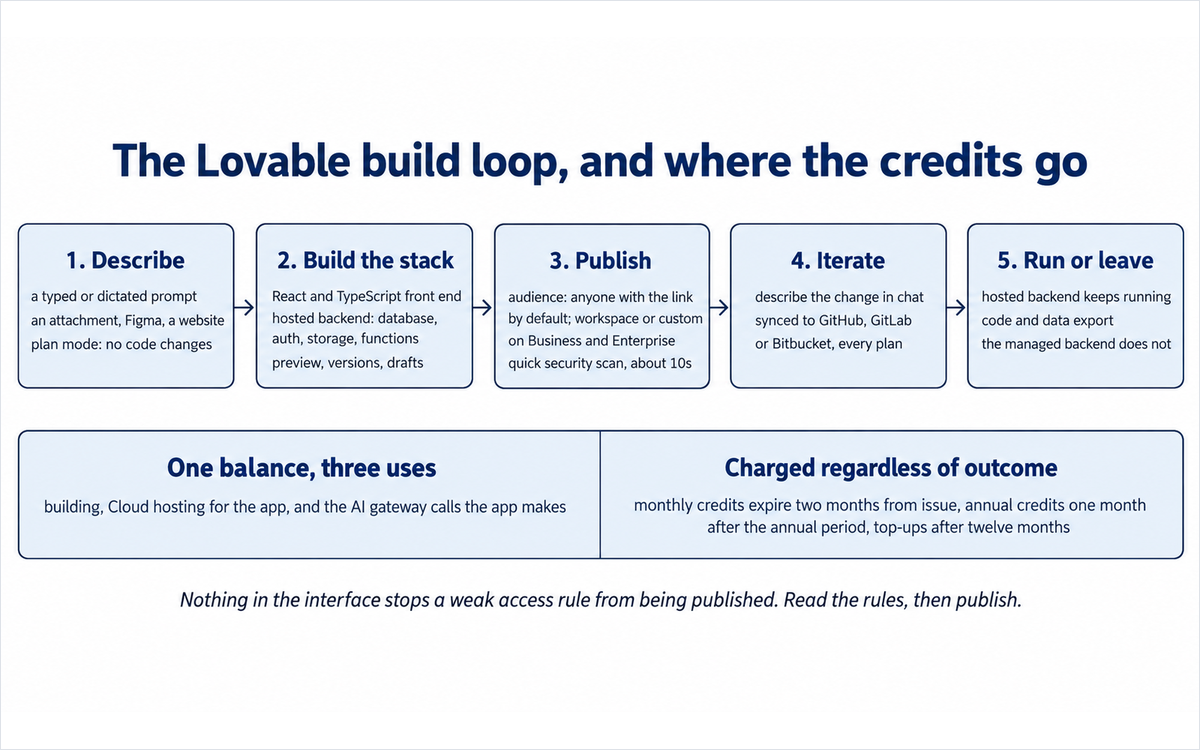
Step 1. Describe, or start from something. A description goes into the chat on the dashboard or in a project. The same field accepts a dictated message, a live spoken conversation in a chat, an attached document, spreadsheet, screenshot, mock-up or audio file, a Figma file, a website whose layout is to be matched, or a template from the library. Plan mode is the exploratory setting: it reads the project, asks clarifying questions, produces an editable plan and changes no code, at one credit per message plus the cost of any research the platform runs while planning. When a plan is approved, the build begins from that plan.
Step 2. The platform builds the stack. A front end, a hosted backend with a database, authentication, storage, server functions and scheduled jobs, and a preview all arrive together. Files attach to the conversation with stated limits, the version history saves every change automatically, drafts isolate work that is not ready to join the project, and projects can reference each other inside one workspace. The stack is React and TypeScript with Tailwind for older projects, and TanStack Start with server-side rendering for projects created from May 2026 onward, with a documented migration path between the two.
Step 3. Publish, and decide who can reach it. Publishing deploys a snapshot and opens the publish dialog, which runs the quick security scan in about ten seconds and reports the result on one line. The audience is one of three settings: public to anyone with the link, internal to workspace members, or a custom audience, with the last two on Business and Enterprise. The address is a platform subdomain by default or a custom domain on a paid plan, and a domain bought through the platform is billed separately from the subscription at the price shown at checkout. The terms state that the platform retains ownership of the whole domain and every subdomain and may reclaim one, and that a specific subdomain should not be relied on. Publishing is the moment the scan runs and the moment the review obligation becomes real.
Step 4. Keep it running, or take it out. A published application runs on the platform's hosted backend, and what it does is metered from the same balance as the build. The code syncs to GitHub, GitLab or Bitbucket with a two-way workflow on every plan including the free tier, the data can be exported from the backend, and the terms state that the applications built are owned by the person who built them. The exit is real and it is partial, in a documented way: the code and the data move, and the managed backend, the connector credentials held in the gateway and the platform's own instruction stores do not.
The instruction stores, which are a different mechanism from the chat. Three surfaces hold persistent text that the agent reads without being asked again. Knowledge is always in context: workspace knowledge applies to every project in the workspace and only owners and admins can edit it, project knowledge applies to one project and anyone with edit access can change it, and each field holds up to ten thousand characters. Skills are loaded on demand when a task matches their description, are written as markdown files with a name, a trigger description and instructions, are shared across the workspace, can be imported from a repository or an archive, and are described by the vendor as following the same file convention other agent tooling uses. A beta feature of the other kind publishes a public-facing artefact: the platform classifies the applications a person has built and posts the resulting skills to a professional profile, under a section the account settings page labels as beta, with the stated qualification that a project needs the category match and at least twenty visitor sessions. The first two are the surfaces clause 5.2.3-a is assessed on below; the third is the one that leaves the platform.
The agent surfaces, which are a different surface from the builder. The same assistant is reachable from Slack, where a workspace administrator connects it once and it answers in channels and in direct messages, reads recent channel history for context, and can search public channels, look up teammates, read pinned messages and attach generated files; from a Telegram bot restricted to direct messages and to Free and Pro workspaces; from a desktop application that can read local files and use the microphone, the camera or the screen where the feature is enabled; from a mobile application for building; and from other assistants, because a published application can be exposed as a tool for them through the Model Context Protocol, and the platform can be driven from outside through its own server. Connected tools act through the connector gateway, each connection carries the permissions of the account that authorised it, and the platform reads from a connected tool without asking and asks before it creates, sends or changes anything, with an option to always allow a given tool.
Inputs: a written, dictated or spoken description; a plan produced in plan mode; attached documents, spreadsheets, images, mock-ups, Figma files and audio; a website or a repository used as a starting point; a template; a project referenced from another project; and, for the agent surfaces, messages from a connected channel, files, and connected tools such as mail, calendars, project trackers and workspaces.
Outputs: a published web application or website on a platform address or a custom domain; a hosted backend with tables, access rules, users, storage, secrets and scheduled jobs; a source repository synced to a platform the user controls; a mobile wrapper around a published application; generated documents, presentations, spreadsheets and images; and on the agent surfaces, messages sent, records changed in connected tools, and files produced.
Technology. The platform publishes a multi-provider model position rather than a model of its own: its own engineering writing names a strategy across several model providers with routing and fallback, describes routing each part of the work to the model best suited to it, states that it does not train, fine-tune or customise foundation models on enterprise customer data, and states that its AI usage was assessed under the European Union's AI Act and classified as low risk. The hosted backend uses an open-source database foundation, and the workspace exposes a model choice rather than a single hidden model. The platform's own infrastructure writing describes separate database instances per project, encryption at rest and in transit, and secrets encrypted at the field level. None of that is independently audited in public, and the platform's own words are the source for all of it.
The credit model, stated as the vendor publishes it. One balance now covers three kinds of usage: build usage, which is the messages sent to plan, generate, edit or update an application; Cloud usage, which is hosting the application and running its built-in backend; and AI gateway usage, which is the calls a deployed application makes to models. The platform states that the change is rolling out gradually and that some workspaces still see the earlier split between Cloud and AI balances. Plan credits are granted monthly at the start of a billing period and expire two months after issue on monthly plans and one month after the annual period ends on annual plans; top-up credits last twelve months; daily build credits refresh at midnight UTC and do not roll over, and on Free they stop after thirty in a calendar month. Build costs are published as illustrative examples rather than as a rate card: a small style change at about half a credit, removing a component at about 1.2, adding authentication at about 1.2, a landing page with generated images at about two. The platform states plainly that these are illustrative, that consumption is charged for the work performed regardless of the outcome, that a prompt that looks small can cost more when the agent has to read and change the existing application, and that consumed credits are not restored when the output is wrong.
Where the data goes, as the published documents describe it. Applications and their data run on the vendor's infrastructure, and the built-in backend is provisioned per project. Data residency is documented on the platform's own security page, with regional hosting available and customer data held in the selected region. The privacy policy, issued by Lovable Labs Sweden AB, sets out the categories collected, the purposes, the legal bases for European users, the rights held, and a named contact point for data protection questions. The training position is stated in three places with one consistent answer: Free and Pro plan content may be used to train the vendor's models, Business and Enterprise workspaces are excluded by default, and any account may opt out at no cost on any plan, prospectively, from the setting. The terms separately forbid uploading health information, financial account numbers, payment card data, government identifiers and biometric data unless a plan or a written agreement permits it. Section 7c sets these documents side by side and quotes the clauses that decide a commercial deployment.
Getting Started with Lovable
The interface is easy and the setup is not, because the decisions that determine whether a build is safe are made before the first prompt. This is the checklist that makes the difference.
A fifteen-minute checklist:
Write the process before you open the account. Minutes 1 to 4. The one workflow the tool must support end to end, the records it holds, the fields each record needs, the two roles that will touch it, and what each role may not do. If you cannot write those, the platform will invent them and you will not be able to tell whether the invention is good.
Settle the data position and the plan that supports it. Minutes 4 to 7. Decide which data categories will be entered, note that health, financial account, government identifier, payment card and biometric data are forbidden on standard terms, and decide whether the prospective training opt-out is sufficient or whether the institution needs the default exclusion that Business and Enterprise carry. Record the decision before anything is uploaded.
Register and build one small thing on the free tier. Minutes 7 to 10. The free tier publishes five build credits a day and is enough to see how the conversation behaves and what a generated screen looks like. Use a process whose worst case is a wasted afternoon.
Run the security scan and read every finding. Minutes 10 to 12. The scan runs at publish time in about ten seconds and covers database access rules including per-record rules, the dependency set and exposed server endpoints. A deeper scan reads the application code for authorization, unauthenticated endpoints, injection, exposed credentials, payment logic and account security, and takes minutes. A clean scan is a starting point and not an approval, and the platform says so itself.
Read the access rules before anyone else is given an account. Minutes 12 to 14. This is the step the platform does not take. Open the database view, read each rule the platform proposed, and check that a signed-out request cannot read a table holding personal data and that an account cannot read another account's records.
Connect the repository and test the exit. Minute 14. Sync to GitHub, GitLab or Bitbucket, clone it, and see whether it runs. The code is the part that leaves cleanly, so knowing that early changes what you are willing to build.
Name the reviewer and set the budget. Minute 15. One named person who reads the access rules and the exported code before anything user-facing is published, and a decision about how many credits an iteration may cost before you stop and change approach.
What to do before you start, if you are doing this on behalf of an institution:
Confirm what the platform will hold. An application built for internal use carries the institution's own data, and the terms forbid the special categories listed above unless a plan or a written agreement permits them.
Confirm the training position for the plan you are buying, from the training documentation, and record the answer in the procurement file with the date you read it and the account state at the time, because the opt-out works from the moment it is switched on.
Confirm the published-address position before announcing anything. The default address is a vendor-owned subdomain under a clause that permits reclamation, and the custom-domain path is the answer for anything the institution depends on.
Decide where the build record lives. The platform keeps the application, its data and its instruction stores. It does not keep the requirement, the reviewer's name or the decision about what may be published.
Real Workflows
Three workflows, each one a job U365 actually has. Each carries the prompt pattern to use, the human step that cannot be delegated, and a verification checklist to run before the result is trusted.
Workflow 1: The internal tracker that replaces a spreadsheet
What it is. A programme office tracks applications, placements, partner contacts or equipment in a spreadsheet with two users, one approval step and a weekly report nobody enjoys producing. The goal is a working tool, not a project.
Steps. Describe the current spreadsheet structure so the platform can see the fields you actually use. State the two roles and what each may not do. Ask for the approval step by name and describe what changes when a record is approved. Ask for the weekly view as a saved filter rather than as an email. Publish to the workspace audience rather than to the public one. Then open the database view and read the rules that were generated.
Time budget. Two to three hours for the first working version, including the access-rule review and one round of corrections. Revisions after real use are the normal case and should be budgeted.
Sample prompt.
Build an internal tool for a U365 programme office. Records: applications with applicant name, programme, intake date, status, owner, notes. Two roles: an office member who creates and edits records, and a programme lead who approves or rejects them. An application starts as submitted, can move to under review, then to approved or rejected, and only the programme lead may approve. Show a weekly view of everything submitted in the last seven days, grouped by programme. Do not allow a member to delete a record or to change a status to approved. Publish it so only workspace members can open it.Where the human step sits. The access rules. Nothing in the generated output tells you whether the member role can reach the approval action by a crafted request, and the two roles only matter if the rule holds. Read the rules in the database view and in the exported code, or have somebody who can read them do it, before the second role is given an account.
Connects to: UIT infrastructure practice, and Business Analysis Professional as the nearest published anchor for requirement definition.
VERIFICATION CHECKLIST for Workflow 1:
☐ Multi-Model Check: run the requirement paragraph through a second assistant and compare the field list and the role rules it produces with the ones the platform built. Differences usually mark a rule you stated loosely.
☐ External Source: check the generated application against the spreadsheet it replaces, record by record, and confirm nothing was dropped in the move.
☐ Human Review: somebody who can read the generated access rules signs off before the second role is created, and somebody who owns the process signs off before the tool is announced.
☐ CI-First Test: can the office explain which record states exist, who may move a record between them, and where each rule is enforced, without opening the platform?
Workflow 2: A working prototype for a service nobody has tested yet
What it is. A programme or a service design needs to be tested before a term is committed to it. The deliverable is not a document, it is something a handful of people can use for a week so the feedback is about the workflow rather than about the slides.
Steps. Keep the prototype on data that identifies nobody. Describe the smallest end-to-end path: the entry point, the two decisions a user makes, and what the user sees at the end. Ask for plan mode first if the shape of the service is still open, because a plan is editable before anything is built. Publish it to a small audience, collect the feedback against the workflow rather than against the design, and decide from the evidence whether to rebuild properly.
Time budget. An afternoon for the prototype and a week of use. The cost of the week is the credits the running application consumes plus whatever the corrections cost.
Sample prompt.
Build a prototype of a service intake flow for a U365 programme. A visitor opens one page, chooses between two service tracks, enters a name, an email address and a short description of what they need, and submits. The submission is stored and a member of the team sees a list of submissions with the track, the date and the status. Use invented sample entries rather than real personal data while we are testing the flow. Do not connect an email provider yet. Show me the plan before you build it.Where the human step sits. The decision about what the prototype is allowed to collect. A prototype that quietly begins holding real personal data before anyone has decided what may be held is the common failure in this class, and the platform will build whatever the description implies.
Connects to: UIC service design practice and UIB venture validation, with no published programme assessing prototype data governance.
VERIFICATION CHECKLIST for Workflow 2:
☐ Multi-Model Check: describe the same service to a second assistant and compare the flow it proposes with the one that was built, looking for a step the description implied and the build omitted.
☐ External Source: compare the prototype against the service definition it is testing, and confirm that what a user experiences matches what the service says it does.
☐ Human Review: the service owner and a person who handles the data both read the flow before it is opened to real users.
☐ CI-First Test: can you state what the prototype collects, where it is stored, who can see it and when it will be deleted, without opening the platform?
Workflow 3: A published page that collects something, and the review that has to happen first
What it is. A landing page, a campaign page or an event page with a form, a connected domain and search metadata. The page is the product, the form is the reason it exists, and the review is the part that gets skipped.
Steps. Describe the page, its sections and the one action a visitor takes. Ask for the form's fields explicitly and say which are required. Connect the domain only after the page is right. Connecting a domain requires a paid plan, and a domain bought through the platform is billed separately from the subscription at the price shown at checkout. Ask for the metadata in plain language, because the platform generates the title, the description and the social image per page. Then run the scan, read the access rules on whatever table the form writes to, and publish to the public audience deliberately rather than by default.
Time budget. One to two hours, including the domain and the review. The form is usually where an hour of the work sits.
Sample prompt.
Build a campaign landing page for a U365 open day. Sections: a headline, three reasons to attend, the programme list, the date and location, and a registration form. The form takes a full name, an email address, an institution and a preferred date, all required, and stores each submission with the time it arrived. Show me a simple list of registrations with the date and the preferred slot. Do not publish it yet. Set the page title and description for search and social sharing.Where the human step sits. The data the form collects and who can read it. A registration form is a table of identified people, and the access rules on that table are the difference between a mailing list and a disclosure.
VERIFICATION CHECKLIST for Workflow 3:
☐ Multi-Model Check: draft the page's headline and the form's labels with a second assistant and compare them with what the platform generated. The platform writes plausible copy and it is rarely the copy you would have chosen.
☐ External Source: open the published page in a private browser window and confirm the form works, that the confirmation is what you intended, and that no page in the application is reachable that you did not intend to publish.
☐ Human Review: the person who owns the campaign reads the page on a phone before it is announced, and the person who owns the audience list approves who can read the registrations.
☐ CI-First Test: can you name the table the form writes to, who can read it and what happens to a submission after the campaign ends, without opening the platform?
The verification rule that covers all three
Every workflow above ends in the same place: a generated artefact has to be read by a person before it is trusted, and the reading is a skill rather than a setting. Where the tool produces something you cannot evaluate, the correct move is to find the person who can, not to accept the preview as evidence. That is the Executive Safeguard applied to this class, and it is what separates a build that was fast from a build that was cheap.
Strengths, Limits, and AI Imposture Risk
Strengths
The path from a description to a running application is complete, and the output is a conventional codebase. A front end, a hosted backend with a database, authentication, storage and server functions, and a preview arrive together. The generated stack is React and TypeScript with a documented move to the platform's newer server-rendered template, the code is readable, and it syncs to GitHub, GitLab or Bitbucket with a two-way workflow on every plan including the free tier. That combination matters more than the speed claim: a cohort can study what was generated, and a developer can take it over without a rewrite.
The free tier builds real applications rather than previews. Five build credits a day up to thirty a month, a monthly allowance for hosted and AI usage in a deployed application, and no card. A reader can establish whether the generation suits them, and a student can build something real, before any commitment. The published student discount then makes the paid tiers reachable for the same reader.
The access-review surface is more than the class usually supplies, and it is documented rather than implied. Two scans with stated coverage: a quick scan at publish covering database access rules including per-record rules, the dependency set and exposed server endpoints; and a deep scan reading the application code for authorization, unauthenticated endpoints, injection, exposed credentials, payment logic and account security, with severity labels on every finding. A workspace security centre aggregates findings, scan coverage, secrets and dependency risk across projects on the higher plans, publishing can be blocked while critical findings are unresolved, and the documentation states the limits of the scans in the vendor's own words. The same documentation describes the correct access-rule patterns, including the check that a policy exists and the separate question of whether it restricts anything. It is the clearest teaching material in the product, and it is not sold as a feature.
The vendor publishes the awkward parts. The training position is stated on a documentation page, including which plans are excluded by default and that the opt-out is available on every plan. The credit documentation states that consumption is charged regardless of the outcome and that the examples are illustrative rather than a rate card. The security page states what the platform does and does not guarantee. A vendor that writes its own limits down is a better source for a buyer than one that leaves them to be discovered, and this review cites those pages rather than inferring them.
Governance arrives before Enterprise. Workspace roles, groups, single sign-on over SAML or OIDC, SCIM provisioning, two-factor authentication, audit logs, per-member monthly credit limits, internal publishing, custom audiences, design systems and workspace-wide instruction stores are all documented, with several of them on Business rather than behind a contract. For an institution that already runs a directory, the join path is real.
Two instruction surfaces that are inspectable, which is unusual. Workspace knowledge and workspace skills are plain text that a person can read before it is applied, are versioned by their editors, and in the skills case are portable files that can be exported and imported. A tool that writes the institution's standards into a format the institution can read is easier to govern than one that keeps them hidden.
The data position has a real switch, and it is free. An account can opt out of model training on any plan at no cost, and the exclusion is the default on Business and Enterprise. A reader who needs the exclusion does not have to negotiate it, which is more than several tools in this class offer.
Limits
No independent measurement of generated-application quality exists, and this is the finding that caps the score. There is no benchmark, no completion study and no third-party engineering assessment of how far an unaided build gets before a human must take over, or how often a finished application survives real use. What exists is the platform's own scans, which check for misconfiguration rather than for correctness; security research into the class of applications this category produces, which measures defect frequency rather than product quality; and user reports, which measure satisfaction with the build experience and with the bill. A quality claim without a measurement is not a quality benefit, and every tool in this class shares the gap.
The access rules are the real risk and the platform does not gate them. Research published in 2025, by a developer at a competing platform, found inadequate per-record access rules across roughly one in ten of the applications it scanned on this platform, including applications on the vendor's own featured gallery; the same write-up states that the platform's first scan checked whether a rule existed rather than whether it worked, which produces a clean report on an open table. The platform's documentation now describes the correct patterns and states that the scans cannot guarantee complete security, and it recommends an additional professional review for applications handling sensitive data. The obligation is stated plainly and it sits on the builder, who is by definition the person least able to meet it.
A published application is reachable by anyone with the link unless the audience is changed, and the audience options that restrict access to a workspace or a named group are on the Business and Enterprise plans. The platform's own publishing documentation describes the audience as a step in the dialog rather than as a warning. An institution that publishes an internal tool on a free or Pro workspace before reading that row has published it to the internet.
The sensitive-data clause is a prohibition rather than a warning. Health information, financial account numbers, payment card data, government identifiers and biometric data may not be uploaded unless a plan or a separate written agreement permits it, and the terms add that the standard services are not designed to be a system of record for them. That is a clear rule and it removes a whole set of institutional use cases on standard terms, including a great deal of what a learner-support or a finance team would want to build.
The licence over content is broad, and the de-identified category is broader. The terms take a worldwide, perpetual, royalty-free licence over Customer Data for the vendor's business purposes, including developing and training models and creating benchmarks and analytics, and they permit de-identified or aggregated data to be retained and used indefinitely, at which point it stops being Customer Data. The opt-out covers model training and the other listed business purposes prospectively; it does not withdraw content already used, and it does not reach the de-identified category. Section 7c quotes the clauses.
The commercial layer charges iteration, and iteration is where a build that fights you spends its money. Consumption is charged for the work performed regardless of the outcome, the published per-action figures are illustrative examples rather than a rate card, monthly plan credits expire two months after issue, and the platform is mid-rollout on a single balance covering building, hosting and AI use, which the documentation says some workspaces have not yet moved onto. A reader measuring cost from the pricing page will underestimate a build that needs several corrections.
The published address is a vendor asset by default. The platform retains all ownership rights in the lovable.app domain and every subdomain, reserves the right to reclaim, reassign or terminate any subdomain at any time and for any reason, states that reclamation carries no refund, and states that a specific subdomain should not be relied on. A custom domain on a paid plan is the documented answer, which makes the domain step a decision rather than a finishing touch. The domain documentation adds two conditions worth reading first: connecting a domain requires a paid plan, and a domain bought through the platform is billed separately from the subscription, can be transferred to another registrar with a sixty-day lock on a new registration, and keeps serving the application after a plan change.
The exit is real for the code and partial for everything else. The repository sync and the data export cover the code and the database contents, and the terms state that the applications built are owned by the person who built them. The managed backend, the authentication configuration, the edge functions, the connector credentials held in the gateway and the platform's own instruction stores do not travel, and a deleted project cannot be restored. A team that treats the repository connection as a formality will discover the difference at the worst moment.
The design ceiling is real, and the platform's own positioning concedes it. The generated interface is competent and not distinctive, metadata and search configuration are treated as publishing steps rather than as craft, and anything where the look is the product belongs with a designer. This is a limit of the class rather than of this product, and it is the reason the review's design row is rated for evaluation rather than for authorship.
The browser is the primary builder, and the desktop and mobile applications extend it rather than replace it. There is no self-hosted edition, no local-only mode, and no offline path. A team whose workflow is a container and a local repository will use this alongside that workflow rather than instead of it.
AI Imposture Risk
Trap | Rating | Evidence |
Time Illusion | Medium | The first version is genuinely fast: a described process becomes a working screen in minutes and a usable internal tool in an afternoon, and the ten-minute publish path in the vendor's own quick start is a real figure rather than a marketing one. The illusion sits in what follows. Consumption is charged for the work performed regardless of the outcome, the published figures are illustrative examples, a prompt that looks small can cost more because the agent has to read and change the existing application, monthly credits expire two months after issue, and the platform is mid-rollout onto a single balance, which means the cost of a given month is not fully predictable from the pricing page. A build that fights you therefore costs both the hours and the allowance, and the interface warns in neither currency. First-version savings are large; time and money to a finished, reviewed application are materially longer than the first screen suggests |
Quantity Illusion | Medium | The platform makes it easy to produce more than anybody will look after: another page, another application, another internal tool, another agent surface, another generated document. The specific mechanism is that every extra artefact carries its own data, its own access rules and its own review obligation, and none of that appears as a cost in the interface. An institution that ships five internal tools in a month has five sets of permissions to maintain and five tables of data to know about, and the scan tells nobody which of them is still correct six months later. The volume is real and the review capacity it implies has not grown with it, which is the Quantity Illusion in its ordinary form |
Skill Illusion | High | Three mechanisms, all documented. First, the product is sold on removing the requirement: the pitch is that anyone can build for the web with no technical knowledge, and no teaching surface, critique or measurement is supplied for the judgement the platform substitutes for. Second, a generated application looks finished to the person who cannot read it: the preview presents a working product, the scan presents a report, and neither tells the builder whether the access rules hold, whether the data model is sound or whether the code would survive a review, while the published research on this platform's class of output found access-rule failures at a rate that would be unacceptable in a hand-built system. Third, and specific to this product, a professional profile can display platform-generated skills derived from what was built, with a stated qualification threshold of twenty visitor sessions, which presents a capability rather than a participation record. A reader gains a working application and a vocabulary; they do not gain the ability to tell a correct application from one that merely runs |
Overall AI Imposture Risk: Medium, with Skill Illusion High. Two traps are Medium and one is High, which the framework places at Medium overall because the Time and Quantity traps carry mitigations the user controls, while the Skill trap is created by the product's design and is not resolved by it.
Framework v1.2 clause note
Three clauses of the CI-First framework, version 1.2, were assessed against this tool. Two return a null and one applies, and each outcome is recorded with its reasoning, because a null is a finding and a null reached without checking is worthless.
Clause 5.2.3-a, agent-authored procedural memory, with a Skill Illusion floor of no lower than Medium: APPLIES, and the Skill Illusion is recorded High. The clause governs a tool that creates or revises the user's skills, memory stores or standing instructions, and it reaches its High threshold where the agent can revise that memory during use without a per-write human decision, or where the user has no routine practice of reading what was written. Two documented surfaces meet it. Workspace skills are reusable instruction sets, written as portable markdown with a trigger description, shared across every project in the workspace, and loaded by the agent on demand; the platform documents that a skill can be created by describing what you want, that a completed task can be turned into a skill from a project chat, and that a workspace administrator controls whether a given skill may be applied automatically. Workspace and project knowledge are standing instructions the agent reads on every request, with published limits and stated editing rights. Both are artefacts the institution holds and did not write in the ordinary sense: they are machine-shaped instructions that shape later work, they persist across sessions, they are revised as the workspace changes rather than as an approval step, and the platform provides no review surface that presents what a skill or a knowledge field currently directs. The clause's own conditions therefore place it at its High threshold, which is consistent with the High Skill Illusion rating above reached on the user-facing grounds. The operative consequence for a U365 reader is that a workspace accumulates written standards nobody wrote, and the review step for them is a reading habit rather than a setting. Two boundaries are recorded so the clause is not over-read: the skills are readable plain text that a person can inspect and export, which is what makes the clause applicable rather than severe, and the public-facing skills display is a separate surface rather than a memory the agent reads back.
Clause 4.2-a, agent-mediated conversation: returns a null, and the reasoning is the interesting part. The clause states that agent-mediated conversation is not erosion by itself, that it measures the human's own communicative capability rather than the composition of the channel, and that erosion requires either agent-authored text presented as the person's own voice in a human-facing channel, or the substitution of agent interaction for human contact. Neither condition is met on the documented default surfaces. In Slack the assistant installs as its own named application and answers as itself, in a thread, to people who mention it, which is a disclosed assistant rather than the person's voice; the documentation states that it reads recent history for context, that it reads only public channels outside its own conversation, and that it never reads private channels or messages it is not part of. The Telegram bot answers as itself and is restricted to direct messages. The connector layer asks before it changes anything and offers a per-tool standing permission, so an action taken through it is an action the human authorised rather than one presented as their own composition. The nearest approach to the clause is a connected tool that could send a message on the user's behalf under an "always allow" permission, and the platform's answer to that is a permission control and a disclosure surface rather than a naming choice, and a user who configures undisclosed automated outreach has made a configuration decision rather than met a product default. The clause would apply on condition (a) if the platform presented generated text as the person's own voice in a channel with no disclosure, and this review would need a documented default that does so to record it.
Clause 7.5, team-level rooms: returns a null, and the reasoning is the interesting part. The clause governs a shared channel in which more than one agent acts alongside the human, requires a profile attributed to each agent individually, requires Centaur as the default, and makes Cyborg unavailable for such a room. The platform runs several agents in one place and does not put them in one room. The subagents the assistant starts are read-only investigations inside one execution: the documentation describes them as temporary, working on bounded questions and returning findings to the main agent, with all file changes still coming from that agent, and the human has no per-agent channel and no persistent named participants to address. The connected-assistant surfaces, Slack and Telegram, are places where one human talks to one named assistant, and the documentation states that each assistant works with the projects and permissions of the person talking to it. A workspace where several colleagues each have their own conversation with the same named assistant is a multi-party configuration the clause does not reach, because each conversation serves its own owner and each owner retains their own boundary. The clause would apply if the platform exposed named persistent agents sharing one channel that a human and other agents could each address, and that is the change to re-check for.
Section 7c: The licence over your content, the training position, and the contract behind the promise, stated plainly
Four of the vendor's own documents decide whether a commercial deployment is safe, and each one is quotable. This section quotes the operative text, keeps allegation and finding distinct, changes no score, and states what the section does not do.
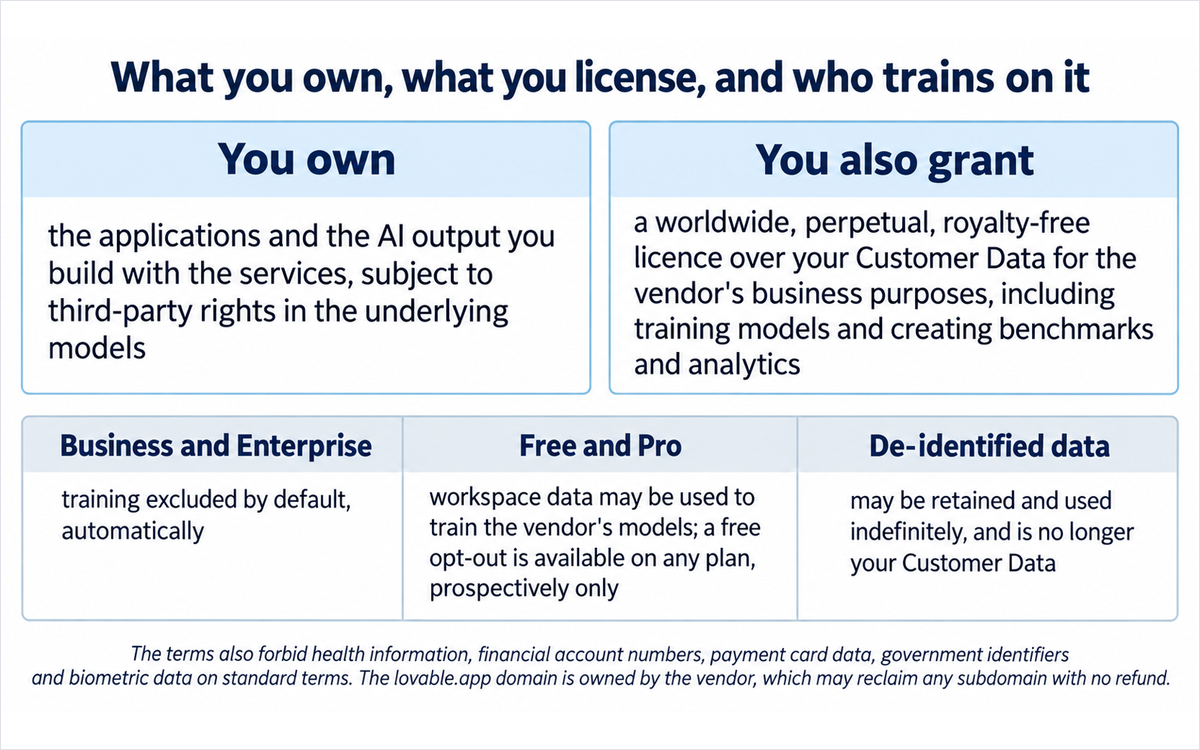
What you own, quoted from the terms. The position on the applications and the output is clear. The terms state that "As between us, you own your Customer Data, including the applications, websites, or other projects you build using the Services. As between us, you also own any AI Output generated for you through the Services, subject to any third-party rights in the underlying models, training data, or outputs." Read alone, that is a workable position and it is the reason this platform is adoptable for institutional work at all. The same document defines Customer Data broadly, as "any content, code, text, images, files, or other data that you input, upload, submit, host, or generate through the Services, including applications you create using the Platform."
What you grant, quoted from the same document, and the clause is two-layered. The terms state that "You grant us a worldwide, perpetual, royalty-free license to use, copy, modify, process, analyze, and otherwise exploit your Customer Data for our business purposes," and the list that follows names four purposes: operating, maintaining and improving the services; "developing and training artificial intelligence and machine learning models"; the creation of benchmarks and analytics; and "any other lawful business purpose." A separate paragraph then removes the retention limit from the derived form: "We may also create de-identified, anonymized, or aggregated data from your Customer Data, and we may retain and use that data on a perpetual basis for any lawful business purpose; such data does not identify you and is no longer your Customer Data." The same paragraph adds that the licence "is granted notwithstanding any confidentiality obligations in these Terms and survives to the extent needed to give effect to the purposes above."
Read the two together and the position resolves into something a buyer can act on. You own the application and the output. You also grant a perpetual, royalty-free licence over the same content for the vendor's business purposes, including model training, benchmarking and analytics, and anything de-identified from it can be kept and used indefinitely with no further reference to you. Ownership and licence are different things, and this review separates them because vendors blur them. An institution that puts client work, internal process documentation or learner data into the platform grants both.
The training position, which is a switch rather than a clause, and it works in one direction. The vendor's own documentation states the position in three places and they agree. The published statement is: "As of September 9, 2026, customer data from Free and Pro plans may be used to train, develop, and improve Lovable's AI models and AI-powered features." The same page states the exclusion: "If every workspace you belong to is on a Business or Enterprise plan, the setting shows as disabled and can't be changed, because your workspace data is already excluded from training by default." And the opt-out itself is stated as a right: "You may tell us at any time that you do not want your Customer Data used for model training or the other business purposes described above, and we will honor that request for prospective use, free of charge and regardless of your plan." The privacy policy adds what is not trained on even where training is on: account and billing details, business and enterprise content, and the data collected by the applications a customer builds, which is described as held in the project's own database and storage and not used to train the vendor's models.
The three sentences together decide the deployment, and the operative word in the third is "prospective". A reader who switches training off protects what is uploaded afterwards. A reader who uploads first and reads the page afterwards has already contributed. Where an institution's position is that its data may not be trained on at all, the default exclusion that Business and Enterprise carry is the answer, and it is worth pricing that against the cost of a settings step somebody has to own.
The clause nobody reads until it matters: the address. The terms state that "Lovable retains all ownership rights in the lovable.app domain and all subdomains," that "We reserve the right, at our sole discretion, to reclaim, reassign, redirect, suspend, or terminate any subdomain at any time and for any reason," that the listed reasons include "recycling inactive or underutilized subdomain names, particularly common word or single word subdomains" and "technical, operational, or business reasons," that "We will generally provide a 7 days' advance notice before reclaiming a subdomain," that reclamation "does not entitle you to a refund or any other compensation," and that "You should not rely on the permanent availability of any particular subdomain and should use custom domains for mission-critical applications." The vendor's own publishing documentation adds the practical consequence: the URL subdomain can be changed in project settings, the project's display name is not the URL, and a custom domain is a paid-plan feature connected after publishing.
That is the clearest buyer instruction in the whole document set, and it is written as a warning rather than as a feature. An institution that announces an application on a platform subdomain has published it at an address the platform may take back, and the platform says so in advance. The decision is not a technical detail; it is whether the address belongs to the institution.
The sensitive-data prohibition, which removes a set of use cases rather than warning about them. The terms state: "Unless your plan or a separate written agreement with us (such as a data processing addendum or enterprise service agreement) expressly permits it, you agree not to upload, input, or otherwise provide through the Services any protected health information subject to HIPAA, or other special or sensitive categories of data (including financial account numbers, payment card data, government identifiers, or biometric data). Our standard Services are not designed to serve as a system of record for, or to provide regulatory-grade safeguards for, such data." The section adds that a customer who provides such data does so at their own risk, is responsible for the lawful basis and the consents, indemnifies the vendor for claims arising from it, and may have the data removed or the service suspended.
A reader should treat that as a design boundary rather than as a legal formality. A learner-support application, a finance tool, an attendance system using biometrics and a recruitment tool holding identity documents are all outside the standard terms, and the answer is either an agreement that permits the category or a different platform. The clause is quotable, and the practical reading is one sentence: this is not a system of record for regulated personal data on standard terms.
The money clauses, quoted. The credits definition states that credits are "the prepaid, non-refundable, non-redeemable units you purchase or receive to use the Services," that the value of a credit "depend[s] on your subscription plan and the feature used, and a Credit on one plan may not equate to a Credit on another," and that "Paid Credits may be used only while your subscription is active," though rolled-over credits are frozen and reactivated rather than destroyed if a subscription lapses and resumes. The AI-output section is unusually direct about outcome: "Credits are consumed by each AI action based on the effort and resources used, regardless of the outcome, and are non-refundable and non-restorable even where the AI Output is erroneous, incomplete, or must be regenerated, except where applicable law requires otherwise." On subscriptions, the terms state that paid plans "are billed in advance on a monthly or annual basis and renew automatically unless you cancel before the renewal date in your account settings," and that "Except where required by law, subscription fees are non-refundable," with "No Refunds" restated as its own heading and a saving provision for statutory consumer rights. Expiry is published separately and precisely: monthly plan credits expire two months from issue, annual plan credits expire one month after the annual period ends, top-up credits last twelve months, and included daily grants expire at the end of each day. Termination for material breach, fraud or abuse forfeits remaining credits.
This is a decision to make before purchase rather than a scandal, and the review states it that way. A reader can switch off auto-renewal, can read usage against the allowance, can start on a monthly rather than an annual plan, and can decline the annual cycle until a build rhythm is known. What the clauses do not offer is recovery: a build that spends its allowance without producing usable work is a cost, and the contract says so in advance.
The liability and dispute position. The terms exclude indirect, incidental, special, consequential, exemplary and punitive damages, name lost profits, lost data, business interruption and loss of goodwill, and state that the vendor will not be liable for errors or inaccuracies in AI output or for loss of customer data except where caused by gross negligence or wilful misconduct. Aggregate liability is capped at the amount paid for the services in the twelve months before the claim, and the terms state that the customer is solely responsible for reviewing, validating and using AI output, is responsible for the applications built and for the lawfulness of the data processed through them, and must not rely on AI output for critical or high-risk functions without appropriate safeguards. Governing law is Delaware, jurisdiction is exclusive to the Delaware courts, disputes must be brought individually with a class-action and jury-trial waiver, and the governing law section does not offer an arbitration clause or a carve-out window. The customer also grants the vendor a licence to use its name and marks to identify it as a customer, revocable in writing, with no obligation to recall material already published.
A documented security history, stated as third-party reports rather than as this review's assessment. Two disclosures belong in a procurement file. The first, published in May 2025 by a developer at a competing platform, reported inadequate per-record access rules across 303 endpoints on 170 of 1,645 sampled applications built on this platform, described the mechanism (an application programming interface key that is public by design, paired with access rules that were absent or permissive), stated that the platform's first scan checked for the existence of a rule rather than for its effect, and recorded the disclosure timeline from 20 March 2025 through publication on 29 May 2025, including that the report was disputed on the position that each customer is responsible for protecting their own application's data. The second, reported in April 2026, was an object-level authorization finding in the platform's own interface, described as allowing an account to reach another user's profile, public projects, source code and embedded database credentials; the reporting described a bug-bounty report closed without escalation, a fix applied for new projects with the existing set outstanding at the time of publication, and a public response that moved from denial to a partial apology on the same day. Both are reported here because an institutional reviewer should know they happened, because the first one generalises to the whole class of generated applications in a way the review's own Limits section relies on, and because the second is a statement about how a vulnerability report was handled rather than only about the defect. The platform's own security page and its engineering writing describe what has changed since, including per-project database isolation, encrypted secrets, automatic scanning at publish, scheduled deep scans and a block-publishing control. No score in this review changed because of either finding.
What the vendor documents about its own posture, and the two items a reviewer should weigh. The security page states SOC 2 Type II and ISO 27001:2022, alignment to the AIUC-1 standard for AI agents, GDPR compliance with a data processing agreement available, encryption at rest and in transit, secret storage with field-level encryption, multi-cloud infrastructure with automatic denial-of-service protection, and tenant isolation, with the compliance reports available through a trust centre. The same page describes what the scans do and states that they "cannot guarantee complete security" and that applications handling sensitive data or critical functions should have an additional professional review. Two items from the wider document set belong in front of a reviewer. The desktop application can use local files, the microphone, the camera and the screen where the feature is enabled, and the policy states that anything processed entirely on the device is not received by the vendor, which puts the consent question on the person recording. And connected tools act through a gateway with the permissions of the account that authorised them, which means a connector's blast radius is the authorising account's access rather than a scoped service account.
No score changed, and why. The CI-First Benefit Score measures benefit to the human net of overhead, and the Humics Protection Badge measures effect on three human capabilities. Neither is a supplier-conduct or contracting dimension, and this framework has no such dimension by design. The findings in this section belong in the adoption decision, in the negotiation and in the procurement file. They do not belong in the arithmetic.
What this section does not do. It does not give legal advice, and it does not assert that any clause is unlawful, unfair or unenforceable. Terms of this shape are common in the category. It does not resolve the training question, because resolving it means deciding whether a prospective opt-out is sufficient for the data you hold and whether the default exclusion on a higher plan is worth its price. It does not adjudicate the two security disclosures: it names the reporting parties, quotes what they found, states the vendor's position where the vendor stated one, and records that one of the two was disputed. It quotes the vendor's documents against each other, names each finding with the surface it came from, states the decision each one puts in front of a reader, and stops there.
U365 Co-Intelligence Rating
CI-First Profile
Primary profile: Co-Worker and Assistant (level 2). The tool performs an execution task: it builds the application from a description and you direct and review it. You supply the requirement, the roles and the acceptance, and you accept, reject or correct the result. That is delegation with review, which the framework places at level 2.
Secondary profiles: Analyst and Tester (level 4), on the scan and security surfaces, which surface problems the builder did not ask about: an exposed secret, a missing login check, a weak access rule, a dependency with a known vulnerability. It also fits the adoption surfaces, where the platform reports which applications exist, who touched them and what they cost, and the security centre, which aggregates scan coverage and findings across projects. Co-Creator and Thought Partner (level 1), narrowly, in the planning conversation: plan mode reads the project, asks questions, proposes an approach and produces a plan the builder edits before approving, and the product documentation describes the plan as the point of the mode.
Why level 2 and not level 1 as the primary. Level 1 would mean the human and the tool build on each other's thinking across the work. The build loop does not work that way: the direction is supplied by the person and the platform constructs it. The planning conversation comes closest to co-creation and it is a proposal step inside a longer build rather than the working relationship itself.
What does not fit. Challenger and Devil's Advocate (level 5) does not apply. Nothing in the platform argues against your requirement, your data model or your decision to publish. The nearest thing it does is ask a clarifying question in plan mode, which is scoping rather than challenge, and the deep scan reports findings against a list of known classes rather than against your intent. Coach and Tutor (level 3) does not apply either: the documentation teaches the platform well, the generated code is visible and a motivated learner can study it, and teaching is not a designed behaviour of the build loop. The security documentation is the closest thing to a teaching surface in the product and it teaches one subject.
Collaboration Mode
Recommended mode: Centaur.
Alternative mode: None recommended. Cyborg is not available here.
Mode rationale. Two independent grounds, and both belong on the record. Framework section 7.2 assigns Centaur whenever the Imposture Risk is Medium or High, which it is here, because the overall risk is Medium with Skill Illusion High. The second ground is specific to this tool. Cyborg requires a tight interaction loop in which the human applies a stopping criterion inside the iteration, and this platform's build loop is deliberately coarse: the agent reads the existing application, plans the change and applies it, and the human's decision point is the review of the result rather than a decision inside the loop. The controls that make the Centaur boundary real are therefore procedural rather than interactive. Write the requirement as a specification before the first prompt. Set a credit budget and treat it as a stopping criterion. Read the access rules before a second person gets an account. Publish nothing user-facing until a named person who can read the generated code has approved it. And keep the requirement, the reviewer's name and the permissions record where the institution keeps its decisions rather than in the platform. The division of labour is the whole point: you own the requirement and the acceptance, the platform owns the construction.
CI-First Benefit Score
Dimension | Score (0-10) | Rationale |
Time | 6 | Moderate savings, and they are structural rather than claimed. A described internal tool becomes a working application in an afternoon, a campaign page with a form and a domain exists without a build pipeline, and a revision happens in conversation rather than in a ticket. The score is 6 rather than higher because the overhead is real and documented: plan mode costs one credit per message plus any research it runs, build consumption is charged for the work performed regardless of the outcome, the published per-action figures are illustrative examples rather than a rate card, a prompt that looks small can cost more because the agent has to read and change the existing project, monthly credits expire two months after issue, and the review step that makes the output publishable is work the platform does not do for you. First-version savings are large and time to a finished, reviewed application is materially longer than the first working screen suggests |
Quantity | 6 | A genuine step change in the number of tools, pages and internal applications a small team can produce in a month. One description becomes an application with a data model, a login and an address; the same subscription covers websites, prototypes, generated documents and presentation material; and the free tier is enough to establish the pattern. Held at 6 rather than higher because the framework scores verified usable quantity, and the marginal unit is not free: every added application carries its own data, its own access rules and its own review, every iteration is charged whether or not it works, and nothing measures whether the additional volume was any good |
Quality | 5 | Moderate on the layer a build inherits and unmeasured on the generated layer, which is why the score lands mid-band rather than lower. The platform layer is genuinely solid and documented: per-project database isolation, encrypted secrets, host-side encryption, two scans with stated coverage and severity labels, a workspace security centre, and publishing controls that can block release while critical findings are open. The generated application itself has no independent measurement of quality anywhere: the scans check for misconfiguration rather than for correctness, the published security research on this platform's class of output found access-rule failures across roughly one in ten sampled applications, the design output is competent rather than distinctive, and the vendor's own terms tell the customer not to rely on AI output for critical or high-risk functions without safeguards. Where the vendor publishes operational detail it is precise, and where a quality claim would need a measurement there is none |
Skill | 3 | Marginal, and scored conservatively on the evidence below. Two real learning surfaces exist: writing a requirement precise enough to build from, and reading an access model well enough to decide who may reach what. The score is 3 because the product's purpose is to remove the requirement rather than to teach it, no standard, critique or measurement is supplied for the judgement it substitutes for, the security surfaces report findings rather than teaching review, and the durable artefacts the platform writes on the user's behalf, the workspace skills and knowledge the agent reads and the profile skills it derives from what was built, are capability the user holds and did not author. A reader gains vocabulary, a working tool and a faster first version, and does not gain the ability to tell a correct application from one that merely runs |
CI-First Benefit Score: (6 + 6 + 5 + 3) / 4 = 5.0 / 10 (CI-First Positive)
Why this score is not higher, and why it is not lower
Why it is not higher. The step from Positive to Strong requires evidence that what the tool produces is good, and no such evidence exists: no benchmark, no completion study, no third-party engineering assessment of a generated application, from the vendor or from anyone else. What evidence there is points the other way and is specific to this platform: a published study found inadequate per-record access rules across roughly one in ten sampled applications built on it, and the platform's own documentation states that its scans cannot guarantee complete security and recommends a professional review for anything handling sensitive data. The commercial layer charges iteration regardless of outcome, publishes illustrative figures rather than a rate card, and expires monthly credits. Add the licence over content, the de-identified retention paragraph, the subdomain clause and the sensitive-data prohibition, and the contract position asks a buyer to make three separate decisions before the first upload. A score above 6 would assert a quality and safety position the evidence does not support.
Why it is not lower. The capability is genuine and the arithmetic is honest. A person with a clear process and no engineering background gets a working application the same day, with a database, a login and an address, and the code is ordinary and portable rather than locked in a proprietary runtime, with repository sync on every plan including the free tier. The security tooling is more than this class usually supplies and its documentation is honest about what it does not cover. The training opt-out is free and available on every plan, the default exclusion is available on a higher tier without negotiation, and the vendor states its own limits in writing. On the framework's honest-user and common-case basis, and comparing against the queue an internal tool otherwise faces, that is a real recommendation with conditions attached, which is what the CI-First Positive band means.
Humics Protection Badge
Dimension | Rating | Rationale |
Creativity | 0 | Neutral. The platform can serve creative decisions: putting a process in front of real users surfaces what the process should be, planning before building is a design conversation, and a working artefact invites the question that a document does not. It can also replace the decision entirely, because accepting the first generated interface means no layout, no component and no interaction choice was ever made, and a workspace design system fixes the components further. The two effects balance, so the rating is neutral rather than protecting. The design ceiling belongs in the limits rather than in this rating |
Critical Thinking | -1 | Erodes, and the mechanism is specific to generated software. The output arrives looking finished, the scan arrives looking like a verdict, and neither says whether the access rules hold or whether the data model is sound. What the platform enforces is a prohibition on entering the sensitive categories and a review obligation written into the terms; what it does not do is gate a weak access rule at publish time by default, which means the review is a habit rather than a checkpoint. The published research on this platform's class of output found access-rule failures at a rate that shows how the habit fails in practice, and the person best placed to benefit from the tool is the person least equipped to catch it. The mitigation is cheap and available, which is why this is -1 rather than a more severe reading: read the access rules, run both scans, and put a named reviewer between the build and the user |
Social Authenticity | 0 | Neutral, and the reasoning is stated because a reader may expect a negative rating from a platform with assistant surfaces. The clause note above explains why 4.2-a returns a null: the assistant answers as a named application in a thread to people who mention it, the bot answers as itself in direct messages, the connector layer asks before it acts and carries the authorising account's permissions, and the platform's own documentation frames the surfaces as the assistant's rather than as the person's voice. The dimension is not scored down for the possibility that a user configures undisclosed outreach under an "always allow" permission, which is a configuration decision rather than a property of the product and is addressed in Verdict and Next Steps rather than here. The rating would move to -1 for a reader whose actual configuration puts agent-composed messages in front of other people under their own identity with no disclosure |
Humics Protection Badge: Humics-Neutral (-1 / +3)
Superhuman Usage Guidance
When to invite the tool:
Building an internal tool or dashboard from a process you can describe, with a named reviewer available for the access rules before a second person gets an account.
Producing a working prototype so that feedback is about the workflow rather than about a mockup, on data that identifies nobody, with the flow read by whoever owns the data before it opens to real users.
Publishing a campaign page, a landing page or an event page with a form, where the copy and the imagery remain yours, the assembly is the platform's, and the table the form writes to has somebody's name against it.
Adding an assistant inside an internal application, with its connected tools scoped to the data it actually needs and its permissions reviewed rather than accepted.
Building a codebase you intend to keep: connect the repository early, clone it once, and treat the generated code as the first version of something a developer will maintain.
The developer pairing: a builder who cannot read the code plus a reviewer who can, working on the same repository, which is the configuration in which the product scores at its best.
When to keep the tool out:
Anything payment-handling, or making or supporting an automated decision about a person, without a person who can read the code in the loop. The vendor's own terms prohibit relying on AI output for critical or high-risk functions without safeguards, and nothing in the product enforces that instruction.
Any application holding health information, financial account numbers, payment card data, government identifiers or biometric data, on standard terms, unless a written agreement permits the category. The prohibition is explicit and the service is stated not to be a system of record for that data.
Any institutional application holding identified personal data where the prospective-only opt-out is not sufficient, until either the data position is settled with the vendor or the work moves to a plan where the exclusion is the default.
An address the institution depends on, on a platform subdomain. Connect a custom domain before anything is announced.
A build whose deadline assumes the first attempt succeeds and the plan allowance covers the iteration, because consumption is charged regardless of outcome and monthly credits expire.
A design-led artefact. The composition is the platform's and the ceiling is visible.
U365 method integration:
LIPS and CARE: the build record belongs in LIPS rather than in the platform. The requirement, the access-rule decision, the reviewer's name, the data categories entered and the rule about what may be published under the institution's name are the assets the institution keeps, and the platform keeps only the application and the workspace instructions the agent reads. In the CARE cycle the platform supports Collect and Execute, and it should never be allowed to make the Review decision on your behalf, which is what happens when a working preview is treated as accepted work.
UP-Context: the boundary this workflow needs is the one the default workflow omits. Write the build rule before the first prompt: what may be built, what data may be entered and what is forbidden, who reviews the access rules, who signs off before publication, and who owns the address. The prompt packs in Verdict and Next Steps turn that into working briefs.
ULM: primarily Career and Finance, and Quality of Life. The tool removes a recurring build burden and a queue, which is a Career and Finance question, and it returns time and removes a dependency on somebody else's schedule, which is a Quality of Life question. Character and Emotions is touched in one way: declining to publish an application whose access rules nobody has read, and declining to announce it at an address the institution does not own, are disciplines rather than settings. Weak fit for Body and Health, Spirit and Mind, and Social and Love Relationships.
My Successful Life: put the review step on the cadence the team already runs on, and attach it to the moment an application is published rather than to a calendar date. The trigger to watch is publication, because that is the point at which a generated application starts holding somebody else's data, and in most teams it is the step with nobody's name against it.
What Users Say
The platform is rated on four public surfaces, and the spread between them is narrower than the category's norm, which is itself the finding below. The counts are the platforms' own published figures as they stood on 2026-09-27, each named with the cohort that produced it.
Aggregate Rating Table
Platform | Rating | Volume | What the cohort is rating |
Trustpilot | 4.2 out of 5 | 1,736 reviews | Paying customers rating the product and the transaction together. The praise is speed, ease of starting and iteration; the complaints concentrate on credits consumed by attempts that did not work, support responsiveness after something broke, and billing and cancellation |
G2 | 4.6 out of 5 | 395 reviews | Reviewers with a professional software context, and the sample skews strongly to five stars with roughly one in ten below four. The recorded strengths are rapid application development and the absence of a setup burden. The count moved between reads in the same week (395 and 415 were both returned), which is worth knowing before quoting it |
Product Hunt | 4.7 out of 5 | 201 reviews | Makers and early adopters rating the build experience. The recurring praise is prompt-to-working-application speed and the design quality of the first screen; the recorded reservations are credit consumption on long projects and the ceiling a generated application reaches |
Capterra | 4.5 out of 5 | 6 reviews | A very thin sample, included with its count for completeness rather than as evidence. The visible remarks describe the tool as lowering the barrier to understanding how software works, which is the learning claim the Skill sub-score treats with care |
Every figure above is the platform's own published rating and count, read on 2026-09-27, and each is kept with the cohort that produced it rather than averaged into one number. G2, Trustpilot and Capterra refuse an automated read, so their figures are taken from the platforms' own listings and cross-checked against the independent assessments named in the Sources section.
The spread is the finding, and here it is small. The same product holds 4.7 where makers rate the first build and 4.2 where paying customers rate the whole relationship, with the professional cohort between them. A three-quarters-of-a-point band across three large surfaces is a different signal from the divergence this series has recorded for other tools in the class, where the build experience and the commercial experience sit a full point and a half apart. What the low reviews share is specific rather than general: the cost of iteration when a build is not going well, and what happens when the person has to wait for support after the credits are already spent.
What Users Praise
Time to something that works, described the same way by everyone. The most consistent praise across every surface is that a described application exists quickly, and the reviewers who separate their first hour from their first week describe the same thing: a working screen in minutes, and a usable internal tool inside a day. The most common comparison is against the alternative of waiting for a developer, and it is usually framed as the tool having removed a dependency rather than a cost.
The design of the first screen. Reviewers who are not designers report that the generated interface is presentable without styling work, and this is consistent with the design limitation this review records: good enough by default, not distinctive, and a starting point for anyone whose product is its appearance.
The code, from the people who read it. The praise that matters most to a U365 reader comes from developers: the generated stack is ordinary React and TypeScript, the component structure follows current conventions, and the repository sync means the work can be taken into a normal workflow rather than living only in the platform. Several reviewers describe starting on this platform and finishing elsewhere, which is the exit path this review treats as a strength rather than as a criticism.
Iteration inside a conversation. Users describe correcting a layout by describing it, watching the preview change, and reverting when a change was wrong, with the version history covering the whole sequence. Where reviewers compare it against tools that produce a one-shot generation, this is the difference they name.
Support, where it worked. Positive reviews that mention support describe the assistant itself as the first line of support, which is the platform's own documented posture: the documentation recommends asking the in-project assistant first, and the vendor answers a share of the negative reviews on the review platforms. Direct support is documented as a paid-plan feature, which is worth knowing before an institution depends on it.
What Users Complain About
Credits consumed while something was wrong. This is the single most consistent complaint in the corpus, and it matches the platform's own documents: consumption is charged for the work performed regardless of the outcome, the per-action figures are illustrations rather than a rate card, and consumed credits are not restored when the output is wrong or the change has to be redone. The detailed one-star and two-star accounts describe repeated attempts at one component, a repair cycle that cost more than the original build, and a support decision that treated the cost as spent. Reviewers who write this complaint usually say they like the product, which is the pattern: the objection is to the meter, not to the builder.
Support reachability when a build breaks. Where the complaint is not about credits it is about time: a first response that arrives after the working day has ended, an issue acknowledged and then unresolved while the project sits on hold, and the sense that the person is paying for a support queue rather than receiving one. The platform documents a support policy with a documentation assistant and a community as the first lines, so a reader should price the expectation rather than assume it.
Expiry and the commercial details. Reviewers describe credits disappearing at the end of a cycle, the difference between the annual figure the pricing page leads with and the monthly figure actually charged, and the step between the two paid tiers where the limitations they hit are removed. The documents support the reading rather than contradicting it: monthly credits expire two months after issue, plan limits are described on the pricing page, and the plan ladder is priced in credits with the allowances published.
A ceiling on complexity. The most consistent technical complaint is that a project grows to a point where each change costs more and lands less predictably, and where the description stops being enough to express what is needed. Reviewers describe reaching for a developer at that point, which is the same conclusion this review reaches in its own Limits section and is the reason the review recommends connecting the repository on day one.
Data handling, in the users' own terms. A smaller set of complaints concerns data: what happens to a project's records when it is deleted, what the platform can see of an application's own users, and whether an application built for internal use is reachable from outside. Those complaints map onto three documented positions this review records elsewhere: a deleted project cannot be restored, the platform states that the data an application collects is held in the project's own database and is not used to train its models, and a published application is reachable by anyone with the link unless the audience is changed.
Sentiment Summary
The pattern across the four surfaces is consistent once the cohorts are separated. People who built something that worked and had a specific small job in mind are satisfied and rate the product highly, and the professional cohort rates it highest. People who hit the meter during a repair cycle rate the transaction poorly while usually saying they still like the tool. Nobody in the corpus describes an engineering review of what was built, and no public assessment measures whether a generated application is correct, which is the evidence this review would most like to have and cannot find.
U365 Editorial Note
This review is written for the reader deciding whether to let a platform build institutional software, and the public record above points at the decision rather than settling it. The praise and the complaints are not in conflict: they describe a product whose first version is fast, whose iteration is charged whether or not it works, and whose worst moments arrive when a build is not going well and a support queue is the only path. The practical consequence is that the honest cost of this platform is a cost per working and reviewed release rather than a cost per plan, and a reader who measures that number on one real build before choosing a tier will not be surprised later. Where the sentiment record and this evaluation agree, the finding is the same on both sides: the platform does the building competently, it hands back code a developer can keep, and it supplies no judgement about whether what it built is fit to use.
Comparison and Alternatives
Five alternatives, each with the case for choosing it over Lovable and the case against. The public-record column carries the platform's own published rating and count as read on 2026-09-27, and it is included for one reason: in this category the public rating tracks the billing model as much as the product.
Tool | What it is | Public record, 2026-09-27 | Choose it over Lovable if | Stay with Lovable if |
Base44 | A no-code application and agent platform that builds apps, websites and AI agents from a description, with a managed backend, an outbound assistant and a GitHub sync on the Builder plan and above | Trustpilot between 2.5 and 2.8 across several hundred reviews, with two reads of the same surfaces in the same week returning 574 and 836 as the count | You want the assistant surfaces in the same subscription as the builder, you want the backend wired for you including payments and hosting without creating accounts elsewhere, and the vendor's own pricing ladder suits a team that will never touch the code | You want the code and the database in a form a developer can take over without a plan gate, repository sync on the free tier, and a training exclusion you can switch on yourself on any plan |
Bolt.new | A browser generator that produces a first screen extremely fast and is designed to hand the code onward | Trustpilot 1.4 across roughly 190 reviews, as published in a cross-platform comparison read on 2026-07-29 | You want the fastest possible first version and you intend to finish the work somewhere else. It is the closest thing in this set to a pure prototyping instrument | The application has to keep running, authenticated and connected, after the prototype is accepted, and you want the generated stack to be the beginning of a codebase you keep |
Replit | A cloud development environment with an agent that builds and hosts applications inside it | Trustpilot 3.2 across roughly 1,000 reviews | You are a developer, or you have one, and you want an environment as well as a generator: a visible workspace, a real deployment model, and a language and framework choice that is not constrained | You are not a developer and you want the description to be the interface. The workspace is Replit's strength and it is exactly what a non-technical builder does not want to meet |
Emergent | An agentic application builder that plans, builds, tests and deploys from a description, with a code export to a repository you control | Trustpilot 2.8 across 384 reviews | You want an agent team that tests what it built before handing it over, and you want a different balance of integrations so that two quotes can be compared before committing | You want repository sync on the free tier, a documented move to a server-rendered template, and the workspace governance surfaces on the middle tier rather than behind a contract |
A developer, or a licensed low-code platform | The conventional alternative: someone builds it, or a licensed platform hosts it under your own arrangement | Not applicable | The application touches money, personal data, regulated decisions or anybody's rights, the institution needs the data to stay inside its own environment and its own contracts, or the address has to belong to the institution from the first day. This is the option the review's own Skill Illusion finding points at, and it remains the right answer where the question is whether the output is correct rather than whether it is cheap | The work is an internal tool, a prototype or a page, the data position in Section 7c has been accepted, the address has been settled with a custom domain, and a reviewer is available for the access rules. A first pass on the platform with a named review step is a defensible pattern, and it is what the workflows describe |
What none of these alternatives changes. Every tool in this comparison shares the same two missing things: none of them publishes an independent measurement of what it produces, and none of them supplies the review step by default. Choosing between them is choosing a billing model, an exit path, an address and a design ceiling, not choosing whether the review obligation exists. In this category the public rating is a better guide to the billing model and to the support experience than to the engineering quality of what is produced, which is why this section carries more decision weight than a rating table usually should.
Verdict and Next Steps
Verdict: adopt it for internal tools, prototypes and pages, with a named reviewer on the access rules, the repository connected on the first day, a custom domain before anything is announced, and the data position settled in writing before the first upload.
Lovable scores 5.0 out of 10, which is CI-First Positive. That is a real recommendation rather than a consolation. A person with a clear process and no engineering background gets a working application the same day, with a database, a login and an address; the code is ordinary and portable and syncs to a repository the institution controls on every plan including the free tier; the security tooling is more than this class usually supplies and its documentation is honest about what the scans do not cover; the training opt-out is free on every plan and the default exclusion is available without negotiation; and the student discount makes the paid tiers reachable for the readers this institution teaches. On the framework's honest-user and common-case basis, comparing against the queue an internal tool otherwise faces, that is worth adopting.
It is not scored higher for reasons that are specific rather than general. No independent measurement of generated-application quality exists anywhere, and what public evidence there is about this platform's own output found access-rule failures across roughly one in ten sampled applications, with the platform's documentation stating that its scans cannot guarantee complete security. The commercial layer charges iteration regardless of outcome, publishes illustrations rather than a rate card, and expires monthly credits two months after issue. The licence over content is perpetual and includes training, benchmarking and analytics; the de-identified category can be retained indefinitely and leaves the definition of Customer Data; and the opt-out reaches forward rather than back. The sensitive-data prohibition removes a set of institutional use cases on standard terms. And the default address is a vendor-owned subdomain under a clause that permits reclamation, which makes the custom domain a first decision rather than a finishing touch.
Next steps, in order.
Settle the data position before the first upload. Decide which categories will ever be entered, note the prohibition on health, financial account, government identifier, payment card and biometric data, decide whether a prospective training opt-out is sufficient or whether the default exclusion on Business or Enterprise is required, and record the answer where the institution keeps its procurement decisions.
Write the requirement as a specification, and set a credit budget before generating. One workflow, the records and their fields, the roles and what each may not do. Then treat the budget as a stopping criterion rather than a meter to watch, because consumption is charged for the work performed and the published figures are illustrations.
Read the access rules before a second person gets an account. Run both scans, read every rule the platform proposed, and have somebody who can read the generated code confirm that a signed-out request cannot reach a table holding personal data. This is the step the platform does not take and the scans cannot take for you.
Connect the repository on day one and test the exit. Clone it, run it, and export the database once. The code and the data move; the managed backend, the connector credentials and the platform's instruction stores do not, and knowing that early changes what you are willing to build.
Connect the custom domain before announcing anything. The platform subdomain is a vendor asset under a clause that permits reclamation without refund, and the platform's own documentation tells buyers not to rely on it.
Put the review on the calendar as a named step. An application that reaches a user without a named reviewer is the failure mode this review spends its length on, and the platform will not flag it.
Re-check this review against the triggers at the top, and specifically when the training position changes, when an independent measurement of generated-application quality appears, or when the licence and subdomain clauses move in either direction.
U.Copilot Integration
U.Copilot is the front door to the U365 tool library, available at https://www.university-365.com/ucopilot. Use it before you open the builder, because the requirement and the boundary are the parts of this workflow the platform cannot write for you and the parts that decide whether the build is safe to publish.
What to ask U.Copilot to do. Describe the process, the roles and the data, and ask it to write the build rule before any prompt is written: what may be built on this platform, what data may be entered and what is forbidden, who reviews the access rules, what may be published under the institution's name, and who owns the address. Ask it to turn the process into a specification with the records, the fields, the roles and the approval step. Ask it to design the review step, naming what the reviewer must check and what evidence a release needs, including the two scans and the access-rule read. And ask it to place the build record, the data decision and the reviewer's name in your LIPS Digital Second Brain, so the decision sits with the application it governs.
U.Copilot prompt example.
Design a CI-First workflow for building [tool or page] on Lovable for [team or cohort]. Write the build rule first: what may be built on this platform, which data categories may be entered and which are forbidden, who reviews the generated access rules before a second person gets an account, and who signs off before publication. Then produce the requirement as a specification with the records, fields, roles and approval step. Then produce the reviewer's checklist, naming the evidence a release needs, including both security scans and the access-rule read. Decide whether the prospective training opt-out is sufficient for the data in scope or whether a plan with the default exclusion is required, and state which tier that implies. Confirm the address decision, naming who owns the domain the application will be announced under. Connect the build rule, the reviewer's name and the data decision to my LIPS Digital Second Brain under [project], and tell me which parts of this workflow I must do myself.
SL-OS Integration
LIPS Digital Second Brain: the build rule, the requirement, the access-rule decision, the reviewer's name, the data categories entered and the address decision belong in your LIPS under the project. The platform holds the application, its data and the workspace instructions its agent reads; LIPS holds the reasoning, which is what you need when a permission is questioned, a build is audited or an application has to be handed to a developer.
ULM routines: primarily Career and Finance, and Quality of Life. The tool removes a build queue and a recurring dependency on somebody else's schedule, which is a Career and Finance question, and it returns the time the queue was consuming, which is a Quality of Life question. Character and Emotions is touched in one way: declining to publish an application whose access rules nobody has read is a discipline rather than a setting. Weak fit for Body and Health, Spirit and Mind, and Social and Love Relationships.
My Successful Life: put the review step on the cadence the team already runs on, and attach it to the moment an application is published rather than to a calendar date. The trigger to watch is publication, because that is the point at which a generated application starts holding somebody else's data and starts being reachable at an address, and in most teams it is the step with nobody's name against it.
UP-Context prompt packs
Three prompts, one per decision this workflow forces: the build rule written before the first prompt, the access review that has to happen before a second person gets an account, and the cost, data and address check before a tier is chosen. Each closes with the verification line, and each states where the record belongs, because this platform writes no standing instruction of the institution's own making.
Prompt pack 1: The build rule, written before the first prompt
Context: The process is [describe the workflow]. The users are [roles and how many]. The data is [what will be recorded, and whether it identifies anyone]. The platform is Lovable on the [tier] plan. The institutional constraints are [what may not leave our environment, what may not be collected, who must approve]. The decision I have already made is [what is settled]. Role: AI as a build-rule author working to a written boundary. Profile: Act as a Co-Creator and Thought Partner. I own the rule and the final judgement; you test it against the risks. Task: Write the build rule for this project: what may be built on this platform, which data categories may be entered and which are forbidden under the platform's own sensitive-data terms, who reviews the generated access rules before a second person gets an account, what may be published under the institution's name, and the one named person who signs off before publication. Then name every case the rule does not settle and say plainly which of them must be decided before the first prompt. Constraints: Never assert a legal or regulatory position as settled; where a market or a data category has a rule, tell me to verify it at source. Never write a rule that a reviewer cannot apply, because a rule nobody can run is not a rule. Distinguish between owning an artefact and licensing it, because the platform separates them and adds a de-identified category. Output format: The rule as a numbered list, a table of data category, permitted or excluded, and the reason, the unresolved-cases list, and the human decision required before the first prompt. Memory: this platform writes no standing instruction of my own making, and its agent reads workspace instructions it was given. The approved rule belongs in my own project record and in my LIPS record. UP-Context verification: I read the rule back against the process before the first prompt, and I check that every data category in the table has a decision. I read the unresolved-cases list myself and settle each one in writing rather than leaving it to the build. Data safety: this pack carries no personal data. I do not paste a real applicant's record, a learner's details or a client's material into it, and I keep the build rule, the reviewer's name and the data decision in my own record rather than in the platform.Prompt pack 2: The access review, before a second person gets an account
Context: The application is [describe], built on Lovable. The roles are [role A and what it may do, role B and what it may do]. The records it holds are [list]. The audience setting is [public, workspace or custom] and [whether sign-in is required]. The reviewer is [name or role]. Role: AI as an access-model reviewer working to a written standard. Profile: Act as an Analyst and Tester, applying my standard rather than inventing one. Task: Produce the checklist the reviewer runs, in order: which records each role can reach read and write, which actions exist that a role should not be able to reach, which rules rest on a platform default rather than on an explicit rule, what the quick and deep scans reported and what they do not cover, and what would have to be true for a record to be visible to the wrong person. Then state what the reviewer must be able to read in the exported code, and say plainly where my own sign-off would not be sufficient. Constraints: Never tell me an application is safe without naming what was checked. Do not treat a clean scan as an approval, because the platform's own documentation says the scans check for misconfiguration and cannot guarantee complete security. Use the platform's own documented limits, including that a published application is reachable by anyone with the link until the audience is changed, and that the audience options that restrict access are on the higher plans. Output format: A numbered reviewer checklist, the role-by-record permission table, the list of rules that rest on a platform default rather than an explicit rule, and one sentence on what I may and may not approve myself. Memory: the reviewer's name and the review outcome belong in my own project record and in the LIPS record, not in the platform. UP-Context verification: I walk the checklist myself on the first build before any later one, and I confirm the reviewer is a person who can read the generated access rules and not a pass over the interface. I name the rules I could not assess and I do not give a second person an account while they are unresolved. Data safety: this pack carries no personal data. I do not paste a live dataset, a signed consent record or another person's records into it, and I keep the access-rule decision and the reviewer's name with the release record rather than in the platform.Prompt pack 3: The cost, data and address check before choosing a tier
Context: I intend to build [describe] on Lovable for [team and users]. The plan I am considering is [tier] at [price] with [monthly credits] and [what the daily grants cover]. The build I have already measured cost [credits and hours] and the working release took [number] iterations. The data is [categories, including any personal data]. The intended use is [purpose], published to [audience], and [may or may not] be wrapped into a service we sell. The domain question is [platform subdomain or custom domain]. Role: AI as a cost and data reviewer for a commercial decision. Profile: Act as an Analyst and Tester. I supply the measured numbers and the contract position; you apply them and flag what is unresolved. Task: For this workload, state what the terms grant the vendor over what I upload and what it generates, including the de-identified category; whether the training exclusion applies on the plan I am considering, what governs below it, and what the opt-out does and does not reach; the measured cost per working release and what iteration and failed attempts do to that number; what the exit path actually moves; and what the published-address clause means for the domain I intend to announce. Then list every question the published record does not settle and the one that must be answered in writing before anything is uploaded. Constraints: Do not give legal advice and do not assert that any party acted improperly. Where the pricing page, the credits documentation and the terms describe the same arrangement differently, say which governs and say that they differ. Use my measured number rather than any advertised allowance, and treat the published per-action figures as the illustrations the vendor says they are. Output format: A governing-document line, a licence line, a training line, a sensitive-data line, a tier-coverage line, a measured cost per working release, an exit-path line, an address-ownership line, an unresolved-questions list, and the human decision required before upload. Memory: this platform writes no standing instruction of my own making; the approved position and the measured cost belong in my own working file and in the LIPS record. UP-Context verification: I read the terms and the credits documentation myself rather than accepting your summary, I confirm the training position on the plan I am buying from the vendor's own documentation, I confirm who owns the domain before anything is announced, and I record the answer where the institution keeps its procurement decisions. Data safety: this pack carries no personal data. I do not paste a contract, an invoice, a client name or a signed order into it, and I keep the contract position and the measured cost per working release in my own store.Status and Last Tested
Status: Active | Last tested: 2026-09-27 (Lovable, as its product, pricing, documentation and legal pages described it on that date) | Re-check: trigger-based (max 6 months)
Active: the tool is current and recommended.
The re-check triggers listed at the top of this review are the conditions under which the assessment should be revisited. The most consequential of them is the second, because the training position is a switch rather than a clause and it operates in one direction: a reader who uploads before reading that page has contributed content the vendor may already have used. The fourth matters for the same reason and is easier to miss, because the address a published application is announced under is a vendor asset by default and the clause permitting reclamation is published. The first is the one that would move the score rather than the advice: an independent measurement of generated-application quality, in either direction, would require the Quality reasoning to be re-run rather than adjusted.
Not applicable to this tool, stated rather than left silent. The clause note in Strengths, Limits, and AI Imposture Risk records what the framework's three v1.2 clauses return, and what each outcome means, including the one that applies. Where a reader expected a null, the reasoning is given rather than the outcome alone.
Migration Path
Not applicable. Lovable is Active. No Migration Path section is required for an Active tool, and none is included.
For completeness, the exit path that exists and that a U365 reader should treat as part of the adoption rather than as a contingency: the source code synchronises to a GitHub, GitLab or Bitbucket repository on every plan including the free tier, with a documented two-way workflow and a documented migration to the platform's current server-rendered template; the backend data can be exported; and the terms state that the applications and the output built with the services are owned by the person who built them. The generated stack is conventional, so the code itself moves. The four things that do not travel are the managed backend and its authentication configuration, the edge functions and scheduled jobs as deployed, the connector credentials held in the gateway, which are documented as never visible to the project or to the workspace, and the platform's own workspace knowledge and skills. A reader planning an exit should therefore make it early and test it, which is the fourth item in the next-steps list above and the sixth item on the Getting Started checklist.
U365's Recommendations to Learn More
The material below is the shortest path from reading about this platform to using it well, in the order a new reader should take it. The platform's own documentation is unusually complete for this class, and the third-party material is included because the honest picture of what a generated application needs comes from people who took one into production rather than from the vendor's own tour.
Official learning resources
The documentation home, which is the entry point to the whole help set and carries a documentation index for machine reading: https://docs.lovable.dev/
The quick start, which builds and publishes a first application in about ten minutes and is the fastest honest answer to what the product does: https://docs.lovable.dev/introduction/getting-started
The prompting guidance, which states the working method plainly: plan before you prompt, build by component, use real content, and apply the vocabulary that steers the design: https://docs.lovable.dev/prompting/prompting-one
The prompt library, which carries copy-ready prompts for the features most applications need, including authentication, dashboards, uploads, payments, notifications and AI, all built on the platform's own backend: https://docs.lovable.dev/prompting/prompting-library
The debugging guidance, for the habits that decide whether a correction costs one credit or five: https://docs.lovable.dev/prompting/prompting-debugging
Plan mode, which is the mode a reader should meet first because it changes no code: https://docs.lovable.dev/features/plan-mode
The security overview, the single most useful page in the set for an institutional reader, because it states what each scan covers and what it does not: https://docs.lovable.dev/features/security
The security best-practices guidance for applications built on the platform: https://docs.lovable.dev/tips-tricks/security-best-practices
The workspace security centre, for the aggregate view of findings, scan coverage and secrets: https://docs.lovable.dev/features/security-center
Knowledge and skills, the two surfaces an institution has to govern because they instruct the agent on every project in the workspace: https://docs.lovable.dev/features/knowledge and https://docs.lovable.dev/features/skills
The credits documentation, which states what a credit covers, how it expires and that consumption is charged regardless of the outcome: https://docs.lovable.dev/introduction/credits-and-usage
The subscription plans page, for what differs between Free, Pro, Business and Enterprise beyond the credit count: https://docs.lovable.dev/introduction/subscription-plans
The publishing documentation, which is where the audience setting and the address live: https://docs.lovable.dev/features/publish
The training and privacy page, which is the page a reader should open before the first upload rather than after: https://docs.lovable.dev/features/business/data-opt-out
The custom-domain guide, for the step that decides who owns the address an application is announced under: https://docs.lovable.dev/features/custom-domain
The enterprise page, for the governance controls and what is on Business rather than behind a contract: https://docs.lovable.dev/introduction/lovable-for-enterprise
The product changelog, which is the fastest way to see how quickly this product moves and therefore how quickly a written review dates: https://lovable.dev/changelog
The student discount page, for the readers this institution teaches: https://lovable.dev/students
Video tutorials and channels
Three walkthroughs are listed below and all three are third-party, which is stated because a reader learning the tool should see how people outside the vendor meet it. Each is listed with its title and its channel.
A beginner walkthrough that starts from a blank account and ends with a working application on a phone, and that spends time on prompting and on the security question rather than on the demonstration: https://www.youtube.com/watch?v=y4IJbZ1E1DM
A full beginner course that covers the interface, a real backend with database, authentication, storage and payments, and deploying to a custom domain, which is the most complete free walkthrough found for this platform: https://www.youtube.com/watch?v=pZpoACNOPAw
A build using the platform's newer hosted backend and AI features in three prompts, useful for seeing how much of an application the current generation produces without a database account elsewhere: https://www.youtube.com/watch?v=KBdh-aqY4CA
Lovable AI Tutorial for Beginners - Build Your First App by Kevin Stratvert (beginner walkthrough, ends with a working app on a phone)
Lovable Full Course for Beginners: Build and Deploy a Real App by Tech With Tim (interface, a real backend and a custom-domain deployment)
Build a FULL AI App in 3 prompts by Luuk Alleman (the hosted backend and the AI features in three prompts)
Watch the second for the mechanics and the third for the current generation. None of the three substitutes for building one small thing on the free tier against your own process, which is what the Getting Started checklist asks for.
Written tutorials and deep-dive articles
The vendor's own engineering guide to the security review a buyer or an investor conducts, which names the five areas a technical assessment covers and states what the platform provides against each: https://lovable.dev/blog/a-founders-guide-to-lovable-security
The disclosure write-up of the 2025 access-rule research on this platform, which is the source of the figure this review quotes in its Limits section and is worth reading in full for what it measured and what it did not: https://mattpalmer.io/posts/2025/05/statement-on-CVE-2025-48757/
The national vulnerability database entry for the same disclosure, which records the identifier, the weakness class and the vendor's disputed position in one place: https://nvd.nist.gov/vuln/detail/CVE-2025-48757
A practitioner guide to the access-rule failure mode that dominates this class of application, with the policy patterns that close it and the checks that find it, which is the most directly useful third-party document in this list for anyone building on the platform: https://ptkd.com/journal/lovable-dev-supabase-rls-bypass-vulnerability
Independent coverage of the platform's 2026 disclosure and of the wider pattern across the category, which is where a reader should go for the sequence of events rather than for the technical detail: https://thenextweb.com/news/lovable-vibe-coding-security-crisis-exposed
A review that separates the build experience from the commercial experience and states the credit-consumption complaint in the reviewers' own words: https://www.zite.com/blog/lovable-reviews
Community and social
The vendor's own community space, linked from the product navigation: https://lovable.dev/community
The vendor's Discord, which is open to all plans and is where build questions are answered fastest: https://discord.gg/lovable-dev
The vendor's YouTube channel, for release videos and product walkthroughs: https://www.youtube.com/@lovable
The platform status page, which is where a reader should look first when a build or a published application misbehaves: https://status.lovable.dev/
The support policy, which states which lines are open to which plans, including that direct support is a paid-plan feature: https://lovable.dev/support
The templates library, which is browsable without signing in and is the cheapest way to see what the platform produces before committing an afternoon: https://lovable.dev/templates
Resources on Lovable
Resources on X
The vendor's own account is the first channel to add, because a change to the training position, the credit mechanics or the subdomain terms would appear there or in the changelog before it reached a documentation page. Verified 2026-09-27: the account is @Lovable at https://x.com/Lovable, with roughly 157,000 followers, described in its own words as "The fastest way to turn ideas into software people love."

Dedicated X channels. For this category the accounts worth following alongside the vendor are the security researchers who publish on generated applications, because the defects this class produces are found by practitioners before they appear in any vendor documentation, and the practitioner accounts that publish comparative work on the app builders, so that a capability or cost claim in this review can be checked against a measurement rather than against a marketing page.
What to do with these channels. Two habits, in order. First, read the disclosure thread and the changelog entry together rather than the thread alone, because the platform's own writing is where the fix and the timeline are recorded. Second, treat every "built in ten minutes" post as a claim about a first version rather than about an application, which is the distinction this review's Time and Quality reasoning turns on.
CI-First Evaluation Summary Card
Field | Value |
Tool | Lovable (Lovable Labs Incorporated) |
Category | AI application and website builder |
Version reviewed | Lovable, as documented at lovable.dev in September 2026 |
Status | Active |
Last tested | 2026-09-27 |
CI-First Profile | Primary: Co-Worker and Assistant (level 2). Secondary: Analyst and Tester (level 4) on the scan, security and adoption surfaces, and Co-Creator and Thought Partner (level 1) narrowly, in the planning conversation before a build |
Collaboration Mode | Centaur (Imposture Risk Medium with Skill Illusion High; the build loop runs across minutes with the human's decision point at the review of the result rather than inside the iteration, so there is no stopping criterion for Cyborg to apply) |
CI-First Benefit Score | 5.0 / 10 (CI-First Positive) |
Time | 6, moderate savings on first-version work, reduced by per-action consumption charged regardless of outcome, illustrative rather than published rates, expiring monthly credits and a single-balance migration still rolling out |
Quantity | 6, a real step change in the number of tools, pages and applications a small team can produce, held down because every added application carries its own data and access rules and nothing measures whether the volume was good |
Quality | 5, solid and documented on the infrastructure layer, unmeasured on the generated layer, with published research on this platform's own output finding access-rule failures across roughly one in ten sampled applications |
Skill | 3, a real learning surface in requirement writing and access-rule reading, and no standard, critique or measurement supplied for the judgement the platform substitutes for |
Humics Protection Badge | Humics-Neutral (-1 / +3) |
Creativity | 0 Neutral: planning and putting an artefact in front of users can widen the choices a team considers, while accepting the first generated interface means no layout, component or interaction decision was ever made |
Critical Thinking | -1 Erodes: the output arrives looking finished, the scan arrives looking like a verdict, publication is not gated on a weak access rule by default, and the cost model rewards accepting the first working version rather than paying to redo it |
Social Authenticity | 0 Neutral: the assistant answers as a named application in a thread and as itself in direct messages, the connector layer asks before it acts, and clause 4.2-a returns a null. A configuration that puts agent-composed messages in front of people under the user's own identity with no disclosure would move the rating |
AI Imposture Risk | Medium overall |
Time Illusion | Medium: first versions are genuinely fast, while build consumption is charged for the work performed regardless of outcome, published per-action figures are illustrations, and monthly credits expire two months after issue |
Quantity Illusion | Medium: applications, pages and agent surfaces are cheap to produce, every one carries its own data and review obligation, and nothing measures whether the additional volume was any good |
Skill Illusion | High: the product is sold on removing the requirement, a generated application looks finished to the person least able to read it, and platform-generated skills can be displayed on a professional profile on a stated participation threshold |
Clause 5.2.3-a | APPLIES. Workspace skills are portable instruction files the agent loads on demand, and workspace and project knowledge are standing instructions it reads on every request. The artefacts outlive the task, they are revised as the workspace changes rather than at an approval step, and the platform provides no review surface that presents what they currently direct. Skill Illusion is recorded High |
Clause 4.2-a | Null. The assistant answers as its own named application in Slack and as its own bot in Telegram, it reads only what its own conversation and the public channels it was invited to reach, and the connector layer asks before it changes anything, so neither condition of the clause is met on a documented default. The clause would apply on condition (a) if the platform presented generated text as the person's own voice without disclosure |
Clause 7.5 | Null. The subagents the assistant starts are read-only investigations inside one execution with no per-agent channel and no persistent named participants, and the connected-assistant surfaces are one human talking to one named assistant. The clause would apply if the platform exposed named persistent agents sharing one channel that a human and other agents could each address |
Section 7c findings | You own the applications and the output, and you grant a worldwide, perpetual, royalty-free licence over the same content for the vendor's business purposes including model training, benchmarking and analytics, with de-identified data retained indefinitely and leaving the definition of Customer Data; the training position is a switch rather than a clause, free on every plan but prospective; the sensitive categories are prohibited on standard terms; consumption is charged regardless of outcome and monthly credits expire two months after issue; the platform owns the lovable.app domain and may reclaim any subdomain without refund, and its own documentation tells buyers not to rely on one. No score changed |
Superhuman usage | Invite for internal tools, prototypes, pages and forms, an application whose code the institution keeps, an assistant scoped to the data it needs, and the builder-plus-reviewer pairing. Keep out for payment handling and decisions about people without a reviewer, the prohibited data categories on standard terms, identified institutional data where a prospective opt-out is not enough, a dependency on a platform subdomain, and any design-led artefact |
Over-delegation warning | The failure mode is a set of published applications nobody can read, holding data whose permissions nobody decided, reachable at addresses the institution does not own, with a clean scan standing in for a review. If you cannot name the person who read the access rules on the last tool you shipped, and say where the data decision and the address decision are written down, the platform has your signature and you are no longer signing anything |
Verification checklists | Per workflow, in Real Workflows: multi-model check, external source, human review, CI-First test |
U365 methods | LIPS holds the build rule, the requirement, the data decision, the reviewer's name and the address decision, not the platform. ULM: primarily Career and Finance, and Quality of Life, with Character and Emotions touched through the standing decision about what may be published unread. UP-Context writes the requirement and the review step. SL-OS: the build review as a recurring intake, decision record in OneNote or SharePoint. UNOP: moderate and conditional, because a generated tool supplements a learning workflow rather than replacing the material a Fellow is learning |
Re-check triggers | A first independent measurement of generated-application quality; a change to the training position in either direction; a change to the licence over content or to the de-identified paragraph; a change to the published-address terms; a change to the refund, expiry or renewal terms or to the credit mechanics; a change to the default publishing visibility or to the scan suite; a new documented security incident or a change to the certification set; a change to the agent surfaces that act through a connected account |
Glossary
CI-First
Co-Intelligence First: the U365 principle that the human is the ruler and the orchestrator and AI is the amplifier. The question this review answers with a score is whether the tool makes co-intelligence more profitable than human intelligence alone. Lovable is a CI-First Positive platform: a clear net benefit on first-version work with a portable codebase, and conditions attached to the data position, the address and the review step.
CI-First Benefit Score
The arithmetic mean of the four benefit dimensions, each scored 0 to 10, rounded to one decimal place. 0 to 2.0 is CI-First Negative, 2.1 to 4.0 is CI-First Neutral, 4.1 to 6.0 is CI-First Positive, 6.1 to 8.0 is CI-First Strong, and 8.1 to 10 is CI-First Transformative. Lovable scores 5.0, which is Positive.
Time Benefit
Whether the tool returns more time than it costs, after the overhead of using it is subtracted. Lovable is 6: a described process becomes a working application in an afternoon and a revision happens in conversation rather than in a ticket, while planning costs credits, build consumption is charged for the work performed regardless of the outcome, the published per-action figures are illustrations, monthly credits expire two months after issue, and the review that makes an application publishable is work the platform does not do for you.
Quantity Benefit
Whether the tool raises the volume of usable work a person can produce, scored on verified usable output rather than on gross output. Lovable is 6: one person can ship a tool, a page and an internal application in a month on one subscription, and the marginal unit is not free because every added application carries its own data and access rules, every iteration is charged whether or not it works, and nothing measures whether the volume was good.
Quality Benefit
Whether the output is better than you would produce alone, verified and durable. Lovable is 5: the platform layer is genuinely solid and documented, with per-project database isolation, encrypted secrets, two scans with stated coverage and severity labels, and publishing controls; the generated application has no independent measurement of quality anywhere, the scans check for misconfiguration rather than for correctness, published research on this platform's own output found access-rule failures across roughly one in ten sampled applications, and the vendor's own terms tell the customer not to rely on AI output for critical or high-risk functions without safeguards.
Knowledge and Skill Benefit
Whether the tool builds lasting capability in you, or substitutes for it. Lovable is 3: writing a requirement precise enough to build from and reading an access model well enough to decide who may reach what are real learning surfaces, and the product's purpose is to remove the requirement rather than teach it, supply no standard or critique for the judgement it substitutes for, and write durable instruction stores that the user holds and did not author.
CI-First Profile
The role the AI plays in your working relationship. (level 1) Co-Creator and Thought Partner, (level 2) Co-Worker and Assistant, (level 3) Coach and Tutor, (level 4) Analyst and Tester, (level 5) Challenger and Devil's Advocate. Assigning a profile before giving the AI a task is a core CI-First discipline. Lovable is primarily a Co-Worker and Assistant (level 2), with Analyst and Tester (level 4) on its scan, security and adoption surfaces and Co-Creator and Thought Partner (level 1) narrowly in the planning conversation.
Collaboration Mode
How the work is divided between you and the AI. Centaur is a clear division of labour: you hold the judgement and the AI holds the execution, and you review before anything is relied on. Cyborg is continuous rapid iteration inside one piece of work, with no clear boundary about who did what, and it requires a stopping criterion you apply yourself. Lovable is Centaur, because the Imposture Risk is Medium with Skill Illusion High and because the build loop completes before a person sees the result, which makes the judgement retrospective rather than iterative.
Humics
The three human capabilities Pascal Bornet's Humics framework identifies as the ones AI can either strengthen or erode: Creativity, Critical Thinking, and Social Authenticity. The question this review applies is whether sustained use makes you stronger or contributes to AI Obesity.
Humics Protection Badge
A rating of whether a tool protects, leaves neutral, or erodes those three capabilities. Each is scored +1, 0, or -1, and the sum gives the badge. +2 to +3 is Humics-Friendly, -1 to +1 is Humics-Neutral, -2 to -3 is Humics-Risky. Lovable is Humics-Neutral at -1 / +3: Creativity neutral, Critical Thinking eroded, Social Authenticity neutral.
AI Imposture Risk
The likelihood that a tool traps you in one of three illusions. The Time Illusion is the appearance of saving time when net time is lost. The Quantity Illusion is high volume that looks good but does not survive inspection. The Skill Illusion is the appearance of competence in you while the underlying skill is absent or eroding. Each trap is rated Low, Medium, or High with cited evidence, and the overall level is Low when all three are Low and High when two or more are High. Lovable is Medium overall, with Skill Illusion High, Time Illusion Medium and Quantity Illusion Medium.
Centaur
The collaboration mode in which you and the AI hold clearly separated roles: you set the task, define the boundary and review the output, and the AI performs the execution. Lovable's Centaur boundary is procedural rather than technical: write the requirement as a specification, set a credit budget as a stopping criterion, read the access rules before a second person gets an account, connect the custom domain before announcing anything, and keep the build record where the institution keeps its decisions.
Agent-authored procedural memory
The CI-First framework's clause 5.2.3-a. When an agent creates or revises the user's skills, memory stores or standing instructions, the user holds a documented capability they did not write, and the artefact is durable, so the illusion outlives the task that produced it and is reused in later sessions. On this platform the surfaces are workspace skills, which are portable instruction files the agent loads on demand and can create from a description, and workspace and project knowledge, which the agent reads on every request. The clause applies, and the Skill Illusion is recorded High.
Workspace knowledge and skills
The two instruction stores this platform maintains for the agent rather than for the person. Workspace knowledge is always in context and applies to every project in the workspace, editable by owners and admins. Skills are markdown files with a name, a trigger description and instructions, loaded when a task matches, shared across the workspace, and exportable. Both are readable plain text, which is what makes them governable, and both shape later work without a per-write decision, which is what makes them a Skill Illusion vector.
Review Status
Review Status records the current standing of the tool at the time of the last test. Active: the tool is current and recommended. Active (updated): recently re-checked and the content was refreshed. Changed: a re-check trigger fired and an update is pending, so read the review with that in mind. Risky: the tool has significant unresolved issues, or it has been clearly surpassed by newer alternatives. Use it with caution and read the Limits section. Stale: this review has not been re-checked in over 6 months, so treat details such as pricing and features as unverified. Retired: the tool still works but is no longer recommended. Deprecated: the tool has been shut down or fundamentally changed. Retired and Deprecated posts include a Migration Path section. Lovable is Active.
Last tested and Re-check
The date on which the platform's product, pricing, documentation and legal pages were read, and the rule under which this review is revisited. Trigger-based means the review is re-run when one of the eight published triggers occurs, with a maximum of six months, rather than on a fixed calendar. The date matters on this platform more than on most, because the credit mechanics, the training position and the publishing controls have all moved within the last twelve months.
User Sentiment
The aggregated public opinion from review platforms and directories, reported separately from the CI-First score because crowd sentiment can contradict a rigorous evaluation. Where the two agree, the finding is stronger. For Lovable the two agree more than they diverge: 4.2 to 4.7 across the three surfaces carrying real volume, with the complaints concentrated on the cost of iteration and on support reachability, which is the same place this review's Time and Quality reasoning lands.
Sources
Vendor primary sources
The product homepage, for the product framing, the use-case headings and the customer stories: https://lovable.dev/
The pricing page, for the plan ladder, the published monthly figures, the credit allowances, the student discount and the FAQ definitions of a credit: https://lovable.dev/pricing
The student discount page, for the published discount and the verification condition: https://lovable.dev/students
The security page, for the certification set, the encryption position, the data-residency statement, the scan descriptions, the training position in its marketing form and the isolation model: https://lovable.dev/security
The trust centre, for the compliance reports and the attestations the security page refers to: https://trust.lovable.dev/
The status page, for platform-wide incidents: https://status.lovable.dev/
The documentation home and its machine-readable index, which is the entry point to the reference set quoted throughout this review: https://docs.lovable.dev/ and https://docs.lovable.dev/llms.txt
The quick start, for the ten-minute path from a prompt to a live URL: https://docs.lovable.dev/introduction/getting-started
The welcome page and the project definitions, for what a workspace, a project and a chat are: https://docs.lovable.dev/introduction/welcome and https://docs.lovable.dev/features/projects/overview
The subscription-plans page, for what differs between Free, Pro, Business and Enterprise and how cancellation works: https://docs.lovable.dev/introduction/subscription-plans
The credits and usage page, for the three kinds of usage one balance covers, the grant tables, the expiry rules and the single-balance migration notice: https://docs.lovable.dev/introduction/credits-and-usage
The plan-mode documentation, for the one-credit pricing and the editable plan: https://docs.lovable.dev/features/plan-mode
The build-mode and chat documentation, for the working loop, the activity cards and the fix allowance: https://docs.lovable.dev/features/agent-mode and https://docs.lovable.dev/features/chats
The publishing documentation, for the publish dialog, the audience settings, the quick scan at publish time and the site-metadata behaviour: https://docs.lovable.dev/features/publish
The custom-domain guide, for the paid-plan condition, the transferability position and the fee: https://docs.lovable.dev/features/custom-domain
The hosting and Cloud documentation, for the managed backend, the storage, the database, the authentication and the secrets model: https://docs.lovable.dev/features/cloud, https://docs.lovable.dev/features/hosting, https://docs.lovable.dev/features/database, https://docs.lovable.dev/features/authentication, https://docs.lovable.dev/features/storage and https://docs.lovable.dev/features/secrets
The security overview, for the coverage of the quick and deep scans, when each runs, the optional external scanners and the vendor's own statement that the tools cannot guarantee complete security: https://docs.lovable.dev/features/security
The workspace security centre, for the aggregate findings view, the secrets overview and the scheduled-scan conditions: https://docs.lovable.dev/features/security-center
The security best-practices guidance, for the access-rule patterns and the checks a builder is told to run: https://docs.lovable.dev/tips-tricks/security-best-practices
The privacy and security settings page, for what a workspace administrator can enforce, including the default project access setting and the block-publishing control: https://docs.lovable.dev/features/privacy-and-security-settings
The knowledge and skills documentation, for the two instruction stores, their scope, their limits and how a skill is created, imported and exported, quoted in the clause note: https://docs.lovable.dev/features/knowledge and https://docs.lovable.dev/features/skills
The account-settings documentation, for the profile skills feature and its stated qualification threshold, quoted in the Imposture Risk table: https://docs.lovable.dev/introduction/lovable-account-settings
The training and privacy page, for the published plan mapping and the opt-out, quoted in Section 7c: https://docs.lovable.dev/features/business/data-opt-out
The enterprise documentation, for the governance controls and the difference between Business and Enterprise: https://docs.lovable.dev/introduction/lovable-for-enterprise
The connector documentation, for the three connection types, the gateway credential model and the approval behaviour: https://docs.lovable.dev/integrations/introduction, https://docs.lovable.dev/integrations/app-connectors, https://docs.lovable.dev/integrations/app-user-connectors and https://docs.lovable.dev/integrations/admin-controls
The Model Context Protocol server documentation, for the inbound and outbound assistant surfaces: https://docs.lovable.dev/integrations/lovable-mcp-server and https://docs.lovable.dev/features/agent-integrations
The Slack and Telegram integration documentation, for how the assistant presents itself and what it reads, quoted in the clause note: https://docs.lovable.dev/integrations/lovable-for-slack and https://docs.lovable.dev/tips-tricks/lovable-telegram-bot
The subagents documentation, for the read-only investigation model, quoted in the clause note: https://docs.lovable.dev/features/subagents
The desktop and mobile application documentation, for the local device features and the consent position: https://docs.lovable.dev/integrations/desktop-app and https://docs.lovable.dev/integrations/lovable-mobile-app
The repository sync documentation, for the two-way workflow and the platform support across GitHub, GitLab and Bitbucket: https://docs.lovable.dev/integrations/git-sync-overview and https://docs.lovable.dev/integrations/github
The terms of service, last updated 28 August 2026 and effective 15 August 2026, and specifically the definitions of Customer Data, Credits and Usage Data, the licence restrictions, the subdomain and username clauses, the subscription, credits and auto-reload clauses, the no-refunds and credit-forfeiture clauses, the AI-output clause, the rights in Customer Data and the de-identified paragraph, the no-sensitive-data clause, the ownership clauses, the disclaimers, the limitation of liability and the governing-law section, all quoted in Section 7c: https://lovable.dev/terms
The privacy policy, effective 15 September 2026 and issued by Lovable Labs Sweden AB, for the categories collected, the purposes, the legal bases and the retention position: https://lovable.dev/privacy
The data processing agreement, for the processor terms, the subprocessor position and the international transfer mechanisms: https://lovable.dev/data-processing-agreement
The platform rules and the abuse policy, which the terms incorporate by reference: https://lovable.dev/platform-rules
The changelog, for what shipped in the months before this review: https://lovable.dev/changelog
The vendor's engineering guide to the security review a buyer conducts, which is the source for the platform's own account of its infrastructure, its isolation model and its AI governance: https://lovable.dev/blog/a-founders-guide-to-lovable-security
The Series C announcement, for the company's own account of its scale, its customer set and its product priorities: https://lovable.dev/blog/series-c
The support policy, for which support lines are available on which plans: https://lovable.dev/support
Independent sources
The disclosure write-up of the 2025 access-rule research, with the sampling method, the endpoint count, the injection demonstration and the disclosure timeline, quoted in the Limits section and in Section 7c: https://mattpalmer.io/posts/2025/05/statement-on-CVE-2025-48757/
The national vulnerability database entry for the same disclosure, recording the identifier, the weakness class, the CVSS assessment and the vendor's disputed position: https://nvd.nist.gov/vuln/detail/CVE-2025-48757
A practitioner analysis of the same failure mode, with the policy patterns that close it and the operational checks that find it, used for the Getting Started checklist's access-rule step: https://ptkd.com/journal/lovable-dev-supabase-rls-bypass-vulnerability
Independent news coverage of the platform's 2026 disclosure, the sequence of events and the wider pattern across generated applications, quoted in Section 7c: https://thenextweb.com/news/lovable-vibe-coding-security-crisis-exposed
A review that separates the build experience from the commercial experience and states the credit-consumption complaint in the reviewers' own words: https://www.zite.com/blog/lovable-reviews
A cross-platform comparison carrying the Trustpilot figures for the competing builders quoted in the comparison section, read on 2026-07-29: https://syndicate.aiinsiders.net/tools/reviews/lovable
A hands-on assessment that builds applications and reports what the generated output needs before it is production-ready: https://flowstep.ai/blog/lovable-reviews/
A cross-platform pricing history and plan comparison, used to corroborate the published plan ladder: https://getpulsesignal.com/pricing/lovable
Independent reporting on the funding round and the valuation, used to corroborate the company's own announcement: https://www.vestbee.com/insights/articles/lovable-secures-400-m
Review platform sources
Trustpilot profile, which carries the 1,736-review corpus and the 4.2 rating quoted in What Users Say: https://www.trustpilot.com/review/lovable.dev
G2 product page, which carries the professional-review cohort and the 4.6 rating quoted in What Users Say: https://www.g2.com/products/lovable/reviews
Product Hunt page and its review summary, which carry the 201-review corpus and the 4.7 rating quoted in What Users Say: https://www.producthunt.com/products/lovable/reviews
Capterra listing, which carries the six-review corpus and the 4.5 rating quoted in the aggregate table: https://www.capterra.co.uk/software/1081889/Lovable
Community and community-reported evidence
The vendor's community space, linked from the product navigation: https://lovable.dev/community
The vendor's Discord, open to all plans: https://discord.gg/lovable-dev
The vendor's YouTube channel, for release videos and product walkthroughs: https://www.youtube.com/@lovable
The vendor's X account, whose description carries its own framing of the promise: https://x.com/Lovable
Third-party beginner walkthrough that ends with a working application on a phone: https://www.youtube.com/watch?v=y4IJbZ1E1DM
Third-party full beginner course covering the interface, a real backend and a custom-domain deployment: https://www.youtube.com/watch?v=pZpoACNOPAw
Third-party build using the platform's hosted backend and AI features in three prompts: https://www.youtube.com/watch?v=KBdh-aqY4CA
The templates library, browsable without signing in and the cheapest way to see what the platform produces: https://lovable.dev/templates
Framework and method
The U365 CI-First Evaluation Framework, version 1.2, which is the scoring method used here. It sets the benefit dimensions, the Humics protection rating, the AI Imposture risk assessment and the collaboration modes applied in this review: https://www.university-365.com/ci-first
The U365 INSIDE Tools review template, which sets the structure of this post: https://www.university-365.com/tools
Published U365 INSIDE Tools reviews, read as comparisons and linked where they are named in this post, including the Base44 review cited in the comparison section: https://www.university-365.com/tools
Faculty Note on Evidence Quality
Four things should be said plainly about the evidence behind this review, because they change how much weight a reader should put on each part of it.
First, the strongest evidence about this platform's output is about the class of application it produces, and it comes from a competitor's developer rather than from a neutral laboratory. The 2025 research quoted in the Limits section sampled applications on the vendor's own featured gallery, found inadequate per-record access rules across 303 endpoints on 170 of 1,645 applications, and demonstrated both data extraction and unauthorised writes. The author works at a competing platform and says so in the write-up, the vendor disputed the framing on the position that each customer is responsible for their own application's data, and both of those facts are stated here rather than resolved. What makes the finding usable despite the conflict is that the mechanism is checkable in any application of this kind: a key that is public by design, paired with an access rule that is absent or permissive, produces an open table, and the platform's own documentation now describes exactly that pattern and the checks that close it. The finding dates from 2025 and the platform has published extensive security work since, which is why this review treats it as a statement about a class of defect and its measured frequency rather than as a current assessment of the product.
Second, the quality position rests on scans and on user reports rather than on a measurement, and that is a statement about the whole category. No vendor in this class publishes a completion rate, an accuracy figure or an engineering assessment of what it generates, and no third party has published a controlled comparison of the builders on correctness. The scans this platform provides check for known misconfiguration classes rather than for whether an application does what its builder intended, and the vendor says so. What exists beyond that is security research into generated applications, editorial hands-on assessments by publishers with their own commercial arrangements, and platform reviews that rate the experience rather than the artefact. This review uses those sources, names them, and declines to treat any of them as a measurement. That absence is why the Quality sub-score is 5 rather than higher, and it is the first re-check trigger at the top of this document.
Third, the review cohorts agree more than is usual in this class, and the complaints are specific rather than general. Three surfaces carry real volume and they sit inside a three-quarters-of-a-point band, which is a different signal from the divergence this series has recorded elsewhere in the app-builder market. The low reviews are not about whether the product works: they are about what iteration costs when it does not, and about what happens when a person has to wait for support after the credits are spent. Those two complaints map onto documented facts, the charging rule and the support policy, which is why they carry weight in this review's Time reasoning rather than being recorded as sentiment alone.
Fourth, the documents that decide a commercial deployment are more precise than the pages a buyer reads first, and one of them contradicts the impression the others give. The marketing surfaces present the product as something anyone can use with no technical knowledge, which is true of the build and not true of the review. The security page presents the scans as a suite and states in its own body that they cannot guarantee complete security. The training page states the plan mapping and the prospective limit of the opt-out, which the pricing page does not. And the terms state the address position plainly, in a clause that tells buyers not to rely on a platform subdomain. When a vendor publishes a limit and a claim on two pages, the limit is the document to believe, because it is the one the product has to honour.
One further asymmetry, stated as a reader risk rather than as a defect. The platform takes the security question seriously enough to scan every application at publish time, rate every finding and offer a fix, and it does not make the answer a gate: findings do not block publishing by default, the block-publishing control is a workspace setting with different defaults across plan types, and the audience a published application is reachable by is a dialog choice rather than a warning. A reader who assumes a clean scan means a safe application, because the platform goes to the trouble of producing one, is assuming something the vendor's own documentation does not claim. The decision about who may reach what belongs to the builder, and it is the decision this review's Getting Started checklist and its third workflow exist to put on the record.




Comments