
OpenClaw: an open-source, self-hosted agent platform you reach from your own chat apps

Status: Risky | Last tested: 2026-09-27 | Re-check: trigger-based (max 6 months)
Risky: the tool has significant unresolved issues, or it has been clearly surpassed by newer alternatives. Use it with caution and read the Limits section.
Reviewed as documented at openclaw.ai and docs.openclaw.ai in September 2026. OpenClaw is a self-hosted agent platform: a gateway process on a machine the operator chooses, reachable from the chat applications already installed on a phone, with the model chosen by the operator, including a local one. The vendor's own pages were read against each other for the security and data-flow findings, and every figure carried from reconnaissance is labelled as such where it appears.
OpenClaw scores 5.5 out of 10 on the U365 CI-First Review, which is CI-First Positive, with a Humics-Neutral protection badge at -1 / +3 and a High AI Imposture Risk. It delivers a capability a chat assistant cannot: an agent that lives in the channels where work arrives, runs on hardware the operator controls, uses a model the operator selects including a local one, and can be extended. The Risky badge records what the reader has to do rather than a verdict on the tool.
For detailed explanations of the CI-First evaluation terms used in this review, including the Humics Protection Badge and the AI Imposture Risk levels, see the Glossary at the end of this post.


In this Tool Review
Status and Re-check
Status: Risky. OpenClaw is current, actively maintained, enormously popular and genuinely useful. It is not superseded and it is not stale. The Risky badge is assigned for a different reason and the reader should understand it precisely, because this is the first decision that shapes every other judgement in this review.
Risky applies when a tool carries significant unresolved issues. OpenClaw's unresolved issues are structural rather than incidental, and they sit exactly on the surfaces that make the product worth using:
The product's declared purpose is to act. Its home page says the AI "really does things" and names inbox, email, calendar and flight check-in as routine work. Acting requires reach: shell execution, file access, credentials held in the environment, and permission to send messages from the user's own accounts.
The published vulnerability record for this project is large by the standards of a consumer-facing desktop application, and a recurring class inside it is authorization bypass in the channel and node execution paths. The details and the sources are in Section 7c and in the Limits discussion.
Third-party skills published to the project's marketplace are not gated for safety by default. A community skill that reached the top of the repository was found by an independent security team to contain data-exfiltration behaviour, and the same team's wider measurement across several agent skill marketplaces reported that a large share of analysed skills contained at least one vulnerability.
Model providers have restricted subscription-based access to their consumer plans for this class of client, so the practical cost of running the tool is not always what a first-time reader assumes from the "no subscription" headline.
Those four points do not cancel the value. They change who can use OpenClaw safely and what they must do first. A reader who skips them and installs the default configuration on a personal machine that holds email, messaging and cloud credentials is running an agent with reach that the reader cannot fully audit. That is the definition of a significant unresolved issue, and it is why the badge says Risky rather than Active.
What would move this review to Active: a sustained period without new authorization-bypass advisories, a default deployment posture that ships with sandboxing and least-privilege channel scoping turned on rather than documented as optional hardening, and a skill marketplace with scanning at install time rather than published guidance about scanner tools. The first of those three is within the project's control and has been moving in the right direction across several releases. The second and third are partly cultural.
Re-check is trigger-based with a six-month ceiling. Re-open this review earlier if any of these triggers fires: a new advisory in the authorization or execution path that affects a current release; a change to the license, the foundation's stewardship or the terms; a change that removes the local-first, bring-your-own-model posture; a published incident affecting official install or update channels; or a major change to how skills are published, reviewed or installed.
Naming and Lineage: Clawdbot, then Moltbot, then OpenClaw
OpenClaw has been renamed twice. This section exists because of that, and it is not trivia. Anyone searching for material about this tool will meet three different names across documentation, advisories, package registries, forum threads and press coverage, and the older names are still indexed under both the product function and the vulnerability record.
The sequence is:
Clawdbot was the original name.
Moltbot was the second name.
OpenClaw is the current name, used across the site at openclaw.ai, the documentation at docs.openclaw.ai, the repository at github.com/openclaw/openclaw, and the foundation at openclaw.org.
The practical consequences for a reader, an administrator or an analyst:
Advisory hunting must use all three strings. A search scoped to "OpenClaw" alone will miss entries filed while the project carried an earlier name. The published record includes advisories that describe affected version ranges rather than a product name, so the version range is the more reliable join key than the name.
Install instructions found in older material may reference the previous package or binary names. Follow the current documentation instead of any older guide, and treat an older guide's copy-and-paste install line as unverified.
Community material about the product is split across the rename boundary. A thread praising Moltbot and a thread warning about Moltbot may both describe the same current codebase at different points in its history.
Names of things inside the project did not all change with the product name. Skill, channel, gateway and node terminology has stayed stable across the renames, which is why cross-referencing an old thread against current documentation still works once the product name is translated.
There is no ambiguity trap between OpenClaw and an unrelated product of the same name in the material reviewed for this review. The trap is temporal, not collisional.
One more naming note for institutional readers. OpenClaw is a tool name, not a method name. It is not one of the U365 methods and must never be written or spoken as though it were. Where this review discusses method alignment, it says so explicitly and separately.
Tool Snapshot
Field | Detail |
Name | OpenClaw |
Category | Open-source, self-hosted personal AI agent platform (gateway plus messaging channels) |
What it does in one line | Runs an agent on a machine you control and reaches it through the chat applications you already use |
Vendor and steward | OpenClaw Foundation, described on the vendor's own materials as an independent 501(c)(3) non-profit in the United States |
Creator | Peter Steinberger |
Site | |
Documentation | |
Foundation | |
Repository | |
License | MIT |
Hosting model | Self-hosted. The vendor states on its home page: "No subscription. No hosted tier. No token." |
Messaging channels | Discord, Google Chat, iMessage, Matrix, Microsoft Teams, Signal, Slack, Telegram, WhatsApp, Zalo, plus a browser WebChat surface and mobile nodes, per the documentation index |
Model posture | Model agnostic. External providers including Claude, GPT and Gemini, plus local models through Ollama |
Native applications | macOS, Windows, Linux, iOS and Android |
Skills marketplace | ClawHub, the project's plugin and skill marketplace |
Latest release at reconnaissance | v2026.9.6, dated 23 September 2026 |
Project scale at reconnaissance | 390.6k stars, 82.2k forks, 3,216 contributors |
Public product-style rating at reconnaissance | 5.0 across listings carrying roughly 61 to 72 reviews in total |
Independent hands-on score at reconnaissance | 3.8 out of 5 from one reviewer's test |
Primary U365 surface | Agent platform evaluation, with the open-source variant applied alongside it |
Two notes on the numbers in that table, because the framework requires the reader to know what a figure is measured against.
First, the two headline ratings disagree, and the disagreement is the finding. A 5.0 from product-listing reviews and a 3.8 from an independent hands-on test do not measure the same thing. Listing reviews are collected from people who chose the product and stayed, and the listing that carries the largest share of the 5.0 reviews is a product-launch style listing, not a moderated enterprise review platform. An independent structured test scores against a reviewer's own criteria. Neither number is wrong. A reader who quotes only the 5.0 is quoting an enthusiastic installed base, and a reader who quotes only the 3.8 is quoting one person's rubric. Cite both, or cite neither.
Second, the release figure has a small spread across surfaces. The OpenClaw home page download card for Linux lists v2026.9.4, while the release recorded at reconnaissance is v2026.9.6 dated 23 September 2026. The gap is two patch versions and is typical of a fast-releasing project whose marketing page is updated by hand. The finding is that any version-pinned instruction should be taken from the release feed or from openclaw --version, not from a download card, and that a two-patch lag on a page that also carries install instructions is enough to make copy-and-paste from that page unsafe in a project whose patches routinely close authorization issues.
The stars, forks, contributors, review counts and reviewer score above are reconnaissance figures carried into this review rather than re-measured here. They are directionally useful for scale and should be re-checked before any figure is published outside this review.
The Problem
Most knowledge workers now have an AI assistant that answers questions and few have one that acts. The gap is not intelligence. The gap is reach and continuity.
Consider what a normal working day requires. A message arrives on WhatsApp that should produce a note. A supplier email needs a reply that references a calendar commitment. A document needs to be filed where the team will find it. A recurring report needs the same four numbers pulled from the same four places every Monday. A question from a colleague needs an answer that only exists inside last quarter's spreadsheet. Each of those tasks is small. Each one also crosses an application boundary, and crossing an application boundary is where human attention goes to die.
Existing options each fail on one of the same three axes.
Hosted assistants fail on data control. The vendor holds the conversation history, the vendor decides which model runs, the vendor decides what the agent may reach, and the vendor's terms decide what may be built on top. For an institution with student records, contract material or personal data about staff, the answer to "where does this go" is a jurisdiction and a supplier, not the institution's own server. This is a governance problem before it is a technical one, and it is the reason self-hosting exists as a category.
Framework-bound assistants fail on reach. An assistant locked inside one productivity suite can act on that suite's objects and nothing else. The work does not stay inside one suite. A message arrives on one channel, the answer lives in another, the record belongs in a third.
Chat assistants fail on continuity. A browser tab holds a conversation, the conversation ends, and the next session starts from nothing. The user re-supplies the same context every day and never accumulates an operating environment.
There is a fourth failure that appears only after the first three are solved. Once an agent has reach, it has reach. An agent that can read your inbox can read your inbox. An agent that can run a shell command can run the wrong one. An agent that can send a message from your account can send the wrong message under your name. The entire category of self-hosted agents therefore carries a security burden that the hosted category partly shifts to the vendor, and any honest review has to weigh that burden as part of the benefit rather than as a footnote.
Finally, cost. The hosted assistants price per seat per month. That is a fixed cost that scales with headcount rather than with use, and for an institution running pilots with a handful of staff, the per-seat model makes experimentation expensive at exactly the moment experimentation matters most.
The Outcome
OpenClaw's answer is to give the user the agent and the infrastructure, and to make the interface something already installed on the phone. Concretely, the outcome for a user who completes setup is:
One gateway process runs on a machine the user controls, either a laptop or a server. The gateway holds the channels, the agents, the sessions and the tool surface.
The user reaches that gateway from chat applications instead of a new dashboard. The documentation index lists Discord, Google Chat, iMessage, Matrix, Microsoft Teams, Signal, Slack, Telegram, WhatsApp and Zalo as channel capabilities alongside a browser WebChat surface and mobile nodes.
The model is a configuration choice, not a lock-in. External providers including Claude, GPT and Gemini are supported, and local models can be served through Ollama, which means an institution can keep a sensitive workload entirely on hardware it owns.
Capability extends through skills. ClawHub is the project's marketplace for plugins and skills, and the product supports scheduled work through cron, event-driven work through webhooks, and multi-agent routing inside the documentation's agent architecture.
The cost model changes shape. The vendor states plainly that there is no subscription, no hosted tier and no token requirement. What the user pays instead is provider usage for whichever model they configure, plus the machine, plus the time to set it up and keep it current.
Data residency becomes a deployment decision. Memory, skills, conversation history and configuration live on the user's machine, which is the property that makes the tool plausible for institutions that cannot place certain data with a third party.
The honest counterweight is the second half of that outcome, and it belongs in this section rather than only in the Limits discussion. A self-hosted agent with messaging and execution reach transfers risk to the operator. Setup is not a five-minute affair for a non-technical user: a gateway, at least one channel with its pairing flow, at least one model provider credential, and a hardening pass are the realistic minimum. The project documents sandboxing, container deployment and allowlist scopes, and the project's own community has published security analysis describing architectural root causes in its authorization layers. The user who reads the quick start and stops there has an agent with reach and no perimeter.
So the outcome, stated plainly: OpenClaw delivers a genuinely different capability from a chat assistant, at a cost profile that suits institutional experimentation, in exchange for an operator role that the user must actually accept. Users who accept the operator role report very high satisfaction. The scale figures at reconnaissance, with hundreds of thousands of stars on the repository, say that a large number of people accepted it.
Who Should Use OpenClaw
Read this list as a gate, not as a market segment description. The first two entries are the ones that matter.
Good fit:
Technical operators who are comfortable running a service on a machine they control and who will read the security documentation before connecting an account. If you can read a configuration file, reason about a container boundary and check a log, the tool's cost falls into a range you can manage.
Institutions that need an agent with data residency they can defend, where the alternative is not "a better hosted agent" but "no agent". Running on owned hardware with a local model is the honest reason to choose this path.
Builders who want to extend an agent rather than consume one. Skills, cron, webhooks and multi-agent routing are real extension surfaces, and the community's scale means existing material is easy to find.
Teams running a bounded pilot with a small number of staff who are willing to keep the pilot on non-critical accounts until the perimeter is proven.
Users already living in chat applications who want assistance inside those applications rather than in a new tab, and who value reach across WhatsApp, Telegram, Slack, Discord, Signal, Teams and iMessage from one gateway.
Poor fit:
Users who want a managed product with a support contract and an uptime commitment. OpenClaw is a foundation-stewarded open-source project. There is no account manager and no service-level agreement.
Users who need the tool to be safe by default without doing configuration work. The default posture requires hardening decisions before you connect anything you would not want read aloud.
Anyone planning to point the agent at a mailbox, a messaging account or a file store holding regulated, clinical, legal or personal data as a first deployment. Prove the perimeter on a low-consequence account first.
Users who will not maintain it. A self-hosted agent is a service. It needs updates, and the update cadence on this project is fast because security fixes land frequently.
Institutions that need a documented certifications package, an audited vendor, or a data-processing agreement with a counterparty that signs. A 501(c)(3) foundation steward does not deliver that in the form a procurement office usually requires, and that is a finding about fit rather than about the project's intentions.
Anyone whose primary need is document generation, spreadsheet analysis or design output as a standalone task. OpenClaw is a delivery and orchestration layer. It routes to those capabilities; it is not the best tool for producing them in isolation.
A note on the individual-versus-team question, because the home page explicitly invites sharing with a team and the documentation covers multi-agent routing. Team use is where this class of tool stops being a personal automation and becomes an institutional system, with rooms containing more than one agent, message traffic on channels that carry obligations, and a supervision requirement that a solo setup does not have. If you are considering the team path, read the collaboration clauses in the rating section first.
U365 Institutes Alignment
Institute | Rating | Why | The limit that holds the row |
UIT (Technology, AI, Data Science) | High (primary) | The tool's own surfaces are the syllabus: gateways, channels, containers, model routing, webhooks, scheduled jobs, agent permissions and the published security analysis of all of it. A student can read a real advisory, trace it to a code path and test a mitigation, which no hosted assistant allows. The competencies survive the removal of the tool, because reading a trust boundary and stating what a permission grants are judgements the operator supplies | The tool teaches none of them. It supplies a working system and the published record of its own failures; the reasoning that turns either into understanding has to come from the course, and nothing in the product assesses whether it did |
UIB (Business Management, Entrepreneurship) | Medium | Relevant for process automation inside small ventures and for the build-versus-buy judgement: what an operator's own time is worth against a subscription, and what responsibility a business accepts when it runs the automation on its own hardware. The competencies are process selection, cost appraisal and the ownership decision | The operational burden of running the infrastructure sits above what a business student needs in order to learn the management lesson, and the cost story is better taught with a hosted tool that publishes a rate card. Nothing in the product supplies a business case, a return method or a procurement position |
UIC (Digital Communication, Marketing) | Medium | Channel reach across WhatsApp, Telegram, Slack, Discord and the rest is a real study object for how audiences are reached and how automation changes a conversation, and the tool raises the disclosure question in published communication: whether a reader is owed the fact that a reply was composed and sent by a system | It produces no channel content itself. It supports the strategy discussion rather than the production workflow, and it publishes no standard for disclosure, tone or audience fit that a communication student could be assessed against |
UID (Digital Design, UX/UI) | Low | There is a real creative-technology angle in extending an agent and in designing the interaction between a chat channel and an automated assistant: what the system says when it is working, and how a person knows what it did | The tool offers no production surface for visual or interaction work, and its value to a design curriculum is indirect. The interface a student would study is the vendor's, not one they can shape |
U365 methods | Medium | The tool can carry method execution as an automation layer, for example running a recurring structured review or a scheduled prompt sequence, and it is model agnostic, which keeps method choice open | It supplies no pedagogy of its own, no assessment and no reasoning discipline, so alignment depends entirely on what the operator builds inside it and not on the tool |
Tool to Skill to Credential
No published U365 credential assesses any of the competencies this tool exercises. That is the finding, and it is not a catalogue defect. It is a statement about what an agent platform does: it supplies capability that sits underneath a way of working rather than teaching the way of working, and U365 credentials assess what a Fellow can do rather than what a system can do for them. The Skill sub-score of 3 records the same thing from the scoring side, and Skill Illusion High records it from the risk side.
Every row therefore does two things. It names the nearest published programme a Fellow could enrol in, and it states what that programme does not publish. An adjacent anchor is useful to a Fellow who wants the neighbouring skill. An adjacent anchor is not a credential claim, and none is presented as an assessment home for the competency in the row.
The programmes below were read from the published Online Programs catalogue on 2026-09-27, each as a published programme with its own description, duration and step count. A term search over the description text of all 79 published programmes returned zero matches for self-host, self-hosted, container, gateway, permission, access control, hardening and approval, which is the measured gap this table records.
Tool skill | U365 competency | Credential | Institute |
Deciding what an unattended system may do on your behalf, and stating where it must stop and ask: the boundary, the reason for it, and what the pause should say | Approval-boundary design for automated systems | No published U365 programme assesses approval design or oversight of an automated system. The term search over all 79 published programme descriptions returned zero matches for approval, human in the loop, human-in-the-loop, oversight and unattended. The nearest published anchor is Project Manager Mastery (25 days, published), which publishes Foundations, Ethics, Schedules, Budgets, Teams and Communication, with the module names reproduced as the catalogue publishes them. That is project governance rather than the design of a control inside an automated process. Adjacent anchor, not an assessment home | UIB (Business Management, Entrepreneurship), no credential mapped |
Reading a trust boundary and a permission grant from a system you operate, and checking a published advisory against your own configuration rather than against a headline severity | Access-control review and vulnerability triage | No published U365 programme assesses the review of a supplied access model. Security programmes exist and are close: IT Security Specialist (60 days, published) carries Core Concepts, Operating System Security, Network Security, SSL/TLS, Cybersecurity with Cloud Computing, Vulnerability Management, Threat Modeling, AI for Cybersecurity and Soft Skills for IT Security Specialist, and Ethical Hacking Professional (60 days, published) carries Footprinting and Reconnaissance, Scanning Networks, Enumeration, Vulnerability Analysis, System Hacking, Malware Analysis Process, Sniffers, Social Engineering, IDS, Firewalls and Honeypots, and Hacking IoT Devices. Both publish security work on systems you are authorised to test and both stop short of the operator's question here, which is what the software you run may reach and what to do with an advisory about it | UIT (Technology, AI, Data Science), no credential mapped |
Judging what a self-hosted system costs in maintenance against what a subscription costs in money, including the time to patch it, the time to harden it and the time to recover it | Total-cost appraisal for self-hosted software | No published U365 programme assesses a total-cost position for self-hosted software. The term search returned zero matches for pricing, procurement, supplier, rate card and total cost. The nearest published anchor is Business Analysis Professional (60 days, published), which publishes Business Analysis Foundations, Agile Requirements, Business Bebefits Realization, Project Manager Collaboration, Business Process Modeling, Leadership Foundations and Communication skills, with the module spellings reproduced as the catalogue publishes them. That is requirements and process modelling rather than the cost of running the thing afterwards. Adjacent anchor, not an assessment home | UIB (Business Management, Entrepreneurship), no credential mapped |
Extending a system you operate: reading a permission surface, writing an extension that asks for less than it could, and testing it before trusting it with anything | Extension design under least privilege | No published U365 programme assesses extension design under a least-privilege rule. The nearest published anchor is Full-Stack Web Developer (60 days, published), which publishes HTML, CSS, Javascript; Git Essential; ECMAScript 6+; React.js; Node.js; SQL and No SQL; REST APIs and DevOps Foundations, with the module names reproduced as published, and DevOps Foundations is the closest contact with deployment and operational practice in the catalogue. That is building and deploying software you own rather than extending a system whose permission model is given to you. Adjacent anchor, not an assessment home | UIT (Technology, AI, Data Science), no credential mapped |
The access levels are stated as the catalogue publishes them. University 365 has three academic access levels: DISCOVERY, INSIDER and SUPERHUMAN. Specialised diplomas and certificates carry Basic, Foundation and Expert levels: DISCOVERY Fellows can enrol in Basic-level programmes only, INSIDER Fellows in Basic and Foundation programmes, and SUPERHUMAN Fellows in all of them. University degree programmes carry a single Expert level and are open to SUPERHUMAN Fellows only. No per-programme access level is asserted, because the catalogue does not expose one, and no credit transfer between programmes is asserted. None of the four anchors above stacks into a degree, so no degree consequence arises from this chain and none is asserted.
How OpenClaw Works
OpenClaw is not a single program. It is a small architecture of cooperating parts, and understanding the parts is the difference between operating it and being surprised by it. The description below follows the documented architecture at docs.openclaw.ai and the trust model page at docs.openclaw.ai/gateway/security/trust-model.
The gateway
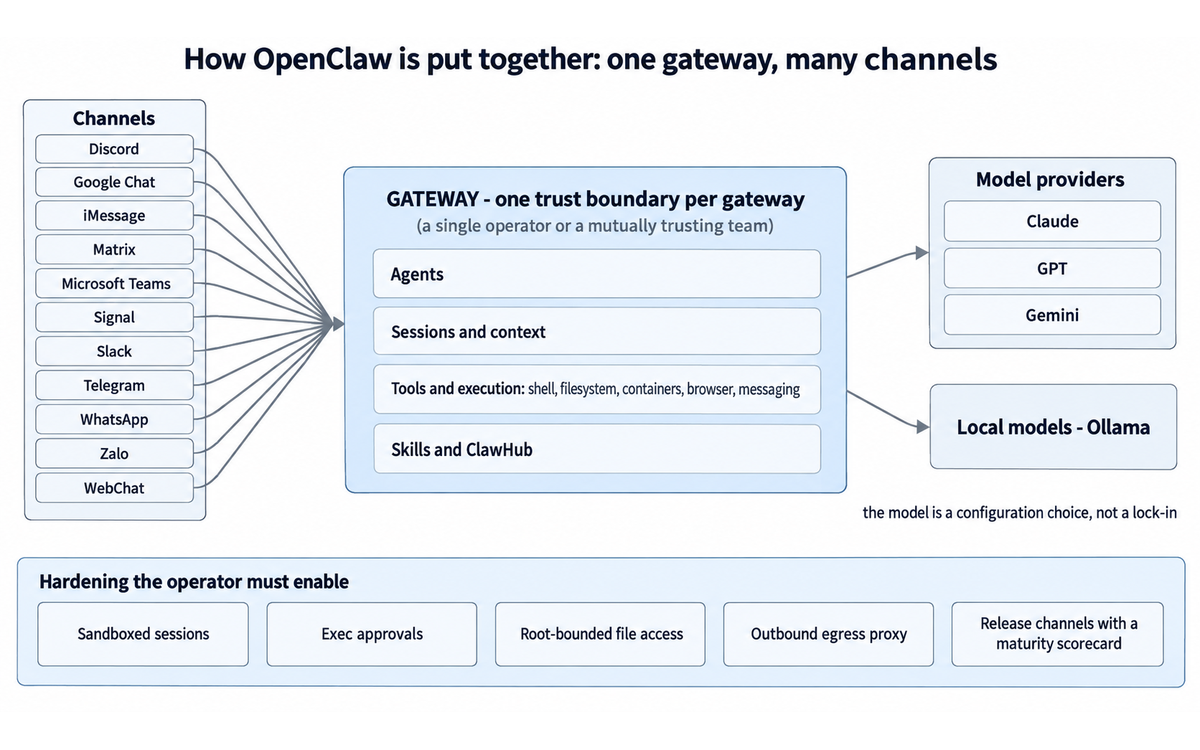
The gateway is the centre of the system. It is a long-running process on a machine the user chooses, and it owns the channels, the agents, the sessions and the tool surface. The documentation describes a single gateway as the unit of deployment, and the trust model page is explicit that the unit of trust is the same thing: "one trust boundary per gateway - a single operator or a mutually trusting team". This is the most important design fact in the product, and it is stated by the vendor rather than inferred by a reviewer.
Channels
Channels are adapters that connect the gateway to messaging systems. The documentation index lists Discord, Google Chat, iMessage, Matrix, Microsoft Teams, Signal, Slack, Telegram, WhatsApp and Zalo, plus a browser WebChat surface and mobile nodes. Pairing flows link an account to the gateway, and channel configuration decides which conversations reach which agent. Channel choice matters more than it appears, because a channel determines both the data the agent can read and the identity it sends messages under.
Agents, sessions and context
Inside the gateway, an agent handles context and reasoning, and sessions hold conversations. Multi-agent routing lets different conversations reach different agents with different instructions and different tool permissions. Memory and context management are documented as first-class concerns, which matters for the Imposture Risk discussion later in this review, because a persistent memory system is what makes agent-authored instruction material durable across sessions.
Tools and execution
Tools are the reach. The documentation groups tools, skills, cron, webhooks and automation under a capabilities heading, and the security analysis reviewed for this review describes the execution surfaces as shell, filesystem, containers, browser automation and messaging platforms. The project ships hardening primitives: sandboxed sessions, an exec approval mechanism that checks command chains, a root-bounded file access mechanism shared by core and plugins, an outbound network proxy that lets an operator place egress policy in one location, and release channels including a slower extended-stable channel with a public maturity scorecard. Every one of those is a defence the operator must enable or configure. None of them is a guarantee, and the vendor's own security page treats sandbox, approval and tool-boundary bypasses as genuine vulnerability classes, which is the correct posture and also the honest warning.
Skills and ClawHub
Skills extend what an agent can do. ClawHub is the marketplace, and it is open to publishing. Moderation exists and is documented: users can report listings, severe findings can place a publisher or listing under a hold, and listings can be held, hidden, quarantined, revoked or otherwise removed from public install surfaces. The vendor also documents a scanning mechanism, ClawScan, with audit labels including Pass, Review, Warn and Malicious. Read the moderation page carefully, though, because the ordering of controls matters. Moderation and install blocking respond to listings that have been found or reported. The supply-chain finding in the next section describes a skill that was already the number one ranked listing in the repository. Detection after ranking is not the same control as review before ranking, and the vendor does not claim otherwise.
Models and providers
Model choice is configuration. External providers including Claude, GPT and Gemini are supported, and local models can be served through Ollama. Failover and local model services are documented under the providers heading. For an institution, this is the property that makes the tool interesting, because it is the only way in this comparison set to run an agent whose inference never leaves owned hardware.
Telemetry
The telemetry documentation is unusually specific and deserves quoting rather than summarising, because data-flow questions are usually answered vaguely elsewhere. The documented default is a daily update check. The request carries "the OpenClaw version, operating system, Node.js version, CPU architecture, and request surface", sent as a user agent with, in the documentation's words, "no request body, install identifier, machine identifier, or random tracking identifier". Anonymous feature statistics are separate and described as being off by default: when enabled they "describe configured channels and providers, plugin inventory, and a retained session-creation count", and they ride along with the same daily request rather than adding a second one. The page states that these reports "do not measure individual plugin invocations, messages, model requests, or active users", and a command, openclaw telemetry show, exists to inspect the payload. The documentation also states that declining "is a completely normal choice and changes nothing about how OpenClaw works for you".
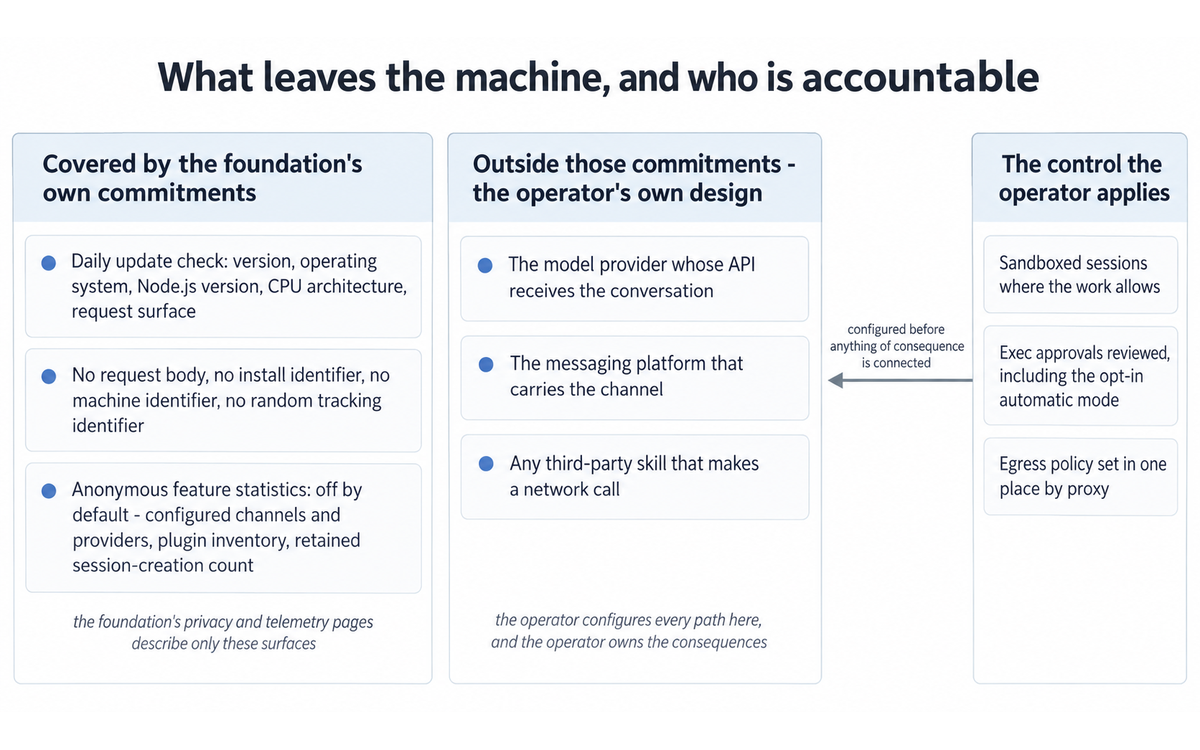
Two observations for an institutional reader. The first is favourable: the disclosure is specific, the opt-in item is genuinely opt-in, and an inspection command exists. The second is the boundary the vendor draws on the same page, that the telemetry page "describes update-check telemetry, not requests made by configured providers, channels, or other services". So the telemetry documentation is not a complete account of egress from an OpenClaw deployment. Egress to model providers and to messaging channels follows from what the operator configures, and the operator, not the foundation, is the accountable party for it. That is the honest reading, and it is a data-flow finding rather than a criticism.
Mobile applications and the browser extension
The privacy policy covers the iOS and Android applications and the Chrome extension, and its scope section says so explicitly. The simple version stated at the top of that policy is that the apps access device or browser data only when a feature is enabled or a permission granted, and that data is sent to the gateway the user chooses rather than to "a central OpenClaw cloud". The policy lists camera, microphone, location, contacts, photos, calendar, notifications, motion and SMS as optional permissions. It also names voice processing: enabled voice features "may use platform speech services and ElevenLabs". The scope clause is worth quoting in full because it is the limit of the vendor's promise: the policy "does not cover the privacy practices of the gateway, server, AI provider, or other services you choose to connect to through OpenClaw".
Getting Started with OpenClaw
This checklist is written for a reader who intends to run the tool rather than evaluate it, and it front-loads the security work that the quick start does not. Budget a working session, not ten minutes.
1. Read the security documentation before installing anything. Open the hardening guide and the trust model page. The trust model page states the supported deployment shape, and knowing it in advance prevents the most common architectural mistake, which is putting mutually untrusted users behind one gateway. 2. Choose the machine and the trust boundary. A gateway serves "one trust boundary per gateway - a single operator or a mutually trusting team". If you need separation between groups, the documented answer is separate gateways, ideally with separate operating system users or hosts. 3. Install from the official path. Native applications exist for macOS, Windows and Linux, and the vendor's home page describes them as installing "everything for you - gateway, chat, setup, and node features". Follow the current install documentation rather than an older guide, because the project has been renamed twice and older guides are indexed under older names. 4. Bring up the gateway and run onboarding. The documentation routes guided setup through openclaw onboard with pairing flows. Complete it before connecting anything that carries consequence. 5. Connect one channel, not all of them. Start with a channel whose account you are willing to have read by an automated system. Complete the pairing flow, and confirm that only the intended conversations reach the agent. 6. Configure one model provider. Either an external provider key or a local model through Ollama. If you use an external provider, confirm what the provider's own terms permit for programmatic and agent use before you depend on it, and read the model-provider paragraph in the Limits discussion below. 7. Tighten the execution surface before you give the agent anything to do. Enable sandboxed sessions where the work allows it, review the exec approval settings including the opt-in automatic mode, consider the outbound network proxy for egress policy in one location, and set the session visibility and agent-to-agent settings deliberately rather than accepting defaults you have not read. 8. Inspect telemetry. Run openclaw telemetry show and read the payload. Decide on the anonymous feature statistics question on purpose rather than by default. 9. Prove the perimeter on a low-consequence task. Give the agent one bounded job in a throwaway account and watch what it does, including which tools it calls and what it sends outward. 10. Decide on a release channel. The project documents a slower extended-stable channel with a public maturity scorecard per feature, and it documents a normal channel. Pick one knowingly. A project this fast-moving lands security fixes frequently, so neither channel removes the need to update. 11. Write down your rollback. Know how to stop the gateway, revoke channel tokens and remove provider credentials before you need to do it under pressure. 12. Only then connect the accounts that matter, and only one at a time.
VERIFICATION CHECKLIST for first deployment:
☐ Multi-Model Check: not applicable to deployment; this is a configuration task, so substitute a configuration review by a second person who reads the trust model page
☐ External Source: compare the running configuration against the vendor's current hardening documentation, not against a tutorial
☐ Human Review: a second person with relevant experience reviews the channel scope, the exec approval settings and the credential inventory before live accounts are connected
☐ CI-First Test: can the operator explain what the agent can reach and what it cannot, without the tool, before granting access? [Y/N]
Real Workflows
Each workflow below describes what the user does, what the agent does, where the risk sits and how to verify the result. The workflows are described at the level the product documentation and public user material support. Treat each as a pattern to adapt, not as a script to run.
Workflow 1: Inbox and message triage across channels
The user connects one messaging channel and a mail account, then asks the agent, from the chat application, what needs attention today. The agent reads across the connected surfaces and returns a short list of items that appear to need a reply, a decision or a calendar change. This is the workflow the vendor's home page leads with, and it is the most common entry point in public user material.
Where the risk sits. Message content is untrusted input. Anything in an email or a message can contain instructions, and an agent with tool reach is a target for that class of input. The vendor's security page states that prompt injection without a policy, approval, sandbox or tool-boundary bypass is treated as outside the vulnerability scope. Read that as a statement of the trust model rather than as a dismissal: the project's position is that injection is expected and defence belongs in the boundaries. Your triage workflow is only as safe as the boundaries around it.
VERIFICATION CHECKLIST for inbox and message triage:
☐ Multi-Model Check: run the same triage question on a second model configuration and compare which items it flags, if your deployment supports switching providers
☐ External Source: open the flagged messages in the mail or messaging client itself before acting on any summary
☐ Human Review: the user decides on every reply. Nothing is sent automatically until the pattern has been proven over a period the user judges sufficient
☐ CI-First Test: can the user state which messages matter without asking the agent? [Y/N]
Workflow 2: A scheduled recurring brief
The user defines a recurring job. The documentation supports scheduled work through cron and event-driven work through webhooks. A morning brief is the standard example: pull the day's calendar, pull overnight messages, produce a short summary and deliver it into the chat application.
Where the risk sits. Scheduled work runs without a person present, so an error compounds quietly. The public discussion of this product includes a widely circulated account of an agent deleting inbox items because a safety instruction given early in a session did not survive context compaction. Context behaviour changed after that episode, which is the point: the failure mode is real, it was reported by a user, and the project's response was to add the ability to designate instructions that survive compaction. If you are scheduling work that can change or delete anything, test the instruction durability first.
VERIFICATION CHECKLIST for scheduled recurring briefs:
☐ Multi-Model Check: not applicable; the risk here is determinism, not reasoning quality
☐ External Source: the brief's factual claims must be checked against the calendar and message interfaces it drew from
☐ Human Review: for the first two weeks, the named owner reads each brief and confirms it contained nothing invented
☐ CI-First Test: can the user assemble the same brief manually in reasonable time if the job fails? [Y/N]
Workflow 3: A bounded research and drafting assistant
The user asks the agent to gather material on a defined question, produce a first draft, and put the draft where the team can review it. The extension surfaces make this a small build rather than a custom project: a skill for the retrieval pattern, a channel for the conversation, and a destination the agent can write to.
Where the risk sits. This is the workflow where the Quantity Illusion trap is most likely to bite, because a fluent draft is easy to mistake for a researched one. The mitigation is structural rather than moral: require sources in the output, and require the user to check at least one source per claim-bearing paragraph against the original document.
VERIFICATION CHECKLIST for bounded research and drafting:
☐ Multi-Model Check: run the same research question through a second model and compare factual claims, not style
☐ External Source: open and read every cited source. A citation that does not support its sentence is a defect, not a rounding error
☐ Human Review: the named owner edits and signs the draft. The draft is a draft until a person owns it
☐ CI-First Test: can the user explain and defend the argument without the tool? [Y/N]
Workflow 4: An internal assistant for a small team
The user runs one gateway for a small group that already trusts each other, gives each member access through a channel, and uses named operator roles to bound what each person's connections can do. The trust model page describes exactly this shape and calls the roles "collaboration guardrails, not tenant isolation". The vendor's home page also invites team use directly.
Where the risk sits. This is the workflow that turns a personal automation into an institutional system, and the documented behaviour to understand before you start is session visibility. The trust model page states that session tools reach across the whole gateway by default, that any tool-enabled agent running unsandboxed "can list, read, search, and message every agent's sessions, including other users' transcripts", and that named roles are guardrails rather than isolation. A team gateway is therefore a shared workspace by default. That can be the right choice for a trusted team, and the page says as much, but it must be a decision and not an accident.
VERIFICATION CHECKLIST for a small-team internal assistant:
☐ Multi-Model Check: not applicable to access configuration
☐ External Source: verify the running session visibility, agent-to-agent and role settings against the trust model page
☐ Human Review: every team member is told plainly what other members can see, before access is granted
☐ CI-First Test: can each member describe the boundary of what the team can see? [Y/N]
Workflow 5: A local-model deployment for sensitive work
The user runs a local model through Ollama and keeps a workload entirely on hardware they own. This is the configuration that justifies the tool for institutions with residency constraints, and it is the one the vendor's model-agnostic posture exists to enable.
Where the risk sits. Local inference removes one egress path and does not remove the others. Channel traffic still leaves the machine because that is what a messaging channel is, and skills can still make external calls. A local-model deployment narrows the data-flow surface; it does not close it. State the residual paths explicitly in any institutional approval document.
VERIFICATION CHECKLIST for a local-model deployment:
☐ Multi-Model Check: not applicable by design; the point of a local model is that no external provider is involved in the request
☐ External Source: read the running configuration and confirm the model endpoint is local and that no provider credential is set in the environment
☐ Human Review: a second person reads the egress policy and the channel scope before any account of consequence is connected
☐ CI-First Test: can the operator state what a local model removes from the data-flow surface and what it does not? [Y/N]
Strengths, Limits, and AI Imposture Risk
Strengths
Reach that matches how work actually arrives. The channel list is the product. Work appears on WhatsApp, on Teams, in Slack, in email, in a calendar, and OpenClaw is the only tool in this comparison set that meets the work where it arrives rather than asking the user to relocate it into a new application.
Data residency as a deployment property rather than a promise. Memory, skills, configuration and conversation history live on the operator's machine, and the model can be local. For an institution that cannot place certain material with a third party, this is not a feature preference, it is a precondition.
Model agnosticism that survives contact with reality. Claude, GPT, Gemini and local models through Ollama, with provider failover documented. An operator can change model per task or per session, and can move a workload off an external provider without changing the surrounding automation.
Cost structure that suits experimentation. The vendor states plainly: "No subscription. No hosted tier. No token." Cost becomes provider usage plus hardware plus operator time, which means a pilot can be run without a per-seat commitment.
Extension surfaces that are real. Skills, cron, webhooks, multi-agent routing and an open marketplace. In public user material, users describe building channel-specific analytics tools and multi-channel automations, which is what a genuine extension surface looks like in practice.
A security program that is visible and specific. The vendor publishes a security page with scope, a hardening guide, a trust model page, a reporting policy, regression rules run per change request, an install-blocking mechanism for malicious listings, and a completed third-party audit engagement announced in September 2026 through a named initiative. Projects usually hide exactly this material.
Institutional scale of the community. Hundreds of thousands of repository stars and thousands of contributors mean material, answers and skills exist, and a problem is likely to have been met before.
Limits
The burden of operation is the user's. This is the limit that produces every other limit. There is no vendor-run service, so updates, credential rotation, log review, channel scope and rollback are all operator duties.
The vulnerability record is large and it clusters where it matters. See Section 7c for the sourced numbers and the quote. The recurring class is authorization and execution policy in the gateway, channel and node paths, which is precisely the code that decides what the agent may do.
Trust is one boundary per gateway, by design. The vendor's own trust model page states the supported shape and states that session tools reach across the whole gateway by default, with agent-to-agent messaging enabled by default. An operator who does not read that page will build something whose behaviour surprises them.
The skill marketplace is open by design, and detection follows publication. A malicious listing reached the top of the repository and was downloaded thousands of times before an independent security team identified it. Moderation, reporting, holds and install blocking now exist and are documented, but the sequence is worth remembering.
Model provider access is not guaranteed. Providers have restricted subscription-based access for this class of client. An operator planning to run the tool on a consumer subscription rather than metered API access should confirm the current position with the provider before committing. This review states the finding and points to the providers' own terms rather than quoting a specific restriction, because the restrictions have moved.
Cost is not zero and the free headline can mislead. Provider usage is metered, a machine that runs an agent continuously has a real cost, and operator time is the largest line item in the first month.
Support expectations must be set correctly. Foundation stewardship, MIT license, community support. No contract, no service level, no account manager, no procurement package with a counterparty that signs.
Documentation spread across two product names of the past. Older guides, older threads and older advisories use the earlier names, and any version-pinned instruction copied from an older source is unsafe in a project whose patches routinely close authorization issues.
No production surface of its own for documents, spreadsheets or design work. OpenClaw routes and orchestrates. It is not the tool you open to build a deck.
AI Imposture Risk
Time Illusion: Medium. The tool genuinely removes work that no chat assistant can remove, because the work crosses application boundaries and the agent is inside all of them. The overhead is equally genuine and it is front-loaded rather than visible: setup, pairing, hardening, and an ongoing update duty on a fast release cadence. Public user material is direct about the discovery period, with a widely repeated community observation that a new user sets the tool up and then does not know what to do with it, and at least one long-form user account framing its subject as what 50 days of use actually costs. The pattern is a large saving after a slow start on well-chosen recurring tasks, and near-zero or negative saving on ad hoc tasks that a user could have completed in two minutes. Rate Medium rather than High because the saving is real and repeatable once the operator has picked the right tasks, and rather than Low because the discovery cost is real enough that a large share of new users hit it.
Quantity Illusion: High. This is the trap that this product sets most effectively, and the mechanism is worth stating precisely. An agent with channel reach produces output continuously and in the places where the user already pays attention: messages, briefs, summaries, drafts. Volume is high, the format is fluent, and the delivery channel itself implies relevance. Nothing about an arriving chat message indicates whether the agent checked anything. The documented failure mode is not invented output but drift: the public account of an agent deleting inbox items because a safety instruction did not survive context compaction is a case where output was produced confidently and the constraint that should have stopped it had quietly stopped applying. Rate High because the surface polish is high, delivery is unsolicited by nature of the channel, and verification of an agent that acts continuously is more effortful than verification of a response to a single prompt.
Skill Illusion: High. The framework sets a floor of no lower than Medium for any tool that writes procedural memory on the user's behalf, and this review assesses High against the two escalation conditions in that clause. First, the agent can create and revise memory and skills during use without a per-write human decision: skills are the product's primary extension mechanism, and standing instructions and memory stores persist across sessions by design. Second, there is no routine practice of reading what was written. A user who installs a skill from a marketplace to solve a problem does not review the skill's instructions, and a user whose memory store has grown over months has no habit of auditing it. The result is durable capability documentation that the user did not author and does not inspect, reused in later sessions. Add the operator dimension: the tool grants an operator authority over gateway configuration and state that the vendor's own trust model equates with trusted-operator status, while the learning curve for that authority is steep, so users can hold configuration-level control they do not fully understand. Rate High.
Overall AI Imposture Risk: High. Two traps are High and one is Medium, which falls in the framework's High band, which is the case where a tool requires strong safeguards. Collaboration Mode is therefore Centaur by the rule in the framework, and the recommendation is a clear division of labour: the agent gathers, drafts, schedules, monitors and routes; the human decides, sends under their own hand where the message carries consequence, approves anything that changes or deletes, and reads the memory and skill material before it becomes standing practice.
Section 7c: The advisory record and the data-flow boundary, stated plainly
This section exists because there is a real finding and the framework requires it to be stated separately from scoring. The finding here is a dual one: a published vulnerability and supply-chain record about the supplier, and a data-flow boundary that the supplier states clearly in its own documents. Both are findings. Neither is an allegation.
The supply-chain finding. An independent security team's analysis of published agent skills is reported to include a community skill published to OpenClaw's repository that reached the top of the listing and was downloaded thousands of times, and which the analysis described as containing silent data exfiltration, prompt injection to bypass the agent's safety guidelines, and no additional user interaction requirement beyond installation. The same reported analysis is said to have covered tens of thousands of skills across several agent skill marketplaces and to have found that a substantial share contained at least one vulnerability. The operative reporting, from a community security publication that reviewed the work, states that the skill "silently executed a curl command that transmitted data to an attacker-controlled server", that it "used direct prompt injection to bypass the agent's safety guidelines", and that it "required no additional user interaction beyond installation". The finding rests on the third-party security team's analysis as reported; this review did not reproduce the analysis and does not present the reported figures as its own measurement. The architectural reason the class works is stated in the same report and is not contested: skills run with the agent's granted privileges, can read environment variables including files that commonly store credentials, and can make outbound network calls.
The published-advisory finding. A published academic security analysis of the framework reports a corpus of hundreds of advisories filed against the project, organizing them by architectural layer and by trust-violation type, and reports that three independently Moderate- or High-severity advisories in the gateway and node-host subsystems compose into a complete unauthenticated remote code execution path from a model tool call to the host process. The same analysis identifies the execution allowlist as the framework's primary command-filtering mechanism and reports that its design assumption, that command identity is recoverable by parsing the command text, is defeated in independent and non-overlapping ways by line continuation, by busybox multiplexing and by long-option abbreviation. The analysis states the broader structural pattern as per-layer and per-call-site trust enforcement rather than unified policy boundaries, and says that this property makes cross-layer composition attacks resistant to layer-local remediation. That last sentence is the important one for an operator: it says that a fix in one place does not necessarily close the class. This review treats the analysis as a credible published source and reports its findings as the analysis' findings, not as this review's independent test. Advisory counts and severity distributions move continuously in an actively developed project, so the exact current number should be taken from the project's own advisory feed or from a national vulnerability database at the time of reading rather than from any figure reproduced here.
Where the vendor stands on it. The vendor's security page, reviewed 9 September 2026 per that page's own review stamp, states that there is no known compromise of OpenClaw infrastructure or of the official install and update channels, and scopes that statement to core, applications and hosted installers while explicitly excluding third-party ClawHub skills. That exclusion is the honest reading of the boundary and the reason this review treats the skill surface as a distinct risk rather than as covered by the core security statement. The same page defines what the project does not treat as a vulnerability: it "assumes one trusted operator running multiple agents per gateway, not a shared multi-tenant service", and under that model prompt injection without a policy, auth, approval, sandbox or tool-boundary bypass is not a vulnerability by itself, nor is malicious behaviour in a plugin installed or enabled by a trusted operator. Read as a trust model, that is coherent and the documentation supporting it is unusually explicit. Read as a procurement statement, it means the operator owns the consequences of what they install and enable. Both readings are true.
The data-flow finding, from the vendor's own documents read against each other. This is a contract-terms style finding and it comes from two of the vendor's own pages. The telemetry page describes what leaves the machine by default and does so precisely, and it then bounds itself: the page "describes update-check telemetry, not requests made by configured providers, channels, or other services". The privacy policy does the same thing from the other direction: the policy "does not cover the privacy practices of the gateway, server, AI provider, or other services you choose to connect to through OpenClaw". Set against each other, the two documents draw one consistent boundary and it is this. The foundation's privacy and telemetry commitments cover the foundation's own surfaces. Everything else that carries data outward, which means the model provider whose API receives the conversation, the messaging platform that carries the channel, and any third-party skill that makes a network call, sits outside those commitments and inside the operator's own accountability. No score changed as a result of this finding and none should, because the boundary is disclosed rather than hidden and the operator genuinely controls every path in it. The finding matters because a reader who takes the local-first marketing at face value and stops there will approve a deployment on the belief that nothing leaves the machine, when the accurate statement is that nothing leaves through the foundation's surfaces by default, and that the configured surfaces are the operator's design decision.
What this section does not do. It does not allege misconduct by the vendor, and the reviewed material does not support such an allegation: the project publishes its security posture, runs a coordinated disclosure process, has completed a third-party audit engagement, and ships mitigations including sandboxing, exec approvals, root-bounded file access, an egress proxy, regression rules run per change request and install blocking for malicious listings. It does not reproduce any third-party analysis independently, and it does not state an advisory count as a current figure. It does not change any score in the rating section, and it does not convert the tool into one that should not be used. It exists because the advisory record and the data-flow boundary are the two facts that decide how a deployment must be designed, and a review that buried them would be misleading in exactly the way the framework's evidence standard is meant to prevent.
U365 Co-Intelligence Rating
CI-First Benefit Score
Dimension | Score | Reasoning |
Time Benefit | 6 | Net of overhead. For recurring, cross-application work chosen well, the saving is large and repeats daily, which no chat assistant can match. For setup, hardening, ongoing updates on a fast release cadence, and the discovery period that public user material reports, the first weeks are a net cost. Averaged across the common case rather than the best case, the honest figure sits just above the midpoint. |
Quantity Benefit | 7 | The agent works continuously and in the channels the user already reads, so the volume of handled items is genuinely higher than a session-based assistant achieves. Scheduled jobs, channel coverage and event-driven work all multiply throughput. Held below the top of the scale because volume that arrives unsolicited in a chat window is volume the user must triage, and triage is work. |
Quality Benefit | 5 | Quality tracks the configured model, and the operator can choose a strong one or a local one, which is a real advantage over a fixed-model hosted assistant. It is held at the midpoint rather than above it because quality here is a property of the configuration and the operator's boundaries, not of the product: message content is untrusted input, the trust model treats injection as out of scope for vulnerability reporting, and the reported incident of an instruction failing to survive context compaction is a quality failure that no reviewer of the output text alone would catch. |
Skill Benefit | 4 | Deliberately conservative, per the framework's instruction. The operator role does teach real competence: gateways, credentials, sandboxing, egress policy and advisory reading are all skills, and a committed operator ends the deployment better at systems work than they began. Against that, the framework's clause on agent-authored procedural memory sets a floor at Medium for any tool that writes procedural memory on the user's behalf, and this review assesses that trap High. Users of the common case consume skills rather than author them, and the capability documentation they accumulate was not written by them. Score the user, not the tool, and the user's gain in transferable skill is modest against the gain in delegated capability. |
CI-First Benefit Score: 5.5 out of 10. Band: Positive (4.1 to 6.0).
Humics Protection Rating
Dimension | Rating | Reasoning |
Creativity | +1 | The extension surfaces are real and the marketplace means a user can build a capability that did not exist rather than consume one. Public user material shows people constructing channel-specific analytics tools and multi-channel automations, which is creative work in the ordinary sense of the word. |
Critical Thinking | -1 | The product shifts the user from producing judgements to reviewing them, and it does so in a channel that implies relevance and urgency. Verification of a continuous agent is more effortful than verification of a single answer, and the framework's own concern about the Quantity Illusion applies directly. The operator role does demand real critical work in configuration, which is why this is a reduction rather than a larger one. |
Social Authenticity | -1 | The tool sends messages from the user's own accounts across channels where recipients reasonably read a message as the person's own voice. A user who routes replies through the agent, or who lets the agent hold a conversation in a messaging channel, is presenting agent-authored text under their own identity, and the framework treats that substitution as the condition under which this dimension degrades. The mitigation is straightforward and available: disclose the practice where it matters, and keep consequential messages under the user's own hand. |
Humics Protection Score: -1. Badge: Humics-Neutral.
Collaboration Mode
Centaur. Derived from the framework's rule that Imposture Risk Medium or High means Centaur, and this review assesses overall Imposture Risk as High on two High traps and one Medium. The division of labour is the recommendation: the agent gathers, drafts, schedules, monitors, routes and reports; the human decides, approves anything that creates, changes or deletes, sends consequential messages personally, and reads the memory and skill material before it hardens into standing practice. Cyborg mode, where the human and the agent interleave continuously on the same artefact, is the mode that the Quantity and Skill traps exploit, because continuous interleaving is exactly the pattern in which nobody stops to verify and nobody notices which judgements were the user's own.
U365 Framework v1.2 Clause Note
5.2.3-a, agent-authored procedural memory. Applies. The tool writes procedural memory on the user's behalf: skills are the primary extension mechanism, standing instructions and memory stores persist across sessions by design, and the operator can also change gateway configuration and state. The framework sets a floor of no lower than Medium for any such tool even where a write-approval gate exists, and this review assesses the trap at High because both escalation conditions in the clause are met, namely that the agent can revise memory during use without a per-write human decision, and that there is no routine practice of reading what was written. Outcome recorded: clause applies, trap rated High, floor exceeded and the escalation stated.
4.2-a, agent-mediated conversation. Applies. The tool's entire interface is conversation, and it operates on messaging channels under the user's own accounts, so agent-authored text can be presented as the user's own voice and agent interaction can substitute for human contact. The null conditions in the clause do not obtain here: this is not a disclosed business agent operating under its own identity where the reader knows what they are talking to, and channel composition is not being changed in a way that alters nothing, because the channel is the delivery mechanism and the identity attached to it is the user's. Outcome recorded: clause applies, with the mitigation stated in the Humics discussion, namely disclosure where it matters and personal handling of consequential messages.
7.5, team-level rooms. Applies for the documented team deployment. The vendor's home page invites sharing with a team, the documentation covers multi-agent routing, and the trust model page states that agent-to-agent messaging is enabled by default and that session tools reach across the whole gateway by default, so a team gateway is a shared channel in which more than one agent can act. Under the framework this requires Centaur, which is the mode already assigned. For a strictly single-operator, single-agent deployment the clause would be a null; that null is not what this review assesses, because the team shape is documented, invited and common. Outcome recorded: clause applies in the team shape, Centaur required and assigned.
What Users Say
The public reaction to OpenClaw is unusually loud and unusually mixed, and the mix is the finding.
Enthusiastic installed base. The vendor's home page collects user testimonials, and the names attached to them include well-known technology figures alongside ordinary users. Themes across that material repeat: speed of the agents in recent versions, the range of small daily tasks the tool absorbs, and the sense that a personal agent system has crossed a threshold. One testimonial describes the tool identifying a snake in a backyard from a photo, supplying a local number to confirm the identification, and suggesting how to handle it, which is a fair illustration of the category: a question that would otherwise have taken a search and a phone call resolved in one message. Another describes the sandbox preventing the deletion of files on a desktop, which is a user reporting a security control working in a real incident rather than in a test.
Product-listing ratings. Public product-style listings carry a 5.0 rating across approximately 61 to 72 reviews in total, as recorded at reconnaissance. Read the base carefully. These are people who chose the product and stayed, on a launch-style listing rather than a moderated enterprise review platform, and the sample is small enough that a handful of negative reviews would move it materially.
An independent hands-on score. One independent reviewer scored the tool 3.8 out of 5 on a hands-on test, also recorded at reconnaissance. This measures something different from the listings, and the gap between 5.0 and 3.8 is not a contradiction. It is the distance between satisfaction among committed adopters and a structured assessment by a reviewer applying their own criteria.
Honest failure accounts. This is the most valuable material available about the product and it is abundant. Long-form user accounts exist that are framed around what actually broke rather than what worked, including a widely circulated community observation that a new user finishes setup and then does not know what to do with it next, which is the discovery cost this review scores in the Time dimension. The account of the agent deleting inbox items because an early safety instruction did not survive context compaction was reported publicly by the user involved, and the project's response, adding the ability to designate instructions that survive compaction, is documented in independent write-ups of the release that followed.
Community size as a signal. The repository figures at reconnaissance, hundreds of thousands of stars and thousands of contributors, are not testimonials but they are evidence of a working community, and they are the reason answers and existing skills are easy to find.
What is not found. No moderated enterprise review platform score was found for this product during reconnaissance. No independent security audit report was found published in full; what was found is the vendor's own announcement of a completed third-party audit engagement dated 21 September 2026 through a named initiative, which is an announcement about an audit rather than the audit document itself. Readers who need the audit output for a procurement decision should request it from the project rather than assuming it is public.
Comparison and Alternatives
Three comparisons matter for a U365 reader. Each is a different trade rather than a straightforward ranking.
Against hosted agent platforms
The relevant contrast is with hosted agent products that run in the vendor's infrastructure and reach a set of connected applications, and with the built-in assistants inside major productivity suites. The hosted option wins on setup effort, support path, and a predictable bill. It loses on data residency, on model choice, and on how much of the system the user can inspect or change. The self-hosted option wins on residency, model choice and extensibility, and it charges the user in operator time and in accepting the security burden. For an institution with material that cannot leave owned hardware, this is not a close comparison: OpenClaw's local-model path is the reason to choose it, and the setup cost is the price of that requirement. For an institution without that constraint, a hosted product is the lower-risk choice and the burden of proof sits on the self-hosted case.
Against the general-purpose coding and computer agent CLIs
The comparison here is with the class of developer-oriented agent tools that run in a terminal or an editor, execute commands, and are typically driven by a knowledgeable operator in sessions rather than continuously through messaging channels. Those tools are stronger where the work is code, where an operator is present to approve each step, and where sessions are naturally bounded. OpenClaw is stronger where the work is continuous, where the interface must be a phone, and where reach across messaging accounts is the point. A reader choosing between them should ask one question first: is the work an interactive build, or is it a standing operational duty? Interactive build favours the CLI class. Standing duty favours OpenClaw. Many technical users will run both, and the two do not conflict.
Against consumer chat subscriptions
The comparison a reader will actually make is with paying for a consumer chat subscription, because the monthly price is visible and the agent's price is diffuse. The subscription is cheaper to start and requires no operator. It cannot send a message from the reader's own WhatsApp account, cannot run on a schedule without the reader present, cannot read the inbox, and cannot be pointed at a local model. A consumer chat subscription is an assistant the reader visits; OpenClaw is an assistant that visits the reader. Whether that difference is worth the operator burden depends entirely on whether the reader's work has recurring, cross-application components. If it does not, the subscription is the better purchase and this review should not talk the reader out of it.
What to watch if you are not choosing OpenClaw
If the residency and model-choice requirements do not apply, watch the hosted agent platforms, which are improving their reach quickly and will keep closing the gap on configuration effort. If the requirement is a bounded coding or research agent, watch the agent CLI class. If the requirement is assistance inside one productivity suite, the suite's own assistant is likely adequate and carries no operator cost.
Verdict and Next Steps
OpenClaw is the most consequential tool in this class and it is the one to be most careful with. It delivers a capability that a chat assistant cannot: an agent that lives in the channels where work arrives, runs on a machine the operator controls, uses a model the operator selects including a local one, and can be extended. That is enough to justify a serious pilot. It also places shell reach, credential access and the operator's own messaging identity behind a codebase with a large published advisory record, a skill marketplace that is open by default, and a documented trust model in which the operator owns the consequences of what is installed and enabled. The Risky badge is the correct reading of that combination, and it is a statement about what the reader must do rather than a statement that the tool is bad.
The verdict in one sentence: run it, deliberately, on accounts you can afford to have read, with the boundaries configured before anything of consequence is connected, and with a named operator who reads the security documentation.
Next steps, in order:
1. Read the vendor's trust model page and hardening guide before installing anything. The trust model page defines the supported deployment shape and the default session visibility behaviour. Both are decisions you are about to make whether or not you read them. 2. Decide the deployment shape explicitly. One gateway per trust boundary. A team gateway means shared visibility by default, and the vendor's own page says named roles are guardrails rather than isolation. 3. Install on a machine and accounts that carry low consequence. Prove the perimeter before connecting a mailbox or a messaging account you would not want read. 4. Configure the boundaries first: sandboxed sessions where possible, exec approvals reviewed, egress policy set, session visibility and agent-to-agent settings chosen deliberately, telemetry inspected with the documented command. 5. Pick the tasks by the recurring, cross-application test. Skip ad hoc tasks. The saving lives in work that repeats and crosses an application boundary. 6. Apply the verification checklists in Real Workflows to the workflows you actually run, and keep consequential messages under your own hand. 7. Read any skill before installing it, and prefer skills you or a known author wrote. Treat the marketplace as open by default, because it is. 8. Confirm your model provider's position on programmatic and agent use before depending on a consumer subscription for it. 9. Set a review date. Re-read the advisory feed and the security page at that date rather than assuming the posture you approved is the posture you have. 10. If this is an institutional deployment, record the data-flow boundary from Section 7c in the approval document: the foundation's commitments cover the foundation's surfaces, and the configured providers, channels and skills are inside your own accountability.
U.Copilot Integration
OpenClaw is not a U.Copilot surface and should not be installed as one. U.Copilot is a U365 method with its own definition, and this review does not extend it. Where an institution operating both wants interaction, the honest shape is an integration at the tool layer: OpenClaw can act as a channel and scheduling layer that invokes a documented process, and the process remains defined by U365 method rather than by the agent. Any such integration must be specified and approved as a U365 design decision before implementation, and it must not present agent-authored text as U365 method output.
SL-OS Integration
SL-OS is likewise not something this tool supplies or replaces. OpenClaw could in principle carry a scheduled SL-OS style review by running a recurring structured prompt, and that is a legitimate automation of an existing practice. It is not an implementation of SL-OS, it adds no method content, and it should be described as an automation of a practice rather than as an SL-OS deployment. The same rule applies as above: specify and approve the design first, and keep human ownership of any output that carries the institution's name.
Status and Last Tested
Status: Risky. Last tested: 2026-09-27. Re-check: trigger-based with a six-month ceiling. Re-check triggers are listed in Status and Re-check at the top of this review.
What was established for this review, and how: vendor statements were taken from the vendor's own pages, including the home page, the security page with its own stated review stamp of 9 September 2026, the trust model page, the telemetry page and the privacy policy with its stated effective date of 2 August 2026. Documentation structure and feature lists were taken from the vendor's documentation index. The advisory and supply-chain findings were taken from a published academic security analysis of the framework and from a community security publication reporting an independent security team's skill analysis, and are reported as those sources' findings rather than as this review's measurements. The review counts, reviewer score, repository figures and release numbers are reconnaissance figures recorded for this review and are labelled as such wherever they appear, with the surface noted for each. No figure in this review is an estimate produced by the reviewer. Where a current number was needed and could not be fixed from a source, this review says so instead of supplying a figure.
Migration Path
Migration is not applicable in the usual sense, because this review assigns Risky rather than Retired or Deprecated, and OpenClaw is current, maintained and not superseded. It is included because the Risky badge means a reader may need to leave, and because a reader may be arriving from an earlier deployment under one of the previous names.
Leaving OpenClaw. The material that matters is local, which is the whole point of the product: memory, skills, configuration and conversation history live on the operator's machine, and the documentation covers backup and export within the product's own operations material. Before you migrate, export what you want to keep, rotate every credential the agent could reach, including provider keys, channel tokens and any credential stored in an environment file, and revoke the channel pairings so the messaging accounts stop accepting agent traffic. Then stop the gateway. A migration that skips the credential rotation has not migrated; it has left a live set of keys behind.
Arriving from an earlier name. Material written when the project carried either of its previous names describes the same codebase at an earlier point. Install from the current official path, follow the current documentation, and treat any version-pinned instruction copied from an older guide as unverified. When searching for advisories, search the earlier names as well as the current one, and prefer the affected version range as the join key rather than the product name.
Moving away to a hosted platform. The parts that do not transfer are the ones that made the tool worth running: local model choice, residency, and reach across messaging accounts under your own identity. A hosted alternative will typically offer channel coverage and a much easier setup, and it will hold the conversation data. Plan the data-flow approval question first, because it is the reason you chose self-hosting and the reason the move may not be open to you.
U365's Recommendations to Learn More
Read the vendor's security page, the trust model page and the hardening guide in that order and before anything else. They are short, they are specific, and they decide whether the rest of the deployment is sound. Then read the documentation index to see the surface area, and read the telemetry page, because a reader who understands exactly what leaves the machine by default is a reader who can answer the governance question without help. For the risk picture, read the published academic security analysis of the framework and the community reporting on the malicious-skill incident, and read both as sources with their own methods rather than as final verdicts.
Resources on OpenClaw
Dedicated OpenClaw channels
The project's own dedicated channels are the fastest route to current information, and they carry an important caveat: the security page scopes its assurance to core, applications and hosted installers, and explicitly excludes third-party skills, so vendor channels are authoritative for the core product and not for what a marketplace skill does.
Site: https://openclaw.ai/
Documentation: https://docs.openclaw.ai/
Security page: https://openclaw.ai/security
Trust model: https://docs.openclaw.ai/gateway/security/trust-model
Telemetry: https://docs.openclaw.ai/gateway/telemetry
Privacy policy: https://openclaw.ai/privacy
Repository: https://github.com/openclaw/openclaw
Foundation: https://openclaw.org/
The image above is the thumbnail for a long-form user account of the tool after extended daily use. It is included because practitioner material of this kind is the most useful evidence available about the discovery cost and the failure modes, both of which are scored in this review.
Video: "50 days with OpenClaw: The hype, the reality and what actually broke", by VelvetShark. Watch it for the failure accounts and the task selection lesson rather than for the feature tour. The video's own framing, that the common community question after setup is what to use the tool for, is the Time Illusion evidence cited in this review.
A second recommendation, text rather than video: read the community security publication's write-up of the malicious-skill incident alongside the vendor's moderation page. Read together, they show a real supply-chain event and the controls that now respond to that class, and the gap between when detection happened and when the listing was ranked is the part worth carrying into your own install policy.
The practitioner account in full
50 days with OpenClaw: the hype, the reality and what actually broke, by VelvetShark. Watch it for the failure accounts and the task-selection lesson rather than for the feature tour.
Resources on X
The project's own account is the first channel to add, because a change to the license, the foundation's stewardship or the security posture would appear there before it reached a documentation page. Verified 2026-09-27: the account is @openclaw at https://x.com/openclaw, linked from the vendor's own security page.
Dedicated X channels

CI-First Evaluation Summary Card
Field | Value |
Tool | OpenClaw |
Category | Open-source self-hosted personal AI agent platform, gateway plus messaging channels |
Vendor and steward | OpenClaw Foundation, an independent 501(c)(3) per the vendor's own materials |
Open source | Yes, MIT licensed, repository public |
Deployment | Self-hosted on the operator's own machine or server |
Primary use case | Continuous, cross-application agent work reached through chat applications |
Time Benefit | 6 |
Quantity Benefit | 7 |
Quality Benefit | 5 |
Skill Benefit | 4 |
CI-First Benefit Score | 5.5 of 10 |
Band | Positive |
Humics Protection | -1, Humics-Neutral |
Imposture Risk, Time Illusion | Medium |
Imposture Risk, Quantity Illusion | High |
Imposture Risk, Skill Illusion | High |
Overall Imposture Risk | High |
Collaboration Mode | Centaur |
Status | Risky |
Clause 5.2.3-a | Applies, trap rated High, framework floor exceeded |
Clause 4.2-a | Applies, mitigated by disclosure and personal handling of consequential messages |
Clause 7.5 | Applies in the documented team shape, Centaur required and assigned |
Strongest reason to adopt | Local model and local data with reach across the messaging channels where work actually arrives |
Strongest reason for caution | Large published advisory record in the authorization and execution paths, an open skill marketplace, and full operator responsibility for the consequences |
Recommended first use | A bounded recurring task on a low-consequence account, with boundaries configured before anything of consequence is connected |
Glossary
CI-First Benefit Score
The score accounts for the overhead of configuration, supervision and verification rather than counting the capability the tool supplies alone. OpenClaw scores 5.5, which is CI-First Positive.
CI-First Profile
The role the AI plays in your working relationship. (level 1) Co-Creator and Thought Partner, (level 2) Co-Worker and Assistant, (level 3) Coach and Tutor, (level 4) Analyst and Tester, (level 5) Challenger and Devil's Advocate. Assigning a profile before giving an AI a task is a core CI-First discipline. This review does not assign a separate CI-First Profile for OpenClaw, because no profile classification was scored for it; the benefit score, the Collaboration Mode and the Imposture Risk assessment carry the judgement.
Time Benefit
How much time the tool saves against doing the same work alone, net of setup, configuration, hardening, updating, reading and correcting. OpenClaw is 6. Net of overhead, for recurring cross-application work chosen well the saving is large and repeats daily, which no chat assistant can match; for setup, hardening, ongoing updates on a fast release cadence and the discovery period that public user material reports, the first weeks are a net cost. Averaged across the common case rather than the best case, the honest figure sits just above the midpoint.
Quantity Benefit
How much more usable output you produce in the same time. OpenClaw is 7. The agent works continuously and in the channels the user already reads, so the volume of handled items is genuinely higher than a session-based assistant achieves, and scheduled jobs, channel coverage and event-driven work all multiply throughput. Held below the top of the scale because volume that arrives unsolicited in a chat window is volume the user still has to triage, and triage is work.
Quality Benefit
Whether the output is better than you would produce alone, verified and durable. OpenClaw is 5. Quality tracks the configured model, and the operator can choose a strong one or a local one, which is a real advantage over a fixed-model hosted assistant. It is held at the midpoint because quality here is a property of the configuration and the operator's boundaries rather than of the product: message content is untrusted input, the trust model treats injection as outside vulnerability scope, and the reported incident of an instruction failing to survive context compaction is a quality failure no reviewer of the output text alone would catch.
Skill Benefit
Whether the tool builds lasting capability in you, or substitutes for it. OpenClaw is 4, deliberately conservative. The operator role does teach real competence: gateways, credentials, sandboxing, egress policy and advisory reading are all skills, and a committed operator ends the deployment better at systems work than they began. Against that, users of the common case consume skills rather than author them, and the capability documentation they accumulate was not written by them. Score the user, not the tool, and the user's gain in transferable skill is modest against the gain in delegated capability.
Humics Protection Badge
A rating of whether a tool protects, leaves neutral, or erodes the three human capabilities the Humics framework identifies, Creativity, Critical Thinking and Social Authenticity. Each is scored +1, 0 or -1, and the sum gives the badge. +2 to +3 is Humics-Friendly, -1 to +1 is Humics-Neutral, -2 to -3 is Humics-Risky. OpenClaw is Humics-Neutral at -1 / +3: Creativity +1, Critical Thinking -1, Social Authenticity -1.
AI Imposture Risk
The U365 assessment of whether a tool creates the appearance of benefit while the underlying capability is not actually being exercised by the user. Three traps are rated Low, Medium or High: the Time Illusion, the appearance of saving time when net time is lost; the Quantity Illusion, high volume that looks good but does not survive inspection; and the Skill Illusion, the appearance of competence in the user while the underlying skill is absent or eroding. OpenClaw is High overall: Time Illusion Medium, Quantity Illusion High, Skill Illusion High.
Collaboration Mode
How the work is divided between you and the AI. Centaur is a clear division of labour: you hold the requirement and the acceptance, the AI holds the execution, and you review before anything is used. Cyborg is continuous rapid iteration inside one piece of work with no clear boundary about who did what. The framework assigns Centaur whenever Imposture Risk is Medium or High, and OpenClaw is Centaur on that rule.
User Sentiment
The aggregated public opinion from review platforms, community forums and directories, reported separately from the CI-First score because crowd sentiment can contradict a rigorous evaluation, and because different platforms sample different populations. For OpenClaw the two available figures measure different groups and are reported side by side rather than averaged: public product-style listings carry 5.0 across roughly 61 to 72 reviews, collected from people who chose the product and stayed, and one independent hands-on reviewer scored it 3.8 out of 5 against a structured rubric. No moderated enterprise review platform was found to carry a rating for this product.
Review Status
Review Status records the current standing of the tool at the time of the last test. The vocabulary is Active, Active (updated), Changed, Risky, Stale, Retired and Deprecated. Active: the tool is current and recommended. Active (updated): recently re-checked and the content was refreshed. Changed: a re-check trigger fired and an update is pending, so read the review with that in mind. Risky: the tool has significant unresolved issues, or it has been clearly surpassed by newer alternatives. Use it with caution and read the Limits section. Stale: this review has not been re-checked in over 6 months, so treat details such as pricing and features as unverified. Retired: the tool still works but is no longer recommended. Deprecated: the tool has been shut down or fundamentally changed. Retired and Deprecated posts include a Migration Path section. OpenClaw is Risky.
Agent-authored procedural memory
Standing instructions, skills or memory stores that an AI system writes on a user's behalf and then reuses in later sessions, as distinct from text the human authored. It is a Skill Illusion vector in its own right under framework clause 5.2.3-a, because the user holds a documented capability they did not write and the artefact outlives the task that produced it. OpenClaw meets both escalation conditions: skills and memory are revised during use with no per-write human decision, and there is no routine practice of reading what was written.
Active
The status vocabulary term for a tool that is current and recommended, carrying a Status line and a re-check date. This review does not assign it to OpenClaw; the assigned term is Risky.
Agent
In this review, a system that uses a language model to decide and carry out actions, including calling tools, rather than only producing text in reply to a prompt.
Advisory
A published notice of a vulnerability in a product, usually carrying an identifier, the affected version range and a severity. Advisory counts in an actively developed project move continuously, which is why this review does not state a current count as its own measurement.
Bring your own model
A deployment property in which the operator chooses the model provider, or runs the model locally, rather than accepting the model fixed by the vendor. OpenClaw supports external providers including Claude, GPT and Gemini, and local models through Ollama.
Centaur
A collaboration mode in which the division of labour between human and tool is clear and the human owns the consequential decisions. The U365 framework assigns Centaur whenever Imposture Risk is Medium or High. OpenClaw is assigned Centaur in this review.
ClawHub
The project's marketplace for plugins and skills. It is open to publishing, with moderation, reporting, holds and install blocking documented by the vendor.
Cyborg
A collaboration mode in which human and tool interleave continuously on the same work. The framework treats it as the less safe mode for tools whose Imposture Risk is Medium or High.
Gateway
The long-running OpenClaw process on the operator's machine that owns channels, agents, sessions and the tool surface. The vendor's trust model defines one trust boundary per gateway.
Humics
The three human capabilities AI can either strengthen or erode: Creativity, Critical Thinking and Social Authenticity, from Pascal Bornet's Humics framework. The question this review applies is whether sustained use makes you stronger or contributes to AI Obesity.
Node
An OpenClaw component that extends a gateway onto another machine or a mobile device, carrying execution or platform capabilities.
Section 7c
The house label for the block in a URC Tools Review that states a regulatory, legal, threat or data-flow finding about a supplier separately from scoring, quoting the operative text and leaving every score unchanged.
Skill
In OpenClaw, an installable extension that gives an agent additional capability. Skills run with the agent's granted privileges, which is why the marketplace is a supply-chain surface.
Telemetry
Data a product sends about itself. OpenClaw's documented default is a daily update check carrying version, operating system, runtime version, CPU architecture and request surface, with anonymous feature statistics off by default and an inspection command available.
Trust boundary
The unit of mutual trust in a deployment. OpenClaw documents one trust boundary per gateway, meaning a single operator or a mutually trusting team, and states that mutually untrusted users require separate gateways.
Sources
Vendor pages, fetched for this review:
Independent and third-party material, fetched for this review:
A Security Analysis of the OpenClaw AI Agent Framework, Suwansathit, Zhang and Gu, Texas A and M University, arXiv identifier 2603.27517: https://arxiv.org/html/2603.27517v3
Community security reporting on the malicious skill incident in the skills repository, including the independent security team's skill analysis findings: https://openclaw.report/ecosystem/what-would-elon-do-openclaw-malicious-skills
Independent write-up of the releases that added instruction persistence across context compaction, and the account of the inbox deletion episode: https://blog.gopenai.com/openclaw-3-7-3-8-the-agent-os-update-720dca1deb98
Long-form practitioner video account of extended daily use: https://www.youtube.com/watch?v=NZ1mKAWJPr4
Search surfaces consulted for the security and marketplace findings and for practitioner material: web search results for OpenClaw advisory records and for the skill incident, and for practitioner video material. Review-platform coverage did not yield a moderated enterprise rating for this product at the time of writing; that absence is recorded in What Users Say.
Figures carried into this review as reconnaissance values rather than re-measured here, each labelled with its surface where it appears: the release tag and date, the repository star, fork and contributor figures, the product-listing rating and its review count range, and the single independent hands-on score.
Faculty Note on Evidence Quality
What this review is strong on. The vendor's own published statements are quoted directly and can be checked in one click, including the trust model boundary, the default session visibility behaviour, the telemetry payload description, the security page's scope and its review stamp date, and the privacy policy's scope clause. The security and supply-chain findings cite a published academic analysis and community security reporting rather than an unsourced claim, and the specific quoted language in Section 7c is reproduced so a reader can judge it. The scoring is explained dimension by dimension with the reasoning attached to each figure, and the two headline ratings a reader will meet elsewhere are both presented with their measurement bases rather than one being suppressed.
What this review is weaker on. The advisory record is reported from a published analysis, and advisory counts and severity distributions in an actively developed project change continuously, so no current count is stated here as a measurement and any reader who needs the number today should take it from the project's advisory feed or a national vulnerability database. The audit material is an announcement of a completed third-party engagement, not the audit document, and the review says so rather than implying more. The reconnaissance figures, including the listing rating, the review counts, the independent score, the repository figures and the release tag, were not re-measured during the writing of this review and should be re-checked before any of them is published elsewhere. No independent benchmarking of the tool against a defined task set was found, so the Time and Quality dimension scores rest on documented behaviour, published user accounts and the framework's instruction to score the honest user net of overhead, not on a controlled measurement. No measurement of the operator time required for first deployment was found, so the Time dimension's overhead component is reasoned from the documented setup surface rather than timed.
How a reader should treat the scores. Treat the dimension scores as the review's judgement on stated evidence, and treat the direction of the Imposture Risk ratings as the more durable output, because the traps follow from documented architecture and documented defaults rather than from a point-in-time count. The Skill Illusion rating is the one to re-examine first if the product changes: it rests on whether agent-authored memory and skills are written without a per-write human decision and whether users routinely read them, and a product change that added mandatory review before any memory or skill write would move that rating and the Collaboration Mode conclusion with it.
Editorial note. Every figure in this review is either quoted from a source fetched for it, labelled as a reconnaissance value, or explicitly declared as not found. Where a current number was needed and unavailable, this review says so. Nothing in it is an estimate presented as a measurement.




Comments