
Runway: video and world models, scored 5.0 on the U365 CI-First Review, with a perpetual training licence stated plainly

Status: Active | Last tested: 2026-09-25 (Runway, as documented at runwayml.com in September 2026) | Re-check: trigger-based (max 6 months)
Active: the tool is current and recommended.
What Active means here. Active means the tool is on the market, generally available, and still the tool this review would recommend to the reader it fits, with the conditions stated in Verdict and Next Steps. It is not a claim that the tool is finished, or that every number in it is stable. Runway is a vendor that releases models on a short cycle and re-prices them, so this review carries explicit re-check triggers rather than a fixed review date, and the triggers below are the events that would move it.
Two products share the Runway name in the same market: Runway AI, Inc., the video and world-model company reviewed here, and Rent the Runway, the clothing rental service. This review covers only the first. Every figure below carries the surface it came from, because Runway's own surfaces do not agree with each other on price, on the model line-up, or on how good the model is.


In this Tool Review
Status and Re-check
Status: Active | Last tested: 2026-09-25 (Runway as documented at runwayml.com in September 2026) | Re-check: trigger-based (max 6 months)
Active: the tool is current and recommended.
The status line above is the short form. Expressed in full: Active means the tool is on the market, generally available, and still the tool this review would recommend to the reader it fits, with the conditions stated in Section 11. It is not a claim that the tool is finished or that every number in it is stable. Runway is a vendor that releases models on a short cycle and re-prices them, so this review carries explicit re-check triggers rather than a fixed review date, and the triggers below are the events that would move it.
For detailed explanations of the CI-First evaluation terms used in this review, including the Humics Protection Badge and the AI Imposture Risk levels, see the Glossary at the end of this post.
Re-check triggers:
A new arena reading for Gen-4.5, or a published methodology for the claim that it is the best video model. The vendor's homepage states that Gen-4.5 is "the world's best video model". The most recent public arena reading retrieved for this review, dated 4 September 2026, places Gen-4.5 outside the top twenty of thirty-five participants. The earlier reading that supports the vendor's claim is dated February 2026. A fresh reading either way changes the Quality sub-score, and so does a published methodology behind the vendor's own sentence.
Any change to the 720p output ceiling for Gen-4.5, or to the two-to-ten-second duration limit. These two limits, not the credit price, are what stop Runway being used for anything longer than a shot in the common case. A 1080p or 4K text-to-video path at a longer duration would move Time and Quantity together.
A change to Section 4.4 of the Terms of Use. The clause grants Runway a perpetual, irrevocable licence over every input and output, and it is the clause that decides whether an institutional reader can send unpublished client footage or unreleased product material through the service. Any narrowing or widening of it changes the adoption decision in Section 7c.
A published rate card for Enterprise, or a change to the credit roll-over rule. Enterprise is quoted rather than priced, and credits on Standard, Pro and the legacy Unlimited tier do not roll over. Both are budget questions a reader will meet first.
A first independent measurement of character or scene consistency. No party, vendor or third party, publishes a repeatable consistency measurement for Gen-4.5, and consistency is the requirement that decides whether a generated shot is usable in a sequence. Until one exists, the Quality sub-score rests on aggregate preference voting and on the vendor's own material.
A change to the training default. Inputs and outputs are used to train and improve the models on the self-serve tiers, with the enterprise terms negotiated separately. Any opt-out added to the self-serve tiers, or removed from a tier that has one, is a material change for an institutional reader.
A change to the free tier's commercial position. The vendor's own help centre states that content you create is yours to use without non-commercial restriction, while independent analyses of the same terms published in March 2026 describe the free tier as personal and non-commercial only. The two readings cannot both describe the current position, and a reader on the free tier should not be the one who discovers which applies.
Tool Snapshot
Runway (Runway AI, Inc.)
Tagline: "Gen-4.5 is the world's best video model, featuring state-of-the-art motion quality, prompt adherence and visual fidelity." (runwayml.com, read 2026-09-25.)
Category: Video and creative AI generation, extending into general world models. A cloud creative platform built on a family of generative models: video generation from text or an image, in-context video editing, image generation, upscaling, and a research line of general world models that simulate environments, avatars and robot behaviour. The vendor's own framing on the homepage is "Building AI to Simulate the World", and the product line is presented as two things at once, a creative suite and a research programme.
Primary use cases:
Generate a short video shot from a written prompt, or animate a still image you already have.
Change footage you already shot instead of shooting it again: alter a product colour, a hairstyle or a piece of clothing, remove an object, or change the time of day, with the rest of the frame held in place.
Produce many versions of one asset for different placements: aspect ratios, formats, languages of text on screen, seasonal variants.
Generate still images and upscale them, including to 4K.
Run the same generation across several vendors' models from one interface, because Runway hosts third-party models alongside its own.
Integrate video and image generation into a product or pipeline through the developer API.
Simulate environments and embodied agents through the world-model line, for research and robotics work rather than for editorial output.
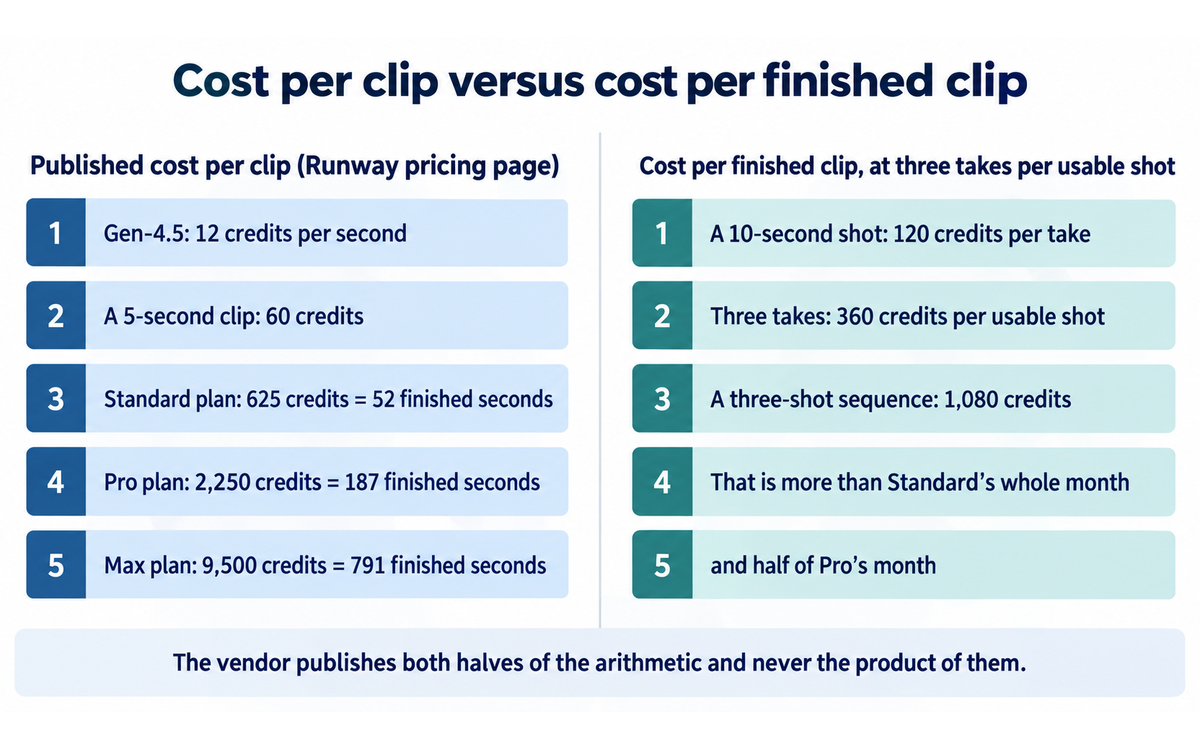
Pricing summary: Four published self-serve tiers plus a quoted enterprise tier, priced in credits. Free is $0 with 125 one-time credits and 5GB of asset storage. Standard is $15 a month or $12 a month billed annually, 625 credits a month, no watermark, 4K upscaling. Pro is $35 or $28, 2,250 credits a month, custom voices for lip sync and text to speech, 500GB of storage. Max is $95 or $76, 9,500 credits a month, one month of credit roll-over, first access to new models, ProRes and image-sequence export, and HDR generation up to 16 bit. Enterprise is quote-only with custom credits, single sign-on, workspace analytics, configurable teamspaces and priority support. Generation is charged per second of output at model-specific rates: the vendor's help centre states 12 credits per second for Gen-4.5, and the developer pricing page lists the same rate for gen4.5, 5 credits per second for gen4_turbo, and 28 credits per second with a 56-credit minimum for aleph2. The published pricing page expresses the same rates per clip, with Gen-4.5 at 60 credits for five seconds. Prices read 2026-09-25 from runwayml.com/pricing, from the vendor help centre, and from the vendor's developer pricing page.
Official links:
Product site: https://runwayml.com/
Pricing: https://runwayml.com/pricing
Terms of Use: https://runwayml.com/terms-of-use
Enterprise Services Terms: https://runway.com/enterprise-terms
Privacy policy: https://runwayml.com/privacy-policy
Usage policy: https://runway.com/safety/usage-policy
Help centre: https://help.runwayml.com/hc/en-us
Gen-4.5 model guide: https://help.runwayml.com/hc/en-us/articles/46974685288467-Creating-with-Gen-4-5
Credits guide: https://help.runwayml.com/hc/en-us/articles/15124877443219-How-do-credits-work
Commercial use answer: https://help.runwayml.com/hc/en-us/articles/21668707517587-Can-I-use-the-content-I-made-in-Runway-for-commercial-purposes
Developer platform: https://dev.runwayml.com/
Developer pricing: https://docs.dev.runwayml.com/guides/pricing/
Aleph 2.0 product page: https://runwayml.com/product/aleph-2
GWM-1 research announcement: https://runway.com/research/introducing-runway-gwm-1
Runway Academy: https://academy.runwayml.com/
Community Discord: https://discord.gg/runwayml
YouTube channel: https://www.youtube.com/@runwayml
X account for the product: https://x.com/runway
X account, second handle: https://x.com/runwayml
System status: https://status.runwayml.com/
Video and creative tool fields:
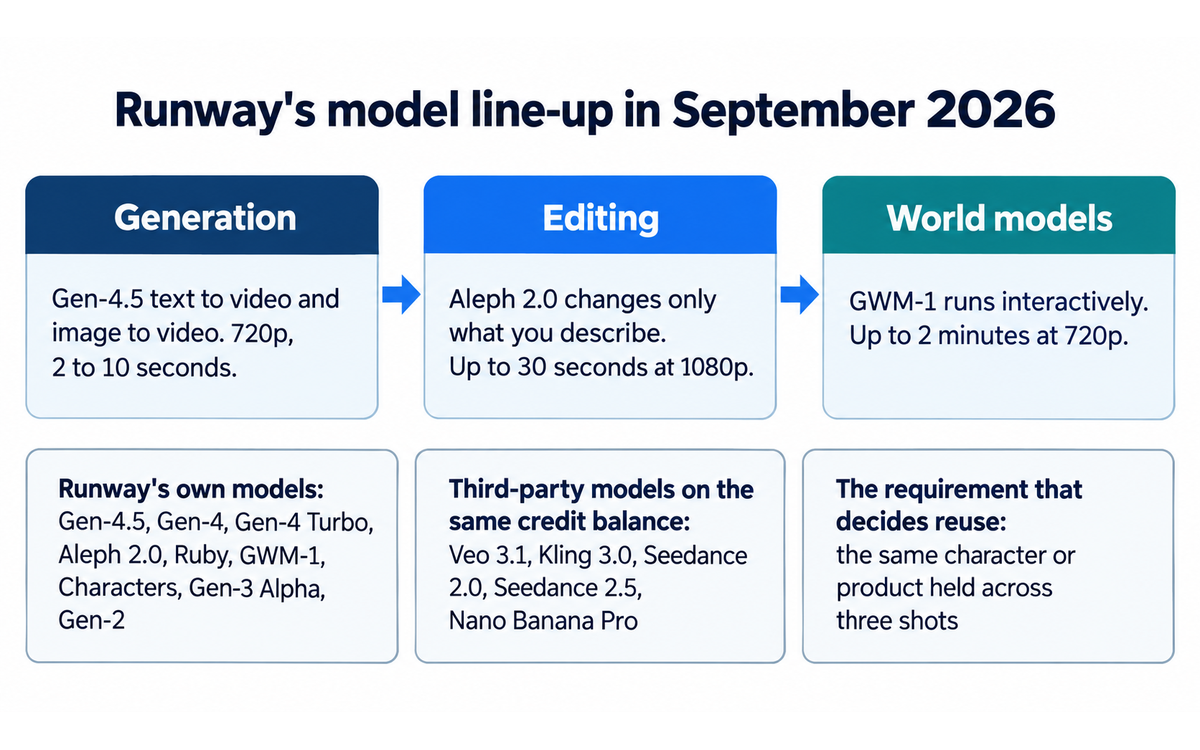
Model line-up as of September 2026, as documented across the vendor's own pages. Runway's own models: Gen-4.5 (text to video and image to video, in-context reference control), Gen-4 and Gen-4 Turbo (image to video), Aleph 2.0 (in-context video editing, up to 30 seconds at 1080p, multi-shot), Ruby (HDR video), GWM-1 (general world model, three variants: GWM Worlds for explorable environments, GWM Avatars for conversational characters, GWM Robotics for robot manipulation), Characters (real-time video agents built on GWM-1), and the legacy Gen-3 Alpha and Gen-2 lines. Third-party models hosted in the same interface and on the same credit balance: Veo 3.1 from Google, Kling 3.0 from Kuaishou, Seedance 2.0 and Seedance 2.5, and Nano Banana Pro for images.
Output formats and technical limits: Gen-4.5 outputs at 720p, 24 or 25 frames per second, with durations from 2 to 10 seconds, and six aspect ratios (16:9 at 1280x720, 9:16, 1:1 at 960x960, 4:3, 3:4 and 21:9 at 1584x672). ProRes and PNG sequence export are available on Max, the legacy Unlimited tier and Enterprise, selected at generation time. HDR generation up to 16 bit is stated on the Max tier. 4K upscaling is available from Standard upward. Aleph 2.0 edits up to 30 seconds at 1080p. GWM-1 generates up to 2 minutes at 720p.
Platform availability: web application, plus a developer API and an MCP surface that runs inside an agent client. The Gen-4.5 model guide states web as the platform for that model.
Creative control surfaces: text prompts, reference images, keyframes, camera terminology documented in the vendor's own prompting guide, first and last frame control, aspect ratio and frame rate selection, and preview-as-image before committing a video edit in Aleph 2.0.
Hosting and delivery: cloud only. No self-hosted or on-premises deployment is offered on the product pages, and the general world models are offered through the developer portal rather than as downloadable weights.
Credit accounting: per second of generated output, model-specific. Credits do not roll over on Standard, Pro and the legacy Unlimited tier, and do roll over for one month on Max.
At a Glance Dashboard
Field | Value |
Category | Applied AI / Video and creative generation, and general world models |
CI-First Benefit Score | 5.0 / 10 (CI-First Positive) |
Sub-scores | Time 6 / Quantity 6 / Quality 5 / Skill 3 |
CI-First Profile | Primary: Co-Worker and Assistant (level 2). Secondary: Co-Creator and Thought Partner (level 1) for the reference-and-edit loop, and Analyst and Tester (level 4) narrowly for output evaluation |
Collaboration Mode | Centaur. Cyborg is not recommended, because the Imposture Risk is Medium and because a shared credit balance is charged per take |
Humics Protection | Humics-Neutral (-1 / +3): Creativity 0, Critical Thinking -1, Social Authenticity 0 |
AI Imposture Risk | Medium overall, with Skill Illusion High, Time Illusion Medium, Quantity Illusion Medium |
Status | Active |
Last tested | 2026-09-25 |
Vendor | Runway AI, Inc., United States. A research company with a creative product line and a robotics and simulation research line |
Framework version applied | CI-First Evaluation Framework v1.2 |
Version reviewed | Runway, as documented at runwayml.com in September 2026 |
Independent measurement | Aggregate preference voting exists (arena leaderboards). No independent measurement of consistency or of generation speed, and the arena readings disagree across surfaces |
The Problem
Video is the most expensive content format a university produces, and the reason is not the camera. It is everything around the camera: someone has to be available, a place has to be available, the light has to cooperate, a second take has to be possible, and the editor has to have the afternoon free. Any one of those failing cancels the shoot, and a cancelled shoot is a lost afternoon rather than a delayed one.
The result is a predictable institutional pattern. The video that would explain a method in ninety seconds does not exist, because the ninety-second video costs the same afternoon as the twenty-minute lecture. The version of a campaign asset in the other aspect ratio does not exist, because the asset was shot for one placement. The localisation does not exist, because the shoot cannot be repeated for one market. Nobody decided against making these; they were priced out by a production model where the minimum unit of work is a shoot.
Two other problems sit on top of that one. The first is the evaluation problem. A reader who has never operated a camera or cut a sequence can look at a generated clip and be unable to say anything useful about it beyond whether it is pleasant. That is the condition in which the Skill Illusion does its work, because the output arrives finished and confident and the reader has no vocabulary for what is wrong with it. The second is the provenance problem. Generated footage has no chain of custody, no location, no release form and no consent, and an institution putting it into published material has taken on a question about what it is showing that a camera never raises.
The Outcome
What changes is the minimum unit of work. A shot that used to require a shoot can be produced from a sentence and a reference image, in minutes, on a laptop, at eleven in the evening. That does not remove the shoot. It moves the shoot to the cases where a shoot is the point, and it makes the eighty per cent of video work that is explanatory, illustrative or derivative possible without one.
The concrete outcomes a reader can hold onto are four.
A shot you could not otherwise have. A drone move over a campus, a laboratory procedure that cannot be filmed safely, a historical scene, a product that does not exist yet. Before this class of tool the answer was to commission it or to write around it. Now it is a prompt, a reference, and a decision about whether the result is good enough.
Variants from one asset. This is the outcome that is easy to underestimate and it is the one where the platform, not the model, is the product. Footage you already shot can be re-cut, re-lit, re-seasoned, re-framed and re-formatted, and an in-context editor that changes only what you asked it to change makes an existing library do work it could not do before.
A first draft that a human finishes. A rough sequence that shows what the piece is, before anyone commits a shoot to it. Storyboard by generation rather than by drawing, and then a decision about whether the live shoot is worth it.
A capability the institution did not have, held at arm's length. This is the outcome the framework exists to interrogate, and it is the one this review is most careful about. The generated shot is a real capability. It is also a capability whose quality the reader may not be able to judge, and a review that reported only the first half of that sentence would be doing the reader a disservice.
Who Should Use Runway
The communications and engagement team producing campaign assets. This is the clearest fit and the largest volume case. One asset becomes every placement, the seasonal and localised versions exist, and the cost of a variant falls from a shoot to a generation. Read Section 7c before sending client or unreleased material through the service.
The faculty member who needs one illustrative shot. A concept that cannot be filmed or that would take a day to film, produced as a short clip that supports a lecture or a written piece. The value here is specific rather than general, and it is realised on the first clip rather than after a habit forms.
The instructional designer building a course. B-roll, transitions, illustrative inserts, and the animated explanation of a process. The 720p ceiling and the ten-second duration limit on the flagship video model are the two constraints that decide whether this works for you, and they are the first thing to test.
The researcher working on simulation and embodied systems. The world-model line is aimed at exactly this reader, and it is a different product from the creative suite with a different access path through the developer portal.
The student or Fellow building a portfolio. A ten-second shot for a showreel, a title sequence, a concept piece. The free tier's 125 one-time credits is roughly one five-second Gen-4.5 clip, so this reader meets the paywall on the second idea rather than the fiftieth.
Who this is not for, stated plainly. A reader who needs a finished, presentable video of more than about ten seconds in a single pass. A reader whose output has to be reproducible frame for frame, for which a generative video model is the wrong instrument. A reader who needs the same character or product to appear identically across a sequence, unless they are prepared to budget the takes that consistency requires. And a reader who needs to self-host, because Runway is a cloud service with no on-premises path.
U365 Institutes Alignment
Institute | Where Runway fits, and where it does not |
UIT (Technology, AI, Data Science) | Low to Medium, corrected down from the drafted Medium. Coursework observation only. The developer API and the MCP surface are a real integration surface a Fellow can work with, and the world-model line is a documented research programme. No credential relevance and no credential chain. The limit that holds the row: the tool produces no system and no code the Fellow is assessed on, the API exercise is a request to an endpoint, and the world-model line publishes no artefact, no architecture and no weights a Fellow could be assessed against. The row would move to Medium if U365 published a programme assessing generative-media pipeline engineering, or if the platform exposed weights or a reproducible evaluation surface a Fellow could be assessed on rather than described. Neither exists on the current record |
UIB (Business Management, Entrepreneurship) | Medium. One competency, and here it is costable: cost judgement in metered production. The vendor publishes the plan price, the credit allowance and the per-second rate, so a Fellow can count their own takes, compute cost per finished clip and defend a decision against it. The review's own credit arithmetic in Real Workflows is the worked example. The limit: the tool teaches no management, finance or entrepreneurship content, and the relevance attaches to the cost and budgeting competency only |
UIC (Digital Communication, Marketing) | High. The institute's production week is multi-format, multi-placement, multi-language short-form output, which is what the editing and variant surfaces are built for. A published U365 programme assesses the craft: Video Production Specialist, through its editing, cutting, transitions and dialogue-editing components. The limit: the tool produces assets, not judgement, and it will produce a competent-looking asset for a Fellow who could not have specified one. The credential attaches to the specification, the edit and the defence, never to the generated file |
UID (Digital Design, UX/UI) | High. Motion, transitions, mood and look development, and visual judgement of generated output. The preview-as-image step is the one surface where the human forms the decision before the machine produces the artefact, which is the previsualisation step the curriculum teaches. Two published programmes assess it: Motion Graphics and VFX Expert and 2D Animation Expert. The teaching case to name here is the consistency test: generate the same subject three times from the same reference image and the same description, place the three side by side, and ask whether they could belong to the same sequence. The limit: producing a look is not the same as being able to specify one, and the product gives no feedback on a rejected take, so the design judgement comes from the curriculum rather than from the tool |
The institute ratings are set out in the table: UIC at High, UID at High and UIB at Medium, UIT at Low to Medium, with no UIT credential chain. One row is recorded as a curriculum gap rather than filled with a plausible programme name.
UIT (Technology, AI, Data Science) carries no credential relevance to this product, and the Low to Medium rating records coursework observation of an integration surface and a documented research line rather than any competency that institute assesses. No institute in this table is rated on what the tool generates. UIC and UID carry relevance because the assessed artefact is the specification and the defence, and UIB carries it for one competency only: cost judgement in metered production. No institute is rated High on the API and MCP surface, and no institute is rated High on the world-model line.
How Runway Works
Runway is a cloud creative platform with a model family behind it, and the models are the product. The workflow has three layers, and understanding which layer does what is what lets you predict what will work.
The generation layer. A text prompt, or a text prompt plus a reference image, produces a video. The flagship model, Gen-4.5, accepts text for text to video and text plus image for image to video, and the vendor documents it as excelling at "understanding and executing complex, sequenced instructions", with camera choreography, scene composition, event timing and atmospheric changes specified inside one prompt. The vendor states that additional input types are coming. Generation is charged per second of output.
The editing layer. Aleph 2.0 is an in-context video editor. You describe a change in plain language, or you edit a single frame, and the model propagates that change through the video while holding the rest of the frame in place. The vendor's own contrast with the rest of the category is specific: "Most AI video editing models change more than you asked. Aleph 2.0 only changes what you asked for and keeps everything else just as it was." It works on clips up to 30 seconds at 1080p and can apply an edit across multiple shots. There is a preview step that renders the proposed edit as an image before you spend the credits on a video generation.
The world-model layer. GWM-1 is an autoregressive model built on top of Gen-4.5 that generates frame by frame, runs in real time, and is controlled interactively with actions rather than with a prompt: camera pose, robot commands, speech. It ships as three separately post-trained models, GWM Worlds for explorable environments, GWM Avatars for conversational characters, and GWM Robotics for robot manipulation, and the vendor states the long-term aim is to unify the domains under a single base model. It generates up to two minutes of video at 720p. Access to fine-tuning runs through the developer portal.
Inputs. Text prompts, reference images, keyframes, existing video for the editing models, camera terminology from the vendor's own prompting guide, and audio for the world models. For the world models, robot pose and speech.
Outputs. Video files at 720p for the flagship generative model, 1080p for the editing model, and HDR up to 16 bit on the highest tier; still images; and on the Max tier and above, ProRes and PNG image sequences. The output format for ProRes and PNG sequences is selected at generation time rather than converted afterwards.
The platform layer, which is the part that is easy to miss. Runway hosts models it did not build, on the same credit balance and in the same interface. The pricing page names Veo 3.1, Kling 3.0, Seedance 2.0, Seedance 2.5 and Nano Banana Pro alongside its own Gen-4.5, Gen-4 Turbo and Aleph. The practical consequence is that choosing Runway is a choice of a place to run several models as well as a choice of model, and the comparison table in Section 10 is therefore about the platform as much as about Gen-4.5.
What the vendor does not disclose. The model architecture, the training data, the parameter counts and the number of generations behind any published figure. Runway publishes research posts about capability and nothing about the composition of the models. For a reader assessing provenance that absence matters, and it is the reason Section 7c exists.
Getting Started with Runway
A fifteen-minute checklist that ends in a real judgement about whether this tool is worth your time. Do not skip step 6, which is the only step that tells you something the vendor's site cannot.
Create the account on the free tier. 125 one-time credits, 5GB of asset storage, and access to a selection of models. Nothing to pay and nothing to cancel.
Read what the free tier includes before you plan around it. The model selection on the free tier can change, and the vendor's help centre says so directly: a model that shows an upgrade prompt is not currently part of the free plan. Do not design a workflow around a model you have not confirmed on your own tier.
Do the arithmetic before your first generation. Gen-4.5 is 12 credits per second. A five-second clip is 60 credits. The free tier's 125 credits is two five-second clips of Gen-4.5 and not much more. Decide in advance what you are spending the two on, because a first session spent exploring is a first session spent.
Generate one clip and read it against four questions. Motion quality, prompt adherence, visual fidelity, and whether anything in the frame is doing something a physical object cannot do. The fourth question is the one the vendor's material cannot answer for you.
Then try the thing that matters for your actual work, not the demo. If you need the same product in a different colour across three shots, test that. If you need a person's face consistent, test that. If you need a clip longer than ten seconds, test the duration limit first, because it decides the answer.
Run the consistency test, which is the one that decides adoption. Generate the same subject three times from the same reference image with the same description of it, then place the three results side by side and ask whether they could belong to the same sequence. Do the same with one subject across two different shots. This is the exercise no vendor surface can run for you and it is the reason this review's Quality sub-score is capped.
Count the takes. Note how many generations each usable clip required and multiply by the credit cost. That number, not the per-clip price, is your cost per finished clip, and it is the number to put in front of whoever approves the budget.
Read the two clauses that decide your legal position before you upload anything you did not make yourself. Section 4.4 of the Terms of Use, on the licence over your inputs and outputs, and the training paragraph. Both are quoted in Section 7c.
Decide which tier matches your actual output volume, using the vendor's own figures. Standard's 625 credits is 52 seconds of Gen-4.5 in a month. Pro's 2,250 is 187 seconds. Max's 9,500 is 791 seconds. Read those as finished seconds only if every take is usable on the first attempt, which on a consistency requirement it will not be.
Real Workflows
Three workflows, each with the credit arithmetic, the verification checklist the framework requires, and the failure mode to watch.
Workflow 1: One campaign asset, every placement
What you are doing. You have one approved creative idea and it has to exist in six aspect ratios, in two languages of on-screen text, and in a seasonal version for the next quarter. Shot conventionally, that is a second shoot.
How it runs. Generate or edit the master asset in Aleph 2.0, describing only the change you want and holding the rest of the frame. Use the preview-as-image step to settle the look before spending on video generations. Then produce the placement variants. Run the language variants through the same editing path rather than regenerating from a prompt, so the subject and the lighting do not move between versions.
The credit arithmetic. Aleph 2.0 is 28 credits per second with a 56-credit minimum per generation on the developer pricing page, so a 5-second edit is 140 credits and a 30-second edit is 840. Gen-4.5 is 12 credits per second, so a 5-second master is 60 credits. On Pro at 2,250 credits a month, a master plus six five-second variant edits is 900 credits, which is 40 per cent of the month for one campaign asset. That is the number to build the campaign plan on.
Failure mode. The edit that changes more than you asked. The vendor's own product page names this as the category's failure, which is a fair signal that it is also theirs on occasion. Check every edited frame you did not ask to change, and not just the element you did.
The verification checklist
☐ Multi-Model Check: run the same change request through a second model in the same Runway interface (Veo 3.1 or Kling 3.0) and compare how much unrequested change each introduces
☐ External Source: check the delivered file against the approved master frame by frame at the points where the change is not expected, and not just at the element you edited
☐ Human Review: the person who approved the original creative checks the variants before they are placed, because a variant is a new asset and not a resize
☐ CI-First Test: can you explain why each variant differs from the master, in one sentence, without the tool? [Y/N]
Workflow 2: A shot you could not otherwise have
What you are doing. You need eight seconds of a thing that cannot be filmed: a process inside a body, a machine that does not exist yet, a view from an altitude you cannot reach, a historical moment. This is the workflow where the tool delivers something genuinely new rather than a faster version of something you already did.
How it runs. Write the prompt the way the vendor's prompting guide teaches, using the documented camera terms rather than invented ones, because the vocabulary is the control surface. Generate at a short duration, judge it, and extend by generating the adjacent shot rather than by asking one generation for a longer piece. Use first and last frame control where the shot has to connect to a neighbouring one.
The credit arithmetic. At 12 credits per second, an eight-second clip is 96 credits. On a realistic three takes per usable clip, which is the honest figure for a shot with any specific visual requirement, that is 288 credits, roughly $3.60 on Standard's effective per-credit rate or $2.30 on Max's. On the API at a flat one cent per credit, 288 credits is $2.88. The per-clip price on the pricing page is the price of the take that worked, not the price of the shot.
Failure mode. The physically impossible detail. Generative video produces a surface that reads as real while the mechanics underneath are wrong, and the wrongness frequently sits in hands, reflections, shadows, text and repeated patterns. On an educational clip, a physically impossible result is the one defect your audience will notice, and it is also the one that undermines the point you were making.
The verification checklist
☐ Multi-Model Check: generate the same shot description on a second video model and compare the physical plausibility of both, since the errors differ between models
☐ External Source: check the content of the shot against a domain source (an anatomy reference, a product drawing, an engineer) rather than against the prompt
☐ Human Review: someone who knows the subject watches the clip specifically for impossible mechanics, not for how it looks
☐ CI-First Test: can you say what the shot shows and why it is accurate, in your own words, without replaying it? [Y/N]
Workflow 3: A character or product that has to hold across a sequence
What you are doing. Three shots, same person or same product, cut together so that the audience reads them as one. This is the workflow this class of tool is worst at, and it is the one most institutional video work actually needs.
How it runs. Establish a single reference image and use image to video rather than text to video for every shot in the sequence, so that the reference is the constant. Keep the description of the subject word for word identical across prompts and change only the description of the action and the environment. Use Aleph 2.0 on an existing shot rather than regenerating a new one wherever the change is a colour, a location detail or a lighting condition. Where the sequence allows, shoot or source the one hard shot conventionally and generate the surrounding ones, because a real reference beats a generated one.
The credit arithmetic, which is the point of the workflow. Three shots of ten seconds each, at three takes per usable shot, is nine generations at 120 credits, so 1,080 credits. On Standard, whose monthly allowance is 625 credits, this workflow does not fit in a month. On Pro it is half the month for one sequence. On Max it is eleven per cent. That arithmetic, not the per-second price, is the adoption decision for anyone producing sequence work, and it is why the Time sub-score in Section 8 is not higher.
Failure mode. Consistency drift. The face, the jacket colour, the product proportions or the background change between shots. Independent practitioner writing describes it as the production problem in AI video, and the vendor's own marketing makes reference control the answer, which is correct as far as it goes: a reference constrains the result, and it does not guarantee it.
The verification checklist
☐ Multi-Model Check: run the same reference image and the same subject description through a second model and compare which one holds the subject more tightly across two shots
☐ External Source: freeze one frame from each shot and compare the subject against the reference image side by side, rather than watching the sequence in motion where the eye forgives movement
☐ Human Review: a colleague who has not seen the reference image watches the cut and says whether the subject is the same one throughout
☐ CI-First Test: can you state what makes the subject recognisable across all three shots, without pointing at the tool? [Y/N]
Strengths, Limits, and AI Imposture Risk
Strengths
A genuine capability at the editing layer rather than the generation layer. Aleph 2.0's proposition, that it changes only what you asked and holds the rest, is the feature that turns an existing library into new assets. It is also the feature with a preview step, which means the vendor has built a way to spend your judgement before you spend your credits, and that is the correct design.
Reference control without fine-tuning. Image to video with a reference means a specific subject, product or look can be pushed into a generation without training a model. The vendor states this in its own terms, and it is the mechanism that makes brand-controlled work possible.
Several vendors' models in one interface on one balance. Veo 3.1, Kling 3.0, Seedance and Nano Banana Pro alongside Runway's own models. For a team that does not want four subscriptions and four billing relationships, this is a real platform benefit, and it also makes the multi-model verification check in every checklist above cheap to run.
The world-model line is a real research programme, not a slide. GWM-1 shipped in December 2025 with three variants, up to two minutes of output, and an action-conditioned interface, and the vendor states plainly that the three are separately post-trained models rather than one unified system. Publishing that limitation is the kind of disclosure a reader should weigh in the vendor's favour.
The platform admits what it does not warrant, in its own contract. Section 10.1 of the Terms of Use states that outputs "may not be unique and similar outputs may be generated for other users". A vendor that puts the uniqueness problem in the contract rather than in a footnote is doing the reader a service, and it is quoted here because it changes what you can claim about a generated asset.
Limits
The flagship model outputs 720p and 2 to 10 seconds. This is the limit that decides most institutional use cases. A 720p ten-second ceiling is a shot, not a piece, and a reader who plans a video around it and discovers the ceiling afterwards has lost the time rather than the money.
Consistency is not solved, and no one has measured how far from solved it is. Reference control constrains a subject; it does not hold it across a sequence. No party publishes a repeatable measurement of character or scene consistency for this model, and the practitioner literature describes drift as the standing production problem. A reader with a sequence requirement has to test it themselves, which is Workflow 3.
Generation is charged per attempt, and the attempt that fails is the common case. Credits are computed per second of output and the vendor's own figures describe an allowance in finished seconds, which assumes the first take is usable. The vendor returns credits for generations that end in an error and does not return them for generations that complete and miss the prompt, which is the failure mode a consistency requirement produces most often. Cost per finished clip is therefore a multiple of cost per clip, and the multiple is the number that decides whether the plan fits.
The claim on the homepage is not supported by the most recent reading available. Runway states that Gen-4.5 is "the world's best video model" and that it is the "world's top-rated video model". Aggregate preference voting from the vendor's own launch period supports a leading position. The most recent public arena reading retrieved for this review, dated 4 September 2026, places Gen-4.5 at rank 21 of 35 participants with an arena rating of about 1,224 over 43,610 votes. The Faculty Note treats this in full, because a reader comparing the homepage with the leaderboard has met the discrepancy already.
No self-hosting, no on-premises, no published architecture. Everything runs in Runway's cloud, and the model composition is not disclosed. For a reader with a data-residency requirement or a provenance requirement, that is the whole answer rather than a detail.
Training on inputs and outputs is a default on the self-serve tiers, not a setting. The Terms of Use grant a perpetual, irrevocable licence for training and improvement, and the enterprise terms are a separate negotiation. A reader who assumes a paid tier means their material is not used has assumed something the contract does not say.
AI Imposture Risk
Trap | Rating | Evidence |
Time Illusion | Medium | The gross saving is the largest in this series and the net saving is much smaller, and there is no published measurement of generation speed to set either against. The vendor publishes throughput figures for its own API tiers, and the one independent speed figure found in this research, an approximately 11.6-second total latency for a 5-to-8-second clip, comes from a vendor-published listicle rather than from a measurement with a methodology. The two constraints the vendor itself documents, 720p and 2 to 10 seconds, mean that anything longer is assembled from several generations, and assembly is human time. The prompting surface is real: the vendor publishes a camera-terms guide and a prompting guide because the prompt is the control interface, and learning it takes an afternoon. Rated Medium rather than High because the single-clip case is genuinely fast and the saving on a first draft is real |
Quantity Illusion | Medium | The platform does increase volume substantially, and it does so in a way that invites an unverified decision, because a generated clip is attractive at a glance. The mechanism is documented rather than inferred: the vendor's own terms warn that outputs "may not be unique and similar outputs may be generated for other users", which means two teams generating the same brief can receive similar assets, and the vendor's own product page names the category failure as a model that changes more than you asked. The variant workflow multiplies output faster than it multiplies review, because a six-placement campaign of edited variants is six assets a human has to look at, and the platform makes producing the seventh nearly free. Rated Medium rather than High because the artefacts are visual and a visual defect is checkable by looking, which is a lower verification bar than a plausible paragraph of prose |
Skill Illusion | High | This is the highest reading in the review and it rests on four documented mechanisms. First, the platform produces the concept as well as the execution: a reader can type a description of something they could not have designed, receive a professional-looking shot, and publish it without ever having formed the visual judgement the shot represents. Second, the vocabulary gap is real and the vendor's own documentation is evidence of it: the prompting guides exist because terms like the camera and lens language are the control surface, and a reader who does not know them is operating a control panel without labels. Third, the finished-object effect: video is a format audiences and colleagues treat as authoritative, so a generated clip carries the weight of a produced asset whether or not it deserves it, and the person who generated it receives the credit for a craft they did not exercise. Fourth, the professional displacement is visible in the market rather than theoretical, with practitioner writing describing production roles adjusting around generated footage in exactly the period covered by this review. The framework's mitigation is available and cheap, and it is the reason the Humics reading is not worse: learn the camera vocabulary from the vendor's own guide, keep the reference and the prompt as an artefact you can explain, and run the consistency test rather than accepting the first attractive result |
Overall AI Imposture Risk: Medium. One trap is High and two are Medium, and the two Mediums have documented mitigations. Framework Section 5.3 places this at Medium on the reading that one High trap with clear mitigations and no second High does not reach the High band, and the mitigation for the Skill Illusion is the one the framework itself names, which is to use the tool as a Coach and Tutor for the vocabulary rather than only as an Assistive generator.
Framework v1.2 clause note
Three clauses apply to this framework version. Each is stated here as either applying or as a null, with the mechanism that produced the outcome.
Clause 5.2.3-a, agent-authored procedural memory: null. The clause sets a Skill Illusion floor for any tool that creates or revises the user's skills, memory stores or standing instructions. Runway generates video, images and world-model output. It writes no skill file, no memory store and no standing instruction for the user, and the platform carries no persistent agent that acts on the user's behalf between sessions. The mechanism that would trigger the clause is absent, so the clause returns a null and does not set a floor. The Skill Illusion rating of High in this review is URC's own judgement under Section 5.2.3 and not a clause outcome.
Clause 4.2-a, agent-mediated conversation: null, and the reason is the scope of the clause. The clause governs the composition of a working channel that contains named agents, and it sets out when such a channel erodes Social Authenticity: it does not, unless agent-authored text is presented as the person's own voice in a human-facing channel, or the person substitutes agent interaction for human contact. Runway is a video and image generation product. It produces no conversational channel between the user and other humans, it writes no message in anyone's voice, and the multi-party surface it does have, the Discord community and the collaborator features inside a workspace, is a normal product community rather than an agent-mediated room. The clause's subject matter is absent here, and the Social Authenticity rating of Neutral follows from the product's own scope rather than from the clause.
Clause 7.5, team-level rooms: null. The clause covers a channel shared by several named agents and their human, and it requires a profile per agent and Centaur mode, with Cyborg unavailable. Runway hosts several models in one interface. That is several generation models available to one user, not several agents sharing one channel and coordinating with each other: the user issues each request, no model has a standing role, and no output of one model is an instruction to another. The mechanism the clause describes is a room with named agents and an owner, and this product does not have one. The Collaboration Mode in Section 8 is therefore derived from the Imposture Risk rule in Section 7.2 rather than from clause 7.5.
One consequence for the reader. Because 5.2.3-a returns a null, the Skill sub-score of 3 is a judgement rather than a floor. The framework permits a lower score when the clause does not apply, and this review has taken that permission, which is why Skill sits below the rest of the series at a level the clause would not have allowed if the product wrote memory on the user's behalf.
Section 7c: Training on your material, the licence over your outputs, and the credit arithmetic behind the marketing, stated plainly
This section carries a finding built from Runway's own published documents. The framing is the one this series uses: an allegation is distinguished from a finding, the operative text is quoted rather than paraphrased, no sub-score changes, and the section closes with what it does not do.
The finding, and it is a finding rather than an allegation, because the document is the vendor's own contract. Runway's Terms of Use, last updated 15 September 2026, contains two clauses that decide whether an institution can put its own footage through this service. Section 4.4 states, verbatim:
"You acknowledge that Inputs and Outputs may be used by the Company to train and improve its AI models, algorithms and related technology, products and services (including for labeling, classification, content moderation and model training purposes). As such, you hereby grant to the Company a non-exclusive, irrevocable, perpetual, worldwide, royalty-free, fully paid, transferable, sublicensable right and license to use any Inputs and Outputs Made Available by you or otherwise generated in connection with your use of the Services at any point, in connection with the purposes described above."
The same clause also carries the ownership position, which is the vendor's answer to the most common question about the product:
"The Company does not claim ownership of any of your Inputs or Outputs. Subject to your compliance with the Agreement, the Company does not restrict your commercial use of your Outputs."
Read separately, the first sentence reads as a clean position and the second reads as a grant. Read together they answer two different questions, and the distinction is the one a reader has to carry into an adoption decision. You own your outputs, and you can use them commercially. You have also granted Runway a perpetual, irrevocable, worldwide, sublicensable licence over both your inputs and your outputs for training and for labelling, classification and content moderation, and the grant is not revocable. There is no clause in the self-serve Terms of Use that lets you withdraw it, and no self-serve setting reported on the vendor's surfaces that turns it off.
The second finding, and it is the practical one. The licence attaches to your inputs as well as to what you generate. The clause says "any Inputs and Outputs Made Available by you", and Inputs in this agreement are defined in the same section as the material you submit. In the ordinary case that is a text prompt, which is uninteresting. In the case that matters it is the footage, stills or product imagery an institution uploads to edit or animate, which is exactly what the platform's editing and reference workflows require you to do. A university sending unreleased campaign footage, an unpublished product photograph, or footage containing identifiable people through Aleph 2.0 or image to video is granting a perpetual licence over that material in the act of uploading it. The enterprise terms are a separate document at a separate address, and the practical route for an institutional reader is therefore an enterprise order rather than a self-serve seat.
The third finding, and it is the one a buyer meets first. The credit model and the marketing on the same surfaces describe different quantities. The pricing page sells a plan in finished seconds of output: Standard's 625 credits is stated as 52 seconds of Gen-4.5, Pro's 2,250 as 187 seconds, Max's 9,500 as 791 seconds. The model guide states the cost as 12 credits per second. Both are correct and both describe the take that worked. The three workflows in Section 6 show what the same allowance means once a consistency requirement is in play: a three-shot sequence at three takes per shot is 1,080 credits, which is more than Standard's entire month and half of Pro's. The number a reader needs is cost per finished clip, and the vendor publishes cost per clip. That is a marketing presentation choice rather than a term, and it is recorded here because the gap between the two numbers is where a budget goes wrong.
What is alleged elsewhere and is not asserted here. Independent legal analyses of the same terms, published in March 2026, describe Runway's free tier as personal and non-commercial only. The vendor's own help centre article on commercial use states the opposite: "Yes, the content you create using Runway is yours to use without any non-commercial restrictions from us." The two readings cannot both describe the current position, this review has not resolved which is correct, and a reader on the free tier is therefore advised to establish the position in writing before using free-tier output commercially. This is a discrepancy between a third-party reading and the vendor's own answer, reported as a discrepancy.
No sub-score changed, and the reason is methodology rather than approval. The CI-First framework's four dimensions measure benefit to the human: time saved, volume produced, quality produced, capability gained. It contains no dimension for contract terms, licensing or data governance, and applying a penalty to Time or Quality for a clause would be measuring one thing and reporting another. That is why the score in this review is identical to what it would be if this section did not exist, and it is stated explicitly so that a reader seeing an unchanged score next to a licensing finding does not read the finding as discounted. The clause is instead handled the way it should be: as a decision this section puts in front of the reader, in the re-check triggers, and in the guidance on which tier to buy.
What this section does not do. It does not assert that Runway does anything unlawful with the material it receives, and nothing here suggests it does. It does not advise against using the product: a perpetual training licence is a common term across this category of tool and Runway discloses it in its own contract rather than burying it. It does not resolve the free-tier commercial-use discrepancy, because doing so would require a legal reading that belongs to the reader's own adviser and not to a tool review. And it does not convert a contract term into a score, for the methodological reason given above.
U365 Co-Intelligence Rating
CI-First Profile
Primary profile: Co-Worker and Assistant (level 2).
Secondary profile(s): Co-Creator and Thought Partner (level 1), because the reference-and-edit loop is genuinely collaborative in a way the generate-from-a-prompt loop is not: you bring the footage, the subject and the intent, the model proposes a change, you judge it against your own material, and you iterate on your own asset rather than on the model's invention. Analyst and Tester (level 4), narrowly, for the reader who uses the multi-model surface to compare the same brief across four providers, which is a testing behaviour with an observable method.
Why level 2 and not level 1 as the primary. Assigning level 1 as the primary would mean the tool's main mode is building on your thinking with you. It is not. The main mode is: you state what you want, the generation arrives, and you accept, reject or re-prompt. That is delegation with review, which the framework places at level 2. The same reasoning placed Klarent, Rabbit OS3, MiMo-V2.6-Pro and Claude Opus 5.5 at level 2, and it is recorded here so this series reads consistently.
Why level 1 is a real secondary rather than a courtesy. The framework's test for level 1 is that the human and AI build on each other's thinking. In the editing workflow that is what happens, and the mechanism is the reference: because the model is constrained by an asset you own and can only change what you describe, the iteration loop runs on your material and your intent. A reader whose work is predominantly editing and reformatting rather than generating will experience this tool as level 1, and the profile is recorded that way.
What does not fit. Coach and Tutor (level 3) is not a profile here. The vendor publishes genuine teaching material, including a camera-terms guide and a prompting guide, and a reader who studies them gains a real vocabulary. That is documentation, not a tool that teaches while producing: the product does not explain why a prompt produced a result, and it does not offer feedback on your direction. Challenger and Devil's Advocate (level 5) is absent for the same reason it is absent in most of this series: nothing in the product argues against your brief.
Collaboration Mode
Recommended mode: Centaur.
Alternative mode: None recommended. Cyborg is not recommended for this tool.
Mode rationale: Two independent grounds, and both belong on the record. Framework Section 7.2 assigns Centaur when the Imposture Risk is Medium or High, which it is here, and it states directly that Centaur mode is safer in that case. The independent ground is specific to this tool and it is a cost argument rather than a caution: Cyborg mode is continuous co-creation inside a fast iteration loop, and on this product the iteration loop is metered. Every refinement is a generation, every generation is charged per second, and the stopping criterion that Cyborg depends on is not a judgement about when the work is good but a judgement about when the work is good enough to stop paying. That makes the boundary not merely advisable but budgetarily mandatory: decide what "finished" means before you start generating, because in Cyborg mode the tool's own design invites you to keep going and the invoice grows with the invitation. The Centaur division of labour here is: you own the brief, the references, the selection and the final judgement; the platform owns producing takes and applying described changes. Keep the reference image and the prompt as artefacts you can explain afterwards, and run the consistency test in Section 5 rather than trusting the first attractive result.
CI-First Benefit Score
Dimension | Score (0-10) | Rationale |
Time | 6 | Moderate savings on the common case and much smaller savings on the case that needs consistency, which is the case institutional work usually has. The gross saving is the largest in this series: a shot that needed a shoot now needs a prompt and a reference. Three things hold it below 7. Generation is metered per second and per attempt, so the retry loop that a specific visual requirement produces is paid time in both senses. The two documented limits on the flagship model, 720p and 2 to 10 seconds, mean anything longer is assembled from several generations and the assembly is human work. And prompting is a learned surface, not a natural one: the vendor publishes a camera-terms guide and a prompting guide because those terms are the control panel, which is an afternoon of learning before the tool is fast. Held at 6 rather than lower because the first-draft case is genuinely fast, and a rough shot that used to be impossible now takes minutes |
Quantity | 6 | Moderate increase, with the platform doing work the model does not. One approved asset becomes six placements, two languages and a seasonal variant, which is a real multiplier rather than a faster version of one output. The platform layer adds a second multiplier that is easy to overlook: because Veo 3.1, Kling 3.0, Seedance and Nano Banana Pro run in the same interface, the same brief can be produced several ways without several subscriptions. Held below 7 because the framework scores verified and usable output, and the review cost scales with the output: six edited variants are six assets a person has to look at, and the platform makes the seventh nearly free while making looking at it no cheaper. Independent practitioner writing records the same asymmetry in the category, and the vendor's own contract warning that similar outputs may be generated for other users is a reminder that volume is not distinctiveness |
Quality | 5 | Moderate improvement on a first pass, capped by the absence of any measurement of the thing that decides whether output is usable. The genuine quality mechanisms are documented: reference-image conditioning constrains the subject, the editing model is built to change only what you asked, the preview-as-image step lets you judge a look before committing, and the platform's own terms warn that outputs may not be unique, which is honest. Three things cap the score. First, no party, vendor or independent, publishes a repeatable measurement of character or scene consistency, and consistency is the requirement that decides whether a generated shot belongs in a sequence. Second, the aggregate preference voting that does exist is not a specification: an arena rating is a preference among outputs shown side by side, which does not tell a reader whether a specific subject will hold across three shots. Third, the arena readings disagree with each other and with the vendor's homepage, so the one independent signal available gives two different verdicts on the same model a few months apart. This sub-score is held down for the absence of measurement rather than for measured weakness, and the absence is the reason. 5 is CI-First Positive in the overall band and a real recommendation; it is a statement about evidence, not about the model |
Skill | 3 | Marginal benefit, scored conservatively as the framework directs for its highest-risk dimension. There is a real learning surface and it is better than most in this category, because the vendor teaches the vocabulary that controls the tool: camera terms, lens language, prompt structure and frame control are documented and are the actual interface. A reader who studies those guides and iterates deliberately does acquire transferable visual vocabulary. Against that, the product's central proposition is that a description produces a professional-looking shot without the reader having any of the craft the shot implies. A reader gains vocabulary and loses the feedback loop that would have taught judgement, because the tool never tells them what was wrong with the take they rejected. Clause 5.2.3-a returns a null here, so 3 is URC's judgement and not a floor the framework would have prevented |
CI-First Benefit Score: (6 + 6 + 5 + 3) / 4 = 5.0 / 10 (CI-First Positive)
Why this score is not higher, and why it is not lower
5.0 is CI-First Positive: a real net benefit, a genuine recommendation for the reader it fits, and the low end of what this series records for a tool with this much capability. The band label matters and it should be read with the score rather than instead of it.
The score is not higher for one reason, and it is the same reason in the Quality and Skill dimensions. This is a tool whose output a reader can produce without the ability to judge it, and whose cost is charged per attempt rather than per usable result. Those two facts compound: the reader who most needs to check the output is the reader least equipped to, and every check is another generation. The framework's Time dimension is scored net of overhead, and on the consistency case the overhead is a multiple of the base cost rather than a rounding error. A score in the Strong band would be a claim about usable output and about consistency that no measurement supports, and the one independent signal available, arena preference voting, is not a consistency measurement and does not agree with itself across two readings.
The score is not lower because the capability is real and it does not go away when you look at it. A shot that could not be filmed now exists in eight seconds for under a dollar of credits at Max's effective rate. An existing library becomes new assets through an editing model purpose-built to change one thing. The platform runs four vendors' models on one balance, which changes the cost of comparison. The world-model line is a substantive research programme with a published limitation. And the vendor's documentation is unusually good at the one thing that matters for Skill, which is teaching the vocabulary that operates the tool. Time 6 and Quantity 6 are middle-of-band scores that describe a real capability.
The two dimensions that cap the total are the two the review turns on. Quality is held at 5 for the absence of any measurement of consistency and for the disagreement between the arena readings. Skill is held at 3 because the product's ease is the mechanism of substitution: the reader who gains the vocabulary gains it from the documentation, and the reader who does not will still get a professional-looking video.
Humics Protection Badge
Dimension | Rating | Rationale |
Creativity | Neutral (0) | Two opposing effects and they net to zero, which is worth stating rather than hiding behind the badge. The editing layer protects creativity and it is the part of the product that does so most clearly: a fast iteration loop over your own footage keeps you in the originating seat, because the asset, the subject and the intent are yours and the model can only change what you describe. That is the pattern the framework calls protection. The generation layer erodes it: asking for the concept and receiving a finished shot removes the step where a person forms, discards and refines a visual idea, and a tool that produces professional-looking output on request removes the pressure that makes people develop that step. For a reader whose work is predominantly editing and reformatting the net is protection, and for a reader whose work is predominantly text-to-video the net is erosion. The framework asks for the common case, which here is a mix, and the honest reading of a mix is Neutral rather than a rating that flatters one half of the product |
Critical Thinking | Erodes (-1) | Two documented mechanisms. First, the tool removes the feedback that trains visual judgement. When a person shoots or edits conventionally, every rejected take teaches something about why it was rejected, because the reason is visible in the material. A generative tool returns an output with no account of what it did, so the reason a take failed is not recoverable from the take, and the reader is left with accept or re-prompt. Second, the output's authority exceeds its provenance: video is a format audiences treat as produced, the vendor's own terms warn that similar outputs may be generated for other users, and a reader who does not know that an asset may be near-identical to a stranger's can present it as their own invention. The mitigation is cheap and available and it is why this is -1 rather than a worse reading: learn the documented camera and prompt vocabulary, keep the reference and the prompt as artefacts you can explain, check the impossible detail in every take, and never present generated footage as documentary |
Social Authenticity | Neutral (0) | The product touches no human-facing communication. It generates video assets and it writes no message, no email and no post in anyone's name. Where a person appears on camera in generated footage, the authenticity question is real and it is a different question from this dimension's: that is a consent and a truthfulness matter about what is shown, assessed in the Limits and in the guidance below, rather than the erosion of the user's own communicative voice that this dimension measures. Framework clause 4.2-a returns a null here, and the reason is the clause's scope rather than a gap in the check: the clause governs agent-mediated conversation channels, and this product has none. The neutral rating follows from the product's own scope |
Humics Protection Score: 0 + (-1) + 0 = -1 / +3 Badge: Humics-Neutral
The badge should be read with its reason attached rather than as a verdict on Runway. The erosion sits in one place, and it is the place no generative media tool can avoid: it removes the feedback that teaches the judgement its own output requires. Everything else about the tool is neutral on the Humics rather than hostile to them, and the editing workflow is a genuine protection of the reader's own creative direction, which is a stronger Creativity reading than most of this series records. Humics-Neutral describes a tool that neither strengthens nor weakens you on its own, and the whole point of the Co-Intelligence framework is that you decide which of the two it becomes.
Superhuman Usage Guidance
When to invite this tool:
A shot you could not otherwise have: a place you cannot reach, a process you cannot film, a thing that does not exist yet. The return here is a capability rather than a saving.
Editing footage you already own. This is the workflow where the tool is closest to level 1 and where the reference constrains the model to your material rather than to its own invention, and it is the workflow to build the habit around.
Producing variants of an approved asset: aspect ratios, placements, seasonal and localised versions, where the creative decision is already made and the work is reproduction.
A first draft of a sequence, to settle whether a shoot is worth commissioning. Cheap, fast, and it produces a decision, which is the highest-value output a generative tool produces.
Storyboarding and look development, where you are testing a direction rather than producing a deliverable, and where a rejected generation still taught you something.
Comparing several models on one brief, using the multi-vendor surface as a testing instrument rather than as a production line.
When to keep this tool out:
Anything that needs the same person, product or place to appear identically across several shots, until you have run the consistency test in Section 5 on your own case and counted the takes it required.
Any footage you are not authorised to send to a third-party cloud service, and any material whose licence position you have not read against Section 7c. This is a legal and security question before it is a creative one.
Anything that must be accurate as documentary record. A generated shot is an illustration of an idea, and presenting it as footage of an event is a truthfulness failure regardless of how good it is.
Published material where a physically impossible detail would undermine the point, unless someone with subject knowledge watches the clip specifically for that.
Any workflow where a person's identity is being reproduced, without a written permission position, because the usage policy restricts likeness and impersonation and the platform's safeguards are not a consent mechanism.
The last step of a decision that matters. Generation is for material, not for judgement, and the framework's executive safeguard applies here as it does everywhere: the reader stays in the orchestrator seat.
U365 method integration:
LIPS + CARE: put generated assets into your Life-Interests-Projects-System with their prompt and reference attached, not as loose files. The prompt and the reference image are the record of what produced the asset, and they are what makes the asset reproducible, revisable and explainable later. In the CARE cycle this belongs to Collect and Review: collect the artefacts with the output, and review generated assets against the brief rather than against each other.
ULM + EVA: relevant to Career and Quality of Life, in the sense that the hours a shoot consumed return to the work that needed the video. Relevant to Character in one specific way: a person who publishes generated footage without saying so has made a small decision about honesty that is entirely theirs to make, and the ULM frame is that it is made deliberately rather than by default.
UP-Context: the prompting method is not optional on this product, because the prompt is the entire control surface and the vendor's own guides teach the same lesson from the other direction. Use the full method: context, profile, audience, task, then the constraints and the output format. The constraints line is the one that does the most work here, because "do not change the background, do not alter the subject's age, keep the product proportions" is what stops a generation drifting into something you did not ask for.
SL-OS: a partial fit. There is no Microsoft 365 integration to speak of beyond the general web platform, and the product is a cloud service with no on-premises path, so the SL-OS connection is a workflow connection rather than an integration: keep the assets, the prompts and the approvals in your own governed storage, and treat Runway as a production step inside a process you control rather than as a place where your material lives. For a Microsoft-centred institution that is the practical arrangement.
UNOP: no direct fit as a product. One indirect fit that is worth naming, because it converts the tool's weakness into a learning task: the retrieval practice the framework favours applies to the camera vocabulary. Learn the terms from the vendor's guide, then describe a shot in writing before generating it, then compare what you described with what you got. That sequence teaches visual specification, and it is the exercise that moves the Skill reading up if it is done deliberately.
Over-delegation warning. Two failure modes, and the second is specific to this tool.
The general one is that the tool's ease is the risk. A description costs nothing to write, the output is attractive on arrival, and the platform will produce a professional-looking asset for someone who could not have specified one. The formula does its usual work: if the human term falls while the artificial term rises, the product falls, and what falls is the reader's ability to say why a piece of video is good. The counter is the discipline this review keeps returning to, which is to write the prompt as an artefact you can defend and to keep the reference.
The specific one is the cost illusion, and it is the reason this review's Time and Quality reasoning is where it is. Runway's own pricing is expressed in finished seconds and its own model guide is expressed in credits per second, and the difference between those two expressions is the number of times you have to generate before you get something usable. On a simple shot that difference is small and the tool is fast. On anything with a consistency requirement it is a multiple, and the multiple is what turns a modest monthly plan into an inadequate one. A reader who budgets from the plan's stated seconds and manages by the plan's remaining credits will discover the difference when the campaign is half-produced rather than when the plan was chosen. Count the takes on your own first real workflow, and build the budget from that number.
What Users Say
Runway is unusual in this series because there is a real independent review corpus and it disagrees with itself, which is a more useful finding than either a clean average or an absence.
Aggregate Rating Table
Platform | Rating | Number of reviews | Link |
G2 | 4.0 / 5, per a third-party directory that aggregates the platform rather than per the platform page itself. Two directories report the same 4.0 figure against different review counts, 17 and 21 | 17 to 21, reported inconsistently across the aggregators | |
Trustpilot, the product domain | 3.0 / 5 TrustScore, described on the page as 2.8 average from 5 reviews | 5 | |
Trustpilot, the main domain | A larger corpus exists, in which the dominant complaint theme is credit consumption against perceived quality. This platform publishes no score or count that a reader can verify, so none is quoted | Not published | |
Gartner's peer review platform | 4.4 / 5 | 8 ratings | |
Capterra | 4.5 / 5 on the Gen-2 product entry | 2 | |
SoftwareReviews | 8.0 / 10 | 18 | |
SoftwareAdvice and GetApp | Averages reported by aggregators in the 4.4 to 4.6 range across small counts; neither platform publishes a count that a reader can verify | Small, counts not published | |
Google Play, the mobile app | 4.14 / 5, reported by a directory that aggregates mobile store ratings | 2,500, per the aggregating directory | |
Tooliverse | 8.31 / 10, stated as based on over 4,000 verified reviews across five platforms; individual platform counts on the same page do not reconcile with that total | Aggregated, unreconciled |
Three honest notes on that table. First, the counts are small on every business-software platform, which is the normal pattern for a creative tool sold to individuals and teams rather than to procurement: the corpus that exists is consumer-facing and it is on Trustpilot and the app stores, not on the platforms an IT buyer checks. Second, the ratings span a wide range for the same product at the same time, from 3.0 out of 5 on the product-domain Trustpilot page to 4.5 out of 5 on Capterra, and no aggregation of those numbers would be meaningful. Read them as evidence that satisfaction is polarised rather than as an average. Third, two platforms publish no score that a reader can verify, G2 and Trustpilot's main domain, and they are reported here as unread rather than counted either way, with the figures attributed to the directories that report them and not presented as readings from the platform pages.
What Users Praise
The praise is consistent across sources and it is about capability rather than about support or price. The recurring themes:
Image to video quality specifically. This is the single most repeated positive across independent review writing: that a still image plus a description produces motion that holds together, and that the model is among the strongest at that specific task.
Motion quality and prompt adherence on the flagship model. Reviewers who compare models directly describe complex sequential instructions being followed, and camera movement being believable inside a single scene.
Speed relative to the alternatives. Several comparisons describe Runway as faster than the competing frontier video models at the time of writing, and one comparison reports roughly forty seconds per five-second clip against several minutes for a named competitor. That figure comes from a vendor-authored comparison and has no published methodology, so it is reported as a claim rather than as a measurement.
The editing model's restraint. The specific complaint about the category, that an editing model changes more than you asked, is also the reason Aleph 2.0 gets praised: reviewers report an edit that leaves the untouched parts of the frame alone.
The variety of models in one place, for readers who do not want four subscriptions.
What Users Complain About
The complaints are equally consistent, and they are about cost and about consistency rather than about capability.
Credits consumed against perceived quality. This is the dominant complaint theme on the consumer-facing corpus, and it is the same structural issue this review's Section 7c records: a credit balance charged per attempt, where the attempts that miss are the common case for anything with a specific visual requirement. A reader who meets the complaint on Trustpilot is meeting the vendor's own pricing model rather than a defect.
Consistency drift across shots. Independent practitioner writing describes character drift as the standing production problem in AI video and recommends reference-image workflows as the mitigation, which is the same conclusion as Workflow 3 in this review.
Duration and resolution ceilings. The two-to-ten-second and 720p limits on the flagship model are reported repeatedly by reviewers who expected a longer or sharper output, and the limits are documented by the vendor in the model guide rather than hidden.
Queue behaviour on the highest tiers. One independent review reports queues of five to ten minutes or more per generation during peak hours on the plan marketed for heavy usage. This is a single source and it is reported as such rather than as a pattern.
Support. One independent review describes support as chatbot-only with long response times. This is a single source, reported as such, and it is the opposite of the vendor's stated priority support on the enterprise tier, which is a separate commercial arrangement.
Sentiment Summary
Overall sentiment: Mixed and polarised, with a clear split between what the tool can do and what it costs to make it do it.
Key themes:
Capability is broadly praised and consistently so across independent sources: image to video quality, motion quality and prompt adherence on the flagship model, and the restraint of the editing model.
Cost is the dominant complaint and the complaint is structural rather than a defect: credits are charged per attempt, the plans are sold in finished seconds, and the number of attempts a specific requirement needs is the gap between the two.
Consistency is the standing technical limit named by practitioners independently of any vendor, and it is the same limit this review's Quality sub-score is capped by.
The satisfaction spread is wide for one product at one time, which means the honest summary is that this tool suits some workflows very well and others not at all, and the review's job is to say which.
No complaint theme in the corpus is about the tool's core claim. Nobody argues that the outputs are not impressive; the arguments are about what it costs to get an output that survives a requirement.
U365 Editorial Note
The crowd and the framework agree here, and the agreement is unusually specific.
Where they agree most usefully: both put the tool's real value in capability and both put its real cost in attempts. The framework reaches that through the Time and Quantity dimensions, which are scored net of the retry loop, and the crowd reaches it through the credit complaint, which is the retry loop expressed as an invoice. The conclusion is identical, and it is the most reliable thing this review can report, because two independent routes arrived at it.
Where the crowd is more useful than the framework can be: the crowd is measuring something the framework cannot, which is the lived experience of the cost model. A Trustpilot complaint about credits is not a data point the framework has a dimension for, and a reader deciding between two tools should weigh it, because it describes the shape of the working week rather than the shape of the output.
Where the framework is more useful than the crowd: the crowd has no way to report an absence. The complaint corpus contains no measurement of consistency, because none exists, and a reader scanning reviews would find people mentioning drift as an anecdote rather than a specification. The review's Quality sub-score of 5 exists to make that absence visible, and the band label next to it, CI-First Positive, exists so that the absence is not read as a bad product. This is the case where the framework's most conservative reading and the crowd's most enthusiastic reading are both correct and describe different things.
The divergence that matters most for a U365 reader, and it is the one no directory listing raises: none of the review platforms treats the training licence as a review subject. A reader comparing Runway with three alternatives on G2 or Trustpilot is comparing them on usability and cost, and the clause in Section 7c, which decides whether an institution can send its own footage through the service at all, appears in none of those comparisons. It is disclosed in the vendor's own contract and it is the reason this review has a Section 7c, because the question a university asks about a creative tool is not the question a freelancer asks.
Comparison and Alternatives
Alternative | "Choose the alternative if..." | "Choose Runway if..." |
Google Veo (https://deepmind.google/models/veo/) | You want the model from the vendor whose distribution you already use, and you value the integration with a workspace you may already pay for. Veo is available inside Google's own products and, notably, also inside Runway's interface on Runway's credit balance, so a reader can test both models in one place without choosing yet | You want several vendors' models in one interface. This is the clearest platform-level reason to choose Runway over any single-model competitor, and it is a comparison decision rather than a model decision |
Kling (https://klingai.com/) | You need longer single-pass clips or a different balance of motion and realism, and independent arena readings place it at or above the flagship on some categories. Kling 3.0 is also hosted inside Runway, which makes it a testing instrument before it is an alternative | You want Runway's editing model, because Aleph 2.0's proposition of changing only what you asked is the specific capability this review rates highest in the product, and it is not what the competing platforms are built around |
OpenAI Sora (https://openai.com/sora) | You are already inside the vendor's subscription and want video generation bundled rather than priced per second, and you want the model with the strongest narrative ambition in the category | You are producing in a metered workflow where cost is accountable to a project, you need the editing path over existing footage, or you need the API rather than a consumer product |
Adobe Firefly video (https://firefly.adobe.com/) | Provenance, indemnification and existing workflow integration are the deciding factors rather than raw capability. This is the alternative to reach for when the reader's organisation already runs on Adobe's tools and values a licensing position over generation quality, and it is the honest answer for a team that will not accept a training licence over its own footage | Raw generation quality, the reference and editing workflow, and the multi-vendor surface are what you are buying, and you have taken a position on Section 7c |
An open-weights video model run on your own hardware (for example, an open video model served through a local inference stack) | Data never leaving your infrastructure is a hard requirement, or you need the model weights for research, or the cost model has to be capital rather than per-second. The trade is real: you take on the hardware, the inference engineering and a model that trails the frontier, and in exchange you keep the material | You need frontier capability, a metered cost you can pass to a project rather than a capital purchase, and a maintained product rather than an inference stack you operate yourself |
A conventional production route: shoot it, or license stock | The shot needs to be true. A stock clip of a real place is evidence, and a generated clip of the same place is an illustration of it, and for institutional material that difference is sometimes the whole point rather than a technicality | The shot cannot be filmed, cannot be licensed, or would cost more than the deliverable is worth, and the reader is prepared to label generated material as generated |
Where Runway is clearly better. Two things, and both are platform-level rather than model-level. First, the multi-vendor surface: four providers' models on one credit balance in one interface changes the cost of comparison, and the multi-model verification check that this review puts in every workflow checklist is genuinely cheap here in a way it is not anywhere else. Second, the editing path over existing footage: Aleph 2.0 is built specifically to change what you asked and hold what you did not, with a preview step before you commit credits, and no other product in this comparison is organised around that problem.
Where Runway is clearly worse. Provenance and licence position against Adobe, because the perpetual training licence in Section 7c is a term the reader has to accept rather than negotiate on a self-serve tier. Long-form output against Kling, where a single-pass duration ceiling of ten seconds on the flagship model is the constraint that decides whole categories of work. Data control against any self-hosted route, without qualification. And price predictability against anything bundled into a subscription the reader already pays for, because Runway's cost scales with the number of attempts and the attempts scale with how specific the requirement is. A reader whose requirement is one accurate shot a week is well served here. A reader whose requirement is a ten-minute piece with a consistent presenter is not, and no tier of this product changes that.
Verdict and Next Steps
Who should adopt it: A communications, engagement or design function producing high volumes of short-form video assets, at an organisation that has read Section 7c and taken a position on it, and that is prepared to count takes rather than budget from the plan's stated seconds. The second good fit is a research or instructional reader who needs a specific shot that cannot be produced any other way, and who is not asking the tool for a sequence.
When: The evaluation can start today on the free tier, and it should, because the consistency test in Section 5 is the only exercise that answers the question this review cannot answer for you. Do not upgrade a tier until you have counted the takes your own real workflow required. Adoption of a paid tier should follow three things: a written position on the training licence over your inputs, a named person who checks each generated asset for the impossible detail before it is published, and a decision about whether the tool is a production step inside your process or a place where your material lives.
For what: Short shots from text or an image, edits and variants of footage you already own, and first drafts that inform a decision about whether to commission a shoot. The task to avoid is asking this class of tool for a consistent sequence of any length and treating the first attractive result as the answer.
What to do next, in order:
Create the free account and spend the 125 credits on one clip and one consistency test, not on exploration.
Run the consistency test in Section 5 and write down the number of takes it required for a usable result.
Take that number to the budget conversation. It, not the plan price, is the cost of your workflow.
Read Section 4.4 of the Terms of Use before uploading any material you did not make.
If your work is institutional and recurring, ask about an enterprise order rather than scaling self-serve seats, because the training licence and the price are both negotiated there.
The shot brief, stated before generating
Context: I need [duration] seconds of [what the shot shows] for [where it will be used].
The audience is [who], and the point the shot makes is [one sentence]. I have a reference
image at [describe it or attach it], and the parts of the subject that must not change are
[name them]. The vocabulary I am using is the camera and lens language documented in the
vendor's prompting guide.

Role: AI as Co-Worker and Assistant (Profile 2). I own the brief and the final judgement.
You produce the takes.

Task: Produce [n] takes of this shot at [duration] seconds and [aspect ratio]. Describe
what you changed between takes and why, so I can judge the direction rather than the result.

Constraints: Do not change [the specific elements]. Do not add text to the frame. Do not
introduce elements I did not describe. Keep the reference subject recognisable across every
take. If the shot as described is not achievable within the duration, say so before
generating rather than producing the closest available thing.

Output format: The takes, plus one line per take naming what differs from the brief.

UP-Context verification: I read the brief back before anything is generated and check that
every element that must not change is on the constraints line. I compare the takes against
the brief rather than against each other, I write one sentence per take on what changed, and
I keep the brief with the selected take so the shot can be explained without the tool. If I
cannot say why the chosen take is the right one, the brief was not finished.
The consistency check, run before committing to a sequence
Context: I need the same [person or product] to appear in [n] shots that will be cut
together. The reference is [describe or attach]. The shots show [list them]. What makes the
subject recognisable is [name the features that must hold].

Role: AI as Analyst and Tester (Profile 4) for this task. You test whether the subject holds.
I decide whether the sequence is usable.

Task: Generate the [n] shots from the same reference image and the same description of the
subject, changing only the action and the environment between them. Then tell me which shots
hold the subject most tightly and which least, and where in the frame the divergence sits.

Constraints: Use the identical subject description in every generation. Do not restyle the
subject. Do not change framing to hide a mismatch. Do not present a sequence as consistent
without naming the divergence you found.

Output format: The shots, plus one sentence per shot on how well the subject holds, plus one
line naming the feature that moved.

UP-Context verification: I freeze one frame from each shot and compare them side by side
against the reference image rather than watching the sequence in motion, and I count the
generations each usable shot required. I write the take count down, because it is the number
the budget is built from, and I record whether the sequence is usable before deciding to
produce it.
The variant brief, for turning one approved asset into placements
Context: We have an approved asset: [describe]. It has to exist as [list the placements and
aspect ratios]. The elements that must not change are [name them]. The thing that may change
per placement is [name it]. The approved version is signed off by [who].

Role: AI as Co-Worker and Assistant (Profile 2). The creative decision is made. You reproduce
it.

Task: Produce the variants, describing only the change each one needs and holding everything
else.

Constraints: Do not regenerate the asset from a prompt. Do not change the subject, the
lighting or the background beyond what the placement requires. Do not add or remove elements.
Show me the proposed look as an image before generating the video for any variant where the
change is not purely a crop. Report every frame you changed that I did not ask you to change.

Output format: One variant per placement, with a note on what was changed for each, plus one
list of any unrequested change.

UP-Context verification: I check each variant against the approved master at the points where
the change was not expected, not only at the element I edited, and the person who approved the
original checks the variants before they are placed, because a variant is a new asset and not
a resize. I keep the approved master and the constraint list with the variants. If a variant
cannot be explained from the master, it is not a variant.
Status and Last Tested
Status: Active Last tested: 2026-09-25
Active: the tool is current and recommended.
Version reviewed: Runway, as documented at runwayml.com in September 2026 Framework version applied: CI-First Evaluation Framework v1.2 Re-check: trigger-based, with a maximum interval of six months
The seven re-check triggers are listed at the top of this review, and the two most likely to fire are a fresh arena reading for Gen-4.5 and any change to Section 4.4 of the Terms of Use. Neither is a defect in the product. They are the two facts that would move this review's Quality and Skill reasoning, and the review is built to be re-run rather than to be static.
Tool to Skill to Credential
Tool skill | U365 competency | Credential | Institute | Stacks into |
Describing a shot precisely enough that another person could produce it: framing, movement, lens language, lighting and continuity, written before generating | Visual specification and previsualisation | 2D Animation Expert (30 days, diploma), verified published 2026-09-25. Its published programme includes Storyboarding, Story and Character Development and Manage Gesture | UID (Digital Design, UX/UI) | Associate in Design (A.D.) 1/2 and 2/2, then Bachelor in Design (B.D.), then Master in Design (M.D.) 1/2 and 2/2 |
Producing and judging motion and time-based work against a brief: transitions, look development, and the account of what was deliberately held unchanged | Motion and time-based design craft | Motion Graphics and VFX Expert (60 days, diploma), verified published 2026-09-25. Its published programme includes Motion Graphics and Animation Foundations, Motion Graphics in After Effects, Type in Motion and Art of Rotoscoping | UID (Digital Design, UX/UI) | Associate in Design (A.D.) 1/2 and 2/2, then Bachelor in Design (B.D.), then Master in Design (M.D.) 1/2 and 2/2 |
Editing footage you already own and producing the placements, formats and language versions from one approved asset, holding the elements that must not change | Editing craft and multi-format production | Video Production Specialist (60 days, diploma), verified published 2026-09-25. Its published programme includes The Art of Video Editing, Creative Techniques, History of Film and Video Editing, Premiere Pro Essential Training and Video Dialogue Editing | UIC (Digital Communication, Marketing) | Associate in Communication & Marketing (A.C) 1/2 and 2/2, then Bachelor in Communication & Marketing (B.C.), then Master in Communication & Marketing (M.C.) 1/2 and 2/2 |
Constraining a generation to an approved asset and holding the subject across a sequence, and being able to say what makes the subject recognisable | Reference discipline for a generative model | Confirm with academic team. No published U365 diploma assesses reference discipline for a generative video model, and none assesses whether a subject holds across a sequence. No credential is attached to this row, and it is recorded as a curriculum gap rather than filled with a plausible programme name | None asserted, because no credential is attached | |
Counting the takes rather than the clips, converting them into cost per finished clip at the published rate, and defending a tier or a route against the number | Cost judgement in metered production, and technology investment appraisal | Financial Analysis Specialist (30 days, diploma), verified published 2026-09-25. Its published programme includes Corporate Financial Statement, Financial Modeling and Forecasting | UIB (Business Management, Entrepreneurship) | Associate of Business Administration (A.B.A.) 1/2 and 2/2, then Bachelor of Business Administration (B.B.A.), then Master of Business Administration (M.B.A.) 1/2 and 2/2 |
All four anchors were verified in the live U365 catalogue on 2026-09-25, and each public page returns a success response at its published address. No micro-credential component title is asserted anywhere, because the component titles carried by earlier alignment work were internal working names that never reached the catalogue. No access level is asserted for any individual programme, because the catalogue does not expose one.
The access-level consequence, stated plainly. University 365 has three academic access levels: DISCOVERY, INSIDER and SUPERHUMAN. Specialised diplomas and certificates carry Basic, Foundation and Expert levels, and DISCOVERY Fellows can enrol in Basic-level programmes only, INSIDER Fellows in Basic and Foundation, and SUPERHUMAN Fellows in all of them. University degree programmes carry a single Expert level and are open to SUPERHUMAN Fellows only. Three of the five chains above stack into a degree, so the degree outcome in three of the five chains is open to SUPERHUMAN Fellows only, and INSIDER or DISCOVERY Fellows would need to upgrade before enrolling.
The pedagogical condition on every chain. A chain applies only when the Fellow can state what the shot has to be and why, describe it in the documented vocabulary without the tool open, explain what each take changed and which of those changes was theirs, and say what the specification could not hold. Submitting a generated clip is not evidence of the Fellow's skill. The assessment artefact must include the written brief, the reference and the reason for choosing it, the counted takes with the cost per finished clip, the Fellow's own comparison of the takes, and one sentence on what they would specify differently next time.
No credential chain for UIT, and why that is stated rather than left silent. Runway builds no competency that institute assesses, and creating a chain for a tool that does not build the competency would inflate the academic claim and mislead Fellows about where the skill is assessed. A UIT Fellow who needs integration or software competency should take a UIT programme as an elective, because this product does not substitute for one.
U365 Co-Intelligence Platform Alignment
U.Copilot is the front door to the U365 tool library, at https://www.university-365.com/ucopilot. Route through it before the first generation, because the specification work is where a generative video workflow succeeds or fails, and an instruction precise enough for U.Copilot to structure is usually precise enough to hold a shot.
Route Fellows to Runway when they need a shot that cannot be filmed, because the return is a capability rather than a saving. When they have to turn one approved asset into many placements, formats and language versions, where the creative decision is already made and the work is reproduction. When they already own the footage and need it changed rather than reshot. When they need a first draft to settle whether a shoot is worth commissioning, which is the highest-value output a generative tool produces. When they need to test a direction rather than produce a deliverable. And when they have read Section 7c and taken a written position on the training licence over their inputs.
Route Fellows away from Runway when they need the same person, product or place to appear identically across several shots, until they have run the consistency test on their own case and counted the takes it required. When they are working with footage they are not authorised to send to a third-party cloud service, or material whose licence position they have not read, which is a legal and security question before it is a creative one. When they need output that is accurate as a documentary record, because a generated shot is an illustration of an idea and presenting it as footage of an event is a truthfulness failure regardless of how good it looks. When they need a piece longer than a shot in a single pass, or a resolution above the documented ceiling, because those two limits decide the answer before the workflow starts. When they are reproducing a person's identity without a written permission position. When they need the last step of a decision that matters, because generation is for material and not for judgement. And when they want a design, communication or business competency without having specified anything, because the tool will produce a competent-looking asset for a Fellow who could not have described it, and that is the failure mode this alignment exists to prevent.
A U.Copilot prompt for a Fellow starting a Runway workflow.
The CI-First Profile and the Collaboration Mode, with Centaur as the mode and the reason stated.
The written shot brief in the UP-Context order, using the camera and lens vocabulary the vendor documents, with a constraints line that names every element that must not change.
The reference decision: which asset to constrain the generation to, and why that asset rather than another.
The consistency test to run before committing to any sequence, and what to write down from it.
The take count and the cost per finished clip at the published rate, against the plan that would have to fund the work.
The publication judgement: whether the asset is labelled as generated, and where that decision is recorded.
A first fifteen minutes on the Fellow's own brief, including one shot specified in full before generating and one that is not, so the difference in the result is visible.
The record to keep in LIPS under CARE, and which parts of this workflow the Fellow must do themselves.
Four guardrails for U.Copilot. State the score beside the risk: 5.0/10, CI-First Positive, with Medium AI Imposture Risk and Skill Illusion High named rather than only the overall Medium. Never present a generated clip as evidence of the Fellow's skill, because the graded work is the brief, the reference, the counted takes and the defence. Never budget from the plan page, because the plan is expressed in finished seconds and the model guide in credits per second, and the difference between the two is how many times you generate before you get something usable. And never quote a vendor speed or ranking claim as a measurement, nor treat an arena preference reading as a capability measurement, because a preference vote says which of two outputs a crowd liked and not whether a subject will hold across three shots.
The tool-choice trade, stated rather than defaulted. For short-form assets at volume from an approved master, Runway is the fit and the editing path is the reason. For a shot that cannot be filmed and is needed once to illustrate a point, it is also the fit and the return is a capability. For a consistent presenter or product across a sequence, test the consistency case on your own material before adopting anything and expect to budget the takes. For institutional material that cannot carry a training licence, an alternative with a different licensing position or an enterprise order is the honest answer, and the comparison table names the alternatives. For data that must never leave your infrastructure, a self-hosted route, with the capability trade accepted. For a shot that has to be true, a conventional production route or licensed stock, where the footage is a record rather than an illustration. And for a production competency assessed for a credential, the curriculum, with this tool as the instrument inside the exercise, because the tool is not the credential and no Runway credential exists.
Successful Life Operating System Alignment
Runway fits SL-OS as a production step a Fellow supervises, not as a place where institutional material lives. Assets, prompts, references and approvals stay in governed storage, and the tool sits at one step of a process that starts with a brief and ends with a human decision.
The LIPS record to keep for every substantive engagement. Store under the relevant Project, or under Career and Finance for skill development: the written brief in the Fellow's own words, with the point the shot makes and the audience. The reference image or asset, and the reason that asset was chosen rather than another. The constraint list, meaning the elements that must not change and why each of them matters to the brief. The vocabulary used, because it is the control surface and the transferable part. The takes, counted, and the resulting cost per finished clip at the published rate. The consistency finding where a sequence was involved: what held, what moved, and the feature that moved. The CI-First Profile and the Collaboration Mode for the session. The publication decision, meaning whether the asset is labelled as generated and where that decision is written down. The licence position taken, including whether the material sent was the Fellow's own and whether the platform is on the tier whose terms were read. The approved master and the sign-off, where a variant set was produced from one. The rejected alternatives, including the option of commissioning the shoot. And the Fellow's own one-sentence comparison of the takes, written without reopening the tool.
The field most likely to be omitted is the one that carries the academic value: the take count. Everything else describes what was made. The take count is the only record of what it cost to make, and it is the number the UIB exercise is assessed on.
The CARE cycle on this tool. Collect: save the brief, the reference, the constraint list, the takes with their count, the selected asset, the licence position and the sign-off, with the prompt and reference attached to the asset rather than left in the platform. Action Plan: before the first generation, write what the shot has to be, what must not change, which asset constrains it, how many takes the brief can afford, and who decides whether the result is usable. Review: read the takes against the brief rather than against each other, check the frames at the points where the change was not expected, run the consistency test where a sequence is involved, and count the takes. Execute: accept the asset with the reason recorded, publish with the labelling decision made deliberately, write the learning outcome in the Fellow's own words, and record the cost per finished clip so the next budget starts from a real number.
ULM and EVA. Career and Finance is the primary domain, because the transferable skills are visual specification and cost judgement, both professional skills rather than tool skills, and both transfer to any production route including a conventional shoot. Quality of Life is real and it is where the time return lands: hours a shoot would have consumed return to the work that needed the video, conditional on the take count being understood before the budget is committed. Character and Emotions is touched in one specific way: publishing generated footage without saying so is a small honesty decision, and the frame is that it is made deliberately rather than by default, with the decision recorded rather than assumed. Runway is not recommended for Body and Health, Spirit and Mind, or Social and Love Relationships, because nothing in the product bears on those domains. Within EVA: explore by taking one real brief of your own and finding out what it costs to make, with the consistency test as the exploration. Visualise by putting the brief, the reference, the counted takes, the cost per finished clip and the publication decision on one page. Action Plan by deciding which work this tool takes, which work stays with a shoot or with stock, and what the standing limit is on the material that may be sent to a third-party service.
My Successful Life cadence. UID Fellows: one specification exercise per fortnight, each closing with a shot written in the documented vocabulary before it is generated, and one comparison of the takes written without the tool open. UIC Fellows: one variant set per approved asset, with the constraint list written before the first variant and the approved master signed off after the last. UIB Fellows: one costed brief per month, with the takes counted and the decision recorded against the plan that would have to fund it. UIT Fellows: on demand, for the integration surface only, because no competency in that institute is assessed here and no dedicated routine is warranted. All Fellows: read the licence position before sending any material you did not make, and record the labelling decision on every generated asset that is published.
Microsoft 365. The fit is weak and it is stated as such rather than stretched. There is no documented Teams, SharePoint or Entra ID surface, and Runway is a browser application with a developer API and no on-premises path. The practical arrangement for a Microsoft-centred institution has five steps. Keep the approved master, the brief, the reference and the constraint list in the SharePoint project record rather than in the platform. Treat each generation as a step that produces a file you then bring back inside your own governance, and file the output against the project it was made for. Keep the publication decision, the labelling decision and the licence position in the same record, so that a question about a published asset can be answered later. Do not store credentials, client material or unredacted personal data in the prompt or in the reference you upload, because the training licence attaches to the inputs as well as to the outputs. And where a variant set is produced from an approved asset, keep the sign-off with the set, because a variant is a new asset and not a resize.
The SL-OS fit statement. A partial fit, and an honest one. Runway is a production step inside a process the Fellow controls; it is not a system of record, it does not govern anything, and material placed in it is governed by the vendor's terms rather than by U365's. The value to a Fellow is bounded by their own specification: the tool produces the shot it was asked for and nothing more, so a Fellow with a written brief, a reference and a counted budget gets a real return, and a Fellow without them gets an attractive asset that cannot be explained, defended or budgeted.
Learn More at U365
Related micro-course: None currently available. Two candidates for a future micro-credential are recorded, both teachable without any product: visual specification for generative production, covering the written brief, the reference, the vocabulary and the judgement of a take, and cost judgement in metered production, covering take counting, cost per finished result rather than cost per attempt, and the decision that follows. Neither is a current programme and neither is presented as one. In the meantime the assessed work sits in existing U365 programmes: 2D Animation Expert and Motion Graphics and VFX Expert for visual specification, Video Production Specialist for editing and multi-format production, and Financial Analysis Specialist for the cost judgement.
Faculty commentary: Hubert Graef, Dean of Research (URC). The finding I would put in front of a reader is that this is the clearest case in the series of a tool whose capability is real and whose cost per usable result is invisible from the plan page. Runway's own documentation states the price as 12 credits per second and its own pricing page expresses the same plan as a number of finished seconds, and both are true. The number nobody publishes is the one that decides your budget, which is how many takes a shot with a specific visual requirement needs. Run a consistency test, count the takes, and the tool becomes predictable. Skip that step and you will discover the number in the middle of a campaign.
How-To Hub content: None currently available. The candidate article is the consistency test in Section 5, which is fifteen minutes of work and answers the adoption question that no vendor surface can answer for you.
Further reading: the tool reviews named in the internal sources below, and the U365 Tools Reviews index at https://www.university-365.com/tools.
Migration Path
Not applicable. Runway is Active and recommended. No migration path is required, none is included, and no migration plan has been built. A reader who adopts it and later needs to leave has a straightforward exit: assets are downloaded files, the prompts and references are yours, and no part of the workflow locks your material inside the platform, with the one qualification that the training licence in Section 7c cannot be withdrawn after the fact.
U365's Recommendations to Learn More
Official learning resources
The Runway Academy, which is the vendor's own structured learning surface and the fastest route into the prompting vocabulary: https://academy.runwayml.com/
The Gen-4.5 model guide, which carries the specification this review's Limits section rests on: 12 credits per second, 2 to 10 seconds, 720p, 24 and 25 frames per second, and the six aspect ratios: https://help.runwayml.com/hc/en-us/articles/46974685288467-Creating-with-Gen-4-5
The camera terms, prompts and examples guide, which is the most useful single page on the site because the camera vocabulary is the control interface: https://help.runwayml.com/hc/en-us/articles/47313504791059-Camera-Terms-Prompts-Examples
The text to video prompting guide, which teaches the prompt structure the vendor's own models respond to: https://help.runwayml.com/hc/en-us/articles/47313737321107-Text-to-Video-Prompting-Guide
The introductory prompting guide: https://help.runwayml.com/hc/en-us/articles/47313698911891-Introduction-to-Prompting
The Aleph 2.0 prompting guide, for the editing workflow this review rates highest: https://help.runwayml.com/hc/en-us/articles/52150503729171-Aleph-2-0-Prompting-Guide
The reference media guide, which is the mechanism behind every consistency recommendation in this review: https://help.runwayml.com/hc/en-us/articles/52963720640275-Using-reference-media-to-guide-your-generations
The credits guide, for the monthly allowances and the roll-over rules: https://help.runwayml.com/hc/en-us/articles/15124877443219-How-do-credits-work
The developer pricing page, which is the clearest statement of the per-model per-second rates and the only place several of them are published: https://docs.dev.runwayml.com/guides/pricing/
The terms of use, and specifically Section 4.4 on inputs, outputs, ownership and training, and Section 10.1 on the uniqueness of outputs: https://runwayml.com/terms-of-use
The enterprise services terms, which are the document to read if your material cannot carry the self-serve training licence: https://runway.com/enterprise-terms
The usage policy, for the content restrictions that govern likeness, impersonation and minors: https://runway.com/safety/usage-policy
The privacy policy, for what is collected and how long it is kept: https://runwayml.com/privacy-policy
The GWM-1 research announcement, for the world-model line, including the vendor's own statement that the three variants are separately post-trained models: https://runway.com/research/introducing-runway-gwm-1
The Aleph 2.0 product page, for the capability this review rates highest and for the preview-before-generate step: https://runwayml.com/product/aleph-2
Video tutorials and channels
The vendor's YouTube channel, which carries model demonstrations, prompt walkthroughs and product announcements: https://www.youtube.com/@runwayml
Four videos are worth watching, each embedded below and each live at the time of writing. Watch them for what the product looks like and how a shot is described in the interface, and not for how the model behaves on your own material: a published walkthrough is a prepared setup, and no reliability claim in this review rests on one.
Runway Gen 4.5 - Tutorial & How to Use in 5 MINUTES
Runway Gen 4.5 Image To Video is HERE
Runway 4.5 vs Kling 2.6: Who Wins? (AI Video Review)
Runway Gen 4.5 Image to Video - Cinematic Motion Explained
Written tutorials and deep-dive articles
The vendor's own prompting guides, listed above, which are the only documentation in this review that both teaches a skill and describes the product accurately.
Independent arena leaderboards, for aggregate preference voting on video models, read with the caveat in the Faculty Note that the readings are not comparable across time as the participant set changes: https://artificialanalysis.ai/video/leaderboard/text-to-video
The video arena surface that publishes vote counts and confidence intervals alongside the rating, which is the more useful of the two for a reader who wants to see how close the top of the field is: https://arena.ai/leaderboard/text-to-video/overall
The vendor's research index, for the technical posts behind the world-model line, which is where a UIT reader should start rather than at the product pages: https://runwayml.com/research
Community and social
The vendor's Discord, which is the largest community surface for prompt technique and troubleshooting: https://discord.gg/runwayml
The Runway for Educators programme material inside the help centre, which is the most relevant vendor surface for an institutional reader: https://help.runwayml.com/hc/en-us/categories/1500001930622-Community-Programs
The system status page, which is the first place to check when a generation behaves unexpectedly: https://status.runwayml.com/
One honest note: the community evidence for this tool is large and it is mostly technique-sharing rather than product assessment. The assessment evidence is the review platforms in Section 9, and it is thin on the business-software side and polarised on the consumer side.
Resources on X
Dedicated X channels:
Runway on X, the product account: https://x.com/runway
Runway on X, the second vendor handle: https://x.com/runwayml
Artificial Analysis on X, for independent measurement in the categories where measurement exists: https://x.com/ArtificialAnlys
X posts with video content:
The product account's feed, which carries model demonstrations and capability announcements: https://x.com/runway
The second vendor handle, which carries research and company announcements: https://x.com/runwayml

Dedicated X channels for this category
For a reader following generative video rather than one vendor, the accounts worth adding are Google DeepMind at https://x.com/GoogleDeepMind and OpenAI at https://x.com/OpenAI for the competing frontier models, Adobe at https://x.com/Adobe for the provenance-first position, Kling AI at https://x.com/Kling_ai for the model that competes on duration and is also hosted inside Runway, and Artificial Analysis at https://x.com/ArtificialAnlys for independent measurement where measurement exists. On this product in particular, the accounts to watch first are the vendor's own, because a new model release, a price change or a change to the training position would be announced there before it reached a documentation page.
Glossary
CI-First Benefit Score
The average of four dimensions, each scored 0 to 10: Time, Quantity, Quality, and Knowledge and Skill. It answers whether using the tool makes Co-Intelligence more profitable than Human Intelligence alone. Bands: 0 to 2.0 CI-First Negative, 2.1 to 4.0 CI-First Neutral, 4.1 to 6.0 CI-First Positive, 6.1 to 8.0 CI-First Strong, 8.1 to 10.0 CI-First Transformative. The score accounts for the overhead of prompting, supervising and verifying, not just the benefit the tool produces. Runway scores 5.0.
CI-First Profile
The role the AI plays in your working relationship. (level 1) Co-Creator and Thought Partner, (level 2) Co-Worker and Assistant, (level 3) Coach and Tutor, (level 4) Analyst and Tester, (level 5) Challenger and Devil's Advocate. Lower level numbers indicate higher AI autonomy. Assigning a profile before giving the AI a task is a core CI-First discipline. Runway is primarily a Co-Worker and Assistant (level 2), with Co-Creator and Thought Partner (level 1) as a real secondary in the editing workflow and Analyst and Tester (level 4) narrowly.
Humics Protection Badge
A rating of whether a tool protects, leaves neutral, or erodes three human capabilities: Creativity, Critical Thinking, and Social Authenticity. Each is scored +1, 0, or -1, and the sum gives the badge. +2 to +3 is Humics-Friendly, -1 to +1 is Humics-Neutral, -2 to -3 is Humics-Risky. It measures whether the tool strengthens the human or contributes to AI Obesity. Runway is Humics-Neutral at -1 / +3: Creativity neutral, Critical Thinking eroded, Social Authenticity neutral.
AI Imposture Risk
The likelihood that a tool traps you in one of three illusions. The Time Illusion is the appearance of saving time when net time is lost. The Quantity Illusion is high volume that looks good but does not survive inspection. The Skill Illusion is the appearance of competence in you while the underlying skill is absent or eroding. Each trap is rated Low, Medium, or High with cited evidence, and the overall level is Low when all three are Low and High when two or more are High. Runway is Medium overall, with Skill Illusion High, Time Illusion Medium and Quantity Illusion Medium.
User Sentiment
The aggregated public opinion from review platforms, community forums and repository activity. It is reported separately from the CI-First score because crowd sentiment can contradict a rigorous evaluation. Where the two agree, the finding is stronger. Where they diverge, the divergence is worth explaining. Runway's sentiment is mixed and polarised: capability is praised consistently and cost is complained about consistently, and the same product carries a 3.0 out of 5 on one platform and a 4.5 out of 5 on another at the same time.
Review Status
Review Status records the current standing of the tool at the time of the last test, and this review uses a fixed six-term vocabulary so that two reviews in this series mean the same thing by the same word.
Active: the tool is current and recommended.
Changed: a re-check trigger has fired and an update to this review is pending, so read the details with that in mind.
Risky: the tool has significant unresolved issues, or it has been clearly surpassed by newer alternatives. Use it with caution and read the Limits section.
Stale: this review has not been re-checked within its interval, so treat pricing, model line-up and features as unverified.
Retired: the tool still works but is no longer recommended.
Deprecated: the tool has been shut down or fundamentally changed.
A further label, Active (updated), records that the tool has recently been re-checked and the content refreshed without any change of standing. Retired and Deprecated reviews carry a Migration Path section. Runway is Active, with the re-check triggers stated at the status badge.
Sources
Vendor primary sources
Runway AI, Inc., homepage, for the "Building AI to Simulate the World" framing, the Gen-4.5 "world's best video model" claim, the three GWM variants, the Characters product and the NVIDIA partnership statement: https://runwayml.com/
Runway AI, Inc., pricing page, for the four self-serve tiers, the annual and monthly rates, the credit allowances, the stated equivalents in finished seconds, the per-model credit rates in the comparison table, and the "60M+ creators" claim: https://runwayml.com/pricing
Runway AI, Inc., Terms of Use, last updated 15 September 2026, for Section 3.1 on responsibility for content, Section 4.2 on ownership, Section 4.3 on the licence to your content, Section 4.4 on inputs, outputs, ownership, commercial use and training, Section 10.1 on the uniqueness of outputs and the as-is warranty position, Section 11 on the liability cap, Section 14 on termination, and Section 16 on arbitration: https://runwayml.com/terms-of-use
Runway AI, Inc., Enterprise Services Terms, last updated 1 June 2026, for the separate contractual path referenced in Section 7c: https://runway.com/enterprise-terms
Runway AI, Inc., privacy policy, effective 11 May 2026, for the categories of information collected, the user-content definition, the retention and deletion provisions, the privacy settings, and the California and EEA rights sections: https://runwayml.com/privacy-policy
Runway AI, Inc., usage policy, for the content restrictions on minors, violence, sexually explicit content, likeness and impersonation, and for the pointer to the commercial-use help article: https://runway.com/safety/usage-policy
Runway AI, Inc., help centre index, for the structure of the documentation set and the categories covering accounts, credits, model guides, apps, workflows, enterprise and troubleshooting: https://help.runwayml.com/hc/en-us
Runway AI, Inc., "Creating with Gen-4.5", for the specification table this review's technical fields rest on, including 12 credits per second, the 2 to 10 second duration range, 720p output, 24 and 25 frames per second, the aspect ratios and the ProRes and PNG sequence export conditions: https://help.runwayml.com/hc/en-us/articles/46974685288467-Creating-with-Gen-4-5
Runway AI, Inc., "How do credits work", for the monthly allowances, the roll-over rules that differ between tiers, and the statement that a Free plan deposit does not expire: https://help.runwayml.com/hc/en-us/articles/15124877443219-How-do-credits-work
Runway AI, Inc., "Can I use the content I made in Runway for commercial purposes", for the vendor's own answer that generated content is yours to use without non-commercial restriction and that no credit is required: https://help.runwayml.com/hc/en-us/articles/21668707517587-Can-I-use-the-content-I-made-in-Runway-for-commercial-purposes
Runway AI, Inc., "Free plan details", for the statement that the model selection on the free tier can change and that an upgrade prompt means the model is not currently included: https://help.runwayml.com/hc/en-us/articles/50404627334547-Free-plan-details
Runway AI, Inc., "Standard plan details", for the per-workflow credit examples on a named tier: https://help.runwayml.com/hc/en-us/articles/49191105352339-Standard-plan-details
Runway AI, Inc., camera terms, prompts and examples guide, for the documented camera vocabulary that operates the models: https://help.runwayml.com/hc/en-us/articles/47313504791059-Camera-Terms-Prompts-Examples
Runway AI, Inc., text to video prompting guide: https://help.runwayml.com/hc/en-us/articles/47313737321107-Text-to-Video-Prompting-Guide
Runway AI, Inc., introduction to prompting: https://help.runwayml.com/hc/en-us/articles/47313698911891-Introduction-to-Prompting
Runway AI, Inc., Aleph 2.0 prompting guide: https://help.runwayml.com/hc/en-us/articles/52150503729171-Aleph-2-0-Prompting-Guide
Runway AI, Inc., using reference media to guide your generations, for the mechanism behind reference-based consistency: https://help.runwayml.com/hc/en-us/articles/52963720640275-Using-reference-media-to-guide-your-generations
Runway AI, Inc., Aleph 2.0 product page, for the in-context editing proposition, the 30-second 1080p capacity, the multi-shot capability, the preview-as-image step and the vendor's own statement of the category failure: https://runwayml.com/product/aleph-2
Runway AI, Inc., "Introducing GWM-1", published 11 December 2025, for the world-model architecture statement, the three separately post-trained variants, the action conditioning surfaces, the two-minute 720p capacity and the fine-tuning access path: https://runway.com/research/introducing-runway-gwm-1
Runway AI, Inc., developer pricing page, for the per-model per-second credit rates including gen4.5 at 12, gen4_turbo at 5, aleph2 at 28 with a 56-credit minimum, and the third-party model rates: https://docs.dev.runwayml.com/guides/pricing/
Runway AI, Inc., developer portal, for the API, the multi-model surface and the agent-facing tooling: https://dev.runwayml.com/
Runway AI, Inc., Runway Academy, for the vendor's own structured learning path: https://academy.runwayml.com/
Runway AI, Inc., Discord community: https://discord.gg/runwayml
Runway AI, Inc., system status page: https://status.runwayml.com/
Runway AI, Inc., Gen-2 research page, for the vendor-run preference figures of 73.53 per cent over Stable Diffusion 1.5 and 88.24 per cent over an earlier method, cited in the Faculty Note for the age of the comparison baseline: https://runway.com/research/gen-2
Independent sources
Arena.ai, text to video leaderboard, read 2026-09-25, for the aggregate preference ranking in which the Runway flagship appears at rank 21 of 35 participants with a rating of approximately 1,224 and 43,610 votes, and for the participant count of 48 models across the full leaderboard: https://arena.ai/leaderboard/text-to-video/overall
Artificial Analysis, text to video leaderboard, for the independent arena surface, the per-model vote counts, the confidence ranges and the stated cost per minute of output for the competing models: https://artificialanalysis.ai/video/leaderboard/text-to-video
CNBC, coverage of the Gen-4.5 release, for the earlier reading of the same model at number one on the Video Arena leaderboard and for the explanation of the blind preference voting method: https://www.cnbc.com/2025/12/01/runway-gen-4-5-video-model-google-open-ai.html
TechCrunch, coverage of the GWM-1 release on 11 December 2025, for the launch context and the native audio addition to Gen-4.5: https://techcrunch.com/2025/12/11/runway-releases-its-first-world-model-adds-native-audio-to-latest-video-model/
Ars Technica, coverage of the GWM-1 announcement, for the vendor's coherence claim over minutes and the competitive context: https://arstechnica.com/
Terms.law, an attorney-authored analysis of the Runway output rights position, published March 2026, for the plan-by-plan commercial-use and training table that disagrees with the vendor's own free-tier answer: https://terms.law/ai-output-rights/runway/
ConductAtlas, records of the Runway training licence over inputs and outputs, for a structured reading of Section 4.4 as a perpetual and irrevocable grant: https://conductatlas.com/platform/runway/runway-terms-of-service/ai-training-license-over-inputs-and-outputs
SoftwareReviews, Runway profile, for the 8.0 out of 10 rating across 18 reviews: https://www.softwarereviews.com/products/runway
Gartner's peer review platform, Runway profile, for the 4.4 out of 5 rating across 8 ratings: https://www.gartner.com/reviews/product/runway-723436971
Capterra, Runway Gen-2 entry, for the 4.5 out of 5 rating across 2 reviews and the note that the listing is for an earlier model in the family: https://www.capterra.com/p/1001446/Runway-Gen-2/
Trustpilot, the product domain's review page, for the 3.0 out of 5 TrustScore described on the page as an average of 2.8 across 5 reviews: https://www.trustpilot.com/review/app.runwayml.com
Software Advice and GetApp aggregator entries for Runway, for the ratings in the 4.4 to 4.6 range across small counts: https://www.softwareadvice.com/
Tooliverse, Runway profile, for the aggregated 8.31 out of 10 described as based on over 4,000 verified reviews across five platforms, and for the platform counts on the same page that do not reconcile with that total: https://tooliverse.ai/tools/runway
Magichour, a Gen-4.5 pricing analysis, for a third-party statement of the per-second credit rate and the API rate that agrees with the vendor's own documentation: https://magichour.ai/blog/runway-gen-45-pricing
An independent Gen-4 production review, for the finding that motion consistency is strong within a single scene and that a multi-scene narrative degrades past about a minute, which is the practitioner statement of the consistency limit this review's Quality sub-score records: https://cognival.co/blog/runway-gen-4-review-2026-production-reality
An independent guide to consistent characters in AI video, for the statement that character drift is the standing production problem and that reference-image workflows are the practical mitigation: https://ailistprime.com/ai-guides/ai-consistent-characters-video-generation
A vendor-authored speed comparison, for the claim of roughly forty seconds per five-second clip against a named competitor, cited in Section 9 as a claim with no published methodology rather than as a measurement: https://openaitoolshub.org/en/blog/sora-2-vs-runway-gen-4-5
A vendor-published speed listicle, for the approximately 11.6-second total latency figure attributed to Runway, cited in the Time Illusion reasoning with the same caveat: https://openpr.com/news/4636250/top-5-fastest-ai-video-generators-in-2026
An independent review carrying the queue-time and support observations quoted in Section 9, each attributed to a single source: https://webverdictai.com/sentiment/runway-review-2026
On the sources above, stated rather than hidden. Every vendor source in this list is a public document, and every figure in this review carries the surface it came from. Where a platform publishes no score or count that a reader can verify, this review reports the directory that does publish one rather than a figure it cannot substantiate. Where two directories report different counts for the same platform, both are reported in Section 9 rather than one being chosen. The specification carried by the vendor's help-centre pages is consistent with the pricing page and the developer documentation.
Community and community-reported evidence
The vendor's Discord community, which is the largest discussion surface for the product and is technique-focused rather than assessment-focused: https://discord.gg/runwayml
The vendor's YouTube channel, represented in this review by four individually identified videos: https://www.youtube.com/@runwayml
The Runway and Runway ML accounts on X, for product announcements and demonstrations: https://x.com/runway and https://x.com/runwayml
Practitioner writing on consistency drift in generated video, used in Section 9 and Workflow 3, and cited in the independent sources list above rather than to a single thread: https://cognival.co/blog/runway-gen-4-review-2026-production-reality and https://ailistprime.com/ai-guides/ai-consistent-characters-video-generation
Internal sources
CI-First Evaluation Framework v1.2, the scoring rubrics in Section 3, the Humics rating and clause 4.2-a in Section 4, the imposture risk assessment and clause 5.2.3-a in Section 5, the profiles in Section 6, the collaboration modes and clause 7.5 in Section 7, and the scoring procedure and principles in Section 9. https://www.university-365.com/tools
INSIDE Tools Post Template, including the Video and Creative Tool variant, which is the variant applied here, and the Infrastructure and DevOps fields used where the developer API is described. https://www.university-365.com/tools
Published INSIDE Tools Reviews used as internal comparisons: Klarent (6.0, the closest precedent for capping Quality on the absence of independent measurement and for a Section 7c built from contract terms), Genmo Mochi 1 (4.5, the only other video-generation review in this series and the precedent for the Video and Creative variant), MiMo-V2.6-Flash (5.5, the precedent for scoring Quality down for unverifiable measurement and saying so), Rabbit OS3 (4.5, Humics-Risky, the precedent for assessing a vendor's own contract as review material), and Jev AI (5.5, the first review under the current ownership model). https://www.university-365.com/tools
Faculty Note on Evidence Quality
This section names what did not survive checking. The pattern across the entries is one thing stated plainly: this vendor's documentation and its contracts are careful, and its marketing surfaces are not, and the most useful thing a reader can do is treat the first two as the evidence and the third as the pitch.
First, the headline claim on the homepage is contradicted by the most recent independent reading available. Runway states that Gen-4.5 is "the world's best video model" and, in a second sentence on the same page, "the world's top-rated video model". Third-party coverage of the December 2025 launch supports a leading position at that time, reporting an Elo of 1,247 and a first place on the Video Arena. The most recent public reading retrieved for this review, dated 4 September 2026, places the same model at rank 21 of 35 participants with a rating near 1,224 across 43,610 votes. Two caveats belong with that finding and they cut in both directions. Preferences are not a capability measurement: a preference vote tells you which of two outputs a crowd liked, not whether a subject will hold across three shots. And arena scores are not comparable across time, because the participant set grows and the task difficulty changes, which means a lower rating eight months later is not the same thing as a model declining. What the reader should take from it is narrower and it is still material: the vendor's present-tense superlative is not supported by the most recent independent reading, and no methodology is published for the superlative itself.
Second, the scale claim has no methodology. The pricing page states "Trusted by 60M+ creators and leading enterprises". No definition of a creator, no measurement date and no method is published, and the figure appears on one surface only.
Third, the technical preference figures still published on the research pages are measured against a competitor from a different generation and carry no methodology. The Gen-2 research page states that results "were preferred over existing methods for image-to-image and video-to-video translation", with 73.53 per cent against Stable Diffusion 1.5 and 88.24 per cent against an earlier method. Stable Diffusion 1.5 is a 2022 image model and Gen-2 has been superseded twice over. The figures are vendor-run user studies with no published sample, protocol or date on the page, and they are presented next to current product navigation as though they described the current model.
Fourth, two tier vocabularies are live at once, and they do not describe the same set of plans. The pricing page sells Free, Standard, Pro, Max and Enterprise. The help centre's credits article refers to Standard, Pro and Unlimited, and the model guide grants ProRes and PNG sequence export to Max, "Unlimited (Legacy)" and Enterprise in one clause, which tells the reader that both a Max tier and a legacy Unlimited tier exist and that the two are not the same thing. A reader budgeting from one surface and configuring from the other will meet a tier name that is not on their account.
Fifth, the free tier's commercial position is stated two ways. The vendor's own help centre answers the commercial-use question with "Yes, the content you create using Runway is yours to use without any non-commercial restrictions from us." An attorney-authored analysis of the same terms, published in March 2026, describes the free tier as personal and non-commercial only. One of the two is out of date and this review cannot establish which, so the discrepancy is reported rather than resolved, and a reader on the free tier should get the position confirmed in writing before publishing anything commercial.
Sixth, the speed comparisons in circulation have no published methodology and at least one sets a promotional frame. The claims that Runway is three to five times faster than a named competitor, that a five-second clip takes about forty seconds, and that total latency is about 11.6 seconds all come from vendor-authored or vendor-published material with no protocol, no hardware disclosure and no repetition. The framework's Pitfall rule applies: a head-to-head figure is only usable if the configuration on both sides is stated, and none of these state one.
Seventh, the pricing headline is an annual prepay rate against a monthly list price. The page title reads "AI Image and Video Pricing from $12/month", and $12 is Standard's annual rate against a $15 monthly rate. The same surface carries a 26 per cent discount badge on a model tier and a "Yearly -20% off" selector, so the reader meeting the $12 figure is meeting a discounted rate as the entry price. Any cost comparison built on the headline number should be re-run against the monthly rate, and the review's Section 6 arithmetic uses the effective per-credit cost of each tier rather than the headline.
Eighth, one independent figure contradicts the vendor's own rate and it is worth naming. A published Gen-4.5 review states 25 credits per second for the flagship model. The vendor's help centre, the vendor's pricing page and the vendor's developer documentation all state 12 credits per second for gen4.5, three surfaces agreeing. The 12 figure is the one to use, and the 25 figure in circulation is a third-party error that a reader may meet while budgeting.
What the vendor got right, stated with the same emphasis, and it is the reason this review's score is a recommendation rather than a caution. Runway publishes the uniqueness limitation in its contract rather than in a footnote: outputs "may not be unique and similar outputs may be generated for other users" is a sentence very few vendors in this category put in front of a buyer. It publishes the editing model's category critique as its own product argument, naming the exact failure, that "most AI video editing models change more than you asked". It states the training licence in plain language in the same clause that grants ownership to the user, so a reader who reads one clause gets both halves of the position. It documents the limits of its own flagship model precisely, including the 720p ceiling and the two-to-ten-second duration, on a help page a user reaches rather than in a terms annexe. It states plainly that its three world-model variants are separately post-trained models rather than one unified system, which is a limitation published against its own research narrative. And it hosts its competitors' models inside its own interface, which is a commercial decision that makes an honest comparison cheaper for the reader.
The pattern is consistent. Where this vendor describes a mechanism or a limit, it is precise, and it is often arguing against itself. Where it describes a result or a ranking, the marketing takes over and the comparisons become undated and unmethodological. Take the first category as the evidence and the second as the pitch, and the product's own documentation is a better guide than its homepage.
Review conducted by URC under the CI-First Evaluation Framework, version 1.2. Scoring date 2026-09-25. Tool version reviewed: Runway, as documented at runwayml.com in September 2026. Framework version applied: 1.2. Framework clauses checked: 5.2.3-a returns a null, because the tool creates no agent-authored procedural memory for the user; 4.2-a returns a null, because the clause governs agent-mediated conversation channels and this product produces video and image assets rather than communication in the user's voice; 7.5 returns a null, because several generation models available to one user are not several named agents sharing a channel.
CI-First Evaluation Summary Card
Field | Value |
Tool | Runway (Runway AI, Inc.) |
Category | Applied AI / Video and creative generation, and general world models |
CI-First Benefit Score | 5.0 / 10 |
Band | CI-First Positive (4.1 to 6.0) |
Time | 6 / 10 |
Quantity | 6 / 10 |
Quality | 5 / 10 (capped by the absence of any measurement of consistency, not by measured weakness) |
Skill | 3 / 10 (clause 5.2.3-a returns a null, so this is URC's judgement rather than a floor) |
CI-First Profile | Primary: Co-Worker and Assistant (level 2). Secondary: Co-Creator and Thought Partner (level 1), Analyst and Tester (level 4) narrowly |
Collaboration Mode | Centaur. Cyborg not recommended: Imposture Risk is Medium, and the iteration loop is metered per take |
Humics Protection | Humics-Neutral (-1 / +3): Creativity 0, Critical Thinking -1, Social Authenticity 0 |
AI Imposture Risk | Medium overall. Skill Illusion High, Time Illusion Medium, Quantity Illusion Medium |
Clause 5.2.3-a | Null. The tool writes no skill, memory store or standing instruction for the user |
Clause 4.2-a | Null. The clause governs agent-mediated conversation channels and this product has none |
Clause 7.5 | Null. Models hosted in one interface are not several named agents sharing one channel |
Status | Active |
Version reviewed | Runway, as documented at runwayml.com in September 2026 |
Last tested | 2026-09-25 |
Framework version applied | CI-First Evaluation Framework v1.2 |
Independent measurement | Aggregate preference voting exists and disagrees across readings. No independent measurement of character or scene consistency, and no independent measurement of generation speed with a published methodology |
Best fit | Communications, engagement and design teams producing high volumes of short-form assets, and readers who need one specific shot that cannot otherwise be produced |
Worst fit | Any requirement for a consistent character across a sequence, any material that cannot carry the perpetual training licence over inputs, and any shot that has to be true |
Decisive finding | Cost per finished clip is a multiple of the published cost per clip, and the multiple is decided by how specific the requirement is. The vendor publishes both halves of the arithmetic and never the product of them |




Comments