
The CI-First Workflow: Applied to Any Field



UIT, UIB, UIC, UID Cross-institute lecture
Series Cross-Institute Series | Level Basic (Free)
Duration 15 to 20 minutes | Access Free
Delivering institutes: UIT (Institute of Technology); UIB (Institute of Business); UIC (Institute of Communication); UID (Institute of Design)

UNOP Sound (University 365 Neuroscience Oriented Pedagogy)
Take five minutes to prepare your brain. Play the isochronous tone track (40Hz gamma frequency) with your eyes closed. Gamma-frequency tones before a learning session raise attention and make the material easier to absorb.
[Audio player: UNOP Pre-Lecture Isochrone (40Hz, 5 minutes)]
In this Lecture

The Hook: Two Answers to the Same Request
Two people receive the same request on a Monday morning: produce a competitor summary for a decision meeting on Thursday.
The first person opens a chat assistant, types three sentences, and pastes the answer into a document. The summary reads well. It names competitors that are plausible, quotes figures that look precise, and cites nothing. On Thursday, one competitor turns out to have been shut down for a year, and one figure came from a press release that no longer exists. The meeting loses twenty minutes to corrections, and the summary loses its authority.
The second person works differently. She starts by writing down, in one sentence, the decision the summary must support and who will read it. She assembles the context: the product's actual positioning, the last two competitive reviews, the constraints of the market. Then she asks the machine for a structured first draft with the comparisons she wants and the sources it used. She checks every claim that will matter to the decision, replaces what cannot be verified, and rewrites the three sentences that carry the recommendation. She signs it.
The second person did not work dramatically longer. She worked in a different order.
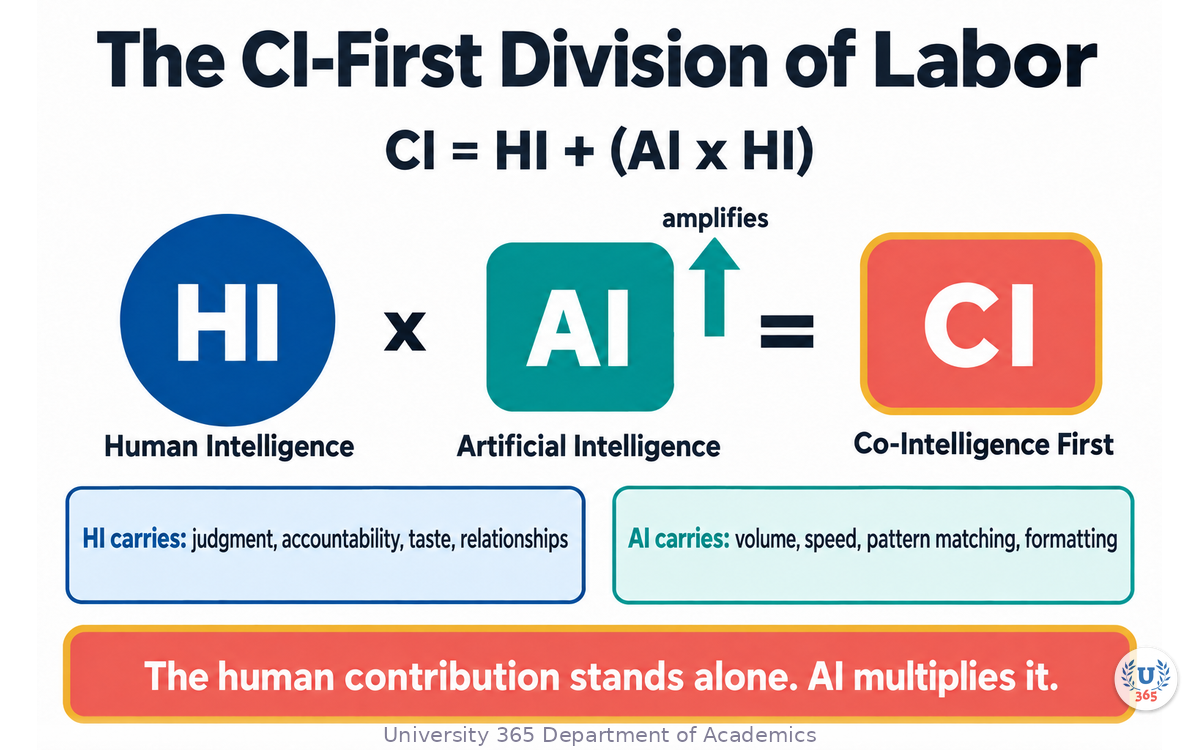
That order has a name at University 365. We call it CI-First, from Co-Intelligence First: human intelligence as the orchestrator, artificial intelligence as the amplifier. This lecture gives you the workflow as six stages, and then shows you the same six stages running inside four different fields: technology, business, communication, and design.
Step 1: Name What You Own Before You Prompt
Before any tool is opened, write two things down.
The decision. What will someone do differently after reading this output? A summary that supports a go or no-go decision is a different artifact from a summary that supports a blog post. The decision determines what must be verified, what may be approximate, and what can be omitted.
The judgment. Which parts of this task carry your name? In every task there is a core where mistakes are expensive: the recommendation, the diagnosis, the quote, the safety call, the visual identity. Mark it before you start. That core is yours. The machine may draft it, challenge it, or format it. It does not own it.
This step takes five minutes and prevents the failure pattern that causes almost every AI embarrassment: treating the machine's first fluent answer as a finished decision.
The division of labor. Two questions split any task cleanly:
Does the task require volume, pattern matching, formatting, or recall? The machine carries it.
Does the task require accountability, taste, relationships, or a judgment call with consequences? You carry it.
Most real work has both halves, and the workflow does not ask you to choose between them. It sequences them.
Step 2: Build the Context, Then Ask
The quality gap between two people using the same model is mostly a context gap. A bare question gets a generic answer because the model has nothing to anchor on. The fix is not a cleverer prompt. It is supplying the material: who you are, what situation you are in, what output you need, and what good looks like.
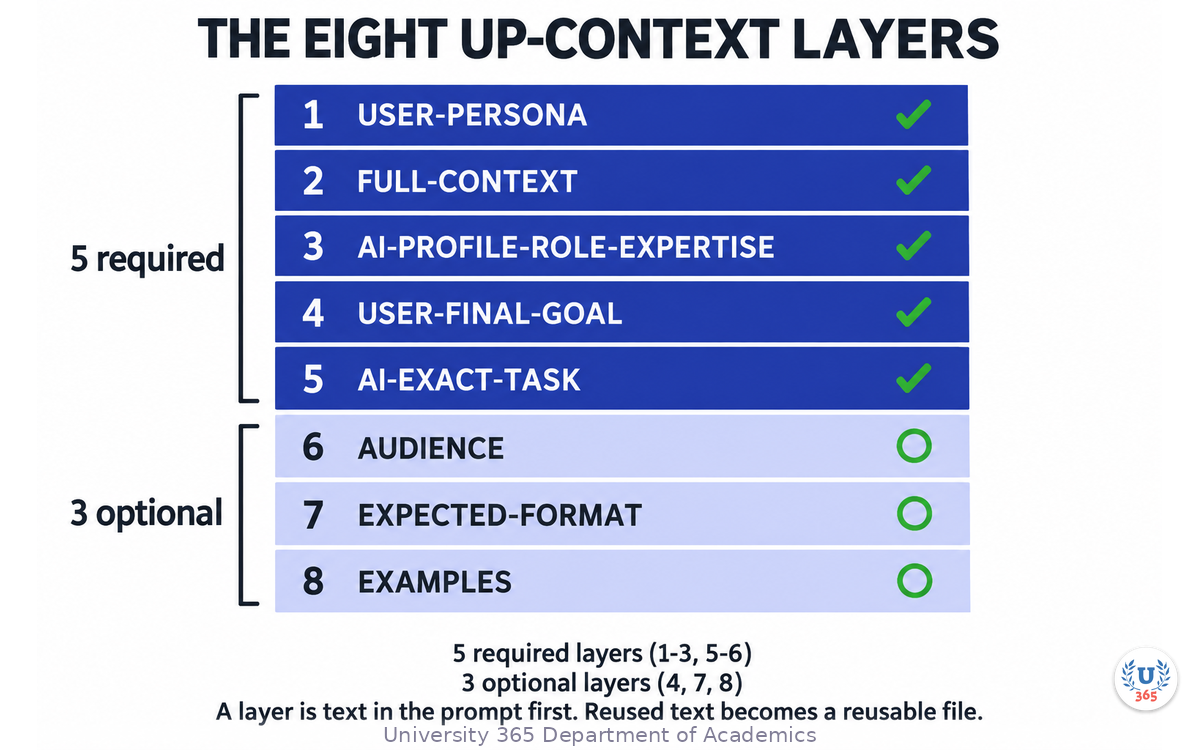
University 365 teaches this as the UP-Context Method, a context-engineering framework built on eight layers. Five are required, and three are optional:
USER-PERSONA: who the human in the conversation is.
FULL-CONTEXT: the situation, constraints, and history the task sits inside.
AI-PROFILE-ROLE-EXPERTISE: the role and expertise the assistant should adopt.
USER-FINAL-GOAL (optional): what success is supposed to look like.
AI-EXACT-TASK: the precise task, stated once, unambiguously.
AUDIENCE: who will read or use the output.
EXPECTED-FORMAT (optional): structure, length, style.
EXAMPLES (optional): samples of good output.
A layer is text in the prompt first. Any layer whose text is long enough and reused across prompts can be kept as a reusable file instead of being retyped. That is the whole idea of context engineering: the expensive part of prompting is the thinking about the task, and that thinking is reusable.
One consequence you can measure: when the context is stored, the next prompt starts from a better baseline, and the first-draft quality rises without the model changing at all.
A note on speed. Building context feels slower than typing a quick question, and for a throwaway question it is. For a task you will repeat, or a decision that will be reviewed, context is the fastest path to a usable first draft. Judge accordingly.
Step 3: Generate Fast, in Parallel
With the decision named and the context assembled, generation becomes the cheap part, and you should use it that way.
Ask for structure, not just prose. A comparison table, a checklist, three alternative framings, a risk list with likelihood and impact, a first draft plus its own critique. Structured generation is easier to verify than prose because gaps are visible.
Generate several variants, then choose. The first output is a sample, not a verdict. Three alternatives take seconds to produce and reveal the range of what the material supports. Choosing among drafts is a human strength; producing drafts is a machine strength.
Ask for the sources it used. When a claim depends on external facts, ask what the answer is based on. Treat the response as a lead, not as evidence. Verification is the next stage, and it is the one that carries your name.
Keep the machine inside the boundary you set. If the task touches personal data, confidential material, or anything regulated in your field, decide before pasting what may leave your boundary at all. That decision is made by a human, in advance, and belongs in your context file so it does not have to be re-made each time.
Step 4: Verify Against Reality, Not Against the Model
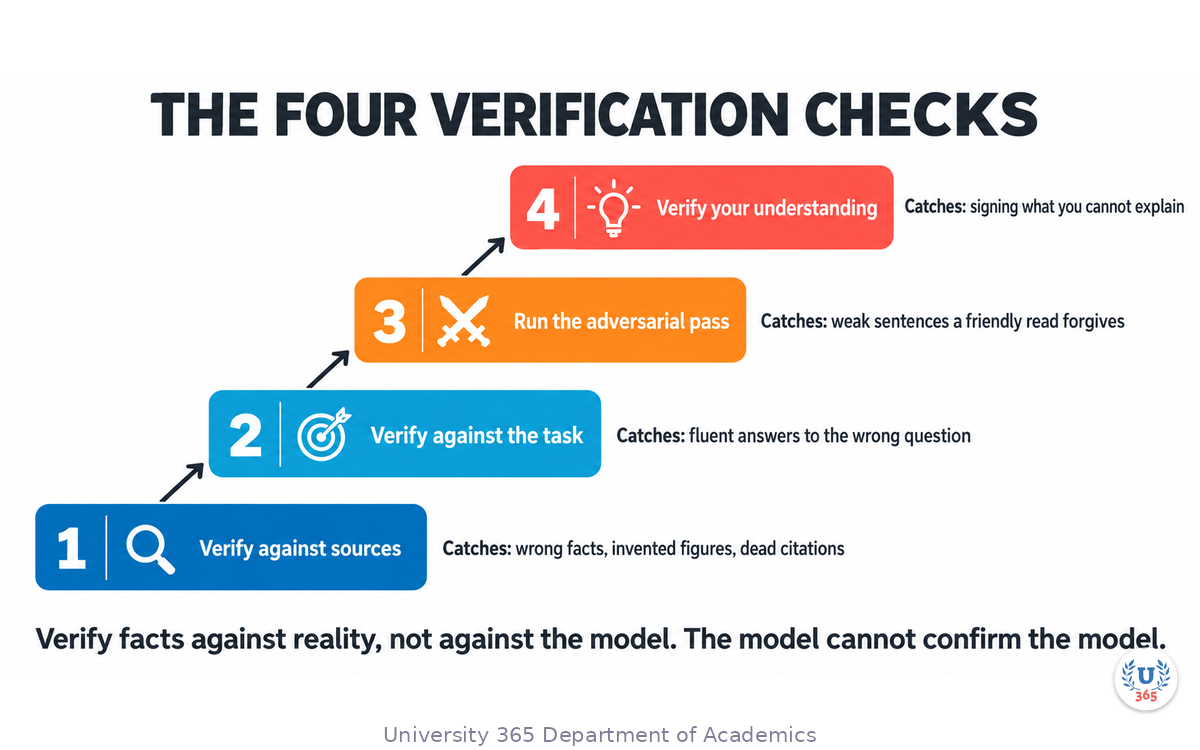
This is the stage that separates a demonstration from a professional result, and it has a simple rule: the model cannot confirm the model.
Verify facts against sources outside the model. Names, numbers, dates, prices, quotes, API behaviours, product features, legal or regulatory statements. If a claim will influence a decision or carry your name publicly, open the source itself. When the source cannot be found, the claim does not go in, or it goes in with an explicit statement that it is unverified.
Verify structure against the task. Read the output against the decision from Stage 1. Does it answer the question that was actually asked? A fluent answer to the wrong question is the most common expensive failure.
Verify with a second method where the stakes are high. Ask a fresh session with no memory of the first draft to attack the result. Feed it a hostile reviewer's mindset and let it look for the weakest sentence. Two independent passes catch different classes of error, because the first pass was generated under the first framing.
Verify your own understanding. If you cannot explain the recommendation without the tool, you are not ready to sign it. The explanation is part of the deliverable's credibility, not an extra.
Step 5: Decide, Sign, and Own the Output
The output leaves your hands with your name on it. That sentence is the entire CI-First contract, and it has three consequences in daily work.
The signature is not a formality. When you send the analysis, publish the post, ship the component, or present the plan, you are the accountable author. The tool is not available to the reader as an explanation. This is good news: it means the judgment you apply at this stage is exactly the judgment you are paid for.
Say what was accelerated, when it matters. In many settings there is no obligation to narrate your tooling, and in some there is, such as regulated disclosures, journalism, academic work, and anything where the audience was promised human authorship. Know which setting you are in. The default in professional settings is to state the method when the reader's trust depends on knowing it, and otherwise to let the quality speak.
Refuse the output you cannot stand behind. Occasionally the honest move is to discard a strong-looking draft and do the last mile again by hand, or to say in the meeting that the number is not ready. That refusal is part of the workflow, not a failure of it.
Step 6: Record and Reuse What Worked
The sixth stage is what turns the workflow from a technique into an advantage.
Keep the prompt and the context. The context file you built in Stage 2 is now an asset. Next week's task in the same domain starts from it. Over months, this is how an individual or a team accumulates an advantage a competitor cannot copy, because it is made of their own situation.
Record what failed verification. A claims list of things the machine got wrong in your domain is a practical filter. It tells you where to look first next time.
Time the stages once. Measure where the hours actually went: context, generation, verification, or rewriting. Most professionals discover that generation was minutes and verification was hours, which changes how they plan the next task.
Write the division down. For recurring work, put the boundary in writing: what the machine may draft, what a human must approve, what never leaves the boundary. A written boundary survives staff changes. A habit does not.
The Same Skeleton in Four Fields
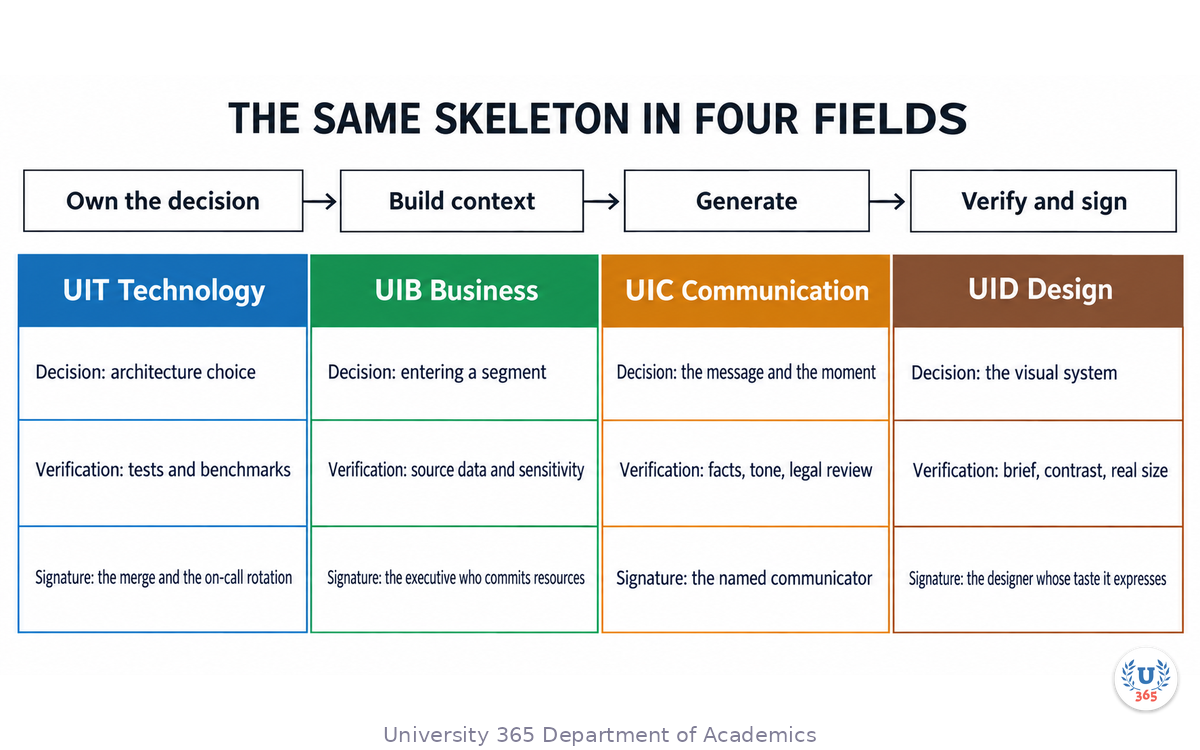
The six stages do not change with the discipline. What changes is the vocabulary and the examples.
In technology (UIT). The decision might be an architecture choice; the context is the system's constraints, scale, and security posture; generation produces design options and code; verification is tests, benchmarks, and a senior review; the signature is the merge and the on-call rotation that lives with the choice; the record is the architecture decision log. A generated function that passes no test is not a contribution. The stages make that obvious.
In business (UIB). The decision might be entering a segment; the context is the financials, the market, and the appetite for risk; generation produces the model, the scenarios, and the objections; verification is against source data and the assumptions' sensitivity; the signature is the executive who commits resources; the record is the model with its assumptions documented. A spreadsheet that nobody can audit is a liability disguised as an asset.
In communication (UIC). The decision might be the message and the moment; the context is the audience, the brand voice, and the channel; generation produces drafts, headlines, and variants; verification is factual checks, tone checks against the brand voice, and the legal or reputational review; the signature is the named communicator; the record is the approved voice examples and the claims list. A sentence that sounds right and says something untrue is the expensive error in this field.
In design (UID). The decision might be the visual system; the context is the brand, the accessibility requirements, and the platform; generation produces concepts, variants, and assets; verification is against the brief, the contrast and readability checks, and the real usage size; the signature is the designer whose taste the work expresses; the record is the system's rules and tokens. A concept that collapses at the real size is not finished.
Four vocabularies, one skeleton. That is why this lecture is cross-institute: the workflow is the product of the whole university, not of one field.
Feynman Summary: Explain It Like You Are 12
You are making a school project with a very fast helper who has read almost everything but has never met your teacher and does not know what your project is about.
If you just say "write my project", the helper writes something about the general topic. It looks fine. But it might use facts that are wrong, and it will sound like everyone else's project.
So you do it in a smarter order. First you decide what the project has to show your teacher, and what parts you will be responsible for. You tell the helper who you are and what the project is about. The helper then makes a few fast versions. You check the facts that matter, replace the ones you cannot check, and fix the ending yourself. Then you write your name on it, because it is your project.
The helper was never the problem. The order was.
Mindmap: The Complete Picture
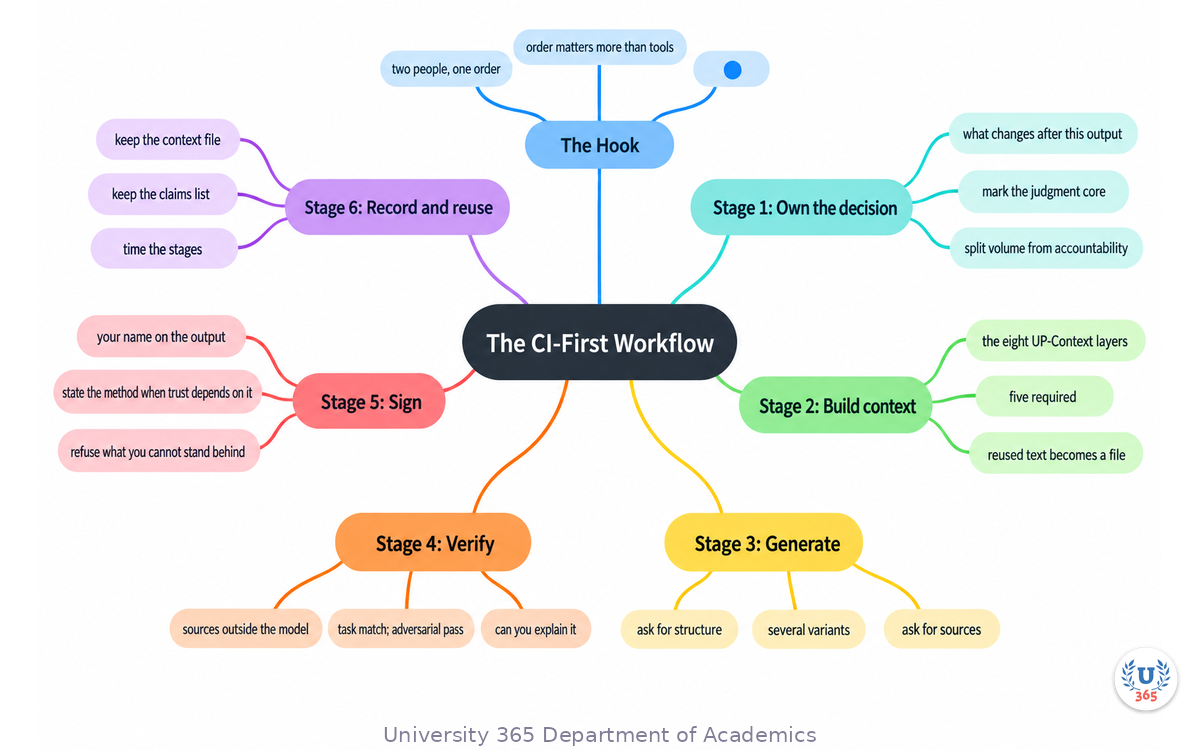
The mindmap gathers the lecture into one view: the six stages around the CI-First division of labor, the UP-Context layers that feed generation, the verification checks, and the four field columns that show the same skeleton at work.
UNOP Sound (University 365 Neuroscience Oriented Pedagogy)
Take five minutes to consolidate your memory. Play the isochronous tone track (10Hz alpha frequency) with your eyes closed. Alpha-frequency tones after a learning session support consolidation, helping move what you just learned from short-term to long-term memory.
[Audio player: UNOP Post-Lecture Isochrone (10Hz, 5 minutes)]
Practical Exercise: Run One Real Task Through All Six Stages
Choose one real task from your current week, not a toy example. Something with a deadline and someone waiting for the result.
Part 1: Prepare (15 minutes)
Write the decision in one sentence: who will do what differently after reading the output.
Mark the judgment core: the part that carries your name and cannot be wrong.
Assemble the context: who you are, the situation, the exact task, the audience, the format. Draft it as a reusable file if the task will repeat.
Decide the boundary: what may not leave your control, in this task and in general.
Part 2: Generate and Verify (30 minutes)
Ask for structure, not prose: a table, a checklist, or three variants.
Ask for the sources used for any factual claim.
Verify the three claims that would matter most if they were wrong. Open the sources yourself.
Run the adversarial pass: a fresh session, told to attack the draft, looking for the weakest sentence.
Time the stages honestly: minutes on context, on generation, on verification, on rewriting.
Part 3: Decide and Record (15 minutes)
Rewrite the part that carries your name. Sign it mentally before you send it.
Send or publish it.
Save the context file and note the two things the machine got wrong that surprised you.
What to look for
Three findings appear in almost every first run. Generation is far faster than expected and verification is far slower than planned. The adversarial pass finds a different class of error than the careful read. And the second run of the same task type is dramatically quicker, because the context file already exists. Those three findings are the argument for the workflow.
Applied CI-First connection
You owned the decision, the boundary, and the judgment. The machine carried volume: variants, structure, recall, formatting. If you felt tempted to skip verification because the draft looked strong, that temptation is exactly what the workflow exists to manage.
Glossary
Term | Definition |
CI-First (Co-Intelligence First) | The University 365 approach in which human intelligence is the orchestrator and AI is the amplifier. |
Human intelligence (HI) | The judgment, accountability, taste and relationship capacity that a human brings to a task. |
Artificial intelligence (AI) | The machine capability that amplifies human work through generation, pattern matching and recall. |
CI = HI + (AI x HI) | The division-of-labor statement: the human contribution stands alone, and AI multiplies it rather than replacing it. |
Orchestrator | The role that names the decision, sets the context, verifies, and signs. In this workflow, always a human. |
Amplifier | The role that increases volume and speed of work under a human's direction. |
Context engineering | Supplying the situation, role, task and audience so the model has material to anchor its output. |
UP-Context Method | University 365's prompting framework built on eight layers, five required and three optional. |
USER-PERSONA | The UP-Context layer that states who the human in the conversation is. |
FULL-CONTEXT | The UP-Context layer that states the situation, constraints and history the task sits inside. |
Verification loop | Checking facts against external sources, matching the output to the task, and running an adversarial pass. |
Output ownership | The rule that the named human, not the tool, is accountable for whatever is sent, published or shipped. |
Claims list | A record of the factual errors the model has made in your domain, used to direct verification next time. |
Adversarial pass | A second, independent critique of a draft tasked with finding its weakest points. |
Boundary | The line a human draws in advance around what may leave their control and be shared with a tool. |
5M2S | 5 Minutes to Success, University 365's microlearning format. |
Quiz: TEST YOUR UNDERSTANDING
1. What is the first thing to write down before prompting, according to this workflow?
A) The longest possible prompt
B) The decision the output must support and the judgment that stays yours
C) The list of tools you will use
D) The number of variants you want
2. Why does the CI-First workflow treat verification as the stage that carries your name?
A) Because verification is slower than generation
B) Because the model cannot confirm the model, and the named human is accountable for the output
C) Because tools are not allowed in professional settings
D) Because verification improves the model's speed
3. Which UP-Context layers are marked as optional?
A) USER-PERSONA, FULL-CONTEXT and AUDIENCE
B) AI-EXACT-TASK and AUDIENCE
C) USER-FINAL-GOAL, EXPECTED-FORMAT and EXAMPLES
D) All eight are required
4. What changes when the same six stages run in design instead of business?
A) The stages themselves
B) The number of stages
C) The vocabulary and the verification checks, while the skeleton stays the same
D) Nothing: design cannot use the workflow
5. What does Stage 6 turn the workflow into?
A) A one-time demonstration
B) A reusable asset, because the context file and the claims list accumulate
C) A faster model
D) A reason to skip verification
Answers: 1-B, 2-B, 3-C, 4-C, 5-B
Related Resources
U365 INSIDE Publications
Lecture: How LLMs Actually Work: Transformers in 20 Minutes: the architecture under the workflow
Lecture: Prompt Engineering at Production Scale: the anatomy of production prompts
Lecture: The ROI of AI: Measuring What Matters: measuring what the amplifications are worth
External Resources
Microsoft WorkLab: AI at work is here. Now comes the hard part: research on how organizations adopt AI assistance: microsoft.com
Stanford AI Index Report: annual, source-linked measurement of AI progress and adoption: aiindex.stanford.edu
Deloitte: Tech Trends: annual analysis of enterprise technology adoption: deloitte.com
Related U365 Lectures
Lecture 2: Building AI Agents for Business: A Cross-Discipline Guide (UIT, UIB, Cross-Institute Series)
Lecture 4: The AI Product Launch: From Code to Market (UIT, UIB, UIC, UID, Cross-Institute Series)
Lecture 5: Ethics and AI: A Practical Framework for Every Field (UIT, UIB, UIC, UID, Cross-Institute Series)
U.Copilot for This Lecture
Discuss this lecture with U.Copilot, your AI chat companion trained on this content.
Copy and paste the following prompt into the U.Copilot chat on university-365.com:
You are U.Copilot for Lectures, an AI chat companion specially trained on University 365 lecture content. You are helping a Fellow who just completed the cross-institute lecture "The CI-First Workflow: Applied to Any Field". Your role is to help the Fellow run the CI-First workflow on their own real task. You can: - Help write the decision sentence and identify the judgment core of their task - Help assemble the context as a reusable file, layer by layer - Suggest structures to request from a model for their specific task - Design the verification plan, including which claims deserve external checks - Role-play the adversarial pass against their draft - Help them set a written boundary for what may be shared with a tool Always maintain U365's CI-First approach: the accountable human owns every claim, and AI accelerates generation, structure and recall. Distinguish verified facts from unverified claims, and never present an unverified statistic as evidence. Use the UP-Context Method: provide context-rich, role-aware responses that account for the Fellow's field, seniority and constraints.
Next Steps
Pick one real task this week and run all six stages on it, timing each stage honestly.
Write your context file once and reuse it on the next three tasks in the same domain.
Start your claims list with the two errors that surprise you most.
Draw your boundary in writing for the work you do most often.
Teach the order to one colleague: the six stages are easier to keep than to learn.
The tools will keep changing. Faster models will shorten generation and will not shorten the judgment. The order is the durable part: own the decision, build the context, generate without ceremony, verify against reality, sign what you send, and keep what worked. Apply that order in any field, and the machine stays what it should be: the amplifier of work you are proud to sign.
IMPORTANT NOTICE
This lecture is published by University 365 as part of its INSIDE Publications Hub. The content is free to read for all visitors. Lectures in this series may be part of a structured academic program leading to a Micro-Credential for your Career (MCC). To enroll in an academic program, visit university-365.com/tuition.
This content is for educational purposes. AI tools, model capabilities and platform policies develop quickly. Verify current specifications and vendor terms against the primary sources linked above before relying on any workflow in production.
Copyright University 365, Inc. All rights reserved. This content is protected under University 365's copyright policies. For permissions or inquiries, contact uda@university-365.com.
Published by the Department of Academics, University 365.
Lecture delivered by the UIT, UIB, UIC, UID in collaboration.
Martin Swartz, Dean of Academics, UDA
Signed for the academic year 2026.




Comments