
What Happens When You Type a URL

In this Interest


What Happens When You Type a URL
Snapshot
One address, typed once, sets four protocols in motion. This brief follows a single request for https://www.university-365.com from the moment you press Enter to the moment the first pixels appear.
By the end you will be able to name each step, say which parts are fixed by international standards and which are choices made by a company, and explain why the diagram in most explanations no longer matches a modern page load.
This brief runs about thirteen minutes.

What Happens When You Type a URL
Why Now
Four things have changed since the diagram most people learn was drawn. The Domain Name System was specified in November 1987 (RFC 1034 and RFC 1035), and its message format has not changed since; what changed is who answers and how the answer travels. TLS 1.3, published in August 2018, removed the older key exchange that most explanations still describe first (RFC 8446). HTTP/3, published in June 2022, moved HTTP onto QUIC, which carries the transport and the cryptography in one handshake (RFC 9114, RFC 9000).
One quieter change matters as much. DNS over HTTPS, published in October 2018, can hide the lookup inside an encrypted exchange (RFC 8484).
The steps are still real. Their order and their number are not fixed, and the parts that changed are exactly the parts people repeat from memory.

What Happens When You Type a URL
The Explainer
The Address Bar
When you press Enter, the browser reads the URL as a structured address. The scheme, https, names a protocol: HTTP carried over TLS (RFC 9110, Section 4.2.2). The authority names the host, here www.university-365.com, and an optional port; without a port, https uses 443 (same section). The path and query identify the resource inside that host.
Before any network traffic, the browser checks its own cache. A stored response that is still fresh may satisfy the request without contacting anyone (RFC 9111, Section 4.2). Many repeat visits end here, before DNS is consulted.
DNS: The Name Becomes an Address
The browser needs an address. It asks its own cache, then the operating system's stub resolver, then a recursive resolver. Google's public resolver is a recursive resolver: it answers from large shared caches, so a large fraction of queries never leave it (Google Public DNS, Introduction). Cloudflare counts eight steps in an uncached lookup, from the browser's first cache check to the answer arriving back at the browser (Cloudflare, What is DNS?).
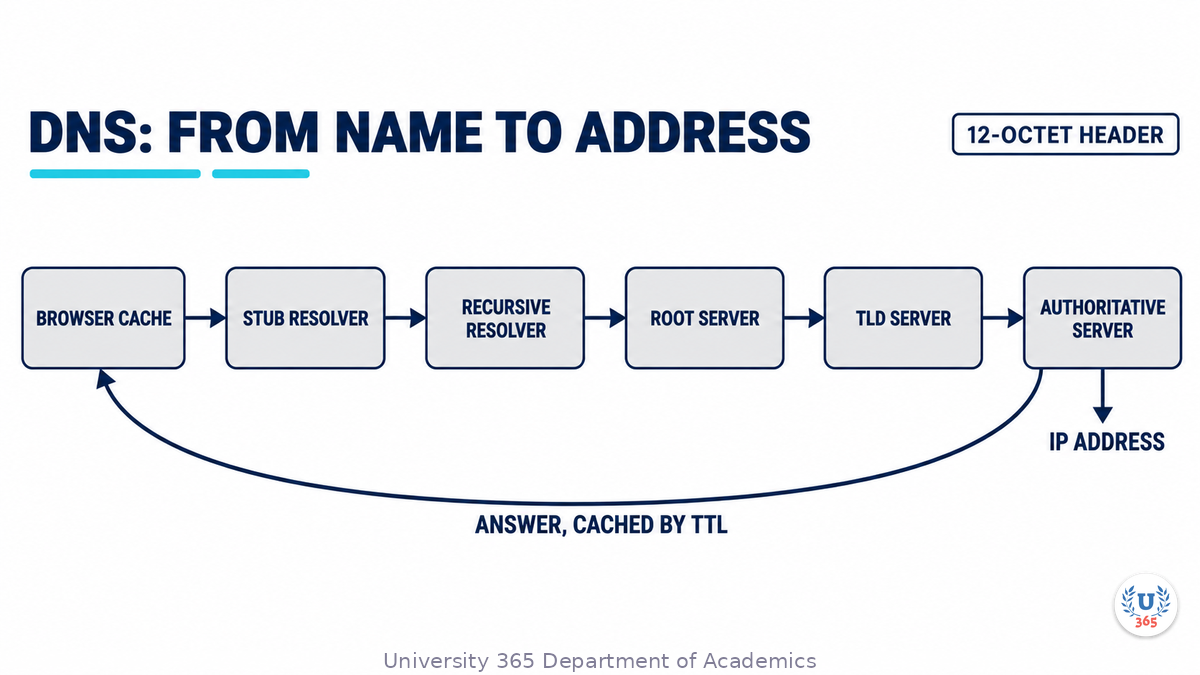
The protocol underneath is small. A DNS query is a message with a 12-octet header carrying an identifier, a set of flags and four counts, followed by the question (RFC 1035, Section 4.1.1). Names are limited to 255 octets, each label to 63, and the original specification limits a UDP message to 512 octets (RFC 1035, Section 2.3.4).
Two strategies exist. In a recursive query the first server pursues the answer for the client; in an iterative query it refers the client to another server and the client continues. RFC 1034 prefers the iterative approach for datagram access and requires servers to implement it, while recursive service is optional (RFC 1034, Section 2.3). In practice the stub resolver sends a recursive query and the recursive resolver does the iterative work.
Answers are cached, and the cache is what makes the system usable. Each record carries a time to live, a 32-bit value in seconds saying how long a resolver may keep it (RFC 1034). When a record is fresh the query stops at the resolver; when it expires the resolver asks again. Google reports that an average user performs hundreds of DNS lookups each day, which is why shared caches matter (Google Public DNS).
The reply carries the address record for the host, and the browser can open a connection. Nothing in this exchange proves the answer is authentic. DNSSEC exists to sign records, and DNS over HTTPS exists to hide the query inside an encrypted HTTP exchange, for two stated purposes: preventing on-path devices from interfering with DNS operations, and giving web applications safe access to DNS information (RFC 8484, Section 1). Whether your lookup is signed or encrypted depends on your device, your network and your resolver.
TCP: Three Messages Before Data
With the address resolved, the browser opens a connection. TCP's three-way handshake is the procedure that establishes it (RFC 9293, Section 3.5). The client sends a segment with the SYN flag and an initial sequence number. The server answers with SYN and ACK, acknowledging the client's number and sending its own. The client answers with ACK. Both sides are then in the ESTABLISHED state and the connection can carry data (RFC 9293, Section 3.5, Figure 6).
Three messages and one and a half round trips pass before a single byte of the request is sent. The sequence numbers are not decoration: they let each side order the bytes and reject duplicates left over from an earlier connection that used the same address pair. On a long path, that round trip is the main cost of opening a connection.
HTTP/3 does not use this connection. It runs over QUIC, a transport built on UDP that carries its own handshake (RFC 9000, RFC 9114).
TLS: Certificates and Keys
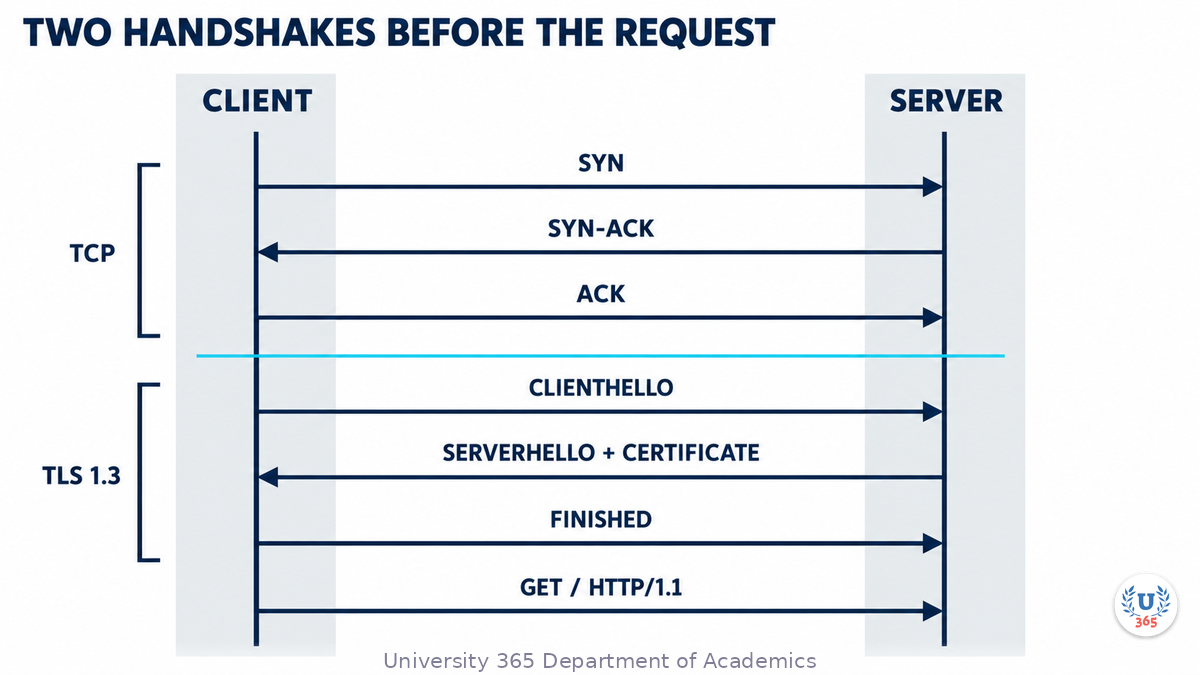
Because the scheme is https, the connection must become secure before HTTP can use it. The TLS handshake negotiates a protocol version, selects cryptographic algorithms, optionally authenticates the peers, and establishes shared keying material; after it completes, the peers protect application traffic with those keys (RFC 8446, Section 2).
The client sends a ClientHello with a random nonce, the versions it supports, a list of cipher and hash pairs, and a key share. The server answers with a ServerHello that selects the parameters and carries its own key share. It then sends EncryptedExtensions, its certificate, a signature over the handshake, and a Finished message. The client verifies the certificate and the signature and returns its own Finished. Everything after the ServerHello is encrypted (RFC 8446, Section 2).
The certificate ties the name to a public key, and the browser checks that it is valid for the host and issued by an authority it trusts; Cloudflare's explainer describes the same verification from the server side (Cloudflare, What happens in a TLS handshake?). With an ephemeral key exchange, the session key is not derived from the server's long-term private key, and TLS 1.3 removed the static RSA and Diffie-Hellman suites that allowed that derivation (RFC 8446, Section 1.2). A recorded session cannot be decrypted later with a stolen long-term key.
The count of round trips is where the popular diagram departs from the standard. MDN's walkthrough describes the older message sequence and counts five more round trips for TLS, then eight in total before the request (MDN, How browsers work). In TLS 1.3 the client sends one flight and the server answers with one flight, and application data can follow (RFC 8446, Section 2, Figure 1).
The HTTP Request
Inside the encrypted channel, the browser writes a request. HTTP/1.1 defines the request line as a method, a space, a request target, a space and the protocol version (RFC 9112, Section 3). A typical first request reads GET / HTTP/1.1, followed by a Host header carrying the same authority used in the URL. The Host header is mandatory: a server must answer 400 to an HTTP/1.1 request that lacks it or carries more than one (RFC 9112, Section 3.2).
Other headers state what the client can accept and what it already holds: Accept, Accept-Encoding, User-Agent, Cookie, and conditional fields such as If-None-Match. GET asks for a current representation of the target resource, and its response is cacheable unless the response says otherwise (RFC 9110, Section 9.3.1). A GET normally carries no body.
The request target in the example is the path only, not the full URL. The connection already knows the host from the Host header. That division is why one address can serve several sites, and why the Host header is a security boundary as much as a routing instruction.
The Server and the Cache
The address the browser reached may not be the machine that holds the page. A content delivery network places servers close to users and caches content at the edge; Cloudflare states that the majority of web traffic is now served through CDNs (Cloudflare, What is a CDN?). The TLS handshake may therefore end at an edge server, and the edge may answer from its cache without contacting the origin at all.
Whether it may answer depends on freshness. A stored response is fresh while its age is below its freshness lifetime, and a fresh response can satisfy a request without contacting the origin server (RFC 9111, Section 4.2). If the response is stale, a cache can revalidate it with a conditional request. The origin answers 304 Not Modified when the stored copy is still valid, or sends a new 200 response (RFC 9110, Section 15.4.5). A 304 carries headers and no body, which is the point: the copy is reused.
If the request does reach an origin, three more things commonly happen. A redirect may send http to https, or a bare domain to its www form, and a 301 costs a second round trip before anything is rendered (RFC 9110, Section 15.4.2). The server may terminate TLS at a load balancer and open a separate connection to an application server. The application may query a database, call another service, and assemble HTML that did not exist when the request arrived. Each of those steps is invisible in the address bar, and each is a place where a page can be slow or fail.
The Response and the Render
The response begins with a status line and headers, then the body. The status code says what happened at the HTTP layer: 200 for a representation, 301 for a permanent move, 304 for an unchanged copy, 404 for a resource that is not there (RFC 9110, Section 15). Content-Type tells the browser how to read the bytes, and the cache fields tell it how long to keep them.
The browser does not wait for the whole body. It starts parsing as bytes arrive, and MDN notes that the first chunk of content is usually about 14KB, which is why the first screen should fit inside it (MDN, How browsers work). HTML is tokenised and turned into a document tree. CSS is parsed into a style tree. A script without async or defer blocks parsing, because it may change the document (MDN).
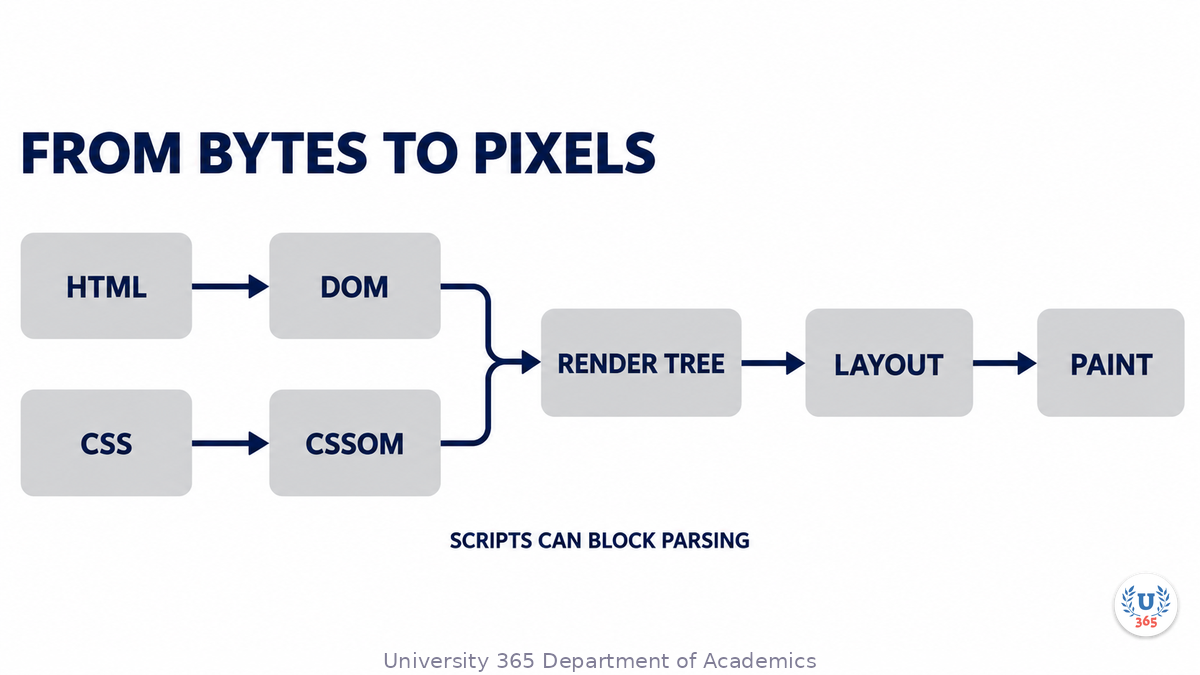
Then the two trees are combined. The render tree contains only the nodes that will be visible, each with its computed style; layout computes the position and size of every box; paint converts those boxes into pixels (web.dev, Render-tree Construction, Layout, and Paint). Images and fonts arriving late can force a second layout, and JavaScript that runs long can delay interactivity after the page is already visible (MDN).
By the time you see the page, the browser has resolved one or more names, opened one connection per origin, negotiated TLS, sent one request, received one response, parsed three languages and painted. The visible result is one screen.

What Happens When You Type a URL
The Feynman Summary
The plain version, without the vocabulary.
You type a name. Your computer does not know where that name lives, so it asks a directory. The directory answers with the address of a computer.
Your computer opens a line to that address. It says hello, the other side says hello back, and both agree that the line is open. Because the address begins with https, they also agree on a secret code before either sends anything private. The other side proves it holds the name by showing a certificate signed by an authority your computer already trusts.
With the line open and the code agreed, your computer sends one short message. It asks for the page at this address and says which formats it can read.
The message can stop at a cache, a computer that keeps copies near you. If the copy is still fresh, the cache answers. If not, it checks with the original server. The server either confirms that the copy is still good or sends a new one.
The answer comes back as text with instructions. Your computer reads the text, builds a model of the page, works out where every block goes, and draws it. What you see is the last step of that work, not the first.

What Happens When You Type a URL
The Evidence
The standardised parts are firm, and each one has a document with a date. The DNS message format is fixed by RFC 1035 (November 1987). The TCP handshake is fixed by RFC 9293 (August 2022). The TLS 1.3 handshake is fixed by RFC 8446 (August 2018). The HTTP request line, the Host requirement, GET semantics and the caching rules are fixed by RFC 9110, RFC 9111 and RFC 9112 (June 2022). These are standards-track specifications, and the parts of them used here have not changed since publication.
The variable parts are deployment choices that no standard fixes. How many resolvers sit between you and the answer, whether the lookup is encrypted, whether a CDN terminates TLS, how many caches hold a copy, and whether the page is assembled on a server or in the browser differ by site, by network and by minute. A reader who wants to know which path their own request took has to look, not reason from the model.
Two popular accounts are less firm than they look. MDN's walkthrough counts five more round trips for TLS and eight in total before the request (MDN, How browsers work), while RFC 8446 shows one client flight and one server flight before application data flows (Section 2, Figure 1). Cloudflare's TLS walkthrough explains the RSA key exchange first and labels it as the pre-1.3 method, while TLS 1.3 removed those suites entirely (RFC 8446, Section 1.2). Both pages describe a real path; neither describes the default one.
What remains genuinely open is measurement, not definition. No source I read measures how many machines a given page load touches, how many of them are caches, or how often a lookup is encrypted. Those numbers change with the site, the network and the year, and any figure quoted as universal should be treated as an estimate.

What Happens When You Type a URL
The Counter-Case
The linear model is wrong in three places, and each one matters. First, the request often never reaches an origin: a fresh browser cache can answer with no network traffic at all (RFC 9111, Section 4.2), and a CDN edge can answer for a large share of the rest. Second, the server is usually several machines: an edge, a load balancer, an application server and a database, each with its own connection. Third, the lookup is increasingly invisible: DNS over HTTPS carries the query inside TLS, so an observer on the path sees an HTTPS connection to a resolver and not a DNS message (RFC 8484).
What would change the picture is already here in part. HTTP/3 over QUIC removes the separate TCP handshake and carries the cryptographic handshake in the transport (RFC 9000, RFC 9114). A resumed TLS session can carry application data at zero round trips, which removes the handshake wait but weakens replay protection (RFC 8446, Section 2.3). If your page is served from an edge, the model describes a first visit, not the common one.
The honest version is a graph with caches at every edge, not a line with a fixed number of boxes. The linear model is still the right place to start, because every branch of the graph uses the same four protocols in the same order. It is the wrong place to stop.

What Happens When You Type a URL
What It Means for You
Quality of Life is the ULM domain this touches first, because the practical gain is time and judgement. A page that fails has a layer, and the layer tells you what to do. A name that does not resolve will not be fixed by reloading. A certificate warning is not fixed by clearing cookies. A stale page often is fixed by a hard reload, because the copy you hold has outlived its freshness (RFC 9111, Section 4.2). Knowing the layer turns a vague frustration into one action, and it stops the worst version of the mistake: re-entering payment or personal details into a page that did not load.
Career and Finance is the secondary domain. The same vocabulary sets what you can ask when your work depends on a website. You can ask a vendor how a page is invalidated at the edge, which TLS versions they accept, and how many redirects sit in front of the home page. Those are answerable questions with standards behind them (RFC 9111, RFC 8446, RFC 9110), and they separate a supplier's preference from an obligation.
In LIPS terms, this belongs in the Interests pillar: something you wanted to understand, not a task you owe anyone. If understanding it turns into an audit of your own site or a decision about a host, it has become a project, and it moves to the Projects pillar with a date and an owner.

What Happens When You Type a URL
The Five-Minute Version
You press Enter. The browser parses the URL: scheme https, host, optional port (443 by default), path and query (RFC 9110, Section 4.2.2). It checks its own cache first; a fresh copy can answer with no network traffic (RFC 9111, Section 4.2).
DNS. The stub resolver asks a recursive resolver, which walks root, top-level domain and authoritative servers unless a cached record answers first. A query is a 12-octet header plus a question; the original specification limits names to 255 octets and UDP messages to 512 (RFC 1035).
TCP. SYN, SYN-ACK, ACK. Three messages establish the connection before any request byte is sent (RFC 9293, Section 3.5).
TLS. ClientHello and ServerHello agree the version, the algorithms and the keys; the certificate ties the name to a public key; everything after ServerHello is encrypted (RFC 8446, Section 2).
HTTP. GET / HTTP/1.1 plus a mandatory Host header and a few more fields. GET is cacheable by default (RFC 9112, RFC 9110, Section 9.3.1).
The edge. A CDN may answer from cache if the response is fresh, or revalidate it and receive 304 Not Modified (RFC 9111, Section 4.2; RFC 9110, Section 15.4.5). A redirect adds a round trip.
The origin. If the request gets through, a load balancer, an application server and a database assemble a response that did not exist a moment earlier.
The render. HTML becomes a document tree, CSS a style tree, the two combine into a render tree, layout computes every box, paint turns boxes into pixels (web.dev). Scripts can block parsing, and late images can force a second layout (MDN).
If you remember one thing, remember the layers: DNS finds the machine, TCP opens the connection, TLS secures it, HTTP asks for the resource, the cache decides whether the origin is asked, and the browser paints. When a page fails, the layer that failed tells you what to do next.
What Happens When You Type a URL
Sources
Every source below was opened and read on 20 October 2026. Publication dates are the documents' own.
RFC 1034, Domain Names: Concepts and Facilities. P. Mockapetris, November 1987. rfc-editor.org/rfc/rfc1034.txt
RFC 1035, Domain Names: Implementation and Specification. P. Mockapetris, November 1987. rfc-editor.org/rfc/rfc1035.txt
RFC 9293, Transmission Control Protocol (TCP). W. Eddy, August 2022. rfc-editor.org/rfc/rfc9293.txt
RFC 8446, The Transport Layer Security Protocol Version 1.3. E. Rescorla, August 2018. rfc-editor.org/rfc/rfc8446.txt
RFC 9110, HTTP Semantics. R. Fielding, M. Nottingham, J. Reschke, June 2022. rfc-editor.org/rfc/rfc9110.txt
RFC 9111, HTTP Caching. R. Fielding, M. Nottingham, J. Reschke, June 2022. rfc-editor.org/rfc/rfc9111.txt
RFC 9112, HTTP/1.1. R. Fielding, M. Nottingham, J. Reschke, June 2022. rfc-editor.org/rfc/rfc9112.txt
RFC 9114, HTTP/3. M. Bishop, June 2022. rfc-editor.org/rfc/rfc9114.txt
RFC 9000, QUIC: A UDP-Based Multiplexed and Secure Transport. J. Iyengar, M. Thomson, May 2021. rfc-editor.org/rfc/rfc9000.txt
RFC 8484, DNS Queries over HTTPS (DoH). P. Hoffman, P. McManus, October 2018. rfc-editor.org/rfc/rfc8484.txt
MDN Web Docs, Populating the page: how browsers work. Last modified 18 December 2025. developer.mozilla.org
MDN Web Docs, Overview of HTTP. developer.mozilla.org
MDN Web Docs, Transport Layer Security (TLS). developer.mozilla.org
MDN Web Docs, HTTP caching. developer.mozilla.org
Cloudflare Learning Center, What is DNS? cloudflare.com
Cloudflare Learning Center, What is a CDN? cloudflare.com
Cloudflare Learning Center, What happens in a TLS handshake? cloudflare.com
Google web.dev, Render-tree Construction, Layout, and Paint. Ilya Grigorik, 31 March 2014. web.dev
Google Public DNS, Introduction to Google Public DNS. Last updated 3 September 2024. developers.google.com




Comments