
Hugging Face: The Open-Source AI Model Hub and Community Platform

Updated: Oct 16
Status: Active | Last tested: 2026-08-31 (current web platform, transformers v5.16.1) | Re-check: trigger-based (max 6 months)
Active: the tool is current and recommended.


In this Tool Review
Tool Snapshot
Category: AI Model Hub and Open-Source Machine Learning Platform
Provider: Hugging Face, Inc.
Version tested: Current web platform (Hub, Spaces, Inference), transformers v5.16.1, diffusers v0.40.0, huggingface_hub v1.29.0 (August 2026)
License: Platform proprietary; hosted artifacts carry their own licenses (Apache 2.0, MIT, custom); core libraries Apache 2.0
Platforms: Web, Python libraries, REST API, Inference API, MCP server
Tagline: "The AI community building the future." The platform where the machine learning community collaborates on models, datasets, and applications.
Primary use cases:
Discovering and comparing open-source AI models before committing engineering time
Downloading and testing pre-trained models (text, image, audio, video, 3D) with a few lines of Python
Hosting interactive ML demos with Spaces (Gradio, Docker, static HTML)
Deploying models to production through Inference Endpoints or Inference Providers
Sharing datasets and fine-tuned models to build a public ML portfolio
Pricing summary: Free Hub with unlimited public repos. PRO $9/month (10x private storage, 20x inference credits, 8x ZeroGPU quota). Team $20/user/month. Enterprise $50/user/month. Pay-as-you-go compute: Spaces GPU from $0.40/hour, Inference Endpoints from $0.033/hour (CPU) and $0.50/hour (GPU T4). Pricing checked 2026-08-31.
Official links:
Website: https://huggingface.co
Documentation: https://huggingface.co/docs
Pricing: https://huggingface.co/pricing
Help and forum: https://discuss.huggingface.co
Status page: https://status.huggingface.co
Community: https://huggingface.co/blog (community blogs and changelog)
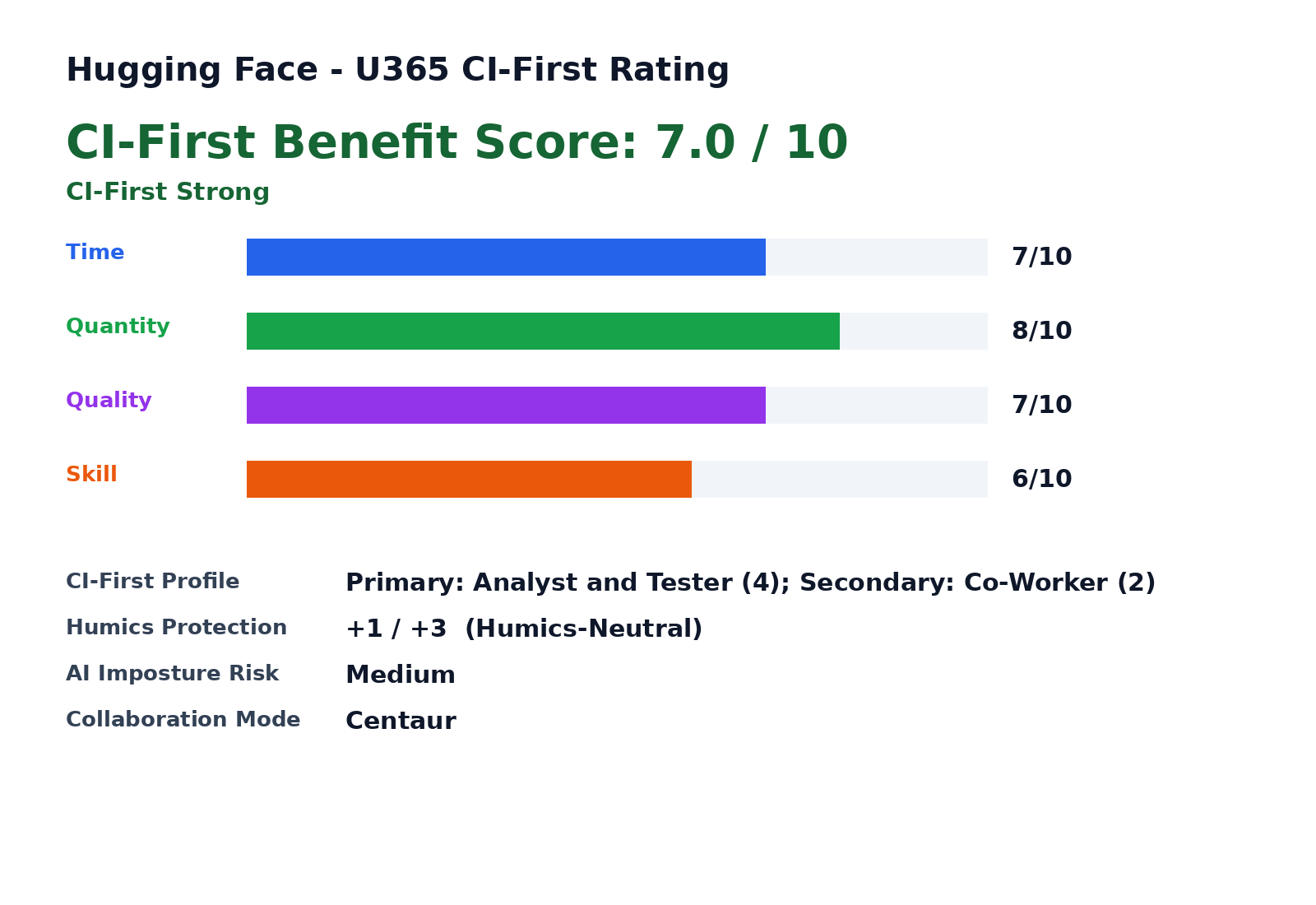
CI-First Benefit Score | 7.0 / 10 (CI-First Strong) |
Time / Quantity / Quality / Skill | 7 / 8 / 7 / 6 |
CI-First Profile | Analyst and Tester (4); Secondary: Co-Worker and Assistant (2) |
Humics Protection | +1 / +3 (Humics-Neutral) |
AI Imposture Risk | Medium |
User Sentiment | Mixed to Positive (G2 4.3/5 from 12 reviews; Trustpilot 2.4/5 from 12 reviews) |
Pricing | Freemium ($9 PRO / $20 Team / $50 Enterprise + usage-based compute) |
Platforms | Web, Python, REST API, MCP |
Hub Scale | 3M+ public models, 1M+ datasets, 1.4M+ Spaces (August 2026) |
For detailed explanations of the CI-First evaluation terms used in this review, including CI-First Benefit Score, CI-First Profile, Humics Protection Badge, AI Imposture Risk, and User Sentiment, see the Glossary at the end of this publication.
The Problem
Open machine learning has a discovery and plumbing problem. Hundreds of labs publish models and datasets every week, but each release lands on a different site, under a different license, with a different file format and a different download procedure. A developer who wants to compare three candidate models for a task must find them, read their model cards, work out licensing, download weights, and write custom loading code for each one. Before Hugging Face standardized this workflow, that process could consume a full day per model family.
The second problem is infrastructure. Most people who want to use a state-of-the-art model do not own a GPU cluster, and most organizations do not want to manage serving infrastructure for a demo. Running open models required either expensive local hardware or a cloud deployment project before a single test could run.
For U365 Fellows, the third problem is learning. A student who wants to understand modern AI by doing, not just reading, previously needed a research lab affiliation to touch real models. Open weights on a file server do not teach anything by themselves; the surrounding tooling, documentation, and community determine whether a learner can actually run and modify the technology.
The Outcome
With the Hub, one interface covers discovery, evaluation, and retrieval. You compare candidate models on model cards, licensing, and download statistics, then pull any of them with two lines of Python. The same two lines work for a 60M-parameter sentence embedder and a 400B-parameter frontier model, because the transformers library and the Hub API standardize the interface.
With Spaces, you test a model in a browser before downloading anything, and you publish your own demos without owning any hardware. Free CPU hosting and the ZeroGPU free tier cover most student experiments. A U365 Fellow can go from idea to a public, shareable AI demo in under an hour, and a working knowledge of the open model landscape by simply using the platform.
Who Should Use Hugging Face
Learner type | Difficulty | Typical ROI | Career path |
Students (Bachelor, Master) | Intermediate | Run real models without a research lab. Build a public ML portfolio with Spaces and model repos that recruiters can inspect. | UIT AI Developer Specialist and Data Scientist; thesis work using open models and datasets |
Professionals (career upskilling) | Intermediate | Evaluate open-source models for product integration in days instead of weeks. Prototype with Inference Providers before committing to a vendor. | UIT (Technology, AI, Data Science); UIB projects that need AI features without vendor lock-in |
Everyone (lifelong learners) | Beginner (Spaces demos) to Advanced (libraries) | Try any open model through browser demos. Understand what AI can and cannot do by direct experiment. | LIPS Collect phase; SL-OS information routines; UNOP hands-on learning |
U365 Institutes Alignment
Rating. High
Why. The Hub is the reference platform for AI engineering. Any learner touching model training, fine-tuning, or deployment works here daily.
The limit that holds the row. The platform distributes the artefacts; it teaches none of the machine-learning foundations, the evaluation design or the systems work behind them, and the review's own Skill note says a learner who only consumes pretrained models gains vocabulary rather than capability. The competencies that remain are the reading of a model card, the choice of an artefact against constraints, and the measured test of it; the review's free-tier limits place production work beyond the learning surface. A word-start accent-folded search over the title and full description of all 79 published programme descriptions returns zero matches for fine-tuning, quantization, self-hosting, model card and test design, so the row stands at High for work that goes past inference: evaluation, fine-tuning and deployment.
Rating. Medium
Why. Product managers and founders evaluate open models as build-vs-buy input. Spaces demos communicate AI concepts without engineering effort.
The limit that holds the row. The platform supplies free evaluation surfaces; it teaches no management content and publishes no business method, and the review states licence literacy is mandatory because open-weight does not mean commercially usable. The competency that remains is the build-versus-buy arithmetic and the licence decision a founder or product manager owns. A word-start accent-folded search over the title and full description of all 79 published programme descriptions returns zero matches for unit economics, total cost of ownership, procurement, vendor management and business case, so the row stays at Medium: the purchase decision and its licence reading are the Fellow's.
Rating. Medium
Why. Content teams prototype image, speech, and text generation with open models before budgeting for production tools.
The limit that holds the row. The platform hosts generative models and demos; it teaches no register, no audience analysis and no publication standard, and the review's own Humics row records social authenticity as untouched by it. The competency that remains is production judgement over open models: what may be generated, what licence the output carries, and what is disclosed about the pipeline. A word-start accent-folded search over the title and full description of all 79 published programme descriptions returns zero matches for editorial, disclosure, provenance, brand voice and cross-cultural, so the row stays at Medium for prototyping under a production decision and not for communication craft.
Rating. Medium
Why. Diffusion model Spaces let designers experiment with generative imagery and understand the technology shaping their field.
The limit that holds the row. The platform lets a designer run generative models and read the technology; it supplies no design method, no critique against a brief and no typographic or layout system, and the review's own limits warn that most published artifacts are experiments rather than dependable components. The competency that remains is judgement over generated imagery: the brief, the selection and the defence of the choice. A word-start accent-folded search over the title and full description of all 79 published programme descriptions returns two documents for typography, three for layout and one for color theory, and zero matches for design system, critique, usability and accessibility, so the row stays at Medium for experimentation with the technology and not for design authorship.
Skill level required: Beginner for consuming Spaces demos. Intermediate Python for the Hub and transformers library. Advanced for fine-tuning and production deployment.
Prerequisites: Basic Python for library work. Git fundamentals for repository collaboration. Machine learning concepts (what a model, dataset, and inference are) for meaningful use.
Typical time to first result: 5 minutes to run a Space in the browser. 15 minutes to download and run a first model locally with pip install transformers.
Typical time to competence: 2 to 4 weeks of regular use to navigate the Hub confidently, pick appropriate models, and build a first Space.
How Hugging Face Works
Inputs: Search queries and filters (task, modality, license, size). Python code calling the huggingface_hub and transformers libraries. REST API calls with access tokens. Files: model weights, datasets, config files, README with YAML metadata.
Outputs: Downloadable model weights and datasets (most in safetensors and parquet formats). Interactive web demos (Spaces). API endpoints for inference (serverless, dedicated Endpoints, or routed Providers). Model evaluation results, dataset previews, and community statistics (downloads, likes, derivatives).
Underlying technology
The Hub is a Git-based collaboration layer: every model, dataset, and Space is a repository with versioning, commits, discussions, and pull requests. On top sit services: the dataset viewer, model evaluation framework, the Inference API (serverless, Inference Endpoints dedicated, Inference Providers routed to partners such as Together, Fireworks, and Cerebras), and Spaces hosting (Gradio, Docker, static HTML).
Key technical features
Unified Python interface across more than 3 million models through transformers and huggingface_hub
Safetensors as the default secure weight format, with automatic virus scanning of uploaded files
ZeroGPU: shared Nvidia RTX Pro 6000 Blackwell capacity (up to 96 GB VRAM) available free for Gradio Spaces with quota tiers
Agent-friendly surface: machine-readable Markdown pages, agents.md endpoints on every Space, and an MCP server exposing repositories and docs (July 2026)
Per-resource-group access controls for Jobs, Inference Endpoints, and publishing (August 2026 changelog)
Core open-source libraries
Transformers (v5.16.1, August 2026): state-of-the-art model architectures for PyTorch; 164,000+ GitHub stars
Diffusers (v0.40.0, August 2026): diffusion models for image, video, and audio generation; 34,000+ GitHub stars
huggingface_hub (v1.29.0, August 2026): the Python and CLI client for the Hub (download, upload, manage repositories)
PEFT, TRL, Accelerate, Datasets: parameter-efficient fine-tuning, reinforcement learning, distributed training, and data loading
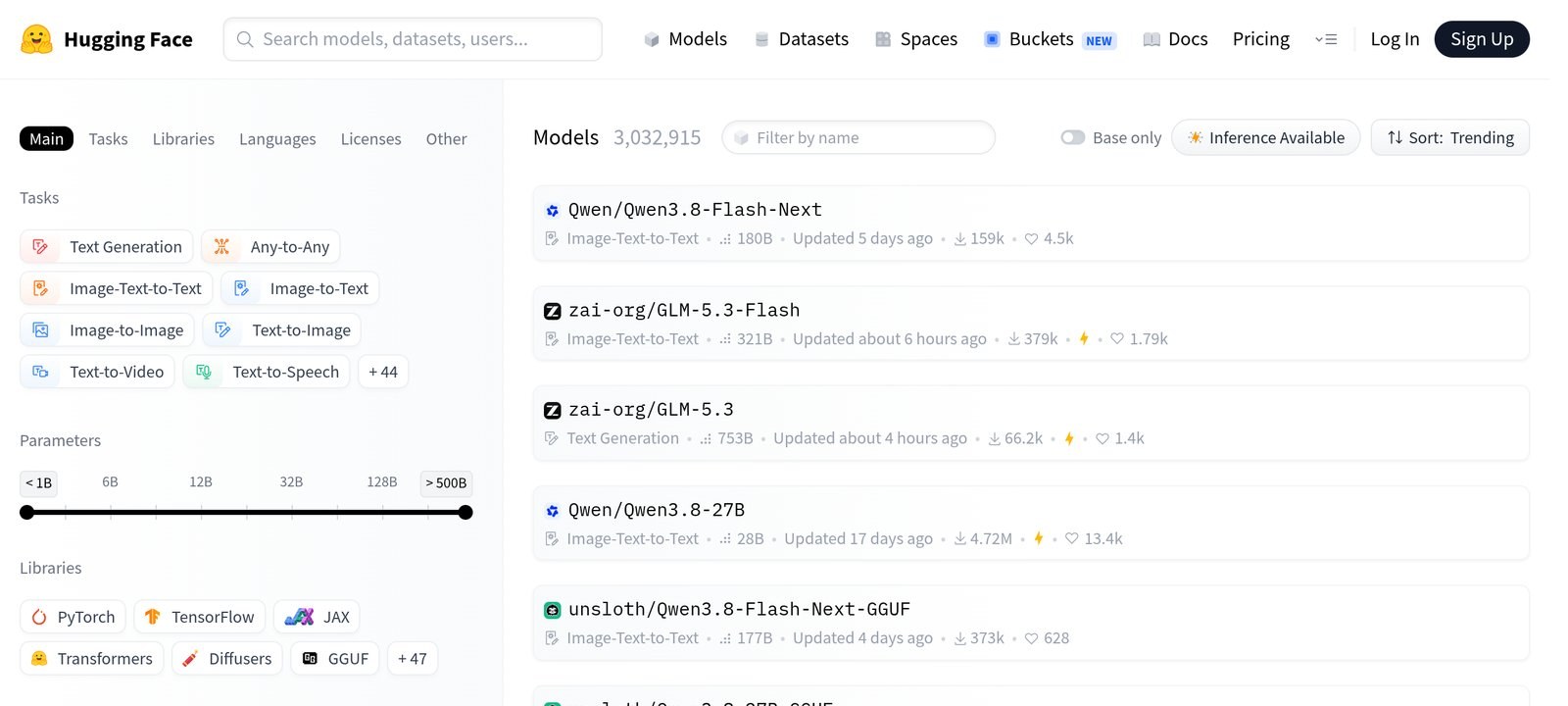
The chart below shows the Hub models page, the main discovery surface where all public models are listed and filtered.
Integrations: AWS, Azure, and GCP deployments for Endpoints. AWS Marketplace billing. An MCP server for AI agents. Google Colab and Kaggle come with the libraries preinstalled. Every major local runtime (Ollama, LM Studio, llama.cpp, vLLM) consumes models distributed through the Hub.
Getting Started with Hugging Face
Required accounts: A free account at huggingface.co/join unlocks unlimited public repositories, free CPU Spaces, and small inference credits. No credit card is needed for the free tier.
Installation
Web only: everything in the browser (Hub browsing, Spaces, dataset viewer) needs no installation. Python work: pip install transformers huggingface_hub in any environment with Python 3.9 or later. The libraries are preinstalled on Google Colab.
First-time configuration
1. Create an account at huggingface.co/join with email or a Google or GitHub identity.
2. Generate an access token in Settings, Token presets. Use the read-only preset for downloads; use the inference preset for API calls.
3. For gated models (some Meta and Google releases), accept the license on the model page once; your token then grants access.
4. Optional: configure the huggingface-cli login command so all libraries reuse the token.
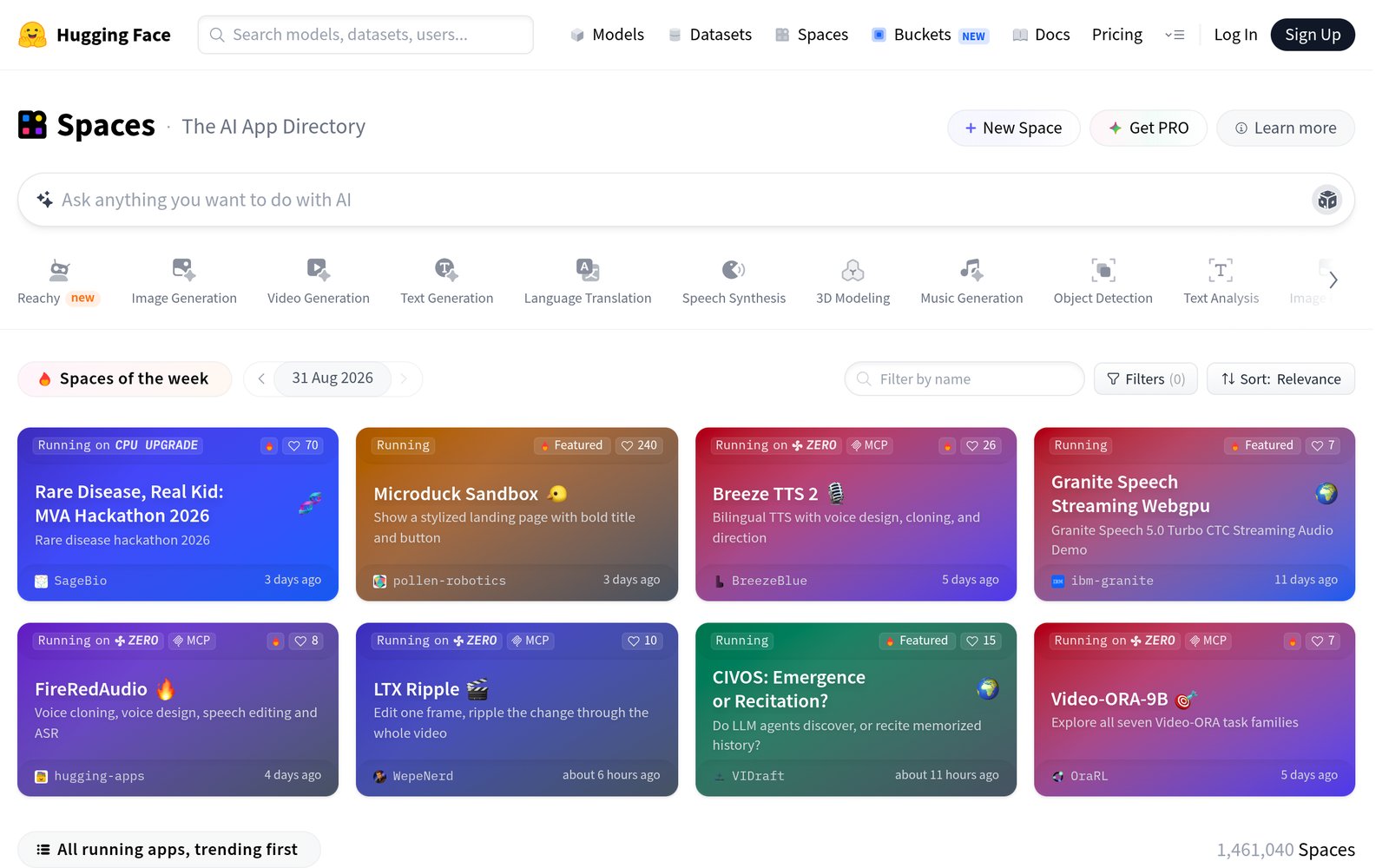
Spaces are the fastest way to try a model: each Space is a running web app. The screenshot below shows the Spaces directory, the platform's app catalog where community demos are discovered and run directly in the browser.
First 15 minutes checklist
☐ Browse huggingface.co/models and filter by task (for example Text Generation) and license (Apache 2.0)
☐ Open a trending model page, read its model card, and check the inference API widget with a sample prompt
☐ Run a Space in the browser: open a trending Space and use its interface with your own input
☐ In Python, run a two-line download and inference on a small model (for example sentence-transformers/all-MiniLM-L6-v2)
☐ Bookmark the model and save the model card link to your LIPS Digital Second Brain under the relevant project
Result: You have run a real open model in the browser and in Python, read a model card, and stored a sourced reference you can reuse.
Real Workflows
Workflow 1: Evaluate and Shortlist Open Models for a Product Feature
Learner type: Professional
CI-First benefit tags: Time, Quantity
Connects to: UIT AI Developer Specialist and Data Scientist; UIB projects that need AI features evaluated without vendor commitments
Time estimate: 60 to 90 minutes for three candidate models, including verification
Step | You do | The tool does |
1 | Define the task, constraints, and budget (for example: text classification, under 1B parameters, Apache 2.0) | (Nothing yet) |
2 | Apply Hub filters: task, license, size, downloads, likes | Returns the matching model list with model cards, licenses, and community statistics |
3 | Read the top 3 model cards: architecture, training data, intended use, known limitations | Hosts the model cards and evaluation tables |
4 | Test each candidate in its Space or the inference widget with your own 5 sample inputs | Runs the model on your inputs without any local setup |
5 | Write a one-page shortlist with scores and license notes; store it in your LIPS project | (Nothing, you judge and execute) |
Sample prompt (for the inference widget or a Space): Context: I am running the model through a hosted inference widget or a demo Space, and the review text I want classified is in front of me. Role: AI as a classification assistant executing one stated task. I own the label; you classify and show your basis. Profile: Act as an Analyst and Tester, quoting the phrase that drives the label rather than summarising the tone. Task: classify the sentiment of the review as positive, negative or mixed, and quote the phrase that drives your label. Then state what would move it to the neighbouring label. Constraints: quote only from the text I provide; never infer sentiment from the rating or the reviewer. Where the review is genuinely mixed, say so rather than forcing one label. Output format: the label, the driving phrase, and the nearer-label condition. Memory: the accepted labels and their phrases belong in my own evaluation notes, because the demo session keeps no record. UP-Context-Engineering verification: I read the quoted phrase myself and confirm it drives the label, I test the same five inputs through a second model before trusting the labels, and I can explain the classification rule without the widget open. Data safety: this pack carries no personal data. I do not paste a customer's review with identifying details, a private message or an unpublished dataset into it, and I keep the evaluation notes in my own store.
Verification checklist:
☐ Multi-Model Check: run the same 5 inputs through a second model from a different family (for example a Llama-based model vs a Qwen-based one) and compare labels
☐ External Source: verify the license text on the model page itself, not the summary card; check the Open LLM Leaderboard results if the model is listed
☐ Human Review: have a colleague run the same 5 inputs and compare shortlists before any engineering time is spent
☐ CI-First Test: can you explain, without the Hub, why model A beat models B and C on your use case? [Y/N]
Workflow 2: Build a Portfolio Demo Space for a Course Project
Learner type: Student
CI-First benefit tags: Quantity, Skill
Connects to: UIT AI Developer Specialist and Data Scientist; thesis and course projects that need a demonstrable artifact
Time estimate: 2 to 4 hours the first time; under 1 hour once familiar
Step | You do | The tool does |
1 | Pick the model your project needs (for example an image captioner) | (Nothing yet) |
2 | Create a new Space with the Gradio SDK, or duplicate an existing Space as a template | Provisions the repository and web interface automatically |
3 | Write a short app.py: load the model with transformers, define inputs and outputs | Builds and runs the app on free CPU or ZeroGPU hardware |
4 | Test with 3 inputs, fix errors, write the README with the model you used and why | Rebuilds on each git push; shows build logs when it fails |
5 | Share the Space URL in your portfolio and store the link in your LIPS project entry | (Nothing, you execute) |
Sample prompt (for a code assistant while writing the Space): Context: I am building a small demo Space around a model, and I write the application code with a code assistant while I build it. The model id and the interface are stated. Role: AI as a coding assistant for one small application. I own the code; you draft against my stated interface. Profile: Act as a Co-Worker and Assistant for the build, keeping the code small enough for me to read. Task: write a Gradio app that loads the stated model with the transformers pipeline API, takes an image upload as input, and returns a generated caption. Keep it under 30 lines and add comments explaining each block. Then name the one thing most likely to break when the Space runs remotely. Constraints: use only documented API calls; where a version detail matters, say so rather than guessing. Keep the code within the stated size. Output format: the app code with comments, then the likely-breaks note with how to check it. Memory: the working code and its environment belong in my own repository, because the Space keeps its own build history. UP-Context-Engineering verification: I run the Space myself with several images before sharing it, I read every line of the generated code, and I can explain what each block does without the assistant. Data safety: this pack carries no personal data. I do not paste private images, credentials or a licensed dataset into it, and I keep the code in my own repository.
Verification checklist:
☐ Multi-Model Check: run the Space with the same images through the model's original demo (linked on the model page) and confirm outputs match
☐ External Source: confirm the Space runs on a visitor's browser without a login, and that the README documents the model license
☐ Human Review: show the demo to a peer or instructor and check that they can reproduce your result with their own input
☐ CI-First Test: can you explain what the pipeline call does and why you chose that model, without opening the app? [Y/N]
Workflow 3: Curate an Open Model Watchlist for Continuous Learning
Learner type: Everyone
CI-First benefit tags: Time, Skill
Connects to: LIPS Collect phase; SL-OS daily information routine; ULM Career and Finance, and Quality of Life domains
Time estimate: 15 minutes per week
Step | You do | The tool does |
1 | Decide which capability matters for your current work (for example: text extraction, speech transcription) | (Nothing yet) |
2 | Check the trending list for your task and the weekly download counts | Provides trending rankings, download counts, and likes as adoption signals |
3 | Read one new model card per week; note its claim, license, and one observed limit in your own words | Hosts the model cards with evaluation data and community discussions |
4 | Once a month, test one watchlisted model in a Space on a real task of yours | Runs the model without any local setup |
5 | Store the note and test result as a LIPS entry under your AI watch project; prune models you no longer track | (Nothing, you execute) |
Sample prompt (UP-Context-Engineering structure for your weekly review): Context: I track open models for my domain as a weekly review habit. This week's model card is read and the workspace is my own. Role: AI as a research assistant structuring a model-card reading. I own the watchlist and its judgements; you summarise from the card. Profile: Act as an Analyst and Tester, recording what the card claims rather than what the model does. Task: summarise the model card for my notes: its claimed capability, its licence terms, its training data source, and one limitation the authors admit. Two sentences per point, then one line on whether it belongs on my watchlist for this domain. Constraints: use only the model card; where a field is absent, say so rather than filling it. Do not rate the model beyond the card's own claims. Output format: the four points with two sentences each, then the watchlist line. Memory: the summary belongs in my LIPS Digital Second Brain under the domain it serves, because the hub keeps the card and not my reading. UP-Context-Engineering verification: I check the licence terms on the model page myself before anything is adopted, I can state the admitted limitation without the summary, and I update the watchlist entry with the date I read it. Data safety: this pack carries no personal data. I do not paste an unreleased model's private evaluation, a partner's data or credentials into it, and I keep the watchlist in my own store.
Verification checklist:
☐ Multi-Model Check: when a model claims a capability, compare its model card claims against the Open LLM Leaderboard or an independent benchmark page
☐ External Source: confirm license and restrictions on the model page itself, since summary cards can lag behind license changes
☐ Human Review: discuss one monthly pick with a peer or mentor and record whether the capability held up in your own test
☐ CI-First Test: can you explain the model's strengths and limits to a colleague without opening the Hub? [Y/N]
Strengths, Limits, and AI Imposture Risk
Strengths
CI-First Benefit | Strength | Evidence |
Time | Model discovery and retrieval collapse from a multi-day research task into minutes of filtering. | Two-line Python interface across millions of models; filters for task, license, and size on the Hub. |
Quantity | Access to the full open-model landscape multiplies what one person can evaluate in a week. | 3M+ models and 1M+ datasets; more than 45,000 models available through Inference Providers alone. |
Quality | Model cards, evaluation tables, and community discussions raise the floor on informed model selection. | PeerSpot reviewers praise step-by-step documentation and on-platform model comparison; Gartner reviews cite easy discovery of the state of open models. |
Skill | Real hands-on practice with real models builds genuine ML capability, not just tool familiarity. | Learners who fine-tune or deploy through the platform practice the actual production workflow used across the industry. |
Limits
Quality varies enormously across repositories. With roughly 85% of models accumulating fewer than 200 lifetime downloads, most published artifacts are experiments, not dependable components. Model cards and benchmark claims are often unaudited, so popularity signals (likes, trending) measure attention, not fitness for your task.
License literacy is mandatory. A model being open-weight does not mean it is commercially usable: some large 2026 releases added non-commercial restrictions and revenue-share clauses, and several American releases declare no license at all. Every serious use requires reading the actual license text.
The platform breadth is disorienting for newcomers. Community reviewers on Product Hunt describe scattered flows and terminology that assumes prior knowledge. Free compute limits are real: free Spaces sleep when unused, and the serverless Inference API is rate-limited and best treated as a test channel rather than a production channel.
AI Imposture Risk
Time Illusion
Rating. Low
Evidence. Discovery and download are genuinely fast and reliable. The main time sink is legitimate evaluation work, not tool overhead.
Quantity Illusion
Rating. Medium
Evidence. 3M+ models creates the appearance of abundant choice, but 85% of repositories have under 200 downloads and quality varies wildly. A shortlist assembled from trending signals alone can look thorough while resting on unproven artifacts.
Skill Illusion
Rating. Medium
Evidence. Running a model through two lines of code can feel like competence in machine learning. A learner who only calls pretrained models without reading their cards, testing their limits, or attempting a fine-tune has tool skill, not ML skill. PeerSpot reviewers note deployment and training remain real hurdles behind the easy surface.
Overall Imposture Risk: Medium. The platform itself is transparent about its artifacts (downloads, licenses, discussions), but its scale invites shallow selection habits.
U365 Co-Intelligence Rating
CI-First Profile
Primary profile: Analyst and Tester (4). The Hub's core value is evidence for decisions: which model, which license, which benchmark. You interrogate the platform's data and draw conclusions.
Secondary profile: Co-Worker and Assistant (2). Libraries like transformers and services like Inference Endpoints execute the mechanical work: loading weights, serving predictions, hosting demos.
CI-First Benefit Score
Time: 7
Rationale. Model research that took days of gathering sources now takes minutes of filtering. The interface is stable and the retrieval reliable enough that verification is quick.
Quantity: 8
Rationale. The platform multiplies what one person can evaluate: millions of artifacts, standardized interfaces, and browser-based testing remove the setup cost that previously limited exploration.
Quality: 7
Rationale. Model cards, benchmark tables, and community discussions measurably improve selection decisions compared to blind downloads. The gain depends on the user actually reading the evidence.
Skill: 6
Rationale. Genuine skill building for users who go beyond inference: fine-tuning, evaluation, and deployment through PEFT, TRL, and Endpoints teach the real production workflow. Users who only consume pretrained models gain vocabulary, not capability.
CI-First Benefit Score: 7.0 / 10 (CI-First Strong)
Humics Protection Badge
Dimension | Rating | Rationale |
Creativity | Neutral | The platform hosts generative models but does not push its own creative output on the user. Effect on creativity depends entirely on how the user works. |
Critical Thinking | Protects | Licenses, download statistics, evaluation tables, and community discussions are exposed for inspection. The platform's own State of Open Models report even distinguishes attention from adoption, actively teaching healthier reading of popularity signals. |
Social Authenticity | Neutral | Not a communication tool. It neither strengthens nor weakens personal voice. |
Humics Protection Score: +1 / +3 Badge: Humics-Neutral
Superhuman Usage Guidance
When to invite this tool:
Any open-model selection or comparison task
Hands-on learning: run, modify, and fine-tune real models
Building a demonstrable portfolio artifact (Spaces)
Deploying an open model to production with Endpoints or Providers
When to keep this tool out:
Tasks where a closed frontier API (Claude, GPT, Gemini) already exceeds every open option for your use case: check the comparison references before defaulting to open models
Decisions you cannot justify by reading: if a task requires a license or safety opinion for production use, read the license text and consult counsel; model card summaries are not legal advice
Production workloads on the free tier: rate limits, sleeping Spaces, and shared capacity make free infrastructure unsuitable for anything users depend on
U365 method integration:
LIPS + CARE: the Hub is a Collect-phase instrument. Model cards, dataset previews, and Space results feed LIPS entries; your own model or Space repositories become Project artifacts in the Execute phase.
ULM + EVA: strongest in the Career domain (AI engineering skills are directly marketable) and Quality of Life (satisfying curiosity by experiment rather than rumor).
UP-Context-Engineering: the platform rewards specificity. A model card read with your real constraints in hand (task, size, license, hardware) beats generic browsing. The agent-facing endpoints (agents.md, MCP server) let AI assistants navigate the Hub for you when prompted with context.
SL-OS: complements the Microsoft 365 core rather than competing with it. Model research notes go to OneNote; dataset exports and weights go to OneDrive or SharePoint project folders.
UNOP: hands-on experimentation is exactly the active, multi-modal practice neuroscience-oriented pedagogy asks for. Spaces make the loop of predict, test, observe, correct fast enough to sustain attention.
Over-delegation warning: the trap here is not the tool doing your thinking, it is the crowd doing your thinking. Likes and trending rankings measure attention, and the Hub's own data shows attention and adoption are different economies. If you pick models by popularity instead of reading model cards against your constraints, you have delegated judgment to an aggregate that never saw your task. The Sub-human downloads what is trending. The Superhuman downloads what fits, and can say why.
The scorecard below summarizes the full U365 Co-Intelligence Rating for Hugging Face.
What Users Say
Aggregate Rating Table
Platform | Rating | Reviews | Link |
G2 (all Hugging Face products) | 4.3/5 | 12 | |
Gartner Peer Insights | 4.5/5 | 18 | |
PeerSpot | 4.1/5 (8.2/10) | 13 | |
TrustRadius | 9.9/10 | 11 | |
Product Hunt | 92 community reviews | 3.1K followers | |
Trustpilot | 2.4/5 | 12 | |
Reddit sentiment (r/huggingface) | Mixed to Positive | 8.5K members |
No reviews found on Capterra for the platform as a whole (one legacy review exists for a discontinued product page). No dedicated reviews found on Futurepedia or FutureTools.
What Users Praise
Professional reviewers consistently praise three things. First, breadth: PeerSpot reviewers value a single hub where models, datasets, and documentation live together, with one noting Hugging Face surpasses alternatives in model variety. Second, documentation: step-by-step docs are repeatedly called out as the reason adoption is fast, and the free inference APIs are credited by students for making real experimentation possible without hardware. Third, reliability and the open-source ethos: Gartner reviewers point to easy discovery of the current state of open models, and Product Hunt reviewers describe the network effect of the whole ML community converging on one place as the core value.
What Users Complain About
The complaints cluster into three areas. Onboarding and organization: Product Hunt reviewers call the first-time experience harder than it needs to be, with terminology that assumes prior ML knowledge and dataset upload flows scattered across screens. Quality variability: enterprise reviewers note that documentation, licensing clarity, and benchmark reliability vary considerably between repositories, which makes rigorous evaluation slow despite the easy surface. Billing and support: the small Trustpilot sample is dominated by billing disputes (charges for unused services) and complaints about gated or restricted models, though this comes from a low review count. PeerSpot reviewers also flag multi-GPU training and production deployment as remaining hurdles.
Sentiment Summary
Overall sentiment: Mixed to Positive (strongly positive among ML practitioners, negative in the small consumer-billing sample)
Key themes:
The depth of the community and the convergence of models, datasets, and demos in one place is the most praised value
Documentation quality is a recurring strength in professional reviews
First-time onboarding is confusing for non-specialists: scattered flows and ML jargon
Repository quality, license clarity, and benchmark reliability vary widely
Billing disputes and gated models dominate the negative consumer reviews (small sample)
U365 Editorial Note
The sentiment split aligns precisely with the CI-First evaluation. The professional reviewers who praise documentation and breadth are describing the platform's Analyst and Tester strength: evidence available for inspection, which is also why Critical Thinking scores as Protected. The complaints map equally well. The onboarding confusion is the practical face of the platform's breadth, which the CI-First evaluation handles through the Quantity Illusion (Medium): 3 million models is abundance for the expert and noise for the newcomer. The quality-variability complaint matches the Medium Quantity and Skill Illusion ratings: reviewers confirm that easy downloads do not equal dependable components, and that real competence still requires the harder work of evaluation and deployment. One caution for the reader: the Trustpilot score (2.4 from 12 reviews) reflects consumer billing disputes, not the practitioner experience measured by G2, Gartner, and PeerSpot, which run 4.1 to 4.5. Weight the sample that matches your use case.
Comparison and Alternatives
Alternative | Choose the alternative if... | Choose Hugging Face if... |
You want to run popular open models locally on your own machine with one command and full privacy. See our Ollama review. | You need the full model landscape, datasets, demos, and portfolio hosting, not merely local inference of a curated model list. | |
You want to call hundreds of models (open and closed) through one paid API and switch providers by changing one string. See our OpenRouter review. | You need to inspect, download, and modify model artifacts, publish your own, and host demos, not merely route API calls. | |
You want a curated set of models exposed as a polished pay-per-second API with production reliability, and you do not need to touch weights. | You want the uncurated full landscape, free tiers for learning, and the ability to publish your own models and datasets. | |
You work primarily with models and datasets from the Chinese open-source community and want first-day access to releases from Alibaba and peers. | You want the global standard with broader international community, English-first documentation, and Western cloud integrations. | |
You want competition datasets, notebooks, and courses in a learning-first environment with free GPU hours. | You want the production-grade distribution channel: versioned repositories, the transformers libraries, and deployment services. Practitioners increasingly use both. |
Where Hugging Face is clearly better
No competitor matches the combination of scale and standardization. The Hub is where the open model community actually publishes first: new frontier open models from every major lab land there on release day, and the transformers interface abstracts all of them to a common API. For learning and portfolio building, nothing else puts a public, runnable demo one click away from every model card, free. And for organizations, per-resource-group access controls, SSO, and regional storage options make it a serious collaboration platform, not just a file host.
Where Hugging Face is clearly worse
For pure production inference, specialized providers win on focus. Replicate offers a curated catalog with stronger uptime guarantees than community Spaces; OpenRouter covers closed frontier models (Claude, GPT, Gemini) that the Hub cannot host; Ollama delivers privacy and zero marginal cost for local use that no cloud service can match. Hugging Face's own report acknowledges that community attention is not the same as production readiness, and the free tiers are explicitly not production infrastructure. If your use case is calling one proven model through an API, the Hub is more than you need.
Verdict and Next Steps
Who should adopt it: Fellows, students, and professionals in any technical or technical-adjacent program who need to understand, evaluate, or build with open AI models. Essential for UIT-aligned learners; valuable as an evaluation sandbox for UIB, UIC, and UID learners who need to test AI capabilities before committing budget.
When: At the start of any AI-related course project, thesis, product evaluation, or portfolio effort. The free tier covers the full learning curve.
For what: Model discovery and comparison, hands-on experimentation with real models, portfolio demos, and production deployment of open models.
UP-Context-Engineering prompt pack:
1. "I am a U365 Fellow in [program]. I need an open model for [task] that runs on [hardware or budget] under a commercial-friendly license. Walk me through the Hub filters I should apply, the three signals on a model card that matter most for my case, and the questions I should answer before shortlisting any model."
2. "Act as my Analyst and Tester (AI Profile 4). Here is my task and constraints: [describe]. I have shortlisted these three models from the Hub: [paste model card links]. For each, extract the claimed capability, the license terms in plain language, the training data source, and any limitation the authors admit. Flag where the model cards are silent, because silence is information too."
3. "I am building a LIPS entry for my AI learning project. I just tested [model id] in a Space on this input: [describe input and result]. Help me write a 5-sentence entry: what the model claims, what I observed, where the two diverge, the license status, and whether I would use it for real work. I will store your draft and revise it in my own words."
Related U365 content:
U365's Recommendations to Learn More
This curated set of resources helps U365 Fellows go deeper with Hugging Face. Every link has been verified as active (HTTP 200 or 403 for bot-blocked platforms) as of 2026-09-03.
Official learning resources
Video tutorials and channels
Written tutorials and deep-dive articles
Community and social
These resources were curated for content quality and relevance to U365 Fellows. Individual creators are included when their tutorials teach something the post itself does not. Channels and playlists are preferred over individual videos for durability, but the best standalone tutorials are also included.
Glossary
CI-First Benefit Score
The U365 measure of how much real benefit a tool delivers across four dimensions: Time (work done faster), Quantity (more usable output in the same time), Quality (verified, durable improvement over what you could produce alone), and Skill (lasting capability built, not dependency created). Each dimension is scored 0 to 10 by testing the tool on real tasks and accounting for the overhead of prompting, verifying, and correcting. The overall score is the average of the four. A score of 7.0 out of 10 falls in the CI-First Strong band (6.1 to 8.0), meaning the tool significantly amplifies the user and earns a place in a Superhuman workflow. Hugging Face reaches that band because it collapses discovery time and multiplies what one person can evaluate, with honest caveats on skill transfer for passive users.
CI-First Profile
The role you assign to an AI tool before giving it work, which sets how much autonomy you hand over and how you verify the result. The five levels are: (level 1) Co-Creator and Thought Partner, (level 2) Co-Worker and Assistant, (level 3) Professor, Coach and Tutor, (level 4) Analyst and Tester, and (level 5) Challenger and Devil's Advocate. Lower level numbers indicate higher AI autonomy in the collaboration. Hugging Face is rated primarily as an Analyst and Tester (level 4): its core value is evidence (model cards, licenses, benchmarks, download statistics) that you interrogate before deciding, with a secondary Co-Worker role (level 2) when its libraries and services execute the mechanical work of loading, serving, and hosting models.
Humics Protection Badge
A U365 rating of whether sustained use of a tool strengthens or weakens the three capabilities that remain uniquely human: creativity, critical thinking, and social authenticity. Each dimension is rated Protects (+1), Neutral (0), or Erodes (-1), and the sum produces a badge: Humics-Friendly (+2 to +3), Humics-Neutral (-1 to +1), or Humics-Risky (-2 to -3). Hugging Face earns Humics-Neutral with a score of +1: critical thinking is protected because the platform exposes licenses, statistics, and community discussion for inspection instead of hiding them, while creativity and social authenticity are untouched by what is fundamentally an engineering platform.
AI Imposture Risk
The threat that a tool creates the appearance of competence while your actual capability or output quality declines. U365 assesses three traps. The Time Illusion: work seems faster while prompting and correcting eat the savings. The Quantity Illusion: high volume that looks like productivity but does not survive inspection. The Skill Illusion: you appear skilled because the tool performs the skill, while your own ability erodes. Hugging Face rates Medium overall. The Time Illusion is Low because retrieval is genuinely fast and reliable. The Quantity Illusion is Medium because 3 million repositories make shallow shortlists look thorough while most artifacts have under 200 downloads. The Skill Illusion is Medium because two lines of Python can feel like machine learning competence; the capability is real only if you read, test, and iterate rather than just consume.
User Sentiment
The aggregate voice of real users across review platforms, gathered by U365 from verifiable public sources and weighted by sample size and relevance. For Hugging Face the sentiment is Mixed to Positive and splits cleanly by audience: practitioners rate it highly (G2 4.3/5, Gartner Peer Insights 4.5/5, PeerSpot 4.1/5, TrustRadius 9.9/10) for breadth, documentation, and community depth, while the small Trustpilot sample (2.4/5 from 12 reviews) is dominated by consumer billing disputes. The U365 position: read the practitioner sample for learning and engineering decisions, and treat the consumer-billing complaints as a reason to watch your subscription settings on any paid tier.




Comments