
Model Quantization: Running LLMs on Your Laptop



UIT University 365 Institute of Technology
Series AI Engineering | Level Basic (Free)
Duration 15 to 20 minutes | Access Free
IT Engineering, AI and Applied AI, Data Science, Software Development, Digital Transformation

UNOP Sound (University 365 Neuroscience Oriented Pedagogy)
Take five minutes to prepare your brain. Play the isochronous tone track (40Hz gamma frequency) with your eyes closed. Gamma-frequency tones before a learning session raise attention and make the material easier to absorb.
[Audio player: UNOP Pre-Lecture Isochrone (40Hz, 5 minutes)]
In this Lecture

The Hook: A Model That Fits in Your Bag
A 70-billion-parameter language model, stored in its original training format, needs about 281 GB on disk. That is a server.
The same model, converted to a 4-bit format, needs about 43 GB. That fits on a laptop with a decent solid-state drive, and it runs on the laptop's own memory, offline, with no API key and no per-token bill.
Nothing about the model's architecture changed. It still has 70 billion parameters, the same layers, the same attention heads, the same weights in the same places. What changed is how precisely each weight is written down.
That is quantization: storing the same numbers with fewer bits. This lecture shows you what that costs, what it buys, and how to choose a format using measured evidence rather than folklore.
Step 1: What a Model Actually Stores
Before you can compress a model, you need to know what is in it.
The parameters
A language model is a very large collection of numbers called parameters or weights. For Llama 3 8B that is roughly 8 billion numbers. For Llama 3 70B, roughly 70 billion. The number after the "B" is the parameter count, and it is the main determinant of how much memory the model needs.
The default storage format
Weights are trained and usually stored in 16-bit floating point, written as FP16 or BF16. Each parameter takes 2 bytes.
Do the arithmetic:
8 billion parameters × 2 bytes = 16 GB
70 billion × 2 bytes = 140 GB
405 billion × 2 bytes = 810 GB
That is the baseline. Everything below is about writing those same parameters in fewer bytes.
Why precision was needed in training
Training is sensitive. Gradients are small, they accumulate over millions of steps, and rounding errors compound. Sixteen bits, and in some places 32 bits for the master copy of the weights, is what makes training stable.
Inference is not like that. At inference time each weight is used once per token to do a multiply-and-add. The model does not accumulate error across steps in the same way. That asymmetry is the opening quantization walks through.
The three things you have to store
Memory for a running model is more than the weights:
Weights, the parameters themselves.
The KV cache, the stored key and value vectors for every token already generated.
Activations and working buffers, temporary values during the forward pass.
Quantization mostly attacks the first, and there are separate techniques for the second. Step 7 covers the split.
Step 2: What Quantization Does to a Number
A floating-point number versus a fixed-point number
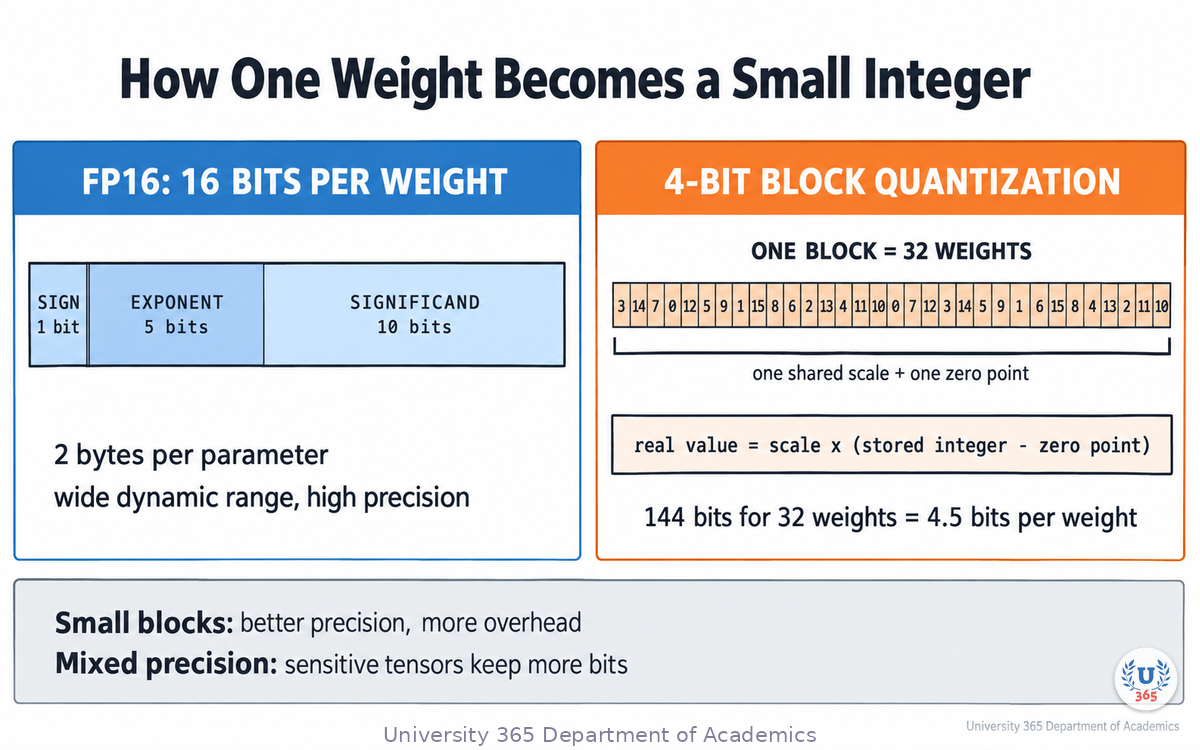
An FP16 value spends 1 bit on the sign, 5 bits on the exponent and 10 bits on the significand. The exponent gives it a huge dynamic range: it can represent very large and very small numbers.
A 4-bit integer has 16 possible values. It cannot represent a wide range.
The trick is that you do not need a wide range for any single weight. You need a wide range across all the weights, and each weight only needs to be accurate relative to its neighbours.
The block-and-scale idea
Modern quantization splits the weight matrix into blocks, typically 32 or 256 weights each, and stores one scale and one zero point per block. Every weight inside the block is stored as a small integer, and its real value is recovered as:
real value ≈ scale × (stored integer − zero point)
A block of 32 weights at 4 bits each takes 128 bits. Add the scale (16 bits) and you have 144 bits for 32 values, which is 4.5 bits per weight. That extra half-bit is the cost of the scale, and it is why a format labelled 4-bit is often closer to 4.5 bits in practice.
Where the error comes from
Two things decide whether quantized weights still work:
The scale granularity. Smaller blocks mean a scale that better fits the local range of values, which reduces error. They also cost more overhead.
Which weights get more precision. Not all weights matter equally. The output projection and the attention projections tend to be more sensitive than the feed-forward layers. This is why the "K" formats use mixed precision inside one file: some tensors at higher bit width, some at lower.
Calibration
A second lever is calibration. Instead of quantizing each block against a naive range, you run a small amount of representative text through the original model, record which weights have the largest effect on the output, and use those statistics to choose the scales. In llama.cpp this produces an importance matrix (imatrix), and it measurably reduces the perplexity penalty at low bit widths.
The practical summary: quantization is not one operation, it is a family of choices about block size, mixed precision and calibration.
Step 3: The GGUF Formats, Decoded
GGUF is the file format used by llama.cpp and most local inference tools. A GGUF file is a single container holding the weights, the tokenizer, the architecture metadata and the chat template.
Within GGUF there are three generations of quantization schemes, and the naming tells you which one you have.
Legacy block quants
Q4_0, Q4_1, Q5_0, Q5_1, Q8_0.
Fixed block sizes, simple scaling, no mixed precision, no calibration. Old and fast to produce. Still useful as a baseline.
K-quants
Q2_K, Q3_K_S, Q3_K_M, Q3_K_L, Q4_K_S, Q4_K_M, Q5_K_S, Q5_K_M, Q6_K.
The "K" means k-quant. These use a larger super-block structure with two levels of scaling, and mixed precision across tensor types. The suffix is a size tier within the same bit width:
_S small, the most aggressive compression in that tier
_M medium, the usual default
_L large, the largest and highest quality in that tier
So Q4_K_M and Q4_K_S are both roughly 4-bit, but _M keeps a little more precision in the sensitive tensors and costs a little more disk.
I-quants
IQ1_S through IQ4_NL.
Importance-matrix quants. They depend on a calibration file, use a codebook rather than a simple scale, and reach very low bit widths. They are the smallest usable files, and they are the most sensitive to how well the calibration matched your use case.
The names you will actually type
# quantize an FP16 GGUF to 4-bit medium ./llama-quantize model-f16.gguf model-Q4_K_M.gguf Q4_K_M # with calibration statistics for a better result ./llama-quantize --imatrix model.imatrix model-f16.gguf model-Q4_K_M.gguf Q4_K_M
The number to watch
Every format has a bits per weight figure, and it is higher than its label:
Format | Bits per weight (7B-class) | Size (GiB) |
Q2_K | 2.96 | 2.8 |
Q3_K_M | 4.00 | 3.7 |
Q4_K_M | 4.89 | 4.6 |
Q5_K_M | 5.70 | 5.3 |
Q6_K | 6.56 | 6.1 |
Q8_0 | 8.50 | 8.0 |
F16 | 16.00 | 15.0 |
The gap between the label and the real figure is the scale and metadata overhead. A "4-bit" file is a 4.9-bit file. Plan your disk and memory against the second column, not the first.
Step 4: The Size and Quality Table
Here is what the compression buys you, in the numbers the tooling itself publishes.
File size, by model
Model | Original size | Q4_K_M size |
8B | 32.1 GB | 4.9 GB |
70B | 280.9 GB | 43.1 GB |
405B | 1,625.1 GB | 249.1 GB |
The 8B row is roughly a 6.5x reduction. The 70B row turns a server requirement into a workstation requirement. The 405B row stays out of reach for a laptop either way.
Quality, by format
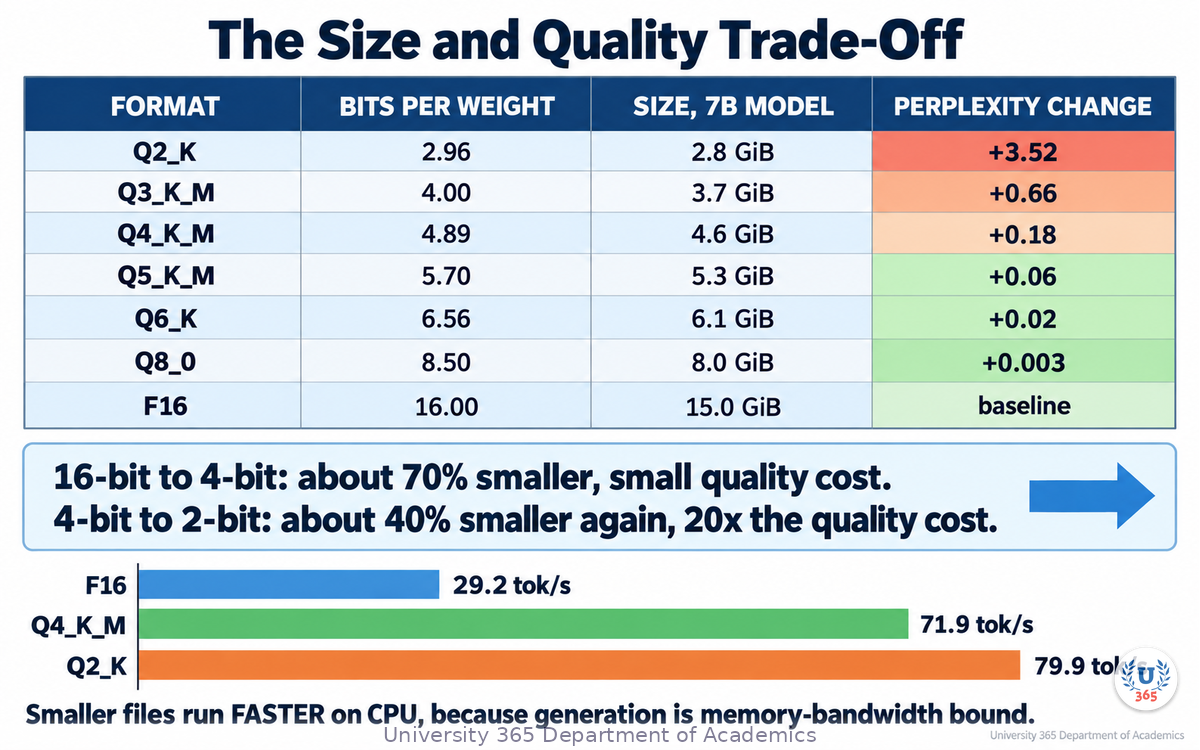
Perplexity measures how surprised a model is by real text. Lower is better. These deltas are measured against a 7B-class baseline:
Format | Perplexity change | Read it as |
Q8_0 | +0.003 | indistinguishable |
Q6_K | +0.02 | indistinguishable in practice |
Q5_K_M | +0.06 | very small |
Q4_K_M | +0.18 | small, usually acceptable |
Q3_K_M | +0.66 | noticeable |
Q2_K | +3.52 | substantial |
The shape of that table is the whole argument. Going from 16 bits to 4 bits saves about 70% of the file size and costs a fraction of a perplexity point. Going from 4 bits to 2 bits saves a further 40% of the remaining size and costs twenty times the quality.
Speed, and the surprise
On a CPU reference benchmark for a 7B-class model, generation speed at 128 tokens was:
Format | Tokens per second |
F16 | 29.2 |
Q8_0 | 50.9 |
Q6_K | 58.7 |
Q4_K_M | 71.9 |
Q2_K | 79.9 |
Smaller files are also faster on CPU, because the bottleneck is memory bandwidth rather than arithmetic. Reading 4.6 GB per pass is quicker than reading 15 GB. Quantization is not purely a quality sacrifice; in the CPU regime it is often a straight win.
Step 5: Why Perplexity Is Not Enough
Perplexity is a proxy. It averages over a whole corpus, and it does not tell you how a specific capability degrades.
A 2026 study evaluated thirteen GGUF configurations of one instruction-tuned 8B model on five downstream benchmarks rather than perplexity alone. The results show the problem clearly.
Configuration | Size reduction | GSM8K (math) | Average score | Perplexity |
F16 baseline | none | 77.63 | 69.47 | 7.32 |
Q4_K_M | 69.4% | 77.41 | 69.15 | 7.56 |
Q3_K_M | 75.0% | 73.16 | 68.07 | 7.96 |
Q3_K_S | 77.2% | 68.31 | 65.49 | 8.96 |
Read the top two rows together. At 4-bit medium, the model loses about 0.3% of its average benchmark score and effectively nothing on multi-step arithmetic, while the file shrinks by nearly 70%.
Then read further down. Q3_K_S saves only eight more percentage points of size than Q3_K_M, and loses nine points of arithmetic reasoning to do it. That is a bad trade for any task that involves calculation.
Three findings from that study are worth carrying into your own work:
Degradation is task-dependent, not uniform. Multi-step arithmetic and instruction-following are the most sensitive. Knowledge questions and commonsense questions degrade less.
Format matters as much as bit width. Two formats with almost the same measured perplexity can differ meaningfully on arithmetic and instruction-following, because the quantization error interacts with the computation pattern the task requires.
A well-calibrated 5-bit format can match or slightly beat the 16-bit baseline on some benchmarks. The study reported several 5-bit configurations scoring above F16 on the arithmetic benchmark. Quantization is not monotonically destructive; it is a perturbation that can go either way on a given metric.
The practical rule that follows: measure on your own task, not on a leaderboard. A model that scores well on general knowledge can still fail on the arithmetic your application depends on.
Step 6: Your First Local Model, Step by Step
This is a concrete sequence you can run today on a laptop with 16 GB of memory.
1. Check what you have
Memory: at least 8 GB free, 16 GB comfortable. A 7B model at Q4_K_M needs about 4.6 GiB for weights plus context.
Disk: at least 10 GB free.
CPU: any modern laptop will run a 7B model and give readable output. Tokens per second will be modest.
GPU: optional. A discrete GPU with 8 GB of video memory can hold a 4-bit 7B model entirely.
2. Get a model in GGUF format
Prefer a GGUF file from a publisher you trust, or convert and quantize yourself from the original weights. The published reference tables use a 7B-class dense model, so a matching file is the easiest way to see the numbers in this lecture reproduce.
3. Pick a format
Start at Q4_K_M. It is the balance point the tooling itself recommends, and Table 4 above shows why: most of the quality, about 30% of the size.
Move to Q5_K_M if you have the memory and your task is arithmetic-heavy. Move to Q3_K_M only if you are memory-constrained and have tested your task.
4. Run it
llama-cli -m model-Q4_K_M.gguf -p "Explain what a KV cache is in two sentences"
5. Find the real limit
Increase the context length until it fails. Watch memory as you go. The point at which it fails is your KV cache limit, and it is usually much smaller than the model's advertised maximum context.
6. Measure, do not guess
llama-bench -m model-Q4_K_M.gguf -p 512 -n 128 -ngl 99 -r 5 -o json
Record prompt-processing speed and generation speed. Then compare two formats on the same hardware and the same prompt. You now have your own data instead of someone else's table.
Step 7: What Else Eats Your Memory
Quantizing the weights gets the model loaded. It does not get it running well at long context. Three other costs matter.
The KV cache
Every generated token adds a key vector and a value vector for every layer. The cache grows linearly with the number of tokens in context.
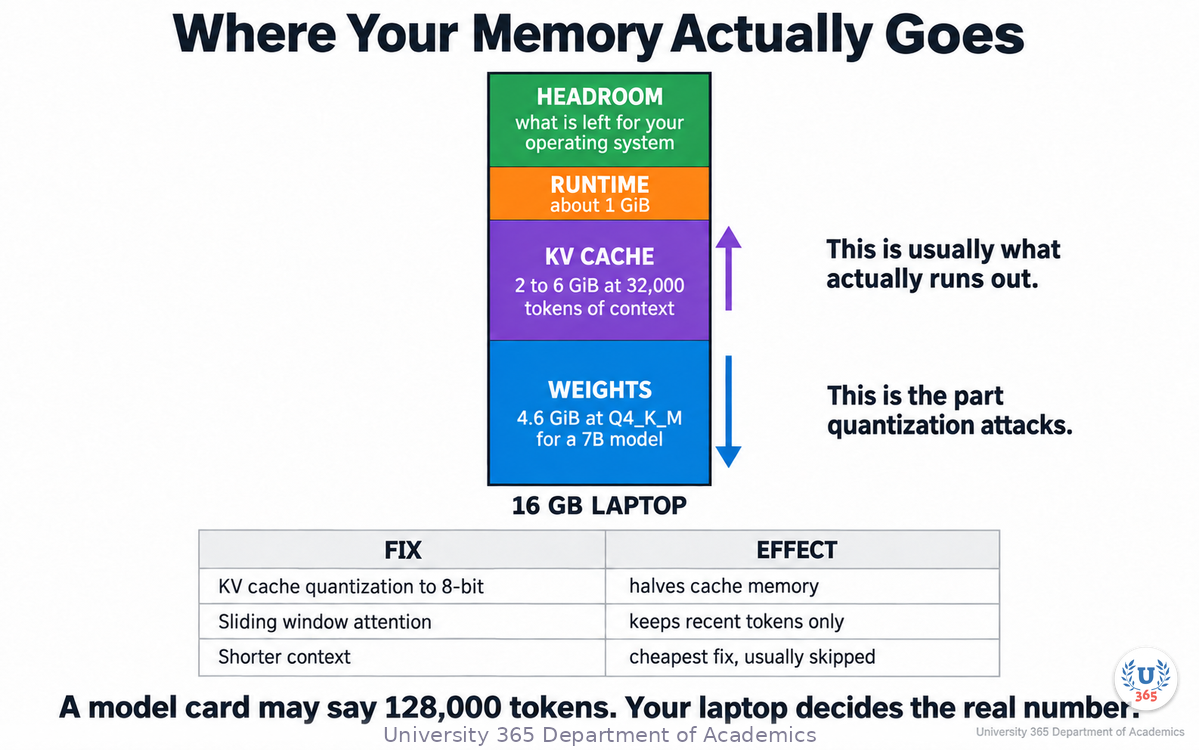
For a model with 8,192 hidden dimensions and 128,000 tokens of context, the cache can run to several gigabytes on its own. This is why a 4-bit model that fits comfortably also runs out of memory at 32,000 tokens of context.
The controls are:
KV cache quantization. Store cached keys and values at 8-bit or 4-bit instead of 16-bit. Halves or quarters the cache. Quality impact grows with context length, so test it.
Sliding-window attention. Keep only the most recent tokens in the cache, with a summary of what was dropped.
Cache eviction. Drop the least useful stored tokens by an attention-based score.
Shorter contexts. The cheapest fix and the one people skip.
The runtime overhead
The inference engine, the tokenizer, the chat template and the working buffers all take memory. Budget a gigabyte or so of headroom above the weights.
The context-window claim versus the context-window reality
A model card may state a 128,000-token context. The memory to hold it is a separate question from the training that supported it. Always test at the context length you actually intend to use.
Step 8: Choosing a Format for Your Hardware
A decision table is more useful here than a rule.
Your situation | Format | Reasoning |
16 GB laptop, general chat and writing | Q4_K_M | the balance point, about 4.6 GiB for a 7B model |
16 GB laptop, arithmetic or code tasks | Q5_K_M | arithmetic is the most sensitive capability; the extra 0.8 GiB is cheap |
8 GB laptop or a small tablet | Q3_K_M | the safest 3-bit choice; accept a visible quality drop |
Disk or memory is the hard constraint | Q2_K or an IQ2 format | usable only when nothing else fits |
Quality must be provably preserved | Q6_K or Q8_0 | near-baseline perplexity, larger files |
Serving many users from a GPU | A GPU-native format | GGUF targets CPU and consumer hardware; server stacks use their own schemes |
Two principles sit behind the table.
First, decide from your task backwards. If your application does arithmetic, instruction-following or structured output, you are in the sensitive region and 4-bit medium is your floor. If it does summarisation and drafting, you have more room.
Second, calibrate when you compress hard. At 4-bit and above, calibration is a refinement. At 3-bit and below it is close to mandatory. An imatrix built from text that resembles your workload is the difference between a usable 3-bit model and a useless one.
Step 9: The Limits of the Laptop
Quantization changes the economics of running a model. It does not change what the model knows.
What local inference gives you
Privacy by construction. No prompt leaves the machine. For regulated data this is often the whole argument.
No per-token cost. Marginal cost becomes electricity.
No rate limit and no deprecation. The file you have keeps working.
Full control of the sampling. Temperature, top-p, stop sequences and the system prompt are yours to set.
What it costs you
A quality gap you did not choose. A frontier hosted model and a 4-bit 8B model on your laptop are not comparable tools. Be honest about which tasks the small model can carry.
A context ceiling. The long-context work you do in a hosted model usually does not survive the move.
Operations you now own. Model updates, prompt templates, evaluation and monitoring all become your job.
Slower iteration. Generation speed on a CPU is measured in tens of tokens per second, not hundreds.
Where the local model wins
The pattern that works is a division of labour: use the local model for the high-volume, low-stakes, private work, such as classifying, extracting fields, rewriting, and first-pass drafting, and use a hosted frontier model for the low-volume, high-stakes work, such as architecture decisions and difficult reasoning. You keep the privacy and cost benefits where they matter and you spend the frontier model where it earns its price.
This is the CI-First position applied to hardware. The human decides which tool carries which task, and the decision is made on measured quality, not on enthusiasm for either option.
Feynman Summary: Explain It Like You Are 12
Imagine you have a very long shopping list with millions of prices written with lots of decimal places, like 12.4938372 euros.
You need to carry that list in a small notebook. So you round every price to the nearest whole euro. The list is now much smaller, and it prints much faster, and most of the time you still know what things cost.
Rounding one price is a tiny mistake. Rounding millions of them adds up, but not as much as you would think, because the mistakes go in both directions and mostly cancel out.
Now imagine going further: rounding to the nearest ten euros. The notebook gets even smaller, but now a 14-euro item and a 6-euro item both say 10, and some of your totals come out wrong. That is the difference between 4-bit and 2-bit quantization. A small squeeze is nearly free. A big squeeze breaks the arithmetic.
The clever part of modern quantization is that it does not round the whole list the same way. It looks at small groups of prices together, and it spends more precision on the items that change the total the most.
Mindmap: The Complete Picture
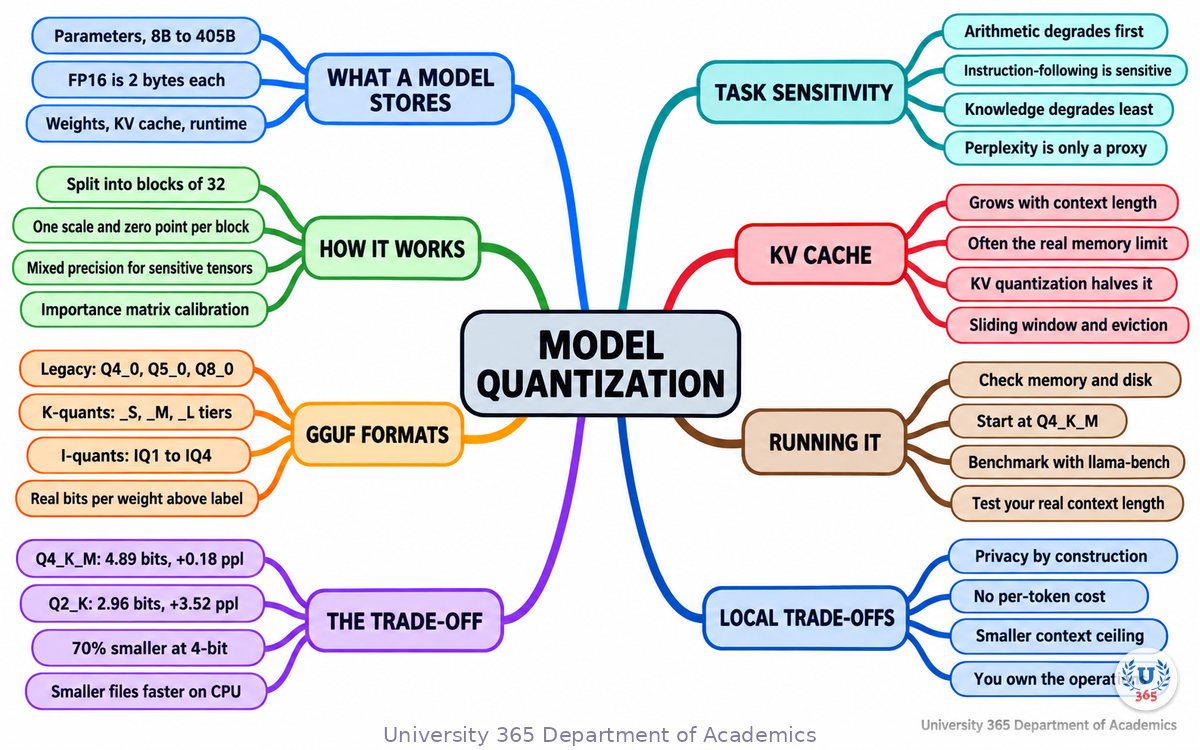
The mindmap shows the full structure of what you learned: what a model stores, where the memory goes, how block-and-scale quantization works, the three families of GGUF format, the size and quality evidence, the task-dependent degradation, the four steps to running a local model, and the KV cache cost that limits it.
UNOP Sound (University 365 Neuroscience Oriented Pedagogy)
Take five minutes to consolidate your memory. Play the isochronous tone track (10Hz alpha frequency) with your eyes closed. Alpha-frequency tones after a learning session support consolidation, helping move what you just learned from short-term to long-term memory.
[Audio player: UNOP Post-Lecture Isochrone (10Hz, 5 minutes)]
Practical Exercise: Quantize and Measure
Objective
Measure the quality and speed cost of quantization on your own hardware, using two formats of the same model.
Steps
Download or produce two GGUF files of the same model: one Q8_0 and one Q4_K_M.
Write five prompts that represent your real workload. Include at least one that requires arithmetic, one that requires following a strict output format, and one that requires recalling a fact.
Run all five prompts against the Q8_0 file and save the outputs verbatim.
Run the same five prompts against the Q4_K_M file and save the outputs verbatim.
Score each pair yourself, blind if possible: same quality, slightly worse, clearly worse.
Benchmark both files:
llama-bench -m model-Q8_0.gguf -p 512 -n 128 -r 5 -o json llama-bench -m model-Q4_K_M.gguf -p 512 -n 128 -r 5 -o json
Record four numbers: file size each, generation speed each, and the count of prompts that degraded.
Now raise the context length in a conversation until memory fails, for each file. Record both limits.
What to Look For
Expect roughly a 2x file-size difference and a visible speed difference in favour of the smaller file.
Expect the arithmetic prompt to degrade first, if any does.
Expect the context limit to be far below the model's advertised maximum, and expect it to be similar for both files, because it is dominated by the KV cache rather than the weights.
If nothing degraded on your five prompts, your task sits in the insensitive region, and you can compress further with confidence.
Glossary
Term | Definition |
**Parameter** | A single learned number in a model. A "7B model" has about 7 billion of them. |
**FP16 / BF16** | 16-bit floating-point storage formats, the usual baseline for trained weights. Each parameter takes 2 bytes. |
**Quantization** | Storing weights at lower precision than they were trained in, to reduce size and memory use. |
**Block** | A group of consecutive weights that share one scale and one zero point. |
**Scale and zero point** | The two numbers that let a small stored integer be converted back to an approximate real value. |
**Bits per weight** | The real storage cost per parameter, including scales and metadata. Always higher than the format's label. |
**GGUF** | A single-file model format carrying weights, tokenizer, architecture metadata and chat template, used by llama.cpp and most local inference tools. |
**K-quant** | A llama.cpp format family using two-level block scaling and mixed precision across tensor types. The `_S`, `_M` and `_L` suffixes are size tiers. |
**I-quant (IQ)** | An importance-matrix-dependent format family using a codebook, reaching the lowest bit widths. |
**Importance matrix (imatrix)** | Calibration statistics, gathered by running representative text through the model, that guide the choice of quantization scales. |
**Perplexity** | A measure of how surprised a model is by real text. Lower is better. Used as a proxy for quantization quality. |
**KV cache** | Stored key and value vectors for already-generated tokens, so they are not recomputed. Grows linearly with context length. |
**KV cache quantization** | Storing cached key and value vectors at 8-bit or 4-bit to reduce memory during long-context generation. |
**Memory bandwidth bound** | A regime where generation speed is limited by how fast weights can be read from memory rather than by arithmetic. This is why smaller files can be faster. |
**Downstream benchmark** | A task-based evaluation, such as arithmetic or instruction-following, as opposed to a distribution-based proxy such as perplexity. |
**CI-First** | The U365 principle that the human is the ruler and orchestrator, and AI is the amplifier. |
Quiz: TEST YOUR UNDERSTANDING
1. A 70-billion-parameter model in FP16 needs about 140 GB. What is the main reason a 4-bit version needs roughly 43 GB?
A) The 4-bit version has fewer parameters
B) Each parameter is stored in fewer bits, with a small overhead for scale and metadata
C) The 4-bit version removes some layers
D) The tokenizer is compressed
2. Why is a format labelled "4-bit" often closer to 4.9 bits per weight in practice?
A) Because 4-bit means 4.9 by definition
B) Because each block needs a scale and a zero point, and some tensors are kept at higher precision
C) Because the tokenizer is counted in the average
D) Because of file-system block size
3. Which capability degrades first when you compress a model aggressively?
A) General knowledge recall
B) Commonsense reasoning
C) Multi-step arithmetic reasoning
D) Tokenizer coverage
4. Why can a smaller quantized file generate tokens FASTER on a CPU?
A) Fewer parameters means less arithmetic
B) CPU generation is memory-bandwidth bound, and a smaller file reads faster
C) Quantized weights use a faster instruction set
D) The KV cache is disabled
5. You have 16 GB of memory, you run mostly arithmetic and code tasks, and you want the highest practical quality. Which format?
A) Q2_K
B) Q3_K_S
C) Q4_K_M
D) Q5_K_M or Q6_K, if the file fits
Answers: 1-B, 2-B, 3-C, 4-B, 5-D
Related Resources
U365 INSIDE Publications
How LLMs Actually Work: Transformers in 20 Minutes: the architecture you are quantizing
AI Code Generation: Copilot, Cursor, and Beyond: the tooling layer above the model
External Resources
llama.cpp quantization tool documentation: the GGUF format list, sizes and perplexity deltas: github.com/ggml-org/llama.cpp/tree/master/tools/quantize
Which Quantization Should I Use? (2026): a unified downstream evaluation of llama.cpp GGUF formats: arxiv.org/abs/2601.14277
llama.cpp (ggml-org): the reference local inference engine: github.com/ggml-org/llama.cpp
Llama 3 herd of models (Meta, 2024): architecture and training details: arxiv.org/abs/2407.21783
Related U365 Lectures (Coming Soon)
Lecture 8: AI Safety and Alignment: Why Hallucinations Happen (UIT, AI Foundations)
U.Copilot for This Lecture
Discuss this lecture with U.Copilot, your AI chat companion trained on this content.
Copy and paste the following prompt into the U.Copilot chat on university-365.com:
You are U.Copilot for Lectures, an AI chat companion trained on University 365 lecture content. You are helping a Fellow who just completed the lecture "Model Quantization: Running LLMs on Your Laptop" from the AI Engineering series at the U365 Institute of Technology (UIT). Your role is to help the Fellow run a local model well. You can: - Explain block-and-scale quantization, bits per weight, and why the label understates the real cost - Compare GGUF format families: legacy quants, K-quants with their _S, _M and _L tiers, and I-quants - Walk through the size, perplexity and speed tables in the lecture and what each implies - Explain why degradation is task-dependent, and why perplexity is not a sufficient predictor - Help the Fellow choose a format from a described machine: available memory, disk, GPU, and the task - Explain the KV cache and why context length, not weights, is usually the binding limit Always maintain the U365 CI-First approach: encourage the Fellow to measure on their own hardware and task rather than trusting a general recommendation. Use the UP-Context Method: ask about the Fellow's machine, memory and intended task before recommending a format.
Next Steps
Now that you understand what quantization costs and buys, here is what to do next:
Run the practical exercise with Q8_0 and Q4_K_M of the same model, and keep your four numbers.
Test your real context requirement by growing a conversation until memory fails, rather than trusting the model card.
If you compress below 4-bit, build an importance matrix from text that resembles your workload.
Write down which of your tasks the local model can carry and which must stay on a hosted model.
Take the next lecture in this series, "AI Safety and Alignment: Why Hallucinations Happen", to understand why even a correctly quantized model still produces confident errors.
Local inference is a control decision before it is a cost decision. Once you can run the model yourself, you decide what leaves your machine.
IMPORTANT NOTICE
This lecture is published by University 365 as part of its INSIDE Publications Hub. The content is free to read for all visitors. Lectures in this series may be part of a structured academic program leading to a Micro-Credential for your Career (MCC). To enroll in an academic program, visit university-365.com/tuition.
This content is for educational purposes. While we strive for accuracy, AI is a fast-moving field. Benchmark figures move with every release; verify current numbers against the primary sources for professional applications.
Copyright University 365, Inc. All rights reserved. This content is protected under University 365's copyright policies. For permissions or inquiries, contact uda@university-365.com.
Published by the Department of Academics, University 365.
Lecture delivered by the University 365 Institute of Technology (UIT).
Sam Utteker, Dean of Technology, UIT
Signed for the academic year 2026.




Comments