
AI Video Production on a Budget


UIC University 365 Institute of Communication
Series Media Studies | Level Basic (Free)
Duration 15 to 20 minutes | Access Free
Digital Communication, Marketing, Branding, Content Strategy, Media Studies

UNOP Sound (University 365 Neuroscience Oriented Pedagogy)
Take five minutes to prepare your brain. Play the isochronous tone track (40Hz gamma frequency) with your eyes closed. Gamma-frequency tones before a learning session raise attention and make the material easier to absorb.
[Audio player: UNOP Pre-Lecture Isochrone (40Hz, 5 minutes)]
In this Lecture

The Hook: The Video You Did Not Make
You had the idea in March. A 90-second explainer for the new service. You wrote the outline, you picked the music in your head, you knew exactly how it should feel.
It never got made. A production company quoted you between 3,000 and 12,000 euros for a two-day shoot. A freelance editor quoted 900 euros for the cut alone. You did the arithmetic, decided the budget did not exist, and let it go.
Now the arithmetic looks different. A working explainer can be scripted, voiced, illustrated, animated and captioned for the price of a monthly subscription you may already pay for. Not because the tools are magic, but because most of what a production budget covered was labour you can now direct rather than buy: drafting, storyboard frames, placeholder visuals, cuts, captions.
This lecture shows you the actual budget stack, stage by stage, with the real prices and the real limits. You will finish knowing what you can produce alone, what still requires a human crew, and where the line between them sits.
Step 1: What Actually Costs Money in Video
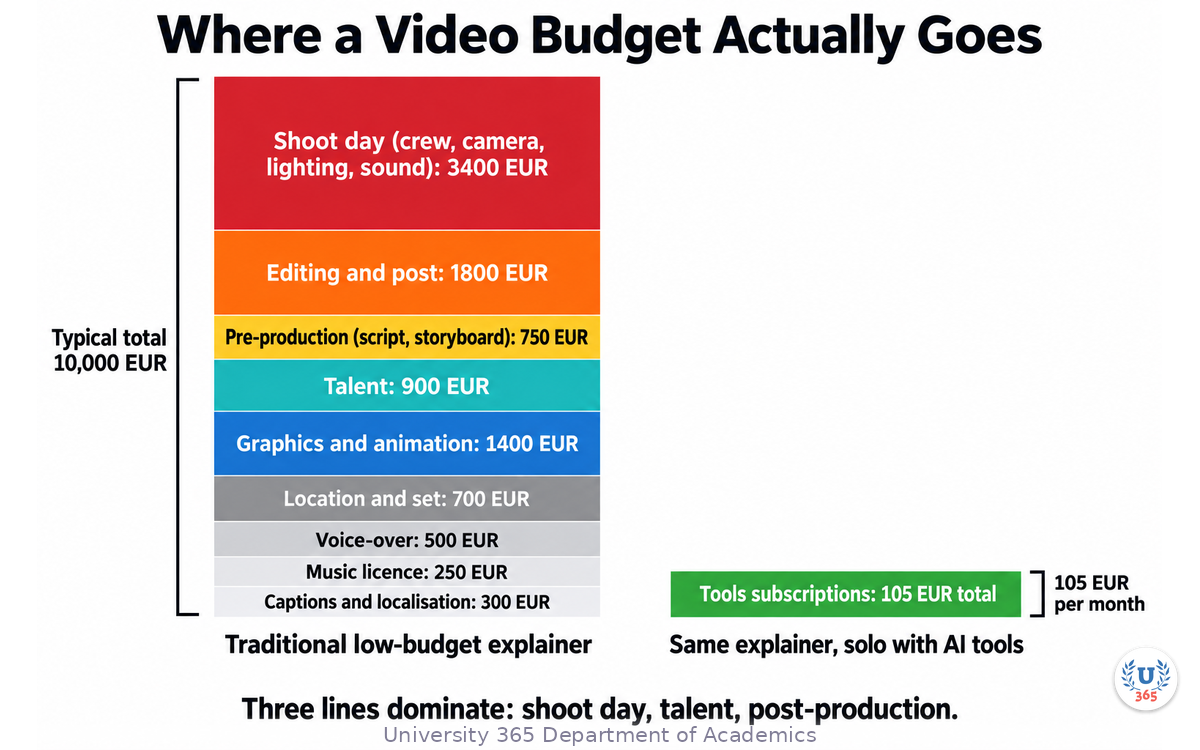
Traditional video pricing is not mysterious. It is a list of labour and equipment, and each line has a different reason to exist.
Cost line | Typical low-budget range | Why it costs this |
Pre-production (script, storyboard, planning) | 300 to 1,200 EUR | Writer and producer hours |
Shoot day (crew, camera, lighting, sound) | 1,200 to 4,000 EUR per day | 4 to 8 people plus equipment rental |
Talent | 300 to 2,000 EUR | Day rate plus usage rights |
Location and set | 0 to 1,500 EUR | Permits, dressing, travel |
Editing and post | 600 to 3,000 EUR | Editor hours, usually 3 to 5 times shoot length |
Voice-over | 200 to 800 EUR | Professional booth and talent |
Music licence | 50 to 500 EUR | Track and usage scope |
Graphics and animation | 400 to 2,500 EUR | Motion designer hours |
Captions and localisation | 100 to 600 EUR | Per language |
Three lines dominate: the shoot day, the talent and post-production. Everything else is comparatively small. That is useful, because it tells you where AI assistance changes the budget most.
What AI changes. Pre-production drafting, storyboard frames, placeholder visuals, synthetic voice-over, background music, first-pass cuts, captioning and translation all become near-zero marginal cost. On a modest explainer that is roughly 1,700 to 6,100 EUR of the line items above.
What AI does not change. A shoot day with real people in a real place. Usage rights for a real person's face or voice. A trained colourist, a sound mixer, a director of photography who knows how to light a face. Those remain human costs, and pretending otherwise produces the failed projects you see all over the internet.
The honest starting question. Do you need footage of real people, real places or real products? If yes, you need a camera and you need people. If no, you can produce the whole thing synthetically and the budget collapses.
Step 2: The Budget Production Stack
A workable no-crew stack has six stages, and each stage has a job that one tool category does well.
Stage | Job | Tool category | Typical cost |
1. Script | Turn the idea into a timed script | Generalist LLM | 0 to 20 EUR per month |
2. Storyboard | Turn the script into visual beats | Image generator | part of the same subscription |
3. Voice | Turn the script into narration | Text-to-speech or voice clone | 0 to 30 EUR per month |
4. Visuals | Produce the shots | Video generator, stock library, screen capture | 0 to 60 EUR per month |
5. Music and sound | Set tone and cover cuts | Music generator, sound library | 0 to 20 EUR per month |
6. Assembly | Cut, caption, export | Editor with AI features | 0 to 25 EUR per month |
The realistic all-in figure for a solo creator is between 60 and 150 EUR per month, or nothing at all on free tiers with watermarks and export limits. For one explainer a month, that is a 20-fold reduction against the production-company quote and a 6-fold reduction against a freelance-only route.
Three rules that keep the stack cheap.
Freeze the script before you generate anything. Video generation is the most expensive stage in time, not money. Generating shots for a script you will rewrite costs you the whole afternoon.
Generate stills first, video second. A storyboard of 12 stills costs minutes and reveals structural problems a 12-shot video generation run cannot reveal until it is finished.
Buy one subscription at a time. Most creators need three months of a video tool, not twelve. Rotate on need.
Step 3: Scripting and Storyboarding with AI
The script. Give the model the constraint set, not the assignment. A one-line brief produces a generic script. This brief produces something usable.
Write a 40-second video script about [topic] for [audience]. Structure: hook (5s), problem (8s), three steps (8s each), close (3s). Voice: direct, second person, no adjectives stacked in threes. Constraint: maximum 95 spoken words total. Mark each beat with [SHOT: ...].
The word cap matters. Spoken English runs at roughly 140 to 160 words per minute, so 95 words is about 38 to 41 seconds. Ask for the script and the shot list in the same response and the two stay aligned.
The storyboard. Generate one still per shot at a wide aspect ratio. You are not looking for final art. You are looking for three things:
Does the visual sequence make sense without the narration?
Do any two consecutive shots look so similar that the cut will read as a jump?
Is there one shot that carries the whole idea? That is your thumbnail.
Reject and regenerate at the still stage. It costs seconds. Regenerating after video assembly costs an hour.
The prompt for stills. State subject, framing, lighting and palette, then stop. Prompts that specify a camera brand and a film stock and a director's name usually produce a vague result, because the model is averaging several incompatible visual references. Four elements beat ten.
What to keep human. The claim in the video. If the script asserts a number, a comparative statement or a promise, you check it against a real source before the shoot, not after publication. An AI-written script will happily state a statistic that sounds plausible and is invented.
Step 4: Generating and Assembling Footage
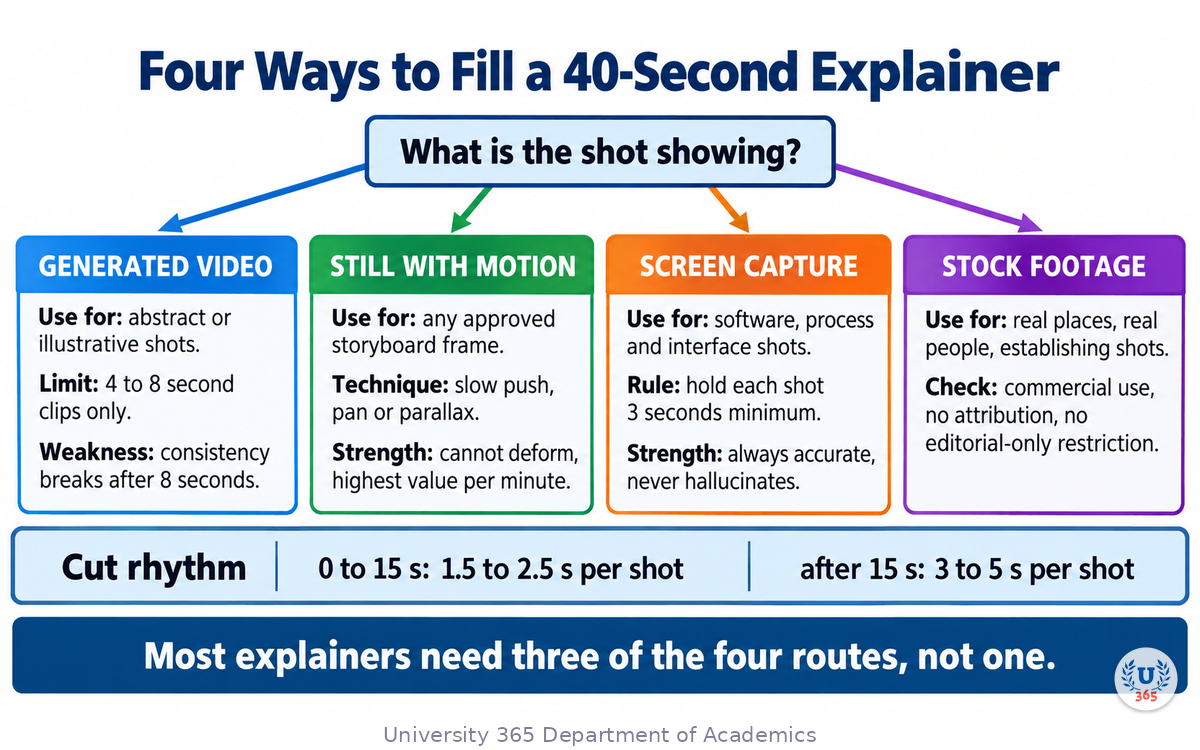
There are four ways to fill a 40-second explainer, and the cheapest combination is usually three of them.
1. Generated video. Text-to-video for abstract or illustrative shots: a city at dawn, a hand opening a box, data moving through a system. Current tools produce convincing 4 to 8 second clips. Beyond that length, consistency breaks: a face changes, a shirt changes colour, a building moves. Treat each clip as a shot, not a scene.
2. Generated stills with motion. Take the storyboard still and add a slow push, a pan or a parallax layer in your editor. This is the highest-value technique on the list, because a still you already approved cannot deform. Ten seconds of slow push on a good still reads better than five seconds of a generated clip that flickers.
3. Screen capture. If you are explaining a process, software or interface, record your own screen. Zoom to the area that matters, hold the shot for at least three seconds, and cut on a keystroke or a click. Screen capture is free, accurate, and it cannot hallucinate.
4. Stock footage. Real footage of real places and real people. Useful for establishing shots and for anything where authenticity matters more than novelty. Read the licence: commercial use, no attribution, no editorial-only restriction.
The assembly rule. Cut to roughly 1.5 to 2.5 seconds per shot in the first 15 seconds and slow to 3 to 5 seconds after that. Short shots early hold attention; long shots late let the idea land.
Continuity, honestly. Cross-shot consistency is the weakest link in generated video. Do not fight it. Change angle, change scale, or insert a still between two clips that do not match. A deliberate cut hides an inconsistency that a smooth morph exposes.
Step 5: Voice, Music and Sound Design
Voice. Three options, in increasing order of cost and decreasing order of legal risk.
Synthetic text-to-speech. Cheapest, fastest, and legally clean when you use the vendor's own voices. Modern engines handle pacing if you punctuate for speech: short sentences, commas where you want a pause, ellipses where you want a beat.
Your own voice. Free, authentic, and unmistakably yours. Record in a small soft room, speak 20 cm from the microphone, and re-record any sentence you stumble on rather than editing around it.
Cloned voice. Highest quality ceiling and the highest risk. Cloning a real person's voice requires that person's written permission, every time, for every use. Cloning a celebrity or a colleague without consent is a legal exposure, not a creative choice.
Pacing. Read the script aloud with a stopwatch before you commit to a voice. If it runs to 52 seconds and your target is 40, cut words. Do not speed up the narrator. Rushed narration is the single most recognisable tell of an AI-assembled video.
Music. Generate or license an instrumental bed and drop it 18 to 22 dB below the voice. Music that competes with speech makes both harder to process. Pick one tonal direction for the whole piece: a video that starts with ambient pads and ends with an upbeat corporate loop sounds assembled from two different projects.
Sound design. Two effects carry most of the perceived production value:
A soft whoosh or a short click at each cut, sitting quietly under the music.
Twenty to forty milliseconds of room tone under the narration so the voice does not sit in a vacuum.
Both are free to produce. Both are the difference between "recorded on a laptop" and "produced".
Loudness. Normalise the final mix to about minus 14 LUFS for social platforms and minus 16 LUFS for web video. Your editor will do this automatically with a loudness normalisation preset.
Step 6: Editing, Captions and Delivery Formats
The edit. Work in this order and you will not rebuild the timeline: lay the narration first on the audio track, place visuals against the narration beat by beat, add music last, then normalise.
Captions are not optional. Between 70 and 85 percent of social video is watched without sound. Platform estimates for muted autoplay viewing cluster in that range, and the direction is the same everywhere: most of your audience sees text before they hear anything. Burn in captions for social cuts, and ship a subtitle file alongside the web version.
Caption rules that hold up:
Maximum two lines on screen, maximum 42 characters per line.
One idea per caption card. Let the card change on the sentence, not mid-phrase.
Contrast, not colour. White text with a dark translucent bar beats coloured text on a busy shot.
Never let a caption cover a face or the product.
Three exports, one project:
Format | Aspect | Length | Use |
Landscape | 16:9 | full | website, embed, presentation |
Vertical | 9:16 | 30 to 45 seconds | social, paid amplification |
Square | 1:1 | 20 to 30 seconds | feed posts, carousels |
Reframe rather than crop. A 16:9 composition cropped to 9:16 loses the sides of the frame, which is usually where the context lives.
Archive the project file. Six months from now you will need to change one number. Editing from the project file takes ten minutes. Rebuilding from the exported MP4 takes a day.
Step 7: The Quality Bar: What You Must Never Ship
Cheap production is a legitimate strategy. Undisclosed synthetic content is not, and it is the fastest way to lose the credibility the video was meant to build.
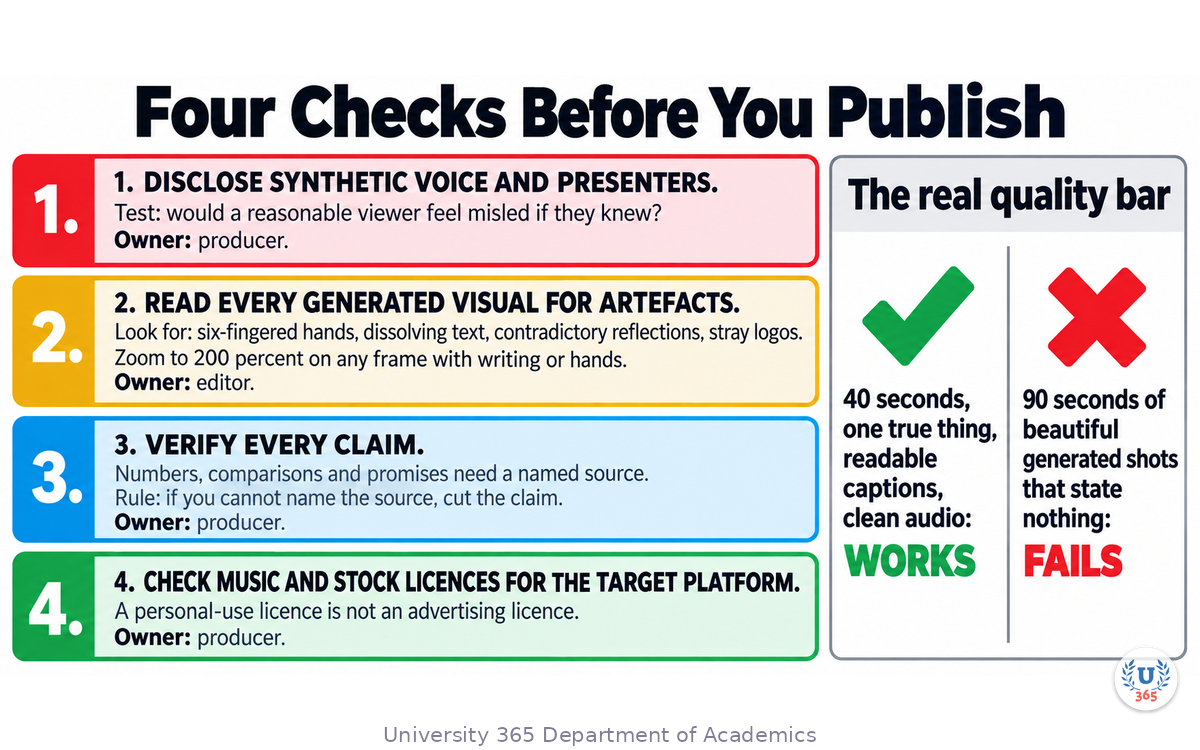
Four things to check before every publish.
Disclose synthetic voice and synthetic presenters when the audience could reasonably assume a real person. A synthetic presenter saying "Hi, I am Marie from the team" is a misrepresentation. The same voice narrating an explanatory diagram is not. The test is whether a reasonable viewer would feel misled if they knew.
Read every generated visual for artefacts. Hands with six fingers, text that dissolves into nonsense, a reflection that contradicts the subject, a logo that does not belong to anyone. Zoom to 200 percent on any frame with writing or hands.
Verify every claim. Numbers, comparisons and promises all come from a source you can point to. If you cannot name the source, cut the claim.
Check the music and the stock licences for the platform you are publishing on. A track licensed for personal use is not licensed for a paid advertisement.
The two failure modes at the cheap end.
The first is the synthetic-face presenter with a slight uncanny drift, on a topic that needed no presenter at all. The second is a montage of beautiful generated shots that never states the claim. Both look expensive for four seconds and hollow for forty.
The bar that matters. A 40-second explainer that states one true thing clearly, with readable captions and clean audio, beats a 90-second showreel that states nothing. Budget does not raise that bar and does not lower it.
Feynman Summary: Explain It Like You Are 12
Imagine you want to make a small movie about your football club.
The expensive way is to hire a camera crew, an actor, a person who plays music, and someone who cuts the film together. All of those people need to be paid, and you need a place to film.
The cheap way is to draw the scenes yourself first, like a comic strip. Then you let a computer draw the pictures properly. You record someone reading the words out loud. You put free music underneath. Then you join everything in a simple cutting program and add subtitles.
You still have to be the boss. You decide what the film says. You check that every fact in it is true. You look at the pictures carefully, because computers sometimes draw hands with too many fingers. And you must be honest that some of the voices are computer voices.
The computer does the boring work quickly. You do the thinking. That is the whole trick.
Mindmap: The Complete Picture
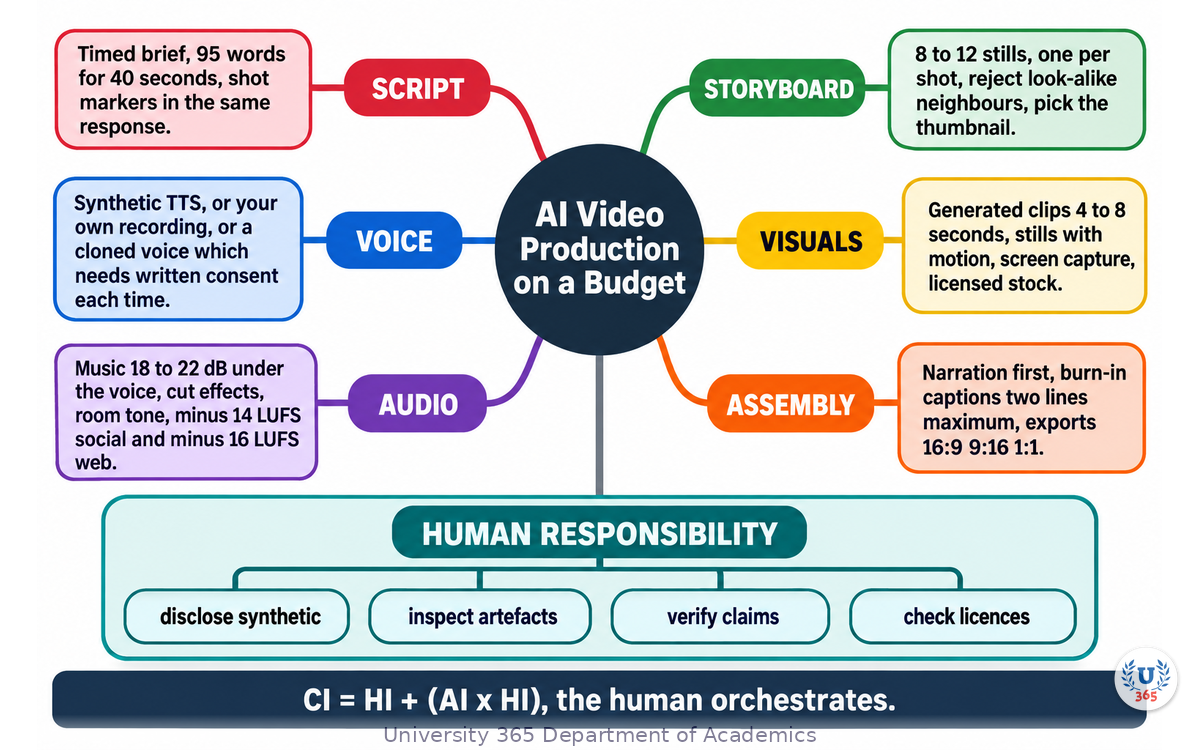
The mindmap shows the six production stages (script, storyboard, voice, visuals, music, assembly), the cost line each one replaces, the four footage routes (generated video, stills with motion, screen capture, stock), the caption and export rules, and the four publication checks with human responsibility attached to each.
UNOP Sound (University 365 Neuroscience Oriented Pedagogy)
Take five minutes to consolidate your memory. Play the isochronous tone track (10Hz alpha frequency) with your eyes closed. Alpha-frequency tones after a learning session support consolidation, helping move what you just learned from short-term to long-term memory.
[Audio player: UNOP Post-Lecture Isochrone (10Hz, 5 minutes)]
Practical Exercise: Produce a 40-Second Explainer
Exercise: One Claim, Forty Seconds, Zero Crew
Pick one true thing you can explain in one sentence. A process you use at work. A small improvement to a routine. A correction to something people commonly get wrong.
Write the claim on one line. If you cannot state it in one sentence, you do not have a claim yet.
Generate the script with the brief from Step 3: 40 seconds, 95 spoken words maximum, hook, problem, three steps, close, with [SHOT: ...] markers.
Read it aloud with a stopwatch. Cut words until it fits. Do not speed up your reading.
Generate 8 to 12 storyboard stills, one per shot marker, at a wide aspect ratio. Regenerate any two that look alike.
Choose two stills to animate with a slow push and two shots to generate as short clips. Add one screen capture if your claim involves a process you can show.
Record the narration yourself, or generate it, and generate or choose an instrumental bed.
Assemble: narration first, visuals against the beats, music 20 dB under the voice, loudness normalised.
Add captions, two lines maximum, and export landscape and vertical.
Run the four publication checks from Step 7 and fix what fails.
Time the whole thing. Write down the minutes you spent per stage. The stage that ate the most time is the stage you should prepare better next round.
What to Observe
How much of your total time went to script and storyboard, compared with generation and assembly?
Where did a generated clip break continuity, and did a straight cut hide it?
Did the stills with motion hold attention as well as the generated clips?
How many claims did you cut at step 9, and were you tempted to keep any of them?
Applied AI Connection
You directed this. You set the claim, chose the shots, checked the facts and made the disclosure decision. The tools drafted, illustrated, spoke and assembled. That is the CI-First pattern: CI = HI + (AI x HI). The human is the orchestrator, and the AI multiplies the human's judgement rather than replacing it.
Glossary
Term | Definition |
**Generated video** | Video produced by a text-to-video model from a written prompt, typically in clips of four to eight seconds. |
**Storyboard** | A sequence of still frames representing each shot of a video, produced before filming or generation begins. |
**Synthetic voice** | Narration produced by a text-to-speech engine or a voice-cloning model rather than recorded from a human speaker. |
**Voice cloning** | Building a model of a specific person's voice from audio samples, which requires that person's written permission for each use. |
**Parallax** | Apparent movement created by moving layers of a still image at different speeds, giving depth without generating new frames. |
**Loudness normalisation** | Adjusting a finished mix to a target integrated loudness level, typically minus 14 LUFS for social and minus 16 LUFS for web. |
**LUFS** | Loudness Units Full Scale, the standard measure of perceived loudness used by broadcast and streaming platforms. |
**Room tone** | The low-level ambient sound of a recording space, placed under narration so speech does not sound isolated. |
**Burn-in captions** | Subtitle text rendered permanently into the video image rather than supplied as a separate subtitle track. |
**Reframe** | Re-composing a shot for a different aspect ratio while keeping the subject in frame, instead of cropping the sides away. |
**Disclosure** | Telling the audience that a voice, presenter or visual is synthetic, at the point where it could otherwise mislead them. |
**CI-First** | Co-Intelligence First: the U365 principle that the human is the orchestrator and the AI is the amplifier. CI = HI + (AI x HI). |
**UP-Context Method** | University 365 Prompting-Context Method: a structured approach to prompting with explicit context blocks for consistent output. |
Quiz: TEST YOUR UNDERSTANDING
1. Which line item does AI assistance reduce least in a video budget?
A) Script and storyboard drafting
B) A shoot day with real people on a real location
C) Captioning and translation
D) Music licensing
2. Why generate storyboard stills before video clips?
A) Stills cost more but look better
B) Stills reveal structural problems in seconds, before the expensive generation stage
C) Video models cannot work without a still reference
D) Platforms require a still thumbnail
3. A generated clip is limited to roughly four to eight seconds mainly because:
A) Storage becomes unmanageable
B) Platform limits cap clip length
C) Visual consistency between shot and shot breaks down over longer spans
D) Rendering time is fixed by the vendor
4. What is the correct level for a music bed under narration?
A) The same level as the voice
B) 5 dB below the voice
C) 18 to 22 dB below the voice
D) Music should be omitted entirely
5. You generate a presenter saying "Hi, I am Marie from the team." Marie does not exist. What is required?
A) Nothing, if the voice sounds good
B) Disclose that the presenter is synthetic, because a reasonable viewer would otherwise assume a real person
C) A licence from the voice vendor
D) A caption naming the model used
Answers: 1-B, 2-B, 3-C, 4-C, 5-B
Related Resources
U365 INSIDE Publications
Lecture: AI Content Generation: Beyond ChatGPT: The multi-tool content pipeline this production stack plugs into
Lecture: Brand Voice in the AI Era: Keeping a synthetic voice and style consistent with your brand
Lecture: Data-Storytelling with AI: Making Numbers Compelling: Turning data into visuals before you animate them
External Resources
Descript: Editing, captions and studio sound for spoken-word video
CapCut: Free editor with automatic captions and vertical reframing
Runway: Text-to-video generation for illustrative shots
Epidemic Sound: Licensed music and sound effects with clear commercial terms
Pexels Videos: Free stock footage with a permissive licence
Related U365 Lectures (Coming Soon)
Lecture 2: Podcast Production with AI: From Script to Published (UIC, Media Studies Series)
Lecture 6: Sentiment Analysis for Brand Monitoring (UIC, Marketing Series)
Lecture 7: The AI Press Release: Automating PR (UIC, Content Strategy Series)
U.Copilot for This Lecture
Discuss this lecture with U.Copilot, your AI chat companion trained on this content.
Copy and paste the following prompt into the U.Copilot chat on university-365.com:
You are U.Copilot for Lectures, an AI chat companion specially trained on University 365 lecture content. You are helping a Fellow who just completed the lecture "AI Video Production on a Budget" from the Media Studies Series at the U365 Institute of Communication (UIC). Your role is to help the Fellow produce video without a crew. You can: - Break down their video idea into a costed production plan using the six-stage stack - Help them write a timed script brief with a spoken-word cap and shot markers - Explain why a still with motion often beats a generated clip, and when it does not - Advise on voice options, including the consent and disclosure requirements of voice cloning - Review their caption and export choices for each platform - Check their claims and flag anything that needs a source before publication Always maintain U365's CI-First approach: the Fellow is the orchestrator and the tools are amplifiers. Encourage them to verify every claim and disclose every synthetic element. Use the UP-Context Method: provide context-rich, role-aware responses that account for the Fellow's production experience and goals.
Next Steps
Now that you can produce video without a crew, here is what to do next:
Produce the 40-second explainer from the practical exercise and publish it somewhere real
Build a reusable caption template in your editor so every future export is consistent
Audit your last three videos for the four publication checks and fix anything that fails
Write your disclosure sentence now, before you need it, so it is not an afterthought
Continue with Lecture 2 in this series, "Podcast Production with AI: From Script to Published", to apply the same stack to audio
Explore the Media Studies tag on INSIDE for more production workflows built on the CI-First approach
The budget was never the reason the video did not get made. The absence of a repeatable process was. You now have the process.
IMPORTANT NOTICE
This lecture is published by University 365 as part of its INSIDE Publications Hub. The content is free to read for all visitors. Lectures in this series may be part of a structured academic program leading to a Micro-Credential for your Career (MCC). To enroll in an academic program, visit university-365.com/tuition.
This content is for educational purposes. While we strive for accuracy, AI is a fast-moving field and tool pricing and capability change quickly. Verify current technical details and licence terms against primary sources before professional use.
Copyright University 365, Inc. All rights reserved. This content is protected under University 365's copyright policies. For permissions or inquiries, contact uda@university-365.com.
Published by the Department of Academics, University 365.
Lecture delivered by the University 365 Institute of Communication (UIC).
Lea Loringam, Dean of Communication, UIC
Signed for the academic year 2026.




Comments