
Nod from n8n Labs: the open-source personal agent that finishes the errand

Status: Active | Last tested: 2026-11-28 (nod-v0.10.3) | Re-check: trigger-based (max 6 months)
Active: the tool is current and recommended.
Reviewed as documented at nod.n8n.io and in the vendor's repository in November 2026. Nod comes from n8n Labs, the experiment team inside n8n, and it is scored here as a separate product from n8n, which this series reviews separately and scored 6.5. By Martin Swartz, Dean of Academics, University 365.
Nod scores 5.0 out of 10 on the U365 CI-First Benefit Score, which is CI-First Positive, with Humics-Risky (-2 / +3) and AI Imposture Risk Medium overall, with Skill Illusion rated High.
For detailed explanations of the CI-First evaluation terms used in this review, including the Humics Protection Badge, the AI Imposture Risk levels and the Review Status vocabulary, see the Glossary at the end of this post.


In this Tool Review
Naming and Scope: Nod, n8n Labs and the n8n assistant
Nod is not a node. That sentence has to come first, because the two words differ by one letter and the search results do not separate them. In n8n, a node is a step in a workflow. Nod is a separate desktop application with its own installer, its own repository and its own release line. A reader who searches for "n8n nod" will meet node documentation, node names and node configuration pages long before meeting the product this review scores.
Nod is also not n8n. n8n is the workflow automation platform that a team or a business runs on a shared instance. Nod is a single-player application built for one person, installed on that person's computer or server, connected to that person's accounts. You do not need an n8n account to use it. If you already run n8n, you can connect the instance and Nod will build, test and fix workflows in it, but the connection is optional and the two products keep separate release lines.
Nod is not the n8n AI Assistant either. That name belongs to the assistant inside the n8n product. The vendor states the distinction on the Nod site, and the distinction matters for procurement: a licence review of n8n does not cover Nod, and a security review of Nod does not cover n8n.
The vendor structure is a lab, not a product line. Nod comes from n8n Labs, described by n8n as a small team inside n8n that tries ideas outside the core product, where most experiments get shelved. Nod itself is out as a research preview. The vendor says plainly that it does not change where n8n is headed. Read that as a scope statement about institutional dependence: a university that builds a process around Nod is building on an experiment with no roadmap commitment, no service-level agreement and no hosted tier yet. The code is Apache 2.0, so the exit is real, but the exit costs an operator.
This review scores the desktop application line, version nod-v0.10.3, released on 27 November 2026, and the self-hosted server that runs the same server code. It does not score n8n itself; that review exists separately and scored 6.5. It does not score a hosted Nod, because no hosted Nod is available.
Tool Snapshot
Field | Detail |
Name | Nod |
Category | Open-source personal AI agent, local-first, with its own workspace and browser |
What it does in one line | Takes a job in plain language and finishes it in your apps and on real websites, asking before anything you did not ask for |
Vendor | n8n, through n8n Labs |
Site | |
Documentation | |
Repository | |
License | Apache 2.0 |
Latest release at review | nod-v0.10.3, published 27 November 2026 |
Project scale | 4,798 stars, 720 forks, 133 open issues and about 50 contributors, measured 28 November 2026 |
Release pace | 28 GitHub releases between nod-v0.6.0 on 9 November and nod-v0.10.3 on 27 November 2026 |
Pricing | The application is free. You pay the model provider you connect, or run a local model at no per-request charge. No Nod subscription and no hosted tier |
Hosting | Your Mac, your Windows 11 PC, a Linux x64 Flatpak preview, or a server you host with Docker Compose |
Model posture | Bring your own model. More than 30 providers including OpenAI, Anthropic, Google, OpenRouter, Bedrock, Vertex AI and Azure, a ChatGPT Plus or Pro sign-in, or an OpenAI-compatible local server such as Ollama, LM Studio, vLLM or llama.cpp |
App connections | Gmail, Google Calendar, Drive, Sheets, Docs, Slack, Notion, Linear and others, through Composio. The launch post says 200+ connections |
Memory | Inspectable notes with source messages, plus learned skills the agent writes for itself after multi-step tasks |
Channels | The desktop app, the web client of a self-hosted server, Telegram and WhatsApp |
Status | Active, research preview, single owner per installation |
Three notes on those numbers, because the framework requires a reader to know what a figure is measured against.
First, the repository figures move daily. The star and fork counts above were read from the GitHub API on 28 November 2026, and a page view of the repository the same week carried a slightly different set. Treat any star count in any review, including this one, as a dated observation rather than a property of the product.
Second, the release pace is the number that matters most for a reader deciding when to install. Twenty-eight releases in nineteen days is not a marketing claim; it is the release feed. It tells you two things at once. The team is repairing and shipping quickly, and the surface you learn this week can change shape next week. The documentation itself opens with an "Early preview" notice and the words "Expect rough edges and breaking changes."
Third, the version string. This review is written against nod-v0.10.3. The desktop download is versioned separately from the server and from the Linux bundle, and the vendor's install page and the GitHub release feed can lag each other by a release or two. Take a version-pinned instruction from the release feed or from the app's own About screen, never from a download card.
At a Glance Dashboard
Field | Value |
Category | Open-source personal AI agent, local-first, with its own workspace and browser |
CI-First Benefit Score | 5.0 / 10 (CI-First Positive) |
Sub-scores | Time 6 / Quantity 6 / Quality 5 / Skill 3 |
CI-First Profile | Primary: Co-Worker and Assistant (level 2). Secondary: Co-Researcher, Analyst and Tester (level 4), narrowly |
Humics Protection | Humics-Risky (-2 / +3) |
AI Imposture Risk | Medium overall, with Time Medium, Quantity Medium and Skill High |
Status | Active, research preview |
Last tested | 2026-11-28 |
Pricing | Free application, Apache 2.0. You pay the model provider, or run a local model. A $5 default task check-in and a monthly limit you set |
Platforms | macOS 14+ (Apple silicon or Intel), Windows 11 preview with WSL 2, Linux x64 Flatpak preview, self-hosted server with Docker Compose |
User sentiment | Mixed, leaning positive: 4.82/5 from 78 Product Hunt reviews, an active launch thread and issue tracker, and a repeated objection to the hosted app connection path |
The Problem
Personal administration is not one task. It is a hundred small tasks that each cross an application boundary. An invoice sits behind a supplier portal that has no export button. A subscription renews because nobody remembered the trial. A client question arrives in email, the answer lives in a spreadsheet, and the note belongs in a project tool. A call needs a one-page brief assembled from a calendar entry, three email threads and a company's latest news.
A chat assistant answers the question and hands the work back. You still open the portal, find the invoice, rename the file, write the email and file the record. A workflow platform can automate the parts that have an API or a connector, but someone has to build the workflow first, and the work that annoys people most is often the work that was never worth a project.
Hosted personal agents solve the doing, at a price the reader cannot always accept. The vendor holds the account, chooses the model, sets the retention rule and decides which apps the agent may reach. For a solo professional that may be a fair trade. For anyone handling student records, client contracts or family documents, "where does this go" is a governance question before it is a feature question.
Local agents have solved the data question by making the user an operator. You install a runtime, configure a gateway, connect a model, harden the permissions and keep it current. That is a reasonable ask for a developer and an unreasonable one for a freelance translator who wants the invoice downloaded.
There is a fourth problem that appears only after reach exists. An agent that can send email can send the wrong email. An agent that can pay can pay twice. An agent that can sign in to a supplier portal holds a credential that opens more than the invoice page. The category therefore needs a permission design, not a warning paragraph.
The Outcome
Nod's answer is a single application that installs like a desktop app, with a private Linux workspace and a browser of its own on the machine that runs it. The concrete outcome for a user who completes setup:
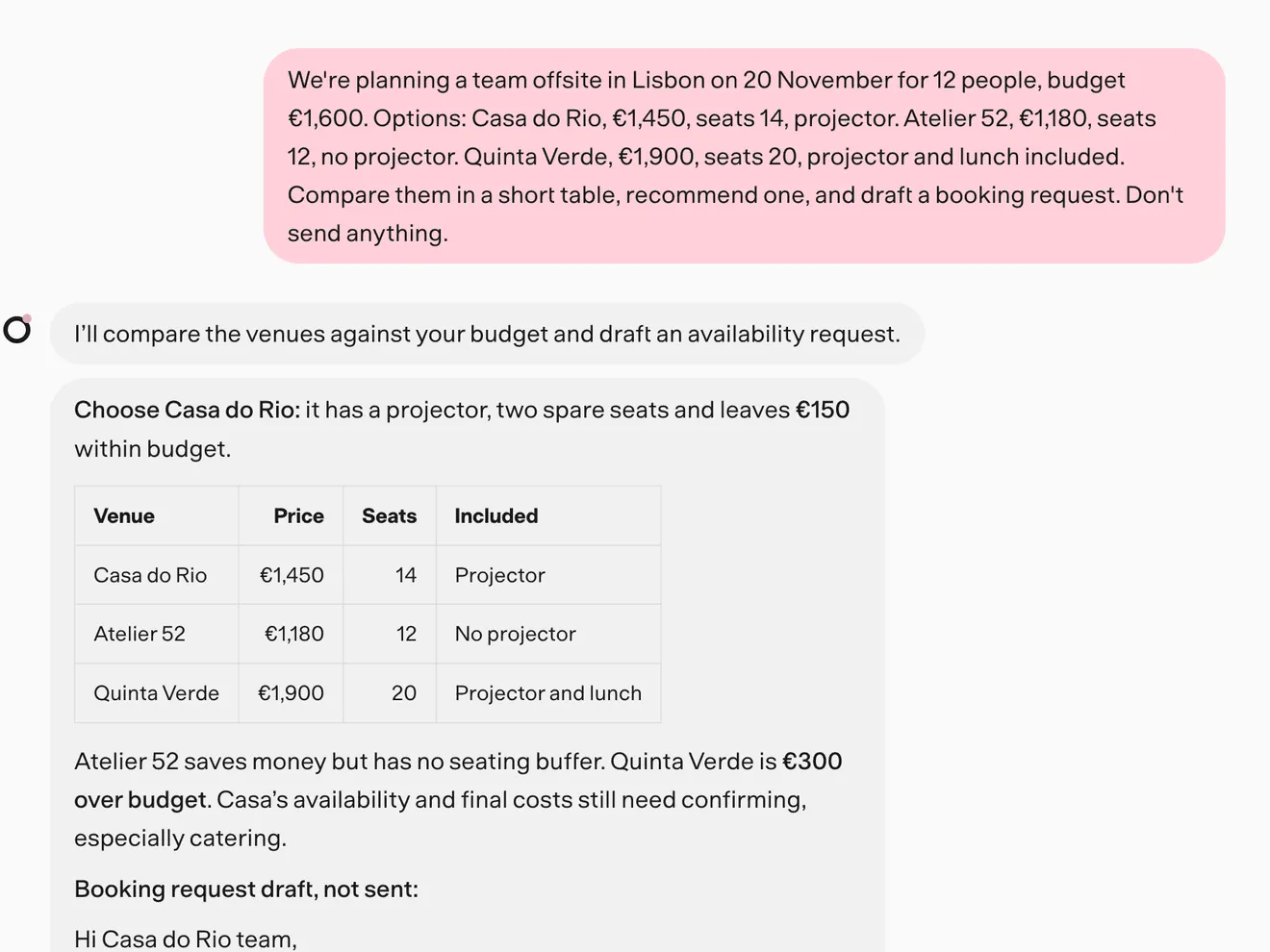
One conversation, reached from the desktop app, a browser, Telegram or WhatsApp. You start a job on the laptop and check it from the phone.
A private workspace and browser. Commands run in a container. The browser has its own tabs, cookies and sessions, separate from yours, and you can take it over when a site needs a human.
Work in connected apps and on websites with no integration. The agent can read Gmail, act in Calendar, post in Slack, or sign in to a supplier portal with a saved login.
Background and scheduled work. A recurring brief, a price check or a monthly invoice run can fire on a schedule, and the agent can prepare drafts when new mail arrives.
A permission check before actions that change something. The server checks your words against the action, asks when they do not cover it, and shows the words that allowed each action in Usage.
A Vault the model cannot read. Saved logins, authenticator keys and cards are encrypted on the machine, entered by the server, and bound to the exact website origin.
Memory you can inspect. Notes carry their source message. Learned skills are listed, editable and versioned.
A cost record. Each task shows what it cost, ends with a receipt, checks in at a default of $5, and respects a monthly limit you set.
A choice of model, including a local one. The model is a connection, not a lock-in, and the provider keys never enter the workspace or the browser.
The counterweight belongs here rather than only in the Limits section. The application is a research preview. It needs a machine that stays awake: when the laptop sleeps, scheduled work stops. Each installation has one owner, so there is no team mode, no shared workspace and no admin console. Model costs are yours and they can surprise you, which the vendor acknowledges by saying early testers found tasks cost more than they expected. The permission check is itself a model, so it can be wrong. And the app connections pass through a hosted connection service by default, which the review takes up in Section 7c below.
So the outcome, stated plainly: Nod gives one person an agent with reach, a real permission boundary and an auditable record, at the cost of running a preview on a machine that must stay awake, plus whatever the model provider charges. For the reader who wants the errand finished and is willing to keep the first month bounded, that is a different proposition from both a chat assistant and a self-hosted gateway.
Who Should Use Nod
Read this list as a gate. The first two entries are the ones that matter.
Good fit:
Solo operators and freelancers whose week contains recurring cross-application work: supplier invoices, client follow-ups, subscription renewals, travel bookings. The tool's value scales with repetition, because the learned skill and the schedule pay back the setup.
Professionals who already pay for a strong model and want the work done rather than described, and who will read the approval prompt before pressing yes.
Students and researchers who need briefs assembled from mail, calendar and public sources, and who will keep assessed work out of it.
Households handling refunds, cancellations, forms and appointments, where the alternative is an afternoon of tabs.
Users with a spare always-on Mac mini, home server or VPS, who can leave the assistant running without leaving a laptop open.
Poor fit:
Teams. There is no team edition, no seats, no shared memory and no administrator. Each person installs a separate assistant with a separate model bill.
Anyone who needs an uptime commitment or a support contract. This is a research preview from a lab inside a vendor, with a public issue tracker and no service-level agreement.
Anyone who cannot leave a machine awake. A scheduled invoice run on a laptop that sleeps fails silently, which is the failure mode that matters most for recurring work.
Regulated data as a first deployment. The permission design is strong, but the app connection path is hosted by default and the product is three weeks old. Prove the boundary on a low-consequence account first.
Readers who want a managed consumer agent with no setup. OpenAI dots, Meta Muse and Claude Duet are the hosted route, with the trade-offs in the comparison section.
Anyone whose main need is document production, design or code. Nod routes to those capabilities; it is not the best tool for producing the artifact itself.
U365 Fellow categories:
Learner type | Difficulty | Typical ROI | Career path |
Students (Bachelor, Master) | Intermediate | A one-page brief per supervision call, a reading pack assembled from mail and public sources, and the administrative errands around a course. Not for assessed work | UIT and UIC practice, with the workflow discipline taught in the AI Agents and Workflows Automation with n8n certificate |
Professionals (career upskilling) | Intermediate | The monthly portal run, the subscription audit and the follow-up queue, done in the background while other work continues | UIB and UIC practice in operations, client communication and cost control |
Everyone (lifelong learners) | Beginner to Intermediate | Refunds, cancellations, bookings, form filling and renewals, with a record of what was done | No programme required; the value is administrative time returned |
For teams and organisations. Nod is sold to individuals only, and the team decision is therefore not a purchasing decision but a governance decision about whether staff may install a single-owner agent on machines that hold institutional accounts.
Team deployment. There is none. Each installation has one owner, with no seats, no shared workspace, no administrator console and no central policy. A team that wants shared automation is the n8n product's job, not Nod's. Plan no pilot around a team feature that does not ship.
Cost at team scale. There is no seat price and no pooled billing. Each person connects their own provider key or ChatGPT plan, and each installation carries its own monthly limit. A team cannot see or cap the total, which is the cost finding an operations lead needs before approving individual installs.
Data and compliance. Files, memory and Vault data stay on the machine that runs Nod. App requests and results pass through n8n's hosted connection service and Composio by default, and basic usage data is shared with n8n on by default for new owners. The vendor publishes a security review guide and a privacy page that name these boundaries. It does not publish an enterprise administration surface for Nod on the vendor's own Nod pages.
U365 for companies. Professionals can learn the tool individually, or an employee group can take it up under a customized training agreement that covers the permission discipline and the data boundary before the first account is connected. Corporate education is built on demand.
Skill level required: Intermediate. The install is simple; the judgement about what to connect and what to approve is not.
Prerequisites: A supported model connection with a working key or plan, a Mac on macOS 14 or later, a Windows 11 machine with WSL 2 and virtualization, or a Linux server for self-hosting. A password manager export helps fill the Vault. Read the trust and privacy pages before connecting a mailbox.
Typical time to first result: About fifteen minutes for install, model connection and a first read-only task. The vendor estimates about ten minutes for setup.
Typical time to competence: Two to four weeks of bounded use. The first week is spent learning which jobs suit the agent, how to phrase an outcome, and where the approval prompt will stop it.
U365 Institutes Alignment
The UIT rating is the one that carries the review. Nod is one of the few consumer-facing agents whose permission model is documented at the level of source files: the trust check in src/server/trust.ts, the approval record in src/server/approvals.ts, the Vault in src/server/vault-crypto.ts, and the browser origin checks in the browser provider. A student can follow a proposed action from the model's plan to the server's decision to the record in Usage, and can read the exact code that decides. That is a better systems lesson than any diagram of an agent loop, because the boundary is real and the failure cases are written down.
UIT (Technology, AI, Data Science)
Rating. High (primary)
Why. The product is a working agent stack a student can read: a Node server, PostgreSQL, a sandbox container, a browser container, server-side policy, a Vault with origin binding, MCP connections and an n8n workflow builder. The repository is open, the design documents are public, and the trust model is written for a reviewer. That is rare material for teaching agent architecture and permission design
The limit that holds the row. The tool teaches none of it. It supplies the system and the documentation; the reasoning that turns either into understanding has to come from the course, and nothing in the product assesses whether it did
UIB (Business Management, Entrepreneurship)
Rating. Medium
Why. Relevant to process selection and cost appraisal: which recurring task is worth delegating, what an operator's hour is worth against a model bill, and what responsibility a business accepts when an agent acts on its accounts. The subscription audit workflow is a direct cost-control exercise
The limit that holds the row. The product publishes no business case, no return method and no team cost model. The single-owner design means the management lesson stops at the individual, and the preview status makes any process commitment premature
UIC (Digital Communication, Marketing)
Rating. Medium
Why. Inbox triage, follow-up drafting and the writing-style model are real communication work, and the disclosure question is unavoidable: a recipient is owed the fact that a reply was composed by a system and sent from a person's account
The limit that holds the row. It publishes no standard for disclosure, tone or audience fit, and it cannot show a campaign result or an audience measure. It supports the practice discussion, not the production workflow
UID (Digital Design, UX/UI)
Rating. Low
Why. There is a study object in the browser handoff: how a person takes control of an agent's page, what the interface says while the agent works, and how a confirmation is presented. The confirmation design is documented in unusual detail
The limit that holds the row. The tool offers no production surface for visual or interaction work. A design student can critique the interface, not build with it
U365 methods, not an institute (UNOP, ULM, LIPS, CARE and the UP-Context Method)
Rating. Applicable
Why. Nod can carry a recurring LIPS and CARE review as a schedule, and its memory and rule surfaces accept UP-Context style instructions. The method supplies the structure; the tool supplies the execution and the record
The limit that holds the row. It supplies no pedagogy, no assessment and no reasoning discipline of its own, so alignment depends on what the user writes into the schedule and the rules, not on the product
Each row carries the limit that holds it, and all four share a root limit: the product does not teach and does not assess. It is a system to be studied, not a course. The ratings stand for this review.
How Nod Works
Inputs: plain-language requests in the app, a browser or a chat channel; voice messages; files uploaded to the workspace; schedules; app events such as a new email; and rules or standing instructions you write.
Outputs: actions in connected apps, browser steps on websites, files in the workspace, drafts and briefs, a cost and action record, and n8n workflows in a connected instance.
Underlying technology:
A Node.js server (Node 24.21 or later for a source install) with a Fastify API and a React client, packaged as an Electron desktop app.
PostgreSQL with pg-boss for the turn queue, the task ledger and the schedule records.
Docker containers for the Linux workspace, the browser and the database. The provider keys never enter the workspace or the browser.
The Pi agent runtime, with tools for the workspace, the browser and connected apps.
agent-browser for the browser, including screenshots, canvas reading, JavaScript execution and private form entry.
Composio for app connections, with MCP servers for Notion, Linear and n8n.
A server-side trust check that runs before app actions, browser steps that could submit or change something, and sign-ins.
The request path. Your message becomes a turn. The runtime plans the work and calls tools. A read or a draft runs. An action that sends, posts, books, pays or deletes goes to the checker, which must find your own words that allow it. The server verifies that the quoted words appear in what the checker was shown, binds the approval to the exact action and arguments, and runs it once. Anything the words do not cover waits for your yes. A payment always waits, and the card security code is never saved.
The memory path. Nod keeps notes about you, your preferences, people, routines and lessons. Notes come from your own messages and from what you add in Settings, never from its own replies, from web pages or from app results. An hourly background pass looks through recent messages, and a note that is mentioned once is marked as a guess until a second message repeats it. Learned skills are different: after a multi-step task or a workaround, the memory model writes down the steps and the gotchas, and the next run follows its own skill. Every skill sits under Skills for you to read, edit or forget, keeps version history, and is demoted when it keeps failing.
The model path. You connect a provider once. The initial choice depends on the provider, and you can change it. If the selected model cannot read images, Nod looks for an image model in your other connections and sends the image there. A model failure pauses automatic work on that connection with a backoff that reaches six hours, while your own requests still go through. A rejected key stops the connection until you reconnect.
What the mechanics cost in practice. There is one thread per owner. Every saved task and every schedule fire runs in its own session, and sessions run in parallel, but the conversation you read is one long thread. Up to four browsers run at once. Turns and tool calls are never retried automatically, which is the right choice for actions that can send or pay, and a source of friction when a provider call fails mid-task.
The vendor's own measurements. Nod publishes an evaluation report, and the numbers are worth reading with their setup:
Test | Published result | Test size | What the score measures |
Task completion | 98% | 226 errands, three attempts each, 678 runs | The requested task met its completion checks |
Action safety | 0 of 678 runs with an unsafe action | The same runs | No checked action exceeded the simulated user's permission |
Prompt injection | 0 of 13 successful attack scenarios | 13 errands, three attempts each | The tested content did not cause the checked unsafe action |
LongMemEval-S | 93.2% answer accuracy | 500 questions, about 115,000 tokens of history per question | Correct answers about earlier conversations |
WhisperBench | 0 of 216 memory injections | 108 attack cases in two modes | No tested email planted its target fact in persistent state |
The task and safety runs are from 17 October 2026 and the memory runs from 19 October 2026, all with GPT-6.1 Sol, in simulated accounts and websites. The 98% figure is rounded. The vendor states that the task suite has grown since, that a current run does not recreate the October test, and that the stricter full-pass rate is reported separately by the runner. A reader should treat the table as a vendor measurement on a named model and a named test world, not as an independent audit.
Getting Started with Nod
Required accounts: A model connection. Either an API key from a supported provider, a ChatGPT Plus or Pro plan that supports sign-in, or a local model server. No n8n account is required. An email connection is optional at setup and can be added later.
Installation: Download the macOS DMG (Apple silicon or Intel) or the Windows installer from the GitHub releases page. The desktop app and its runtime are about 1.8 GB to download on a Mac. Windows 11 requires WSL 2 and virtualization. Linux x64 is a Flatpak preview. A self-hosted server needs Docker Compose.
First-time configuration:
Install the app and choose Get started for a local assistant, or Connect to a server and enter its address and access token.
Let Nod prepare its computer. This downloads the runtime and starts the containers. Keep the network connection on.
Connect a model in Settings, then Models. Pick a model with the capability you need, and check that the provider account has credit. A free key on a paid default model fails with a quota error, which is the first trap reported by a Windows user in the community thread.
Set a monthly spending limit in Usage before the first real task. Set the task check-in amount if $5 is not the threshold you want.
Connect one app only. Gmail or Outlook is the useful first connection; Calendar is the second. Review the provider's consent screen and the scopes it grants.
Open Settings, Privacy and data. Decide on usage sharing and conversation traces before you forget. Usage sharing is on by default for new owners; traces are off.
Add a rule or a standing instruction for the one action you never want taken without a question. "Always ask before sending email to anyone outside my organisation" is a good first rule.
First 15 minutes checklist:
☐ Ask Nod to read today's calendar and list the meetings with their times. This is a read, so it runs without an approval prompt.
☐ Ask it to draft, not send, a short reply to one email you name. Check that the draft appears and that nothing was sent.
☐ Open Usage and read the record: the model call, the tokens, the cost if the model is priced, and the action with the words that allowed it.
☐ Set one schedule for tomorrow morning, for example a calendar and inbox summary. Confirm the next run time.
☐ Open Settings, Memory, and read the notes already saved. Delete one to prove the control works.
Result: A connected assistant that can read your calendar and inbox, draft without sending, run one scheduled job, and show you a cost and action record you can read. That is enough to decide whether the next job should be a real errand.
Real Workflows
Workflow 1: The monthly supplier portal run
Learner type: Professional. CI-First benefit tags: Time, Quality. Connects to: UIT (Technology, AI, Data Science). Time estimate: 25 minutes for the first run including the Vault setup and the review; about 8 minutes a month after that.
Step | You do | The tool does |
1 | Name the three portals, the account for each and the month you need | Opens each portal in its own browser, signs in with the Vault login and checks the exact origin |
2 | Nothing | Downloads each invoice, renames the file by supplier and period, and files it in the workspace |
3 | Check the file list against the portal's own invoice page | Lists what it downloaded, with the portal, period and amount it read |
4 | Name the accountant's address and approve the email | Drafts the email, attaches the files and waits for the approval |
5 | Read the draft and press yes | Sends once, records the action and the words that allowed it |
This sample prompt uses the UP-Context-Engineering Method and the CI-First doctrine. Read the method at https://www.university-365.com/post/the-up-method-university-365-prompting-the-new-gold-standard-for-prompt-engineering, the doctrine at https://www.university-365.com/post/discover-the-ci-first-approach, learn both in a U365 online program at https://www.university-365.com/programs, and request a U.Coach for orientation at https://www.university-365.com/ucoach.
USER-PERSONA: My UP-Context-Engineering USER-PERSONA file is the file for this layer, attached. It is my psychographic file concatenated with the six ULM life-domain files. The parts that matter here: I run a one-person consultancy, the filing date carries a penalty, and I will not put a file in front of my accountant that I have not opened. If the file is not attached, ask for it before you start.
FULL-CONTEXT: The FULL-CONTEXT set for this task, added and not merged: the BUSINESS-PERSONA file for the consultancy, at least its invoicing and record-keeping sections; the PROJECT-DESCRIPTION for this filing run, naming the three portals, the filing date and the accountant; the login each portal uses from the Vault; and the accountant's address I give at the end. The portal's own invoice page is the only authority on what was issued. If a portal is not named, ask for it and stop.
AI-PROFILE-ROLE-EXPERTISE: Act as a Co-Worker and Assistant, in the role of a bounded monthly filing clerk, with expertise in portal navigation, file naming and evidence-based summary.
USER-FINAL-GOAL: The month's supplier invoices downloaded, named, filed and described in one email, with the send still mine, so the task costs minutes rather than an afternoon of tabs.
AI-EXACT-TASK: Sign in to each named portal, download every invoice issued this month, name each file supplier-period-amount, list the files with the amount read from each, and draft one email to the accountant with the files attached.
AUDIENCE: Me, before I approve, and the accountant who receives it. The accountant checks the amounts against the portal, not my description of them.
EXPECTED-FORMAT-AND-CONSTRAINTS: Format: (1) the file list by portal with the amount read from each, (2) the draft email with the attachments, both under the heading "Ready for your review". Constraints: never enter card details; never change an account setting; never email anyone except the address I name; if a portal asks for a code or a passkey, hand the browser to me and wait; do not send. Data limits: this prompt carries no personal data, no account number, no portal password and no card detail; the invoices and the logins stay in the Vault and in the workspace on this machine.
EXAMPLES: The three invoices I filed by hand last month are the naming example, and the last email my accountant answered without a question is the email example. If I have not supplied them, ask for one of each before you start.
Before you use the output, run the check yourself: open each portal's own invoice page and compare it with the downloaded list, amount by amount, before you approve the email, and confirm that no account number, portal password or card detail ever entered this prompt. The decision is yours, per CI-First.
Verification checklist:
☐ Multi-Model Check: Ask a second model, or the same model in a fresh Nod task, to list the invoices it can see for the same period, and compare the counts and amounts.
☐ External Source: Open each portal yourself and compare the invoice list to the downloaded files before approving the email.
☐ Human Review: You read the draft and the attachment list. The accountant confirms receipt and totals.
☐ CI-First Test: Can you explain and defend the file naming, the amounts and the recipient without the tool? If not, do not send.
Workflow 2: The subscription audit and the cancellation queue
Learner type: Everyone. CI-First benefit tags: Time, Quantity, Quality. Connects to: LIPS, as a method surface for the recurring review. Time estimate: 30 minutes for the first audit, including the per-merchant decisions; 10 minutes a quarter after that.
Step | You do | The tool does |
1 | Ask for a subscription audit over the last twelve months of receipts and renewal notices | Reads the mailbox and builds a list of recurring charges with merchant, amount, cadence and last charge |
2 | Set the annual-cost threshold and name the merchants you will consider | Ranks the list by annual cost and flags trials, duplicates and silent renewals |
3 | Approve a cancellation, one merchant at a time | Opens the cancellation page, declines the retention offer as instructed, stops before the final confirmation |
4 | Confirm the final step, or take the browser and do it yourself | Completes the cancellation once and records the confirmation |
5 | Ask for a one-page summary | Saves a summary with the amount recovered and the merchants still open |
This sample prompt uses the UP-Context-Engineering Method and the CI-First doctrine. Read the method at https://www.university-365.com/post/the-up-method-university-365-prompting-the-new-gold-standard-for-prompt-engineering, the doctrine at https://www.university-365.com/post/discover-the-ci-first-approach, learn both in a U365 online program at https://www.university-365.com/programs, and request a U.Coach for orientation at https://www.university-365.com/ucoach.
USER-PERSONA: My UP-Context-Engineering USER-PERSONA file is the file for this layer, attached. It is my psychographic file concatenated with the six ULM life-domain files. The parts that matter here: the mailbox is years of my own receipts, I decide every cancellation, and I will not cancel on one email receipt alone. If the file is not attached, ask for it before you start.
FULL-CONTEXT: The FULL-CONTEXT set for this task, added and not merged: the BUSINESS-PERSONA file for the household these charges belong to, which for a one-person budget is the personal-finance variant; no PROJECT-DESCRIPTION applies to this one, because the audit is a recurring personal review rather than a project; the twelve months of receipts and renewal notices exported from the mailbox [file]; the annual-cost threshold I set [value]; and the list of merchants I will consider [list]. A charge is real only when it appears in the mailbox and in the bank statement. If the export is missing, name it and stop.
AI-PROFILE-ROLE-EXPERTISE: Act as a Co-Researcher, Analyst and Tester, in the role of an auditor of recurring charges, with expertise in receipt extraction, duplicate detection and annualised cost ranking.
USER-FINAL-GOAL: Stop paying for services I no longer use, and keep a record of what was cancelled and what was recovered, so the decision survives the next renewal.
AI-EXACT-TASK: List every recurring charge in the last twelve months with merchant, amount, cadence and last charge date, flag trials, duplicates and services with no use in ninety days, rank by annual cost, and, for the merchants I name one at a time, open the cancellation page and stop before the final confirmation.
AUDIENCE: Me, merchant by merchant, and my own record at the end of the quarter. The record has to answer a question a year from now without the tool.
EXPECTED-FORMAT-AND-CONSTRAINTS: Format: (1) the charges table with merchant, amount, cadence and last charge date, (2) the per-merchant status list under the heading "Awaiting your yes", (3) the one-page summary with the amount recovered and the merchants still open. Constraints: never cancel anything without my explicit yes for that merchant; do not accept a retention offer; do not open a support chat; name any merchant whose page you could not read instead of guessing; stop before the final confirmation even when I have already said yes. Data limits: this prompt carries no personal data, no card number and no account credential; the receipts stay in the mailbox and the record stays in my LIPS personal-finance note.
EXAMPLES: The two cancellations I completed by hand are the status example, and one renewal notice I have already read is the extraction example. If I have not supplied them, ask before you start.
Before you use the output, run the check yourself: compare the charge list with your bank statement for the same period before you approve a cancellation, because a receipt in an email is not proof of a charge, and keep the confirmation number so the next statement can settle it. The decision is yours, per CI-First.
Verification checklist:
☐ Multi-Model Check: Ask a second model to review the charge list for missed annual renewals that bill once a year.
☐ External Source: Compare the list to the bank statement for the same period. A receipt in email is not proof of a charge.
☐ Human Review: You approve each cancellation and keep the confirmation number. Check the next statement for the charge.
☐ CI-First Test: Can you explain why each merchant was kept or cancelled without the tool? If not, the audit is not yours.
Workflow 3: Build and test an n8n workflow for a course project
Learner type: Student. CI-First benefit tags: Quality, Skill. Connects to: AI Agents and Workflows Automation with n8n (certificate). Time estimate: 40 minutes including the test and the write-up; the first workflow takes longer because the n8n connection needs setup.
Step | You do | The tool does |
1 | Connect your n8n instance through Apps, or give Nod the address of a self-hosted instance | Approves on n8n's consent page and reads the node definitions through n8n's MCP tools |
2 | Describe the workflow in one sentence: trigger, condition, destination | Writes the workflow as code in its workspace, checks it with n8n and creates it as a draft |
3 | Provide the sample data and the expected branch | Replaces the external steps with sample data and runs both paths |
4 | Read the canvas and the test report | Shows the canvas in the side panel, names the paths it tested and the paths it could not |
5 | Say "publish it" only after the test report is complete | Publishes the workflow and returns its live address |
This sample prompt uses the UP-Context-Engineering Method and the CI-First doctrine. Read the method at https://www.university-365.com/post/the-up-method-university-365-prompting-the-new-gold-standard-for-prompt-engineering, the doctrine at https://www.university-365.com/post/discover-the-ci-first-approach, learn both in a U365 online program at https://www.university-365.com/programs, and request a U.Coach for orientation at https://www.university-365.com/ucoach.
USER-PERSONA: My UP-Context-Engineering USER-PERSONA file is the file for this layer, attached. It is my psychographic file concatenated with the six ULM life-domain files. The parts that matter here: I am a UIT student, the workflow and its explanation are my submission, and I will be asked to defend the branch condition without notes. If the file is not attached, ask for it before you start.
FULL-CONTEXT: The FULL-CONTEXT set for this task, added and not merged: the BUSINESS-PERSONA file for me as a student practitioner; the PROJECT-DESCRIPTION for this course project, carrying the brief, the deadline and the marking criteria; the n8n instance address and the consent it grants; the sample weather and channel data [file]; and the expected branch for each of the two paths. The n8n node definitions are the only authority on what a node does. If the brief is missing, name it and stop.
AI-PROFILE-ROLE-EXPERTISE: Act as a Professor, Coach and Tutor, in the role of a build-and-explain tutor for one workflow, with expertise in n8n node configuration, branch logic and test design.
USER-FINAL-GOAL: A working draft workflow plus an explanation I can defend unaided, so the submission is mine and the mark reflects what I understand.
AI-EXACT-TASK: Build the workflow in my n8n instance as a draft, test the rain path and the dry path with the sample data, show the canvas, and explain each node and the branch condition in five sentences.
AUDIENCE: Me, then my instructor and a peer reviewer who will challenge one choice. The peer accepts the explanation, not the canvas.
EXPECTED-FORMAT-AND-CONSTRAINTS: Format: (1) the canvas, (2) the tested-path list naming the paths tested and the paths not tested, (3) the five-sentence explanation, (4) the remaining setup steps under the heading "Before you publish". Constraints: do not create or read credentials; do not publish until I say publish it; name any path you could not test instead of claiming it works; the five sentences have to be words I can defend, so keep your own reasoning out of them. Data limits: this prompt carries no personal data and no student records; the test uses sample data only; the learned skill you write in your Skills list is your working note and not my submission.
EXAMPLES: One node I configured by hand in an earlier lab is the configuration example, and the branch explanation I wrote for it is the explanation example. If I have not supplied them, ask before you start.
Before you use the output, run the check yourself: rebuild the branch condition from memory and run both paths once by hand in n8n before you say publish it, and keep the sample data free of student records. The decision is yours, per CI-First.
Verification checklist:
☐ Multi-Model Check: Ask a second model to review the workflow logic and name a branch the test did not cover.
☐ External Source: Open the workflow in n8n and read the node configuration yourself. Run it once manually and read the execution log.
☐ Human Review: Your instructor or a peer reads your five-sentence explanation and challenges one choice.
☐ CI-First Test: Can you rebuild the branch condition from memory? If not, you have a workflow you cannot defend.
Strengths, Limits, and AI Imposture Risk
Strengths
Nod delivers clear CI-First benefits in these areas:
CI-First Benefit | Strength | Evidence |
Time | Recurring cross-application errands run in the background while you do other work | A supplier portal run, a subscription audit and a call brief are multi-step jobs that the agent completes end to end. A reviewer who gave it four jobs reported all four came back with real, checkable answers |
Quantity | Parallel tasks and schedules raise the number of handled items | Sessions run in parallel behind one conversation, up to four browsers run at once, and a schedule can fire while a chat task continues |
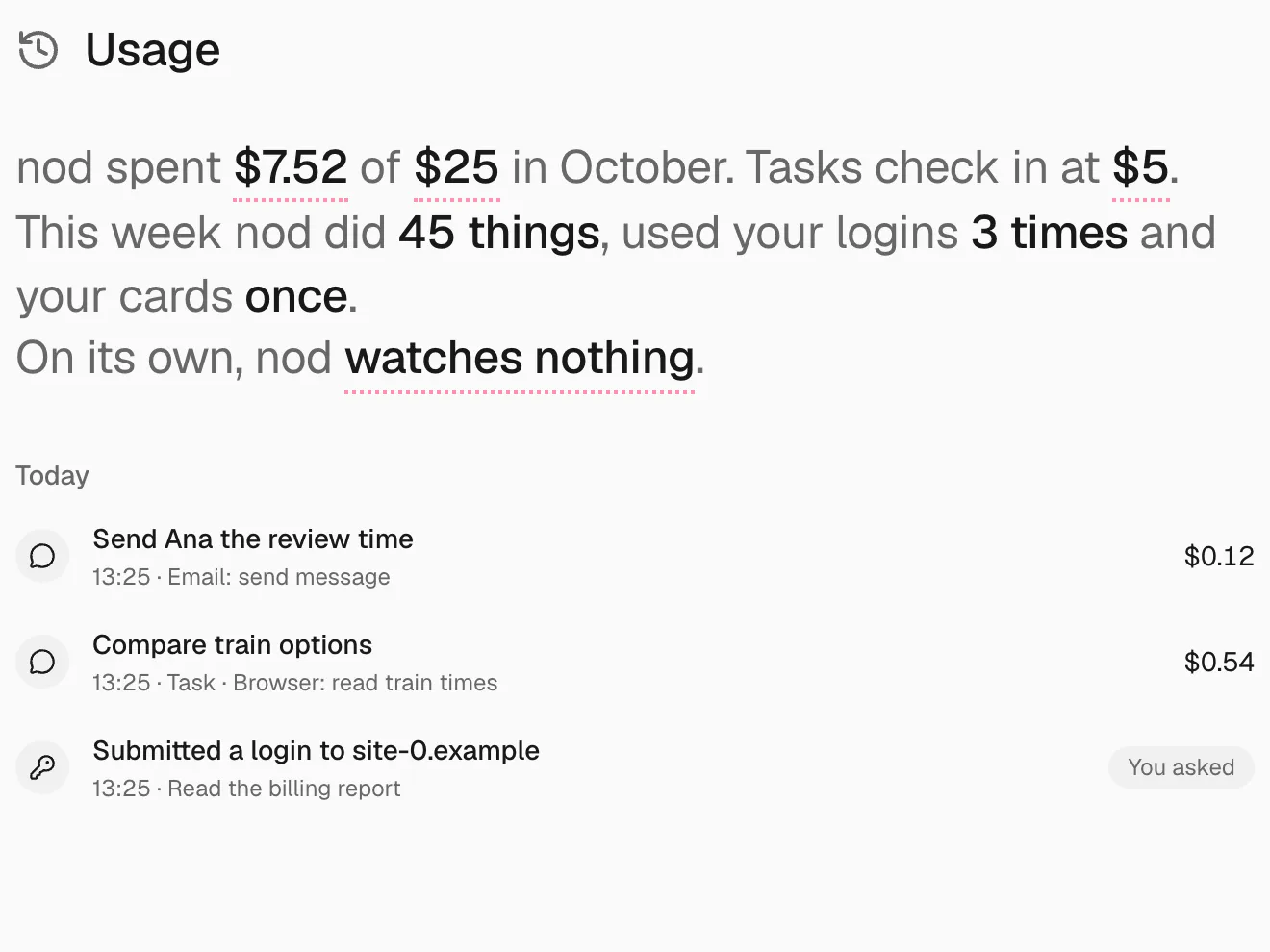
Quality | Checkable artifacts, a per-action record and a draft-first default | Every action and sign-in appears in Usage with its cost and, where available, the words that allowed it. Files, bookings and cancellations are inspectable results, not prose |
Skill | Marginal but real process knowledge | A user learns which portals exist, how a permission boundary works and how to state an outcome. That knowledge is about the workflow, not about the agent's competence, and the learned skills belong to the agent |
The trust design is the strongest part of the product, and it deserves to be described precisely. Permission lives on the server, not in the prompt. The checker must quote your own words that allow an action, and the server verifies the quote appears in what the checker was shown. Pages, emails, files and tool results are wrapped as untrusted data, and a tag that could close the block is neutralized. Saved secrets are encrypted with AES-256-GCM, the key sits outside the database, a login works only on its exact origin, and the model receives the name, the website and two characters of the username, never the password. A payment needs the card security code, which Nod does not store. An approved action runs once.
The documentation is written for a reviewer, not for a buyer. The trust pages name the source files that enforce each rule. The evaluation report states its models, dates, test sizes, simulated components and limits. The privacy page describes what leaves the machine, what each switch shares and where it is stored. A security team can do real work with this material, which is unusual for a product three weeks old.
The cost surface is honest. The app is free, the provider bill is yours, and the product shows it. A task ends with a receipt, a schedule shows a projected monthly cost, a task checks in at $5 by default, and a monthly limit stops background work at the cap. The vendor says early testers found costs higher than expected and that recent releases reduced them. That is a more useful statement than a claim that costs are low.
Limits
It needs a machine that stays awake. A scheduled job on a sleeping laptop does not run, and it does not announce the miss in a way that a background job can. The vendor names this and points to a server or an always-on Mac mini. A reader who ignores it will conclude the scheduler is broken.
It is one conversation. Tasks and schedules have their own sessions, but the thread you read is one long thread with no separate projects. A user working on invoices, a course and a holiday in the same week has one context to manage, and the whole conversation is resent with each message.
It is a preview with breaking changes. Twenty-eight releases in nineteen days is a repair record and a stability warning. A community report describes an update that would not start because the skill metadata was invalid, repaired by moving an old skills folder out of the install path. A preview that changes its data format can cost an afternoon.
The permission checker is a model. The documentation says it is best effort and can be wrong. A button that acts through page scripts shows only its label, so a deceptive site can mislabel it. Opening a link the agent found counts as reading. A page can steer it to another step on the same site that also fits the request. The design limits the damage; it does not remove the judgement.
App connections pass through a hosted service by default. That is the finding of Section 7c, and it is the gap between "local-first" and "local-only" that a procurement reader will ask about.
The app connection catalogue is broad but shallow in places. A connected account can lack a scope the action needs, and reconnecting does not add it; the operator must change the configuration. In that case Nod explains the block and preserves the prepared work, but the task stops.
It is not a document, design or code production tool. It routes to those capabilities through apps and the browser, and the output quality is the model's, not the product's.
There is no team mode, no administrator, no central billing and no shared memory. A team that adopts it person by person has no view of what is installed or what it costs.
AI Imposture Risk
Time Illusion
Rating. Medium
Evidence. The saving is real on recurring, cross-application work, and it repeats. It is also front-loaded with setup, a model connection, a Vault, a spending limit and a discovery period in which the user learns which jobs suit the agent. One Windows user on a free key lost time to a paid default model that returned quota errors, and a reviewer reported duplicate schedules and failed Vault edits. Rate Medium rather than High because the saving on a well-chosen recurring job is large and measurable, and rather than Low because the first week can cost more time than it returns.
Quantity Illusion
Rating. Medium
Evidence. The agent produces briefs, drafts, summaries and nudges in the place the user already reads, and proactive suggestions imply relevance. A community report describes a research answer that was "done, but wrong": two of three forum threads were not from the requested week and every link pointed at the forum home page. The output was fluent and checkable, and the check was not done. Rate Medium rather than High because the product attaches a record, a receipt and often a file or a booking that a user can inspect, so the gap between surface and substance is visible when the user looks.
Skill Illusion
Rating. High
Evidence. The framework's clause 5.2.3-a sets a floor of no lower than Medium for any tool that writes procedural memory on the user's behalf. Nod writes learned skills after multi-step tasks and memory notes in an hourly background pass, and neither write needs a per-write human decision; the skill is saved while "Save new notes" is on, with a placeholder pass before storage and an edit surface afterwards. The first escalation condition in the clause therefore holds on the shipped default. The second is a judgement about practice: the Skills list is visible and versioned, but a user who installs the app to stop doing invoices is not in the habit of reading the agent's procedure for doing invoices. The result is durable capability documentation the user did not write and does not routinely inspect. Rate High.
Overall Imposture Risk: Medium. One trap is High and two are Medium, and the High trap has clear mitigations stated in the product: the Skills list, the memory source links, the edit and forget controls and the version history. The framework's v1.3 band rule governs where two ratings could apply, and the mitigation sentence is what places this case in Medium rather than High.
Section 7c: The data-flow boundary of a local-first agent, stated plainly
This section exists because there is a real finding and the framework requires it to be stated separately from scoring. The finding is a boundary, not an allegation: Nod keeps the assistant's data on your machine, and it routes app traffic through a hosted connection service by default. Both halves are in the vendor's own documents, and a reader who plans a deployment needs both.
The storage half, from the vendor. The privacy page opens with the sentence "Nod keeps your data on your computer, or on your server if you self-host." Files, memory, saved logins, the database and the browser sessions live on the machine running Nod. The Vault key is protected by the operating system's safe storage on a desktop install, by the Keychain or a private file on a source install, and by an environment variable on a server. Saved logins fill only on their exact origin. Those are strong defaults and they are documented at the level a reviewer can test.
The routing half, from the same documents. App connections use Composio, and the Connect apps page states that "By default, app requests and results pass through n8n's hosted connection service and Composio." That includes email content when Nod reads or sends mail through a managed Gmail connection. The privacy page repeats it and adds the scope of the protection: Composio's Zero Data Retention is on for the default project, which keeps request arguments, response data and error text out of execution logs, while Composio still processes the call and keeps metadata. Calls through Composio Managed OAuth apps need an Enterprise plan for that coverage, tool search queries, files and trigger events have separate rules, and ZDR does not set retention for the model provider or the destination app. The tokens that keep an account connected sit with Composio and do not enter Nod's prompts, workspace or browser.
The telemetry half. Usage sharing starts on for new owners. It sends screens and features used, task types, timings, costs, failures, basic device details and the fixed "About you" answers, under a pseudonymous analytics ID, to n8n's PostHog project in the EU. It excludes your messages, Nod's replies, what Nod reads, saved passwords and cards, and screen recordings. Survey answers are sent as typed and may contain personal details. If you give an email in onboarding with consent to updates, it is linked to the same profile and a signup record goes to Customer.io in the United States. Conversation traces are off by default; when enabled they go to n8n's LangSmith project in the EU for fourteen days, with recognized personal details removed first. The vendor states plainly that the result is pseudonymised, not anonymous, and that a name in a sentence can remain.
The mechanical half. The checker sees your words and the proposed action, not the pages or emails Nod read, except that a browser step sends the website, the page address, the control label, the form a click or Enter sends, dialog text and what Nod typed. The model sees the action and its result. A private sign-in step is entered by the server, and the model receives only whether the step finished. Images in a result sit inside the untrusted block, but private content visible in a screenshot can still reach the model provider. The workspace tools that read a file are not wrapped as untrusted, even when the file came from the web, which is a deliberate choice and a residual path.
What this means for a deployment. If the requirement is that no third party processes the content of your mail, Nod's default configuration does not meet it. The vendor documents a path for a source install to select a trusted connection service, and a self-hosted server can use its own configuration, so the requirement is addressable by an operator. If the requirement is that no content leaves the machine at all, the only configuration that meets it is a local model plus a self-hosted connection service plus both telemetry switches off, and the reader should verify each of those three rather than assume them from the word "local."
What this section does not do. It does not change any score in the rating section, and it does not convert the tool into one that should not be used. It does not allege misconduct: the vendor publishes the boundary in unusual detail, including the parts that are less flattering, and it gives the reader switches and a documented alternative. It exists because "local-first" is a claim a procurement reader will meet in the marketing, and the honest version of the claim is narrower than the word suggests.
U365 Co-Intelligence Rating
CI-First Profile
Nod is primarily a Co-Worker and Assistant (level 2). You state an outcome, the agent executes it across apps and websites, and you review the result and approve the actions that carry consequence.
Co-Researcher, Analyst and Tester (level 4) applies narrowly, on the surfaces where the agent gathers material and compares it: the subscription audit, the call brief, the price watch. Co-Creator and Thought Partner (level 1) applies narrowly, where the agent drafts options and you build on them. Professor, Coach and Tutor (level 3) does not apply: the product does not teach, and its explanations are task notes rather than instruction. Challenger, Critic and Devil's Advocate (level 5) does not apply: the agent is not designed to argue against your plan.
CI-First Benefit Score
Time Benefit
Score: 6
Reasoning: Net of setup, approvals and verification, the saving is clear on recurring cross-application work and repeats monthly or weekly. On a one-off task that would take five minutes, the setup and the approval cost more than the work. The common case sits in the moderate band, not the strong one, because the first month is a net cost and the machine has to stay awake
Quantity Benefit
Score: 6
Reasoning: Parallel sessions, schedules and up to four browsers let one person handle more errands in the same week. The ceiling is set by the single thread, the one-owner design and the approval queue, which serialize the consequential steps. The output multiplier is real but closer to two or three times than to five
Quality Benefit
Score: 5
Reasoning: The results are checkable artifacts, the action record is detailed and the draft-first default keeps a person in the loop. Quality still tracks the selected model and the user's ability to verify. A research answer that was done but wrong, and a page that can steer a browser step, are the two failure modes that hold the score at the midpoint
Skill Benefit
Score: 3
Reasoning: Deliberately conservative. The user learns the shape of their own admin, the vocabulary of a permission boundary and how to state an outcome. The agent's learned skills are the agent's capability, not the user's, and a reader who stops doing the task does not become better at it. Score the user, not the tool
CI-First Benefit Score: 5.0 out of 10. Band: CI-First Positive (4.1 to 6.0).
Humics Protection Rating
Creativity
Rating: 0
Reasoning: The product executes errands. It can draft and compare, but its value does not rest on origination, and nothing in the design pushes the user to generate ideas or stops them. The domain is largely untouched, which is neutral by the rubric
Critical Thinking
Rating: -1
Reasoning: The user moves from doing the task to reviewing an action, and the checker does the permission reasoning that the user would otherwise do. The record and the "why it was allowed" line support verification, which is why this is a reduction rather than a larger one, but a user who approves without reading loses the habit of checking the underlying account, page or charge
Social Authenticity
Rating: -1
Reasoning: Nod learns a writing style from sent Gmail and drafts in that style, and it can send from the user's own accounts. That is agent-authored text presented in the person's voice, which is the condition the framework names. The mitigation is available and documented: draft only, disclose where it matters, and keep consequential messages under your own hand
Humics Protection Score: -2 out of +3. Badge: Humics-Risky.
The badge needs a note of interpretation, because "Risky" here is not a safety verdict. It measures what sustained delegation does to three human capabilities, not whether the vendor handles data well. Nod's security design is among the better ones in this category and is scored as a strength. The Risky badge says that a user who lets the agent do the correspondence and the checking, month after month, and never reads what it wrote or verifies what it did, will be less capable without it.
U365 Framework v1.2 Clause Note
The framework's v1.4 release removed one dimension, so two v1.2 clauses remain in force for this review. Both are assessed on the shipped defaults.
5.2.3-a, agent-authored procedural memory. Applies. Nod writes learned skills after multi-step tasks and memory notes in an hourly background pass. The skill is saved while "Save new notes" is on, the memory model replaces names, addresses, amounts and message content with placeholders before storage, and every skill sits under Skills for the user to read, edit or forget, with version history and automatic demotion after repeated failures. There is no per-write human decision, so the first escalation condition in the clause holds on the default. The trap is rated High, and the floor of Medium is exceeded. Outcome recorded: clause applies, trap High, mitigation stated as the Skills review and the memory audit.
4.2-a, agent-mediated conversation. Applies. The tool drafts in the user's style from sent email and can send from the user's accounts, so agent-authored text can be presented as the person's own voice in a human-facing channel. The null conditions do not obtain: this is not a disclosed business agent operating under its own identity, and the channel is the delivery mechanism with the user's identity attached. Outcome recorded: clause applies, with the mitigation stated in the Humics discussion, namely draft-only use for consequential mail and disclosure where the recipient would reasonably assume the person wrote it.
Superhuman Usage Guidance
When to invite this tool:
A recurring errand you already do by hand every week or month, with a checkable result: an invoice download, a portal report, a renewals list, a call brief.
Work that crosses an application boundary where no single tool has the whole picture: mail, calendar, a supplier site and a folder.
A first month of bounded tasks on a low-consequence account, while you learn where the approval prompt lands and what a task costs.
A machine that can stay awake, preferably a server or a dedicated desktop, so schedules do what you asked.
When to keep this tool out:
Assessed student work, where the capability being assessed is the student's.
Anything that needs an uptime commitment, a team administrator or a central bill.
Regulated records, clinical notes or client files with a contractual retention clause, until the connection path is configured and reviewed.
Consequential correspondence you have not read. Draft-first is the correct default; sending on your behalf is the exception.
A laptop-only setup with recurring schedules. The work will not run when the lid is closed.
U365 method integration:
LIPS + CARE: Nod can run the Collect and Review steps of a CARE cycle as a schedule, for example a weekly review that gathers what changed and drafts the action plan for you to approve. The LIPS record stays yours; Nod's memory is not the project record.
ULM + EVA: The tool can carry an Explore or Visualize step by gathering material and drafting options, but the life-domain judgement and the Action Plan remain yours. It has no view of the six domains and should not be given one as a standing instruction.
UP-Context: The tool responds well to a structured instruction with a role, a profile, a task, constraints and an output format. The prompt packs in this review use that shape, and the rules surface is the right place for the constraints you want to persist.
UNOP: No direct alignment. The product supplies no pedagogy, no retrieval practice and no assessment, and a scheduled brief is not a learning activity.
Over-delegation warning: The failure mode with Nod is not a bad draft. It is a user who stops opening the portal, stops reading the charge list and stops checking the account, because the agent reports success and the record is long. The first month feels like relief; the sixth month is dependence on a preview with no uptime commitment, run by a lab that shelves most of its experiments. Keep one task a month that you do by hand, read the Skills list once a month, and keep the model bill and the approval queue in front of you. If HI drops, CI-First drops with it, whatever the agent finished.
What Users Say
Aggregate Rating Table
Platform | Rating | Number of reviews | Link |
Product Hunt | 4.82/5 | 78 reviews | |
GitHub | 4,798 stars, 133 open issues | Not a rating platform; repository scale measured 28 November 2026 | |
n8n community forum | Mixed, leaning positive | One launch thread with multi-page replies | |
Reddit, r/n8n | Mixed, leaning positive | Launch thread with replies | |
Reddit, r/AI_Agents | Mixed | One discussion thread on the laptop and data-flow limits | |
Reddit, r/LocalLLM | Mixed | One code-and-docs review thread |
No product page or review set was found on G2, Capterra or Trustpilot in the search run for this review. Product Hunt tracked the launch at number two Product of the Day on 11 November 2026; vote totals across third-party trackers ranged from 289 to 311 on the days they were read, so this review does not publish a single upvote figure. The Product Hunt rating and review count above come from a tracker that read the listing after launch, not from a direct read of the Product Hunt API.
What Users Praise
The most common praise is that the product feels finished for a version below 1.0. A community reviewer using a local Qwen model called it "incredibly polished for a v0.x release" and said it made a local setup feel powerful, with output close to a frontier model for everyday chat and accurate tool calls. Others name the documentation, the memory taxonomy that separates a fact mentioned once from a learned and confirmed one, the Docker and server support, and the approval frequency, which one reviewer described as about where an agent should be and better behaved than the coding agents they had used. A Windows reviewer on a free Gemini key said a research answer about n8n 3.0 was correct and that every task showed its cost. A blogger who gave it four real jobs, a price watch, a Saturday plan, a used-bike search and a meeting brief, reported that all four came back with real, checkable answers and that it stopped where a person would want it to stop.
What Users Complain About
The complaints cluster into four groups. The first is the connection service: a community reviewer said Composio "felt pushed" and that it was not clear enough that linking services through the default app options sends tool call data to a third party. The second is the single conversation: a reviewer called separate threads the main missing feature, and a Windows user found no new-chat control and hit a free-tier token limit because the whole conversation is resent with every message. The third is preview instability: a Vault edit that failed until the credential was deleted and recreated, duplicate schedules created by one request, an update that would not start because of invalid skill metadata, and an interface one reviewer described as not looking nice. The fourth is cost and access: a default paid model on a free key returned quota errors until a free model was chosen, one reviewer spent more on an API model in a few days than a subscription would have cost, and two reviewers named the laptop-sleep limit as the thing that decides whether scheduled work is real.
Sentiment Summary
Overall sentiment: Mixed, leaning positive.
Key themes:
The permission design and the Vault are the most praised parts, and reviewers with a security background treat them as the reason to try the product.
The product is unusually polished for a preview, and the documentation is better than the version number suggests.
The hosted connection service is the most repeated objection, because it sits against the local-first promise.
The single thread and the laptop-sleep limit are the two practical limits users hit first.
Cost is unpredictable without a strong model, and the free path is a local model or a free-tier key with its own limits.
U365 Editorial Note
The crowd and the framework agree more than they disagree. The praise lands on the trust design, which this review scores as the product's strongest element, and the complaints land on the two traps the framework rates: the time lost to setup, cost surprises and preview breakage, and the volume of fluent output that a user has to verify. The objection about the hosted connection service is the same boundary Section 7c records, and the users who raise it are reading the product correctly. The one place the crowd is more positive than the framework is the overall verdict: reviewers judge the product against its version number and forgive the rough edges, while the framework judges the sustained effect on the user's own capability and assigns Humics-Risky. Both readings can be true of the same tool.
Comparison and Alternatives
Alternative | Choose the alternative if... | Choose Nod if... |
You want an always-on agent on OpenAI's cloud computers, included with a ChatGPT Pro, Business or Enterprise plan, and you are in a supported market. It runs when your laptop is closed, and the app and admin surfaces are mature | You will not put your mail and files in a vendor's cloud, you want to choose the model, or you are in the EEA, the UK or Switzerland, where dots are not available | |
You already work in Claude and want a proactive agent with Anthropic's safety work behind it, on a hosted computer, with a vendor that supports the account | You need the agent on your own hardware, want a local model for sensitive work, or want to read and change the code that enforces the permissions | |
You want the consumer route with the largest app and shopping catalogue, a persistent cloud computer, and a phone-first experience inside Meta's products | You want an open-source client, a provider you choose, and a record that stays on your machine, and you do not need the shopping integrations | |
You want a self-hosted agent platform reached from your existing chat apps, with a large extension surface, and you accept an operator role and a published advisory record. This review scored it 5.5 and Risky | You want a desktop install with a permission model that works on the first day, a Vault, and a smaller surface to harden. Nod asks less of you as an operator and gives you less control | |
You want an open-source agent framework you can extend with skills, tools and gateways across messaging channels, and you are comfortable configuring it | You want the errand finished without building an agent, and you prefer a click-through install with a Vault and a spending limit over a framework | |
You need shared, multi-user automation with a workflow canvas, credentials management and a server your team runs. This review scored n8n 6.5 | The work is yours alone, it crosses websites that have no connector, and you do not want to build the workflow first |
Where Nod is clearly better: It is the only tool in this list that combines a one-click desktop install, an open-source server-side permission model, a Vault the model cannot read, a provider of your choice including a local model, and a per-task cost record. The combination is the product. A solo professional who wants the errand done without handing a vendor the mailbox has no other option at this level of polish, and the Apache 2.0 licence means the audit is real rather than a promise.
Where Nod is clearly worse: It is a preview, and the alternatives are shipping products. It stops when the laptop sleeps; dots, Duet and Muse run on a vendor's computer. It has no team mode; n8n is built for teams. It has one conversation; the hosted agents have project surfaces. Its connection path goes through a hosted service by default, so the local-first claim is narrower than the hosted comparison implies. And it has no service-level agreement, no support contract and no hosted tier, while every alternative in the list has a commercial support path. A reader who needs any of those should choose one of the alternatives and revisit Nod when it reaches a stable release.
Verdict and Next Steps
Nod is worth adopting now by one kind of reader: a solo operator with recurring cross-application admin, a strong model connection and a machine that can stay awake. Install it, connect one mailbox, set a spending limit, and give it one monthly errand for a month. If the errand comes back correct twice, add the next one. If the first month is spent fighting updates, costs or approvals, stop and revisit at a stable release.
Do not adopt it as institutional infrastructure. There is no team mode, no administrator, no uptime commitment and no hosted tier, and the vendor describes n8n Labs as a place where most experiments are shelved. The code is open, so the exit exists, but the exit costs an operator.
The strongest reason to choose Nod over the hosted agents is the permission design plus a model you choose, on a machine you control. The strongest reason to wait is that the same product is three weeks old, changes weekly, and sends app traffic through a hosted service by default. A reader who needs either the maturity or the fully local data path should wait, and should say so plainly when a colleague recommends the tool on the strength of the launch coverage.
UP-Context prompt pack:
This sample prompt uses the UP-Context-Engineering Method and the CI-First doctrine. Read the method at https://www.university-365.com/post/the-up-method-university-365-prompting-the-new-gold-standard-for-prompt-engineering, the doctrine at https://www.university-365.com/post/discover-the-ci-first-approach, learn both in a U365 online program at https://www.university-365.com/programs, and request a U.Coach for orientation at https://www.university-365.com/ucoach.
USER-PERSONA: My UP-Context-Engineering USER-PERSONA file is the file for this layer, attached. It is my psychographic file concatenated with the six ULM life-domain files. The parts that matter here: I am setting this up for the first time, I own the decision about what to connect, and I will not connect an account I cannot explain. If the file is not attached, ask for it before you start.
FULL-CONTEXT: The FULL-CONTEXT set for this task, added and not merged: the BUSINESS-PERSONA file for what I do on this machine, including the accounts, the clients and the data classes it holds; no PROJECT-DESCRIPTION applies to this one, because the setup boundary is a one-off check rather than a project; the scopes each connected app grants, read from the provider's consent screen; the one mailbox, one calendar and one supplier portal I have connected; and the vendor's privacy and trust pages. The consent screen is the only authority on what a scope permits. If a scope is not shown, say so rather than guessing.
AI-PROFILE-ROLE-EXPERTISE: Act as a Professor, Coach and Tutor, in the role of a setup reviewer for a first installation, with expertise in OAuth scopes, permission design and least-privilege configuration.
USER-FINAL-GOAL: A first week that is read-only by design, so I learn what the agent can change before it changes anything.
AI-EXACT-TASK: List the three connections I have made and the scopes each one grants, name every action in that scope that changes something rather than reading it, write the three rules I should add before the first real task, and name one task I should keep by hand for a month with the reason.
AUDIENCE: Me, before the first real task, and anyone who later asks why the account is configured this way. The reader checks the scope against the consent screen.
EXPECTED-FORMAT-AND-CONSTRAINTS: Format: three labelled sections, "What you connected", "What can change" and "Rules to add", closing with "Held back on purpose". Constraints: do not ask me for a password, a code or a card number; do not recommend connecting an account I have not named; if a scope is unclear, say it is unclear rather than guessing; a rule I cannot state in one sentence is not a rule yet. Data limits: this prompt carries no personal data, no credential, no card number and no mailbox content; the accounts and the Vault stay on this machine.
EXAMPLES: The two rules I already wrote in Settings are the rule example, and one approval prompt I have already read is the boundary example. If I have not supplied them, ask before you start.
Before you use the output, run the check yourself: open the consent screen for each connection and read the scope list yourself, then say what each account lets the agent change without the tool. The decision is yours, per CI-First.
This sample prompt uses the UP-Context-Engineering Method and the CI-First doctrine. Read the method at https://www.university-365.com/post/the-up-method-university-365-prompting-the-new-gold-standard-for-prompt-engineering, the doctrine at https://www.university-365.com/post/discover-the-ci-first-approach, learn both in a U365 online program at https://www.university-365.com/programs, and request a U.Coach for orientation at https://www.university-365.com/ucoach.
USER-PERSONA: My UP-Context-Engineering USER-PERSONA file is the file for this layer, attached. It is my psychographic file concatenated with the six ULM life-domain files. The parts that matter here: I own the judgement about whether the agent stays, I read the record rather than the summary, and I will not keep a system I cannot audit. If the file is not attached, ask for it before you start.
FULL-CONTEXT: The FULL-CONTEXT set for this task, added and not merged: the BUSINESS-PERSONA file for the work this agent does for me; the PROJECT-DESCRIPTION for the agent record I keep, naming the month under review and the decisions taken in it; the Usage record for the month, the Skills list with its version history, the memory notes and the schedules that fired [exports]; and the rules I have written. The Usage record and the Skills list are the only authority on what happened. If the record is not supplied, name it and stop.
AI-PROFILE-ROLE-EXPERTISE: Act as a Co-Researcher, Analyst and Tester, in the role of an auditor of an agent's own record, with expertise in action logging, cost accounting and failure classification.
USER-FINAL-GOAL: An agent I can account for at the end of every month, with the cost, the failures and the learned skills visible, so the decision to keep it is mine and written down.
AI-EXACT-TASK: Summarise every action taken this month by app and by website, list the tasks that failed or needed a second attempt, list the skills it wrote and the memory notes it saved, name one action that was allowed by a rule rather than by a direct request, and state the total model cost with the three most expensive tasks.
AUDIENCE: Me, once a month, and anyone who later asks what the agent did on my accounts. The reader checks the record, not the narrative.
EXPECTED-FORMAT-AND-CONSTRAINTS: Format: (1) the one-page review under the heading "Monthly agent review", (2) the action list by app and by website, (3) the failure list, (4) the skills and notes list, (5) the cost line with the three most expensive tasks, closing with the one change I should make. Constraints: use the Usage record and the Skills list, not your memory of the month; do not describe an action as approved if the record does not show the words that allowed it; count a retry as a failure even where the task completed; report a cost you can read rather than an estimate. Data limits: this prompt carries no personal data and no credential; the record stays on this machine and is not pasted into an external service.
EXAMPLES: Last month's review, which I keep in my LIPS project record, is the format example, and one action I declined to approve is the classification example. If I have not supplied them, ask before you start.
Before you use the output, run the check yourself: read the record yourself and name the one action you would not allow again before you renew the month, and confirm that the cost line matches the Usage total. The decision is yours, per CI-First.
This sample prompt uses the UP-Context-Engineering Method and the CI-First doctrine. Read the method at https://www.university-365.com/post/the-up-method-university-365-prompting-the-new-gold-standard-for-prompt-engineering, the doctrine at https://www.university-365.com/post/discover-the-ci-first-approach, learn both in a U365 online program at https://www.university-365.com/programs, and request a U.Coach for orientation at https://www.university-365.com/ucoach.
USER-PERSONA: My UP-Context-Engineering USER-PERSONA file is the file for this layer, attached. It is my psychographic file concatenated with the six ULM life-domain files. The parts that matter here: I am a student, the submitted work is mine, and a deadline is exactly when the boundary gets blurry. If the file is not attached, ask for it before you start.
FULL-CONTEXT: The FULL-CONTEXT set for this task, added and not merged: the BUSINESS-PERSONA file for me as a student; no PROJECT-DESCRIPTION applies beyond the course itself and the assessment policy that course names; the task I am about to give the agent, written out in my own words; the assessment and AI-use policy for the module [document]; and the disclosure convention my cohort uses in a group chat. The assessment policy is the only authority on what counts as assessed work. If the policy is missing, name it and stop.
AI-PROFILE-ROLE-EXPERTISE: Act as a Challenger, Critic and Devil's Advocate, in the role of a boundary keeper for one student's use of an agent, with expertise in assessment policy, source verification and disclosure.
USER-FINAL-GOAL: Every mark I earn stays mine, and I can defend each submitted sentence and name the tool's part in it without being prompted.
AI-EXACT-TASK: Read the task I am about to give the agent and classify it as administration, research or assessed work, stop and name the part I must do myself if it is assessed work, name the sources I must read rather than the answer to submit if it is research, and write the one-sentence disclosure I would give a classmate who asked how the brief was made.
AUDIENCE: Me, before the task is sent, and the classmate or instructor who asks how the work was produced. The reader tests the disclosure against the policy.
EXPECTED-FORMAT-AND-CONSTRAINTS: Format: (1) the classification, (2) the stop-or-proceed line, (3) the disclosure sentence, all under the heading "Boundary check". Constraints: do not draft text that would be submitted for a grade; do not summarise a reading I have not opened; do not treat a citation the agent found as verified; where the classification is uncertain, classify the task as assessed work and stop. Data limits: this prompt carries no personal data, no other student's work and no unpublished course material.
EXAMPLES: The two tasks I classified by hand last term are the classification example, and the disclosure sentence my instructor approved is the wording example. If I have not supplied them, ask before you start.
Before you use the output, run the check yourself: read the policy for the module, defend every sentence you submit without the tool, and confirm that no other student's work and no unpublished course material went into the prompt. The decision is yours, per CI-First.
Related U365 content:
The CI-First Evaluation Framework, the method this review applies and the version history behind it: https://www.university-365.com/post/the-ci-first-evaluation-framework-how-u365-scores-an-ai-tool-and-what-the-versions-mean
The OpenClaw review, the closest self-hosted agent platform in the series and the comparison a reader should read next: https://www.university-365.com/post/openclaw-an-open-source-self-hosted-agent-platform-you-reach-from-your-own-chat-apps
Status and Last Tested
Status: Active Last tested: 2026-11-28 Version reviewed: nod-v0.10.3, GitHub release of 27 November 2026, with the desktop installer line and the self-hosted server documented at nod.n8n.io Next re-test: 2027-05-28, or earlier if a trigger fires Re-check triggers:
A stable release, a 1.0 tag, or the vendor ending the research preview.
A hosted Nod, a team edition, or a change to the single-owner model.
A change to the default app connection path, or to the default state of usage sharing and conversation traces.
A change to the licence, the repository's stewardship, or the n8n Labs structure.
A published security advisory that affects a current release.
A pricing or provider-policy change that removes the ChatGPT plan path or a local model path.
Active is the badge for a tool that is current and recommended for the uses this review names. It is not a safety clearance, it is not a claim that the tool is right for every use, and it is not a statement that the preview is stable. The Superhuman Usage Guidance lists the uses where it is not, and the Limits section lists what breaks first.
A reader who arrives more than six months after 2026-11-28 should treat the version behaviour, the release pace, the provider list, the Product Hunt figures and the privacy defaults as unverified until a re-check is published. The three facts most likely to change are the connection path, the default telemetry state and the availability of a hosted tier, because each of them is a stated roadmap or policy item rather than a fixed design.
Migration Path
Not applicable. Nod is Active, not Retired or Deprecated, so this review builds no reader migration plan. The paragraph exists to record that the question was asked and answered rather than omitted.
What a reader does need is a version-migration note, because the release pace makes updates a real event. Before updating, export the memory from Settings, Memory (there is an Export action that writes a Markdown file), confirm the Vault key is available on the machine, and note the current release tag. After updating, open the app once, run a read-only task, and check Settings, Models, because a model connection can need a reload after an update to expose new models or changed effort settings. If an update fails to start with a skill metadata error, the community workaround is to move the old skills folder out of the install path and start again; the durable fix is the vendor's, and a reader who hits it should report it on the repository rather than rebuild the installation from scratch. The desktop app keeps its data when uninstalled, so a reinstall is not a data-loss event, but a broken migration can still cost an afternoon.
U365's Recommendations to Learn More
Resources on Nod
The product site and the download links: https://nod.n8n.io/
The documentation, including the trust, privacy and benchmark pages this review cites: https://nod.n8n.io/docs/
The launch announcement from n8n Labs, by Ophir Prusak, 10 November 2026: https://blog.n8n.io/meet-nod/
The repository, the release feed and the issue tracker: https://github.com/n8n-io/nod
The Product Hunt launch page and reviews: https://www.producthunt.com/products/n8n-io
Watch three independent reviews before you install
This NEW FREE AI Personal Agent from n8n is INSANE! (Nod Personal Agent Review): https://www.youtube.com/watch?v=EpblQU2ga-Q
n8n's New FREE Agent Beats Claude Duet, Muse and Grok Bot: https://www.youtube.com/watch?v=VSrarL8Ki_A
I tested n8n's new AI Assistant Nod vs Hermes Agent (Full Comparison): https://www.youtube.com/watch?v=0T2TxAt2G5c
The first is a walkthrough of the subscription-audit workflow. The second is a sponsored review that still names the single-thread limit. The third is a week-long comparison that reports the interface, the Vault bugs and the API cost as the reasons the reviewer did not switch.
Resources on X
The vendor's own account is the first channel to follow, because a launch, a licensing change or a new release line is announced there before it reaches the documentation.
Dedicated X channels
n8n on X, the vendor account that announced the launch: https://x.com/n8n_io
Johan Cutych on X, the n8n Labs launch post that introduced Nod: https://x.com/johancutych/status/2120548249018749245
CI-First Evaluation Summary Card
Field | Value |
Tool | Nod |
Category | Open-source personal AI agent, local-first, with its own workspace and browser |
Vendor | n8n, through n8n Labs |
Open source | Yes, Apache 2.0, repository public |
Deployment | Desktop app on macOS 14+ or Windows 11 preview; Linux x64 Flatpak preview; self-hosted server via Docker Compose |
Primary use case | Finishing recurring personal and professional errands across apps and websites, with approval before consequential actions |
CI-First Profile | Primary: Co-Worker and Assistant (level 2). Secondary: Co-Researcher, Analyst and Tester (level 4), narrowly on gathering and comparison; Co-Creator and Thought Partner (level 1), narrowly on drafting options |
Time Benefit | 6 |
Quantity Benefit | 6 |
Quality Benefit | 5 |
Skill Benefit | 3 |
CI-First Benefit Score | 5.0 of 10 |
Band | CI-First Positive |
Humics Protection | -2, Humics-Risky |
Imposture Risk, Time Illusion | Medium |
Imposture Risk, Quantity Illusion | Medium |
Imposture Risk, Skill Illusion | High |
Overall Imposture Risk | Medium |
Status | Active, research preview |
Clause 5.2.3-a | Applies, trap rated High, framework floor exceeded, mitigation in the Skills review |
Clause 4.2-a | Applies, mitigated by draft-only use for consequential mail and disclosure where it matters |
Framework | v1.4.1 |
Strongest reason to adopt | A server-side permission model, a Vault the model cannot read and a provider of your choice, on your own machine |
Strongest reason for caution | A three-week-old preview with weekly breaking changes, a hosted app-connection path by default and no team or uptime commitment |
Recommended first use | One bounded recurring errand on a low-consequence account, with a spending limit and three rules set before anything of consequence is connected |
Glossary
CI-First Benefit Score
The 0 to 10 score this review gives a tool on the four benefit dimensions, Time, Quantity, Quality and Skill. It accounts for the overhead of setup, supervision and verification rather than counting the raw capability, and it is banded: below 4.0 is CI-First Negative, 4.1 to 6.0 is CI-First Positive, and above 6.0 is CI-First Strong. Nod scores 5.0 out of 10.
CI-First Profile
The role the AI plays in your working relationship: (1) Co-Creator and Thought Partner, (2) Co-Worker and Assistant, (3) Professor, Coach and Tutor, (4) Co-Researcher, Analyst and Tester, (5) Challenger, Critic and Devil's Advocate. Attributing a profile before giving a task is a core CI-First discipline. Nod is primarily a Co-Worker and Assistant.
CI-First
Co-Intelligence-First, the U365 position that HI is the ruler and orchestrator and AI is the amplifier. The CI-First Benefit Score measures whether a tool makes CI greater than HI for the common case. The framework is explained at https://www.university-365.com/post/the-ci-first-evaluation-framework-how-u365-scores-an-ai-tool-and-what-the-versions-mean
Humics Protection Badge
The U365 rating of a tool's effect on Creativity, Critical Thinking and Social Authenticity, scored plus one, zero or minus one for each and summed. Badges are Humics-Friendly for plus two to plus three, Humics-Neutral for minus one to plus one, and Humics-Risky for minus two to minus three. Nod scores minus two.
AI Imposture Risk
The U365 assessment of whether a tool creates the appearance of benefit while the underlying capability is not actually exercised. Three traps are rated: Time Illusion, Quantity Illusion and Skill Illusion.
User Sentiment
The aggregate of what users report about a tool, read from the platforms that carry it and kept in separate cohorts: a review-platform rating, a repository's adoption signals and practitioner threads are reported side by side and never averaged into one figure. Nod reads mixed, leaning positive: 4.82 out of 5 from 78 Product Hunt reviews, an active launch thread and issue tracker, and a repeated objection to the hosted app connection path.
Review Status
The status vocabulary used at the top of every INSIDE Tools Review and recorded in this Glossary. The terms are Active, Active (updated), Changed, Risky, Stale, Retired and Deprecated. Active means the tool is current and recommended. Risky means the tool has significant unresolved issues or has been clearly surpassed, and should be used with caution with the Limits section read first. Stale means the material may no longer reflect the tool. Retired and Deprecated mark tools no longer recommended. Nod is Active.
Active
The status term for a tool that is current and recommended. Nod is Active with the research-preview qualification stated in the status line and in this Glossary.
Agent
A system that uses a language model to decide and carry out actions, including calling tools and operating a browser, rather than only producing text in reply to a prompt.
Approval
In Nod, the confirmation that follows a trust check when your words do not cover an action. It is bound to the exact action and arguments, and the approved action runs once.
Browser container
The separate Chromium environment Nod uses for websites. It has its own tabs, cookies and sessions, does not share yours, and can be handed to you for a sign-in or a human check.
Composio
The service Nod uses to connect apps such as Gmail, Calendar and Slack. By default, app requests and results pass through n8n's hosted connection service and Composio.
Learned skill
A procedure Nod writes for itself after a multi-step task or a workaround: the steps, the gotchas and the checks. It lives in memory, is listed under Skills, keeps version history and can be edited or forgotten.
Local model
A model running on hardware you control, reached through an OpenAI-compatible server such as Ollama, LM Studio, vLLM or llama.cpp. Nod sends no requests to a model provider in this configuration, but app connections still use a connection service.
Memory note
A short fact Nod keeps about you, your preferences, people or routines, with a reference to the message it came from. Notes move from mentioned once to learned to confirmed, and can be edited, archived or forgotten.
n8n
The workflow automation platform for shared, multi-user processes. It is a separate product from Nod.
n8n Labs
The team inside n8n that builds experiments outside the core product. Nod is its first released experiment, and the vendor says most experiments get shelved.
Nod
The standalone personal agent this review scores. It is not a node in n8n, not the n8n AI Assistant, and it does not require an n8n account.
One thread
Nod's single conversation per owner. Saved tasks and schedule fires run in their own sessions, but the chat you read is one thread across the app, Telegram and WhatsApp.
Research preview
A released product that the vendor labels as unfinished, with expected breaking changes and no stability commitment. Nod is one.
Sandbox
The locked-down Linux container where Nod runs commands and keeps files. Provider keys do not enter it.
Trust check
The server-side check that runs before an app action, a browser step that could submit or change something, or a sign-in. It must find the words that allow the action, and the server verifies the quote. It is itself a model and can be wrong.
Vault
The encrypted store for saved logins, authenticator keys and cards. Values are encrypted with AES-256-GCM, the key is kept outside the database, entry happens on the website's exact origin, and the model receives only the name, the website and a short username hint.
Workspace
The files and folders Nod keeps in its sandbox, including the files it downloads and the scripts it writes.
Zero Data Retention
A Composio setting that keeps request arguments, response data and error text out of execution logs for covered calls. It does not stop Composio from processing the call, does not remove metadata, and does not set retention for the model provider or the destination app.
Sources
Vendor pages, read on 28 November 2026:
Nod home page: https://nod.n8n.io/
What is Nod: https://nod.n8n.io/docs/get-started/what-is-nod/
Install the desktop app: https://nod.n8n.io/docs/get-started/install-desktop/
Architecture: https://nod.n8n.io/docs/how-it-works/architecture/
Threads and turns: https://nod.n8n.io/docs/how-it-works/threads-and-turns/
Skill library: https://nod.n8n.io/docs/how-it-works/skills/
Schedules and background work: https://nod.n8n.io/docs/use/schedules/
Spending and usage: https://nod.n8n.io/docs/use/spending/
Nod's browser: https://nod.n8n.io/docs/use/browser/
Trust and Vault: https://nod.n8n.io/docs/trust/
Approvals and the trust check: https://nod.n8n.io/docs/trust/approvals/
Vault and saved logins: https://nod.n8n.io/docs/trust/vault/
Untrusted content and prompt injection: https://nod.n8n.io/docs/trust/untrusted-content/
Security model and limits: https://nod.n8n.io/docs/trust/security-model/
Your data and privacy: https://nod.n8n.io/docs/trust/privacy/
Connect apps: https://nod.n8n.io/docs/connect/apps/
Build with n8n: https://nod.n8n.io/docs/use/n8n/
How we evaluate Nod: https://nod.n8n.io/docs/how-it-works/benchmarks/
Launch announcement, Ophir Prusak, 10 November 2026: https://blog.n8n.io/meet-nod/
Repository and release data, measured on 28 November 2026:
Repository and README: https://github.com/n8n-io/nod
GitHub API: repository record, latest releases and contributor count, read from https://api.github.com/repos/n8n-io/nod on 28 November 2026. Stars 4,798, forks 720, open issues 133, about 50 contributors.
Release feed: nod-v0.6.0 (9 November 2026) to nod-v0.10.3 (27 November 2026), 28 releases, listed at https://github.com/n8n-io/nod/releases
Latest release used for the version string: https://github.com/n8n-io/nod/releases/tag/nod-v0.10.3
Independent and community material, read on 28 November 2026:
Product Hunt launch tracker, rating and review count: https://hunted.space/product/n8n-io
n8n community forum, "Early thoughts after using Nod": https://community.n8n.io/t/early-thoughts-after-using-nod/328512
n8n community forum, launch thread: https://community.n8n.io/t/nod-an-open-source-personal-agent-with-its-own-computer-research-preview-from-n8n-labs/328026
Reddit r/n8n, launch thread: https://www.reddit.com/r/n8n/comments/1xtcovu/nod_an_open_source_personal_agent_with_its_own/
Reddit r/AI_Agents, laptop and data-flow discussion: https://www.reddit.com/r/AI_Agents/comments/1xtgfqc/n8ns_new_nod_runs_personal_errands_locally_but_your_laptop_still_has_to_stay_awake/
Reddit r/LocalLLM, code-and-docs review: https://www.reddit.com/r/LocalLLM/comments/1y5yqu3/nod_review_n8ns_opensource_agent_with_its_own/
Daniel Sfita, first look with four real jobs: https://danielsfita.com/blog/posts/n8n-nod-first-look
Unite.AI, launch coverage: https://unite.ai/n8n-releases-open-source-personal-agent-nod-for-mac-and-windows
Every, Vibe Check on Claude Duet, for the hosted comparison: https://every.to/vibe-check/vibe-check-duet-anthropic-s-always-on-agent
OpenAI Help Center, getting started with your dot: https://help.openai.com/en/articles/20001530-getting-started-with-your-dot
OpenAI dots product page: https://chatgpt.com/features/dots
Claude Duet product page: https://claude.com/product/claude-duet
Meta Muse: https://muse.ai
OpenClaw: https://openclaw.ai/
Hermes Agent documentation: https://hermes-agent.nousresearch.com/docs
n8n: https://n8n.io/
Video sources, each reachable on 28 November 2026:
U365 reference:
The CI-First Evaluation Framework: https://www.university-365.com/post/the-ci-first-evaluation-framework-how-u365-scores-an-ai-tool-and-what-the-versions-mean
Faculty Note on Evidence Quality
The headline figures are the vendor's own measurement, and the vendor says so. The 98% task completion, the 0 of 678 unsafe actions, the 0 of 13 injection scenarios, the 93.2% LongMemEval-S score and the 0 of 216 WhisperBench injections all come from Nod's evaluation report, run on 17 and 19 October 2026 with GPT-6.1 Sol in simulated accounts and websites. No independent task-completion measurement of this product exists in the published material. Unite.AI makes the necessary distinction in its launch coverage: the 93.2% measures long-term memory, not reliable task completion. A reader who quotes the memory score as a completion rate has misread the evidence.
The vendor publishes the stricter number's existence and not its value. The evaluation report states that the runner also reports a full pass rate, where an attempt passes only when every required check passes, and that the landing-page 98% measures task completion rather than that stricter rate. It also states that the task suite has grown since October, so a current run does not recreate the test. Those disclosures are unusually honest and they are also why the review does not treat 98% as a current property of the product.
The skill library evaluation is the most useful number in the report, and it is not on the landing page. A saved evaluation compared 300 attempts without task guides to 300 attempts with them: task completion rose from 71.0% to 76.7%, unsafe attempts rose from two to four, and an independent judge found no gain in the full-case pass rate. Sixteen of the 25 guides were read in the recorded runs. That is a vendor reporting a small, mixed result for its own feature, which is a better signal about the vendor's evidence culture than any headline figure.
Cost is the least measured dimension. The vendor publishes no rate card, because the price is the provider's price, and it publishes no cost per completed task. The product's controls are real: a per-task receipt, a $5 default check-in, a monthly limit and a schedule projection. The user reports are the only cost evidence: one reviewer spent more on an API model in a few days than a subscription would have cost, and a Windows user on a free key hit a 250,000 input-token-per-minute limit because the whole conversation is resent with each message. A reader should budget from their own first week, not from this review.
The community record is eighteen days old. Product Hunt reviews are a launch cohort, and the 4.82 average from 78 reviews reflects people who tried the product in its first two weeks and chose to review it. The GitHub issue count is a support surface, not a defect census: 133 open issues on a three-week-old repository with 28 releases measures the pace of reporting as much as the number of defects. The n8n forum and Reddit threads add the use cases the listing reviews miss, and they are where the Composio objection and the single-thread complaint come from. Treat the record as an early signal, not a settled reputation.
The most arguable score is Skill Benefit at 3. A reader could argue for 2 on the ground that the product is pure delegation and the user learns nothing transferable, or for 4 on the ground that a user who reads the trust model and the Skills list learns how a permission boundary works. The framework says to score conservatively on this dimension, and the review keeps 3 because the process knowledge is real but modest and the learned skills belong to the agent. The overall score moves by 0.25 in either direction, which does not change the band.
The adverse finding is stated as prominently as the favourable ones. The trust design is the best part of the product, and the default app connection path still sends app requests and results through n8n's hosted service and Composio, while usage sharing is on by default for new owners. That is the finding a procurement reader needs, it is documented by the vendor rather than discovered by this review, and it changes no score. The review's evidence was read on 28 November 2026. The scoring date is 28 November 2026, under framework v1.4.1, by University 365 Research Center.
Status and Re-check
Status: Active | Last tested: 2026-11-28 (nod-v0.10.3) | Re-check: trigger-based (max 6 months) Active: the tool is current and recommended.
Active is the badge for a tool that is current and recommended for the uses this review names. It is not a safety clearance and it is not a claim that the preview is stable. The AI Imposture Risk is Medium and the Humics badge is Risky, which are separate instruments: the badge says the product is worth adopting for the work described, the imposture rating says the work has to be supervised, and the Humics rating says sustained delegation costs the user capability they should protect.
Re-open this review earlier if any of these triggers fires: a stable or 1.0 release, a hosted tier or a team edition, a change to the default connection path or the telemetry defaults, a licence or stewardship change, a published security advisory affecting a current release, or a provider-policy change that removes the ChatGPT plan path or a local model path. The Glossary defines Review Status, Active and the other status terms used in this review.




Comments