
Podcast Production with AI: From Script to Published


UIC University 365 Institute of Communication
Series Media Studies | Level Basic (Free)
Duration 15 to 20 minutes | Access Free
Digital Communication, Marketing, Branding, Content Strategy, Media Studies

UNOP Sound (University 365 Neuroscience Oriented Pedagogy)
Take five minutes to prepare your brain. Play the isochronous tone track (40Hz gamma frequency) with your eyes closed. Gamma-frequency tones before a learning session raise attention and make the material easier to absorb.
[Audio player: UNOP Pre-Lecture Isochrone (40Hz, 5 minutes)]
In this Lecture

The Hook: The Unfinished Podcast
Count the podcasts you started and abandoned. Most people who begin one stop before episode thirty, and the reason is almost never talent. It is the production cost of each episode: research, scripting, recording, editing, cleanup, show notes, uploading, publishing. Six to ten hours per episode, repeated forever.
AI does not remove that cost. It removes the parts of it that are mechanical. Research assembly, first-draft scripting, silence removal, loudness normalization, transcription, chapter generation, metadata drafting, and publishing checks are all tasks a machine can prepare and a human can finish. What is left is the part that makes a show worth listening to: the point of view, the questions, the judgment about what stays in.
This lecture takes you through the full pipeline, from a blank episode plan to a published episode in a feed, with AI doing the heavy lifting and a human doing the deciding.
Step 1: What AI Can and Cannot Do in Podcasting
Be precise about the division of labor, because the failure modes of AI-assisted shows are all the same failure: a mechanically correct episode that nobody needs to hear.
What AI does well. It assembles research from your own sources. It drafts a script from a structured outline. It transcribes recorded audio with punctuation and speaker labels. It removes long silences and normalizes loudness across tracks. It generates a first pass at show notes, titles, and chapter markers. It checks the published feed against a technical checklist.
What AI does badly. It cannot know what your audience needs to hear this week. It cannot conduct a good interview, because a good interview follows a surprising answer. It cannot hold a position under pressure. It fabricates a statistic if you let it. It has no voice of its own worth publishing.
What AI must never do. It must not publish without a human decision. If an episode is materially generated by AI without human review, say so in the episode description. Listeners forgive assistance. They do not forgive deception.
The cost model that matters
Break your episode into tasks and mark each one as human-only, AI-assisted, or AI-only with a human check.
Task | Who leads | Typical time saved |
Choose the episode topic and angle | Human | none, this is the work |
Assemble research and sources | AI, human verifies | 1 to 2 hours |
Draft the script or interview plan | AI, human rewrites | 1 to 3 hours |
Record or generate narration | Human, or AI with human review | 0 to 1 hour |
Edit, remove silence, normalize loudness | AI, human approves | 2 to 4 hours |
Transcript, chapters, show notes | AI, human edits | 1 to 2 hours |
Publish and verify the feed | Human, AI checks | 15 to 30 minutes |
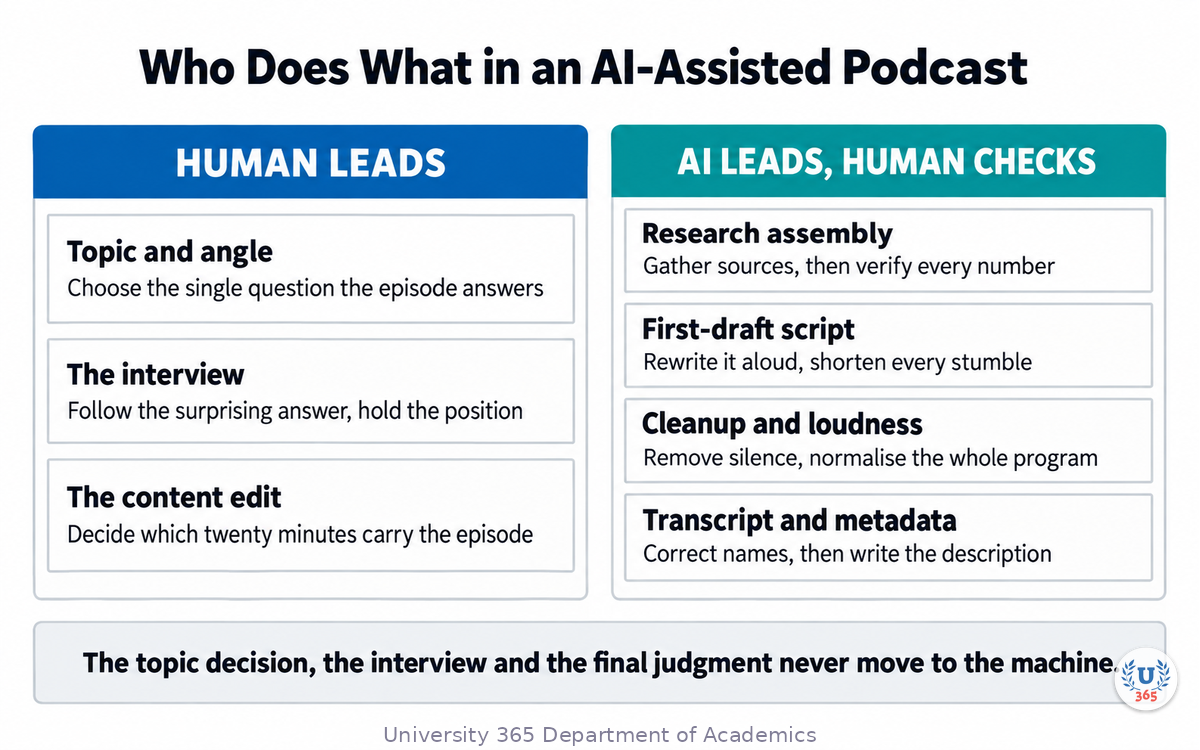
That table is where the return comes from. The topic decision, the interview, and the final judgment stay with you. Everything transactional moves to the machine.
Step 2: The Episode Blueprint
A podcast episode is not a recording. It is a structured document that a recording makes real. Write the blueprint before you generate anything, because an AI working from a blueprint produces something usable, and an AI working from a vague idea produces something forgettable.
An episode blueprint has eight fields:
The single question. One sentence. If you cannot write it, the episode does not exist yet.
The listener. Who they are and what they already know, so the script does not explain what they know or assume what they do not.
The shape. Interview, monologue, discussion, or narrative. Each has a different script structure.
The segments. Three to five blocks with titles, each carrying one idea, each with a target duration.
The evidence. The specific facts, numbers, quotes, or examples each segment will use, with their sources.
The cold open. The first 30 to 60 seconds, which decide whether anyone hears the rest. It states the tension, not the topic.
The close. The action you want the listener to take, and the one idea they should remember.
The metadata. Working title, description draft, target length, publication date, episode number.
The blueprint is also your quality gate. If a segment cannot state its evidence, the segment is not ready. If the single question is vague, no amount of editing fixes the episode.
Target lengths
Format | Target duration | Structure |
Microlearning episode (D2L-style) | 5 to 12 minutes | One question, one guest or host, a clear close |
Discussion episode | 20 to 40 minutes | Three segments, host plus one guest, one idea per segment |
Narrative episode | 15 to 25 minutes | Story arc with recorded segments and narration links between them |
For University 365, the D2L format is a microlearning discussion podcast: a host and a professor in dialogue, one topic, short enough to finish on a commute.
Step 3: Research and Scripting with AI
Research assembly
Give the model your episode question and your own source material, then ask for a structured research brief: the three strongest supporting points, the strongest counterpoint, and the specific evidence with its origin. Ask it to mark every claim it cannot attribute.
Then do the part it cannot do: open the sources and confirm the numbers. Delete anything you could not confirm. An episode that cites a fabricated statistic costs more reputation than it gains listeners.
Scripting
Do not ask for a finished script. Ask for a structure you will rewrite. The difference matters, because a generated script reads as written prose, and spoken prose is shorter and less formal.
Ask for the draft in this shape, one segment per block:
Segment title and target duration.
Opening line: one sentence that starts the segment.
Two to four talking points in bullet form, each a complete idea.
One example the speaker can tell in their own words.
Transition line into the next segment.
Then rewrite the script aloud. Record yourself reading it. Every sentence you stumble on is a sentence that needs shortening.
The spoken-word rules
Use short sentences. One idea per sentence.
Write numbers the way you say them: "about four in ten", not "41.3 percent".
Avoid subordinate clauses that make a listener wait for the verb.
Repeat the key idea twice in different words. Listeners cannot scroll back.
Cut every sentence that only transitions.
Step 4: Voice, Recording, and Synthetic Narration
If you record yourself
Record in a small room with soft surfaces. Speak 10 to 15 centimetres from the microphone, slightly off axis to avoid plosives. Record 10 seconds of room tone at the start of every session; the editor needs it to fill the gaps left by silence removal. Record each segment as a separate file so a mistake costs you one segment, not the episode.
If you use a synthetic voice
Synthetic narration is a legitimate production choice for a defined set of cases: a narrated article, an onboarding series, a translation of an existing episode, or an accessibility version. It is a poor choice for a personal show, because the audience came for a person.
When you use it, three rules keep it honest:
Disclose it. State in the episode description that narration is synthetic. In several jurisdictions, labelling synthetic media is also a legal requirement.
Write for speech, then adjust pronunciation. Feed the engine short sentences, and check every proper noun, acronym, and number by listening.
Do not clone a voice without documented, written consent. Voice cloning of a real person without consent is a reputational and legal hazard, and it is the fastest way to lose an audience.
The recording checklist
Microphone positioned and gain set before the session, with a test recording.
Room tone captured.
Script or interview plan open, with evidence and sources beside it.
Phone silenced, notifications off, window closed.
One filename convention, decided before recording: show, episode number, segment, take.
Step 5: Editing, Cleanup, and Loudness
Editing is where AI assistance pays for itself. The work splits into four passes.
Pass 1: Content edit
Decide what stays. Cut the segment that repeats an earlier point, the answer that goes nowhere, and the aside that only interests the host. This pass is entirely human. No tool knows which twenty minutes carry the episode.
Pass 2: Cleanup
Remove long silences, click and mouth noise, and room hum. AI tools do this reliably in minutes. Set a silence threshold rather than a fixed cut, so natural pauses inside sentences survive. Review the result by listening at double speed; over-aggressive silence removal makes speech sound clipped and unnatural.
Pass 3: Loudness
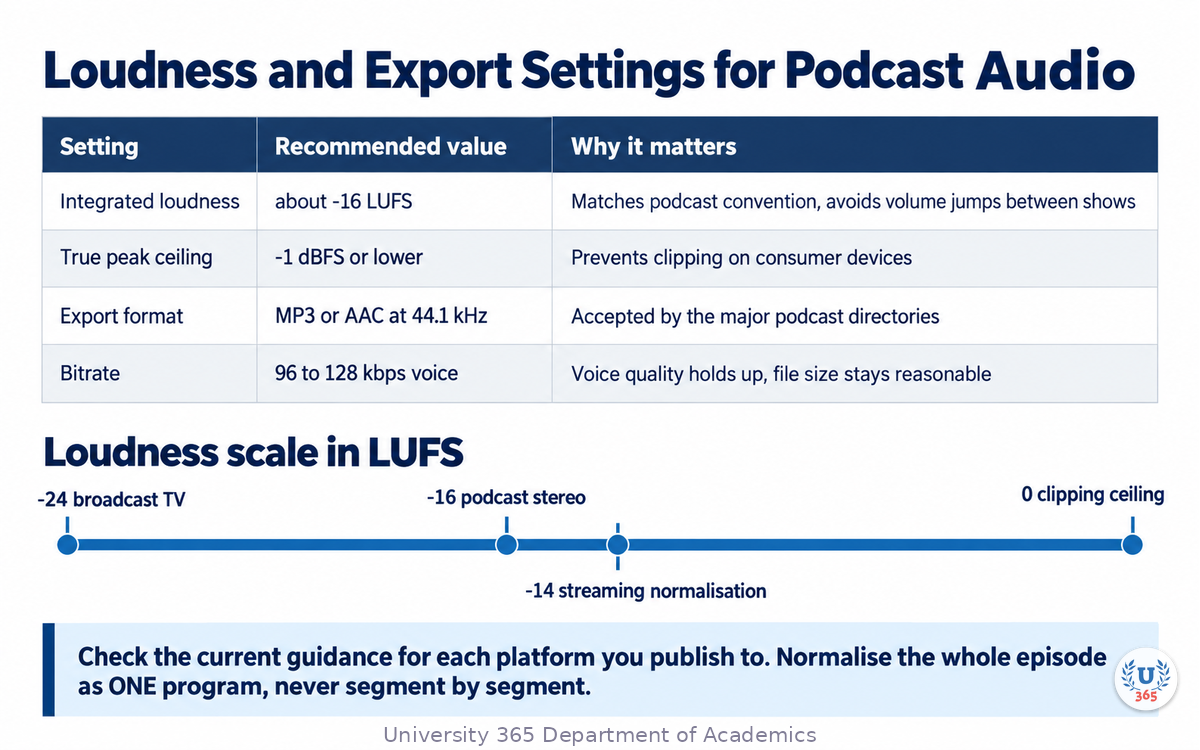
Loudness is measured in LUFS, Loudness Units Full Scale, using the ITU-R BS.1770 measurement algorithm. The podcast convention is an integrated target of about minus 16 LUFS for stereo, with a true peak ceiling near minus 1 dBFS. Some platform documentation recommends values in the minus 14 to minus 16 LUFS range; check the current loudness guidance for each platform you publish to, because the numbers are platform policy rather than a single global standard.
Two habits prevent the common failures:
Normalize the whole episode as one program, never segment by segment, or the volume will drift between blocks.
Leave headroom. A true peak above the ceiling will clip on some players even if it sounds fine in your editor.
Pass 4: Quality listen
Listen once on phone speakers and once on headphones, at normal speed, without looking at your notes. Note the timestamp of anything that loses your attention. Fix only those.
Setting | Recommended value | Why |
Integrated loudness | about minus 16 LUFS (check your platform) | Matches podcast convention; avoids volume jumps between shows |
True peak ceiling | minus 1 dBFS or lower | Prevents clipping on consumer devices |
Export format | MP3 or AAC, 44.1 kHz | Accepted by the major directories |
Bitrate | 96 to 128 kbps mono or stereo voice | Voice quality holds up; file size stays reasonable |
Step 6: Show Notes, Transcript, and Publication
Transcript
Generate a transcript from the audio, then correct it. The transcript is not an accessibility extra; it is a discovery asset. Search engines and answer systems read it, and many listeners skim it before deciding to press play. Correct the speaker names, the proper nouns, and the numbers, and add speaker labels.
Chapters
Chapters are timestamps with short titles that let a listener jump to a segment. Generate a first pass from the transcript, then cut it down to five to nine entries with descriptive titles. A chapter title should name the idea, not describe the audio: "Why loudness targets differ by platform", not "Discussion about levels".
Show notes
Write the description for a person deciding whether to spend twenty minutes. It should contain: the single question the episode answers, two or three sentences on what the listener will get, the guest's name and role if there is one, links to the material referenced, and the timestamps. Ask an AI assistant for a draft, then make it specific. Generic descriptions lose to specific ones in every directory.
The pre-publication checklist
Audio exported at the target loudness and true peak.
Transcript corrected and speaker-labelled.
Chapters generated and titled.
Description written, with episode number and date.
Episode title that names the idea, not the episode number alone.
Artwork attached if the episode carries its own image.
Any synthetic narration disclosed.
Step 7: The Feed, the Metadata, and Distribution
A podcast is an RSS feed. Directories do not host your audio; they read your feed and point listeners at your files. That single fact explains most publishing errors.
The tags that must be correct
Element | What it does | Common mistake |
Enclosure | Gives the audio file's URL, byte length, and MIME type | Wrong or missing byte length, so some apps refuse to stream |
GUID | The permanent unique identifier for the episode | Changed on re-upload, so the episode appears twice |
Publication date | When the episode appears in subscribers' apps | Left in the past, so the episode is buried |
Episode number and season | Ordering in directories | Inconsistent numbering across platforms |
Episode type | Distinguishes full episodes from trailers and bonuses | Trailers published as full episodes |
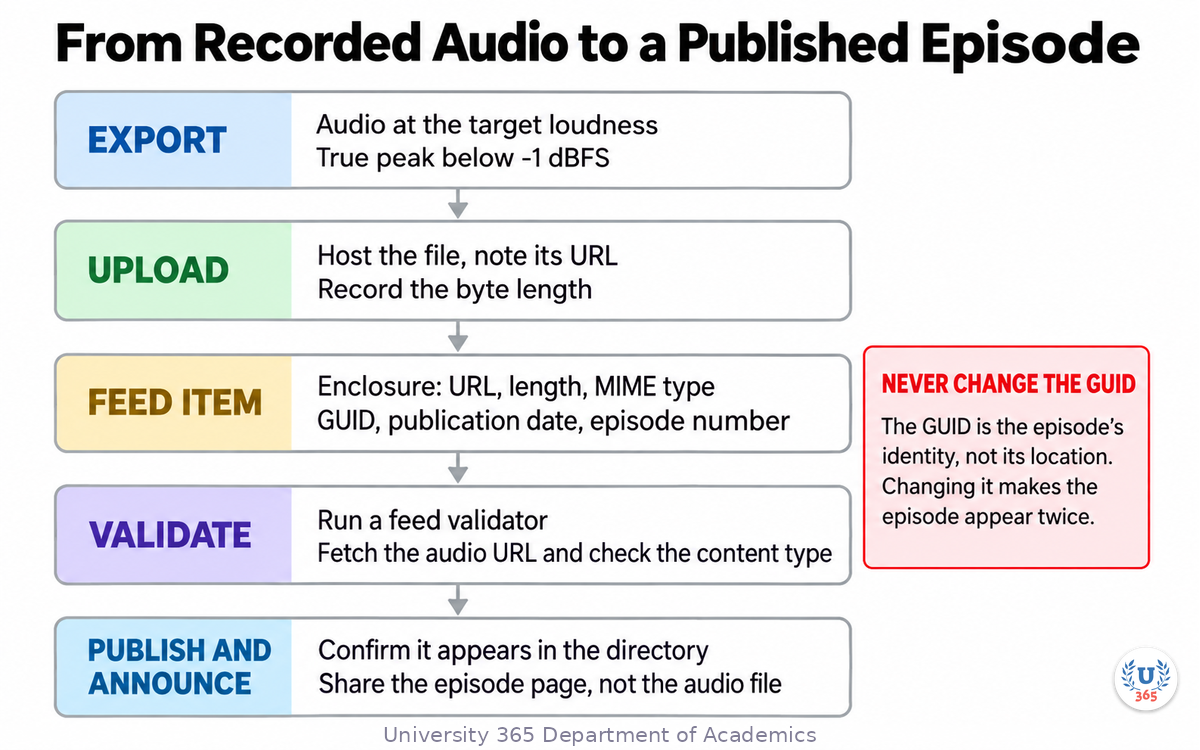
Two rules protect you from the classic failures. First, never change an episode's GUID, even if you re-upload the audio: the GUID is an identity, not a location. Second, host the feed on infrastructure you control and keep the audio file URL stable. A hosting migration with changed URLs breaks every past episode.
Distribution sequence
Upload the audio file and note its URL and byte length.
Add the item to the feed with all required elements.
Validate the feed with a feed validator before submitting it anywhere.
Fetch the episode's audio URL and confirm it responds with the correct content type.
Confirm the episode appears in the directory that reads your feed.
Announce it on your owned channels with a link to the episode page, not to the audio file.
Measuring what happened
Track retention by segment, not just total downloads. Most podcast analytics report how far into the episode listeners get. A drop at a specific timestamp tells you which segment lost them, which is the only number that improves the next episode. Look at downloads in the first seven days, retention at the midpoint, and the completion rate.
Feynman Summary: Explain It Like You Are 12
Making a podcast is like baking a cake for a lot of people at once.
You have to decide what kind of cake, and why anyone wants it. That decision is yours. Then you gather ingredients (research), write the recipe (script), bake it (record), trim the burnt edges (edit), and put it in a box with a label so people can find it (publish).
A machine is very good at gathering ingredients, writing a first recipe, trimming the edges, and printing the label. A machine cannot decide what kind of cake your friends actually want, and it cannot taste the batter.
If you hand the whole thing to the machine, you get a cake-shaped object that nobody wants a second slice of. If you decide the cake and let the machine do the chopping, you can make one every week instead of once a month.
That is the whole trade. Choose what only you can choose, and let the machine carry the rest.
Mindmap: The Complete Picture
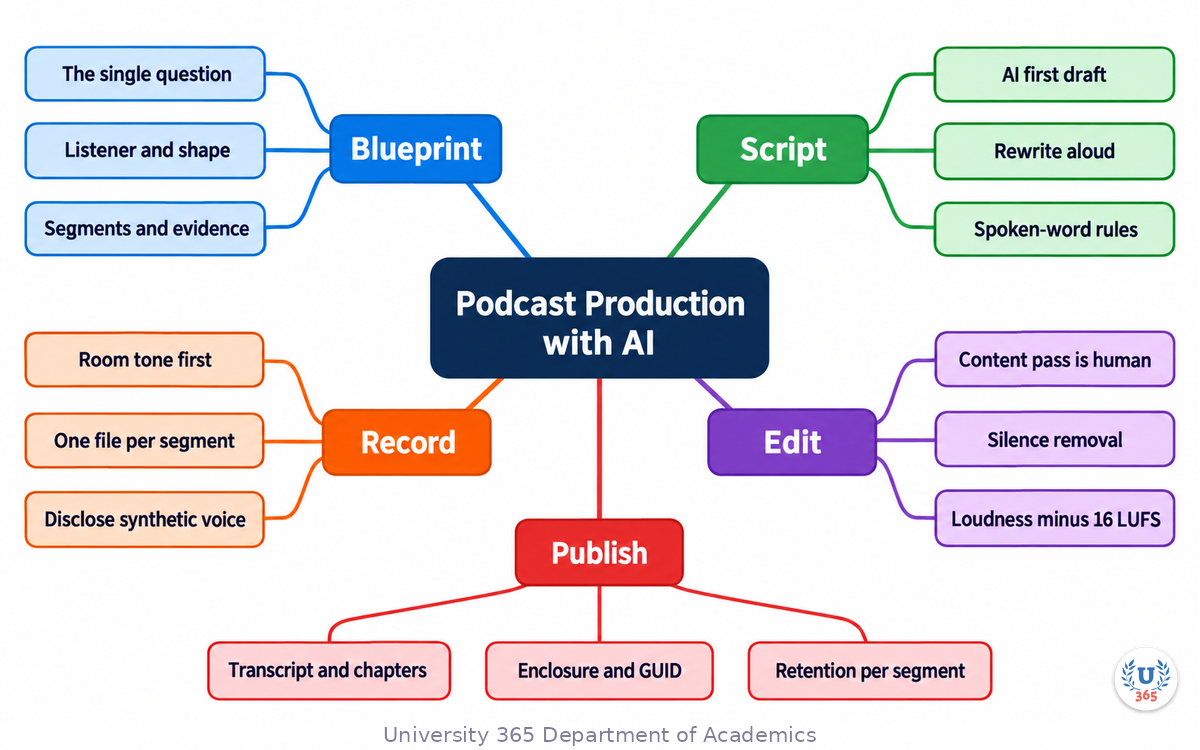
The mindmap gathers the pipeline into one view: blueprint decisions at the centre, the five production stages around it, and the publication and measurement loop that closes the cycle.
UNOP Sound (University 365 Neuroscience Oriented Pedagogy)
Take five minutes to consolidate your memory. Play the isochronous tone track (10Hz alpha frequency) with your eyes closed. Alpha-frequency tones after a learning session support consolidation, helping move what you just learned from short-term to long-term memory.
[Audio player: UNOP Post-Lecture Isochrone (10Hz, 5 minutes)]
Practical Exercise: Produce a Five-Minute Pilot
Produce one short episode end to end. Five minutes is enough to learn the whole pipeline and short enough to finish today.
Part 1: Blueprint (15 minutes)
Write the single question your episode answers, in one sentence.
Name the listener and what they already know.
Sketch three segments of roughly 100 seconds each, with a title and one idea each.
List the evidence each segment uses, with its source.
Write the cold open: three sentences that state the tension.
Part 2: Script and record (30 minutes)
Ask an AI assistant for a segment-structured draft against your blueprint, including the evidence you supplied.
Rewrite the draft aloud. Shorten every sentenced you stumbled on.
Record the three segments separately, capturing 10 seconds of room tone first.
If you use synthetic narration, listen to every proper noun and number, and note the disclosure you will publish.
Part 3: Edit and publish (45 minutes)
Cut anything that repeats a point you already made.
Run silence removal and loudness normalization on the whole episode as one program.
Generate the transcript and correct the names, numbers, and proper nouns.
Generate chapters and cut them to five entries with descriptive titles.
Write the description: the question, what the listener gets, and any links.
Export at your platform's target loudness with a true peak ceiling below minus 1 dBFS.
Add the item to a feed draft with enclosure, GUID, publication date, and episode number.
What to look for
Listen to your pilot on phone speakers. If you lose interest at a specific point, mark the timestamp, and identify the segment that caused it. Almost always the cause is one of three things: a segment with no single idea, an opening that describes instead of provoking, or an editing pass that cut the pauses which gave the speech its shape.
Applied CI-First connection
You chose the question, the listener, and the evidence, and you made the final content decisions. The assistant assembled research, produced a first draft, cleaned the audio, and prepared the metadata. That is CI-First in production: human intelligence sets the target and owns the judgment, AI carries the volume.
Glossary
Term | Definition |
Episode blueprint | A structured plan for an episode: single question, listener, shape, segments, evidence, cold open, close, and metadata. |
Cold open | The first 30 to 60 seconds of an episode, which states the tension and decides whether a listener stays. |
Room tone | A recording of the quiet ambience of a room, used to fill gaps created by silence removal. |
LUFS | Loudness Units Full Scale: a loudness measurement that accounts for how human hearing responds to different frequencies. |
Integrated loudness | The average loudness of an entire program, as opposed to momentary or short-term loudness. |
True peak | The highest signal level of an audio file measured with oversampling, used to catch inter-sample clipping. |
Silence removal | An automated editing process that detects and removes long gaps between spoken passages. |
Loudness normalization | Adjusting the overall gain of a program so its integrated loudness matches a target value. |
Synthetic narration | Speech generated by a text-to-speech or voice model rather than recorded from a human speaker. |
Voice cloning | Generating speech that imitates a specific real person's voice. Requires documented consent from that person. |
Transcript | A text rendering of the spoken content of an episode, corrected and speaker-labelled, used for accessibility and discovery. |
Chapter | A timestamped marker with a short title that lets a listener jump to a defined section of an episode. |
Show notes | The written description published with an episode, explaining what it covers and linking to referenced material. |
RSS feed | The XML document that directories read to discover your episodes, their audio URLs, and their metadata. |
Enclosure | The RSS element that gives an episode's audio file URL, byte length, and MIME type. |
GUID | The permanent unique identifier of an episode in a feed. It must never change for a given episode. |
D2L (Discussions To Learn) | The University 365 microlearning discussion podcast format, featuring a host in dialogue with a professor. |
CI-First (Co-Intelligence First) | The University 365 approach in which human intelligence is the orchestrator and AI is the amplifier. |
Quiz: TEST YOUR UNDERSTANDING
1. What is the first artifact to produce when starting an episode?
A) The audio export settings
B) The episode blueprint with the single question it answers
C) The cover artwork
D) The RSS feed entry
2. Why should you record 10 seconds of room tone at the start of a session?
A) To prove the recording is original
B) To give the editor material to fill the gaps left by silence removal
C) To calibrate the loudness meter
D) To satisfy the directory's technical requirement
3. What does the RSS enclosure element contain?
A) The episode transcript text
B) The audio file URL, byte length, and MIME type
C) The chapter timestamps
D) The show's cover artwork
4. Which rule must you never break when re-uploading an episode's audio?
A) Keep the file size under 100 MB
B) Never change the episode's GUID
C) Always re-record the intro
D) Always change the publication date
5. What does the transcript contribute beyond accessibility?
A) It replaces show notes
B) It is read by search engines and answer systems, aiding discovery
C) It sets the episode's loudness
D) It generates the RSS feed automatically
Answers: 1-B, 2-B, 3-B, 4-B, 5-B
Related Resources
U365 INSIDE Publications
Lecture: AI Video Production on a Budget: Media production pipelines for video with AI assistance
Lecture: Brand Voice in the AI Era: Training AI on brand guidelines and detecting voice drift
Lecture: AI for SEO: Content That Ranks: How search systems select and cite content
External Resources
Podcast RSS feed requirements (Apple Podcasts for Creators): the required tags and technical rules for a feed: podcasters.apple.com/support/823-podcast-requirements
The Podcasting 2.0 namespace (Podcast Index): extension tags for chapters, transcripts, and credits: podcastnamespace.org
ITU-R BS.1770 loudness measurement (background on loudness algorithms used by every podcast platform): discussed in audio-dubcheck.com/blog/ebu-r128-vs-atsc-a85-vs-bs1770
A guide to podcast loudness (Simplecast): why minus 16 LUFS integrated became the convention and how to reach it: blog.simplecast.com/a-massively-oversimplified-guide-to-loudness
Content Credentials (C2PA): the open standard for recording how media was created and edited: c2pa.org
Related U365 Lectures
Lecture 5: AI Video Production on a Budget (UIC, Media Studies Series)
Lecture 10: Crisis Communication in the AI Age (UIC, Branding Series)
U.Copilot for This Lecture
Discuss this lecture with U.Copilot, your AI chat companion trained on this content.
Copy and paste the following prompt into the U.Copilot chat on university-365.com:
You are U.Copilot for Lectures, an AI chat companion specially trained on University 365 lecture content. You are helping a Fellow who just completed the lecture "Podcast Production with AI: From Script to Published" from the Media Studies series at the U365 Institute of Communication (UIC). Your role is to help the Fellow produce and publish an episode. You can: - Help write an episode blueprint from a topic, including the single question and the segments - Review a script for spoken-word problems and suggest shortenings - Explain the loudness targets and the export settings for each platform - Walk through transcript correction and chapter title writing - Check an RSS item against the required elements: enclosure, GUID, date, episode number - Design a retention measurement routine Always maintain U365's CI-First approach: the human chooses the question, the guests, and what stays in the edit; AI carries the production labour. Remind the Fellow to disclose synthetic narration and to obtain written consent before any voice cloning. Use the UP-Context Method: provide context-rich, role-aware responses that account for the Fellow's show format, their audience, and their publishing platform.
Next Steps
Now that you understand the full production pipeline, here is what to do next:
Produce the five-minute pilot in the practical exercise, end to end, today.
Decide your target loudness from your publishing platform's current documentation and record it as a fixed export preset.
Write your standard blueprint template once, and reuse it for every episode.
Correct your transcripts, then check whether they bring new search traffic within a month.
Take the next lecture in this series to extend the same production discipline to video.
The reason most podcasts stop is not quality. It is the weekly cost of an episode. Move the mechanical work to the machine, keep the judgment for yourself, and the cost drops to something you can sustain.
IMPORTANT NOTICE
This lecture is published by University 365 as part of its INSIDE Publications Hub. The content is free to read for all visitors. Lectures in this series may be part of a structured academic program leading to a Micro-Credential for your Career (MCC). To enroll in an academic program, visit university-365.com/tuition.
This content is for educational purposes. Audio tooling, platform loudness policies, and feed specifications change. Verify current values against each platform's own documentation before you publish.
Copyright University 365, Inc. All rights reserved. This content is protected under University 365's copyright policies. For permissions or inquiries, contact uda@university-365.com.
Published by the Department of Academics, University 365.
Lecture delivered by the University 365 Institute of Communication (UIC).
Lea Loringam, Dean of Communication, UIC
Signed for the academic year 2026.




Comments